


Buddy Punch Testbericht: Vorteile, Nachteile, Funktionen und Preise erklärt



Buddy Punch is a time tracking software built for teams that need to track employee hours, manage schedules, and handle PTO requests in one place. It's worth considering if you're overseeing hourly or field-based workers and want more built-in scheduling and punch management than Hubstaff offers, without the overhead of a full workforce management platform.
Buddy Punch Evaluation Summary
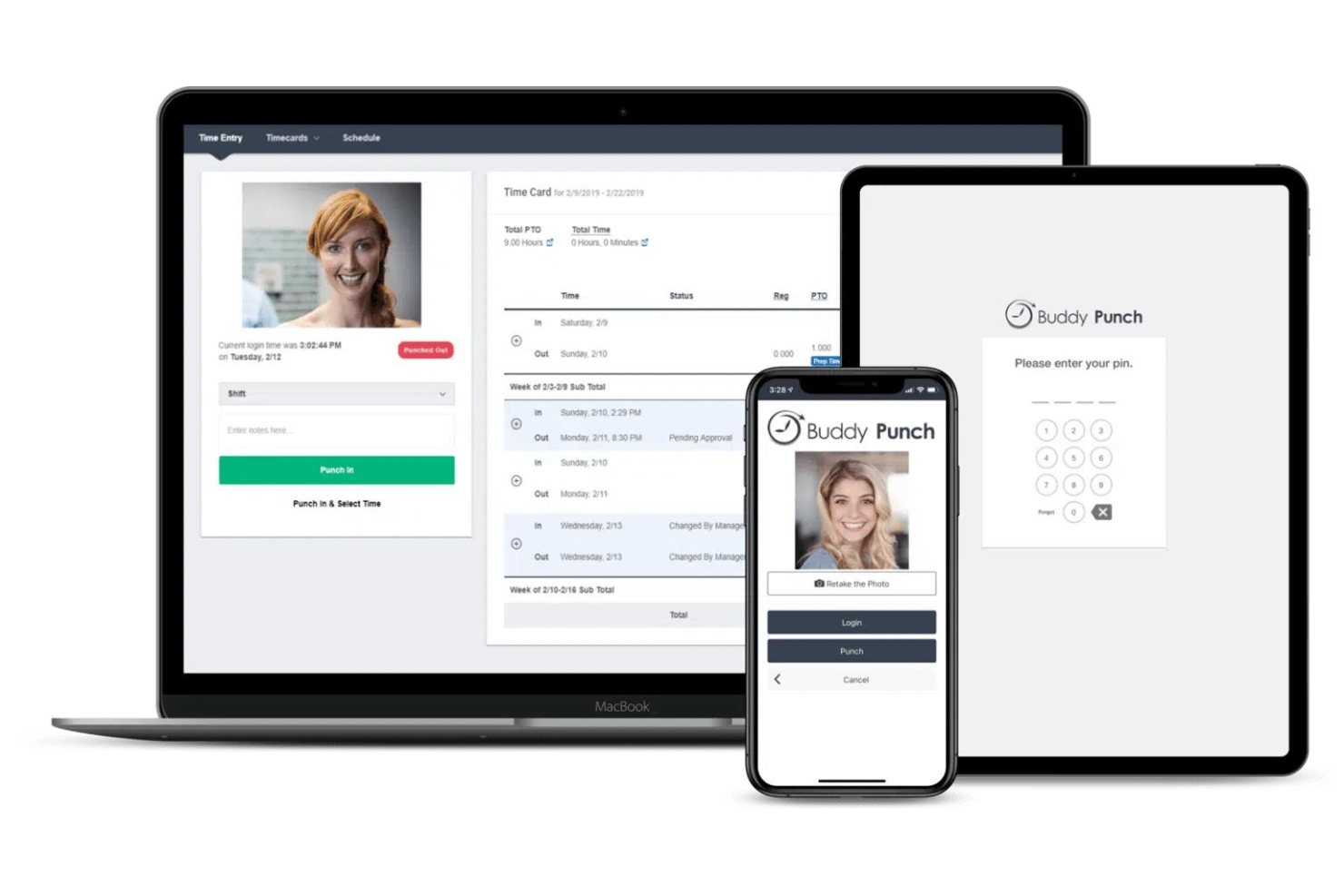
- From $4.99/user/month + $19/month base fee (billed annually)
- 14-day free trial + free demo available
Warum Sie unseren Software-Empfehlungen vertrauen können
Unser Team testet und bewertet Software seit 2012. Als Projektmanager wissen wir selbst, wie schwierig – und wichtig – es ist, die richtige Software auszuwählen.
Für diesen Leitfaden haben wir Tools mithilfe von praktischen Tests und unabhängiger Recherche bewertet und dabei unsere Bewertungskriterien angewendet. Zudem greifen wir auf Erkenntnisse von Branchenvordenkern und praktizierenden Projektmanagement-Experten zurück.
Unsere Bewertungen spiegeln unser menschliches redaktionelles Urteilsvermögen wider, keine Verkaufsstrategie.
Expertenprüfer:
Buddy Punch Overview
When evaluating Buddy Punch as a time tracking tool, its intuitive interface and simple onboarding set it apart for teams new to digital time tracking. The platform's flexible punch-in options and customizable reports make it easy to adapt to different workflows, while its pricing remains accessible for small and mid-sized businesses. However, users needing advanced integrations or highly detailed project analytics may find it less competitive. In my opinion, Buddy Punch is best suited for organizations prioritizing ease of use and straightforward scheduling over complex automation or deep analytics. For example, retail and field service teams often select it for its mobile features and real-time visibility into where employees punch in from.
pros
-
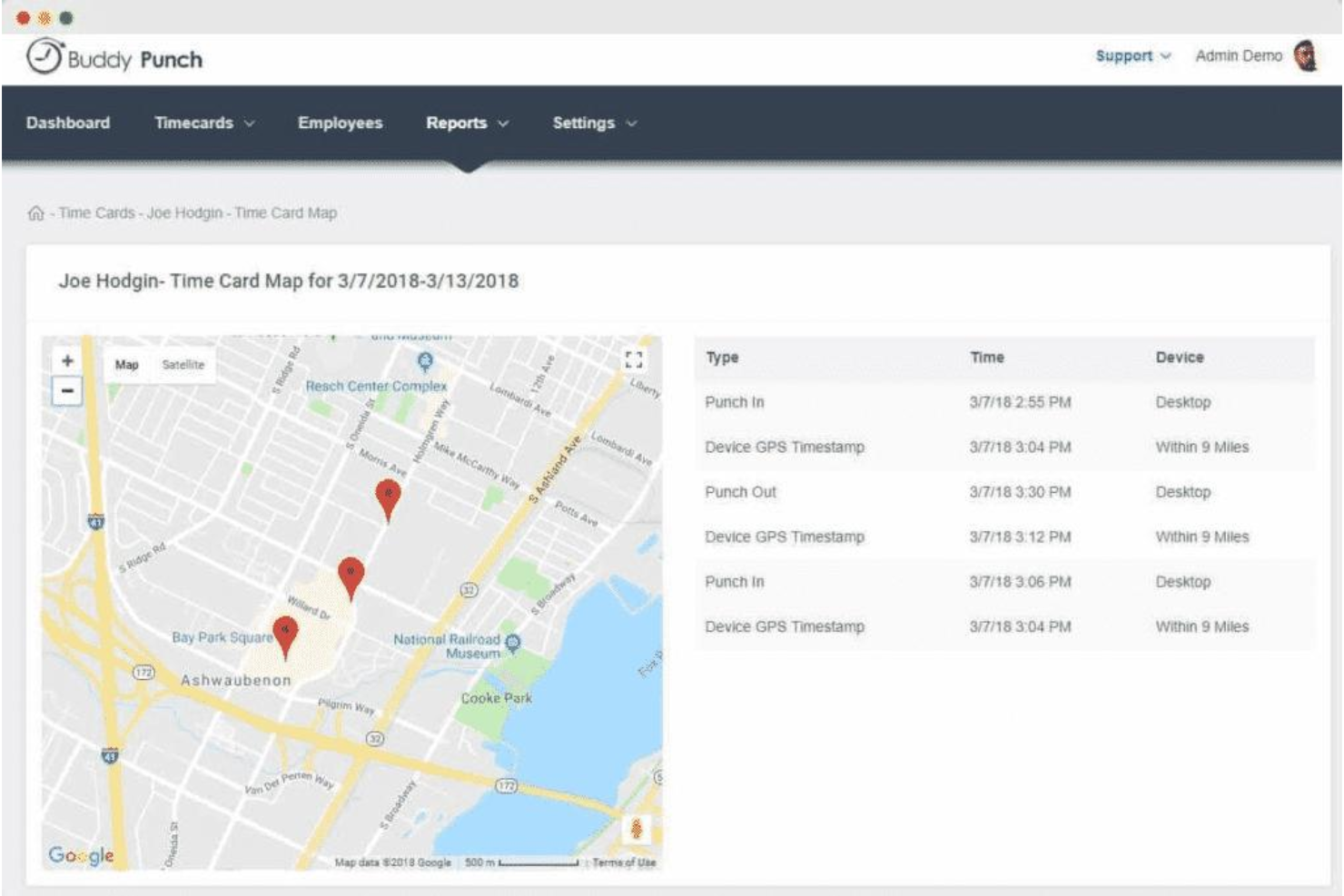
GPS tracking and geofencing prevent offsite punching.
-
Photo-on-punch and facial recognition reduce time theft.
-
PTO tracking and scheduling are built into the platform.
cons
-
Mobile app can be glitchy and limiting for some users.
-
Visual data representation in reports is limited.
-
Scheduling and payroll features cost extra as add-ons.
Is Buddy Punch Right For Your Needs?
Who Would be a Good Fit for Buddy Punch?
Buddy Punch works best for organizations that need straightforward time tracking, location verification, and simple scheduling without complex project management requirements. Its GPS tracking, PTO management, and mobile punch-in features make it a strong choice for teams with hourly workers, distributed staff, or field-based roles. Businesses that value built-in compliance tools and want to reduce time theft will find its photo-on-punch and facial recognition especially useful. These strengths make Buddy Punch a practical option for several specific industries and roles.
-
Construction Crews
GPS and geofencing confirm workers are on-site for every shift.
-
Retail Stores
Photo-on-punch helps prevent buddy punching among hourly staff.
-
Healthcare Clinics
PTO tracking and shift scheduling support rotating staff schedules.
-
Cleaning Services
Mobile punch-in and location tracking suit teams working offsite.
-
Small Businesses
Simple setup and affordable plans fit limited budgets and resources.
-
Franchise Operations
Centralized dashboard supports managing multiple locations and teams.
Who Would be a Bad Fit for Buddy Punch?
Buddy Punch is less suitable for organizations that need advanced project tracking, deep analytics, or highly customizable workflows. Its reporting and data visualization are basic compared to more specialized platforms, and some features require add-ons or higher-tier plans. Teams with complex integration needs or those managing large-scale, multi-phase projects may find Buddy Punch limiting. Here are some examples of where Buddy Punch may not be the best choice.
-
Software Development
Lacks detailed project tracking and task-level time allocation.
-
Large Enterprises
Limited reporting and analytics for enterprise-scale requirements.
-
Creative Agencies
No built-in client billing or granular project budgeting tools.
-
Finance Departments
Payroll integrations are limited and may require manual exports.
-
Consulting Firms
No native support for billable rates or multi-client invoicing.
-
Manufacturing Plants
Does not offer advanced shift planning or labor forecasting.
Unsere Bewertungsmethodik
Wie wir Tools testen & bewerten
Wir haben jahrelang unser System zur Softwareüberprüfung und -bewertung aufgebaut, verfeinert und verbessert. Das Bewertungsschema wurde entwickelt, um die Feinheiten der Softwareauswahl und die Effektivität eines Tools einzufangen, wobei der Fokus auf den entscheidenden Aspekten des Entscheidungsprozesses liegt. Unten sehen Sie genau, wie unser Test- und Bewertungssystem über sieben Kriterien hinweg funktioniert. So können wir eine objektive Einschätzung der Software auf Grundlage von Kernfunktionen, herausragenden Merkmalen, Benutzerfreundlichkeit, Onboarding, Kundenservice, Integrationen, Kundenbewertungen und Preis-Leistungs-Verhältnis bieten.
Kernfunktionalität (25% der Gesamtbewertung)
Ausgangspunkt unserer Bewertung ist immer die Kernfunktionalität des Tools. Hat es die grundlegenden Funktionen, die ein Nutzer erwarten würde? Sind einige dieser Kernfunktionen nur in höherpreisigen Tarifen verfügbar? Wir erwarten, dass ein Tool mindestens den grundlegenden Leistungsumfang seiner Mitbewerber erfüllt.
Herausragende Funktionen (25% der Gesamtbewertung)
Anschließend bewerten wir außergewöhnliche Funktionen, die über die üblichen Kernfunktionen hinausgehen. Eine hohe Bewertung spiegelt spezialisierte oder einzigartige Eigenschaften wider, durch die das Produkt schneller, effizienter oder für den Nutzer besonders wertvoll wird. Wir bewerten auch, wie einfach sich das Tool in andere Tools integrieren lässt, die üblicherweise im Tech-Stack zu finden sind, um die Funktionalität zu erweitern. Lösungen mit vielen nativen Integrationen, Drittanbieter-Anbindungen und API-Zugang zur Erstellung individueller Verknüpfungen schneiden am besten ab.
Benutzerfreundlichkeit (10% der Gesamtbewertung)
Wir berücksichtigen, wie schnell und einfach sich die Aufgaben – basierend auf der Kernfunktionalität – mit dem Tool erledigen lassen. Eine hohe Bewertung erhalten Tools, die durchdacht gestaltet und intuitiv bedienbar sind, mobile Apps und Vorlagen bieten und sogar komplexe Aufgaben einfach erscheinen lassen.
Onboarding (10% der Gesamtbewertung)
Wir wissen, wie wichtig eine schnelle Einführung im Team ist, und bewerten deshalb, wie leicht ein Tool mit minimaler Schulung erlernt und genutzt werden kann. Wir prüfen, wie schnell neue Teammitglieder ohne Vorkenntnisse starten können. Lösungen, die wenig oder gar keine Unterstützung erfordern, erhalten die höchste Bewertung.
Kundenservice (10% der Gesamtbewertung)
Wir überprüfen, wie schnell und unkompliziert Hilfe per Telefon, Live-Chat oder Wissensdatenbank verfügbar ist. Tools und Unternehmen, die Echtzeit-Support bieten, schneiden am besten ab; Chatbots am schlechtesten.
Kundenbewertungen (10% der Gesamtbewertung)
Neben unseren eigenen Tests beziehen wir auch den Net Promoter Score aktueller und ehemaliger Nutzer ein. Wir prüfen die Wahrscheinlichkeit, mit der sie das Tool erneut für die Kernfunktionalitäten wählen würden. Ein hohes Ergebnis spiegelt einen hohen Net Promoter Score bei aktuellen oder früheren Kund:innen wider.
Preis-Leistungs-Verhältnis (10% der Gesamtbewertung)
Abschließend vergleichen wir – unter Berücksichtigung aller anderen Kriterien – den Durchschnittspreis der Einstiegstarife mit den Kernfunktionen und bewerten das Preis-Leistungs-Verhältnis. Software, die mehr Leistung für weniger Geld bietet, bekommt die höchsten Werte.
Core Features
GPS Tracking
Track employee locations during clock-in and clock-out using GPS data. This helps verify on-site attendance for field and remote teams.
Photo-on-Punch
Require employees to take a photo when punching in or out. This reduces buddy punching and supports compliance for hourly staff.
Facial Recognition
Use facial recognition to confirm employee identity at clock-in. This adds an extra layer of security for workplaces with shared devices.
PTO Management
Employees can request, approve, and track time off requests directly in the platform. Managers see all PTO requests in one dashboard for easy scheduling.
Customizable Overtime Rules
Set custom overtime rules based on your company's policies. The system automatically calculates overtime hours for payroll accuracy.
Employee Scheduling
Create, assign, and adjust shifts with a drag-and-drop scheduler. Employees receive notifications about their schedules and any changes.
Standout Features
Punch Rounding Rules
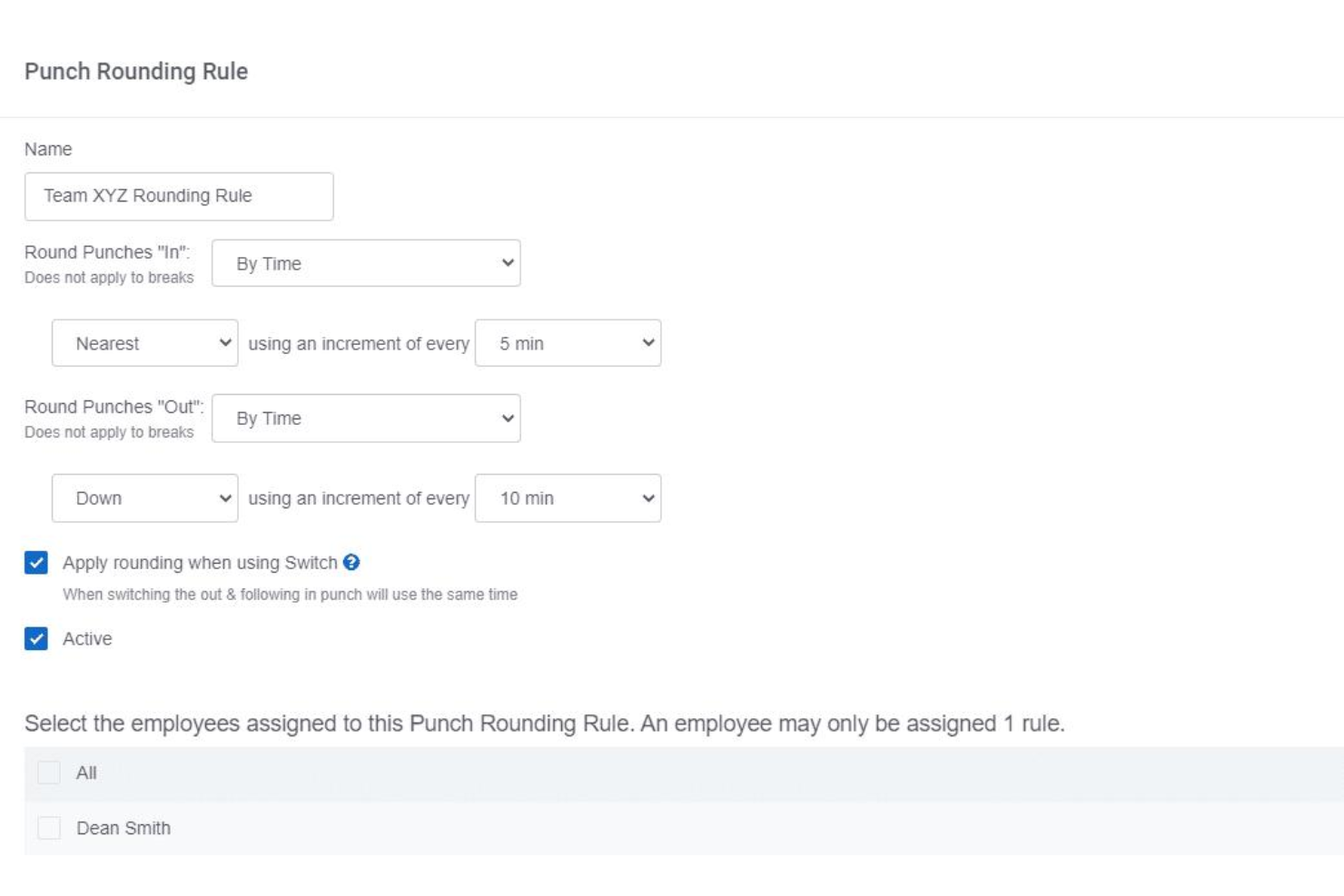
Set custom rounding rules for clock-in and clock-out times to match payroll policies. This helps standardize time entries and reduces disputes over a few minutes worked.
Automatic Breaks
Configure automatic unpaid or paid breaks based on shift length. The system deducts break time without manual input, ensuring compliance with labor regulations.
Ease of Use
Buddy Punch is widely recognized for its clean interface and straightforward navigation, making it accessible for both managers and hourly staff. Users often mention the quick onboarding process and intuitive punch-in options, such as mobile, web, and kiosk modes. The dashboard clearly displays schedules, PTO, and hours worked, reducing confusion. While some users report occasional mobile app glitches, most find daily tasks easy to complete without extensive training or support.

Onboarding
Buddy Punch offers a fast onboarding experience, with most users able to set up accounts, add employees, and configure schedules in under an hour. The platform provides step-by-step guides, video tutorials, and responsive live chat support, which users frequently praise for quick issue resolution.

Customer Support
Buddy Punch earns strong marks for its responsive customer support, with users frequently noting fast replies via live chat and email. Many reviewers mention that support staff are knowledgeable and proactive in resolving setup or technical issues. The platform also offers a detailed help center and video resources, which help users troubleshoot independently. This combination of accessible channels and helpful documentation makes Buddy Punch's support experience stand out for teams with limited IT resources.

Integrations
Buddy Punch integrates with QuickBooks Online, QuickBooks Desktop, ADP, Paychex, Gusto, Paylocity, SurePayroll, Workday, and PayPlus, among others.
Buddy Punch also offers an API and connects with third-party integration tools like Zapier for expanded automation options.

Value for Money
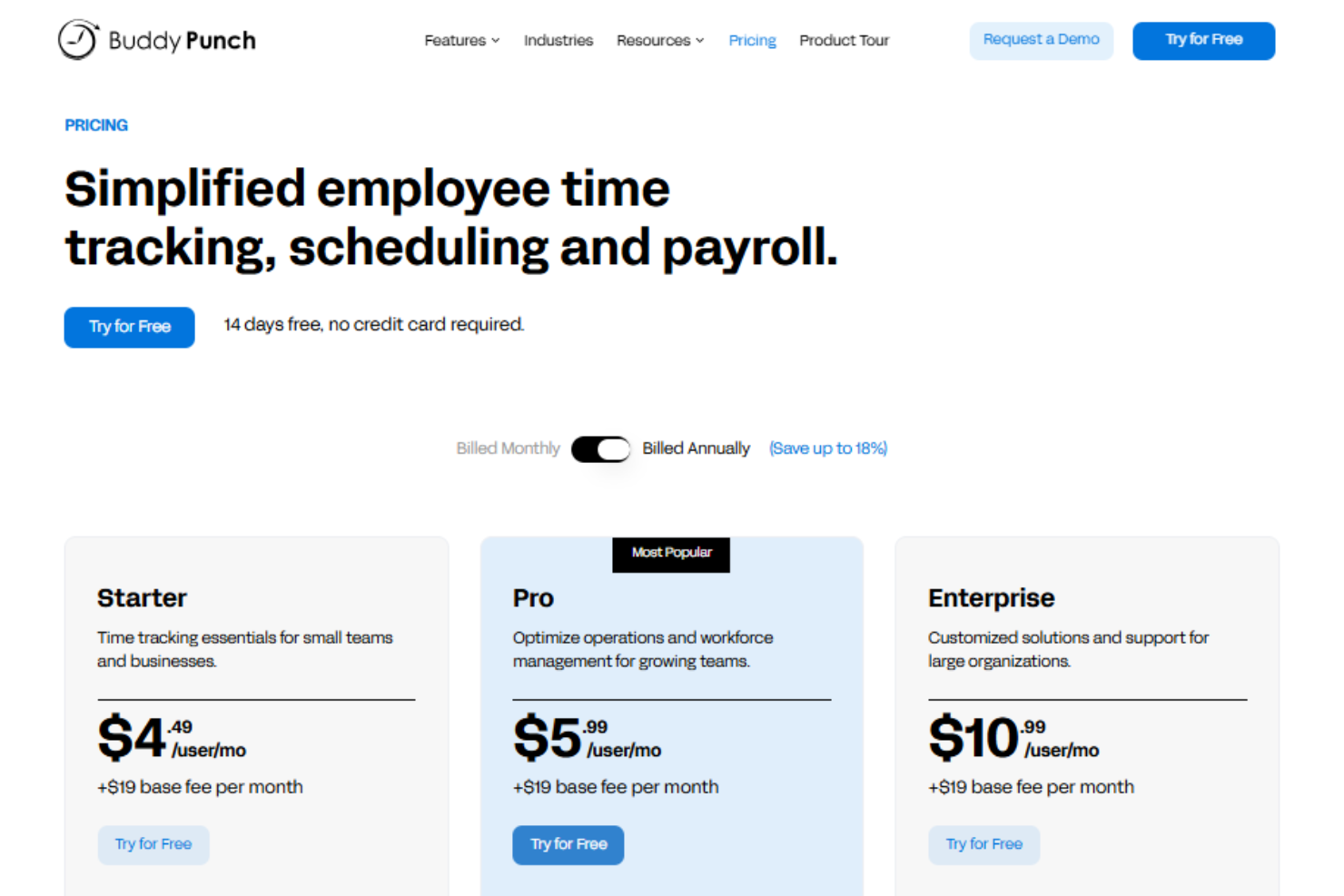
Buddy Punch’s pricing is often seen as affordable for small and mid-sized teams. Users appreciate the flexible pricing plans and the ability to pay only for needed features, though some note that advanced scheduling and payroll tools require higher tiers or add-ons. Note that there is no platform-wide base fee—you pay per user, which keeps labor costs predictable as your team scales. The platform's value is strongest for teams seeking core time tracking without complex extras.
- Standard: Includes time tracking, PTO management, payroll integrations, and reporting.
- Pro: Adds QR code scanning, webcam on punches, geofencing, and job codes.
- Enterprise: Offers advanced controls, API access, and priority support.
Buddy Punch Specs
- 360 Degree Feedback
- API
- Attendance Tracking
- Batch Permissions & Access
- Budgeting
- Calendar Management
- Dashboard
- Data Export
- Data Import
- Data Visualization
- Employee Database
- Employee Engagement
- Employee Onboarding
- External Integrations
- Feedback Management
- Forecasting
- Multi-User
- Notifications
- Project Management
- Scheduling
- Timesheets
- Travel Management
- Vacation & Absence Calendar
Buddy Punch FAQs
Can Buddy Punch handle multiple locations or job sites?
How does Buddy Punch prevent buddy punching or time theft?
Is Buddy Punch suitable for remote or field-based teams?
What data security and compliance measures does Buddy Punch offer?
Can I customize overtime and break rules to match my company policy?
How easy is it to export time data for payroll processing?
Does Buddy Punch support approval workflows for timecards and PTO?
What kind of customer support is available if I run into issues?
Buddy Punch Company Overview & History
Buddy Punch is a U.S.-based company headquartered in Appleton, Wisconsin, focused exclusively on time clock software and scheduling for businesses with hourly workers. The company serves over 10,000 businesses across industries like construction, healthcare, retail, and professional services. Buddy Punch is independently owned and does not appear to be affiliated with other products or parent companies. The company is known for its user-friendly platform, responsive U.S.-based support, and high customer ratings, but does not publicly share financial or workforce size details.
Buddy Punch Major Milestones
- 2013: Buddy Punch is founded and begins development of its time tracking software.
- 2014: Official product launch, offering cloud-based time tracking for small businesses.
- 2020: Surpasses 10,000 business customers using the platform.
- 2023: Launches built-in payroll service and expands scheduling features.
- 2025: Recognized with multiple industry awards for usability and customer satisfaction.