

10 Alternativen zu Zoho Assist für Fernsupport im Jahr 2026

10 Auswahl der besten Zoho-Assist-Alternativen


Die Verwaltung eines Projekts kann eine Herausforderung sein, insbesondere wenn Ihre Fernzugriffssoftware nicht den Anforderungen Ihres Teams entspricht. Möglicherweise weist Zoho Assist in bestimmten Bereichen Schwächen auf, sodass Sie nach der besten Alternative für die Herausforderungen Ihres Unternehmens suchen.
Meiner Erfahrung nach kann die richtige Fernzugriffssoftware die Zusammenarbeit und Produktivität deutlich verbessern. Sie benötigen zuverlässige, benutzerfreundliche Tools, die auf Ihre spezifischen Anforderungen zugeschnitten sind.
In diesem Artikel stelle ich meine besten Alternativen zu Zoho Assist vor. Ich habe jede Option unabhängig getestet und bewertet und gebe Ihnen unvoreingenommene Einblicke, damit Sie eine fundierte Entscheidung treffen können. Ganz gleich, ob Sie nach Funktionen, Preisen oder Benutzerfreundlichkeit suchen – ich habe die passenden Informationen für Sie.
Was ist Zoho Assist?
Zoho Assist ist eine Fernzugriffssoftware, mit der Sie Fernsupport-Sitzungen bereitstellen und auf entfernte Computer zugreifen können. IT-Fachleute und Supportteams verwenden sie häufig, um Systeme effizient zu beheben und zu verwalten. Funktionen wie Fernsteuerung, Dateiübertragung und Unterstützung mehrerer Plattformen helfen dabei, Probleme schnell zu lösen und die Produktivität aufrechtzuerhalten. Insgesamt bietet Zoho Assist eine praktische Option für Fernsupport-Lösungen.
Vergleichstabelle der Zoho-Assist-Alternativen
Diese Vergleichstabelle fasst die Preisdetails meiner besten Alternativen zu Zoho Assist zusammen:
| Tool | Best For | Trial Info | Price | ||
|---|---|---|---|---|---|
| 1 | Am besten für kostenlosen Fernsupport | Kostenloser Tarif verfügbar | Preise auf Anfrage | Website | |
| 2 | Am besten für sofortigen Remote-Support geeignet | 14-tägige kostenlose Testversion | Ab $30/Benutzer/Monat (jährlich abgerechnet) | Website | |
| 3 | Ideal für kostenlosen Fernzugriff | 30-tägige kostenlose Testversion | Ab 24.9 $/Monat (jährlich abgerechnet) | Website | |
| 4 | Am besten für umfassenden Fernsupport | 14-tägige kostenlose Testversion | Ab $30/Benutzer/Monat (jährlich abgerechnet) | Website | |
| 5 | Am besten für schnelle Sitzungen mit geringer Latenz | Kostenlose Testversion + kostenlose Demo verfügbar | Ab $28.90/Monat (jährliche Abrechnung) | Website | |
| 6 | Am besten für einfachen Fernzugriff | Not available | Kostenlos nutzbar | Website | |
| 7 | Am besten für strenge Sicherheitsanforderungen | Kostenlose Testversion verfügbar | Preise auf Anfrage | Website | |
| 8 | Am besten für unbegrenzten Zugriff geeignet | 15-tägige kostenlose Testversion verfügbar | Ab 16.90 $/Benutzer/Monat (jährliche Abrechnung) | Website | |
| 9 | Am besten für die einheitliche Verwaltung geeignet | Kostenlose Testversion + kostenlose Demo | Preis auf Anfrage | Website | |
| 10 | Am besten für sicheren Fernzugriff geeignet | Kostenlose 7-Tage-Testversion | Ab $1.84/Benutzer/Monat (jährlich abgerechnet) | Website |
Warum Sie unseren Software-Empfehlungen vertrauen können
Unser Team testet und bewertet Software seit 2012. Als Projektmanager wissen wir selbst, wie schwierig – und wichtig – es ist, die richtige Software auszuwählen.
Für diesen Leitfaden haben wir Tools mithilfe von praktischen Tests und unabhängiger Recherche bewertet und dabei unsere Bewertungskriterien angewendet. Zudem greifen wir auf Erkenntnisse von Branchenvordenkern und praktizierenden Projektmanagement-Experten zurück.
Unsere Bewertungen spiegeln unser menschliches redaktionelles Urteilsvermögen wider, keine Verkaufsstrategie.
Expertenprüfer:
Bewertungen der besten Zoho-Assist-Alternativen
Nachfolgend finden Sie meine ausführlichen Zusammenfassungen der besten Zoho-Assist-Alternativen, die es in meine Auswahl geschafft haben. Meine Bewertungen bieten einen detaillierten Überblick über die wichtigsten Funktionen, Vor- und Nachteile, Integrationen sowie die idealen Einsatzmöglichkeiten jedes Tools, damit Sie die beste Option für sich finden.

HelpWire
Am besten für kostenlosen Fernsupport
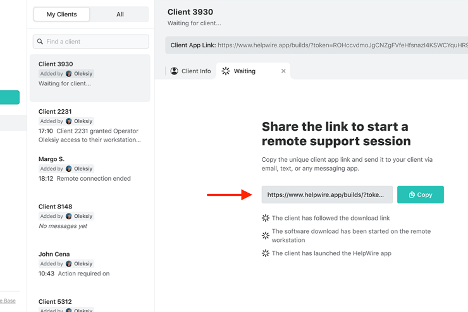
HelpWire ist eine Software für den Fernsupport, mit der Sie sich aus der Ferne mit Kunden verbinden und ihnen helfen können. Kundensupportteams und IT-Fachkräfte nutzen sie, um technische Probleme zu diagnostizieren und zu beheben.
Warum es eine gute Alternative zu Zoho Assist ist: HelpWire bietet kostenlosen Fernsupport und ist damit eine erschwingliche Wahl für Unternehmen mit begrenztem Budget. Zu den Funktionen gehören sicherer Fernzugriff, plattformübergreifende Kompatibilität und Diagnosen in Echtzeit. Diese Möglichkeiten stellen sicher, dass Ihr Team Kundenprobleme schnell beheben kann. Die unkomplizierte Einrichtung und die benutzerfreundliche Oberfläche der Software erhöhen ihre Attraktivität für Supportabläufe.
Hervorstechende Funktionen und Integrationen:
Zu den Funktionen gehören Diagnosen in Echtzeit, sicheres Teilen von Dateien und plattformübergreifender Support. Diese Funktionen ermöglichen es Ihrem Team, effizienten Support zu leisten, ohne die Sicherheit zu beeinträchtigen. Die intuitive Oberfläche von HelpWire erleichtert außerdem die Navigation und verkürzt die Einarbeitungszeit für neue Benutzer.
Integrationen sind nicht öffentlich aufgeführt.
Pros and Cons
Pros:
- Kostenlose Supportoption verfügbar
- Sicherer Fernzugriff
- Diagnosen in Echtzeit
Cons:
- Begrenzte erweiterte Funktionen
- Grundlegende Anpassungsoptionen

Am besten für sofortigen Remote-Support geeignet

ConnectWise ScreenConnect ist eine Remote-Desktop-Software, die entwickelt wurde, um IT-Fachkräften in verschiedenen Branchen, darunter Bildung, Finanzwesen und Gesundheitswesen, schnellen und sicheren Remote-Support zu bieten. Sie bietet wichtige Funktionen wie rund um die Uhr verfügbaren Fernzugriff, Verwaltung privilegierter Zugriffe sowie Unterstützung für unbeaufsichtigten Zugriff und mobile Geräte.
Warum es eine gute Alternative zu Zoho Assist ist: ConnectWise ScreenConnect bietet sofortigen Remote-Support und ist damit ideal für Teams, die schnellen Zugriff auf Geräte benötigen. Funktionen wie sichere Remote-Verbindungen, die Verwaltung privilegierter Zugriffe und die Unterstützung mobiler Geräte helfen Ihrem Team dabei, IT-Abläufe effizient zu verwalten. Der Fokus der Software auf die Minimierung von Ausfallzeiten stellt sicher, dass die Produktivität Ihres Teams erhalten bleibt. Darüber hinaus sorgen umfassende Sicherheitsmaßnahmen wie AES-Verschlüsselung und Multifaktor-Authentifizierung für zusätzliche Sicherheit.
Herausragende Funktionen und Integrationen:
Zu den Funktionen gehören rund um die Uhr verfügbarer Fernzugriff, Unterstützung für unbeaufsichtigten Zugriff und Kompatibilität mit mobilen Geräten. Diese Funktionen ermöglichen es Ihrem Team, problemlos eine Verbindung zu Geräten herzustellen und IT-Abläufe reibungslos zu verwalten. Meiner Erfahrung nach sind die erweiterten Sicherheitsmaßnahmen der Software ein wesentlicher Vorteil beim Schutz sensibler Daten.
Zu den Integrationen gehören ConnectWise Help Desk Services, ConnectWise Automate, Microsoft Intune und weitere.
Pros and Cons
Pros:
- Möglichkeiten für sofortigen Remote-Support
- Sichere Remote-Verbindungen
- Unterstützung mobiler Geräte
Cons:
- Mögliche Probleme mit der Video- und Audioqualität
- Erfordert eine ordnungsgemäße Verwaltung für die Sicherheit

Ideal für kostenlosen Fernzugriff
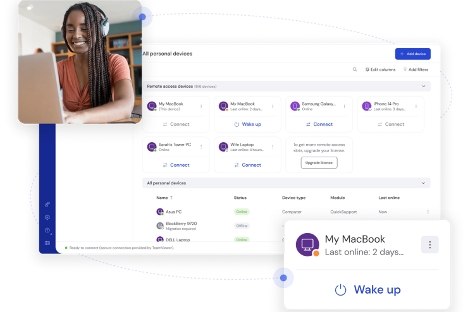
TeamViewer ist eine Remote-Desktop-Software, mit der Sie eine Verbindung zu Geräten herstellen und diese aus der Ferne verwalten können. IT-Supportteams und Unternehmen nutzen sie, um die Fehlerbehebung und Verwaltung aus der Ferne zu erleichtern.
Warum es eine gute Alternative zu Zoho Assist ist: TeamViewer ist eine kostenlose Lösung für den Fernzugriff, die ideal ist, wenn Sie budgetfreundliche Lösungen benötigen. Die Funktionen wie einfache Dateiübertragung, plattformübergreifende Kompatibilität und Drucken aus der Ferne erweitern Ihre Supportmöglichkeiten. Sie können schnell und problemlos eine Verbindung zu jedem Gerät herstellen. Diese Eigenschaften machen die Lösung zu einer überzeugenden Option, wenn Sie Alternativen zu Zoho Assist in Betracht ziehen.
Herausragende Funktionen und Integrationen:
Zu den Funktionen gehören Fernsteuerung und Drucken sowie unbeaufsichtigter Fernzugriff. Mit diesen Funktionen können Sie Geräte einfach verwalten und sicherstellen, dass Ihr Team Support leisten kann, ohne physisch vor Ort sein zu müssen. Darüber hinaus unterstützt der plattformübergreifende Zugriff von TeamViewer verschiedene Betriebssysteme, was in vielfältigen IT-Umgebungen unerlässlich ist.
Zu den Integrationen gehören Microsoft Teams, ServiceNow, Salesforce, Jira, Zendesk, Freshworks, Microsoft Intune, Zoho, Microsoft Entra ID und weitere.
Pros and Cons
Pros:
- Erschwinglicher Preis
- Plattformübergreifende Unterstützung
- Einfache Dateiübertragung
Cons:
- Gemeldete Verbindungsprobleme
- Gelegentliche Verzögerungen bei Verbindungen

LogMeIn
Am besten für umfassenden Fernsupport

LogMeIn ist eine Lösung für Fernzugriff und Support, die für IT-Fachleute und Managed Service Provider (MSPs) entwickelt wurde, um die IT-Verwaltung zu optimieren. Sie übernimmt wichtige Aufgaben wie Fernsupport, Endpunktverwaltung und sicheren Dateizugriff.
Warum es eine gute Alternative zu Zoho Assist ist: LogMeIn bietet umfassenden Fernsupport durch Funktionen wie KI-gestützte Verwaltung, automatisierte Geräteverwaltung und fortschrittliche Sicherheitsmaßnahmen. Die benutzerfreundliche Oberfläche und die reibungslose Fernüberwachung machen die Lösung ideal für IT-Teams. Gesteigerte Produktivität und eine vereinfachte IT-Verwaltung stehen im Mittelpunkt des Angebots von LogMeIn und sprechen Organisationen an, die nach einer umfassenden Supportlösung suchen.
Herausragende Funktionen und Integrationen:
Zu den Funktionen gehören KI-gestützte Werkzeuge für mehr Effizienz, automatisierte Geräteverwaltung und fortschrittliche Sicherheitsmaßnahmen. Diese Funktionen vereinfachen komplexe IT-Aufgaben und steigern die Produktivität Ihres Teams. Mit der Verwaltung mobiler Geräte von LogMeIn können Sie Geräte unterwegs problemlos verwalten.
Zu den Integrationen gehören ServiceNow, Salesforce, Jira Service Desk und weitere.
Pros and Cons
Pros:
- KI-gestützte Verwaltungstools
- Automatisierte Geräteverwaltung
- Fortschrittliche Sicherheitsmaßnahmen
Cons:
- Hoher Ressourcenbedarf auf Geräten
- Steile Lernkurve

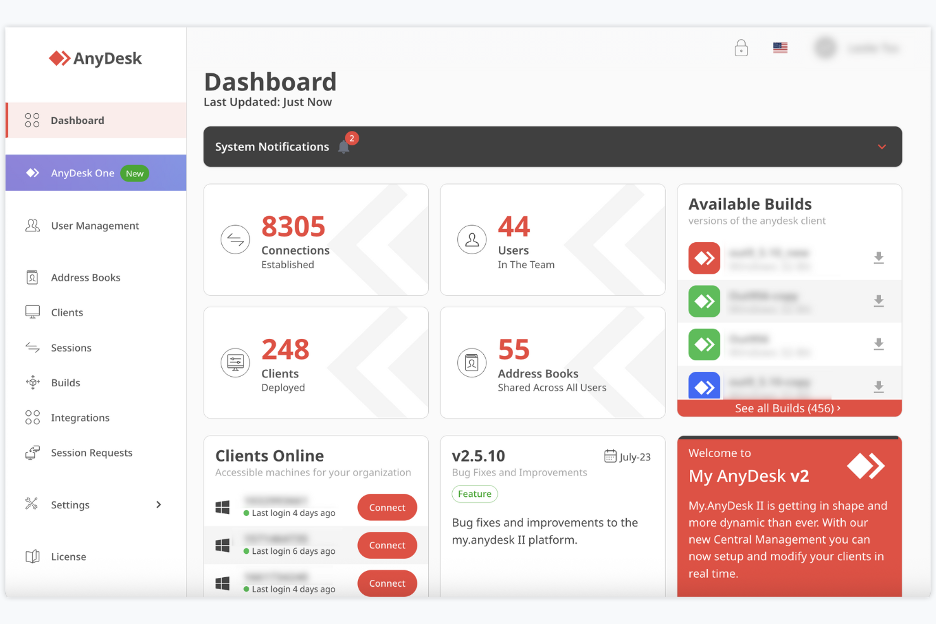
AnyDesk ist eine Anwendung für den Fernzugriff und Fernsupport, mit der Sie von überall auf Computer oder Geräte zugreifen und diese steuern können. Sie wird von Freiberuflern, kleinen Teams, IT-Mitarbeitern und anderen Personen genutzt, die Fernzugriff und Support benötigen.
Warum AnyDesk eine gute Alternative zu Zoho Assist ist: AnyDesk bietet latenzfreies Teilen von Desktops und eine stabile Fernsteuerung, sodass Sie und Ihr Team auf entfernten Geräten arbeiten können, als wären Sie direkt vor Ort. Sie können Tastatur und Maus steuern und gleichzeitig anderen ermöglichen, mit Ihrem Bildschirm zu interagieren, sowie Dateien und Daten schnell teilen. Dank der verzögerungsarmen Fernzugriffssitzungen und der schnellen Datenübertragung mit Verschlüsselung nach dem Advanced Encryption Standard (AES) ist es besonders nützlich, wenn Sie häufig schnellen Fernzugriff oder Support benötigen.
Herausragende Funktionen und Integrationen:
Zu den Funktionen gehören die Fernsteuerung von Desktops und Servern, die Bildschirmfreigabe von jedem Gerät (PC, Mobilgerät oder Tablet) sowie die Dateiübertragung zwischen Geräten während Sitzungen. Außerdem wird interaktiver Zugriff unterstützt, sodass Sie entfernte Bildschirme sowohl anzeigen als auch steuern können.
Zu den Integrationen gehören die Unterstützung für Windows, macOS, Linux, Android, iOS und weitere Plattformen.
Pros and Cons
Pros:
- Fernzugriff mit geringer Latenz
- Viele Plattformen werden unterstützt
- Dateiübertragung und Fernsteuerung werden unterstützt
Cons:
- Die kostenlose Version ist für die geschäftliche Nutzung eingeschränkt
- Es fehlen erweiterte Teamverwaltungsfunktionen

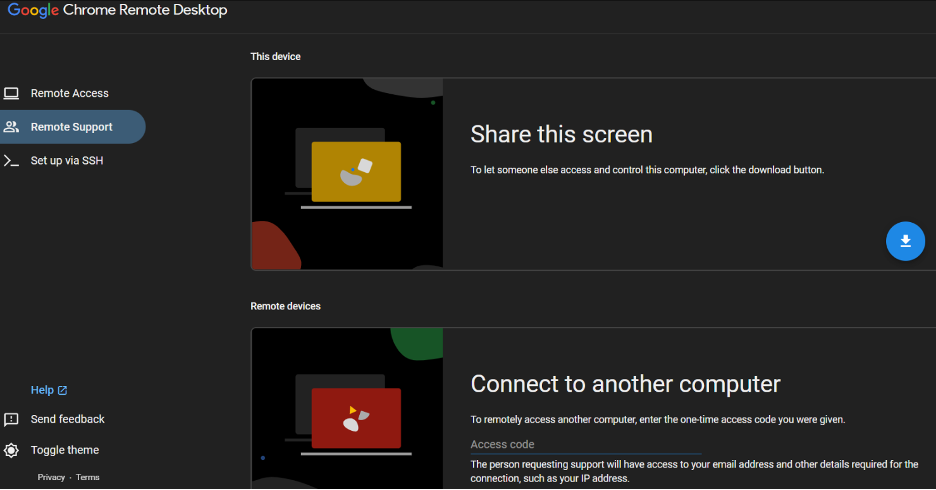
Chrome Remote Desktop ist ein Fernzugriffstool, mit dem Benutzer über den Chrome-Browser oder ein Chromebook sicher eine Verbindung zu anderen Computern herstellen können. Einzelpersonen und kleine Unternehmen entscheiden sich für die persönliche Nutzung und grundlegende IT-Unterstützung dafür.
Warum es eine gute Alternative zu Zoho Assist ist: Chrome Remote Desktop bietet einfachen Fernzugriff mit minimalem Einrichtungsaufwand und ist damit für Benutzer zugänglich, die schnelle Verbindungen benötigen. Die Integration in den Chrome-Browser macht die Installation zusätzlicher Software überflüssig. Sie können von überall auf Ihre Geräte zugreifen, was die Flexibilität erhöht. Die unkomplizierte Benutzeroberfläche des Tools ist benutzerfreundlich und verkürzt die Einarbeitungszeit für neue Benutzer.
Hervorstechende Funktionen und Integrationen:
Zu den Funktionen gehören der Fernzugriff über den Chrome-Browser, die Unterstützung mehrerer Betriebssysteme und die Möglichkeit, Ihren Bildschirm mit anderen zu teilen. Diese Funktionen ermöglichen es Ihnen, mühelos eine Verbindung zu Ihren Geräten herzustellen. Meiner Erfahrung nach ist die Einfachheit des Tools ein großer Vorteil für Benutzer, die unkomplizierten Fernzugriff benötigen.
Integrationen sind nicht öffentlich aufgeführt.
Pros and Cons
Pros:
- Einfach einzurichten
- Keine zusätzliche Software erforderlich
- Zugriff von überall
Cons:
- Keine Dateiübertragung verfügbar
- Kein Drucken per Fernzugriff


BeyondTrust Remote Support ist ein cloudbasiertes Tool für den Fernzugriff und Support, das IT-Teams zur sicheren Fehlerbehebung bei Geräten verwenden. Es unterstützt Ihr Team dabei, Benutzer zu betreuen, entfernte Systeme zu verwalten und Supportaufgaben von überall aus zu erledigen.
Warum BeyondTrust Remote Support eine gute Alternative zu Zoho Assist ist: Es bietet umfassende Kontrollen, die Ihnen helfen, strenge Sicherheitsanforderungen zu erfüllen. Sie können präzise Zugriffsregeln festlegen, sodass Ihr Team nur auf die Systeme zugreift, für deren Bearbeitung es autorisiert ist. Sitzungsüberwachung und detaillierte Prüfprotokolle liefern Ihnen klare Aufzeichnungen darüber, was während der Supportarbeit geschieht. Diese Kontrollen helfen Ihnen, sensible Umgebungen beim Fernzugriff besser zu schützen.
Herausragende Funktionen und Integrationen:
Zu den Funktionen gehören Sitzungsaufzeichnungen, mit denen Sie Supportarbeiten überprüfen können, die Freigabe von Remote-Kameras, damit Benutzer Ihnen zeigen können, was sie sehen, sowie Chat-Tools, mit denen Sie Kunden unterstützen können. Diese Funktionen erleichtern Ihrem Team die Behebung von Problemen, selbst wenn Systeme nicht problemlos erreichbar sind. Sie können außerdem die Bildschirmfreigabe verwenden, um Benutzer ohne Verwirrung durch Fehlerbehebungen zu führen.
Zu den Integrationen gehören ServiceNow, BMC, Salesforce, Okta und weitere.
Pros and Cons
Pros:
- Umfangreiche Optionen zur Zugriffskontrolle
- Umfangreiche Optionen zur Zugriffskontrolle
- Bildschirmfreigabe auf Abruf
Cons:
- Viele zu verwaltende Einstellungen
- Umständlich für kleine Teams


ISL Online ist eine Lösung für Fernzugriff und Fernsupport, mit der Ihr Team von überall eine Verbindung zu Windows-, Mac-, Linux- und Mobilgeräten herstellen kann. IT-Teams, Helpdesk-Mitarbeiter und Supportanbieter nutzen sie für Fernsupport und unbeaufsichtigten Zugriff.
Warum ISL Online eine gute Alternative zu Zoho Assist ist: ISL Online bietet Ihnen eine Lizenz, mit der Sie unbegrenzt viele Benutzer und Geräte unterstützen können – ideal, wenn Ihr Team mit vielen Endpunkten arbeitet. Sie können ohne Beschränkungen pro Gerät auf entfernte Computer zugreifen und den unbeaufsichtigten Zugriff einrichten, damit Ihr Team bei Bedarf aus der Ferne unterstützen kann. Die Lösung bietet erweiterte Sicherheit mit AES-256-Verschlüsselung, Zwei-Faktor-Authentifizierung und rollenbasierten Berechtigungen, sodass Sie die Kontrolle über mehrere Geräte behalten. Sie erhalten vollständigen Zugriff sowie Fernsupport-Funktionen, ohne sich ständig über Lizenzbeschränkungen Gedanken machen zu müssen.
Hervorstechende Funktionen und Integrationen:
Zu den Funktionen gehören die Dateiübertragung zwischen lokalen und entfernten Computern, die Sitzungsaufzeichnung für Prüfungen und Überprüfungen sowie die Unterstützung des Fernzugriffs, auch auf Mobilgeräten. Außerdem können Sie bei Bedarf über das Remotedesktopprotokoll bzw. eine sichere Shell (RDP/SSH) eine Verbindung herstellen und Benutzerberechtigungen zentral verwalten. Das System unterstützt mehrere Monitore sowie einen entfernten Systemstart oder Neustart mit erneuter Verbindung.
Zu den Integrationen gehören ServiceNow, Freshworks, HaloITSM und weitere.
Pros and Cons
Pros:
- Unbegrenzte Geräte unter einer Lizenz
- AES-Verschlüsselung und Zugriffskontrollen
- Funktioniert unter Windows, Mac, Linux und auf Mobilgeräten
Cons:
- Lizenz für gleichzeitige Benutzer kann Teams einschränken
- Benutzeroberfläche weniger modern als bei einigen Lösungen

NinjaOne
Am besten für die einheitliche Verwaltung geeignet
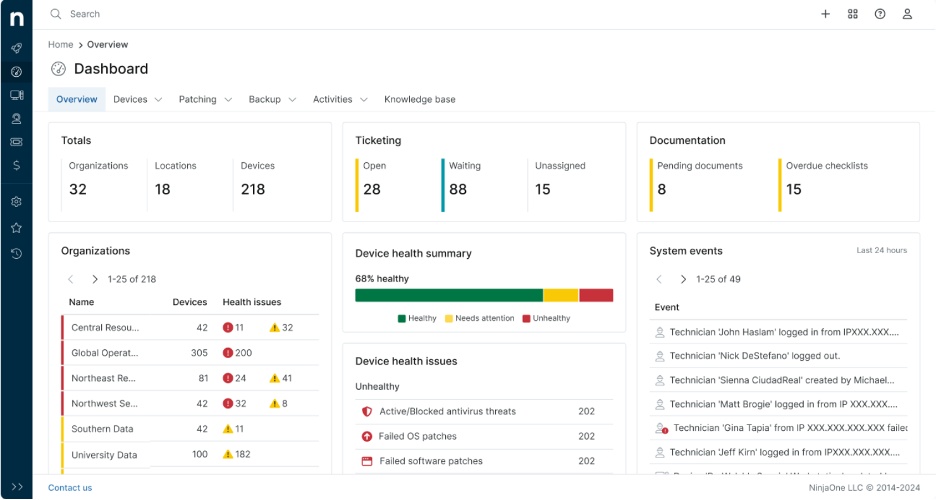
NinjaOne ist eine Endpunktverwaltungssoftware, die für IT-Fachleute und MSPs entwickelt wurde, um Geräte effizient zu verwalten und zu überwachen. Sie übernimmt wichtige Aufgaben wie Fernüberwachung, Patch-Management und IT-Asset-Management.
Warum es eine gute Alternative zu Zoho Assist ist: NinjaOne bietet eine einheitliche Verwaltung und ist daher ideal für Teams, die vollständige Kontrolle über ihre IT-Umgebungen benötigen. Funktionen wie automatisiertes Patchen, Echtzeitüberwachung und detaillierte Berichte helfen Ihrem Team, Sicherheit und Leistung aufrechtzuerhalten. Das intuitive Dashboard bietet eine zentrale Ansicht aller Geräte und ermöglicht so schnelle Entscheidungen. Die Skalierbarkeit der Software unterstützt wachsende IT-Infrastrukturen.
Hervorragende Funktionen und Integrationen:
Zu den Funktionen gehören automatisiertes Patch-Management, Echtzeitwarnungen und umfassende Berichte. Diese Funktionen stellen sicher, dass Ihr Team IT-Probleme proaktiv und ohne manuelle Eingriffe verwalten kann. Das zentrale Dashboard von NinjaOne hilft Ihnen, alle Ihre Geräte an einem Ort im Blick zu behalten und dadurch die Effizienz zu steigern.
Zu den Integrationen gehören ConnectWise Screen Connect, Autotask, Zendesk, ServiceNow, Microsoft Entra und weitere.
Pros and Cons
Pros:
- Automatisiertes Patch-Management
- Echtzeitüberwachung
- Zentrale Geräteverwaltung
Cons:
- Preisinformationen sind nicht transparent
- Komplex für technisch nicht versierte Benutzer


RemotePC ist eine sichere Fernzugriffssoftware, die für eine vielfältige Nutzergruppe entwickelt wurde, darunter Einzelpersonen, kleine Büros, Teams und Unternehmen. Sie bietet wichtige Funktionen wie den Fernzugriff auf mehrere Computer, Dateiübertragungen und Remotedrucken.
Warum es eine gute Alternative zu Zoho Assist ist: RemotePC bietet Benutzern unbegrenzten Zugriff, was ideal ist, wenn Ihr Team umfangreiche Fernzugriffsmöglichkeiten benötigt. Zu den Funktionen gehören sichere Dateiübertragungen, Tools für die Zusammenarbeit und der beaufsichtigte Zugriff für den Kundensupport. Die Skalierbarkeit und Benutzerfreundlichkeit der Software machen sie zu einer praktischen Wahl für private und geschäftliche Anwendungen. Sicherheitsmaßnahmen wie TLS v 1.2 mit AES-256-Verschlüsselung erhöhen ihre Attraktivität für IT-Supportanforderungen.
Herausragende Funktionen und Integrationen:
Zu den Funktionen gehören Remotedrucken, ein digitales Whiteboard für die Zusammenarbeit und mobiler Zugriff. Diese Funktionen unterstützen Ihr Team dabei, von überall aus effizient zu arbeiten. Die Benutzerverwaltung und Überwachungstools von RemotePC sind ebenfalls hilfreich für Unternehmen, die eine Übersicht benötigen.
Zu den Integrationen gehören Zendesk, Freshdesk, Jira, Okta, G Suite, OneLogin und weitere.
Pros and Cons
Pros:
- Unbegrenzte Benutzerlizenzen
- Sichere Dateiübertragungen
- Mobiler Zugriff verfügbar
Cons:
- Keine Demo verfügbar
- Kein kostenloser Tarif verfügbar
Weitere Zoho-Assist-Alternativen
Hier sind einige weitere Alternativen zu Zoho Assist, die es nicht in meine Auswahl geschafft haben, aber dennoch einen Blick wert sind:
- Parallels Access
Am besten für die Windows-auf-Mac-Integration geeignet
- TSplus Remote Support
Am besten für maßgeschneiderte Branchenlösungen geeignet
- Dameware Remote Support
Am besten für Support in der eigenen Infrastruktur


Wie ich Zoho-Assist-Alternativen bewerte
Ich bewerte auf zwei Ebenen: grundlegende Anforderungen wie unbeaufsichtigten Zugriff und plattformübergreifende Steuerung sowie Unterscheidungsmerkmale wie Integrationen mit Projektmanagement-Tools und Prüfprotokollierung, die die besten Lösungen vom Rest abheben.
Kernfunktionen (Grundvoraussetzungen für diese Liste)
Bei der Auswahl der Lösungen für meine Liste bewerte ich jede einzelne für jede unten aufgeführte Kernfunktion auf einer Skala von 0 (bietet die Funktion nicht an) bis 5 (zeichnet sich in diesem Bereich aus). Anschließend rechne ich die Gesamtpunktzahl der Lösung in einen Prozentsatz um. Jede Lösung muss eine Mindestgesamtpunktzahl von 65 % erreichen, um für die Aufnahme berücksichtigt zu werden.
- Steuerung des Fernbildschirms: Ich bewerte, wie reaktionsschnell die Steuerung in Echtzeit ist, insbesondere wenn ein Techniker während eines Gesprächs Dienste neu starten, Konfigurationen bearbeiten oder einen Ansprechpartner durch ein Ergebnis führen muss.
- Unbeaufsichtigter Zugriff: Ich achte auf zuverlässige, dauerhaft verfügbare Verbindungen zu Geräten ohne Benutzeroberfläche, einschließlich Gerätegruppierung und Optionen für die Massenbereitstellung, die die Verwaltung dutzender Projektserver praktikabel machen.
- Plattformübergreifende Kompatibilität: Projektteams arbeiten mit gemischten Umgebungen. Daher prüfe ich, ob jede Lösung Windows, macOS, Linux, iOS und Android unterstützt – einschließlich Verbindungen von Mobilgeräten zu Desktop-Computern für die Fehlerbehebung unterwegs.
- Dateiübertragung während der Sitzung: Das Übertragen von Projektdateien während einer laufenden Sitzung ist wichtig. Daher bewerte ich, ob die Lösung Übertragungen per Ziehen und Ablegen in beide Richtungen ohne restriktive Dateigrößenbeschränkungen unterstützt.
- Unterstützung mehrerer Sitzungen und Monitore: Ich prüfe, ob Techniker parallele Sitzungen ausführen und zwischen Monitoren wechseln können. Das ist bei der Unterstützung von Entwicklungs- oder Designumgebungen mit mehreren Bildschirmen ständig relevant.
- Sitzungssicherheit und Verschlüsselung: Ende-zu-Ende-Verschlüsselung, MFA und Prüfprotokolle für Sitzungen sind die Punkte, auf die ich hier achte – insbesondere bei Teams, die mit sensiblen Kundendaten arbeiten oder Compliance-Anforderungen wie SOC 2 oder DSGVO erfüllen müssen.
Sobald ich eine Liste von Lösungen zusammengestellt habe, die diese Kriterien erfüllen, prüfe ich, wodurch sich die einzelnen Plattformen voneinander unterscheiden.
Unterscheidungsmerkmale (Was Anbieter voneinander abhebt)
So vergleiche ich verschiedene Anbieter miteinander:
Herausragende Funktionen
Ich achte auf direkte Integrationen mit Projektmanagement- und Ticketsystemen wie Jira, ServiceNow oder Slack, da das direkte Starten einer Fernzugriffssitzung aus einem Ticket während der Störungsbehebung viel Zeit spart. Die Aufzeichnung von Sitzungen ist ein weiteres Unterscheidungsmerkmal, das ich bewerte – sie ist für Nachbesprechungen, Kundenaudits und Dokumentationen zur Einarbeitung nützlich. Integrierte Funktionen für die Zusammenarbeit wie Chat, VoIP und Bildschirmannotation sind ebenfalls wichtig, wenn man einen Ansprechpartner durch eine Vorführung in Echtzeit führt, anstatt nur einen Computer zu reparieren.
Mehr als nur Funktionen
Die Preisstruktur spielt hier eine große Rolle. Ich prüfe, ob ein Anbieter pro Techniker oder pro Gerät abrechnet, da dieser Unterschied die Kosten abhängig von Teamgröße und Anzahl der Endpunkte drastisch verändern kann. Die Einhaltung von Vorschriften ist ein weiterer Faktor, den ich genau bewerte – Teams, die Kunden in regulierten Branchen unterstützen, benötigen SOC-2-, DSGVO- oder HIPAA-Abdeckung, und nicht jede Lösung bietet dies. Außerdem berücksichtige ich die einfache Bereitstellung, insbesondere ob eine Lösung unbeaufsichtigte Installationen oder MDM-basierte Einführungen für verteilte Teams unterstützt, die Hunderte von Endpunkten verwalten.
Warum nach einer Alternative zu Zoho Assist suchen?
Obwohl Zoho Assist eine gute Wahl für Fernzugriffssoftware ist, gibt es mehrere Gründe, warum manche Nutzer nach alternativen Lösungen suchen. Sie suchen möglicherweise aus folgenden Gründen nach einer Alternative zu Zoho Assist:
- Sie benötigen fortschrittlichere Sicherheitsfunktionen
- Ihr Team benötigt besseren mobilen Zugriff
- Sie suchen nach mehr Anpassungsmöglichkeiten
- Sie benötigen eine Lösung mit besserer Skalierbarkeit
- Ihr Team arbeitet außerhalb der geografischen Verfügbarkeit von Zoho Assist
Wenn einer dieser Punkte auf Sie zutrifft, sind Sie hier richtig. Meine Liste enthält mehrere Optionen für Fernzugriffssoftware, die besser für Teams geeignet sind, die mit diesen Herausforderungen von Zoho Assist konfrontiert sind und nach alternativen Lösungen suchen.
Wichtige Funktionen von Zoho Assist
Hier sind einige der wichtigsten Funktionen von Zoho Assist, damit Sie die Angebote alternativer Lösungen gegenüberstellen und vergleichen können:
- Fernsupport: Sofortige Unterstützung für Benutzer, damit Sie Probleme schnell beheben können.
- Unbeaufsichtigter Zugriff: Verwalten Sie Geräte ohne die Anwesenheit eines Benutzers und geben Sie Ihrem Team dadurch mehr Flexibilität.
- Dateiübertragung: Einfaches Teilen von Dateien zwischen Geräten zur Erleichterung der Zusammenarbeit.
- Sitzungsaufzeichnung: Zeichnen Sie Sitzungen zur späteren Bezugnahme und für Schulungszwecke auf.
- Anmerkungswerkzeuge: Heben Sie während Sitzungen Inhalte hervor und markieren Sie diese, um die Kommunikation zu verbessern.
- Erweiterte Berichterstellung: Erstellen Sie detaillierte Nutzungsberichte für bessere Analysen und Erkenntnisse.
- Unterstützung mobiler Geräte: Greifen Sie aus der Ferne auf mobile Geräte zu und stellen Sie so Unterstützung unterwegs sicher.
- API/SDK-Integration: Passen Sie die Lösung an und integrieren Sie sie mit anderen Anwendungen, um maßgeschneiderte Lösungen zu ermöglichen.
- Verwaltung der Service-Warteschlange: Organisieren und priorisieren Sie Supportanfragen effizient.
- Anpassung: Optionen für Benutzeroberfläche und Markenauftritt, die auf die Identität Ihres Unternehmens abgestimmt werden können.