

10 beste Wufoo-Alternativen für Online-Formulare im Jahr 2026

Beste Wufoo-Alternativen – Shortlist


Haben Sie mit den Einschränkungen von Wufoo zu kämpfen und suchen Sie nach einer besseren Lösung für Ihr Team? Damit sind Sie nicht allein. Viele Projektmanager stehen bei Wufoo vor Herausforderungen wie eingeschränkten Anpassungsmöglichkeiten, Integrationsproblemen oder Bedenken hinsichtlich der Datenverwaltung.
Viele cloudbasierte Formularersteller bieten Lösungen, die auf Ihre spezifischen Anforderungen zugeschnitten sind. Meiner Erfahrung nach kann die Wahl des richtigen Tools einen großen Unterschied für Ihren Arbeitsablauf und Ihre Effizienz machen.
In diesem Artikel teile ich meine unvoreingenommene Bewertung der besten Wufoo-Alternativen. Sie entdecken Optionen, die die Produktivität Ihres Teams steigern und Ihre individuellen Herausforderungen bewältigen können. Sehen wir uns die besten Lösungen an und finden die perfekte Option für Ihr Unternehmen.
Was ist Wufoo?
Wufoo ist ein cloudbasierter Formularersteller, mit dem Sie ganz einfach Online-Formulare erstellen können. Fachleute aus den Bereichen Marketing, Kundenservice und Veranstaltungsplanung nutzen ihn häufig zur Datenerfassung und -verwaltung. Die Drag-and-Drop-Funktionalität, anpassbare Vorlagen und die einfache Integration mit anderen Tools ermöglichen eine schnelle und effiziente Formularerstellung. Insgesamt bietet Wufoo eine benutzerfreundliche Plattform für die Verwaltung formularbasierter Aufgaben.
Zusammenfassung der besten Wufoo-Alternativen
Diese Vergleichstabelle fasst die Preisinformationen meiner besten Wufoo-Alternativen zusammen, damit Sie die beste Lösung für Ihr Budget und Ihre geschäftlichen Anforderungen finden.
| Tool | Best For | Trial Info | Price | ||
|---|---|---|---|---|---|
| 1 | Am besten für designorientierte Formulare geeignet | 7-tägige kostenlose Testversion + kostenloser Tarif verfügbar | Ab $24/Monat (jährlich abgerechnet) | Website | |
| 2 | Am besten für die Anpassung von Umfragen geeignet | Kostenloser Tarif verfügbar | Ab $30/Nutzer/Monat (jährliche Abrechnung) | Website | |
| 3 | Am besten für die WordPress-Integration geeignet | Kostenloser Tarif verfügbar | Ab $49.50/Jahr (jährliche Abrechnung) | Website | |
| 4 | Am besten für Trichter zur Lead-Generierung geeignet | 14-tägige kostenlose Testversion | Ab 56 $/Monat (jährliche Abrechnung) | Website | |
| 5 | Am besten für die Einhaltung von Branchenvorschriften geeignet | Kostenlose 14-Tage-Testversion + kostenlose Demo verfügbar | Ab $83/Monat (jährliche Abrechnung) | Website | |
| 6 | Am besten für sichere Online-Formulare geeignet | Kostenlose 14-tägige Testversion verfügbar | Ab $21/Monat (jährlich abgerechnet) | Website | |
| 7 | Am besten für einfaches Teilen | Kostenloser Tarif verfügbar | Kostenloser Tarif verfügbar; ab $7/user/month (jährlich abgerechnet) für Google Workspace | Website | |
| 8 | Am besten für die Zusammenarbeit in Echtzeit | 30-tägige kostenlose Testversion | Ab $9.99/Benutzer/Monat (Microsoft 365 Business Basic oder in Microsoft 365-Plänen enthalten) | Website | |
| 9 | Am besten für die Automatisierung von Arbeitsabläufen | 14-tägige kostenlose Testversion + kostenloser Tarif verfügbar | Ab $19/Monat | Website | |
| 10 | Am besten für ansprechende Umfragen geeignet | Kostenloser Tarif verfügbar | Ab $28/Monat (jährlich abgerechnet) | Website |
Warum Sie unseren Software-Empfehlungen vertrauen können
Unser Team testet und bewertet Software seit 2012. Als Projektmanager wissen wir selbst, wie schwierig – und wichtig – es ist, die richtige Software auszuwählen.
Für diesen Leitfaden haben wir Tools mithilfe von praktischen Tests und unabhängiger Recherche bewertet und dabei unsere Bewertungskriterien angewendet. Zudem greifen wir auf Erkenntnisse von Branchenvordenkern und praktizierenden Projektmanagement-Experten zurück.
Unsere Bewertungen spiegeln unser menschliches redaktionelles Urteilsvermögen wider, keine Verkaufsstrategie.
Expertenprüfer:
Bewertungen der besten Wufoo-Alternativen
Nachfolgend finden Sie meine ausführlichen Zusammenfassungen der besten Wufoo-Alternativen, die es auf meine Shortlist geschafft haben. Meine Bewertungen bieten einen detaillierten Einblick in die wichtigsten Funktionen, Vor- & Nachteile, Integrationen und idealen Anwendungsfälle jedes Tools, damit Sie die beste Lösung für sich finden.

Am besten für designorientierte Formulare geeignet

Paperform ist ein vielseitiger Online-Formularersteller, mit dem Sie ansprechende Formulare und Landingpages erstellen können. Er ist bei kleinen Unternehmen, Marketingfachleuten und Kreativen beliebt, die Wert auf Designflexibilität und Ästhetik legen.
Warum Paperform eine gute Wufoo-Alternative ist: Paperform bietet umfangreiche Anpassungsoptionen, mit denen Sie Formulare gestalten können, die zur Identität Ihrer Marke passen. Der intuitive Editor unterstützt umfangreiche Medieninhalte wie Bilder und Videos, wodurch Ihre Formulare ansprechender werden. Sie können außerdem Workflows mit bedingter Logik automatisieren und Ihrem Team so Zeit sparen. Diese Funktionen machen Paperform ideal, wenn Sie visuell ansprechende Formulare erstellen möchten, die hervorstechen.
Herausragende Funktionen & Integrationen:
Funktionen umfassen die Möglichkeit, Zahlungen direkt über Formulare zu akzeptieren, was ideal für E-Commerce-Unternehmen ist. Sie können erweiterte Berechnungen verwenden, um komplexe Vorgänge innerhalb von Formularen durchzuführen. Die Plattform bietet außerdem benutzerdefiniertes HTML und CSS, wodurch Sie die Darstellung Ihres Formulars vollständig kontrollieren können.
Integrationen umfassen Zapier, Mailchimp, Google Sheets, Stripe, PayPal, Slack, HubSpot, Trello, Dropbox und Square.
Pros and Cons
Pros:
- Freitextoberfläche für umfangreiche Designflexibilität
- Unterstützt umfangreiche Medieninhalte, einschließlich Bildern, Videos, benutzerdefinierten Karten und Kalendern
- Möglichkeit, benutzerdefinierten HTML- und CSS-Code einzufügen, um eine bessere Kontrolle zu erhalten
Cons:
- Begrenzte integrierte Analysefunktionen
- Aufgrund der umfangreichen Anpassungsmöglichkeiten besteht die Gefahr einer Überforderung durch zu viele Optionen

Am besten für die Anpassung von Umfragen geeignet
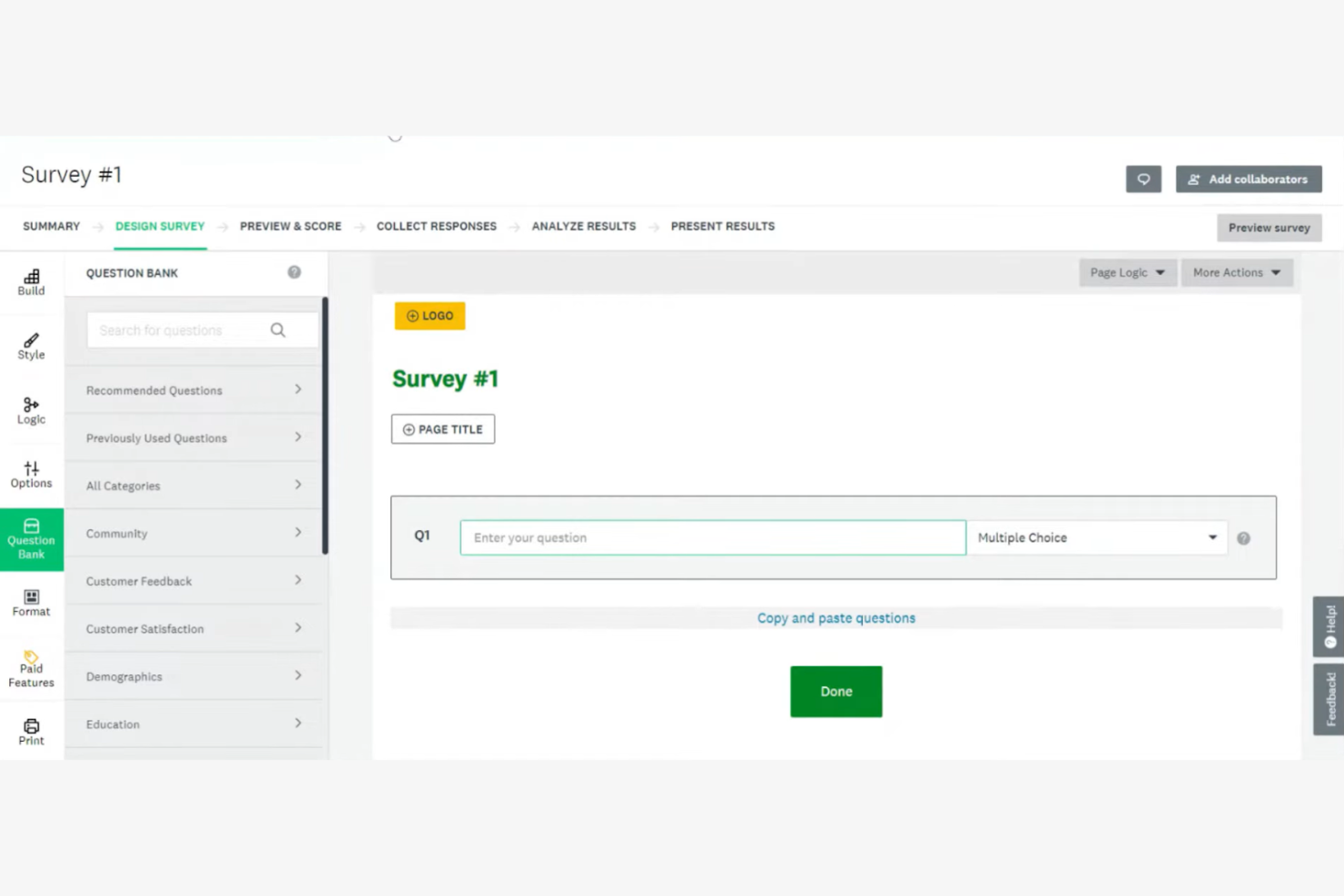
SurveyMonkey ist ein Online-Umfragetool, das Unternehmen und Einzelpersonen dabei unterstützt, Rückmeldungen zu sammeln und zu analysieren. Es wird häufig von Forschern, Marketingfachleuten und Organisationen eingesetzt, die effizient Daten erfassen müssen.
Warum SurveyMonkey eine gute Wufoo-Alternative ist: SurveyMonkey bietet umfangreiche Anpassungsmöglichkeiten, mit denen Sie Umfragen auf Ihre spezifischen Anforderungen zuschneiden können. Die Vielzahl an Fragetypen und Logikfunktionen ermöglicht die Erstellung komplexer Umfragen für tiefgehende Einblicke. Die Analysetools der Plattform helfen Ihnen dabei, Daten effektiv auszuwerten, sodass Ihr Team leichter fundierte Entscheidungen treffen kann. Das intuitive Design macht die Erstellung von Umfragen auch für Einsteiger unkompliziert.
Besondere Funktionen & Integrationen:
Zu den Funktionen gehört eine erweiterte Umfragelogik, mit der Sie den Ablauf abhängig von den Antworten anpassen können. Sie können vorgefertigte Umfragevorlagen verwenden, um Zeit zu sparen und sicherzustellen, dass Sie die richtigen Fragen stellen. Die Plattform bietet außerdem eine Datenanalyse in Echtzeit, mit der Sie eingehende Antworten verfolgen können.
Zu den Integrationen gehören Salesforce, Mailchimp, HubSpot, Slack, Microsoft Teams, Google Drive, Dropbox, Zendesk, Eventbrite und Constant Contact.
Pros and Cons
Pros:
- Umfangreiche Anpassungsmöglichkeiten für Umfragethemen, Farben und Markenelemente
- Erschwinglicher kostenloser Tarif und skalierbare Optionen, die den Anforderungen der Nutzer gerecht werden
- Große Auswahl an Fragetypen, einschließlich Fragen mit Mehrfachauswahl, Likert-Skalen, Rangfolgen und Bildauswahl
Cons:
- Höhere Preise für erweiterte Funktionen
- Antwortlimits im kostenlosen Tarif

WPForms
Am besten für die WordPress-Integration geeignet
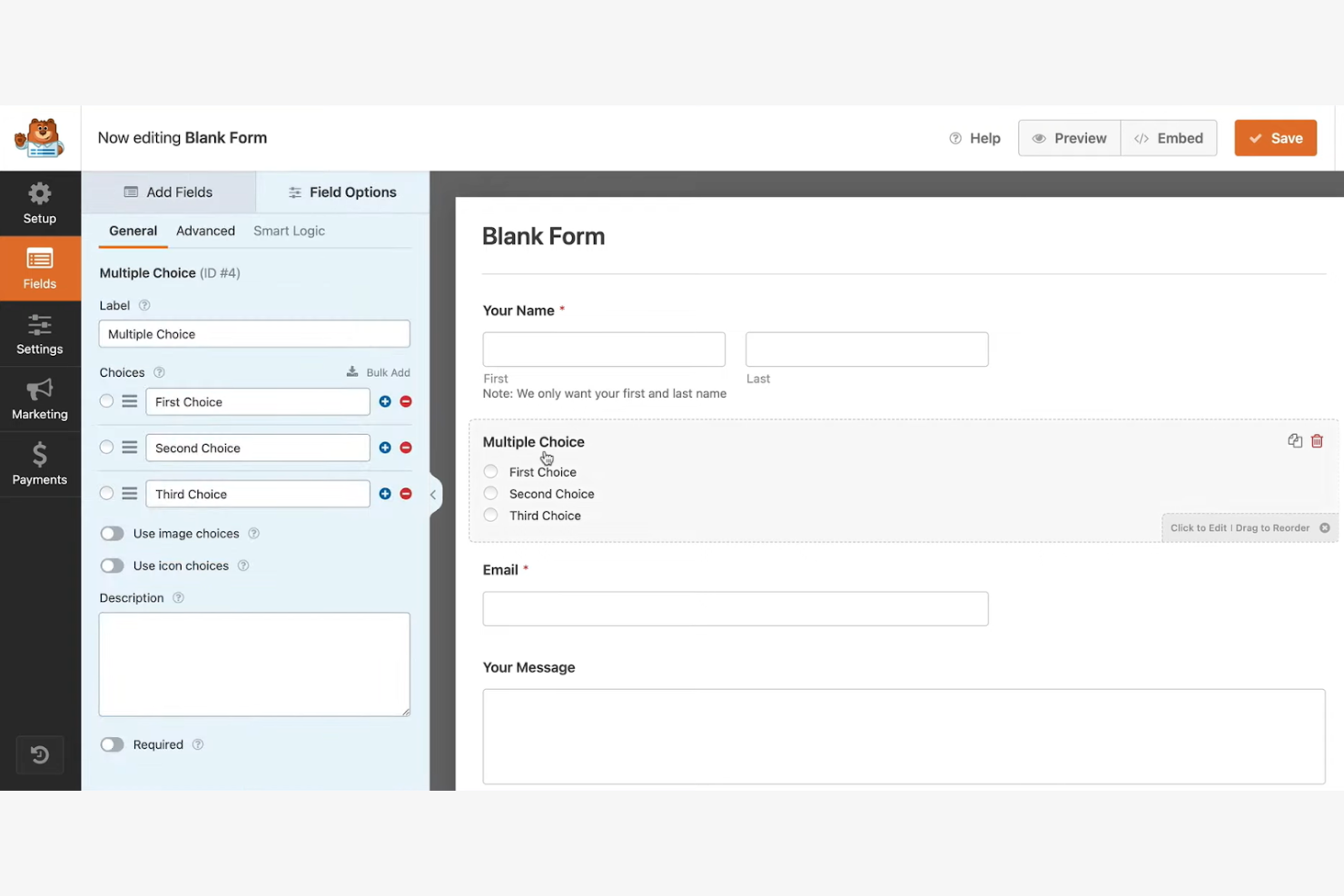
WPForms ist ein WordPress-Plugin, das entwickelt wurde, um Online-Formulare direkt von Ihrer WordPress-Website aus zu erstellen und zu verwalten. Es wird hauptsächlich von Bloggern, Kleinunternehmern und Entwicklern verwendet, die eine einfache Möglichkeit benötigen, Formulare zu ihren Websites hinzuzufügen.
Warum WPForms eine gute Wufoo-Alternative ist: WPForms bietet eine Integration mit WordPress und ist damit eine praktische Wahl für Nutzer, die bereits diese Plattform verwenden. Mit dem Editor zum Ziehen und Ablegen können Sie schnell Formulare erstellen, ohne zu programmieren. Mit Funktionen wie vorgefertigten Vorlagen und intelligenter bedingter Logik können Sie Formulare an Ihre Bedürfnisse anpassen. Das Plugin unterstützt außerdem sofortige Benachrichtigungen, sodass Sie automatisch über neue Formulareinsendungen informiert werden.
Herausragende Funktionen & Integrationen:
Zu den Funktionen gehört die Möglichkeit, mehrseitige Formulare zu erstellen, die lange Formulare in überschaubare Abschnitte unterteilen. Sie können Erweiterungen für Umfragen und Abstimmungen verwenden, um detaillierte Rückmeldungen von Ihrer Zielgruppe zu sammeln. Die Plattform bietet außerdem Tools zum Schutz vor Spam, damit Ihre Formulare vor unerwünschten Einsendungen geschützt bleiben.
Zu den Integrationen gehören Mailchimp, PayPal, Stripe, AWeber, Campaign Monitor, GetResponse, Drip, Constant Contact, Salesforce und Zapier.
Pros and Cons
Pros:
- Spezielles WordPress-Plugin zur direkten Integration in den Übersichtsbereich
- Benutzerfreundliche Formularerstellung per Ziehen und Ablegen in kostenlosen und kostenpflichtigen Versionen
- Über 2.000 vorgefertigte Formularvorlagen
Cons:
- Kundensupport ist nur für Nutzer mit aktiven Premium-Lizenzen verfügbar
- Erweiterte Funktionen erfordern Erweiterungen
Heyflow
Am besten für Trichter zur Lead-Generierung geeignet

Heyflow ist eine No-Code-Plattform, die darauf ausgelegt ist, Website-Besucher durch interaktive, für Mobilgeräte optimierte Trichter in Leads umzuwandeln. Sie wird hauptsächlich von Performance-Marketern, Designern und Entwicklern in verschiedenen Branchen wie B2C und B2B eingesetzt.
Warum Heyflow eine gute Wufoo-Alternative ist: Heyflow bietet umfangreiche Anpassungsmöglichkeiten für interaktive Landingpages und Formulare und eignet sich dadurch ideal für die Lead-Generierung. Mit integrierten Analysen, A/B-Tests und Lead-Bewertungen hilft die Plattform, Interaktionen und Konversionsraten zu optimieren. Das auf Mobilgeräte ausgerichtete Design sorgt für eine reibungslose Benutzererfahrung, während Funktionen wie benutzerdefinierter Code und integrierte Zahlungen fortgeschrittene Marketingmaßnahmen unterstützen.
Hervorstechende Funktionen & Integrationen:
Zu den Funktionen gehören integrierte A/B-Tests zur Optimierung Ihrer Trichter, Absprunganalysen, um zu verstehen, an welcher Stelle Nutzer abspringen, sowie Lead-Bewertungen, um potenzielle Kunden zu priorisieren. Die Plattform bietet außerdem über 40 Drag-and-Drop-Blöcke zur einfachen Anpassung.
Zu den Integrationen gehören Zapier, HubSpot, Mailchimp, Salesforce, Google Analytics, Facebook Pixel, Intercom, Slack, Google Tag Manager und Shopify.
Pros and Cons
Pros:
- Interaktive Trichter erfassen Leads Schritt für Schritt und erzielen höhere Konversionsraten als statische Formulare
- Alle Trichterabläufe sind standardmäßig für Mobilgeräte optimiert
- Leistungsstarke integrierte Analysen für übersichtliche Leistungsdaten
Cons:
- Die Oberfläche ohne Programmieraufwand beschränkt Nutzer auf die vordefinierten Blöcke der Plattform
- Sichtbares Heyflow-Trichter-Branding in den kostenlosen und einfachen Tarifstufen

Am besten für die Einhaltung von Branchenvorschriften geeignet
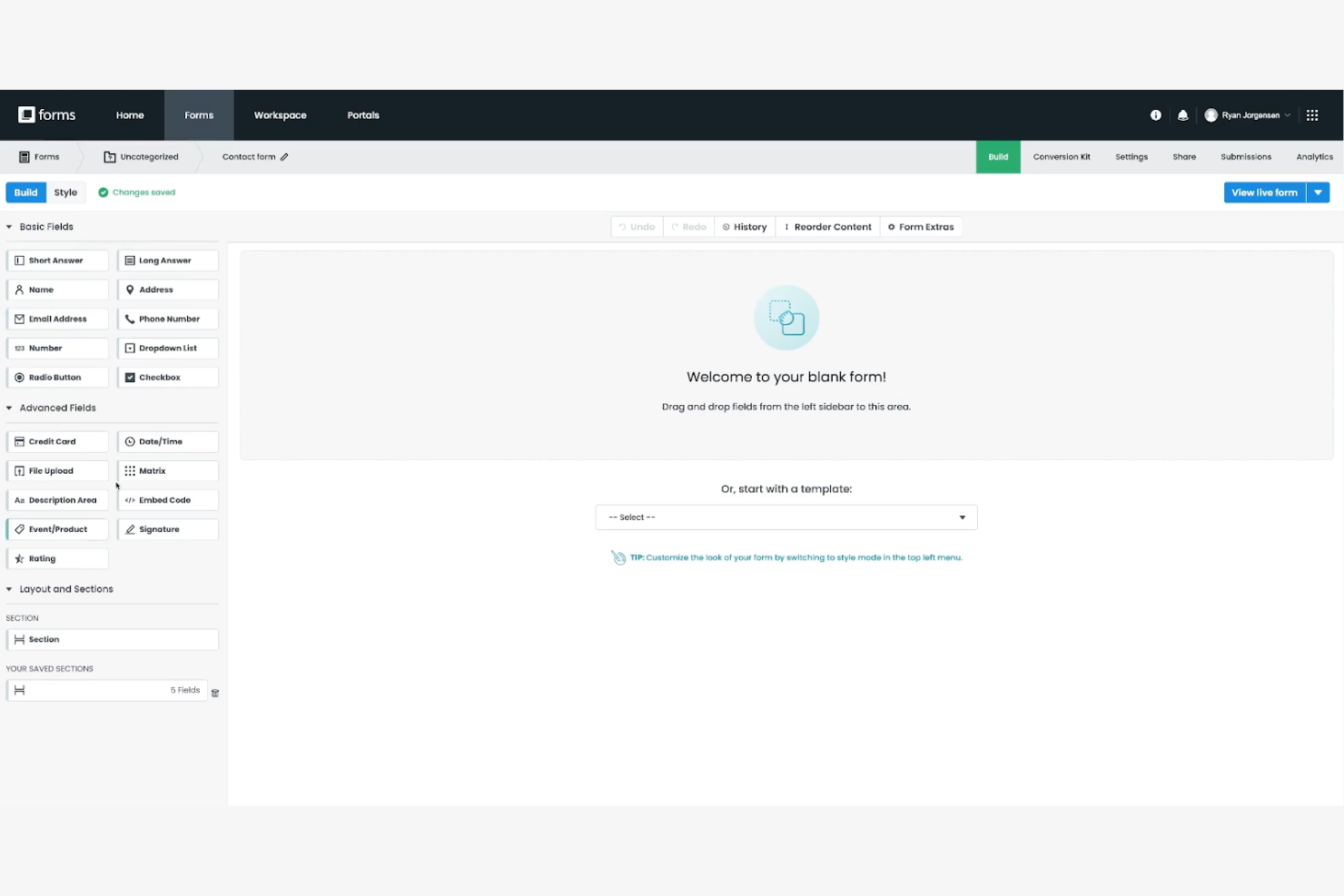
Formstack ist ein vielseitiger Formularersteller, der Unternehmen dabei unterstützt, Arbeitsabläufe zu automatisieren und Daten effizient zu verwalten. Er wird häufig von Gesundheitsdienstleistern, Bildungseinrichtungen und Finanzdienstleistern eingesetzt, die eine sichere und rechtskonforme Datenverarbeitung benötigen.
Warum Formstack eine gute Alternative zu Wufoo ist: Formstack bietet erweiterte Funktionen zur Einhaltung von Vorschriften, einschließlich HIPAA-Konformität und Datenverschlüsselung, und ist damit ideal für Branchen mit strengen Datenschutzbestimmungen. Der flexible Formularersteller unterstützt komplexe Arbeitsabläufe und Genehmigungen und hilft Ihnen dabei, Prozesse zu optimieren. Die Sicherheitsmaßnahmen der Plattform gewährleisten, dass Ihre Daten geschützt sind, und geben Ihrem Team Sicherheit.
Hervorstechende Funktionen & Integrationen:
Zu den Funktionen gehören erweiterte Formularanalysen, mit denen Sie die Leistung Ihrer Formulare verfolgen und datengestützte Entscheidungen treffen können. Sie können bedingte Logik verwenden, um dynamische Formulare zu erstellen, die sich an Benutzereingaben anpassen. Die Plattform bietet außerdem Funktionen zur Dokumentgenerierung, mit denen Sie aus Formulareinsendungen PDFs erstellen können.
Zu den Integrationen gehören Salesforce, Mailchimp, Google Drive, HubSpot, PayPal, QuickBooks, Dropbox, Stripe, Microsoft Teams und Slack.
Pros and Cons
Pros:
- Maßnahmen zur Einhaltung von Vorschriften und Sicherheitsstandards, die sich an wichtigen Branchenvorschriften und -standards orientieren
- Automatisierungsfunktionen ermöglichen individuell angepasste Genehmigungsketten
- 256-Bit-SSL-Verschlüsselung, Verschlüsselung ruhender Daten, sichere Downloads und Passwortschutz
Cons:
- Kaum oder kein telefonischer Support bei Basistarifen
- Nutzungsbeschränkungen in allen Tarifstufen


Formsite ist ein Online-Formularerstellungsprogramm, das sich auf die Erstellung sicherer Formulare zur Datenerfassung konzentriert. Es wird hauptsächlich von Unternehmen und Organisationen verwendet, die vertrauliche Informationen verarbeiten müssen, darunter Gesundheitsdienstleister, Bildungseinrichtungen und Finanzunternehmen.
Warum Formsite eine gute Wufoo-Alternative ist: Formsite bietet fortschrittliche Sicherheitsfunktionen, darunter SSL-Verschlüsselung und Passwortschutz, um Ihre Daten zu schützen. Mit den anpassbaren Formularen können Sie Formulare an Ihre spezifischen Anforderungen anpassen und gleichzeitig die Einhaltung von Branchenstandards gewährleisten. Die Plattform bietet außerdem Funktionen wie Formularanalysen und bedingte Logik, mit denen Sie Ihre Daten effizient verwalten und analysieren können.
Herausragende Funktionen & Integrationen:
Zu den Funktionen gehört ein Formularerstellungsprogramm mit einer Funktion zum Ziehen und Ablegen, mit dem Sie schnell und einfach Formulare erstellen können. Mithilfe der bedingten Logik können Sie Fragen abhängig von den Antworten der Benutzer ein- oder ausblenden. Die Plattform bietet außerdem Funktionen zum Hochladen von Dateien, sodass Benutzer Dokumente über Ihre Formulare einreichen können.
Zu den Integrationen gehören Google Sheets, Salesforce, Dropbox, Mailchimp, PayPal, Zapier, Slack, HubSpot, Constant Contact und Stripe.
Pros and Cons
Pros:
- Umfassende Datensicherheit, einschließlich HTTPS-Verschlüsselung und einer Richtlinie zur Datenaufbewahrung
- Anpassbares Formularerstellungsprogramm mit einer Funktion zum Ziehen und Ablegen sowie Optionen zur CSS-Bearbeitung
- Sichere Funktion zum Hochladen von Dateien in allen kostenpflichtigen Tarifen zur Erfassung von Dokumenten und Bildern der Befragten
Cons:
- Integrierte Formularanalysen bieten nur begrenzte visuelle Möglichkeiten
- Eingeschränkte mobile Anpassungsfähigkeit

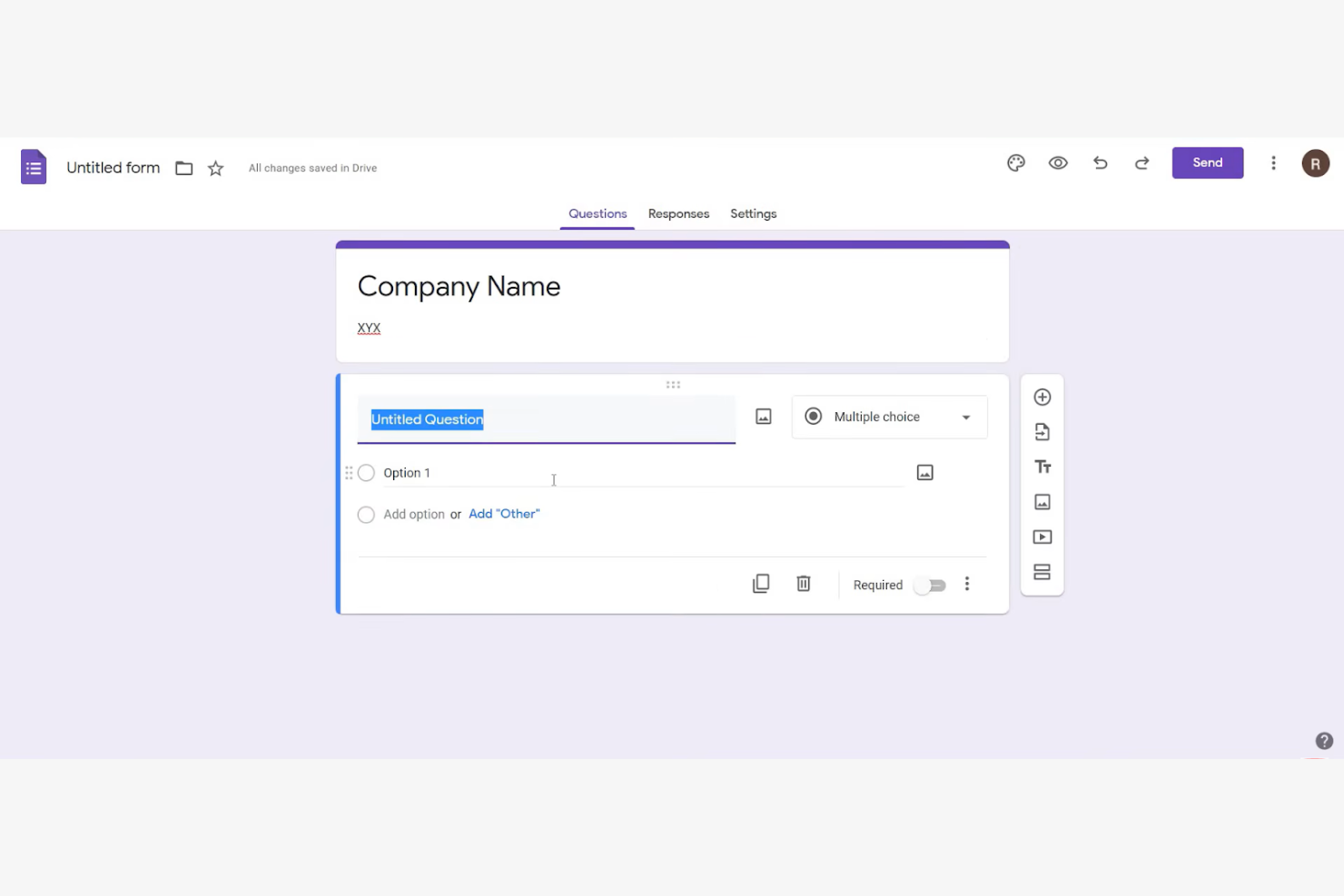
Google Forms ist ein Online-Umfragetool, mit dem Nutzer ganz einfach Formulare erstellen und Daten sammeln können. Es wird häufig von Lehrkräften, kleinen Unternehmen und Einzelpersonen verwendet, die schnell Informationen erfassen und teilen müssen.
Warum Google Forms eine gute Wufoo-Alternative ist: Google Forms bietet einfache Freigabeoptionen und Zusammenarbeit in Echtzeit und ist damit ideal für Teams, die gemeinsam arbeiten müssen. Sie können Formulare ganz einfach per Link oder E-Mail teilen, und die Antworten werden automatisch in Google Sheets gesammelt. Die intuitive Benutzeroberfläche und die Integration in Google Workspace verbessern die Benutzerfreundlichkeit zusätzlich.
Herausragende Funktionen & Integrationen:
Funktionen umfassen die automatische Datensammlung in Google Sheets, wodurch Sie Antworten effizient analysieren können. Sie können Designs anpassen und Ihren Formularen Bilder oder Videos hinzufügen, um eine ansprechendere Erfahrung zu ermöglichen. Das Tool bietet außerdem die Verfolgung von Antworten in Echtzeit, sodass Sie eingehende Daten in Echtzeit überwachen können.
Integrationen umfassen Google Sheets, Google Drive, Google Classroom, Google Calendar, Google Docs, Google Slides, Google Chat und Google Sites.
Pros and Cons
Pros:
- Formulare können per Direktlink, E-Mail oder sozialen Medien geteilt oder in Websites eingebettet werden
- Unterstützt die Zusammenarbeit in Echtzeit
- Verbesserte Workflow-Effizienz durch die Integration in Google Workspace
Cons:
- Eingeschränkte Anpassungsmöglichkeiten für Design und Branding
- Grundlegende bedingte Logik

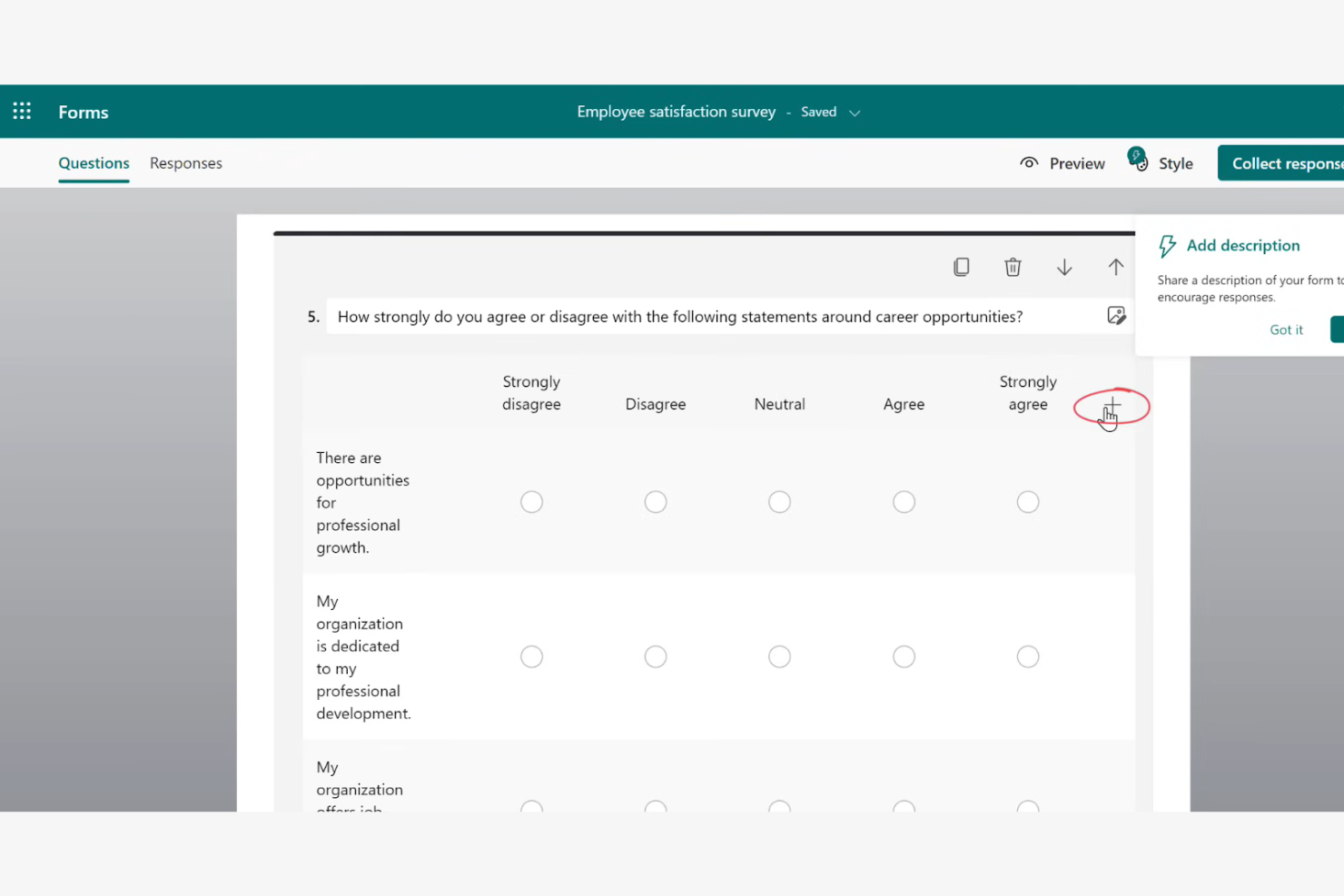
Microsoft Forms ist ein Online-Werkzeug für Umfragen und Quizze, das entwickelt wurde, um Rückmeldungen und Daten effizient zu erfassen. Es wird hauptsächlich von Lehrkräften, Unternehmen und Organisationen verwendet, die schnell Informationen sammeln und in Echtzeit zusammenarbeiten müssen.
Warum Microsoft Forms eine gute Wufoo-Alternative ist: Microsoft Forms bietet Funktionen für die Zusammenarbeit in Echtzeit, mit denen mehrere Teammitglieder gleichzeitig an Formularen arbeiten können. Sie können Formulare ganz einfach per E-Mail oder über Links teilen, was die Verteilung unkompliziert macht. Die Integration der Plattform in Microsoft 365 erweitert ihre Funktionalität und bietet den Benutzern eine vertraute Oberfläche. Mit integrierten Analysefunktionen können Sie Antworten schnell analysieren und Erkenntnisse gewinnen.
Hervorstechende Funktionen & Integrationen:
Zu den Funktionen gehören die automatische Erfassung und Analyse von Antworten, wodurch Ihr Team Zeit spart. Sie können verzweigte Formulare erstellen, die sich auf Grundlage der Benutzereingaben anpassen und so ein personalisiertes Erlebnis bieten. Die Plattform unterstützt außerdem Quizze, mit denen Sie Wissen bewerten oder effektiv Rückmeldungen sammeln können.
Zu den Integrationen gehören Microsoft Teams, Microsoft Excel, Microsoft SharePoint, Microsoft OneDrive, Microsoft Power Automate, Microsoft Outlook und Microsoft Power BI.
Pros and Cons
Pros:
- Zusammenarbeit in Echtzeit zur gleichzeitigen Bearbeitung und Verwaltung von Formularen
- Formulare können über Links, QR-Codes und E-Mail geteilt oder in Microsoft-Produkte eingebettet werden
- Automatisierte Diagramme und Berichte in Echtzeit können zur tiefergehenden Analyse nach Excel exportiert werden
Cons:
- Weniger geeignet für komplexe Umfragen
- Begrenzte Fragetypen


Cognito Forms ist ein Online-Formularersteller, der sich durch die Erstellung komplexer Formulare und die Automatisierung von Arbeitsabläufen auszeichnet. Er wird von Unternehmen und Organisationen häufig genutzt, die Prozesse vereinfachen und Daten effizient verwalten möchten.
Warum Cognito Forms eine gute Wufoo-Alternative ist: Cognito Forms bietet erweiterte Berechnungen und bedingte Logik zur Automatisierung von Arbeitsabläufen und ist damit eine ausgezeichnete Option zur Steigerung der Effizienz. Sie können Formulare erstellen, die Berechnungen direkt innerhalb der Benutzeroberfläche durchführen, wodurch sich manuelle Arbeit reduziert. Die Fähigkeit der Plattform, komplexe Logik und Datenverwaltung zu verarbeiten, hebt sie von anderen Lösungen ab. Ihre Sicherheitsfunktionen gewährleisten den Schutz Ihrer Daten und machen sie zu einer zuverlässigen Wahl für sensible Informationen.
Hervorstechende Funktionen & Integrationen:
Funktionen umfassen die Möglichkeit, komplexe Berechnungen innerhalb von Formularen durchzuführen, wodurch sich manuelle Fehler reduzieren lassen. Sie können wiederholbare Abschnitte verwenden, um mehrere Einträge innerhalb einer einzigen Formularübermittlung zu erfassen. Die Plattform bietet außerdem anpassbare E-Mail-Benachrichtigungen, damit Ihr Team über neue Übermittlungen informiert bleibt.
Integrationen umfassen Zapier, Microsoft Power Automate, Dropbox, Google Sheets, Stripe, PayPal, Mailchimp, Square, Microsoft OneDrive und QuickBooks Online.
Pros and Cons
Pros:
- Plattformintegrationen ermöglichen eine fortschrittliche Automatisierung von Arbeitsabläufen und Datenübertragungen
- Leistungsstarke Berechnungsmöglichkeiten direkt innerhalb der Formularoberfläche
- Unterstützt komplexe bedingte Logik für Abschnitte, Seiten, berechnete Werte und Weiterleitungen
Cons:
- Die Benutzeroberfläche wird als zweckmäßig oder weniger modern als die der Konkurrenz wahrgenommen
- Begrenzte Möglichkeiten zur Designanpassung ohne die Verwendung von CSS-Code

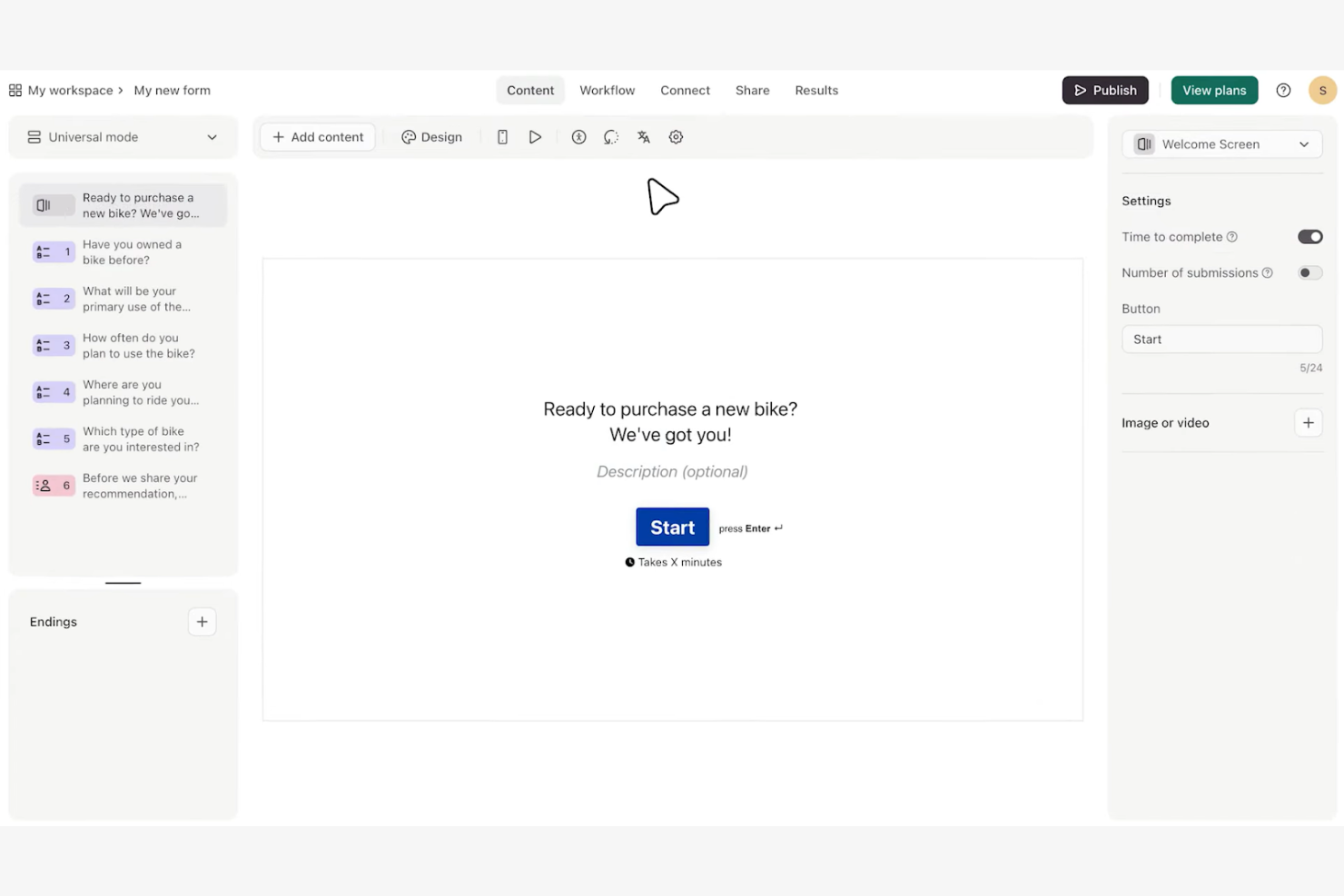
Typeform ist ein Online-Formularersteller, der sich auf die Erstellung interaktiver und visuell ansprechender Umfragen konzentriert. Er ist bei Marketingfachleuten, Lehrkräften und Unternehmen beliebt, die ihr Publikum mit dynamischen Formularen ansprechen möchten.
Warum Typeform eine gute Wufoo-Alternative ist: Typeform bietet mit seinen dialogorientierten Formularen ein einzigartiges Erlebnis, bei dem die Befragten Schritt für Schritt durch die Fragen geführt werden. Dieser Ansatz fördert höhere Abschlussquoten und eine bessere Interaktion. Mit Funktionen wie anpassbaren Designs, Logiksprüngen und Multimedia-Unterstützung können Sie ganz einfach herausragende Umfragen erstellen. Das macht Typeform zu einer hervorragenden Wahl, wenn Sie Ihr Publikum begeistern und aussagekräftigere Antworten sammeln möchten.
Besondere Funktionen & Integrationen:
Funktionen umfassen anpassbare Vorlagen, mit denen Sie Formulare an das Erscheinungsbild Ihrer Marke anpassen können. Mit Logiksprüngen können Sie das Umfrageerlebnis anhand der Antworten der Befragten personalisieren. Sie können auch Videos und Bilder einbetten, um Ihre Formulare ansprechender zu gestalten.
Integrationen umfassen HubSpot, Slack, Google Sheets, Mailchimp, Zapier, Salesforce, Airtable, Asana, Trello und Intercom.
Pros and Cons
Pros:
- Dialogorientierte Oberfläche mit einer Frage nach der anderen für verbesserte Abschlussquoten
- Umfangreiche Designflexibilität für eine präzise Anpassung von Formularen
- Interaktiver Fragenablauf mit Logiksprüngen
Cons:
- Begrenzte erweiterte Anpassungsmöglichkeiten für Entwickler oder Designer
- Kein nativer Datei-Upload im kostenlosen Tarif
Weitere Wufoo-Alternativen
Hier sind einige weitere Wufoo-Alternativen, die es nicht auf meine Shortlist geschafft haben, aber dennoch einen Blick wert sind:


Wie ich Wufoo-Alternativen bewerte
Ich bewerte Formular-Builder für Projektteams anhand von zwei Ebenen: Zum einen die grundlegenden Funktionen, die ein Tool bieten muss – wie das Weiterleiten von Anfragen an Jira – und zum anderen die Alleinstellungsmerkmale, die hervorragende Optionen auszeichnen.
Kernfunktionen (Grundvoraussetzungen für diese Liste)
Wenn ich Tools für meine Liste auswähle, bewerte ich jedes einzelne auf einer Skala von 0 (bietet die Funktion nicht) bis 5 (hervorragend in diesem Bereich) nach jeder der unten aufgeführten Kernfunktionen. Anschließend berechne ich die Gesamtpunktzahl des Tools in Prozent. Jedes Tool muss mindestens eine Gesamtpunktzahl von 65 % erreichen, um in die engere Auswahl zu kommen.
- Individueller Formular-Builder: Ich achte auf einen Drag-and-Drop-Editor mit vielfältigen Feldtypen—Datei-Uploads, Dropdowns, Datumsfelder—damit Projektmanager Intake-Formulare ohne Entwicklerhilfe erstellen können.
- Konditionale Logik & Workflows: Verzweigungsmöglichkeiten sind hier entscheidend. Ich bewerte, ob ein Tool eine Änderungsanfrage anhand des Projekttyps oder der Prioritätsstufe an den passenden Genehmiger weiterleiten kann.
- Integrationen mit Projektwerkzeugen: Die nativen Konnektoren jedes Tools zu Plattformen wie Asana, Jira, Monday und ClickUp werden überprüft, ebenso wie die Unterstützung durch Zapier, Make oder APIs für individuelle Setups.
- Verwaltung & Benachrichtigung von Einsendungen: Ich suche ein zentrales Dashboard zum Filtern, Zuweisen und Exportieren von Einsendungen – sowie konfigurierbare Benachrichtigungen, damit der zuständige Projektmanager bei neuen Anfragen informiert wird.
- Datensicherheit & Zugriffssteuerung: Rollengestützte Berechtigungen, SSL-Verschlüsselung und Zertifizierungen wie GDPR und SOC 2 bewerte ich insbesondere für Teams, die mit Projektdaten von Kunden arbeiten.
- Formular-Verteilung & Einbettung: Flexibilität beim Teilen ist wichtig. Ich prüfe, ob teilbare Links, Website-Einbindungen, QR-Codes und E-Mail-Optionen vorhanden sind, damit Formulare sowohl interne Teams als auch externe Beteiligte erreichen.
Sobald ich eine Liste der Tools habe, die diese Kriterien erfüllen, betrachte ich die besonderen Merkmale jeder Plattform.
Unterscheidungsmerkmale (Was Anbieter abhebt)
So vergleiche und kontrastiere ich verschiedene Anbieter:
Herausragende Merkmale
Unterstützung für elektronische Signaturen ist ein großes Plus. Tools, mit denen Kunden Änderungsaufträge oder Leistungsbeschreibungen direkt im Formular signieren können, ersparen Projektmanagern den Umweg über eine separate Signaturplattform. Außerdem achte ich auf Vorbefüllen von Feldern, bei dem Inhalte aus URLs oder früheren Einsendungen automatisch ausgefüllt werden – denn wiederkehrende Status-Updates sollten nicht jedes Mal neu eingegeben werden müssen. Für Teams mit Außendienstmitarbeitern lohnt sich auch die Bewertung einer Offline-Datenerfassung, da Baustellenprüfungen nicht vom WLAN abhängen.
Mehr als nur Funktionen
Die Preisstruktur ist hier ebenfalls entscheidend. Manche Tools berechnen pro Formular, andere pro Einsendung oder Nutzer – das falsche Modell kann bei mehreren laufenden Projekten schnell teuer werden. Ich prüfe außerdem, wie einfach sich bestehende Wufoo-Formulare migrieren lassen – Vorlagenbibliotheken und Importfunktionen verkürzen die Zeit bis zum Produktiveinsatz erheblich. Den Abschluss meiner Bewertung bilden Zusammenarbeit und Team-Funktionalität. Ich schaue, ob eine Plattform geteilte Arbeitsbereiche, interne Notizen zu Einsendungen und rollenbasierte Zugriffe bietet, sodass Projektmanager, Mitarbeitende und Beteiligte nur das sehen, was sie benötigen.
Warum nach einer Wufoo-Alternative suchen?
Wufoo ist zwar eine gute Wahl für einen cloudbasierten Formularersteller, doch es gibt mehrere Gründe, warum manche Nutzer nach alternativen Lösungen suchen. Vielleicht suchen Sie nach einer Wufoo-Alternative, weil …
- Sie erweiterte Anpassungsmöglichkeiten benötigen
- Ihr Team bessere Funktionen für die Datensicherheit benötigt
- Sie nach verbesserten Integrationsmöglichkeiten suchen
- Sie ein Tool mit besserer Skalierbarkeit für das Wachstum benötigen
- Ihr Team einen reaktionsschnelleren Kundensupport benötigt
- Sie eine Offline-Funktion für Formulare benötigen
Wenn einer dieser Punkte auf Sie zutrifft, sind Sie hier genau richtig. Meine Liste enthält mehrere Optionen für cloudbasierte Formularersteller, die besser für Teams geeignet sind, die mit diesen Herausforderungen bei Wufoo konfrontiert sind und nach alternativen Lösungen suchen.
Wichtige Funktionen von Wufoo
Hier sind einige der wichtigsten Funktionen von Wufoo, damit Sie die Angebote alternativer Lösungen gegenüberstellen und vergleichen können:
- Drag-and-Drop-Formularersteller: Erstellt ganz einfach Formulare ohne Programmierkenntnisse und ist damit für alle Benutzer zugänglich.
- Individuelles Branding: Personalisiert Ihre Formulare mit Logos und Markenelementen, um ein einheitliches Erscheinungsbild zu gewährleisten.
- Zahlungsintegration: Akzeptiert Zahlungen direkt über Formulare mithilfe verschiedener Anbieter, vereinfacht Transaktionen und ermöglicht Online-Zahlungen.
- Datei-Uploads: Sammelt Dateien direkt von Teilnehmern, was für Bewerbungen und Umfragen nützlich ist.
- Echtzeit-Benachrichtigungen: Erhält sofortige Benachrichtigungen über neue Einreichungen und hält Sie über die Antworten auf dem Laufenden.
- Workflow-Automatisierung: Automatisiert die Datenübertragung an andere Tools und Systeme und spart Ihrem Team Zeit.
- Verzweigungslogik: Personalisiert das Formularerlebnis auf Grundlage der Benutzerantworten und steigert dadurch die Interaktion.
- Individuelle Berichte: Analysiert Einreichungen mithilfe integrierter oder individueller Berichte, um Erkenntnisse zu gewinnen.
- Datenexport: Exportiert Daten ganz einfach zur weiteren Analyse, was für die Berichterstellung hilfreich ist.
- Sicherheitsfunktionen: Umfassen SSL-Verschlüsselung und CAPTCHA zum Schutz der Daten und gewährleisten sichere Einreichungen.
Wie geht es weiter:
Wenn Sie gerade cloudbasierte Formularersteller recherchieren, wenden Sie sich an einen SoftwareSelect-Berater und erhalten Sie kostenlose Empfehlungen.
Sie füllen ein Formular aus und führen ein kurzes Gespräch, in dem die spezifischen Anforderungen Ihres Bedarfs besprochen werden. Anschließend erhalten Sie eine Vorauswahl an Software, die Sie prüfen können. Sie werden sogar während des gesamten Kaufprozesses unterstützt, einschließlich bei Preisverhandlungen.