



Airtable vs. Asana: Vergleich & Expertenbewertungen für 2026



Airtable bietet einen vielseitigen Ansatz für das Projektmanagement, während Asana einen strukturierten Rahmen bereitstellt, der Ihrem Team hilft, organisiert zu bleiben. Beide Tools verfügen über eine Vielzahl von Funktionen, mit denen Sie Projekte verwalten, verfolgen und darüber berichten können, unterscheiden sich jedoch hinsichtlich Benutzeroberfläche, Flexibilität und Integrationsmöglichkeiten.
Ich habe beide Software-Tools ausführlich getestet und genutzt – hier ist mein detaillierter Vergleich und meine Bewertung dieser Tools mit ihren Features, Vor- und Nachteilen, Preisen und wie sie als Projektmanagement-Software abschneiden.
Airtable vs. Asana: An Overview
Airtable
Asana

Warum Sie unseren Software-Empfehlungen vertrauen können
Unser Team testet und bewertet Software seit 2012. Als Projektmanager wissen wir selbst, wie schwierig – und wichtig – es ist, die richtige Software auszuwählen.
Für diesen Leitfaden haben wir Tools mithilfe von praktischen Tests und unabhängiger Recherche bewertet und dabei unsere Bewertungskriterien angewendet. Zudem greifen wir auf Erkenntnisse von Branchenvordenkern und praktizierenden Projektmanagement-Experten zurück.
Unsere Bewertungen spiegeln unser menschliches redaktionelles Urteilsvermögen wider, keine Verkaufsstrategie.
Expertenprüfer:
Airtable vs. Asana Pricing Comparison
| Airtable | Asana | |
|---|---|---|
| Free Trial | Free plan available; 14-day free trial | Free plan available |
| Pricing | From $20/user/month (billed annually) | From $10.99/user/month (billed annually) |
Airtables Preisgestaltung folgt einem gestaffelten Abonnementmodell, das sich je nach zusätzlichem Speicherplatz oder Premium-Projektmanagementfunktionen anpassen lässt.
Asanas Preisgestaltung ist ebenfalls gestaffelt, und es können zusätzliche Kosten für fortgeschrittene Integrationen oder höhere Nutzerlimits anfallen.
Um das passende Tool für Ihr Team zu wählen, sollten Sie die spezifischen Funktionen und Integrationen bewerten, die für Ihre Projekte erforderlich sind, sowie potenzielle Skalierbarkeitsbedarfe berücksichtigen, die zusätzliche Kosten verursachen können, wenn Ihr Team wächst.
Airtable vs. Asana Feature Comparison
Airtables herausragende „Interfaces“-Funktion ermöglicht es Ihnen, individuell angepasste Ansichten zu erstellen, um Projektupdates mit Stakeholdern zu teilen – ohne dass zusätzliche Lizenzen benötigt werden. Das macht es ideal für die Zusammenarbeit mit Kunden.
Asana glänzt beim Aufgabenmanagement und bietet Features wie Kanban-Boards und Zeitachsenansichten, die Teams helfen, Aufgaben mit klaren Verantwortlichkeiten, Fälligkeitsdaten und Deadlines im Blick zu behalten. Wählen Sie Airtable für flexible Zusammenarbeit mit Kunden oder Asana für strukturierte interne Koordination.
| Airtable | Asana | |
|---|---|---|
| API | ||
| Batch Permissions & Access | ||
| Budgeting | ||
| Calendar Management | ||
| Contact Management | ||
| Contact Sharing | ||
| Customer Management | ||
| Dashboard | ||
| Data Export | ||
| Data Import | ||
| Data Visualization | ||
| Expense Tracking | ||
| External Integrations | ||
| Gantt Charts | ||
| Multi-User | ||
| Notifications | ||
| Project Management | ||
| Resource Management | ||
| Scheduling | ||
| Task Scheduling/Tracking | ||
| Third-Party Plugins/Add-Ons | ||
| Travel Management |
Airtable vs. Asana Integrationen
| Integration | Airtable | Asana |
|---|---|---|
| Google Drive | ✅ | ✅ |
| Slack | ✅ | ✅ |
| Salesforce | ✅ | ✅ |
| Trello | ❌ | ✅ |
| Microsoft Teams | ❌ | ✅ |
| HubSpot | ❌ | ✅ |
| Dropbox | ✅ | ✅ |
| Zoom | ❌ | ✅ |
| API | ✅ | ✅ |
| Zapier | ✅ | ✅ |
Airtable lässt sich in Slack integrieren und ermöglicht es, automatisierte Updates direkt in Team-Kanäle zu senden, was eine schnelle Kommunikation erleichtert. Asanas Integration mit Microsoft Teams bietet einen zentralen Raum für Aufgaben-Updates und Diskussionen.
Beide Tools verbessern Arbeitsabläufe, indem sie Schnittstellen zu Plattformen bieten, die eine effiziente Kommunikation und Aufgabenverwaltung unterstützen.
Airtable vs. Asana Sicherheit, Compliance & Zuverlässigkeit
| Faktor | Airtable | Asana |
|---|---|---|
| Datenverschlüsselung | Airtable verschlüsselt Daten im Ruhezustand und bei der Übertragung mit AES-256 und TLS. | Asana verwendet AES-256-Verschlüsselung für ruhende Daten und TLS für Daten während der Übertragung. |
| Regulatorische Compliance | Airtable erfüllt die DSGVO und bietet Tools zum Datenexport und zur Datenlöschung. | Asana ist DSGVO- und CCPA-konform und bietet Datenmanagement-Tools für Compliance. |
| Zuverlässigkeit | Airtable bietet Zuverlässigkeit mit einer SLA von 99,9 % Betriebszeit und redundanten Backups. | Asana garantiert eine SLA von 99,9 % Betriebszeit mit regelmäßigen Backups und Notfallwiederherstellungsprotokollen. |
| Audit-Logs | Airtable bietet detaillierte Audit-Logs zur Verfolgung von Änderungen und Zugriffen. | Asana stellt Audit-Logs zur Überwachung von Nutzeraktivitäten und Änderungen bereit. |
Airtable und Asana bieten beide starke Sicherheits- und Compliance-Funktionen, unterscheiden sich jedoch bei der Verwaltung von Zugriffskontrolle und Audit-Logs. Überlegen Sie, wie sich die jeweiligen Sicherheitsmaßnahmen der Plattformen an den regulatorischen Anforderungen und dem Risikoprofil Ihrer Organisation orientieren.
Asana vs. Airtable Benutzerfreundlichkeit
| Faktor | Airtable | Asana |
|---|---|---|
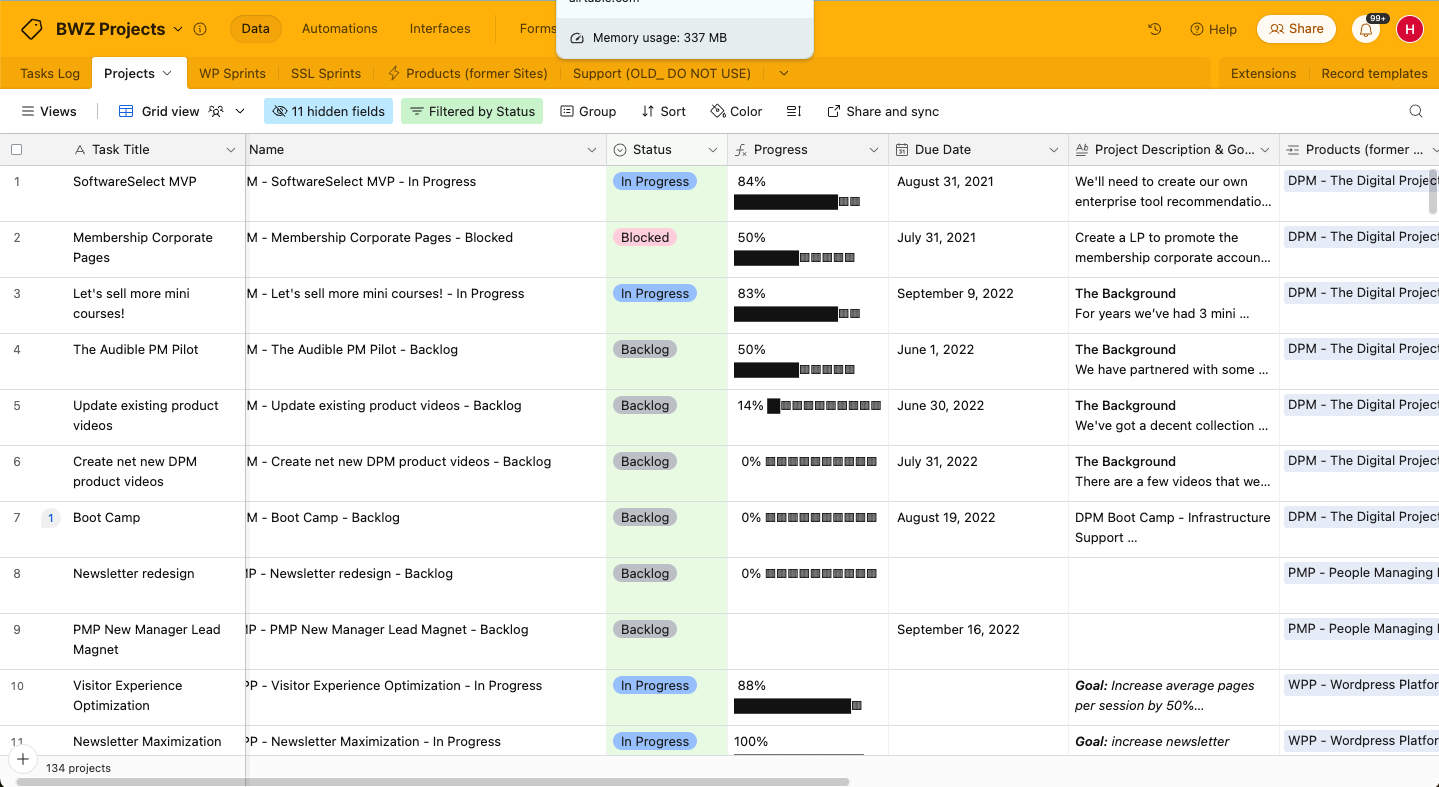
| Benutzeroberfläche | Airtables Oberfläche ist flexibel, rasterbasiert und ermöglicht individuell gestaltbare Layouts. | Asanas Oberfläche ist aufgeräumt mit intuitiver Navigation und Aufgabenansichten. |
| Onboarding-Erlebnis | Airtable bietet geführte Tutorials und Vorlagen für einen schnellen Einstieg und eine kurze Einarbeitungszeit. | Asana stellt eine schrittweise Einführung mit Video-Tutorials und Hilfeseiten zur Verfügung. |
| Einrichtung | Die Einrichtung von Airtable ist unkompliziert und beinhaltet Drag-and-Drop-Funktionalität. | Asana benötigt nur minimale Einrichtung und bietet einfach zu verwendende Projektvorlagen. |
| Support | Airtable bietet Community-Foren und E-Mail-Support zur Fehlerbehebung. | Asana verfügt über ein umfassendes Hilfezentrum und einen reaktionsschnellen Kundensupport per E-Mail. |
| Anpassungsoptionen | Airtable erlaubt umfangreiche Anpassungen mit Feldern und Projektansichten. | Asana bietet Anpassungen über Aufgaben-Vorlagen und Projektlayouts. |
Airtable brilliert mit umfassenden Anpassungsmöglichkeiten, was es ideal macht, wenn Sie flexible Projektlayouts benötigen, doch die Oberfläche kann anfangs etwas überwältigend wirken. Asana ist dagegen sehr leicht zu bedienen, allerdings könnten die begrenzten Anpassungsmöglichkeiten für komplexere Arbeitsabläufe ungeeignet sein.
Airtable vs Asana: Pros & Cons
Airtable
- Its automation rules make it easy to notify stakeholders, even if they are outside the platform.
- Airtable's forms feature lets you efficiently gather information from external sources.
- You can connect and perform calculations across multiple bases.
- Customizing the templates requires a big time investment.
- It's not a traditional project management platform.
- The learning curve can be challenging for new users.
Asana
- You can easily track tasks and deadlines using Asana's intuitive interface.
- Asana's collaboration tools help your team communicate effectively in real-time.
- There are extensive customization options so you can tailor workflows and views to your specific needs.
- The reporting capabilities are somewhat basic, which may not satisfy teams needing detailed analytics.
- It can feel overwhelming if your team is small or your projects are simple.
- You might find the notification system a bit excessive or distracting.
Best Use Cases for Airtable and Asana
Airtable
- Creative agencies Airtable lets your team design custom project pipelines to foster creativity and improve task management.
- Marketing teams You can track campaigns with Airtable’s flexible and visual database and make sure every detail is covered.
- Small businesses Airtable adapts to your unique business processes and can scale with you as your team grows.
- Event planners Its visual calendar and task management features help you coordinate every detail efficiently.
- Consulting firms Track client projects and deliverables with Airtable’s customizable views and data organization.
- Product development You can manage product roadmaps and feature backlogs with Airtable’s powerful database tools.
Asana
- Creative agencies You can manage creative workflows and client projects with Asana’s visual boards and timeline features.
- Tech startups You can coordinate product development and team tasks using Asana’s real-time updates and goal-setting tools.
- Marketing teams You can plan campaigns and track progress with Asana’s clear timelines and task comments.
- Nonprofits Asana lets you manage volunteer tasks, events, and fundraising efforts with clear task assignments and timelines.
- Remote teams You can collaborate effectively with Asana’s real-time updates and communication features.
- Event planners You can organize events easily with Asana’s task management and timeline visualization features.
Wer sollte Airtable nutzen und wer sollte Asana verwenden?
Airtable eignet sich besonders für kreative Teams oder Branchen, die Flexibilität und Anpassbarkeit benötigen, wie zum Beispiel Marketingagenturen oder Designfirmen. Besonders vorteilhaft ist es bei datenorientierten Projekten, die von einer hochgradig anpassbaren Struktur profitieren.
Asana hingegen ist optimal für strukturierte Umgebungen wie Tech-Startups oder Unternehmensteams, die auf klare Aufgabenverwaltung und Deadlines angewiesen sind. Wenn Ihr Team Wert auf klar definierte Aufgaben und Zeitpläne legt, ist Asana die bessere Wahl.
Differences Between Airtable and Asana
| Airtable | Asana | |
|---|---|---|
| Customization | Airtable lets you design custom layouts and custom fields for unique workflows. | Asana offers limited customization with predefined task templates. |
| Flexibility | Airtable is highly adaptable for a wide range of project types and industries. | Asana is structured and best for teams that need clear task and subtask assignments. |
| User Interface | Airtable’s interface is grid-based, which is ideal for data-centric projects. | Asana’s interface is task-focused and perfect for clear task management. |
| Read Airtable ReviewOpens new window | Read Asana ReviewOpens new window |
Similarities Between Airtable and Asana
| Automation | Both offer automation features that can help you reduce manual tasks and repetitive work. |
|---|---|
| Collaboration | Both Airtable and Asana offer real-time team collaboration so everyone can work together seamlessly. Airtable offers shared views and Asana includes task discussion features. |
| Integrations | Both platforms integrate with popular tools like Slack and Google Drive, so your team can connect their existing tools and smooth out their workflows. |
| Pricing | Both offer tiered pricing models that can flex and scale as your team's needs grow, with options for additional features at higher tiers. They both also offer free plans. |
| User-Friendly Design | Both Airtable and Asana boast intuitive interfaces that make it easy for your team members to adopt and use daily, as well as drag-and-drop features and clear navigation. |
| Read Airtable ReviewOpens new window Read Asana ReviewOpens new window | |