

Video Prodüksiyonu İçin En İyi 10 Proje Yönetimi Yazılımı

10 Video Prodüksiyonu İçin En İyi Proje Yönetimi Yazılımları Kısa Listesi


Video prodüksiyonu için doğru proje yönetimi yazılımı, sizin ve ekibinizin video projelerini verimli bir şekilde planlamasına, yönetmesine ve yürütmesine yardımcı olabilir. Bu yazılımlar iş birliğini kolaylaştırır, ilerlemeyi takip eder ve teslim tarihlerine uyulmasını sağlar. Bu yazılımlar, düzensiz iş akışlarını, kaçırılan teslim tarihlerini ve ekip içi zayıf iletişimi azaltmak için idealdir.
Piyasada çok fazla seçenek bulunduğundan video prodüksiyonu için doğru proje yönetimi yazılımını seçmek zordur. Video projelerinizi daha verimli hâle getirmek istiyorsunuz, ancak hangi aracın ihtiyaçlarınıza en uygun olduğunu belirlemeniz gerekiyor. Size yardımcı olabilirim! Dijital projeleri yönetme ve çeşitli proje yönetimi araçlarını kullanma konusundaki yıllara dayanan deneyimimle, video prodüksiyonu için en iyi yazılımı bulmanıza yardımcı olabilirim. Ekibiniz için doğru seçimi yapmanıza yardımcı olmak üzere, video prodüksiyonu proje yönetimi için en iyi yazılımlara dair en iyi seçimlerim burada.
Why Trust Our Software Recommendations
Our team has been testing and reviewing software since 2012. As project managers ourselves, we know how difficult—and important—it is to choose the right software.
For this guide, we evaluated tools using hands-on testing and independent research, scoring tools using our selection criteria. We also draw on insights from industry thought leaders and practicing project management experts.
Our reviews reflect our human editorial judgment, not a sales pitch.
Expert reviewers:
Karşılaştırma Tablosu: Video Prodüksiyonu İçin Proje Yönetimi Yazılımları
Bu karşılaştırma tablosu, video prodüksiyonu yönetimi için en iyi yazılım seçimlerimin fiyatlandırma ayrıntılarını özetlemektedir.
Score legend (out of 5)
- Excellent 4.5–5
- Good 4–4.4
- Average 3–3.9
- Below average 2–2.9
- Poor 1–1.9
| Tool | Starting Price | Website | |||||||
|---|---|---|---|---|---|---|---|---|---|
| Best for managing creative requests | 3.3 out of 5 | 4 | 4 | 2 | 3 | 4 | 3 | $10/user/month Free plan + 14-day trial + demo available | Book Demo |
| Best with customizable no-code workflow automation | 3.7 out of 5 | 4 | 3 | 4 | 3 | 4 | 4 | Pricing upon request Not available | Book Demo |
| Best for production timeline tracking | 3.0 out of 5 | 2 | 4 | 4 | 2 | 3 | 3 | Pricing upon request Free plan + 15-day trial + demo available | Website |
| Best for agency-side creative approvals | 3.0 out of 5 | 3 | 4 | 3 | 2 | 3 | 3 | $8/user/month 14-day free trial + demo available | Website |
| Best for agency client work and budget tracking | 3.0 out of 5 | 2 | 4 | 4 | 2 | 3 | 3 | $9.99/user/month Free plan + 14-day free trial + free demo available | Website |
| Best for all-in-one production task tracking | 3.0 out of 5 | 3 | 4 | 3 | 3 | 4 | 1 | $12/user/month Free plan + trial + demo available | Website |
| Best for VFX and animation pipeline tracking | 3.5 out of 5 | 4 | 4 | 3 | 4 | 3 | 3 | $50/month 30-day free trial | Website |
| Best for VFX and post-production tracking | 3.5 out of 5 | 4 | 4 | 2 | 3 | 4 | 4 | $10/month Free demo available | Website |
| Best for NLE-connected video review and approvals | 3.0 out of 5 | 4 | 4 | 2 | 2 | 3 | 3 | $10/user/month Free plan available | Website |
| Best for open-source animation studio tracking | 3.5 out of 5 | 4 | 4 | 4 | 3 | 3 | 3 | €20/user/month Free plan available; 14-day free trial | Website |
Video Prodüksiyonu İçin En İyi Proje Yönetimi Yazılımları İncelemeleri
Bu kapsamlı analiz, video prodüksiyonu için uyarlanmış her bir proje yönetimi yazılımına genel bir bakış sunmaktadır. Her aracın avantajlarını ve dezavantajlarını, özelliklerini ve en uygun kullanım alanlarını ele almaktadır.

Wrike
Best for managing creative requests
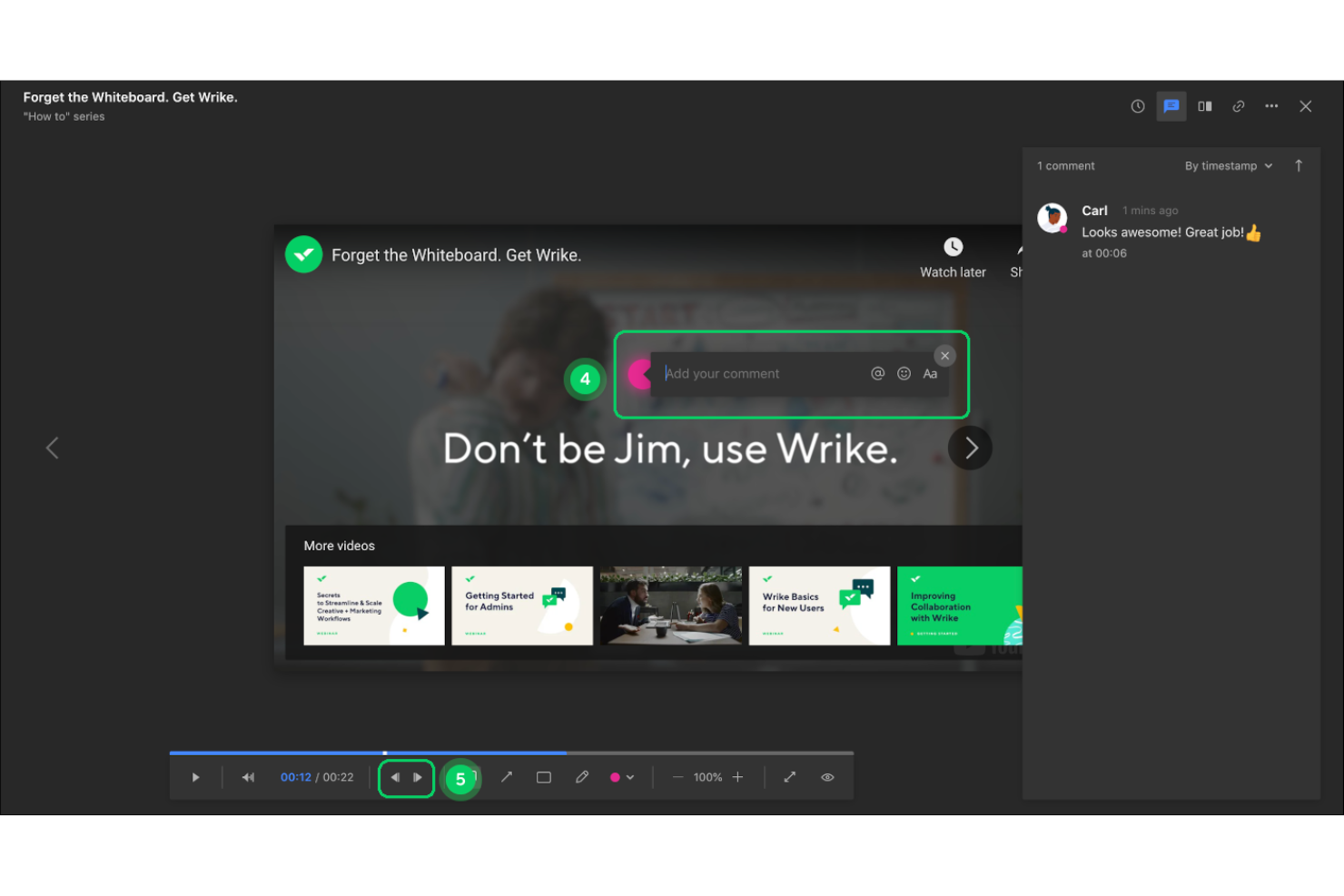
Wrike is a work and project management platform that combines task tracking, custom workflows, video proofing, resource scheduling, and creative request intake to support media and creative production teams.
Who Is Wrike Best For?
Wrike is a strong fit for creative and media teams that need a central place to manage incoming project requests, route work automatically, and coordinate reviews across multiple stakeholders.
Why I Picked Wrike
I've included Wrike in my top picks because it handles creative request intake better than most general project management tools I've used. When a new video project lands, custom request forms automatically route it into the right workflow, so nothing gets lost in an inbox. I also rely on its frame-level video proofing, which lets stakeholders drop comments at the exact timestamp where a change is needed, turning what's usually a chaotic revision process into something trackable and organized.
Wrike Key Features
- Custom request forms: Collect incoming project details through configurable forms that automatically route work into the right workflow.
- Gantt chart with task dependencies: Visualize production timelines and set dependencies that shift downstream task dates automatically when schedules change.
- Guest file review: Invite external stakeholders to comment, approve, or request changes on assets without requiring a Wrike account.
- Adobe Premiere Pro integration: Access Wrike tasks and upload MP4 preview versions directly from Premiere Pro via the Adobe Creative Cloud extension.
Wrike Integrations
Wrike lists 400+ integrations, including Adobe Creative Cloud, Adobe Premiere Pro, Google Drive, Dropbox, Jira, GitHub, Slack, and Microsoft Teams. It also offers a RESTful API, OAuth 2.0, webhooks, Datahub API, BI Export API, and Wrike MCP Server for custom connectivity.
Pros and Cons
Pros:
- Dependencies help teams track shifting timelines
- Guest approvals reduce client email back-and-forth
- Frame-specific comments clarify video revisions
Cons:
- Advanced production controls sit behind plan gates
- Complex workflow setup takes careful configuration
New Product Updates from Wrike

Wrike Redesigns Workspace Search With New Filters
Wrike introduces a redesigned Workspace Search interface with recent search shortcuts, item type and location filters, and parent-task context. These updates help users find relevant work items and navigate search results efficiently. For more information, visit Wrike’s official site.
 .
Best with customizable no-code workflow automation
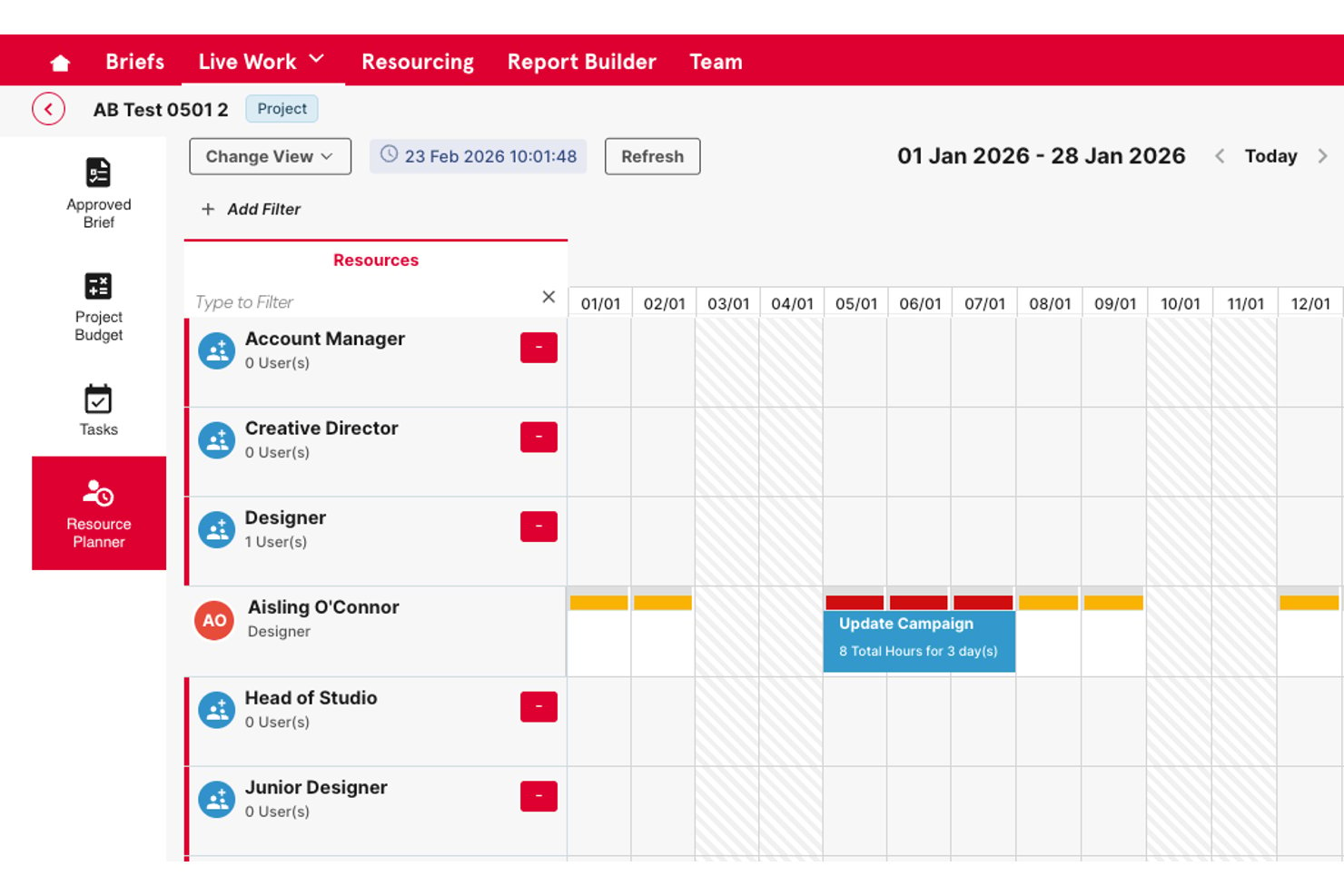
Screendragon is an AI-powered creative workflow and approval platform built for agency and marketing teams, offering no-code workflow automation, in-platform video review, resource planning, budget tracking, and a searchable digital asset library.
Who Is Screendragon Best For?
Screendragon is a strong fit for agency and in-house creative teams that need to manage review cycles, approvals, and budgets across multiple concurrent projects.
Why I Picked Screendragon
I picked Screendragon because its no-code workflow builder lets creative teams configure multi-stage approval routes for video assets without touching a single line of code. I especially like how reviewers can leave time-stamped comments and visual markups directly on video files, keeping feedback centralized instead of scattered across email threads. The AI-powered version comparison, which flags pixel-level differences between cuts, makes it easy to catch subtle changes during review cycles across concurrent projects.
Screendragon Key Features
- Budget tracking with overrun alerts: Timesheets feed live costs against job budgets, with threshold alerts that flag scope creep before it becomes a problem.
- Searchable digital asset library: A built-in DAM with AI-powered search, smart tagging, governance controls, and version control keeps creative assets organized and accessible.
- Multi-stage approval routing: Content can be routed through sequential, parallel, or conditional approval steps for internal teams, clients, or legal reviewers.
- Resource planning by skill and availability: The resourcing module matches team members to projects based on role, skill set, and current availability across concurrent jobs.
Screendragon Integrations
Screendragon claims 1,000+ integrations, including native connections with Google Cloud Storage, Amazon S3, Adobe, Slack, Microsoft Teams, and Jira Software. It offers a RESTful OAuth2 API for custom integrations and Zapier access.
Pros and Cons
Pros:
- Budget and resource views span concurrent projects
- Custom approval routes adapt to agency workflows
- Timestamped video feedback reduces email back-and-forth
Cons:
- Reviewers report proofing trails dedicated review tools
- No documented shoot-day or equipment scheduling

Best for production timeline tracking
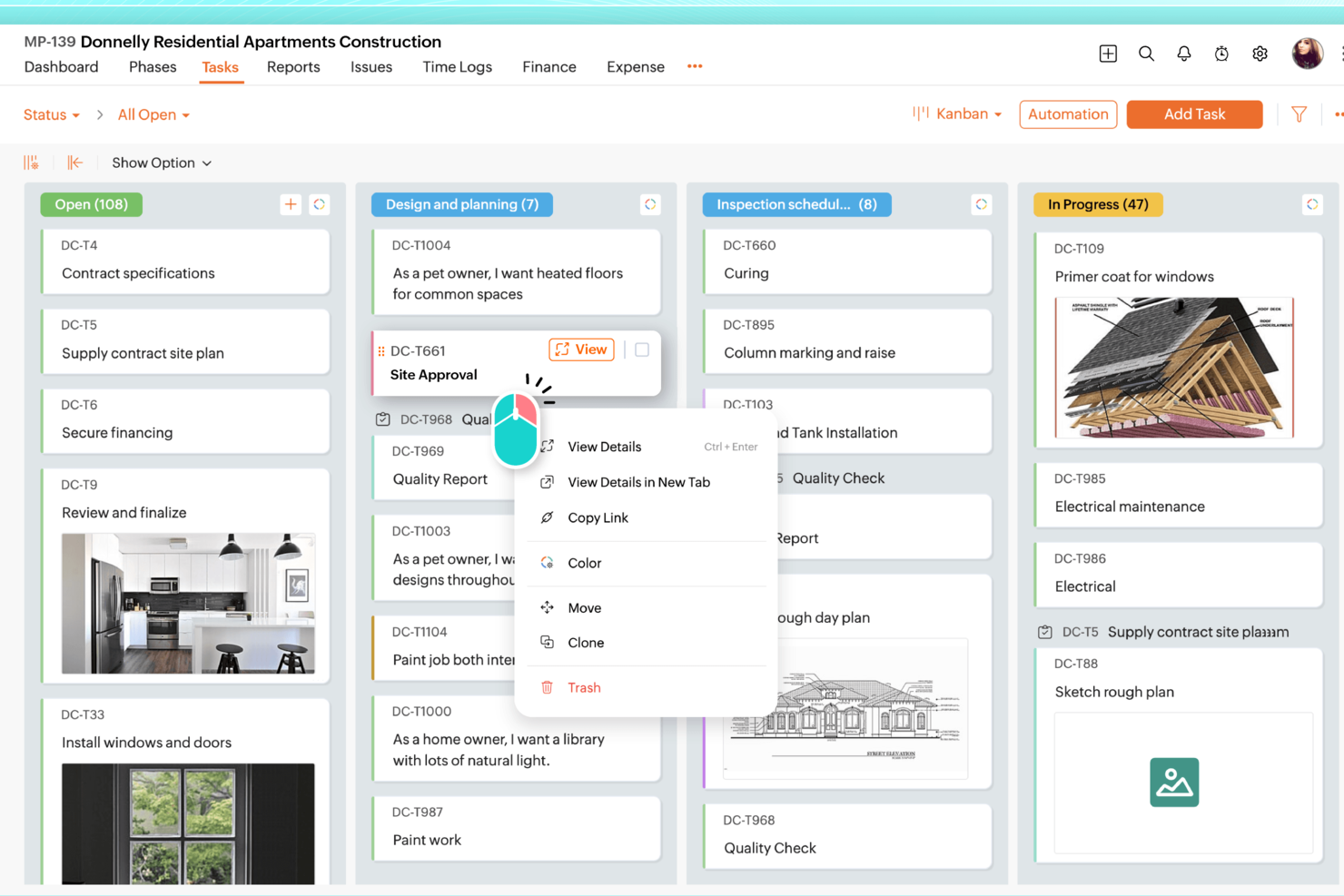
Zoho Projects is a project management platform that combines task tracking, Gantt-based scheduling, budget monitoring, file versioning, and workflow automation for teams managing multi-phase projects.
Who Is Zoho Projects Best For?
Zoho Projects is a strong fit for creative agencies and marketing teams that need structured timeline tracking and budget oversight across multiple concurrent projects.
Why I Picked Zoho Projects
I've included Zoho Projects in my top picks because its budget and timeline tracking capabilities are genuinely strong for managing production schedules across concurrent projects. I like how you can set budgets at the project, phase, or task level, and enable threshold alerts that notify you the moment actual costs approach your planned budget. Gantt charts with critical path and baseline comparisons let me see exactly where a production timeline is slipping before it becomes a real problem.
Zoho Projects Key Features
- Task blueprint: Design structured task workflows that automatically assign people, update fields, and trigger notifications when a task status changes.
- File versioning with check-out: Replace files with new versions and version notes, and lock files for exclusive editing so other users see only the approved version.
- Workload heatmap view: Visualize team availability and overload across daily, weekly, or monthly schedules, and drag task bars to reassign work directly from the chart.
- Workflow automation rules: Set trigger-based rules to automate actions on project work items, with up to 500,000 executions per month on the highest tier.
Zoho Projects Integrations
Zoho Projects offers 50+ marketplace integrations, including native connections with Zoho WorkDrive, Zoho Books, Zoho Invoice, Zoho Analytics, Google Calendar, Microsoft 365, Slack, Dropbox, Box, and GitHub. It also provides REST APIs with OAuth 2.0 and connects through Zoho Flow and Zapier.
Pros and Cons
Pros:
- File version notes support asset handoffs
- Budget forecasts flag project cost overruns
- Gantt dependencies clarify shifting production schedules
Cons:
- 500 MB file cap constrains footage sharing
- No frame-accurate video review or approvals
New Product Updates from Zoho Projects
Zoho Projects Adds CodeX Scripts for Custom Modules
Zoho Projects now supports CodeX Scripts for custom modules, enabling conditional logic and rules for creating, updating, and deleting records. For more information, visit Zoho Projects' official site.
 .

Workzone
Best for agency-side creative approvals
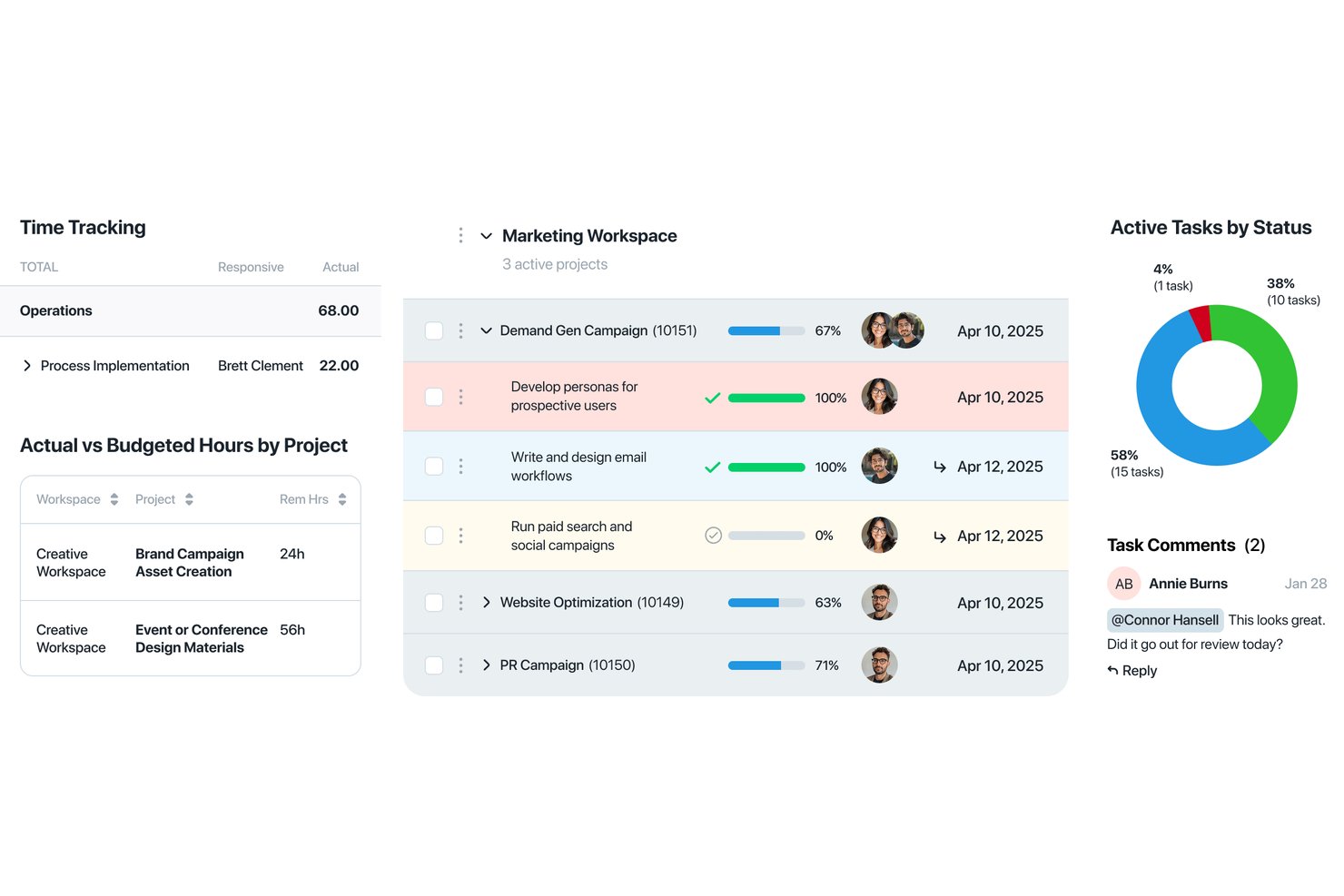
Workzone is a project management platform that combines task tracking, Gantt and Kanban views, file versioning, timestamped video markup, and approval workflows for creative and agency teams.
Who Is Workzone Best For?
Workzone suits creative and agency teams that need structured approval workflows and cross-project visibility without the complexity of enterprise-grade tools.
Why I Picked Workzone
I've included Workzone in my top picks because it handles agency-side creative approvals better than most general project management tools. I particularly like how reviewers can leave timestamped comments directly on video files, keeping feedback anchored to the exact moment that needs attention. Document approvals and PDF/image markup are also built into the Team plan, so creative rounds move from request to sign-off without leaving the platform.
Workzone Key Features
- Portfolio view: Displays progress across all active projects in a single dashboard, so you can track deadlines and status without opening each project individually.
- Intake forms: Collects incoming project requests with structured fields, letting you capture brief details and prioritize work before it enters your project queue.
- Workload and capacity planning: Shows team assignments and availability across projects, helping you balance work before committing to new deliverables.
- File versioning: Lets you upload new document versions and keep prior iterations with sequential version numbers, so your team always knows which file is current.
Workzone Integrations
Workzone offers native integrations with Google Drive, OneDrive, Slack, Microsoft Teams, and Microsoft SharePoint, plus integrations with Adobe Creative Cloud and over 1,000 web apps through Zapier. Enterprise plans include a REST API for custom integrations.
Pros and Cons
Pros:
- Workload reports help coordinate concurrent projects
- Creative approvals keep feedback with files
- Timestamped video comments anchor feedback
Cons:
- No shoot-day crew or equipment scheduling
- No pre-production or post-production workflows
New Product Updates from Workzone

Workzone Enterprise Adds Multi-Stage Approval Workflows
Workzone Enterprise now includes Approval Workflows, enabling multi-stage document approvals to standardize complex processes and reduce manual effort. For more information, visit Workzone's official site.
 .
Best for agency client work and budget tracking
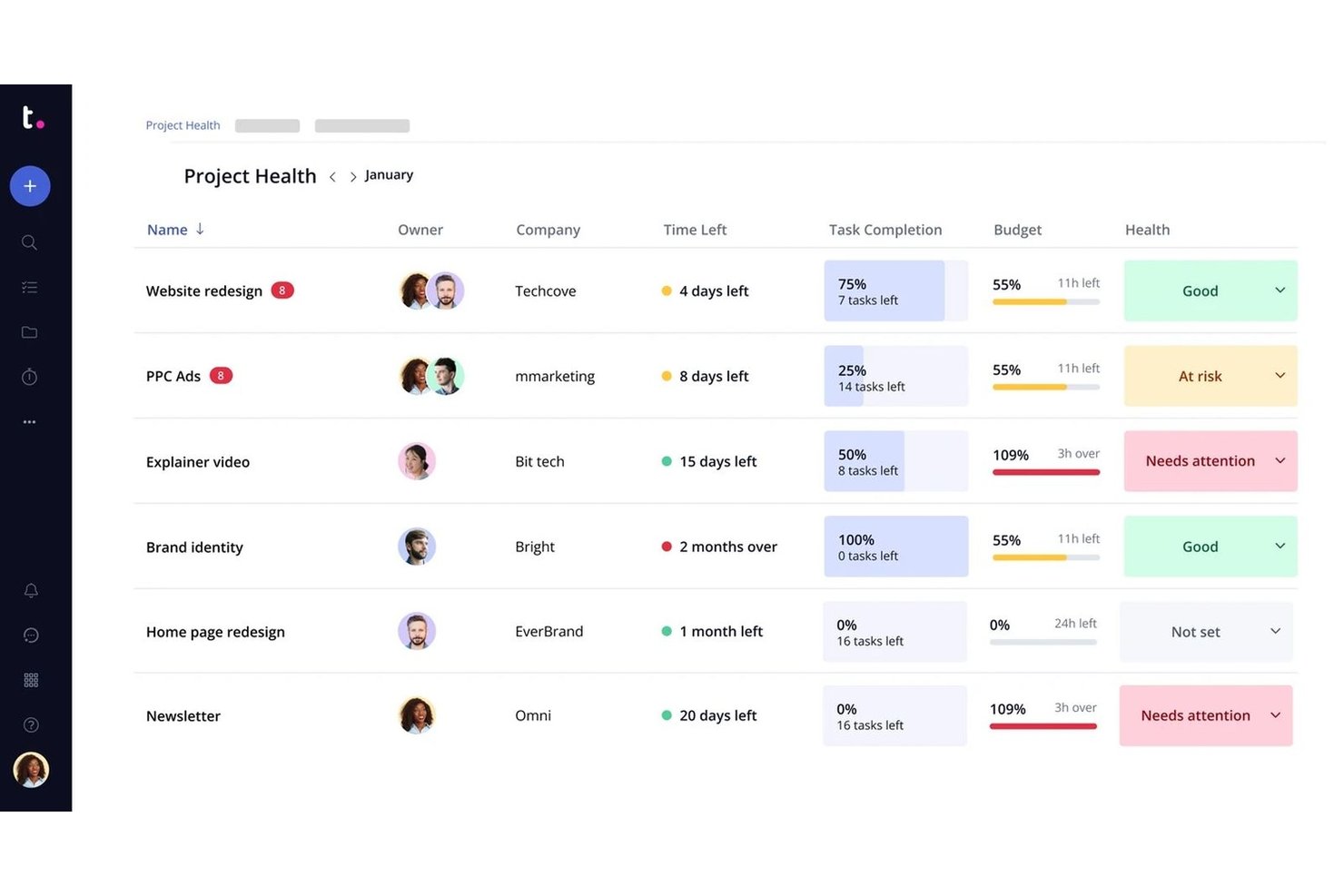
Teamwork.com is a client-work project management platform that combines task tracking, resource scheduling, budget management, time logging, and approval workflows for agencies and teams managing multiple concurrent projects.
Who Is Teamwork.com Best For?
Teamwork.com suits agencies that manage video work alongside other client deliverables and need tight budget tracking, time logging, and invoicing in one place.
Why I Picked Teamwork.com
I've included Teamwork.com in my top picks because it's the strongest option on this list for agencies juggling video projects alongside other client work, where budget visibility and invoicing matter as much as task tracking. I particularly like how it ties time logging directly to client invoices: you can log billable hours against a project, set budget threshold alerts, and generate invoices from those logged hours without leaving the platform. For a creative agency producing video content for multiple clients at once, that closed loop between tracked effort and client billing is genuinely hard to replicate with general-purpose tools.
Teamwork.com Key Features
- Proof versioning: Upload new proof versions while retaining all previous versions, with comments tied to the version on which they were made.
- Intake forms: Collect client or team requests via form submissions and automatically convert them into project tasks.
- Workload and capacity planning: View team workloads, identify resourcing issues, and reassign work across concurrent projects.
- Cross-project view: See tasks, milestones, messages, and files from multiple projects in a single consolidated view.
Teamwork.com Integrations
Teamwork.com lists 150+ integrations, including Slack, Google Drive, Dropbox, Microsoft Teams, QuickBooks, HubSpot, Salesforce, Xero, and NetSuite. It also supports an API, webhooks, and Zapier for custom connectivity.
Pros and Cons
Pros:
- Tasks and milestones keep deliverables visible
- Workload views help balance concurrent client edits
- Billable time and budgets track project profitability
Cons:
- Scheduling omits equipment and shoot-day logistics
- Proofing lacks frame-accurate video review

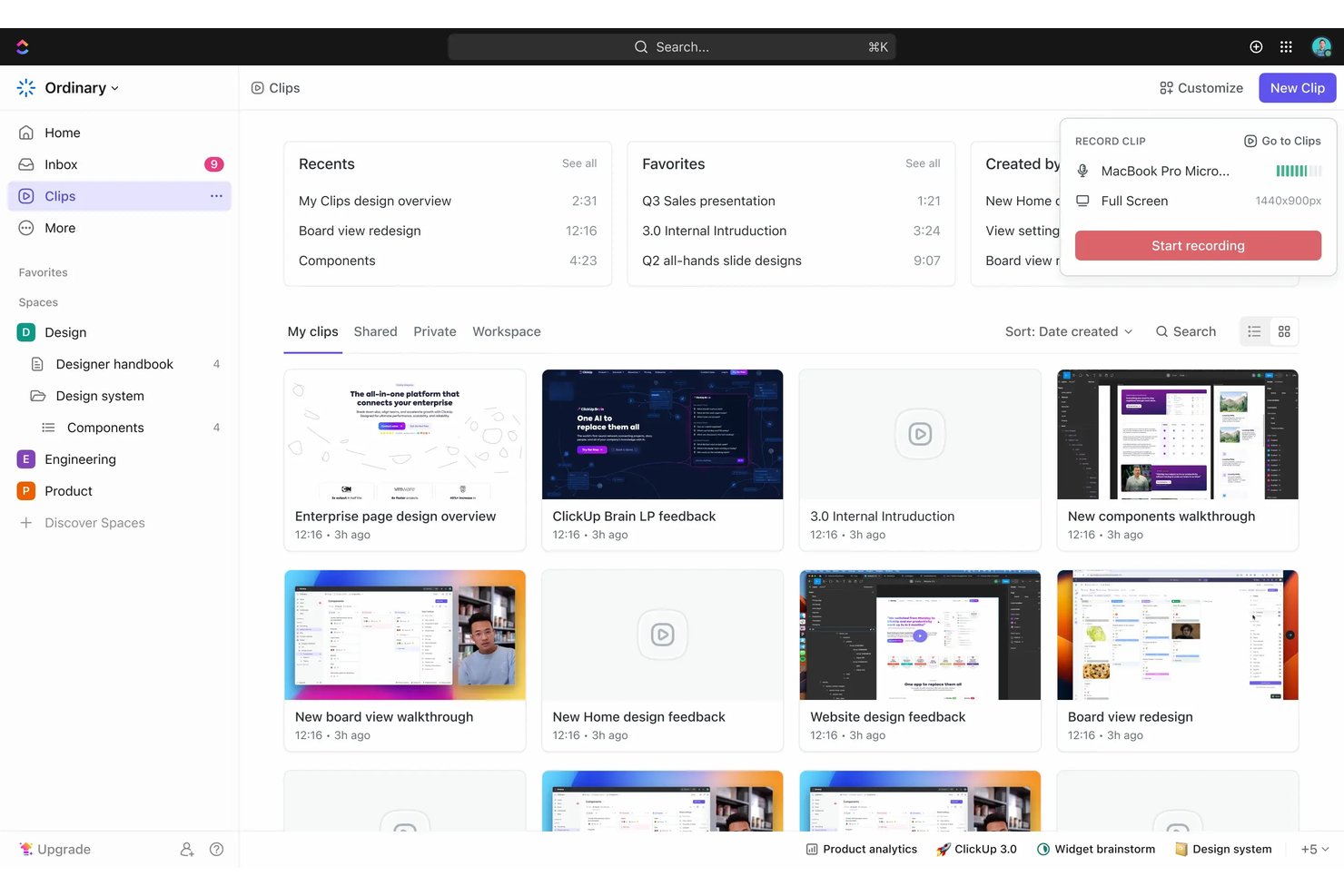
ClickUp is a work management platform that combines task tracking, project scheduling, workload visualization, file attachments, document collaboration, and built-in proofing tools to coordinate video production workflows from pre-production through delivery.
Who Is ClickUp Best For?
ClickUp is a strong fit for video production managers and creative agency producers who need a flexible, centralized hub to coordinate tasks, files, and team schedules across multiple projects.
Why I Picked ClickUp
I've included ClickUp in my top picks because it pulls pre-production, production, and post-production work into a single task-tracking system without forcing your team to juggle multiple tools. I particularly like how dependencies and scheduling auto-adjust when a blocking task shifts dates, which keeps shoot-day timelines from cascading into chaos. Proofing lets reviewers drop timestamped comments directly on video attachments, and Workload view shows exactly who's over capacity before you finalize a crew assignment.
ClickUp Key Features
- Custom task statuses: Create workflow-specific statuses like "In Edit," "Awaiting Approval," or "Ready to Deliver" to reflect your production pipeline stages.
- Gantt chart and timeline views: Map task dependencies and deadlines visually across pre-production, production, and post-production phases.
- Docs with task linking: Build briefs, shot lists, and scripts directly in ClickUp and connect them to the relevant production tasks.
- Automations: Set rules that trigger status changes, reassignments, or notifications when a task condition is met.
ClickUp Integrations
ClickUp offers 50+ native integrations, including Google Drive, Dropbox, Box, Vimeo, Slack, and Google Calendar. It also supports a public API, webhooks, OAuth, and Zapier for custom connections.
Pros and Cons
Pros:
- Dependency shifts keep shoot schedules aligned
- Tasks and Docs keep project context together
- Custom statuses map production stages
Cons:
- Proofing falls short of full approval chains
- Media files lack native version comparison

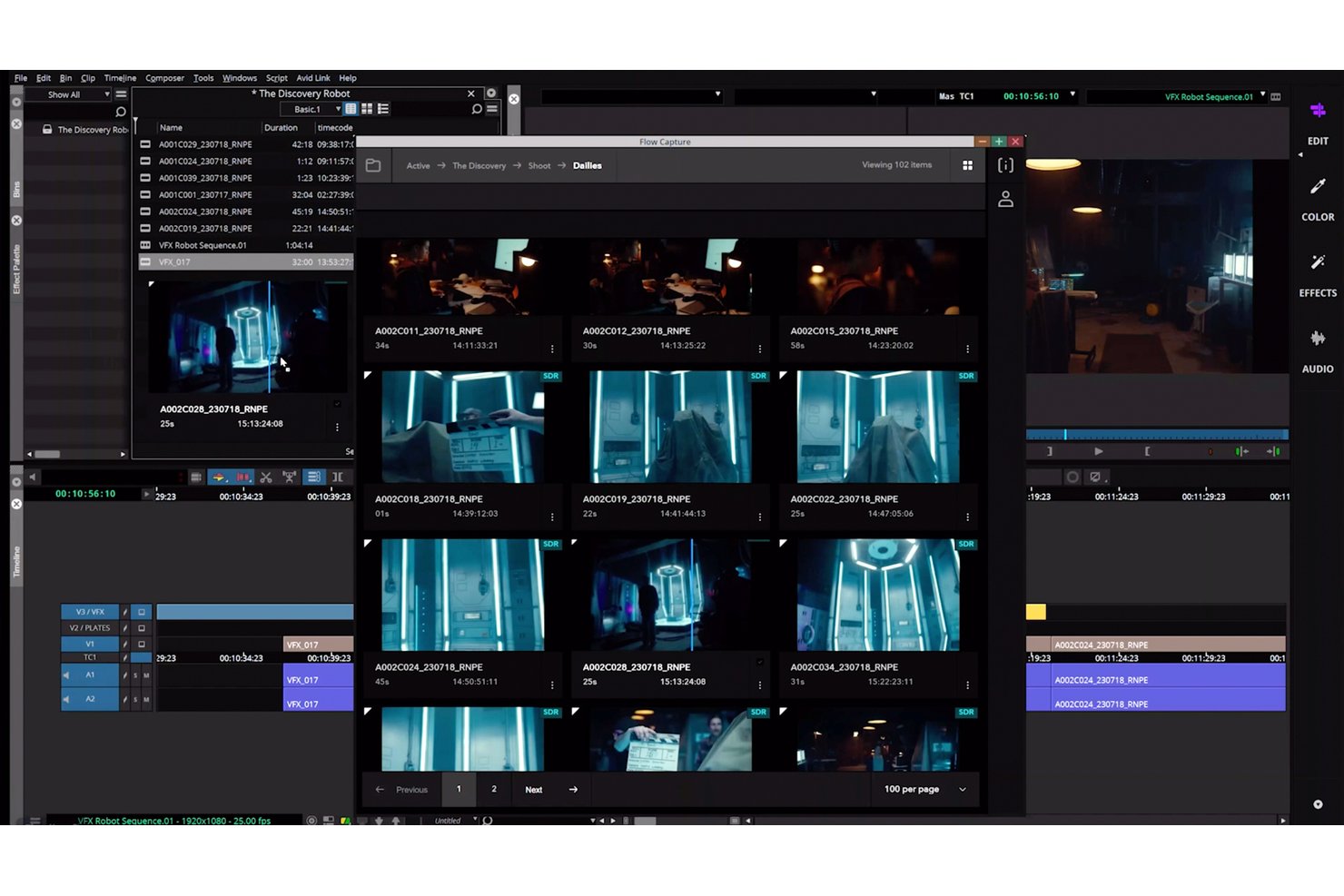
Autodesk Flow Production Tracking is a cloud-based production management and review platform built for VFX and animation pipelines, combining task tracking, resource scheduling, media review, asset management, and budget and timeline monitoring across productions.
Who Is Autodesk Flow Production Tracking Best For?
Flow Production Tracking is built for VFX and animation studios that need to manage complex pipelines across artists, assets, and production milestones in one place.
Why I Picked Autodesk Flow Production Tracking
Flow Production Tracking earns its spot on my list because it's purpose-built for the kind of pipeline complexity that VFX and animation studios deal with every day. I'm particularly drawn to Flow Generative Scheduling, which generates multiple resource-optimized schedules and adapts as project scope shifts, and Live Review, which lets distributed teams annotate and give feedback on footage in real-time synchronized sessions. Together, those two features handle the crew coordination and media review demands that define production work at scale.
Autodesk Flow Production Tracking Key Features
- Production insights dashboard: Visualizes production data and project progress across tasks, budgets, timelines, and resources in one view.
- Overlay Player with annotations: Opens uploaded media directly in-browser and lets reviewers draw on frames, attach notes, and inspect version details.
- Cross-project asset linking: Connects assets across multiple projects by adding a destination project to an asset's Linked Projects field without duplicating files.
- Customizable API and pipeline toolkit: Supports custom integrations and tools through Pipeline Toolkit, Python API, REST API, and webhooks.
Autodesk Flow Production Tracking Integrations
Autodesk Flow Production Tracking offers native integrations with Maya, 3ds Max, Unreal Engine, and RV. It supports custom integrations through Pipeline Toolkit, Python API, REST API, and webhooks.
Pros and Cons
Pros:
- Balances artist capacity across changing schedules
- Frame-level annotations support media reviews
- Centralizes work across production pipelines
Cons:
- Linked assets can modify source files
- Review comments aren't sorted by timecode


ftrack Studio is a production tracking and project management platform built for VFX and post-production teams, offering task scheduling, Gantt-based planning, synchronized media review, frame-accurate annotation, and version management across creative projects.
Who Is ftrack Best For?
ftrack is a strong fit for VFX studios and post-production teams that need frame-accurate review, version tracking, and production scheduling in one place.
Why I Picked ftrack
I've included ftrack in my top picks because it's purpose-built for VFX and post-production tracking in a way that general project management tools simply aren't. I particularly like the synchronized media review, where every participant sees the same frame at the same time, and frame-accurate annotations get logged directly against the version. The Capacity Forecast tool is also genuinely useful for VFX pipelines, letting you compare estimated work against team availability across multiple concurrent productions.
ftrack Key Features
- Configurable approval statuses: Set up custom status lists to represent stages like pending review, revision requested, or client approved against tasks and asset versions.
- Adobe Premiere Pro integration: Publish working files directly from Premiere Pro to ftrack for tracking and iteration, and reopen previously published versions from within the NLE.
- Kanban task boards: Manage production tasks on kanban boards with inline comments and to-do notes for team direction.
- Review session PDF export: Export client review sessions to PDF with thumbnails, timecodes, and notes for offline reference or client records.
ftrack Integrations
ftrack offers native integrations with Adobe Premiere Pro, Adobe After Effects, Nuke Studio, Foundry, Autodesk 3ds Max, Maxon Cinema 4D, Unreal Engine, and Adobe Creative Cloud. Its Python, JavaScript, HTTP/JSON APIs, event subscriptions, and webhooks support custom integrations.
Pros and Cons
Pros:
- Capacity forecasts reveal overloaded teams
- Versions stay linked to production tasks
- Frame-specific feedback sharpens edit revisions
Cons:
- Budget and shoot logistics need workarounds
- Review comments can lag or misattach

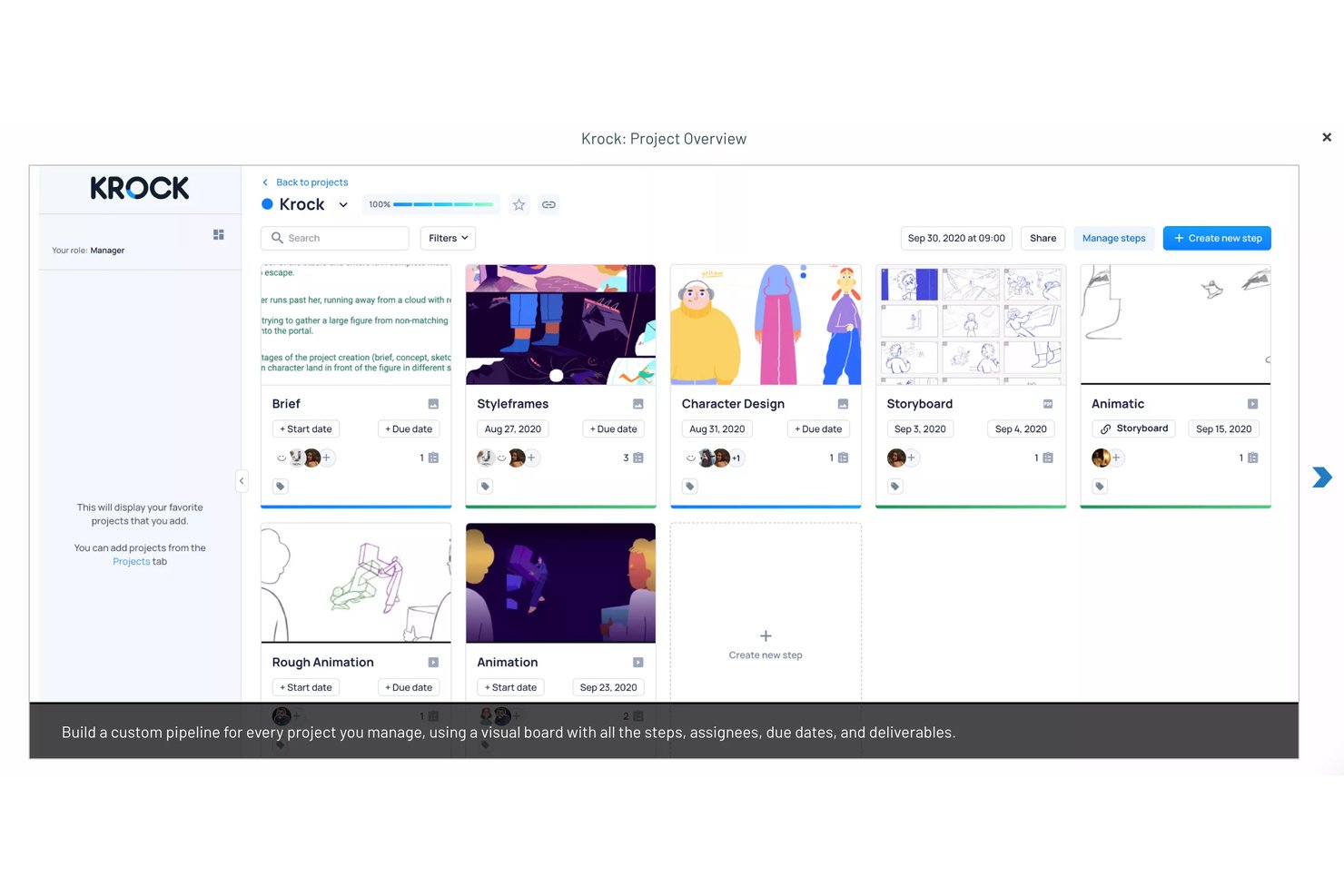
Krock.io is a video production project management and creative collaboration platform that combines multi-stage production pipelines, media review and approval workflows, frame-accurate annotation, and NLE integrations for Adobe Premiere Pro, Final Cut Pro, and DaVinci Resolve.
Who Is Krock.io Best For?
Krock.io is a strong fit for video agencies and creative teams that edit inside Adobe Premiere Pro, Final Cut Pro, or DaVinci Resolve and need client review built directly into that workflow.
Why I Picked Krock.io
I picked Krock.io as one of the best because its NLE integrations go beyond simple file sharing. When I'm reviewing a cut in Adobe Premiere Pro or Final Cut Pro, Krock.io syncs the playhead directly with client comments and imports that feedback as timeline markers, so I'm jumping to the exact frame being discussed instead of hunting for it manually. Frame-accurate annotations and version-tied approvals keep every round of changes organized inside the same project pipeline, from storyboard through final delivery.
Krock.io Key Features
- Multi-stage project pipelines: Build custom production sequences with dependent steps, assignees, start dates, and deadlines that cover pre-production through final delivery.
- Storyboard AI tool: Generate storyboard visuals from text or a CSV file, then export as PDF or CSV and collect frame-level comments from collaborators.
- Multi-format media annotation: Leave time-coded or frame-level comments on video, image, PDF, and audio files within a single project workspace.
- Unlimited reviewer seats: Invite external clients and stakeholders to review projects or share viewer links without requiring them to hold a paid subscription seat.
Krock.io Integrations
Krock.io offers native integrations with Adobe Creative Cloud, Final Cut Pro, DaVinci Resolve Studio, Slack, Google Calendar, Apple Calendar, and Outlook Calendar. Webhooks support custom workflow connections, but a public API specification isn’t documented.
Pros and Cons
Pros:
- Reviewers praise centralized feedback across media formats
- Frame-level comments tie feedback to exact moments
- Production stages, tasks, and deadlines stay connected
Cons:
- Crew availability and production budgets lack tracking tools
- Users report slow large-file uploads

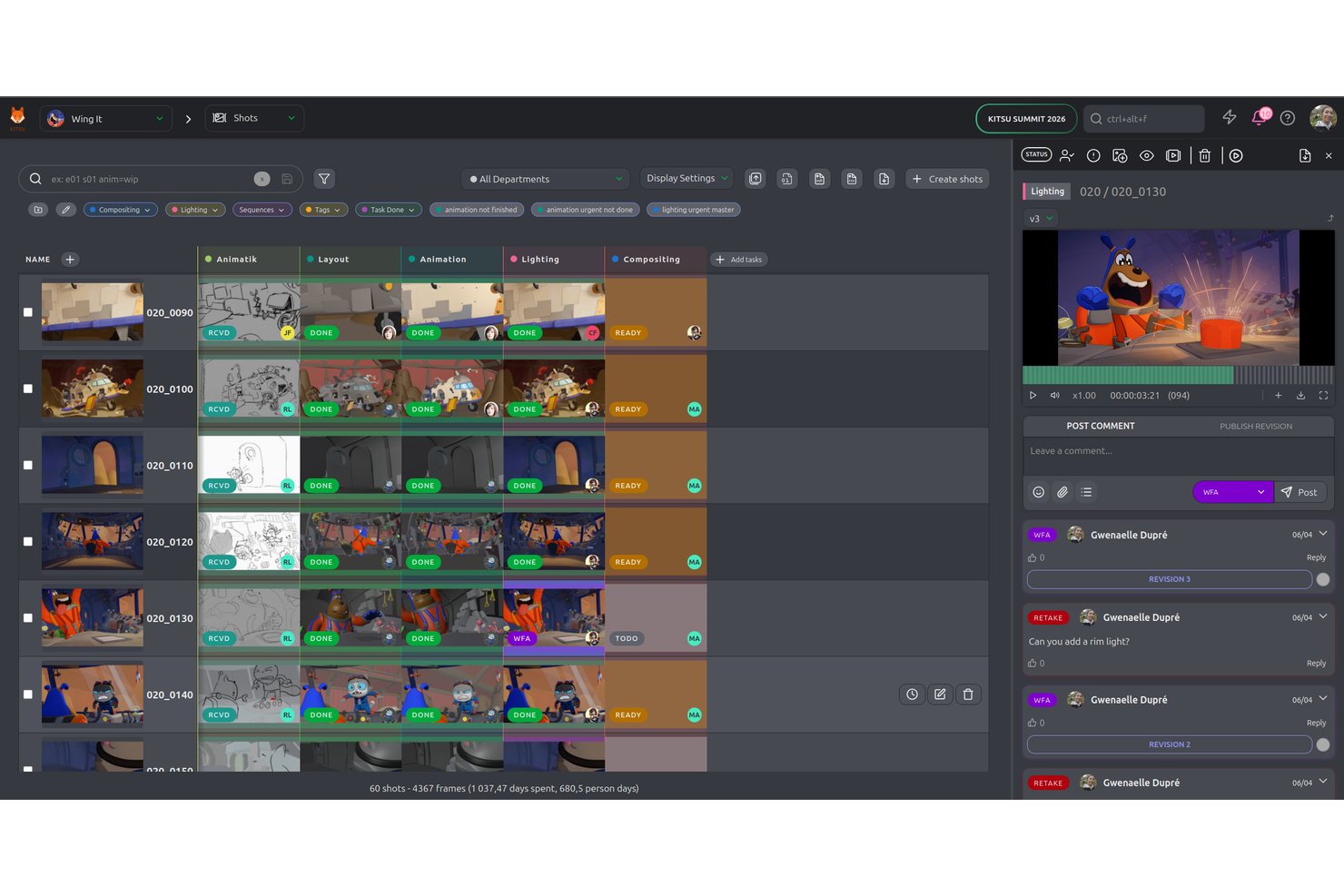
Kitsu is an open-source production tracking and collaboration platform built for animation, VFX, and game studios, covering task assignment, shot tracking, scheduling, budget forecasting, and frame-accurate media review.
Who Is Kitsu Best For?
Kitsu is a strong fit for animation and VFX studios that want open-source flexibility, from indie teams running shorts to mid-sized studios managing multiple productions at once.
Why I Picked Kitsu
I've included Kitsu in my top picks because it's the only open-source production tracker purpose-built for animation and VFX workflows, meaning studios can self-host the entire platform at no licensing cost while keeping full control over their data and pipeline. I particularly like its frame-accurate review engine, where supervisors can annotate directly on frames, run synchronized online review sessions, and compare two versions side by side, all without leaving the browser. Its shot-level task tracking, configurable status automations, and cross-production scheduling views make it genuinely practical for studios running several productions at once.
Kitsu Key Features
- Budget forecasting: Compare current spending against forecasts and model cost scenarios to keep productions on budget.
- Timesheet tracking: Log and review artist hours by person, asset, or shot, then compare estimates against actual time spent.
- Casting breakdown list: Build shot breakdown tables that link assets like characters, props, and sets to their associated shots.
- Chat notifications: Send task updates, status changes, and new previews directly to Slack, Mattermost, or Discord.
Kitsu Integrations
Kitsu has native integrations with Blender, Harmony, Unreal, OpenRV, Slack, Mattermost, and Discord. It also offers REST, Python, and JavaScript APIs for custom integrations, plus community contributions for Houdini, Prism, and Maya.
Pros and Cons
Pros:
- Open-source flexibility suits studios shaping their pipelines
- Shot tracking clarifies production progress and validation
- Frame-accurate reviews keep feedback tied to shots
Cons:
- Pipeline setup can burden very small teams
- Production file management may require separate tools
Video Prodüksiyonu İçin Diğer Proje Yönetimi Yazılımları
Aşağıda, kısa listemize aldığımız ancak en iyi listeye giremeyen video prodüksiyonu için ek proje yönetimi yazılımlarının bir listesi bulunmaktadır. Bunları kesinlikle incelemeye değer.
- monday AI Workspace
For cross-project crew and budget tracking
- Smartsheet
For enterprise-grade video project tracking
- Filestage
For video review and approval workflows
- Assemble
For calendar-driven media review and approvals
- Yamdu
For full-cycle production management
- StreamWork
For multi-stage video approval routing
- Atlas
For filmmakers managing shoots end to end
- Workamajig
For agency budget and resource tracking
- StudioBinder
For pre-production script breakdowns


How I Evaluate Project Management Software for Video Production
I split my evaluation into three parts, giving the most weight to core functionality: assign production tasks, track deadlines, and collect time-stamped video feedback. Next, I look for differentiators such as frame-accurate review. Finally, I consider support, production-specific onboarding, and storage pricing beyond the feature set.
Core Functionality (Table Stakes For This List)
When I'm selecting tools for my list, I score each one on a scale from 0 (does not offer the functionality) to 5 (excels in this area) for each core functionality listed below. I then convert the total into a percentage to help assess each tool's overall fit, with extra weight on any functionalities I’ve deemed essential.
- Task & Project Tracking (Essential): I look for tasks organized by production phase, with owners, deadlines, dependencies, and status views across concurrent shoots and edits.
- Media Review & Approval (Essential): I assess whether reviewers can leave time-stamped, frame-specific feedback and approve or reject versions without losing sign-off context.
- Media Version Control: I check whether teams can find earlier cuts, trace changes to one asset, and compare versions during client review.
- Crew & Resource Scheduling: I look for scheduling that assigns crew, equipment, or shoot days to projects and makes availability conflicts visible.
- File Sharing & Storage: I evaluate how teams organize and share large video files and production assets within projects or through connected storage.
- Budget & Timeline Tracking: I check whether teams can compare budgets and deadlines with production milestones across active projects.
Once I have a list of tools that meet the criteria, I consider what sets each platform apart.
Differentiating Factors (What Sets Vendors Apart)
Here's how I compare and contrast different vendors:
Standout Features
I check whether a tool offers NLE integration plugins that let editors sync comments and versions directly inside Adobe Premiere or DaVinci Resolve—skipping the context switch saves real time during revision rounds. Camera-to-cloud ingest is another separator; on shoots where footage uploads to the platform straight from set, post-production review can start the same day. I also evaluate client-branded review portals, since agencies presenting password-protected, white-labeled links build more trust than sending raw download URLs.
Beyond Features
Storage pricing matters more than most buyers expect. A team shooting 4K across multiple projects can blow past a platform's included storage in weeks, so I check whether tiers scale without punishing overages. I also evaluate how vendors handle security and IP protection—watermarking, forensic tracking, and compliance with standards like MPA/TPN tell you whether a platform is built for pre-release work. Finally, I look at ecosystem fit: does the tool connect to Slack, Dropbox, or accounting software your team already uses daily?
Video Prodüksiyonu İçin Proje Yönetimi Yazılımı Nasıl Seçilir?
Kendinize özgü yazılım seçim sürecinizi yürütürken aşağıdaki noktaları göz önünde bulundurun:
- Düzenleme Araçlarıyla Entegrasyon: Adobe Premiere Pro, Final Cut Pro veya DaVinci Resolve gibi popüler video düzenleme yazılımlarıyla sorunsuz bir şekilde entegre olabilme özelliği kritik öneme sahiptir. Bu, ekibinizin proje yönetimi görevleri ile video düzenleme arasında herhangi bir aksaklık yaşamadan geçiş yapabilmesini sağlar. Örneğin, düzenleme araçlarınızla senkronize olan bir proje yönetimi yazılımına sahip olmak, gerçek zamanlı güncellemeler ve iş birliği olanağı sunarak yapım sonrası iş akışını kolaylaştırabilir.
- Varlık Yönetimi: Video prodüksiyonu; ham görüntüler, ses dosyaları, grafikler ve daha fazlası da dahil olmak üzere çok büyük miktarda medya varlığının yönetilmesini gerektirir. Doğru yazılım; etiketleme, kategorilere ayırma, dosya paylaşımı ve kolay erişim gibi hızlı ve sezgisel varlık yönetimi özellikleri sunmalıdır. Bu, yapım sürecinin düzenli tutulmasına yardımcı olur ve özellikle storyboard'lar, son düzenlemeler veya revizyonlar gibi kritik aşamalarda belirli dosyaları aramak için harcanan zamanı azaltır.
- İş Birliğine Dayalı Özellikler: Video prodüksiyonu; yönetmenleri, kurgucuları, ses tasarımcılarını ve diğer ekip üyelerini içeren, doğası gereği iş birliğine dayalı bir süreçtir. Paylaşılan çalışma alanları, yorumlar, mesajlaşma ve sürüm kontrolü gibi gerçek zamanlı iş birliği özellikleri sunan yazılımlar üretkenliği önemli ölçüde artırabilir. Örneğin, video taslaklarına zaman damgalı yorumlar bırakabilme özelliği, geri bildirim ve onay süreçlerini hızlandırabilir. Serbest çalışanlardan hizmet alıyorsanız, varlıklarını merkezi bir yerde düzenli tutabileceğiniz; böylece hızlı düzenlemeleri kendiniz yapabileceğiniz ve orijinal dosyalarına erişebileceğiniz bir yönteme ihtiyacınız vardır.
- Zaman Çizelgesi ve Planlama Yetenekleri: Bir video prodüksiyon projesini yönetmek; teslim tarihlerine uymak ve ön yapım, çekim ve yapım sonrası gibi farklı aşamaları koordine etmek için hassas bir planlama gerektirir. Yapım ve film oluşturma sürecinin her adımını planlamanıza olanak tanıyan gelişmiş zaman çizelgesi ve planlama araçları sunan yazılımları tercih edin. Bu, özellikle darboğazları önlemek ve her ekip üyesinin sorumluluklarını ve teslim tarihlerini bilmesini sağlamak açısından önemlidir.
- Ölçeklenebilirlik ve Özelleştirme: Yapım şirketiniz büyüdükçe proje yönetimi ihtiyaçlarınız da gelişecektir. Operasyonlarınızla birlikte ölçeklenebilen ve platformu iş akışlarınıza göre uyarlamanız için özelleştirme seçenekleri sunan bir yazılım seçin. Örneğin, özelleştirilebilir şablonlar ve iş akışı otomasyonu; kısa reklamlardan uzun metrajlı filmlere kadar farklı proje türlerine uyarlanabilir ve projeleriniz daha karmaşık hâle geldikçe yazılımın güncelliğini korumasını sağlar.
Bu temel hususlara odaklanarak yalnızca mevcut ihtiyaçlarınızı karşılayan değil, aynı zamanda ekibinizin büyümesini ve video prodüksiyon sürecindeki gelişen iş akışlarını destekleyen doğru yapım yönetimi aracını seçme olasılığınız artar.
Video Prodüksiyonu İçin Proje Yönetimi Yazılımı Trendleri
Video prodüksiyonu için proje yönetimi yazılımları hızla gelişiyor. Aşağıda, bu yıl sektörü şekillendiren başlıca trendler yer alıyor.
- Yapay Zekâ Destekli Otomasyon: Yapay zekâ destekli iş akışı otomasyonu, planlama ve görev atama gibi tekrarlayan görevleri hızlandırıyor. Bu trend verimliliği artırıyor ve yaratıcı ekiplerin içerik oluşturmaya daha fazla odaklanmasını sağlıyor. İnsan hatalarını azaltması ve yapım takvimlerini hızlandırması nedeniyle önem taşıyor.
- Gerçek Zamanlı İş Birliği: Bu araçlar giderek daha gelişmiş hâle geliyor ve ekiplerin farklı konumlardan gerçek zamanlı olarak birlikte çalışmasını sağlıyor. Bu araçlar canlı düzenlemeyi ve anında geri bildirimi destekliyor; bu da hızlı ilerleyen yapım ortamlarında yararlı olabilir. Bu trendin üretkenliği ve hızlı tamamlanma sürelerini artırması muhtemel.
- Bulut Tabanlı Çözümler: Bulut tabanlı proje yönetimi yükselişte ve proje dosyalarına ve araçlarına her yerden erişim sağlıyor. Bu trend uzaktan çalışmayı destekliyor ve ekip esnekliğini artırıyor. Fiziksel konumdan bağımsız olarak süreklilik ve erişilebilirlik sağlama becerisi nedeniyle önem taşıyor.
- Entegre Varlık Yönetimi: Bu özellik, medya dosyalarının daha iyi düzenlenmesini ve bulunmasını sağlar. Bu trend, ekiplerin büyük hacimli video içeriklerini daha etkili bir şekilde yönetmesine yardımcı olur. Zaman kazandırdığı ve önemli varlıkların kaybolma riskini azalttığı için kritik öneme sahiptir.
- Geliştirilmiş Güvenlik Özellikleri: Hassas yapım verilerini korumak için proje güvenliğini güçlendirmeye giderek daha fazla öncelik veriliyor. Buna gelişmiş şifreleme ve güvenli erişim denetimleri de dâhil. Siber saldırı tehditlerinin artması ve fikri mülkiyetin korunması gerekliliği nedeniyle bu trend önem taşıyor.
Bu trendler, video prodüksiyonu için proje yönetimi yazılımlarının dinamik yapısını ortaya koyuyor. Daha gelişmiş güvenlik özelliklerinden bulut tabanlı çözümlere ve entegre varlık yönetimine kadar medya varlıklarının giderek daha mobil ve erişilebilir hâle geldiğini, bunun da daha fazla iş birliğine olanak tanıdığını göreceğiz. Uzaktan çalışmaya uygun bu geliştirmeler, yapay zekâ otomasyonuyla birleştiğinde daha fazla yapımın her yerden ve daha hızlı gerçekleştirilebilmesini sağlıyor. Video projeleriniz için yeni bir proje yönetimi yazılımı düşünüyorsanız, işletmenizin büyümesine ve ölçeklenmesine yardımcı olabilecek ilgili özellikleri değerlendirirken bu trendleri göz önünde bulundurun.
Video Prodüksiyonu İçin Proje Yönetimi Yazılımı Nedir?
Video prodüksiyonu için proje yönetimi yazılımları, video prodüksiyon ekiplerinin yaratıcı iş akışlarını baştan sona planlamasına, düzenlemesine ve yönetmesine yardımcı olmak üzere tasarlanmış araçlardır. Genellikle video yapımcıları, yönetmenler, editörler ve diğer ekip üyeleri tarafından görevleri, programları ve kaynakları koordine etmek için kullanılır; böylece video projelerinin zamanında ve bütçe dâhilinde tamamlanması sağlanır.
Yazılım genellikle görev yönetimi, planlama, kaynak tahsisi ve iş birliği araçları gibi bileşenleri içerir. Bu özellikler, ekip üyelerinin görev atamasına, son teslim tarihleri belirlemesine, ilerlemeyi takip etmesine ve etkili bir şekilde iletişim kurmasına olanak tanır; video prodüksiyonunun tüm yönlerini yönetmek için merkezi bir platform sunar.
Video Prodüksiyonu için Proje Yönetimi Yazılımlarının Özellikleri
Video prodüksiyonu için proje yönetimi yazılımlarını değerlendirirken iş akışlarını kolaylaştıran ve iş birliğini geliştiren temel özelliklere odaklanırım. Aşağıda, etkili video prodüksiyonu yönetimi için kritik öneme sahip on temel özellik yer almaktadır.
- Görev Yönetimi: Görevleri kolayca atayın ve takip edin.
- Planlama ve Takvimler: Çekimleri ve son teslim tarihlerini planlayın ve düzenleyin.
- Varlık Yönetimi: Video varlıklarını verimli bir şekilde depolayın ve geri alın.
- İş Birliği Araçları: Ekip iletişimini ve geri bildirim alışverişini kolaylaştırın.
- Gerçek Zamanlı Düzenleme: Canlı düzenlemeleri ve güncellemeleri mümkün kılın.
- Sürüm Kontrolü: Dosyaların farklı sürümlerini takip edin.
- Senaryo Ayrıştırma: Prodüksiyon ayrıntılarını planlamak için senaryoları analiz edin.
- Bütçe Takibi: Proje giderlerini ve bütçelerini izleyin.
- Raporlama ve Analiz: Proje performansına ilişkin içgörüler oluşturun.
- Düzenleme Araçlarıyla Entegrasyon: Adobe Premiere Pro gibi yazılımlarla eşitleyin.
Bu özellikler, planlamadan son düzenlemelere kadar video prodüksiyon projelerinin sorunsuz bir şekilde yürütülmesine yardımcı olur. Karmaşık iş akışlarını yönetmek ve ekip verimliliğini artırmak için gereken araçları sunarlar.
Video Prodüksiyonu için Proje Yönetimi Yazılımlarının Faydaları
Video prodüksiyonu için özel olarak tasarlanmış proje yönetimi yazılımları, hem kullanıcılar hem de kuruluşlar için çok sayıda avantaj sunar. Verimliliği artırır, iş birliğini teşvik eder ve projelerin zamanında ve bütçe dâhilinde teslim edilmesini sağlar. Özel araçları ve özellikleri bir araya getiren bu yazılım, prodüksiyon öncesi planlamadan prodüksiyon sonrası düzenlemeye kadar video prodüksiyonunun kendine özgü zorluklarını ele alır. Video prodüksiyonu için proje yönetimi yazılımı kullanmanın beş temel faydası şunlardır:
- Geliştirilmiş İş Akışı Organizasyonu: Prodüksiyon öncesi planlamadan prodüksiyon sonrası düzenlemelere kadar tüm prodüksiyon sürecini kolaylaştırır; tüm görevlerin verimli bir şekilde yönetilmesini ve son teslim tarihlerine uyulmasını sağlar. Bu fayda, prodüksiyon döngüsünün her aşamasının düzenli olmasını sağlayarak kritik adımların gözden kaçmasını önler ve görevler arasındaki geçişlerin daha sorunsuz gerçekleşmesine olanak tanır.
- Geliştirilmiş Ekip İş Birliği: Ekip üyeleri arasında sorunsuz iletişimi ve video prodüksiyonu üzerinde iş birliğini kolaylaştırır; dinamik video prodüksiyonu ortamında kritik öneme sahip gerçek zamanlı güncellemelere ve geri bildirimlere olanak tanır. Paylaşılan çalışma alanları, anlık mesajlaşma ve ortaklaşa düzenleme araçları gibi özellikler sayesinde ekip üyeleri farklı konumlarda olsalar bile daha etkili bir şekilde birlikte çalışabilir.
- Kaynak Yönetimi: Ekipman, personel ve bütçe dâhil olmak üzere kaynakların etkili bir şekilde tahsis edilmesine ve takip edilmesine yardımcı olur; kaynakların en uygun şekilde kullanılmasını sağlar ve aşırı rezervasyon ya da kaynakların yeterince kullanılmaması gibi durumları önler. Kaynakların kullanılabilirliği ve tahsisine ilişkin net bir genel bakış sunan bu yazılım, prodüksiyon yöneticilerinin bilinçli kararlar almasına, israfı azaltmasına ve ihtiyaç duyulduğunda doğru kaynakların kullanılabilir olmasını sağlamasına yardımcı olur.
- Görev Otomasyonu: Planlama, görev atamaları ve durum güncellemeleri gibi tekrarlayan görevleri otomatikleştirerek yaratıcı çalışmalar için zaman kazandırır ve insan hatası olasılığını azaltır. Otomasyon araçları, rutin idari görevleri üstlenerek ekip üyelerinin video prodüksiyonunun yaratıcı yönlerine odaklanmasına olanak tanır; bu da daha yüksek kaliteli sonuçlara ve daha verimli bir prodüksiyon sürecine yol açabilir.
- Gerçek Zamanlı İlerleme Takibi: Proje takip araçları, gösterge panelleri ve raporlar aracılığıyla proje durumuna ilişkin gerçek zamanlı içgörüler sunabilir; bu sayede olası sorunlar hızlı bir şekilde belirlenebilir ve projeyi planlanan doğrultuda tutmak için zamanında müdahalelerde bulunulabilir. Bu özellik, prodüksiyon yöneticilerinin çeşitli görevlerin ilerlemesini izlemesine ve olası darboğazları ya da gecikmeleri erkenden belirlemesine olanak tanır; böylece düzeltici önlemler büyük sorunlara dönüşmeden önce alınabilir.
Video prodüksiyon ekipleri bu faydalardan yararlanarak daha yüksek kaliteli çıktılar ve daha yüksek müşteri memnuniyeti elde edebilir. Ayrıca ilerlemeyi gerçek zamanlı olarak takip edebilme ve rutin görevleri otomatikleştirebilme olanağı, daha düzenli bir prodüksiyon süreci sağlar ve sonuç olarak sürece dâhil olan herkes için daha başarılı ve keyifli bir video prodüksiyonu deneyimine yol açar.
Video Prodüksiyonu için Proje Yönetimi Yazılımlarının Maliyetleri ve Fiyatlandırması
Video prodüksiyonu için proje yönetimi yazılımını değerlendirirken çeşitli fiyatlandırma planlarını ve sundukları özellikleri anlamak önemlidir. Bu planlar farklı ekip büyüklüklerine ve ihtiyaçlarına hitap ederek bütçenize ve gereksinimlerinize uygun bir seçenek bulabilmenizi sağlar.
| Plan Türü | Ortalama Fiyat | Yaygın Özellikler |
| Ücretsiz | $0 /kullanıcı /ay | Temel görev yönetimi, sınırlı depolama ve temel iş birliği araçları |
| Temel | $10 /kullanıcı /ay | Görev yönetimi, takvim ve planlama, sınırlı entegrasyonlar ve standart destek |
| Standart | $25/kullanıcı /ay | Tüm temel özellikler, gelişmiş iş birliği araçları, gelişmiş entegrasyonlar, ek depolama ve raporlama araçları |
| Üst Düzey | $50/kullanıcı /ay | Tüm standart özellikler, öncelikli destek, sınırsız depolama, gelişmiş raporlama ve analizler ve özel iş akışları |
Doğru planı seçmek ekibinizin büyüklüğüne ve özel ihtiyaçlarına bağlıdır. Proje yönetimi gereksinimleriniz ve bütçenizle uyumlu olduğundan emin olmak için her planın özelliklerini değerlendirin.
Video Prodüksiyonu İçin Proje Yönetimi Yazılımı SSS
Video prodüksiyonu için proje yönetimi yazılımı ve işleyişi hakkında sahip olabileceğiniz sık sorulan bazı soruların yanıtları burada yer almaktadır:
Proje yönetimi yazılımı mevcut video düzenleme araçlarımla entegre olabilir mi?
Evet, birçok proje yönetimi aracı Adobe Premiere Pro ve Final Cut Pro gibi popüler video düzenleme yazılımlarıyla entegrasyonlar sunar. Bu, düzenleme ve proje yönetimi görevleri arasında sorunsuz geçiş yapılmasını sağlar.
Video prodüksiyonu için bulut tabanlı proje yönetimi yazılımına sahip olmak gerekli mi?
Gerekli olmasa da bulut tabanlı yazılım, dosyalara ve araçlara her yerden erişim avantajı sunarak uzaktan iş birliğini ve esnekliği artırır. Ayrıca verilerin yedeklenmesini ve kolayca geri alınabilmesini sağlar.
Proje yönetimi yazılımındaki video varlıklarımın güvenliğini nasıl sağlayabilirim?
Şifreleme ve güvenli erişim denetimleri gibi gelişmiş güvenlik özelliklerine sahip bir yazılım seçin. Şifreleri düzenli olarak güncelleyin ve hassas verilere erişimi yetkili kullanıcılarla sınırlandırın.
Proje yönetimi yazılımı büyük ölçekli video projelerini yönetebilir mi?
Evet, birçok araç gelişmiş planlama, kaynak yönetimi ve kapsamlı raporlama araçları gibi özelliklerle karmaşık ve büyük ölçekli projeleri yönetmek üzere tasarlanmıştır. Seçtiğiniz yazılımın proje ihtiyaçlarınıza göre ölçeklenebildiğinden emin olun.
Bir ekibi yeni proje yönetimi yazılımına dahil etmek ne kadar kolaydır?
Çoğu proje yönetimi yazılımı eğitim videoları, ürün turları ve şablonlar gibi işe alıştırma kaynakları sunar. Bu kaynaklar ekiplerin hızla uyum sağlamasına ve yazılımı etkili bir şekilde kullanmaya başlamasına yardımcı olur.