

2026’nın En İyi 10 Yapay Zekâ Proje Yönetim Ofisi Yazılımı

Yapay Zekâ Proje Yönetim Ofisi Yazılımları Kısa Listesi


Yapay zekâ proje yönetim ofisi yazılımları, PMO'lar için planlama, kaynak tahsisi, raporlama ve karar alma süreçlerini otomatikleştirmek üzere yapay zekâ kullanır. Bu yapay zekâ proje yönetimi araçları; ekiplerin karmaşıklığı yönetmesine, manuel işleri azaltmasına ve daha iyi sonuçlar elde etmesine yardımcı olan gelişmiş yapay zekâ özellikleriyle birlikte gelir. Beyin fırtınası yapma, olası riskleri belirleme ve gerçek zamanlı içgörülerle daha bilinçli kararlar alma gibi faaliyetleri destekler. Birçok platform, nispeten yönetilebilir bir öğrenme eğrisini korurken büyük portföyleri yönetmek üzere tasarlanmış gelişmiş özellikler de içerir. Bu kılavuzda, 2026'da projeleri daha fazla güvenle teslim etmenize nasıl yardımcı olabilecekleriyle birlikte en iyi yapay zekâ destekli PMO platformlarını ve her birini benzersiz kılan özellikleri bulacaksınız.
Why Trust Our Software Recommendations
Our team has been testing and reviewing software since 2012. As project managers ourselves, we know how difficult—and important—it is to choose the right software.
For this guide, we evaluated tools using hands-on testing and independent research, scoring tools using our selection criteria. We also draw on insights from industry thought leaders and practicing project management experts.
Our reviews reflect our human editorial judgment, not a sales pitch.
Expert reviewers:
Yapay Zekâ Proje Yönetim Ofisi Yazılımları Karşılaştırma Tablosu
Bu karşılaştırma tablosu, en iyi yapay zekâ proje yönetim ofisi yazılımı seçimlerimin fiyatlandırma ayrıntılarını özetlemektedir:
| Tool | Best For | Trial Info | Price | ||
|---|---|---|---|---|---|
| 1 | Best with intuitive AI-powered team adoption | Free plan + 14-day trial available | From $9/user/month (billed annually) | Website | |
| 2 | Best for project and portfolio insights | 14-day free trial | From $10/user/month (billed annually) | Website | |
| 3 | Best for AI resource planning | Free demo available | Pricing upon request | Website | |
| 4 | Best for all-in-one task management | Free plan available | From $7/user/month (billed annually) | Website | |
| 5 | Best for services project intelligence | Free demo available | Pricing upon request | Website | |
| 6 | Best for spreadsheet-style project tracking | 30-day free trial + demo available | From $9/user/month (billed annually) | Website | |
| 7 | Best for collaborative project automation | Free plan + 14-day trial + demo available | From $5/user/month | Website | |
| 8 | Best for customizable PMO workflows | Free plan + 14-day trial + demo available | From $10/user/month (billed annually) | Website | |
| 9 | Best for end-to-end project management | Free plan + 15-day trial + demo available | Pricing upon request | Website | |
| 10 | Best for multi-project resource optimization | 30-day free trial | From €25/user/month | Website |


Yapay Zekâ Proje Yönetim Ofisi Yazılımları İncelemeleri
Aşağıda, kısa listeme giren yapay zekâ proje yönetim ofisi yazılımlarının ayrıntılı özetlerini bulabilirsiniz. İncelemelerim, size en uygun olanı bulmanıza yardımcı olmak için her platformun özelliklerine, en iyi kullanım alanlarına ve entegrasyonlarına ayrıntılı bir bakış sunar.

Best with intuitive AI-powered team adoption
monday AI Workspace is a Work OS platform that combines AI-assisted project planning, portfolio dashboards, workflow automation, and cross-team collaboration tools in a single, highly configurable workspace.
Who Is monday AI Workspace Best For?
It's a strong fit for mid-market and enterprise teams that manage multiple concurrent projects across product, engineering, and business functions.
Why I Picked monday AI Workspace
monday AI Workspace earns its spot on my shortlist because of how naturally its AI features embed into the way teams already work. I particularly like the Sidekick AI assistant, which surfaces context and suggests automations based on actual usage patterns rather than requiring manual configuration. The AI Columns and Agent Workforce let my team automate repetitive status updates and handoffs without writing a single rule from scratch.
monday AI Workspace Key Features
- AI meeting notetaker: Automatically transcribes and summarizes meetings, extracting key action items and decisions into project records.
- Portfolio dashboards: Aggregates real-time data across multiple projects, giving clear visibility into portfolio status and trends.
- Custom workflow builder: Lets you design and automate multi-step project workflows using a visual, no-code interface.
- Risk detection algorithms: Surfaces potential risks and project blockers using AI that scans activity and status updates across your portfolio.
monday AI Workspace Integrations
monday.com offers hundreds of native integrations through its built-in connectors and marketplace, including Slack, Gmail, Outlook, Google Workspace, Salesforce, Jira, GitHub, Microsoft Teams, Dropbox, and Zoom. It also supports Zapier and provides an API for custom integrations.
Pros and Cons
Pros:
- Portfolio dashboards refresh with real-time data
- Meeting notetaker syncs actions into project records
- AI Sidekick suggests automations from team patterns
Cons:
- No AI-driven project prioritization scoring
- Limited portfolio-level resource optimization features
New Product Updates from monday AI Workspace
monday AI Workspace Adds Human Approval Routing
monday AI Workspace adds a human-in-the-loop approval block to AI Workflows, sending approval requests and routing workflow paths based on responses. For more information, visit monday AI Workspace's official site.

Celoxis
Best for project and portfolio insights
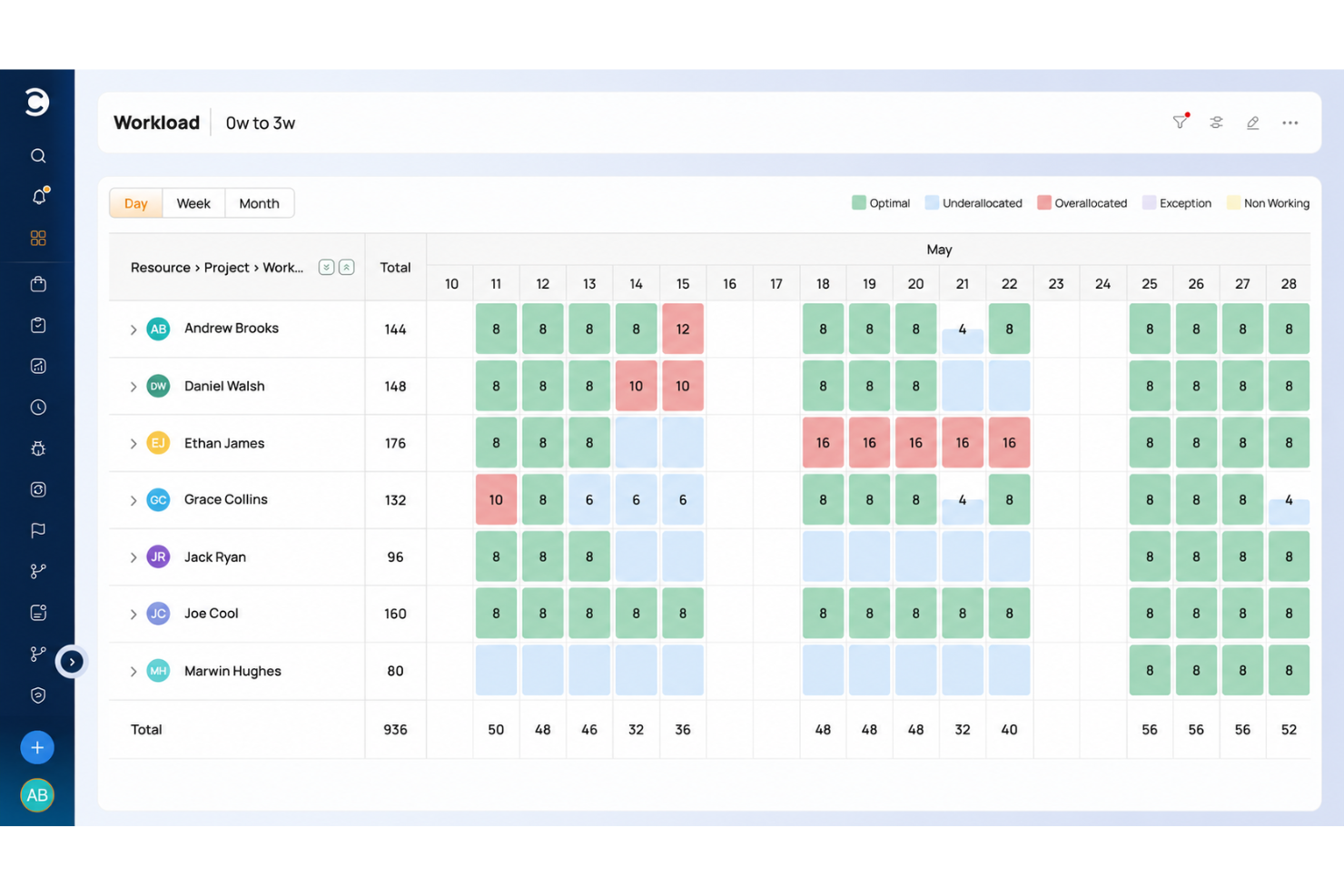
Celoxis is a project portfolio management platform for PMOs and enterprise teams that combines AI-powered project tracking, advanced analytics, resource management, and workflow automation.
Who Is Celoxis Best For?
PMOs and enterprise project managers who need AI-driven portfolio management and advanced analytics for complex, multi-project environments.
Why I Picked Celoxis
I picked Celoxis as one of the best because its AI-powered project portfolio management helps me prioritize and balance resources across multiple projects. I use its advanced analytics to generate real-time portfolio health reports and spot project risks early. My team relies on customizable dashboards to track KPIs and visualize dependencies at scale.
Celoxis Key Features
- Interactive Gantt charts: Plan, schedule, and update project timelines with drag-and-drop controls.
- Timesheet management: Log billable and non-billable hours directly within the platform.
- Custom workflow automation: Build and automate approval processes and task flows.
- Client portal: Give external stakeholders access to project updates and deliverables.
Celoxis Integrations
Celoxis offers native integrations with Jira, Salesforce, Microsoft Project, Google Drive, Excel, Outlook, Slack, QuickBooks, and Trello. An API is available for custom integrations.
Pros and Cons
Pros:
- Advanced reporting with real-time dashboards
- Built-in client portal for external collaboration
- Portfolio-level resource and capacity planning
Cons:
- Limited agile board and sprint features
- No built-in AI chat or assistant

Forecast
Best for AI resource planning
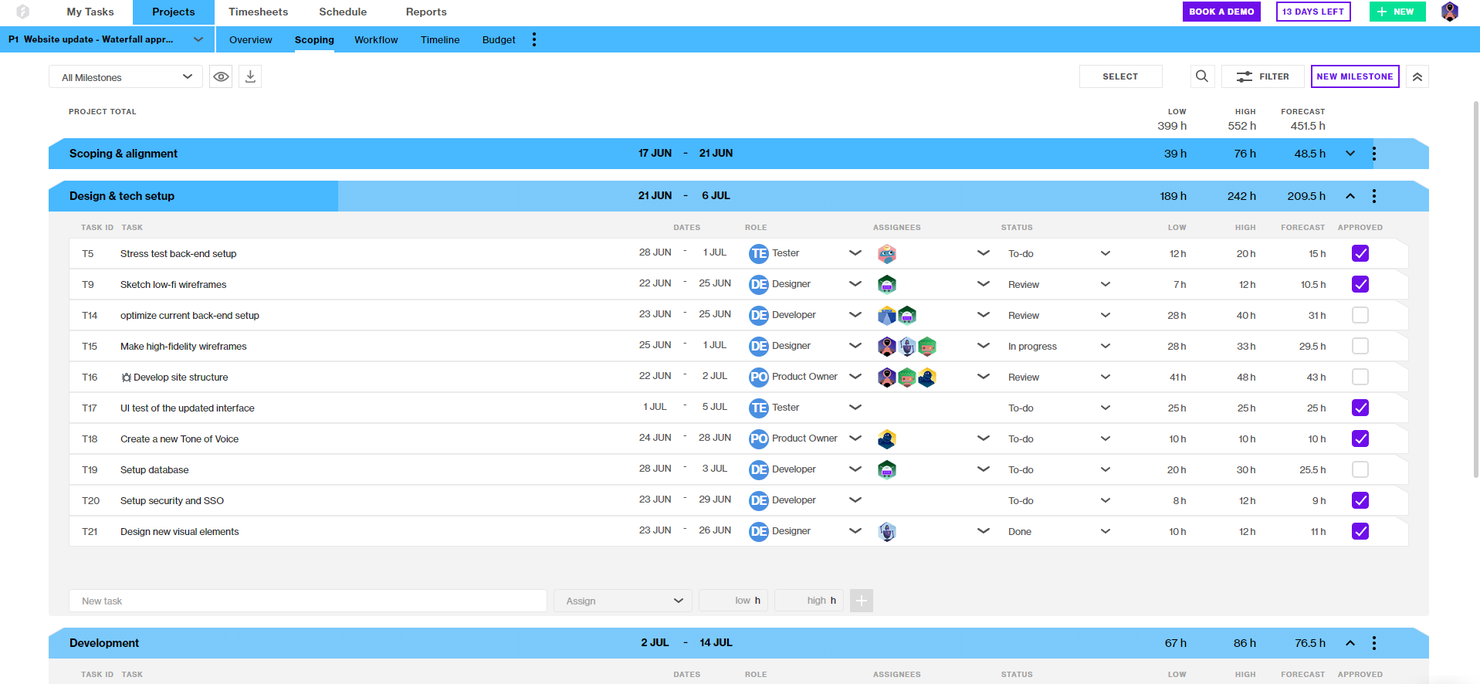
Forecast is an AI-powered project and resource management platform that brings together project planning, resource allocation, time tracking, and financial management for teams managing complex project portfolios.
Who Is Forecast Best For?
Project managers and operations leads at mid-sized to large professional services firms who need unified project, resource, and financial management.
Why I Picked Forecast
I picked Forecast as one of the best because I rely on its AI-powered resource, project, and financial management to keep my project office running smoothly. I use Forecast’s auto-scheduling and workload balancing to optimize team assignments across multiple projects. The built-in financial tracking lets me monitor budgets and margins in real time without switching tools.
Forecast Key Features
- Kanban boards: Visualize and manage project tasks with customizable Kanban workflows.
- Retainer management: Track and manage recurring client retainers within project portfolios.
- Project timeline view: See project phases, milestones, and dependencies in a single timeline.
- Custom permission settings: Control user access and visibility for sensitive project data.
Forecast Integrations
Forecast offers native integrations with Jira Cloud, Trello, Azure DevOps, GitHub, GitLab, Salesforce, HubSpot, Slack, QuickBooks, and Xero. It also connects with Zapier and provides an API for custom integrations.
Pros and Cons
Pros:
- Resource heatmaps show team workload visually
- Built-in financials link budgets to projects
- AI auto-scheduling predicts project timelines
Cons:
- No native time tracking for individual tasks
- No built-in document management system

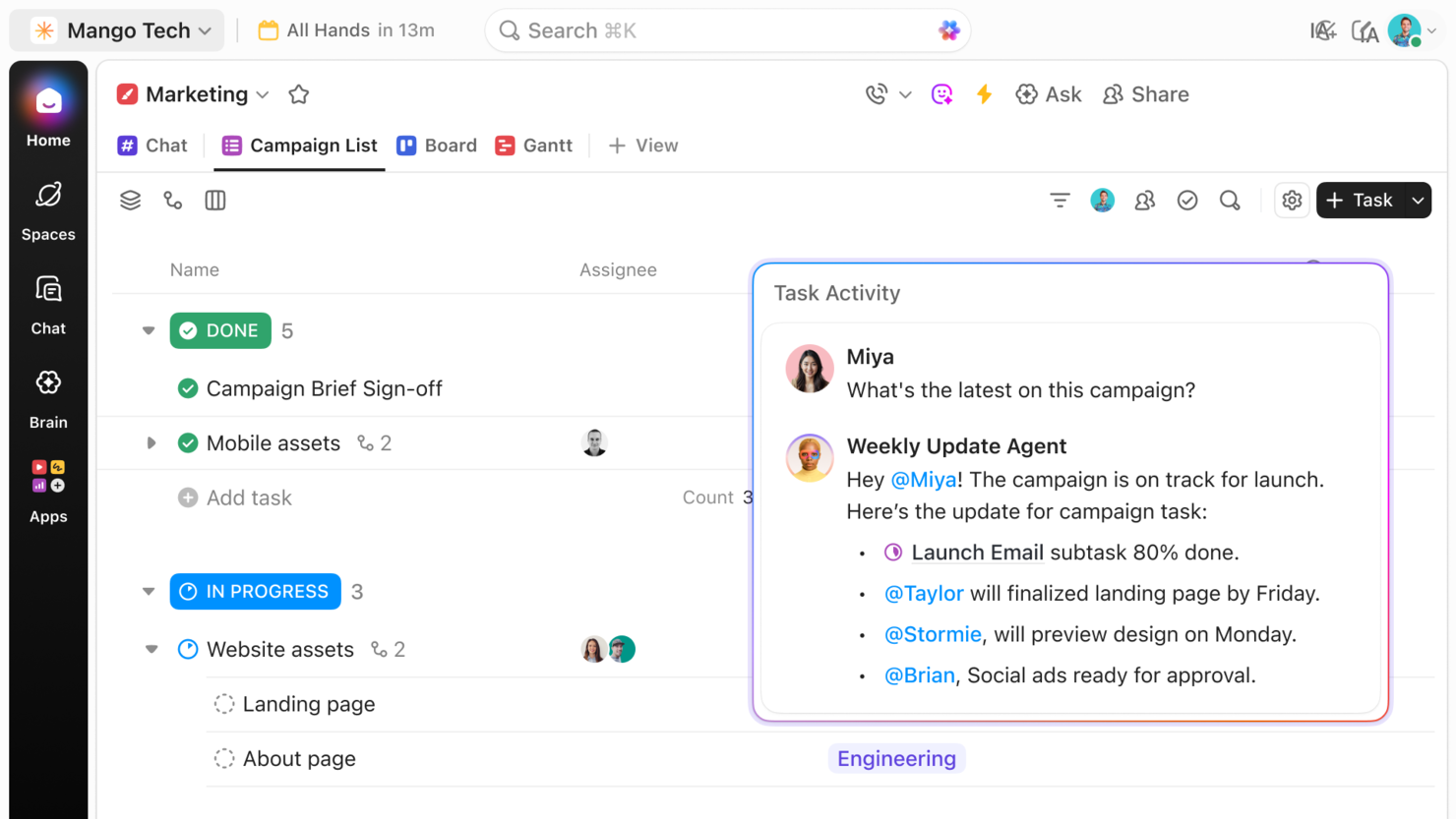
ClickUp is an AI-powered project management platform for teams and PMOs that combines task management, workflow automation, document collaboration, and customizable dashboards.
Who Is ClickUp Best For?
Cross-functional teams and PMOs at mid-sized to large tech companies that need AI-driven project management and workflow automation.
Why I Picked ClickUp
I picked ClickUp as one of the best because its AI-powered project management features let me automate task creation, summarize project updates, and generate action items directly from meeting notes. My team uses ClickUp’s customizable dashboards to track project health and dependencies across multiple workstreams. I rely on its AI writing assistant to draft project documentation and status reports quickly.
ClickUp Key Features
- Whiteboards: Collaborate visually on project plans and workflows in real time.
- Goal tracking: Set, track, and update project goals within your workspace.
- Custom fields: Add tailored data fields to tasks, lists, or projects for advanced tracking.
- Workload view: Monitor team capacity and balance assignments across projects.
ClickUp Integrations
ClickUp offers 50+ native integrations, including Slack, GitHub, GitLab, Google Drive, Dropbox, Microsoft Teams, Zoom, Outlook, HubSpot, and Zendesk. It connects with Zapier and provides an API for custom integrations.
Pros and Cons
Pros:
- Supports complex workflow automation rules
- Advanced goal tracking and OKR features
- Built-in whiteboards for visual collaboration
Cons:
- Portfolio reporting is limited for large PMOs
- AI features require higher-tier plans

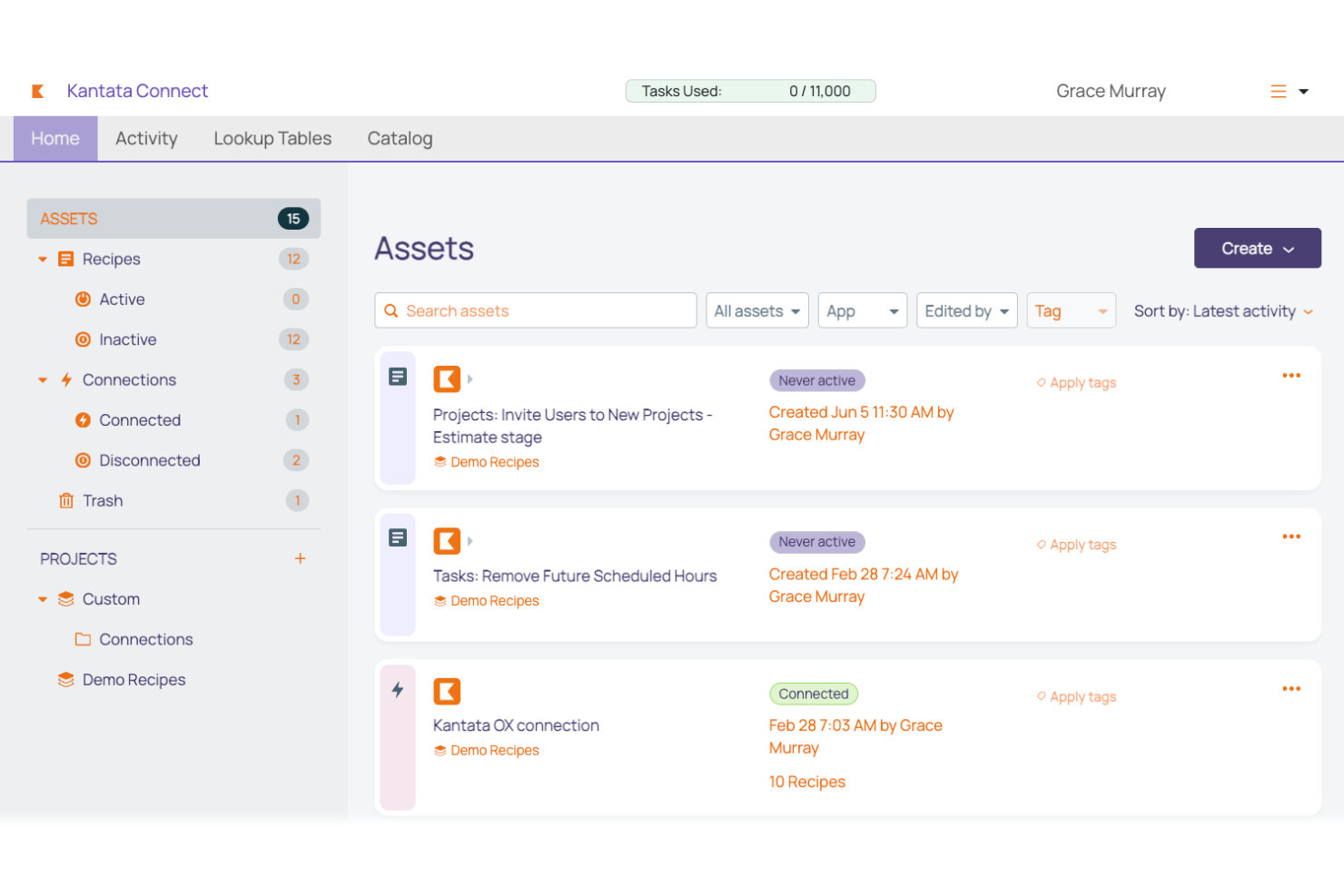
Kantata is a professional services automation platform for project management offices that combines resource management, project accounting, time tracking, and project collaboration in one system.
Who Is Kantata Best For?
Project managers and operations leaders at large professional services firms who need advanced project delivery and resource management.
Why I Picked Kantata
I picked Kantata because I need a platform that’s purpose-built for professional services project delivery at scale. I use its resource forecasting and project accounting to manage complex client portfolios. My team relies on its advanced utilization tracking and margin analysis to keep projects profitable and on schedule.
Kantata Key Features
- Project workspace: Centralizes project files, discussions, and updates in one place.
- Role-based permissions: Controls access to sensitive project and financial data.
- Time and expense tracking: Lets users log billable hours and expenses directly in the platform.
- Custom dashboards: Allow teams to build tailored views for project metrics and KPIs.
Kantata Integrations
Kantata offers native integrations with Salesforce, HubSpot, Expensify, Jira, BambooHR, and Concur. An API is available for custom integrations, and over 1,200 prebuilt connectors are supported through middleware like MuleSoft and Workato.
Pros and Cons
Pros:
- Resource heatmaps visualize team workload
- Retainer management for recurring client work
- Portfolio dashboards for multi-project visibility
Cons:
- Reporting exports have format restrictions
- Limited project template customization options
Best for spreadsheet-style project tracking
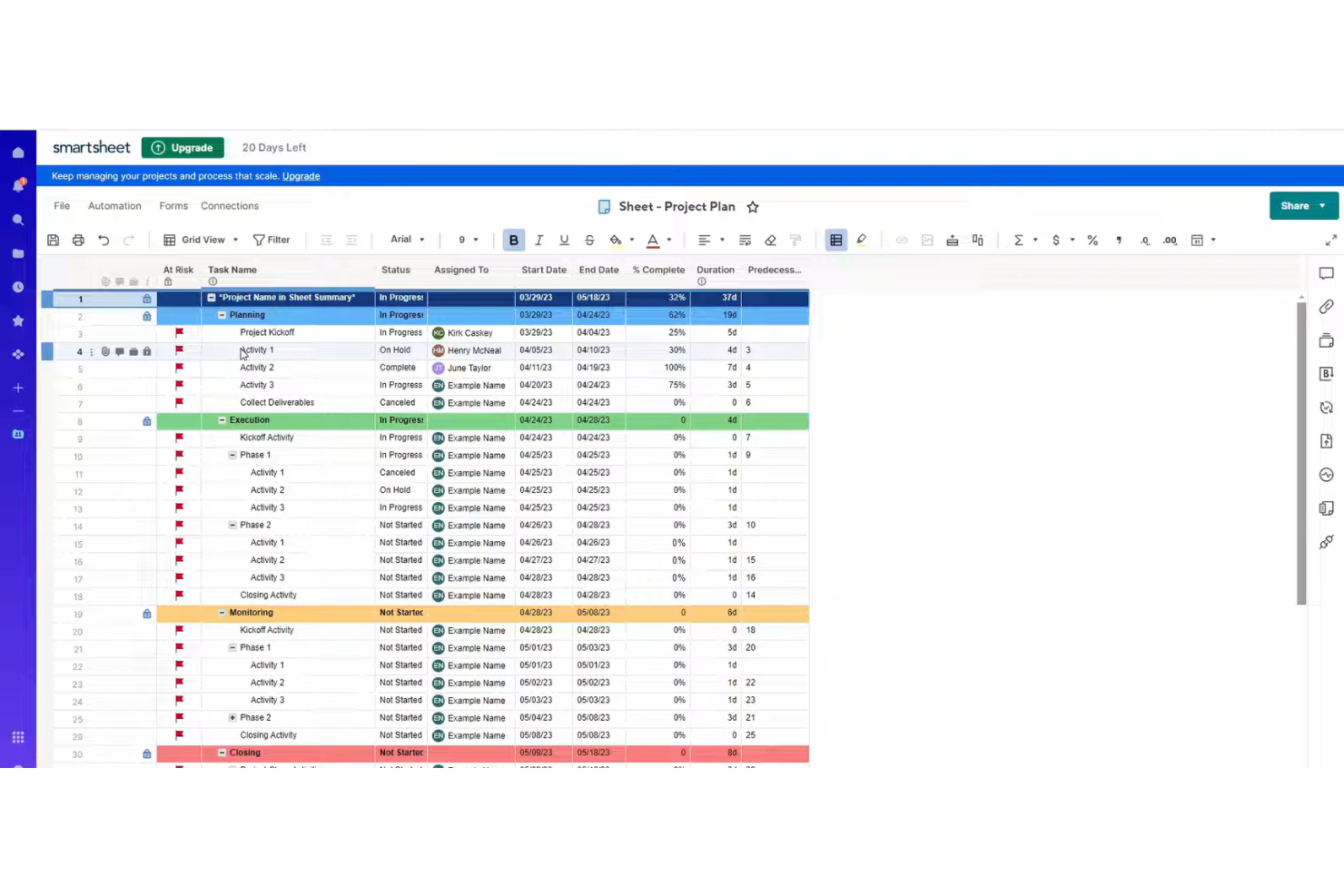
Smartsheet is a project and work management platform that combines spreadsheet-style task tracking, workflow automation, resource management, and reporting for teams managing complex project portfolios.
Who Is Smartsheet Best For?
Project managers and teams at mid-sized to large organizations who need flexible, spreadsheet-inspired project management with automation and integrations.
Why I Picked Smartsheet
I picked Smartsheet as one of the best because I rely on its spreadsheet-inspired interface to quickly build custom project plans and automate repetitive workflows. My team uses built-in automation rules and conditional formatting to manage approvals and status updates across complex projects. I also like how Smartsheet’s integrations and flexible templates let us adapt our workspace as project requirements shift.
Smartsheet Key Features
- Resource management: Allocate, track, and adjust team workloads in real time.
- Gantt chart view: Visualize project timelines and dependencies with interactive Gantt charts.
- Cell-level commenting: Add context and discussion directly to individual cells in project sheets.
- Automated reminders: Set up time-based or condition-based reminders for tasks and deadlines.
Smartsheet Integrations
Smartsheet offers native integrations with Google Workspace, Microsoft 365, Slack, Salesforce, Jira, DocuSign, Box, Dropbox, Tableau, and Zapier. An API is available for custom integrations.
Pros and Cons
Pros:
- Resource management with allocation and workload views
- Built-in automation for repetitive project tasks
- Spreadsheet-style interface supports rapid project setup
Cons:
- Gantt charts lack advanced dependency controls
- Limited AI-driven project forecasting features
New Product Updates from Smartsheet

Smartsheet Adds Non-Plan User Management in Admin Center
Smartsheet adds a Non plan users tab to the Seat types and true-up page in Admin Center. This lets system admins review non-plan users and add them to the plan or remove them from the organization in one place. For more information, visit Smartsheet’s official site.
Hive
Best for collaborative project automation

Hive is a project management and team collaboration platform that brings together AI-powered task automation, project tracking, time management, and document sharing in one workspace.
Who Is Hive Best For?
Fast-moving teams in marketing, operations, or creative agencies that need AI-driven project management and collaboration.
Why I Picked Hive
I picked Hive as one of the best because I use its AI-powered project management tools to automate repetitive tasks and generate project summaries in real time. My team relies on its AI assistant to draft emails, create action cards, and suggest next steps directly in our workspace. I also like how Hive’s flexible project views let us switch between Gantt, Kanban, and calendar layouts without losing context.
Hive Key Features
- In-app chat: Message teammates directly within project workspaces.
- Time tracking: Log hours and monitor time spent on tasks.
- Proofing and approvals: Review and approve documents, images, and videos in one place.
- Forms: Collect project requests and feedback through customizable forms.
Hive Integrations
Hive offers native integrations with Google Drive, Google Calendar, Dropbox, QuickBooks, Zoom, Microsoft OneDrive, and Microsoft Teams. It also connects with Zapier and provides an API for custom integrations.
Pros and Cons
Pros:
- Multiple project views including Gantt and Kanban
- Built-in proofing for creative asset review
- AI assistant generates action cards and summaries
Cons:
- Gantt chart can lag with large projects
- AI features limited to selected workflows

Wrike
Best for customizable PMO workflows
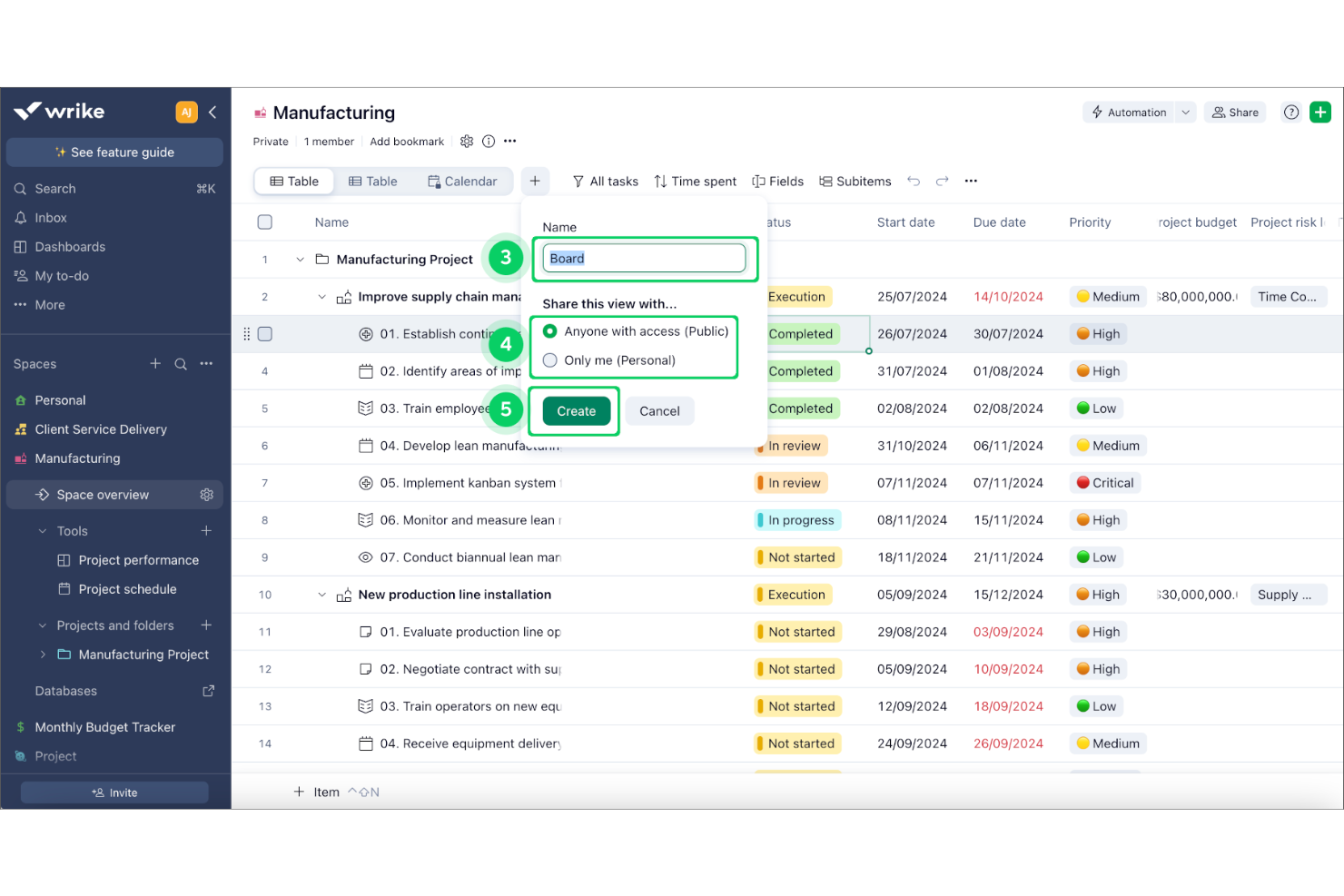
Wrike is an AI-powered project management office software platform that combines project planning, workflow automation, resource management, and advanced analytics for teams managing complex workstreams.
Who Is Wrike Best For?
Project management offices at mid-sized to large enterprises coordinating cross-functional teams and complex projects.
Why I Picked Wrike
I picked Wrike as one of the best because its AI work management platform gives me automated risk prediction and smart task prioritization for complex project portfolios. I use its workflow automation to reduce manual updates and keep cross-team work moving. My team relies on Wrike’s analytics to surface project health insights and spot blockers before they escalate.
Wrike Key Features
- Custom request forms: Capture project intake and automate task creation with configurable forms.
- Blueprints: Standardize recurring projects and processes using reusable templates.
- Resource management dashboard: Visualize team workloads and allocate resources across projects.
- Document proofing: Review, comment, and approve files directly within tasks.
Wrike Integrations
Wrike offers hundreds of native integrations through its built-in integrations and marketplace, including Google Workspace, Dropbox, GitHub, Adobe Creative Cloud, and Zoom. It also supports Zapier and provides an API for custom integrations.
Pros and Cons
Pros:
- Custom request forms for project intake
- Automated workflow and task assignment options
- AI-driven project risk prediction and insights
Cons:
- Notification system can overwhelm large teams
- Automation setup can be complex for PMOs
New Product Updates from Wrike

Wrike Redesigns Workspace Search With New Filters
Wrike introduces a redesigned Workspace Search interface with recent search shortcuts, item type and location filters, and parent-task context. These updates help users find relevant work items and navigate search results efficiently. For more information, visit Wrike’s official site.

Best for end-to-end project management
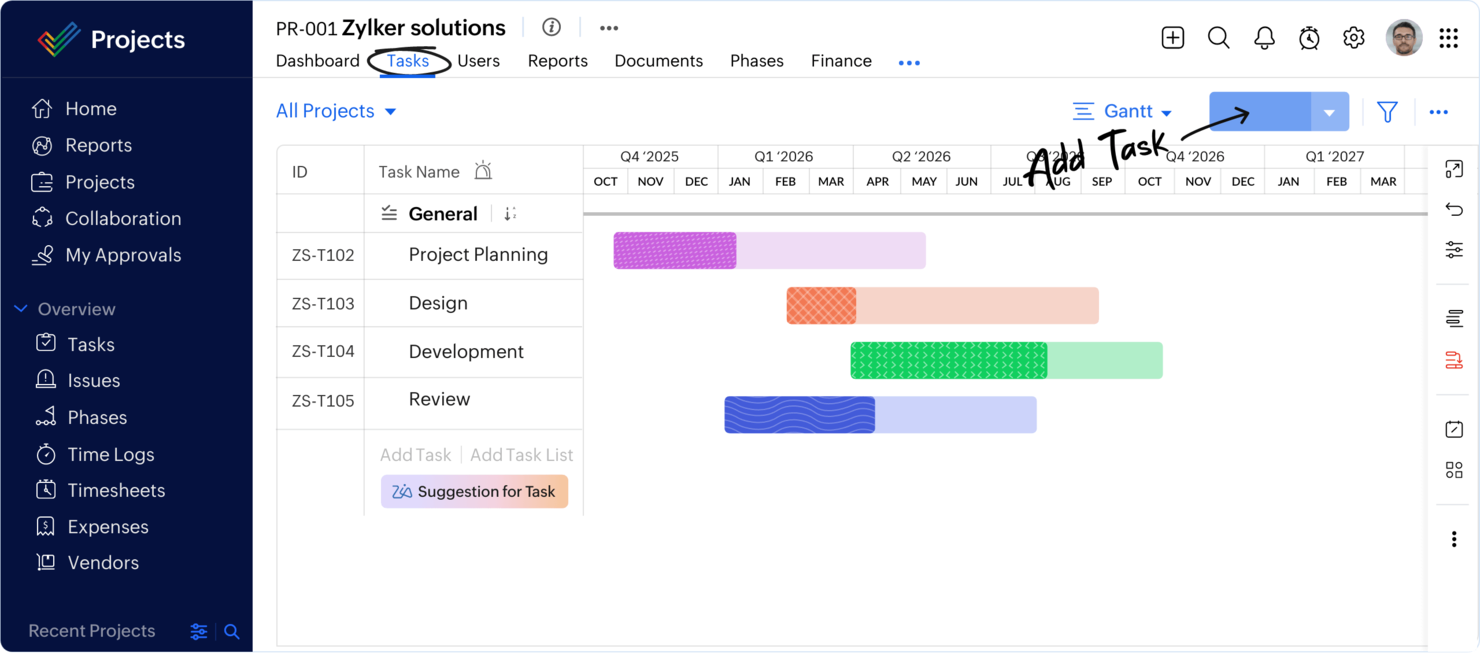
Zoho Projects is a cloud-based project management platform for PMOs and teams that combines task management, workflow automation, AI-powered project tracking, and built-in time tracking.
Who Is Zoho Projects Best For?
Project managers and PMOs at small to mid-sized businesses who need AI-driven project management and workflow automation.
Why I Picked Zoho Projects
I picked Zoho Projects as one of the best because its AI-powered project management features help me automate routine updates and predict project delays. My team uses workflow automation to streamline approvals and recurring tasks. I also rely on built-in time tracking to monitor project hours without leaving the platform.
Zoho Projects Key Features
- Blueprint workflow builder: Design and automate custom project workflows visually.
- Gantt charts: Plan, schedule, and track project timelines with drag-and-drop adjustments.
- Issue tracking: Log, assign, and resolve project issues within dedicated modules.
- Document management: Store, share, and collaborate on project files directly in the platform.
Zoho Projects Integrations
Zoho Projects offers native integrations with Slack, Microsoft Teams, Google Drive, Dropbox, GitHub, Bitbucket, Zoho CRM, Zoho Desk, and Zapier. An API is available for custom integrations.
Pros and Cons
Pros:
- Gantt charts with critical path analysis
- Built-in issue tracking and bug logging
- AI assistant predicts project delays and risks
Cons:
- Resource allocation lacks advanced forecasting
- No built-in portfolio management module
New Product Updates from Zoho Projects
Zoho Projects Adds CodeX Scripts for Custom Modules
Zoho Projects now supports CodeX Scripts for custom modules, enabling conditional logic and rules for creating, updating, and deleting records. For more information, visit Zoho Projects' official site.
 .

Epicflow
Best for multi-project resource optimization

Epicflow is an AI-powered project and resource management platform designed for multi-project environments, offering features for workload balancing, scenario simulation, and advanced analytics.
Who Is Epicflow Best For?
Project and resource managers at mid-sized to large organizations running multiple, concurrent projects across complex teams.
Why I Picked Epicflow
I picked Epicflow because I need AI-driven resource management that can handle dozens of overlapping projects without manual juggling. I use its pipeline view to see real-time project flow and spot bottlenecks before they hit. My team relies on its scenario simulation to test resource allocation changes and predict project outcomes with data-driven accuracy.
Epicflow Key Features
- Task prioritization engine: Automatically ranks tasks based on project constraints and dependencies.
- Integration with MS Project and Jira: Syncs data from existing project management tools for unified oversight.
- Historical data analytics: Analyzes past project performance to inform future planning.
- Customizable dashboards: Lets users tailor visualizations for workload, progress, and resource allocation.
Epicflow Integrations
Epicflow offers native integrations with Microsoft Project, Jira Software, Oracle Primavera, and HRM systems. An API is available for custom integrations with other project or resource management tools.
Pros and Cons
Pros:
- Real-time workload and bottleneck visualization
- Scenario simulation for project planning
- AI-driven resource allocation across projects
Cons:
- Reporting customization options are somewhat restricted
- Limited AI features beyond resource management
Diğer Yapay Zekâ Proje Yönetim Ofisi Yazılımları
İşte kısa listeme giremeyen ancak yine de göz atmaya değer bazı ek yapay zekâ proje yönetim ofisi yazılımı seçenekleri:
- Planview
For scalable portfolio planning
- Planisware
For enterprise portfolio management
- Teamwork.com
For client project management
- Microsoft Project
For enterprise project scheduling
- Airtable
For database-driven workflows
- Taskade
For AI workflow automation
- Project Insight
For centralized project management
- Notion
For all-in-one project workspaces
- ProjectLibre
For free project scheduling
- Jira
For agile software development
- Asana
For cross-functional work management
- Trello
For visual project boards
- Allex.ai
For AI project planning
- Prism PPM
For agile portfolio management
- Plane
For open-source project management


How I Evaluate AI Project Management Office Software
Every tool on this list needs to deliver AI that actually moves the needle for PMO teams—think auto-generated portfolio roll-ups or risk forecasts that flag trouble before a sponsor asks. I split my evaluation into core functionality every PMO platform must have to qualify and differentiating factors that separate good options from great fits.
Core Functionality (Table Stakes For This List)
When I'm selecting tools for my list, I rank each one on a scale from 0 (does not offer the functionality) to 5 (excels in this area) for each core functionality listed below. Then, I calculate the tool's total score into a percentage. Each tool needs to achieve a minimum total score of 65% to be considered for inclusion.
- AI-Driven Portfolio Analytics: I look for AI that surfaces portfolio-wide health insights—like flagging a cluster of projects trending over budget—rather than just static dashboards.
- Predictive Risk Forecasting: The tool should predict risks like schedule slippage or resource bottlenecks early, not just log them after a PM raises a flag in a standup.
- Intelligent Resource Optimization: I evaluate whether the AI recommends staffing adjustments across projects based on skills, availability, and priority shifts.
- Automated Status Reporting: I check whether the platform generates AI-written executive summaries and roll-ups instead of requiring PMs to manually compile weekly updates.
- AI Governance & Prioritization: Project intake scoring matters here—I look for AI that ranks incoming requests against strategic goals so the PMO can fund the right work.
- Conversational AI Assistant: A solid AI copilot lets PMO leads ask natural language questions like "which programs are at risk this quarter?" and get an actionable answer.
Once I have a list of tools that meet the criteria, I consider what sets each platform apart.
Differentiating Factors (What Sets Vendors Apart)
Here's how I compare and contrast different vendors:
Standout Features
Scenario planning is a big differentiator—I look for tools that let PMO leaders model what happens if a key program gets delayed or a budget gets cut mid-quarter. Custom AI agents also stand out when they let teams automate governance rituals like stage-gate reviews without developer support. I evaluate whether a platform tracks benefits realization too, tying delivered projects back to the business outcomes they promised in the original case.
Beyond Features
Integration depth matters a lot here. A PMO platform that can't pull live data from Jira, Smartsheet, or your ERP is just another silo. I also evaluate AI data policies closely—whether the vendor trains models on your portfolio data, offers data residency controls, and provides explainability for AI recommendations. Implementation timelines are worth checking too, especially how long it takes for the AI to learn your portfolio patterns and start delivering useful forecasts rather than generic outputs.
Yapay Zekâ Proje Yönetim Ofisi Yazılımı Nasıl Seçilir?
Uzun özellik listeleri ve karmaşık fiyatlandırma yapıları arasında kaybolmak kolaydır. Benzersiz yazılım seçim süreciniz üzerinde çalışırken odağınızı korumanıza yardımcı olmak için göz önünde bulundurmanız gereken faktörleri içeren bir kontrol listesi hazırladım:
| Faktör | Göz önünde bulundurulması gerekenler |
|---|---|
| Ölçeklenebilirlik | Yazılım, ekibinizin büyümesini, daha fazla projeyi veya artan veri miktarını yavaşlamadan ya da maliyetli yükseltmeler gerektirmeden yönetebilecek mi? |
| Entegrasyonlar | Slack, Jira veya Google Workspace gibi mevcut araçlarınıza yerel olarak bağlanıyor mu, yoksa geçici çözümlere veya özel geliştirmelere mi ihtiyacınız olacak? |
| Özelleştirilebilirlik | İş akışlarını, alanları ve panoları ekibinizin süreçlerine uyacak şekilde özelleştirebilir misiniz, yoksa katı şablonlara mı bağlı kalırsınız? |
| Kullanım kolaylığı | Ekibiniz yazılımı hızlı bir şekilde benimseyecek mi, yoksa arayüz ve gezinme günlük çalışmayı yavaşlatıp ek eğitim gerektirecek mi? |
| Uygulama ve işe alıştırma | Yazılımı kullanıma hazır hâle getirmek ne kadar sürecek ve veri taşıma ile kullanıcı eğitimi için hangi kaynaklara veya desteğe ihtiyacınız olacak? |
| Maliyet | Fiyatlandırma kademeleri net mi ve ihtiyaçlarınız değiştikçe bütçenizle uyumlu mu? Gizli ücretlere veya zorunlu eklentilere dikkat edin. |
| Güvenlik önlemleri | Platform, verilerinizi korumak için şifreleme, erişim denetimleri ve GDPR veya SOC 2 gibi standartlara uygunluk sunuyor mu? |
| Destek erişilebilirliği | İhtiyaç duyduğunuzda desteğe ulaşabiliyor musunuz ve acil sorunlar ya da işe alıştırma yardımı için hizmet düzeyi anlaşmaları veya özel irtibat kişileriniz var mı? |
Yapay Zekâ Proje Yönetim Ofisi Yazılımı Nedir?
AI proje yönetim ofisi yazılımı, ekiplerin projeleri daha verimli bir şekilde planlamasına, izlemesine ve yönetmesine yardımcı olmak için yapay zekâ kullanan bir AI proje yönetimi yazılım platformudur. Bu araçlar genellikle iş akışlarını otomatikleştiren, verileri analiz eden ve daha iyi sonuçları destekleyen içgörüler sunan AI aracılarını içerir. Güçlü üretkenlik araçları olarak işlev görerek ekiplerin manuel işleri azaltmak, iş birliğini geliştirmek ve değişen önceliklere uyum sağlamak için AI kullanmasına yardımcı olurlar. Çoğu durumda bu platformlar, ölçeklenebilir ve verimli proje yönetimi çözümlerine ihtiyaç duyan girişimler ve büyüyen ekipler için özellikle değerlidir.
AI Proje Yönetim Ofisi Yazılımının Özellikleri
AI proje yönetim ofisi yazılımı seçerken aşağıdaki temel özelliklere dikkat edin:
- AI görev otomasyonu: Proje kurallarına veya tetikleyicilere dayalı olarak iş atama, hatırlatıcı gönderme ve durum güncelleme gibi tekrarlayan proje görevlerini otomatikleştirir.
- Öngörücü analiz: Erken harekete geçebilmeniz için proje risklerini, kaynak darboğazlarını ve teslimat zaman çizelgelerini tahmin etmek üzere geçmiş ve gerçek zamanlı verileri kullanır.
- Doğal dil işleme: Sade dil komutlarını veya sohbet arayüzlerini kullanarak görevler oluşturmanıza, projeleri güncellemenize veya raporlar hazırlamanıza olanak tanır.
- Otomatik raporlama: Manuel giriş gerektirmeden proje özetleri, gösterge tabloları ve ilerleme güncellemeleri oluşturur; böylece zamandan tasarruf sağlar ve raporlama hatalarını azaltır.
- Kaynak yönetimi: Ekip uygunluğunu izler, kaynakları tahsis eder ve iş yükü ile proje ihtiyaçlarına göre en uygun atamaları önerir.
- İş birliği araçları: Ekiplerin platform değiştirmeden iletişim kurabilmesi ve birlikte çalışabilmesi için yerleşik sohbet, yorumlar ve dosya paylaşımı sağlar.
- Entegrasyon özellikleri: Proje bilgilerini merkezileştirmek için takvimler, belge depolama ve iletişim uygulamaları gibi diğer iş araçlarına bağlanır.
- Özelleştirilebilir iş akışları: Proje aşamalarını, onay süreçlerini ve görev bağımlılıklarını ekibinizin çalışma biçimine uyacak şekilde tasarlamanıza ve ayarlamanıza olanak tanır.
- Zaman takibi: Görevler ve projeler için ne kadar zaman harcandığını izleyerek faturalandırma, kaynak planlaması ve performans analizine yardımcı olur.
- Otomatik onaylar: Gecikmeleri ve manuel takip işlemlerini azaltmak için belgeleri, görevleri veya talepleri inceleme ve onaylama amacıyla doğru paydaşlara yönlendirir.
AI Proje Yönetim Ofisi Yazılımının Faydaları
AI proje yönetim ofisi yazılımını uygulamak ekibiniz ve işletmeniz için çeşitli faydalar sağlar. Yararlanabileceğiniz avantajlardan bazıları şunlardır:
- Daha hızlı proje teslimi: Otomatik görev atamaları ve durum güncellemeleri projelerin planlandığı şekilde ilerlemesine yardımcı olur ve manuel gecikmeleri azaltır.
- Geliştirilmiş karar alma: Öngörücü analizler ve gerçek zamanlı gösterge tabloları, riskleri belirlemeniz ve planları proaktif bir şekilde ayarlamanız için içgörüler sağlar.
- Daha iyi kaynak tahsisi: AI destekli kaynak yönetimi, uygunluk ve iş yüküne göre doğru kişilerin doğru görevlere atanmasını sağlar.
- Geliştirilmiş iş birliği: Yerleşik sohbet, yorumlar ve dosya paylaşımı herkesi bağlantıda tutar ve dağınık iletişim araçlarına duyulan ihtiyacı azaltır.
- Azaltılmış idari iş yükü: Otomatik raporlama ve onaylar, tekrarlayan görevlere harcanan zamanı en aza indirerek ekibinizin daha yüksek değerli işlere odaklanmasını sağlar.
- Daha fazla görünürlük: Merkezileştirilmiş proje verileri ve özelleştirilebilir gösterge tabloları, ilerlemeyi izlemeyi ve paydaşlarla güncellemeleri paylaşmayı kolaylaştırır.
- Büyüyen ekipler için ölçeklenebilirlik: Esnek iş akışları ve entegrasyon özellikleri, proje hacmi ve karmaşıklığı arttıkça ekibinizi destekler.
AI Proje Yönetim Ofisi Yazılımının Maliyetleri ve Fiyatlandırması
AI proje yönetim ofisi yazılımı seçmek, mevcut çeşitli fiyatlandırma modellerinin ve planların anlaşılmasını gerektirir. Maliyetler özelliklere, ekip büyüklüğüne, eklentilere ve daha fazlasına göre değişir. Aşağıdaki tablo, AI proje yönetim ofisi yazılımı çözümlerinde yaygın planları, ortalama fiyatlarını ve genellikle sunulan özellikleri özetlemektedir:
AI Proje Yönetim Ofisi Yazılımı İçin Plan Karşılaştırma Tablosu
| Plan Türü | Ortalama Fiyat | Yaygın Özellikler |
|---|---|---|
| Ücretsiz Plan | $0 | Temel görev yönetimi, sınırlı AI özellikleri, temel entegrasyonlar ve sınırlı depolama. |
| Kişisel Plan | $5-$15/kullanıcı/ay | Görev otomasyonu, takvim senkronizasyonu, temel raporlama ve e-posta desteği. |
| İşletme Planı | $15-$35/kullanıcı/ay | Gelişmiş AI araçları, proje şablonları, zaman takibi, kaynak yönetimi ve öncelikli destek. |
| Kurumsal Plan | $35-$60/kullanıcı/ay | Özel iş akışları, gelişmiş güvenlik, API erişimi, özel işe alıştırma ve uyumluluk özellikleri. |
AI Proje Yönetim Ofisi Yazılımı Hakkında SSS
AI proje yönetim ofisi yazılımı hakkında sık sorulan soruların bazı yanıtları:
AI, proje yönetim ofisi yazılımını nasıl geliştirir?
AI, tekrarlayan görevleri otomatikleştirerek, eğilimleri belirlemek için proje verilerini analiz ederek ve uygulanabilir içgörüler sağlayarak proje yönetim ofisi yazılımını geliştirir. Bu, ekiplerin zaman kazanmasına, riskleri erken fark etmesine ve proje yaşam döngüsü boyunca daha iyi kararlar almasına yardımcı olur.
AI proje yönetim ofisi yazılımı mevcut araçlarımla entegre olabilir mi?
Evet, çoğu AI proje yönetim ofisi yazılımı Slack, Google Workspace ve Jira gibi popüler araçlarla entegre olabilir. Yazılımın mevcut iş akışınıza ek manuel çalışma gerektirmeden uyduğundan emin olmak için entegrasyon seçeneklerini mutlaka kontrol edin.
AI proje yönetim ofisi yazılımı küçük ekipler için uygun mudur?
Evet, birçok çözüm küçük ekipler için iyi çalışan esnek planlar ve özellikler sunar. Araç değiştirmek zorunda kalmadan büyüyebilmeniz için basit işe alıştırma süreçlerine, uygun fiyatlandırmaya ve ölçeklenebilir özelliklere sahip platformları tercih edin.
AI proje yönetim ofisi yazılımından hangi güvenlik özelliklerini beklemeliyim?
Veri şifreleme, kullanıcı erişim denetimleri ve GDPR veya SOC 2 gibi standartlara uyumluluk özelliklerini beklemelisiniz. Bu güvenlik önlemleri, hassas proje bilgilerini korumaya ve kuruluşunuzun mevzuat gerekliliklerini karşılamasını sağlamaya yardımcı olur.
Bir AI proje yönetim ofisi yazılımının uygulanması ne kadar sürer?
Uygulama süresi değişiklik gösterir, ancak bulut tabanlı çözümlerin çoğu birkaç gün ile birkaç hafta içinde kurulabilir. Veri aktarımı, kullanıcı eğitimi ve iş akışı özelleştirmesi gibi etkenler zaman çizelgesini etkileyebilir; bu nedenle planlamanızı buna göre yapın.