

2026’da Teslim Sürelerini Azaltacak En İyi 10 Kanban Yazılımı

10 En İyi Kanban Yazılımları Kısa Listesi


İşi verimli bir şekilde yönetmek, özellikle birden fazla görevi, ekibi ve teslim tarihini dengelerken, jonglörlük yapıyormuşsunuz gibi hissettirebilir. İşte bu noktada Kanban yazılımı devreye girer: projelerinizi yolunda tutan ve ekibinizi uyumlu hâle getiren, görev ve iş akışı yönetimine yönelik görsel bir yaklaşım sunar. Ancak piyasada sayısız Kanban çözümü bulunduğundan, doğru olanı seçmek bunaltıcı olabilir.
Proje yönetimi alanındaki uzmanlığımı kullanarak ve yıllar boyunca araçları test ederek mevcut en iyi seçenekleri bir araya getirdim. İster bir ekibi yönetiyor ister tek başınıza çalışıyor olun, bu özenle hazırlanmış listede ihtiyaçlarınıza uygun bir seçenek bulabilirsiniz.
Why Trust Our Software Recommendations
Our team has been testing and reviewing software since 2012. As project managers ourselves, we know how difficult—and important—it is to choose the right software.
For this guide, we evaluated tools using hands-on testing and independent research, scoring tools using our selection criteria. We also draw on insights from industry thought leaders and practicing project management experts.
Our reviews reflect our human editorial judgment, not a sales pitch.
Expert reviewers:
Kanban Yazılımı Karşılaştırma Tablosu
Aşağıda, genel bakışlarda az önce ele aldığımız araçları hızlıca karşılaştırabileceğiniz bir tablo yer alıyor.
| Tool | Starting Price | Website | |
|---|---|---|---|
| Best with risk detection in Kanban boards | 4.6 out of 5 | $9/user/month Free plan + 14-day free trial available | Book Demo |
| Best project template selection | 4.3 out of 5 | $10/user/month Free plan + 14-day trial available | Book Demo |
| Best for real-time collaboration | 4.4 out of 5 | $1/user/month Free plan available | Website |
| Best for Google Workspace integration | 4.5 out of 5 | $3/user/month 14-day free trial | Website |
| Best for building no-code custom apps and workflows | 4.4 out of 5 | $35/user/month 30-day free trial + free demo available | Website |
| Best Kanban software for visualizing project phases | 4.3 out of 5 | Pricing upon request Free plan + 15-day trial + demo available | Website |
| Best for drag-and-drop functionality | 4.7 out of 5 | $7.65/user/month Free plan + 30-day free trial available | Website |
| Best Kanban software for team communication | 4.8 out of 5 | $8/user/month Free plan + 14-day trial available | Book Demo |
| Best for brainstorming, ideation, and task management in one | 4.7 out of 5 | €17.50/user/month Free plan + 14-day free trial available | Website |
| Best cross-portfolio Kanban board | 4.6 out of 5 | $10/user/month 30 days free trial | Website |
En İyi 10 Kanban Yazılımına Genel Bakış
Listemde yer alan Kanban proje yönetimi yazılımlarının her birinin kısa bir açıklamasını burada bulabilirsiniz. Açıklamalarda, her yazılımın en iyi yaptığı şeyler belirtiliyor ve bazı özelliklerini göstermek için ekran görüntülerine yer veriliyor.

Best with risk detection in Kanban boards
monday AI Workspace is an AI-powered work management platform that combines Kanban boards, sprint planning, workflow automation, and cross-team collaboration tools across project, dev, CRM, and service use cases.
Who Is monday AI Workspace Best For?
It's a strong fit for agile teams and cross-functional operations teams that need Kanban boards alongside sprint planning, automation, and AI-assisted risk tracking in one platform.
Why I Picked monday AI Workspace
monday AI Workspace earns its spot as one of the best on my shortlist because of how its AI risk detection works directly inside the Kanban board. The Sidekick AI assistant flags dependency issues and at-risk timelines before they show up in a status meeting. I also like the AI sprint summary, which automatically surfaces blockers across active boards so my team can act before tasks go off-track.
monday AI Workspace Key Features
- Multiple board views: Switch between Kanban, Gantt, timeline, calendar, and chart views for flexible progress tracking.
- Workflow automation rules: Set triggers and actions to move cards, assign owners, or notify team members without manual updates.
- Dependency management: Link related cards and visualize task dependencies to prevent blockers and workflow stalls.
- Custom card templates: Create reusable templates with pre-filled fields and checklists for common recurring work types.
monday AI Workspace Integrations
monday AI Workspace offers hundreds of native integrations, including Slack, Google Workspace, Microsoft 365, Salesforce, Jira, GitHub, Zoom, Dropbox, HubSpot, and Zendesk. It also supports Zapier and provides an API for custom integrations.
Pros and Cons
Pros:
- Offers portfolio-level multi-board views
- Supports advanced automation on board actions
- AI detects at-risk items in Kanban boards
Cons:
- Limited offline board editing support
- Mobile app sometimes lags with large boards
New Product Updates from monday AI Workspace
monday AI Workspace Adds Human Approval Routing
monday AI Workspace adds a human-in-the-loop approval block to AI Workflows, sending approval requests and routing workflow paths based on responses. For more information, visit monday AI Workspace's official site.
 .

Wrike
Best project template selection

Wrike’s versatile and easy-to-use web-based platform adapts to however your team organizes their work—it doesn’t just have Kanban stuff, but you’ll find standard Kanban boards along with other project management features. The built-in proofing and approvals help to accelerate your activity stream and multiple reporting views keep you abreast of developments as they happen. Wrike offers many different types of project templates, including Kanban project templates to get you started quickly.
On higher level plans, you can use Wrike to build schedule tags for full time, part time, contract, and/or weekend workers. Then, you can assign a schedule to each team member and Wrike will consider their unique availability when plotting out timelines for Kanban projects.
Wrike offers 400+ pre-built native integrations, including integrations with the most popular file management software from Microsoft, Google, and Dropbox, along with sales and marketing software from Salesforce and Marketo.
New Product Updates from Wrike

Wrike Redesigns Workspace Search With New Filters
Wrike introduces a redesigned Workspace Search interface with recent search shortcuts, item type and location filters, and parent-task context. These updates help users find relevant work items and navigate search results efficiently. For more information, visit Wrike’s official site.
 .

Best for real-time collaboration

Zoho Sprints is an agile project management software designed to support dynamic teams in planning, tracking, and collaborating on projects. It stands out for its comprehensive suite of features tailored for agile methodologies, particularly for frameworks like Scrum and Kanban.
Teams can manage their sprints, conduct daily stand-ups, set sprint goals, and engage in retrospective meetings using the platform. The software also supports collaboration through features like feeds, comments, and notifications, allowing team members to stay updated and communicate effectively.
As a Kanban software, Zoho Sprints offers intuitive visual Kanban boards, support for crucial features like work-in-progress (WIP) limits, and customizable workflows that cater to specific team processes. Its real-time collaboration features and comprehensive analytics enhance team productivity and decision-making, while its integration capabilities ensure seamless operation within diverse tech ecosystems.
Zoho Sprints integrates with Microsoft Teams, Google Workspace, Zendesk, Jenkins, GitHub, BitBucket, AWS Code Commit, Zapier, and more. It also integrates with a host of Zoho apps.
New Product Updates from Zoho Sprints

Zoho Sprints Adds ServiceDesk Plus Integration
Zoho Sprints now offers Zoho Sprints for ServiceDesk Plus in Zoho Marketplace, enabling IT teams to send requests, changes, and releases to developers and track progress in SDP. For more information, visit Zoho Sprints' official site.
 .

GQueues
Best for Google Workspace integration
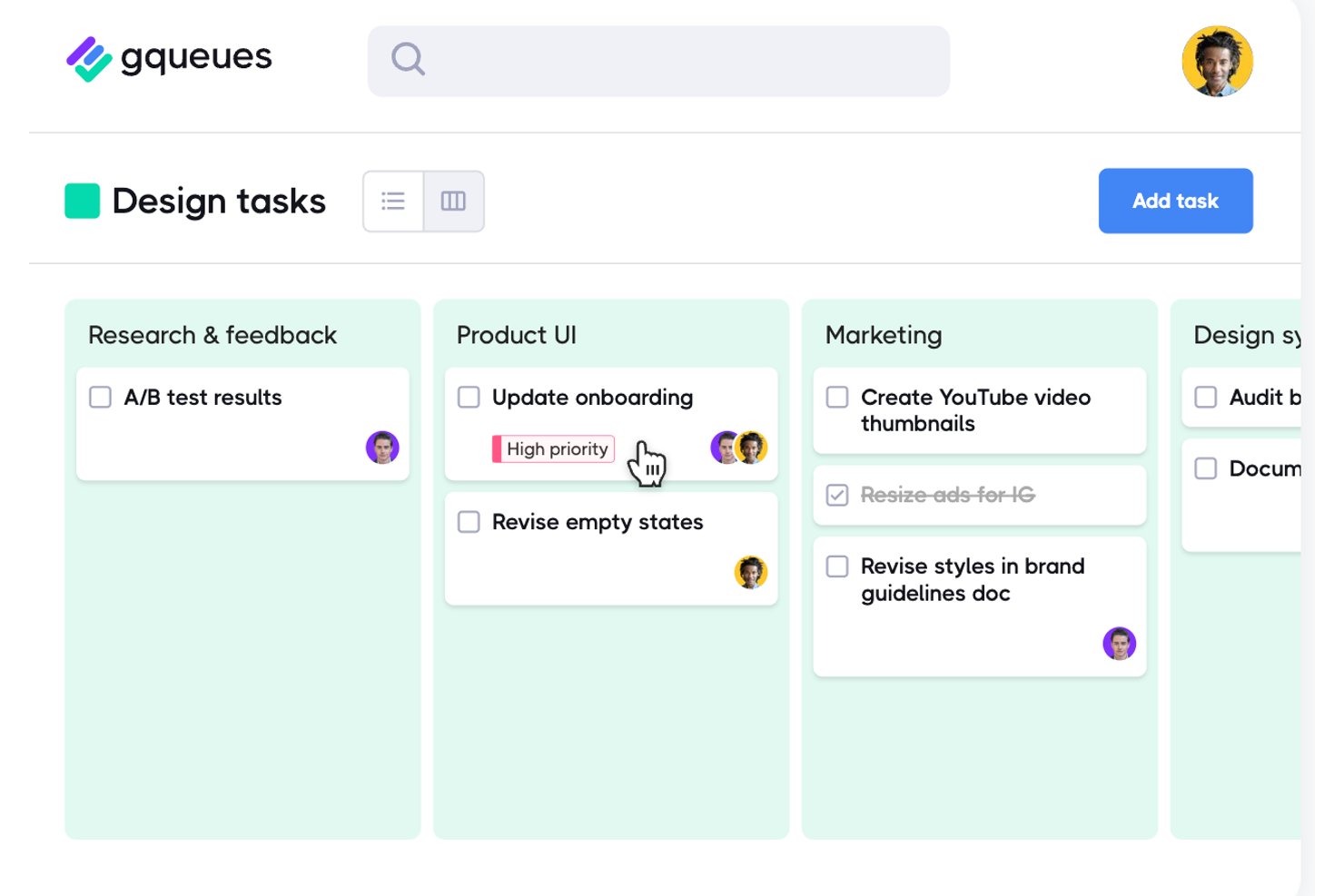
GQueues is a task manager built for Google Workspace teams that layers kanban board views, list management, and Google Calendar sync into a single, Google-native workflow tool.
Who Is GQueues Best For?
GQueues is a natural fit for small to mid-sized teams that run entirely on Google Workspace and need structured task management without adopting a separate platform.
Why I Picked GQueues
I picked GQueues as one of the best because it's the only kanban tool I've seen built entirely around Google Workspace rather than bolted onto it. Its Board view lets my team organize tasks by assignee, priority, or status using drag-and-drop columns, and two-way Google Calendar sync means card due dates actually show up where we already plan our work. Smart Queues let me save filtered views across projects, so I'm never hunting for what's blocked.
GQueues Key Features
- Smart Queues: Save custom filters as Smart Queues for quick access to priority tasks across multiple projects.
- Gmail Add-on: Turn emails into actionable tasks directly from your inbox with the native Gmail add-on.
- Two-way Google Calendar sync: Automatically update task due dates and completion status within your connected Google Calendar.
- Unlimited nested subtasks: Break work down into as many sub-levels as your team needs for detailed tracking.
GQueues Integrations
GQueues offers native integration with Google Workspace, including Google Calendar, Gmail, Google Drive, and Google Contacts. Zapier can be used with its email-to-queue functionality to connect other apps.
Pros and Cons
Pros:
- Unlimited subtask nesting hierarchy levels
- Instant list-to-board view switching
- Board columns organize tasks by assignee, status, or priority
Cons:
- No cycle time or flow analytics reporting
- No WIP limits to control column capacity

Best for building no-code custom apps and workflows

QuickBase is a cloud-based application development platform that enables businesses to create custom solutions for their unique operational challenges. Known for its versatility and ease of use, QuickBase allows users with little to no coding experience to develop custom applications that streamline processes, manage data, and improve collaboration.
As a Kanban software, QuickBase excels in offering a highly customizable and flexible platform for workflow and project management. Its strength lies in enabling users to create tailored Kanban boards that align perfectly with their specific project needs and processes. QuickBase allows for easy visualization of tasks and workflows, facilitating efficient tracking of progress and bottlenecks in real-time. The platform supports a dynamic approach to project management, where tasks can be quickly and intuitively moved across different stages of the workflow, promoting agility and responsiveness.
Integrations include Salesforce, Microsoft Teams, Google Calendar, Tableau, QuickBase Pipelines, Slack and Zapier.
Pricing for QuickBase starts from $35/user/month (billed annually). A 30-day free trial is also available.

Best Kanban software for visualizing project phases

Zoho Projects is a web-based project management software that offers various features for project planning, execution, monitoring, and collaboration, making it a well-rounded tool for managing projects effectively. Kanban is a project management methodology that emphasizes visualizing work, limiting work-in-progress, and optimizing the workflow. Zoho Projects allow teams to track their work visually, providing a clear overview of the status of each task and the progress of the project as a whole.
Zoho Projects’ Kanban boards are fully customizable, enabling teams to create them based on their workflow and preferences. Teams can create multiple boards for different projects or stages of the same project. Each panel consists of columns representing different stages of the workflow, such as "To Do," "In Progress," and "Done." Teams can also create custom columns to represent specific stages of their workflow.
Using Zoho Projects you can add tasks, assign them to team members, set due dates, and add descriptions and attachments. Each task on the board is represented by a card containing all the relevant job information. Teams can also add labels to tasks to classify them based on their priority, status, or any other category pertinent to their workflow.
You can move tasks between columns by simply dragging and dropping them. This feature enables users to update the status of jobs and track their progress quickly. You can use the filter and search functionality to find specific tasks, making it easy to focus on what matters most.
Zoho Projects provides several features to help teams collaborate effectively. Teams can add comments to tasks, mention other team members, and discuss specific tasks. They can also use the @mention feature to tag team members and notify them of updates or changes to the task.
Zoho Projects integrates with other Zoho apps, commonly used apps by Google (Google Calendar, Drive, Spreadsheets, etc.), and Microsoft (Calendar, Excel, Office 365, OneDrive, Teams, and SharePoint), and other third-party apps such as Basecamp, Jira, Slack, Zendesk, and Zapier.
Zoho Projects costs from $5/user/month for tracking unlimited projects. A freemium plan with limited features, as well as a 10-day free trial, are also available.
New Product Updates from Zoho Projects
Zoho Projects Adds CodeX Scripts for Custom Modules
Zoho Projects now supports CodeX Scripts for custom modules, enabling conditional logic and rules for creating, updating, and deleting records. For more information, visit Zoho Projects' official site.
 .

Quire
Best for drag-and-drop functionality

Quire is a cloud-based project management tool that helps teams organize tasks, collaborate, and track progress. It combines nested task lists with visual boards to support both planning and execution. Whether you're managing a small project or coordinating a larger initiative, Quire offers flexible views to match your workflow.
The platform lets you switch between a traditional task list and a Kanban board within the same project. This dual-view approach allows you to plan your work hierarchically and then execute it visually. The Kanban board also supports drag-and-drop functionality, making it easy to move tasks across different stages and keep everyone aligned on progress.
Another feature that makes Quire stand out is its support for nested Kanban boards through the Task Bundle feature. This allows you to maintain the parent-child relationship of tasks even in the board view, providing context and clarity. You can also customize your board by grouping tasks based on assignee, priority, or tags, which helps in managing workload and focusing on what's important.
Some integrations include Google Calendar, Gmail, Slack, Outlook, Zoho Flow, GitHub, Apple Calendar Sync, Box, Dropbox, Google Drive, and Microsoft Teams.
New Product Updates from Quire
Quire Adds Custom Field Locking and Comment Reaction API Support
Quire adds custom field locking and API support for reading and setting emoji reactions on comments. These updates give teams more control over field data and expand comment interaction options for developers. For more information, visit Quire’s official site.
 .

Miro
Best Kanban software for team communication

Miro is a collaborative online whiteboard with over 1,000 templates including mind maps, Kanban boards, Gantt charts, product wireframes, research boards, and flowcharts. Miro is widely adopted by leading companies and is recognized for fostering team communication and supporting hybrid work environments effectively.
The platform supports a wide range of creative and organizational tasks with features like an intuitive Kanban template, real-time editing, and video calling. Miro also accommodates various forms of idea expression, including images and videos, and provides tools for quick diagramming and an infinite canvas to meet the expansive needs of project management.
Miro additionally includes collaboration tools such as voting and sticky notes, allowing teams to integrate feedback efficiently. Furthermore, Miro offers seamless integrations with essential project documentation tools like Notion and Asana, facilitating smoother workflows.
Miro has integrations with a whole suite of tools, including Zoom, Figma, Asana, Microsoft Teams, Jira, Slack, Google Drive, Box, Confluence, Monday.com, Airtable, Notion, Azure, and Webex. Some integrations are limited to paid plans only.
Miro is free to use for unlimited members with up to 3 editable boards. Paid plans start at $8/user/month (billed annually).
Pros and Cons
Pros:
- Free forever plan available
- Intuitive and easy setup
- Built-in communication features for streamlined collaboration
Cons:
- Visitor/guest accounts locked to paid plans only
- Zooming can be jumpy on larger projects
- Free version does not allow high-quality export to pdf
New Product Updates from Miro
Miro Adds Japan Data Residency for Enterprise Customers
Miro has introduced Japan data residency for enterprise customers, offering in-region storage for production data, backups, and metadata, plus in-region compute infrastructure. For more information, visit Miro's official site.
 .
Best for brainstorming, ideation, and task management in one

MeisterTask stands out in the realm of Kanban software by offering a highly visual and intuitive platform for managing tasks and workflows using the Kanban methodology. It allows users to create customizable Kanban boards where tasks are represented as cards that can be moved across different columns or stages, reflecting their current status in the workflow. This visual approach not only makes it easier for teams to understand the progress of individual tasks and projects at a glance but also facilitates smoother transitions between different phases of work.
Beyond its core Kanban functionality, MeisterTask enriches the project management experience with a suite of features designed to boost productivity and collaboration. It integrates seamlessly with MindMeister, an online mind mapping tool, allowing for a unique and efficient flow from brainstorming and ideation directly into actionable tasks. This integration bridges the gap between initial planning and task execution, a feature particularly appealing to teams that value creativity and innovation in their workflows. Additionally, MeisterTask supports task automation, due date reminders, time tracking, and comprehensive collaboration tools, including file attachments and comments.
Integrations include Slack, Dropbox, Github, Google Drive, Microsoft Teams, Outlook, Trello, Asana, MindMeister, and hundreds more through a paid plan with Zapier.
MeisterTask costs from $14.50/month (billed annually) and offers a fre trial.

Kanban Zone
Best cross-portfolio Kanban board

Kanban Zone is designed to allow teams to visualize their entire agency and organization by connecting teams and processes. The tool offers a highly flexible Kanban board editor that does not constrain users to perfect grids and instead allows them to truly map their ideal flow of work.
The tool also includes a timeline view for increased planning capabilities, as well as templates and a Portfolio Kanban for traceability across projects. Also available are project and Kanban metrics, collaboration features such as comments and notifications, and workflow management capabilities.
Kanban Zone has a simple interface that helps teams focus on the work at hand, and a team of support experts to help with onboarding and ongoing questions. They have plenty of learning resources on their site for those who want to learn more about kanban methodology.
Kanban Zone can integrate with other project management tools using a (paid) plan through Zapier.
Kanban Zone pricing starts at $5 per month for a personal plan and $8 per month for professional plans. A free 30 day trial is also available.
Diğer Kanban Seçenekleri
En iyi seçenekler listesine dahil etmediğim birkaç seçenek daha var; ancak bunlar da göz atmaya değer harika araçlar:
- Shortcut
For automating workflows with triggers
- Teamwork.com
Stakeholder/client access controls
- Bonsai Agency Software
For agencies
- ProjectManager
For project portfolio management (PPM)
- Businessmap
Kanban software for software development teams
- Stackfield
For encrypted boards hosted in Germany
- SwiftKanban
Enterprise kanban software
- Height
Kanban for cross-functional resource allocation
- ClickUp
For customizing your own set of features
- Teamhood
Kanban software with flow metrics


How I Evaluate Kanban Software
I split every evaluation into two layers: the baseline kanban functionality a tool must have—real boards, WIP limits, flow metrics—and the differentiators that separate a good fit from a great one.
Core Functionality (Table Stakes For This List)
When I'm selecting tools for my list, I rank each one on a scale from 0 (does not offer the functionality) to 5 (excels in this area) for each core functionality listed below. Then, I calculate the tool's total score into a percentage. Each tool needs to achieve a minimum total score of 75% to be considered for inclusion.
- Customizable Kanban Boards: I check whether you can configure columns to match a real workflow—like separating "code review" from "QA" instead of being stuck with generic "to do" and "done" stages.
- Drag-and-Drop Card Management: Moving cards across columns should update status in real time, and I look for support for bulk moves when you need to reprioritize an entire sprint's worth of tasks.
- Work-in-Progress Limits: Teams that practice flow-based delivery need column-level WIP caps. I evaluate whether limits trigger visual alerts or actually block new cards from entering a full column.
- Swimlanes & Card Categorization: I look for horizontal swimlanes, labels, and custom fields that let you segment a board by team, priority, or class of service—useful when one board serves both bug fixes and feature work.
- Flow Analytics & Reporting: Cumulative flow diagrams, cycle time charts, and throughput trends are what separate a kanban tool from a basic task board. I evaluate the depth and clarity of these metrics.
- Card-Level Collaboration: Each card should support assignees, due dates, checklists, comments, and file attachments so the board doubles as the single source of truth—not just a visual layer on top of another tool.
Once I have a list of tools that meet the criteria, I consider what sets each platform apart.
Differentiating Factors (What Sets Vendors Apart)
Here's how I compare and contrast different vendors:
Standout Features
Workflow automation is a big differentiator. I look for tools that auto-assign cards, trigger notifications, or move tasks between columns based on rules—saving time on repetitive handoffs like passing a card from "design" to "dev." Dependency management matters just as much when multiple teams share a board. The ability to link and block cards prevents downstream surprises during cross-functional sprints. For program-level visibility, I evaluate whether a tool offers portfolio rollups that aggregate data across multiple team boards into a single view.
Beyond Features
Integration depth is one of the first things I check. A kanban board that connects natively to GitHub, Slack, and your CI/CD pipeline becomes the team's central hub instead of another tab to manage. Pricing structure also shapes who a tool actually serves—I evaluate whether free tiers gate key features like WIP limits or analytics behind paid plans, since that directly affects small-team adoption. For enterprise buyers, I look at SSO, role-based access, and compliance certifications like SOC 2 to make sure the tool fits within existing security requirements.
Kanban Yazılımı Nasıl Seçilir?
Uzun özellik listeleri ve karmaşık fiyatlandırma yapılarına kendinizi kaptırmanız kolaydır. Kendinize özgü yazılım seçme sürecinizde ilerlerken odağınızı korumanıza yardımcı olmak için göz önünde bulundurmanız gereken faktörleri içeren bir kontrol listesi hazırladım:
| Faktör | Dikkat Edilmesi Gerekenler |
|---|---|
| Ölçeklenebilirlik | Yazılımın ekibinizle birlikte büyüyüp büyüyemeyeceğini değerlendirin. Performans veya kullanılabilirlikten ödün vermeden artan görev ve kullanıcı sayısını yönetebilen seçenekleri arayın. |
| Entegrasyonlar | İş akışlarını kolaylaştırmak ve üretkenliği korumak için Slack veya Google Workspace gibi mevcut araçlarınıza bağlanabildiğinden emin olun. |
| Özelleştirilebilirlik | Verimlilik ve memnuniyet açısından hayati önem taşıyan panoları ve iş akışlarını ekibinizin belirli süreçlerine uyacak şekilde düzenleyip düzenleyemeyeceğinizi kontrol edin. |
| Kullanım Kolaylığı | Eğitim süresini en aza indiren ve ekibinizin görevleri hızlıca yönetmeye başlamasına yardımcı olan kullanıcı dostu bir arayüz seçin. |
| Bütçe | Maliyeti bütçenize göre değerlendirin. Değeri herhangi bir taahhütte bulunmadan değerlendirebilmek için şeffaf fiyatlandırma, ücretsiz Kanban panoları ve ücretsiz denemeler sunan seçenekleri arayın. |
| Güvenlik Önlemleri | Hassas proje verilerinizi korumak için şifreleme ve role dayalı izinler gibi güçlü güvenlik özelliklerine sahip yazılımlara öncelik verin. |
| Mobil Erişim | Ekibiniz sık sık hareket hâlindeyse, görevleri her yerden yönetmek için yazılımın güvenilir bir mobil uygulama sunduğundan emin olun. |
| Destek | Sorunları hızlıca çözmek için eğitimler ve canlı yardım da dahil olmak üzere güçlü müşteri desteği sunan bir sağlayıcıyı tercih edin. |
Açıkçası, sindirmesi gereken çok şey var ve doğru kararı verme konusunda büyük bir baskı hissedebilirsiniz. Bu nedenle, sizin ve kuruluşunuzun özel ihtiyaçlarına uygun proje yöneticisi araçlarını kısa listeye almanıza yardımcı olması için proje yönetimi yazılımı danışmanlığı hizmetimizi kullanmanızı öneririm.
Kanban yazılımı nedir?
Kanban yazılımı, kullanıcıların ilerlemeyi göstermek ve iş akışını görselleştirmek için kartları bir pano üzerinde hareket ettirebildiği Kanban metodolojisine dayalı bir proje yönetimi aracıdır. Kanban yazılımı genellikle projenin ilerlemesi üzerindeki görünürlüğü ve kontrolü artırmak için görev atama, öncelik belirleme, gerçek zamanlı iş birliği, kart içi yorumlar ve analizler gibi özellikler içerir.
Bu görsel temsil şeffaflığı teşvik ederek darboğazları belirlemenizi, ilerlemeyi takip etmenizi ve iş akışı verimliliğini optimize etmenizi kolaylaştırır.
Kanban Yazılımının Özellikleri
Kanban yazılımı seçerken aşağıdaki temel özelliklere dikkat edin:
- İş birliği: Kullanıcıların görevleri paylaşmasına, yorumlar aracılığıyla iletişim kurmasına ve Slack veya e-posta gibi araçlarla entegre olmasına olanak tanıyarak ekip çalışmasını kolaylaştırır.
- Görev yönetimi: Kullanıcıların görevler oluşturmasını, atamasını ve takip etmesini sağlayarak tüm ekip üyelerinin sorumluluklarının farkında olmasını mümkün kılar.
- Yol haritası oluşturma: Ürün sürümlerinin planlanmasına ve iş listelerinin yönetilmesine yardımcı olarak ekiplerin görevleri ve özellikleri etkili bir şekilde önceliklendirmesini sağlar.
- Fikir haritalama: Fikirlerin görevlere, kullanıcı hikâyelerine ve epiklere dönüştürülerek yapılandırılmasını destekler; bu, ürün geliştirme ve proje yönetimi için kritik olabilir.
- Zaman takibi: Her zaman yerleşik olarak sunulmasa da bazı Kanban araçları, görevlere harcanan zamanı takip etmek için uzantılarla entegre olabilir ve verimlilik analizine yardımcı olabilir.
- Özelleştirilebilir iş akışları: Ekiplerin daha iyi görselleştirme için yüzme kulvarları, filtreler ve öge iç içe yerleştirme gibi süreçleri kendi özel ihtiyaçlarına göre uyarlamasına olanak tanır.
- Entegrasyon olanakları: Diğer yazılım araçlarıyla sorunsuz entegrasyon sunarak iş akışının genel işlevselliğini ve bağlantılılığını geliştirir.
- Kullanıcı geri bildirim yönetimi: Ürün geliştirmenin müşteri ihtiyaçları ve beklentileriyle uyumlu olmasını sağlamak için kullanıcı geri bildirimlerini toplar ve önceliklendirir.
Kanban Yazılımını Kullanırken En İyi Uygulamalar
Kanban yazılımını kullanmak kolaydır. Ancak onu doğru kullanmak, iyi bir proje yöneticisini harika bir proje yöneticisinden ayıran şeydir! Kanban panolarını doğru şekilde kullanabileceğiniz 5 yöntem şunlardır:
1. Devam Eden Çalışmayı (WIP) tanımlayın ve sınırlayın
Ekibin yeni görevlere başlamadan önce mevcut görevleri tamamlamaya odaklanmasını sağlamak için her sütun için WIP sınırları belirleyin. Örneğin, "Devam Ediyor" sütununun WIP sınırı 3 ise aynı anda yalnızca 3 görev üzerinde çalışılabilir.
2. Açık ve tutarlı etiketler kullanın
Öncelikleri, görev türlerini veya görevlendirilen kişileri belirlemek için renk kodları, etiketler ya da kategoriler kullanın. Örneğin, yüksek öncelikli görevler için kırmızı, düşük öncelikli görevler için yeşil kullanın.
3. Panoyu düzenli olarak gözden geçirin ve güncelleyin
Görevlerin güncellendiğinden, tamamlanan görevlerin arşivlendiğinden ve engellerin ele alındığından emin olmak için günlük veya haftalık değerlendirmeler yapın. Bu, günlük bir ayakta toplantının veya retrospektifin parçası olabilir.
4. Görevleri yönetilebilir parçalara ayırın
Daha büyük görevleri, pano üzerinde daha hızlı ilerleyebilecek daha küçük ve uygulanabilir alt görevlere ayırın. Örneğin, bir proje aşaması "Araştırma", "Taslak hazırlama" ve "İnceleme" gibi alt görevlere sahip olabilir.
5. İş akışını sürekli olarak optimize edin
Verimsizlikleri belirlemek için teslim süresi (görevin oluşturulmasından tamamlanmasına kadar geçen süre) ve çevrim süresi (başlangıçtan tamamlanmaya kadar geçen süre) gibi ölçümleri kullanın. Gerektiğinde WIP sınırlarını ayarlayın, kaynakları yeniden tahsis edin veya iş akışlarını iyileştirin.
Kanban Yazılımı - Sıkça Sorulan Sorular
Kanban metodolojisine yeni mi başladınız? Yeni araçlarınız hakkında daha fazla bilgi edinmeniz mi gerekiyor? İhtiyacınız ne olursa olsun, burada Kanban yazılımı hakkında sıkça sorulan soruların (SSS) bazı yanıtlarını bulabilirsiniz.