2026’da Proje Yönetimi İçin En İyi 10 Mavenlink Alternatifi

En İyi Mavenlink Alternatifleri Kısa Listesi


Mavenlink alternatiflerini değerlendiriyorsanız yalnız değilsiniz. Belki fiyatlandırması bütçenizle uyuşmuyor ya da özellikleri ekibinizin ihtiyaçlarına pek uygun görünmüyor. Her iki durumda da güvendiğiniz araçlar beklediğiniz sonuçları sunmadığında bu durum can sıkıcı olabilir.
Bu makalede, test ettiğim en iyi Mavenlink alternatiflerini paylaşacağım. Her biri, umarım işletme hedeflerinize daha iyi uyacak benzersiz özellikler sunuyor. Makalenin sonunda, hangi aracın ekibiniz için doğru seçenek olabileceği konusunda daha net bir fikriniz olacak.
Why Trust Our Software Recommendations
Our team has been testing and reviewing software since 2012. As project managers ourselves, we know how difficult—and important—it is to choose the right software.
For this guide, we evaluated tools using hands-on testing and independent research, scoring tools using our selection criteria. We also draw on insights from industry thought leaders and practicing project management experts.
Our reviews reflect our human editorial judgment, not a sales pitch.
Expert reviewers:
Mavenlink Alternatifleri Karşılaştırma Tablosu
Bu karşılaştırma tablosu, en iyi Mavenlink alternatifleri seçimlerimin fiyatlandırma ayrıntılarını özetlemektedir:
Score legend (out of 5)
- Excellent 4.5–5
- Good 4–4.4
- Average 3–3.9
- Below average 2–2.9
- Poor 1–1.9
| Tool | Starting Price | Website | |||||||
|---|---|---|---|---|---|---|---|---|---|
| Best for a fully-packed free plan | 3.0 out of 5 | 2 | 1 | 4 | 4 | 5 | 2 | $10/user/month Free plan + 14-day trial available | Book Demo |
| Best for project management with built-in KPI tracking | 4.3 out of 5 | 4 | 4 | 4 | 5 | 4 | 5 | $17/user/month 14-day free trial | Book Demo |
| Best for ease of use | — | 2 | — | 3 | 4 | 4 | 3 | $9/user/month Free plan + 14-day free trial available | Book Demo |
| Best for advanced workflow automation | 3.2 out of 5 | 2 | 1 | 5 | 4 | 4 | 3 | Pricing upon request Not available | Book Demo |
| Best for A&E firm billing and financials | 4.3 out of 5 | 4 | 5 | 4 | 4 | 4 | 5 | Pricing upon request Free demo available | Website |
| Best for better reporting & analytics | — | 3 | — | 5 | 4 | 1 | 4 | Pricing upon request Not available | Website |
| Best for creative agency billing and WIP tracking | 4.2 out of 5 | 4 | 5 | 3 | 4 | 4 | 5 | $49/user/month Free demo available | Website |
| Best for Salesforce-native services delivery | 4.2 out of 5 | 4 | 3 | 5 | 4 | 4 | 5 | Pricing upon request Free demo available | Website |
| Best for IT consulting firms needing WIP visibility | 4.5 out of 5 | 5 | 4 | 5 | 4 | 4 | 5 | Pricing upon request Free demo available | Website |
| Best for agency billing and revenue recognition | 4.2 out of 5 | 4 | 4 | 4 | 4 | 4 | 5 | $10/user/month 14-day free trial + demo available | Book Demo |


Karşılaştırılan En İyi 10 Mavenlink Alternatifi
Birden fazla proje yönetimi aracını inceledim ve uygulamanın yeteneklerine yaklaşan en iyi Mavenlink alternatiflerini seçtim. Her biri için bazı artıları ve eksileri, deneme bilgilerini ve maliyetini ele almanın yanı sıra her biri hakkında uzman görüşü de sunuyorum.

Wrike
Best for a fully-packed free plan
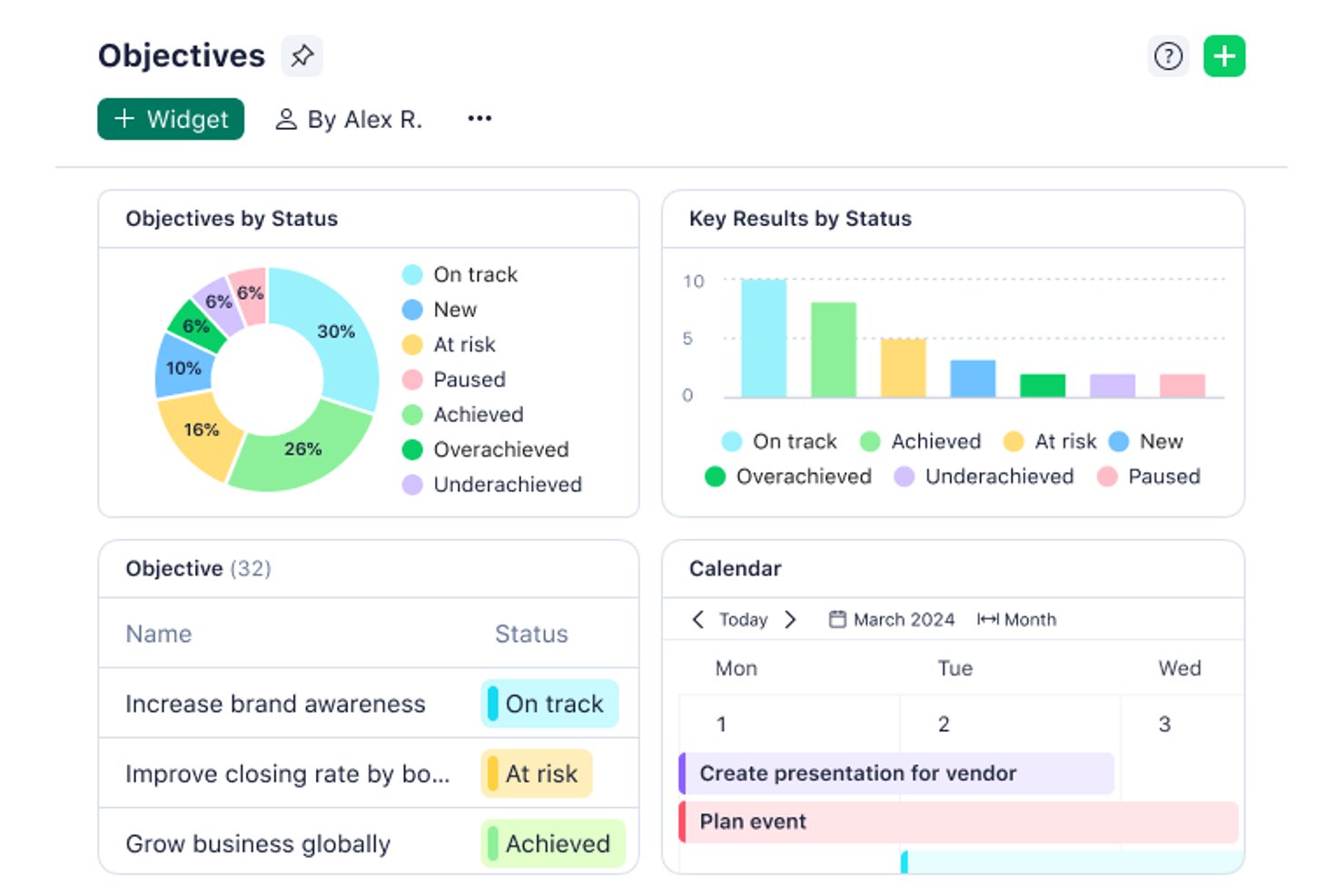
Wrike is a work management platform for professional services teams that need to coordinate client projects, balance workloads, and track timelines and dependencies across delivery teams.
Who Is Wrike Best For?
Wrike suits small project and cross-functional teams that want to coordinate tasks and timelines with a feature-rich free plan.
Why I Picked Wrike
Wrike earns a place among Mavenlink alternatives as Best for a fully-packed free plan. I appreciate that its free tier supports coordinating tasks, timelines, and dependencies, which helps a services team map client work and spot scheduling conflicts.
Wrike Key Features
- Time tracking: Log hours against project tasks.
- Workload charts: View assigned effort and team capacity.
- Request forms: Collect project intake details and create work items.
- Proofing and approvals: Annotate files and review versions.
Wrike Integrations
Wrike lists 400+ prebuilt connectors, including Slack, Salesforce, Jira, GitHub, Google, Microsoft Teams, Zoom, and Dropbox; it also supports Zapier. Wrike offers an API for custom integrations and Wrike Integrate as an add-on.
Pros and Cons
Pros:
- Dependencies and timelines clarify delivery sequencing
- Request forms standardize client project intake
- Workload charts expose team capacity
Cons:
- Cross-project reporting and calculations remain limited
- Dense interface complicates day-to-day navigation
New Product Updates from Wrike

Wrike Adds Advanced Filters to Chart View
Wrike introduces new default filters in Chart view, including relative dates, exclusion conditions, multiple filters per field, and status group filtering. These updates help teams refine project data and reporting. For more information, visit Wrike’s official site.

Scoro
Best for project management with built-in KPI tracking
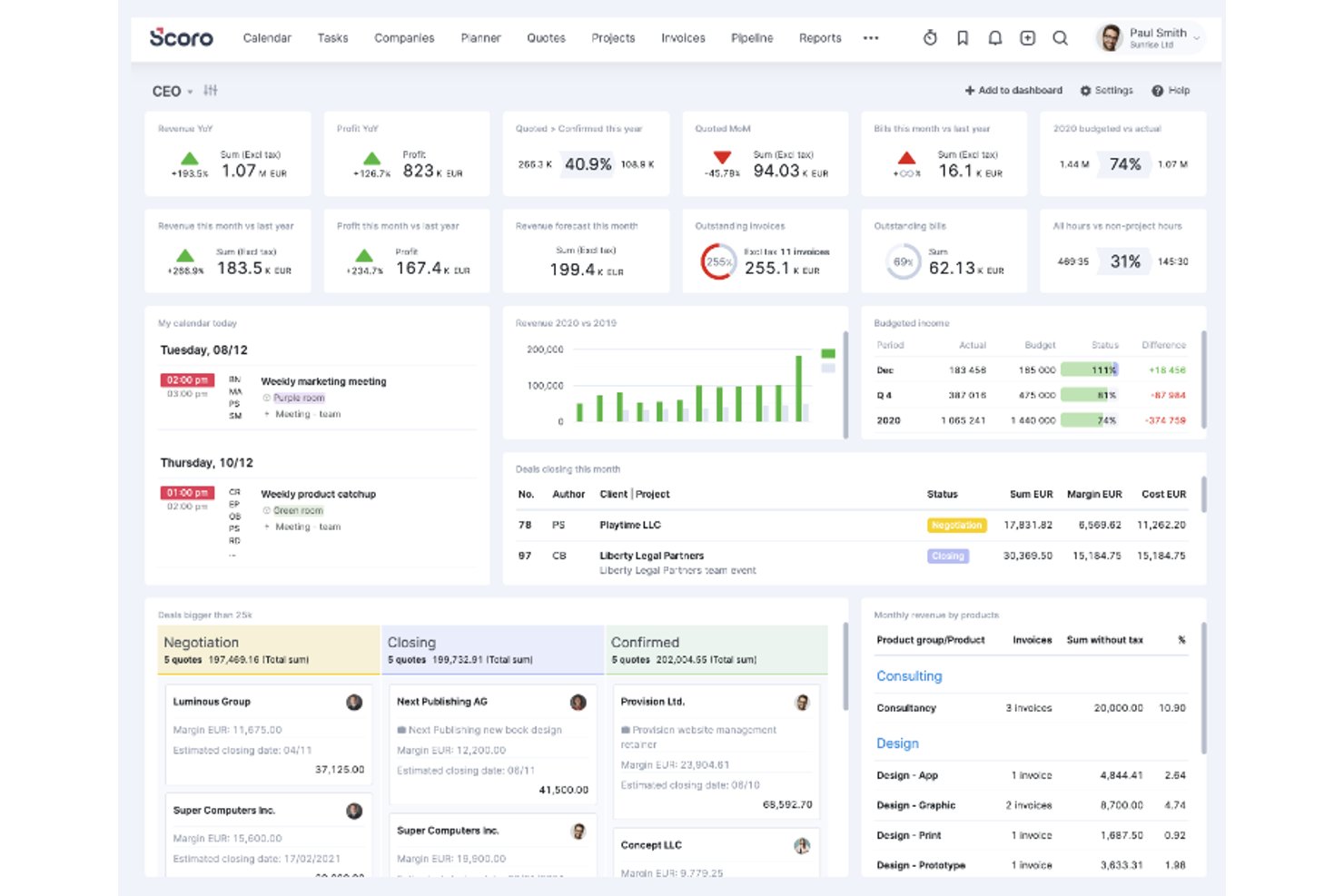
For professional-services teams juggling client work, budgets, and deadlines, Scoro brings project planning, resource management, and financial workflows into one platform.
Who Is Scoro Best For?
Scoro suits project and operations managers at professional-services firms who need to connect delivery plans, team capacity, and business performance metrics.
Why I Picked Scoro
I picked Scoro as my choice for “Best for project management with built-in KPI tracking” because its dashboards turn delivery data into visible measures. I like how bookmarked reports track project profitability and utilization, while result or ratio metrics put those figures on dashboards. That helps me spot margin or capacity issues while work is underway.
Scoro Key Features
- Task management: Create and assign tasks within projects.
- Resource capacity planning: Forecast team capacity and balance workloads.
- Time and cost tracking: Record time and costs against project work.
- Client billing: Issue invoices as part of the project lifecycle.
Scoro Integrations
Scoro’s app marketplace lists integrations with Jira, Asana, Slack, Microsoft Teams, Google Calendar, Google Drive, Xero, QuickBooks, HubSpot, and Salesforce. It also supports Zapier and offers an API for custom integrations.
Pros and Cons
Pros:
- Links estimates, tracked time, and invoicing
- Forecasts team capacity and utilization
- Connects project delivery data with profitability dashboards
Cons:
- Project views and task workflows need fewer clicks
- Initial setup can require significant configuration
New Product Updates from Scoro

Scoro Adds Time Mobile App and ELI Improvements
Scoro adds the Scoro Time mobile app for iOS/Android to track time anywhere and expands ELI with attachments, smarter filtering, and trigger-based actions. For more information, visit Scoro's official site.

Best for ease of use
monday AI Workspace gives product, engineering, and digital teams a visual place to plan projects, assign work, and track dependencies as priorities change.
Who Is monday AI Workspace Best For?
Project managers who want an approachable, visual way to coordinate contributors and make everyday work easier to follow are a good fit for monday AI Workspace.
Why I Picked monday AI Workspace
I picked monday AI Workspace as Best for ease of use because its visual project views make owners, tasks, and dependencies easy to scan. I like how product and engineering teams can track linked work as priorities shift, so a changed delivery date is visible in the plan.
monday AI Workspace Key Features
- WorkForms: Collect project requests and send submissions to a project approval pipeline.
- Cross-board automations: Create or move project items across boards when approval or status changes.
- Milestones: Mark key project events in Timeline and Gantt views.
- Budget tracking: Record expenses in Numbers columns and compare costs with approved budgets in charts.
monday.com Integrations
monday.com lists 850+ integrations and apps, including Slack, Gmail, Google Calendar, Outlook, Microsoft Teams, GitHub, GitLab, Salesforce, and HubSpot. It also connects with Zapier and offers a GraphQL API for custom integrations.
Pros and Cons
Pros:
- Dashboards summarize progress across project boards
- Custom workflows adapt to changing project processes
- Visual timelines clarify task dependencies
Cons:
- Recurring task setup can feel cumbersome
- Advanced portfolio forecasting is limited
New Product Updates from monday AI Workspace
monday AI Workspace Adds Human Approval Routing
monday AI Workspace adds a human-in-the-loop approval block to AI Workflows, sending approval requests and routing workflow paths based on responses. For more information, visit monday AI Workspace's official site.

Best for advanced workflow automation
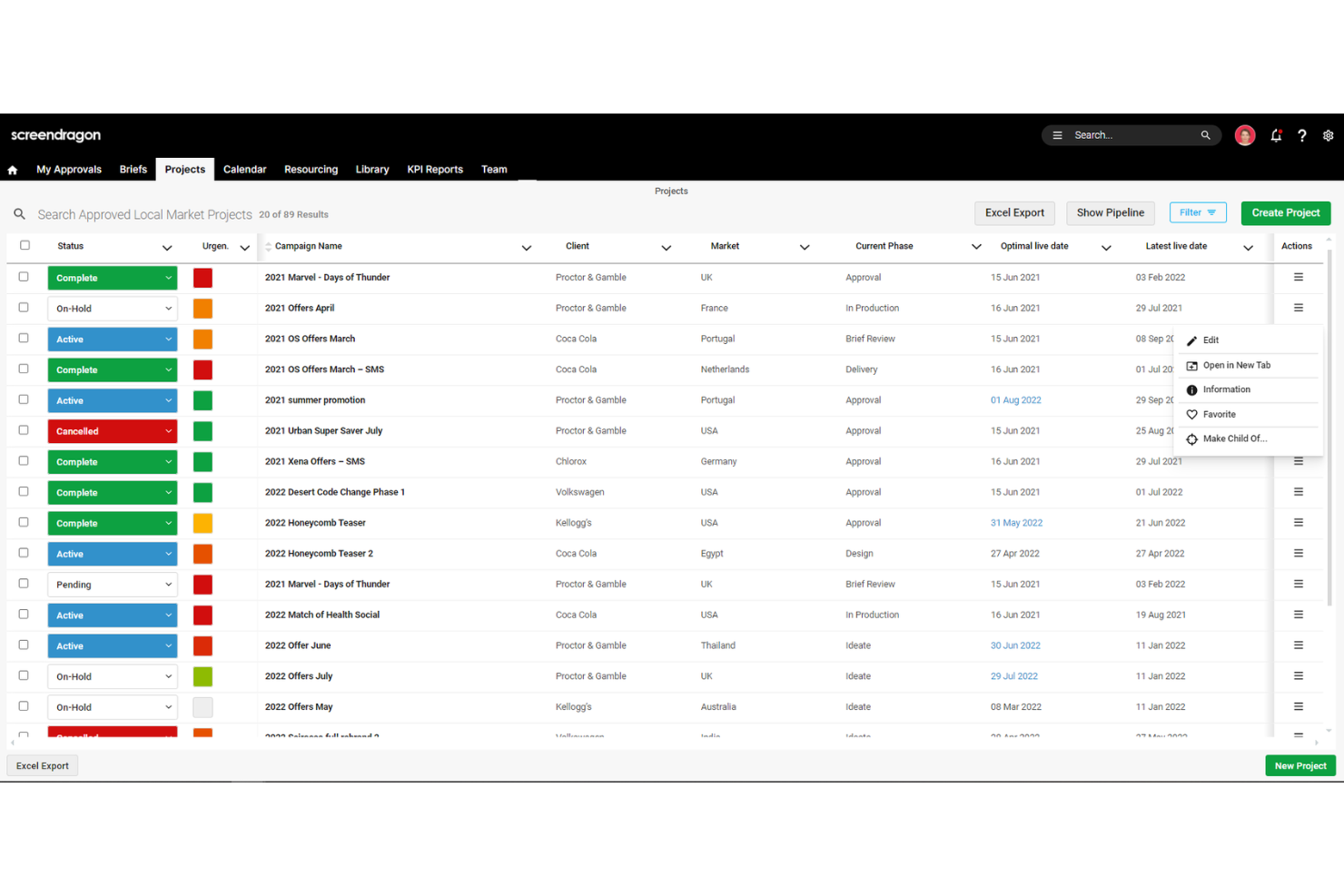
Screendragon is a work management platform for marketing and creative teams that brings project planning, collaboration, and approvals together to help coordinate campaigns and keep deliverables on track.
Who Is Screendragon Best For?
Screendragon suits marketing operations teams that coordinate multi-step creative production across departments.
Why I Picked Screendragon
I picked Screendragon as a Mavenlink alternative for its “Best for advanced workflow automation” fit. Its no-code visual workflow builder supports conditional routing and configurable stages, so campaign assets can follow different review paths by market. I also like its sequential or parallel approvals with online proofing, which keeps feedback and decisions attached to each version.
Screendragon Key Features
- Role-based permissions: Set access rules down to individual fields.
- Dynamic briefs: Configure brief fields, language, and layout by team, client, or market.
- Reports and dashboards: View project status, milestones, and performance data.
- Integrations: Connect tools such as Jira Software, Google Drive, and Microsoft 365.
Screendragon Integrations
Screendragon offers pre-built integrations with Aprimo, Smartsheet, HubSpot, Microsoft Teams, Microsoft Power BI, Google Cloud Platform Storage, Amazon S3, Sitecore, Ziflow, and Brandfolder. It also provides a REST API and a Universal API Connector for connecting with systems that expose a standard API.
Pros and Cons
Pros:
- Responsive support helps tailor workflows
- Resource and budget visibility spans projects
- Conditional workflows adapt to campaign paths
Cons:
- Configuration and admin setup take time
- Complex approval chains can run slowly

BQE Core
Best for A&E firm billing and financials
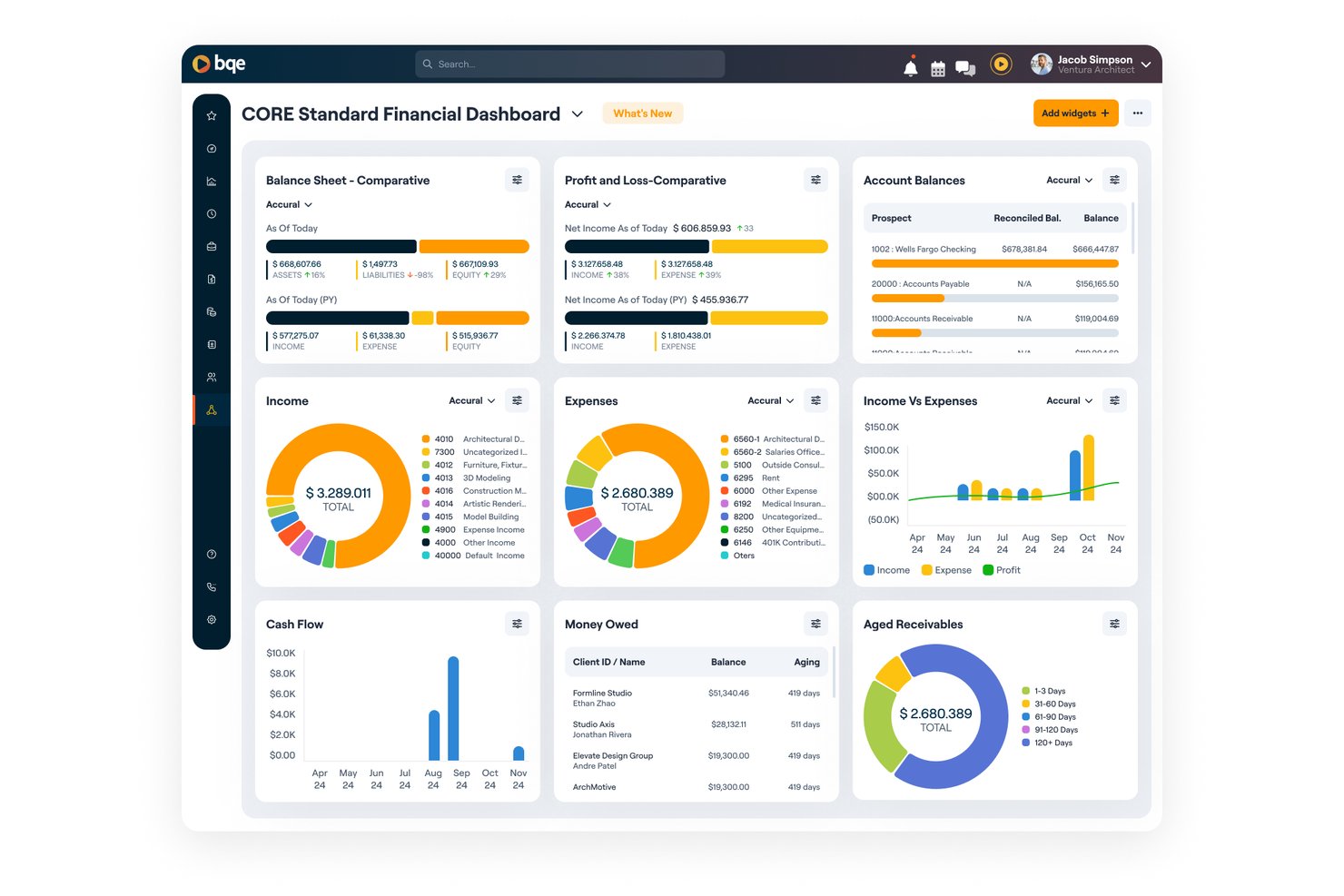
BQE Core is a professional services automation platform for architecture and engineering firms that brings project planning, time and expense tracking, staffing, and financial management into one system.
Who Is BQE Core Best For?
BQE Core suits architecture and engineering firms that need project-based billing and financial oversight tied to client work.
Why I Picked BQE Core
I picked BQE Core because its project-based billing and financial oversight suit architecture and engineering work. I like that teams can track time and expenses against client projects, then connect that activity with staffing and financial management. That makes it a focused option among Mavenlink alternatives when A&E billing and project finances need to stay tied together.
BQE Core Key Features
- Customer relationship management: Track prospects, client relationships, and business development opportunities.
- Proposal builder: Create proposals to support project pursuits.
- Project dashboards: View project status and progress in real time.
- Reporting and analytics: Generate reports to review project and business performance.
BQE Core Integrations
BQE CORE integrates with QuickBooks, DocuSign, Power BI, Xero, Google, Microsoft, and Zapier. It also provides an open API for custom integrations.
Pros and Cons
Pros:
- Custom reports show project performance
- Time entries feed billing and invoicing
- A&E project budgets link to financials
Cons:
- Slow screens and time-entry inconsistencies reported
- Onboarding and setup can feel complex

Parallax
Best for better reporting & analytics
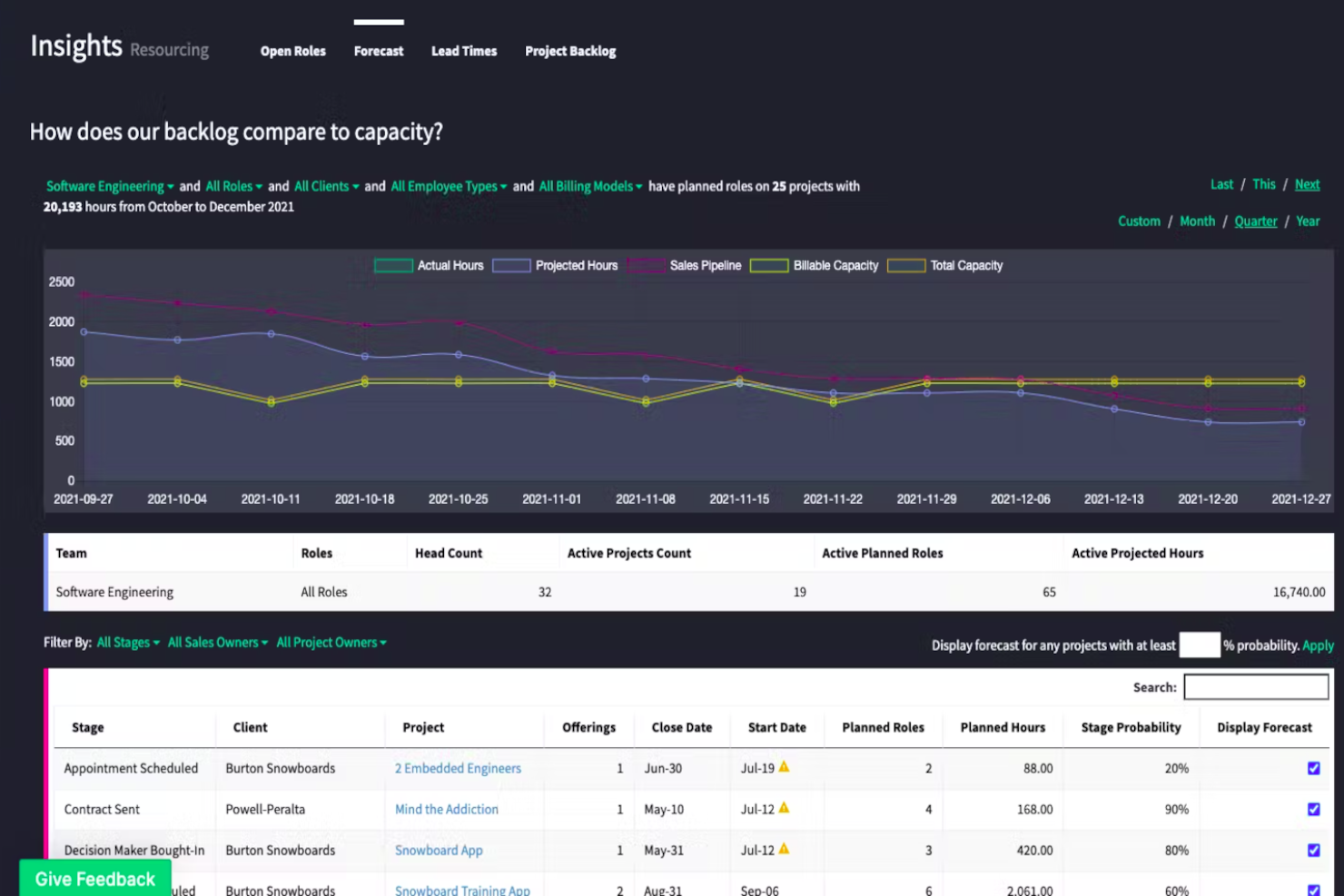
Parallax is professional services automation software for digital services firms, connecting resource planning, project delivery, and financials to help teams manage capacity and profitability—Best for better reporting & analytics.
Who Is Parallax Best For?
Parallax suits operations and resource-planning teams at digital services firms coordinating staffing, project delivery, and financial performance.
Why I Picked Parallax
I picked Parallax, Best for better reporting & analytics, as a Mavenlink alternative because it combines CRM deals and time-tracking data with capacity, revenue, and margin forecasts. I like that project teams can compare performance against plan and get alerts when margins slip, helping them spot delivery risks before projects close.
Parallax Key Features
- Skills-based matching: Match people to project needs based on their skills and availability.
- Hiring planning: See upcoming staffing needs early enough to plan hiring ahead.
- Pricing insights: Use past project performance, client insights, and market trends to shape proposal pricing.
- Parallax Pipeline: Track prospective work within Parallax as an in-platform pipeline option.
Parallax Integrations
Parallax offers native integrations with Salesforce, HubSpot, Pipedrive, Copper, Zoho, Harvest, Clockify, Toggl, Asana, and Jira. It also provides an API for custom integrations.
Pros and Cons
Pros:
- Cuts spreadsheet work in resource planning
- Surfaces capacity gaps before staffing decisions
- Connects pipeline forecasts with project margins
Cons:
- Large team views can load slowly
- Setup demands substantial data cleanup and onboarding

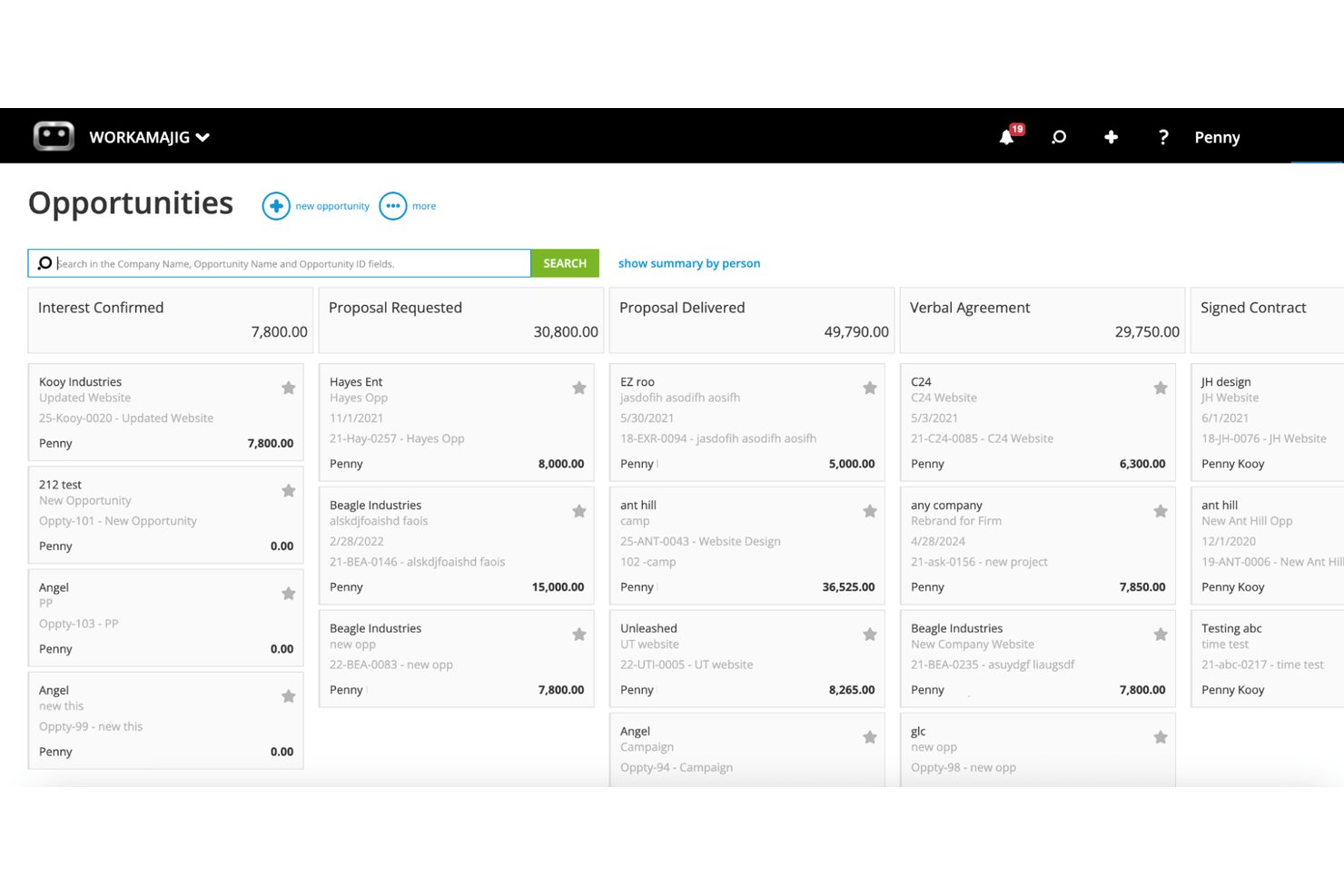
Workamajig is project management software for creative agencies that connects project planning, team collaboration, and financial workflows to help teams coordinate client work and track delivery.
Who Is Workamajig Best For?
Workamajig suits creative agencies that need to manage client-project billing, budgets, and work in progress alongside delivery.
Why I Picked Workamajig
I picked Workamajig as a Mavenlink alternative because it’s Best for creative agency billing and WIP tracking. I like that it connects client-project budgets and billing with delivery, so I can keep project work and financial status in view together.
Workamajig Key Features
- Sales CRM: Track opportunities and turn them into projects.
- Resource scheduling: Assign work and view team availability and overbooking.
- Task and time tracking: Log time against project tasks and estimates.
- Digital proofing: Review and approve creative work within the platform.
Workamajig Integrations
Workamajig documents integrations with Google Calendar, Outlook/Exchange, Slack, Avalara, AvidXchange, Edenred Pay, Strata, Mediaocean, Bionic, and GaleForce. It also supports Zapier and offers REST and JSON APIs for custom integrations.
Pros and Cons
Pros:
- Creative proofing and approval stay in workflow
- Live visibility into project profitability and WIP
- Project budgets connect directly to agency accounting
Cons:
- Navigation and reporting can feel cumbersome
- Timesheets and project updates take extra clicks

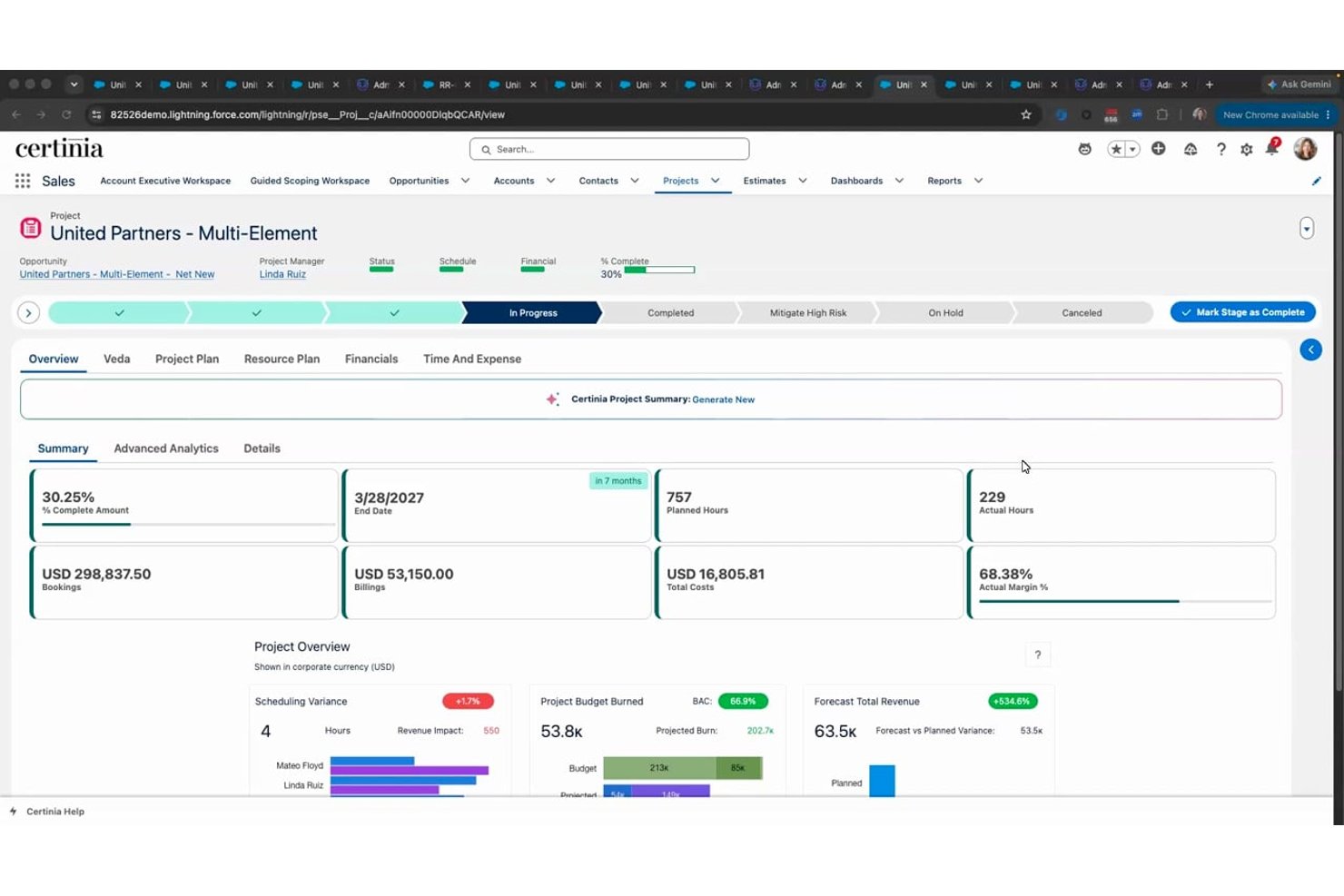
Certinia PS Cloud is a project management platform for professional services teams that need to coordinate client work, staffing, timelines, and project finances, making it Best for Salesforce-native services delivery.
Who Is Certinia PS Cloud Best For?
Certinia PS Cloud suits professional services operations leaders and project managers who manage client engagements and staffing within Salesforce.
Why I Picked Certinia PS Cloud
I picked Certinia PS Cloud because it is Best for Salesforce-native services delivery. I like how it brings client engagements, staffing, timelines, and project finances into Salesforce, so I can track delivery and resource needs alongside the client work they support.
Certinia PS Cloud Key Features
- Project templates: Create projects from reusable templates.
- Risk and issue tracking: Record and manage risks and issues on project records.
- Timecard approvals: Submit timecards for review and approval.
- Customer communities: Give customers secure access to project information and reports.
Certinia PS Cloud Integrations
Certinia PS Cloud is built natively on Salesforce and works with other apps on the Salesforce platform. Certinia lists 24 partner integrations, including Microsoft Outlook, Concur, DocuSign, Expensify, Avalara, and Jitterbit, and provides REST and SOAP APIs for custom integrations.
Pros and Cons
Pros:
- Flexible workflows support complex services operations
- Project financials expose costs and margins
- Resource forecasting connects staffing with demand
Cons:
- Complex reports can slow with large datasets
- Navigation feels dated and hard to follow
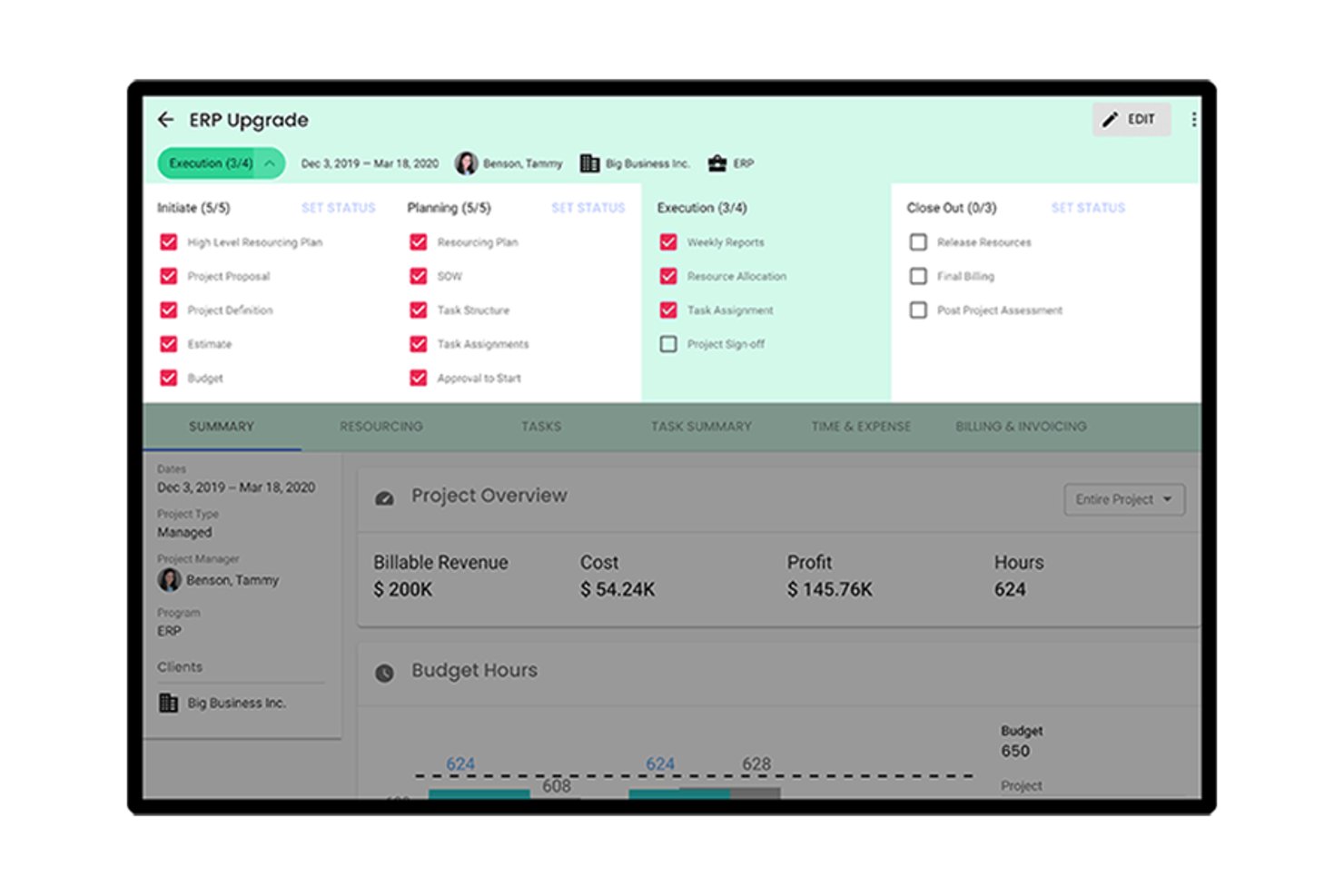
Polaris is Deltek’s PSA platform for IT consulting firms that need to connect project delivery, resource planning, time and expense, and financial workflows.
Who Is Polaris Best For?
Polaris suits IT consulting project managers and finance teams that need a clearer view of work in progress across active client engagements.
Why I Picked Polaris
I picked Polaris as a Mavenlink alternative because it’s best for IT consulting firms needing WIP visibility. I like how it connects project delivery and time and expense with financial workflows, so I can track work in progress across active client engagements. Resource planning adds context when I review delivery and financial status together.
Polaris Key Features
- Configurable project templates: Set up reusable workflows and task hierarchies for project engagements.
- Certification tracking: Record employee certifications alongside skills and availability.
- Project dashboards: Review project health, utilization, profitability, and delivery metrics.
- Business intelligence integrations: Connect Polaris data with Tableau and Power BI.
Polaris Integrations
Deltek lists six out-of-the-box Polaris integrations: Jira, QuickBooks Online, Salesforce, Xero, Zendesk, and BambooHR. Polaris also offers an API for custom integrations and connects with Tableau and Power BI for reporting.
Pros and Cons
Pros:
- Helpful, responsive customer support
- Flexible timesheets and project-level tracking
- Connects project status with financial visibility
Cons:
- Clock adjustments require confusing manual steps
- Reports can retain deleted time

Productive
Best for agency billing and revenue recognition
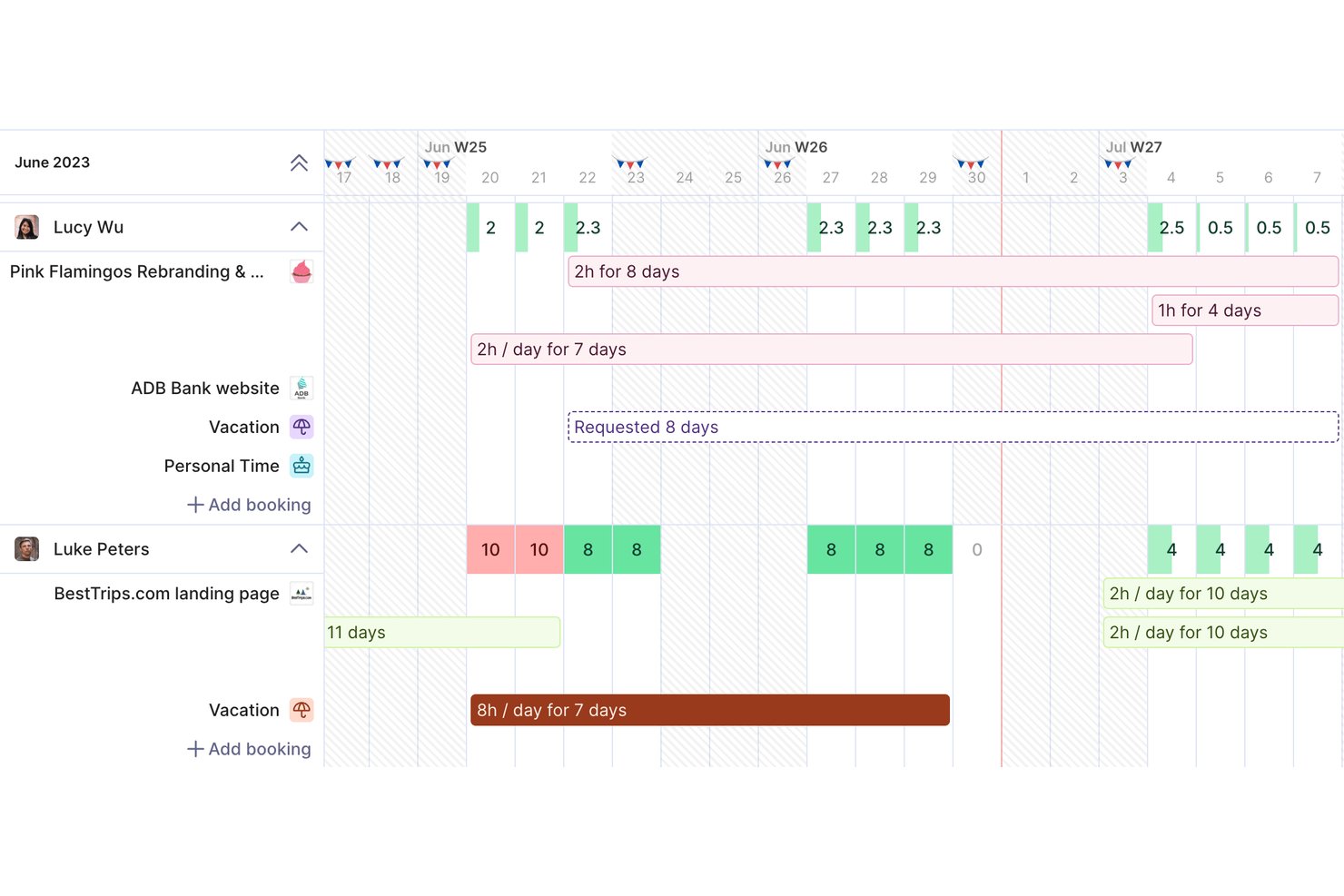
Productive is a professional services automation platform for agencies and consulting teams, bringing project planning, resource scheduling, time tracking, and budgets into one workspace to help teams coordinate delivery and monitor project health.
Who Is Productive Best For?
Productive is a good fit for project managers at agencies and consultancies who coordinate client work, team capacity, and project budgets in one workspace.
Why I Picked Productive
I picked Productive because it’s a strong fit for agency billing and revenue recognition. Project budgets and time tracking connect delivery work to client charges, while revenue recognition helps track earned income by project. That makes it a relevant Mavenlink alternative when you need financial visibility alongside project delivery.
Productive Key Features
- Sales pipeline: Track deals through stages and manage sales forecasts.
- Gantt charts: View project schedules and task timelines.
- Docs: Create and share project documents within Productive.
- Expense management: Record project expenses as billable or non-billable costs.
Productive Integrations
Productive documents integrations with Xero, QuickBooks Online, Exact, Visma e-conomic, Sage, Jira, Slack, Google Calendar, and Outlook, and it connects with Zapier. It also offers an open API for custom integrations.
Pros and Cons
Pros:
- Combines resource planning with delivery workflows
- Shows client profitability and billable utilization
- Connects time tracking with project budgets
Cons:
- Proposal builder offers limited design flexibility
- Reporting customization can feel limited
New Product Updates from Productive
Productive Adds Email and Calendar Integrations for Agents
Productive adds Gmail, Outlook, Google Calendar, and Outlook Calendar connectors for its AI agents. These integrations let agents manage emails and create calendar events directly within Productive. For more information, visit Productive’s official site.
Diğer Mavenlink Alternatifleri
İşte kısa listeme giremeyen ancak yine de göz atmaya değer bazı ek Mavenlink alternatifleri:
- Celoxis
For managing a project portfolio
- Hive
For stronger collaborative and teamwork features
- Teamwork.com
For agency time tracking and billing
- Accelo
For professional service automation
- Ravetree
For client-facing project portals
- BigTime
For quote-to-cash billing in consulting firms
- Rocketlane
For customer collaboration and onboarding
- Netsuite OpenAir
For ERP-native revenue recognition
- Birdview PSA
For Microsoft-stack billing workflows
- Ruddr
For AI-native time-to-invoice billing


Mavenlink Alternatifleri Nelerdir?
Mavenlink alternatifleri, proje yönetimi ve ekip iş birliği yazılımı seçenekleridir. Mavenlink'e benzer işlevler sunarlar ancak özellikler, kullanıcı arayüzleri ve fiyatlandırma modelleri açısından farklılık gösterirler. Bu araçlar projeleri yönetmeye, görevleri izlemeye ve ekip iletişimi ile kaynak yönetimini kolaylaştırmaya yardımcı olur.
Mavenlink alternatiflerinin faydaları ve kullanım alanları arasında belirli proje ve ekip gereksinimlerini karşılayacak şekilde özelleştirilebilen seçenekler, çeşitli proje türlerine uygun bir dizi özellik ve çoğu zaman daha uygun maliyetli çözümler bulunur. Ekip iş birliğini geliştirir, işletmenin büyümesine uyum sağlayacak şekilde ölçeklenebilir ve genellikle diğer işletme araçlarıyla çeşitli entegrasyon olanakları sunarlar.
Mavenlink
Mavenlink, temel planlama, yürütme, proje muhasebesi ve analiz sistemlerini tek bir işletim ortamında bir araya getiren çok yönlü bir proje yönetimi aracıdır. Proje yönetimi, muhasebe, kaynak yönetimi, iş zekâsı ve ekip iş birliği modüllerine sahiptir. Bunlara ek olarak gösterge panoları, canlı zaman ve gider izleme özellikleri ve kapsamlı bir dokümantasyon sistemi sunar. Tüm bu sınıfının en iyisi özellikler, sade ve minimalist bir tasarım aracılığıyla sunulur.
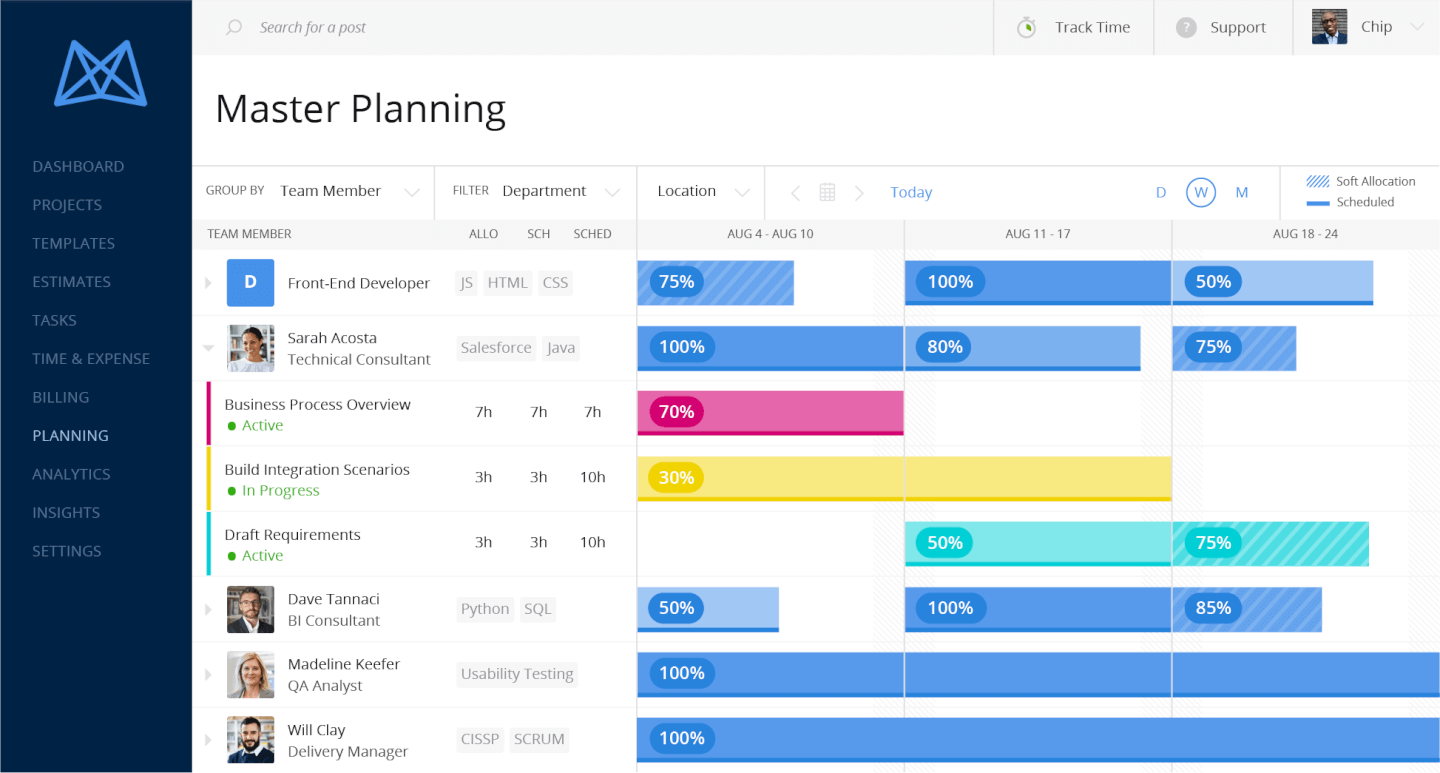
Mavenlink, RM özellikleri söz konusu olduğunda tüm kutuları işaretler. Kaynak yönetimi modülü, proje ve hatta görev düzeyinde gerçek zamanlı kullanım ve marj bilgileri sunar. Öne çıkan özelliklerden bazıları kaynak tahmini, kapasite yönetimi, beceri yönetimi, senaryo planlama ve role dayalı planlamadır.
Diğer özelliklerine daha yakından bakıldığında, BI paketi modülü yerleşik raporlar, özel raporlama, trend analizi, veri görselleştirme ve diğer sistemlerle veri entegrasyonu sağlar. Yazılım ayrıca proje maliyetlendirme, proje ve görev bütçesi yönetimi, gerçek zamanlı kullanım ve marj takibi, faturalandırma, ücret kartları ve arka uç finans sistemleriyle güçlü entegrasyonlar gibi birçok başka çözüme kıyasla daha fazla muhasebe aracı sunar. Ayrıca görevler, projeler ve diğer birçok proje nesnesiyle ilgili hem özel hem de herkese açık tartışmalar yoluyla iletişim kurmak için bazı iyi bağlamsal iş birliği özelliklerine sahiptir.
Mavenlink’in özellikleri hakkında uzun uzun konuşabilirim; çünkü listelenemeyecek kadar çok özellik gerçekten mevcut. Bu, tamamen uzmanlaşmak zaman alsa da kullanımı ve öğrenilmesi kolay olarak kabul edilmiş kapsamlı bir RM paketidir. Dahası şirket, profesyonel hizmetler konusundaki uzmanlığından teklifinin bir parçası olarak yararlanır ve işletmeniz için özel olarak raporlar oluşturabilecek Mavenlink BI Danışmanlarını hizmete sunar. Ayrıca uygulamanın hayata geçirilmesiyle ilgili riskleri ve maliyetleri azaltmaya yardımcı olabilecek bazı harika eğitim kaynakları sağlar.
Mavenlink, entegrasyonlara benzersiz bir yaklaşımla yaklaşır. “API öncelikli strateji” stratejisinin bir parçası olarak, herhangi bir uygulamayla entegre olmak için üçüncü taraf gerektirmeyen bir çözüm geliştirmiştir. Mavenlink ile CRM, HCM ve finans yazılımları gibi diğer iş uygulamaları arasındaki entegrasyonu kolaylaştırmak üzere tasarlanmış bir entegrasyon platformu (M-Bridge olarak adlandırılır) sağlar. Mavenlink, M-Bridge platformunun üzerine şu araçlarla önceden oluşturulmuş çeşitli entegrasyonlar sunar: Expensify, G Suite, Xero, Salesforce, NetSuite, Jira, HubSpot, Slack, Concur, Dynamics 365, Qualtrics, QuickBooks ve Sage Intacct.
Mavenlink’in fiyatı kullanıcı/ay başına 19 $’dan başlar ve 10 günlük ücretsiz deneme sunar.
How I Evaluate a Mavenlink Alternative
I split my evaluation into three parts. First—and most important—I check that a tool can plan and schedule projects across multiple views and give you real cross-project capacity visibility. Then I look for standout capabilities like revenue recognition or scenario-based capacity modeling. Finally, I consider onboarding depth and pricing transparency.
Core Functionality (Table Stakes For This List)
When I'm selecting tools for my list, I score each one on a scale from 0 (does not offer the functionality) to 5 (excels in this area) for each core functionality listed below. I then convert the total into a percentage to help assess each tool's overall fit, with extra weight on any functionalities I’ve deemed essential.
- Project & Task Management (Essential): I look for project views, dependencies, milestones, and templates that help teams manage changing work across multiple client engagements.
- Resource Management (Essential): I assess cross-project capacity and allocation views, including whether managers can spot schedule conflicts and forecast upcoming staffing needs.
- Time Tracking: Check whether people can log billable and non-billable hours against projects or tasks, and whether those entries support approvals and billing.
- Budget & Financial Tracking: I look for planned-versus-actual costs and project margin visibility, so delivery leads can catch budget drift before closeout.
- Invoicing & Billing: I assess whether teams can prepare client invoices from tracked time, expenses, or milestones across different billing arrangements.
- Reporting & Dashboards: Check for useful project, utilization, and financial reporting that helps delivery leaders explain progress and performance to stakeholders.
Once I have a list of tools that meet the criteria, I consider what sets each platform apart.
Differentiating Factors (What Sets Vendors Apart)
Here's how I compare and contrast different vendors:
Standout Features
I check whether a tool can automate revenue recognition by milestone or percentage-of-completion, since manual tracking across dozens of active projects invites errors at month-end. Scenario-based capacity modeling matters just as much—I evaluate how well a platform lets you simulate staffing plans against incoming demand before committing headcount. I also look for skills-based staffing that matches people to projects by certification or expertise, not just open calendar slots.
Beyond Features
I check how deeply a tool integrates with your finance stack. A native QuickBooks or Xero connection that syncs project financials removes manual reconciliation, while a CRM link to Salesforce or HubSpot keeps the sales-to-delivery handoff clean. Pricing models matter just as much—per-user licensing adds up fast as consultancies scale, so I look for tiered plans that separate financial modules from basic project management. I also evaluate onboarding support, especially migration tooling and dedicated customer success resources, since switching from a platform like Kantata mid-engagement can stall active projects.
Neden Bir Mavenlink Alternatifine İhtiyaç Duyabilirsiniz?
Tasarım, yeni kullanıcılar veya dış iş ortakları için fazla karmaşık
Mavenlink’in karmaşık arayüzü, yeni ekip üyelerinin veya iş ortaklarının sık sık katılıp ayrıldığı bir çalışma alanı için uygun olmayan yavaş bir öğrenme sürecine neden olur. Mavenlink, proje yönetimi yazılımlarıyla ilgili önceki deneyimin kesinlikle avantaj sağlayacağı bir araçtır.
Daha güçlü ekip iş birliği özelliklerine ihtiyacınız var
Yorum bırakma ve düzeltme dışında, iş birliği açısından Mavenlink’te yapabileceğiniz pek fazla şey yoktur. Eksikliğini hissedebileceğiniz ve diğer çözümlerde bulabileceğiniz iş birliği özellikleri arasında sohbet, entegre e-posta ve mesaj panoları bulunur.
Aracın ücretini ödemek giderek pahalılaşıyor
Mavenlink’in çok sayıdaki özelliği maliyetini haklı çıkarır; ancak araç, büyük bir işletmenin rahatlıkla karşılayabileceği daha pahalı seçenekler arasındadır. Küçük bir ekibi veya girişimi yönetiyorsanız, diğer uygulamalarda daha düşük bir maliyetle yeterli işlevselliği bulabilirsiniz. Ayrıca Mavenlink, rakiplerinden bazılarının aksine ücretsiz bir plan sunmaz.
Uygun Bir Mavenlink Alternatifi İçin Temel Özellikler
Zaman takibi
Mavenlink, zamanı takip etmek, zaman çizelgeleri oluşturmak ve performans raporları hazırlamak için birden fazla yöntem içeren kapsamlı bir zaman takip paketi sunar. Zaman takibi, proje yönetimi yazılımları için zorunlu bir özellik olmasa da uygun bir alternatif bu özellikleri karşılamalıdır.
Faturalandırma ve ücretlendirme
Uygulama içinden müşterilerinize fatura kesmeyi de planlıyorsanız, bir sonraki proje yönetimi çözümünüzün ihtiyaç duyacağı iki özellik bunlardır. Tüm Mavenlink planları faturalandırma ve çevrim içi ödeme çözümleriyle birlikte gelir; bu nedenle yazılım alternatiflerinde de bu özellikleri (doğrudan sunulan veya eklentiler aracılığıyla sağlanan) arayacağım.
Kaynak planlama
Kaynak biçimlendirme, sabit ve esnek kaynak tahsisi ve gerçek zamanlı kullanılabilirlik tahmini, diğer proje yönetimi araçlarını değerlendirirken göz önünde bulundurulması gereken gelişmiş kaynak planlama özelliklerinden yalnızca birkaçıdır. Bu seçenekler yalnızca üst düzey Mavenlink planlarında kullanılabildiğinden, kaynak yönetimi için benzer alternatifler sunan daha ucuz bir çözümü değerlendirmek isteyebilirsiniz.
Gelişmiş raporlama özellikleri
Mavenlink'teki raporlama, en karmaşık projelere bile uygun olacak şekilde gerçekten olağanüstüdür. Değerlendirdiğiniz diğer tüm araçlar; görevleri, projeleri, portföyleri, zaman takibini ve bütçelemeyi, diğer kaynak türleriyle birlikte kapsayan bir raporlama paketine sahip olmalıdır.