

2026’da Mimarlar İçin En İyi 10 Proje Yönetimi Yazılımı

10 Mimarlar İçin En İyi Mimari Proje Yönetimi Yazılımları


Mimari projeleri yönetmek; tasarım hassasiyetini, müşteri beklentilerini ve mevzuat gerekliliklerini aynı anda dengelemeyi gerektirir. Doğru araçlar olmadan zaman çizelgelerinin aksaması, bütçelerin kontrolden çıkması ve iletişim kopukluklarının ilerlemeyi sekteye uğratması kolaydır. İşte bu noktada mimarlar için özel olarak tasarlanmış proje yönetimi yazılımları devreye girer. Ancak bu kadar çok seçenek varken firmanız için en uygun çözümü bulmak bunaltıcı olabilir.
Mimarlık ekipleri için tasarlanmış önde gelen araçları test edip analiz ederek özelliklerini, kullanılabilirliklerini ve sektöre özgü işlevlerini değerlendirdim. Bu listede, mimarlar için en iyi proje yönetimi yazılımlarını inceleyerek projelerinizin sorunsuz ilerlemesini sağlayacak doğru çözümü seçmenize yardımcı olacağım.
Why Trust Our Software Recommendations
Our team has been testing and reviewing software since 2012. As project managers ourselves, we know how difficult—and important—it is to choose the right software.
For this guide, we evaluated tools using hands-on testing and independent research, scoring tools using our selection criteria. We also draw on insights from industry thought leaders and practicing project management experts.
Our reviews reflect our human editorial judgment, not a sales pitch.
Expert reviewers:
Mimarlar İçin Proje Yönetimi Yazılımları Karşılaştırma Tablosu
Genel bakışlarda az önce ele aldığımız tüm araçları karşılaştırmak için kullanabileceğiniz tablo aşağıdadır.
Score legend (out of 5)
- Excellent 4.5–5
- Good 4–4.4
- Average 3–3.9
- Below average 2–2.9
- Poor 1–1.9
| Tool | Starting Price | Website | |||||||
|---|---|---|---|---|---|---|---|---|---|
| Best for phase-by-phase fee and profit tracking | 3.3 out of 5 | 4 | 4 | 4 | 4 | 2 | 2 | $17/user/month 14-day free trial | Book Demo |
| Best for fee tracking and invoicing | 3.3 out of 5 | 4 | 3 | 4 | 4 | 2 | 3 | $10/user/month 14-day free trial + demo available | Book Demo |
| Best for time and fee tracking in AEC firms | — | 4 | 2 | 4 | 4 | — | 2 | Pricing upon request Free demo available | Website |
| Best for affordable multi-project team collaboration | 3.2 out of 5 | 3 | 3 | 3 | 4 | 3 | 3 | $4/user/month Free plan + 15-day free trial + free demo available | Website |
| Best for cross-team workload and approval tracking | 3.2 out of 5 | 3 | 3 | 2 | 4 | 3 | 4 | $10/user/month Free plan + 14-day free trial + demo available | Book Demo |
| Best for billing from tracked hours | 3.5 out of 5 | 4 | 2 | 4 | 4 | 3 | 4 | Pricing upon request Free plan available | Website |
| Best for tracking fees and profit by phase | 3.3 out of 5 | 4 | 3 | 4 | 4 | 2 | 3 | Pricing upon request Free demo available | Book Demo |
| Best for construction-phase billing and approvals | 3.2 out of 5 | 3 | 3 | 4 | 2 | 3 | 4 | $49/month 30-day free trial + free demo available | Website |
| Best for client portal and project billing | 3.5 out of 5 | 4 | 4 | 4 | 3 | 3 | 3 | $39/user/month Free plan + free trial + free demo available | Website |
| Best for phase-based time and fee tracking | 3.3 out of 5 | 4 | 4 | 4 | 3 | 2 | 3 | $45/month Free trial + demo available | Website |


Mimarlar İçin En İyi Proje Yönetimi Yazılımlarına Genel Bakış
Mimarlar için en iyi proje yönetimi yazılımları listemdeki temel özellikler ve en uygun kullanım alanları hakkındaki değerlendirmem aşağıdadır.

Scoro
Best for phase-by-phase fee and profit tracking
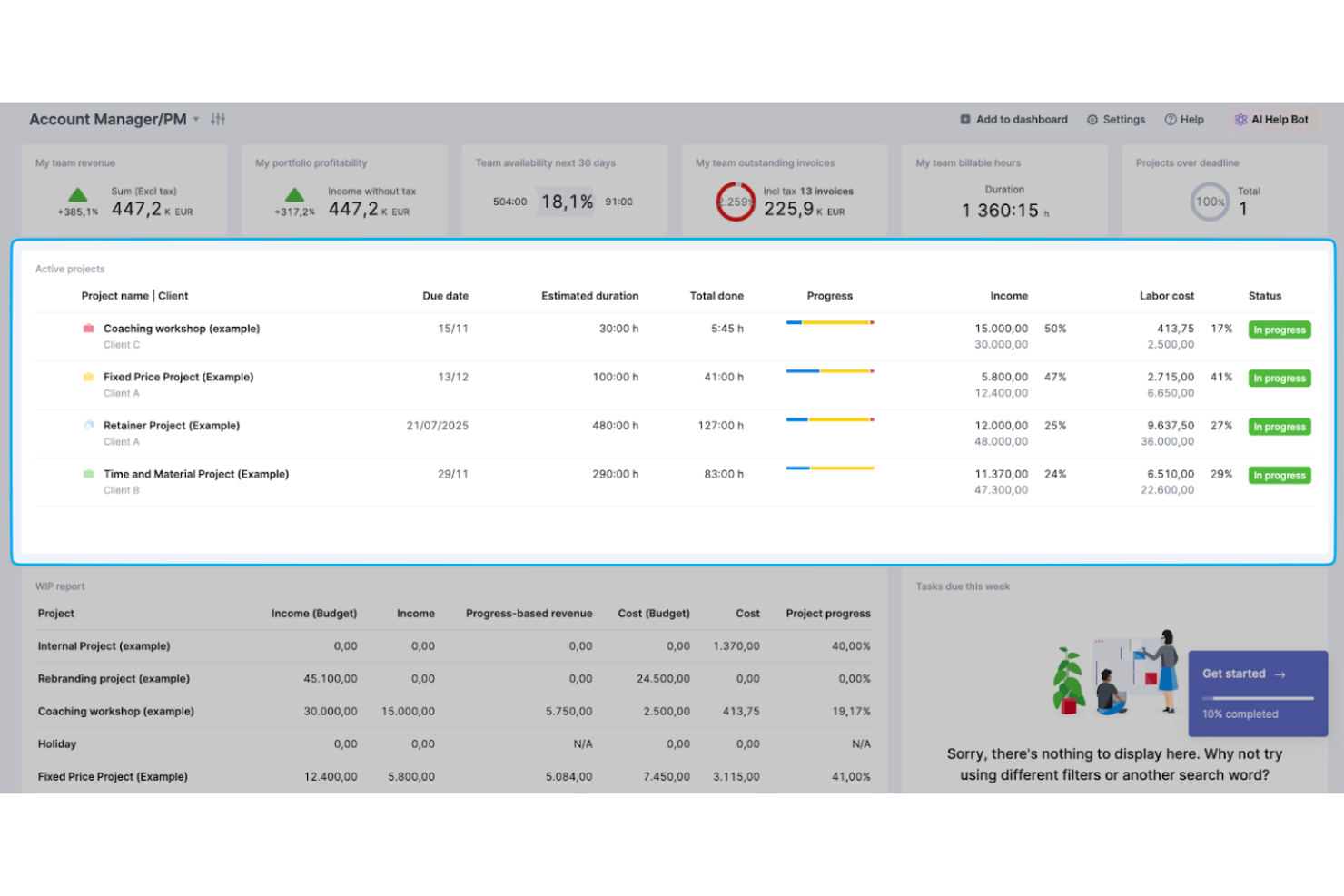
Scoro is a professional services automation platform that combines project phase planning, time tracking, resource scheduling, budgeting, and invoicing in one system.
Who Is Scoro Best For?
Scoro is a strong fit for architecture firm principals and operations managers who need to track fees, costs, and profitability across multiple project phases in one place.
Why I Picked Scoro
I've included Scoro in my top picks because it's the only tool on this list that lets you price each project phase by role and rate, then tracks actual time and cost against that estimate as work progresses. When a phase flips from Schematic Design to Construction Documents, I can see earned revenue, remaining budget, and forecasted profit margin all in one view. Scoro also rolls those figures up to portfolio level, so principals can spot which projects are eroding margin before the damage is done.
Scoro Key Features
- Resource capacity heatmaps: Visual workload heatmaps show who's available or overbooked across all active projects, so you can allocate staff without creating bottlenecks.
- Project templates with phase bundles: Reusable templates include predefined phases and linked task bundles, letting you spin up new projects with consistent structure.
- Utilization and time analysis: Time is broken down by client, project, activity, and billable status, giving you a full picture of how your team's hours are being spent.
- Milestone-split and recurring invoicing: Invoices can be issued against project milestones, split across billing periods, or set to recur automatically for retainer engagements.
Scoro Integrations
Scoro offers native integrations with Xero, QuickBooks, Sage Intacct, Exact Online, Google Drive, Dropbox, BambooHR, Slack, Jira, and Stripe. It also provides a REST API, webhooks, MCP server, and Zapier for custom connectivity.
Pros and Cons
Pros:
- Capacity views help balance project workloads
- Time entries connect budgets and client billing
- Phase-level fee tracking exposes margin drift
Cons:
- Portal collaboration lacks formal approval workflows
- No native BIM or CAD connection
New Product Updates from Scoro

Scoro Adds Time Mobile App and ELI Improvements
Scoro adds the Scoro Time mobile app for iOS/Android to track time anywhere and expands ELI with attachments, smarter filtering, and trigger-based actions. For more information, visit Scoro's official site.

Best for fee tracking and invoicing
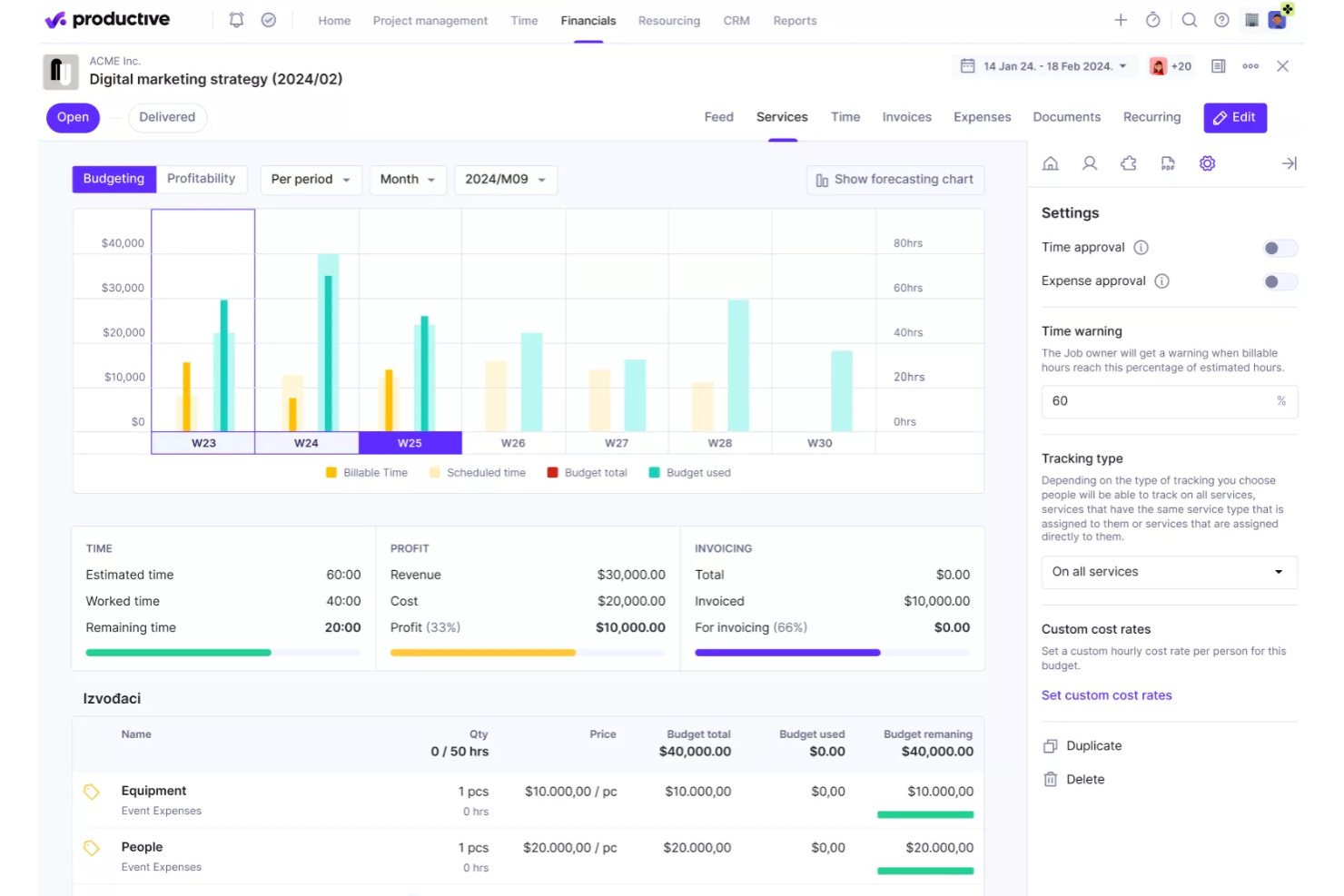
Productive is a professional services management platform that combines project and task management, time tracking, resource planning, budget monitoring, and invoicing in one place.
Who Is Productive Best For?
Productive is a strong fit for architecture and professional services firms that need tight control over project fees, budgets, and invoicing across multiple concurrent client engagements.
Why I Picked Productive
I picked Productive as one of the best because it keeps fee tracking and invoicing tightly connected to the actual work happening in a project. I like that you can set budget overrun limits at the service level, so your team gets stopped (or flagged) before a fixed-fee engagement quietly bleeds over scope. Milestone billing lets you create future-dated draft invoices tied to specific phases, and payment sync with tools like Xero or QuickBooks reflects what's been collected without manual reconciliation.
Productive Key Features
- Resource planner: View team capacity, availability, and workload across multiple concurrent projects in a single visual layout.
- Project timeline layouts: Visualize work using Gantt, calendar, or timeline views with milestones and task dependencies.
- Client collaborator access: Invite clients to tasks and projects at no extra seat cost, with filtered, permission-controlled visibility.
- Budget profitability tracking: Monitor planned revenue, actual costs, and real-time profitability at the project and service level.
Productive Integrations
Productive offers native integrations with Xero, QuickBooks, Google Calendar, Slack, and Jira, plus connections to Sage and NetSuite. It provides a REST-style API with webhooks and connects to over 1,000 apps via Zapier.
Pros and Cons
Pros:
- Clients can join project task discussions
- Time, fees, and profitability stay connected
- Cross-project capacity and workload visibility
Cons:
- No drawing-focused version control or markups
- No architecture-specific design phase workflows
New Product Updates from Productive
Productive Adds Email and Calendar Integrations for Agents
Productive adds Gmail, Outlook, Google Calendar, and Outlook Calendar connectors for its AI agents. These integrations let agents manage emails and create calendar events directly within Productive. For more information, visit Productive’s official site.

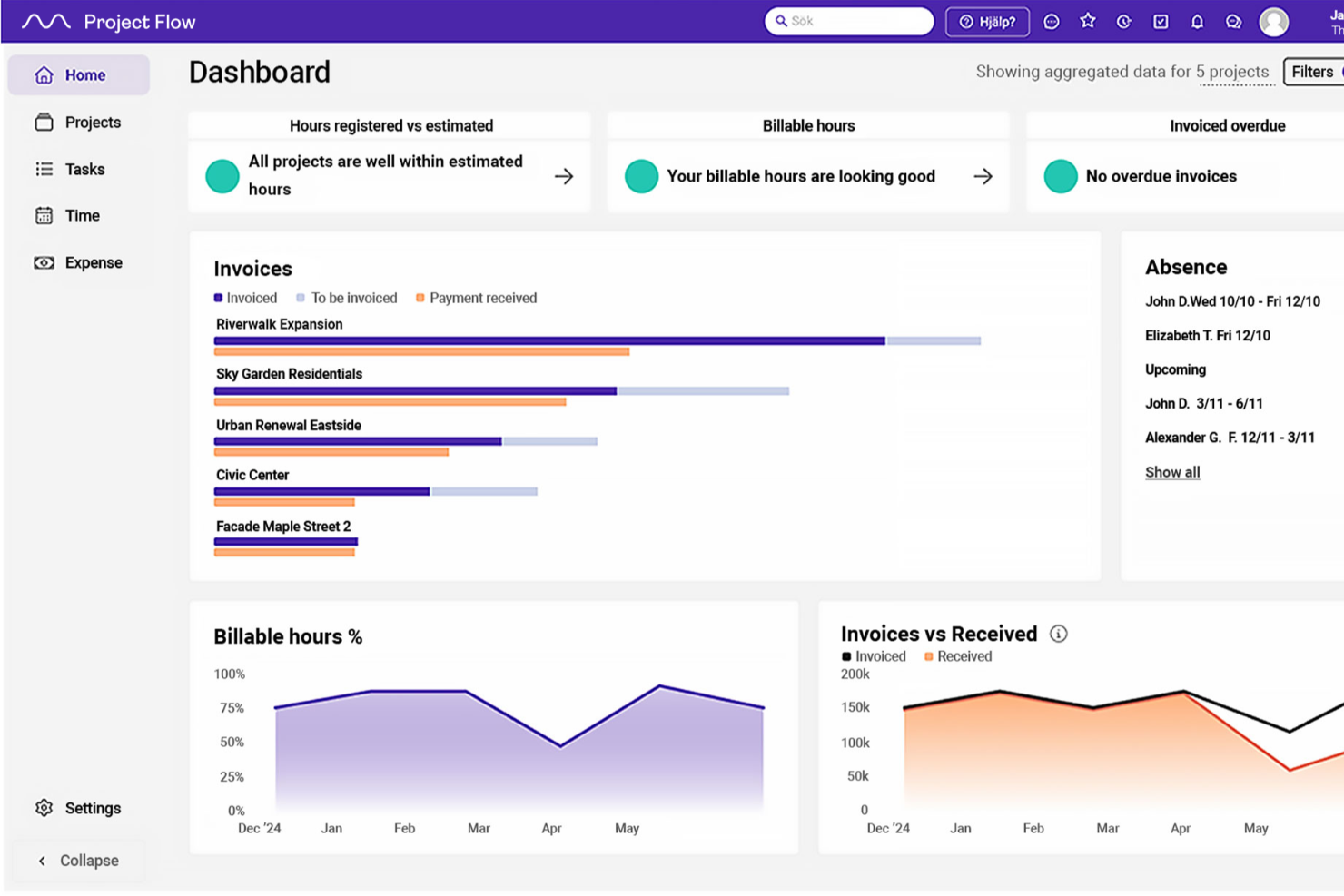
Project Flow by Milient is a project management platform built for architecture and engineering firms that combines project planning, time tracking, resource scheduling, budget monitoring, and invoicing in one system.
Who Is Project Flow by Milient Best For?
Project Flow is a strong fit for architecture and engineering firms that need tight control over billable hours, fee tracking, and invoicing across multiple concurrent projects.
Why I Picked Project Flow by Milient
I've included Project Flow by Milient in my top picks because it handles the financial side of architecture work with a level of detail that most project tools don't get close to. The project overview compares hours worked against billable hours in real time, flags overages automatically, and feeds directly into invoicing, so nothing slips through at billing time. I also like that fee calculation accounts for contract type, time, and costs, which mirrors how AEC firms actually price work.
Project Flow by Milient Key Features
- Resource allocation views: Calendar-based workload and utilization views let you assign work by role and availability across multiple concurrent projects.
- Mobile time and expense logging: The mobile app lets users register project hours and upload expense receipts directly from their phones.
- Quality system with checklists: Built-in checklists, non-conformity tracking, and risk assessment tools support project quality processes.
- Analytics dashboard: Provides portfolio-level reporting on business KPIs, actuals, potential revenue, and forecasts across projects.
Project Flow Integrations
Project Flow offers native integrations with Sage, Xero, AccountsIQ, QuickBooks, and Access. It also provides an open REST API for custom integrations.
Pros and Cons
Pros:
- Connects project hours with invoicing and follow-up
- Helps allocate staff across concurrent projects
- Tracks hours against project plans and fees
Cons:
- No documented drawing version control or sharing
- Time reporting can require extra steps

Best for affordable multi-project team collaboration
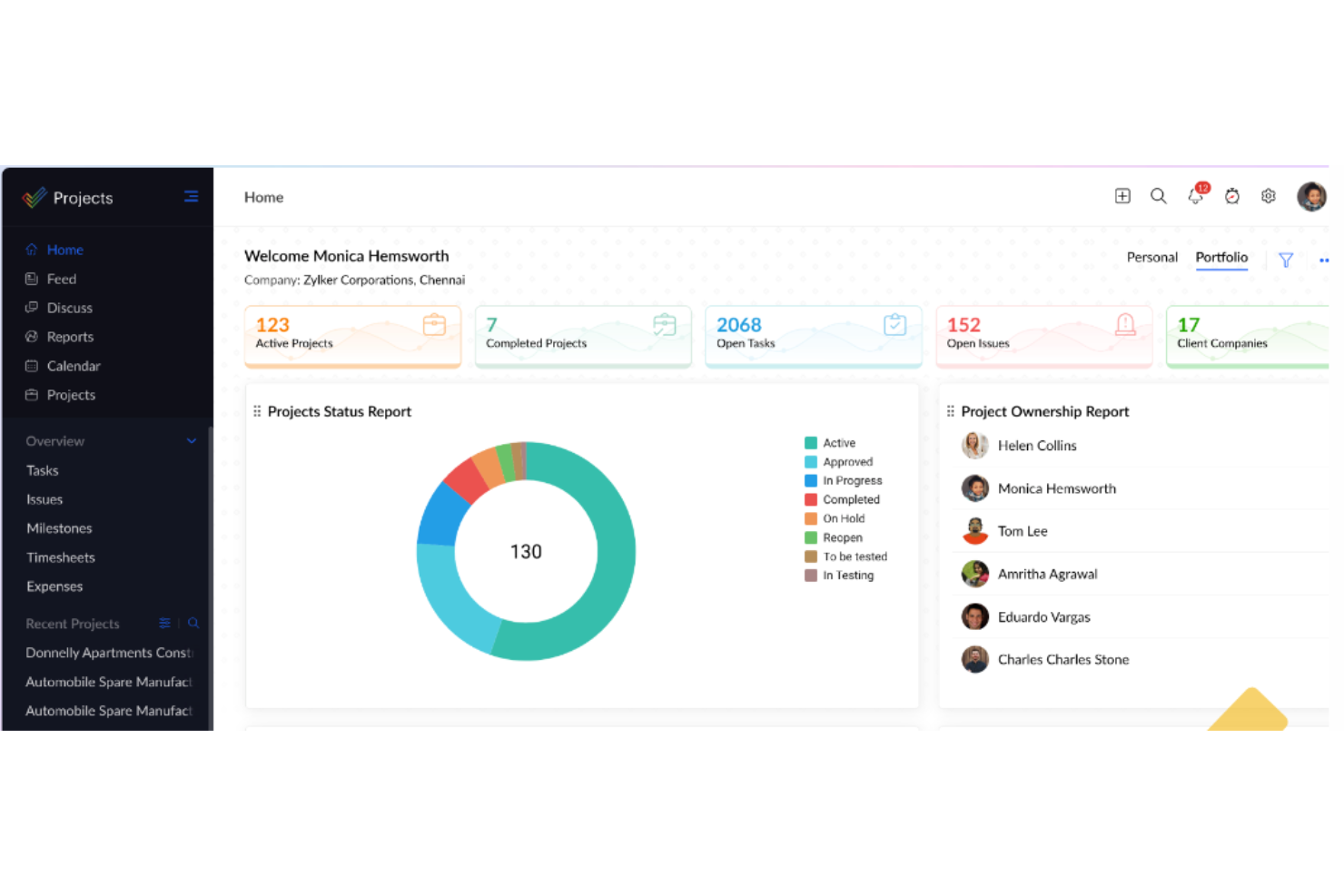
Zoho Projects is a cloud-based project management tool that combines task tracking, Gantt charts, phase management, workload scheduling, time logging, budget tracking, and document management across multiple concurrent projects.
Who Is Zoho Projects Best For?
Zoho Projects suits small to mid-sized firms running multiple concurrent projects who need solid task tracking, time logging, and resource allocation without a high per-seat cost.
Why I Picked Zoho Projects
I've included Zoho Projects in my top picks because it handles multi-project resource scheduling at a price point that genuinely surprises me. When I'm tracking staff across concurrent projects, the global workload report gives me bar, heatmap, and timeline views so I can spot over-allocation instantly and reassign tasks without leaving the report. Paired with phase-level budget tracking and planned-versus-actual cost alerts, it covers the core financial visibility architects need without requiring a premium-tier tool.
Zoho Projects Key Features
- Phase-based budgeting: Set project budgets at the phase level and track planned versus actual costs with threshold alerts and overrun notifications.
- Client user permissions: Add external client users to projects with customizable, per-user permissions that control access to specific phases, files, and forums.
- File version control: Upload, organize, and version project documents in folders with check-out functionality to prevent conflicting edits.
- Blueprint task automation: Design structured task workflows that automatically assign team members, update fields, and notify stakeholders as task statuses change.
Zoho Projects Integrations
Zoho Projects has 50+ marketplace integrations, including native integrations with Zoho Books, Zoho Invoice, Zoho WorkDrive, Google Drive, Microsoft SharePoint, Microsoft Teams, Slack, Dropbox, and Box. It also offers a REST API, webhooks, and Zapier.
Pros and Cons
Pros:
- Time logs help track billable design work
- Reviewers praise milestone tracking and Gantt schedules
- Cross-project workload views expose allocation gaps
Cons:
- Client sharing lacks documented consultant approval workflows
- No preset architectural stages or phase dependencies
New Product Updates from Zoho Projects

Zoho Projects Adds QuickBooks Online and Xero Integrations
Zoho Projects now connects with QuickBooks Online and Xero, bringing project work and accounting workflows closer together. Manage project-related billing and financial tasks with fewer app switches. For more information, visit Zoho Projects’ official site.
 .

Wrike
Best for cross-team workload and approval tracking
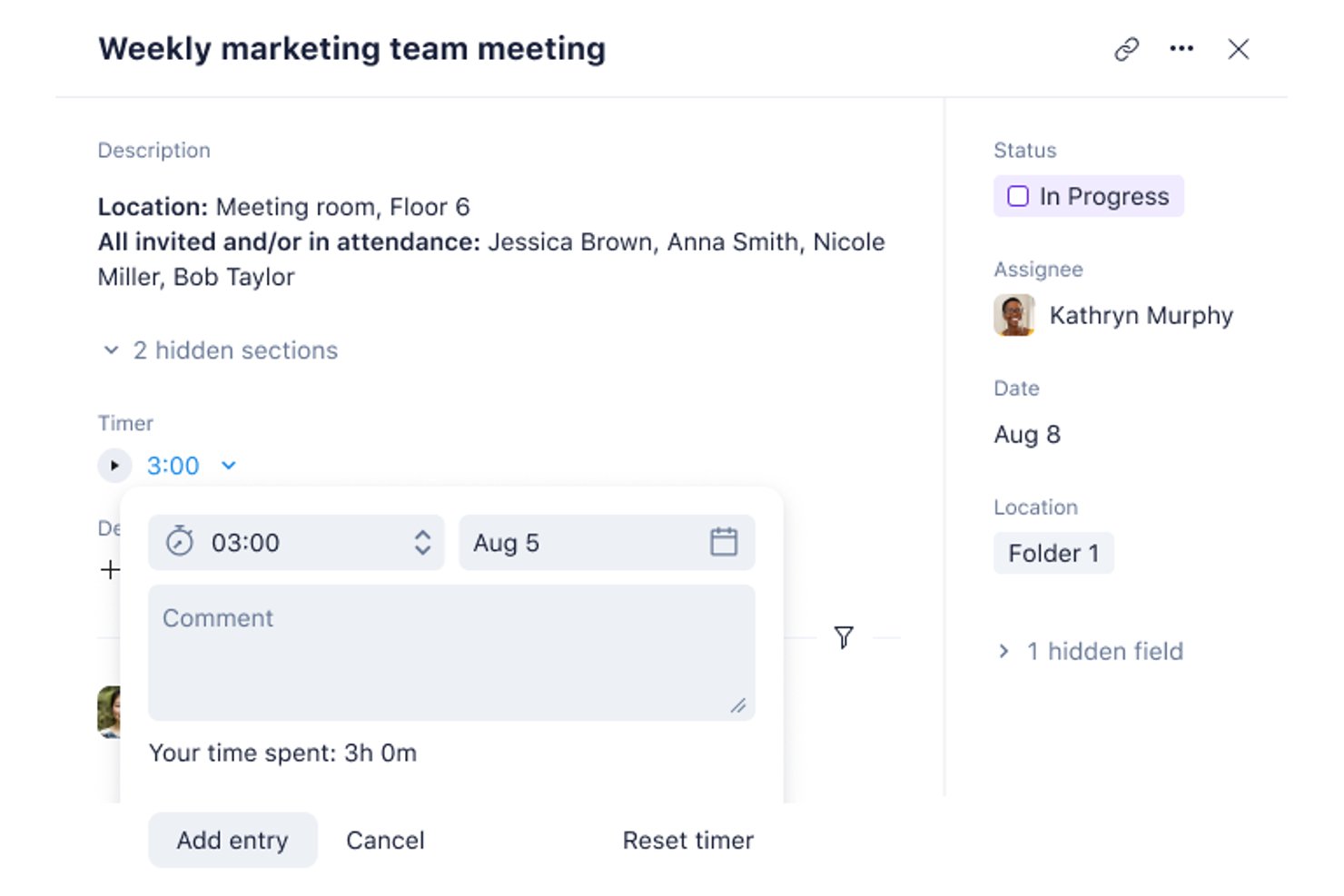
Wrike is a work management platform that combines Gantt-based project scheduling, workload and resource planning, visual proofing, and cross-team approval workflows to help architecture studios coordinate multi-disciplinary project delivery.
Who Is Wrike Best For?
Wrike suits studio operations managers and multi-disciplinary design teams that need to coordinate workloads, approvals, and external collaboration across several concurrent projects.
Why I Picked Wrike
I've included Wrike in my top picks because it handles cross-team workload visibility and structured approval routing better than most general-purpose tools I've tested. When you're juggling multiple concurrent projects, the Resources view shows exactly who's over capacity by user or job role across your whole portfolio. Paired with guest review workflows that let clients approve files without a Wrike account, it keeps sign-offs moving without pulling external stakeholders into your workspace.
Wrike Key Features
- Interactive Gantt charts: View project timelines, set milestones, and map finish-to-start and other task dependencies across design phases.
- Reusable project blueprints: Save folder, task, and project structures as templates to standardize recurring workflows across engagements.
- Visual proofing tools: Add markup and feedback directly to attached files and compare original versions with updated ones side by side.
- Dynamic request forms: Route internal and external work requests to a central location while capturing the details needed to kick off a project.
Wrike Integrations
Wrike lists 400+ integrations, including QuickBooks, NetSuite, Google Sheets, Microsoft Excel, OneDrive, Dropbox, Adobe Creative Cloud, Bynder, and MediaValet. It also provides a REST API, webhooks, OAuth 2.0, and an MCP Server for custom connections.
Pros and Cons
Pros:
- Reusable phase structures support repeatable delivery
- Guest approvals keep client sign-offs moving
- Cross-project workload visibility
Cons:
- Initial workflow setup takes planning
- Budgeting and invoicing need separate systems
New Product Updates from Wrike

Wrike Adds Advanced Filters to Chart View
Wrike introduces new default filters in Chart view, including relative dates, exclusion conditions, multiple filters per field, and status group filtering. These updates help teams refine project data and reporting. For more information, visit Wrike’s official site.
Best for billing from tracked hours
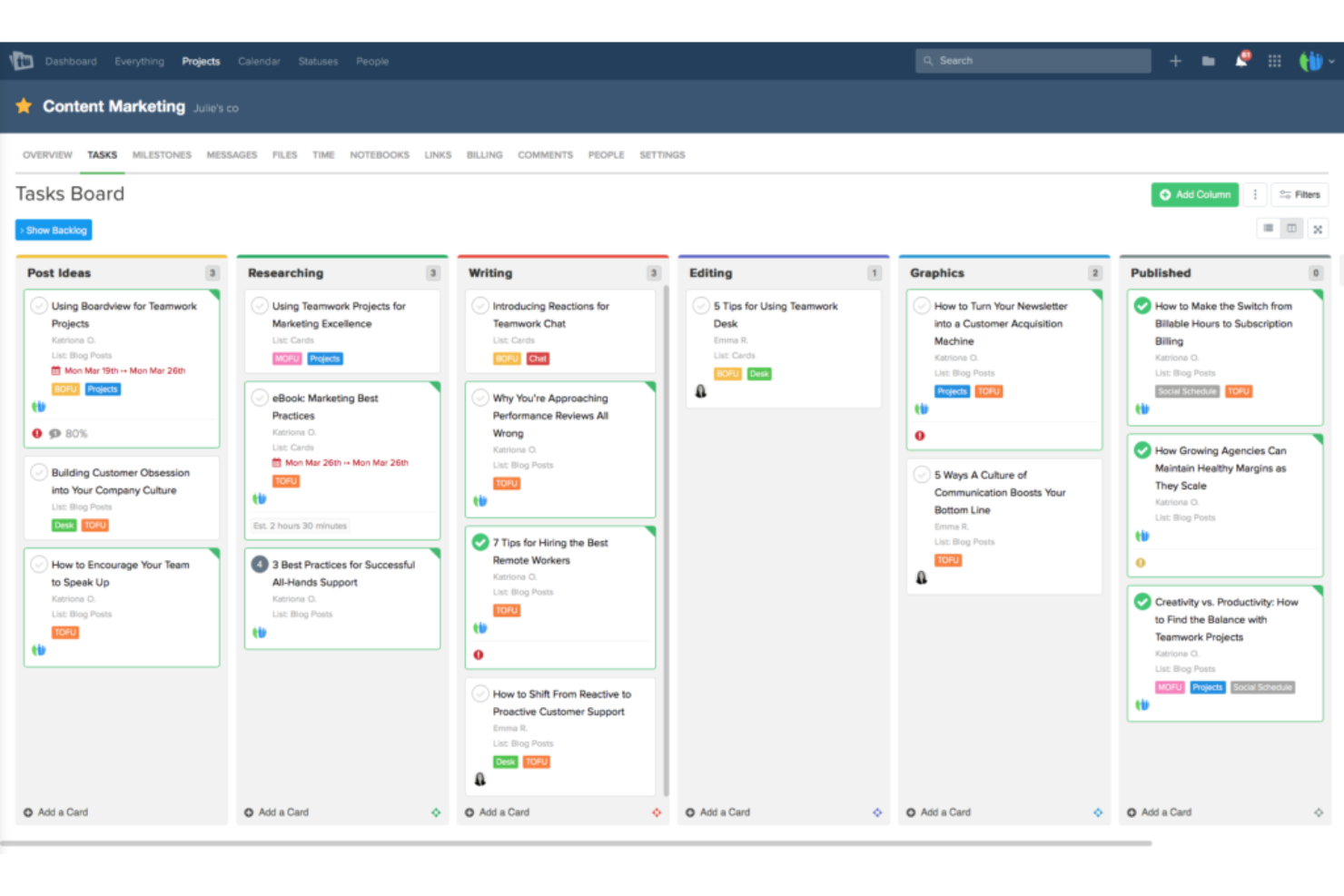
Teamwork.com is a project management platform built for client work that combines task planning, time tracking, resource scheduling, budgeting, and client collaboration tools in one place.
Who Is Teamwork.com Best For?
Teamwork.com is a strong fit for client-facing teams that need to turn logged hours directly into invoices without jumping between tools.
Why I Picked Teamwork.com
I've included Teamwork.com in my top picks because it closes the gap between logged hours and client invoices better than most tools I've tested. When your team logs billable time against tasks, you can generate an invoice directly from those hours without reformatting data or jumping to a separate billing tool. I also like that you can set different billable rates per person, role, or project, which matters when a principal and a junior architect are both billing to the same job.
Teamwork.com Key Features
- Client proofing and approvals: Invite clients by email to review, annotate, and approve deliverables directly within the platform, without requiring a paid account.
- Resource scheduling with role-based placeholders: Plan capacity across projects using role placeholders before specific team members are assigned.
- Workload and capacity management: View team availability and identify over-allocated staff across concurrent projects in a single scheduling view.
- File versioning: Upload and track multiple versions of project files, with comments tied to each version separately.
Teamwork.com Integrations
Teamwork.com lists 150+ integrations, including QuickBooks, NetSuite, Xero, Google Drive, SharePoint, Dropbox, Slack, and Microsoft Teams. It also offers an API, webhooks, an MCP server, and Zapier for custom connectivity.
Pros and Cons
Pros:
- Capacity views help balance concurrent studio projects
- Proofing keeps client approvals with deliverables
- Billable hours connect directly to client invoicing
Cons:
- No dedicated BIM or drawing workflows
- No built-in architecture design-phase templates

Accelo
Best for tracking fees and profit by phase
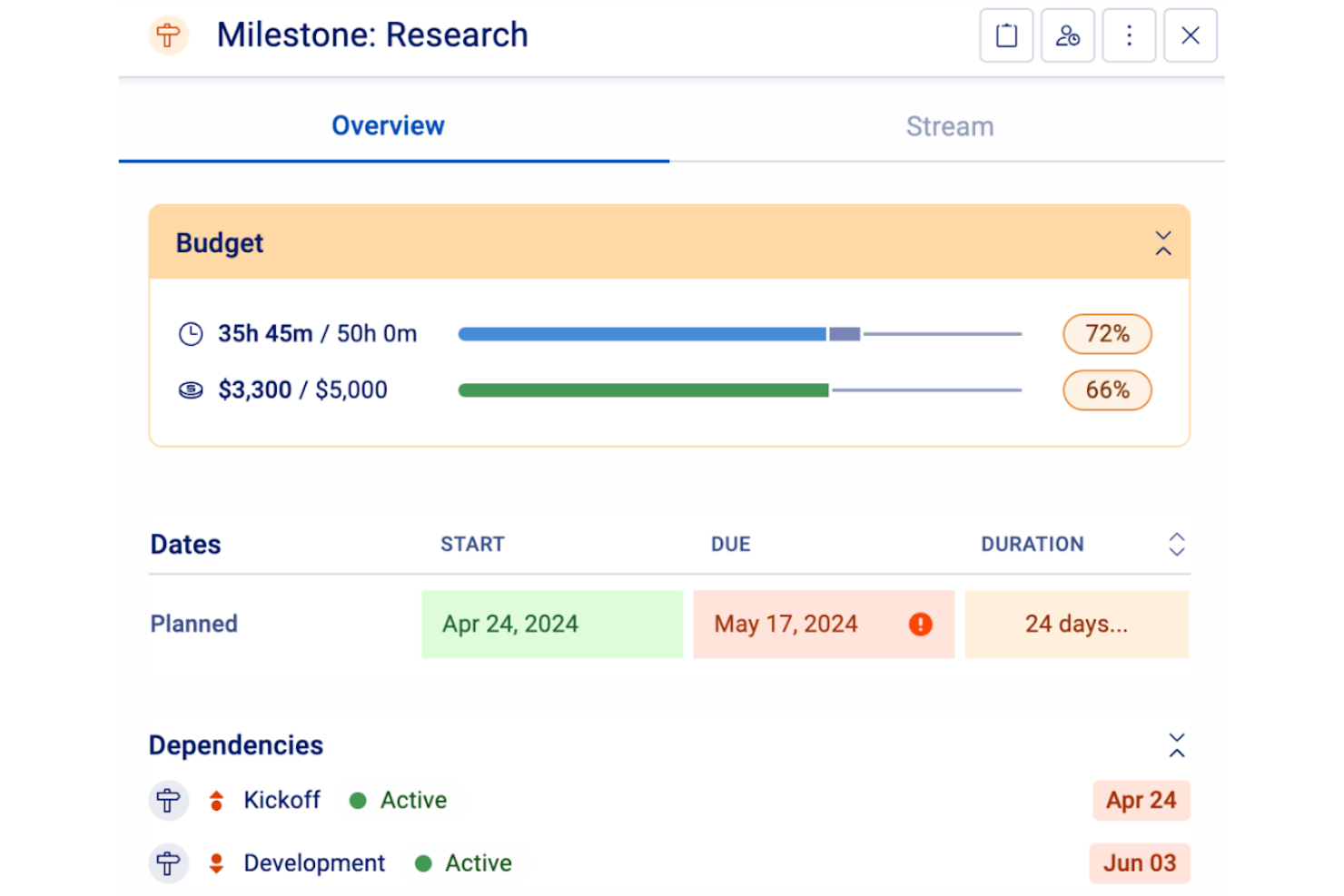
Accelo is a professional services automation platform that connects project management, time tracking, resource scheduling, and financial reporting—including phase-level budget monitoring and profitability analysis—in a single system.
Who Is Accelo Best For?
Accelo suits architecture firms and professional services studios that bill by phase and need tight control over fees, margins, and profitability across concurrent projects.
Why I Picked Accelo
I picked Accelo as one of the best because it gives architecture firms a direct line of sight into fees and profitability at the phase level, which is exactly where budget conversations get hard. I love that you can track budget consumption in real time as each phase progresses, flag variances before they become write-offs, and generate invoices directly from logged project activity. The Profitability Dashboard then lets you cut that data by project type, client, or phase, so you always know where your margins are holding and where they aren't.
Accelo Key Features
- Resource scheduling: Assign architects and designers to project phases using visual capacity planning with soft and hard allocations.
- Skills-based resource recommendations: AI evaluates team skills, availability, workload, and past performance to suggest the best fit for each phase.
- Client workspace: Clients access a branded portal to view project timelines, milestones, and deliverables via secure magic links.
- Accounting integrations: Sync invoices, payments, and billing data directly with QuickBooks, Xero, and Sage Intacct.
Accelo Integrations
Accelo offers integrations with QuickBooks, Xero, Sage Intacct, Microsoft 365, Google Workspace, Jira, and Slack. It supports REST, Forms API, webhooks, OAuth 2.0, and Zapier for custom connectivity.
Pros and Cons
Pros:
- Client signoffs capture comments and approvals
- Staff allocation flags capacity gaps across projects
- Phase budgets expose fee overruns early
Cons:
- Project setup can take months to settle
- Drawing files lack documented version histories
New Product Updates from Accelo

Accelo Rebuilds Mobile App for Project and Time Management
Accelo rebuilds its mobile app with task management, new work creation, and mobile timesheets for Forecast customers. This helps teams keep project and time data current while working away from a desktop. For more information, visit Accelo’s official site.

Best for construction-phase billing and approvals

Contractor Foreman is a construction management platform built for contractors that covers project scheduling, job costing, client communication, document management, submittal approvals, and AIA-style billing.
Who Is Contractor Foreman Best For?
Contractor Foreman is a good fit for architects who take a hands-on role during construction administration and need client approvals, AIA-style billing, and submittal workflows in one place.
Why I Picked Contractor Foreman
I picked Contractor Foreman as one of the best because it handles the billing and approval workflows that define construction administration for architects. When a contractor submits shop drawings, I can route them through an external approval portal where engineers, consultants, and owner representatives review, approve, or reject with comments, all without emailing files back and forth. I also like that AIA-style progress invoicing ties directly to a Schedule of Values, so billing reflects actual construction milestones rather than manual estimates.
Contractor Foreman Key Features
- Gantt-chart scheduling: Build project schedules with critical-path tracking, baseline comparisons, and progress updates using a visual Gantt interface.
- Daily logs: Record jobsite activity, including crew presence, weather, materials, and safety notes, directly from the field.
- PDF markup and measurement: Annotate drawings, take measurements, and save them to plans from both desktop and mobile.
- Budget vs. actual reporting: Generate detailed job-cost reports comparing contract amounts, budgets, invoiced totals, time-card costs, and expenses.
Contractor Foreman Integrations
Contractor Foreman connects with 50+ systems, including native integrations for QuickBooks Online, QuickBooks Desktop, Microsoft Project, Google Calendar, Outlook Calendar, Gusto, Stripe, CompanyCam, and SweetPay. Zapier is also supported.
Pros and Cons
Pros:
- Job-cost reports compare budgets and actuals
- Submittal approvals include consultant comments
- Client portal earns positive client feedback
Cons:
- Cross-project staffing visibility draws user criticism
- Manual scheduling lacks architecture-phase templates

Ravetree
Best for client portal and project billing

Ravetree is a work management platform for architecture firms that brings together project phase tracking, time and fee tracking, resource planning, client portals, and billing in a single system.
Who Is Ravetree Best For?
Ravetree is a strong fit for architecture firms and AEC teams that need client billing, phase-based fee tracking, and client collaboration in one platform.
Why I Picked Ravetree
I've included Ravetree in my top picks because it handles client billing and project financials in a way that feels built for architecture work specifically. I can invoice by phase or by a percentage of the total project budget, and time logs tie directly to those phases so estimates-versus-actuals are always visible. The client portal lets clients review files, approve deliverables, and submit requests without needing their own seat, which keeps the approval loop tight without adding overhead.
Ravetree Key Features
- Resource timeline: View team utilization by day, week, or month, with time off and holidays factored into availability calculations.
- Gantt chart with dependencies: Visualize project schedules and set finish-to-start, start-to-finish, and finish-to-finish task dependencies.
- Retainer billing automation: Automatically generate retainer renewal invoices and recurring project templates on a weekly, monthly, or quarterly cycle.
- Portfolio view: Group multiple projects together to see aggregated budgets, time logs, and task metrics across your workload.
Ravetree Integrations
Native integrations include QuickBooks, Xero, Google Calendar, Outlook Calendar, Google Drive, Dropbox, and Box. Ravetree also provides an OpenAPI 3 API for custom integrations.
Pros and Cons
Pros:
- Resource views clarify workload across concurrent projects
- Client approvals keep project reviews in one place
- Phase budgets connect time, fees, and invoices
Cons:
- No documented CAD or BIM drawing markup
- Mobile field workflows are less complete than desktop

Monograph
Best for phase-based time and fee tracking
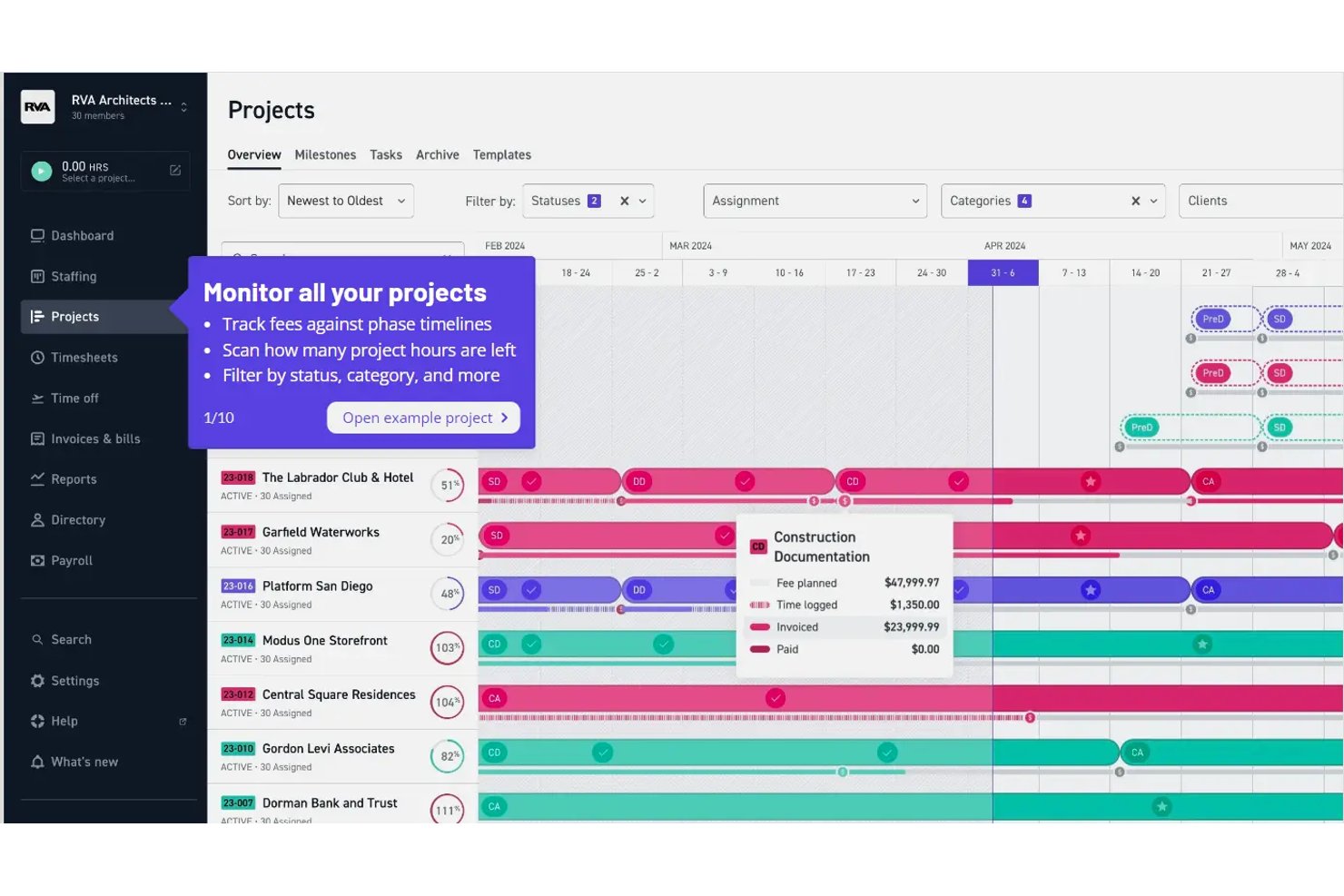
Monograph is firm management software built specifically for architecture and engineering practices, combining project planning, phase tracking, staffing, time tracking, invoicing, and financial reporting in one platform.
Who Is Monograph Best For?
Monograph is a strong fit for architecture and engineering firms that need to track project phases, fees, and staff workloads in one place.
Why I Picked Monograph
I picked Monograph as one of the best because it's built specifically around how architecture and engineering firms actually structure work: by phase. The Money Gantt tracks logged hours against each phase's fee budget in real time, so I can see a schematic design phase running hot before it becomes a billing problem. The Project Financials Report then breaks this down by role and rate, showing billable versus non-billable time and invoice status, all without leaving the platform.
Monograph Key Features
- Linked phase scheduling: Connect project phases so that shifting one phase's end date automatically cascades date changes through all succeeding phases.
- Staffing People view: See each team member's allocated hours against their available capacity across weekly, monthly, or quarterly timeframes.
- AI Budget Builder: Generate a proposed phase-by-phase budget with fee types, roles, and rates directly from contract information.
- Client View portal: Give clients a read-only window into project phases, Gantt progress, invoice status, and proposals, with built-in proposal acceptance.
Monograph Integrations
Monograph offers one documented native integration with QuickBooks Online for syncing invoices, bills, expenses, payments, and project costs. No additional native integrations or public API are documented.
Pros and Cons
Pros:
- Staffing views show workloads across projects
- Money Gantt connects logged hours to budgets
- Linked phases automatically shift succeeding dates
Cons:
- Staffing hours often need manual rebalancing
- File hub lacks drawing markup and version control
Mimarlar İçin Diğer Proje Yönetimi Yazılımları
En iyi listeye giremeyen ancak yine de değerlendirmenize değer birkaç seçenek daha aşağıdadır.
- ArchiOffice
For A&E time, billing, and fee tracking
- Paymo
For time-to-invoice project tracking
- ProWorkflow
For fee tracking and client reporting
- Workzone
For juggling multiple client projects at once
- Projectworks
For financial oversight in architecture
- Bonsai Agency Software
For client billing and fee tracking
- GoodDay
For adapting workflows to any design phase
- Unanet
For AE-specific ERP and fee tracking
- Deltek Ajera
For A&E project and billing in one place
- WorkflowMax
For time and fee tracking by job phase


How I Evaluate Project Management Software for Architects
I split my evaluation into three parts, giving core functionality the most weight: track design phases and fees against budgets, and coordinate staff workloads. Next, I look for features such as Revit-linked BIM/CAD files. Finally, I consider AEC-aware onboarding, support, and pricing that fits firm size.
Core Functionality (Table Stakes For This List)
When I'm selecting tools for my list, I score each one on a scale from 0 (does not offer the functionality) to 5 (excels in this area) for each core functionality listed below. I then convert the total into a percentage to help assess each tool's overall fit, with extra weight on any functionalities I’ve deemed essential.
- Project Phase Tracking (Essential): I look for phase templates and progress tracking across schematic design, design development, construction documents, and construction administration.
- Time & Fee Tracking (Essential): I assess whether teams can log billable hours by project or phase and compare fees and time spent against budgets.
- Staff Scheduling: I check for workload and availability views that help managers spot conflicts when assigning staff across concurrent projects.
- Document Management: I look for organized project files, drawing version history, and links to tasks or phases, especially when teams revise documents.
- Client & Consultant Collaboration: I evaluate whether external partners can access relevant updates, exchange files, comment, and approve deliverables within the project workflow.
- Budget & Billing: I check whether teams can monitor project costs and budgets, then connect billing or invoices to project progress or milestones.
Once I have a list of tools that meet the criteria, I consider what sets each platform apart.
Differentiating Factors (What Sets Vendors Apart)
Here's how I compare and contrast different vendors:
Standout Features
I look for BIM/CAD integration that links Revit or AutoCAD files directly to project tasks, so drawing updates stay connected to the timeline without manual re-uploads. Mobile field access matters just as much—I check whether project architects can log punch lists and RFIs offline from a job site, then sync when they're back online. I also evaluate multi-project profitability rollups that aggregate utilization and realization rates across the entire studio, giving principals a single view of margin health firm-wide.
Beyond Features
I check how easily each platform onboards external consultants and contractors. Architects coordinate with structural engineers, MEP firms, and specialty subs on every project, so flexible guest licensing and compatibility with tools like Procore or Bluebeam matter. I also evaluate whether accounting integrations—QuickBooks, Deltek, or similar—sync time and billing data without duplicate entry, since disconnected financials undermine any profitability reporting the PM tool produces. Finally, firm size scalability counts: a five-person studio shouldn't need enterprise admin overhead, but the upgrade path should be clear when a second office opens.
Mimarlar İçin Proje Yönetimi Yazılımı Nasıl Seçilir?
Uzun özellik listeleri ve karmaşık fiyatlandırma yapıları arasında kaybolmak kolaydır. Kendinize özgü yazılım seçim sürecinizi yürütürken odağınızı korumanıza yardımcı olmak için göz önünde bulundurmanız gereken faktörleri aşağıda bir kontrol listesi hâlinde bulabilirsiniz:
| Faktör | Dikkat Edilmesi Gerekenler |
|---|---|
| Ölçeklenebilirlik | Aracın ekibinizle birlikte büyüyebildiğinden emin olun. Ek kullanıcıları ve projeleri sorunsuz şekilde destekleyen seçenekleri arayın. |
| Entegrasyonlar | Yazılımın CAD programları, e-posta ve bulut depolama gibi hâlihazırda kullandığınız araçlarla bağlantı kurup kuramadığını kontrol edin. |
| Özelleştirilebilirlik | İş akışlarını, gösterge tablolarını ve raporları ekibinizin özel ihtiyaçlarına uyarlama seçenekleri sunan araçları arayın. |
| Kullanım Kolaylığı | Ekibinizin hızlıca öğrenebileceği sezgisel bir arayüze sahip bir araç seçerek kesinti süresini en aza indirin. |
| Bütçe | Ek özellikler, kullanıcılar veya destek için alınabilecek ücretler de dâhil olmak üzere toplam maliyeti göz önünde bulundurun. |
| Güvenlik Önlemleri | Projelerinizi ve müşteri bilgilerinizi güvende tutmak için yazılımın güçlü veri koruma önlemlerine sahip olduğundan emin olun. |
| Mobil Erişim | Ekibiniz sahada çalışıyorsa hareket hâlindeyken erişim için güçlü mobil uygulama desteği sunan araçları değerlendirin. |
| Destek Hizmetleri | Eğitimler, canlı sohbet ve telefon desteği dâhil olmak üzere kapsamlı destek sunan platformları arayın. |
Açıkçası, sindirmesi gereken çok şey var ve doğru seçimi yapmak konusunda ciddi bir baskı hissedebilirsiniz. Bu nedenle, sizin ve kuruluşunuzun özel ihtiyaçlarına uygun proje yöneticisi araçlarını kısa listeye almanıza yardımcı olması için proje yönetimi yazılımı danışmanlığı hizmetimizi kullanmanızı öneririm.
Mimarlar İçin Proje Yönetimi Yazılımlarındaki Trendler
Araştırmam sırasında farklı mimarlık proje yönetimi yazılımı tedarikçilerinden sayısız ürün güncellemesi, basın bülteni ve sürüm günlüğü inceledim. Takip ettiğim yeni ortaya çıkan trendlerden bazıları şunlar:
- BIM entegrasyonu: Bina Bilgi Modellemesi (BIM) entegrasyonu giderek yaygınlaşıyor ve mimarların proje yönetimi araçları içinde doğrudan 3D modellerle çalışmasına olanak tanıyor. Bu, ekiplerin projeleri daha iyi görselleştirmesine ve daha bilinçli kararlar almasına yardımcı oluyor.
- Sürdürülebilirlik takibi: Araçlar, enerji kullanımı ve malzeme tedariki gibi sürdürülebilirlik ölçütlerini izlemeye yönelik özellikler sunmaya başlıyor. Bu eğilim, çevre dostu tasarımlara ve inşaat uygulamalarına yönelik artan talepten kaynaklanıyor.
- Artırılmış gerçeklik (AR) desteği: Bazı sağlayıcılar, mimarların tasarımları gerçek dünya ortamlarında görselleştirmesine olanak tanımak için AR teknolojisini kullanmaya başlıyor. Bu, fikirleri müşterilere sunmak ve inşaat başlamadan önce düzenlemeler yapmak için yeni bir yöntem sunuyor.
- Gelişmiş iş birliği araçları: Platform içinde gerçek zamanlı ortak düzenleme ve video konferans gibi gelişmiş iş birliği özellikleri standart hâle geliyor. Bunlar, özellikle farklı konumlara dağılmış ekiplerin verimli bir şekilde birlikte çalışmasına yardımcı oluyor. Sektör standardı özellikler hakkında daha fazla bilgi edinmek için gerçek zamanlı iş birliği araçlarına da göz atabilirsiniz.
- Veri analitiği ve içgörüler: Proje yönetimi araçları, ekiplerin veriye dayalı kararlar almasına yardımcı olmak için daha gelişmiş analizler sunuyor. Bu kapsamda proje performansının izlenmesi ve gelecekteki eğilimlerin öngörülmesi yer alıyor; böylece mimarlara değerli içgörüler sağlanıyor.
Mimarlar İçin Proje Yönetimi Yazılımı Nedir?
Mimarlar için proje yönetimi yazılımı, mimari projelerin planlanması ve yürütülmesine yönelik ihtiyaçlara göre tasarlanmış özel bir araçtır. Tasarım geliştirme, görev yönetimi, kaynak tahsisi, müşteri etkileşimi ve çeşitli paydaşlarla iş birliği özelliklerini bir araya getirir. Bu yazılım, kavram aşamasından inşaata kadar mimari çalışmanın kendine özgü yönlerini kapsar.
Bu yazılımın faydaları arasında karmaşık mimari projelerin yönetiminde verimliliğin artırılması, ekip üyeleri arasındaki koordinasyonun iyileştirilmesi ve müşteri iletişimlerinin kolaylaştırılması yer alır. Etkili bütçe takibi, merkezi belge yönetimi ve zaman kazandıran özellikler sunar. Mimarlar bu yazılımı kullanarak yüksek kalite standartlarını koruyabilir, riskleri etkili bir şekilde yönetebilir ve projelerinin ilk tasarımdan son tamamlanma aşamasına kadar sorunsuz ilerlemesini sağlayabilir.
Mimarlar İçin Proje Yönetimi Yazılımının Özellikleri
Mimarlar için proje yönetimi yazılımı seçerken aşağıdaki temel özelliklere dikkat edin:
- BIM entegrasyonu: Kullanıcıların doğrudan araç içinde 3D modellerle çalışmasına olanak tanıyarak görselleştirmeye ve bilinçli karar almaya yardımcı olur.
- Sürdürülebilirlik takibi: Sürdürülebilir tasarım uygulamalarını desteklemek için enerji kullanımı ve malzeme tedariki gibi çevre dostu ölçütleri izler.
- Gelişmiş iş birliği araçları: Gerçek zamanlı ortak düzenleme ve video konferans sunarak ekip iletişimini ve üretkenliğini artırır.
- Görev yönetimi: Projelerin takvime uygun ilerlemesini sağlamak için görevleri düzenlemeye, atamaya ve izlemeye yardımcı olur.
- Zaman takibi: Zaman takibi için en iyi uygulamaları hayata geçirebilmenize rağmen doğru araç, görevlere harcanan zamanı izleyerek kaynak yönetimine ve proje planlamasına yardımcı olur.
- Özelleştirilebilir panolar: Kullanıcıların çalışma alanlarını belirli proje ihtiyaçlarına ve tercihlerine göre düzenlemesine olanak tanır.
- Mobil erişim: Sahada çalışan ekipler için yararlı olan proje bilgilerine hareket hâlindeyken erişim sağlar.
- Varlık depolama – Yazılım, farklı görsel, video ve metin varlıklarını dijital olarak depolamanıza ve derlemenize olanak tanımalıdır. Dijital varlık yönetimi yazılımına benzer.
- Veri analitiği ve içgörüler: Proje performansını analiz eder ve eğilimleri öngörerek karar alma süreçleri için değerli içgörüler sunar.
- Güvenlik yönetimi araçları: İnşaatla ilgili projeler için kritik olan güvenlik düzenlemelerine uyumu sağlar.
- Bütçeleme ve muhasebe – Faturalandırmayı, faturalandırılabilir saatlerin takibini ve zaman çizelgelerini yönetmeye yönelik araçlar sağlar. Özellikler sınırlıysa proje bütçesi yazılımı ile desteklenebilir.
- Müşteri portalı: Müşterilere proje güncellemelerine ve belgelere erişim sağlayarak şeffaflığı ve iletişimi geliştirir.
Mimarlar için Proje Yönetimi Hakkında SSS
Aşağıda mimari proje yönetimi yazılımı hakkında bazı temel soru ve yanıtları ele alacağım.
Mimarlar hangi yazılımları kullanır?
Mimarlık firmalarındaki ve diğer AEC firmalarındaki mimarlar; proje planlama yazılımı (Trello, Asana, Basecamp), mimarlar için muhasebe yazılımı (Quickbooks, Sage) ve/veya tasarım yazılımı (AutoCAD, Rhino 3D, Sketchup) gibi çeşitli yazılımlar kullanır.
Mimari proje yönetimi nedir?
Mimari projeler, karmaşık ve çok boyutlu olmalarıyla kendine özgü bir yapıya sahiptir. İşlevselliğin yanı sıra teknik hassasiyeti estetik vizyonla bir araya getirirler. Daha doğrusal projelerin aksine mimari çalışmalar; yerel düzenlemeler, çevresel etki ve topluluk bağlamıyla iç içedir. Mimarlar, mühendisler, yükleniciler ve müşteriler de dâhil olmak üzere farklı uzmanlıklara sahip bir ekiple yakın iş birliği gerektirir.
Mimari projeleri yönetmenin kendine özgü bazı yönleri şunlardır:
\u003cul\u003e
\u003cli\u003e\u003cstrong\u003eProje bütçeleri:\u003c/strong\u003e Elbette bütçeler ve proje kapsamları her sektörde değişebilir. Ancak mühendislik firmalarının yalnızca başlangıç maliyetlerini değil, uzun vadeli bakım maliyetlerini ve işletme giderlerini de dikkate alması gerekir.\u003c/li\u003e
\u003cli\u003e\u003cstrong\u003eKarmaşık iş akışları:\u003c/strong\u003e İş akışlarını kolaylaştırma becerisi çok önemlidir; çünkü farklı uzmanlıklara sahip birden fazla kişinin projeye farklı zamanlarda dâhil olması ve projeden ayrılması gerekir. Bir proje yönetimi çözümündeki iş birliği araçları (dosya paylaşımı ve otomatik Slack bildirimleri gibi) bu açıdan da son derece faydalıdır.\u003c/li\u003e
\u003cli\u003e\u003cstrong\u003eYasal ve düzenleyici uyumluluk:\u003c/strong\u003e Mimari projeler, her konuma özgü karmaşık yapı yönetmeliklerine, imar yasalarına ve güvenlik düzenlemelerine uymalıdır. Bunların planlama aşamasından her proje dönüm noktasına kadar dikkate alınması ve düzenlemelerde gelecekte yapılacak değişikliklerin de hesaba katılması önemlidir.\u003c/li\u003e
\u003c/ul\u003e
Mimarlar için proje yönetimi yazılımı ile inşaat proje yönetimi yazılımı arasındaki fark nedir?
Mimarlar için proje yönetimi yazılımı, mimari sürece özgü tasarım iş birliğine, belge paylaşımına ve iş akışı yönetimine odaklanır. Öte yandan, \u003ca href=\u0022https://thedigitalprojectmanager.com/tools/best-construction-project-management-software/\u0022\u003eİnşaat proje yönetimi yazılımı\u003c/a\u003e; planlama, kaynak tahsisi, bütçe takibi ve güvenlik standartlarına uyumluluk da dâhil olmak üzere, sahadaki proje uygulamasına yöneliktir. Temel fark, ana kullanıcı odağında yatar: mimarlar ve inşaat yöneticileri.
Mimarlar için proje yönetimi yazılımı ile mühendislik proje yönetimi yazılımı arasındaki fark nedir?
Mimarlar için proje yönetimi yazılımı; tasarım iş birliğini, çizim yönetimini ve müşteri onaylarını vurgular. \u003ca href=\u0022https://thedigitalprojectmanager.com/tools/project-management-software-for-engineers/\u0022\u003eMühendislik proje yönetimi yazılımı\u003c/a\u003e ise teknik görev takibine, hesaplamalara, uyumluluğa ve disiplinler arası ekipler arasındaki koordinasyona daha fazla odaklanır. Her ikisi de zaman çizelgelerini ve kaynakları yönetirken araçları farklı iş akışlarına göre uyarlanmıştır: yaratıcı tasarım ve teknik uygulama.
\u0026nbsp;
\u0026nbsp;
\u0026nbsp;
\u0026nbsp;