

2026’da İncelenen Profesyonel Hizmetler İçin En İyi 10 Kaynak Yönetimi Yazılımı

Profesyonel Hizmetler İçin En İyi Kaynak Yönetimi Yazılımları Kısa Listesi


Piyasadaki çok çeşitli kaynak yönetimi yazılımları arasından profesyonel hizmetleriniz için mükemmel seçimi yapmak göz korkutucu bir görev olabilir. Kaynaklarınızı daha hassas bir şekilde tahsis etmek ve kullanmak istiyor, ancak en uygun aracı bulmakta zorlanıyor olabilirsiniz. İçiniz rahat olsun, bu kararı sizin için basitleştirmek üzere buradayım. Dijital proje yönetimindeki kapsamlı geçmişimden ve çok sayıda kaynak yönetimi platformunu uygulamalı olarak kullanmış olmamdan yararlanarak sizi doğru seçime yönlendireceğim. Profesyonel hizmetler için en iyi kaynak yönetimi yazılımı seçimlerim burada.
Why Trust Our Software Recommendations
Our team has been testing and reviewing software since 2012. As project managers ourselves, we know how difficult—and important—it is to choose the right software.
For this guide, we evaluated tools using hands-on testing and independent research, scoring tools using our selection criteria. We also draw on insights from industry thought leaders and practicing project management experts.
Our reviews reflect our human editorial judgment, not a sales pitch.
Expert reviewers:
Profesyonel Hizmetler İçin Kaynak Yönetimi Yazılımları Karşılaştırma Tablosu
Aşağıdaki tablo, profesyonel hizmetler için en iyi kaynak yönetimi yazılımı seçimlerimin fiyatlandırma ayrıntılarını karşılaştırmaktadır.
Score legend (out of 5)
- Excellent 4.5–5
- Good 4–4.4
- Average 3–3.9
- Below average 2–2.9
- Poor 1–1.9
| Tool | Starting Price | Website | |||||||
|---|---|---|---|---|---|---|---|---|---|
| Best for all-in-one professional service automation | 3.5 out of 5 | 4 | 3 | 4 | 2 | 4 | 4 | $17/user/month 14-day free trial | Book Demo |
| Best for agencies | 4.0 out of 5 | 4 | 4 | 4 | 3 | 4 | 5 | $10/user/month 14-day free trial | Book Demo |
| Best for configurable permissions management | 3.7 out of 5 | 3 | 4 | 4 | 4 | 4 | 3 | Pricing upon request Free demo available | Website |
| Best for AI-driven resource management | 4.3 out of 5 | 4 | 3 | 5 | 5 | 5 | 4 | Pricing upon request Free demo available | Website |
| Best for workload visualization | 3.2 out of 5 | 3 | 2 | 4 | 2 | 4 | 4 | $10/user/month Free plan + 14-day trial + demo available | Book Demo |
| Best for people-centric resourcing | 3.8 out of 5 | 4 | 3 | 4 | 4 | 4 | 4 | Pricing upon request Not available | Website |
| Best for AI resource planning | 4.0 out of 5 | 4 | 3 | 4 | 4 | 4 | 5 | Pricing upon request Free demo available | Website |
| Best for automated invoicing | 3.7 out of 5 | 4 | 2 | 4 | 3 | 4 | 5 | $17/user/month 21-day free trial + free demo available | Website |
| Best for pre-sale staffing scenarios | 3.8 out of 5 | 3 | 4 | 4 | 4 | 4 | 4 | $9/user/month 14-day free trial + free demo available | Website |
| Best for scalable project management | 3.8 out of 5 | 4 | 3 | 4 | 3 | 5 | 4 | Pricing upon request Free demo available | Website |
Profesyonel Hizmetler İçin En İyi Kaynak Yönetimi Yazılımları İncelemeleri
Bu listede yer alan her yazılım hakkındaki ayrıntılı görüşlerim; her birinin iyi yaptığı şeyleri ve en uygun kullanım alanlarını içeriyor.

Scoro
Best for all-in-one professional service automation

Scoro is a comprehensive work management solution designed to bring structure to your work, offering a suite of features across project management, CRM, billing, and reporting.
Why I Picked Scoro:
I chose Scoro for its robust all-in-one platform that integrates various aspects of professional service automation into one system. Its comprehensive feature set distinguishes it from other resource management tools by providing a unified solution for project management, CRM, and financials. I believe Scoro is best for professional service automation because it offers a centralized platform that simplifies the management of the entire project lifecycle, from quoting to billing, ensuring that all processes are seamlessly connected.
Standout features & integrations:
Scoro's standout features include real-time Gantt charts, a drag-and-drop planner, and detailed reporting capabilities that provide insights into project progress and financial performance. The software also offers a time tracker, sales pipeline management, and automated billing, which are essential for optimizing resource utilization and improving profitability.
Scoro integrates natively with a variety of tools, including Google Calendar, Microsoft Exchange, Xero, QuickBooks, Sage Intacct, Exact Online, Expensify, Stripe, Jira, and more.
Pros and Cons
Pros:
- Customizable to fit specific business needs
- Real-time data and reporting for informed decision-making
- All-in-one platform for various business processes
Cons:
- Pricing can be higher compared to some other tools, especially for smaller teams
- May require time for onboarding and full system adoption
- Minimum of 5 user seats required for all packages
New Product Updates from Scoro

Scoro Adds Time Mobile App and ELI Improvements
Scoro adds the Scoro Time mobile app for iOS/Android to track time anywhere and expands ELI with attachments, smarter filtering, and trigger-based actions. For more information, visit Scoro's official site.
 .

Best for agencies

Productive is an all-in-one agency management software designed for a wide range of businesses, including marketing and design agencies and consulting firms.
Why I Picked Productive:
I like that its resource planning feature lets your team allocate resources effectively across different projects, ensuring workloads are balanced and deadlines are met. With resource planning, you can see who’s working on what and when helping identify potential bottlenecks or periods of underutilization.
Standout features & integrations:
Features include project management, revenue forecasting, client collaboration, onboarding support, custom reporting, project templates, flexible invoicing, and growth metrics.
Integrations include Jira, HubSpot, Xero, Google Calendar, Sage, Zapier, Outlook/Microsoft Calendar, Slack, BugHerd, QuickBooks, Fortnox, and Personio.
Pros and Cons
Pros:
- Robust resource planning and tracking capabilities
- Comprehensive features for financial management and reporting
- Sales CRM feature for tracking opportunities
Cons:
- May not be ideal for businesses just wanting a resourcing function
- Could have more integrations
New Product Updates from Productive
Productive Adds Email and Calendar Integrations for Agents
Productive adds Gmail, Outlook, Google Calendar, and Outlook Calendar connectors for its AI agents. These integrations let agents manage emails and create calendar events directly within Productive. For more information, visit Productive’s official site.
 .

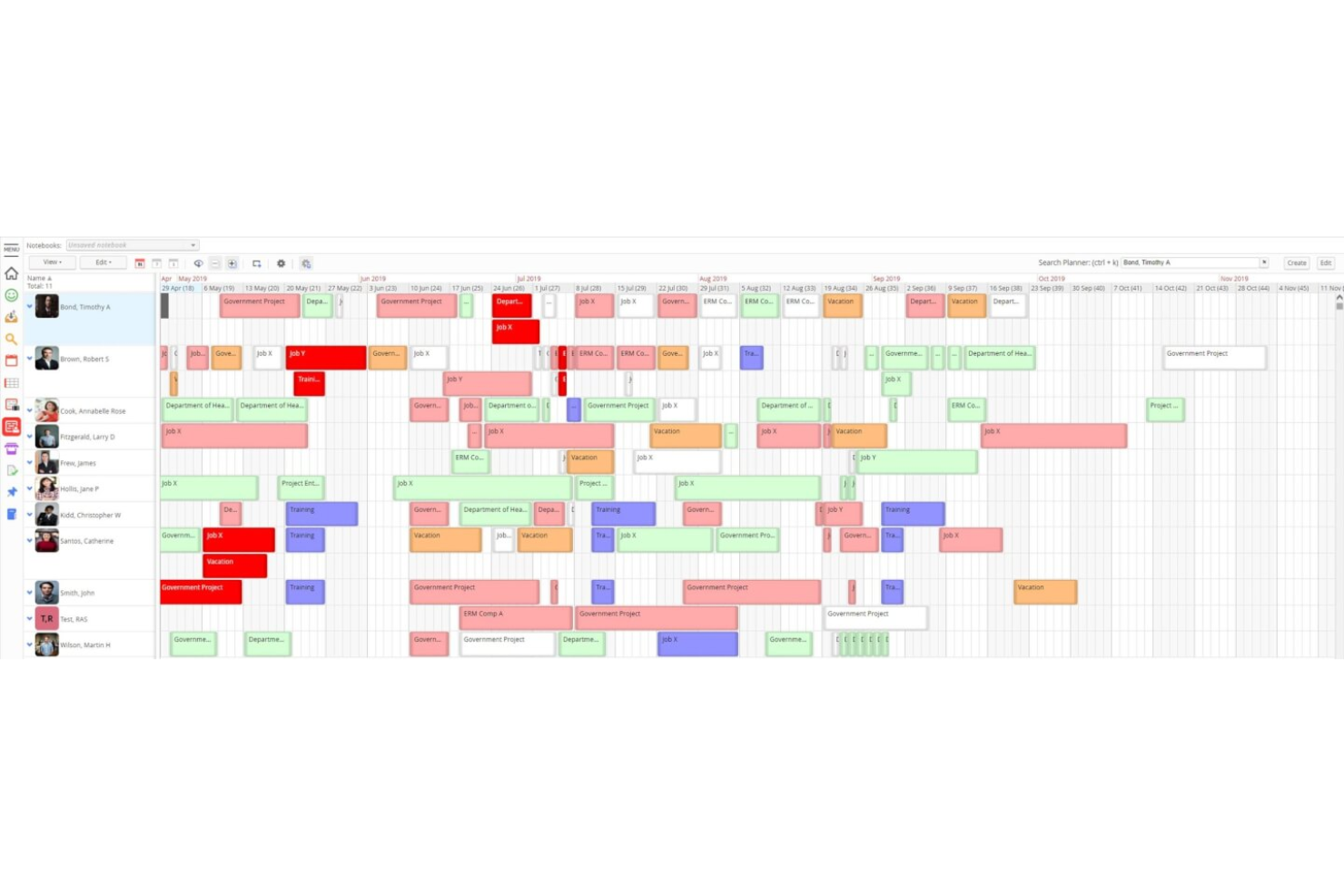
Retain is a resource planning and scheduling platform built for professional services firms, combining skills-based allocation, capacity planning, utilisation tracking, and built-in timesheets in a single system.
Who Is Retain Best For?
Retain is a strong fit for mid-to-large accounting, consulting, and engineering firms that need enterprise-grade resource planning across complex, multi-office structures.
Why I Picked Retain
I picked Retain as one of the best because its permissions model is genuinely built for the organizational complexity you find in large professional services firms. Administrators can define role-based access at a granular level, so a department head sees their team's capacity while a junior coordinator has booking rights only within their scope. I also like that workflow configurations and system notifications are adjustable per role, meaning approval chains for skills updates or booking changes can mirror how your firm actually operates.
Retain Key Features
- Skills-based resource allocation: Match people to projects using a structured taxonomy of up to 30,000 skills, powered by Lightcast.
- AI suitability matching: Automatically surface the best-fit resources for a role based on skills, availability, and experience.
- Built-in timesheets: Auto-fill timesheets from existing bookings and compare scheduled hours against actuals.
- Utilisation dashboards: Track billable and non-billable utilisation across teams, departments, and time periods.
Retain Integrations
Retain offers integrations that connect resource planning data across HR, CRM, and finance systems, with native synchronization with Microsoft 365 and support for middleware platforms like MuleSoft and Azure Logic Apps. Integrations include Salesforce, Microsoft Dynamics 365, Workday, SAP, Oracle, Oracle NetSuite OpenAir, BambooHR, SugarCRM, Employment Hero, and Thomson Reuters GoFileRoom. An API is available for custom integrations.
Pros and Cons
Pros:
- AI suitability matching for staffing requests
- Granular role-based permission profiles
- On-premises and cloud deployment options
Cons:
- Session timeouts disrupt scheduling workflows
- Built-in reporting needs manual workarounds

Dayshape
Best for AI-driven resource management

Dayshape is a software designed to optimize workforce planning and scheduling. It stands out for its AI-driven approach to resource management, enabling professional services firms to staff projects effectively and maintain profitability.
Why I Picked Dayshape:
I selected Dayshape for its innovative use of artificial intelligence in managing resources, which distinguishes it from other resource management tools. I judge Dayshape to be best for AI-driven resource management because it employs AI to enhance real-time decision-making and financial oversight, which is crucial for the success of professional services firms.
Standout features & integrations:
Dayshape offers AI resource scheduling, real-time engagement financials, and people-first planning, among other features. These tools are crucial for firms aiming to optimize their workforce and profitability.
Dayshape integrates natively with a variety of systems, including ERP, PSA, CRM, Practice Management Software, and finance software, facilitating profitable engagement planning. It also connects with HR and skills databases for informed scheduling and capacity planning, and leverages timesheet data for real-time project analysis.
Pros and Cons
Pros:
- Integration with existing systems to support workforce profitability
- Access to real-time financial metrics to guide resource management
- AI-driven scheduling for optimal resource allocation and project staffing
Cons:
- Limited details on integration options without direct inquiry
- Potential learning curve due to the depth of features
- Lack of transparent pricing information on the website

Wrike
Best for workload visualization

Wrike is a cloud-based project management tool that helps teams organize tasks, manage resources, and collaborate effectively.
Why I Picked Wrike:
Wrike's resource management capabilities are particularly beneficial for professional services teams. The platform offers workload charts that let you visualize each team member's assignments, making it easier to balance tasks and prevent burnout. This feature ensures that work is distributed evenly, allowing your team to operate efficiently and meet project deadlines. Additionally, Wrike provides resource allocation tools that help you assign the right people to the right tasks based on their availability and skill sets.
Standout features & integrations:
Features include time tracking, customizable workflows, real-time collaboration, document sharing, task dependencies, Gantt charts, workload management, request forms, dashboards, reporting tools, file proofing, and approval processes.
Integrations include QuickBooks, Skyvia, Power BI, Google Sheets, Miro, Salesforce, Tableau, Microsoft Teams, MediaValet, Zoom, Adobe Creative Cloud, and Google Drive.
Pros and Cons
Pros:
- Scalable for growing teams
- Custom workflows, dashboards, and reports
- Offers diverse project management tools
Cons:
- No built-in chat feature
- Learning curve due to extensive features
New Product Updates from Wrike

Wrike Redesigns Workspace Search With New Filters
Wrike introduces a redesigned Workspace Search interface with recent search shortcuts, item type and location filters, and parent-task context. These updates help users find relevant work items and navigate search results efficiently. For more information, visit Wrike’s official site.
 .

Kantata
Best for people-centric resourcing

Kantata is a comprehensive resource and project management platform built for consultants, agencies, and professional services teams. It centralizes project delivery, financial data, team collaboration, and reporting.
Why I Picked Kantata:
I like that Kantata takes a people-first approach to resource planning, helping firms balance workloads and match the right skills to the right projects. Its forecasting and capacity planning tools provide real-time visibility into staffing needs, so you can make adjustments quickly to avoid overbooking or underutilization. This ensures teams stay productive and engaged, while projects remain profitable and on track.
Standout features & integrations:
Kantata offers many other features, like automated staffing recommendations based on availability and skill sets, scenario planning for testing resourcing options before committing, and a detailed skills inventory to identify gaps or development opportunities. It also provides time and expense tracking, plus collaboration tools like task boards and shared calendars to keep work connected across teams.
Integrations include Microsoft Teams, Asana, Trello, Zapier, Google Workspace, Salesforce, Slack, QuickBooks, Jira, HubSpot, Xero, NetSuite, Harvest, FreshBooks, Toggl, and Dropbox.
Pros and Cons
Pros:
- Forecasting capabilities for financials and capacity
- Analytics and reporting features
- Project planning and resource allocation Gantt charts
Cons:
- Setup process can be complicated
- Custom reports can be difficult to create
New Product Updates from Kantata

Kantata Adds Access Group Change History
Kantata adds Access Groups History, letting account administrators track changes to group details, membership, and permissions in Recent History. The update also makes these events available through the Subscribed Events API for broader monitoring. For more information, visit Kantata’s official site.
 .

Forecast
Best for AI resource planning
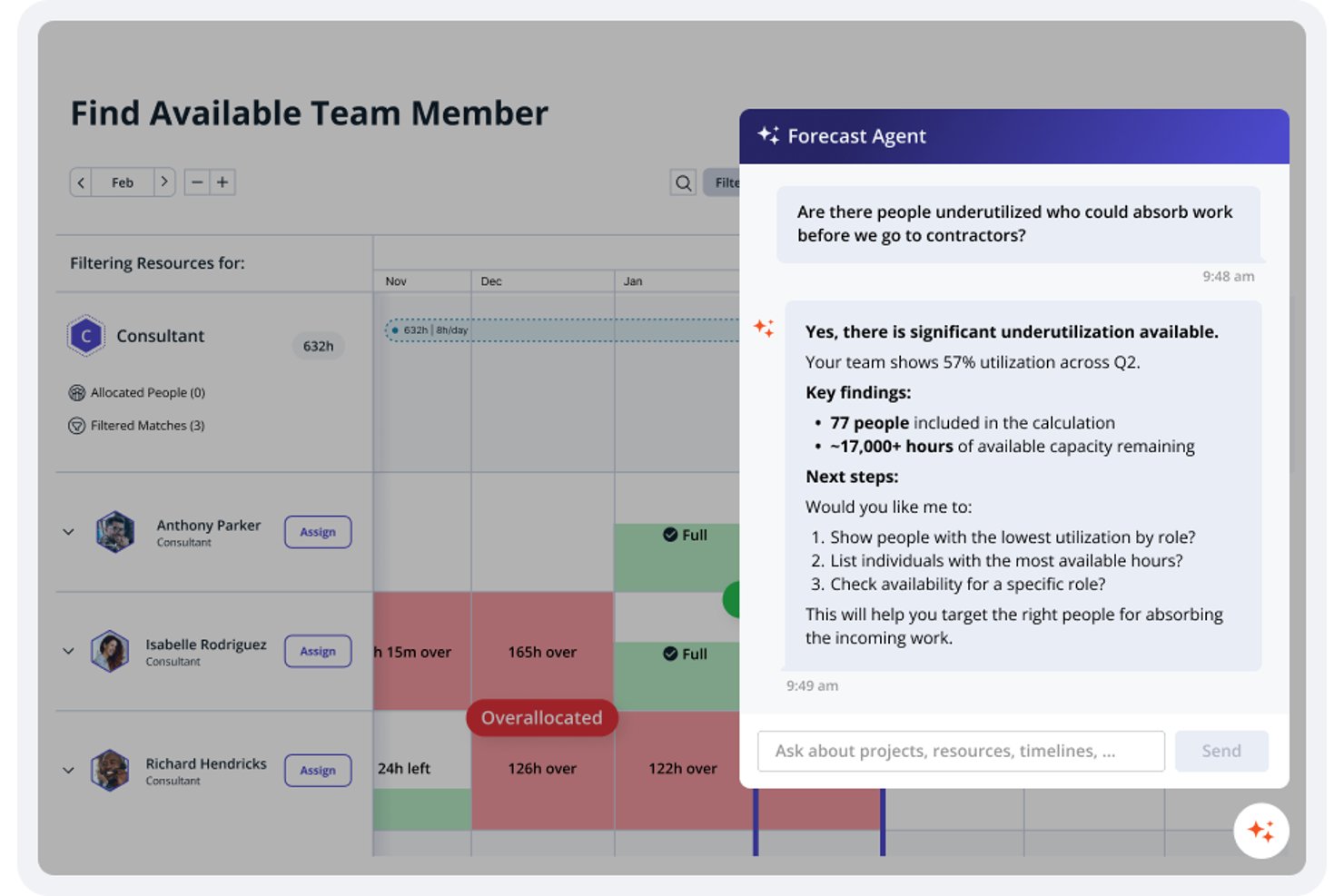
Accelo is a professional services automation platform that combines AI-assisted resource scheduling, capacity forecasting, utilization tracking, and project financial management in a single system.
Who Is Accelo Best For?
Accelo is a strong fit for professional services teams that need to connect resource planning, project delivery, and billing in one place.
Why I Picked Accelo
I picked Accelo as one of the best because its AI-driven resource recommendations set it apart for professional services teams: it factors in skills, availability, workload, and past performance together to suggest the right person for each project. I also love how capacity forecasting pulls in pipeline-weighted demand, so you can spot staffing gaps before a deal even closes. The Utilization Dashboard layers billable and non-billable time, scheduled commitments, and external calendar hours into one filterable view by division, role, or skill set.
Accelo Key Features
- Project rate cards: Set project-specific billing rates that override default rates and bulk-apply changes across budgets using that rate.
- Timesheet approvals: Review and approve weekly team timesheets with permission-based access, leave indicators, and a full audit history.
- MCP natural-language queries: Query live project, resource, and financial data through connected AI assistants like Claude, ChatGPT, or Gemini using plain-language questions.
- Client workspace: Share project milestones, Gantt timelines, retainer burn rates, and approval requests with clients through a branded portal.
Forecast Integrations
Forecast lists integrations with Salesforce, HubSpot, QuickBooks, Sage Intacct, Xero, Jira, Azure DevOps, Slack, and Microsoft Teams, plus Zapier. Its RESTful and Forms APIs support custom integrations.
Pros and Cons
Pros:
- Project time connects directly to profitability reporting
- Capacity forecasts include tentative pipeline demand
- AI matches skills, availability, workload, and performance
Cons:
- Resource reports can take effort to interpret
- Team scheduling requires Premium licensing

Best for automated invoicing

Projectworks is a cloud-based professional services automation (PSA) platform built for consulting, architecture, engineering, and similar firms. It combines project visibility, financial oversight, and resource planning to help teams optimize utilization and profitability.
Why I Picked Projectworks:
I picked Projectworks because its automated invoicing removes much of the admin burden around billing, ensuring invoices are accurate and issued on time. I also like that it links directly with accounting platforms like Xero and QuickBooks, so financial data stays consistent across systems. Plus, the real-time project reporting helps you keep a close eye on budgets, profitability, and resource use, which is essential for professional services firms.
Standout features & integrations:
Projectworks offers features like time and expense tracking, resource allocation across projects, and live dashboards that replace error-prone spreadsheets. Its automated invoicing system ensures billable hours and project costs flow directly into accurate invoices, saving you time and reducing mistakes.
Integrations include Xero, QuickBooks, HubSpot, Salesforce, 12d Synergy, MYOB, Jira, Azure DevOps, Employment Hero, Zapier, Direct Data Connection, and API Connection.
Pros and Cons
Pros:
- Live dashboards for project oversight
- Accurate time and expense tracking
- Automates billing with accounting sync
Cons:
- Learning curve for new users
- Requires minimum 10-seat plan

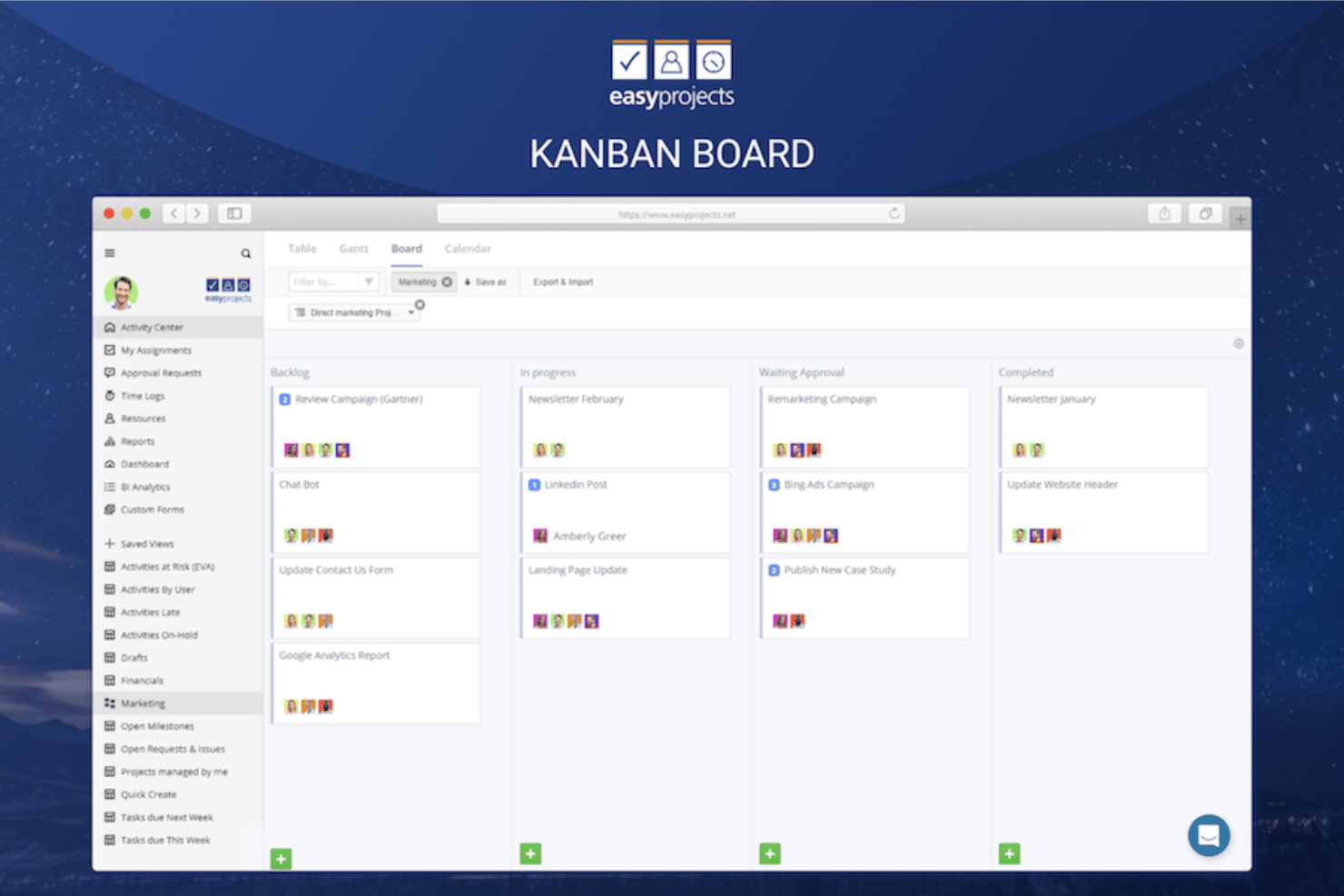
Birdview PSA is a professional services automation platform that combines resource planning, capacity management, project delivery, time tracking, and financial reporting in a single system.
Who Is Birdview PSA Best For?
Birdview PSA is a strong fit for professional services firms that need to model staffing before a deal closes and carry that plan directly into project delivery.
Why I Picked Birdview PSA
I picked Birdview PSA because its Simulation feature lets you model staffing for a deal before it closes, which is rare at this level of specificity. You can set a project timeframe, filter by skill and availability, and run "Find best matches" to get a draft team, including unnamed placeholder roles, without touching your live plan. Pair that with pipeline demand modeling that flags capacity gaps and bench risk, and you can walk into a sales conversation knowing exactly what delivery will require.
Birdview PSA Key Features
- Soft and hard allocations: Reserve tentative or confirmed capacity for resources across projects, with availability calculated against work schedules, holidays, and leave.
- Rate card versioning: Maintain dated rate card versions with role-to-rate mappings, so billing rates stay accurate across a project's full lifespan.
- QuickBooks integration: Sync approved time logs and invoices between Birdview PSA and QuickBooks, keeping project financials and accounting reconciled.
- Power BI dashboards: Access prebuilt dashboards that break down delivery performance, resource data, financials, and portfolio health.
Birdview PSA Integrations
Birdview PSA offers 5,000+ integrations, including native QuickBooks, Salesforce, HubSpot, Jira, Microsoft Teams, SharePoint, Microsoft Excel, and TimeControl connections. It also provides a REST API and Zapier or iPaaS connectivity.
Pros and Cons
Pros:
- Project-linked time logs support utilization reviews
- Cross-project assignments clarify team workload
- Pre-sale staffing scenarios protect delivery capacity
Cons:
- Large project lists complicate filtering and navigation
- Broad setup can overwhelm new resource planners


Clarizen is a collaborative work management software designed to enhance cross-company project management and workflow automation. It stands out as the best for scalable project management due to its ability to bring together project management, configurable workflow automation, and in-context collaboration on a secure, scalable enterprise platform.
Why I Picked Clarizen:
I believe Clarizen is best for scalable project management because it offers a flexible and configurable system that can grow with an organization. Its platform is designed to manage large-scale projects across various departments and teams, ensuring that as a company expands, its project management capabilities can scale accordingly without compromising on efficiency or control.
Standout features & integrations:
Clarizen's most important features include its AI-powered work management bot for Microsoft Teams and Slack, real-time data access, project prioritization, and timesheet reporting. The software also allows for project status, cost, and revenue reports, and task completion updates, all facilitated through natural language processing.
Clarizen integrates natively with a range of tools, including Microsoft Teams, Slack, Box.com, Google Drive, Jira, Proof HQ, and has mobile apps for both Android and iOS. It also offers an open API for custom integrations, catering to the specific needs of different organizations.
Pros and Cons
Pros:
- Easy to navigate with a quick setup process
- Includes a chat app for quick communication
- Comprehensive project and work management platform
Cons:
- Considered expensive, especially for smaller businesses
- Considered expensive, especially for smaller businesses
- Not as fast or responsive as some competitors
Profesyonel Hizmetler İçin Değerlendirilebilecek Diğer Kaynak Yönetimi Yazılımları
Aşağıda, kısa listeme aldığım ancak en üst sıralarda yer vermediğim profesyonel hizmetler için ek kaynak yönetimi yazılımlarının bir listesi bulunmaktadır. Bunlar kesinlikle göz atmaya değer.
- Accelo
For service operations automation
- Saviom
For enterprise resource optimization
- Teamwork.com
For client work management
- Screendragon
AI-powered resourcing and forecasting for PSA
- BigTime
For firm productivity and profitability
- Runn
For real-time project tracking
- Parallax
For margin-focused resource management
- Certinia
For staffing against sales opportunities
- 10,000ft by Smartsheet
For high-level resource insights
- Ruddr
For budget management


How I Evaluate Resource Management Software for Professional Services
I split my evaluation into three parts, with the most weight on core needs: see capacity across projects and match people by skills and availability as client work shifts. Next, I look for differentiators such as role-based placeholders for staffing work before names are confirmed. Finally, I consider onboarding, support, and pricing flexibility as teams grow.
Core Functionality (Table Stakes For This List)
When I'm selecting tools for my list, I score each one on a scale from 0 (does not offer the functionality) to 5 (excels in this area) for each core functionality listed below. I then convert the total into a percentage to help assess each tool's overall fit, with extra weight on any functionalities I’ve deemed essential.
- Capacity Planning (Essential): I look for time-based views that compare project demand with team capacity across projects, so managers can spot overloads and rebalance assignments.
- Skills & Availability (Essential): I check whether teams can find people by role, skills, and availability when staffing a new client project or replacing someone.
- Utilization Tracking: I assess reporting on billable and non-billable time by person or team to see how project work affects utilization.
- Scenario Forecasting: I look for forward-looking plans and what-if comparisons that help assess staffing needs for likely or prospective work.
- Time & Financial Links: I check whether resource plans connect to time entries or project budgets, so teams can compare planned work with logged time.
- Cross-Project Visibility: I look for a consolidated view of assignments across clients and projects to identify conflicts and see where capacity remains.
Once I have a list of tools that meet the criteria, I consider what sets each platform apart.
Differentiating Factors (What Sets Vendors Apart)
Here's how I compare and contrast different vendors:
Standout Features
Role-based placeholder planning matters a lot when you're staffing projects that aren't confirmed yet. I check whether a tool lets me assign a "Senior Developer" placeholder to a tentative engagement so I can model demand without locking in specific people. Bench and pipeline alerts are equally valuable—I look for proactive flags that surface upcoming idle time or gaps before they hit revenue. Rate card flexibility rounds out my evaluation: services firms juggle different bill rates by client, role, and project type, so I check how each tool handles that complexity without clunky workarounds.
Beyond Features
I check how well each tool connects to CRM and accounting systems, since a platform that pulls pipeline data from your CRM lets you forecast demand before deals close. Licensing flexibility matters too—your team size shifts with project cycles, so I look for pricing that scales with headcount rather than locking you into rigid tiers. I also evaluate role-based access controls, because delivery leads and finance stakeholders need very different views of rate and margin data.
Profesyonel Hizmetler İçin Kaynak Yönetimi Yazılımı Nasıl Seçilir?
Uzun özellik listeleri ve karmaşık fiyatlandırma yapıları içinde kaybolmak kolaydır. Kendinize özgü yazılım seçim sürecinizi yürütürken odağınızı korumanıza yardımcı olmak için aşağıda aklınızda bulundurmanız gereken faktörlerin bir kontrol listesini bulabilirsiniz:
| Faktör | Dikkate Alınması Gerekenler |
|---|---|
| Ölçeklenebilirlik | Yazılım işletmenizle birlikte büyüyecek mi? Performans sorunları yaşamadan artan kullanıcı veya proje sayılarını karşılayıp karşılayamayacağını değerlendirin. Gelecekteki büyümenizi destekleyen çözümleri arayın. |
| Entegrasyonlar | Mevcut araçlarınızla entegre oluyor mu? İş akışı kesintilerini önlemek için CRM, muhasebe ve diğer temel sistemlerinize kolayca bağlanıp bağlanmadığını kontrol edin. |
| Özelleştirilebilirlik | Süreçlerinize uyacak şekilde uyarlayabilir misiniz? Yazılımın belirli iş akışlarınız ve işletme ihtiyaçlarınızla uyum sağlayacak değişikliklere izin verdiğinden emin olun. |
| Kullanım kolaylığı | Arayüz sezgisel mi? Ekibinizin ne kadar hızlı kullanmaya başlayabileceğini değerlendirin. Kullanıcı dostu bir tasarım eğitim süresini azaltır ve üretkenliği artırır. |
| Uygulama ve işe alıştırma | Geçiş ne kadar sorunsuz? Değişikliği kolaylaştırmak ve kesinti süresini en aza indirmek için eğitimler ve müşteri desteği gibi açık işe alıştırma kaynakları sunan çözümleri arayın. |
| Maliyet | Fiyat bütçenize uygun mu? Fiyatlandırma katmanlarını ve gizli ücretleri karşılaştırın. Maliyetin sunulan değer ve özelliklerle uyumlu olduğundan emin olun. |
| Güvenlik önlemleri | Verileriniz ne kadar güvende? Yazılımın şifreleme ve düzenli güvenlik denetimleri de dâhil olmak üzere veri korumaya ilişkin sektör standartlarını karşıladığını doğrulayın. |
| Destek erişilebilirliği | Ne zaman yardım alabilirsiniz? Desteğin çalışma saatleriniz içinde ve telefon, e-posta veya sohbet gibi tercih ettiğiniz kanallar üzerinden sunulup sunulmadığını kontrol edin. |
Profesyonel Hizmetler İçin Kaynak Yönetimi Yazılımındaki Trendler
Profesyonel hizmetler teknolojisi için kaynak yönetimi yazılımında fark ettiğim güncel ve ilgi çekici trendlerden bazıları şunlar.
- Yapay Zekâ ve Makine Öğrenimiyle Entegrasyon: Yapay zekâ ve makine öğrenimi, kaynak yönetimi yazılımlarına giderek daha fazla entegre ediliyor. Bu trend, öngörücü analiz ve daha akıllı kaynak tahsisi olanağı sunarak verimliliği ve proje sonuçlarını önemli ölçüde iyileştirebilir.
- Gerçek Zamanlı Verilere Vurgu: Gerçek zamanlı veriler, kaynak yönetimi araçlarında standart bir özellik hâline geliyor. Bu sayede yöneticiler bilinçli kararları hızlı bir şekilde alabilir, projelerin çevik kalmasını ve değişikliklere yanıt vermesini sağlayabilir.
- Özelleştirme Yoluyla Geliştirilmiş Kullanıcı Deneyimi: Kaynak yönetimi platformlarındaki özelleştirme seçenekleri genişliyor ve kullanıcıların arayüzleriyle iş akışlarını kendi özel ihtiyaçlarına göre uyarlamalarına olanak tanıyor. Bu trend, farklı profesyonel hizmet uygulamalarına hitap etmesi ve kullanıcı etkileşimini iyileştirmesi açısından ilgi çekici.
- Mobil Erişilebilirlik: Kaynak yönetimi yazılımlarında mobil erişilebilirlik giderek yaygınlaşıyor ve uzaktan çalışan, hareket hâlindeki iş gücünü destekliyor. Bu, ekip üyelerinin her yerden bilgileri güncellemesine ve bunlara erişmesine olanak tanıyor.
- İş Birliği Araçlarına Odaklanma: İş birliği araçları, kaynak yönetimi yazılımlarına daha derinlemesine entegre ediliyor. Bu araçlar daha iyi iletişim ve ekip çalışmasını kolaylaştırabilir, ayrıca kuruluşlar içindeki bilgi silolarının ortadan kaldırılmasına yardımcı olabilir.
Bu trendler, profesyonel hizmetlerde daha dinamik ve duyarlı kaynak yönetiminin temelini oluşturuyor.
Profesyonel Hizmetler İçin Kaynak Yönetimi Yazılımı Nedir?
Profesyonel hizmetler için kaynak yönetimi yazılımı; işletmelerin zaman, insan kaynağı ve bütçe gibi kaynakları etkili bir şekilde tahsis etmesine ve yönetmesine yardımcı olan bir araçtır. Proje yöneticileri ve ekip liderleri gibi profesyoneller, verimliliği artırmak ve projelerin sorunsuz ilerlemesini sağlamak için bu araçları kullanır. Planlama, zaman takibi ve raporlama özellikleri kaynakların optimize edilmesine, zaman çizelgelerinin korunmasına ve bilinçli kararlar alınmasına yardımcı olur. Genel olarak bu araçlar, verimliliği ve proje sonuçlarını iyileştirerek önemli bir değer sunar.
Özellikler
Profesyonel hizmetler için kaynak yönetimi yazılımı seçerken aşağıdaki temel özelliklere dikkat edin:
- Kaynak tahsisi: Daha kapsamlı proje yönetimi yazılımında da bulunan bu özellik, ekip üyelerinin ve varlıkların en iyi şekilde kullanılmasını sağlayarak kaynakları projelere verimli bir şekilde atar.
- Proje planlaması: Proje zaman çizelgelerini ve görevlerini planlamaya yardımcı olarak her şeyin planlandığı gibi ve düzenli ilerlemesini sağlar.
- Zaman takibi: Görevler ve projeler için harcanan zamanı izler, verimlilik hakkında içgörüler sunar ve son tarihlerin yönetilmesine yardımcı olur.
- Raporlama ve analiz: Proje performansı ve kaynak kullanımı hakkında içgörüler sunarak veriye dayalı karar almayı destekler.
- Bütçe yönetimi: Proje giderlerini ve bütçelerini izleyerek aşırı harcamaların önlenmesine ve mali kontrolün sağlanmasına yardımcı olur.
- Özelleştirilebilir panolar: Ekibiniz için en ilgili verilere ve ölçümlere odaklanmak üzere görünümlerin kişiselleştirilmesine olanak tanır.
- Görev yönetimi: Görevleri ve öncelikleri düzenleyerek tüm ekip üyelerinin sorumluluklarını bilmesini sağlar.
- Mobil erişim: Kaynakları ve projeleri her yerden yönetme olanağı sunarak uzaktan çalışmayı ve esnekliği destekler.
- Uyumluluk yönetimi: Tüm projelerin sektörel düzenlemelere ve standartlara uymasını sağlayarak riski azaltır.
- İş birliği araçları: İletişimi ve ekip çalışmasını kolaylaştırarak ekiplerin birlikte etkili bir şekilde çalışmasını sağlar.
Faydalar
Profesyonel hizmetler için kaynak yönetimi yazılımını uygulamak, ekibiniz ve işletmeniz için çeşitli faydalar sağlar. İşte yararlanabileceğiniz birkaç fayda:
- Geliştirilmiş verimlilik: Kaynak tahsisini ve görev yönetimini optimize ederek ekibinizin daha akıllı ve hızlı çalışmasına yardımcı olur.
- Geliştirilmiş iş birliği: İletişimi ve ekip çalışmasını kolaylaştıran araçlar sunarak herkesin bağlantıda ve bilgili kalmasını sağlar.
- Daha iyi karar alma: Raporlama ve analiz yoluyla içgörüler sunarak veriye dayalı stratejiler ve düzenlemeler yapılmasını sağlar.
- Maliyet kontrolü: Bütçeleri ve harcamaları takip ederek fazla harcamaların önlenmesine ve projelerin finansal açıdan sürdürülebilir kalmasına yardımcı olur.
- Artırılmış esneklik: Mobil erişim sunarak ekibinizin projeleri her yerden yönetmesine ve uzaktan çalışmayı desteklemesine olanak tanır.
- Mevzuata uyum: Sektör standartlarına ve düzenlemelere uyulmasına yardımcı olarak uyumsuzluk risklerini azaltır.
- Zamandan tasarruf: Planlama ve zaman takibi gibi süreçleri kolaylaştırarak daha stratejik faaliyetler için zaman kazandırır.
Maliyetler ve Fiyatlandırma
Profesyonel hizmetler için kaynak yönetimi yazılımı seçmek, mevcut çeşitli fiyatlandırma modellerinin ve planların anlaşılmasını gerektirir. Maliyetler özelliklere, ekip büyüklüğüne, eklentilere ve diğer unsurlara göre değişir. Aşağıdaki tabloda, profesyonel hizmetlere yönelik kaynak yönetimi yazılımı çözümlerinde yaygın planlar, ortalama fiyatları ve genellikle sunulan özellikler özetlenmiştir:
Profesyonel Hizmetler için Kaynak Yönetimi Yazılımı Plan Karşılaştırma Tablosu
| Plan Türü | Ortalama Fiyat | Yaygın Özellikler |
|---|---|---|
| Ücretsiz Plan | $0 | Temel görev yönetimi, sınırlı kullanıcı erişimi ve minimum depolama alanı. |
| Kişisel Plan | $5-$25/kullanıcı/ay | Görev yönetimi, zaman takibi ve temel raporlama özellikleri. |
| İşletme Planı | $30-$60/kullanıcı/ay | Gelişmiş raporlama, proje planlama, kaynak tahsisi ve entegrasyonlar. |
| Kurumsal Plan | $70-$120/kullanıcı/ay | Özelleştirilebilir gösterge panelleri, kapsamlı analizler, gelişmiş güvenlik özellikleri ve özel destek. |
Profesyonel Hizmetler için Kaynak Yönetimi Yazılımı Hakkında SSS
Profesyonel hizmetler için kaynak yönetimi yazılımı hakkında sık sorulan bazı soruların yanıtları:
Kaynak yönetimi yazılımı karar alma sürecine nasıl yardımcı olur?
Kaynak yönetimi yazılımı, gerçek zamanlı veriler ve analizler sağlayarak bilinçli kararlar almanıza yardımcı olur. İyileştirilmesi gereken alanları öne çıkarır ve kaynakları daha etkili şekilde tahsis etmenizi sağlar. Bu bilgilerle stratejilerinizi düzenleyebilir ve proje sonuçlarını optimize edebilirsiniz.
Kaynak yönetimi yazılımının maliyetini hangi faktörler etkiler?
Maliyet; yazılımın özelliklerinden, kapsamından ve işlevselliğinden etkilenir. Eğitim ve desteğin fiyata dahil olup olmadığını göz önünde bulundurun. Gelişmiş analizler veya entegrasyon özellikleri gibi unsurlar maliyeti artırabilir; bu nedenle ekibinizin gerçekten neye ihtiyaç duyduğunu değerlendirin.
Kaynak yönetimi yazılımı mevcut araçlarla ne kadar kolay entegre olur?
Entegrasyon kolaylığı yazılıma göre değişir, ancak iş akışının verimliliğini korumak için kritik öneme sahiptir. Yazılımın CRM veya muhasebe sistemleri gibi mevcut araçlarınızı destekleyip desteklemediğini kontrol edin. Sorunsuz entegrasyon, verilere erişimi kolaylaştırır ve manuel veri girişini azaltır.
Kaynak yönetimi yazılımında yerleşik zaman takip özellikleri bulunur mu?
Evet, çoğu kaynak yönetimi yazılımı kaynak kullanımını izlemek için zaman takibi özelliği içerir. Bu özellik, iş yüklerini ve teslim tarihlerini etkili bir şekilde yönetmenize yardımcı olur; ekibinizin üretken kalmasını ve projelerin programa uygun ilerlemesini sağlar.
Kaynak yönetimi yazılımı için uygulama sonrası hangi destekler sunulur?
Uygulama sonrası destek; eğitim, öğreticiler ve müşteri hizmetlerini içerebilir. Desteğin saat diliminizde ve tercih ettiğiniz kanallar üzerinden sunulup sunulmadığını doğrulayın. Sürekli yardım, ekibinizin yazılımın özelliklerinden tam olarak yararlanabilmesini sağlar.