

2026’da İncelenen En İyi 10 Yapay Zekâ Verimlilik Aracı

En İyi AI Üretkenlik Araçları Kısa Listesi


AI üretkenlik araçları, ekiplerin iş akışlarını kolaylaştırmasına, tekrarlayan görevleri otomatikleştirmesine ve yüksek etkili çalışmalara odaklanmasına yardımcı olur. Son teslim tarihleri yaklaştığında ve öncelikler sürekli değiştiğinde bu araçlar; projeleri düzenleyerek, güncellemeleri özetleyerek ve günlük görev yönetimini daha verimli hâle getirerek üzerinizdeki baskıyı azaltabilir.
Üretkenliği gerçekten artıran araçları bulmak için düzinelerce yapay zekâ destekli platformu test edip inceledim. Akıllı zamanlama ve görev otomasyonundan gerçek zamanlı içgörülere ve yapay zekâ yazma asistanlarına kadar bu listedeki her araç, baskı altındaki modern ekipleri desteklemek için tasarlandı.
Yazılım Önerilerimize Neden Güvenebilirsiniz?
Ekibimiz 2012’den beri yazılımları test ediyor ve inceliyor. Biz de proje yöneticisi olduğumuz için doğru yazılımı seçmenin ne kadar zor ve önemli olduğunu biliyoruz.
Bu rehber için araçları uygulamalı testler ve bağımsız araştırmalarla değerlendirdik ve seçim kriterlerimize göre puanladık. Ayrıca sektörün fikir önderlerinin ve alanında çalışan proje yönetimi uzmanlarının görüşlerinden de yararlanıyoruz.
İncelemelerimiz bir satış konuşması değil, editör ekibimizin kendi değerlendirmesidir.
Uzman inceleyenler:
AI Üretkenlik Araçları Karşılaştırma Tablosu
Bu karşılaştırma tablosu, en iyi AI üretkenlik aracı seçimlerimin fiyatlandırma ayrıntılarını özetler:
| Tool | Starting Price | Website | |
|---|---|---|---|
| Best for querying time data in plain language | 4.7 out of 5 | $9/user/month Free plan available; 30-day free trial; Free demo available | Book Demo |
| Best for automating routine team tasks | 4.6 out of 5 | $9/user/month Free plan + 14-day trial available | Book Demo |
| Best for AI workflows across projects and email | 4.5 out of 5 | $5/user/month Free plan + 14-day free trial + demo available | Website |
| Best for small business pipeline customization | 4.3 out of 5 | $7/user/month Free plan available | Website |
| Best for office integration | 4.6 out of 5 | $21/user/month Free plan available | Website |
| Best for meeting transcription | 4.3 out of 5 | $10/user/month Free plan + free demo available | Website |
| Best for research organization | 4.9 out of 5 | Pricing upon request Free demo available | Website |
| Best for quick answers | — | $20/month Free demo available | Website |
| Best for task automation | — | $29/user/month Free plan available | Website |
| Best for video creation | — | $14/month Free plan + free demo available | Website |


En İyi AI Üretkenlik Araçları İncelemeleri
Aşağıda, kısa listeme giren en iyi AI üretkenlik araçlarının ayrıntılı özetlerini bulabilirsiniz. İncelemelerim, sizin için en iyi aracı bulmanıza yardımcı olmak amacıyla her aracın temel özelliklerine, artılarına & eksilerine, entegrasyonlarına ve ideal kullanım alanlarına ayrıntılı bir bakış sunar.
Toggl
Best for querying time data in plain language
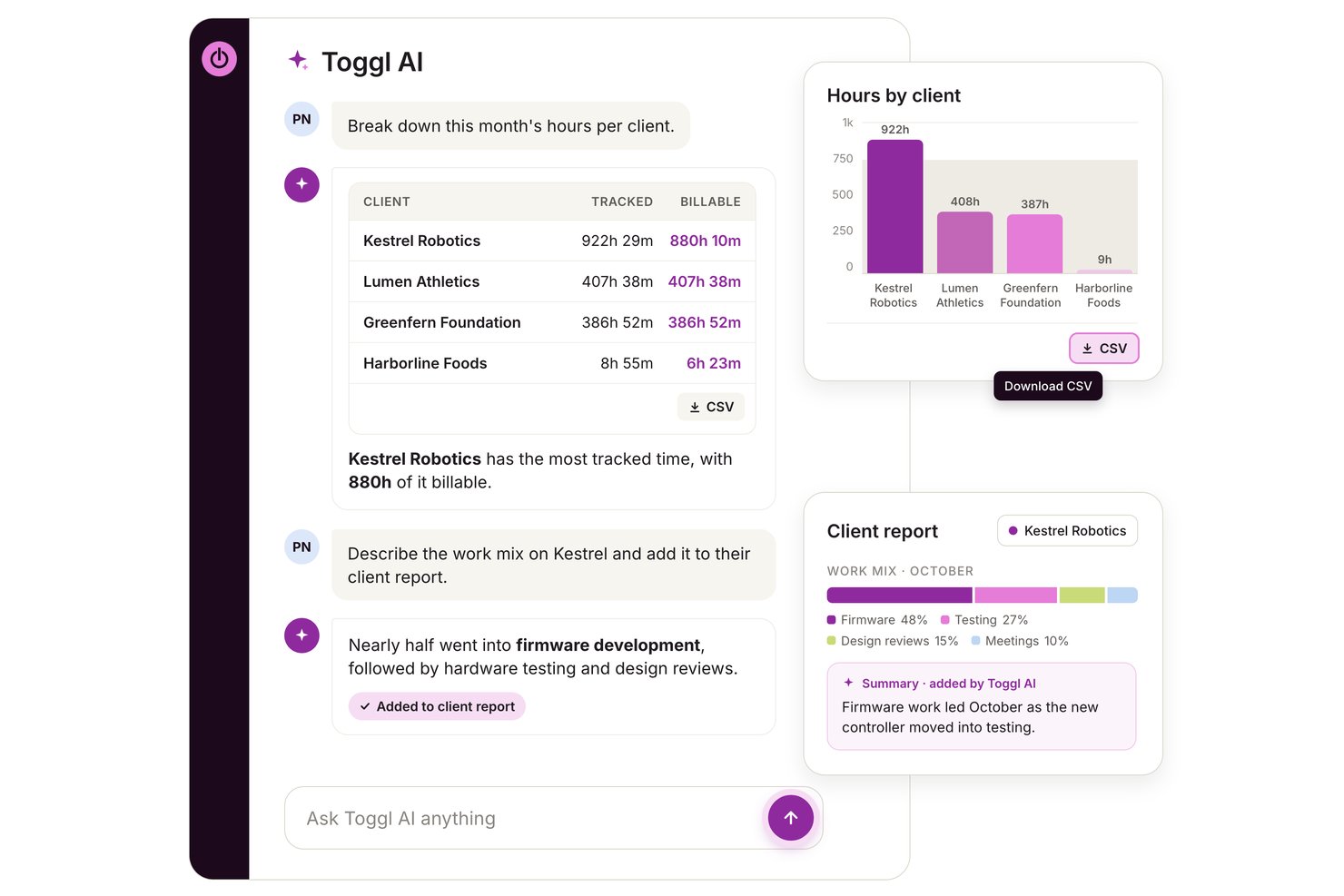
Toggl is a time tracking and capacity planning platform with an AI assistant that lets you query workspace time data in plain language, create tasks from notes or briefs, and manage projects, budgets, and team workload.
Who Is Toggl Best For?
Toggl works well for project managers and team leads who need to answer questions about where time is actually going—across projects, clients, and team members—without digging through reports manually.
Why I Picked Toggl
I picked Toggl as one of the best because its AI assistant lets you ask plain-language questions directly against your workspace data—so instead of manually pulling reports, you can ask things like "which projects ran over estimate this month?" and get an answer with the actual numbers behind it. I also like that the AI Task Creator turns rough meeting notes or a photo of a handwritten to-do list into a structured task list you can review and edit before committing.
Toggl Key Features
- MCP server integration: Connect Toggl to compatible AI assistants like Claude and Cursor to query and update workspace data using natural language.
- Capacity forecasting: Project future workload, utilization, and profitability from scheduled or tentative work using the Capacity Management add-on.
- Timesheet approvals: Let team members submit timesheets for admin review, approval, or change requests on Premium plans.
- Permission-aware AI controls: Organization admins can disable AI features for the entire workspace, with the setting enforced server-side.
Toggl Integrations
Toggl offers native integrations with Google Calendar, Outlook Email & Calendar, Asana, and Jira, plus an API, webhooks, and an MCP server and CLI for custom AI-assisted workflows.
Pros and Cons
Pros:
- Reviewers value project-level time breakdowns
- Turns notes and photos into editable tasks
- Answers workspace questions with supporting figures
Cons:
- No general-purpose drafting or summaries
- AI remains beta and can be wrong

Best for automating routine team tasks
monday AI Workspace is an AI work platform that combines project planning, task automation, workflow orchestration, and cross-functional collaboration across work management, CRM, service, and dev products on a single connected platform.
Who Is monday AI Workspace Best For?
monday AI Workspace is a strong fit for mid-market and enterprise teams coordinating work across multiple departments on a single platform.
Why I Picked monday AI Workspace
I picked monday AI Workspace as one of the best because its automation capabilities go well beyond simple rule-based triggers. The monday agents layer evaluates context and chooses actions dynamically, so repetitive workflows like SLA escalations, supplier research, and bug triage run without manual intervention. My team also uses monday magic to generate full workflows from a single natural language prompt, which cuts the manual setup that usually slows adoption on new projects.
monday AI Workspace Key Features
- No-code workflow builder: Create and customize project workflows visually without writing code.
- Portfolio-level dashboards: Aggregate analytics, health metrics, and dependencies across multiple projects in one view.
- Methodology flexibility: Switch between Agile, Kanban, Waterfall, and hybrid project structures based on team needs.
- Role-based permissions: Set granular access controls for boards, dashboards, and data based on user roles.
monday AI Workspace Integrations
monday AI Workspace offers hundreds of native integrations and marketplace apps, including Slack, Gmail, Outlook, Zoom, GitHub, Microsoft Teams, Salesforce, HubSpot, Google Workspace, and Zapier, with an API available for custom integrations.
Pros and Cons
Pros:
- Custom AI agents for team-specific workflows
- Portfolio dashboards roll up cross-project AI insights
- Automation agents handle complex multi-step workflows
Cons:
- Resource optimization features lag leading competitors
- AI meeting notetaker is still maturing
New Product Updates from monday AI Workspace
monday AI Workspace Adds Human Approval Routing
monday AI Workspace adds a human-in-the-loop approval block to AI Workflows, sending approval requests and routing workflow paths based on responses. For more information, visit monday AI Workspace's official site.
Hive
Best for AI workflows across projects and email
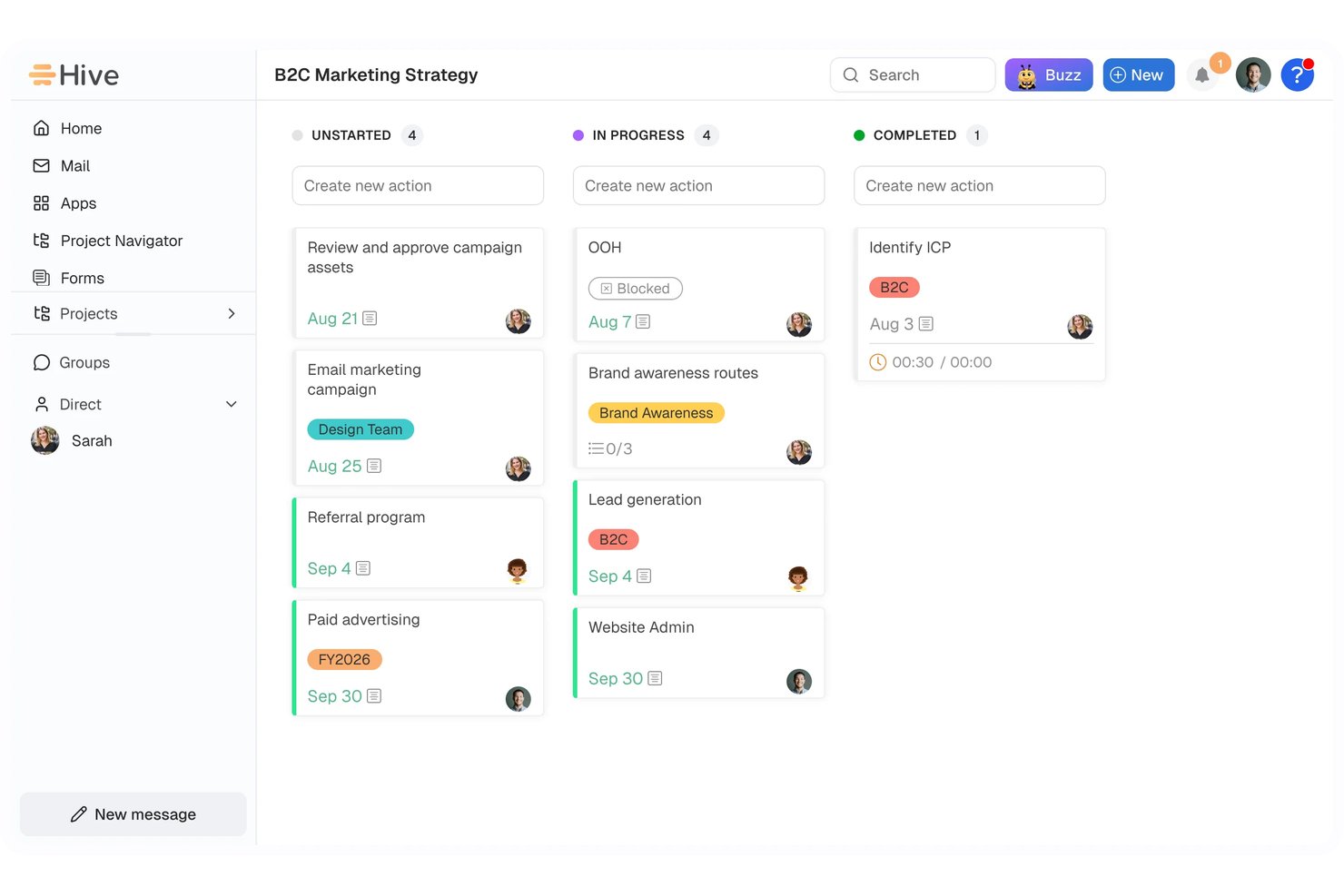
Hive is an AI-enabled project management platform that combines task tracking, workflow automation, meeting intelligence, and email management through its Buzz AI assistant.
Who Is Hive Best For?
Hive is a strong fit for team managers and leads who need to run projects, automate workflows, and manage email in one connected workspace.
Why I Picked Hive
I picked Hive as one of the best because it genuinely connects AI across both project workflows and email in a single workspace, which is rare. Its Buzz AI assistant can draft a status report, convert an email thread into an action card, and build a multi-step automation from a plain-English description, all without leaving the app. I also love that Sidekick preps meeting briefings before calls and pulls out committed action items after, so nothing slips through the cracks between conversations and project tasks.
Hive Key Features
- Buzz Chat: Ask Buzz questions in plain English to get project status updates, surface blockers, or pull workspace stats across active work.
- AI Dashboards: Build and refine charts and reports using workspace activity data to track goals and flag project blockers.
- Proofing and approvals: Mark up documents, videos, and live pages with feedback, then manage the full review and approval cycle inside Hive.
- Resourcing view: Assign teammates to projects and visualize team availability across a project's full lifecycle to manage capacity.
Hive Integrations
Hive claims over 1,000 integrations and documents native connections with Jira, GitHub, Slack, Google Calendar, Outlook Calendar, Google Drive, Zoom, and Microsoft Teams. It also offers a REST API, custom HTTP and MCP connections, plus Zapier integrations.
Pros and Cons
Pros:
- AI turns meetings and email into actions
- Flexible views clarify deadlines and progress
- Forms and triggers route incoming work
Cons:
- Large projects can feel slow
- Workflow setup can demand upfront configuration
Best for small business pipeline customization
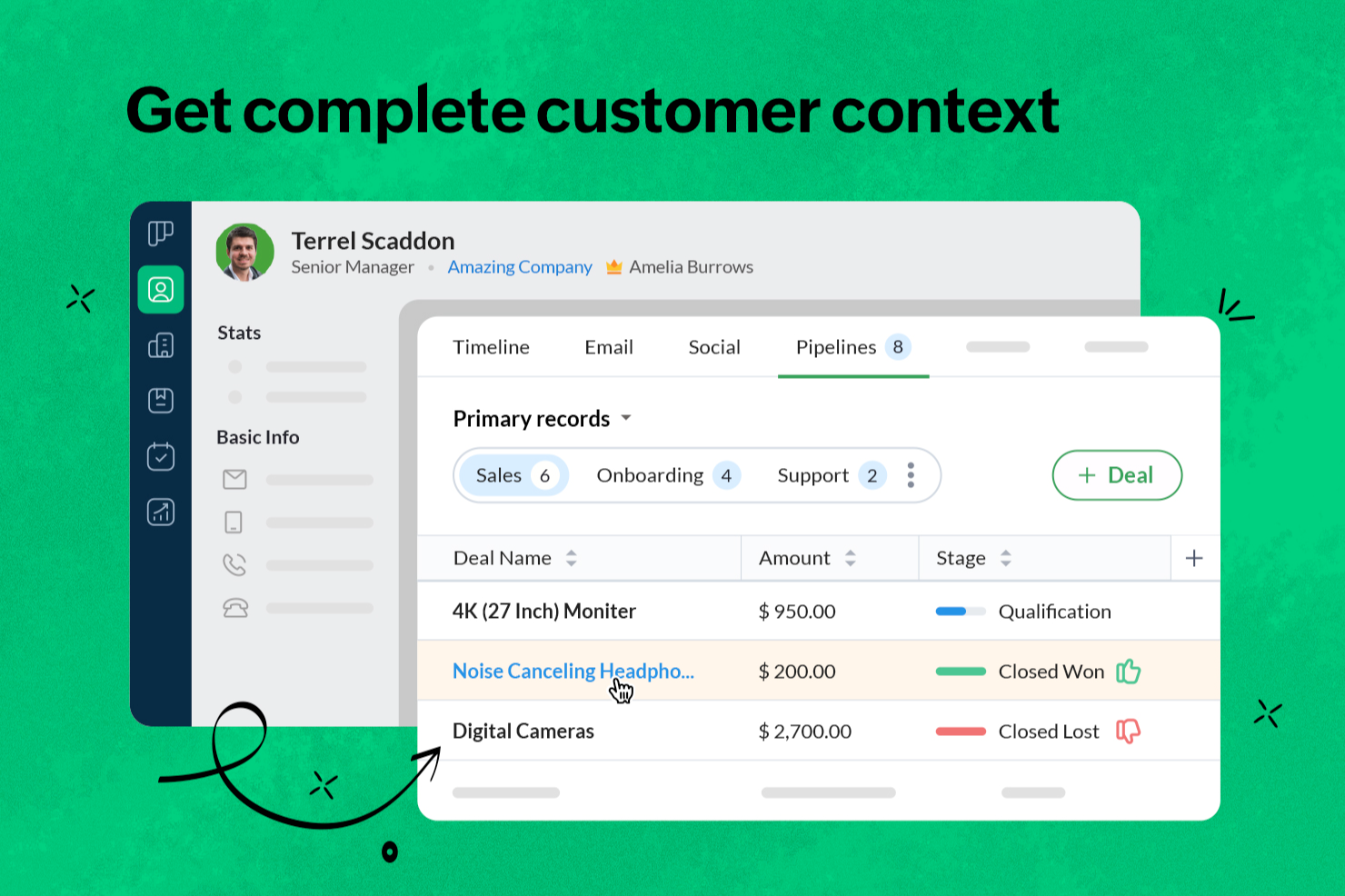
Bigin by Zoho CRM is a pipeline-focused CRM designed for small businesses that need to manage contacts, track deals, and automate sales workflows. It helps you organize customer relationships in customizable pipelines while keeping communication and activity tracking in one place.
Who Is Bigin by Zoho CRM Best For?
Small business owners and teams who need a simple, pipeline-focused CRM to manage customer relationships and sales activities.
Why I Picked Bigin by Zoho CRM
I picked Bigin by Zoho CRM because it allows my team to customize sales pipelines for different business processes instead of relying on a single generic structure. We can create multiple pipelines with unique stages, fields, and workflows, which makes it easier to track deals by product line or service type. The drag-and-drop builder also lets my team adjust processes quickly as priorities shift.
Bigin by Zoho CRM Key Features
- Workflow automation: Set up automated actions for repetitive tasks like follow-ups and status updates.
- Email integration: Connect your email accounts to send, receive, and track messages directly from Bigin.
- Mobile app: Access pipelines, contacts, and activities on iOS and Android devices.
- Telephony integration: Make and log calls from within the CRM using built-in phone system integrations.
Bigin by Zoho CRM Integrations
Bigin by Zoho CRM offers native integrations with Microsoft Outlook, Microsoft Teams, Google Workspace, Mailchimp, Shopify, and Zapier. An API is available for custom integrations.
Pros and Cons
Pros:
- Customizable pipelines for different sales processes
- Mobile app supports pipeline updates on the go
- Built-in telephony and unified communication tracking
Cons:
- Limited third-party integrations compared to competitors
- Fewer advanced reporting features than larger CRMs

Best for office integration

Microsoft CoPilot is an AI productivity tool that integrates seamlessly into the Microsoft ecosystem. It helps professionals save time by automating tasks and enhancing workflows across familiar applications.
Why I picked Microsoft CoPilot: Its AI support makes everyday work faster and smarter. You can rely on automation to draft content, analyze information, and simplify complex tasks. The tool adapts to different use cases, from data-heavy projects to polished communications. This makes it a powerful choice for teams aiming to maximize productivity within Microsoft Office.
Standout features & integrations:
Features include natural language processing for document creation, automated data insights, and task automation. These features help you manage large datasets and improve document accuracy. You can also receive intelligent suggestions to optimize your workflow.
Integrations include Microsoft Word, Excel, Outlook, PowerPoint, OneNote, Teams, SharePoint, Dynamics 365, Azure, and OneDrive.
Pros and Cons
Pros:
- Provides intelligent suggestions
- Enhances document accuracy
- Automates repetitive tasks
- AI-driven content generation
- Excellent office integration
Cons:
- Subscription for full features
- Relies on internet connection
- May have a learning curve
- Limited to Microsoft ecosystem
- Requires Microsoft 365 subscription

Best for meeting transcription

Fireflies.ai is an AI productivity tool that streamlines meeting documentation through automated transcription. It helps teams save time by capturing conversations and turning them into actionable insights.
Why I picked Fireflies.ai: Its AI support makes meetings more productive and less manual. You can automatically generate transcripts, highlight important details, and extract action items. The platform ensures information is easy to access and share across your team. This makes Fireflies.ai an ideal choice for organizations that want to improve efficiency in meeting management.
Standout features & integrations:
Features include keyword detection, sentiment analysis, and speaker identification. You can organize your meeting notes by tagging specific topics. The platform also allows you to set reminders for follow-up actions.
Integrations include Zoom, Microsoft Teams, Google Meet, Slack, Salesforce, HubSpot, Zapier, Dropbox, Evernote, and Trello.
Pros and Cons
Pros:
- Creates action items
- Highlights key points
- Automatic recording
- Searchable transcripts
- Accurate meeting transcriptions
Cons:
- Limited offline access
- Subscription for full features
- May need manual corrections
- Requires internet connection
- Occasional transcription errors

Best for research organization

NotebookLM is an AI productivity tool that simplifies research and writing by turning complex information into clear insights. It helps professionals, students, and teams save time while organizing and presenting knowledge effectively.
Why I picked NotebookLM: Its AI-driven support makes handling large volumes of information more efficient. You can automate the process of extracting key points and structuring your work. The platform adapts to different workflows, whether for research, learning, or professional projects. This makes it an excellent choice for anyone looking to boost productivity in knowledge-intensive tasks.
Standout features & integrations:
Features include audio overviews, personalized AI insights, and presentation outlines. You can listen to your sources with engaging audio discussions. The tool also helps you create structured outlines for presentations.
Integrations include Google Docs, Google Slides, YouTube, Gmail, Slack, Microsoft Teams, Dropbox, Evernote, Asana, and Trello.
Pros and Cons
Pros:
- Audio overview feature
- Supports multiple document types
- Clear citation tracking
- Instant insights from sources
- Effective research organization
Cons:
- Relies on internet connection
- Subscription required for full features
- May not suit all research needs
- Requires learning curve
- Limited offline access


Perplexity is an AI productivity tool that delivers fast, reliable answers to complex questions. It helps users save time by turning detailed queries into clear, actionable insights.
Why I picked Perplexity: Its AI-powered approach makes information retrieval efficient and accurate. You can quickly process complex inputs and get concise results tailored to your needs. The tool adapts to a wide range of professional and research workflows. This makes Perplexity an excellent choice for anyone looking to boost productivity through smarter access to knowledge.
Standout features & integrations:
Features include natural language processing, customizable query settings, and real-time feedback. These features help you refine your search criteria and get the most relevant results. The tool also offers a user-friendly interface for easy navigation.
Integrations include Google Sheets, Microsoft Excel, Slack, Trello, Asana, Zapier, Notion, Airtable, Jira, and Monday.com.
Pros and Cons
Pros:
- User-friendly interface
- Intuitive search capabilities
- Offers real-time feedback
- Handles large datasets efficiently
- Fast response to queries
Cons:
- Initial setup may be time-consuming
- Subscription needed for full features
- May have a learning curve
- Requires internet connection
- Limited offline functionality


Motion AI is an AI productivity tool built to automate work and streamline daily operations. It helps teams manage projects and schedules more efficiently by using intelligent automation.
Why I picked Motion AI: Its AI-first approach reduces the need for manual planning. You can rely on automation to handle repetitive tasks, while the system adapts to your team’s priorities. The clean interface makes it easy to adopt AI-driven workflows. This makes Motion AI an excellent choice for teams aiming to maximize efficiency and focus on high-value work.
Standout features & integrations:
Features include AI-driven scheduling, task management, and project planning. These features help you organize your workload effectively. With automated notifications, your team stays informed and on track.
Integrations include Zapier, Zoom, Google Meet, Gmail, Outlook, HubSpot, Salesforce, and Slack.
Pros and Cons
Pros:
- Supports remote work
- Enhances team collaboration
- Automates repetitive tasks
- Intuitive user interface
- AI-driven task scheduling
Cons:
- Subscription cost may be high
- Occasional glitches reported
- Requires learning curve
- Limited customization options
- Can be complex for new users


Synthesia is an AI productivity tool that streamlines video creation for businesses and teams. It uses AI to simplify production, helping you generate professional content without traditional filming resources.
Why I picked Synthesia: Its AI capabilities make video creation faster and more accessible. You can automate production steps, adapt content to multiple formats, and scale video output with ease. The platform’s intuitive setup ensures quick adoption across teams. This makes Synthesia a powerful choice for organizations aiming to save time while producing engaging video content.
Standout features & integrations:
Features include multi-language support, customizable templates, and a user-friendly interface. You can add subtitles to your videos effortlessly. The platform also offers a library of stock footage to enhance your content.
Integrations include YouTube, Vimeo, Wistia, HubSpot, Marketo, Mailchimp, Salesforce, Slack, Microsoft Teams, and Google Drive.
Pros and Cons
Pros:
- Stock footage library
- Easy branding options
- Customizable video templates
- Multi-language support
- AI-generated video avatars
Cons:
- Can be costly for small teams
- Subscription needed for full features
- May require creative input
- Relies on internet connection
- Limited editing capabilities
Diğer AI Üretkenlik Araçları
İşte kısa listeme giremeyen ancak yine de göz atmaya değer bazı ek AI üretkenlik aracı seçenekleri:
- Elicit
For research insights
- Insightful
For transforming workforce data into insights
- Grammarly
For writing assistance
- Slack
For catching up on team decisions
- Smartsheet
For flexible project tracking views
- Zoho Projects
For budget tracking
- Any.do
For to-do lists
- Reclaim
For smart calendar scheduling


How I Evaluate AI Productivity Tools
Every tool on this list has to do more than slap an AI label on basic automations—I look for platforms that actually save PMs time on planning, risk detection, and status reporting. I split my evaluation into two layers: the core AI functionality a tool needs to qualify and the differentiating factors that separate good options from great ones.
Core Functionality (Table Stakes For This List)
When I'm selecting tools for my list, I rank each one on a scale from 0 (does not offer the functionality) to 5 (excels in this area) for each core functionality listed below. Then, I calculate the tool's total score into a percentage. Each tool needs to achieve a minimum total score of 65% to be considered for inclusion.
- AI-Driven Task Automation: I check whether the tool can auto-create, assign, and reprioritize tasks from inputs like emails, briefs, or sprint signals rather than just running static rules.
- Generative Planning Assistance: I look for AI that turns a plain-language brief into a structured plan with milestones, dependencies, and owners—not just a task list.
- Predictive Risk & Delay Detection: Each tool should surface at-risk work before it's overdue, flagging bottlenecks or slipping timelines based on real project data patterns.
- AI Content & Meeting Summarization: I evaluate whether summaries produce linked action items, not just transcripts—turning a 30-minute standup into assigned next steps.
- Natural Language Interaction: The AI should let PMs ask questions like "which tasks are blocked this sprint?" and get accurate, contextual answers or trigger actions directly.
- Intelligent Resource Optimization: I look for workload balancing that goes beyond utilization charts—recommending reassignments based on availability, skills, and capacity forecasts.
Once I have a list of tools that meet this criteria, I consider what sets each platform apart.
Differentiating Factors (What Sets Vendors Apart)
Here's how I compare and contrast different vendors:
Standout Features
Cross-tool AI orchestration is a big differentiator—I look for tools that pull context from Slack threads, GitHub commits, and shared docs to inform project decisions rather than operating in a silo. Portfolio-level intelligence matters when you're a program manager tracking health across dozens of projects at once. I also evaluate how transparent a tool's AI outputs are. When the AI flags a delivery risk, you should see the data driving that score, not just a red icon.
Beyond Features
Data security and AI governance deserve close attention—I check whether vendors clearly disclose how project data is handled and whether it trains their models. Integration depth also matters a lot. A tool that syncs bi-directionally with Jira, Confluence, and Slack fits into an existing PM stack without forcing a rip-and-replace. I also evaluate scalability, since a tool that works for a 10-person squad may struggle once you're running a portfolio across multiple business units with years of historical data.
AI Üretkenlik Araçları Nasıl Seçilir?
Uzun özellik listeleri ve karmaşık fiyatlandırma yapıları arasında kaybolmak kolaydır. Kendinize özgü yazılım seçimi sürecinizde ilerlerken odaklanmanızı korumanıza yardımcı olmak için göz önünde bulundurmanız gereken faktörlerin bir kontrol listesini aşağıda bulabilirsiniz:
| Faktör | Göz önünde bulundurulması gerekenler |
|---|---|
| Ölçeklenebilirlik | Araç ekibinizle birlikte büyüyebilir mi? Ek maliyetler olmadan artan kullanıcı veya veri miktarını işleyip işleyemeyeceğini değerlendirin. Gelecekteki işletme büyümenizi destekleyen seçenekleri arayın. |
| Entegrasyonlar | Mevcut araçlarınıza bağlanabiliyor mu? Ekibinizin kullandığı CRM, e-posta ve takvim uygulamaları gibi diğer yazılımlarla sorunsuz çalıştığından emin olun. Verileri izole eden araçlardan kaçının. |
| Özelleştirilebilirlik | Süreçlerinize uyacak şekilde özelleştirebilir misiniz? İş akışlarını, panoları veya ayarları ekibinizin kendine özgü ihtiyaçlarına uyacak şekilde düzenleyip düzenleyemeyeceğinizi kontrol edin. |
| Kullanım kolaylığı | Araç sezgisel mi? Kullanıcı dostu bir arayüz eğitim süresini azaltır ve benimsenme oranını artırır. Ekibinizin ne kadar hızlı uyum sağlayabileceğini görmek için ücretsiz deneme sürümüyle test edin. |
| Uygulama ve başlangıç | Başlamak ne kadar kolay? Kurulum için gereken süreyi ve kaynakları değerlendirin. Geçişi kolaylaştırmak için anlaşılır kılavuzlara ve desteğe sahip araçları arayın. |
| Maliyet | Bütçenize uygun mu? Fiyatlandırma planlarını karşılaştırın ve gizli ücretler veya eklentiler de dâhil olmak üzere toplam maliyetleri göz önünde bulundurun. Bütçenizle uyumlu esnek fiyatlandırma seçeneklerini arayın. |
| Güvenlik önlemleri | Verileriniz ne kadar güvende? Hassas bilgileri korumak için aracın şifreleme, kullanıcı erişim denetimleri ve veri koruma düzenlemelerine uyumluluk sunup sunmadığını doğrulayın. |
AI Üretkenlik Araçları Nedir?
AI üretkenlik araçları; görevleri otomatikleştirmek, verileri analiz etmek ve verimliliği artırmak için yapay zekâdan yararlanan yazılım uygulamalarıdır. Proje yöneticileri, pazarlamacılar ve analistler gibi profesyoneller bu araçları genellikle zamandan tasarruf etmek ve iş akışlarını geliştirmek için kullanır. Görev otomasyonu, veri analizi ve entegrasyon özellikleri; iş yüklerini yönetmeye, iş birliğini geliştirmeye ve verilere dayalı kararlar almaya yardımcı olur. Genel olarak bu araçlar üretkenliği artırır ve kullanıcıların yüksek değerli görevlere odaklanmasını sağlar.
AI Üretkenlik Araçlarının Özellikleri
AI üretkenlik araçlarını seçerken aşağıdaki temel özelliklere dikkat edin:
- Görev otomasyonu: Zaman kazanmak ve manuel çabayı azaltmak için tekrarlayan görevleri otomatikleştirir.
- Veri analizi: Bilinçli karar almayı desteklemek için verilerden içgörüler ve eğilimler sunar.
- Entegrasyon özellikleri: Sorunsuz veri akışı ve iş birliği sağlamak için mevcut yazılımlara bağlanır.
- Özelleştirilebilirlik: Kullanıcıların iş akışlarını ve gösterge tablolarını kendi özel ihtiyaçlarına göre uyarlamasına olanak tanır.
- Gerçek zamanlı iş birliği: Ekiplerin aynı anda birlikte çalışmasını sağlayarak iletişimi ve verimliliği artırır.
- Doğal dil işleme: Kullanıcı etkileşimini kolaylaştırmak için insan dilini anlar ve işler.
- Güvenlik önlemleri: Hassas bilgileri şifreleme ve erişim denetimleriyle korur.
- Ölçeklenebilirlik: Ek maliyet olmadan büyüyen ekip boyutlarına ve artan veri miktarına uyum sağlar.
- Kullanım kolaylığı: Öğrenme eğrisini azaltan ve benimsenmeyi artıran sezgisel bir arayüze sahiptir.
- Raporlama ve görselleştirme: Verilerin daha iyi yorumlanması için görsel raporlar ve gösterge tabloları oluşturmaya yönelik araçlar sunar.
Yapay Zekâ Verimlilik Araçlarının Faydaları
Yapay zekâ verimlilik araçlarını uygulamak, ekibiniz ve işletmeniz için çeşitli faydalar sağlar. Yararlanabileceğiniz birkaç fayda şunlardır:
- Zaman tasarrufu: Rutin görevleri otomatikleştirerek daha stratejik çalışmalar için zaman kazandırır.
- Geliştirilmiş karar alma: İçgörüler sunmak için verileri analiz ederek bilinçli seçimler yapmanıza yardımcı olur.
- Gelişmiş iş birliği: Gerçek zamanlı özellikler, ekiplerin daha etkili bir şekilde birlikte çalışmasını sağlar.
- Artırılmış esneklik: Özelleştirilebilir seçenekler, aracı belirli süreçlerinize uyacak şekilde uyarlamanıza olanak tanır.
- Daha iyi veri yönetimi: Entegrasyon özellikleri, farklı platformlar arasında sorunsuz veri akışı sağlar.
- Ölçeklenebilirlik: Ek maliyet olmadan ekibiniz ve işletmenizin ihtiyaçlarıyla birlikte büyür.
- Güvenlik güvencesi: Hassas verileri gelişmiş güvenlik özellikleriyle korur.
Yapay Zekâ Verimlilik Araçlarının Maliyetleri ve Fiyatlandırması
Yapay zekâ verimlilik araçlarını seçmek, mevcut çeşitli fiyatlandırma modellerinin ve planların anlaşılmasını gerektirir. Maliyetler özelliklere, ekip büyüklüğüne, eklentilere ve daha fazlasına bağlı olarak değişir. Aşağıdaki tablo, yapay zekâ verimlilik aracı çözümlerinde yaygın planları, bunların ortalama fiyatlarını ve tipik olarak sunulan özellikleri özetlemektedir:
Yapay Zekâ Verimlilik Araçları İçin Plan Karşılaştırma Tablosu
| Plan Türü | Ortalama Fiyat | Yaygın Özellikler |
|---|---|---|
| Ücretsiz Plan | $0 | Temel görev yönetimi, sınırlı entegrasyonlar ve temel destek. |
| Kişisel Plan | $5-$25/kullanıcı/ay | Görev otomasyonu, veri analizi ve temel özelleştirme seçenekleri. |
| İşletme Planı | $30-$60/kullanıcı/ay | Gelişmiş entegrasyonlar, geliştirilmiş iş birliği araçları ve öncelikli destek. |
| Kurumsal Plan | $75-$150/kullanıcı/ay | Tam özelleştirilebilirlik, özel hesap yöneticisi ve gelişmiş güvenlik özellikleri. |
Yapay Zekâ Verimlilik Araçları SSS
Yapay zekâ verimlilik araçları hakkında sık sorulan bazı soruların yanıtları:
Yapay zekâ verimlilik araçları mevcut sistemlerle nasıl entegre olabilir?
Yapay zekâ verimlilik araçları genellikle CRM sistemleri, e-posta platformları ve proje yönetimi araçları gibi mevcut yazılımlara sorunsuz şekilde bağlanmalarını sağlayan entegrasyon özellikleri sunar. Aracın, mevcut sistemleriniz için gereken API’leri veya üçüncü taraf bağlayıcıları destekleyip desteklemediğini kontrol etmek önemlidir. Bu, sorunsuz bir veri akışı sağlar ve iş akışı verimliliğini artırır.
Yapay zekâ araçlarıyla veri güvenliği konusunda nelere dikkat etmeliyim?
Yapay zekâ verimlilik araçlarını kullanırken veri güvenliği önlemlerini değerlendirmek çok önemlidir. Şifreleme, kullanıcı erişim kontrolleri ve veri koruma düzenlemelerine uyumluluk gibi özellikleri arayın. Hassas bilgileri korumak ve güveni sürdürmek için aracın kuruluşunuzun güvenlik politikalarıyla uyumlu olduğundan emin olun.
Yapay zekâ verimlilik araçları ölçeklenebilir mi?
Yapay zekâ verimlilik araçlarını seçerken ölçeklenebilirlik önemli bir etkendir. Ekibiniz büyüdükçe aracın artan veri hacmini veya kullanıcı sayısını işleyip işleyemeyeceğini değerlendirin. Ölçeklenebilir çözümler, önemli ek maliyetler olmadan özellik veya kapasite eklemenize olanak tanımalı ve işletmeniz büyürken etkili kalmalarını sağlamalıdır.
Yapay zekâ verimlilik araçlarıyla ilişkili maliyetler nelerdir?
Yapay zekâ verimlilik araçlarının fiyatları; özelliklere, kullanıcı sayısına ve ek hizmetlere bağlı olarak büyük ölçüde değişebilir. Abonelik ile tek seferlik ücretler gibi fiyatlandırma modellerini karşılaştırmak ve kurulum veya eğitim gibi gizli maliyetleri dikkate almak önemlidir. Bütçenize uygun esneklik sunan planları tercih edin.
Yapay zekâ verimlilik araçları iş birliğini nasıl destekler?
Yapay zekâ verimlilik araçları; gerçek zamanlı belge düzenleme, paylaşılan çalışma alanları ve iletişim kanalları gibi özellikler sunarak iş birliğini destekler. Bu özellikler, ekiplerin konumlarından bağımsız olarak verimli şekilde birlikte çalışmasına yardımcı olur. İş birliğini geliştirmek için ekibinizin tercih ettiği iletişim platformlarıyla sorunsuz entegrasyon sunan araçları değerlendirin.
Yapay zekâ verimlilik araçları ne düzeyde müşteri desteği sunar?
Müşteri desteği düzeyi, yapay zekâ verimlilik araçları arasında farklılık gösterebilir. Canlı sohbet, e-posta veya telefon desteği gibi destek kanallarının kullanılabilirliğini değerlendirin. Herhangi bir sorunu hızlıca çözebilmeniz için sağlayıcının yanıt süresini ve eğitimler veya SSS gibi destek kaynaklarının kalitesini göz önünde bulundurun.