2026’da Muhasebeciler İçin En İyi 10 Zaman Takibi Yazılımı

10 Muhasebeciler İçin En İyi Zaman Takibi Yazılımları Kısa Listesi


Zamanı verimli bir şekilde takip etmek muhasebeciler için gerçek bir zorluk olabilir. Yönetilmesi gereken bu kadar çok görev varken, faturalandırılabilir saatlerin takibini kaybetmek kolaydır. Zaman takibi yazılımları size ve ekibinize bu konuda yardımcı olarak harcanan her dakikanın kayda geçirilmesini sağlayabilir.
Muhasebecilere yönelik çeşitli zaman takibi araçlarını bağımsız olarak test edip inceledim. Deneyimlerime göre bu araçlar yalnızca doğruluğu artırmakla kalmıyor, aynı zamanda değerli zamandan da tasarruf sağlıyor.
Bu makalede, zaman takibi yazılımları için en iyi seçimlerimi bulacaksınız. Özelliklerini, avantajlarını ve iş akışınıza nasıl uyum sağlayabileceklerini açıklayacağım. İster küçük bir firmanın ister büyük bir muhasebe ekibinin parçası olun, burada sizin için uygun bir seçenek var.
Why Trust Our Software Recommendations
Our team has been testing and reviewing software since 2012. As project managers ourselves, we know how difficult—and important—it is to choose the right software.
For this guide, we evaluated tools using hands-on testing and independent research, scoring tools using our selection criteria. We also draw on insights from industry thought leaders and practicing project management experts.
Our reviews reflect our human editorial judgment, not a sales pitch.
Expert reviewers:
Muhasebeciler İçin Zaman Takibi Yazılımları Karşılaştırma Tablosu
Muhasebeciler için en iyi zaman takibi yazılımı seçimlerimin fiyatlandırma ayrıntıları bu karşılaştırma tablosunda özetlenmiştir:
| Tool | Starting Price | Website | |
|---|---|---|---|
| Best for multi-entity billing and profitability | 4.5 out of 5 | $17/user/month 14-day free trial | Book Demo |
| Best for tracking billable hours | 4.8 out of 5 | $4.99/user/month 14-day free trial + free demo available | Website |
| Best for flexible integrations | 4.7 out of 5 | $9/user/month Free plan available; 30-day free trial; Free demo available | Book Demo |
| Best for detailed reporting & data analysis | 4.6 out of 5 | $6/user/month Free plan + Free trial + Free demo available | Book Demo |
| Best for reporting features | 4.8 out of 5 | $4.99/user/month Free plan + 7-day trial + demo available | Website |
| Best for payroll integration | 4.7 out of 5 | $20/month + $10/user/month 30-day free trial | Website |
| Best for automatic tracking | 4.7 out of 5 | $9/user/month Free 14-day trial + free demo available | Website |
| Best for project management | 4.8 out of 5 | $5/user/month Free plan + 14-day free trial + free demo available | Website |
| Best for attendance tracking | 4.7 out of 5 | $3.99/user/month Free plan + free trial + free demo available | Website |
| Best for accounting firms | 4.8 out of 5 | $79/user/month Free demo available | Website |
Muhasebeciler İçin En İyi Zaman Takibi Yazılımları İncelemeleri
Kısa listemde yer alan muhasebeciler için en iyi zaman takibi yazılımlarına ilişkin ayrıntılı özetlerim aşağıdadır. İncelemelerim, sizin için en uygun olanı bulmanıza yardımcı olmak amacıyla her aracın temel özelliklerine, artılarına & eksilerine, entegrasyonlarına ve ideal kullanım alanlarına ayrıntılı bir bakış sunuyor.

Scoro
Best for multi-entity billing and profitability
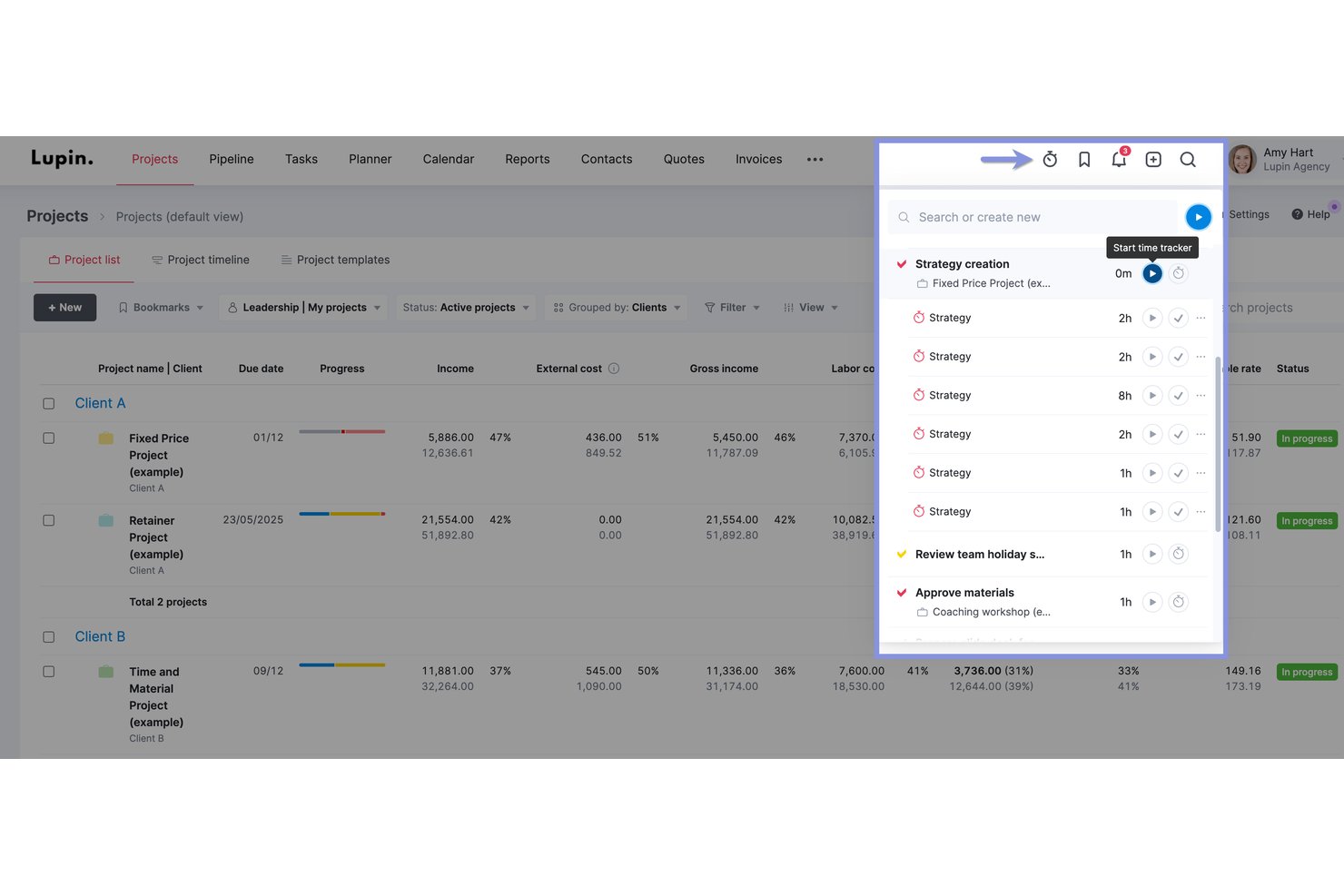
Scoro is a professional services automation platform that combines time tracking, project budgeting, invoicing, and profitability reporting with native two-way integrations with QuickBooks, Xero, and Sage Intacct.
Who Is Scoro Best For?
Scoro is a strong fit for mid-market accounting and professional services firms managing multiple client engagements, entities, or currencies across a team of five or more.
Why I Picked Scoro
I picked Scoro as one of the best because its multi-entity billing and real-time profitability reporting genuinely serve accounting firms running advisory and recurring engagements across multiple offices or legal entities. Each entity can carry its own currency and financial settings, while WIP reporting and retainer invoicing run in parallel. I also love that profit forecasting updates in real time as time is logged, so you're never guessing where a client engagement stands on margin.
Scoro Key Features
- Timesheet approval workflow: Managers review and approve prefilled timesheets submitted by team members before time is locked and billed.
- Automated timesheet reminders: Admins can configure up to five email reminders to prompt staff with unsubmitted timesheets from the past eight weeks.
- Multi-currency support: Each client engagement or entity can be managed in its own currency, with financial settings applied independently.
- Native two-way accounting integrations: Scoro syncs invoices, payments, and contacts bidirectionally with QuickBooks, Xero, Sage Intacct, and Exact Online.
Scoro Integrations
Scoro offers native two-way integrations with QuickBooks, Xero, Sage Intacct, and Exact Online, plus integrations with Jira, Google Calendar, Microsoft 365, HubSpot, Salesforce, Slack, and Avalara. It also supports custom integrations through its public REST API and Zapier.
Pros and Cons
Pros:
- Multi-entity billing supports global accounting teams
- Native two-way sync with major accounting platforms
- Real-time profitability forecasting across client engagements
Cons:
- Not purpose-built for accounting workflows
- Time locking and WIP features gated by tier
New Product Updates from Scoro

Scoro Adds Time Mobile App and ELI Improvements
Scoro adds the Scoro Time mobile app for iOS/Android to track time anywhere and expands ELI with attachments, smarter filtering, and trigger-based actions. For more information, visit Scoro's official site.
 .

Best for tracking billable hours

Buddy Punch is a versatile employee time clock software designed to make time tracking, employee scheduling, and payroll management easier for businesses. It offers a variety of features that cater to the needs of teams looking to efficiently manage their time and attendance.
Why I Picked Buddy Punch: I picked Buddy Punch as a top time tracking tool for accountants because it enables real-time monitoring of employee hours and overtime from anywhere, helping you capture every billable hour. Its automated attendance and PTO tracking streamlines time-off management and ensures policy compliance. The platform also simplifies payroll with automated timesheets and fast approvals, letting you focus on accounting tasks rather than admin work.
Standout Features & Integrations
Features include GPS tracking, which monitors employee locations for remote work, ensuring accountability and transparency. Geofencing is another noteworthy feature, allowing you to set specific locations where employees can clock in and out, providing an extra layer of security. Additionally, customizable reporting lets you tailor reports to meet your specific business needs, giving you valuable insights into your team's performance.
Integrations include QuickBooks, ADP Workforce Now, Gusto, Paychex, Paylocity, Paycor, iSolved, Justworks, SurePayroll, Rippling, Zapier, and TriNet Payroll.
Pros and Cons
Pros:
- Real-time monitoring
- GPS tracking
- Customizable reports
Cons:
- Basic mobile app
- No offline mode

Toggl
Best for flexible integrations
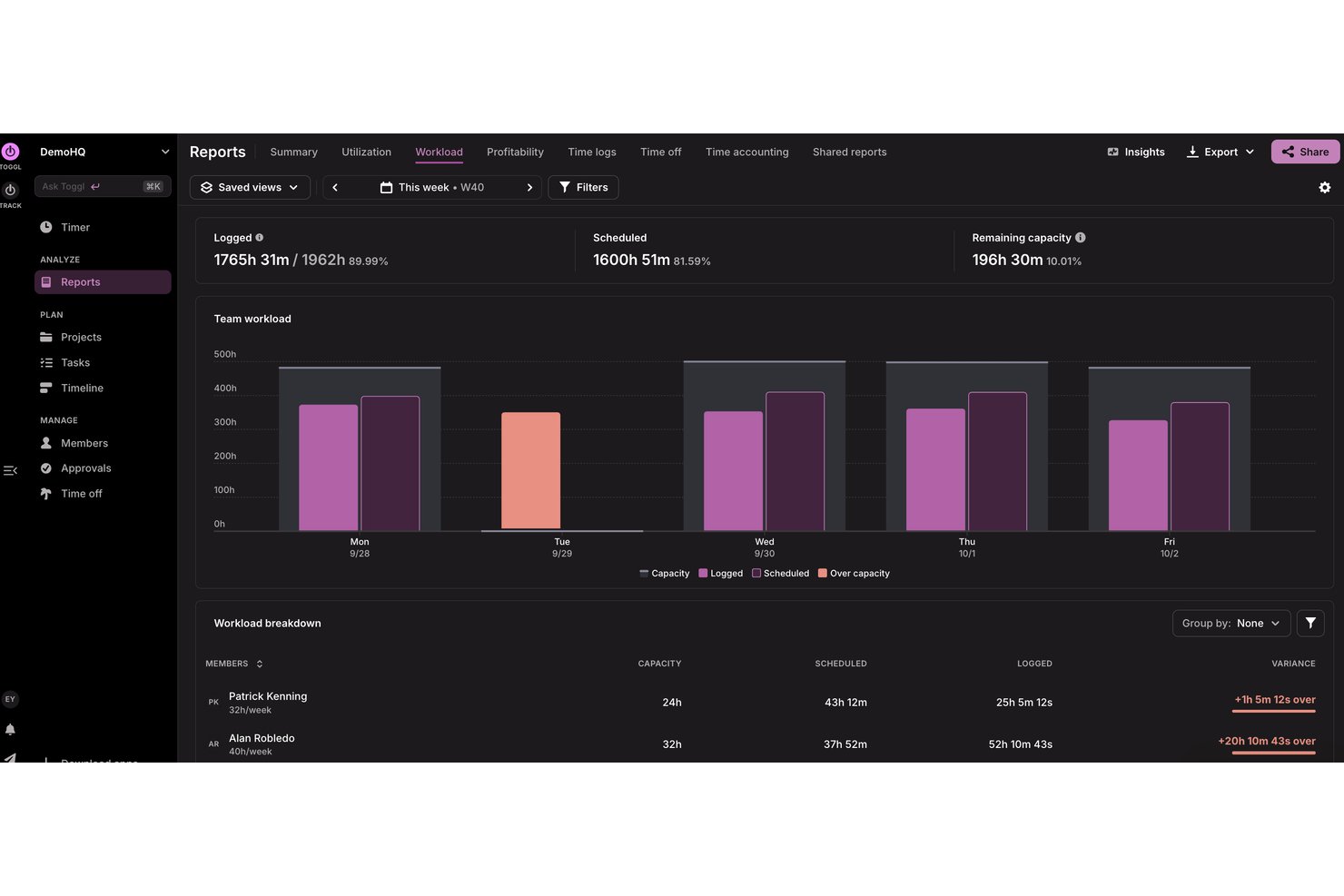
Toggl is a versatile time tracking tool popular among freelancers and small to medium-sized businesses. It helps users track time, manage projects, and generate reports to improve productivity.
Why I picked Toggl: It stands out for its flexible integrations, allowing you to connect with over 100 different tools. This flexibility makes it easy to customize your workflow. Toggl also offers features like automated time tracking and customizable reports, aligning with its USP. The software's user-friendly interface makes it accessible for teams of all sizes.
Standout Features & Integrations
Features include automated time tracking that privately records your activity in the background, customizable reporting tools to fit your business needs, workload and utlization reports for accurate capacity planning, and a calendar view for easy integration and management of time entries.
Integrations include Jira, Asana, Slack, Todoist, Google Calendar, and Outlook, plus an API for custom integrations and MCP for connecting to AI assitants like Claude, Cursor, and Codex.
Pros and Cons
Pros:
- Supports multiple currencies
- Capacity and utilization tracking
- Billable and cost rates by person and project
Cons:
- No phone support
- No invoicing features

actiTIME
Best for detailed reporting & data analysis
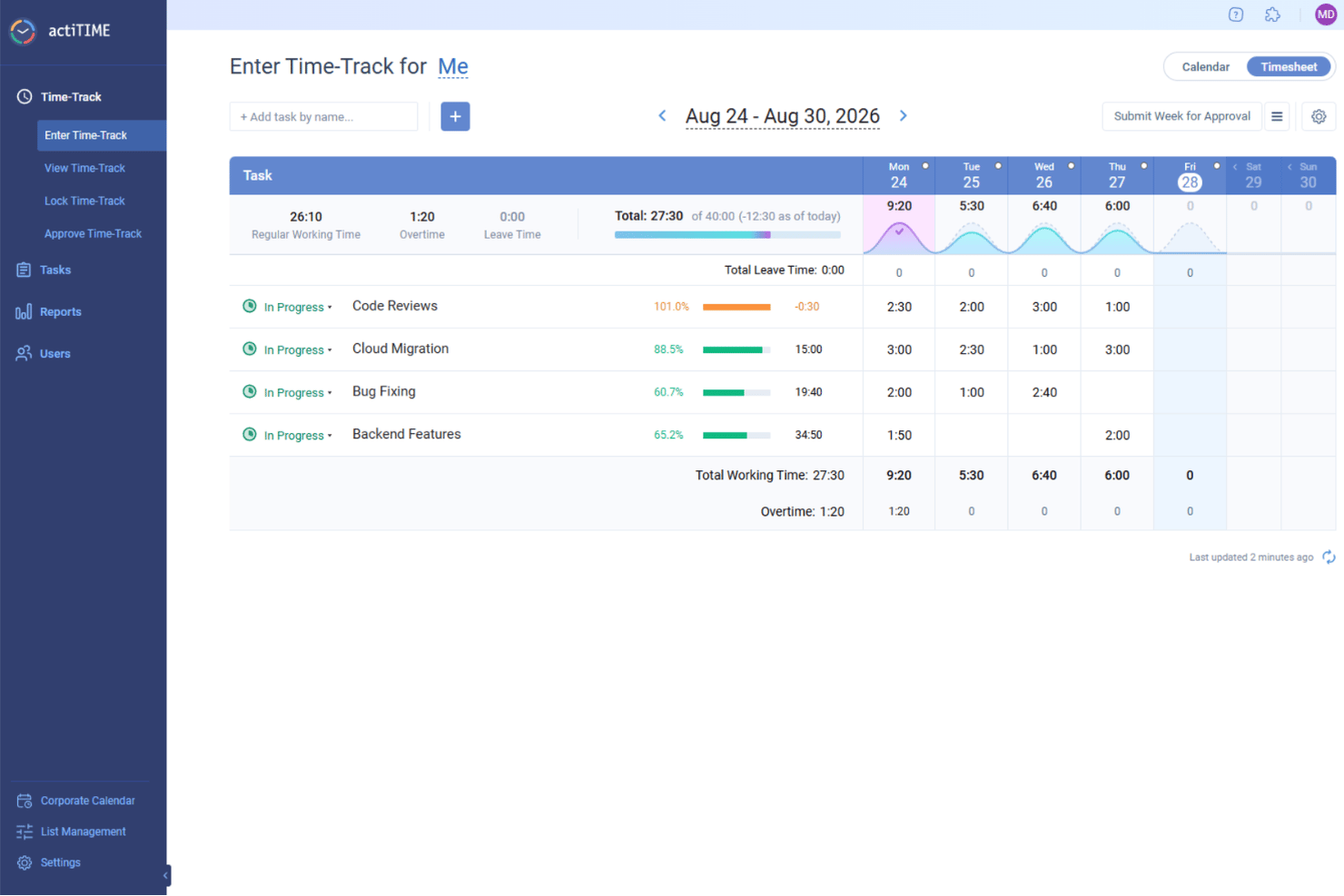
actiTIME is a versatile time tracking software designed to meet the needs of various industries, including accounting. With its focus on improving project cost-effectiveness, it offers a range of features that cater specifically to professionals like accountants who need precise time management.
Why I Picked actiTIME: I picked actiTIME for accountants because it offers comprehensive project management tools to track projects and monitor budgets effectively, ensuring financial control and profitability. Its detailed reporting and data analysis features provide insights into productivity and project performance, supporting informed decision-making. Additionally, actiTIME’s billing and invoicing automation helps save time and reduce errors, ensuring accurate client billing.
Standout Features & Integrations
Features include insightful analytics that provide a clear view of your team's productivity and project profitability, helping you make data-driven decisions. The software also streamlines leave tracking, allowing you to manage time-off requests and ensure that your team is adequately staffed. Additionally, actiTIME supports efficient cost analysis, enabling you to monitor expenses and resource allocation effectively.
Integrations include QuickBooks and Zapier.
Pros and Cons
Pros:
- Simple manual time entries
- Easy project setup
- Customizable billing rates
Cons:
- Limited advanced features
- Basic user interface
New Product Updates from actiTIME

actiTIME Visual Hour Indicator and Time-Track Report Redesign
actiTIME adds a wave-style hour indicator to the Timesheet and Calendar views and refreshes the Time-Track report for smoother navigation and clearer visuals. For more information, visit actiTIME's official site.
 .

Clockify
Best for reporting features

Clockify is a time tracking tool ideal for teams of any size, offering unlimited users at no additional cost. It allows businesses to track work hours, manage projects, and generate reports efficiently.
Why I picked Clockify: I selected Clockify because its detailed reporting tools allow accounting professionals to quickly audit billable time across different clients and projects. Practice managers can generate broken-down time entries by task, client, or team member to simplify monthly billing and safeguard margin accuracy. This makes it ideal for accountants who need clear time tracking and reporting features to verify billing precision without manual spreadsheet management.
Standout Features & Integrations
Features include detailed reporting that helps analyze time usage, a timeline view to visualize your team's workday, and a Pomodoro timer to boost productivity by breaking work into intervals.
Integrations include Asana, Trello, Jira, Slack, QuickBooks, Google Calendar, Notion, Monday.com, GitHub, and Basecamp.
Pros and Cons
Pros:
- Scalable for growing teams
- Pomodoro timer feature
- Free for up to five users
Cons:
- No invoicing capabilities
- Basic free plan features

Best for payroll integration

QuickBooks Time is a time tracking software designed for businesses of all sizes, especially those needing payroll integration. It helps users track employee hours, manage schedules, and export data for payroll processing.
Why I picked QuickBooks Time: Payroll integration is key for many businesses, and QuickBooks Time excels in this area. It offers features like GPS tracking and mobile time entry, making it easy for your team to log hours from anywhere. The software allows seamless syncing with QuickBooks for payroll processing. This integration ensures that your payroll is accurate and efficient, saving you time and reducing errors.
Standout Features & Integrations
Features include GPS tracking to monitor where your team is working, mobile time entry for logging hours on the go, and scheduling tools that help organize shifts and manage time-off requests.
Integrations include QuickBooks, Xero, Square, Gusto, Expensify, ADP, Deputy, Tsheets, Sage, and BambooHR.
Pros and Cons
Pros:
- Detailed scheduling options
- GPS tracking available
- Strong mobile app functionality
Cons:
- Learning curve for new users
- Occasional sync delays

Timely
Best for automatic tracking

Timely is a time tracking software designed for professionals and teams who want to automate their time management. It helps users track work hours, manage projects, and optimize productivity without manual entry.
Why I picked Timely: Automatic tracking is the core of Timely's offering, making it a unique choice for those who want to reduce manual time entry. The software captures all activities across devices, providing a complete picture of your workday. It also offers memory tracking, which logs your time usage without needing to start or stop a timer. This helps ensure accuracy and saves time, making it ideal for busy professionals.
Standout Features & Integrations
Features include memory tracking, which logs your activity without timers, project dashboards that provide a visual overview of tasks, and privacy-first design that ensures your data is secure and private.
Integrations include Asana, Trello, Slack, QuickBooks, Google Calendar, Outlook, Xero, GitHub, Monday.com, and Zapier.
Pros and Cons
Pros:
- Detailed project dashboards
- Privacy-focused design
- Automatic time tracking
Cons:
- Requires consistent internet connection
- Limited customization options

My Hours
Best for project management

My Hours is a time tracking and project management tool designed for teams and freelancers who need to manage tasks and track billable hours efficiently. It helps users organize projects, allocate resources, and monitor time spent on tasks.
Why I picked My Hours: It excels in project management, offering tools that help you organize and manage your tasks effectively. With My Hours, you can set project budgets and track time against them, ensuring you stay within limits. The software provides detailed reports, which are crucial for evaluating project performance. This makes it a great choice for teams looking to enhance their project management capabilities.
Standout Features & Integrations
Features include task tracking that allows you to monitor progress in real-time, budget alerts to notify you when you're nearing project limits, and detailed reporting to analyze time and cost data effectively.
Integrations include QuickBooks, Zapier, Trello, Asana, Slack, Basecamp, Google Calendar, Microsoft Teams, Outlook, and Jira.
Pros and Cons
Pros:
- Real-time task tracking
- Budget alerts for projects
- Effective project management tools
Cons:
- Limited mobile app features
- Limited customization options

TimeCamp
Best for attendance tracking

TimeCamp is a time tracking software tailored for businesses seeking detailed insights into employee attendance and productivity. It serves companies of all sizes, helping them track work hours, manage projects, and improve efficiency.
Why I picked TimeCamp: Attendance tracking is a strong feature, providing tools to monitor employee presence accurately. TimeCamp offers automatic time tracking, capturing work hours without manual input. It also includes a feature for tracking billable and non-billable hours, making it easier to manage project budgets. The software's emphasis on attendance ensures you have precise data for payroll and performance assessments.
Standout Features & Integrations
Features include graphical timesheets that provide a visual representation of work hours, idle time tracking to identify productivity gaps, and invoicing capabilities to bill clients directly from the app.
Integrations include Trello, Asana, Slack, QuickBooks, Xero, Jira, Monday.com, Zapier, Google Calendar, and Microsoft Teams.
Pros and Cons
Pros:
- Graphical timesheets
- Automatic time tracking
- Detailed attendance tracking
Cons:
- No phone support
- Limited customization options

Karbon
Best for accounting firms
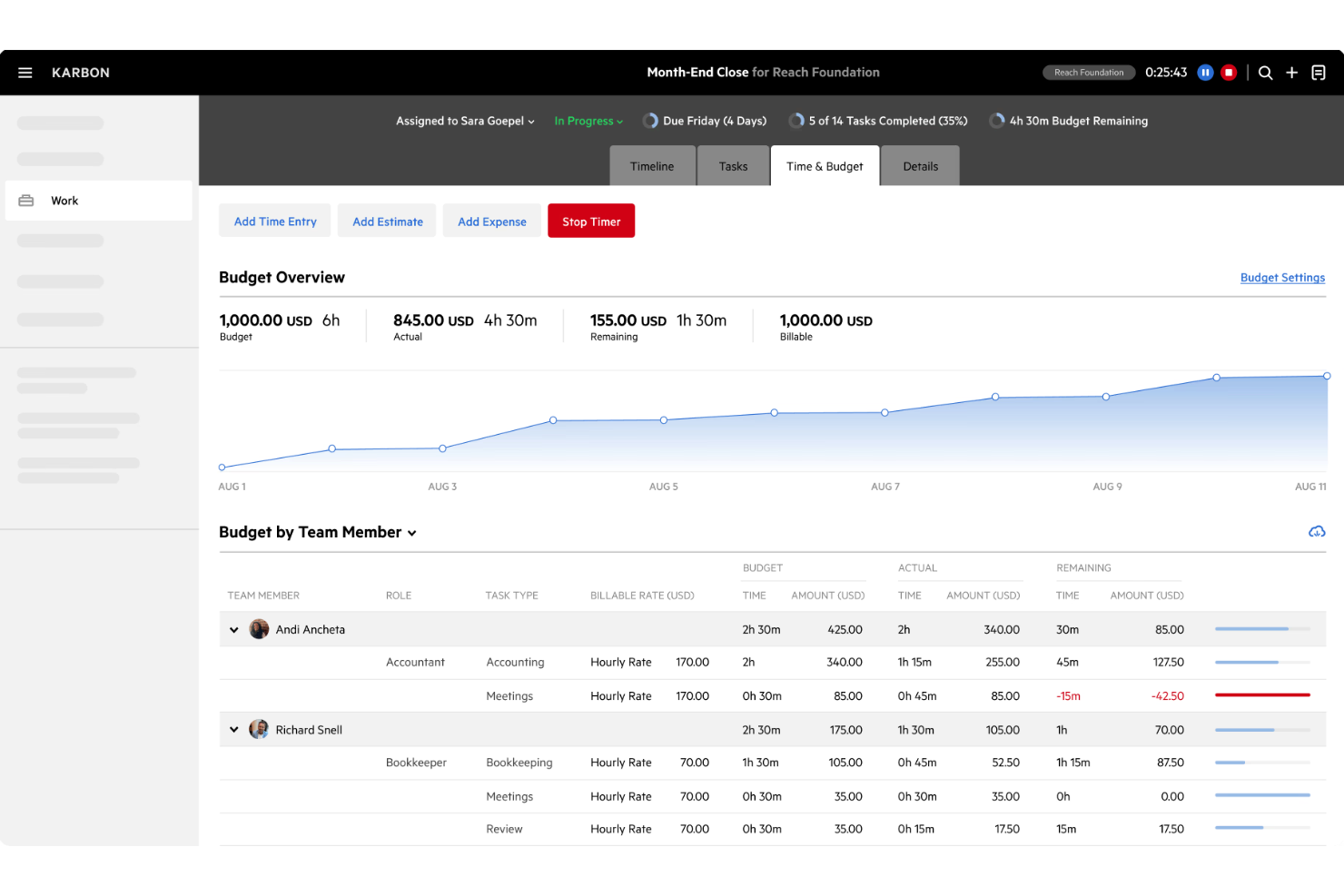
Karbon is a practice management software designed specifically for accounting firms, helping them manage workflows, collaborate with their teams, and communicate with clients effectively. It streamlines operations by combining email, tasks, and client data into a single platform.
Why I picked Karbon: It is tailored for accounting firms, offering features that support the unique needs of this industry. With Karbon, you can manage client emails directly within the platform and create tasks from emails. It also offers workflow automation, which saves time and reduces manual work. This focus on accounting firms ensures that you get the tools needed to manage your practice efficiently.
Standout Features & Integrations
Features include a client portal for secure communication and document sharing, customizable workflows to fit your firm's processes, and a timeline view that provides a complete overview of client interactions and tasks.
Integrations include Xero, QuickBooks Online, Gmail, Outlook, Office 365, Slack, Zapier, GoProposal, Microsoft Teams, and Mailchimp.
Pros and Cons
Pros:
- Secure client portal
- Workflow automation available
- Tailored for accounting firms
Cons:
- Limited third-party integrations
- Higher price point
Muhasebeciler İçin Diğer Zaman Takibi Yazılımları
Kısa listeme giremeyen ancak yine de göz atmaya değer bazı ek muhasebeci zaman takibi yazılımı seçenekleri şunlardır:
- Time Doctor
For remote teams
- Deltek Replicon Time
For global compliance
- Harvest
For expense tracking
- Time Tracker
For invoicing
- Insightful
For precise billing & productivity insights
- ClickTime
For smart cost allocation
- DeskTime
For offline tracking
- monday AI Workspace
With AI-powered project risk detection


How I Evaluate Time Tracking Software for Accountants
I split my evaluation into baseline criteria every tool must meet—like billable hour tracking and billing rate management—and differentiators that separate the best options for accounting firms.
Core Functionality (Table Stakes For This List)
When I'm selecting tools for my list, I rank each one on a scale from 0 (does not offer the functionality) to 5 (excels in this area) for each core functionality listed below. Then, I calculate the tool's total score into a percentage. Each tool needs to achieve a minimum total score of 65% to be considered for inclusion.
- Billable Time Tracking: I check whether each tool lets staff tag entries as billable or non-billable at the task level, like splitting hours between a client audit and internal admin.
- Client & Project Allocation: Each tool should support multi-level hierarchies so accountants can log time under a client, engagement type, and specific deliverable.
- Timesheet Approval Workflows: I look for structured submit-and-approve cycles that mirror how accounting firms operate, where a senior or partner signs off before time hits billing.
- Billing Rate Management: Tools need to handle multiple rate structures, since firms often set different rates per staff level, client agreement, or service type.
- Invoicing & Accounting Integration: I evaluate how each platform connects with systems like QuickBooks, Xero, or Sage to push approved time directly into invoices or the general ledger.
- Utilization & Realization Reporting: Dashboards that surface realization rates, write-offs, and staff utilization help firms understand where revenue leaks during busy season.
Once I have a list of tools that meet this criteria, I consider what sets each platform apart.
Differentiating Factors (What Sets Vendors Apart)
Here's how I compare and contrast different vendors:
Standout Features
Automatic time capture is a major differentiator. Tools that passively log hours spent in tax prep software or email save accountants from reconstructing timesheets at week's end. I also look for capacity planning features that help firms forecast workload during peak periods like year-end close. Client portals add another layer of value, letting clients review logged time and approve invoices without constant back-and-forth over email.
Beyond Features
Integration depth matters. I evaluate whether a tool connects with practice management platforms like Karbon or TaxDome, since that's where most accounting workflows live. Data security is another priority—firms handle sensitive client financials, so I check for SOC 2 certification and role-based access controls. Firm size fit also shapes my assessment. A solo practitioner needs simple per-user pricing, while a multi-office firm needs multi-entity support and scalable licensing that won't balloon costs as the team grows.
Muhasebeciler İçin Zaman Takibi Yazılımı Nasıl Seçilir
Uzun özellik listeleri ve karmaşık fiyatlandırma yapıları arasında kaybolmak kolaydır. Kendinize özgü yazılım seçim süreciniz üzerinde çalışırken odağınızı korumanıza yardımcı olmak için göz önünde bulundurmanız gereken faktörleri içeren bir kontrol listesi hazırladım:
| Faktör | Dikkat Edilmesi Gerekenler |
|---|---|
| Ölçeklenebilirlik | Yazılımın ekibinizle birlikte büyüyüp büyüyemeyeceğini değerlendirin. Daha fazla kullanıcıyı veya projeyi sorunsuz şekilde yönetebilir mi? Büyüyen işletmelere uygun, ölçeklenebilir fiyatlandırma planları sunan araçları tercih edin. |
| Entegrasyonlar | Aracın mevcut muhasebe yazılımınızla ve günlük olarak kullandığınız diğer araçlarla bağlantı kurup kuramadığını kontrol edin. Sorunsuz entegrasyon zamandan tasarruf sağlayabilir ve hataları azaltabilir. Kullanılabilir entegrasyonların listesini inceleyin ve mevcut teknoloji yığınınıza uygun olduklarından emin olun. |
| Özelleştirilebilirlik | Yazılımın iş akışınıza ne kadar uyarlanabilir olduğunu düşünün. Yazılımı belirli süreçlerinize ve tercihlerinize uyacak şekilde düzenleyebilir misiniz? Özelleştirilebilir panolar ve raporlar kullanılabilirliği artırabilir. |
| Kullanım kolaylığı | Kullanıcı arayüzünü ve gezinmeyi değerlendirin. Ekip üyeleriniz için sezgisel mi? Karmaşık bir arayüz benimsemeyi ve verimliliği yavaşlatabilir; bu nedenle minimum eğitim gerektiren, kullanıcı dostu tasarımlara öncelik verin. |
| Uygulama ve işe alıştırma | İşe alıştırma için sağlanan kaynakları değerlendirin. Ekibinizin başlamasına yardımcı olacak eğitimler, kılavuzlar ve destek var mı? Hızlı ve etkili bir işe alıştırma, başarılı bir uygulamanın temelini oluşturabilir. |
| Maliyet | Fiyatlandırma yapısını inceleyin ve bütçenizle uyumlu olduğundan emin olun. Gizli ücretleri veya ek özellikler için alınan ilave maliyetleri araştırın. İhtiyaçlarınıza en uygun seçeneği bulmak için farklı fiyat noktalarında sunulan değeri karşılaştırın. |
| Güvenlik önlemleri | Aracın güvenlik standartlarınızı karşıladığından emin olun. Veri şifreleme ve güvenli kimlik doğrulama sunuyor mu? Hassas finansal verileri korumak kritik önem taşır; bu nedenle karar vermeden önce yazılımın güvenlik önlemlerini doğrulayın. |
| Destek kullanılabilirliği | Sunulan desteğin düzeyini belirleyin. 7/24 yardım mevcut mu? Zamanında ve etkili desteğe erişim, sorunları hızlıca çözmek ve verimliliği korumak için kritik olabilir. |
Muhasebeciler için Zaman Takibi Yazılımı Nedir?
Muhasebeciler için zaman takibi yazılımı, faturalandırılabilir saatleri takip etmeye, projeleri yönetmeye ve raporlar oluşturmaya yardımcı olan bir araçtır. Bu araçlar genellikle muhasebeciler, finans profesyonelleri ve doğru zaman ve gider takibine ihtiyaç duyan ekipler tarafından kullanılır. Zaman kaydı, proje takibi ve entegrasyon özellikleri; iş akışlarını yönetmeye ve doğru faturalandırmayı sağlamaya yardımcı olur. Genel olarak bu araçlar, muhasebe görevleri için verimliliği artırır ve zamanın etkili şekilde yönetilmesini sağlar.
Muhasebeciler için Zaman Takibi Yazılımının Özellikleri
Muhasebeciler için zaman takibi yazılımı seçerken aşağıdaki temel özelliklere dikkat edin:
- Zaman kaydı: Doğru faturalandırma ve proje yönetimi sağlamak için faturalandırılabilir ve faturalandırılamaz saatleri doğru şekilde kaydeder.
- Proje takibi: Çeşitli projelerin ilerlemesini ve bütçelerini izleyerek ekiplerin programa ve finansal sınırlar içinde kalmasına yardımcı olur.
- Entegrasyon özellikleri: Veri akışını kolaylaştırmak ve manuel veri girişini azaltmak için mevcut muhasebe yazılımları ve diğer araçlarla bağlantı kurar.
- Gider takibi: Giderleri kaydeder ve kategorilere ayırarak proje maliyetleri ve finansal yönetim hakkında net bir görünüm sunar.
- Özelleştirilebilir raporlar: Zaman kullanımı, verimlilik ve finansal performans hakkında içgörüler sağlayan, ihtiyaca göre hazırlanmış raporlar sunar.
- Otomatik faturalandırma: Doğrudan zaman ve gider verilerinden faturalar oluşturarak faturalandırma sürecini basitleştirir ve ödemelerin zamanında yapılmasını sağlar.
- Gerçek zamanlı panolar: Temel ölçümlere ve proje durumuna genel bakış sağlayarak bilinçli karar almayı ve kaynak tahsisini mümkün kılar.
- Güvenlik önlemleri: Şifreleme ve güvenli kimlik doğrulama ile veri koruması sağlayarak hassas finansal bilgileri güvence altına alır.
Muhasebeciler için Zaman Takibi Yazılımının Faydaları
Muhasebeciler için zaman takibi yazılımını uygulamak, ekibiniz ve işletmeniz için çeşitli faydalar sağlar. Yararlanabileceğiniz faydalardan bazıları şunlardır:
- Geliştirilmiş doğruluk: Faturalandırılabilir saatleri hassas şekilde takip ederek faturalandırmadaki hataları azaltır ve müşterilerden doğru ücret alınmasını sağlar.
- Artırılmış verimlilik: Zaman kullanımını izler ve verimlilik açıklarını belirleyerek ekiplerin iş akışlarını optimize etmesine yardımcı olur.
- Daha iyi finansal denetim: Zaman ve giderler hakkında ayrıntılı raporlar sunarak proje maliyetleri ve finansal durum hakkında içgörüler sağlar.
- Kolaylaştırılmış faturalandırma: Takip edilen verileri kullanarak faturalandırmayı otomatikleştirir, faturalandırma sürecini hızlandırır ve ödemelerin zamanında yapılmasını sağlar.
- Artırılmış şeffaflık: Gerçek zamanlı panolar ve raporlar sunarak proje ilerlemesinin ve kaynak tahsisinin daha iyi görülmesini sağlar.
- Güvenli veri yönetimi: Hassas finansal bilgileri güvenlik önlemleriyle koruyarak veri koruma standartlarına uyumu sağlar.
Muhasebeciler için Zaman Takibi Yazılımının Maliyetleri ve Fiyatlandırması
Muhasebeciler için zaman takip yazılımı seçmek, mevcut çeşitli fiyatlandırma modellerini ve planları anlamayı gerektirir. Maliyetler özelliklere, ekip büyüklüğüne, eklentilere ve daha fazlasına göre değişir. Aşağıdaki tablo, muhasebecilere yönelik zaman takip yazılımı çözümlerinde yaygın planları, ortalama fiyatlarını ve genellikle dahil edilen özellikleri özetlemektedir:
Muhasebeciler için Zaman Takip Yazılımı Plan Karşılaştırma Tablosu
| Plan Türü | Ortalama Fiyat | Yaygın Özellikler |
|---|---|---|
| Ücretsiz Plan | $0 | Temel zaman takibi, sınırlı sayıda proje ve basit raporlama. |
| Bireysel Plan | $5-$15/kullanıcı/ay | Zaman takibi, proje yönetimi, entegrasyonlar ve temel raporlama. |
| İşletme Planı | $15-$30/kullanıcı/ay | Gelişmiş raporlama, faturalandırma, birden fazla kullanıcı ve muhasebe araçlarıyla entegrasyonlar. |
| Kurumsal Plan | $30-$50/kullanıcı/ay | Özelleştirilebilir özellikler, öncelikli destek, gelişmiş güvenlik ve kapsamlı analizler. |
Muhasebeciler için Zaman Takip Yazılımı SSS
Muhasebeciler için zaman takip yazılımı hakkında sık sorulan bazı soruların yanıtları aşağıdadır:
Zaman takip yazılımı faturalandırma doğruluğunu nasıl artırabilir?
Zaman takip yazılımı, faturalandırılabilir tüm saatlerin doğru şekilde kaydedilmesini sağlayarak müşteri faturalandırmasındaki hataları azaltır. Takip sürecini otomatikleştirerek manuel veri girişi hatalarını önleyebilir ve kesin kayıtlar tutabilirsiniz. Bu, daha doğru faturalar oluşturulmasını sağlar ve müşterilerle güvenin korunmasına yardımcı olur.
Zaman takip yazılımında hangi entegrasyonları aramalıyım?
QuickBooks, Xero veya Trello gibi mevcut muhasebe ve proje yönetimi araçlarınızla entegre olan yazılımları tercih edin. Entegrasyonlar, verilerin sistemler arasında sorunsuz şekilde aktarılmasını sağlayarak iş akışınızı kolaylaştırır ve manuel veri girişini ve olası hataları azaltır.
Zaman takip yazılımı mevzuata uyuma nasıl yardımcı olur?
Zaman takip yazılımı, çalışma saatleri ve faturalandırılabilir sürelerle ilgili doğru ve ayrıntılı kayıtlar tutarak mevzuata uyum sağlamaya yardımcı olabilir. Bu, denetimler ve mevzuata ilişkin raporlama açısından kritik öneme sahiptir; çünkü zamanın projeler ve müşteriler arasında nasıl harcandığına dair açık ve düzenli bir kayıt sunar.
Zaman takip yazılımı uzaktan çalışan ekipleri destekleyebilir mi?
Evet, birçok zaman takip aracı mobil erişim ve gerçek zamanlı panolar gibi uzaktan çalışan ekipler için özel olarak tasarlanmış özellikler sunar. Bu özellikler, ekibiniz nerede bulunursa bulunsun verimliliği izlemenize ve projeleri etkili şekilde yönetmenize yardımcı olur.
Proje yönetimi için hangi özelliklere öncelik vermeliyim?
Proje takibi, bütçe yönetimi ve ekip iş birliği araçları gibi özelliklere öncelik verin. Bu özellikler, kaynakları etkili şekilde yönetmenize, projeleri planlanan doğrultuda ilerletmenize ve ekibinizin proje hedeflerine verimli şekilde ulaşmak için çalışmasını sağlamanıza yardımcı olur.
Zaman takip yazılımı verimliliği nasıl artırır?
Zamanın nasıl harcandığına ilişkin içgörüler sunan zaman takip yazılımı, verimlilik açıklarının belirlenmesine ve iş akışlarının optimize edilmesine yardımcı olur. Doğru veriler sayesinde verimliliği artırmak ve kaynakları daha etkili şekilde tahsis etmek için bilinçli kararlar alabilirsiniz.