

2026’da İncelenen En İyi 10 Günlük Planlayıcı Uygulaması

En İyi Günlük Planlayıcı Uygulamaları Kısa Listesi


Birden fazla projeyi yönetmek hiç de kolay bir iş değildir. Her gün teslim tarihleri, görevler ve ekip dinamikleri arasında denge kurmanız gerekir. İşte dijital planlayıcı uygulaması, her şeyi yolunda tutmanıza yardımcı olmak için burada devreye girer.
Deneyimlerime göre doğru araç büyük bir fark yaratabilir. Görevlerinizi düzenlemenize, işlere öncelik vermenize ve hiçbir şeyin gözden kaçmamasını sağlamanıza yardımcı olur. Yazılımları bağımsız olarak test edip inceliyor, size tarafsız ve iyi araştırılmış bilgiler sunmayı amaçlıyorum.
Bu makalede, size ve ekibinize fayda sağlayabilecek en iyi günlük planlayıcı uygulamalarını anlatacağım. İhtiyaçlarınıza en uygun olanı bulacak ve projeleri daha verimli yönetmenize yardımcı olacaksınız. Haydi başlayalım ve iş akışınıza en uygun seçeneği bulalım.
Why Trust Our Software Recommendations
Our team has been testing and reviewing software since 2012. As project managers ourselves, we know how difficult—and important—it is to choose the right software.
For this guide, we evaluated tools using hands-on testing and independent research, scoring tools using our selection criteria. We also draw on insights from industry thought leaders and practicing project management experts.
Our reviews reflect our human editorial judgment, not a sales pitch.
Expert reviewers:
Günlük Planlayıcı Uygulamaları Karşılaştırma Tablosu
Bu karşılaştırma tablosu, en iyi günlük planlayıcı uygulaması seçimlerimin fiyatlandırma ayrıntılarını özetlemektedir:
| Tool | Starting Price | Website | |
|---|---|---|---|
| Best for cross-platform integration | 4.7 out of 5 | $19/user/month 7-day free trial | Website |
| Best for Microsoft 365 task-tracking integration | 4.7 out of 5 | Free to use Free-forever plan available | Website |
| Best for habit tracking features | 4.6 out of 5 | $49.99/year Free plan available | Website |
| Best for shared scheduling reliability | 4.6 out of 5 | $7.56/month 14-day free trial | Website |
| Best for quick task entries | 4.2 out of 5 | Free to use Free-forever plan available | Website |
| Best for to-do lists and project management | 4.1 out of 5 | $4.99/user/month Free plan + free demo available | Website |
| Best for automated AI-driven daily planning | 4.2 out of 5 | $19/seat/month Free trial available | Website |
| Best for personal task management | — | Pricing depends on region Free plan available | Website |
| Best for intentional guided daily rituals | — | $17/user/month 14-day free trial | Website |
| Best for multi-calendar visibility | — | $15/month Free trial available | Website |
En İyi Günlük Planlayıcı Uygulaması İncelemeleri
Aşağıda kısa listemde yer alan en iyi günlük planlayıcı uygulamalarına ilişkin ayrıntılı özetlerimi bulabilirsiniz. İncelemelerim, her aracın temel özelliklerine, artılarına ve eksilerine, entegrasyonlarına ve ideal kullanım alanlarına ayrıntılı bir bakış sunarak sizin için en iyi seçeneği bulmanıza yardımcı olur.

Akiflow
Best for cross-platform integration
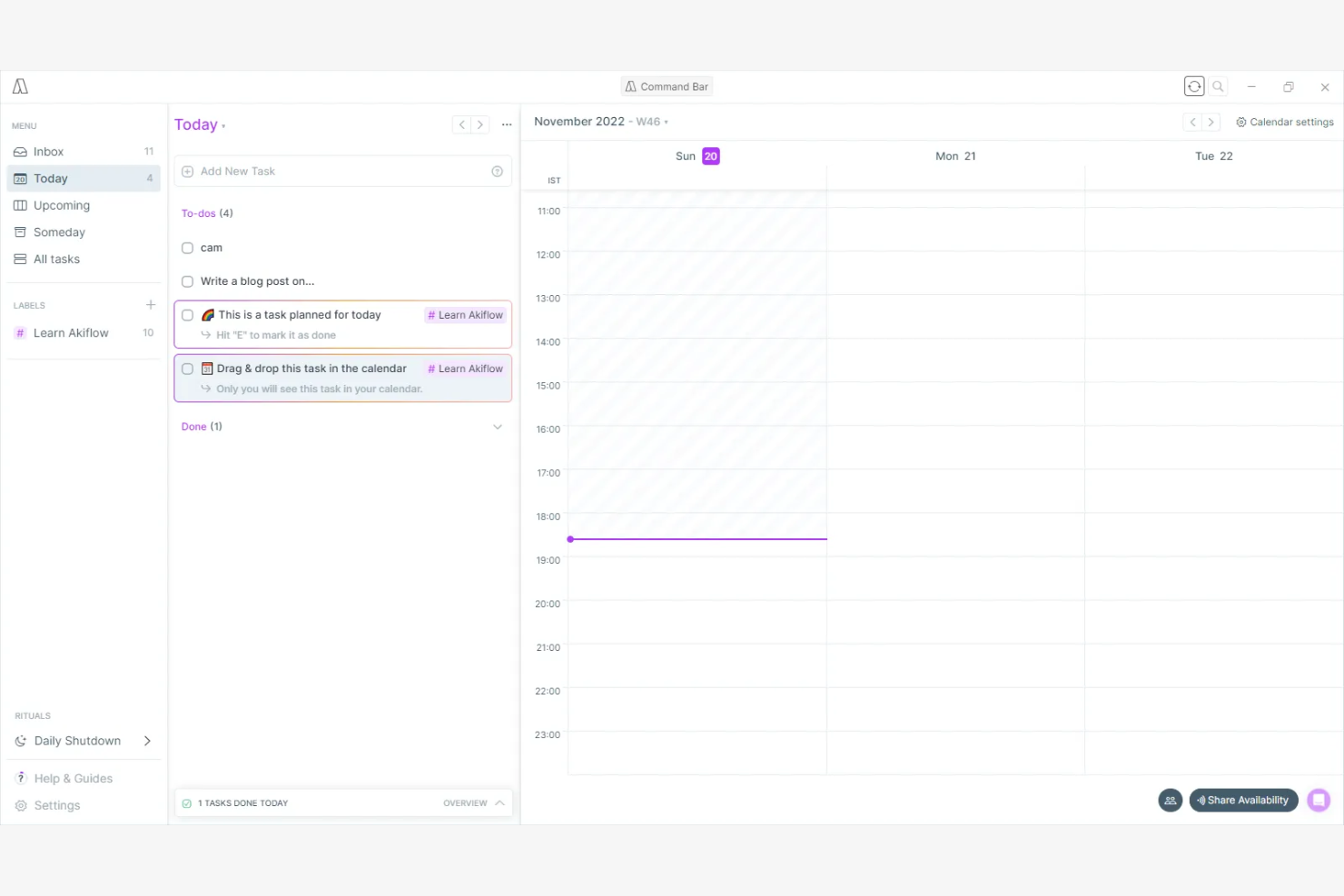
Akiflow is a task management app with productivity tools designed for professionals seeking efficient, cross-platform organization. It helps you centralize your tasks and schedules, making it easier to manage daily responsibilities.
Why I picked Akiflow: Akiflow excels in cross-platform integration, allowing you to sync tasks across multiple devices. Its intuitive interface provides a clear view of your action items and calendar events. The app's ability to aggregate items from various sources ensures you never miss important deadlines.
Standout Features and Integrations:
Features include a command bar for quick navigation and task management, keyboard shortcuts and a quick-add feature to speed up your workflow, and a focus mode that helps minimize distractions.
Integrations include Google Calendar, Slack, Trello, Todoist, Asana, Notion, and more.
Pros and Cons
Pros:
- Smart command bar
- Strong integration capabilities
- Efficient cross-platform sync
Cons:
- Collaboration is not in-built
- Feature overlap can be initially overwhelming

Best for Microsoft 365 task-tracking integration

Microsoft To Do is a task management app that works within the Microsoft ecosystem. It helps you organize tasks, set reminders, and collaborate within familiar Microsoft tools.
Why I picked Microsoft To Do: It's tightly integrated with other Microsoft services, making it ideal for those already using the Microsoft suite. You can sync tasks with Outlook for flawless task management. The My Day feature helps you focus on daily priorities, and the app's ability to share task lists improves team collaboration.
Standout Features and Integrations:
Features include the ability to create subtasks for better task breakdown, customizable themes to personalize your workspace, and a smart suggestions feature that recommends tasks for the day.
Integrations include Microsoft Outlook, OneNote, Microsoft Teams, and more.
Pros and Cons
Pros:
- My Day feature for priorities
- Syncs with Outlook tasks
- Smart list and custom views
Cons:
- Integration scope is narrow
- Not ideal for non-Microsoft users

TickTick
Best for habit tracking features
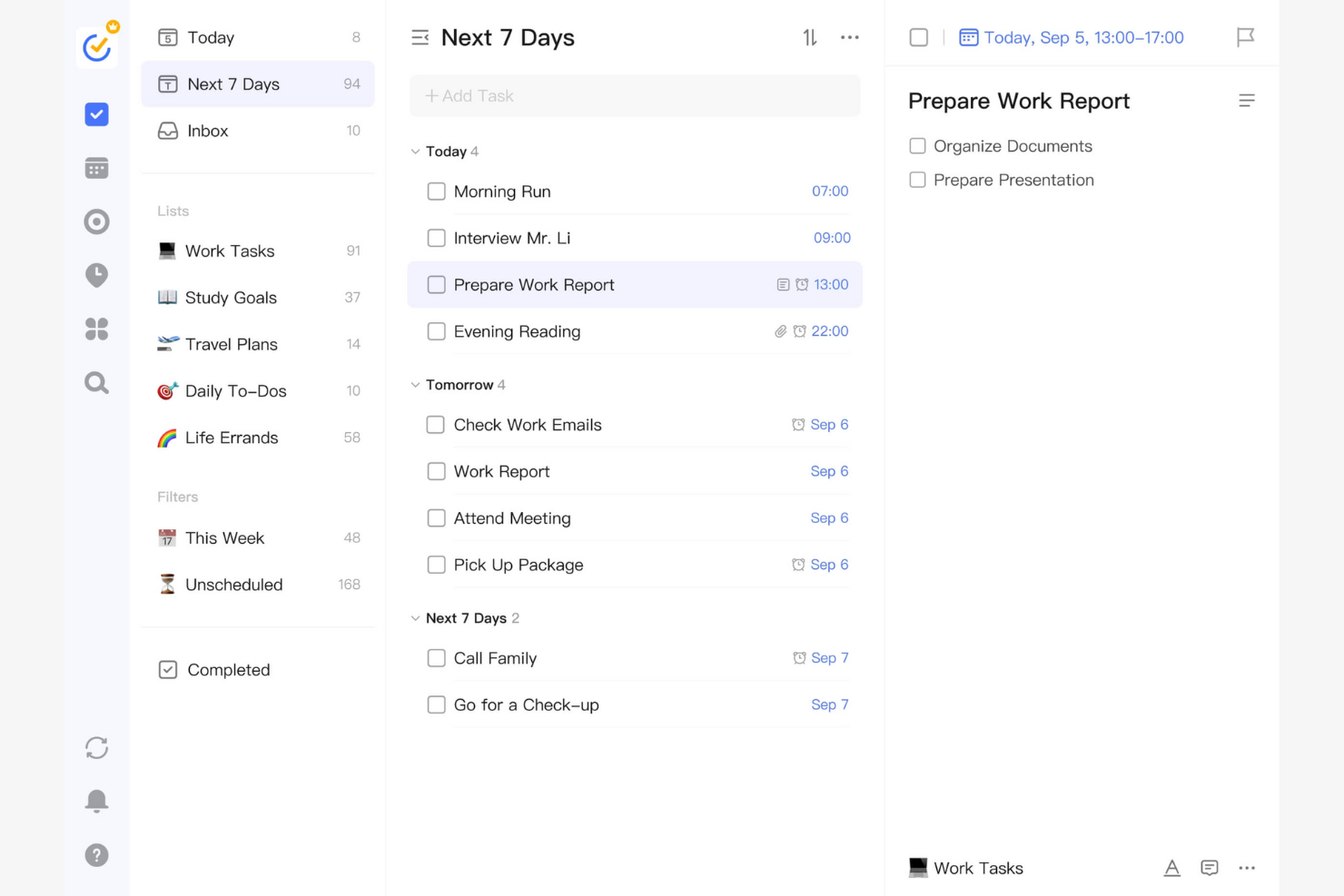
TickTick is a task management app you can use to increase productivity. It assists you in organizing tasks, setting reminders, and tracking daily habits to achieve your goals.
Why I picked TickTick: TickTick integrates a habit tracker directly into its task management system. You can set daily, weekly, or monthly habits and track your progress over time. The app's Pomodoro timer helps you stay focused and productive during work sessions. TickTick's flexible recurring tasks make it easy to manage ongoing responsibilities.
Standout Features and Integrations:
Features include a built-in calendar view that provides a visual representation of your tasks, the ability to create checklists within tasks for better organization, and a priority setting that helps you focus on the most important actions.
Integrations include Microsoft Outlook, Siri, Alexa, IFTTT, Slack, Zapier, and more.
Pros and Cons
Pros:
- Flexible recurring tasks
- Pomodoro timer included
- Integrates habit tracking
Cons:
- May not suit complex workflows
- Limited project management features

Best for shared scheduling reliability
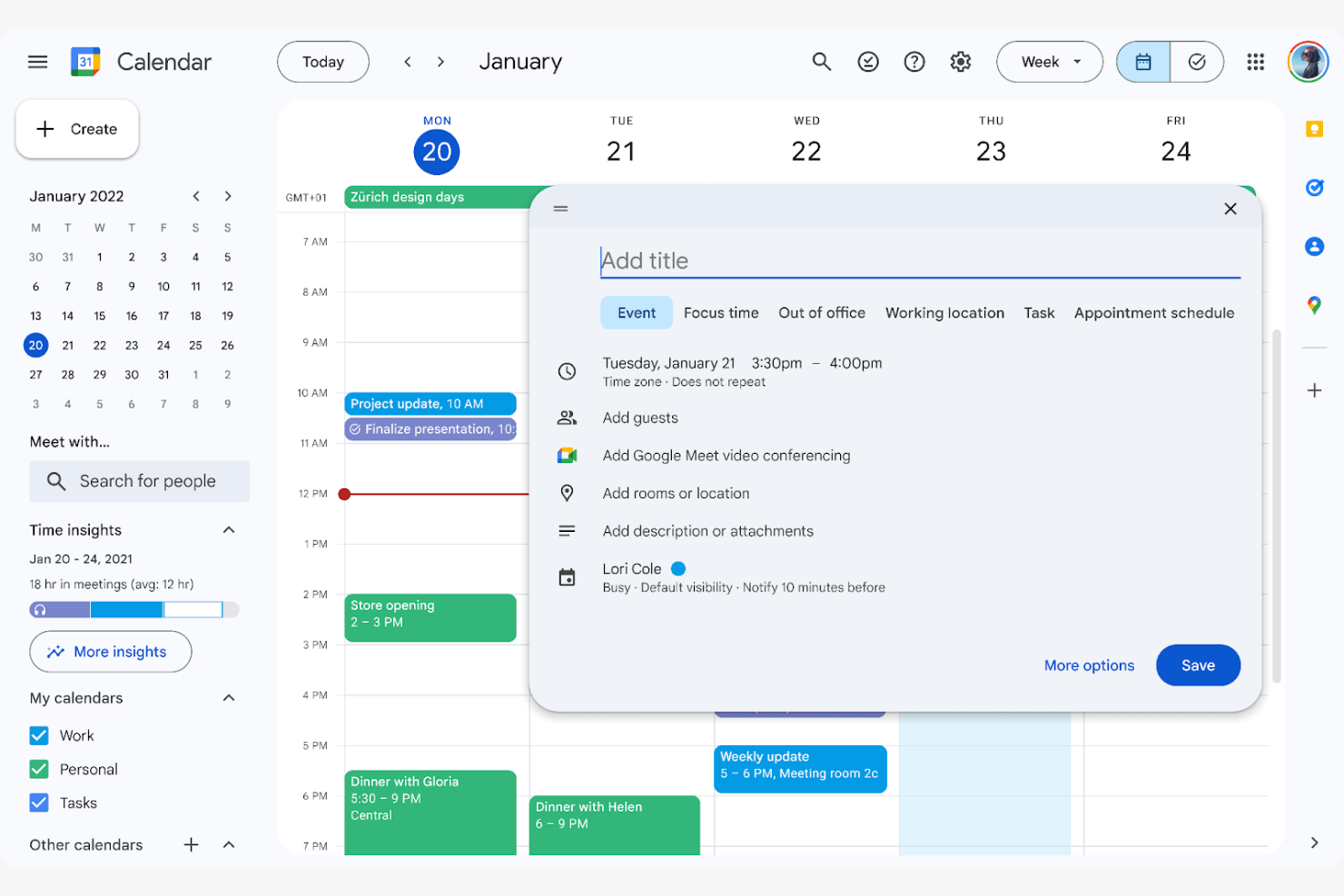
Google Calendar is a scheduling tool you and your team can use to manage events and appointments efficiently. It enables you to coordinate schedules and collaborate on shared calendars, making it ideal for team environments.
Why I picked Google Calendar: Google Calendar excels at team scheduling, allowing you to view and manage multiple team calendars in one place. Its event sharing feature lets you invite others to meetings and events. The ability to set reminders ensures your team stays on top of important tasks, and the color-coding feature helps differentiate between personal and professional commitments.
Standout Features and Integrations:
Features include customizable event notifications to keep you informed, timezone support to make scheduling across regions easier, and a simple drag-and-drop interface for rescheduling events.
Integrations include Google Meet, Notion, Google Sheets, Doodle, Zoom, Slack, and more.
Pros and Cons
Pros:
- Handles scheduling in differing time zones
- Color-coded calendar events
- Effective team scheduling and event sharing
Cons:
- Poor handling of recurring event changes
- Limited task management features

Best for quick task entries
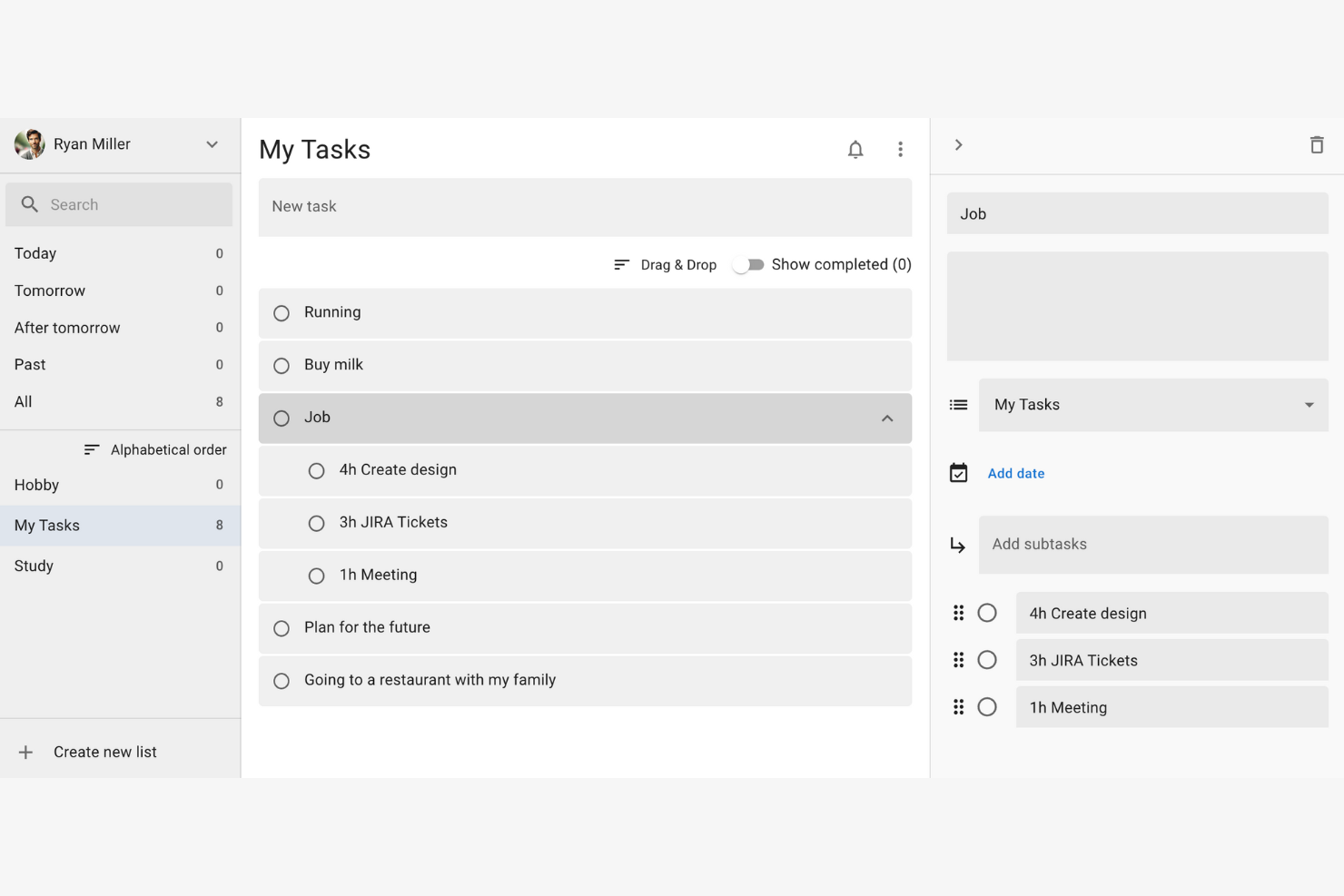
Google Tasks is a simple task management tool that organizes daily to-dos efficiently. It allows you to create, manage, and track tasks directly from your Google account.
Why I picked Google Tasks: It's perfect for quick task entries, letting you add tasks with minimal clicks. You can integrate tasks with your Gmail and Calendar, allowing for efficient task management. Its integration with other Google services elevates productivity by keeping everything in one place.
Standout Features and Integrations:
Features include creating subtasks for a more detailed task breakdown, setting due dates to ensure timely completion, and sorting tasks by date or priority for better organization.
Integrations include Google Gmail, Google Calendar, Google Assistant, Google Keep, and more.
Pros and Cons
Pros:
- Syncs across devices
- Task prioritization options
- Integrates with Google services
Cons:
- Missing built-in search functionality
- No collaborative sharing or team tools

Any.do
Best for to-do lists and project management

Any.do is a to-do list app for you to manage your personal daily tasks, family events, and team's work all in one place. It offers a straightforward interface that helps you manage your to-do lists, set reminders, and plan your schedule.
Why I picked Any.do: Any.do is known for its simplicity in task management, making it easy for you to create and organize tasks. The app's drag-and-drop functionality allows you to quickly rearrange tasks by priority. Any.do's reminder system ensures you never miss important deadlines.
Standout Features and Integrations:
Features include a focus mode to reduce distractions while working, a grocery list to manage shopping tasks, and voice entry for hands-free task management.
Integrations include Google Calendar, Microsoft Outlook, Slack, Zapier, and more.
Pros and Cons
Pros:
- Voice entry capability
- Drag-and-drop functionality
- Flexible reminder system
Cons:
- Majority of useful tools behind paywall
- Customer support can be inconsistent

Motion
Best for automated AI-driven daily planning
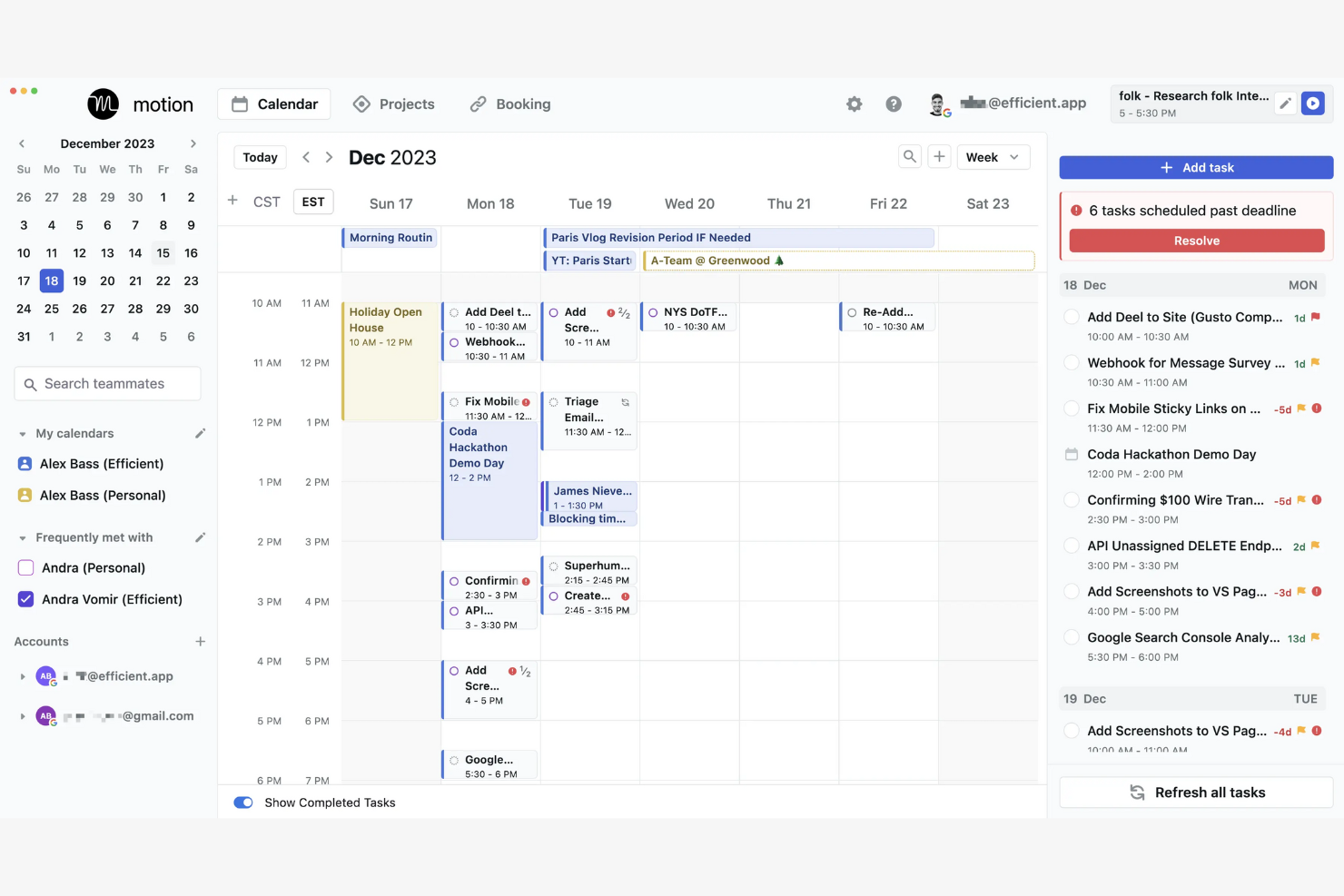
Motion is an AI-powered productivity app tailored for project management and scheduling. It primarily caters to teams and individuals looking to strengthen their task management and scheduling efficiency.
Why I picked Motion: It offers an AI-driven scheduling approach, with several unique tools. Its AI Project Manager automates project planning and helps you organize tasks efficiently. The AI-powered Gantt Chart provides a visual timeline for tracking progress, which is particularly useful for managing complex projects. These features help you manage your time and resources effectively.
Standout Features and Integrations:
Features include an AI Task Manager that efficiently prioritizes tasks, an AI Calendar that integrates scheduling and time management, and an AI Meeting Assistant that simplifies meeting scheduling, all of which work together to optimize your daily workflow.
Integrations include Zoom, Google Meet, Google Gmail, Microsoft Outlook, and more.
Pros and Cons
Pros:
- Integrates well with calendars
- Auto captures meeting notes
- AI-driven project management
Cons:
- High price point with no free version
- Complex user interface

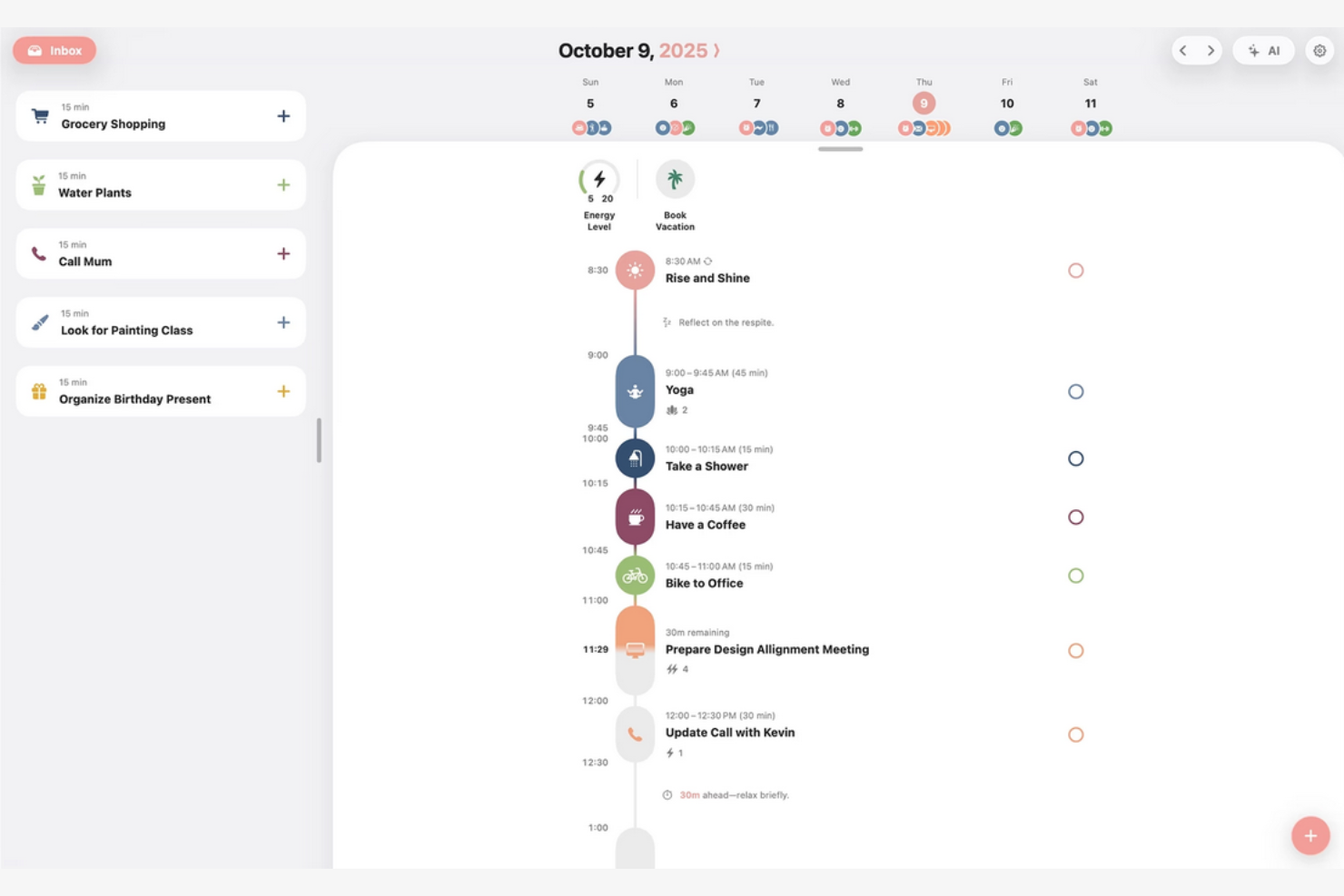
Structured is a daily planner app designed to make time management easier with its visual timeline. It caters to users looking to manage their personal schedules and boost daily productivity.
Why I picked Structured: Available through various app stores, Standard’s unique visual timeline helps you manage your tasks effectively by bringing your calendar, to-dos, routines, and habits together. Its quick task creation and calendar import features make it easy to set up your day. The app's device compatibility ensures you can plan on the go. Smartwatch integration conveniently allows you to access your schedule anytime.
Standout Features and Integrations:
Features include weekly and monthly planning views for a better overview, as well as notifications and widgets to keep you focused. These features work together to improve your daily planning experience.
Integrations include Google Calendar, Apple Calendar, and more.
Pros and Cons
Pros:
- Integrates with built-in calendars
- Quick task creation and drag-and-drop scheduling
- Clear visual timeline
Cons:
- Android and web versions still lag behind iOS
- No team collaboration

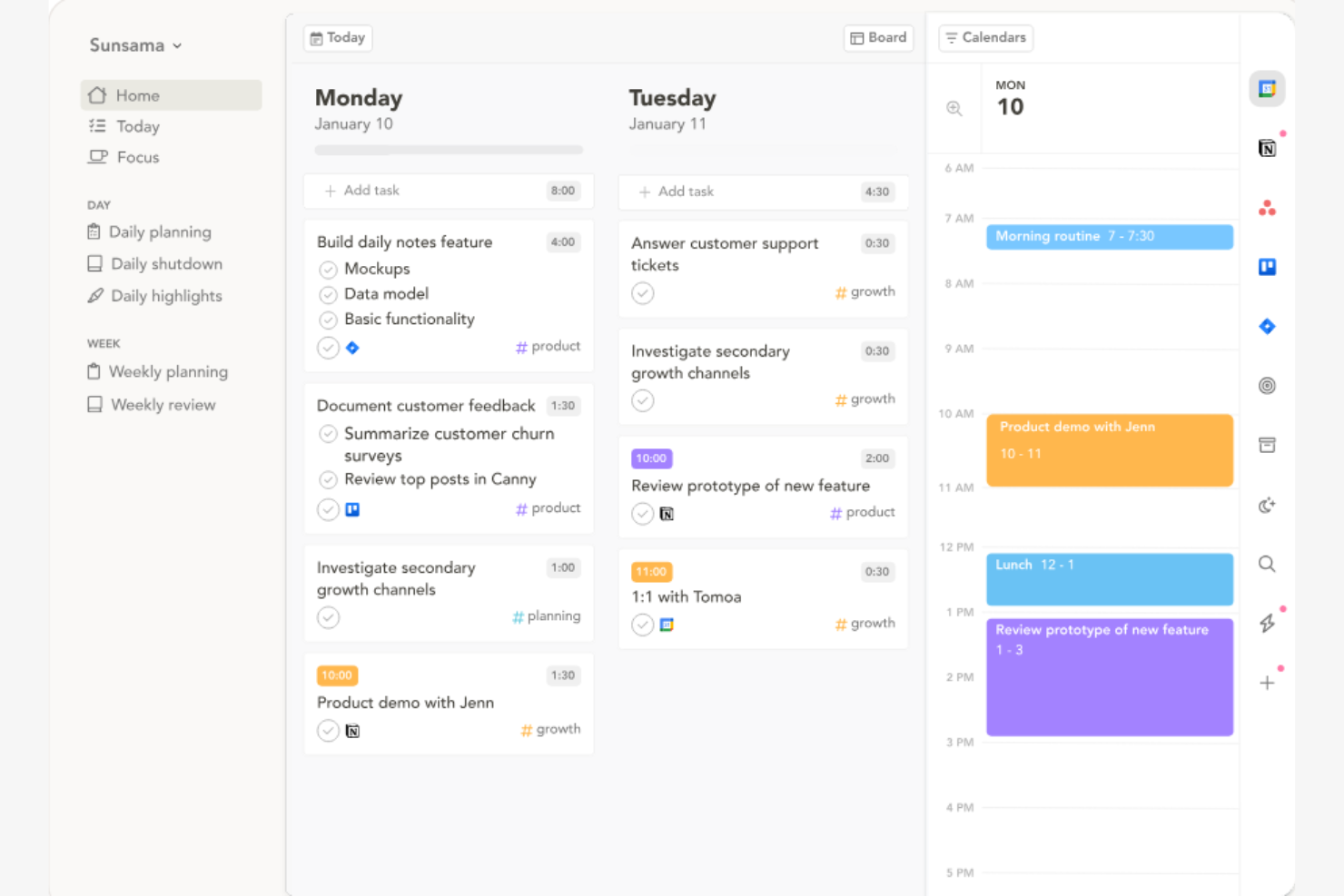
Sunsama is a daily planner app that uses time blocking to organize your workday effectively. It helps you focus on daily tasks and align them with your long-term goals.
Why I picked Sunsama: Its intuitive interface allows you to drag and drop tasks into your calendar. The app's ability to set daily goals helps you stay on track with your priorities. Sunsama's focus on reflection at the end of the day helps you evaluate your productivity.
Standout Features and Integrations:
Features include a day planner mode to outline your day, task drag-and-drop functionality for easy scheduling, and a reflection feature to promote end-of-day evaluation. These features work together to improve your daily workflow.
Integrations include Google Calendar, Todoist, Slack, and more.
Pros and Cons
Pros:
- Aligns tasks with goals
- Encourages daily reflection
- Intuitive drag-and-drop interface
Cons:
- Missing advanced task hierarchy
- No offline mode

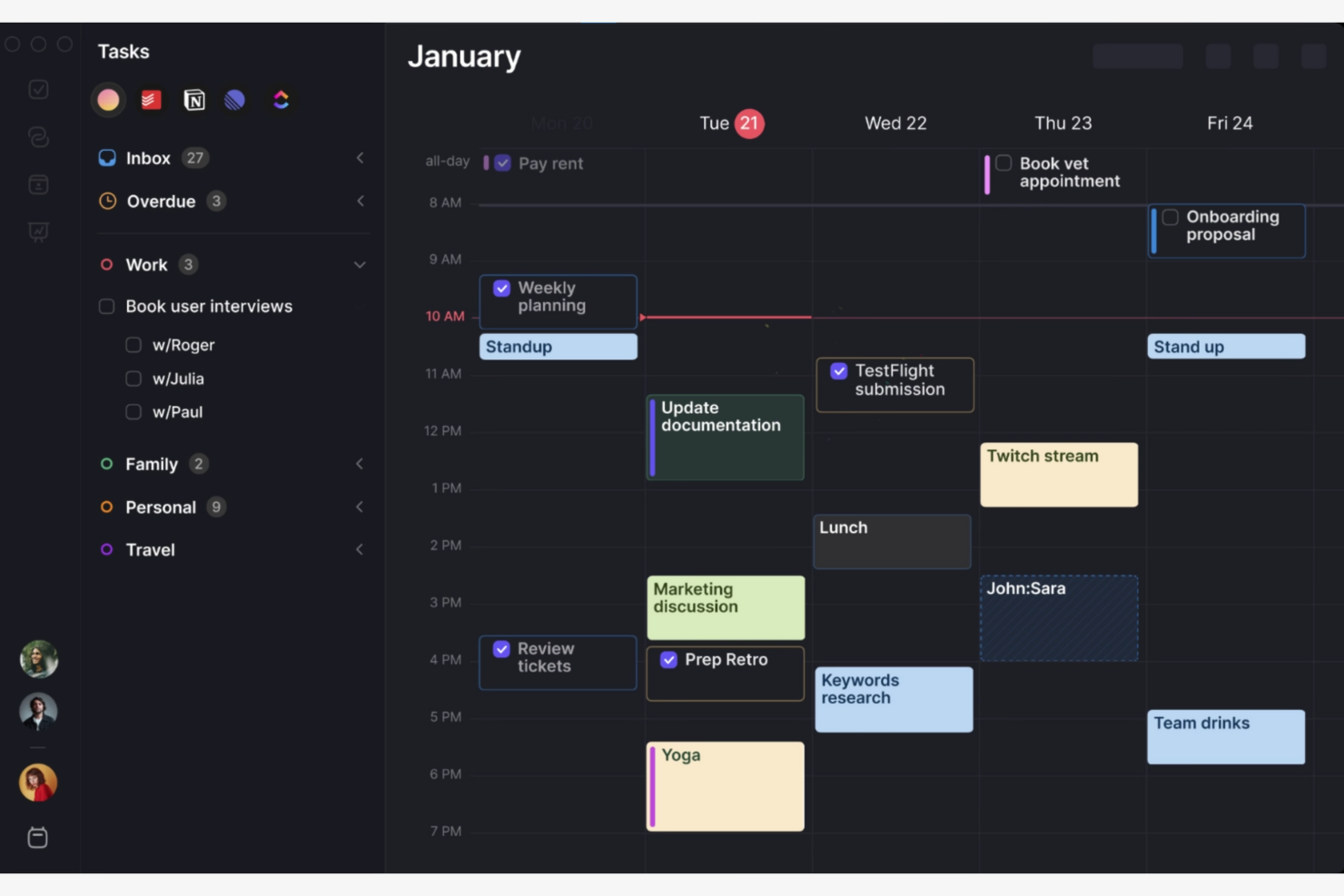
Morgen is a scheduling and calendar management tool you can use when you need to coordinate your time efficiently. It helps you manage multiple calendars and organize your daily schedule.
Why I picked Morgen: Morgen excels at calendar integration, allowing you to manage multiple calendars in one place. Its smart scheduling feature finds optimal meeting times across calendars. The task management functionality lets you integrate tasks directly into your schedule. In my experience, Morgen's interface makes it easy to switch between different calendar views.
Standout Features and Integrations:
Features include time zone management to schedule meetings across different time zones, customizable reminders to keep you on track with your tasks, and a unified calendar view to manage your time effectively.
Integrations include Google Calendar, Microsoft Outlook, Apple Calendar, and more.
Pros and Cons
Pros:
- Handles different time zones
- Integrates tasks into your schedule
- Manages multiple calendars
Cons:
- Occasional sync delays
- Limited task organization options
Diğer Günlük Planlayıcı Uygulamaları
İşte kısa listeme giremeyen ancak yine de göz atmaya değer bazı ek günlük planlayıcı uygulaması seçenekleri:


How I Evaluate Daily Planner Apps
I evaluate in two layers: the baseline a daily planner must meet to make this list, and the differentiators that matter when a PM is time-blocking a sprint week or juggling parallel projects.
Core Functionality (Table Stakes For This List)
When I'm selecting tools for my list, I rank each one on a scale from 0 (does not offer the functionality) to 5 (excels in this area) for each core functionality listed below. Then, I calculate the tool's total score into a percentage. Each tool needs to achieve a minimum total score of 65% to be considered for inclusion.
- Daily Task Scheduling: I check whether the app offers a dedicated daily view where you can assign, reorder, and manage tasks for today—not just a filtered task list buried inside a broader project board.
- Time Blocking: The ability to slot tasks into specific windows on a timeline matters, especially when you're carving out deep work between back-to-back standups and stakeholder syncs.
- Prioritization & Reminders: I look for clear priority levels or flags paired with configurable reminders, so a PM juggling multiple workstreams can surface what's urgent before it's overdue.
- Calendar Integration: Two-way sync with Google Calendar or Outlook is what I evaluate here—your daily plan should reflect meeting changes in real time, not require manual updates.
- Recurring Tasks & Routines: Tools like Todoist and TickTick handle recurrence differently, so I look at whether the app supports custom patterns like "every other Monday" alongside simple daily repeats.
- Cross-Device Sync: Planning happens at a desk, on a commute, and between meetings. I check that the app syncs in real time across desktop, mobile, and web so nothing gets lost in transit.
Once I have a list of tools that meet this criteria, I consider what sets each platform apart.
Differentiating Factors (What Sets Vendors Apart)
Here's how I compare and contrast different vendors:
Standout Features
AI-powered scheduling is a big differentiator—I look for tools that can auto-reschedule missed tasks and suggest optimal time slots based on your existing commitments. Daily review and analytics features also matter. A PM wrapping up a sprint week benefits from seeing where time actually went versus what was planned. I also evaluate whether the app connects directly to platforms like Jira, Asana, or Trello, so project tasks flow into your daily plan without manual re-entry.
Beyond Features
I evaluate pricing models closely—freelance consultants and solo PMs need affordable individual plans, while teams rolling out daily planning across a department need transparent per-seat pricing. Cross-platform availability also weighs in. Planning happens everywhere, so I check for native mobile apps and offline mode for those in-transit moments between client sites. Onboarding speed matters too. I look for pre-built templates like time-blocking or GTD frameworks that let a PM start planning on day one.
Günlük Planlayıcı Uygulaması Nasıl Seçilir?
Uzun özellik listeleri ve karmaşık fiyatlandırma yapılarına kendinizi kaptırmanız kolaydır. Kendinize özgü yazılım seçim süreciniz üzerinde çalışırken odağınızı korumanıza yardımcı olmak için göz önünde bulundurmanız gereken faktörleri içeren bir kontrol listesi hazırladım:
| Faktör | Dikkat Edilmesi Gerekenler |
|---|---|
| Ölçeklenebilirlik | Araç ekibinizle birlikte büyüyecek mi? Performans sorunları yaşamadan artan kullanıcı veya görev sayısını işleyip işleyemeyeceğini değerlendirin. İhtiyaçlarınız geliştikçe ölçeklenebilir planlar veya ek özellikler sunan araçları tercih edin. |
| Entegrasyonlar | Mevcut araçlarınıza bağlanabiliyor mu? Takvimler, e-posta ve proje yönetimi araçları gibi temel yazılımlarla entegre olduğundan emin olun. Uygulama entegrasyonu zamandan tasarruf sağlayabilir ve manuel veri girişini azaltabilir. |
| Özelleştirilebilirlik | İş akışınıza uyacak şekilde özelleştirebilir misiniz? Görünümleri, bildirimleri ve görev kategorilerini iş akışınıza uyacak şekilde özelleştirmenize olanak tanıyan seçenekleri arayın. Çok katı olan ve süreçlerinize uyum sağlamayan araçlara karşı dikkatli olun. |
| Kullanım kolaylığı | Ekibiniz için kullanımı sezgisel mi? Arayüzü ve kullanıcı deneyimini değerlendirin. Öğrenme eğrisinin dik olması benimsenmeyi engelleyebilir. Karar vermeden önce kullanılabilirliğini değerlendirmek için aracı birkaç ekip üyesiyle test edin. |
| Uygulama ve işe alıştırma | Ne kadar hızlı kullanmaya başlayabilirsiniz? Kurulum sırasında eğitimlerin, kılavuzların ve desteğin bulunabilirliğini değerlendirin. Sorunsuz bir işe alıştırma süreci, daha hızlı benimsenmeye ve iş akışınızda daha az kesintiye yol açabilir. |
| Maliyet | Bütçenize uygun mu? Fiyatlandırma planlarını ve nelerin dahil olduğunu karşılaştırın. Ek özellikler için eklentiler veya ücretler gibi gizli maliyetleri göz önünde bulundurun. Mali bir taahhütte bulunmadan önce aracı test etmek için ücretsiz denemeleri tercih edin. |
| Güvenlik önlemleri | Verileriniz ve gizliliğiniz korunuyor mu? Şifreleme, iki faktörlü kimlik doğrulama ve veri koruma düzenlemelerine uyumluluk gibi özellikleri kontrol edin. Hassas bilgileri korumak ve güveni sürdürmek için güvenlik kritik önem taşır. |
| Destek bulunabilirliği | İhtiyaç duyduğunuzda yardım alabiliyor musunuz? Sohbet, e-posta veya telefon gibi sunulan destek kanallarını göz önünde bulundurun. Hızlı yanıt veren destek, sorunları çabucak çözebilir ve ekibinizin üretken kalmasını sağlayabilir. |
Günlük Planlayıcı Uygulaması Nedir?
Günlük planlayıcı uygulaması, günlük görevlerinizi ve programlarınızı düzenlemenize ve yönetmenize yardımcı olan dijital bir araçtır. Proje yöneticileri, yöneticiler ve serbest çalışanlar gibi profesyoneller, üretkenliklerini artırmak ve hiçbir işin gözden kaçmamasını sağlamak için bu araçları sıklıkla kullanır. Görev yönetimi, takvim entegrasyonu ve hatırlatma özellikleri; düzenli kalmanıza, son teslim tarihlerine uymanıza ve önceliklendirmeyi etkili bir şekilde yapmanıza yardımcı olur. Bu araçlar, günlük planlamayı basitleştirerek ve zaman yönetimini iyileştirerek genel değer sağlar.
Özellikler
Bir günlük planlayıcı uygulaması seçerken aşağıdaki temel özelliklere dikkat edin:
- Görev yönetimi: Yapılacaklar listenizi takip etmenize yardımcı olmak için görevler oluşturmanıza, düzenlemenize ve önceliklendirmenize olanak tanır.
- Takvim entegrasyonu: Randevuları ve son teslim tarihlerini tek bir yerden yönetmek için mevcut takviminizle senkronize olur.
- Hatırlatıcılar ve bildirimler: Önemli görevleri veya etkinlikleri kaçırmamanızı sağlamak için uyarılar gönderir.
- Özelleştirilebilir görünümler: Görevlerinizin ve programlarınızın nasıl görüntüleneceğini ayarlamanıza olanak tanıyarak önemli konulara odaklanmanızı kolaylaştırır.
- İş birliği araçları: Ekip üyelerinizle görevleri ve programları paylaşmanızı sağlayarak ekip çalışmasını ve iletişimi destekler.
- Alışkanlık takibi: Zaman içindeki ilerlemenizi izleyerek yeni alışkanlıklar geliştirmenize ve bunları takip etmenize yardımcı olur.
- Zaman takibi: Görevlere ne kadar zaman harcadığınızı izlemenize olanak tanıyarak üretkenliği ve zaman yönetimini iyileştirir.
- Yinelenen görevler: Görevleri düzenli aralıklarla tekrarlanacak şekilde ayarlayarak tekrarlayan işleri otomatikleştirir ve zamandan tasarruf etmenizi sağlar.
- Not alma: Görevlerinizle ilgili önemli bilgileri veya fikirleri not alabileceğiniz bir alan sunar.
- Hedef belirleme: Uzun vadeli hedefler belirlemenize ve bunları takip etmenize yardımcı olarak motivasyonunuzu korumanızı ve hedeflerinize ulaşmaya odaklanmanızı sağlar.
Faydalar
Bir günlük planlayıcı uygulamasını hayata geçirmek ekibiniz ve işletmeniz için çeşitli faydalar sağlar. Yararlanabileceğiniz birkaç fayda şunlardır:
- Gelişmiş organizasyon: Görevleri ve programları tek bir yerde tutmanıza yardımcı olarak dağınıklığı ve karmaşayı azaltır.
- Artan üretkenlik: Etkili görev yönetimini ve zaman takibini teşvik ederek önceliklerinize odaklanmanızı sağlar.
- Daha iyi zaman yönetimi: Programınıza uymanızı ve son teslim tarihlerini kaçırmanızı önlemek için hatırlatıcılar ve bildirimler sunar.
- Artan iş birliği: Görevlerin ve programların paylaşılmasını kolaylaştırarak iletişimi ve ekip çalışmasını geliştirir.
- Hedeflere ulaşma: Hedef belirlemeyi ve takibini destekleyerek motivasyonunuzu korumanızı ve hedeflerinize ulaşma yolunda ilerlemenizi sağlar.
- Alışkanlık geliştirme: Alışkanlık takibi için araçlar sunarak üretken rutinler oluşturmanıza ve bunları sürdürmenize yardımcı olur.
- Stres azaltma: Planlama ve düzenleme süreçlerini basitleştirerek günlük görevleri yönetmenin zihinsel yükünü azaltır.
Maliyetler ve Fiyatlandırma
Bir günlük planlayıcı uygulaması seçmek, mevcut çeşitli fiyatlandırma modellerini ve planları anlamayı gerektirir. Maliyetler özelliklere, ekip büyüklüğüne, eklentilere ve daha fazlasına göre değişir. Aşağıdaki tablo, günlük planlayıcı uygulaması çözümlerinde yaygın planları, ortalama fiyatlarını ve genellikle sunulan özellikleri özetlemektedir:
Günlük Planlayıcı Uygulamaları İçin Plan Karşılaştırma Tablosu
| Plan Türü | Ortalama Fiyat | Yaygın Özellikler |
|---|---|---|
| Ücretsiz Plan | $0 | Temel görev yönetimi, sınırlı entegrasyonlar ve temel hatırlatıcılar. |
| Kişisel Plan | $2.99-$29/kullanıcı/ay | Gelişmiş görev yönetimi, takvim senkronizasyonu ve temel iş birliği araçları. |
| İşletme Planı | $29+/kullanıcı/ay | Ekip iş birliği özellikleri, öncelikli destek ve gelişmiş analizler. |
| Kurumsal Plan | Talep üzerine | Özel entegrasyonlar, özel hesap yönetimi ve yükseltilmiş güvenlik özellikleri. |
Günlük Planlayıcı Uygulaması SSS
Günlük planlayıcı uygulamaları hakkında sık sorulan soruların bazı yanıtları burada yer almaktadır:
Bir günlük planlayıcı uygulaması kullandığım diğer araçlarla entegre olabilir mi?
Evet, birçok günlük planlayıcı uygulaması takvimler, e-posta ve proje yönetimi yazılımları gibi popüler araçlarla entegrasyon sunar. Mevcut sistemlerinizle uyumluluğu sağlamak için uygulamanın entegrasyon seçeneklerini kontrol edin. Sorunsuz entegrasyon, manuel veri girişini azaltır ve platformlar arasında tutarlılığı korur.
Günlük planlayıcı uygulamaları ekip projelerini yönetmeme nasıl yardımcı olur?
Günlük planlayıcı uygulamaları görevler atamanıza, son tarihler belirlemenize ve ilerlemeyi tek bir yerden takip etmenize olanak tanır. Bu, ekibinizin aynı noktada buluşmasına yardımcı olur; böylece kaçırılan son tarihler azalır ve herkes sorumluluklarını yerine getirir. Birçok uygulama ayrıca bildirimler, kolay dosya paylaşımı ve iş birliği araçları sunar.
Günlük planlayıcı uygulamaları ekipler için uygun mudur?
Evet, günlük planlayıcı uygulamaları ekip iş birliği için oldukça yararlı olabilir. Paylaşılan takvimler, görev atamaları ve iş birliği araçları gibi özellikleri arayın. Bu özellikler herkesin aynı noktada buluşmasına ve iletişimin iyileştirilmesine yardımcı olur. Erişimi etkili bir şekilde yönetmek için uygulamanın birden fazla kullanıcıyı desteklediğinden ve izin ayarları sunduğundan emin olun.
Bir günlük planlayıcı uygulaması proje gecikmelerini önlemeye nasıl yardımcı olabilir?
Planlayıcı uygulamaları görevler, son tarihler ve bağımlılıklar hakkında net bir genel görünüm sunar. Gerçek zamanlı güncellemeler ve hatırlatıcılar, darboğazları fark etmenize ve planları hızlıca ayarlamanıza yardımcı olur. Böylece projeler planlandığı şekilde ilerler ve sorunlar ortaya çıktıkça bunlara yanıt verebilirsiniz.
Bir günlük planlayıcı uygulaması kullanmak güvenli midir?
Evet, günlük planlayıcı uygulamalarının çoğu şifreleme ve iki faktörlü kimlik doğrulama gibi özelliklerle güvenliğe öncelik verir. Uygulamanın ilgili veri koruma düzenlemelerine uyup uymadığını kontrol edin. Güvenliği güçlendirmek için güçlü parolalar kullandığınızdan ve bunları düzenli olarak güncellediğinizden emin olun. Bilgilerinizi korumak için güçlü güvenlik önlemleri sunan bir uygulama seçmek önemlidir.
Ücretsiz bir sürüm kullanmak yerine premium bir günlük planlayıcı uygulaması için ödeme yapmak buna değer mi?
Bir planlayıcı uygulaması için ücretli abonelik genellikle daha fazla entegrasyon, gelişmiş raporlama, otomasyon ve öncelikli destek sunar. Daha büyük projeleri veya ekipleri yönetiyorsanız bu özellikler üretkenliğinizi artırabilir ve zamandan tasarruf etmenizi sağlayabilir; bu nedenle ücretli yükseltmeyi değerlendirmeye değer.