

En İyi Üretkenlik Uygulamaları: 2026’da Verimliliğini Artır

10 en iyi üretkenlik uygulaması (ücretsiz alternatifler dahil)


Tuhaf zamanlarda yaşıyoruz – daha az şey yapmamıza yardımcı olması beklenen, hızla büyüyen farkındalık uygulamaları sektörünün yanı sıra hepimiz daha fazlasını başarmamıza yardımcı olması beklenen her türden üretkenlik uygulamasını kullanıyoruz.
Dijital sektörde çalışıyorsanız muhtemelen daha önce belirli bir üretkenlik yazılımını denemişsinizdir. Peki üretkenlik yazılımı nedir? Üretkenlik araçları, basit yapılacaklar listelerinden belirli bir günde gösterdiğiniz performansı ölçen üretkenlik takip araçlarına kadar geniş bir alanı kapsar.
Sizin için iyi çalışan uygulamaları düşünürken, en iyi organizasyon uygulamalarının veya en iyi hatırlatıcı uygulamalarının yalnızca, özel durumunuzda doğru işi sizin için sürekli olarak iyi çalışan bir şekilde yapmanıza yardımcı olduklarında “en iyi” olduklarını unutmayın.
Kısacası, en iyi üretkenlik uygulamaları etkili çalışmanıza yardımcı olan araçlardır.
Etkili ve üretken olmanın yolları
Çoğu zaman üretkenliğe kapsam meselesi olarak odaklanıyoruz: Ne kadar kazanıyorum ve ne kadar hızlıyım? Gerçekten etkili çalışabilmek için üretkenlik konusundaki düşüncelerimizi yeniden yönlendirmeliyiz: Asıl mesele, zamanınızı daha iyi kullanmaktır.
Zamanınızı nasıl daha iyi kullanabilirsiniz?
Öncelikle zamanımızı en üretken şekilde nasıl kullanabileceğimizi bulmalıyız. Durun ve kendinize şu soruları sorun:
- Şu anda görünüşte acil olan bu işi yapmazsam ne gibi bir etkisi olur? (Çünkü bu acil iş aslında muhtemelen o kadar da önemli değildir!)
- Benim için en önemli faaliyetler hangileri?
- İyi yapıldığında gerçek bir fark yaratacak, yalnızca benim yapabileceğim ne var?
Bu soruları yanıtlamanın iyi bir yolu, görevleri aciliyet ve önemlerine göre listelemek için bir öncelik matrisi kullanmaktır. Eisenhower Matrisi'ni temel alan aşağıdaki matrisi kullanmayı seviyorum:
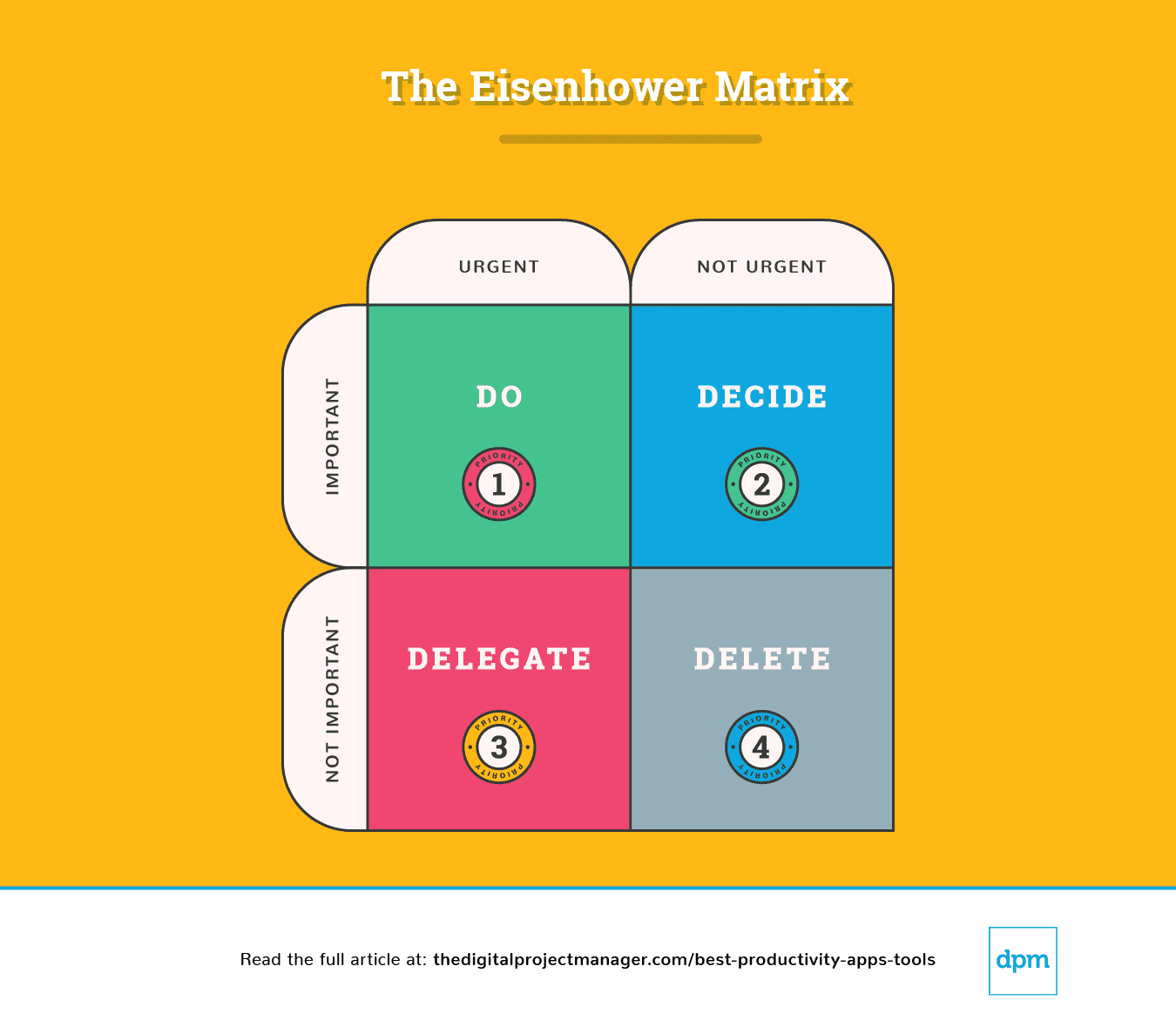
Eisenhower Matrisi açıklaması
Bu diyagramın basit bir şekilde ayrıştırılması, bir görevi nasıl ele almamız gerektiğini gösterir:
1. Öncelik: Acil ve önemli. Hemen yapın.
2. Öncelik: Acil değil ama yine de önemli. Sürecin ilerlemesini engelleyen tüm noktaları belirleyin. Görevi yerine getirmek için ideal zamanı, kişiyi ve yöntemi belirleyin.
3. Öncelik: Acil ama önemli değil. Önemli görevlere odaklanabilmeniz için görevi sorumlu kişiye devredin.
4. Öncelik: Acil değil ve önemli de değil; dördüncü önceliktir. Görevi ortadan kaldırın.
Her günün sonunda, yarının nasıl geçeceğini belirlemek için 10 dakika ayırmalısınız – ne yapacak, neye karar verecek, neyi devredecek ve neyi sileceksiniz?
Ardından bu üretkenlik uygulamalarına göz atmalısınız. Önemli işleri tamamlamanıza, görevleri otomatikleştirerek, takip ederek, senkronize ederek ve hatırlatarak zamanınızı etkili kullanmanıza yardımcı olabilecek uygulamaları seçtim – böylece en önemli işleri yapmak için daha fazla zamanınız olacak!
Digital Project Manager okuyucu desteğiyle yayın yapmaktadır. Web sitemizdeki bağlantılara tıklamanız durumunda komisyon alabiliriz. Daha fazla bilgi edinin.
Öncelik #1: Acil ve önemli. Hadi, yap.
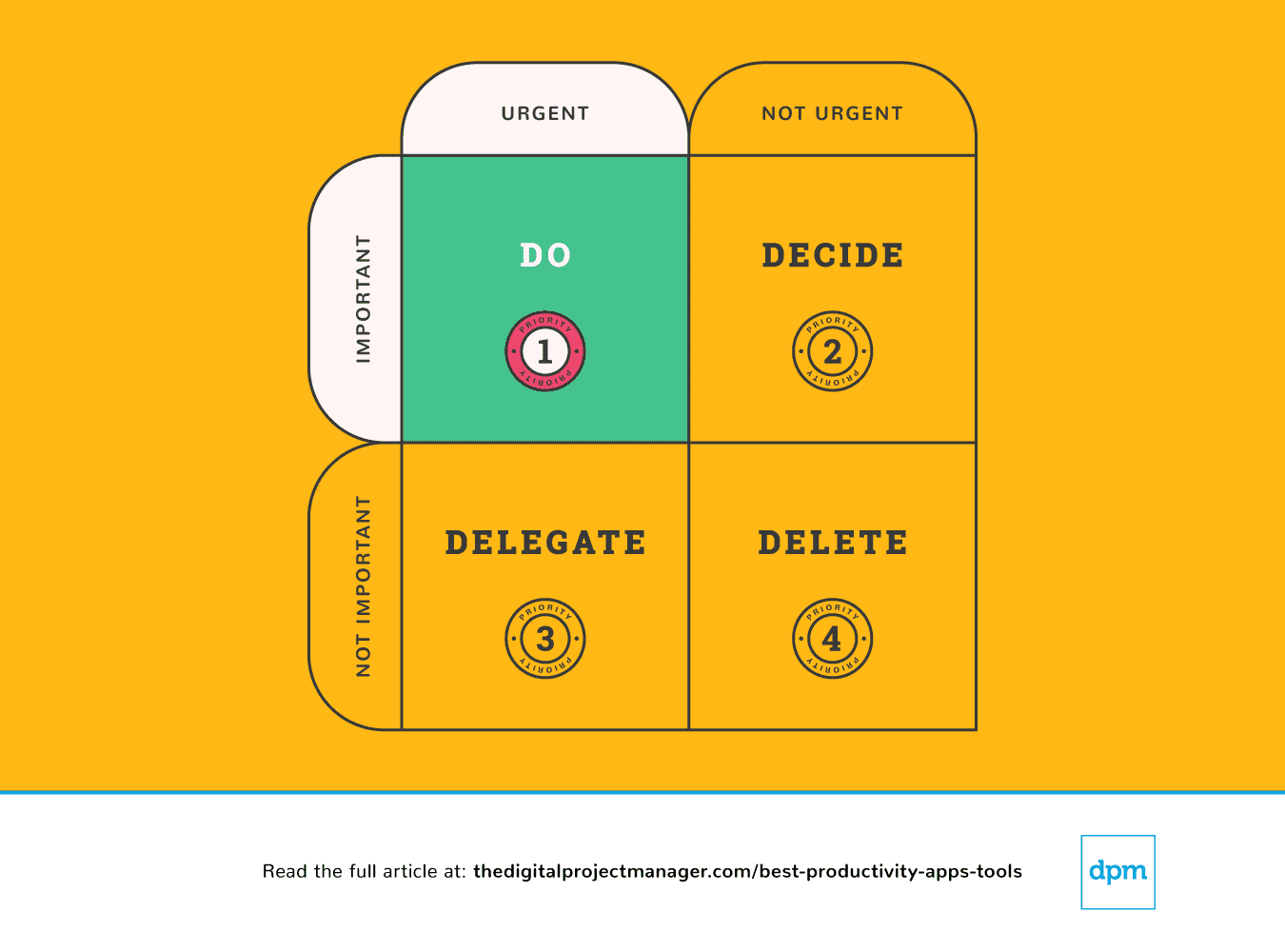
En önemli görevlerin “Şimdi tamamla” kuralına uyması gerekir. Bu doğrultuda, 2 dakikadan kısa süren bir görev gördüğünde onu hemen tamamla (Neden mi? Çünkü görevi görev listene eklemek, ardından planlamak ve önceliklendirmek daha fazla zaman alır).
Yüksek öncelikli bir göreve başlamak ve bu görevi %100 tamamlanana kadar sürdürmek, karakterinin gerçek sınavıdır. Kolay değildir, ancak ne kadar üretken olacağını belirleyen şey budur. Bu, öz disiplin gerektirir; fakat birkaç verimlilik aracıyla bunu kendimiz için kolaylaştırabiliriz.
Öncelik #2: Acil değil ama yine de önemli. Tüm önemli noktaları belirle.
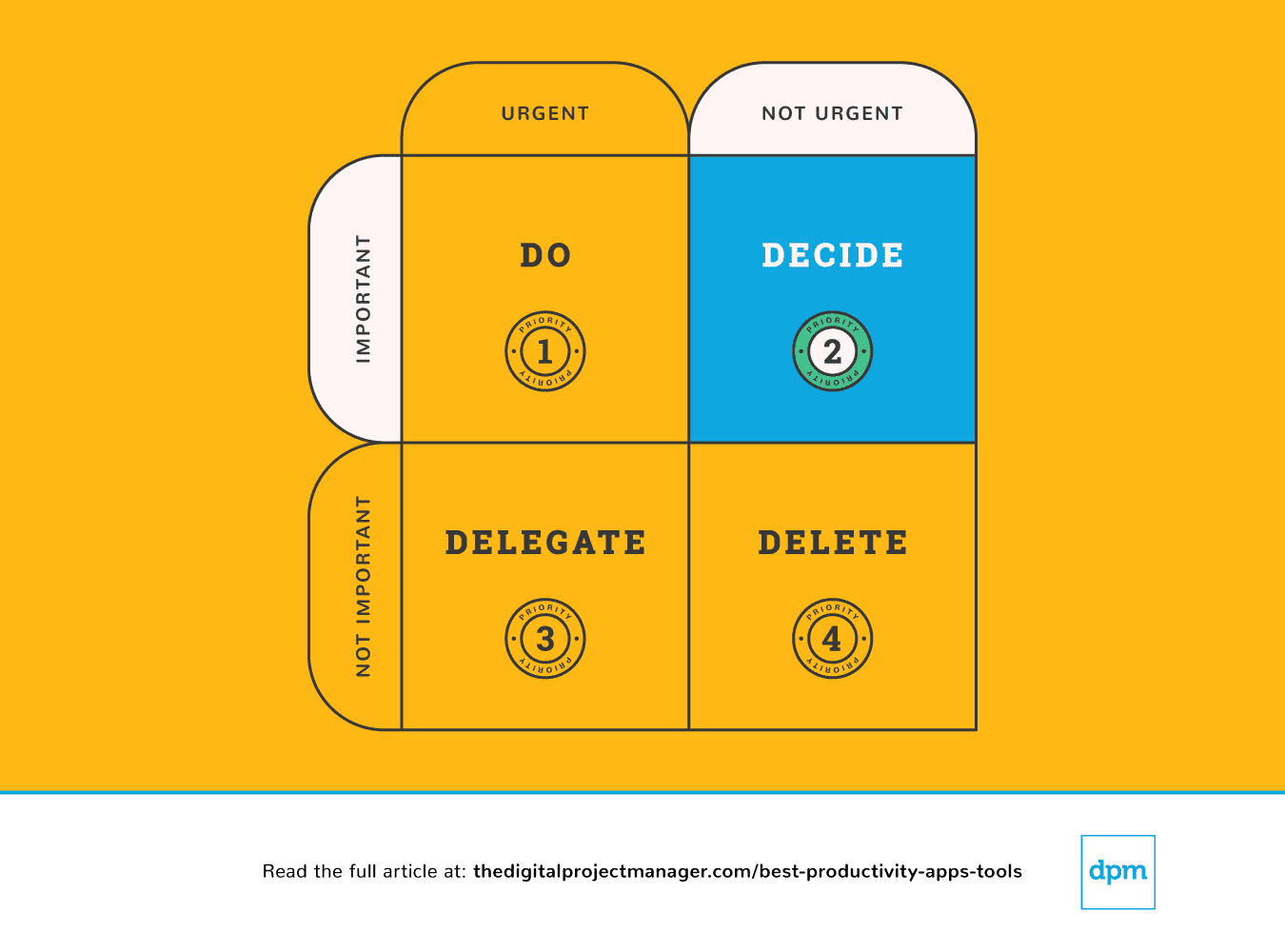
Bir şey önemli ancak mutlaka acil değilse, bu konuyla nasıl ilgileneceğine dair uygun bir plan bulmak için biraz zaman ayırmalısın. Bir kenarda durmayı bırak; önemli işleri gerektiği gibi tamamlamayı planla.
Çok fazla yöne çekildiğimiz için kendimizi tamamen bunalmış hissedebiliriz; sanki masada çok fazla iş varmış ve herkesi memnun etmenin hiçbir yolu yokmuş gibi gelir. Kendimiz, ekibimiz ve projelerimiz için en mantıklı kararları verebilmek adına tüm görevlerimize, önceliklerimize ve ilerlememize dair net bir genel bakışa ihtiyacımız vardır.
Aşağıdaki verimlilik uygulamaları özellikle görevleri önceliklendirmeye yardımcı olur: işlem hattını gözden geçirme, ilerlemeyi takip etme ve işlerimizi yönetirken sağlam kararlar verebilmemiz için gereken tüm bilgileri sağlama.
Öncelik #3: Acil ama önemli değil. Delege et.
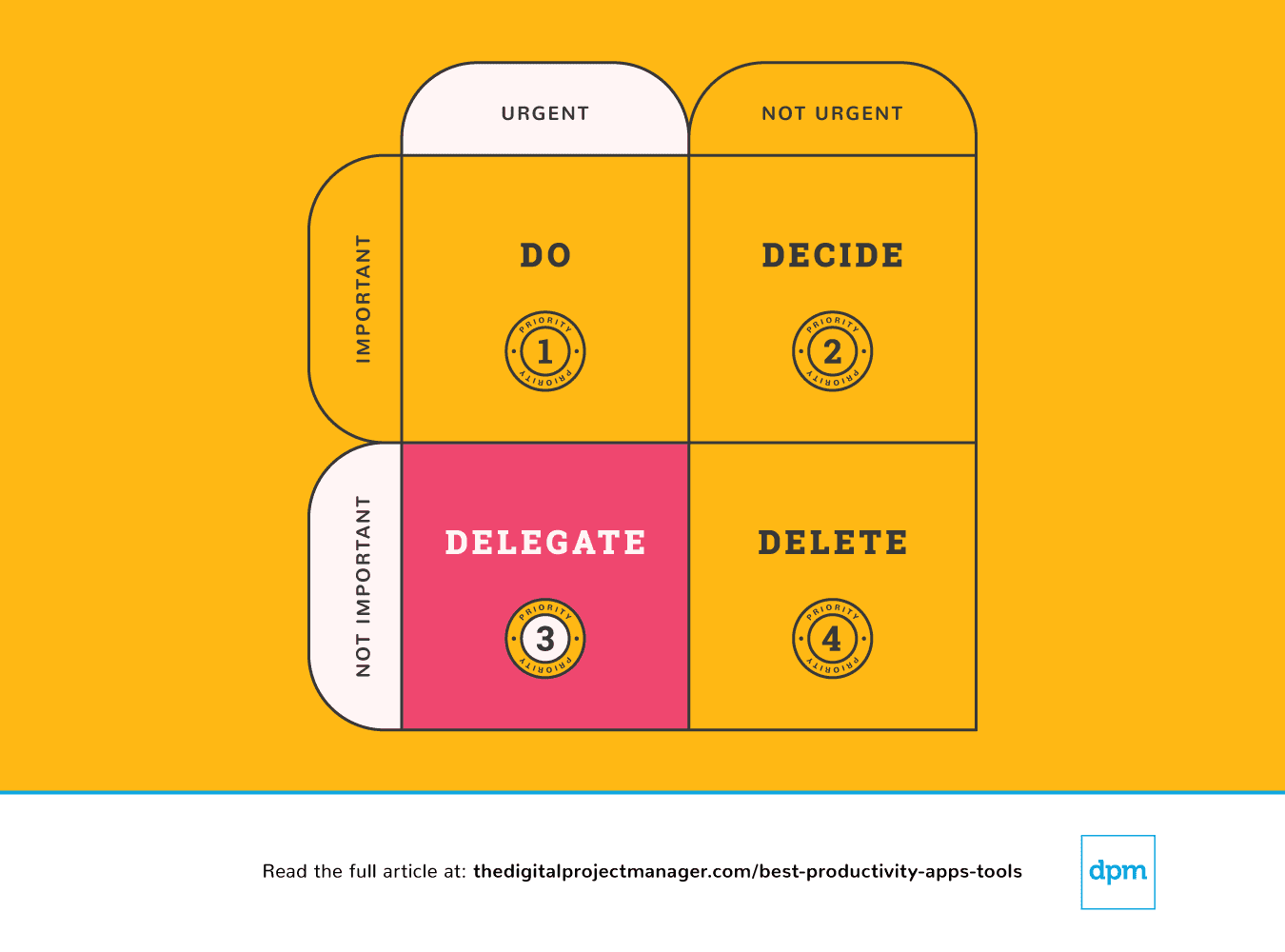 Bazı insanlar görevleri delege etmeyi kolay bulurken bazıları bunu “kendileri yapma” yönünde güçlü bir dürtü hisseder. Görevleri başka kişilere devretmek ne kadar zor olabilirse, görevleri bir makineye devretmek de o kadar kolaydır. İş akışlarımıza daha fazla otomasyon ekleyerek ve angarya işleri bir algoritmaya yaptırarak kısa sürede daha fazlasını başarmamızı sağlayan çok sayıda verimlilik uygulaması vardır.
Öncelik #4: Acil değil ve önemli de değil. Sil gitsin.
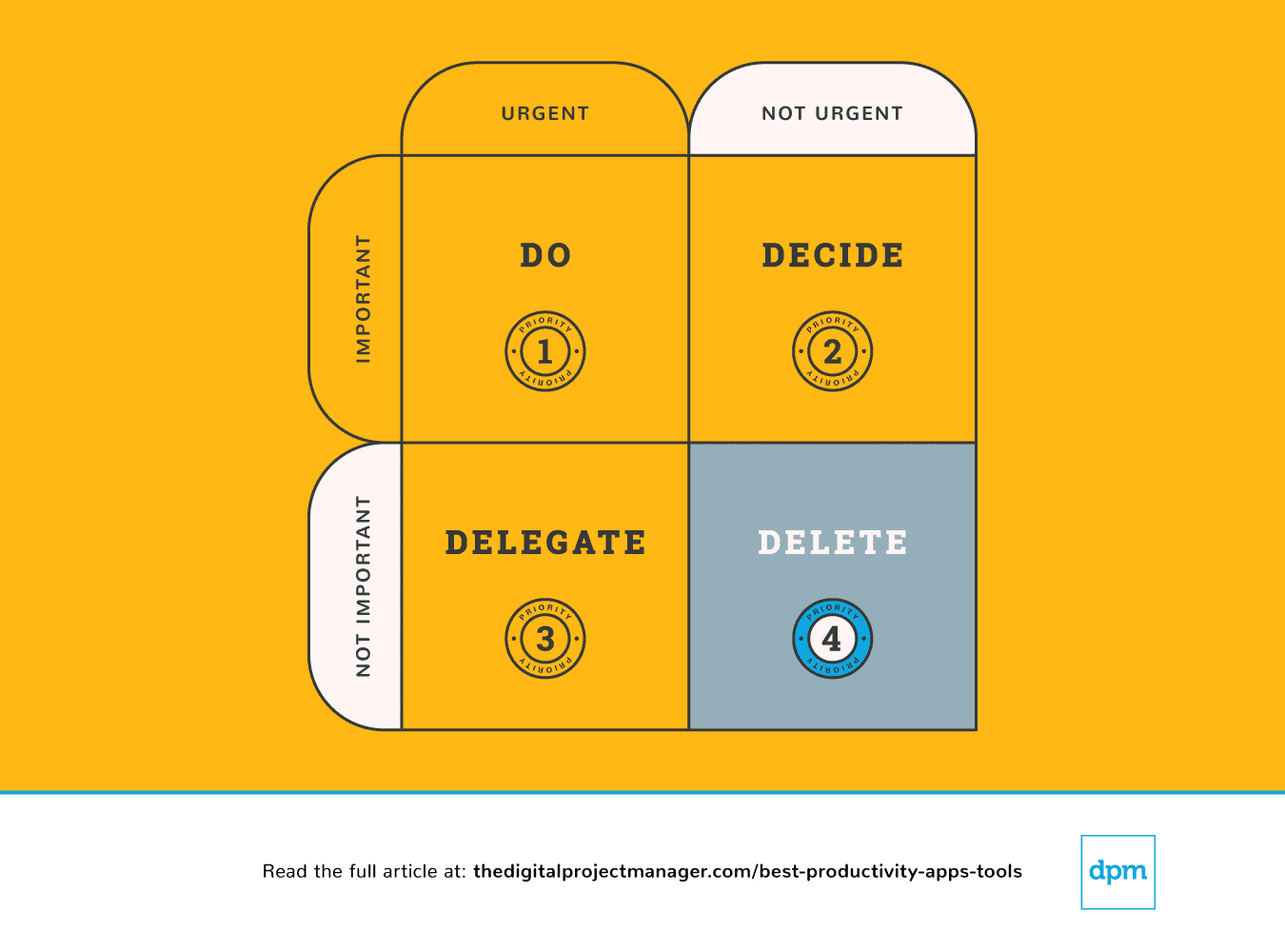 Sonuç olarak bazen daha az yaparak daha etkili olabiliriz. Harika fikirlere “Evet” demek için sonsuz olasılık (ve sana yardımcı olacak birçok verimlilik uygulaması) vardır. Ancak bu, onları hayata geçirebilmek için doğru şeylere “hayır” demen gerektiği anlamına da gelir. Sınırlar koymayı öğren ve hayır de.
İyi ve nazik olmak, insanlara yardım etmek harikadır. Sorun şu ki her zaman yeterli zamanımız olmayabilir. Bu da çok az şey sunmamıza veya hiç sunamamamıza yol açabilir. Gerçekten en iyi işini ortaya koyamayacağın bir şeyi seçersen kimseye iyilik etmiş olmazsın.
İşte görevleri üzerinden atmanı ve kendine “hayır” diyebileceğin bir sistem oluşturarak sınırlar geliştirmeni sağlayacak harika bir verimlilik uygulaması:

Best for custom workflows and task boards
monday AI Workspace is a work management platform that combines customizable task boards, project planning, workflow automation, and AI-powered execution tools across project management, CRM, dev, and service operations.
Who Is monday AI Workspace Best For?
It's a strong fit for mid-to-large teams running multiple workstreams across product, marketing, operations, or engineering who need a single, highly configurable workspace.
Why I Picked monday AI Workspace
I've included monday AI Workspace in my top picks because no other tool makes it this easy to build workflows that match how your team works. The board system lets you configure custom columns, statuses, and automations around your specific process. I particularly like the AI Workflow Builder, which orchestrates multi-step automations across boards without needing a developer. My team can build a sprint board for engineering and a campaign tracker for marketing, each with its own automations.
monday AI Workspace Key Features
- AI Meeting Notetaker: Captures, summarizes, and distributes action items from project meetings automatically.
- Time tracking: Lets team members log hours directly within tasks for accurate project reporting.
- Integrated Docs: Supports collaborative note-taking and documentation tied to specific boards or projects.
- Custom dashboard reporting: Allows creation of real-time dashboards to visualize metrics across multiple workspaces.
monday AI Workspace Integrations
monday AI Workspace offers hundreds of native integrations through its built-in marketplace, including Slack, Microsoft Teams, Google Workspace, Salesforce, HubSpot, Jira, GitHub, Dropbox, Zoom, and Outlook. It also supports Zapier and provides an API for custom integrations.
Pros and Cons
Pros:
- Multiple project views including Gantt and workload
- AI workflow builder handles multi-step automations
- Highly customizable boards with flexible column types
Cons:
- Notification volume can become hard to manage
- Dashboards require manual configuration across boards
New Product Updates from monday AI Workspace
monday AI Workspace Adds Human Approval Routing
monday AI Workspace adds a human-in-the-loop approval block to AI Workflows, sending approval requests and routing workflow paths based on responses. For more information, visit monday AI Workspace's official site.
 .

Slack
Best instant messaging app for teams
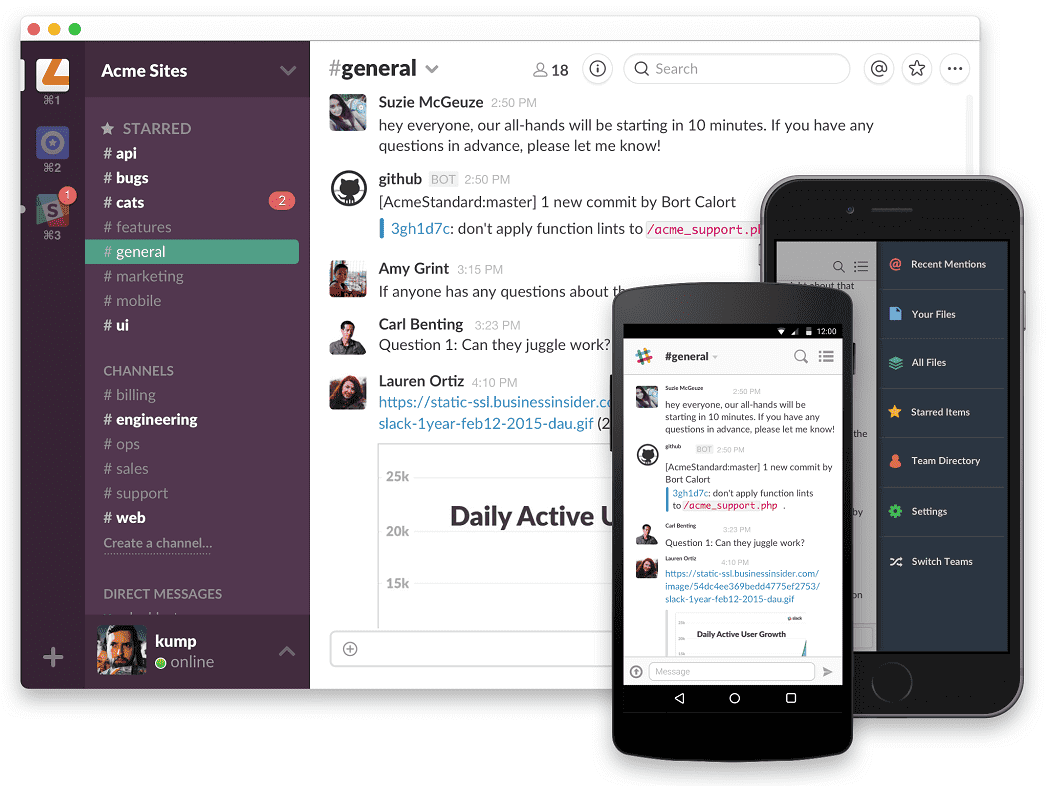
Slack is a collaboration and messaging platform that enables teams to communicate and work together in real-time. It offers a range of features, including channels, file sharing, integration with other software tools, and robust security.
Why I Picked Slack: If you’re doing a lot of task management and delegation within a team, Slack is a best-in-class tool for team collaboration. Slack provides a platform for you to communicate with team members-this includes private chats and group channels, file sharing, tagging and mentions, and loads of integrations with productivity apps to sync up your activities. You can use this tool to break out of endless email threads and enjoy a more transparent, easy-to-follow flow of communication and resources between you and your collaborators.
Slack Standout Features & Integrations
Features include collaboration, file sharing, powerful search, customization, robust security, and has a mobile app, and third-party integrations/plugins.
Integrations include Teamline, Workstreams, ClickUp, Asana, Sentry, SimplePoll, Trello, and dozens of development, management, communication, finance, media, marketing, design, wellness, and other apps.

Toggl
Best with automated time tracking
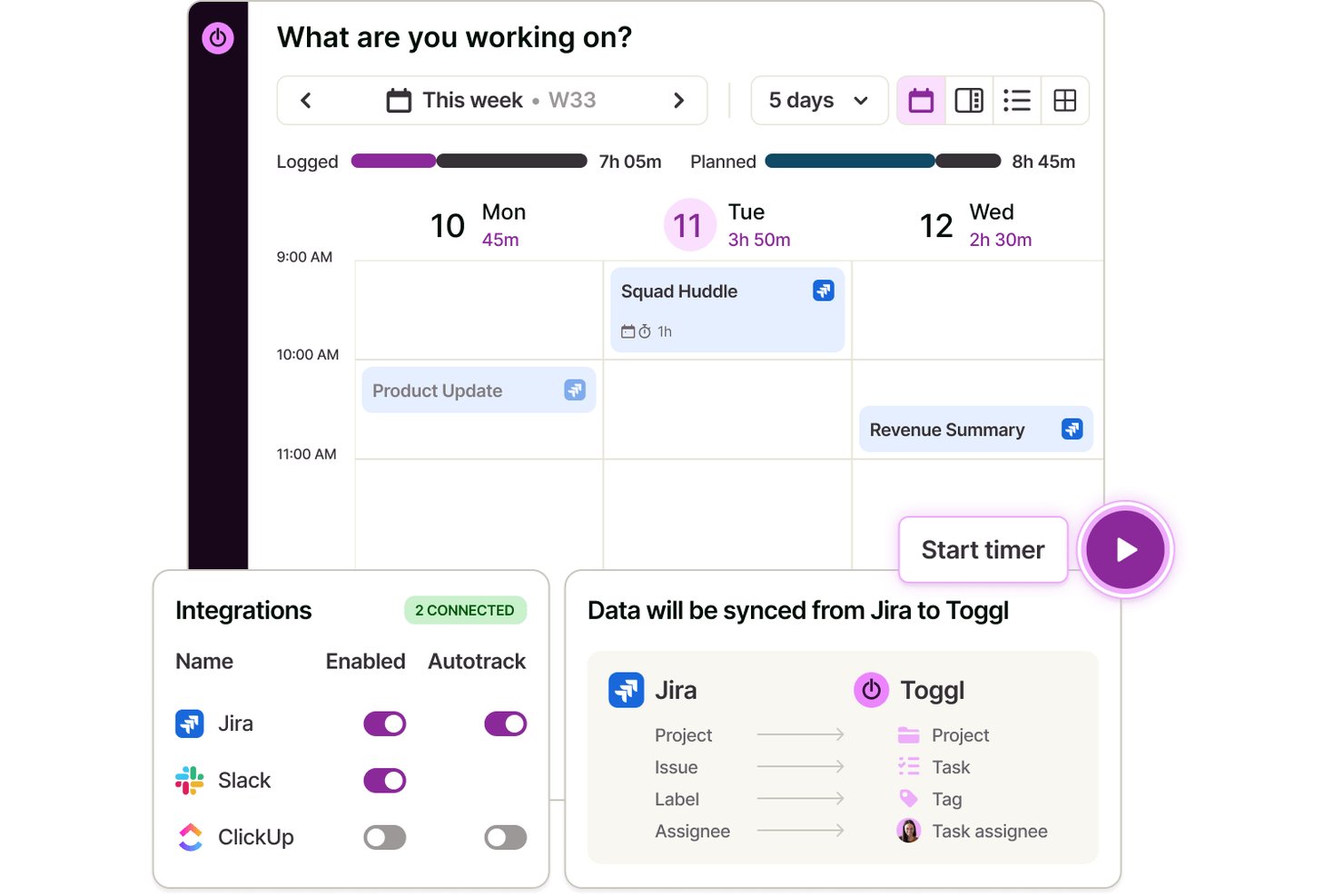
Toggl is a time tracking app that lets individuals and teams log hours across web, desktop, and mobile, with automated time capture, calendar integrations, and detailed productivity and profitability reporting.
Who Is Toggl Best For?
Toggl is a strong fit for freelancers, consultants, and agencies that bill by the hour and need accurate time data without invasive employee monitoring.
Why I Picked Toggl
I picked Toggl as one of the best because its approach to automated tracking is genuinely different. The desktop app silently logs every app and website you use for over 10 seconds, but that data stays private to you alone. You decide what becomes an official time entry, which means no screenshots, no keystroke logs, and no manager surveillance. It also converts calendar events into time entries automatically, so logging a client call takes zero extra effort. Toggl also has an AI assistant that lets you ask plain-language questions about your time and project data, making it easier to pull insights from what you've tracked.
Toggl Key Features
- Calendar view: See tracked time as blocks on a visual calendar and connect with Google or Outlook.
- Project and client tracking: Organize time entries by unlimited projects and clients for clean reporting.
- AI task creation and management: Create tasks from screenshots, notes, and ideas and manage them in Board, List, Calendar, or Timeline view
- Customizable reports: Build bar, donut, pivot, and line charts to analyze trends in tracked hours.
Toggl Integrations
Toggl offers native integrations with Asana, Trello, Jira, ClickUp, Salesforce, Google Calendar, Outlook Calendar, QuickBooks Online, Xero, and Slack.
Pros and Cons
Pros:
- Simple switching between projects and clients
- Full privacy controls on activity data
- Calendar events become time entries automatically
Cons:
- Mobile app can miss background tracking
- Lacks advanced task management features

Best productivity app for end-to-end project management
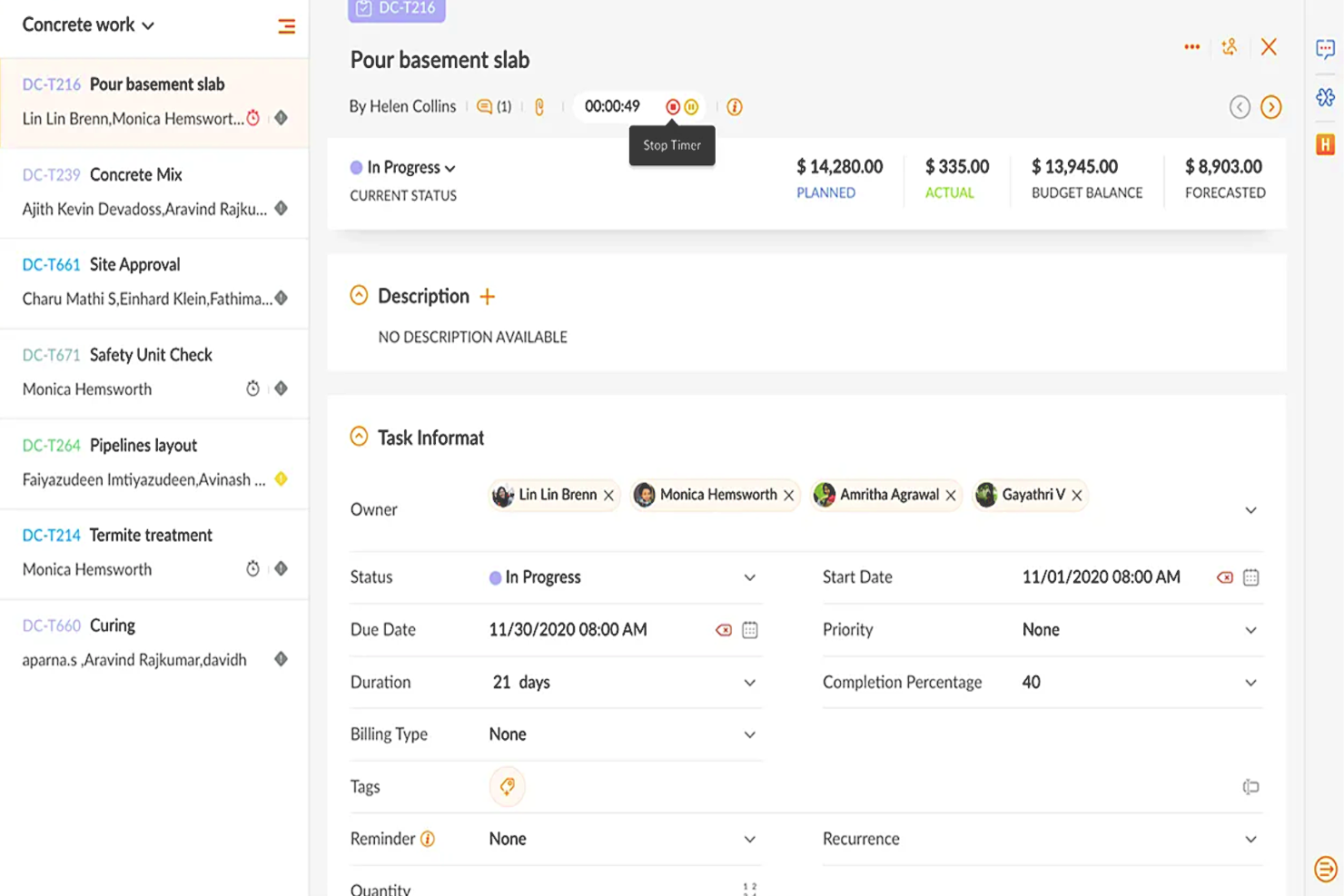
Zoho Projects is a cloud-based project management software that allows individuals and teams to collaborate, plan, and execute projects efficiently. The software enhances productivity by providing a centralized platform for task management, time tracking, document sharing, and team communication.
Why I picked Zoho Projects: It's a versatile software solution that different types of organizations and teams can use to manage their projects effectively. Its intuitive interface makes it easy to navigate and utilize, and it's user-friendly, with features that are easily accessible and organized logically. Their customizable user interface lets you choose the layout and features that best suit your needs.
You can create, manage, assign, and set task deadlines using Zoho Projects. You can also create task dependencies, ensuring that each job is completed in the correct order. It includes a calendar view allowing users to see their upcoming tasks and deadlines in one place.
Users can also track their time spent on each task, making it easier to manage their workload and allocate resources effectively. The time tracking feature can generate reports, providing valuable insights into team performance and project progress.
Zoho Projects Standout Features & Integrations
Features include collaboration tools that make it easy for team members to communicate and work together, a chat feature that supports real-time communication, and a comments section where team members can discuss specific tasks and projects. It also includes a document management system where team members can share and collaborate on documents, spreadsheets, and presentations.
Integrations are available with other Zoho apps, commonly used Google apps (Google Calendar, Drive, Spreadsheets, etc.), Microsoft apps (Calendar, Excel, Office 365, OneDrive, Teams, and SharePoint), and other third-party apps such as Basecamp, Jira, Slack, Zendesk, and Zapier.
New Product Updates from Zoho Projects
Zoho Projects Adds CodeX Scripts for Custom Modules
Zoho Projects now supports CodeX Scripts for custom modules, enabling conditional logic and rules for creating, updating, and deleting records. For more information, visit Zoho Projects' official site.
 .
Best for brainstorming, ideation, and task management in one

MeisterTask is a versatile project management tool that combines intuitive Kanban boards with powerful collaboration and customization features, making it ideal for teams of all sizes. Its seamless integration with MindMeister for brainstorming and ideation, along with robust task automation and real-time communication capabilities, streamlines workflow and enhances productivity across projects.
Why I picked MeisterTask: MeisterTask excels as a productivity app by offering a streamlined, intuitive interface that simplifies task and project management. It effectively combines customizable Kanban boards for visual workflow management with powerful features like task automation, due date reminders, and time tracking to enhance efficiency.
The app facilitates seamless collaboration through easy file sharing, commenting, and task assignments, keeping teams aligned and focused. Its integration with tools like MindMeister for mind mapping ensures a smooth transition from brainstorming to execution, making it easier for users to turn ideas into actionable tasks. MeisterTask's focus on user-friendly design and practical functionality makes it a valuable tool for individuals and teams aiming to boost productivity and achieve their goals more efficiently.
MeisterTask Standout Features and Integrations
Features include Kanban boards, task automation, mindmeister integration, customizable workflows, project templates, time tracking, file attachments, due date reminders, collaboration tools, activity streams, mobile apps, secure data encryption, multiple integrations with other tools, personalized dashboards, and flexible project views.
Integrations include Slack, Dropbox, Github, Google Drive, Microsoft Teams, Outlook, Trello, Asana, MindMeister, and hundreds more through a paid plan with Zapier.
Kintone
Best for building custom productivity apps
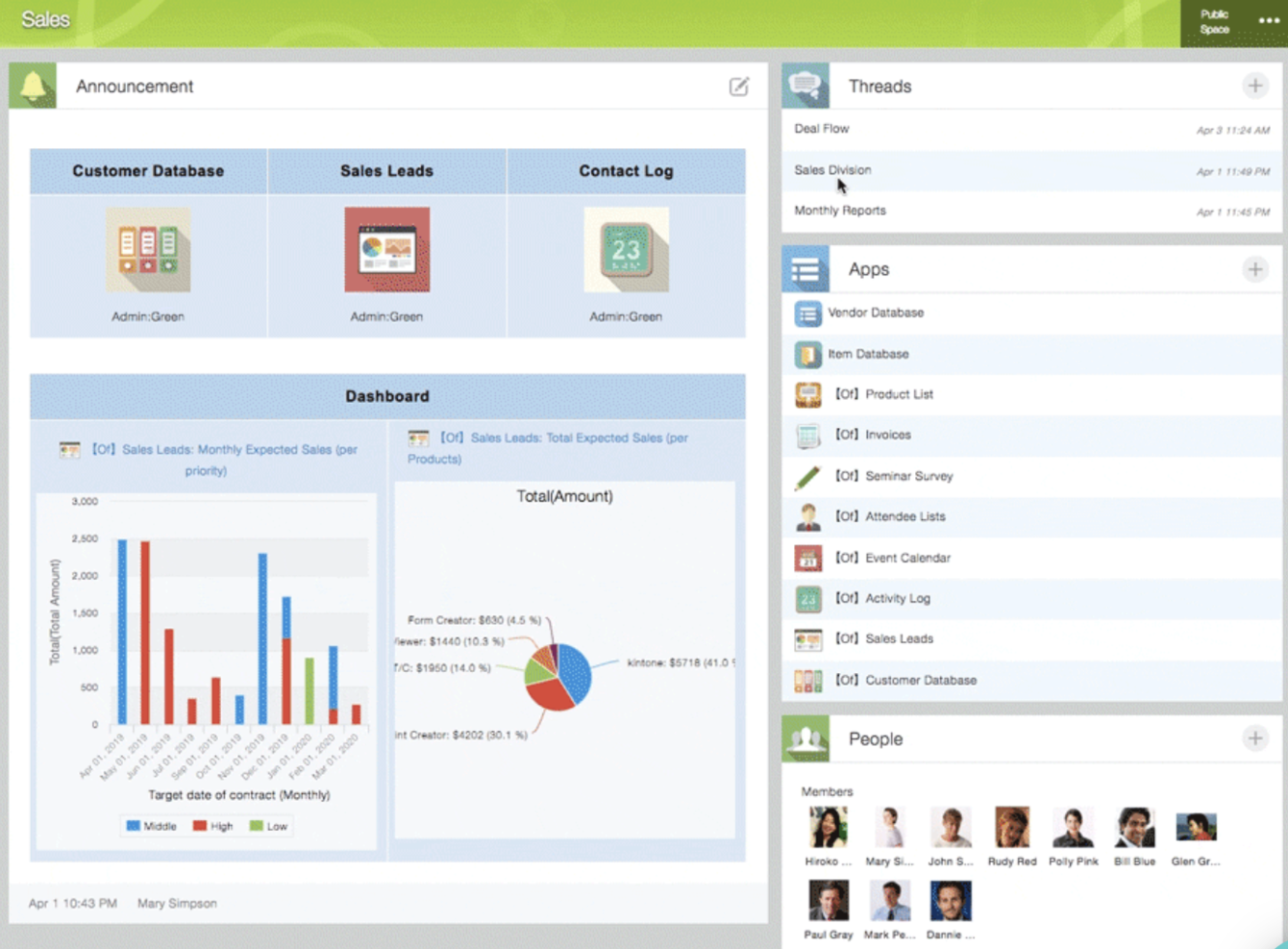
Kintone is a customizable app platform used by teams at Volvo Trucks North America, Japan Airlines, Shiseido, and over 23,000 organizations worldwide. Their unique approach allows you to build a wide variety of customizable “apps” either from scratch, using templates or from your existing spreadsheets, for data management, business processes, and workflows. Kintone apps can be customized for project management, sales CRM, customer databases, expense reports, shared to-do lists, equipment management, product feedback, and much more.
Why I Picked Kintone: Kintone lets you build no-code task management apps by dragging and dropping elements that you want to see onto the page: rich text fields, date fields, drop-down menus, number fields with built-in calculations, spaces for attachments, user or group selection menus, related data from other apps, tables, and more.
Once you’ve built the app you want, you can use it to more easily manage whatever data and tasks you and your team need to track. And with custom notifications and reminders as well as detailed permissions settings, your project tracking solution can look and work however you want it to.
What makes Kintone particularly great for project tracking are the features to filter and prioritize tasks by data field or team member to generate custom reports or dashboard views, as well as the ability to automate reminders and handoffs between team members for multi-step workflows.
Kintone’s built-in communication features also allow teams to discuss projects directly in the app and in topic or project-based threads. Dedicated “spaces” organize everything your team needs for your project, including task-tracking apps and searchable conversation threads.
Kintone Standout Features & Integrations
Features include project management, dashboards, resource management, analytics, calendar management, conversion tracking, employee onboarding, forecasting, lead scoring, timesheets, collaboration support, reports, pipeline management, budgeting, and process modeling.
Integrations include Slack, Gmail, Google Calendar, Outlook, Tableau, Dropbox, Salesforce, HubSpot, Eventbrite, WordPress, QuickBooks, MailChimp, and many more through a paid plan with Zapier or via API integrations.
Trello
Best for card-based task lists and Kanban boards
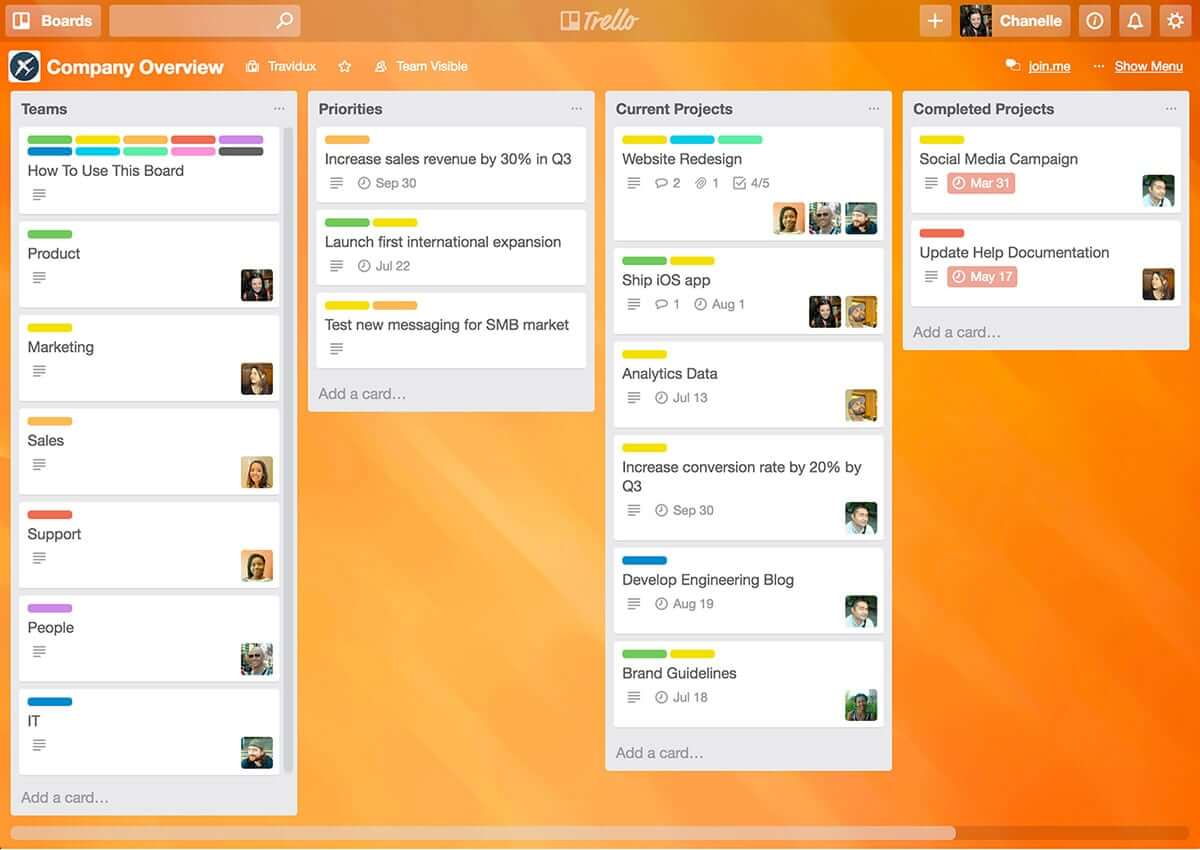
Trello is a Kanban board app that can be used to organize tasks visually. It’s user-friendly, with an intuitive drag-and-drop interface that makes it easy to learn. This popular tool can be used to help you visualize your deadlines, items in progress, and completed tasks, enabling you to make informed decisions about what to work on next according to the big picture.
Why I Picked Trello: Trello is a popular project management tool that helps teams organize tasks and collaborate on projects visually and intuitively. It uses a system of boards, lists, and cards to represent tasks and workflows, allowing team members to easily see what needs to be done, who is responsible for each task, and what the status of each task is. Trello can be customized to fit a wide range of project management needs, and it offers features such as due dates, checklists, attachments, and team member assignments. Its flexibility and ease of use make it a great tool for teams of all sizes and types, from small startups to large enterprises.
Trello Standout Features & Integrations
Features include boards, to-do lists, task management, workflow management, priority labels, due dates, file sharing, communication, a mobile app, and third-party integrations/add-ons.
Integrations include 200+ apps and tools your team depends on, like Slack, Google Drive, Salesforce, Dropbox directly into your Trello boards. (Note: Some connections require an additional subscription fee.)

Best for real-time collaboration

Whether you're leading a small business, managing a large enterprise, or navigating the educational sector, Google Workspace offers a suite of productivity tools designed to meet your diverse needs. With apps like Gmail, Drive, and Meet, you can seamlessly manage communications, storage, and virtual meetings while enhancing collaboration and maintaining strong security. With Gemini—Google’s premium AI—integrated across all plans, Workspace helps you draft emails faster, summarize documents instantly, generate ideas, and stay organized across devices. Whether you're handling client communication, creating content, or coordinating daily operations, Workspace boosts productivity and keeps your team connected.
Why I Picked Google Workspace
I picked Google Workspace for its unique blend of real-time collaboration, cloud accessibility, and AI-driven assistance. Tools like Google Docs and Sheets allow your team to work together simultaneously, eliminating version-control issues and reducing unnecessary email threads. Google Meet provides convenient video conferencing without relying on external software, making communication frictionless. Gemini is built directly into apps like Gmail, Docs, Sheets, and Meet, going beyond collaboration to actively enhance how you work. From drafting content to summarizing documents and managing tasks, having AI built in helps you stay efficient, responsive, and adaptive to changing business or project needs.
Google Workspace Key Features
In addition to its collaborative capabilities, Google Workspace offers several other features that boost productivity:
- Drive: Secure cloud storage with generous space options, ensuring your files are accessible anywhere, anytime.
- Calendar: Simplified scheduling with shared calendars and appointment booking pages to keep your team organized.
- Chat: Integrated messaging platform for real-time team communication and collaboration.
- NotebookLM: Instant insights and podcast-style Audio Overviews to accelerate team learning and content understanding.
Google Workspace Integrations
Integrations include Salesforce, Atlassian, Tableau, SAP, Okta, Microsoft Office 365, Slack, Zoom, Trello, and Asana.
Pros and Cons
Pros:
- Generous cloud storage options facilitate easy file access and sharing.
- Real-time collaboration tools improve team productivity and communication.
- Seamless integration with Google services enhances workflow efficiency.
Cons:
- Shared drive permissions and complex folder hierarchies can become difficult to manage if not structured carefully.
- Compatibility issues when collaborating externally with teams using non-Google file formats or Microsoft Office workflows.
Guru
Best tool for searching through all your apps to surface answers quickly
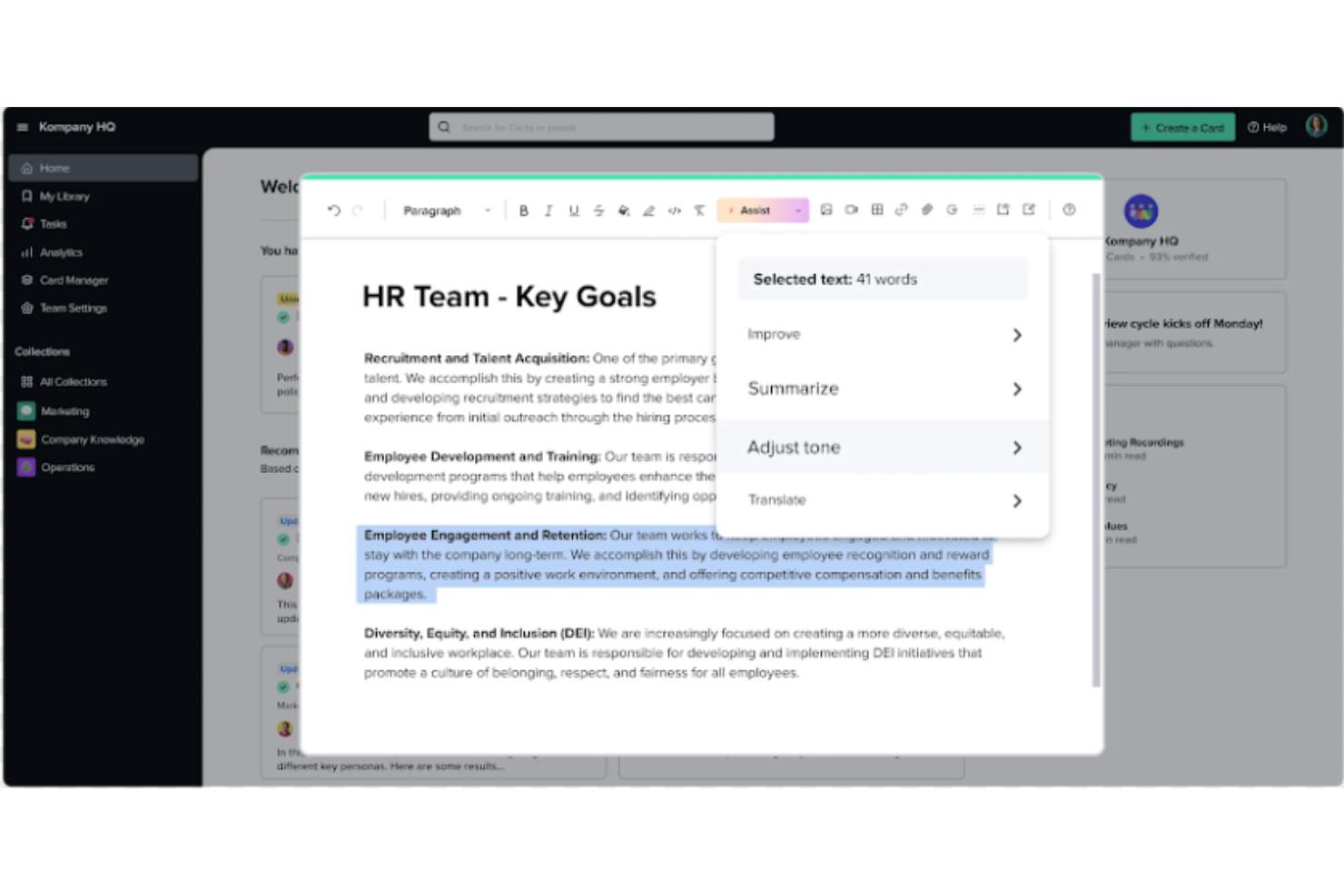
Guru is an advanced search and knowledge management platform that's designed to help users find relevant information quickly. Their advanced AI-driven search feature can search all your apps, documents, and slack #channels for answers — either directly in Slack or via a Chrome extension — making it easier to find information fast.
Why I Picked Guru: Guru employs AI to deliver instant answers within the user's workflow that are tailored to their specific role, location, and activities. The tool also facilitates the onboarding process for new hires, streamlines the creation, sharing, and organization of company documentation, and acts as a knowledge hub to disseminate educational content and troubleshooting guidance throughout an organization. The platform also integrates with a multitude of tools and services, enabling users to find answers and collaborate without leaving their workflow.
Overall, Guru is intended to eliminate the barriers created by knowledge silos and to improve productivity by automating information retrieval, thus allowing employees to concentrate on tasks that require human intelligence.
Guru Standout Features & Integrations
Features include enterprise AI search, an employee intranet, a company wiki, AI suggest and assist, custom branding tools, collaboration and feedback tools, mobile accessibility, and access controls and permissions.
Integrations include Trello, Cognito Forms, Jira Software Cloud, Confluence Cloud, HubSpot, Google Chat, Confluence Server, and GitHub.
Visor
Best for its user-friendly interface

Visor is a cloud-based SaaS product that aims to help individuals and businesses manage their time and tasks more efficiently. It's best suited for individuals and teams who need a comprehensive and easy-to-use productivity tool that allows them to manage their projects, tasks, and time all in one place.
Why I picked Visor: I chose Visor as one of the best productivity software because it's an all-in-one solution that brings together task management, project management, time tracking, and calendar features in a user-friendly interface. I appreciate that I can keep track of everything I need to do without having to switch between multiple tools or apps.
Another great feature is its real-time collaboration capabilities, which allow you to work with your team members on projects, assign tasks, and track progress. This feature makes it easy to communicate with team members and stay on top of everything that's going on in your projects. It also has an intelligent scheduling feature that suggests the best time slots for each task based on your availability and workload. This feature is particularly helpful when you have a lot of tasks to complete and you need to prioritize your time effectively.
Visor Standout Features & Integrations
Features include API, dashboards, data export/data import, data visualization, external integrations, Gantt charts, project management, task scheduling/tracking, resource management and third-party plugins/add-ons.
Integrations include Jira, HubSpot, and Salesforce.
En iyi üretkenlik uygulamalarının özeti
| Tool | Starting Price | Website | |
|---|---|---|---|
| Best for custom workflows and task boards | 4.6 out of 5 | $9/user/month Free plan + 14-day trial available | Book Demo |
| Best instant messaging app for teams | 4.6 out of 5 | $7.25/user/month Free plan available | Website |
| Best with automated time tracking | 4.7 out of 5 | $9/user/month Free plan available; 30-day free trial; Free demo available | Book Demo |
| Best productivity app for end-to-end project management | 4.3 out of 5 | Pricing upon request Free plan + 15-day trial + demo available | Website |
| Best for brainstorming, ideation, and task management in one | 4.7 out of 5 | €17.50/user/month Free plan + 14-day free trial available | Website |
| Best for building custom productivity apps | 4.6 out of 5 | $24/user/month 30-day free trial + free demo available | Website |
| Best for card-based task lists and Kanban boards | 4.5 out of 5 | $5/user/month Free plan + free trial available | Website |
| Best for real-time collaboration | 4.6 out of 5 | $7/user/month 14-day free trial available | Website |
| Best tool for searching through all your apps to surface answers quickly | 3.5 out of 5 | Pricing upon request Free demo available | Website |
| Best for its user-friendly interface | 4.6 out of 5 | $18/user/month Free plan available | Website |
Diğer üretkenlik araçları
Bu araçların tümünü henüz kapsamlı bir şekilde inceleme fırsatım olmadı, ancak bu raporda sunulan araçlar ihtiyaçlarınızı karşılamıyorsa değerlendirebileceğiniz birkaç araç daha şunlar:
- Pneumatic Workflow
For unlimited workflow management
- Collabio Spaces
For iPhone & Mac
- Focus Booster
For the Pomodoro productivity technique
- SaneBox
For increasing productivity by streamlining your email inbox
- ClickUp
For in-app communication tools
- actiTIME
For detailed time tracking
- Hubstaff
For managing remote and field teams
- Hive
For flexible project views according to team needs
- Lucidspark
For ideation and collaboration using an infinite canvas
- Wrike
Productivity app for team collaboration


Seçenekleri Daraltma Konusunda Yardıma mı İhtiyacın Var?
Bu araç oldukça kullanışlı. Crozdesk ile iş birliği yaparak sana “Yazılım Bulucu”ya erişim sunmaya çalıştık.
Projen ve bir proje yönetimi aracında aradığın özelliklerle ilgili bazı ayrıntıları girdiğinde, tercihlerine uygun araçların bir listesi oluşturulur. E-posta adresini ekiple paylaşırsın ve ekip sana en iyi eşleşmelerinin özetini içeren faydalı bir PDF rehberi gönderir.
Üretkenlik uygulamaları için seçim kriterleri
Üretkenlik yazılımlarını değerlendirirken aklında bulundurman gereken önemli bir nokta var: Üretkenlik büyük ölçüde ayarlarına ve kişisel alışkanlıklarına bağlı olduğundan, üretkenlik aracının kendisi ancak senin kadar etkilidir.
Ancak bu araçları incelerken, bu üretkenlik uygulamaları listesinde aşağıdaki seçim kriterlerini kullandık:
- Kullanım kolaylığı: Arayüz basit mi ve uygulamanın sistemi kolayca anlaşılabiliyor mu? Uygulamadaki özellikler kafa karıştırıcı mı, yoksa kullanışlı mı? Yalnızca gerçekten kullanımı kolay ve ek çaba gerektirmeyen uygulamaları seçtik!
- Organizasyon ve önceliklendirme: Yapılacaklar listesi uygulamalarına yönelik üretkenlik uygulaması, görevleri organize etmek ve yeniden düzenlemek için net bir sistem sunuyor mu? Öncelikleri belirlemek ve en önemli görevleri yönetmek için kullanılabiliyor mu?
- Erişilebilirlik: Birden fazla işletim sisteminde kullanılabiliyor mu? Omni Focus gibi Android'de kullanılamayan birçok Mac üretkenlik uygulaması var. Ancak birden fazla cihazda kullanılabilen uygulamalara bağlı kalmaya çalıştık.
- Raporlama: Uygulama ne tür raporlama özellikleri içeriyor? Görevlere harcanan zamanı takip edebiliyor, zaman içindeki üretkenliği karşılaştırabiliyor veya analizleri kullanarak bunların senin için gerçekten işe yarayıp yaramadığını ölçebiliyor musun?
- Entegrasyonlar: Diğer en iyi organizasyon uygulamalarından, hatırlatıcı uygulamalarından, üretkenlik takip uygulamalarından vb. bazılarıyla entegre edilebiliyor mu? Görev yönetimini mümkün olduğunca otomatikleştirmek için diğer araçlarla senkronize edilebilen uygulamalar arıyoruz.
- Fiyat: Fiyatlandırma sistemi, uygulamanın sunduğu fayda açısından mantıklı mı? Çoğu durumda kişisel kullanım için ücretsiz bir sürüm kullanabilirsin. Ücretli planlar genellikle ayda yaklaşık $6 tutarındadır.
Sen bu konuda ne düşünüyorsun?
Organize ve verimli çalışmak için hangi üretkenlik uygulamalarını kullanıyorsun? Bunları kullanışlı buluyor musun, yoksa başka önceliklendirme yöntemlerini mi tercih ediyorsun? Gerçekten üretken olmamızı sağlayan araçları bize anlat.