

2026’da İncelenen En İyi 10 Zaman Bloklama Uygulaması

En İyi Zaman Bloklama Uygulamaları Kısa Listesi


Zaman bloklama uygulamaları, görevleri bilinçli bir şekilde planlayarak proje yöneticilerinin günlerini yapılandırmasına, odaklanmalarını korumasına ve çalışma saatlerini en iyi şekilde değerlendirmesine yardımcı olur. Dağınık yapılacaklar listeleriyle uğraşmak veya sürekli kesintilere tepki vermek yerine bu araçlar, derinlemesine çalışma, toplantılar ve idari işler için zaman ayırmanıza olanak tanır; böylece programınızın kontrolünü elinizde tutarsınız.
Odağı gerçekten artıran, bağlam değiştirmeyi azaltan ve yoğun çalışan profesyonellerin daha etkili plan yapmasına yardımcı olan uygulamaları bulmak için çok çeşitli zaman bloklama uygulamalarını test edip inceledim. Yapay zekâ destekli planlama, takvim entegrasyonları veya basit bir görsel arayüze ihtiyacınız varsa iş akışınıza uygun bir araç bulacaksınız.
Why Trust Our Software Recommendations
Our team has been testing and reviewing software since 2012. As project managers ourselves, we know how difficult—and important—it is to choose the right software.
For this guide, we evaluated tools using hands-on testing and independent research, scoring tools using our selection criteria. We also draw on insights from industry thought leaders and practicing project management experts.
Our reviews reflect our human editorial judgment, not a sales pitch.
Expert reviewers:
Zaman Bloklama Uygulamaları Karşılaştırma Tablosu
Aşağıdaki tabloda, en iyi zaman bloklama uygulaması seçeneklerimin fiyatlandırma ayrıntıları karşılaştırılmaktadır.
Score legend (out of 5)
- Excellent 4.5–5
- Good 4–4.4
- Average 3–3.9
- Below average 2–2.9
- Poor 1–1.9
| Tool | Starting Price | Website | |||||||
|---|---|---|---|---|---|---|---|---|---|
| Best for non-intrusive project time logging | 3.2 out of 5 | 2 | 3 | 5 | 3 | 3 | 3 | $4.99/user/month Free plan + 7-day trial + demo available | Website |
| Best for Trello users | 3.7 out of 5 | 3 | 4 | 4 | 4 | 3 | 4 | $3.99/user/month 14-day free trial | Website |
| Best for integration | 3.0 out of 5 | 4 | 4 | 1 | 3 | 3 | 3 | $7.56/month 14-day free trial | Website |
| Best for reminders | 3.5 out of 5 | 4 | 3 | 4 | 4 | 3 | 3 | $4.99/user/month Free plan + free demo available | Website |
| Best for AI scheduling | 4.7 out of 5 | 4 | 5 | 5 | 4 | 5 | 5 | $19/user/month Free trial available | Website |
| Best for adaptive scheduling | 4.2 out of 5 | 4 | 4 | 4 | 4 | 4 | 5 | $9.95/month 14-day free trial | Website |
| Best for visual time management | 3.3 out of 5 | 3 | 4 | 4 | 2 | 3 | 4 | Pricing upon request Not available | Website |
| Best for habit tracking | 3.5 out of 5 | 3 | 4 | 3 | 4 | 3 | 4 | $49.99/year Free plan available | Website |
| Best for automatic scheduling | — | 4 | 4 | — | 3 | 4 | 5 | $5/month Free plan available | Website |
| Best for customizable workspaces | 3.7 out of 5 | 3 | 3 | 4 | 5 | 3 | 4 | $4/user/month Free plan available | Website |
En İyi Zaman Bloklama Uygulaması İncelemeleri
Aşağıda, kısa listeme giren en iyi zaman bloklama uygulamalarının ayrıntılı özetlerini bulabilirsiniz. İncelemelerim, size en uygun olanı bulmanıza yardımcı olmak için her aracın temel özelliklerine, artılarına \u0026 eksilerine, entegrasyonlarına ve ideal kullanım alanlarına ayrıntılı bir bakış sunuyor.

Clockify
Best for non-intrusive project time logging
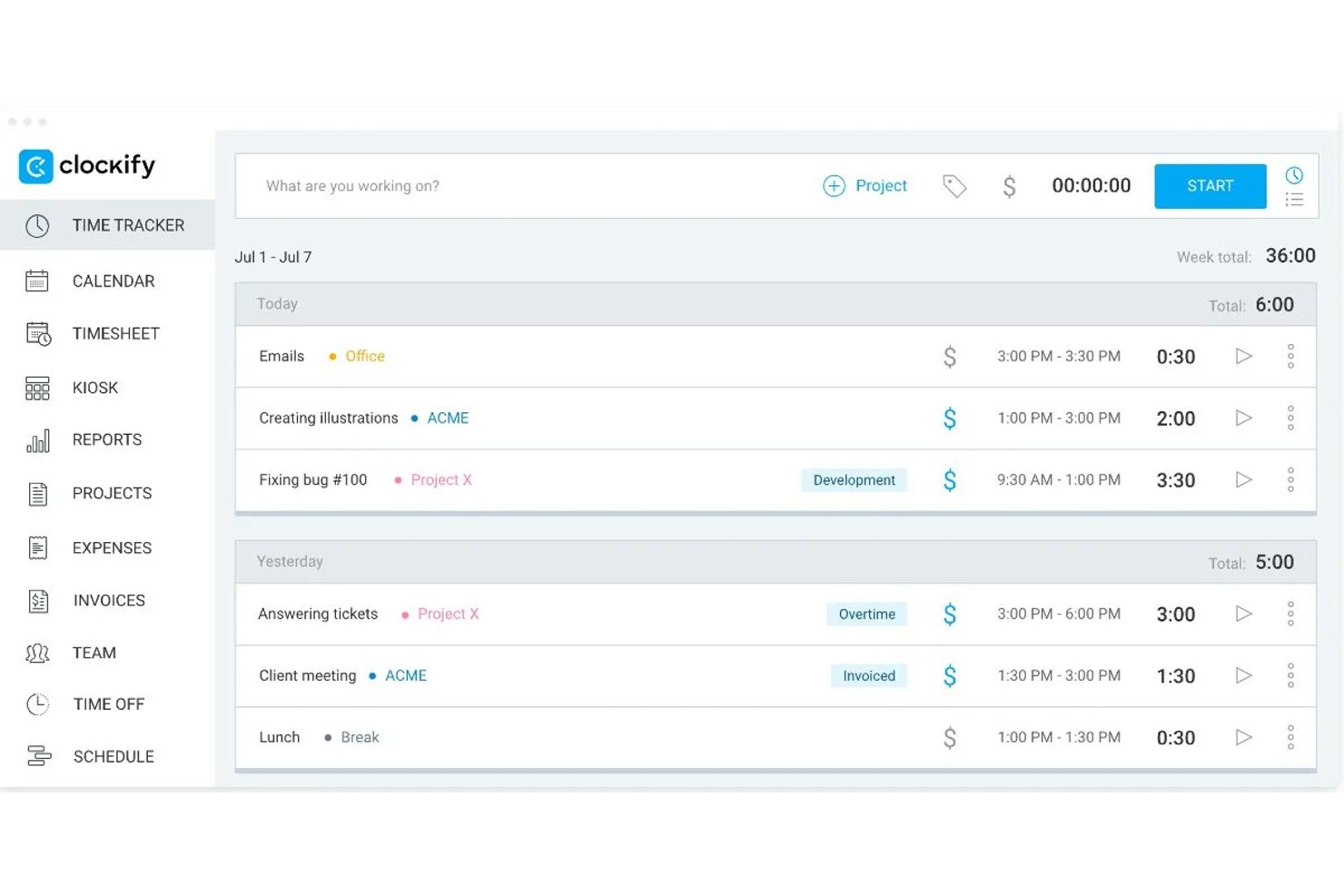
Clockify is a time tracking platform that pairs a visual calendar for creating and managing time blocks with detailed reporting, team scheduling, and integrations across 100+ tools.
Who Is Clockify Best For?
Clockify is a strong fit for freelance consultants and lean project teams who need to log time against project work without disrupting their existing workflow.
Why I Picked Clockify
I picked Clockify as one of the best because it treats time blocking as a tracking exercise, not a scheduling one, which is exactly what project teams doing billable or estimated work actually need. Its Calendar view lets you draw time blocks against specific projects, then run an Assignments Report to see how planned hours compare to what was actually logged. I've found that planned-vs-actual gap is where estimation debt hides, and Clockify surfaces it without requiring you to overhaul how your team already works.
Clockify Key Features
- Assignments report: Compares scheduled hours against actual tracked time per team member or activity, so you can see where estimation gaps are appearing across projects.
- Team scheduling module: Lets managers create, publish, and adjust recurring team assignments with drag-and-drop editing and capacity visibility across the week.
- Browser extension with in-app timer: Adds a one-click timer button inside 100+ tools—including Jira, Asana, and ClickUp—so you can log time without switching tabs.
- Project forecasting: Tracks estimated, scheduled, and actual hours side by side at the project level, giving you an early signal when a project is trending over budget or timeline.
Clockify Integrations
Clockify offers native integrations with Google Calendar, Outlook, Jira, Asana, Trello, ClickUp, monday.com, and Todoist. It also supports 100+ web app integrations through its browser extension, plus Zapier and an API for custom integrations.
Pros and Cons
Pros:
- Free tier supports unlimited time tracking
- Calendar blocks connect directly with tracked time
- Planned-versus-actual reports sharpen project estimates
Cons:
- Scheduling favors resource planning over personal blocking
- One-way calendar sync weakens schedule consolidation

Planyway
Best for Trello users

Planyway is a time management and scheduling app integrated with Trello, designed for teams and individuals who use Trello to organize their projects. It helps users visualize their tasks and schedules on a calendar, allowing for better planning and coordination.
Why I picked Planyway: Planyway is ideal for Trello users who need a calendar view to manage their tasks effectively. You can drag and drop Trello cards directly into your calendar, making it easy to plan your workload. The timeline view helps your team track project progress and deadlines. Additionally, Planyway supports collaboration by allowing you to share your calendar with team members.
Standout features & integrations:
Features include a timeline view that provides a clear overview of project schedules, task dependencies to highlight the relationships between tasks, and customizable filters to focus on specific projects or team members. These features help you keep your projects organized and on track.
Integrations include Trello, Google Calendar, Outlook, Slack, Asana, Jira, Microsoft Teams, Zoom, Todoist, and Evernote.
Pros and Cons
Pros:
- Supports team collaboration
- Timeline view for projects
- Task dependencies feature
- Customizable calendar sharing
- Drag and drop Trello integration
Cons:
- May not suit non-Trello workflows
- Initial setup can be complex
- Basic customization options
- Requires internet connection
- Limited to Trello users

Best for integration

Google Calendar is a scheduling tool widely used by individuals and teams to organize meetings, events, and appointments. It helps users manage their time effectively by providing a straightforward interface for scheduling and reminders.
Why I picked Google Calendar: Google Calendar integrates effortlessly with other Google Workspace apps, making it a go-to choice for many. Its ability to sync across multiple devices ensures you and your team stay updated on all schedules. You can create multiple calendars for different purposes, helping you maintain a clear overview of personal and professional commitments. The shared calendar feature allows easy collaboration with your team.
Standout features & integrations:
Features include color-coded events to differentiate between various types of activities, customizable reminders to keep you on track, and the ability to set recurring events with ease. These features help you maintain an organized schedule and reduce the chance of missing important meetings.
Integrations include Gmail, Google Meet, Slack, Zoom, Microsoft Outlook, Trello, Asana, Todoist, Zapier, and IFTTT.
Pros and Cons
Pros:
- Integrates with Google Workspace
- Supports multiple calendars
- Customizable reminders
- Easy calendar sharing
- Syncs across multiple devices
Cons:
- Requires internet for updates
- No advanced task management
- Can be overwhelming with notifications
- Basic design customization
- Limited offline access

Any.do
Best for reminders

Any.do is a task management app that helps individuals and teams organize tasks, set reminders, and manage their schedules efficiently. It is designed for users who need a reliable tool to stay on top of their daily tasks and deadlines.
Why I picked Any.do: Any.do excels in providing timely reminders to keep you on track with your tasks. You can set one-time or recurring reminders, ensuring you never miss important deadlines. The app allows you to create lists and prioritize tasks, helping you manage your workload effectively. Additionally, its calendar integration provides a comprehensive view of your schedule.
Standout features & integrations:
Features include a daily planner that helps you organize tasks for the day, a focus mode that minimizes distractions while working, and a voice entry feature for quickly adding tasks. These features enhance your productivity by keeping you focused and organized.
Integrations include Google Calendar, Outlook, Slack, Trello, Gmail, Zapier, Alexa, Siri, Evernote, and Dropbox.
Pros and Cons
Pros:
- Daily planner feature
- Voice entry for tasks
- Customizable reminders
- Comprehensive calendar view
- Effective task prioritization
Cons:
- Requires internet connection
- May not suit complex workflows
- Basic customization options
- Complex initial setup
- Limited offline capabilities

Motion
Best for AI scheduling

Motion is a time blocking app designed for individuals and teams seeking to enhance their productivity through effective scheduling. It primarily serves project managers and professionals who need to organize their time efficiently and reduce distractions.
Why I picked Motion: Motion uses AI to automate scheduling tasks, helping you allocate time effectively. Its AI-driven scheduler adapts to your changing priorities and workload. This feature sets it apart by intelligently managing your calendar without your constant input. It also offers task management and deadline tracking, ensuring you stay on top of your responsibilities.
Standout features & integrations:
Features include smart task prioritization, automatic rescheduling of tasks based on availability, and a focus mode to minimize distractions while working. These features help you and your team maintain productivity throughout the day.
Integrations include Google Calendar, Outlook, Slack, Zoom, Trello, Asana, Monday.com, Microsoft Teams, Salesforce, and Dropbox.
Pros and Cons
Pros:
- Real-time updates AI Employees
- Focus mode for distraction-free work
- Customizable task lists
- Automatic calendar management
- AI-driven task scheduling
Cons:
- Not suitable for large teams
- No offline mode
- Limited customization options
- Requires learning curve


SkedPal is a time management app that utilizes AI to help users organize tasks into specific time slots, making it ideal for professionals who need dynamic scheduling solutions. It primarily assists individuals and teams in managing their time effectively, prioritizing tasks, and reducing interruptions.
Why I picked SkedPal: SkedPal offers adaptive scheduling that automatically reschedules tasks as your priorities change. Its AI-driven system allows you to update task durations, and the app will reorganize your schedule accordingly. This feature is particularly useful for managing unpredictable workloads. Additionally, SkedPal's ability to integrate time blocking with to-do lists provides a comprehensive approach to productivity.
Standout features & integrations:
Features include dynamic scheduling that adjusts to changes in your priorities, time blocking for effective task management, and a focus mode to minimize distractions. These features work together to enhance your productivity and ensure that important tasks are prioritized.
Integrations include Google Calendar, Outlook, Slack, Trello, Asana, Microsoft Teams, Todoist, Zapier, IFTTT, and Evernote.
Pros and Cons
Pros:
- Flexible time blocking
- Focus mode for reduced distractions
- Dynamic task rescheduling
- Integration with to-do lists
- Adaptive scheduling capabilities
Cons:
- May not suit all workflows
- Potential over-reliance on AI
- Limited offline features
- Initial setup complexity
- Requires internet connection

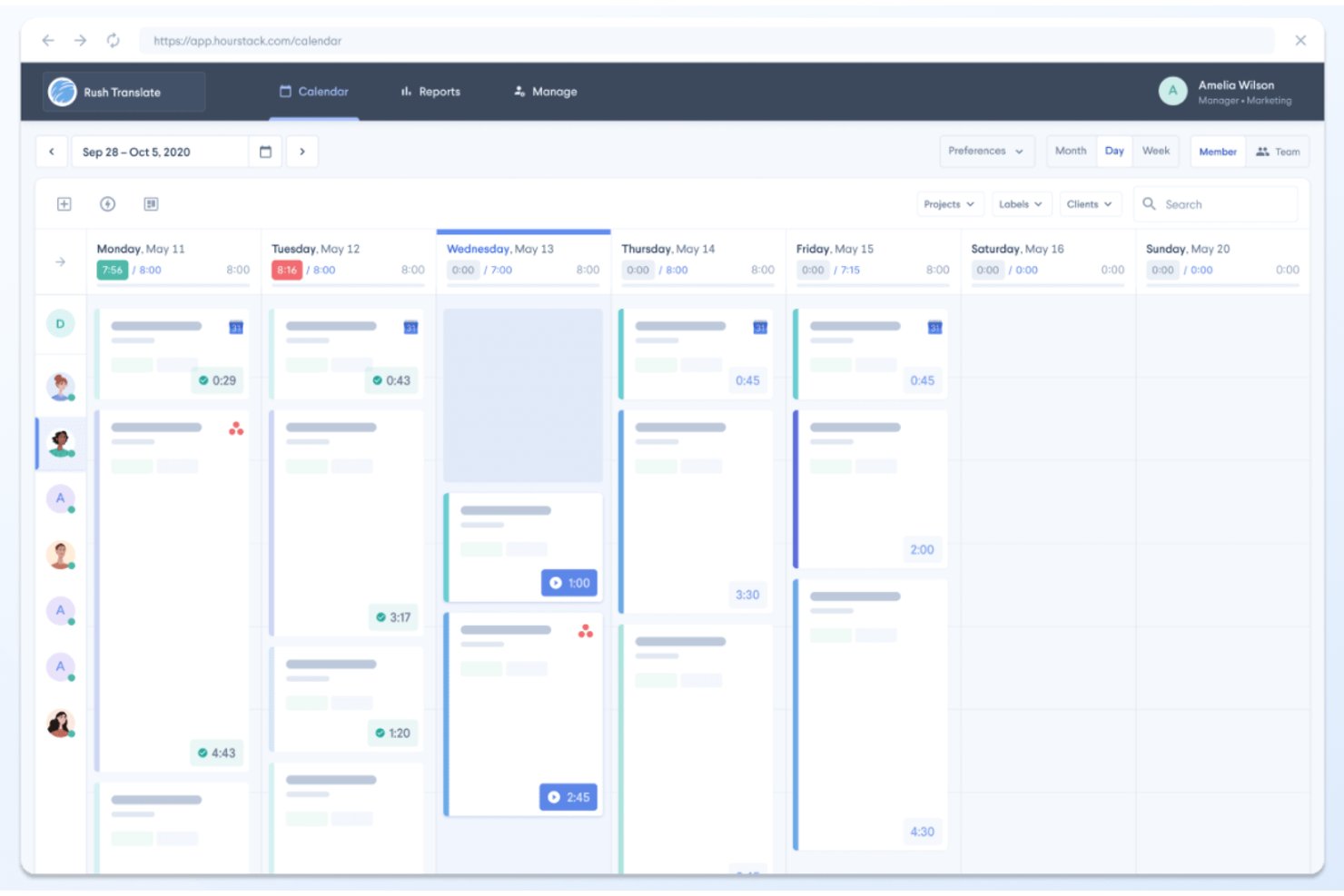
HourStack is a visual time blocking app that combines drag-and-drop calendar scheduling, allocated-vs-actual time tracking, and project-based reporting into a single web-based workspace.
Who Is HourStack Best For?
HourStack suits project managers and freelance consultants who need to see scheduled versus actual time in one visual workspace.
Why I Picked HourStack
I picked HourStack as one of the best because its visual calendar is purpose-built for seeing scheduled versus actual time in a single workspace. I love how allocated-vs-actual tracking flags overruns in real time, so I can spot where my estimates are off before they compound across a project. The unused time rollover feature is something I haven't found replicated elsewhere: unfinished blocks carry forward automatically instead of disappearing into the void.
HourStack Key Features
- Allocated vs. actual time tracking: Each time block records both your planned and real time spent, so you can see overruns as they happen.
- Task splitting across days: A single task can be divided into multiple time entries scheduled across different days.
- Reporting by client and project: Generate custom reports filtered by team member, client, or project, and export them to Excel, CSV, or Google Sheets.
- Slack timer commands: Start and stop timers, create entries, and check daily stats directly from Slack using
/hourstackslash commands.
HourStack Integrations
HourStack offered roughly 20 native integrations, including Asana, Google Calendar, Outlook, Slack, Trello, and Todoist, plus Zapier. The standalone product is discontinued, so these integrations are no longer available for new customers.
Pros and Cons
Pros:
- Tasks can span multiple scheduled days
- Unused blocks roll forward automatically
- Visual calendar clarates planned versus actual time
Cons:
- Native task prioritization remains limited
- Standalone product is no longer available

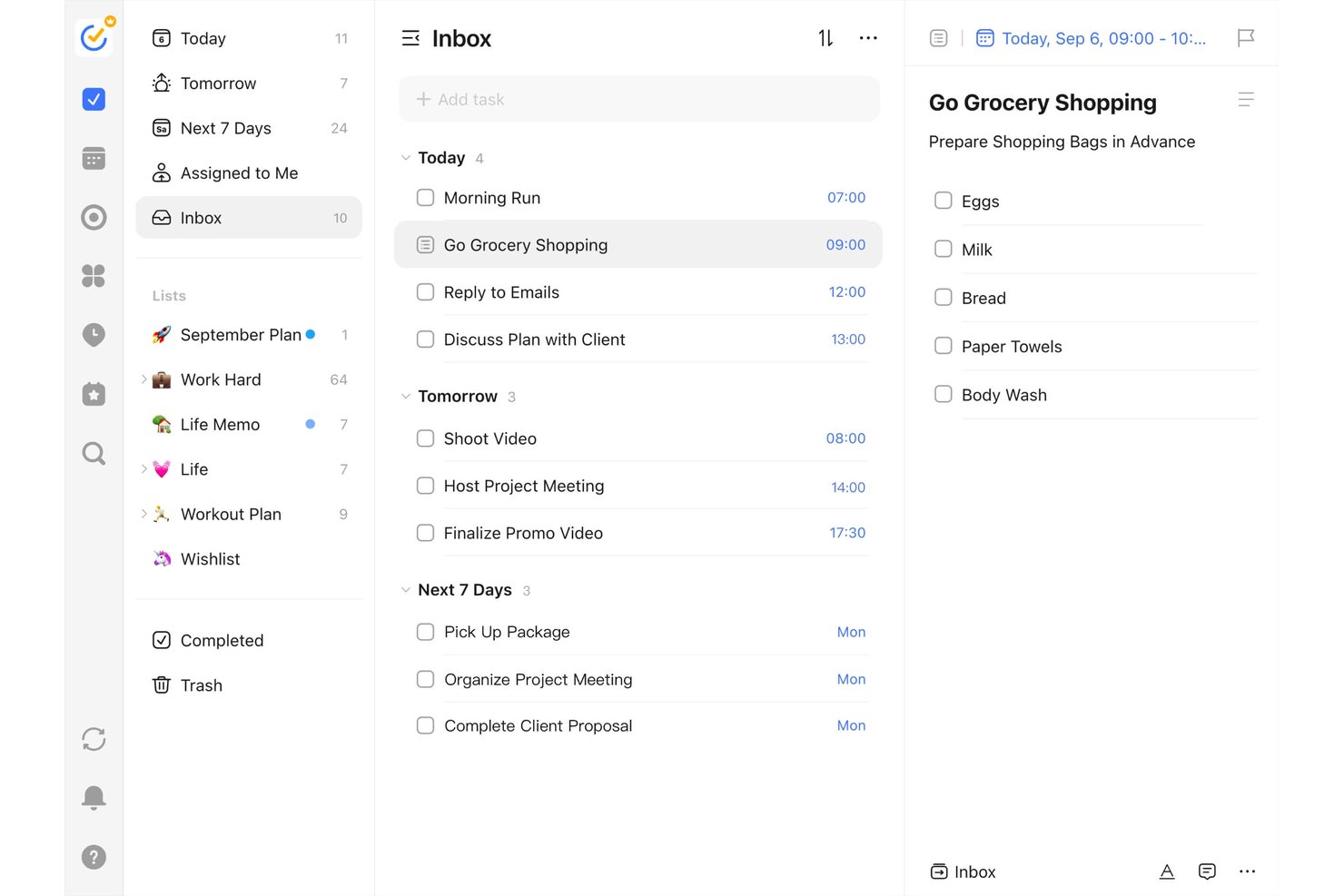
TickTick is a personal productivity and task management app that combines calendar time blocking, drag-and-drop scheduling, a built-in Pomodoro timer, habit tracking, and multiple task views including Kanban, Timeline, and Eisenhower Matrix.
Who Is TickTick Best For?
TickTick is a great fit for freelance consultants and solo contributors who want task management, habit tracking, and calendar time blocking in one affordable app.
Why I Picked TickTick
Habit tracking is what sets TickTick apart from other time blocking apps, and I've included it in my top picks because it bridges the gap between scheduling time and actually building consistent routines. I love that the built-in Habit Tracker runs alongside your task calendar, so you can block time for recurring behaviors (daily deep work, weekly reviews) and monitor streaks in the same app. The Pomodoro timer ties directly into this, letting you log focused work cycles against specific tasks and habits.
TickTick Key Features
- Multiple calendar views: TickTick offers daily, weekly, monthly, multi-day, and multi-week calendar views so you can visualize your schedule at whatever granularity fits your workflow.
- Task duration blocking: Drag tasks directly onto your calendar and assign durations to create sized, visual time blocks tied to specific work items.
- Kanban and timeline views: Switch between a Kanban board and a lightweight timeline view to manage tasks with adjustable start times and durations.
- Natural language task entry: Type tasks in plain text and TickTick auto-detects dates, times, and priorities without manual field entry.
TickTick Integrations
TickTick offers two native integrations, Google Calendar and Notion, plus calendar subscriptions through CalDAV/ICS. It also connects through Zapier.
Pros and Cons
Pros:
- Habit tracking reinforces recurring work routines
- Pomodoro timer links focus to tasks
- Drag tasks into sized calendar blocks
Cons:
- Focus statistics lack planned-versus-actual reporting
- No automatic scheduling around priorities


FlowSavvy is a time management app designed for individuals looking to optimize their schedules through automatic time blocking. It caters to users who need an efficient way to plan their tasks and manage their time without manual adjustments.
Why I picked FlowSavvy: FlowSavvy automates your schedule by intelligently finding time for tasks, ensuring that your week is planned efficiently. It automatically reschedules tasks when plans change, reducing the need for manual calendar adjustments. You can set recurring tasks, allowing the app to plan regular activities like workouts or meetings. The ability to visualize your workload with color-coded tasks helps you prioritize effectively.
Standout features & integrations:
Features include auto-scheduling that adapts to changes, color-coded tasks to easily visualize priorities, and recurring task management for building habits. These features help you stay organized and ensure that important tasks are not overlooked.
Integrations include Google Calendar, iCloud, Outlook, Slack, Zoom, Trello, Asana, Todoist, Microsoft Teams, and Evernote.
Pros and Cons
Pros:
- Custom scheduling hours
- Recurring task handling
- Color-coded task visualization
- Efficient time management
- Automatic task rescheduling
Cons:
- Basic customization options
- Requires internet connection
- May not suit rigid schedules
- Learning curve for new users
- Limited manual control

GoodDay
Best for customizable workspaces
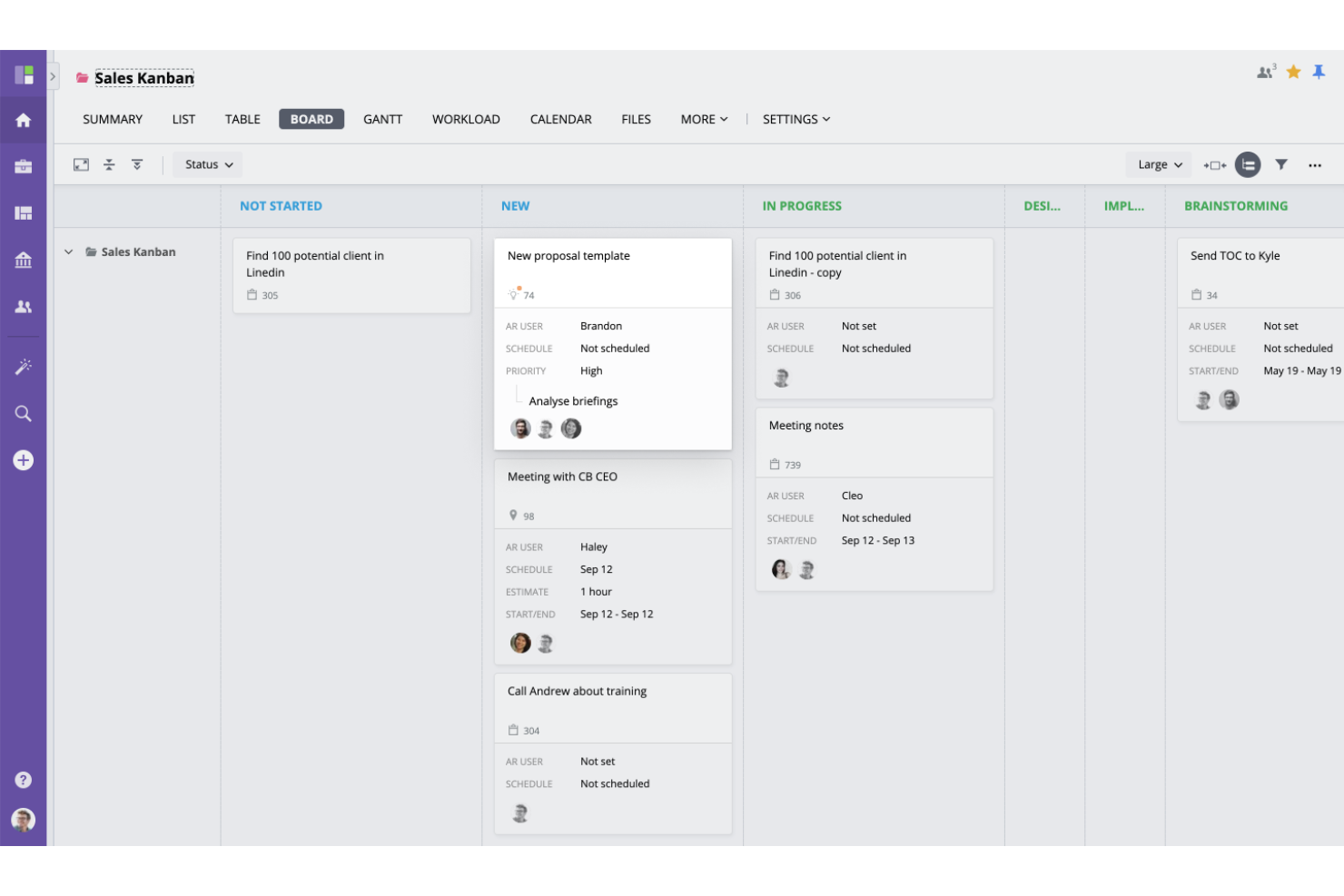
For teams seeking a time blocking solution to enhance productivity and streamline workflows, GoodDay offers a compelling work management platform. Tailored to meet the needs of diverse teams, such as project managers, team leaders, and remote workers, GoodDay stands out with its customizable workspaces and integration capabilities. By offering tools that consolidate project management, resource planning, and team collaboration, it addresses the challenges of managing multiple projects and enhancing team communication.
Why I Picked GoodDay
I picked GoodDay as a fitting choice for time blocking due to its versatile task visualization and customizable workspaces. These features allow you to organize your day into focused blocks of time effectively, catering to various project management methodologies like Waterfall and Scrum. The platform’s ability to adapt workflows to your specific needs ensures that you can maintain productivity and manage tasks efficiently, making it a suitable tool for those committed to time blocking strategies.
GoodDay Key Features
In addition to customizable workspaces, GoodDay offers:
- Multiple Views for Task Visualization: This feature allows you to see your tasks in different formats, such as timelines or Kanban boards, helping you allocate time blocks effectively.
- Goal Management Tools: These tools help you set and track goals, keeping your time blocks aligned with long-term objectives.
- Resource Planning: Plan and allocate resources efficiently, ensuring that your time blocks are realistic and achievable.
GoodDay Integrations
Integrations include Google Drive, Slack, Microsoft Teams, Dropbox, Google Calendar, Outlook, Jira, Trello, Asana, and GitHub.
Pros and Cons
Pros:
- Its Agile and Scrum support cater to flexible project methodologies
- Integrated time tracking connects your time blocks to actual logged hours
- Task-linked blocks ensure every time slot ties directly to project work
Cons:
- Mobile experience is less streamlined for detailed time blocking
- Some users report occasional slow system performance
Diğer Zaman Bloklama Uygulamaları
Kısa listeme giremeyen ancak yine de göz atmaya değer bazı ek zaman bloklama uygulaması seçenekleri şunlardır:


How I Evaluate Time Blocking Apps
I split my evaluation into two layers: baseline criteria every tool must meet—like blocking focused work time around a sprint review—and differentiators that separate the best options from the rest.
Core Functionality (Table Stakes For This List)
When I'm selecting tools for my list, I rank each one on a scale from 0 (does not offer the functionality) to 5 (excels in this area) for each core functionality listed below. Then, I calculate the tool's total score into a percentage. Each tool needs to achieve a minimum total score of 65% to be considered for inclusion.
- Calendar Time Blocking: I look for a visual daily and weekly calendar where you can create, resize, and color-code blocks—like reserving a two-hour window for sprint planning prep.
- Task-to-Calendar Scheduling: Each tool should let you pull tasks directly onto the calendar, so a backlog item with a Friday deadline can land in an open slot without manual re-entry.
- Calendar Integration: Two-way sync with Google Calendar, Outlook, or iCal matters here, because project managers live across multiple calendars and need blocks and meetings in one view.
- Priority & Task Management: I evaluate whether the app supports task lists with priorities, due dates, and project tags—enough structure to sort deliverables by urgency before blocking time.
- Recurring & Flexible Blocks: Recurring daily standups or weekly review blocks should be easy to template, and unfinished blocks should roll forward rather than disappear from the schedule.
- Time Tracking & Insights: Built-in tracking that captures planned vs. actual time per block helps project managers refine future estimates—like spotting that design reviews consistently run over.
Once I have a list of tools that meet this criteria, I consider what sets each platform apart.
Differentiating Factors (What Sets Vendors Apart)
Here's how I compare and contrast different vendors:
Standout Features
AI auto-scheduling is a big differentiator—I look for tools that place tasks into open calendar slots based on priority and deadlines, which saves project managers from manually puzzling together a packed week. Team visibility matters just as much, especially when you need to see who's in a focus block before scheduling a cross-functional sync. I also check for native integrations with tools like Jira, Asana, or ClickUp, so project tasks flow into time blocks without duplicate entry.
Beyond Features
Pricing structure is worth a close look—I evaluate whether a free tier gives individual project managers enough room to validate the tool before committing a team budget. Platform coverage also matters; a project manager bouncing between a laptop and their phone between meetings needs reliable sync across web, desktop, and mobile. I check onboarding resources too, since time blocking is a methodology shift for many teams, and guided templates or setup wizards help drive adoption faster than a blank calendar.
Zaman Bloklama Uygulaması Nasıl Seçilir?
Uzun özellik listeleri ve karmaşık fiyatlandırma yapılarına kendinizi kaptırmak kolaydır. Benzersiz yazılım seçimi süreciniz üzerinde çalışırken odaklanmanızı korumanıza yardımcı olmak için göz önünde bulundurmanız gereken faktörlerin bir kontrol listesini burada bulabilirsiniz:
| Faktör | Dikkat edilmesi gerekenler |
|---|---|
| Ölçeklenebilirlik | Uygulamanın ekibinizle birlikte büyüyüp büyüyemeyeceğini değerlendirin. İhtiyaçlarınız geliştikçe daha fazla kullanıcıyı veya daha büyük projeleri yönetebilecek mi? Maliyette büyük bir artış olmadan esneklik sunan kademeli fiyatlandırma planlarını arayın. |
| Entegrasyonlar | Uygulamanın takvimler, e-posta veya proje yönetimi yazılımları gibi mevcut araçlarınızla çalışıp çalışmadığını kontrol edin. Entegrasyon eksikliği iş akışında aksamalara veya verilerin iki kez girilmesine yol açabilir. |
| Özelleştirilebilirlik | Uygulamayı iş akışınıza uyacak şekilde ne ölçüde özelleştirebileceğinizi değerlendirin. Görünümleri değiştirebilir veya özel kurallar belirleyebilir misiniz? Sınırlı özelleştirilebilirlik, uygulamanın süreçlerinizle tam olarak uyumlu olmayabileceği anlamına gelebilir. |
| Kullanım kolaylığı | Uygulamanın ekibiniz için ne kadar sezgisel olduğunu değerlendirin. Kapsamlı bir eğitime ihtiyaçları olacak mı, yoksa hemen kullanmaya başlayabilecekler mi? Karmaşık bir arayüz, düşük benimseme oranlarına ve hayal kırıklığına yol açabilir. |
| Uygulama ve kullanıma alıştırma | Başlamak için gereken zamanı ve kaynakları göz önünde bulundurun. Sağlayıcı, eğitimler veya web seminerleri gibi kullanıma alıştırma desteği sunuyor mu? Uzun bir kurulum aşaması, ekibinizin verimlilik kazanımlarını geciktirebilir. |
| Maliyet | Uygulamanın fiyatlandırmasını bütçenizle karşılaştırın. Gizli ücretler veya uzun vadeli taahhütler var mı? Maliyetin uygulamadan elde etmeyi beklediğiniz değerle uyumlu olduğundan emin olun. |
| Güvenlik önlemleri | Uygulamanın güvenlik önlemlerini inceleyin. Sektör standartlarına uyuyor ve verilerinizi koruyor mu? Zayıf güvenlik, kuruluşunuzu risklere ve veri ihlallerine maruz bırakabilir. |
| Destek bulunabilirliği | Sunulan desteğin seviyesini belirleyin. 7/24 yardım var mı, yoksa destek almak için beklemeniz mi gerekecek? Güvenilir destek, sorunların hızlı bir şekilde çözülmesini sağlayarak kesinti süresini en aza indirir. |
Zaman Bloklama Uygulaması Nedir?
Zaman bloklama uygulaması, kullanıcıların farklı görevler ve etkinlikler için belirli zaman aralıkları ayırmasına yardımcı olan bir araçtır. Proje yöneticileri, serbest çalışanlar ve yöneticiler gibi profesyoneller, programlarını yönetmek ve üretkenliklerini artırmak için bu araçları kullanır. Takvim entegrasyonu, görev planlama ve hatırlatıcı özellikleri, etkili zaman yönetimini ve görev önceliklendirmesini destekler. Genel olarak bu araçlar, kullanıcıların görevlere odaklanmasına, ertelemeyi azaltmasına ve üretkenliği artırmasına yardımcı olur.
Zaman Bloklama Uygulamasının Özellikleri
Bir zaman bloklama uygulaması seçerken aşağıdaki temel özelliklere dikkat edin:
- Görev planlama: Görevler için belirli zaman aralıkları ayırmanıza olanak tanır ve gününüzü etkili bir şekilde düzenlemenize yardımcı olur.
- Takvim entegrasyonu: Mevcut takvimlerle senkronize olarak programınızı tek bir görünümde sunar ve manuel güncelleme ihtiyacını azaltır.
- Hatırlatıcılar ve bildirimler: Yaklaşan görevleri ve son teslim tarihlerini takip etmenizi sağlayan uyarılar göndererek önemli etkinlikleri unutma riskini en aza indirir.
- Yinelenen görevler: Tekrarlanan görevleri otomatikleştirerek zamandan tasarruf etmenizi sağlar ve programınızda tutarlılık oluşturur.
- Odaklanma modu: Belirlenen çalışma dönemlerinde bildirimleri engelleyerek dikkat dağıtıcı unsurları en aza indirir ve konsantrasyonu artırır.
- Renk kodlu görevler: Görev türlerini veya önceliklerini birbirinden ayırmak için renkleri kullanır; iş yükünüzü görselleştirmenizi ve yönetmenizi kolaylaştırır.
- Özelleştirilebilir şablonlar: Yaygın programlar için önceden hazırlanmış şablonlar sunarak ihtiyaçlarınıza uygun hızlı kurulum ve düzenleme yapmanıza olanak tanır.
- İş birliği araçları: Programları ve görevleri ekip üyeleriyle paylaşmanıza olanak tanıyarak koordinasyonu ve ekip çalışmasını kolaylaştırır.
- Analizler ve raporlar: İyileştirilmesi gereken alanları belirlemenize yardımcı olmak için zaman kullanımınız ve üretkenlik kalıplarınız hakkında içgörüler sunar.
- Mobil erişim: Nerede olursanız olun bağlantıda ve düzenli kalmanızı sağlayarak programınızı hareket hâlindeyken yönetmenize olanak tanır.
Zaman Bloklama Uygulamasının Faydaları
Bir zaman bloklama uygulamasını kullanmaya başlamak ekibiniz ve işletmeniz için çeşitli faydalar sağlar. Yararlanabileceğiniz bazı avantajlar şunlardır:
- Gelişmiş odaklanma: Görevler için belirli zamanlar planlayarak daha iyi konsantre olabilir ve odaklanma modu gibi özellikler sayesinde dikkat dağıtıcı unsurları en aza indirebilirsiniz.
- Artan üretkenlik: Görev planlama ve hatırlatıcılar iş yükünüzü takip etmenize ve daha kısa sürede daha fazla iş tamamlamanıza yardımcı olur.
- Daha iyi zaman yönetimi: Takvim entegrasyonu ve yinelenen görevler, zamanınızı verimli bir şekilde düzenleyerek mevcut sürenizden en iyi şekilde yararlanmanızı sağlar.
- Azalan stres: Ne yapılması gerektiğini ve bunun ne zaman yapılacağını tam olarak bilmek, çakışan görevleri ve sıkışık son teslim tarihlerini yönetmenin yarattığı kaygıyı azaltabilir.
- Artan sorumluluk bilinci: Programları ekip arkadaşlarıyla paylaşmak, herkesin sorumluluklarının farkında olduğu iş birliğine dayalı bir ortam oluşturur.
- Uygulanabilir içgörüler: Analizler ve raporlar zaman kullanımınız hakkında veriler sunarak üretkenlik eğilimlerini ve iyileştirilmesi gereken alanları belirlemenizi sağlar.
Zaman Bloklama Uygulamasının Maliyetleri ve Fiyatlandırması
Bir zaman bloklama uygulaması seçmek, mevcut çeşitli fiyatlandırma modellerini ve planları anlamayı gerektirir. Maliyetler özelliklere, ekip büyüklüğüne, eklentilere ve daha fazlasına göre değişir. Aşağıdaki tabloda yaygın planlar, ortalama fiyatları ve zaman bloklama uygulaması çözümlerinde genellikle bulunan özellikler özetlenmiştir:
Zaman Bloklama Uygulaması İçin Plan Karşılaştırma Tablosu
| Plan Türü | Ortalama Fiyat | Yaygın Özellikler |
|---|---|---|
| Ücretsiz Plan | $0 | Temel görev planlama, sınırlı takvim entegrasyonu ve temel hatırlatıcılar. |
| Kişisel Plan | $5-$15/kullanıcı/ay | Tam takvim entegrasyonu, özelleştirilebilir şablonlar ve yinelenen görevler. |
| İşletme Planı | $15-$25/kullanıcı/ay | Ekip iş birliği araçları, gelişmiş analizler ve öncelikli destek. |
| Kurumsal Plan | $25-$50/kullanıcı/ay | Özel entegrasyonlar, özel hesap yöneticisi, gelişmiş güvenlik özellikleri ve kapsamlı analizler. |
Zaman Bloklama Uygulaması SSS
Zaman bloklama uygulaması hakkında sık sorulan soruların bazı yanıtları:
Zaman bloklama uygulamaları üretkenliği nasıl artırır?
Zaman bloklama uygulamaları, görevlere belirli zaman aralıkları ayırmanıza yardımcı olarak dikkat dağıtıcı unsurları en aza indirir ve aynı anda tek bir göreve odaklanmanızı sağlar. Yolunuzda ilerlemenizi sağlamak için hatırlatıcılar ve bildirimler sunar; bu da zamanınızı daha etkili yönetmenize ve gün boyunca daha fazla iş tamamlamanıza yardımcı olur.
Zaman bloklama uygulamaları ekip iş birliği için kullanılabilir mi?
Evet, birçok zaman bloklama uygulaması takvimleri paylaşmanıza, görevler atamanıza ve ekip üyeleriyle programları koordine etmenize olanak tanıyarak ekip iş birliğini destekler. Bu işlev, herkesin öncelikler ve son tarihler konusunda aynı doğrultuda olmasını sağlayarak daha iyi iletişim ve ekip çalışmasını kolaylaştırır.
İş amaçlı kullanım için bir zaman bloklama uygulamasında nelere dikkat etmeliyim?
İş amaçlı kullanım için ekip iş birliği özellikleri, diğer iş araçlarıyla entegrasyon ve gelişmiş analizler sunan bir zaman bloklama uygulaması arayın. Bu özellikler ekibinizle koordinasyon kurmanıza, iş akışlarını kolaylaştırmanıza ve üretkenlik eğilimleri hakkında içgörüler elde etmenize yardımcı olur; böylece genel iş verimliliğini artırabilirsiniz.
Zaman bloklama uygulamalarını kullanmanın herhangi bir dezavantajı var mı?
Zaman bloklama uygulamalarını kullanmanın bazı dezavantajları arasında strese yol açabilecek aşırı programlama ve iş akışınızı aksatabilecek düzenli güncelleme gereksinimi bulunur. Bu sorunlardan kaçınmak için bu uygulamaları esnek bir şekilde kullanmanız ve gerektiğinde programınızı ayarlamanız önemlidir.
Zaman bloklama uygulamaları geleneksel takvim uygulamalarından nasıl farklıdır?
Zaman bloklama uygulamaları, görev yönetimine ve zaman ayırmaya odaklanmaları bakımından geleneksel takvim uygulamalarından farklıdır. Yinelenen görevler, hatırlatıcılar ve odaklanma modları gibi özellikler sunarak zamanınızı daha etkili yönetmenize ve önemli görevlere belirli zaman aralıkları ayırmanızı sağlar.
Zaman bloklama uygulamaları diğer üretkenlik araçlarıyla entegre olabilir mi?
Birçok zaman bloklama uygulaması, proje yönetimi yazılımları, e-posta istemcileri ve iletişim platformları gibi diğer üretkenlik araçlarıyla entegre olabilir. Bu entegrasyonlar görevleri ve takvimleri senkronize ederek, manuel veri girişini azaltarak ve tüm araçlarınızın verimli bir şekilde birlikte çalışmasını sağlayarak iş akışınızı kolaylaştırır.