

2026’nın En İyi 10 Zaman Takip Uygulaması: İncelendi & Karşılaştırıldı

10 En İyi Zaman Takibi Uygulamaları Listesi


En iyi zaman takibi uygulamaları, görevler, projeler ve ekip üyeleri arasında zamanın tam olarak nereye harcandığını anlamanıza yardımcı olur. Böylece faturalandırma doğruluğunu, verimliliği ve iş yükü planlamasını geliştirebilirsiniz. Bu araçlar, manuel elektronik tabloların yerini gerçek zamanlı içgörüler ve net sorumluluk takibiyle doldurur.
Kariyerim boyunca mühendislik ve ajans ortamlarında zaman takibi araçlarını bizzat kullandım ve kötü zaman verilerinin nasıl faturalandırma sorunlarına, kapsamın kontrolsüz şekilde genişlemesine ve tükenmişliğe yol açtığını gördüm.
Bu rehberde, ilk elden gerçekleştirdiğim testlere dayanarak en iyi zaman takibi uygulamalarını inceledim. Her biri saatleri kaydetme, zaman verilerini analiz etme ve ekiplerin odaklanmasını, doğru faturalandırma yapmasını ve daha akıllıca planlama gerçekleştirmesini sağlama açısından farklı güçlü yönler sunuyor. Bu nedenle, onları öne çıkaran özellikler, artıları ve eksileri ve bir sonraki aracınız hakkında bilinçli bir karar vermenize yardımcı olacak diğer ayrıntılar hakkında bilgi bulacaksınız.
Why Trust Our Software Recommendations
Our team has been testing and reviewing software since 2012. As project managers ourselves, we know how difficult—and important—it is to choose the right software.
For this guide, we evaluated tools using hands-on testing and independent research, scoring tools using our selection criteria. We also draw on insights from industry thought leaders and practicing project management experts.
Our reviews reflect our human editorial judgment, not a sales pitch.
Expert reviewers:
Zaman Takibi Uygulamaları Karşılaştırma Tablosu
Bu karşılaştırma tablosu, en iyi zaman takibi yazılımı seçimlerimin her biri hakkında temel ayrıntıları özetler:
| Tool | Starting Price | Website | |
|---|---|---|---|
| Best for GPS-enabled field team tracking | 4.6 out of 5 | Pricing upon request Free plan + 14-day free trial available | Website |
| Best as AI for business | 4.4 out of 5 | $8/user/month Free trial + Free demo available | Website |
| Best for remote employee monitoring | 4.8 out of 5 | $4.99/user/month 14-day free trial + free demo available | Website |
| Best for customizability and flexibility | 4.6 out of 5 | $6/user/month Free plan + Free trial + Free demo available | Book Demo |
| Best for user-friendly calendar integrations | 4.7 out of 5 | $9/user/month Free plan available; 30-day free trial; Free demo available | Book Demo |
| Best with employee monitoring capabilities | 4.8 out of 5 | $8/user/month Free trial + free demo available | Website |
| Best for tracking project costs in real time | 4.5 out of 5 | $6.42/user/month Free trial available | Website |
| Best for agencies managing budgets and time together | 4.6 out of 5 | $10/user/month 14-day free trial | Book Demo |
| Best for managing hourly workforces | 4.2 out of 5 | $99/month Free plan + 30-day free trial + free demo available | Website |
| Best for automatic time tracking | 4.6 out of 5 | $3.99/user/month 14-day free trial + free demo available | Website |
En İyi Zaman Takibi Uygulamalarına Genel Bakış
Her bir zaman takibi uygulamasının, her aracın en uygun kullanım alanını ve dikkat çeken özelliklerini göstermek için kısa bir açıklamasını burada bulabilirsiniz. Ayrıca kullanıcı arayüzlerine genel bir bakış sunmak için ekran görüntülerine de yer verdim.

Best for GPS-enabled field team tracking

Connecteam is an employee management platform built for deskless and mobile teams. It combines time tracking, scheduling, task management, and communication tools in one place and makes it easier for businesses to manage field employees and stay connected.
Why I Picked Connecteam
I picked Connecteam because it offers one of the most reliable GPS-enabled time-tracking systems for mobile and field teams. Its built-in time clock lets employees clock in and out from anywhere, and location tracking helps maintain accurate records for payroll and accountability. I also like its scheduling tools, which make it simple to manage shifts, track availability, and reduce conflicts, especially for distributed or on-the-go workforces.
Connecteam Key Features
Connecteam offers several other features that make it a comprehensive time tracking solution for your business.
- Automated Time Logging: This lets you automatically record employee work hours to reduce manual entry errors and maintain accurate reporting.
- Geofencing: You can set up virtual boundaries to make sure employees clock in and out only when they are within designated work areas, which adds a layer of accountability.
- Timesheet Export: You can easily export digital timesheets to payroll software, which streamlines the payroll process and saves time on administrative tasks.
- Break and Overtime Management: The app tracks breaks and overtime hours in real-time to help you manage compliance and follow fair labor practices.
Connecteam Integrations
Integrations include Gusto, QuickBooks, Xero, Paychex, Zapier, NetSuite, Salesforce, HubSpot, Slack, Microsoft Teams, Google Calendar, and Microsoft Outlook.
Pros and Cons
Pros:
- Timesheet export ready for payroll
- View live job-site map routes for mobile staff
- Accurate geofence clock-in monitoring
Cons:
- Requires mobile devices for full benefit
- Complex workflows require setup and configuration effort
New Product Updates from Connecteam

Connecteam Adds Automatic Paid Break Actions and Manual Break Windows
Connecteam adds automatic paid break actions and configurable start windows for manual breaks. These updates help teams manage break schedules and maintain accurate timesheets. For more information, visit Connecteam’s official site.
 .

Best as AI for business
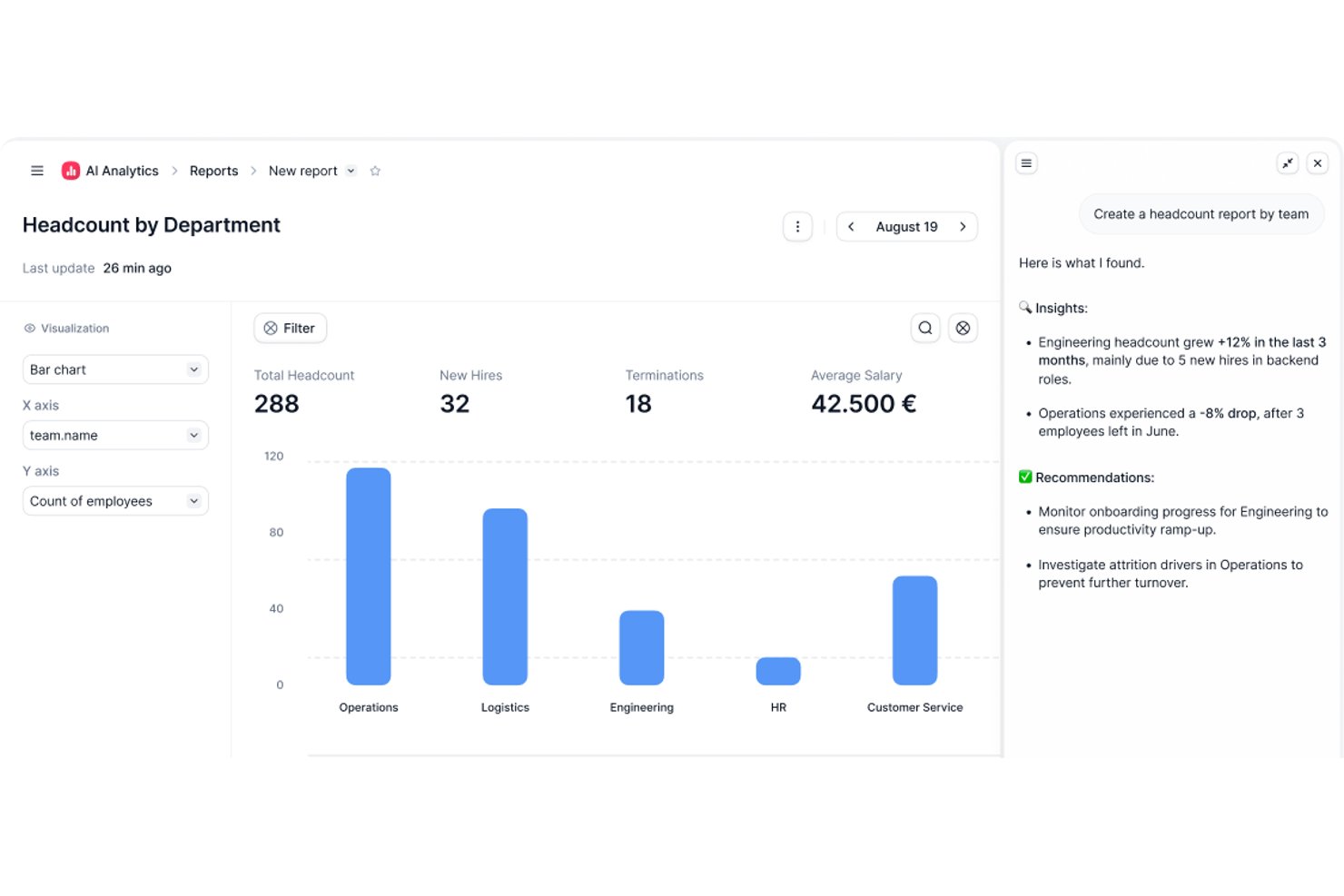
Factorial is an AI-powered HR and business operations platform that covers time tracking, shift scheduling, timesheet approval, project hour logging, and workforce reporting.
Who Is Factorial Best For?
Factorial is a strong fit for HR and operations teams that want time tracking, scheduling, and workforce reporting managed within a single AI-powered platform.
Why I Picked Factorial
I've included Factorial in my top picks because its AI-for-business positioning goes beyond basic time tracking: the built-in AI agent, One, can generate live reports from your actual workforce data, answer team questions about time-off policies, and automate expense processing without you touching a spreadsheet. I also like how project time tracking ties directly into Time and Materials billing, so tracked hours and rates roll up into billable amounts and profitability views in real time.
Factorial Key Features
- QR-code clock-in: Employees can clock in and out by scanning a QR code, including codes tied to specific work locations.
- Team Status widget: Gives managers a real-time view of which employees are clocked in, clocked out, or missing their scheduled start.
- Timesheet approval workflow: Managers can review timesheets by day, week, or month, filter by pending status, and approve or unapprove entries.
- Project budget tracking: Project phases display tracked hours versus estimated hours, used budget versus budget cap, and cost-to-date versus estimated cost.
Factorial Integrations
Marketplace integrations include Microsoft Power BI, Slack, Okta, Sage 200, DATEV LODAS, and Zapier. Factorial also offers a public REST API, webhooks, and sandboxes for custom integrations.
Pros and Cons
Pros:
- Attendance sits alongside leave and employee records
- Mobile clock-ins suit distributed, moving teams
- Quick timesheet submission for managers
Cons:
- Project invoicing caps may constrain client billing
- Custom time reports require manual workarounds
New Product Updates from Factorial
Factorial One Adds AI Automation Across HR, Finance, and IT
Factorial One adds company-context assistance, workflow automation, and connections across HR, Finance, and IT. These capabilities help employees access information, create documents, and complete routine tasks using AI. For more information, visit Factorial’s official site.
 .

Best for remote employee monitoring

Buddy Punch is an employee time clock software designed to help you manage time tracking, scheduling, and payroll. It lets you monitor employee hours and handle payroll processes from anywhere.
Why I Picked Buddy Punch
I picked Buddy Punch for its robust time tracking and attendance features, which make it easy to monitor remote employee hours, overtime, and missed shifts for accurate payroll. It also automates PTO tracking for simpler time-off management. Additionally, Buddy Punch offers advanced tools like GPS tracking, geofencing, and facial recognition to manage remote teams effectively, ensure accountability, and prevent buddy punching.
Buddy Punch Key Features
In addition, Buddy Punch offers a variety of other features that can meet your scheduling and time tracking needs.
- Employee Scheduling: You can create and manage schedules using a user-friendly drag-and-drop interface, which makes it easy to organize shifts and accommodate changes.
- Payroll Management: This lets you integrate your time tracking data with payroll processing to maintain accurate and timely payments.
- Customizable Reporting: You can generate detailed reports tailored to your specific needs and get insights into employee hours, overtime, and more.
- Job Costing: This lets you track the time spent on specific projects or tasks to better understand labor costs and optimize resource allocation.
Buddy Punch Integrations
Integrations include QuickBooks, ADP Workforce Now, Gusto, Paychex, Paylocity, Paycor, iSolved, Justworks, SurePayroll, Rippling, Zapier, and TriNet Payroll.
Pros and Cons
Pros:
- Customizable reports
- GPS tracking
- Real-time monitoring
Cons:
- No offline mode
- Basic mobile app

actiTIME
Best for customizability and flexibility
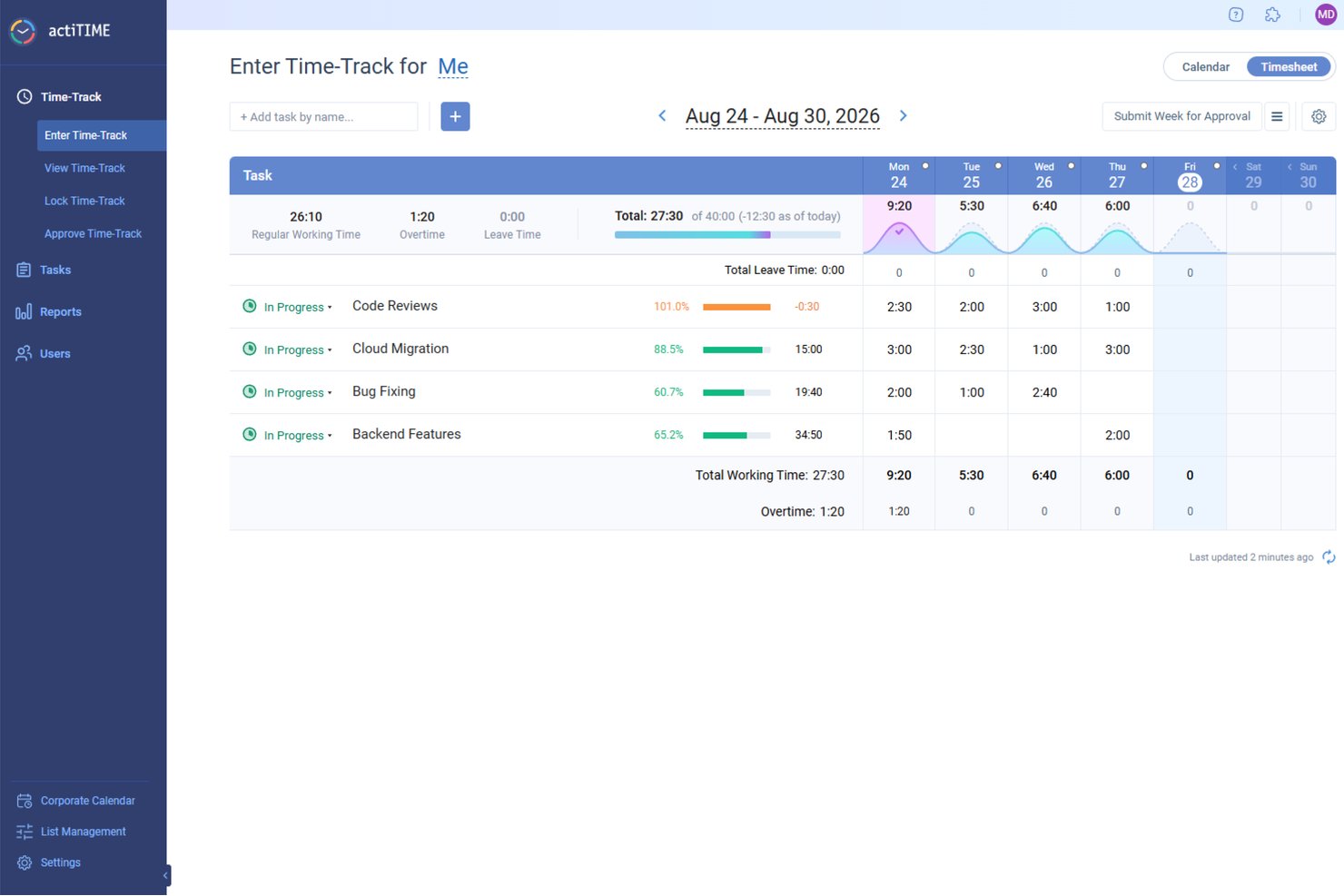
actiTIME is a digital project management tool that focuses on time tracking and work management for businesses of various sizes. Its user-friendly interface and comprehensive time management features position it as a top choice for intuitive time tracking management.
Why I Picked actiTIME
actiTIME allows users to tailor the software to their specific needs. This means that businesses can choose which features they want to use and turn off the rest, simplifying the user experience and ensuring that the software aligns perfectly with their workflow and requirements.
actiTIME provides various deployment options, including cloud, on-premise, and hybrid models. This flexibility ensures that businesses of all types and sizes can choose a deployment method that best fits their IT infrastructure and data management policies. Having these options in a largely "always online" world makes actiTIME stand out for customizability and flexibility.
actiTIME Key Features
actiTIME also offers a wide range of other features that cater to diverse business needs.
- Time Tracking: The weekly timesheets, calendar views, and mobile app let you track working hours and leave with precision.
- Task Management: You can use task estimates, deadlines, and Kanban views to efficiently manage your team's workload.
- Reports & Data Analysis: This lets you generate comprehensive performance reports and profit/loss analyses to gain insights into your business operations.
- Team Management: You can define user roles, set permissions, and manage work schedules to maintain a well-organized team environment.
actiTIME Integrations
Integrations include QuickBooks, Outlook, GitHub, Jira, and Trello.
Pros and Cons
Pros:
- Offline time tracking with sync-back
- Good manual timesheet locking and approval options
- Set hourly budgets and track cost by project
Cons:
- Setup and configuration of advanced workflows can be complex
- Reporting granularity and customization are limited
New Product Updates from actiTIME

actiTIME Visual Hour Indicator and Time-Track Report Redesign
actiTIME adds a wave-style hour indicator to the Timesheet and Calendar views and refreshes the Time-Track report for smoother navigation and clearer visuals. For more information, visit actiTIME's official site.
 .

Toggl
Best for user-friendly calendar integrations
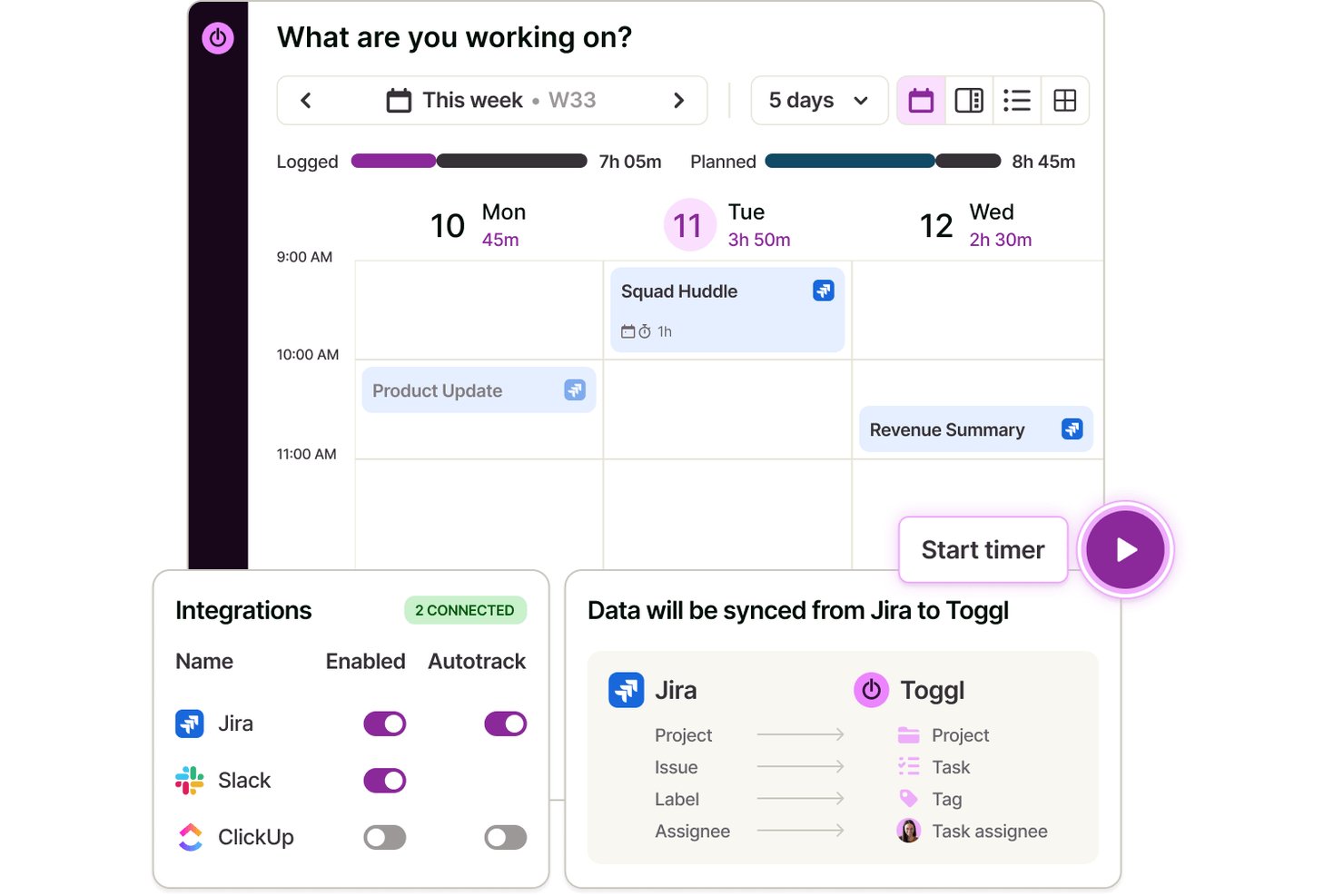
Toggl is a time-tracking app that lets you record hours, manage projects, organize client work, and connect seamlessly with popular calendar platforms through web, desktop, and mobile apps.
Who Is Toggl Best For?
Freelancers, agencies, and small to mid-sized teams looking for simple, calendar-friendly time tracking across multiple devices, capacity planning, and detailed reporting.
Why I Picked Toggl
I picked Toggl as one of the best because I can drag calendar events right into my timesheet, pull in Google or Outlook meeting data instantly, and see scheduled tasks alongside my tracked hours—all without leaving the platform. Toggl AI also allows me to start a timer, create tasks, and compile client reports, all using natural language.
Toggl Key Features
- Task management: Plan tasks on a board, schedule them against real capacity, and track how long they take with a timer.
- Capacity planning: Plan according to team availability and current workload, based on accurate time data.
- Multi-platform time entries: Track time on web, desktop, mobile, and browser extensions that sync across all devices.
- Billable rates: Assign custom hourly rates to projects, clients, or team members for accurate billing.
Toggl Integrations
Toggl offers native integrations with Google Calendar, Outlook Calendar, Asana, Jira, GitHub, Todoist, and more. It connects with Zapier, provides an API for custom integrations, and an MCP for connecting to Claude, Codex, and other AI assitants.
Pros and Cons
Pros:
- Customizable reporting dashboards for projects
- Transparent anti-surveillance approach
- Supports team-based timesheet approvals
Cons:
- No GPS location or screenshot tracking
- Bulk editing tools are limited

Best with employee monitoring capabilities

Insightful is a workforce analytics suite with separate modules for employee time-tracking, automatic time-mapping, and employee monitoring. It's user-friendly and has a broad set of features that can help organizations manage and monitor growing remote teams.
Why I Picked Insightful
It's a great time tracking solution for organizations with remote employees since it includes additional features to monitor employee activity, including time spent on specific projects and tasks, or on third-party websites or apps. It strikes a great balance between being easy to use and offering advanced features that make it great for scaling a remote business.
Insightful Key Features
Insightful also offers a range of other features that can help your team better track time on projects.
- Automated Screenshots: This lets you capture periodic screenshots of your team's screens to get visual insights into their work progress.
- App and Website Usage: You can track which applications and websites are being used and get a detailed view of digital habits and potential distractions.
- Project and Task Tracking: You can assign tasks and track time spent on specific projects, which makes it easier to manage workloads and deadlines.
- Customizable Reports: This lets you generate detailed reports tailored to your specific needs and helps you analyze productivity trends and make data-driven decisions.
Insightful Integrations
Integrations include Asana, Google Docs, Google Hangouts, Jira, Slack, and Trello.
Pros and Cons
Pros:
- On-premise deployment option
- Automatic idle time detection aids better time accuracy
- Segment data between office and remote teams
Cons:
- No mobile app
- Complex interface may slow team adoption
New Product Updates from Insightful
Insightful Expands MCP and HRIS Integrations
Insightful adds OAuth connections for ChatGPT and Microsoft Copilot Studio through its MCP Server, while HRIS integrations gain manager scope syncing in Beta. These updates expand AI access and automate permission management. For more information, visit Insightful’s official site.
 .

DeskTime
Best for tracking project costs in real time
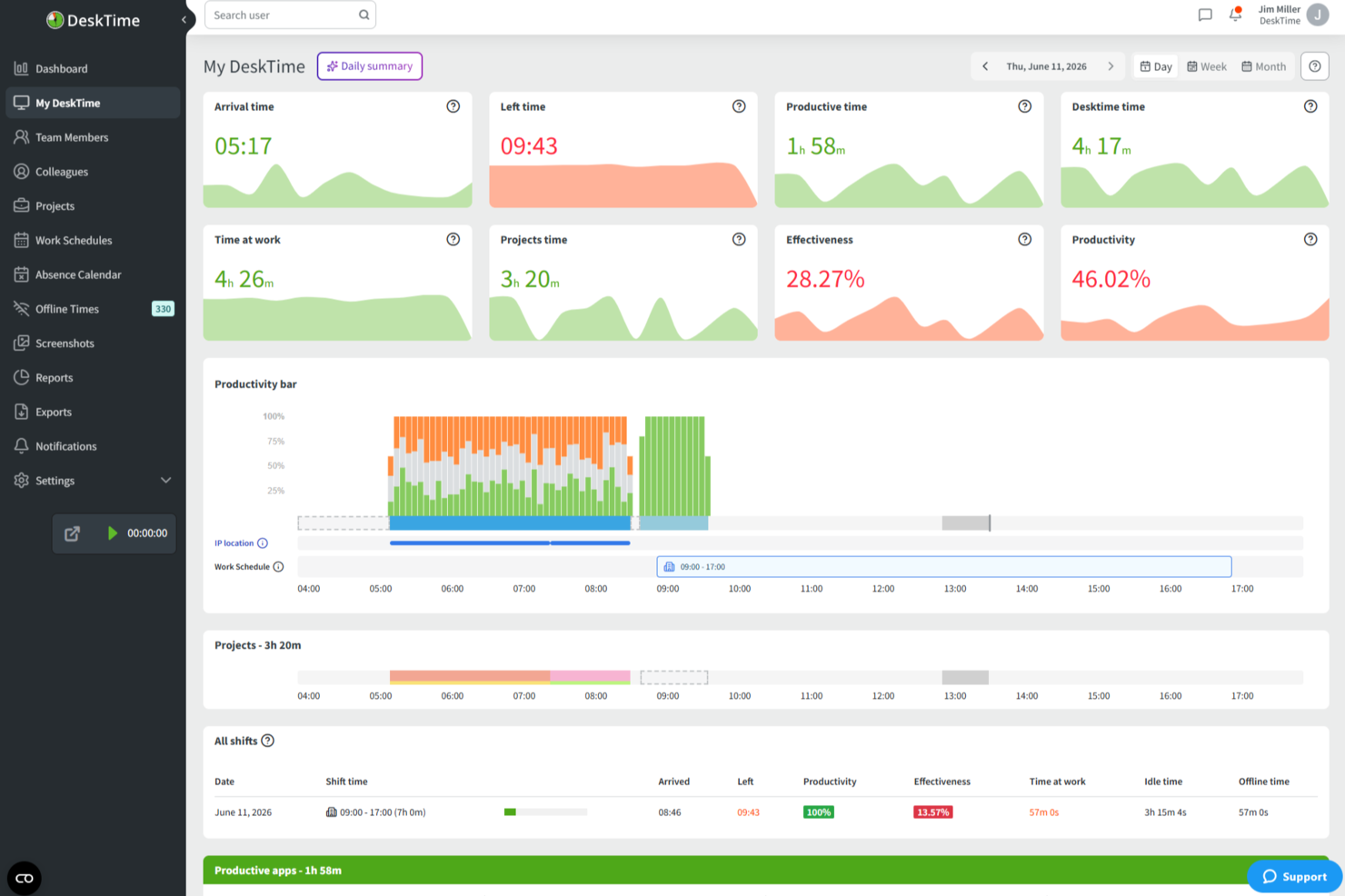
DeskTime is an automatic time tracking app that runs in the background to log app and URL usage, track hours across projects, calculate productivity scores, and manage employee schedules—all within a single platform.
Who Is DeskTime Best For?
DeskTime is a good fit for small to mid-sized teams that need automatic, always-on time tracking without relying on manual input from employees.
Why I Picked DeskTime
I've included DeskTime in my top picks because its project tracking lets you attach hourly rates directly to individual projects and tasks. That means as your team logs hours, DeskTime calculates labor costs in real time, so you're never guessing where your budget stands mid-project. I also like that multiple team members can log time against the same project simultaneously, giving you a live cost rollup across the entire team, not just individual contributors.
DeskTime Key Features
- Automatic time tracking: DeskTime runs in the background on your desktop and logs time automatically, without requiring manual start and stop inputs.
- App and URL categorization: Every app and website your team visits gets tagged as productive, unproductive, or neutral, giving you a breakdown of how work time is actually spent.
- Screenshot feature: DeskTime captures optional screenshots at set intervals, giving you visual confirmation of what was on screen during logged work hours.
- Absence calendar: Track team vacations, sick days, and time off directly within DeskTime alongside regular work schedules.
DeskTime Integrations
DeskTime offers a small set of native integrations, including Google Calendar, Outlook Calendar, Trello, GitLab, Asana, and Jira, and it connects with Zapier. An API is also available for custom integrations.
Pros and Cons
Pros:
- Built-in shift scheduling and absence management
- Categorizes apps as productive or unproductive
- Automatic tracking eliminates manual timer entry
Cons:
- Idle time detection can miscount work hours
- Mobile app lacks full desktop feature parity

Best for agencies managing budgets and time together

Productive is a complete work management system for agencies. It combines employee time tracking, project management, resource allocation, and budgeting under one roof.
Why I Picked Productive
This software is a good choice for teams that want an all-in-one solution for work management. Designed specifically with the needs of agencies in mind, your team members can track their billable and non-billable hours, and you can sync that up directly with invoicing and billing. You can also leverage your time tracking data for project planning, capacity planning, and resource allocation.
The platform is relatively flexible and customizable. Several views are available for project management, including Gantt charts, boards, timelines, calendars, and more. You can assign work and tasks based not just on employee capacities, but also skill sets. It's a comprehensive tool that covers nearly all aspects of your agency's work management operations.
Productive Key Features
Productive also offers several other features that cater to your agency's diverse needs.
- Invoicing: This feature lets you generate invoices directly from tracked time and project data to help you accurately bill your clients.
- Reporting: You can get insights into team performance, project progress, and financial metrics, all tailored to your specific needs.
- Resource Scheduling: This lets you easily allocate tasks and manage workloads across your team.
- Automations: You can automate routine tasks and processes to save time and reduce manual errors, which helps improve overall productivity.
Productive Integrations
Integrations include Dropbox, Exact, Google Calendar, HubSpot, Jira, Harvest Economic, Outlook, Microsoft Calendar, Slack, QuickBooks, and Xero.
Pros and Cons
Pros:
- Budget vs actuals visibility for each project
- Resource planning helps avoid over-booking your team
- Time entries linked directly to budgets and clients
Cons:
- Requires discipline from your team to track time accurately
- Customization options limited for complex setups
New Product Updates from Productive
Productive Adds Email and Calendar Integrations for Agents
Productive adds Gmail, Outlook, Google Calendar, and Outlook Calendar connectors for its AI agents. These integrations let agents manage emails and create calendar events directly within Productive. For more information, visit Productive’s official site.
 .

Homebase
Best for managing hourly workforces

Homebase is a time tracking solution tailored for small and midsize businesses, as well as remote and hybrid teams. It has an intuitive user interface (UI) with drag-and-drop functionality, which makes it a strong option if you’re looking for a feature-rich employee scheduling and time-tracking platform that has a relatively short learning curve.
For example, Greg Feinerman, Owner & Medical Director of Feinerman Vision, shared how impactful the tool has been in a healthcare setting: “Homebase made scheduling and payroll easier for our team because it tracked the hours of our staff with accuracy and generated clear reports. Homebase was also helpful for our company in terms of scheduling and tracking. It reduced our administrative work by roughly 20 percent a month, which afforded us more time to focus on patient care.”
Why I Picked Homebase
With Homebase’s scheduling and time tracking app, you can easily drag and drop shifts, make duplicates of employee schedules, and copy current shift schedules to other days with just a click. You can also easily group your employees into teams or departments and view their schedules at a glance, based on their roles. This is useful for businesses like restaurants or organizations with hourly employees, especially those that manage remote or hybrid teams.
Homebase Key Features
Homebase also offers several other features that make it useful as a time tracking app.
- GPS-Enabled Clock-Ins: This lets your team clock in and out from their mobile devices using GPS, which helps make sure they are where they need to be during work hours.
- Shift Alerts: Homebase automatically sends alerts to employees to remind them of upcoming shifts and reduce the likelihood of tardiness or missed shifts.
- Automatic Payroll Calculations: This lets you automatically convert tracked hours, breaks, and overtime into timesheets and calculate wages for payroll, which helps eliminate manual data entry.
- Team Communication Tools: This lets your team view their schedules, request time off, and swap shifts directly through the app.
Homebase Integrations
Integrations include Clover, Lightspeed, Shopify, Square, Toast, Upserve, ADP, Gusto, Heartland, Paychex, Rippling, SurePayroll, and Square Payroll.
Pros and Cons
Pros:
- Built-in photo capture at clock-in for audit trails
- Multi-location support with separate tracking per site
- Ability to set geofence radius for clock-in accuracy
Cons:
- Reporting customization and deep analytics limited
- Offline mode can be unreliable
New Product Updates from Homebase

Homebase Adds Time Card Review and AutoPayroll Alerts
Homebase adds Time Card Review, time clock monitoring, and AutoPayroll email alerts. These updates help managers correct timecard errors and address payroll issues before processing. For more information, visit Homebase’s official site.
 .

Best for automatic time tracking
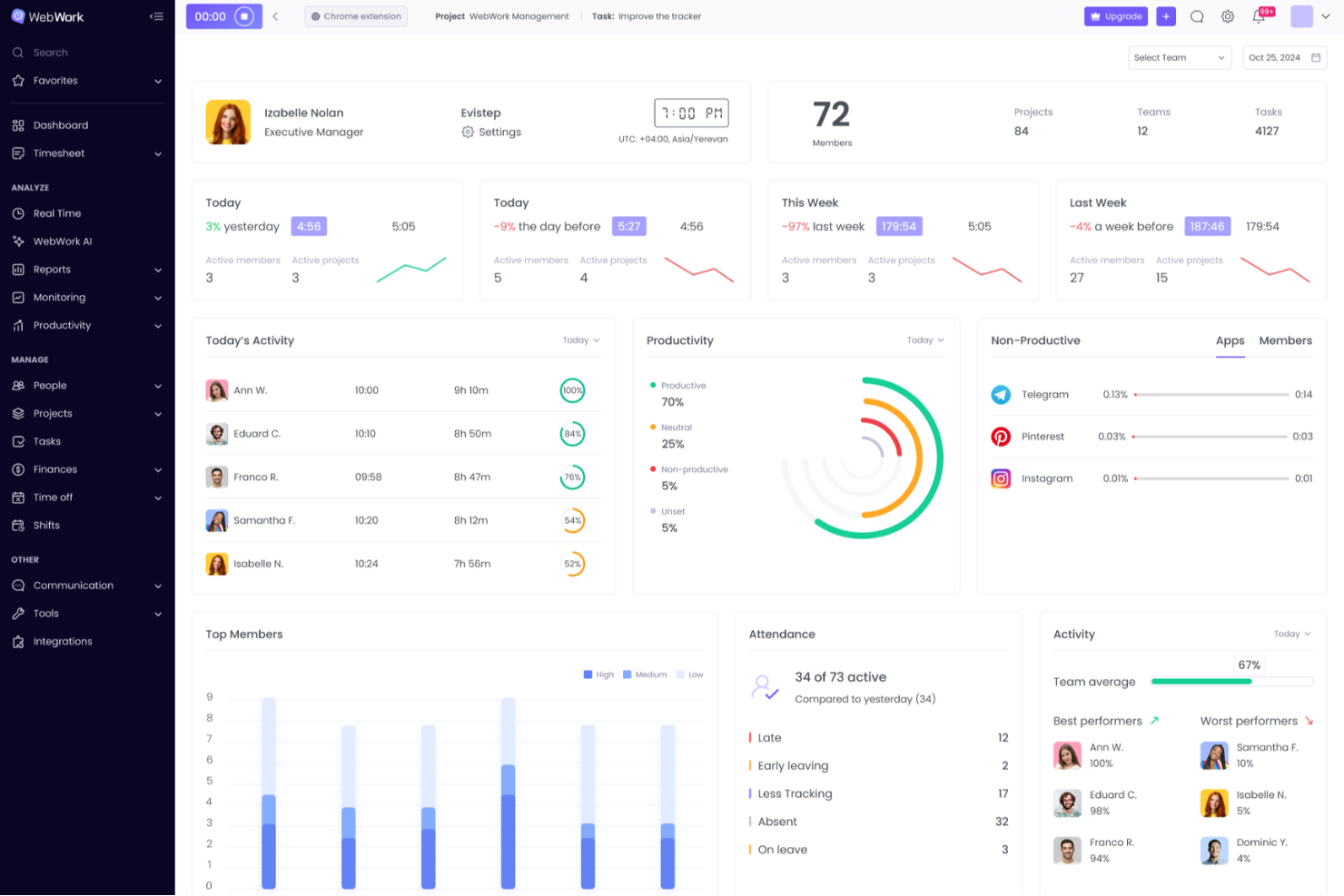
WebWork Time Tracker is a versatile tool designed to help you and your team monitor work hours and boost productivity. It offers automated time tracking and detailed activity monitoring and makes it easier to manage tasks and projects.
Why I Picked WebWork Time Tracker
I like that it offers time tracking with screenshots, which automatically records the hours your team works and captures periodic screenshots to verify their activity. This feature ensures you have a clear view of your team's productivity and helps maintain transparency. It's particularly beneficial when managing remote teams, as it provides an extra layer of accountability.
WebWork Time Tracker Key Features
WebWork Time Tracker also offers a range of other features that can help you improve productivity and accountability on your team.
- Task Management: You can organize and assign tasks directly within the app, which lets your team stay focused and on track with project goals.
- Billable Hours Tracking: You can easily distinguish between billable and non-billable hours, which helps maintain accurate invoicing and budgeting for your projects.
- Activity Levels: This lets you monitor keyboard and mouse activity levels to gain insights into your team’s engagement and productivity throughout the day.
- Invoice Generation: This lets you create and send professional invoices directly from the app, streamline your billing process, and improve cash flow management.
WebWork Time Tracker Integrations
Integrations include Asana, Slack, Deel, GitHub, ClickUp, Trello, Jira, Xero, Bitbucket, Zapier, Todoist, and Bitwage.
Pros and Cons
Pros:
- Manual time edits allow for missed clock-ins
- Idle-time detection flagging team time accuracy
- Segment tracked time by project and sub-task
Cons:
- Difficulty in deducting excess hours when tracker continues running
- Time-consuming setup and custom workflow configuration
New Product Updates from WebWork Time Tracker
WebWork Time Tracker Adds Scheduled Screenshot Exports
WebWork Time Tracker adds Scheduled Screenshot Export with daily, weekly, and monthly export options. This add-on helps workspace owners archive team screenshots automatically without manual downloads. For more information, visit WebWork Time Tracker’s official site.
 .
Diğer Zaman Takibi Seçenekleri
İşte en iyi zaman takibi yazılımları listesine giremeyen, ancak yine de göz atmaya değer birkaç seçenek:
- Agendrix
For payroll integration
- Beebole
For charging billable hours
- TimeTrex
For biometric employee attendance
- Clockify
For real-time tracking
- Jibble
For small teams
- 7shifts
For restaurant time tracking
- Projectworks
For real-time tracking of billable hours
- Timesheets.com
For project-specific time tracking
- Deltek Replicon Time
For mobile time tracking
- Miter
For construction labor compliance
- Sage HR
For employee engagement features
- Deel HR
For global teams
- ClickTime
For structured, finance-ready data
- Hubstaff
For tracking across devices
- Hub Planner by Milient
For capacity-based time planning
- MinuteShark
For manual and live timers
- VOGSY
For service firms using Google Workspace
- Monitask
For tracking remote team productivity
- TimeJam
For motivating teams with daily time goals


How I Evaluate Time Tracking Apps
I split my evaluation into two layers: baseline criteria a tool must hit—like project-level billing rates and native PM integrations—and differentiators that set tools apart for multi-client PMs.
Core Functionality (Table Stakes For This List)
When I'm selecting tools for my list, I rank each one on a scale from 0 (does not offer the functionality) to 5 (excels in this area) for each core functionality listed below. Then, I calculate the tool's total score into a percentage. Each tool needs to achieve a minimum total score of 65% to be considered for inclusion.
- Time Entry Methods: I check whether a tool supports real-time timers, manual entry, and weekly timesheets—because teams that split time between meetings and deep work need flexible logging options.
- Project & Task Association: Every logged hour should map to a specific project, task, or client so PMs can trace where time actually goes across active engagements.
- Billable Hours Tracking: I look for the ability to flag billable vs. non-billable time and set rates at the user, project, or task level—especially important for agencies juggling multiple client contracts.
- Reporting & Analytics: Good reports break down time by person, project, and client with export options, so I evaluate how easily you can pull a weekly utilization snapshot or a project profitability summary.
- Team & Resource Management: I evaluate multi-user support, role-based permissions, and workload visibility—tools like Toggl Track and Harvest handle this differently, so I compare how each surfaces team utilization.
- PM Tool Integrations: Native connections with platforms like Jira, Asana, and Monday are key, so I check whether tasks sync bidirectionally or require manual mapping between systems.
Once I have a list of tools that meet the criteria, I consider what sets each platform apart.
Differentiating Factors (What Sets Vendors Apart)
Here's how I compare and contrast different vendors:
Standout Features
Budget and burn alerts make a real difference when you're running multiple projects—I look for tools that notify you before a project crosses its hour or cost threshold, not after. Timesheet approval workflows also matter for PMO leads who need to validate logged hours before they flow into invoicing or payroll. I evaluate resource forecasting views that compare planned hours against actuals too, which helps PMs make staffing decisions before a sprint starts rather than reacting to overallocation mid-cycle.
Beyond Features
Pricing model matters a lot here—I check whether per-user costs make sense at scale or if flat-rate plans better fit larger PMOs. Platform coverage is another factor I weigh, since distributed teams need mobile apps and browser extensions to log time wherever they work. I also evaluate how easily a tool rolls out to a full team, looking at SSO provisioning and onboarding resources that help drive adoption. Getting 50 people to actually track their hours consistently is a challenge on its own, and the right vendor makes that easier.
Zaman Takibi Uygulaması Nasıl Seçilir?
Uzun özellik listeleri ve karmaşık fiyatlandırma yapıları arasında kaybolmak kolaydır. Kendinize özgü yazılım seçim sürecinizde ilerlerken odağınızı korumanıza yardımcı olmak için göz önünde bulundurmanız gereken faktörlerin bir kontrol listesi aşağıda yer alıyor:
| Faktör | Dikkat Edilmesi Gerekenler |
|---|---|
| Ölçeklenebilirlik | Araç, ekibiniz büyüdükçe onu destekleyebilir mi? Kullanıcı sınırlarını, proje kotalarını ve ihtiyaçlarınız arttıkça fiyatlandırma kademelerinin mantıklı olup olmadığını inceleyin. Ölçek büyüdükçe maliyeti karşılanamayacak veya kullanımı zorlaşacak araçlardan kaçının. |
| Entegrasyonlar | Proje yönetimi araçlarınıza, faturalandırma sistemlerinize veya bordro sisteminize bağlanabiliyor mu? Entegrasyonların doğrudan ve iyi belgelenmiş olduğundan, kullanımı zor geçici çözümlere dayanmadığından emin olun. Zapier desteği faydalıdır ancak yeterli olmayabilir. |
| Özelleştirilebilirlik | Zaman girişi alanları, onay akışları veya proje etiketleri gibi ayarları ihtiyaçlarınıza göre düzenleyebilir misiniz? İş akışlarınızın ne kadar katı olduğunu ve uygulamanın bunlara uyum sağlayıp sağlayamayacağını düşünün. |
| Kullanım kolaylığı | Ekibiniz aracı gerçekten kullanacak mı? Basit zamanlayıcılara, mobil erişime ve minimum kurulum gereksinimine sahip araçları tercih edin. Kullanımı zahmetliyse hatalı veri alırsınız veya hiç veri alamazsınız. |
| Uygulama ve işe alıştırma | Kurulum ne kadar sürecek ve kimlerin dahil olması gerekecek? Yönetici desteğine ihtiyaç duyup duymayacağınızı, projeleri içe aktarmanın ne kadar süreceğini ve ne tür bir eğitim sunulduğunu değerlendirin. |
| Maliyet | Kullanıcı başına aylık fiyatı haklı çıkarabilir misiniz? Gizli sınırlamalara, uzun vadeli sözleşmelere ve zorunlu eklentilere dikkat edin. Ücretsiz deneme veya freemium kademesi riski azaltmaya yardımcı olur. |
| Güvenlik önlemleri | Sağlayıcı, SOC 2, SSO veya 2FA gibi en iyi uygulamaları takip ediyor mu? Müşteri çalışma saatlerini veya bordro verilerini kaydediyorsanız bunların uygun şekilde korunduğundan emin olun. |
| Destek erişilebilirliği | Bir şeyler ters gittiğinde birine ulaşabilir misiniz? Canlı sohbet, e-posta veya telefon desteğinin dahil olup olmadığını ya da desteğin yalnızca çalışma saatleriyle veya üst düzey kademelerle sınırlı olup olmadığını kontrol edin. |
Zaman Takibi Uygulaması Nedir?
Zaman takibi uygulaması, görevlere harcanan süreyi kaydetmek ve analiz etmek için tasarlanmış bir araçtır; bireylerin ve ekiplerin çalışma saatlerini kaydetmesine, proje yöneticilerinin ise kapasiteden haberdar olmasına yardımcı olur. Serbest çalışanlar, ajanslar ve proje tabanlı ekipler tarafından faturalandırılabilir zamanı takip etmek, üretkenliği ölçmek ve iş yüklerini yönetmek için kullanılır.
Bu uygulamalar genellikle zamanlayıcılar, manuel giriş, raporlama ve faturalandırma veya proje yönetimi araçlarıyla entegrasyonlar içerir.
Zaman Takibi Uygulamalarının Özellikleri
Bir zaman takibi uygulaması seçerken aşağıdaki temel özelliklere dikkat edin:
- Kullanıcı dostu arayüz: Uygulamada kolayca gezinilebilmeli ve zamanlayıcıları hızlıca başlatıp durdurmanıza veya çalışma saatlerini kaydetmenize olanak tanınmalıdır. Böylece dikkatinizi araç yerine işinize verebilirsiniz.
- Birden fazla cihaz desteği: Masaüstü, mobil cihaz ve web tarayıcısında sorunsuz çalışan bir uygulama arayın; bu, cihazlar arasında geçiş yaparken kullanışlıdır.
- Proje ve görev düzenleme: Çalışma saatlerini müşteri, proje veya göreve göre düzenleyebilirsiniz. Bu, zamanınızın nereye gittiğini gözden geçirmenize ve müşterilere kolayca fatura kesmenize yardımcı olur.
- Özelleştirilebilir raporlar: Bu özellik, takip edilen zamana göre ayrıntılı raporlar oluşturmanıza, eğilimleri görmenize, üretkenliği takip etmenize ve çalışma saatlerini bir yöneticiyle veya müşteriyle kolayca paylaşmanıza olanak tanır.
- Manuel zaman girişi: Zamanlayıcıyı başlatmayı unutsanız bile kayıtlarınızın doğru kalması için çalışma saatlerinizi manuel olarak ekleyebilmeli veya düzenleyebilmelisiniz.
- Hatırlatıcılar ve bildirimler: Bu özellik, kayıtlarınızı düzenli tutmak ve eksikliklerle atlanan girişleri önlemeye yardımcı olmak için giriş veya çıkış yapma hatırlatıcıları gibi uyarılar sağlar.
- Diğer araçlarla entegrasyon: Zamandan tasarruf etmek ve iş akışlarınızı kolaylaştırmak için proje yönetimi araçlarına veya takvimlere bağlanabilmelisiniz.
- Çevrimdışı işlevsellik: Bu özellik, internet bağlantınız olmadığında bile zamanı takip etmenizi sağlar. Her şeyin güncel kalması için internete eriştiğinizde çalışma saatleriniz senkronize edilir.
- Faturalandırılabilir ücret yönetimi: Farklı ücretlerle faturalandırma yapıyorsanız faydalı olan bu özellik, faturalandırılabilir ücretleri kolayca belirlemenize ve ayarlamanıza olanak tanır.
Yaygın Zaman Takibi Uygulaması Yapay Zekâ Özellikleri
Yukarıda listelenen standart zaman takibi uygulaması özelliklerinin yanı sıra birçok çözüm aşağıdaki gibi yapay zekâ özellikleri sunar:
- Otomatik zaman yakalama: Yapay zekâ etkinliğinizi takip edebilir ve zamandan tasarruf etmeniz, manuel hataları önlemeniz için zamanı doğru projelere veya görevlere otomatik olarak atayabilir.
- Akıllı öneriler: Yapay zekâ, etkinliğinize göre hangi müşteri veya görev üzerinde çalıştığınızı önerebilir; bu da çalışma şeklinizi değiştirdiğinizde düzenli kalmanızı kolaylaştırır.
- Tahmine dayalı analiz: Yapay zekâ, proje tamamlanma sürelerini öngörmek veya çalışma programınızı daha verimli planlamanıza yardımcı olmak için önceki örüntüleri analiz edebilir.
- Anormallik tespiti: Yapay zekâ, hataları hızlıca düzeltmeniz ve ileride oluşabilecek karışıklıkları önlemeniz için olağandışı zaman kayıtlarını (ör. çok uzun çalışma saatleri veya atlanan girişler) işaretleyebilir.
- Üretkenlik içgörüleri: Yapay zekâ çalışma alışkanlıklarınızı inceleyebilir, eğilimleri öne çıkarabilir ve daha çok değil, daha akıllıca çalışabilmeniz için uygulanabilir ipuçları sunabilir.
Zaman Takibi Uygulamalarının Faydaları
Zaman takibi uygulamalarını hayata geçirmek ekibiniz ve işletmeniz için çeşitli faydalar sağlar. İşte yararlanmayı bekleyebileceğiniz birkaç fayda:
- Daha iyi zaman farkındalığı: Ekip üyelerinin çalışma saatlerinin nereye gittiğini görmesine yardımcı olarak daha verimli çalışmalarını sağlar.
- Daha kolay faturalandırma: Faturalandırılabilir saatleri doğru şekilde takip ederek müşterilere tekrar tekrar kontrol etme gereği duymadan fatura göndermenizi sağlar.
- Daha net proje maliyetleri: Her görevin veya projenin ne kadar zaman aldığını göstererek bütçeyi aşmamanıza yardımcı olur.
- Geliştirilmiş hesap verebilirlik: Özellikle uzaktan çalışan ekiplerde, kimin ne üzerinde ve ne zaman çalıştığını görmeyi kolaylaştırır.
- Basitleştirilmiş bordro işlemleri: Çalışma saatlerini kaydederek zaman çizelgelerinin peşine düşmeden ücret hesaplamanızı sağlar.
- Daha hızlı raporlama: Manuel elektronik tablolar oluşturmanıza gerek kalmadan zaman verilerine hızlı erişim sağlar.
- Daha sorunsuz kaynak planlaması: İş yükü dengesizliklerini fark etmenizi ve görevleri daha dengeli şekilde atamanızı sağlar.
Zaman Takibi Uygulamalarının Maliyetleri ve Fiyatlandırması
Zaman takibi uygulamalarını seçerken mevcut çeşitli fiyatlandırma modellerini ve planları anlamak gerekir. Maliyetler özelliklere, ekip büyüklüğüne, eklentilere ve daha birçok etkene göre değişir. Aşağıdaki tablo, zaman takibi uygulamalarında yaygın planları, ortalama fiyatlarını ve genellikle sunulan özellikleri özetlemektedir:
Zaman Takibi Uygulamaları İçin Plan Karşılaştırma Tablosu
| Plan Türü | Ortalama Fiyat | Yaygın Özellikler |
|---|---|---|
| Ücretsiz Plan | $0 | Temel zaman takibi, manuel giriş, sınırlı sayıda proje ve temel raporlama |
| Kişisel Plan | $5–$10/kullanıcı/ay | Zaman takibi, mobil erişim, basit raporlar ve sınırlı entegrasyonlar |
| İşletme Planı | $10–$25/kullanıcı/ay | Ekip yönetimi, proje takibi, faturalandırma, onay iş akışları ve gelişmiş raporlar |
| Kurumsal Plan | $25–$50/kullanıcı/ay | Özel roller, denetim günlükleri, özel destek, SSO seçenekleri ve gelişmiş güvenlik |
Zaman Takibi Uygulaması Sıkça Sorulan Sorular
Zaman takibi uygulamaları ve bunların süreçlerinize nasıl değer katabileceği hakkında sıkça sorulan soruların bazı yanıtları burada:
Ekibimin çalışma süresini neden takip etmeliyim?
Ekibinizin çalışma süresini takip etmek, çalışma saatlerinin nerede harcandığını görmenizi ve darboğazları ya da verimsizlikleri belirlemenizi sağlar. Bu veriler kaynakları daha iyi tahsis etmenize, bütçeleri yönetmenize ve projeleri plan dahilinde tutmanıza yardımcı olur. Proje yöneticisi olarak bu özellik, daha doğru tahminler ve müşteri raporlaması yapmanızı desteklemek açısından özellikle faydalıdır.
Doğru zaman takibi, tahmin yürütmeye gerek kalmadan müşteri faturalandırmasını ve bordro işlemlerini de destekler. Genel olarak hesap verebilirlik oluşturur ve ekibinizin daha akıllıca çalışmasına yardımcı olur.
Zaman takibi uygulamaları üretkenliğe nasıl yardımcı olur?
Zaman takibi uygulamaları, her gün zamanın nerede harcandığını göstererek üretkenliğe yardımcı olur. Dikkat dağıtıcı unsurları fark edebilir, iş yüklerini yönetebilir ve ekibinizi yüksek öncelikli görevlere odaklanmaya teşvik edebilirsiniz. Birçok uygulama, herkesin sorumluluklarını yerine getirmesine ve programa uymasına yardımcı olmak için otomatik hatırlatıcılar ve raporlar sunar.
Üretken olmayan görevlere harcanan zamanın miktarını vurgulayan birçok makale var ve bunlar oldukça endişe verici. Cep telefonlarında geçirilen zamandan sosyalleşme faaliyetlerine kadar bunlar yılda yüzlerce saati boşa harcayabilir.
İş gücünüz genelinde zaman takibini uyguladığınızda çalışanlarınız, biriktirdikleri üretken olmayan saatlerin daha fazla farkına varır; çünkü bu saatleri takip uygulamalarına kaydetmelerinin bir yolu olmayacaktır. Bunun yerine, çalışma saatleri sırasında zaman kaybettiren faaliyetleri azaltarak veya ortadan kaldırarak daha sorumlu ve üretken hale gelirler.
Ücretsiz zaman takibi uygulamaları var mı?
Evet, birçok zaman takibi uygulaması daha küçük ekipler veya özellikleri denemek için harika olan ücretsiz planlar sunar. Toggl Track, Clockify ve Harvest gibi araçların ücretsiz sürümleri vardır. Bununla birlikte, ücretsiz planlar temel zaman takibi ihtiyaçları olan küçük işletmeler için de harika bir seçenektir. Bu planların ücretli planlarda bulunan tüm özellikleri içermeyeceğini ve çoğu zaman sınırlı müşteri desteği sunduğunu unutmayın.
Proje tahminlerini iyileştirmek için zaman takibi verilerini nasıl kullanabilirim?
Gelecekteki çalışmalar için daha doğru tahminler oluşturmak amacıyla zaman takibi uygulamalarındaki gerçek proje verilerini kullanabilirsiniz. Benzer görevlerin ne kadar sürdüğünü, gecikmelerin nerede meydana geldiğini ve hangi kaynakların aşırı yüklendiğini analiz edin. Geçmiş veriler sayesinde yeni proje planlarınız ve teklifleriniz gerçek ekip performansını yansıtabilir, böylece tahminleriniz daha güvenilir olur.
Zaman takibi uygulamalarında zaman çizelgesi onaylarını ve düzeltmelerini nasıl yönetebilirim?
Çoğu zaman takibi uygulaması, yöneticilerin gönderilen zaman çizelgelerini kesinleştirilmeden önce inceleyip onaylayabilmesi için onay iş akışları oluşturmanıza olanak tanır. Hatalar veya eksik kayıtlar varsa doğrudan uygulama üzerinden düzeltme talep edebilirsiniz. Ekip üyelerini otomatik olarak bilgilendiren ve denetim kayıtları için değişiklik günlüğü tutan araçları tercih edin.