

2026’da İncelenen En İyi 10 Yapay Zekâ Kurumsal İş Akışı Yazılımı

En İyi Yapay Zekâ Kurumsal İş Akışı Yazılımları Kısa Listesi


Kurumsal düzeyde projeleri yönetmek; karmaşık iş akışlarını koordine etmek, ekiplerin uyum içinde çalışmasını sağlamak ve öncelikler değiştiğinde hızla uyum sağlamak anlamına gelir. Yapay zekâ kurumsal iş akışı yazılımları, rutin görevleri otomatikleştirerek, görünürlüğü artırarak ve ekiplerin büyük ve birbiriyle bağlantılı sistemler arasında daha verimli ilerlemesine yardımcı olarak bu çalışmayı destekler.
Proje yönetimi ve iş akışı platformlarını test etme konusunda yıllara dayanan deneyimimle, ekstra karmaşıklık katmanları eklemek yerine günlük operasyonları gerçekten iyileştiren araçları belirlemeye odaklanıyorum. Amacım, anlamlı bir etki sağlayan yapay zekâ iş akışı çözümlerinin tarafsız ve iyi araştırılmış bir incelemesini sunmak.
Bu makalede, günümüzde mevcut olan en iyi seçenekleri ele alacak ve her aracı farklı kılan yapay zekâ destekli özellikleri ve avantajları vurgulayacağım. Kurumsal ekiplerin gerçek ihtiyaçlarına göre hazırlanmış bilgiler bulacak, böylece iş akışınızı en iyi şekilde geliştiren ve kuruluşunuzun hedeflerini destekleyen çözümü seçebileceksiniz.
Why Trust Our Software Recommendations
Our team has been testing and reviewing software since 2012. As project managers ourselves, we know how difficult—and important—it is to choose the right software.
For this guide, we evaluated tools using hands-on testing and independent research, scoring tools using our selection criteria. We also draw on insights from industry thought leaders and practicing project management experts.
Our reviews reflect our human editorial judgment, not a sales pitch.
Expert reviewers:
Yapay Zekâ Kurumsal İş Akışı Yazılımları Karşılaştırma Tablosu
Bu karşılaştırma tablosu, en iyi yapay zekâ kurumsal iş akışı yazılımı seçimlerimin fiyatlandırma ayrıntılarını özetlemektedir.
| Tool | Starting Price | Website | |
|---|---|---|---|
| Best for AI-driven project management | 4.3 out of 5 | $10/user/month Free plan + 14-day trial available | Book Demo |
| Best for client-facing portals | 4.4 out of 5 | $5,000/year Free trial + free demo available | Website |
| Best for enterprise-grade no-code governance | 4.7 out of 5 | $40/user/month Free demo available | Book Demo |
| Best for AI-powered enterprise workflows | 4.6 out of 5 | Pricing upon request Not available | Book Demo |
| Best for document processing | 4.9 out of 5 | Pricing upon request Free trial available + free demo | Website |
| Best for custom workflows | 4.7 out of 5 | €20/month Free trial available | Website |
| Best for data visualization | 4.4 out of 5 | Pricing upon request Free demo available | Website |
| Best for secure file sharing | 4.3 out of 5 | $7/user/month Free plan + trial + demo available | Website |
| Best for AI orchestration and automation | — | $19.99/month Free plan available | Website |
| Best for low-code development | — | Pricing upon request Free demo available | Website |


En İyi Yapay Zekâ Kurumsal İş Akışı Yazılımları İncelemeleri
Aşağıda, kısa listeme giren en iyi yapay zekâ kurumsal iş akışı yazılımlarının ayrıntılı özetlerini bulabilirsiniz. İncelemelerim, sizin için en uygun aracı bulmanıza yardımcı olmak amacıyla her aracın temel özelliklerine, artılarına & eksilerine, entegrasyonlarına ve ideal kullanım alanlarına ayrıntılı bir bakış sunuyor.

Wrike
Best for AI-driven project management

Wrike offers a versatile project management solution tailored for teams looking to streamline their workflows and enhance productivity. Designed to reduce busywork through automation and AI, it appeals to businesses across various industries, from retail giants to tech innovators, who seek to optimize their operations without the hassle of complex setups. By integrating seamlessly with existing tools, Wrike addresses the need for improved efficiency and effective collaboration in managing projects.
Why I Picked Wrike
I picked Wrike for its unique ability to blend AI and automation into project management, making it an ideal choice for enterprises. The platform's generative AI capabilities, such as creating project plans and summarizing meetings, directly address the need for efficient task management. Additionally, Wrike's real-time dashboards offer an invaluable feature for monitoring project progress and ensuring alignment across teams, which is crucial for managing large-scale operations. These features together make Wrike a compelling option for businesses looking to enhance their workflow processes.
Wrike Key Features
In addition to its AI-driven project planning and real-time monitoring, I also found the following features to be useful:
- Customizable Request Forms: Allow your team to tailor project intake processes to fit specific needs and streamline task initiation.
- Gantt Charts: Provide a visual timeline of project tasks, helping your team to plan and adjust schedules dynamically.
- Kanban Boards: Enable your team to visualize work stages, making it easier to track progress and manage workloads.
- In-Platform Communication: Facilitate seamless collaboration by keeping all project-related discussions within the platform.
Wrike Integrations
Integrations include NetSuite, QuickBooks, Jira, Microsoft Teams, Salesforce, Dropbox, Google Drive, Slack, Box, and GitHub.
Pros and Cons
Pros:
- AI supports enterprise project prioritization
- Highly customizable workflows for teams
- AI supports enterprise project prioritization
Cons:
- Steep learning curve initially
- Advanced AI features cost more
New Product Updates from Wrike

Wrike Adds Advanced Filters to Chart View
Wrike introduces new default filters in Chart view, including relative dates, exclusion conditions, multiple filters per field, and status group filtering. These updates help teams refine project data and reporting. For more information, visit Wrike’s official site.

Moxo
Best for client-facing portals
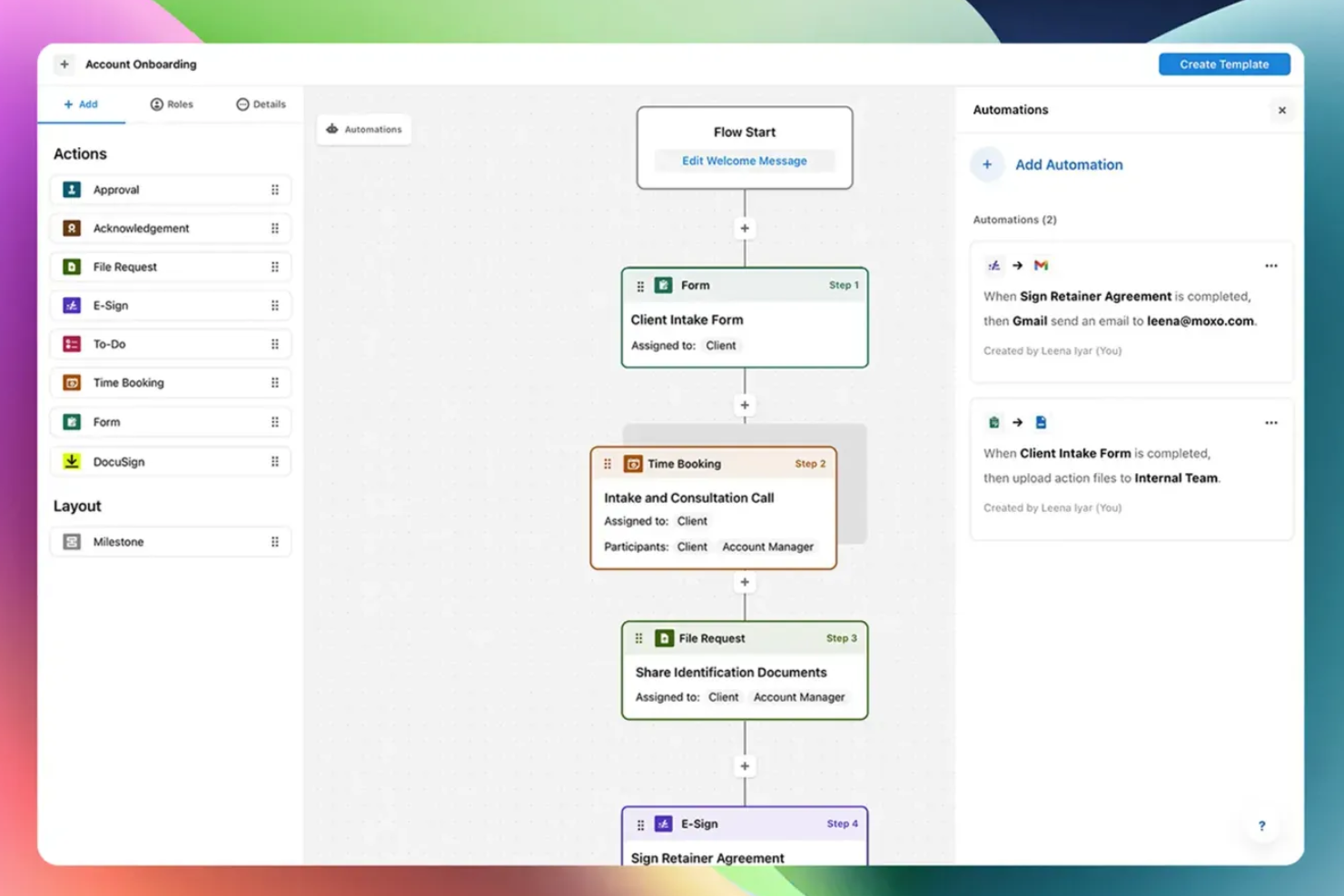
Moxo is an AI-powered workflow orchestration platform that combines visual workflow building, client-facing portals, AI agents, and built-in communication tools to manage multi-party business processes.
Who Is Moxo Best For?
Moxo is a strong fit for mid-size to enterprise teams in financial services, legal, or professional services that run high-touch, client-facing workflows with multiple external stakeholders.
Why I Picked Moxo
Moxo earns its spot on my shortlist because of how it handles external stakeholder participation in a live workflow. When a client needs to approve a document, submit a form, or sign a contract, they get a focused portal view showing exactly their action and the context around it, with no training required and no access to internal process logic. I also like that this portal experience is built directly into the workflow engine, so the moment a client completes their step, the next internal action triggers automatically, with no manual handoff needed.
Moxo Key Features
- AI agent framework: Deploy Assist, Automate, and Amplify agents to handle preparation, validation, and monitoring tasks around human decision points in a workflow.
- Visual workflow builder: Design multi-step processes with conditional branching, parallel paths, looping, and subflows using a drag-and-drop canvas.
- AI utilities: Apply built-in AI actions to extract, summarize, translate, or transcribe content at any step in a workflow.
- Audit logs: Access a timestamped record of every action taken across a workflow instance for compliance and accountability tracking.
Moxo Integrations
Moxo offers data sync connectors with Salesforce, HubSpot, Microsoft Dynamics, Zoho, Wealthbox, Redtail, Filevine, Global Relay, Smarsh, and Xero, along with integrations for tools like DocuSign, Jira, Slack, Stripe, QuickBooks, and file upload connections from Google Drive, Dropbox, Box, and OneDrive. It's available on Zapier and has a REST API and webhooks for custom integrations.
Pros and Cons
Pros:
- Drag-and-drop builder with reusable templates
- Built-in chat, video, and screen sharing
- White-label portals preserve your brand identity
Cons:
- No built-in annotation on documents
- No built-in timer for tracking task duration
Best for enterprise-grade no-code governance
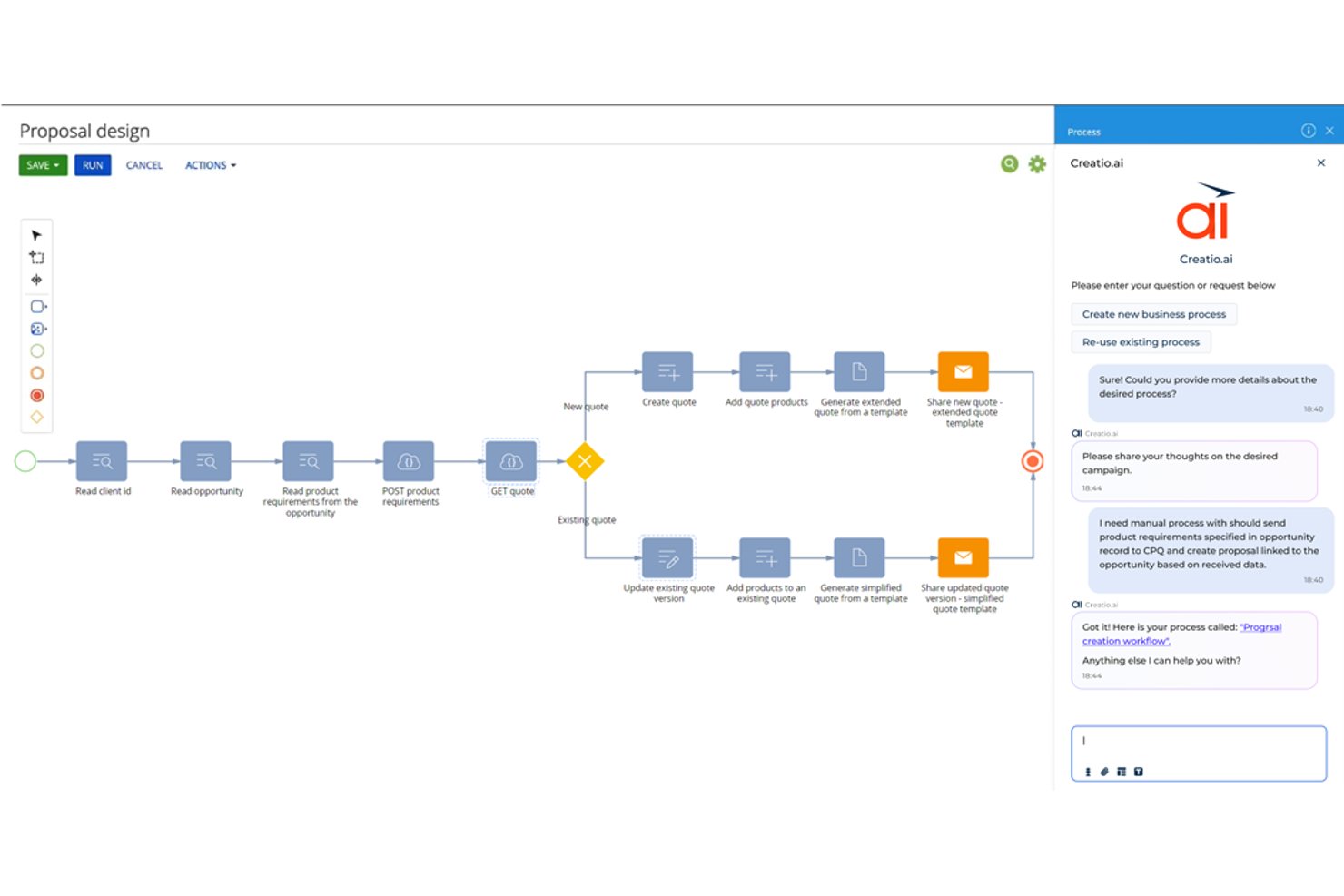
Creatio Studio is a no-code AI platform for building enterprise workflow automation, custom applications, and AI agents across cross-functional business processes.
Who Is Creatio Studio Best For?
Creatio Studio is a strong fit for mid-market and enterprise teams in regulated industries like banking, insurance, and the public sector that need customizable, governance-heavy workflow automation.
Why I Picked Creatio Studio
I picked Creatio Studio as one of the best because no-code governance is genuinely central to how it's built, not bolted on as an afterthought. It enforces GDPR, HIPAA, and SOC 2 compliance at the workflow level and automates internal compliance audits across IT, operational, and management processes. That means my team can build and deploy automated workflows that are already compliant by design, without running a separate audit cycle after the fact.
Creatio Studio Key Features
- Visual process designer: Drag-and-drop builder for designing complex multi-step workflows across teams.
- AI-driven app creation: Build applications from natural language prompts using generative AI tools.
- Composable component library: Access and reuse a wide range of prebuilt workflow building blocks.
- Marketplace integrations: Connect to a library of add-ons for ERP, CRM, ITSM, and collaboration systems.
Creatio Studio Integrations
Creatio Studio offers native integrations with Power BI, Microsoft 365, Twilio, WhatsApp, Zoom, Formstack, Avaya, and more. An API is available for custom integrations.
Pros and Cons
Pros:
- AI-powered process and app design capabilities
- Enterprise-grade governance and compliance controls
- Comprehensive workflow automation builder
Cons:
- Long implementation cycles for complex organizations
- Steep learning curve for beginners
New Product Updates from Creatio AI Studio
Creatio Studio Expands AI App-Building Capabilities
Creatio Studio adds expanded AI coding agents, AI-generated pivot tables, and built-in analytics for generated apps. These updates let users build more UI, logic, and reporting components from natural-language prompts. For more information, visit Creatio Studio’s official site.

Best for AI-powered enterprise workflows

For organizations seeking an AI-driven enterprise workflow solution, Screendragon offers an adaptable platform designed to transform complex operations. By integrating AI agents with no-code workflow customization, it caters to creative and marketing teams looking to automate mundane tasks and focus on impactful work. With features that enhance team alignment and decision-making, Screendragon addresses the challenge of managing intricate workflows efficiently.
Why I Picked Screendragon
I picked Screendragon for its unique ability to combine advanced automation with a no-code visual workflow builder, making it highly suitable for enterprise teams. The platform's AI agents automate repetitive tasks, allowing your team to concentrate on strategic initiatives. Additionally, its digital approval workflow management centralizes data and comments, simplifying the review process and ensuring compliance. These features make Screendragon an excellent choice for those looking to enhance productivity and governance in their workflow management.
Screendragon Key Features
In addition to its standout automation capabilities, Screendragon offers:
- Dynamic Custom Forms: Create and connect forms to automated steps, customizing fields, language, and layout to fit your team's needs.
- Secure Workflow System with Advanced Permission Controls: Architect workflows with sophisticated permissions to suit decision-making and compliance requirements.
- Workflow Analytics with Real-time Insight and Reports: Build custom automated reports and track status updates or milestones in real-time using personalized dashboards.
- Enterprise-Grade Security: Benefit from high data security standards that can be scaled to thousands of users globally.
Screendragon Integrations
Integrations include Microsoft Power BI, Slack, Microsoft Teams, HubSpot, Okta, Aprimo, SugarCRM, and Adobe. Additionally, Screendragon can connect with over 1,000 apps via Zapier.
Pros and Cons
Pros:
- Easy to adapt to different project sizes and organizational needs
- Automation features streamline processes and improve efficiency
- No-code platform allows users to create workflows without coding
Cons:
- Reporting and manual report creation can feel limited or complex
- The admin console and settings may be confusing for new users

TrailHQ
Best for document processing

Nanonets is an AI-driven document processing tool designed for businesses that need to automate data extraction from documents. It primarily serves industries like finance, logistics, and healthcare, where handling large volumes of documents is common.
Why I picked Nanonets: Nanonets excels in document processing, providing AI models that learn and adapt to your specific needs. You can automate data extraction from invoices, receipts, and other documents with ease. The platform allows you to train custom models, ensuring accuracy and efficiency. Its scalability makes it suitable for businesses of all sizes, handling various document types effectively.
Standout features & integrations:
Features include customizable AI models that adapt to your documents, automated data extraction to save time, and scalability to handle varying document volumes. You can also benefit from its user-friendly interface that simplifies the setup process.
Integrations include Salesforce, QuickBooks, Google Drive, Dropbox, Slack, Microsoft Dynamics 365, SAP, Zoho CRM, HubSpot, and Box.
Pros and Cons
Pros:
- Enterprise SLAs with priority support
- SOC2-compliant secure infrastructure
- Granular permission and role-based access control
Cons:
- Limited controls for data file processing
- Training time varies by system performance

n8n
Best for custom workflows

n8n is an open-source workflow automation tool that allows users to create custom workflows without complex coding. It's popular among developers and tech-savvy users who want to automate repetitive tasks and data processes.
Why I picked n8n: n8n is perfect for custom workflows, offering a flexible and extendable platform. The visual workflow editor lets your team design processes tailored to your needs. With its open-source nature, you can modify and expand its capabilities to fit your unique requirements. The platform also supports complex logic, enabling sophisticated automation scenarios.
Standout features & integrations:
Features include a visual workflow editor to simplify process design, support for complex logic to create advanced automations, and the ability to run on your own server for full control. You also get access to a vibrant community that contributes to continuous improvements.
Integrations include Slack, Google Sheets, GitHub, Trello, Airtable, Dropbox, and Stripe.
Pros and Cons
Pros:
- Fully on-premise with version control support
- Advanced security with SSO, LDAP support, and encryption
- User-friendly interface and intuitive workflow
Cons:
- Requires coding for advanced tasks
- Costly execution-based pricing model
Domo
Best for data visualization

Domo is a cloud-based business intelligence platform that caters to data-driven enterprises seeking to visualize and analyze data effectively. Its main users include business leaders and analysts who need to make informed decisions quickly.
Why I picked Domo: Domo excels in data visualization, offering interactive dashboards that give your team real-time insights. Its drag-and-drop interface makes it easy to create custom visualizations without needing extensive technical skills. Domo's ability to handle large datasets allows your team to view trends and patterns effortlessly. The platform also includes built-in data governance to ensure data quality and security.
Standout features & integrations:
Features include interactive dashboards for real-time insights, drag-and-drop tools for custom visualizations, and built-in data governance to maintain data quality. You can also access mobile capabilities to view dashboards on the go.
Integrations include Salesforce, Microsoft 365, Slack, Google Analytics, HubSpot, Shopify, Zendesk, QuickBooks, Marketo, and Facebook.
Pros and Cons
Pros:
- Real-time data updates
- Handles large datasets
- Customizable dashboards
Cons:
- Requires consistent data management
- May require technical support

Box
Best for secure file sharing

Box is a cloud-based content management and collaboration platform designed for businesses that need secure file sharing and management. Its primary users include enterprises that prioritize data protection and workflow automation.
Why I picked Box: Box offers a secure environment for file sharing with advanced security measures like ransomware protection. It stands out with its AI-driven content management and no-code applications, enabling you to automate workflows. The platform's emphasis on security is ideal for industries requiring strict data compliance. Box also provides intelligent insights to manage your data effectively.
Standout features & integrations:
Features include advanced security measures to protect your data, AI-driven content management to automate your processes, and no-code applications for easy workflow customization.
Integrations include Microsoft 365, Google Workspace, Slack, Salesforce, IBM, Okta, Adobe, Zoom, Oracle, and ServiceNow.
Pros and Cons
Pros:
- No-code workflow automation
- AI-driven content insights
- Strong data security features
Cons:
- Document collaboration tools are insufficient
- Storage limitations reduce efficiency


Zapier is an AI orchestration platform that allows enterprise teams to connect thousands of apps and build multi-step automated workflows without code. It's used by teams across marketing, sales, RevOps, IT, HR, and operations to centralize workflows and reduce manual work across large, distributed tech stacks.
Why I picked Zapier: Zapier stands out for its deep automation capabilities combined with an accessible, no-code experience. Teams can build workflows using natural language with Zapier Copilot, add AI-powered steps, and manage automations at scale with admin controls, permissions, and audit logs. With thousands of app integrations, Zapier is especially strong for organizations with complex, multi-system environments.
Standout features & integrations:
Features include scalable, multi-step workflows with logic and AI actions, supported by built-in data tools like Zapier Tables and Forms. Enterprise plans add centralized administration, access controls, and security features to support large teams.
Integrations include Salesforce, HubSpot, Slack, Google Sheets, Gmail, Stripe, Airtable, ServiceNow, Shopify, OpenAI, and more.
Pros and Cons
Pros:
- Enterprise-scale automation with no-code and AI-first tools
- Extensive app and AI integration ecosystem
- Strong security, governance, and admin controls
Cons:
- Free plan limited to two-step workflows
- No mobile app

Appian is a low-code automation platform designed for enterprises that want to systematize business processes and improve efficiency. It's mainly used by business analysts and IT professionals to build custom applications quickly and effectively.
Why I picked Appian: Appian is perfect for low-code development, providing a platform where you can create applications without extensive coding knowledge. The drag-and-drop interface allows your team to design workflows and automate processes easily. With its scalability, Appian can grow alongside your business needs, accommodating new processes and users. It also includes built-in collaboration tools to strengthen teamwork and project management.
Standout features & integrations:
Features include a drag-and-drop interface for easy app creation, built-in collaboration tools to improve teamwork, and scalability to support business growth. You can also take advantage of its process automation capabilities to improve operational efficiency.
Integrations include Salesforce, Microsoft Dynamics 365, Oracle, SAP, Google Workspace, AWS, Box, SharePoint, Docusign, and Tableau.
Pros and Cons
Pros:
- Enhances team collaboration
- Scalable for growing businesses
- Quick app development with low-code
Cons:
- High licensing costs for large deployments
- Requires familiarity with Appian’s design model
Diğer Yapay Zekâ Kurumsal İş Akışı Yazılımları
Kısa listeme giremeyen ancak yine de incelemeye değer bazı ek yapay zekâ kurumsal iş akışı yazılımı seçeneklerini burada bulabilirsiniz:
- Jitterbit
For API integration
- Celigo
With 1,000+ prebuilt app connectors
- Gumloop
For collaborative planning
- Atomicwork
For small teams
- Flowable
For BPM solutions
- AutoKitteh
For automated testing
- Miro
For AI-enhanced virtual collaboration
- Workato
For enterprise integration AI support
- Apache Airflow
For AI-management for data pipelines
- Moveworks
For IT service AI automation
- Sana
For AI-driven personalized learning
- Kognitos
For business process AI automation


How I Evaluate AI Enterprise Workflow Software
Every tool here has to deliver AI that actually helps cross-functional delivery teams—not just a chatbot layered onto a task board. I evaluate in two layers: core functionality a tool must offer to make the list, and differentiating factors that set one vendor apart from another.
Core Functionality (Table Stakes For This List)
When I'm selecting tools for my list, I rank each one on a scale from 0 (does not offer the functionality) to 5 (excels in this area) for each core functionality listed below. Then, I calculate the tool's total score into a percentage. Each tool needs to achieve a minimum total score of 65% to be considered for inclusion.
- AI-Driven Workflow Automation: I look for tools that go beyond simple if/then rules—like auto-routing approval requests, reassigning tasks when blockers arise, or triggering downstream handoffs between teams.
- Cross-Functional Process Orchestration: The tool should coordinate workflows across departments, such as syncing design reviews with engineering sprints and stakeholder sign-offs in one unified flow.
- Predictive Project Analytics: I evaluate whether the platform can forecast schedule risks, flag resource conflicts, or surface at-risk milestones using patterns from past project data.
- Generative AI Capabilities: Tools earn higher marks when their AI drafts status updates, summarizes meeting notes, or answers natural-language questions about project health and progress.
- Enterprise System Integrations: I check for native, bidirectional connections with tools teams already rely on—think Jira, Salesforce, ServiceNow, SAP, or Slack—so workflows span the full tech stack.
- Governance and Security Controls: Role-based access, audit trails, SSO, and compliance certifications like SOC 2 and ISO 27001 all factor into how well a tool fits enterprise requirements.
Once I have a list of tools that meet this criteria, I consider what sets each platform apart.
Differentiating Factors (What Sets Vendors Apart)
Here's how I compare and contrast different vendors:
Standout Features
I look for no-code AI builders that let operations leads design workflows visually, without waiting on engineering. Autonomous AI agents add another layer—tools where agents can triage incoming requests, assign tasks, and escalate blockers on their own save teams real time. Process mining capabilities also stand out, especially when the platform can analyze existing workflows and pinpoint where delays or redundancies live before you start automating.
Beyond Features
AI transparency matters a lot in this space. I check whether a platform explains why it made a recommendation or flagged a risk, so project leads can justify decisions to stakeholders. Pricing predictability is another big factor—some vendors charge per workflow execution, which can spike costs fast when you're running hundreds of automated processes daily. I also evaluate how quickly teams can go live, looking for pre-built templates and guided onboarding that shrink the gap between purchase and first production workflow.
Yapay Zekâ Kurumsal İş Akışı Yazılımı Nasıl Seçilir?
Uzun özellik listeleri ve karmaşık fiyatlandırma yapıları içinde kaybolmak kolaydır. Kendinize özgü yazılım seçme süreciniz üzerinde çalışırken odağınızı korumanıza yardımcı olmak için göz önünde bulundurmanız gereken faktörleri içeren bir kontrol listesi hazırladım:
| Faktör | Dikkat Edilmesi Gerekenler |
|---|---|
| Ölçeklenebilirlik | Yazılım işletmenizle birlikte büyüyebilir mi? Kullanıcı ve süreç sayısının sorunsuz bir şekilde artmasını destekleyen seçenekleri arayın. Aracın ek iş yükünü kaldırıp kaldıramayacağını veya maliyetli yükseltmeler gerektirip gerektirmeyeceğini değerlendirin. |
| Entegrasyonlar | Mevcut araçlarınızla entegre oluyor mu? CRM, ERP veya iletişim platformları gibi mevcut sistemlerinizle uyumluluğunu kontrol edin. Kapsamlı geçici çözümler gerektiren veya ana yazılımınızla senkronize olmayan araçlardan kaçının. |
| Özelleştirilebilirlik | Araç ihtiyaçlarınıza ne ölçüde uyarlanabiliyor? İş akışlarını ve panoları süreçlerinize uyacak şekilde özelleştirip özelleştiremeyeceğinizi değerlendirin. Sizi önceden tanımlanmış yapılara zorlayan aşırı katı sistemlere karşı dikkatli olun. |
| Kullanım kolaylığı | Arayüz ekibiniz için kullanıcı dostu mu? Teknik olmayan kullanıcıların kolayca gezinebildiğini ve hayal kırıklığı yaşamadan görevleri gerçekleştirebildiğini test edin. Karmaşık bir arayüz, düşük benimseme oranlarına yol açabilir. |
| Uygulama ve kullanıma alma | Sistemi çalışır duruma getirmek ne kadar sürecek? Eğitim materyalleri ve kurulum desteği de dâhil olmak üzere kapsamlı kullanıma alma desteği sunan sağlayıcıları arayın. Uzun ve karmaşık uygulama süreçlerine sahip araçlardan kaçının. |
| Maliyet | Fiyatlandırma bütçenize uygun mu? Maliyetleri rakiplerle karşılaştırın ve gizli ücretleri kontrol edin. İhtiyacınız olan özelliklerin temel fiyata dâhil olduğundan emin olun ve potansiyel yatırım getirisini değerlendirin. |
| Güvenlik önlemleri | Verileriniz ve süreçleriniz güvende mi? Yazılımın sektör güvenlik standartlarına uyduğunu ve şifreleme ile erişim kontrolleri gibi özellikler sunduğunu doğrulayın. Sağlayıcının veri koruma konusundaki geçmişini değerlendirin. |
| Uyumluluk gereksinimleri | Araç sektörünüzün uyumluluk ihtiyaçlarını karşılıyor mu? GDPR veya HIPAA gibi düzenleyici gereksinimleri destekleyen özellikleri kontrol edin. Uyumsuzluk para cezalarına ve itibarınızın zarar görmesine yol açabilir. |
Yapay Zekâ Kurumsal İş Akışı Yazılımı Nedir?
Yapay zekâ kurumsal iş akışı yazılımı, bir kuruluş içindeki iş süreçlerini otomatikleştirmek ve optimize etmek için tasarlanmış bir araçtır. Genellikle verimliliği ve üretkenliği artırmak için proje yöneticileri, BT uzmanları ve operasyon ekipleri gibi profesyoneller tarafından kullanılır. Otomasyon, veri entegrasyonu ve gerçek zamanlı analiz özellikleri; iş akışlarını yönetmeye, manuel görevleri azaltmaya ve doğru veri akışını sağlamaya yardımcı olur. Genel olarak bu araçlar, operasyonel verimliliği artırarak ve bilinçli karar almayı destekleyerek önemli değer sağlar.
Özellikler
Yapay zekâ kurumsal iş akışı yazılımı seçerken aşağıdaki temel özelliklere dikkat edin:
- Otomasyon: Zaman kazanmak ve insan hatasını azaltmak için tekrarlayan görevleri otomatikleştirir.
- Veri entegrasyonu: Sistemler arasındaki veri akışını optimize etmek için çeşitli veri kaynaklarına bağlanır.
- Gerçek zamanlı analiz: Karar almaya yardımcı olmak ve performansı izlemek için içgörüler ve analizler sunar.
- Özelleştirilebilir iş akışları: Süreçleri belirli iş ihtiyaçlarına ve hedeflerine uyacak şekilde uyarlamanıza olanak tanır.
- Kullanıcı dostu arayüz: Öğrenme eğrisini azaltarak tüm ekip üyeleri için kullanım kolaylığı sağlar.
- Güvenlik özellikleri: Hassas verileri şifreleme ve erişim kontrolleriyle korur.
- Uyumluluk desteği: Sektör düzenlemelerine ve standartlarına uyulmasına yardımcı olarak riski azaltır.
- Ölçeklenebilirlik: Artan iş yüklerini ve kullanıcıları destekleyerek büyüyen işletme ihtiyaçlarına uyum sağlar.
- İş birliği araçları: Departmanlar arasındaki iletişimi ve ekip çalışmasını kolaylaştırır.
- Mobil erişim: Hareket hâlindeyken iş akışlarının yönetilmesini sağlayarak esneklik ve hızlı yanıt verme olanağı sunar.
Faydalar
Yapay zekâ kurumsal iş akışı yazılımını uygulamak ekibiniz ve işletmeniz için çeşitli faydalar sağlar. Yararlanabileceğiniz faydalardan bazıları şunlardır:
- Artan verimlilik: Tekrarlayan görevleri otomatikleştirerek ekibinizin daha yüksek değer sağlayan faaliyetlere odaklanmasına olanak tanır.
- Geliştirilmiş veri doğruluğu: Sistemler arasındaki verileri entegre ederek hataları azaltır ve tutarlı bilgi akışı sağlar.
- Gelişmiş karar alma: Bilinçli iş kararlarını desteklemek için gerçek zamanlı analizler ve içgörüler sunar.
- Daha fazla esneklik: Özelleştirilebilir iş akışları ve ölçeklenebilir çözümler işletmenizin ihtiyaçlarına ve büyümesine uyum sağlar.
- Daha iyi uyumluluk: Yerleşik uyumluluk özellikleriyle düzenleyici gereksinimleri destekleyerek riski en aza indirir.
- Daha güçlü iş birliği: Departmanlar arasındaki ekip çalışmasını ve iletişimi kolaylaştıran araçlar sunar.
- Maliyet tasarrufu: Manuel iş gücünü ve hataları azaltarak zaman içinde daha düşük operasyonel maliyetler sağlar.
Yapay Zekâ Kurumsal İş Akışı Yazılımının Maliyetleri ve Fiyatlandırması
AI kurumsal iş akışı yazılımını seçmek, mevcut çeşitli fiyatlandırma modelleri ve planların anlaşılmasını gerektirir. Maliyetler özelliklere, ekip büyüklüğüne, eklentilere ve daha fazlasına göre değişir. Aşağıdaki tablo, AI kurumsal iş akışı yazılımı çözümlerinde yaygın planları, ortalama fiyatlarını ve genellikle sunulan özellikleri özetlemektedir:
AI Kurumsal İş Akışı Yazılımı İçin Plan Karşılaştırma Tablosu
| Plan Türü | Ortalama Fiyat | Yaygın Özellikler |
|---|---|---|
| Ücretsiz Plan | $0 | Temel görev otomasyonu, sınırlı entegrasyonlar ve topluluk desteği. |
| Kişisel Plan | $15-$2,347/user/month | Görev otomasyonu, temel analizler, popüler uygulamalarla entegrasyon ve sınırlı özelleştirme seçenekleri. |
| İşletme Planı | $244-$3293/user/month | Gelişmiş otomasyon, iyileştirilmiş analizler, artırılmış entegrasyonlar ve özel iş akışları. |
| Kurumsal Plan | $50-$15,000/user/month | Tam otomasyon paketi, gerçek zamanlı analizler, sınırsız entegrasyonlar, gelişmiş güvenlik özellikleri ve özel destek. |
AI Kurumsal İş Akışı Yazılımı SSS
AI kurumsal iş akışı yazılımı hakkında sık sorulan bazı soruların yanıtları:
Bulut tabanlı ve şirket içi yazılım arasındaki fark nedir?
Bulut tabanlı yazılım, sağlayıcının sunucularında barındırılır ve çevrim içi olarak erişilirken şirket içi yazılım, şirketinizin sunucularına yüklenir. Bulut tabanlı çözümler daha kolay erişim ve ölçeklenebilirlik sunarken şirket içi çözümler veriler ve güvenlik üzerinde daha fazla kontrol sağlar. Karar verirken ekibinizin ihtiyaçlarını ve BT olanaklarını göz önünde bulundurun.
İş akışı yazılımıyla veri güvenliğini nasıl sağlayabilirim?
Evet, veri güvenliği çok önemlidir. Şifreleme, erişim denetimleri ve GDPR veya HIPAA gibi sektör standartlarına uyumluluk sunan yazılımları arayın. Her zaman sağlayıcının güvenlik önlemlerini inceleyin ve kuruluşunuzun gereksinimlerini karşıladıklarından emin olmak için bir güvenlik denetimi gerçekleştirmeyi değerlendirin.
İş akışı yazılımı işletmemin ihtiyaçlarına uyacak şekilde özelleştirilebilir mi?
Evet, birçok iş akışı yazılımı çözümü özelleştirilebilir özellikler sunar. İş akışlarını, gösterge tablolarını ve raporları genellikle belirli süreçlerinizle uyumlu olacak şekilde düzenleyebilirsiniz. Esnek özelleştirme seçeneklerine sahip araçları arayın ve ekibinizin bu özelleştirmeleri dışarıdan yardım almadan yönetebilme becerisini göz önünde bulundurun.
İş akışı yazılımının uygulanması ne kadar sürer?
Uygulama süresi, yazılımın karmaşıklığına ve ölçeğine göre değişir. Bazı araçlar minimum özelleştirmeyle hızlı kurulum sunarken diğerlerinin tam entegrasyon için haftalara veya aylara ihtiyacı olabilir. Eğitim ve test aşamalarını planlayın ve sorunsuz bir geçiş sağlamak için kaynak ayırın.
Sırada Ne Var:
AI kurumsal iş akışı yazılımı araştırma sürecindeyseniz, ücretsiz öneriler almak için bir SoftwareSelect danışmanına ulaşın.
Bir form doldurur ve ihtiyaçlarınızın ayrıntılarını konuştukları kısa bir görüşme yaparsınız. Ardından incelemeniz için kısa bir yazılım listesi alırsınız. Fiyat görüşmeleri de dahil olmak üzere satın alma sürecinin tamamında size destek olurlar.