

2026’da İncelenen En İyi 10 Yapay Zekâ İş Akışı Aracı

En İyi Yapay Zekâ İş Akışı Araçları Kısa Listesi


Günümüzde projeleri yönetmek; görevleri koordine etmeyi, ekipler genelinde ilerlemeyi takip etmeyi ve planlar değiştiğinde hızlı bir şekilde uyum sağlamayı gerektirir. İş akışı araçları yardımcı olabilir, ancak yapay zekâ iş akışı araçları rutin görevleri otomatikleştirerek, verimsizlikleri belirleyerek ve daha iyi planlama ile uygulamayı destekleyen içgörüler sunarak bunu bir adım ileri taşır.
Bu platformları test etme deneyimime göre, farkı yaratan unsur yapay zekâ özellikleridir. Bu araçlar olası darboğazları işaretleyebilir, sonraki adımları önerebilir ve sürekli manuel denetim gerektirmeden ekiplerin uyum içinde kalmasına yardımcı olabilir. Bu makalede, günlük proje operasyonlarını anlamlı ölçüde iyileştiren özelliklere ve avantajlara odaklanarak mevcut en iyi yapay zekâ iş akışı araçlarını öne çıkaracağım.
Ekibinizi ve projelerinizi en iyi şekilde destekleyen çözümü seçmenize yardımcı olmak için uygulamalı araştırmaya dayanan açık ve tarafsız incelemeler bulacaksınız.
Why Trust Our Software Recommendations
Our team has been testing and reviewing software since 2012. As project managers ourselves, we know how difficult—and important—it is to choose the right software.
For this guide, we evaluated tools using hands-on testing and independent research, scoring tools using our selection criteria. We also draw on insights from industry thought leaders and practicing project management experts.
Our reviews reflect our human editorial judgment, not a sales pitch.
Expert reviewers:
Yapay Zekâ İş Akışı Araçları Karşılaştırma Tablosu
Bu karşılaştırma tablosu, en iyi yapay zekâ iş akışı aracı seçimlerimin fiyatlandırma ayrıntılarını özetlemektedir.
| Tool | Starting Price | Website | |
|---|---|---|---|
| Best for AI-driven risk identification & reporting | 4.6 out of 5 | $9/user/month Free plan + 14-day trial available | Book Demo |
| Best for embedding workflows in client portals | 4.4 out of 5 | $5,000/year Free trial + free demo available | Book Demo |
| Best for customizable approval process flows | 4.6 out of 5 | Pricing upon request Not available | Book Demo |
| Best for AI-drafted workflow creation | 4.5 out of 5 | $5/user/month Free plan + 14-day trial + demo available | Website |
| Best for AI-driven task prioritization | 4.3 out of 5 | $10/user/month Free plan + 14-day trial + demo available | Book Demo |
| Best with 1,000+ prebuilt connectors | — | Pricing upon request 30-day free trial available | Website |
| Best for AI automation in complex processes | 4.7 out of 5 | $9/month Free plan + free demo available | Website |
| Best for open-source workflow customization | 4.7 out of 5 | €20/month Free trial available | Website |
| Best AI roadmap-planning tool for product managers | 4.4 out of 5 | $59/user/month 30-day free trial + free demo available | Website |
| Best for AI orchestration | — | $19.99/month Free plan available | Website |
En İyi Yapay Zekâ İş Akışı Araçları İncelemeleri
Aşağıda, kısa listeme giren en iyi yapay zekâ iş akışı araçlarına ilişkin ayrıntılı özetlerimi bulabilirsiniz. İncelemelerim, size en uygun aracı bulmanıza yardımcı olmak için her aracın temel özelliklerine, avantajlarına & dezavantajlarına, entegrasyonlarına ve ideal kullanım alanlarına ayrıntılı bir bakış sunuyor.

Best for AI-driven risk identification & reporting
monday AI Workspace is an AI-native work management platform that blends workflow automation, agentic task execution, generative project planning, and predictive portfolio intelligence in one environment.
Who Is monday AI Workspace Best For?
It's a strong fit for mid-to-large enterprise teams and PMO-led organizations that need portfolio-level AI oversight across multiple concurrent projects.
Why I Picked monday AI Workspace
monday AI Workspace earns its spot on my shortlist because of how it handles risk before it becomes a problem. I love the AI-powered risk insights feature, which scans dependencies across active boards and flags delays before they cascade. The portfolio-level AI reporting then pulls that data into executive-ready dashboards, so I'm not digging through individual boards to piece together project health.
monday AI Workspace Key Features
- AI workflow builder: Lets you orchestrate multi-step, condition-based automations across teams and tools using AI-driven rules.
- Sidekick AI assistant: Provides a natural language interface for querying project data, updating tasks, and managing workstreams.
- Vibe app builder: Enables no-code creation of custom business applications directly within your workspace.
- AI meeting notetaker: Automatically records, transcribes, and summarizes meetings so action items are captured and shared.
monday AI Workspace Integrations
monday AI Workspace offers hundreds of native integrations through its built-in integrations and marketplace, including Slack, Jira, Google Workspace, Microsoft Teams, Salesforce, HubSpot, Asana, Trello, GitHub, and Zoom. It also supports Zapier and provides an API for custom integrations.
Pros and Cons
Pros:
- No-code custom AI agents for any workflow
- Portfolio-level AI reporting across multiple projects
- AI risk flags surface before delays cascade
Cons:
- Overwhelming for small teams with simple workflows
- AI features locked behind higher-tier plans
New Product Updates from monday AI Workspace
monday AI Workspace Adds Human Approval Routing
monday AI Workspace adds a human-in-the-loop approval block to AI Workflows, sending approval requests and routing workflow paths based on responses. For more information, visit monday AI Workspace's official site.
 .

Moxo
Best for embedding workflows in client portals
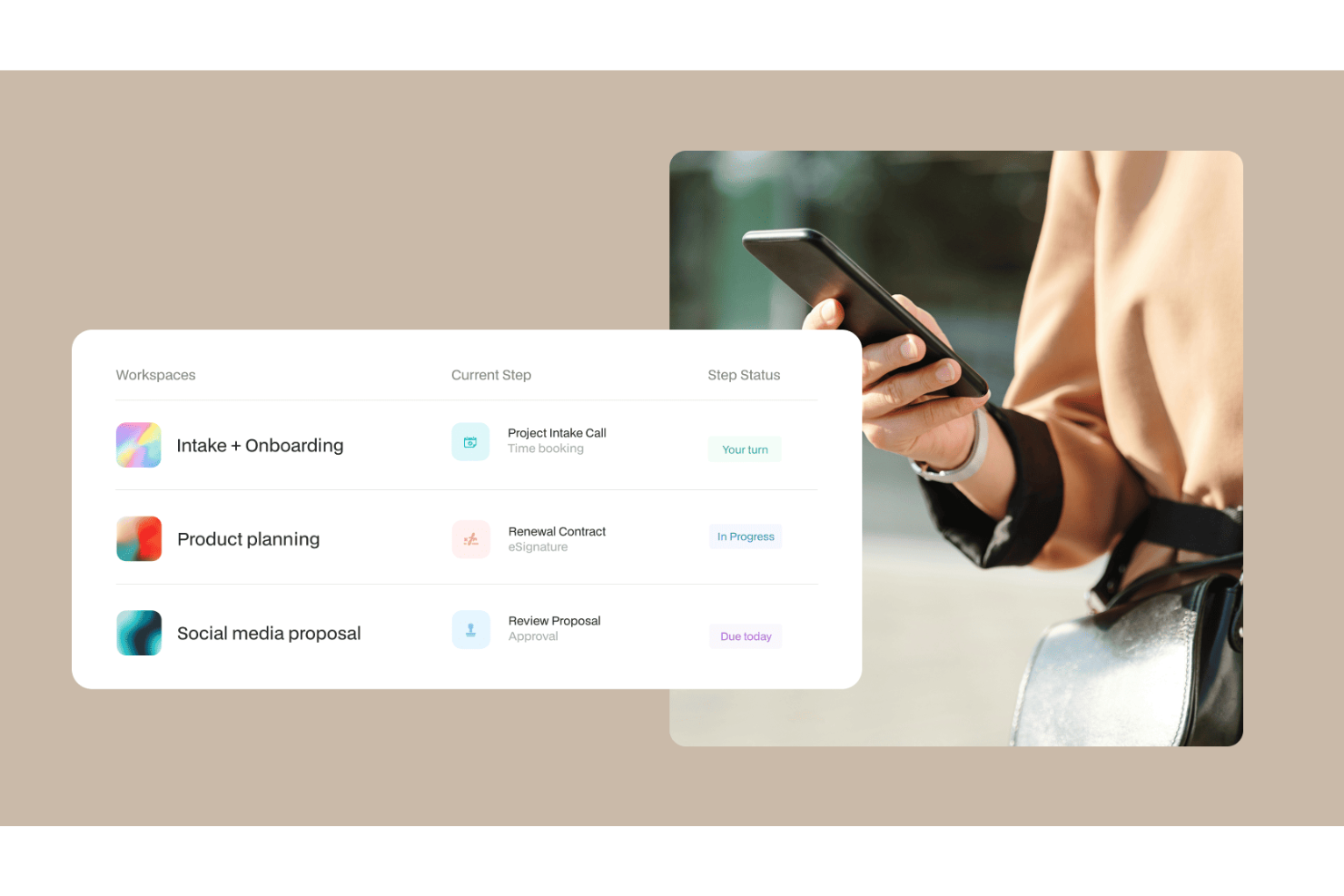
Moxo is an AI workflow platform that combines a visual workflow builder with AI agents to orchestrate multi-step business processes across both internal teams and external clients within a branded portal environment.
Who Is Moxo Best For?
Moxo is a strong fit for client-facing teams in financial services, legal, and professional services who need to manage external stakeholders within structured workflows.
Why I Picked Moxo
I've included Moxo in my top picks because it's one of the few AI workflow tools that lets you embed entire process flows directly into your own app or website. Using its SDKs for iOS, Android, and JavaScript, my team can surface structured workflows (document collection, approvals, eSignatures) inside a fully branded client portal, so clients complete steps without ever leaving your product. The white-label customization goes deep: logo, colors, UI components, and feature visibility are all configurable at an organizational level.
Moxo Key Features
- AI workflow agents: Moxo's Assist, Automate, and Amplify agents handle task preparation, validation, and escalation within active workflows.
- Conditional workflow logic: Build branching paths, loops, and parallel tracks in the visual workflow builder based on step outcomes or input data.
- SLA timers: Set time-based triggers on individual workflow steps to automatically escalate or reassign tasks when deadlines are missed.
- Secure in-app messaging: Send encrypted messages, files, and alerts directly within the workflow context, without switching to external tools.
Moxo Integrations
Moxo offers direct integrations with Salesforce, HubSpot, Microsoft Dynamics, Zoho, Wealthbox, Redtail, Filevine, Global Relay, Smarsh, Xero, and Follow Up Boss, plus file upload integrations with Google Drive, Dropbox, Box, and OneDrive, and calendar syncing with Google Calendar and Outlook. It connects with Zapier, and a REST API with webhooks is available for custom integrations.
Pros and Cons
Pros:
- SOC 2 Type II and GDPR compliant
- White-label branding for client-facing portals
- Built-in eSignatures, forms, and approvals in one workspace
Cons:
- Task tracking lacks depth for internal projects
- No built-in time tracking for tasks

Best for customizable approval process flows

Screendragon is a no-code workflow management platform built for enterprise marketing and creative operations teams, combining AI agents, visual workflow automation, dynamic form-based intake, digital approval management, and real-time reporting.
Who Is Screendragon Best For?
Screendragon is a strong fit for enterprise marketing, agency, and creative operations teams that need structured, scalable workflow management across complex, multi-stakeholder projects.
Why I Picked Screendragon
I've included Screendragon in my top picks because its digital approval workflow management is genuinely configurable in ways most tools don't allow. You can build multi-step approval loops directly into your no-code workflow design, with conditional routing that sends work to different reviewers based on specific criteria. I also like that every approval decision is captured in an automated audit trail, with side-by-side version comparison and in-platform markup, so there's no ambiguity about what was reviewed, by whom, or when.
Screendragon Key Features
- AI Hub: Build, deploy, and govern custom AI agents directly within your workflows for tasks like briefing, content generation, and compliance checking.
- Dynamic form builder: Create custom intake forms with conditional logic to capture structured project information at the start of any workflow.
- Real-time workflow analytics: Access custom dashboards and reports that surface workload, bottleneck, and process performance data across active workflows.
- AI resource forecasting: Use Screendragon's AI Resourcing Agent to model and predict resource demand based on active project pipelines.
Screendragon Integrations
Screendragon offers pre-built integrations that connect with tools teams already use, including Aprimo, Microsoft Power BI, Google Cloud Platform Storage, HubSpot, Amazon S3, Sitecore, Ziflow, Vidmob, Brandfolder, Smartsheet, and Workato. Additional integrations shown on their site include Jira, Google Drive, Egnyte, Box, Adobe, OneDrive, NetSuite, Salesforce, Microsoft Dynamics 365, SAP, Microsoft 365, and Trello. An API and a Connection Manager are available for connecting Screendragon to any system with an open API.
Pros and Cons
Pros:
- Dynamic forms with conditional field logic
- Granular role-based permission controls
- Built-in AI agents for workflow automation
Cons:
- Requires dedicated onboarding time investment
- Enterprise-focused, complex for smaller teams
Hive
Best for AI-drafted workflow creation
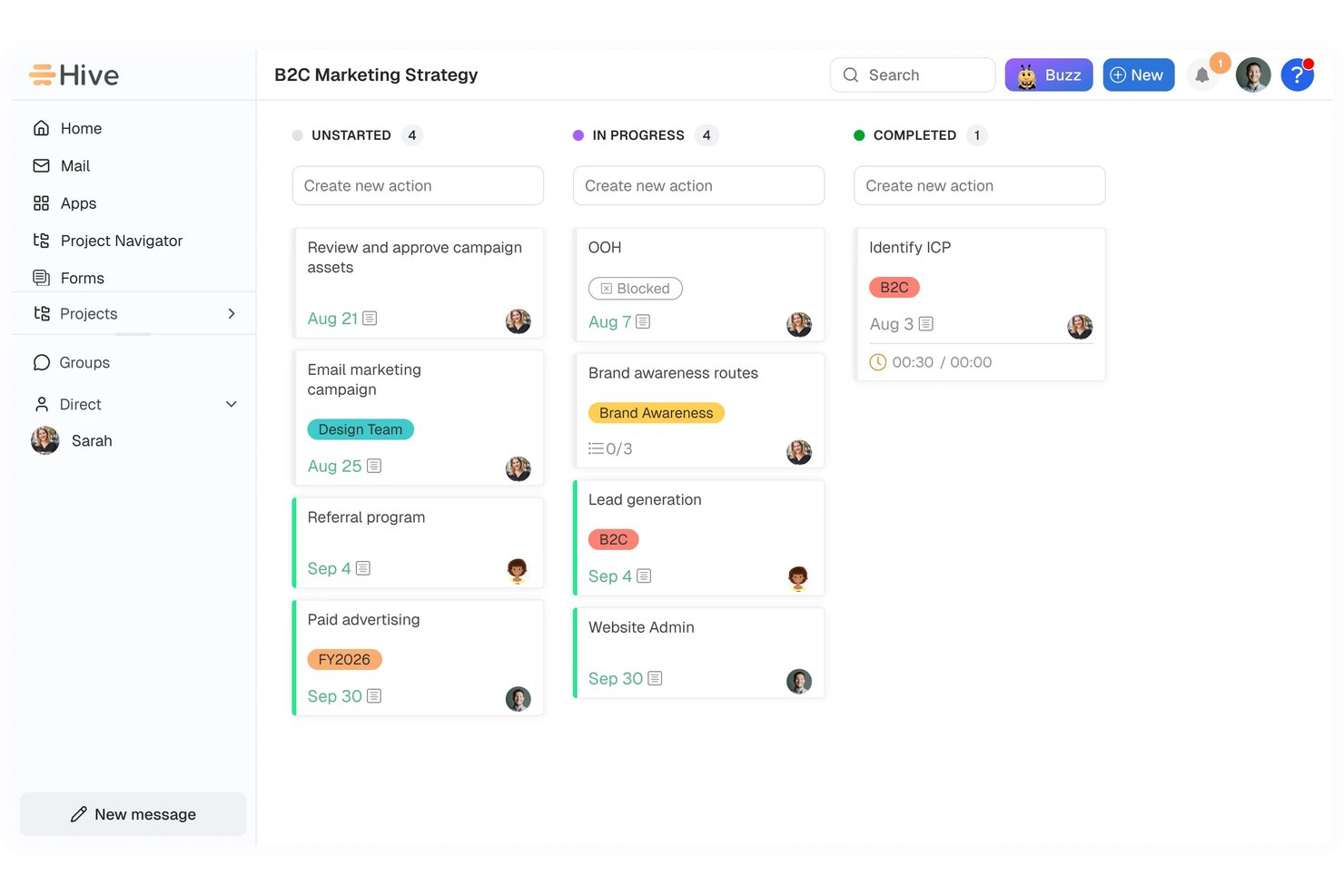
Hive is an AI-powered work management platform that combines project planning, workflow automation, team collaboration, and reporting—with an AI assistant (Buzz) that can draft workflows, create projects, and generate content from natural-language prompts.
Who Is Hive Best For?
Hive is a strong fit for team and department leaders who want to describe a process in plain language and let AI draft the workflow for them.
Why I Picked Hive
I've included Hive in my top picks because its Buzz AI assistant can take a plain-language process description and draft a full workflow, complete with triggers and operations, ready for your review before it goes live. I particularly like the "Give Buzz a job" workflow operation, which lets you embed tasks like deadline digests or project summaries directly into automated runs. Buzz can also spin up entire projects with assigned owners and due dates from a single prompt.
Hive Key Features
- Workflow Manager: View every automated workflow run with timestamps, trigger details, and pass/fail status, filterable by date range and workflow.
- Form-triggered automation: Use form submissions to create actions or projects, map answers to fields, and conditionally route requests to the right teams.
- Approval routing: Set up multi-stage review routes where approvers can approve, request changes, or reassign a review, with full reporting on each stage.
- 1,000+ integrations: Connect Hive to tools like Slack, Jira, Google Workspace, Salesforce, and QuickBooks through native connectors and third-party automation services.
Hive Integrations
Hive offers 1,000+ integrations, including native connections with Slack, Jira, Salesforce, Google Drive, Microsoft Teams, GitHub, QuickBooks, and Zoom. It also provides an API for custom integrations, though its technical specifications aren’t documented.
Pros and Cons
Pros:
- Run monitoring exposes status and triggers
- Forms route requests into follow-up actions
- Buzz drafts workflows from plain-language prompts
Cons:
- Workflow setup can demand technical confidence
- AI workflows require review before activation

Wrike
Best for AI-driven task prioritization

For those looking for an AI-driven workflow solution, Wrike stands out for its mix of automation and collaboration tools. It works well for enterprises and teams of all sizes that want to improve operations and simplify project management. By automating routine tasks and strengthening team collaboration, Wrike helps teams handle complex projects more efficiently.
Why I Picked Wrike
I picked Wrike for its strong integration of AI into workflow management. Its Copilot feature is a key highlight; it helps teams prioritize tasks and generate insights that support better decision-making. The platform also lets users automate processes using natural language commands, which reduces time spent on repetitive work and frees teams to focus on more strategic tasks. These capabilities make Wrike a solid choice for teams that want to boost productivity with AI-driven tools.
Wrike Key Features
In addition to its AI-driven capabilities, Wrike offers several other features that enhance workflow management:
- Customizable Dashboards: Tailor the interface to your team's needs, providing a personalized view of projects and priorities.
- Gantt Charts: Visualize project timelines and dependencies with interactive Gantt charts, making it easier to manage complex projects.
- Time Tracking: Keep track of time spent on tasks and projects for accurate billing and productivity analysis.
- In-Platform Email: Communicate with external stakeholders directly within the platform, ensuring seamless project updates and collaboration.
Wrike Integrations
Integrations include Microsoft Teams, Google Workspace, Zoom, Slack, Dropbox, Outlook, Salesforce, HubSpot, Jira, and Adobe Creative Cloud.
Pros and Cons
Pros:
- Customizable real-time dashboards
- No-code workflow automation tools
- AI-powered task prioritization
Cons:
- Pricing may challenge small teams
- Advanced features require higher tiers
New Product Updates from Wrike

Wrike Redesigns Workspace Search With New Filters
Wrike introduces a redesigned Workspace Search interface with recent search shortcuts, item type and location filters, and parent-task context. These updates help users find relevant work items and navigate search results efficiently. For more information, visit Wrike’s official site.
 .
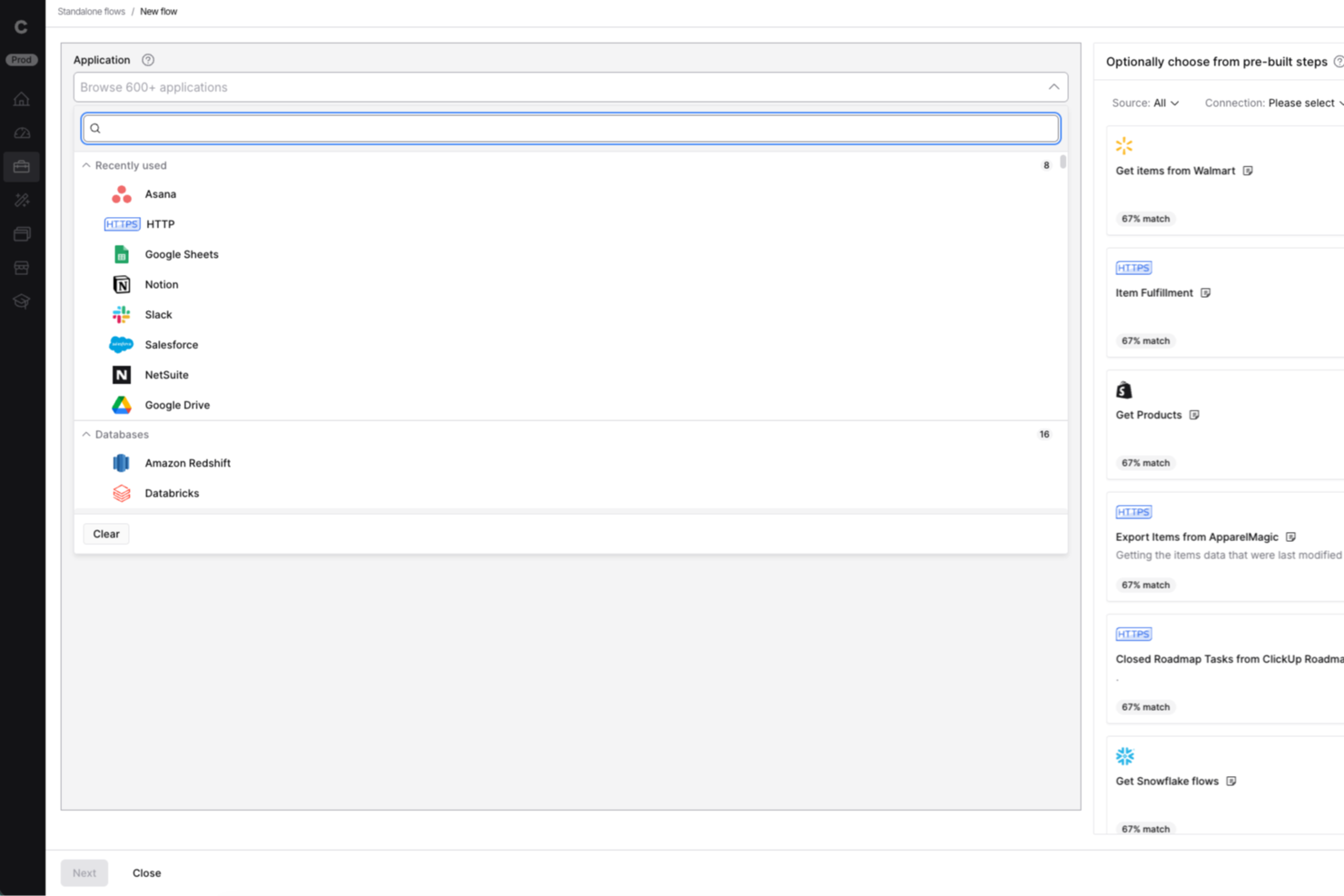
Celigo is an integration and automation platform designed for IT teams and business operations leaders who need to connect cloud apps, automate workflows, and manage data across multiple systems without heavy coding.
Who Is Celigo Best For?
Mid-sized to large businesses with complex integration needs across multiple cloud applications and departments.
Why I Picked Celigo
I picked Celigo as one of the best because having access to over 1,000 prebuilt connectors lets my team connect cloud apps like Salesforce, NetSuite, and Shopify in minutes. I can quickly automate workflows between our CRM, ERP, and ecommerce platforms without custom development. This huge connector library means we spend less time building integrations from scratch and more time optimizing our processes.
Celigo Key Features
- AI-guided flow builder: Build and customize integration workflows using AI-driven suggestions and automation.
- Error management dashboard: Monitor, diagnose, and resolve integration errors from a centralized dashboard.
- Role-based access controls: Set granular permissions for users and teams to manage integrations securely.
- Real-time data synchronization: Keep data consistent across connected systems with automated, real-time syncing.
Celigo Integrations
Integrations include Salesforce, Microsoft Dynamics 365 Business Central, Oracle NetSuite, Walmart, SAP, Snowflake, Acumatica, ADP, Adobe, and 3PL Central.
Pros and Cons
Pros:
- Detailed audit logs for compliance tracking
- Multi-environment support for safe testing
- Granular access controls for sensitive workflows
Cons:
- Advanced features require higher-tier pricing
- No free-forever plan available
New Product Updates from Celigo
Celigo Expands Storage, Data Imports, and Connection Management
Celigo adds a standalone storage connector, optimized Azure Synapse imports, NetSuite OAuth 2.0, flexible file templates, and expanded MCP access controls. These updates help teams manage files, process data, and secure integrations. For more information, visit Celigo’s official site.
 .

Make
Best for AI automation in complex processes

Make is a visual automation platform for teams that need to design complex, multi-step workflows. It supports developers and technical users by combining workflow automation with AI agents, generative AI functions, and real-time orchestration tools.
Why I picked Make: Make offers a visual programming interface that simplifies the creation of detailed workflows. You can integrate its generative AI capabilities to enhance process automation, making it easier to manage complex tasks. Its interface, AI agent capabilities, and support for branching logic help teams manage processes that require detailed automation. It also offers templates and a wide range of AI-supported integrations.
Standout features & integrations:
Features include a user-friendly drag-and-drop builder that allows you to orchestrate workflows without coding. You can set up triggers and actions to automate repetitive tasks effectively. The platform also supports real-time monitoring, letting you track workflow performance and make adjustments as needed.
Integrations include Google Workspace, Slack, Google Gemini, Trello, Dropbox, Shopify, HubSpot, ChatGPT, Mailchimp, Salesforce, QuickBooks, and Asana.
Pros and Cons
Pros:
- Real-time monitoring for workflow adjustments
- Supports complex automation needs
- Customizable workflows with visual interface
Cons:
- Can be overwhelming for beginners
- Requires learning for advanced features

n8n
Best for open-source workflow customization

n8n is an open-source workflow automation software that caters to developers and tech-savvy teams looking for flexibility in building custom workflows. It supports AI workflows, custom code, and self-hosting, making it suitable for organizations requiring flexibility and data control.
Why I picked n8n: n8n offers AI features like automated decision-making and data processing, which allow you to create tailored workflows that fit specific business needs. Its support for custom JavaScript/Python code, built-in AI nodes, LangChain compatibility, and extensive triggers enables technical teams to tailor advanced automation to their needs. Self-hosting also offers additional control over data handling.
Standout features & integrations:
Features include a visual workflow editor, which makes it easy to design complex workflows without coding. You can use webhook triggers to initiate workflows based on real-time events. The tool also provides built-in error handling to ensure processes run smoothly, minimizing disruptions.
Integrations include Slack, Google Sheets, Trello, GitHub, Discord, Airtable, Dropbox, Twitter, Shopify, and Notion.
Pros and Cons
Pros:
- Intuitive visual workflow editor
- Supports self-hosting for greater control
- Highly customizable through its open-source framework
Cons:
- Limited support compared to competitor tools
- Requires technical knowledge for setup

Aha!
Best AI roadmap-planning tool for product managers

Aha! is a product management software designed for product managers to create strategic roadmaps and manage product development. It caters to teams looking to align product strategy with execution using AI-driven insights and planning tools.
Why I picked Aha!: Aha! supports product managers who need structured planning tools that use AI assistance. Its predictive analytics, AI-supported whiteboards, and strategic planning capabilities help teams prioritize work and adjust roadmaps efficiently. The platform also offers an AI assistant across roadmapping and whiteboard tools, helping teams analyze data and create documentation more quickly. These capabilities make it a strong fit for product managers who need to align strategy with execution.
Standout features & integrations:
Features include goal tracking to align your team’s efforts with company objectives, idea management to capture and prioritize customer feedback, and custom workflows to adapt processes to your team's needs.
Integrations include Jira, Slack, Microsoft Teams, Salesforce, GitHub, Asana, Trello, Azure DevOps, Google Analytics, and Confluence.
Pros and Cons
Pros:
- Customizable workflows for varied needs
- Effective idea management system
- Strong support for strategic planning
Cons:
- Reporting lacks customization options
- Slight learning curve for new users


Zapier is an AI orchestration platform that helps teams connect and automate workflows across thousands of apps and AI tools—without code. It's used by organizations of all sizes, from fast-growing startups to large enterprises, to coordinate work across marketing, sales, RevOps, IT, and operations
Why I picked Zapier: Zapier is well-suited for teams that need to build, adapt, and scale automations quickly across many tools. Its AI Copilot helps users design multi-step workflows using natural language, reducing the effort required to coordinate complex processes. Pre-built templates and an accessible interface support fast setup, while more advanced logic, AI actions, and admin controls allow larger organizations to manage and orchestrate workflows across departments without heavy technical overhead.
Standout features & integrations:
Features include AI-driven workflow creation, a visual editor for building automations, AI agents and chatbots for task execution, and Tables for organizing workflow data. It allows you to automate repetitive tasks through workflows called "Zaps," which connect thousands of apps to run tasks without code, saving time and reducing manual effort.
Integrations include Google Sheets, Slack, Trello, Gmail, LinkedIn, Salesforce, HubSpot, Dropbox, Asana, Microsoft Teams, and more.
Pros and Cons
Pros:
- Integrates with thousands of apps and AI tools
- No-code workflows accessible to non-technical users
- Scales well from two-step automations to complex, cross-team systems
Cons:
- Free plan limited to two-step workflows
- No mobile app
Diğer Yapay Zekâ İş Akışı Araçları
Kısa listeme giremeyen ancak yine de göz atmaya değer bazı ek yapay zekâ iş akışı aracı seçenekleri şunlardır:
- Boomi Flow
For enterprises integrating AI systems
- Gumloop
For design teams needing AI-enhanced feedback loops
- Flowforma
For AI-supported compliance workflow management
- Dart
For AI-enhanced task management


How I Evaluate AI Workflow Tools
Every tool on this list needs to do more than slap an AI label on basic automations—I look for platforms that actually save PMs time on things like building project plans, routing approvals, or flagging risks before they derail a sprint. I split my evaluation into core functionality every tool must have to qualify and differentiating factors that separate good options from great ones.
Core Functionality (Table Stakes For This List)
When I'm selecting tools for my list, I rank each one on a scale from 0 (does not offer the functionality) to 5 (excels in this area) for each core functionality listed below. Then, I calculate the tool's total score into a percentage. Each tool needs to achieve a minimum total score of 65% to be considered for inclusion.
- AI Workflow Automation: I look for tools that go beyond basic if-then rules to trigger multi-step workflows with AI logic, like auto-routing a design review to the right approver based on project context.
- Generative Task Creation: A good tool here lets you type a high-level objective and get back a structured plan with subtasks and dependencies, not just a generic to-do list.
- Predictive Project Intelligence: I evaluate whether the AI surfaces useful forecasts, like flagging that a sprint is likely to slip based on team velocity trends or unresolved blockers.
- AI Summarization & Insights: Tools earn points here when they can distill a week's worth of async updates or a 45-minute standup recording into clear next steps your stakeholders can act on.
- Native PM Integrations: Whether a tool connects to platforms like Jira, Asana, or monday.com with real two-way sync matters, so AI actions actually flow back into the systems teams already use.
- Conversational AI Assistant: I check whether you can query project status or update tasks through natural language, like asking "What's blocking the Q3 launch?" and getting a real answer.
Once I have a list of tools that meet this criteria, I consider what sets each platform apart.
Differentiating Factors (What Sets Vendors Apart)
Here's how I compare and contrast different vendors:
Standout Features
I pay close attention to whether a tool lets you build custom AI agents for recurring rituals like sprint retrospectives or stakeholder digest emails. Cross-tool orchestration is another big differentiator—the best platforms can kick off actions across your CRM, docs, and dev tools in a single workflow run. I also evaluate workflow analytics dashboards that show automation ROI and time saved, since that's the data PMO leaders need to justify the investment.
Beyond Features
Data security and AI governance matter a lot here—I check whether a vendor is clear about how project data is handled and whether it trains external LLMs. For PMO directors managing sensitive roadmaps, that's a real concern. Pricing transparency is another factor I weigh, especially around AI credit models that can spike costs as automation usage grows. I also look at time-to-value: does the tool ship prebuilt PM workflow templates, or does your team need weeks of setup before a single automation runs?
Yapay Zekâ İş Akışı Araçları Nasıl Seçilir?
Uzun özellik listeleri ve karmaşık fiyatlandırma yapılarına kendinizi kaptırmanız kolaydır. Size özgü yazılım seçim sürecinizde ilerlerken odağınızı korumanıza yardımcı olmak için göz önünde bulundurmanız gereken faktörlerin bir kontrol listesi aşağıda yer alıyor:
| Faktör | Dikkat Edilmesi Gerekenler |
|---|---|
| Ölçeklenebilirlik | Araç işletmenizle birlikte büyüyecek mi? Artan veri ve kullanıcı yüklerini sorunsuz bir şekilde kaldırabildiğini kontrol edin. Daha sonra geçiş maliyetlerinden kaçınmak için seçiminizi geleceğe hazırlamayı değerlendirin. |
| Entegrasyonlar | Mevcut sistemlerinize bağlanıyor mu? Maliyetli geçici çözümlerden kaçınmak için hâlihazırda kullandığınız uygulamaları desteklediğinden emin olun. |
| Özelleştirilebilirlik | Aracı iş akışlarınıza göre uyarlayabilir misiniz? Geliştiriciye ihtiyaç duymadan süreçleri uyarlamanıza olanak tanıyan araçları arayın. |
| Kullanım kolaylığı | Ekibiniz için kullanıcı dostu mu? Öğrenme eğrisinin dik olması benimsenmeyi yavaşlatabilir; bu nedenle sezgisel arayüzlere öncelik verin. |
| Uygulama ve kullanıma alıştırma | Ne kadar hızlı başlayabilirsiniz? Kurulum ve eğitim için gereken süreyi ve kaynakları değerlendirin. Rehberli kullanıma alıştırma sunan araçlar zaman kazandırır. |
| Maliyet | Sahip olmanın toplam maliyeti nedir? Bütçenize uygun olduğundan emin olmak için gizli ücretleri hesaba katın ve fiyatlandırma planlarını karşılaştırın. |
| Güvenlik önlemleri | Verilerinizi koruyor mu? Bilgilerinizi güvende tutmak için şifreleme, erişim denetimleri ve veri koruma düzenlemelerine uyumluluk özelliklerini arayın. |
| Destek erişilebilirliği | İhtiyaç duyduğunuzda yardım mevcut mu? Hızlı bir şekilde destek alabilmeniz için sağlayıcının destek saatlerini ve sohbet veya telefon gibi kanallarını değerlendirin. |
Yapay Zekâ İş Akışı Araçları Nedir?
Yapay zekâ iş akışı araçları, yapay zekâ kullanarak iş süreçlerini otomatikleştiren ve optimize eden yazılım çözümleridir. Bu araçlar genellikle proje yönetimi, pazarlama ve operasyonlar gibi alanlardaki profesyoneller tarafından verimliliği ve doğruluğu artırmak için kullanılır. Otomasyon, öngörücü analizler ve doğal dil işleme özellikleri; manuel görevlerin azaltılmasına, karar alma süreçlerinin iyileştirilmesine ve iletişimin kolaylaştırılmasına yardımcı olur. Genel olarak bu araçlar, stratejik çalışmalara zaman ayırılmasını sağlayarak ve hataları en aza indirerek önemli değer sunar.
Özellikler
Yapay zekâ iş akışı araçlarını seçerken aşağıdaki temel özelliklere dikkat edin:
- Otomasyon özellikleri: Manuel iş yükünü azaltmak ve verimliliği artırmak için tekrarlayan görevleri otomatikleştirin.
- Öngörücü analizler: Sonuçları öngörmek ve bilinçli kararları hızlıca almak için verileri kullanın.
- Doğal dil işleme: İnsan dilindeki girdileri yorumlayıp bunlara yanıt vererek iletişimi kolaylaştırın.
- Yapay zekâ destekli karar alma: Yapay zekâ tarafından oluşturulan içgörüler ve önerilerle stratejik planlamayı destekleyin.
- Özelleştirilebilir iş akışları: Kodlama uzmanlığına ihtiyaç duymadan süreçleri belirli iş gereksinimlerine uyarlayın.
- Görsel iş akışı oluşturucu: Sezgisel bir sürükle ve bırak arayüzü kullanarak iş akışlarını tasarlayın ve yönetin.
- Entegrasyon seçenekleri: Sistemler arasındaki bilgi akışının sorunsuz olmasını sağlamak için mevcut araçlara bağlanın.
- Gerçek zamanlı izleme: İş akışı performansını takip edin ve gerekli ayarlamaları anında yapın.
- Güvenlik önlemleri: Hassas verileri şifreleme ve veri koruma düzenlemelerine uyum yoluyla koruyun.
- Mobil erişim: Daha fazla esneklik için mobil uygulama desteğiyle iş akışlarını hareket hâlindeyken yönetin.
Avantajlar
Yapay zekâ iş akışı araçlarını uygulamak, ekibiniz ve işletmeniz için çeşitli avantajlar sağlar. Yararlanabileceğiniz avantajlardan bazıları şunlardır:
- Artan verimlilik: Tekrarlayan görevleri otomatikleştirerek daha stratejik çalışmalar için zaman kazandırın.
- Geliştirilmiş karar alma: Bilinçli seçimleri hızlıca yapmak için öngörücü analizleri ve yapay zekâ içgörülerini kullanın.
- Gelişmiş iletişim: Doğal dil işleme sayesinde etkileşimleri kolaylaştırın ve görevleri ve projeleri yönetmeyi kolaylaştırın.
- Daha fazla özelleştirme: Teknik uzmanlığa ihtiyaç duymadan iş akışlarını belirli gereksinimlere uyarlayın.
- Daha iyi veri güvenliği: Hassas bilgileri gelişmiş güvenlik önlemleri ve uyumluluk özellikleriyle koruyun.
- Gerçek zamanlı uyarlanabilirlik: Verimliliği korumak için iş akışlarını gerçek zamanlı olarak izleyin ve süreçleri gerektiğinde ayarlayın.
- Hareket hâlinde esneklik: Çalışmaların her yerden sorunsuz şekilde sürmesini sağlamak için iş akışlarına mobil cihazlardan erişin ve bunları yönetin.
Maliyetler ve Fiyatlandırma
Yapay zekâ iş akışı araçlarını seçmek, mevcut çeşitli fiyatlandırma modellerinin ve planların anlaşılmasını gerektirir. Maliyetler özelliklere, ekip büyüklüğüne, eklentilere ve diğer unsurlara göre değişir. Aşağıdaki tablo, yapay zekâ iş akışı aracı çözümlerinde yaygın planları, bunların ortalama fiyatlarını ve genellikle sunulan özellikleri özetlemektedir:
Yapay Zekâ İş Akışı Araçları için Plan Karşılaştırma Tablosu
| Plan Türü | Ortalama Fiyat | Yaygın Özellikler |
|---|---|---|
| Ücretsiz Plan | $0 | Temel otomasyon, sınırlı entegrasyonlar ve topluluk desteği. |
| Kişisel Plan | $9-$2,347/kullanıcı/ay | Gelişmiş otomasyon, daha fazla entegrasyon ve temel analizler. |
| İşletme Planı | $16-$3,293/kullanıcı/ay | Gelişmiş otomasyon, premium entegrasyonlar, ekip iş birliği araçları ve öncelikli destek. |
| Kurumsal Plan | $29-$3600/kullanıcı/ay | Özel iş akışları, kurumsal düzeyde güvenlik, özel hesap yönetimi ve gelişmiş analizler. |
Yapay Zekâ İş Akışı Araçları Hakkında SSS
Yapay zekâ iş akışı araçları hakkında sık sorulan soruların bazı yanıtları:
Yapay zekâ iş akışı araçlarını mevcut sistemlerimle nasıl entegre edebilirim?
Evet, çoğu yapay zekâ iş akışı aracı mevcut sistemlerle entegre olacak şekilde tasarlanmıştır. CRM, e-posta ve proje yönetimi platformları gibi mevcut yazılımlarınıza bağlandığından emin olmak için aracın entegrasyon özelliklerini kontrol etmelisiniz. API desteği veya önceden oluşturulmuş bağlayıcılar sunan araçları tercih edin. Uyumluluk sorunlarıyla karşılaşırsanız, aradaki boşluğu kapatmak için ara yazılım çözümlerini kullanmayı düşünün. Kesintileri önlemek için entegrasyonları kontrollü bir ortamda test edin. Bu yaklaşım, yeni teknolojiyi benimserken operasyonların sorunsuz şekilde sürdürülmesine yardımcı olur.
Yapay zekâ iş akışı araçları karmaşık iş akışlarını yönetebilir mi?
Evet, birçok yapay zekâ iş akışı aracı karmaşık iş akışlarını yönetmek üzere geliştirilmiştir. Karmaşık süreçlere uyum sağlamak için koşullu mantık, dallanan yollar ve çok adımlı otomasyon gibi özellikler sunarlar. Kurulum sırasında temel otomasyon noktalarını belirlemek için iş akışınızın haritasını çıkarın. Görevleri düzenlemek ve her adımın işletmenizin ihtiyaçlarıyla uyumlu olmasını sağlamak için aracın görsel oluşturucusundan yararlanın. Performansı iyileştirmek ve operasyonlarınızdaki değişikliklere uyum sağlamak için iş akışlarını düzenli olarak gözden geçirip ayarlayın.
Yapay zekâ iş akışı araçları veri koruma açısından ne kadar güvenlidir?
Yapay zekâ iş akışı araçları; şifreleme, erişim denetimleri ve uyumluluk önlemleriyle veri güvenliğine öncelik verir. Bir araç seçmeden önce güvenlik özelliklerini değerlendirin ve kuruluşunuzun veri koruma politikalarıyla uyumlu olduğundan emin olun. Uygulanabiliyorsa GDPR veya HIPAA gibi sektör standartlarına uyumluluğunu kontrol edin. Veri erişimini yetkili kullanıcılarla sınırlamak için role dayalı erişim denetimleri uygulayın. Verilerinizi olası tehditlere karşı güvende tutmak için güvenlik ayarlarını düzenli olarak denetleyip güncelleyin.
Yapay zekâ iş akışı araçları proje gecikmelerini azaltmaya nasıl yardımcı olabilir?
Yapay zekâ iş akışı araçları rutin görevleri otomatikleştirerek, zamanında hatırlatıcılar göndererek ve darboğazları işaretleyerek proje gecikmelerini azaltmaya yardımcı olur. Ekip üyeleri arasındaki onay ve devir süreçlerini basitleştirerek hiçbir işin gözden kaçmamasını sağlarlar. Gerçek zamanlı bildirimler ve ilerleme takibi herkesin aynı doğrultuda kalmasını sağlar; böylece sorunları projeyi yavaşlatmadan önce tespit etmek ve çözmek kolaylaşır.
Yapay zekâ iş akışı araçlarını benimserken karşılaşılan yaygın zorluklar nelerdir?
Yaygın zorluklar arasında ekibin değişime direnmesi, mevcut yazılımlarla entegrasyon sorunları ve yeni özellikler için gereken öğrenme süreci yer alır. Veri taşıma konusunda zorluklarla veya hangi süreçlerin önce otomatikleştirileceğine dair belirsizlikle karşılaşabilirsiniz. Eğitim vererek, basit iş akışlarıyla başlayarak, önemli paydaşları sürece erkenden dahil ederek ve güçlü destek kaynaklarına sahip araçları seçerek bu zorlukların üstesinden gelebilirsiniz.
Sırada Ne Var:
Yapay zekâ iş akışı araçlarını araştırma sürecindeyseniz, ücretsiz öneriler almak için SoftwareSelect danışmanıyla iletişime geçin.
Bir form doldurur ve ihtiyaçlarınızın ayrıntılarını ele aldıkları kısa bir görüşme yaparsınız. Ardından incelemeniz için bir yazılım kısa listesi alırsınız. Hatta fiyat görüşmeleri de dahil olmak üzere satın alma sürecinin tamamında size destek olurlar.