

2026 İçin En İyi 10 Otomotiv Proje Yönetimi Yazılımı

10 En İyi Otomotiv Proje Yönetimi Yazılımları Kısa Listesi


En iyi otomotiv proje yönetimi yazılımı; programları, bütçeleri, uyumluluk gerekliliklerini ve iletişimi tek bir platformda yönetmenize yardımcı olur. Bu yazılım olmadan, kaçırılan zaman çizelgeleri nedeniyle gecikmeler, yetersiz bütçeleme nedeniyle maliyet aşımları ve e-posta ile elektronik tablolara dağılmış güncellemelerden kaynaklanan hatalarla karşılaşma riski taşırsınız. Bu da işleri zamanında ve kapsam dahilinde teslim etmenizi zorlaştırır.
Doğru çözüm, görevleri merkezileştirmenize, rutin takibi otomatikleştirmenize ve ekipler genelinde görünürlüğü artırmanıza olanak tanır. Düzinelerce araçla ilgili deneyimimi ve proje ekipleriyle uygulamalı çalışmalarımı kullanarak, teslimat süreçlerinizi iyileştirmenize ve tutarlı, yüksek kaliteli sonuçlar elde etmenize yardımcı olacak en iyi platformları belirledim.
Yazılım Önerilerimize Neden Güvenebilirsiniz?
Ekibimiz 2012’den beri yazılımları test ediyor ve inceliyor. Biz de proje yöneticisi olduğumuz için doğru yazılımı seçmenin ne kadar zor ve önemli olduğunu biliyoruz.
Bu rehber için araçları uygulamalı testler ve bağımsız araştırmalarla değerlendirdik ve seçim kriterlerimize göre puanladık. Ayrıca sektörün fikir önderlerinin ve alanında çalışan proje yönetimi uzmanlarının görüşlerinden de yararlanıyoruz.
İncelemelerimiz bir satış konuşması değil, editör ekibimizin kendi değerlendirmesidir.
Uzman inceleyenler:
Otomotiv Proje Yönetimi Yazılımları Karşılaştırma Tablosu
Bu karşılaştırma tablosu, otomotiv proje yönetimi yazılımı seçimlerimde öne çıkan seçeneklerin fiyatlandırma ayrıntılarını özetlemektedir:
Score legend (out of 5)
- Excellent 4.5–5
- Good 4–4.4
- Average 3–3.9
- Below average 2–2.9
- Poor 1–1.9
| Tool | Starting Price | Website | |||||||
|---|---|---|---|---|---|---|---|---|---|
| Best for multi-project program dashboards | 3.2 out of 5 | 3 | 4 | 4 | 4 | 2 | 2 | $10/user/month 14-day free trial | Website |
| Best for organized file sharing | 3.2 out of 5 | 4 | 4 | 4 | 3 | 2 | 2 | $8/user/month 14-day free trial + demo available | Website |
| Best for enterprise cross-team program tracking | 3.0 out of 5 | 2 | 4 | 4 | 4 | 2 | 2 | $8.48/user/month Free plan available | Website |
| Best for AIAG-based quality gate planning | 3.2 out of 5 | 4 | 3 | 3 | 3 | 3 | 3 | Pricing upon request Free plan available; free demo available | Website |
| Best for flexible automotive team coordination | 3.2 out of 5 | 3 | 4 | 4 | 3 | 3 | 2 | $10/user/month Free plan + free demo available | Book Demo |
| Best for visual project tracking | 3.0 out of 5 | 3 | 4 | 4 | 4 | 2 | 1 | $9/user/month Free plan + 14-day free trial available | Book Demo |
| Best for adaptable multi-team program tracking | 2.8 out of 5 | 2 | 4 | 4 | 4 | 1 | 2 | $12/user/month 30-day free trial available | Website |
| Best for enterprise-scale program scheduling | 2.8 out of 5 | 2 | 4 | 4 | 4 | 1 | 2 | $125/user/month Free demo available | Website |
| Best for PLM-connected program planning | 3.2 out of 5 | 4 | 3 | 4 | 3 | 3 | 2 | Pricing upon request 30-day free trial | Website |
| Best for cross-department vehicle program tracking | 3.7 out of 5 | 3 | 4 | 4 | 4 | 3 | 4 | $10/user/month Free plan + 14-day free trial + demo available | Book Demo |


En İyi Otomotiv Proje Yönetimi Yazılımları İncelemesi
En iyi otomotiv proje yönetimi yazılımı seçimlerimin her biriyle ilgili ayrıntılı özeti okuyun. Doğru seçeneği bulabilmeniz için temel özellikleri, artıları ve eksileri, entegrasyonları ve ideal kullanım alanlarını ele alıyorum.

Celoxis
Best for multi-project program dashboards
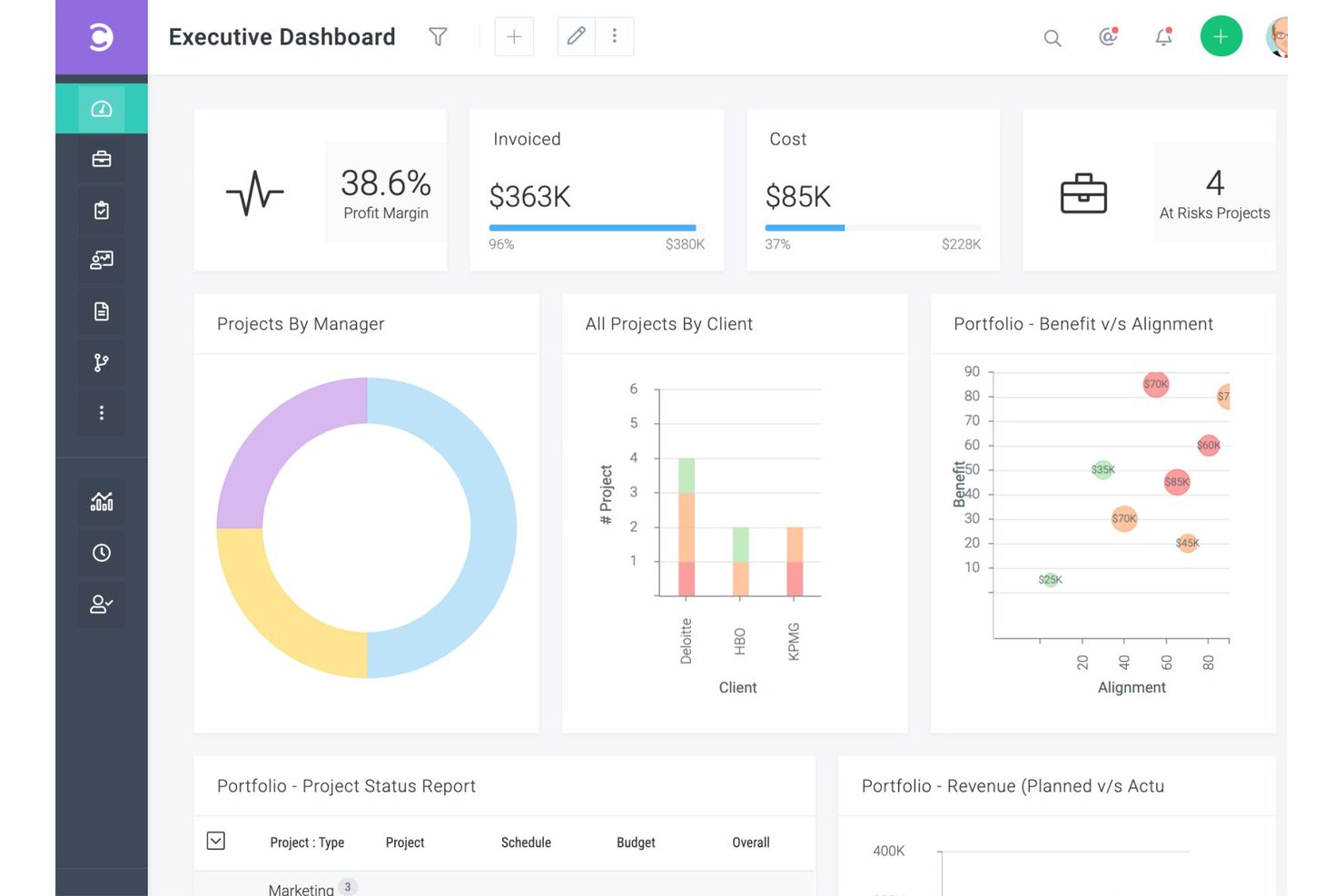
Celoxis is a project and portfolio management platform that covers scheduling, resource planning, financial tracking, cross-project dashboards, and configurable workflow apps for managing complex, multi-team programs.
Who Is Celoxis Best For?
Celoxis suits mid-to-large teams managing multiple concurrent programs who need configurable portfolio dashboards, dependency-based scheduling, and cross-project visibility in one place.
Why I Picked Celoxis
Celoxis earns its spot on my shortlist because of how well it handles multi-project program dashboards across complex, cross-functional programs. I like that you can build customizable portfolio dashboards that drill down from high-level status charts into individual task records, giving you real visibility across concurrent programs without toggling between tools. Celoxis also lets you model supplier milestones like tooling lead times and PPAP dates as inter-project dependencies, so schedule impacts surface automatically in the portfolio view.
Celoxis Key Features
- Inter-project dependency scheduling: Link tasks across concurrent programs so that when one milestone shifts—like a tooling lead time—dependent tasks in other projects recalculate automatically.
- Role-based access controls: Assign around 60 configurable privileges by security role, letting you expose project and task data to engineering, procurement, or supplier contacts without revealing financial information.
- Built-in risk, issue, and change request tracking: Log and route risks, issues, and change requests through configurable workflow apps with escalation rules and multi-level approvals.
- Resource workload and capacity planning: View cross-project resource utilization by role or skill and identify overloaded team members before conflicts affect your program schedule.
Celoxis Integrations
Celoxis has 21 integrations configured within the platform, including Microsoft Project, Excel, Google Drive, Jira, and Azure DevOps. It also supports custom connections through its REST API and integrations via Zapier.
Pros and Cons
Pros:
- Resource views reveal competing team workloads
- Portfolio dashboards show cross-program status
- Gantt dependencies map automotive milestones
Cons:
- Supplier milestones lack dedicated status escalation
- No native APQP or PPAP checklists

Workzone
Best for organized file sharing

Workzone is a project management platform that combines task tracking, Gantt and Kanban views, document approvals, file versioning, and cross-functional collaboration tools built around structured file sharing and review workflows.
Who Is Workzone Best For?
Workzone fits cross-functional teams that need structured file sharing, document approvals, and version control to keep project reviews organized and traceable.
Why I Picked Workzone
I picked Workzone as one of the best because its structured file sharing keeps automotive review workflows from falling apart across distributed teams. When you're routing spec sheets, tooling drawings, or supplier qualification documents for approval, Workzone's version control automatically tracks every revision and its document approval workflows create a clear, traceable chain of sign-offs. I also like that Partners get their own restricted folders, so suppliers only see what they need to see.
Workzone Key Features
- Manufacturing project templates: Pre-built templates for new product development, engineering change orders, tooling design, and supplier qualification map common manufacturing workflows.
- Role-based permissions: Assign Administrator, Manager, Contributor, Reviewer, or Partner roles to control exactly who can view, edit, or approve files and tasks.
- Portfolio view: See status across all active projects in a single dashboard, including milestones, deadlines, and project health indicators.
- Workload and capacity planning: Track team capacity across projects to spot over-allocation before it delays a program.
Workzone Integrations
Workzone offers native integrations with Microsoft Teams, Slack, Google Drive, OneDrive, and Microsoft SharePoint. It also supports a REST API for custom integrations and integrations via Zapier.
Pros and Cons
Pros:
- Partner folders support controlled supplier collaboration
- Manufacturing templates cover NPD and tooling
- Versioned files support traceable document reviews
Cons:
- Supplier tracking relies on generic templates
- No documented APQP or PPAP workflows
New Product Updates from Workzone

Workzone Enterprise Adds Multi-Stage Approval Workflows
Workzone Enterprise now includes Approval Workflows, enabling multi-stage document approvals to standardize complex processes and reduce manual effort. For more information, visit Workzone's official site.
 .

Jira
Best for enterprise cross-team program tracking
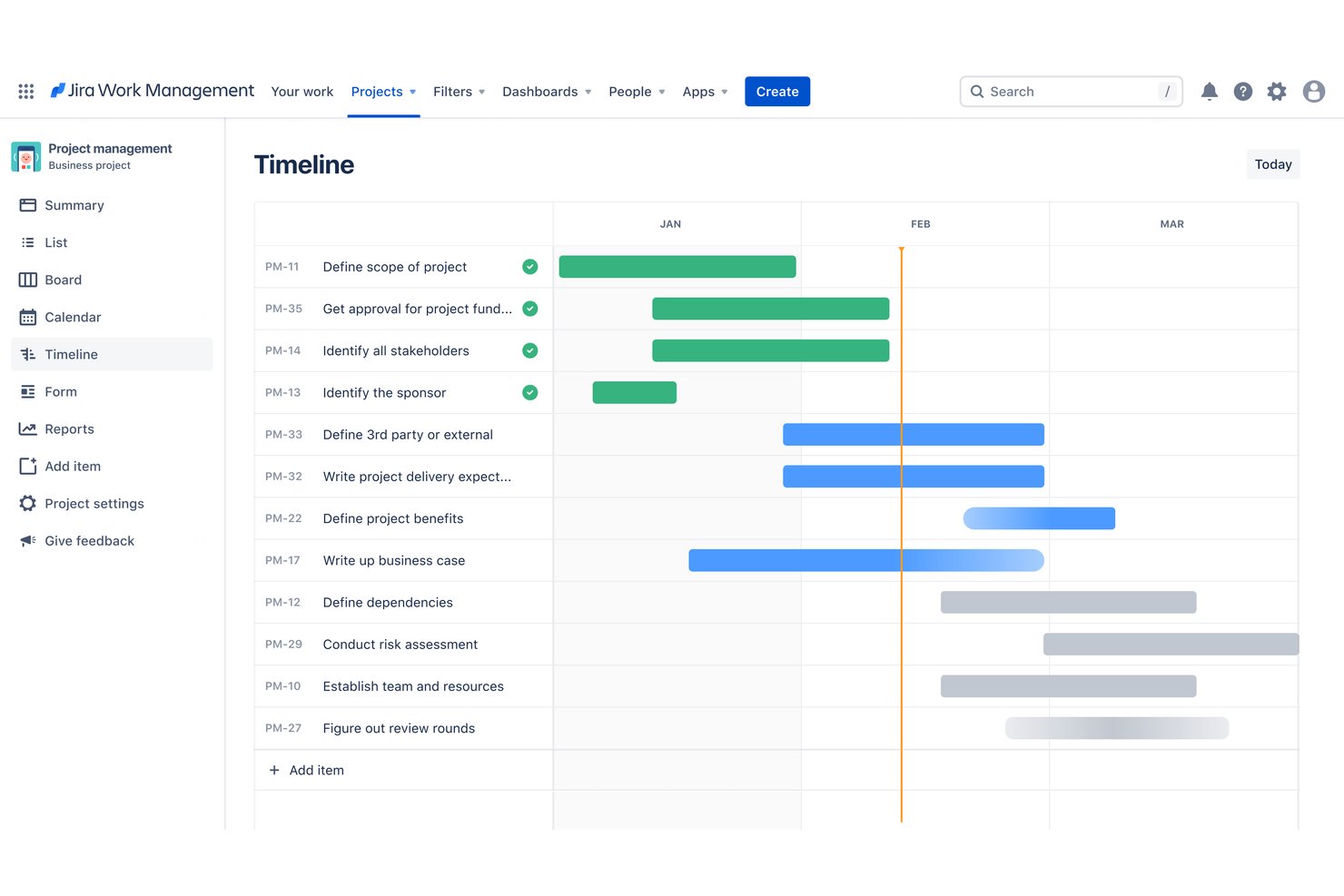
Jira is an Atlassian project management platform that combines task tracking, cross-team planning, dependency mapping, workflow automation, and AI-driven reporting across large, multi-team programs.
Who Is Jira Best For?
Jira fits large, multi-team organizations that need to coordinate complex programs across engineering, product, and operations under one tracking system.
Why I Picked Jira
I've included Jira in my top picks because it's the strongest option on this list for coordinating large, multi-team programs where work spans engineering, product, and operations. Cross-team dependency mapping and Advanced Roadmaps let you visualize what's blocking what across dozens of teams simultaneously. Mercedes-Benz uses Jira across software, hardware, and business teams in vehicle development, which gives it real automotive credibility.
Jira Key Features
- Scenario modeling: Compare alternative planning scenarios side by side to assess downstream impact before committing to a plan.
- Capacity management: Allocate team members' time across sprints and identify over-allocation before it affects delivery.
- No-code automation: Build rules to automate repetitive tasks and handoffs across spaces without writing code.
- Configurable approval workflows: Add approval steps to any workflow, specifying who must approve and what status transitions follow each decision.
Jira Integrations
Jira has native integrations with Confluence, Trello, and Bitbucket, plus 3,000+ Marketplace apps. It offers a REST API v3 for custom integrations and connects with tools including Slack, Figma, Gmail, GitHub, and Microsoft products.
Pros and Cons
Pros:
- Dashboards help track status and bottlenecks
- Mercedes-Benz case validates automotive team use
- Cross-team dependency maps clarify program blockers
Cons:
- Supplier guests lack dedicated milestone portals
- No built-in APQP, PPAP, or gate checklists
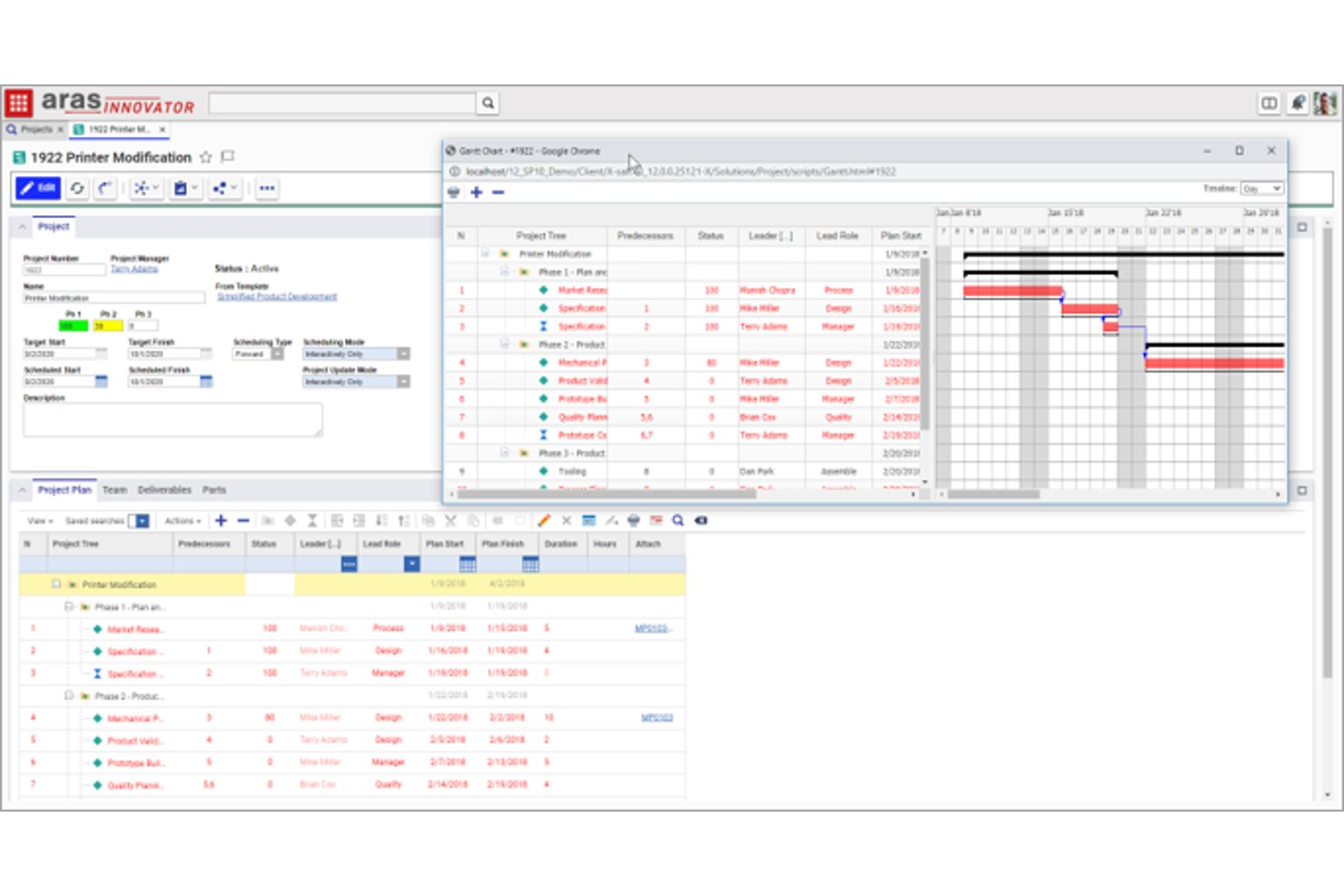
Aras Innovator is a product lifecycle management platform that combines requirements engineering, quality management, program tracking, and supplier coordination across the full product development lifecycle.
Who Is Aras Best For?
Aras Innovator is a strong fit for quality engineers and program teams at automotive OEMs or Tier 1 suppliers who need AIAG-aligned planning tools built into their PLM environment.
Why I Picked Aras
I've included Aras Innovator in my top picks because its Quality Management System is built directly on AIAG standards, giving quality engineers a native framework for APQP planning, DFMEA, PFMEA, and control plans without relying on workarounds. I particularly like that these quality gate tools connect directly to requirements, design, and engineering change data in the same platform, so a gate review reflects actual program status rather than manually compiled reports. The stage-gate program management module adds Gantt charts, milestone tracking, and status roll-ups that keep gate planning grounded in live project data.
Aras Key Features
- Variant management: Defines and resolves product variability using features, options, and configuration rules across engineering BOMs and lifecycle structures.
- Supplier portal: Provides a secure web-based portal where suppliers can complete workflows, questionnaires, and corrective action requests.
- EBOM-to-MBOM transformation: Supports drag-and-drop conversion from engineering BOMs to manufacturing BOMs with reconciliation indicators.
- Engineering change tracking: Monitors how changes to PLM-managed parts and documents affect downstream content, with alerts to impacted authors.
Aras Innovator Integrations
Marketplace integrations include SAP, Jira, Jama, 3DEXPERIENCE CATIA V6, Altium Designer, and Microsoft Office. Aras Innovator also offers an Open API and supports copying, synchronizing, or federating data with external systems.
Pros and Cons
Pros:
- Stage-gate dashboards track costs and schedules
- AIAG-based APQP planning links quality records
- Reviewers value shared production-data visibility
Cons:
- Reviewers report extra clicks finding records
- Setup and customization can take time
ClickUp
Best for flexible automotive team coordination
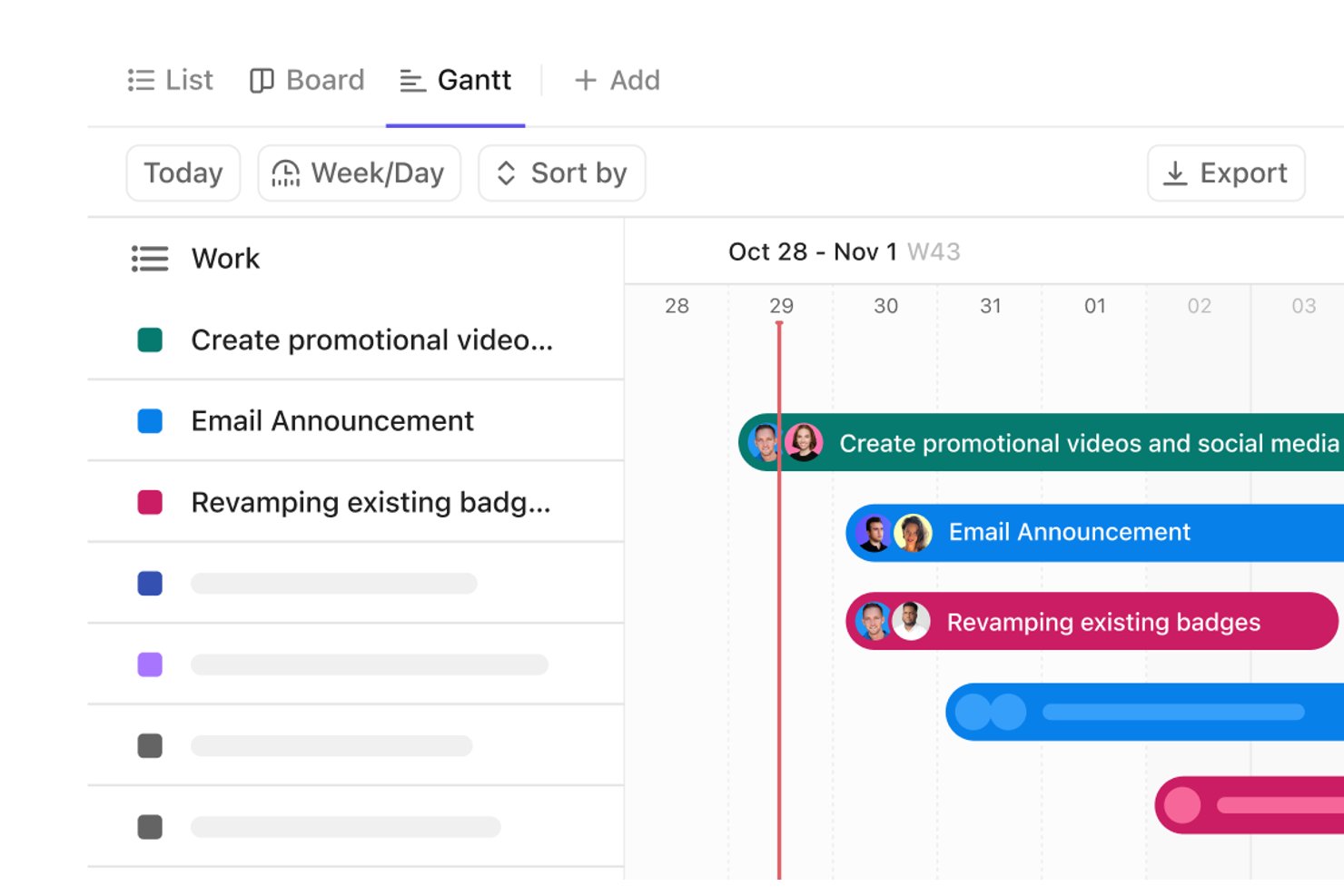
ClickUp is a work management platform that combines task tracking, Gantt-based timeline planning, cross-functional collaboration, and customizable dashboards to help automotive teams coordinate projects from concept through production.
Who Is ClickUp Best for?
ClickUp suits cross-functional automotive teams that need a flexible, configurable workspace to coordinate tasks, timelines, and documentation across engineering, supply chain, and production.
Why I Picked ClickUp
I've included ClickUp in my top picks because its flexibility makes it genuinely useful for automotive teams that span engineering, supply chain, and production. I like that Gantt charts automatically reschedule downstream dependent tasks when timelines shift, which is exactly what you need when a supplier delay ripples across an assembly stage. Milestones displayed as fixed diamonds on the Gantt let my team mark critical review points and launch gates without building a separate tracker.
ClickUp Key Features
- Custom task statuses and fields: Define your own statuses, field types, and task types to match the stages and data points your automotive workflows actually use.
- Forms for request intake: Collect engineering change requests, quality findings, or supplier submissions through a Form and route them automatically into the right workflow.
- Workload and resource management: View team capacity across tasks and timelines to balance assignments before scheduling conflicts affect a production stage.
- Automations: Set rules to trigger status updates, reassign tasks, or send notifications when conditions change across your project workflow.
ClickUp Integrations
ClickUp lists 1,000+ integrations, including native connections with Google Drive, Microsoft Teams, Slack, GitHub, GitLab, Google Calendar, and Tableau Web Connector. It also supports custom integrations through its API, webhooks, OAuth, and Zapier.
Pros and Cons
Pros:
- Custom statuses and forms adapt workflows
- Shared tasks, docs, and chat support coordination
- Dependency-aware Gantt rescheduling
Cons:
- Supplier guests cannot join Spaces
- No native APQP or PPAP gates
New Product Updates from ClickUp
ClickUp Adds List Automations, Time Off Scheduling, and Org Charts
ClickUp adds template-based List automations, personal time off scheduling, a unified picker, automatic task date syncing, and Org Charts. These updates help teams automate project setup, manage availability, and organize work. For more information, visit ClickUp’s official site.
Best for visual project tracking
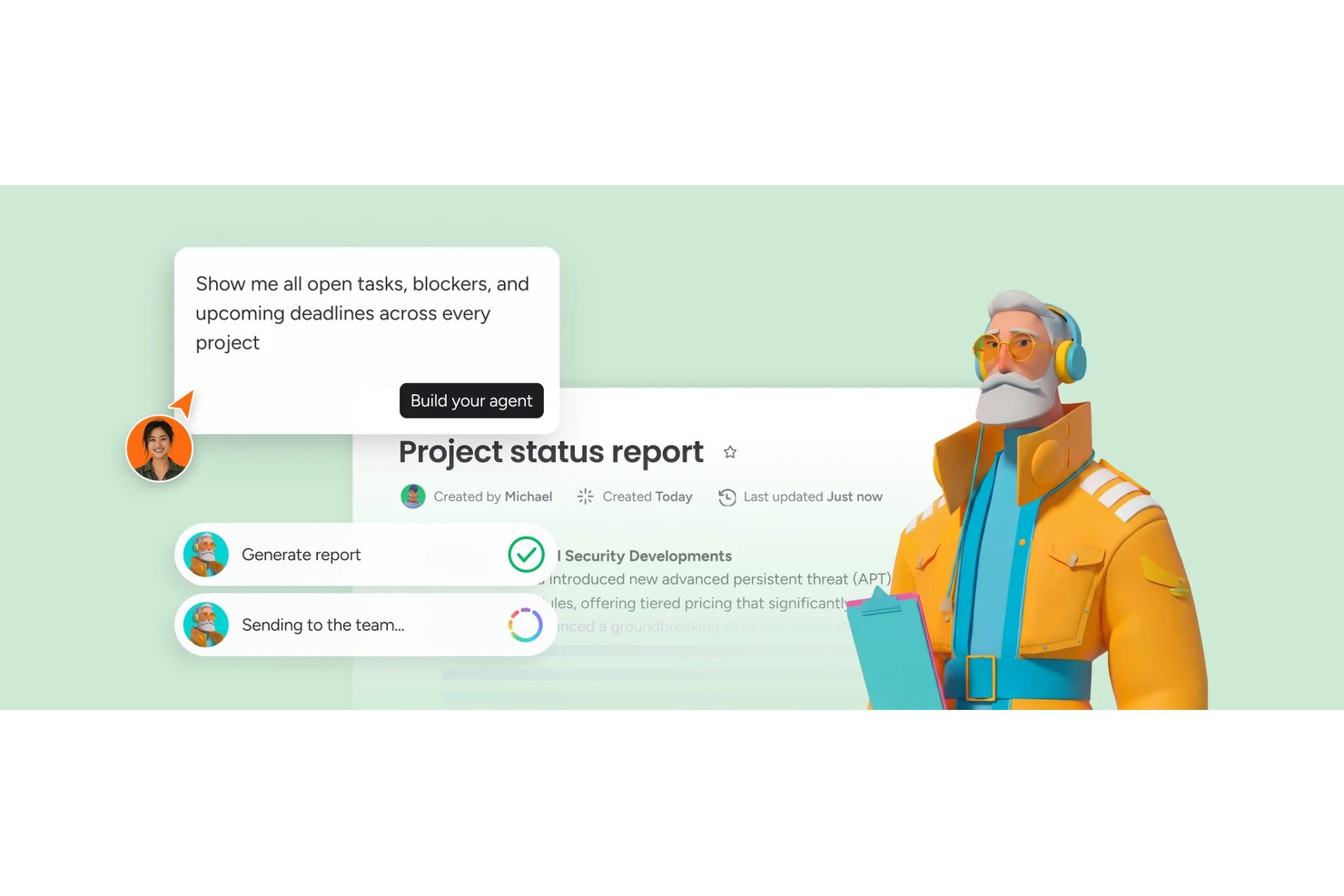
monday AI Workspace is a flexible, AI-powered project management platform that combines visual boards, Gantt charts, automated workflows, and cross-team dashboards to plan, track, and coordinate work across projects.
Who Is monday AI Workspace Best For?
monday AI Workspace is a good fit for cross-functional teams that need visual project tracking but don't require automotive-specific workflows like APQP or PPAP.
Why I Picked monday AI Workspace
I've included monday AI Workspace in my top picks because its Gantt charts with dependency tracking and milestone views make it easy to see exactly where a project stands across multiple workstreams at once. I particularly like how the cross-project dependency linking lets me connect tasks across separate boards, so when one workstream slips, the downstream impact is visible immediately. It's not built for APQP or PPAP, but for teams that need strong visual project tracking without automotive-specific constraints, it delivers.
monday AI Workspace Key Features
- AI workflow builder: Build automated workflows from natural-language descriptions, a visual canvas, or templates, combining rules, approvals, and AI steps.
- WorkForms with conditional logic: Create structured forms that adapt questions based on responses and feed submissions directly into boards as trackable items.
- File versioning: Store, preview, and restore multiple versions of uploaded documents through the Files Column.
- Activity log: Track item- and board-level changes—including status updates, date changes, and permission edits—with a timestamped record of who made each change.
monday AI Workspace Integrations
monday AI Workspace lists 850+ integrations and apps, including GitHub, GitLab, Slack, Microsoft Teams, Google Calendar, Salesforce, and HubSpot. It also supports GraphQL APIs, webhooks, SDKs, and Zapier.
Pros and Cons
Pros:
- Configurable boards adapt to engineering workflows
- Dashboards reduce manual status chasing
- Visual timelines clarify cross-team program status
Cons:
- Supplier tracking lacks dedicated portals
- No native APQP or PPAP gates
New Product Updates from monday AI Workspace
monday AI Workspace Adds Human Approval Routing
monday AI Workspace adds a human-in-the-loop approval block to AI Workflows, sending approval requests and routing workflow paths based on responses. For more information, visit monday AI Workspace's official site.
Best for adaptable multi-team program tracking
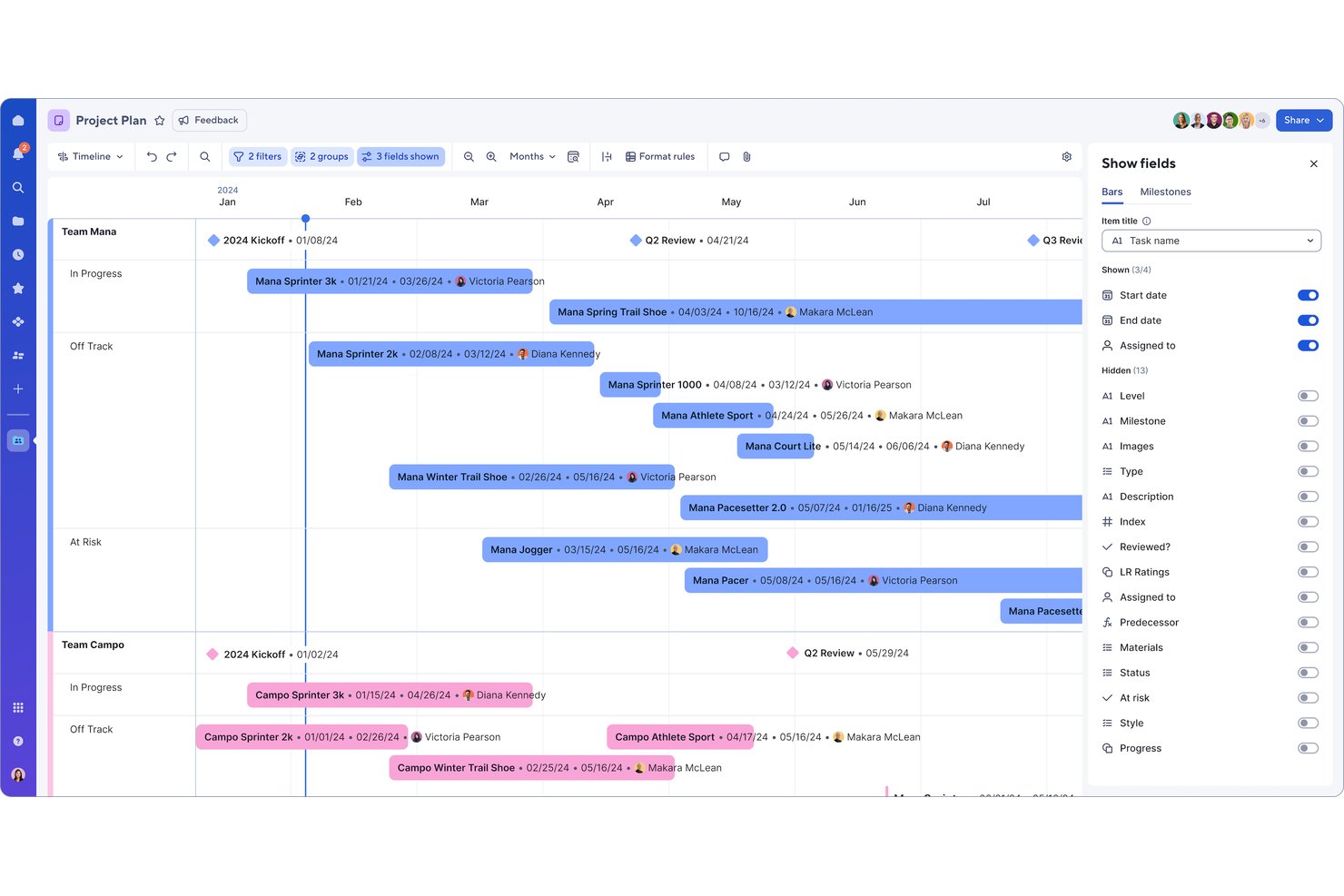
Smartsheet is a flexible work management platform that combines multi-view task tracking, Gantt-based timeline planning, cross-team collaboration, portfolio dashboards, and workflow automation to help teams plan, manage, and report on programs across multiple workstreams.
Who Is Smartsheet Best For?
Smartsheet fits cross-functional teams that need to track multiple programs across departments and already rely on spreadsheet-style workflows to manage complex, multi-workstream projects.
Why I Picked Smartsheet
I've included Smartsheet in my top picks because it's one of the most adaptable platforms I've seen for keeping multi-team programs organized without forcing everyone into a rigid structure. I particularly like how Sheet Summary Reports pull milestone and status data from across multiple sheets into a single portfolio-level view, so program leads can spot bottlenecks without chasing individual teams. Scenario Planning (Enterprise) lets you model timeline and capacity changes before committing, which matters when program scope shifts mid-cycle.
Smartsheet Key Features
- Automated workflow builder: Set up no-code workflows with conditional logic to trigger reminders, approvals, and row updates across program workstreams.
- Sheet Summary Reports: Aggregate milestone and status fields from multiple project sheets into a single filterable, sortable portfolio-level view.
- Dependency tracking: Define Finish-to-Start, Finish-to-Finish, Start-to-Start, and Start-to-Finish task relationships with lag or lead time to maintain accurate program schedules.
- Role-based access controls: Set permission levels down to individual assets and restrict external collaboration to trusted domains or specific users.
Smartsheet Integrations
Smartsheet reports over 175 integrations, including Jira Software, SAP ERP, ServiceNow, Salesforce, Power BI, Microsoft Teams, and Slack. It also supports API, webhooks, SDKs, OAuth 2.0, and Zapier for custom connectivity.
Pros and Cons
Pros:
- Shared sheets support collaborative project visibility
- Portfolio dashboards consolidate cross-team status updates
- Task dependencies clarify shifting program schedules
Cons:
- Supplier deliverables and tooling milestones need workarounds
- No native APQP or PPAP gate workflows
New Product Updates from Smartsheet

Smartsheet Adds Claude Sheets Export Integration
Smartsheet introduces Send to Smartsheet in Claude Sheets (beta), allowing users to transfer AI-generated plans into Smartsheet with rows, dates, numbers, and dropdowns preserved. This helps teams turn AI-generated plans into collaborative workflows. For more information, visit Smartsheet’s official site.
 .

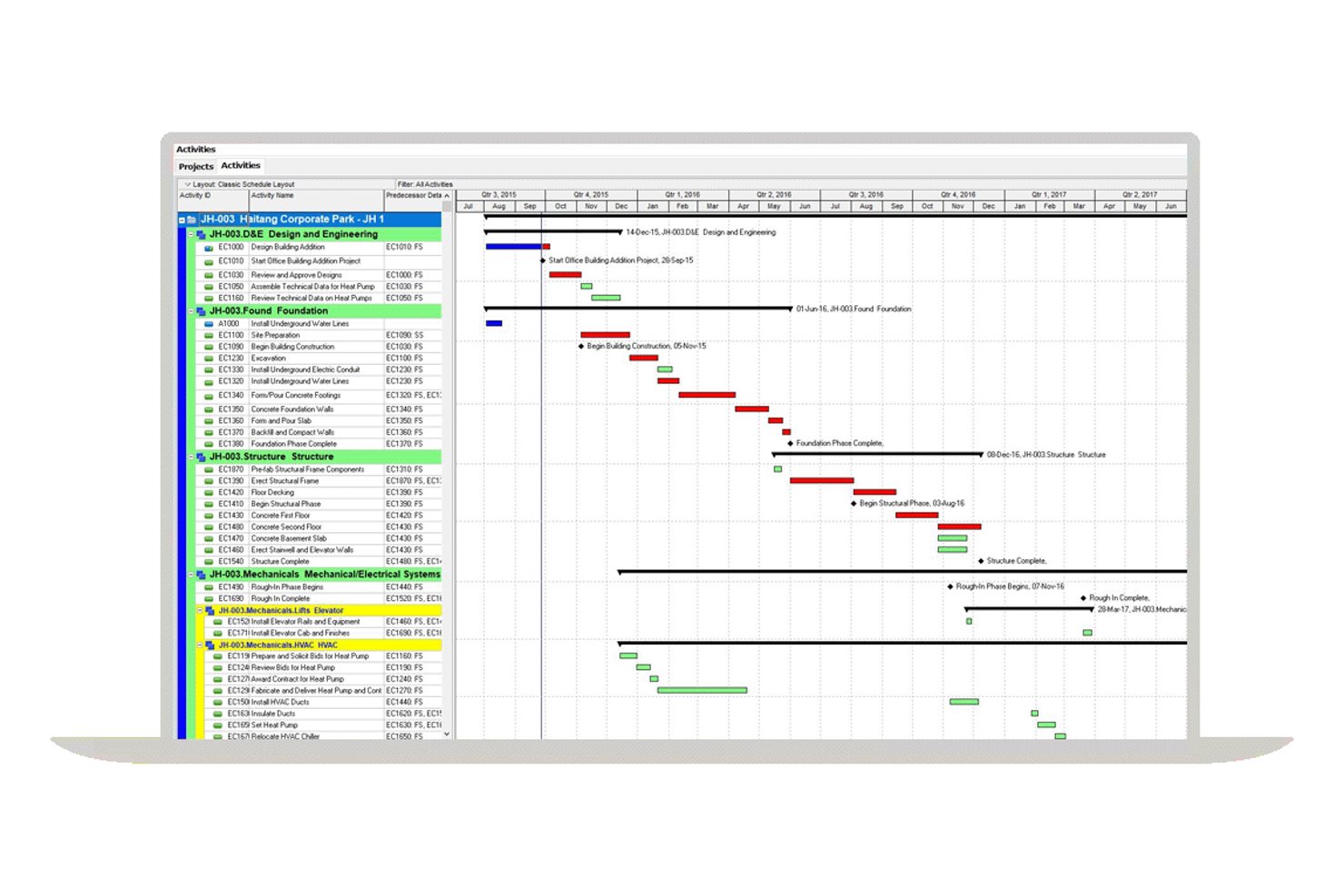
Oracle Primavera P6 is an enterprise project portfolio management platform that supports large-scale program planning, CPM scheduling, resource optimization, cost management, and cross-project portfolio reporting.
Who Is Oracle Primavera P6 Best For?
Oracle Primavera P6 is a strong fit for enterprise organizations managing large, complex programs where CPM scheduling, multi-project visibility, and portfolio-level reporting are non-negotiable.
Why I Picked Oracle Primavera P6
I picked Oracle Primavera P6 as one of the best because it's built for exactly the kind of multi-project complexity that automotive programs generate at scale. When you're managing overlapping vehicle programs with hundreds of interdependent activities, P6's CPM scheduling engine calculates critical paths, float, and early/late dates across all of them simultaneously. I also rely on its portfolio dashboards to compare schedule and cost performance across programs in one view, which is essential when leadership needs cross-program status at a glance.
Oracle Primavera P6 Key Features
- Resource demand and capacity planning: View and plan resource and role demand across multiple projects to identify conflicts before they delay your program.
- What-if scenario analysis: Model alternative resource and schedule scenarios to evaluate tradeoffs before committing to a plan.
- Integrated cost and schedule tracking: Connect cost codes to work breakdown structures for real-time visibility into budget and schedule impacts together.
- Graphical workflow modeling: Configure workflow forms to route approvals and communication across project teams without relying on manual follow-up.
Oracle Primavera P6 Integrations
Oracle Primavera P6 integrates with Oracle Primavera Unifier and interoperates with Oracle E-Business Suite and SAP ERP. Primavera Gateway, Primavera Web Services, and its Java-based Integration API support custom connectivity.
Pros and Cons
Pros:
- Resource scenarios flag cross-program capacity conflicts
- Portfolio views compare vehicle-program status
- CPM scheduling exposes dependencies and float
Cons:
- No dedicated supplier or tooling milestone tracking
- No native APQP or PPAP gate workflows
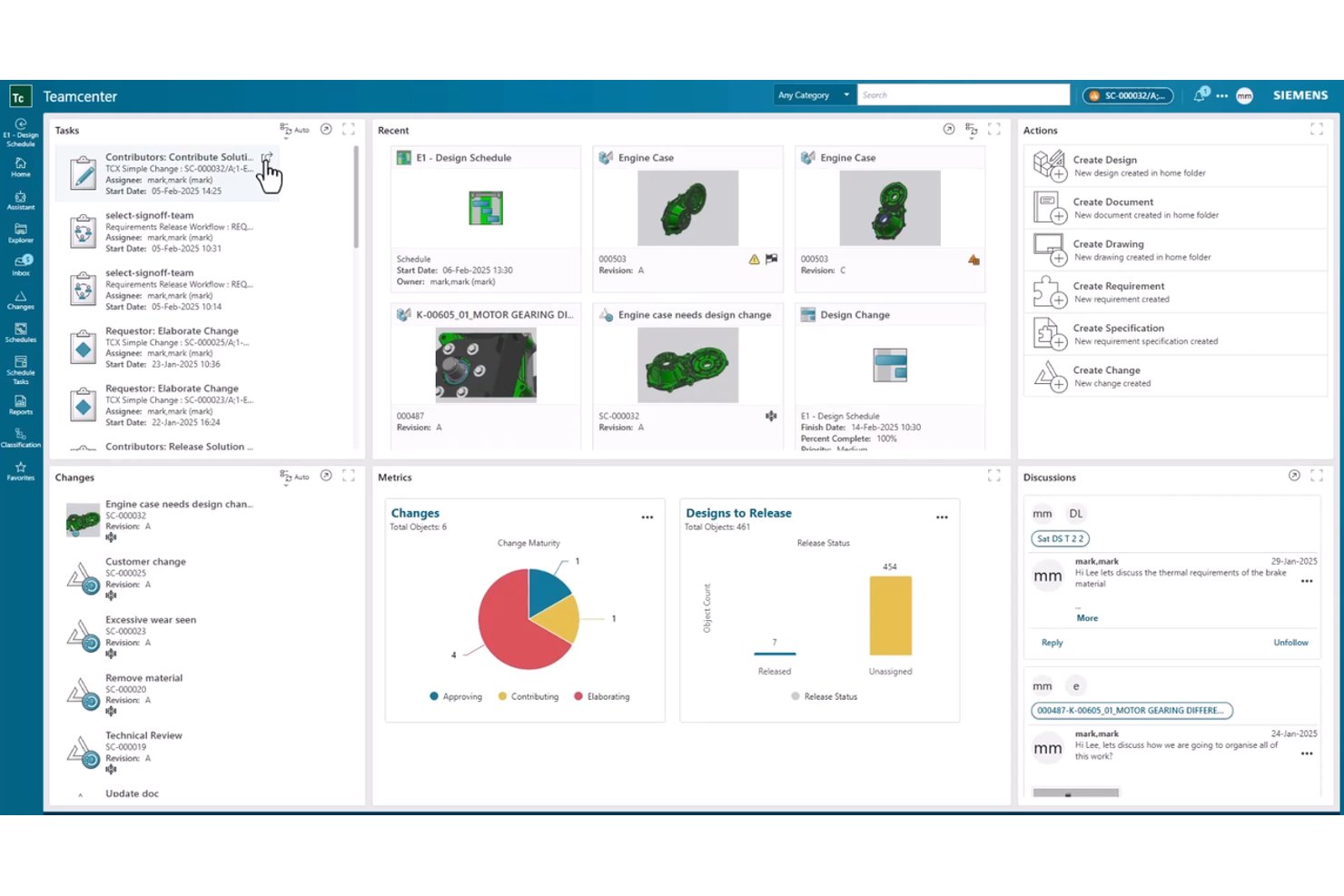
Siemens Teamcenter is a product lifecycle management platform that connects program planning, change management, document control, supplier collaboration, and APQP quality tracking across the full vehicle development lifecycle.
Who Is Siemens Teamcenter Best For?
Teamcenter is a strong fit for enterprise OEMs and Tier 1 suppliers that need program planning tightly connected to product data, change control, and supplier collaboration across the full vehicle lifecycle.
Why I Picked Siemens Teamcenter
Teamcenter earns its spot on my shortlist because it connects program planning directly to live product data, which is something most standalone project tools simply can't do. I like that project plans can be tied to specific requirements, deliverables, and BOMs, so when something changes in the product structure, the program context changes with it. Configurable change workflows with full audit trails also mean cross-functional teams across engineering, supply chain, and manufacturing are working from the same traceable record.
Siemens Teamcenter Key Features
- APQP quality project management: Structured quality planning from design through production, connected to FMEA, control plans, and ISO 9001/IATF 16949 practices.
- Supplier Connect portal: Suppliers can view shared product data, request write access, and submit updates, with OEM gatekeeper review at each step.
- Workflow automation with audit trails: Configurable workflows use business logic and standard process templates, capturing full status history for every change.
- ERP and CAD integrations: Bidirectional data sync with SAP and Oracle ERP, plus native integrations for SolidWorks, Creo, Inventor, and AutoCAD.
Siemens Teamcenter Integrations
Siemens Teamcenter integrates with SAP Business Suite, Oracle E-Business Suite, SolidWorks, Creo, Inventor, and AutoCAD. Teamcenter Gateway synchronizes ERP, MES, and CRM data, while APIs and web services/SOAP support custom integrations.
Pros and Cons
Pros:
- Reviewers praise revision control across CAD teams
- Supplier submissions retain review and audit trails
- Product-linked plans connect tasks with BOM changes
Cons:
- Critical-path sequencing isn't documented for schedules
- Built-in PPAP levels and gate scoring undocumented

Wrike
Best for cross-department vehicle program tracking
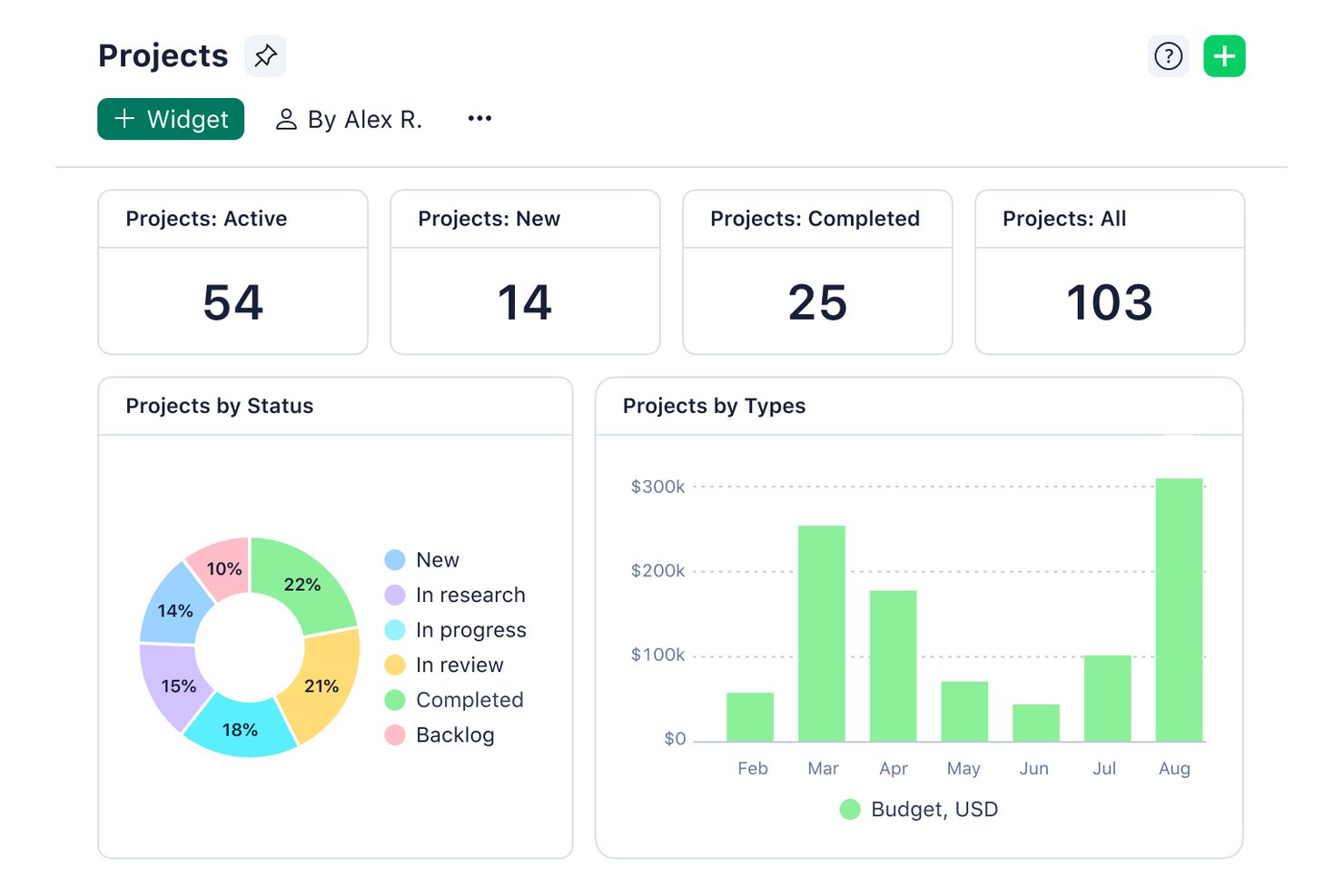
Wrike is a work management platform that supports automotive program planning through configurable stage-gate workflows, Gantt-based timelines, cross-department visibility, and supplier coordination across vehicle development programs.
Who Is Wrike Best For?
Wrike is a strong fit for cross-functional automotive teams—spanning engineering, supply chain, and quality—that need to coordinate vehicle programs across departments without adopting a purpose-built PLM tool.
Why I Picked Wrike
I've included Wrike in my top picks because it handles cross-department vehicle program tracking better than most horizontal tools I've used. I particularly like how shared work items can appear across multiple vehicle programs simultaneously, so engineering, supply chain, and quality teams each see their own view while updating the same record. Configurable stage-gate workflows for APQP and engineering change orders, with required fields that block gate advancement until sign-offs are recorded, give real structure to what can otherwise be a chaotic process.
Wrike Key Features
- Gantt chart dependencies: View task relationships across finish-to-start, start-to-start, finish-to-finish, and start-to-finish links, with dependent tasks rescheduled automatically when dates shift.
- Cross-tagging: Make a single work item visible across multiple vehicle programs and team spaces without duplicating the record.
- Dynamic supplier request forms: Send scheduled status requests to Tier 2 or Tier 3 suppliers and pull their responses directly into the program schedule.
- Portfolio visibility: Connect vehicle roadmaps, capital allocation, and capacity planning in a single view across programs.
Wrike Integrations
Wrike supports 400+ integrations, including Jira, GitHub, Power BI, Google Sheets, Salesforce, and Slack, plus Wrike Sync for two-way connections. Its REST API, webhooks, Datahub API, and BI Export API support custom connectivity with PLM, ERP, and MES systems.
Pros and Cons
Pros:
- Dashboards reduce manual status chasing
- Configurable APQP gates capture approvals
- Shared records span vehicle programs
Cons:
- Advanced cross-program reporting can fall short
- Supplier workflows lack dedicated portals
New Product Updates from Wrike

Wrike Adds Advanced Filters to Chart View
Wrike introduces new default filters in Chart view, including relative dates, exclusion conditions, multiple filters per field, and status group filtering. These updates help teams refine project data and reporting. For more information, visit Wrike’s official site.
Diğer Otomotiv Proje Yönetimi Yazılımları
İşte kısa listeme giremeyen, ancak yukarıda aradığınızı bulamadıysanız yine de incelemeye değer bazı ek otomotiv proje yönetimi yazılımı seçenekleri:
- Quickbase
For custom app creation
- GoodDay
For viewing tasks across multiple layouts
- Planisware
For automotive cross-functional program sync
- PTC Windchill
For PLM-driven vehicle program coordination
- Polarion ALM
For ALM-driven requirements traceability
- Arena PLM
For ECO-linked program traceability
- Propel PLM
For change control across supplier teams


How I Evaluate Automotive Project Management Software
I split my evaluation into three parts, with core functionality carrying the most weight: assign tasks, track dependencies and milestones, and coordinate engineering, procurement, and manufacturing. Then I look for standout features such as launch-readiness scoring. Finally, I consider onboarding, support, deployment, and value beyond features.
Core Functionality (Table Stakes For This List)
When I'm selecting tools for my list, I score each one on a scale from 0 (does not offer the functionality) to 5 (excels in this area) for each core functionality listed below. I then convert the total into a percentage to help assess each tool's overall fit, with extra weight on any functionalities I’ve deemed essential.
- Task & Timeline Management (Essential): I look for sequenced tasks, dependencies, and milestones that help teams track engineering work through tooling and production dates.
- Cross-Functional Collaboration (Essential): I assess how engineering, procurement, and manufacturing teams share plans, update work, and see ownership across a vehicle program.
- Program Gate Tracking: I check how easily teams can map APQP-style phases, readiness checks, and approvals to a program’s development milestones.
- Supplier Coordination: I look for ways to assign supplier deliverables, track tooling dates, and flag late inputs against program milestones.
- Document Control: I assess document versions and change tracking, including how teams record revisions to requirements or engineering plans.
- Program Reporting: I look for dashboards that summarize milestone progress, schedule risks, and status across vehicle programs.
Once I have a list of tools that meet the criteria, I consider what sets each platform apart.
Differentiating Factors (What Sets Vendors Apart)
Here's how I compare and contrast different vendors:
Standout Features
I look for engineering change impact analysis that visually maps how an ECO ripples into downstream tasks, supplier timelines, and tooling schedules. Without that linkage, a single design change can silently push back SOP. I also evaluate multi-platform variant tracking—when teams share parts across derivatives, I want one program view showing common tooling and divergent timelines side by side. Launch readiness scoring matters too: automated red/yellow/green indicators at each gate review surface at-risk deliverables before they become surprises.
Beyond Features
I check whether a vendor's templates and terminology map to automotive gate reviews like design freeze and PPAP levels without heavy reconfiguration. Industry standards alignment with IATF 16949 or AIAG saves weeks of setup. I also evaluate API maturity and pre-built PLM/ERP connectors, since duplicate data entry across systems is a real risk on multi-year vehicle programs. Security certifications like ISO 27001 matter when sensitive tooling data crosses organizational boundaries with tiered suppliers.
Otomotiv Proje Yönetimi Yazılımı Nasıl Seçilir?
Uzun özellik listeleri ve karmaşık fiyatlandırma yapıları arasında kaybolmak kolaydır. Yazılım seçeneklerini kısa listeye alırken odaklanmanıza yardımcı olmak için göz önünde bulundurmanız gereken faktörlerin bir kontrol listesini aşağıda bulabilirsiniz:
| Faktör | Dikkat Edilmesi Gerekenler |
|---|---|
| Ölçeklenebilirlik | Araç işletmenizle birlikte büyüyecek mi? İşletmeniz genişledikçe artan iş yükünü kaldırıp daha fazla kullanıcıyı destekleyip destekleyemeyeceğini değerlendirin. Büyümeye uyum sağlayan esnek fiyatlandırma kademeleri arayın. |
| Entegrasyonlar | Yazılım mevcut araçlarınızla çalışıyor mu? Muhasebe, envanter ve CRM sistemlerinize sorunsuz şekilde bağlandığından emin olun. QuickBooks veya CARFAX gibi araçlarla uyumluluğunu kontrol edin. |
| Özelleştirilebilirlik | Yazılımı iş akışlarınıza uyacak şekilde uyarlayabilir misiniz? Panoları, raporları ve kullanıcı izinlerini değiştirme seçeneklerini arayın. Arayüz ve işlevleri üzerindeki kontrol düzeyinizi değerlendirin. |
| Kullanım kolaylığı | Araç ekibiniz için sezgisel mi? Kullanıcı dostu bir arayüz eğitim süresini ve hataları azaltır. Ekibinizin günlük kullanıma ne kadar hızlı uyum sağlayabileceğini değerlendirmek için tanıtım sürümünü test edin. |
| Uygulama ve işe alıştırma | Çalışmaya başlamanız ne kadar sürecek? Eğitim videoları, web seminerleri ve özel işe alıştırma uzmanları dahil olmak üzere kurulum sırasında sağlanan desteği değerlendirin. Kurulum süresi uzun olan araçlardan kaçının. |
| Maliyet | Fiyatlandırma bütçenize uygun mu? Maliyeti sunulan özelliklerle karşılaştırın. Kurulum ücretleri veya ek kullanıcılar için alınan ücretler gibi gizli maliyetleri göz önünde bulundurmayı unutmayın. |
| Güvenlik önlemleri | Yazılım verilerinizi nasıl koruyor? Şifreleme standartlarını, veri yedekleme protokollerini ve GDPR gibi düzenlemelere uyumluluğu arayın. |
| Destek erişilebilirliği | İhtiyaç duyduğunuzda gerekli yardımı alabilecek misiniz? Sohbet, telefon ve e-posta dahil olmak üzere birden fazla kanal üzerinden 7/24 destek sunulup sunulmadığını kontrol edin. Hızlı ve güvenilir destek, zamandan ve hayal kırıklığından tasarruf sağlar. |
Otomotiv Proje Yönetimi Yazılımı Nedir?
Otomotiv proje yönetimi yazılımı, oto tamirhanelerinin operasyonlarını daha verimli bir şekilde yönetmesine yardımcı olmak için tasarlanmış bir araçtır. Servis yöneticileri, işletme sahipleri ve teknisyenler bu araçları randevuları planlamak, envanteri takip etmek ve müşterilerle iletişim kurmak için kullanır.
Planlama, envanter yönetimi ve müşteri iletişimi özellikleri, iş akışlarınızı ve müşteri hizmetlerinizi geliştirmenize yardımcı olur. Bu araçlar günlük görevleri kolaylaştırarak işletmenizin sorunsuz ve verimli bir şekilde çalışmasını sağlar.
Otomotiv Proje Yönetimi Yazılımının Özellikleri
Otomotiv proje yönetimi yazılımı seçerken aşağıdaki temel özellikleri arayın:
- Planlama: Randevuları yönetmeye, boşta kalma süresini azaltmaya ve işletmenizi düzenli tutmaya yardımcı olur.
- Envanter yönetimi: Onarımları tamamlamak için gerekli parçalara ve malzemelere sahip olmanız amacıyla bunları takip eder.
- Faturalandırma: Faturalandırma süreçlerini otomatikleştirir, zamandan tasarruf sağlar ve finansal işlemlerdeki hataları azaltır.
- Müşteri iletişimi: Güncellemeler ve hatırlatmalar göndermek için araçlar sunarak müşteri memnuniyetini ve etkileşimini artırır.
- Dijital araç muayeneleri: Hizmet süreçlerinde güven ve şeffaflık oluşturmak için müşterilere ayrıntılı raporlar sunmanıza olanak tanır.
- Raporlama araçları: Performansla ilgili içgörüler oluşturarak bilinçli kararlar almanıza ve operasyonlarınızı geliştirmenize yardımcı olur.
- Parça yönetimi: Stok tükenmelerini ve onarımlardaki gecikmeleri önlemek için envanteri düzenli tutar.
- Zaman takibi: Verimliliği ve etkinliği artırmak için projelere ne kadar zaman harcandığını izler.
- Özel hizmet paketleri: Belirli müşteri ihtiyaçlarını karşılamak üzere tekliflerinizi özelleştirmenize olanak tanır ve hizmet esnekliğini artırır.
Otomotiv Proje Yönetimi Yazılımının Faydaları
Otomotiv proje yönetimi yazılımını uygulamak, ekibiniz ve işletmeniz için çeşitli faydalar sağlar. İşte yararlanabileceğiniz birkaç fayda:
- Geliştirilmiş organizasyon: Planlama ve envanter yönetimi özellikleri işletmenizin sorunsuz çalışmasını sağlar ve boşta kalma süresini azaltır.
- Artırılmış müşteri memnuniyeti: Müşteri iletişimi araçları, müşterilerinizi bilgilendirmenize ve etkileşimde tutmanıza, ayrıca daha iyi hizmet deneyimleri sunmanıza yardımcı olur.
- Zamandan tasarruf: Otomatik faturalandırma ve planlama, ekibinizin onarımlara ve müşteri etkileşimlerine odaklanması için zaman kazandırır.
- Artırılmış şeffaflık: Dijital araç muayeneleri, açık ve dürüst iletişim yoluyla müşterilerinizin güvenini oluşturabilmeniz için ayrıntılı raporlar sunar.
- Daha iyi karar alma: Raporlama araçları performansla ilgili içgörüler sunarak operasyonlarınızı geliştirmek için bilinçli seçimler yapmanıza yardımcı olur.
- Verimli kaynak yönetimi: Parça yönetimi özellikleri stok tükenmelerini önler; böylece onarımlar için gerekli parçalara her zaman sahip olursunuz.
Otomotiv Proje Yönetimi Yazılımının Maliyetleri ve Fiyatlandırması
Otomotiv proje yönetimi yazılımı seçmek, mevcut çeşitli fiyatlandırma modellerinin ve planların anlaşılmasını gerektirir. Maliyetler özelliklere, ekip büyüklüğüne, eklentilere ve daha fazlasına göre değişir. Aşağıdaki tablo, otomotiv proje yönetimi yazılımı çözümlerinde yaygın planları, bunların ortalama fiyatlarını ve genel olarak sunulan özellikleri özetlemektedir:
Otomotiv Proje Yönetimi Yazılımı Planları Karşılaştırma Tablosu
| Plan Türü | Ortalama Fiyat | Yaygın Özellikler |
|---|---|---|
| Ücretsiz Plan | $0 | Temel planlama, sınırlı envanter takibi ve basit faturalandırma. |
| Kişisel Plan | $10-$30/kullanıcı/ay | Gelişmiş planlama, ayrıntılı envanter yönetimi, müşteri iletişimi araçları ve dijital araç muayeneleri. |
| İşletme Planı | $30-$60/kullanıcı/ay | Kapsamlı raporlama araçları, parça yönetimi, zaman takibi ve özel hizmet paketleri. |
| Kurumsal Plan | $60-$100/kullanıcı/ay | Tüm entegrasyonlar, gelişmiş analizler, öncelikli destek ve kapsamlı özelleştirme seçenekleri dahil olmak üzere eksiksiz özellik paketi. |
Otomotiv Proje Yönetimi Yazılımı SSS
Otomotiv proje yönetimi yazılımı hakkında sık sorulan bazı soruların yanıtlarını burada bulabilirsiniz:
Otomotiv proje yönetimi yazılımı karmaşık planlamayı nasıl yönetir?
Otomotiv proje yönetimi yazılımı, birden fazla projeyi ve görevi yönetmenizi sağlayan gelişmiş planlama araçlarına sahiptir. Önceliklendirme yapabilir, kaynakları tahsis edebilir ve zaman çizelgelerini kolayca ayarlayabilirsiniz. Bu esneklik, ekibinizin değişikliklere uyum sağlamasına ve stres yaşamadan son teslim tarihlerine yetişmesine olanak tanır.
Otomotiv proje yönetimi yazılımı mevcut sistemlerle entegre olabilir mi?
Evet, çoğu otomotiv proje yönetimi yazılımı muhasebe, envanter yönetimi ve CRM araçları gibi mevcut sistemlerle entegre olabilir. Bu, manuel veri girişini ve hataları azaltmaya yardımcı olur. Bir yazılım seçmeden önce mevcut sistemlerinizle uyumluluğunu kontrol edin.
Verileri korumak için hangi güvenlik önlemleri uygulanıyor?
Otomotiv proje yönetimi yazılımı genellikle veri şifreleme, kullanıcı kimlik doğrulama ve düzenli yedekleme gibi güvenlik özelliklerini içerir. Bu önlemler, hassas bilgileri yetkisiz erişime ve veri ihlallerine karşı korur.
Bu araçlar harici iş ortaklarıyla iş birliğini nasıl destekler?
Bu araçlar, proje verilerine ortak erişim ve iletişim platformları sağlayarak iş birliğini kolaylaştırır. Tedarikçiler, yükleniciler ve diğer iş ortaklarıyla kolayca koordinasyon sağlayabilir, böylece herkes proje hedefleri hakkında bilgi sahibi olur ve hedeflerle uyum içinde çalışır.
Ne tür bir müşteri desteği bekleyebilirim?
Otomotiv proje yönetimi yazılımı sağlayıcıları genellikle telefon, e-posta ve sohbet desteği dahil olmak üzere çeşitli destek seçenekleri sunar. Bazıları ayrıca sizin ve ekibinizin yazılımın potansiyelinden en iyi şekilde yararlanmasına yardımcı olmak için eğitim kaynakları, kullanıcı kılavuzları ve web seminerleri sağlar. Bir taahhütte bulunmadan önce desteğin kullanılabilirliğini ve yanıt verme hızını kontrol edin.
Yazılımı belirli ihtiyaçlara uyacak şekilde özelleştirmek mümkün mü?
Birçok otomotiv proje yönetimi yazılımı çözümü, aracı belirli iş süreçlerinize ve gereksinimlerinize göre uyarlayabilmeniz için özelleştirme seçenekleri sunar. Panoları, raporları ve kullanıcı izinlerini iş ihtiyaçlarınıza uyacak şekilde ayarlayabilirsiniz.