

2026 En İyi Jira Entegrasyonlu 10 Proje Yönetimi Yazılımı

Jira Entegrasyonlu En İyi Proje Yönetimi Yazılımları Kısa Listesi


Kuruluşların birden fazla proje yönetimi aracı kullandığını görmek alışılmadık bir durum değildir. Jira gibi bir aracın kendine özgü bir kullanım alanı vardır ve geliştirme ekipleri dışındaki kişiler için ideal bir seçim olmayabilir. Bu nedenle Jira entegrasyonuna sahip bir proje yönetimi yazılımı, iş akışlarınızda fark yaratabilir. Neyse ki pek çok seçenek mevcut; ancak bu durum kısa sürede bunaltıcı olabilir.
Dijital projeleri yönetme ve çeşitli proje yönetimi araçlarını test etme konusundaki kapsamlı deneyimimden yararlanarak, seçebileceğiniz en iyi seçeneklerin bu listesini hazırladım.
Why Trust Our Software Recommendations
Our team has been testing and reviewing software since 2012. As project managers ourselves, we know how difficult—and important—it is to choose the right software.
For this guide, we evaluated tools using hands-on testing and independent research, scoring tools using our selection criteria. We also draw on insights from industry thought leaders and practicing project management experts.
Our reviews reflect our human editorial judgment, not a sales pitch.
Expert reviewers:
Jira Entegrasyonlu Proje Yönetimi Yazılımları Karşılaştırma Tablosu
Bu karşılaştırma tablosu, Jira entegrasyonuna sahip en iyi proje yönetimi yazılımı seçimlerimin fiyatlandırma ayrıntılarını özetlemektedir:
| Tool | Starting Price | Website | |
|---|---|---|---|
| Best for comprehensive agency project management | 4.6 out of 5 | $10/user/month 14-day free trial | Book Demo |
| Best for agile project management | 4.3 out of 5 | $10/user/month Free plan + 14-day trial + demo available | Book Demo |
| Best for two-way synchronization with Jira | 4.4 out of 5 | $1/user/month Free plan available | Website |
| Best for client-access project portals | 4.5 out of 5 | $10/user/month 14-day free trial | Website |
| Best for issue tracking features | 4.3 out of 5 | Pricing upon request Free plan + 15-day trial + demo available | Website |
| Best for issue tracking & project planning | 4.6 out of 5 | $16/user/month Free trial available | Website |
| Best for real-time updates with visual dashboards | 4.8 out of 5 | $8/user/month Free plan + 14-day trial available | Book Demo |
| Best for mid-sized agencies and consultancies | 4.6 out of 5 | Pricing upon request Free demo available | Website |
| Best for all-in-one collaboration | 4.5 out of 5 | $35/month 30-day free trial and free plan available | Website |
| Best for scaling on demand | 4.4 out of 5 | $9/user/month 14-day free trial available | Website |
Jira Entegrasyonlu En İyi Proje Yönetimi Yazılımları İncelemeleri
Jira ile entegre olan en iyi 10 proje yönetimi aracım aşağıda yer alıyor. Her inceleme, her aracın özellikleri, güçlü ve zayıf yönleri ile bu entegre çözümler için ideal kullanım alanlarının kapsamlı bir analizini sunmaktadır.

Best for comprehensive agency project management

Productive is an agency-focused project management platform that covers resource planning, time tracking, budgeting and profitability, invoicing, forecasting, and financial reporting—all in one place.
Who Is Productive Best For?
Productive is a strong fit for digital agencies, consultancies, and professional services firms that need to manage projects alongside budgets, capacity, and client billing.
Why I Picked Productive
Productive stands out because it covers the full agency operation—not just tasks and timelines, but budgets, resource capacity, profitability, and invoicing in a single platform. I really like that the Jira integration sits inside Productive's time tracking module, so time logged against Jira issues feeds directly into project budgets and profitability reports. That connection means agency teams using Jira for dev work don't have to reconcile hours manually. I also find the budgeting and profitability views especially useful—you can see in real time whether a project is tracking toward margin or burning through budget too fast.
Productive Key Features
- Gantt chart scheduling: Visualize project timelines, set task dependencies, and adjust schedules by dragging and dropping tasks across the chart.
- Sales pipeline CRM: Track leads, manage deals, and convert won opportunities directly into projects without switching tools.
- Automated invoicing: Generate invoices from tracked time and expenses, then send them to clients from within the platform.
- Custom reporting: Build reports across projects, budgets, and team utilization using filters and saved report templates.
Pros and Cons
Pros:
- Good financial management capabilities
- Customizable dashboards for reporting
- Ability to track project profitability
Cons:
- Initial setup can be time-consuming
- Could benefit from more integrations
New Product Updates from Productive
Productive Adds Email and Calendar Integrations for Agents
Productive adds Gmail, Outlook, Google Calendar, and Outlook Calendar connectors for its AI agents. These integrations let agents manage emails and create calendar events directly within Productive. For more information, visit Productive’s official site.
 .

Wrike
Best for agile project management

Wrike is a cloud-based project management platform that combines task tracking, Kanban and Gantt views, workload management, workflow automation, and a native two-way Jira sync for cross-team visibility.
Who Is Wrike Best For?
Wrike is a strong fit for mid-size to enterprise teams that run cross-functional projects across product, engineering, and marketing, especially where Jira and non-Jira teams need to work in sync.
Why I Picked Wrike
I picked Wrike as one of the best because it handles agile delivery without forcing every team member into Jira. My team can run sprints, manage backlogs, and track work in Wrike while Jira issues sync automatically in both directions. I especially like how you can map Wrike's custom statuses directly to Jira issue types, so engineering sprints and product workstreams stay connected without manual updates.
Wrike Key Features
- Gantt chart timeline view: Visualize project schedules, set dependencies, and adjust timelines by dragging and dropping tasks directly on the chart.
- Workload management: View team capacity across all active tasks, spot overallocation, and rebalance assignments from a single dashboard.
- Custom request forms: Build intake forms that automatically generate and route tasks to the right projects when submitted.
- No-code workflow automation: Set up trigger-based rules to auto-assign tasks, change statuses, or send notifications without writing any code.
Pros and Cons
Pros:
- Good proofing tools
- Dynamic Gantt charts for project organization and tracking
- Powerful AI and automation
Cons:
- No in-app chat function aside from in-task commenting and mentions
- Can be complex to customize to your unique needs
New Product Updates from Wrike

Wrike Redesigns Workspace Search With New Filters
Wrike introduces a redesigned Workspace Search interface with recent search shortcuts, item type and location filters, and parent-task context. These updates help users find relevant work items and navigate search results efficiently. For more information, visit Wrike’s official site.
 .

Best for two-way synchronization with Jira
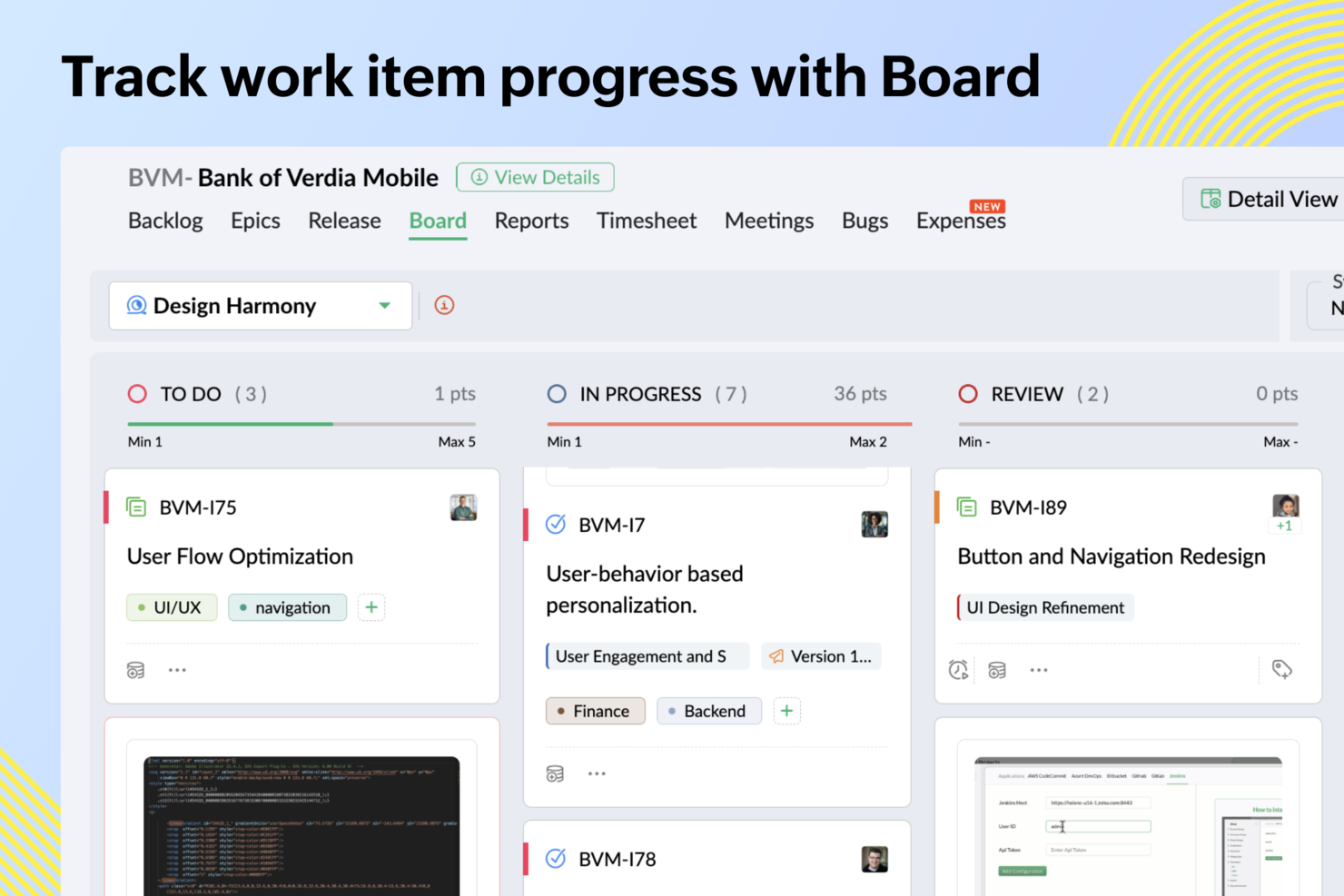
Zoho Sprints is an agile project management tool that covers sprint planning, backlog management, scrum and Kanban boards, time tracking, and release management—with a native Jira integration built directly into the platform.
Who Is Zoho Sprints Best For?
Zoho Sprints is a good fit for agile software development teams that already use other Zoho products and need a dedicated scrum tool with a direct Jira connection.
Why I Picked Zoho Sprints
Zoho Sprints earns its spot on my shortlist because of how thoroughly its Jira integration handles the details that usually fall through the cracks. When my team creates a work item in Zoho Sprints, it automatically appears in Jira—with statuses, priorities, tags, and assignees all mapped across. I especially like that comments sync with a custom header showing the author and source, so neither team loses the conversation thread. File attachments sync automatically too, which means no one is hunting for the latest design file or spec doc in a separate tool.
Zoho Sprints Key Features
- Sprint planning board: Build sprints from your backlog using epics and user stories, with drag-and-drop prioritization across columns.
- Burndown and velocity charts: Track sprint progress and team delivery speed using built-in agile reports updated in real time.
- Release management: Plan and monitor releases with a dedicated timeline view that connects to CI/CD pipelines like Jenkins and GitLab.
- Timesheet tracking: Log hours directly against work items and sprints, with approval workflows for team time submissions.
Pros and Cons
Pros:
- Strong integration with Zoho suite
- Built-in Scrum and Kanban boards
- Two-way Jira issue synchronization
Cons:
- Limited advanced dependency management
- Interface feels dated to some
New Product Updates from Zoho Sprints

Zoho Sprints Adds ServiceDesk Plus Integration
Zoho Sprints now offers Zoho Sprints for ServiceDesk Plus in Zoho Marketplace, enabling IT teams to send requests, changes, and releases to developers and track progress in SDP. For more information, visit Zoho Sprints' official site.
 .

Celoxis
Best for client-access project portals
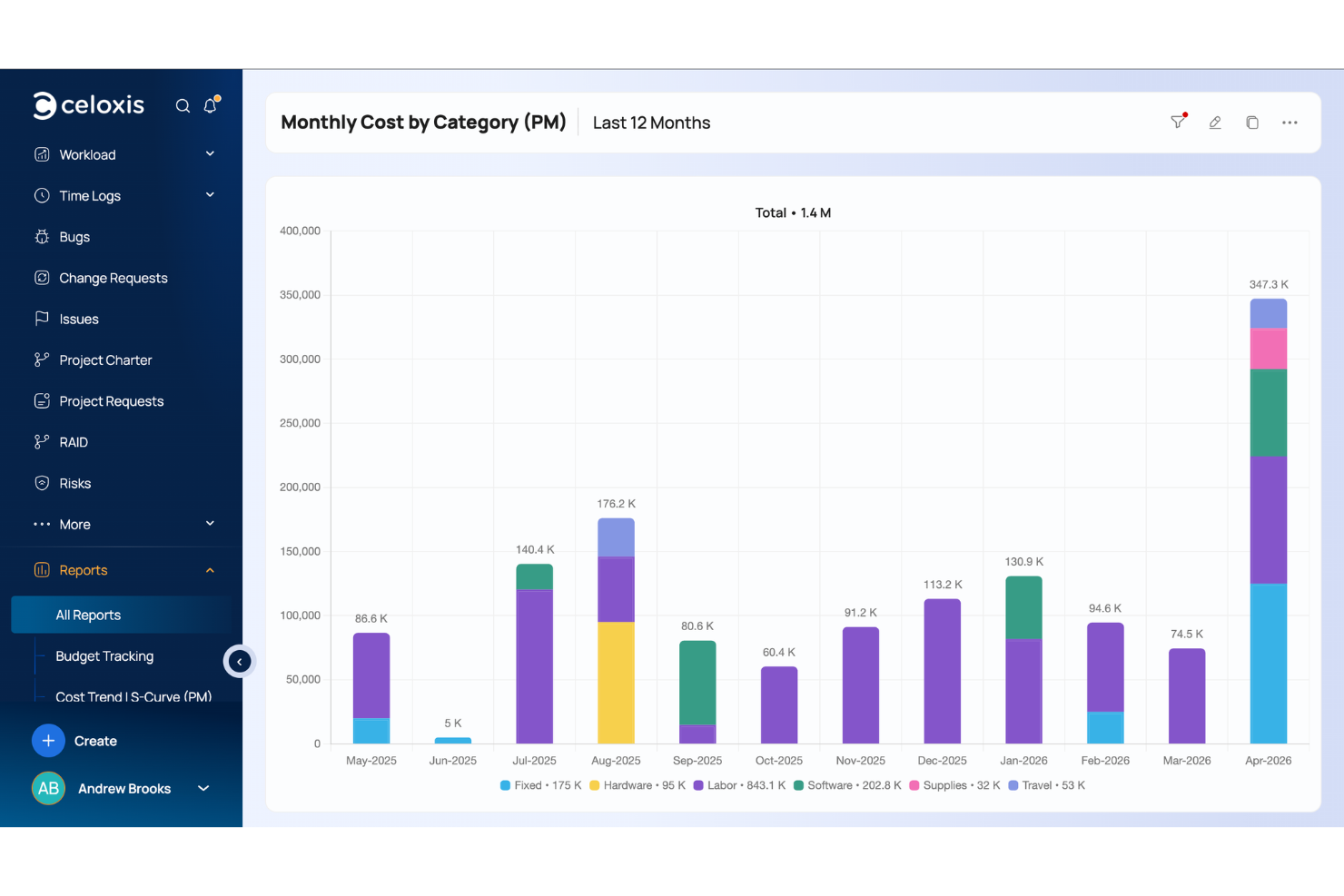
Celoxis is a project management and portfolio management platform with a native Jira integration that links development progress and resource utilization to project plans, Gantt charts, resource management, time and expense tracking, and BI-style reporting dashboards.
Who Is Celoxis Best For?
Celoxis is well-suited for mid-to-large organizations running multiple concurrent projects that need a single platform connecting engineering work in Jira to broader project planning and financials.
Why I Picked Celoxis
I picked Celoxis as one of the best because of how it handles client visibility without adding to your licensing costs. The client portal is free and fully customizable, letting clients log in to view shared reports, join project discussions, and participate in business workflows like issue tracking or approvals. What I find especially useful is the client hierarchy system: you can create nested client structures to partition access, so there's no risk of one client accidentally seeing another's projects. For teams running Jira-connected projects, clients get a window into real delivery progress, not a manually curated status update.
Celoxis Key Features
- Jira sync: Brings Jira issues, sprints, story points, worklogs, and assignees into Celoxis task plans.
- Interactive Gantt chart: Lets you visualize project schedules with drag-and-drop task editing and automatic recalculation of dependencies.
- Resource workload chart: Shows team capacity and allocation across all active projects in one chart.
- Custom dashboard widgets: Create project dashboards using drill-down charts, KPI tiles, and scheduled email reports.
Celoxis Integrations
Celoxis offers native integrations with Jira, Salesforce, Trello, Zendesk, Okta, Microsoft Project, Slack, Outlook, Google Drive, and more, with an API available for custom integrations.
Pros and Cons
Pros:
- Available as both cloud and on-premise solutions
- Replicates advanced Microsoft Project scheduling online
- Built-in custom formula fields for reporting
Cons:
- Interface feels dated
- Steep learning curve for users

Best for issue tracking features
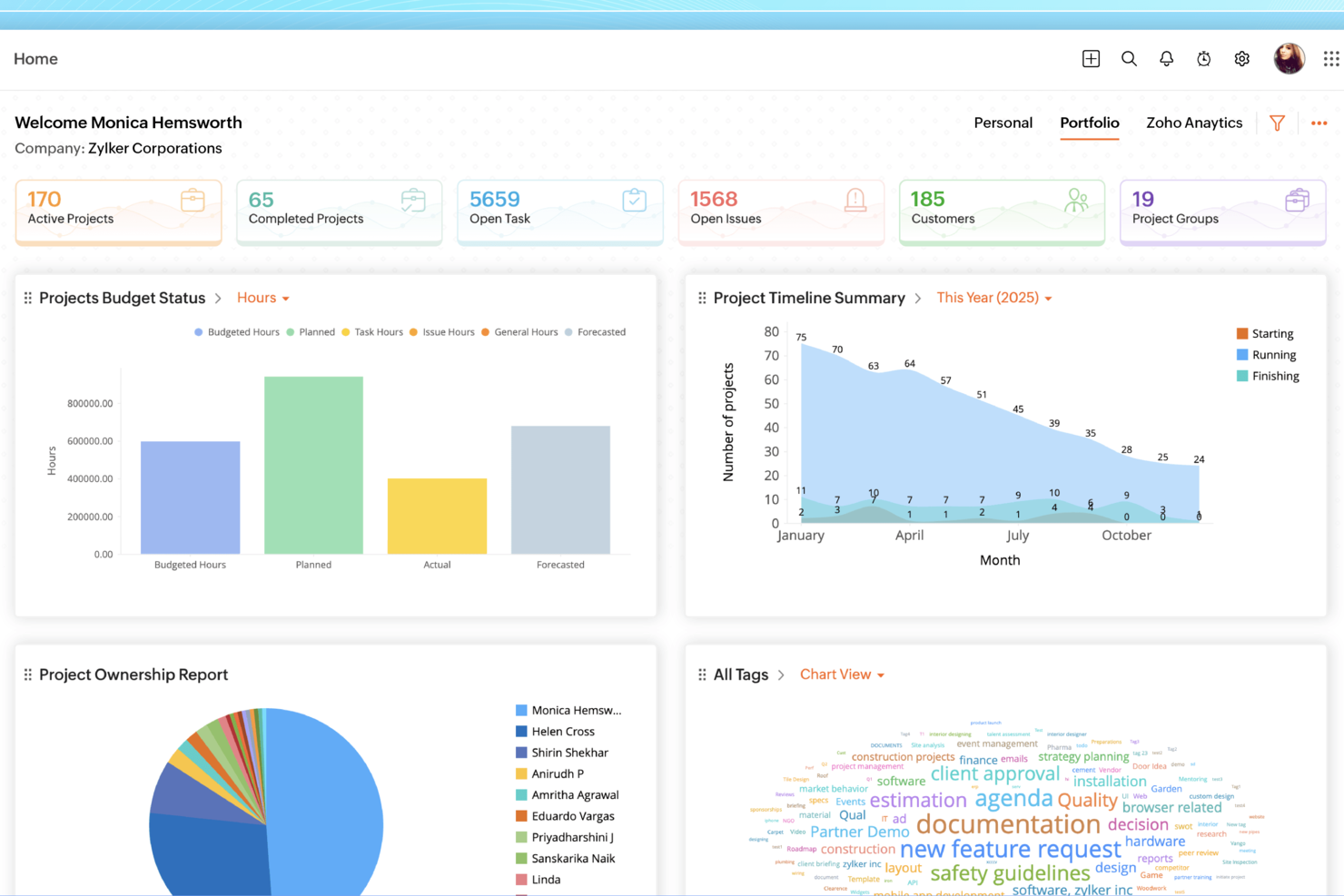
Zoho Projects is a project management platform that combines task tracking, Gantt charts, time logging, issue tracking, and workflow automation with a Jira integration that connects your Zoho projects directly to Jira tickets.
Who Is Zoho Projects Best For?
Zoho Projects is a good fit for small to mid-sized teams already using other Zoho products who want project management and issue tracking in one connected workspace.
Why I Picked Zoho Projects
I've included Zoho Projects in my top picks because its issue tracking module is one of the more fully built-out I've seen in a project management tool. I like that you can define custom workflows and statuses, set up SLA rules with escalation paths, and log bugs directly from external websites. The Kanban board for issues lets my team drag cards between columns tied to specific issue statuses like severity and classification, making triage much faster than digging through a flat list.
Zoho Projects Key Features
- Gantt chart with critical path: Visualize task dependencies and automatically highlight the sequence of tasks that determine your project's end date.
- Jira integration: Connect Zoho Projects to your Jira account via the Zoho Marketplace to link Jira tickets directly to tasks.
- Timesheet logging: Track time at the task level and generate timesheet reports across projects for billing or internal review.
- Resource utilization chart: See each team member's workload across all active projects in a single view.
Pros and Cons
Pros:
- Custom workflows fit diverse teams
- Strong task and time tracking
- Native Jira task synchronization support
Cons:
- Interface can feel overwhelming initially
- Jira setup requires configuration effort
New Product Updates from Zoho Projects
Zoho Projects Adds CodeX Scripts for Custom Modules
Zoho Projects now supports CodeX Scripts for custom modules, enabling conditional logic and rules for creating, updating, and deleting records. For more information, visit Zoho Projects' official site.
 .

VOGSY
Best for issue tracking & project planning

VOGSY is a professional services automation platform built for global service firms that connects project management, resource planning, time tracking, and financial controls—including a native Jira integration for syncing issues and project data.
Who Is VOGSY Best For?
VOGSY is a strong fit for professional services firms—like consulting, IT services, and agencies—that need to manage client projects alongside Jira-based development workflows.
Why I Picked VOGSY
I've included VOGSY in my top picks because its Jira integration goes deeper than a simple data sync. When your dev team logs time directly on Jira issues using the VOGSY add-on, those hours flow automatically into the right billable activities in VOGSY—keeping budgets and margins accurate without manual reconciliation. I also like that you can view real-time Jira issue status, assignees, and sprint data from within a VOGSY project, which makes cross-team project planning much easier to manage in one place.
VOGSY Key Features
- Work breakdown structure: Build out projects with deliverables, tasks, and milestones to define scope and track progress at a granular level.
- Project planning chart: Manage and visualize project schedules in an interactive chart, including dependencies and timeline tracking.
- Project templates: Save existing project structures as reusable templates to replicate setup for new client engagements.
- Mixed billing methods: Run a single project with a combination of time & materials, fixed price, retainer, and subscription billing.
Pros and Cons
Pros:
- Real-time global financial overview
- Fast setup and onboarding
- Robust resource planning tools
Cons:
- Limited mobile functionality
- Basic customization options feel restrictive
New Product Updates from VOGSY
VOGSY Adds Velocity Agent Verdicts for Quote Approvals
VOGSY adds Velocity agent verdicts for quote approval requests with risk levels, margin checks, discount analysis, and reasoning. This helps approvers assess quote risk before making a final decision. For more information, visit VOGSY’s official site.
 .

Miro
Best for real-time updates with visual dashboards
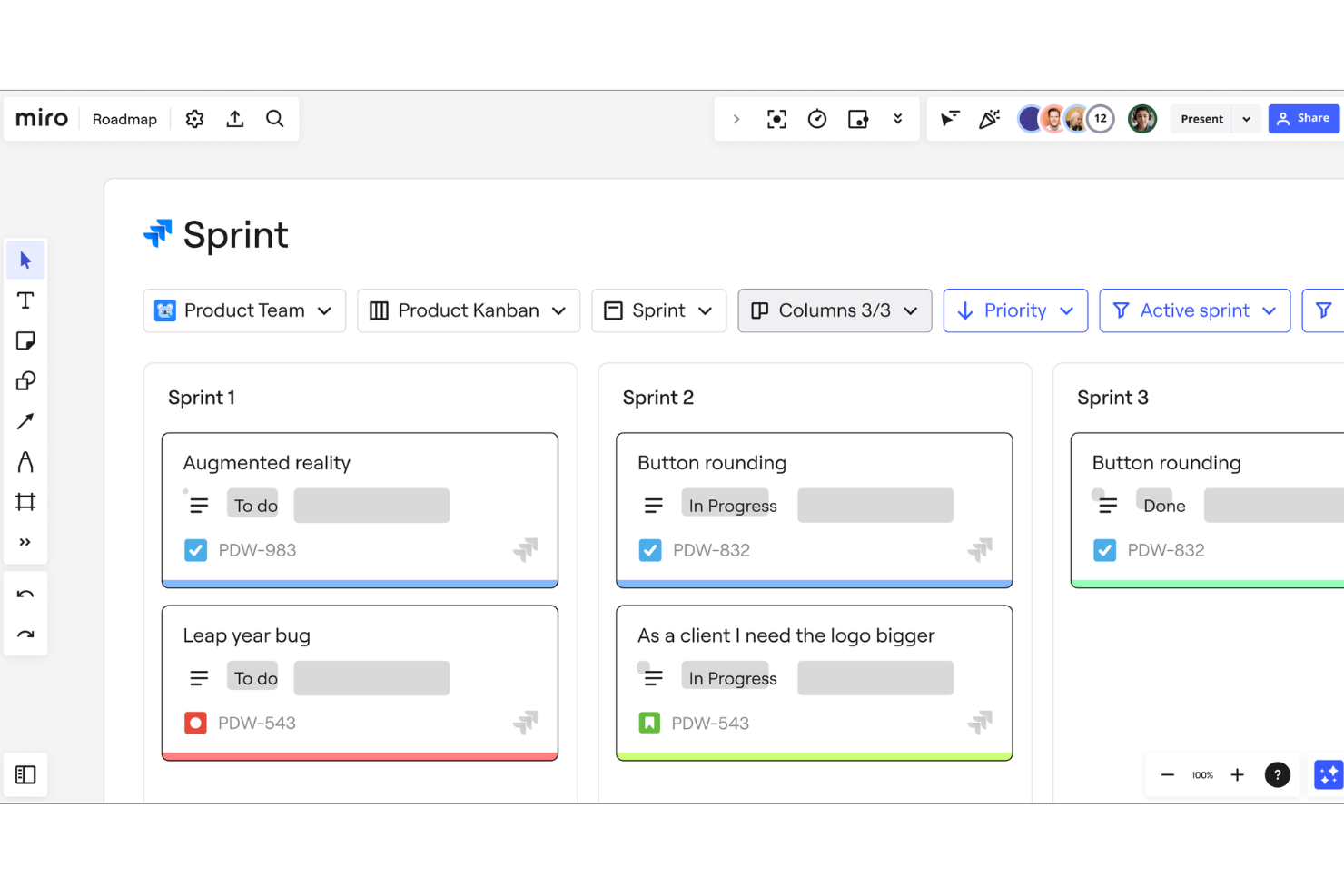
Miro is a visual collaboration platform that combines an infinite canvas workspace with project planning tools like Kanban boards, timelines, and Gantt charts, plus a two-way Jira integration for syncing issues directly into visual workflows.
Who Is Miro Best For?
Miro is a strong fit for cross-functional teams in product, design, and engineering who need a shared visual workspace to plan, map, and track work alongside their Jira workflows.
Why I Picked Miro
I picked Miro as one of the best because of how its Jira Cards surface live issue data (status, assignee, and priority) directly on the canvas. When a sprint status changes in Jira, the card updates in real time without any manual syncing. I build visual dashboards on the infinite canvas that pull these cards together with timelines and sticky notes, giving my team one shared view of project progress across multiple workstreams.
Miro Key Features
- Two-way issue creation: Convert any Miro sticky note or shape directly into a Jira issue without leaving the canvas, and vice versa.
- Built-in Kanban boards: Create and manage Kanban boards natively in Miro, with drag-and-drop card management and customizable columns for sprint workflows.
- Sprint planning templates: Pre-built sprint planning and retrospective templates that teams can populate and run directly within the Miro workspace.
- Contextual comments and @mentions: Leave threaded comments and tag teammates anywhere on the canvas to flag decisions, blockers, or feedback in context.
Pros and Cons
Pros:
- Infinite whiteboard
- Customizable templates for workflows and dashboards
- Real-time collaboration features
Cons:
- Highly customizable nature may take time to get used to
- Some integrations are limited to higher-tier plans
New Product Updates from Miro
Miro Adds Japan Data Residency for Enterprise Customers
Miro has introduced Japan data residency for enterprise customers, offering in-region storage for production data, backups, and metadata, plus in-region compute infrastructure. For more information, visit Miro's official site.
 .

Forecast
Best for mid-sized agencies and consultancies

Forecast is an AI-powered project and resource management platform designed to help teams manage projects more effectively. Its integration with Jira ensures project tasks, sprints, and time entries stay synchronized across both tools, giving project managers full visibility into progress and potential risks.
Why I Picked Forecast: I picked Forecast because its predictive capabilities go beyond standard project tracking. The platform uses AI to forecast resource needs, predict project risks, and flag capacity issues before they become problems. When paired with Jira, Forecast provides a comprehensive view of both development work, project delivery, and profitability, allowing you to make informed decisions faster.
If you want a project management tool that helps you stay one step ahead of issues, Forecast is a strong choice.
Standout features & integrations:
Features include AI-assisted project scoping, automated time tracking, utilization reports, Gantt charts, invoicing, budget management, revenue recognition, and capacity overviews.
Integrations include Jira Cloud, Azure DevOps, GitHub, GitLab, Slack, MS Teams, Salesforce, HubSpot, QuickBooks, Xero, Sage Intacct, BambooHR, Google Calendar, Google Drive, Trello, and Zapier.
Pros and Cons
Pros:
- Predictive analytics for better decision-making
- Integration with leading platforms like Jira and QuickBooks
- AI-driven resource and project planning
Cons:
- Annual commitment is needed for the best pricing
- Minimum user requirements may exclude small teams
Backlog
Best for all-in-one collaboration
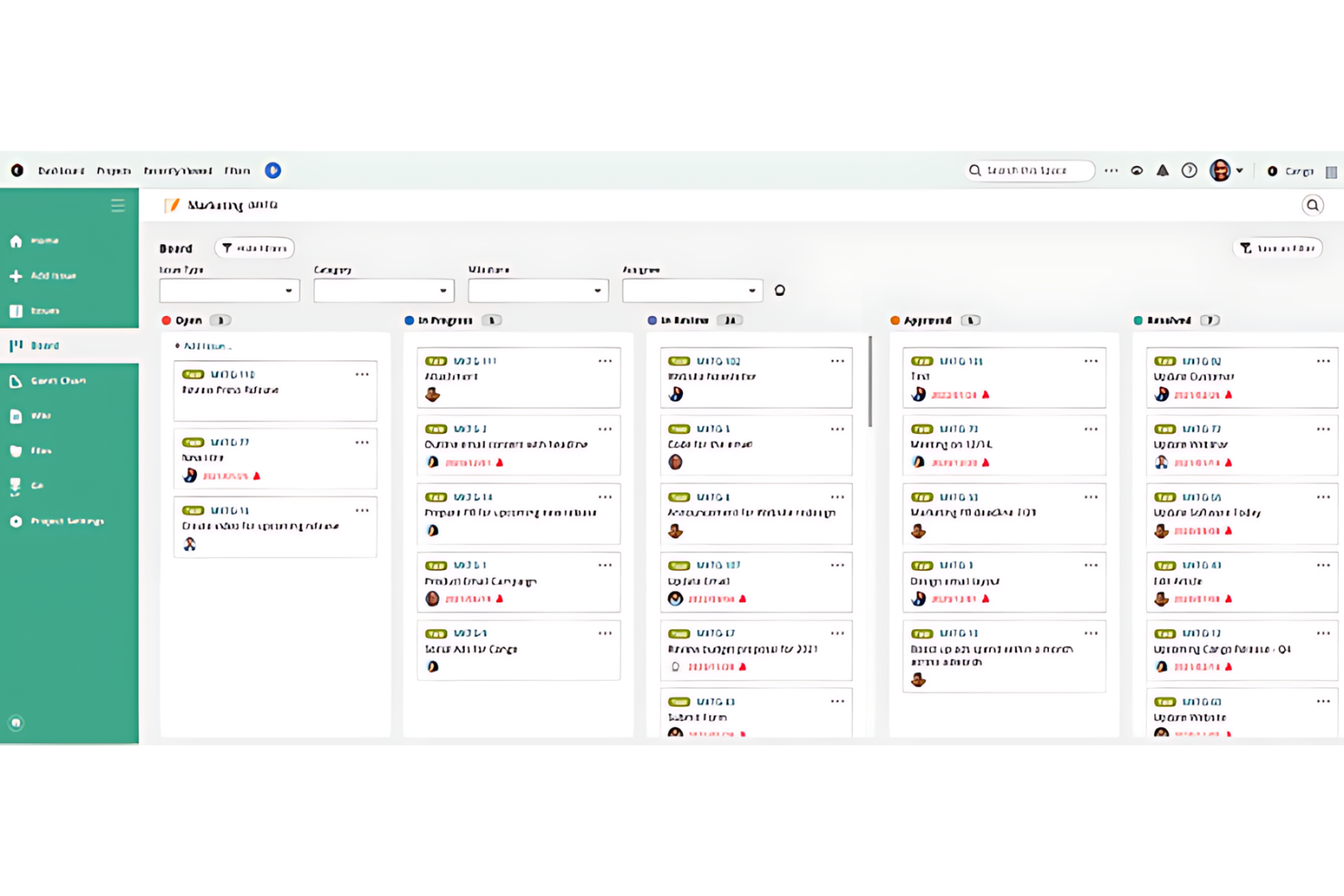
Backlog is a project management platform that combines issue tracking, task management, built-in Git/SVN version control, wikis, and team collaboration tools in a single workspace.
Who Is Backlog Best For?
Backlog is a strong fit for software development teams that want project management, code hosting, and issue tracking without juggling multiple tools.
Why I Picked Backlog
Backlog is one of my top picks because I love that it keeps code, tasks, and documentation in one place rather than spreading them across separate tools. My team is able to tie commits directly to issues, so there's a clear paper trail from a bug report to the code fix. The built-in wiki also means documentation lives alongside the actual work, not in a disconnected knowledge base. That tight connection between version control, issue tracking, and wikis is what makes the "all-in-one" case genuinely compelling here.
Backlog Key Features
- Gantt charts: Visualize project timelines, set milestones, and map task dependencies in a drag-and-drop chart view.
- Kanban boards: Manage tasks across customizable status columns with WIP limits to control workload.
- Burndown charts: Track sprint progress automatically against your team's planned vs. actual work over time.
- Jira importer: Migrate existing Jira projects, issues, and data directly into Backlog without manual re-entry.
Pros and Cons
Pros:
- Features customizable issue-tracking
- Includes built-in code management tools
- Integrates multiple project management functions
Cons:
- Some features require a learning curve
- The free plan is limited to 10 users and 1 project

Birdview
Best for scaling on demand

Birdview is a project and resource management platform that combines portfolio tracking, Gantt scheduling, workload planning, financial management, and a native Jira integration for syncing tasks and project data across teams.
Who Is Birdview Best For?
Birdview is a strong fit for mid-sized professional services and technology teams that manage multiple projects across mixed Jira and non-Jira workflows.
Why I Picked Birdview
Birdview earns its spot as one of the best on my shortlist because its modular plan structure lets teams activate features like resource capacity planning and portfolio-level BI reporting only when they need them. I like that my team can start syncing Jira projects on the Team plan, then layer in financial tracking and workload forecasting as project volume grows so I don't have to manage complexity my team isn't ready for.
Birdview Key Features
- Gantt chart with dependency sync: Visualize Jira task dependencies directly in a Gantt timeline alongside non-Jira project work.
- AI project assistant: Generate project plans and get completion date forecasts based on current task and resource data.
- Time tracking: Log billable and non-billable hours directly against tasks synced from Jira or created natively in Birdview.
- Project templates: Build reusable project structures to standardize delivery across recurring project types.
Pros and Cons
Pros:
- A wide array of integrations with other business tools
- Comprehensive suite of project management features
- Scalable to meet the needs of growing businesses
Cons:
- Extensive features may present a learning curve for new users
- Enterprise edition requires direct inquiry for pricing
Değerlendirilebilecek Diğer Jira Entegrasyonlu Proje Yönetimi Yazılımları
Aşağıda, en iyi listeye giremeyen ancak yine de göz atmaya değer Jira entegrasyonlu ek proje yönetimi yazılımlarının bir listesi yer almaktadır.
- ProjectManager
For project planning and scheduling
- OnePlan
For project portfolio management
- GoodDay
For flexible project methodologies
- Trello
For visual project management
- GanttPRO
For Gantt chart creation
- Scoro
For professional services management
- Hubstaff
For integrated time tracking
- Hive
For real-time collaboration
- Quickbase
For dynamic work management
- Epicflow
For bottleneck visualization
- GoodDay
For customizable workspaces
- Smartsheet
For spreadsheet-like project tracking
- Basecamp
For remote team collaboration


İlgili Proje Yönetimi Yazılımı İncelemeleri
Aradığınızı hâlâ bulamadıysanız, test edip değerlendirdiğimiz şu diğer ilgili araçlara göz atın:
How I Evaluate Project Management Software With Jira Integration
I split my evaluation into baseline criteria—native Jira sync, bidirectional field mapping, cross-tool views—and differentiators that separate tools built for hybrid engineering and PMO teams.
Core Functionality (Table Stakes For This List)
When I'm selecting tools for my list, I rank each one on a scale from 0 (does not offer the functionality) to 5 (excels in this area) for each core functionality listed below. Then, I calculate the tool's total score into a percentage. Each tool needs to achieve a minimum total score of 65% to be considered for inclusion.
- Native Jira Integration: I check whether the tool connects to Jira through its own built-in integration rather than relying on a third-party connector like Zapier or Unito.
- Bidirectional Data Sync: Updates to assignees, statuses, or priorities should flow both ways so a dev closing a Jira issue triggers a status change in the PM tool automatically.
- Field & Status Mapping: I evaluate how much control you get when mapping Jira workflows to PM tool statuses, especially for custom fields like story points or sprint labels.
- Cross-Tool Project Views: Teams mixing Jira-based engineering work with non-Jira marketing or design tasks need unified Gantt, Kanban, or timeline views that pull from both sources.
- Task & Workflow Management: Beyond syncing with Jira, the tool itself needs solid task management with assignments, dependencies, and deadlines for non-dev workstreams.
- Cross-Project Reporting: I look for dashboards that aggregate delivery metrics across Jira sprints and non-Jira projects so a PMO lead can report on portfolio health in one place.
Once I have a list of tools that meet this criteria, I consider what sets each platform apart.
Differentiating Factors (What Sets Vendors Apart)
Here's how I compare and contrast different vendors:
Standout Features
Cross-tool automation matters a lot here. I look for rules engines that trigger actions across both Jira and the PM tool—like auto-assigning a QA task when a Jira issue moves to "In Review." Portfolio resource management is another separator, especially for TPMs balancing developer capacity across sprints and non-engineering projects. I also evaluate multi-instance Jira support, which is a real differentiator for orgs managing separate Jira instances after acquisitions or across client accounts.
Beyond Features
Pricing structure matters more than usual in this category. I check whether a vendor offers low-cost viewer seats so executives and stakeholders can access Jira-synced dashboards without inflating your bill. The broader integration ecosystem is worth evaluating too—tools that connect natively with Confluence, Slack, and GitHub give engineering-heavy teams a tighter workflow loop. For enterprise buyers, I also consider security posture, specifically SOC 2 Type II compliance and SSO/SAML support that aligns with existing Atlassian identity setups.
Jira Entegrasyonlu Proje Yönetimi Yazılımı Nasıl Seçilir?
Kendinize özgü yazılım seçim sürecinizi yürütürken aşağıdaki noktaları aklınızda bulundurun:
- Entegrasyon Kolaylığı: Yazılım, mevcut araçlarınız ve sistemlerinizle, özellikle Jira ile sorunsuz şekilde entegre olmalıdır. Bu, ekibinizin karmaşık kurulumlarla uğraşmasını önlemeye yardımcı olabilir ve uygulamalar arasındaki veri akışının sorunsuz olmasını sağlar.
- Kullanım Kolaylığı: Yazılımın kullanımı kolay olmalı ve gezinme sezgisel olmalıdır; çünkü karmaşık bir arayüz proje ilerlemesini yavaşlatabilir ve ekip üyelerini hayal kırıklığına uğratabilir. Sade bir kullanıcı arayüzüne ve anlaşılır gezinme seçeneklerine sahip araçlar, tüm ekip üyelerinin yazılımı verimli bir şekilde kullanmasını sağlayarak üretkenliği artırır.
- İş Birliği Özellikleri: Etkili iş birliği, proje yönetiminde kritik öneme sahiptir. Gerçek zamanlı güncellemeler, paylaşılan panolar ve yorum dizileri gibi özelliklerle iletişimi ve ekip çalışmasını geliştiren bir yazılım seçin. Bu özellikler, özellikle uzaktan çalışan ekipler veya birden fazla departmanın yer aldığı projeler için oldukça faydalıdır; herkesin aynı bilgiye sahip olmasına yardımcı olabilir.
- Özelleştirme Seçenekleri: Farklı projelerin farklı ihtiyaçları vardır; bu nedenle iş akışlarını, panoları ve raporları özelleştirebilme olanağı, yazılımın çeşitli proje gereksinimlerine uyum sağlayabilmesini güvence altına alır. Bu esneklik, farklı proje türlerini ve ölçeklerini yöneten kuruluşlar için hayati önem taşır; çünkü aracı kendi özel süreçlerine göre uyarlamalarına olanak tanır.
- Ölçeklenebilirlik: Yazılım kuruluşunuzla birlikte büyüyebilmelidir; bu nedenle artan proje, kullanıcı ve veri sayısını yönetebilecek çözümler arayın. Bu özellik, büyüme bekleyen veya güçlü yönetim araçları gerektiren büyük ve karmaşık projeleri yöneten işletmeler için çok önemlidir; böylece talepler arttıkça yazılım etkili olmaya devam eder.
2025'te Proje Yönetimi Yazılımlarındaki Eğilimler
Proje yönetimi araçları, modern proje yönetimi ekiplerinin ihtiyaçlarını karşılamak için hızla gelişiyor. 2025'te proje yönetimi araçlarını etkileyen başlıca eğilimlerden bazıları şunlardır.
- Yapay Zekâ ve Makine Öğrenimi Entegrasyonu: Proje yönetimi yazılımları yapay zekâdan ve makine öğreniminden giderek daha fazla yararlanıyor. Örneğin monday.com gibi platformlar, tahmine dayalı analizler ve görev otomasyonu sunmak için bu teknolojileri entegre ediyor. Yapay zekâ destekli uygulamaların kullanıma sunulması, karar alma süreçlerini ve iş akışı verimliliğini de geliştirebilir.
- Uzaktan ve Hibrit Çalışma İçin Geliştirilmiş Optimizasyon: Uzaktan ve hibrit çalışma modellerine geçiş, proje yönetimi araçlarını da uyum sağlamaya yöneltti. monday.com'daki çok yönlü pano görünümleri ve zaman takibi gibi esnekliği ve bağlantıyı destekleyen özellikler standart hâle geliyor.
- Gerçek Zamanlı İş Birliği ve İletişim: Proje ekipleri teslim tarihlerini karşılamaya çalışırken anlık iş birliği çoğu zaman kritik öneme sahiptir. Bunun sonucunda proje yönetimi yazılımları, monday.com'daki pano tartışmaları ve Workdocs gibi gerçek zamanlı iletişim özelliklerini giderek daha fazla bünyesine katıyor. Bu araçlar, farklı platformlar arasındaki iş birliğini geliştiren üçüncü taraf uygulamalarla destekleniyor.
- Proje Şeffaflığı ve Hesap Verebilirlik: Proje yönetiminde şeffaflık ve hesap verebilirlik de giderek daha fazla önem kazanıyor. monday.com gibi araçlar, herkese açık belgelerin ve bilgi tabanlarının oluşturulmasını kolaylaştırıyor. Bu eğilim, paydaşların güncel proje bilgilerine erişmesini ve proje hesap verebilirliğini sürdürmesini sağlıyor.
Bu eğilimlerin gösterdiği üzere, Jira entegrasyonuna sahip olanlar da dâhil olmak üzere proje yönetimi yazılımları, ekiplerin daha verimli ve etkili çalışmasını sağlayan daha akıllı ve iş birliğine dayalı çözümlere doğru ilerliyor.
Jira Entegrasyonuna Sahip Proje Yönetimi Yazılımı Nedir?
Jira entegrasyonuna sahip proje yönetimi yazılımı, proje yönetimi işlevlerini; ekiplerin çalışmalarını planlamak, izlemek ve yönetmek için kullandığı, Atlassian tarafından geliştirilen popüler bir proje yönetimi ve sorun takip yazılımı olan Jira'ya bağlayan dijital bir araçtır. Proje yöneticileri, geliştirme ekipleri ve proje yönetimi çalışmalarını teknik sorun takibiyle eşzamanlamak isteyen kuruluşlar tarafından kullanılabilir. Bu yazılım, proje görevlerini geliştirme döngüleriyle uyumlu hâle getirmeye, ilerlemeyi izlemeye ve kaynakları etkili bir şekilde yönetmeye yarar.
Bu yazılımın bileşenleri; proje planlamayı, görev yönetimini, kaynak tahsisini ve ilerleme takibini içerebilir. Tüm bu bileşenler, sorun takibi ve çevik proje yönetimi için Jira'nın sistemiyle entegre çalışır. Bu entegrasyon ayrıca proje zaman çizelgeleri ve geliştirme sorunlarına ilişkin birleşik bir görünüm sunarak ekip üyeleri arasındaki iletişimi ve koordinasyonu kolaylaştırır.
Jira Entegrasyonuna Sahip Proje Yönetimi Yazılımının Özellikleri
Jira entegrasyonuna sahip proje yönetimi yazılımı, projelerin yönetilmesindeki verimliliği ve etkililiği önemli ölçüde artırabilir. Bu yazılım çözümleri Jira ile entegre olarak ekiplerin projeleri başarıyla teslim etmesini destekleyen çeşitli özellikler sunabilir. Dikkate alınması gereken bazı temel özellikler şunlardır:
- Gerçek Zamanlı İş Birliği: İş birliği araçlarına sahip olmak, ekip üyelerinin iletişimi açık tutmak ve herkesin aynı fikirde olmasını sağlamak için eş zamanlı olarak birlikte çalışabilmesine olanak tanımak açısından kritik öneme sahiptir; bu da proje başarısı için gereklidir.
- Görev Otomasyonu: Rutin görevlerin otomatikleştirilmesi, tekrarlayan işleri kolaylaştırarak zamandan tasarruf sağlar ve insan hatası riskini azaltır. Bu ayrıca ekiplerin daha karmaşık proje unsurlarına odaklanmasına olanak tanır.
- Özelleştirilebilir İş Akışları: Bu özellik, proje yönetimi sürecini belirli ekip ihtiyaçlarına göre uyarlar. Özel iş akışları, ekiplerin projelerine en uygun şekilde çalışmasına olanak tanıyarak verimliliği ve üretkenliği artırır.
- Gelişmiş Raporlama: Gelişmiş raporlama sayesinde ekipler, veriye dayalı kararlar almalarına ve paydaşları proje ilerlemesi hakkında bilgilendirmelerine yardımcı olacak şekilde proje performansı hakkında bilgi edinebilir.
- Zaman Takibi: Bu özellik, ekiplerin bütçeleme yapmasına, gelecekteki projeleri tahmin etmesine ve kaynakların etkili bir şekilde kullanılmasını sağlamasına yardımcı olabilir.
- Kaynak Yönetimi: Etkili kaynak yönetimi, darboğazları önleyerek her görevin gerekli personel ve araçlara sahip olmasını sağlar.
- Kullanıcı İzinleri: Proje liderleri, kullanıcı izinlerini yöneterek güvenliği koruyabilir ve ekip üyelerinin uygun erişim düzeyine sahip olmasını sağlayabilir.
- Dosya Paylaşımı ve Ekler: Merkezi dosya paylaşımı, tüm ekip üyelerinin belgelerin en güncel sürümlerine erişebilmesini sağlar; bu da tutarlılığın korunması açısından hayati önem taşır.
- Diğer Araçlarla Entegrasyon: CRM, sürüm kontrolü ve iletişim platformları gibi araçlarla entegrasyon, daha uyumlu bir iş akışı sağlar.
- Mobil Erişilebilirlik: Mobil erişilebilirlik, güncel kalması ve projelere her yerden katkıda bulunması gereken ekip üyeleri için önemlidir.
Bu özellikler Jira kullanma olanağıyla bir araya geldiğinde, her boyut ve karmaşıklıktaki projeleri yönetmek için mükemmel bir ortam oluşturur. Entegrasyon, proje yönetimine daha bağlantılı ve duyarlı bir yaklaşım sağlar; böylece ekiplerin değişikliklere hızlı bir şekilde uyum sağlaması ve proje yaşam döngüsü boyunca yüksek performans düzeyini koruması mümkün olur.
Jira Entegrasyonlu Proje Yönetimi Yazılımının Faydaları
Jira entegrasyonuna sahip proje yönetimi yazılımı, bir kuruluş içindeki proje yönetiminin verimliliğini ve etkililiğini önemli ölçüde artırabilecek avantajlar sunar. Proje yönetimi araçlarının yeteneklerini Jira'nın özel işlevleriyle birleştirerek daha uyumlu ve kontrollü bir proje yönetimi süreci deneyimlemeyi bekleyebilirsiniz. Potansiyel alıcıların dikkate alması gereken çeşitli faydalar şunlardır:
- Gelişmiş İş Birliği: Jira'nın proje yönetimi yazılımıyla entegre edilmesi, ekip üyelerinin görevler ve sorunlar hakkında gerçek zamanlı iletişim kurmasına ve iş birliği yapmasına olanak tanıyarak daha uyumlu bir ekip ortamı oluşturur.
- Merkezi Bilgi: Kullanıcılar, proje bilgileri için tek bir doğru kaynağa sahip olmanın avantajından yararlanır; bu, kafa karışıklığını azaltır ve herkesin aynı fikirde olmasını sağlar.
- Geliştirilmiş Görünürlük: Entegrasyon, yöneticilere ve paydaşlara proje durumu, zaman çizelgeleri ve kaynak tahsisi hakkında kapsamlı bir görünüm sunan panolar ve raporlama araçları sağlar.
- Kolaylaştırılmış İş Akışları: İş akışlarının otomatikleştirilmesi ve Jira ile proje yönetimi yazılımı arasındaki görevlerin birbirine bağlanması, manuel veri girişini ortadan kaldırır ve ekiplerin daha verimli çalışmasına yardımcı olur.
- Daha İyi Kaynak Yönetimi: Entegre kaynak yönetimi yazılımı sayesinde yöneticiler, projeler genelindeki kaynakları kolayca izleyip yönetebilir; böylece iş yüklerinin dengeli olması ve kaynaklara gereğinden fazla görev verilmemesi sağlanır.
Jira'nın proje yönetimi yazılımına entegrasyonu; iş birliği, bilgi yönetimi, proje görünürlüğü, iş akışı verimliliği ve kaynak yönetimi dahil olmak üzere proje yönetimi yeteneklerini geliştirmek isteyen kuruluşlar için akıllı bir stratejik adım olabilir.
Jira Entegrasyonlu Proje Yönetimi Yazılımının Maliyetleri ve Fiyatlandırması
Jira entegrasyonu olsun veya olmasın, proje yönetimi yazılımı seçerken fiyatlandırma yapılarını anlamak önemli bir husustur. Farklı planlar çeşitli ihtiyaçlara ve bütçelere hitap eder; bu nedenle hem özellikler hem de fiyatlandırma açısından ekibinizin gereksinimlerine en uygun planı seçmeniz önemlidir. Bu doğrultuda, mevcut fiyatlandırma seçeneklerini kapsamlı bir şekilde değerlendirmek, kuruluşunuzun kendine özgü ihtiyaçlarına ve bütçe kısıtlamalarına uygun bir çözüm bulmanıza yardımcı olabilir.
Bu kılavuz, Jira entegrasyonuna sahip proje yönetimi yazılımı için yaygın fiyatlandırma planlarına genel bir bakış sunar.
Jira Entegrasyonlu Proje Yönetimi Yazılımı İçin Plan Karşılaştırma Tablosu
| Plan Türü | Ortalama Fiyat | Yaygın Özellikler |
| Ücretsiz | $0 | Temel görev yönetimi, sınırlı kullanıcı, temel entegrasyonlar |
| Temel | $7/kullanıcı/ay'dan başlayan | Görev yönetimi, sınırlı projeler, standart entegrasyonlar, temel raporlama |
| Standart | $12/kullanıcı/ay'dan başlayan | Gelişmiş görev yönetimi, sınırsız proje, gerçek zamanlı iş birliği, gelişmiş entegrasyonlar, özelleştirilebilir iş akışları |
| Premium | $25/kullanıcı/ay'dan başlayan | Tüm standart özellikler, gelişmiş raporlama ve analiz, öncelikli destek, geliştirilmiş güvenlik özellikleri |
| Kurumsal | Talep üzerine fiyatlandırma | Tüm premium özellikler, özel hesap yöneticisi, özel entegrasyonlar, kurumsal düzeyde güvenlik, uyumluluk özellikleri |
Planları karşılaştırırken ekibinizin büyüklüğünü, ihtiyaç duyduğunuz özellikleri ve bütçe kısıtlamalarınızı değerlendirdiğinizden emin olun. Böylece ekibiniz için en uygun planı belirleyebilirsiniz.
Jira Entegrasyonuna Sahip Proje Yönetimi Yazılımları Hakkında SSS
Jira nedir ve neden proje yönetimi yazılımıyla entegre edilmelidir?
Jira, yazılım geliştirmeden çevik proje yönetimine kadar her türden ekip için tasarlanmış popüler bir sorun ve proje izleme aracıdır. Jira’nın proje yönetimi yazılımıyla entegre edilmesi, görevlerin ve projelerin senkronize edilmesini sağlar; ekiplerin ilerlemeyi kapsamlı bir şekilde izlemesine ve farklı platformlardaki iş akışlarını güncel tutmasına olanak tanır.
Jira ile entegre proje yönetimi yazılımı arasındaki iş akışlarını otomatikleştirmek mümkün müdür?
Evet, Jira ile entegre olan birçok proje yönetimi aracı otomasyon özellikleri sunar. Bunlar, Jira’daki tetikleyicilere dayalı olarak otomatik görev oluşturma, durum güncellemeleri ve bildirimleri içerebilir. Otomasyon, manuel veri girişini azaltmaya yardımcı olur ve her iki sistemin de en güncel bilgileri yansıtmasını sağlar.
Jira ile proje yönetimi yazılımı arasındaki entegrasyonu nasıl kurabilirim?
Entegrasyonun kurulması genellikle bir eklentinin yüklenmesini veya proje yönetimi yazılımındaki yerleşik bir entegrasyon özelliğinin kullanılmasını gerektirir. Jira hesabınızda kimlik doğrulaması yapmanız ve ayarları iş akışı gereksinimlerinize uyacak şekilde yapılandırmanız gerekir. Ayrıntılı talimatlar için ilgili proje yönetimi aracının belgelerine veya destek kaynaklarına başvurmanız önemlidir.
Entegre proje yönetimi yazılımı aracılığıyla Jira'daki görevlere harcanan zamanı izleyebilir miyim?
Evet, bazı proje yönetimi araçları Jira ile senkronize edilebilen zaman izleme özellikleri sunar. Bu, ekip üyelerinin proje yönetimi yazılımındaki görevler için harcanan zamanı kaydetmesine ve bu bilgilerin Jira’ya yansıtılmasına olanak tanır. Bu özellik, faturalandırma veya üretkenlik analizi amacıyla zamanı izlemesi gereken ekipler için özellikle yararlıdır.
Entegrasyonla ilgili sorunlarla karşılaşırsam ne yapmalıyım?
Entegrasyonla ilgili herhangi bir sorun yaşarsanız ilk adım, entegrasyon ayarlarını kontrol etmek ve doğru şekilde yapılandırıldıklarından emin olmaktır. Sorun devam ederse proje yönetimi yazılımı tarafından sağlanan destek veya yardım belgelerine başvurun. Ayrıca yardım almak için müşteri desteğiyle iletişime geçebilir ya da benzer sorunların tartışıldığı ve çözüldüğü topluluk forumlarını inceleyebilirsiniz.