

Os 10 melhores softwares de gestão de ativos digitais para Mac em 2026

Melhor software de gestão de ativos digitais para Mac: seleção


O software de gestão de ativos digitais (DAM) oferece a vantagem de manter os seus ativos organizados e facilmente pesquisáveis, poupando-lhe tempo e reduzindo a frustração. Existem várias opções de software para computadores, mas e se a sua empresa funcionar em Mac?
Pode ser um desafio encontrar um software de gestão de ativos digitais equivalente para Mac. No entanto, com a minha vasta experiência na gestão de projetos digitais e na utilização de várias ferramentas de produtividade, acredito que posso ajudá-lo eficazmente a encontrar a solução certa para si e para a sua equipa.
Why Trust Our Software Recommendations
Our team has been testing and reviewing software since 2012. As project managers ourselves, we know how difficult—and important—it is to choose the right software.
For this guide, we evaluated tools using hands-on testing and independent research, scoring tools using our selection criteria. We also draw on insights from industry thought leaders and practicing project management experts.
Our reviews reflect our human editorial judgment, not a sales pitch.
Expert reviewers:
Tabela de comparação: software de gestão de ativos digitais para Mac
Esta tabela de comparação resume os detalhes de preços das minhas principais escolhas de software de gestão de ativos digitais para Mac.
| Tool | Best For | Trial Info | Price | ||
|---|---|---|---|---|---|
| 1 | Best for digital asset organization | 7-day free trial + free demo available | From $100/month | Website | |
| 2 | Best for flexible permission controls | Not available | Pricing upon request | Website | |
| 3 | Best for centralized feedback and approval | Free plan + demo available | From $900/month (billed annually) | Website | |
| 4 | Best for automated file tagging and sorting | Free plan + free trial available | From $250/month (billed annually) | Website | |
| 5 | Best for managing and sharing brand assets | 30-day free trial available | From $29/month | Website | |
| 6 | Best for storage-based pricing with unlimited users | Free plan + 14-day free trial + demo available | From $99/month | Website | |
| 7 | Best for MacOS media synchronization | 14-day free trial | Pricing upon request | Website | |
| 8 | Best for brand asset sharing | Free trial + demo available | From $300/user/month | Website | |
| 9 | Best for content collaboration | Free demo available | Pricing upon request | Website | |
| 10 | Best asset management in a marketing platform | Free plan + 14-day free trial + free demo available | From $13/month | Website |

Análises do melhor software de gestão de ativos digitais para Mac
Apresento abaixo as minhas análises detalhadas dos principais softwares de DAM para Mac. Cada uma das seguintes análises aborda as vantagens e desvantagens, as funcionalidades principais e os cenários ideais de utilização destas soluções de software.

Pics.io
Best for digital asset organization

Pics.io is an advanced digital asset management platform that streamlines the organization and collaboration on digital assets. It provides a centralized system to store, access, and share files, which enhances efficiency and collaboration across various departments.
Why I picked Pics.io:
Pics.io provides advanced digital asset organization capabilities, which are essential for teams looking to efficiently manage their growing libraries of digital content. Its intuitive interface and powerful search functionalities make it a versatile choice for creative professionals and teams. It's best for digital asset organization because it provides a centralized platform where teams can easily access, manage, and distribute their digital assets, ensuring that they can quickly find and reuse existing content.
Standout features & integrations:
Features include version control, media library organization, metadata management, powerful search tools, built-in editing tools, workflow automation, customizable access permissions, collaboration features, asset sharing capabilities, and analytics for asset usage tracking.
Integrations include Google Drive, Amazon S3, Shopify, Slack, Adobe Creative Cloud (After Effects, Illustrator, Photoshop, Premiere Pro), ClickUp, Easy Projects, Google Workspace (Docs, Forms, Sheets, Slides), Hootsuite, HubSpot, its mobile app, Monday.com, Salesforce, Trello, WordPress, Wrike, Zapier, YouTube, Figma, and Zoho CRM.
Pros and Cons
Pros:
- Wide range of integrations with popular platforms
- Powerful search and organization tools
- Comprehensive digital asset management features
Cons:
- Complex features
- Not available offline
New Product Updates from Pics.io
Pics.io Adds Filtered Audit Trail CSV Exports
Pics.io now lets you export Audit Trail logs to CSV and apply filters before exporting, making it easier to analyze and share activity history. For more information, visit Pics.io's official site.
 .

Papirfly
Best for flexible permission controls

Papirfly is a cloud-based DAM platform that combines centralized asset storage, templated content creation, brand portals, and rights management for brand and marketing teams.
Who Is Papirfly Best For?
Papirfly is a strong fit for mid-to-large enterprise marketing and brand teams that manage high volumes of assets across multiple markets, channels, or regions.
Why I Picked Papirfly
I've included Papirfly in my top picks because the granular permission controls go well beyond basic role assignments. You can restrict asset access by office, region, or role, which means a regional marketing team in Germany only sees the assets approved for their market. I also like that permission controls tie directly into approval workflows, so only the right users can sign off on assets before they reach a portal or distribution channel.
Papirfly Key Features
- Natural language search: Describe what you need in plain text, and AI-powered search finds matching assets without exact filenames or rigid taxonomy.
- Duplicate detection: AI visual and metadata analysis flags duplicate files at upload, keeping the library clean and version-controlled.
- Facial recognition: Automatically identifies people within assets to flag consent status and support GDPR-compliant image and video distribution.
- Portal analytics: Track asset usage, downloads, and engagement by region to measure brand adoption across markets.
Papirfly Integrations
Integrations include Adobe Creative Cloud, Adobe Commerce, Akamai, Akeneo, Asana, BigCommerce, Canva, Contentful, DeepL, and Dynamics 365.
Pros and Cons
Pros:
- Non-designers can create assets independently
- Built-in brand portals for regional distribution
- Locked templates prevent off-brand assets
Cons:
- No native video editing tools
- Lack flexibility for project templates
New Product Updates from Papirfly

Papirfly Prove Enterprise Adds Analytics Agent
Papirfly Prove Enterprise adds Analytics Agent for asking data questions in plain language and generating figures or charts. This helps users explore analytics without setting up filters or queries. For more information, visit Papirfly’s official site.
 .

Air
Best for centralized feedback and approval

Air is a creative operations platform designed to centralize the management of creative assets and workflows for teams. It offers a workspace that helps teams collect, approve, and share content.
Why I picked Air:
I like its visual workspace, which consolidates all assets and creative tools in one place. This visual-first approach allows users to manage, organize, and access their digital assets more intuitively, significantly enhancing productivity. The centralized feedback and approval processes further simplify collaboration, enabling teams to provide and receive feedback in real-time.
Standout features & integrations:
Features include smart search using AI, advanced sharing capabilities, support for various file types, version tracking, automatic asset expiration management, and digital rights management.
Integrations include Airtable, Zapier, HubSpot, Slack, Tally, Alfred, ClickUp, Google Sheets, Microsoft Excel, Canva, Adobe Premiere Pro, Salesforce, Trello, Figma, Wrike, Shopify, Amazon S3, and Google Drive.
Pros and Cons
Pros:
- Facilitates easy sharing of visual assets
- Supports various file formats
- Good for approval and feedback features
Cons:
- Lacks a dedicated mobile app
- Not ideal for non-visual digital assets
New Product Updates from Air

Air Showcases Introduces Custom Branding, Content Blocks, and Sub-Pages
Air Showcases now support custom branding, content blocks, sub-pages, and saved default layout settings, plus more control over removing items and branding options for Enterprise. For more information, visit Air's official site.
Best for automated file tagging and sorting

Tagbox.io is a cloud-based digital asset management platform for Mac teams that need a faster way to organize, search, and share growing libraries of creative files. Its AI tagging, facial recognition, video search, and visual asset organization tools make it a strong fit for marketing, creative, and event teams managing large photo and video collections.
Who Is Tagbox.io Best For?
Tagbox.io is a strong fit for creative and marketing teams that manage large volumes of visual assets and need faster ways to organize, find, and share files.
Why I Picked Tagbox.io
I picked Tagbox.io because it helps Mac teams organize large media libraries through automated file tagging and sorting. Its AI can tag assets by people, objects, scenes, and custom labels, so your team can find specific photos and videos without manually sorting every file. I also like its face recognition feature, which helps group and locate images of specific people across large event or marketing libraries. Its advanced search tools add another layer of control by letting you filter assets by tags, dates, collections, file type, resolution, color, and orientation.
Tagbox.io Key Features
Some other Tagbox.io features support easier collaboration and more structured asset management:
- Shareable collections: Create asset collections for specific team members, clients, or external collaborators with controlled access permissions.
- Video asset management: Search video content by people, products, speech, and brand-related moments to locate useful footage faster.
- Custom metadata fields: Add details like client names, venues, campaign labels, or approval status to keep assets organized.
- Multilingual search: Search across your asset library in 100+ languages to support multilingual teams and content libraries.
- Native Desktop App: It has the search capabilities of the web app together with advanced sync options and a simple drag and drop interface to any app.
Tagbox.io Integrations
Connect Tagbox.io through Tagbox Desktop (drag-and-drop into any app), Zapier, Make, and a REST API. Custom workflows are available for Enterprise.
Pros and Cons
Pros:
- Video search makes speech, products, and scenes easier to locate
- Face recognition helps teams find people-heavy photo collections faster
- AI tagging reduces manual sorting for large Mac media libraries
Cons:
- Mac-native desktop app support is not clearly promoted
- Workflow approvals are not a clear core DAM feature

Filecamp
Best for managing and sharing brand assets

Filecamp is a cloud-based digital asset management (DAM) platform that helps teams organize, store, and share digital files like images, videos, and documents. Accessible through any browser, including on Mac, it offers a centralized space for managing creative assets.
Why I picked Filecamp:
I picked Filecamp because of its online proofing tools and advanced download options. The proofing tools let your team review and annotate design files like PDFs and PSDs directly in the browser, making creative feedback easy and centralized. For Mac users frequently working with varied file formats, the ability to convert and download files in different versions—like turning an AI file into a JPEG—is especially helpful. These features reduce dependency on extra apps and keep your workflow smooth within your browser.
Standout features & integrations:
Features include version control, audit trails, collections, labels, favorites, shared links, branded login pages, access requests, and AI-powered auto-tagging.
Integrations are not currently listed.
Pros and Cons
Pros:
- Customizable branding options enhance professional appearance
- Granular access controls improve security and collaboration
- Advanced search and tagging
Cons:
- Commenting limited to higher-tier plans
- You may need to pay for additional storage
New Product Updates from Filecamp
Filecamp Adds Analytics, AI Thumbnails, and CDN Embed Links
Filecamp adds Analytics, AI-powered thumbnails, and CDN-backed Embed links. These updates give teams more visibility into asset usage, improve thumbnail presentation, and make embedded images easier to manage. For more information, visit Filecamp’s official site.
 .

Best for storage-based pricing with unlimited users
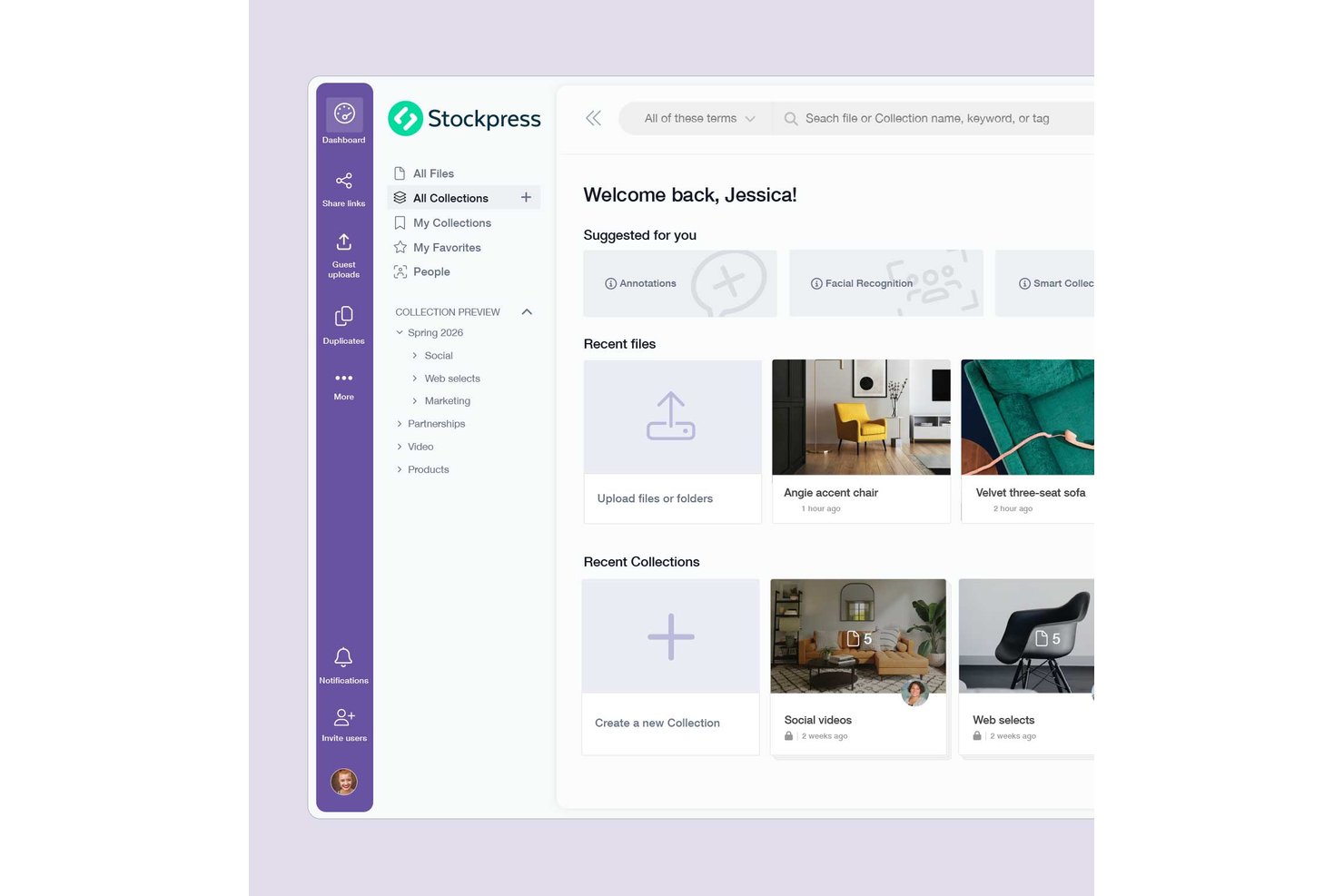
Stockpress is a cloud-based digital asset management platform that centralizes files of any type or size with AI-powered tagging, Smart Collections, version control, and granular share-link permissions.
Who Is Stockpress Best For?
Stockpress is a strong fit for marketing and agency teams that need to give many people access to a shared asset library without paying per seat.
Why I Picked Stockpress
I picked Stockpress as one of the best because its storage-based pricing with unlimited users solves a real problem: growing teams shouldn't have to justify every new seat. I especially like Smart Collections, which auto-update based on saved searches, so your library stays organized without manual sorting. AI tagging across objects, scenes, and colors means assets are actually findable the moment they land in your workspace.
Stockpress Key Features
- Version history and restore: View a full upload history for every file, compare versions side by side, and restore any previous version in one click.
- Granular share-link controls: Set passwords, expiry dates, download limits, and view-only access on individual share links without changing broader workspace permissions.
- Desktop Sync app: A Mac menu bar app that lets you sync selected Collections to Finder and automatically pushes local edits from Photoshop, Illustrator, or Lightroom back to your workspace.
- Guest upload pages: Create public-facing upload pages so external contributors can send files directly into your workspace without needing a Stockpress account.
Stockpress Integrations
Stockpress offers documented integrations with Adobe Photoshop, Adobe InDesign, Figma, Canva, Dropbox, Box, Google Drive, Slack, and Okta. It also provides an API for custom integrations, but no native Asana, monday.com, Trello, Wrike, or Zapier integrations are documented.
Pros and Cons
Pros:
- Share controls protect client deliverables
- Version history restores earlier creative files
- AI tagging speeds asset retrieval
Cons:
- No multi-stage approval routing
- Mac Desktop Sync remains beta and admin-only

Best for MacOS media synchronization

4ALLPORTAL presents a dynamic solution for Mac users seeking digital asset management software that makes it easier to manage digital content at scale. Tailored for industries such as ecommerce, media, and healthcare, it centralizes your digital assets, ensuring integration with existing content management systems and enhancing overall workflow. With AI-driven features, 4ALLPORTAL not only organizes asset management but also allows your team to focus on creative endeavors and strategic initiatives.
Why I Picked 4ALLPORTAL
I picked 4ALLPORTAL because of its MacOS Connector, which facilitates media data synchronization between Mac devices and the DAM system, enhancing offline editing capabilities. The platform's AI-driven tools, such as natural language search and auto-tagging, simplify asset retrieval and categorization, addressing common organizational challenges. Additionally, 4ALLPORTAL’s compliance features, including user-defined access rights and digital rights management, ensure your assets are used legally and securely.
4ALLPORTAL Key Features
In addition to its MacOS Connector, 4ALLPORTAL offers:
- Quick Download: This feature allows you to swiftly download files in your desired format directly from the tile view, saving time during asset retrieval.
- Version Control: Track changes and access previous versions of your assets, ensuring you can revert to earlier versions if needed.
- Automated Workflow Management: Enhance team collaboration by automating routine tasks and approvals, organizing your workflow processes.
4ALLPORTAL Integrations
Integrations include Salesforce, SAP, Adobe Creative Cloud, Microsoft Office 365, WordPress, Shopify, Magento, HubSpot, Google Analytics, and Dropbox. 4ALLPORTAL also provides an API for custom integrations, allowing further flexibility.
Pros and Cons
Pros:
- Offers AI-driven tools for enhanced asset categorization
- Provides customizable user permissions for secure asset access
- Scalable solution suitable for medium to large enterprises
Cons:
- Limited native integration options compared to other platforms
- Some users report slow performance with large file uploads

Best for brand asset sharing

Image Relay is a platform designed for efficient management and sharing of brand assets. It provides secure, controlled access to digital assets, ensuring that brand integrity is maintained across all channels.
Why I picked Image Relay:
Image Relay’s dedication to brand asset sharing, user-friendly interface, and strong search capabilities differentiates it from other DAM software for Mac. It’s considered the best for brand asset sharing due to its specialized features that support the secure and controlled distribution of digital content.
Standout features & integrations:
Features include advanced search options, customizable metadata fields, and permission settings that allow for controlled access to assets.
Integrations include Adobe InDesign, Adobe Photoshop, Airtable, Asana, Basecamp, Box, Canva, Conceptboard, Dropbox, and Egnyte.
Pros and Cons
Pros:
- User-friendly interface for easy navigation and use
- Controlled access with customizable permission settings
- Advanced search and customizable metadata for efficient asset management
Cons:
- Lower mobile experience
- Limited customization options for workflows
Canto
Best for content collaboration

Canto simplifies digital asset management and enhances team collaboration. It helps teams and organizations efficiently store, manage, and share their digital assets such as photos, videos, and other media files.
Why I picked Canto:
Canto offers a detailed approach to managing digital assets, which makes it unique compared to other software in its category. It's best for content collaboration because it offers a centralized solution that supports teams in efficiently organizing, accessing, and sharing digital assets, which is essential for collaborative projects.
Standout features & integrations:
Features include cloud storage, advanced search capabilities, facial recognition, metadata tagging, version control, brand asset templates, workflow automation, role-based access controls, sharing and collaboration tools, and real-time analytics and reporting.
Integrations include Salesforce, Dropbox, Adobe Creative Cloud, WordPress, Hootsuite, Canva, Google Drive, Microsoft Office, and Zapier.
Pros and Cons
Pros:
- Customizable branding options
- Advanced search and smart album features
- Centralized management of digital assets
Cons:
- May be limitations when connecting to third-party applications
- May experience performance issues with larger asset libraries

Mailchimp
Best asset management in a marketing platform

Mailchimp is a flexible marketing platform that supports businesses in managing their marketing campaigns and digital assets. It offers tools for organizing, storing, and accessing marketing files and data in one place, making it easier for teams to manage content. The platform’s intuitive design makes it accessible for users across different devices, including Mac, ensuring seamless asset management within marketing workflows.
Why I picked Mailchimp:
With Mailchimp, your team can keep track of files and use them in campaigns without having to switch between multiple tools. The platform's asset management features let you tie your assets directly to your campaigns and track them accordingly. This provides insights into how your marketing materials are performing, giving you the data you need to optimize your content.
Mailchimp Standout Features and Integrations:
Features include asset management, file organization, and performance tracking. Your team can manage marketing assets and integrate them directly into campaigns. The platform also offers real-time data insights to help you optimize asset performance.
Integrations include Shopify, WooCommerce, WordPress, Salesforce, Zapier, BigCommerce, Magento, Slack, Stripe, and HubSpot.
Pros and Cons
Pros:
- Scalable for growing marketing teams
- Optimized for creative content management
- Cloud asset management for multi-device access
Cons:
- Limited advanced filtering options
- Limited customization for asset organization
Outro software de gestão de ativos digitais para Mac
Segue-se uma lista de software adicional de gestão de ativos digitais para Mac que selecionei. Embora não tenham ficado entre os 10 melhores, continuam a ser valiosos e merecem uma análise mais aprofundada.
- Scaleflex
For AI asset optimization
- Adobe Experience Manager
For personalized experiences
- Nuxeo
For content customization
- ResourceSpace
For asset sharing
- Extensis Portfolio
For creative workflows
- Digizuite
For omnichannel management
- Razuna
For team asset management
- MediaGraph
For cultural heritage
- Cloudinary
For visual experiences
- Brandfolder
For enterprise usability


How I Evaluate Digital Asset Management Software for Mac
When a brand manager needs to pull approved campaign assets on her Mac without chasing Slack threads, I split evaluation into baseline DAM capabilities and the differentiators that set tools apart.
Core Functionality (Table Stakes For This List)
When I'm selecting tools for my list, I rank each one on a scale from 0 (does not offer the functionality) to 5 (excels in this area) for each core functionality listed below. Then, I calculate the tool's total score into a percentage. Each tool needs to achieve a minimum total score of 65% to be considered for inclusion.
- Centralized Asset Library: I check whether you can store, browse, and retrieve images, videos, PDFs, and design files from one searchable hub instead of scattered folders.
- Metadata & Tagging: Custom fields, taxonomies, and bulk tagging matter here—like tagging assets by campaign, client, or asset type for fast filtering.
- macOS Compatibility: Each tool should run well on Mac, whether through a native desktop app, Safari-optimized browser experience, or Finder-level sync.
- Version Control & Approvals: I look for clear version histories and built-in review cycles so a creative PM can route a logo revision for sign-off without email chains.
- Permissions & Rights Management: Role-based access is key—like giving a freelancer view-only access to one project folder while internal leads retain full editing rights.
- Creative & PM Integrations: I evaluate connections to tools teams already use, such as Adobe Creative Cloud, Figma, Asana, monday.com, or Wrike.
Once I have a list of tools that meet this criteria, I consider what sets each platform apart.
Differentiating Factors (What Sets Vendors Apart)
Here's how I compare and contrast different vendors:
Standout Features
AI-powered search is a major differentiator—tools that use visual recognition or natural language queries let you find assets without remembering exact file names or tag conventions. I also evaluate brand portals, which give external clients or freelancers a curated, self-serve library instead of fielding constant asset requests over Slack. Creative workflow automation matters too, especially intake forms and routing rules that move assets from brief to approval without manual handoffs.
Beyond Features
Mac-specific performance is something I pay close attention to—whether a tool supports Apple Silicon natively, handles ProRes and HEIC files, or integrates with Finder for drag-and-drop workflows makes a real difference for creative teams. Pricing models also vary widely, so I evaluate whether a vendor charges per user, by storage, or both, and whether guest seats for external reviewers come at extra cost. Security matters too, especially SOC 2 compliance and granular audit logs for teams managing unreleased brand assets.
Como escolher um software de gestão de ativos digitais para Mac
É fácil perder-se em longas listas de funcionalidades e estruturas de preços complexas. Para o ajudar a manter o foco enquanto avalia o seu processo único de seleção de software, apresentamos uma lista de verificação dos fatores a ter em conta:
| Fator | O que considerar |
|---|---|
| Escalabilidade | O software acompanhará o crescimento da sua equipa? Considere o crescimento futuro e se a ferramenta consegue lidar com quantidades crescentes de dados e utilizadores sem problemas. |
| Integrações | Estabelece ligação às suas ferramentas atuais? Verifique se se integra com o software que já utiliza, como o Adobe Creative Cloud, o Google Workspace ou o Salesforce. |
| Personalização | Pode adaptá-lo ao seu fluxo de trabalho? Considere até que ponto pode ajustar definições, esquemas e opções para responder às suas necessidades e processos específicos. |
| Facilidade de utilização | É fácil de utilizar para todos? Avalie se a interface é intuitiva e se os membros da equipa conseguem aprender a utilizá-la rapidamente, sem uma curva de aprendizagem acentuada. |
| Implementação e integração inicial | É fácil começar a utilizá-lo? Analise o processo de configuração, os recursos de formação disponíveis e a rapidez com que a sua equipa pode adquirir proficiência na utilização do software. |
| Custo | Enquadra-se no seu orçamento? Compare o preço com as funcionalidades oferecidas e esteja atento a custos ocultos ou complementos necessários que possam aumentar o preço. |
| Medidas de segurança | Os seus ativos estão protegidos? Certifique-se de que o software dispõe de medidas de segurança robustas, como encriptação, permissões de utilizador e atualizações regulares, para proteger os seus dados. |
| Disponibilidade do suporte | Terá ajuda quando precisar? Considere a disponibilidade do apoio ao cliente, se funciona 24 horas por dia, 7 dias por semana, e a variedade de canais de suporte, como chat, e-mail ou telefone. |
Tendências no software de gestão de ativos digitais para Mac
O software DAM está a evoluir rapidamente, influenciado pelos mais recentes avanços tecnológicos e pelas expectativas em mudança dos utilizadores. Eis alguns dos desenvolvimentos que tenho observado no mercado de DAM e que prometem oferecer aos utilizadores de Mac ferramentas mais potentes, intuitivas e eficientes para gerir os seus ativos digitais.
- Metadados e etiquetagem baseados em IA: A inteligência artificial é agora uma componente essencial do software DAM, automatizando os processos de criação de metadados e etiquetagem. Isto reduz a introdução manual de dados, acelera a pesquisa e aumenta a precisão da recuperação de ativos, tornando-se um avanço fundamental para a eficiência.
- Integração entre plataformas: Os sistemas DAM oferecem cada vez mais integração entre plataformas, estabelecendo ligação com várias ferramentas empresariais. Esta conectividade é importante, pois simplifica os fluxos de trabalho e reduz a necessidade de alternar entre aplicações, poupando tempo e recursos.
- Medidas de segurança avançadas: A segurança nas plataformas DAM está a ser reforçada, com a implementação de controlos de permissões sofisticados. Isto é essencial para proteger os ativos digitais contra ameaças cibernéticas crescentes, garantindo que o acesso fica restrito a pessoal autorizado.
- Distribuição de conteúdos simplificada: O software DAM facilita a distribuição direta de conteúdos para retalhistas em linha através de imagens dinâmicas e sindicação. Esta é uma tendência inovadora, essencial para manter a consistência da marca e acelerar o processo de entrega de conteúdos.
- Edição colaborativa em tempo real: A capacidade de as equipas editarem e etiquetarem ativos em tempo real está a tornar-se uma norma nas soluções DAM. Isto é particularmente relevante pelo seu impacto positivo na colaboração, permitindo obter comentários e atualizações instantâneos, o que, por sua vez, acelera a conclusão dos projetos.
O que é o software de gestão de ativos digitais para Mac?
O software de gestão de ativos digitais para Mac proporciona aos utilizadores de Mac uma plataforma centralizada para gerirem eficazmente os seus ativos digitais. Foi concebido para ajudar os utilizadores a organizar, armazenar e recuperar de forma eficiente vários ficheiros digitais, como imagens, vídeos, ficheiros de áudio e documentos, em sistemas macOS.
Funcionalidades
Ao selecionar um software de gestão de ativos digitais para Mac, procure as seguintes funcionalidades principais:
- Etiquetagem de metadados: Ajuda a categorizar e a encontrar rapidamente os ativos através da atribuição de etiquetas descritivas.
- Controlo de versões: Regista as alterações aos ficheiros, garantindo que tem sempre acesso à versão mais recente.
- Partilha segura: Permite partilhar ficheiros com membros da equipa ou clientes, mantendo o controlo sobre as permissões de acesso.
- Fluxos de trabalho personalizáveis: Permite adaptar os processos às necessidades específicas da sua equipa e melhorar a eficiência.
- Etiquetagem de conteúdos baseada em IA: Categoriza automaticamente os ativos, poupando tempo e reduzindo o trabalho manual.
- Capacidades de pesquisa avançada: Permite recuperar rapidamente ficheiros utilizando palavras-chave, etiquetas ou outros critérios.
- Análises e relatórios: Fornece informações sobre a utilização e o desempenho dos ativos, ajudando-o a tomar decisões baseadas em dados.
- Suporte para integrações: Estabelece ligação com ferramentas existentes, como o Adobe Creative Cloud ou o Google Workspace, para proporcionar um fluxo de trabalho mais simples.
- Escalabilidade: Garante que o software pode crescer com a sua equipa, suportando volumes crescentes de dados e utilizadores.
- Interface fácil de utilizar: Facilita a navegação e a utilização do software pelos membros da equipa, sem necessidade de formação extensiva.
Benefícios
A implementação de um software de gestão de ativos digitais para Mac proporciona vários benefícios à sua equipa e à sua empresa. Eis alguns dos benefícios que pode esperar:
- Poupança de tempo: Encontre e recupere rapidamente ficheiros utilizando a etiquetagem de metadados e as funcionalidades de pesquisa avançada.
- Colaboração melhorada: Partilhe ativos de forma segura com a sua equipa e os seus clientes, garantindo que todos têm acesso aos ficheiros certos.
- Consistência da marca: Mantenha a consistência da marca com o controlo de versões e os fluxos de trabalho personalizáveis que mantêm os ativos atualizados e alinhados com a marca.
- Produtividade melhorada: Automatize tarefas repetitivas, como a etiquetagem de conteúdos, com funcionalidades baseadas em IA, libertando tempo para trabalhos mais importantes.
- Decisões baseadas em dados: Utilize análises e relatórios para obter informações sobre a utilização e o desempenho dos ativos, ajudando-o a tomar decisões informadas.
- Crescimento escalável: Acomode facilmente mais dados e utilizadores à medida que a sua equipa cresce, graças às capacidades de escalabilidade do software.
- Experiência fácil de utilizar: Beneficie de uma interface intuitiva que reduz a curva de aprendizagem e ajuda a sua equipa a familiarizar-se rapidamente com o sistema.
Custos e preços
A seleção de software de gestão de ativos digitais para Mac requer uma compreensão dos vários modelos de preços e planos disponíveis. Os custos variam consoante as funcionalidades, o tamanho da equipa, os complementos e outros fatores. A tabela abaixo resume os planos comuns, os seus preços médios e as funcionalidades normalmente incluídas nas soluções de software de gestão de ativos digitais para Mac:
Tabela de comparação de planos de software de gestão de ativos digitais para Mac
| Tipo de plano | Preço médio | Funcionalidades comuns |
|---|---|---|
| Plano gratuito | $0 | Armazenamento básico, opções de partilha limitadas e capacidades de pesquisa simples. |
| Plano pessoal | $5-$15/utilizador/mês | Armazenamento melhorado, etiquetagem de metadados e ferramentas básicas de colaboração. |
| Plano empresarial | $25-$50/utilizador/mês | Pesquisa avançada, partilha segura e análise e relatórios. |
| Plano empresarial personalizado | $75-$150/utilizador/mês | Fluxos de trabalho personalizáveis, integrações abrangentes e suporte dedicado. |
Perguntas frequentes sobre software de gestão de ativos digitais para Mac
Eis algumas perguntas frequentes que recebo sobre software de gestão de ativos digitais para Mac:
Como é que o software DAM contribui para a consistência da marca?
O software DAM mantém a consistência da marca ao disponibilizar um repositório centralizado para todos os ativos da marca, acesso controlado para garantir que apenas são utilizados materiais aprovados, mensagens consistentes através do acesso a ativos da marca e documentos de mensagens aprovados, bem como eficiência e rapidez na produção de conteúdos consistentes e alinhados com a marca.
Qual é a diferença entre o software DAM e serviços de armazenamento na nuvem, como o Google Drive ou o Dropbox?
Embora o Google Drive, o Dropbox e serviços semelhantes possam armazenar ficheiros, o software DAM oferece funcionalidades adicionais, como a revisão e aprovação de conteúdos, o redimensionamento de imagens, a alteração de formatos de vídeo, a partilha de ficheiros através de integrações e a etiquetagem avançada de metadados. Estas funcionalidades adicionais tornam o software DAM mais adequado para gerir uma vasta gama de ativos digitais num contexto profissional.
Quais são as melhores práticas para organizar ativos no software DAM?
As melhores práticas para organizar ativos no software DAM incluem a utilização de convenções de nomenclatura consistentes, o uso de metadados para facilitar a pesquisa e a organização, o desenvolvimento de uma estrutura lógica de pastas, a gestão meticulosa das versões e a realização de auditorias regulares para remover ativos desatualizados e reorganizar os conteúdos conforme necessário.
O software de gestão de ativos digitais para Mac pode integrar-se com outras aplicações e serviços Apple?
Sim, muitas soluções de gestão de ativos digitais, como \u003ca href=\u0022https://thedigitalprojectmanager.com/tools/best-digital-asset-management-software-for-photographers/\u0022\u003esoftware DAM para fotógrafos\u003c/a\u003e, concebidas para Mac oferecem integrações com aplicações e serviços Apple populares, como o iCloud, o Fotos, o Final Cut Pro e outros. Estas integrações facilitam fluxos de trabalho simples, permitindo aos utilizadores aceder diretamente aos ativos e geri-los nas ferramentas do ecossistema Mac que preferem.