

10 melhores ferramentas de software de Scrum e quadros Scrum para 2026

10 Melhor lista de software Scrum


O software Scrum ajuda as equipas a planear sprints, gerir listas de pendências e manter o alinhamento através de ciclos de desenvolvimento rápidos e iterativos. Quer esteja a acompanhar a velocidade, a facilitar reuniões diárias ou a organizar revisões de sprint, a ferramenta certa pode trazer estrutura aos fluxos de trabalho ágeis e ajudar a sua equipa a lançar melhores produtos, mais rapidamente.
Testei e analisei as principais plataformas Scrum em dezenas de projetos para destacar aquelas que realmente apoiam as equipas ágeis. Desde o planeamento de sprints e os quadros de tarefas até aos gráficos de burndown e às funcionalidades de colaboração, cada ferramenta deste guia oferece funcionalidades concebidas para manter a sua equipa a avançar com clareza e rapidez.
Why Trust Our Software Recommendations
Our team has been testing and reviewing software since 2012. As project managers ourselves, we know how difficult—and important—it is to choose the right software.
For this guide, we evaluated tools using hands-on testing and independent research, scoring tools using our selection criteria. We also draw on insights from industry thought leaders and practicing project management experts.
Our reviews reflect our human editorial judgment, not a sales pitch.
Expert reviewers:
Tabela comparativa do melhor software Scrum
| Tool | Best For | Trial Info | Price | ||
|---|---|---|---|---|---|
| 1 | Best for Scrum and agile templates | Free plan + 14-day trial + demo available | From $10/user/month (billed annually) | Website | |
| 2 | Best for custom workflow automation | 30-day free trial | From $35/user/month (billed annually) | Website | |
| 3 | Best Scrum board for real-time collaboration | Free plan available | From $1/user/month (billed annually) | Website | |
| 4 | Best scrum tool with built-in video conferencing | Free plan + 14-day free trial + free demo available | From $8/user/month (billed annually) | Website | |
| 5 | Best for API documentation | Free plan + 14-day free trial + free demo available | From $9.99/user/month (billed annually) | Website | |
| 6 | Best scrum software for enterprises | Free plan + 7-day free trial available | From $8.48/user/month | Website | |
| 7 | Best scrum software for sprint retrospectives | Free trial available | Pricing upon request | Website | |
| 8 | Best for agencies and consultancies | 7-day free trial | From $9/user/month (billed annually) | Website | |
| 9 | Best Scrum software for app integrations | Free plan available (request via email) | From $12.49 project-planning/user/month (billed annually) | Website | |
| 10 | Best for small teams and startups | 7-day free trial | From $96 (one time fee for 10 users) | Website |


Avaliações do melhor software Scrum
Eis uma breve descrição de cada uma das ferramentas Scrum da minha lista, mostrando aquilo que fazem melhor, além de capturas de ecrã que destacam algumas das funcionalidades.

Wrike
Best for Scrum and agile templates

Wrike is a project management software suitable for teams of five or more. It includes Scrum tools and features, and is highly configurable, allowing users to customize workflows, dashboards, reports, and request forms.
Wrike enables users to switch between Agile Kanban boards, one-click Gantt charts, and traditional workload views. The tool also comes with a number of pre-built Agile templates, and features task lists, subtasks, schedules, shared workflows, file sharing, and real-time collaboration. Automatically prioritize your backlog, plan sprints with Gantt charts and Kanban boards, and track your sprint success with reports.
Wrike has an easy-to-use, intuitive interface and navigation with distinct spaces, folders, and tasks. Users can toggle between the home screen and timesheets, dashboards, calendars, reports, and an activity stream. Wrike has a dedicated help center with interactive training, videos, a ‘Getting Started’ guide, and a thriving community.
Wrike offers 400+ pre-built native integrations, including integrations with the most popular file management software from Microsoft, Google, and Dropbox, along with sales and marketing software from Salesforce and Marketo.
Pros and Cons
Pros:
- Excellent email integration
- View projects and tasks in different views (list, table, Kanban, Gantt)
- User-friendly and intuitive for all skill levels
- Users have access to a variety of fully customizable dashboards
Cons:
- No alerts to warn against unassigned/untagged tasks
- No task prioritization levels, high priority flags only
- Time tracking is included in Business/Enterprise plans only
New Product Updates from Wrike
Wrike Expands Gantt Planning, Approvals, and AI Work Intake
Wrike adds cross-project Gantt dependencies, flexible approval routing, and AI work intake through Wrike MCP. These updates give teams more control over planning, decision-making, and incoming work. For more information, visit Wrike’s official site.

Best for custom workflow automation

QuickBase is a cloud-based application development platform that enables users to create custom business applications without the need for coding expertise. Its platform can also be adapted for use as scrum software, supporting agile project management methodologies. This allows teams to manage sprints, backlogs, and user stories within a customizable framework.
QuickBase's flexibility in application design and data management additionally allows scrum teams to configure the system to their specific workflow requirements, facilitating the iterative development and continuous improvement central to scrum practices.
QuickBase integrates with Microsoft Teams, Tableau, Slack, Salesforce, NetSuite, QuickBooks, Dropbox, Google Drive, Marketo, and Zendesk.
QuickBase costs from $35/user/month (billed annually) and comes with a 30-day free trial.
Pros and Cons
Pros:
- Can scale with growing businesses
- Provides excellent customer support for users
- Intuitive interface
Cons:
- Some issues with slow loading times
- Lacks easily formattable reports

Best Scrum board for real-time collaboration
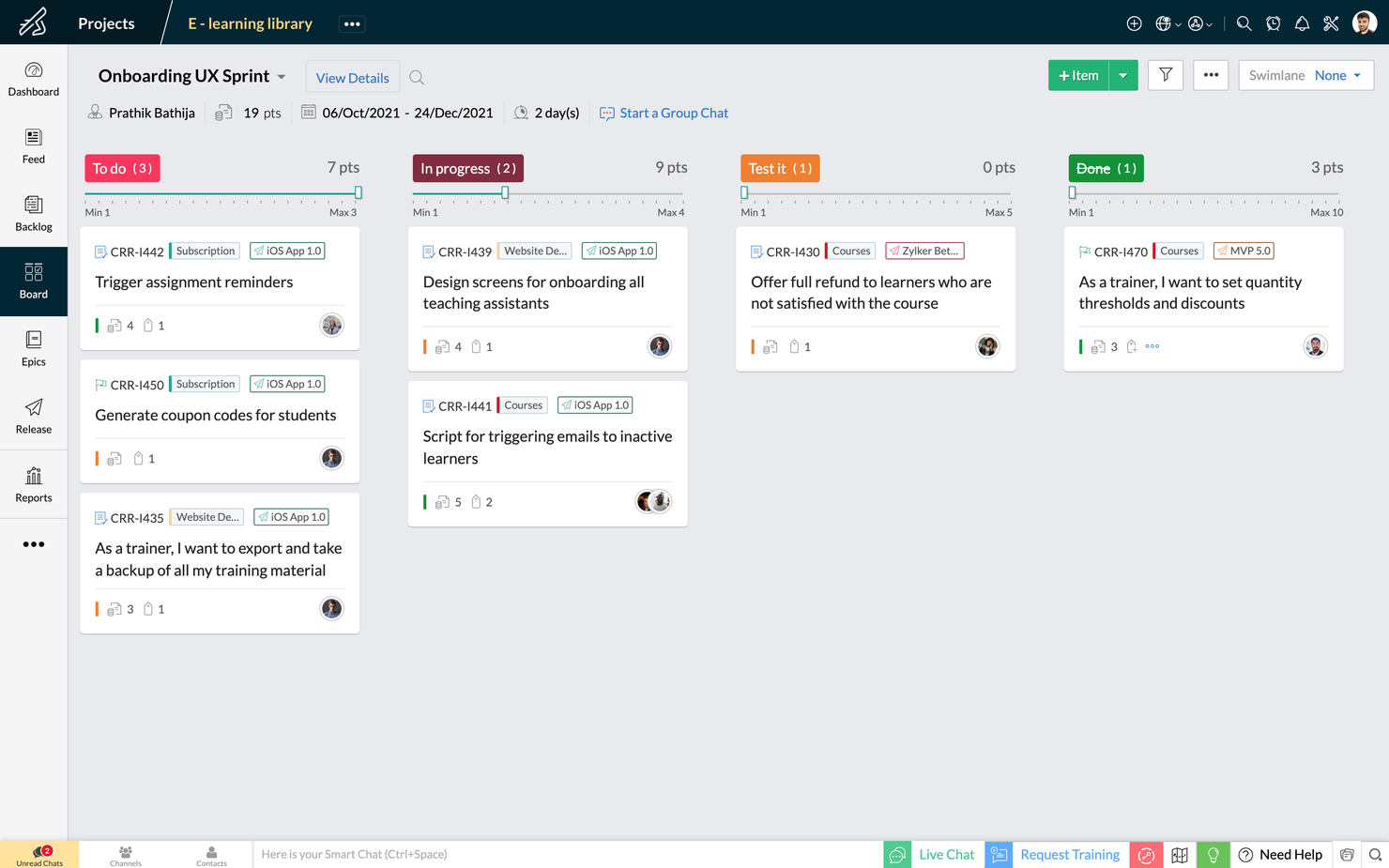
Zoho Sprints is an agile project management tool that helps Scrum teams organize user stories, manage backlogs, and track progress on Scrum Boards. It’s a simple and clutter-free Scrum software that helps teams to focus on shipping great quality work.
The drag and drop planning builder helps teams plan their upcoming sprints by moving items from their project backlog to their sprint backlog. The project backlog serves as the repository of all user stories, tasks, and bugs. The dedicated planning center equips teams to refine their project backlog with options to filter, sort and search items across default and custom parameters.
The Scrum Board in Zoho Sprints is highly customizable and provides visibility and transparency of everyone’s progress. It is effortless to drag-and-drop stories into completion, create custom statuses and set WIP limits. Teams can sort work items into swimlanes based on priority, story, or estimation points, and track the progress of sprints in an exclusive sprint dashboard.
Zoho Sprints provides real-time reports and insights into the overall progress. The Velocity Chart calculates the amount of work delivered in each sprint and helps teams to plan and estimate future sprints. Meanwhile, Burndown and Burnup charts help teams to track the pace at which they are burning estimation points by comparing the current and ideal progress line.
Communication and collaboration are crucial in every aspect of life, and
they're especially critical when you're working with cross-functional teams. With Zoho Sprints, product teams can collaborate within the context of their work through features like built-in chat, virtual meetings, and an interactive project feed.
Zoho Sprints integrates well with popular code repository management tools like GitHub, GitLab, Bitbucket. DevOps teams can also automate their CI/CD pipelines by integrating with developer tools like Jenkins and Azure DevOps. Teams can leverage webhooks and APIs to build their integrations or browse through a growing library of apps listed on Zoho's marketplace.
Zoho Sprints starts at $6/user/month (billed annually). They offer a freemium version for up to 3 users for 3 projects. Zoho Sprints offers a free trial for 15 days (no credit card required).
New Product Updates from Zoho Sprints
Zoho Sprints Expands Forms With Location Tracking and Custom Modules
Zoho Sprints adds location tracking to creation forms and extends public forms to custom modules. These updates give teams more ways to capture context and create records through forms. For more information, visit Zoho Sprints’ official site.
 .
Miro
Best scrum tool with built-in video conferencing

Miro is a collaborative online whiteboard with built-in video conferencing widely used across various industries, including major Fortune 100 companies. It offers an extensive array of templates and formats, from Kanban boards to flowcharts.
As a scrum software tool, Miro includes interactive collaboration features like stickies and comments, enabling dynamic discussions during scrum sessions. Its integration with project management tools like Jira and Asana centralizes task tracking within the scrum framework. Additionally, Miro's planner tool assists in visualizing and organizing tasks, aiding teams in maintaining a clear overview of their projects and sprints.
Miro has integrations with a whole suite of tools, including Zoom, Figma, Confluence, Asana, monday.com, Microsoft Teams, Jira, Slack, Google Drive, Box, Airtable, Notion, Azure, and Webex. Some integrations are limited to paid plans only.
Pros and Cons
Pros:
- Built-in communication features for streamlined collaboration
- Intuitive and easy setup
- Free forever plan available
Cons:
- Free version does not allow high-quality export to pdf
- Zooming can be jumpy on larger projects
- Visitor/guest accounts locked to paid plans only
New Product Updates from Miro
Miro Adds Japan Data Residency for Enterprise Customers
Miro has introduced Japan data residency for enterprise customers, offering in-region storage for production data, backups, and metadata, plus in-region compute infrastructure. For more information, visit Miro's official site.

Best for API documentation

Used by over 20K companies, Teamwork is a project management tool that highlights accountability and collaboration with time tracking, workload management, and templates and automation. Teamwork's API is flexible and accessible with different self-help modules for manipulating data, building integrations, customizing product development workflows, and visualizing your content. Scrum-oriented cross-functional teams will love this adaptability.
Teamwork costs from $10/user/month and they also offer a freemium version of the tool for up to 5 users. They also offer a 30-day free trial for all paid plans.
Pros and Cons
Pros:
- Easy to communicate task status with clients or team
- Easy zoom in/zoom out on project plans
- Features can be turned on/off (tasks, messages, time, risks, billing)
Cons:
- No easy way to measure your team’s capacity
- No industry-specialized project templates or formats
- No CSS template option for advanced customization

Jira
Best scrum software for enterprises
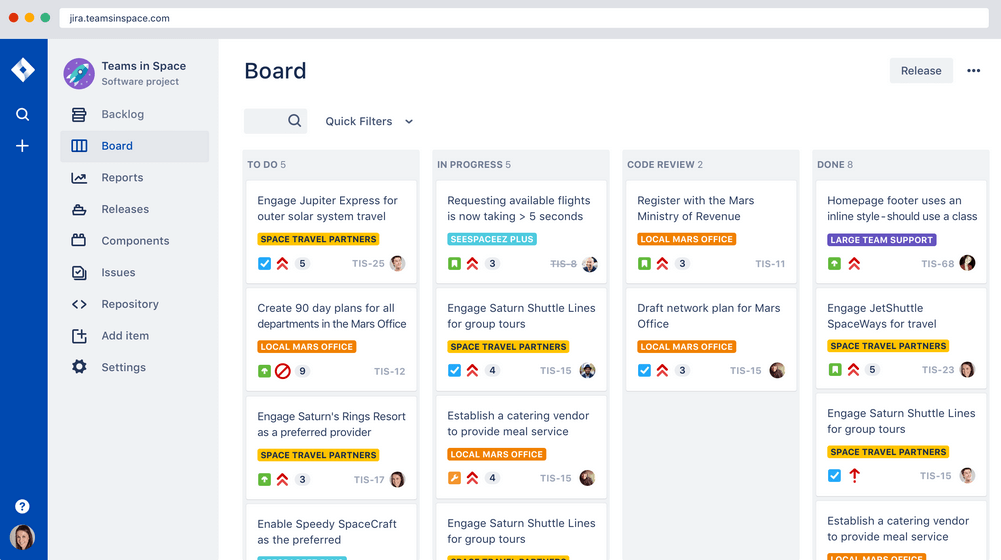
Jira Scrum board takes this workflow software powerhouse and hones it around team collaboration and incremental delivery starts. A few features scrum masters will find handy are their printable agile user story cards, 25+ agile extensions and filters, and a robust project template manager. Atlassian owns Jira, Confluence, Trello, BitBucket, SourceTree, Bamboo—making it great for enterprises who want everything in a single ecosystem.
Jira costs from $7/month for up to 10 users. They also offer free licensing for groups of 10 users or less.
Pros and Cons
Pros:
- Centralized administration across all Atlassian Cloud products
- Houses all historical works for future reference
- Can create tasks, sub-tasks, spikes, and epics
- Single view for all user stories
Cons:
- No mass-editing and scripting (rename a whole set of labels, etc.)
- Needs better linking within stories and tasks
- Limited collaboration features
Best scrum software for sprint retrospectives

Targetprocess is a Scrum team management app with tailored solutions for product owners, release train engineers, portfolio managers, and agile coaches. They make sprint retrospectives simple with built-in tools to check team happiness, organize feedback, or just record a high-level summary of a project. Targetprocess has board tags for "worked well," "didn't work well," and "improvement ideas", making collaborative retrospectives even easier.
Targetprocess offers customized pricing upon request.
Pros and Cons
Pros:
- Robust graphical and custom reports to pinpoint trends
- Responsive customer support team
- Can choose between unique or standard views per user
Cons:
- Can be tricky to move entities into different levels of the hierarchy
- Does not include iteration tracking
- No means to reuse steps
Best for agencies and consultancies

Bonsai is a versatile business management platform tailored for agencies, consultancies, and professional services. It combines tools for client and project management with financial tracking, offering an all-in-one solution for business operations. With features like CRM, proposal and contract management, scheduling, and expense tracking, Bonsai helps teams organize workflows, manage sprints, and complete projects.
Bonsai's robust task management system makes it a valuable tool for Scrum teams. It includes task assignments, prioritization, deadlines, and Kanban views for progress tracking, essential for managing Scrum sprints. The integrated timers and collaboration tools ensure that teams can maintain clear communication and stay on schedule throughout their projects.
Furthermore, Bonsai offers features like customizable templates, automated invoicing, project timelines, client portals, and comprehensive reporting and analytics. Bonsai also integrates with popular tools such as Google Calendar, Calendly, QuickBooks Online, ClickUp, Google Drive, Google Sheets, Zapier, Slack, HubSpot, Gmail, Xero, and more.
Pros and Cons
Pros:
- Client portal for direct communication
- Flexible task management with Kanban views
- Automation for repetitive tasks
Cons:
- Lacks more advanced scrum features like backlog management
- May not be the best for larger businesses
Nutcache
Best Scrum software for app integrations

Nutcache is a Scrum project management tool with the ability to measure task progress, set a business value to cards (ROI), assign complexity points to cards, display real-time sprint statistics, and use acceptance tests to set cards as completed. Nutcache has a healthy list of third-party integration options and also works with a paid Zapier plan to unlock thousands more. They also offer a flexible API to connect Nutcache to your existing tools and workflow.
Nutcache costs from $6/user/month with a “Pro” plan that requires 5 users.
Pros and Cons
Pros:
- Easy to integrate new employees (scalable)
- Great time and expense tracking
- Intuitive to learn and use
- Robust project dashboards
Cons:
- Need more third party integrations
- Complicated security levels for employees
VivifyScrum
Best for small teams and startups
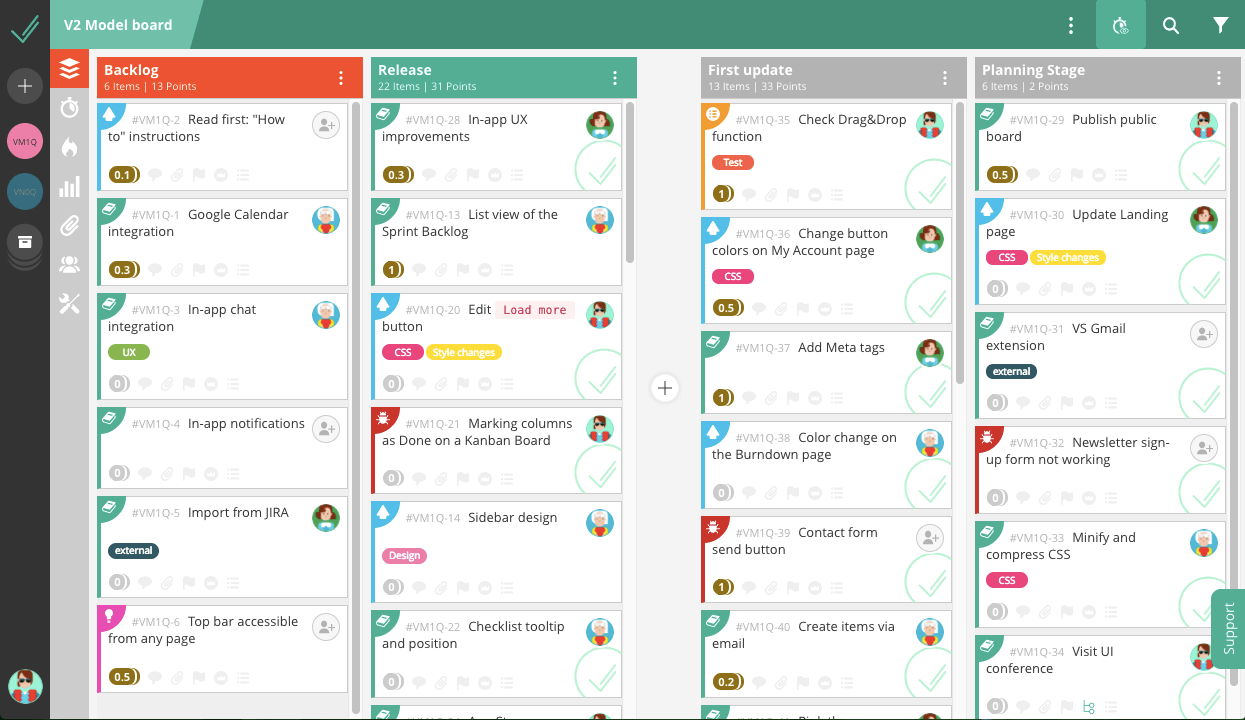
VivifyScrum is a web-based project management tool that comes with free Scrum training via their VivifySCrum EDU course—just one of the many added benefits that small teams and startups will appreciate. They also have fixed price licensing for SMBs trying to navigate the growing world of monthly workflow app subscriptions. Additionally, teams of all sizes will appreciate their flexible agile boards, burndown charts, and Scrum metrics graphs.
VivifyScrum costs from $96 as a one-time fee for 10 users and offers a 7-day free trial as well as a 30-day refund policy upon purchase.
Pros and Cons
Pros:
- Helpful shortcuts to quickly assign, label, type tasks
- Labels and card types work well for added organization
- Easy to add and rearrange tasks on board
Cons:
- Gitlab connection could be better
- Can’t sort backlog items in dashboard view
- Lacking in 3rd party integrations
Outro software Scrum
Eis mais algumas opções que não entraram na lista principal.
- SwiftKanban
Scrum tool for engineering
- Height
Efficient Agile development made simple.
- Axosoft
Sprint dashboard
- Orangescrum
Scrum software with resource management
- monday AI Workspace
With AI-driven risk detection and reporting
- ClickUp
For freelancers &
- Celoxis
For resource management
- Hubstaff
Free scrum software
- Lucidspark
Scrum board for integrations and collaboration
- GoodDay
For backlog prioritization
- Asana
Free Scrum software
- Basecamp
Scrum tool for non-software projects
- Scoro
Agile Scrum software
- Trello
Widely-used Scrum board software
- SprintGround
For web developers
- Zoho Sprints
Scrum software within a connected suite of other business tools
- Scrumdesk
Objectives and key results (OKR) planning


How I Evaluate Scrum Software
I split my evaluation into two layers—whether a tool covers the sprint planning, backlog grooming, and burndown reporting fundamentals, then what sets it apart for teams scaling across multiple squads.
Core Functionality (Table Stakes For This List)
When I'm selecting tools for my list, I rank each one on a scale from 0 (does not offer the functionality) to 5 (excels in this area) for each core functionality listed below. Then, I calculate the tool's total score into a percentage. Each tool needs to achieve a minimum total score of 65% to be considered for inclusion.
- Product Backlog Management: I evaluate how each tool handles creating, ranking, and grooming user stories and epics—like dragging items to reprioritize after a stakeholder review.
- Sprint Planning & Execution: Each tool should let you define sprints with goals, pull items from the backlog, and track capacity so your team commits to realistic workloads.
- Scrum Board Visualization: I look for drag-and-drop boards with customizable columns and swimlanes that reflect how your team actually moves work from "To Do" through "Done."
- Agile Reporting & Metrics: Burndown charts, velocity tracking, and cumulative flow diagrams matter here—I check whether reports update in real time as the sprint progresses.
- Story Point Estimation: Tools should support story points at the item level and roll them up across sprints, similar to how Jira and Azure DevOps surface velocity history.
- Team Collaboration on Work Items: I look at whether team members can comment, @mention, attach files, and receive notifications directly on stories and tasks within a sprint.
Once I have a list of tools that meet this criteria, I consider what sets each platform apart.
Differentiating Factors (What Sets Vendors Apart)
Here's how I compare and contrast different vendors:
Standout Features
Built-in retrospective tools are a big differentiator—I look for templates like Start/Stop/Continue with voting and action items that carry into the next sprint. Developer integrations also matter: linking GitHub or GitLab commits directly to user stories gives the whole team visibility into what's shipped. I also check for no-code automation rules that handle recurring tasks like rolling unfinished items into the next sprint or notifying the Scrum Master when a story is blocked.
Beyond Features
Ecosystem fit is one of the first things I evaluate—whether a tool connects with your existing Slack, Confluence, or Figma setup shapes daily workflows more than most features do. I also consider how well a platform scales; a tool that works for one Scrum team can fall apart when you're coordinating ten squads across a portfolio. Onboarding matters, too. Pre-built Scrum templates and migration support from tools like spreadsheets or legacy PM platforms can cut weeks off your team's ramp-up time.
Como escolher software Scrum
É fácil perder-se em listas extensas de funcionalidades e estruturas de preços complexas. Para o ajudar a manter o foco enquanto percorre o seu processo específico de seleção de software, eis uma lista de fatores a ter em conta:
| Fator | O que considerar |
| Escalabilidade | Esta ferramenta acompanhará o crescimento da sua equipa à medida que as suas necessidades aumentam? Deve analisar os planos de preços e as funcionalidades para verificar se a ferramenta pode crescer consigo. |
| Integrações | O software integra-se com as ferramentas que a sua equipa já utiliza? Por exemplo, algumas empresas procuram especificamente software de gestão de projetos que se integre com o Jira. |
| Personalização | Pode adaptar o software aos seus fluxos de trabalho? |
| Facilidade de utilização | A interface da ferramenta é suficientemente intuitiva para que a sua equipa a aprenda rapidamente? |
| Orçamento | O preço enquadra-se nos limites financeiros da sua equipa? |
| Medidas de segurança | O software oferece funcionalidades de segurança robustas para proteger os seus dados? |
| Colaboração | O software melhorará a forma como a sua equipa colabora nos projetos? |
| Ferramentas de elaboração de relatórios | O software oferece relatórios que respondem às necessidades da sua equipa? Este aspeto é frequentemente ignorado e muitas ferramentas não dispõem de módulos de elaboração de relatórios robustos. |
Tendências do software Scrum em 2025
Na minha investigação, consultei inúmeras atualizações de produtos, comunicados de imprensa e registos de lançamentos de diferentes fornecedores de software Scrum. Eis algumas das tendências emergentes que estou a acompanhar:
- Planeamento de sprints com IA: Os fornecedores estão a começar a integrar a IA no software de planeamento de sprints para prever a duração das tarefas e atribuir automaticamente membros da equipa com base em dados de desempenho anteriores. Isto torna o planeamento mais eficiente e reduz o erro humano, ajudando as equipas a avançar mais rapidamente em geral.
- Gamificação para aumentar o envolvimento: As ferramentas para mestres de Scrum estão a incorporar a gamificação para manter os membros da equipa motivados. Ao recompensar o progresso com distintivos ou pontos, estas funcionalidades tornam a utilização dos quadros de tarefas Scrum mais envolvente e ajudam a aumentar a produtividade durante os sprints.
- Foco na colaboração à distância: As plataformas de quadros Scrum online estão a melhorar as suas funcionalidades de colaboração virtual, disponibilizando atualizações em tempo real e ferramentas de comunicação integradas para ligar melhor as equipas remotas. Algumas aplicações Scrum incluem agora videoconferência ou conversação integradas, tornando a colaboração à distância mais simples.
- Relatórios e análises avançados: Um maior número de ferramentas de gestão Scrum está a fornecer informações detalhadas sobre a velocidade dos sprints, as taxas de conclusão de tarefas e os bloqueios. As equipas que utilizam estes quadros ágeis podem agora tomar decisões mais baseadas em dados e acompanhar as tendências de desempenho ao longo do tempo com maior precisão.
- Acompanhamento visual dos sprints: Os quadros brancos Scrum e o design Scrum estão a evoluir para plataformas mais visuais e interativas. Os fornecedores estão a incorporar interfaces de arrastar e largar, definição de prioridades das tarefas através de cores e gráficos dinâmicos nos seus sistemas Scrum, facilitando o acompanhamento do progresso dos sprints de relance.
O que é o software Scrum?
O software Scrum é uma ferramenta de gestão de projetos que ajuda as equipas a implementar o quadro Scrum, organizando o trabalho em sprints curtos e iterativos.
Utilizado habitualmente no desenvolvimento ágil de software, inclui funcionalidades para o planeamento de sprints, a gestão do backlog, o acompanhamento de tarefas e as reuniões diárias. As ferramentas Scrum melhoram a colaboração da equipa, aumentam a transparência e apoiam a entrega contínua, ajudando as equipas a responder rapidamente às mudanças.
Funcionalidades do software Scrum
Ao escolher software Scrum, esteja atento às seguintes funcionalidades principais:
- Planeamento de sprints: Ajuda as equipas a planear e dividir o trabalho em sprints geríveis através de uma ferramenta de planeamento de sprints, garantindo uma entrega atempada.
- Gestão do backlog: Permite atribuir prioridades e organizar facilmente as tarefas no backlog do produto, algo essencial para a gestão ágil de Scrum.
- Gráficos de burndown: Fornece uma representação visual do progresso do trabalho num quadro Scrum ágil, ajudando as equipas a acompanhar a sua velocidade e a prever a conclusão.
- Mapeamento de histórias de utilizador: Permite às equipas estruturar eficazmente as histórias de utilizador no desenvolvimento de software Scrum ágil, alinhando o trabalho com as necessidades dos clientes.
- Fluxos de trabalho personalizáveis: Adapta-se aos processos específicos das equipas nos sistemas de ferramentas Scrum ágeis, permitindo flexibilidade na forma como o trabalho é acompanhado e concluído, sendo ideal para fluxos de trabalho Scrum.
- Ferramentas de colaboração: Facilitam a comunicação da equipa com funcionalidades como conversação, comentários e partilha de ficheiros.
- Ferramentas de retrospetiva: Incentivam a melhoria contínua ao oferecerem formas estruturadas de rever e discutir os sprints concluídos.
- Relatórios e análises: Fornecem informações sobre o desempenho da equipa, ajudando a otimizar os processos dos projetos Scrum.
- Permissões baseadas em funções: Garantem que os membros da equipa têm acesso às ferramentas e informações adequadas, protegendo os dados sensíveis, algo fundamental para gerir equipas e fluxos de trabalho Scrum.
- Capacidades de integração: Ligam-se a outras ferramentas do ecossistema de gestão de projetos, simplificando os fluxos de trabalho entre plataformas.
Vantagens do software Scrum
A implementação de software Scrum proporciona várias vantagens à sua equipa e à sua empresa. Eis algumas das que pode esperar:
- Maior colaboração: As ferramentas Scrum facilitam a comunicação e o trabalho conjunto das equipas através de quadros e listas de tarefas partilhados.
- Entrega mais rápida: As equipas podem entregar projetos mais rapidamente utilizando aplicações de planeamento de sprints para dividir tarefas grandes em sprints mais pequenos e geríveis.
- Maior transparência: O software de quadros Scrum permite que todos vejam o progresso das tarefas em tempo real, pelo que não há confusão sobre quem está a fazer o quê.
- Maior flexibilidade: As ferramentas de software ágil permitem que as equipas se adaptem rapidamente às mudanças sem perder de vista os objetivos do projeto.
- Priorização mais fácil: As ferramentas para mestres de Scrum, como o software de sprints, ajudam as equipas a reorganizar as tarefas com base na importância, garantindo que o foco está no que precisa de ser feito primeiro.
- Maior responsabilização: O software para mestres de Scrum fornece atribuições e prazos claros, facilitando o acompanhamento da pessoa responsável por cada tarefa.
- Redução dos bloqueios: Ao utilizarem ferramentas como um quadro de sprints ágil para visualizar o fluxo de trabalho, as equipas podem identificar e resolver problemas que atrasam o progresso.
Custos e preços do software Scrum
A seleção de software Scrum requer uma compreensão dos vários modelos de preços e planos disponíveis. Os custos variam consoante as funcionalidades, o tamanho da equipa, os complementos e outros fatores. A tabela abaixo resume os planos comuns, os seus preços médios e as funcionalidades normalmente incluídas nas soluções de software Scrum:
Tabela de comparação de planos para software Scrum
| Tipo de plano | Preço médio | Funcionalidades comuns |
| Plano gratuito | $0-$10/utilizador/mês | Gestão básica de tarefas, projetos limitados, relatórios básicos e integrações limitadas. |
| Plano pessoal | $0-$10/utilizador/mês | Acompanhamento avançado de tarefas, fluxos de trabalho personalizados, ferramentas de elaboração de relatórios e acesso a integrações padrão. |
| Plano para empresas | $15-$50/utilizador/mês | Modelos de projetos, relatórios detalhados, painéis personalizados e funcionalidades de colaboração em equipa. |
| Plano empresarial | $30-$100/utilizador/mês | Projetos ilimitados, suporte prioritário, funcionalidades avançadas de segurança e integrações ao nível empresarial. |