

10 Melhores Ferramentas Alternativas ao ClickTime para Controlo de Tempo em 2026

Lista restrita das melhores alternativas ao ClickTime


Se está a constatar que o ClickTime não é a ferramenta certa de gestão de projetos e controlo de tempo para a sua equipa, existem muitas alternativas ao ClickTime que podem ajudar com folhas de horas, orçamentação de projetos e relatórios de projetos.
O ClickTime pode não dispor das análises avançadas ou das integrações específicas de que precisa para satisfazer o seu caso de utilização, por isso testei e analisei dezenas de alternativas ao ClickTime para o ajudar a encontrar uma substituta. Estas são as minhas recomendações para as melhores alternativas ao ClickTime.
O que é o ClickTime?
O ClickTime é um software de controlo de tempo e gestão da força de trabalho que as empresas e organizações podem utilizar para monitorizar as horas dos funcionários, gerir os custos dos projetos e melhorar a produtividade da força de trabalho.
Entre os utilizadores comuns encontram-se gestores de projetos, profissionais de recursos humanos e equipas financeiras que precisam de controlar o tempo para efeitos de faturação, processamento salarial e gestão de projetos. O software fornece informações sobre os hábitos de trabalho dos funcionários e o progresso dos projetos, ajudando-o a tomar decisões informadas e a alocar recursos de forma eficiente.
Why Trust Our Software Recommendations
Our team has been testing and reviewing software since 2012. As project managers ourselves, we know how difficult—and important—it is to choose the right software.
For this guide, we evaluated tools using hands-on testing and independent research, scoring tools using our selection criteria. We also draw on insights from industry thought leaders and practicing project management experts.
Our reviews reflect our human editorial judgment, not a sales pitch.
Expert reviewers:
Tabela de comparação das alternativas ao ClickTime
Esta tabela de comparação resume os detalhes de preços das minhas principais escolhas de alternativas ao ClickTime:
| Tool | Best For | Trial Info | Price | ||
|---|---|---|---|---|---|
| 1 | Best for flexible time tracking | Free plan + Free trial + Free demo available | From $6/user/month | Website | |
| 2 | Best for profitability tracking across client projects | Free plan + 30-day trial available | From $9/user/month (billed annually) | Website | |
| 3 | Best for cross-platform time tracking | Free plan + 7-day trial + demo available | From $3.99/user/month (billed annually) | Website | |
| 4 | Best for team time tracking | Free plan + 14-day free trial + free demo available | From $5/user/month | Website | |
| 5 | Best for automatic time tracking | Free plan + free trial + free demo available | From $3.99/user/month (billed annually) | Website | |
| 6 | Best for project cost accounting | Free trial + demo available | From $13/user/month | Website | |
| 7 | Best for GovCon compliance and project billing | Free demo available | Pricing upon request | Website | |
| 8 | Best for professional services billing and utilization | 14-day free trial | From $10/user/month (billed annually) | Website | |
| 9 | Best for GPS and remote workforce tracking | 14-day free trial + demo available | Pricing upon request | Website | |
| 10 | Best for budget management | Free demo available | From $20/user/month | Website |


Análises das melhores alternativas ao ClickTime
Segue-se a minha análise detalhada de cada uma das principais alternativas ao ClickTime. Cada resumo aborda os pontos fortes e fracos, as funcionalidades principais e os cenários ideais para utilizar estas ferramentas.

actiTIME
Best for flexible time tracking
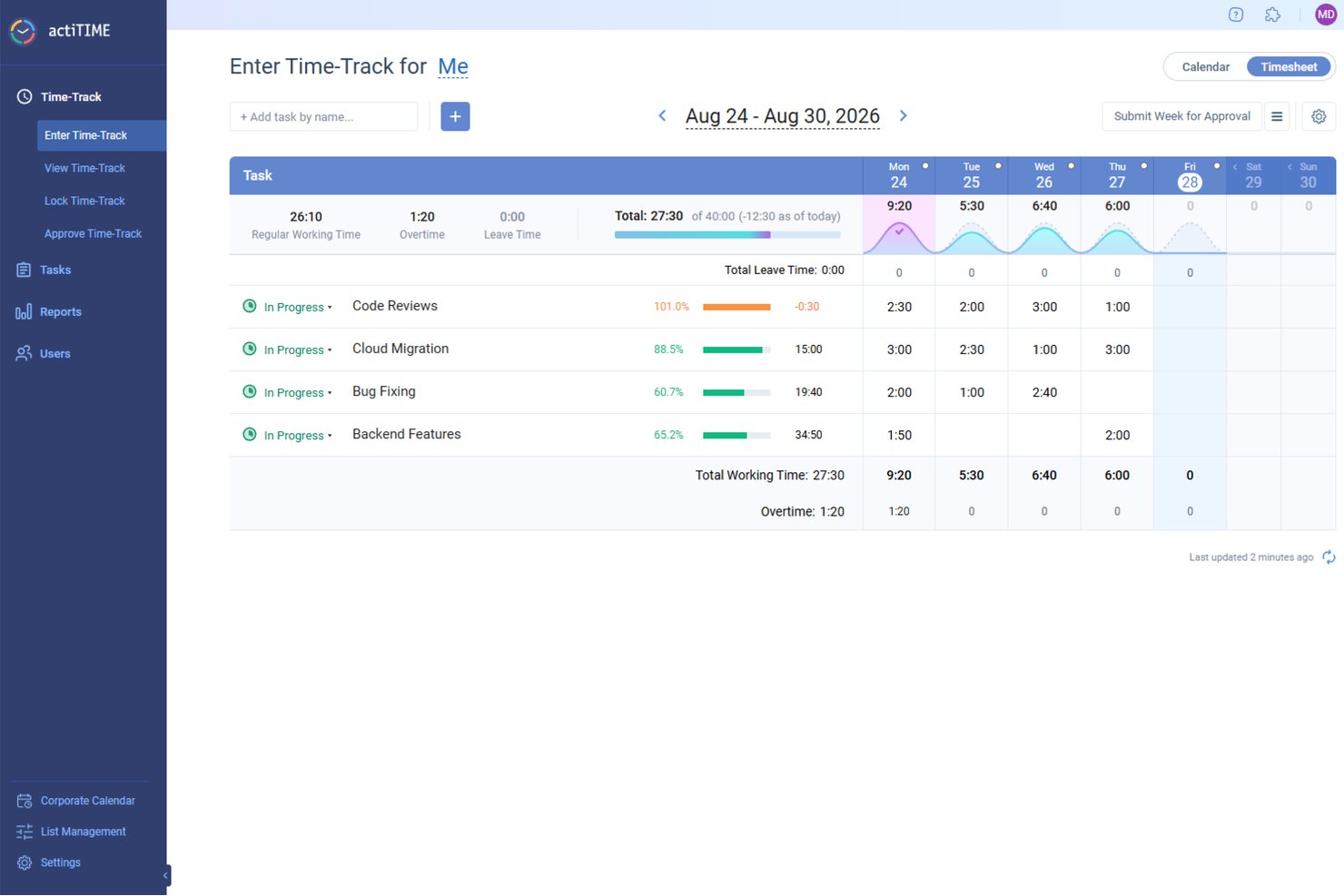
actiTIME is a time tracking and project billing tool that combines weekly timesheets, calendar-based time entry, budget tracking, and financial reporting for teams managing billable work across clients and projects.
Who Is actiTIME Best For?
actiTIME is a solid fit for small consulting and professional services teams that need to track billable hours, manage project budgets, and generate client invoices without a steep learning curve.
Why I Picked actiTIME
actiTIME earns its spot on my shortlist because of how much control it gives you over the way time actually gets recorded. I like that teams can switch between weekly timesheets and a calendar-based view that logs exact start and stop times, which matters when clients expect precise billing records. The multi-level budget tracking, covering time, cost, and billable amounts across tasks, projects, and clients, feeds directly into PDF invoice generation without extra manual work.
actiTIME Key Features
- PTO accruals and leave tracking: Teams can define accrual rules, configure leave types, monitor sick-day balances, and track PTO balances directly in the system.
- Kanban board view: Users can visualize project progress, manage task statuses, and spot workflow bottlenecks in a drag-and-drop Kanban interface.
- Overtime calculation: The system automatically calculates overtime hours based on company-wide or individual employee rules.
- Budget alerts and notifications: Administrators can set up automated alerts when project costs exceed a budget or task estimates reach a defined threshold.
actiTIME Integrations
actiTIME offers native integrations with QuickBooks Online and actiPLANS. It also provides a REST API with REST Hooks for custom connections and supports Zapier.
Pros and Cons
Pros:
- Flexible task and calendar time capture
- Project cost reports clarify profitability
- Straightforward timesheets support client billing
Cons:
- Recurring fixed invoice items need manual entry
- Client-to-project hierarchy may feel shallow
New Product Updates from actiTIME

actiTIME Visual Hour Indicator and Time-Track Report Redesign
actiTIME adds a wave-style hour indicator to the Timesheet and Calendar views and refreshes the Time-Track report for smoother navigation and clearer visuals. For more information, visit actiTIME's official site.

Beebole
Best for profitability tracking across client projects
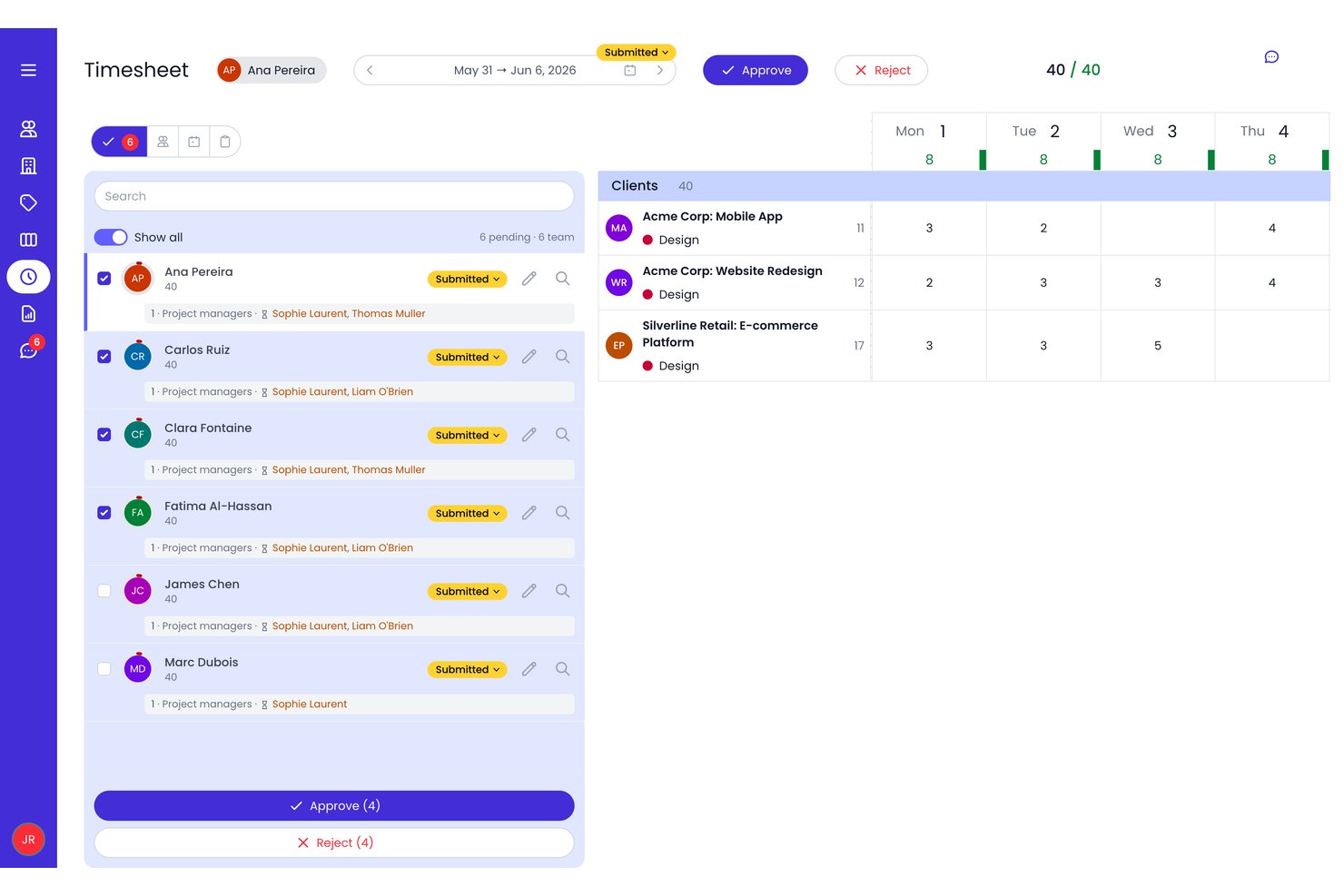
Beebole is a time tracking and resource planning tool that connects project time entry, multi-level timesheet approvals, capacity planning, and billing-rate reporting across projects, subprojects, and tasks.
Who Is Beebole Best For?
Beebole suits project-based teams that need to track billable hours, manage approval workflows, and report on project-level profitability across multiple clients.
Why I Picked Beebole
I picked Beebole as one of the best ClickTime alternatives because it goes deeper on project-level profitability than most time tracking tools. Where ClickTime focuses on time capture, Beebole connects billing rates at the project, task, and person level to actual cost and margin reporting—so I can see which client engagements are profitable and which are eating into budget. The Budget Status report flags at-risk projects before they go over, and fixed-fee retainers can be set to repeat automatically on a monthly cycle.
Beebole Key Features
- Multi-level timesheet approvals: Sequential approval workflows let you configure any-one or all-approver rules at the organization, tag, or person level, with automated reminders and stage-by-stage status tracking.
- Staffing view: Search for available team members by skill tag or capacity, assign them to projects, and flag bookings as tentative while plans are still forming.
- Custom report builder: Build and save reports across time, expenses, billing, costs, and overtime, then export results in Excel, CSV, PDF, or JSON formats.
- Billing rate configuration: Set hourly, daily, fixed-fee, or non-billable rates at the organization, project, tag, or person level, with the most specific rate automatically taking precedence.
Beebole Integrations
Beebole offers native integrations with QuickBooks Online, Xero, Asana, Linear, monday.com, BambooHR, Google Sheets, Excel, Google Calendar, and Outlook Calendar. It also supports GraphQL API access and webhooks for custom integrations.
Pros and Cons
Pros:
- Custom reports adapt to complex project structures
- Approval stages document decisions and pending actions
- Project margin reports expose unprofitable work
Cons:
- Manager reporting navigation can feel cumbersome
- Resource forecasting lacks scenario planning

Clockify
Best for cross-platform time tracking
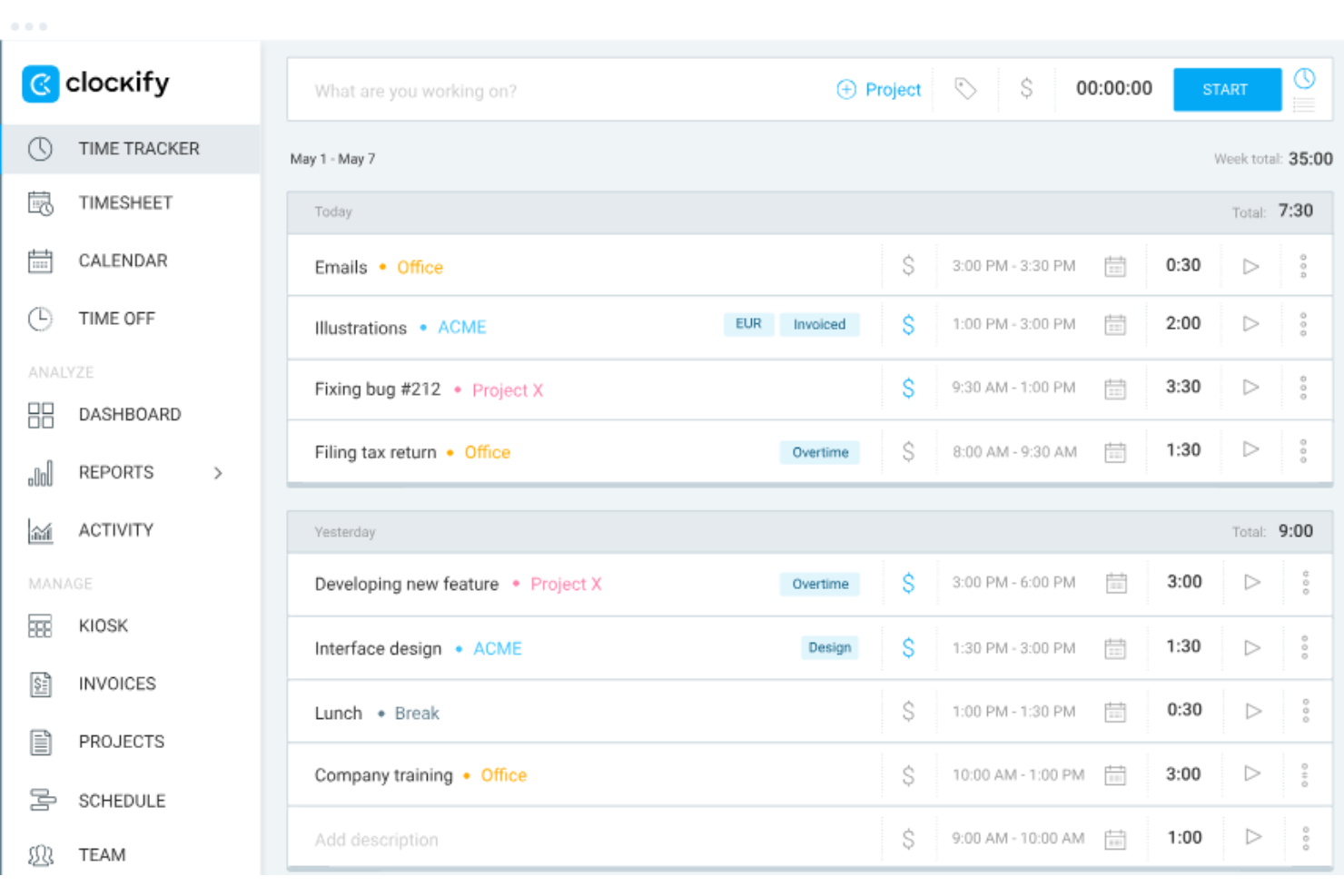
Clockify is a time tracking and timesheet app that lets teams log hours against projects, clients, and tasks, with support for billable rates, invoicing, approvals, scheduling, and cross-platform access across web, desktop, and mobile.
Who Is Clockify Best For?
Clockify works well for agencies and consulting teams that need to track billable hours across multiple clients and projects from any device.
Why I Picked Clockify
Clockify earns its spot on my shortlist because it tracks time from virtually anywhere your team works, whether that's a browser, desktop, iOS, Android, or a shared kiosk device. I particularly like how the auto tracker logs time across apps and websites in the background, so consultants and project teams aren't manually entering every hour. The calendar view lets you visualize and block time by day, which I find useful for matching logged hours against what was actually planned.
Clockify Key Features
- Timesheet approval workflow: Submit timesheets for manager review, with approval, rejection, bulk actions, and automatic locking of approved entries.
- Billable rate hierarchy: Set hourly rates at the workspace, member, project, task, and project-member levels, with more-specific rates overriding broader ones.
- Project budget alerts: Configure threshold-based email alerts that notify designated roles when a project reaches a set percentage of its time or monetary budget.
- Invoicing from tracked time: Generate client invoices directly from billable time entries and expenses, with PDF export and recurring invoice options.
Clockify Integrations
Clockify lists 100+ native integrations, including QuickBooks, Xero, Jira, Google Calendar, Asana, Trello, GitHub, and Salesforce. It also supports REST API and webhooks for custom connections, plus Zapier.
Pros and Cons
Pros:
- Turn approved time into billable project records
- Capture work with timers, calendar, or kiosk
- Track client hours across desktop and mobile
Cons:
- Reports offer limited project-level customization
- Mobile entries sometimes sync inconsistently

My Hours
Best for team time tracking
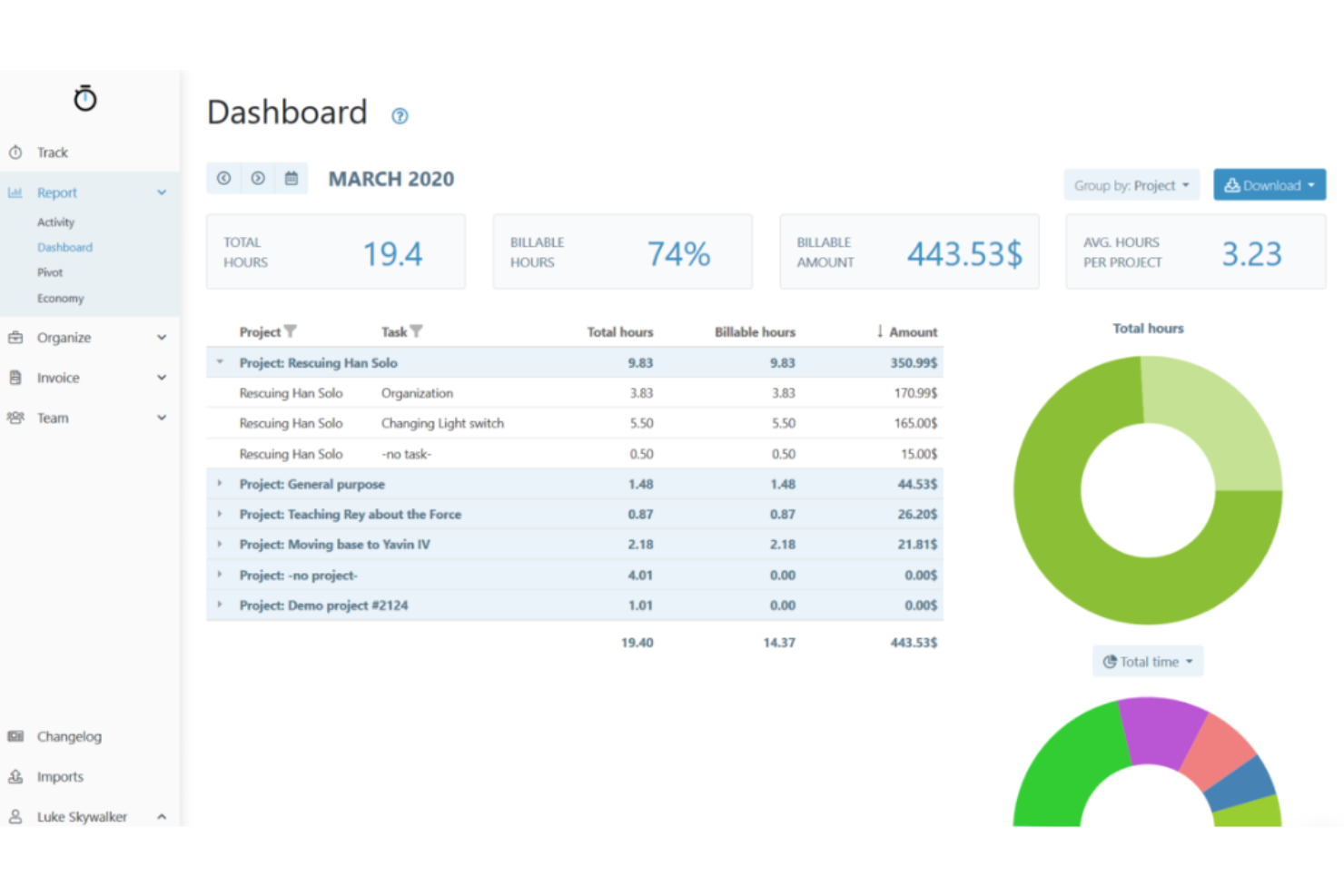
My Hours is a project time tracking tool that lets teams log hours against clients, projects, and tasks, with built-in billing rates, timesheet approvals, budget tracking, and integrations with tools like QuickBooks, Xero, and Jira.
Who Is My Hours Best For?
My Hours is a strong fit for agencies and consulting teams that need to track billable hours across multiple clients and projects without investing in a heavy, enterprise-grade platform.
Why I Picked My Hours
My Hours earns its spot on my shortlist because of how cleanly it handles billable-rate configuration across an entire team. I can set a default rate on each user's profile, then override it per project or task, so a consultant billing at different rates for strategy work versus execution never has to touch a spreadsheet to sort it out. The timesheet approval workflow adds a layer of accountability I find genuinely useful: approvers can filter logs by status, approve in bulk, and the audit trail captures every edit and rejection automatically.
My Hours Key Features
- Budget alerts: My Hours emails assigned administrators and managers when a project or task approaches its set budget threshold.
- Expense tracking: Users can log expenses against specific projects and tasks, attach receipt photos, and submit them for approval.
- Scheduled report delivery: Reports can be saved and scheduled to send automatically to recipients by email on a recurring basis.
- REST API access: My Hours provides a REST API for connecting time and project data to external tools and workflows.
My Hours Integrations
My Hours offers 100+ integrations, including native connections with QuickBooks, Xero, Jira, Asana, ClickUp, Monday, Basecamp, Microsoft Teams, and Salesforce. It also provides a REST API and supports Zapier.
Pros and Cons
Pros:
- Project budget alerts flag approaching overruns
- Bulk timesheet approvals with audit trails
- Manual and timer-based project logging
Cons:
- Invoices omit individual time-entry details
- Report filters can feel confusing

TimeCamp
Best for automatic time tracking
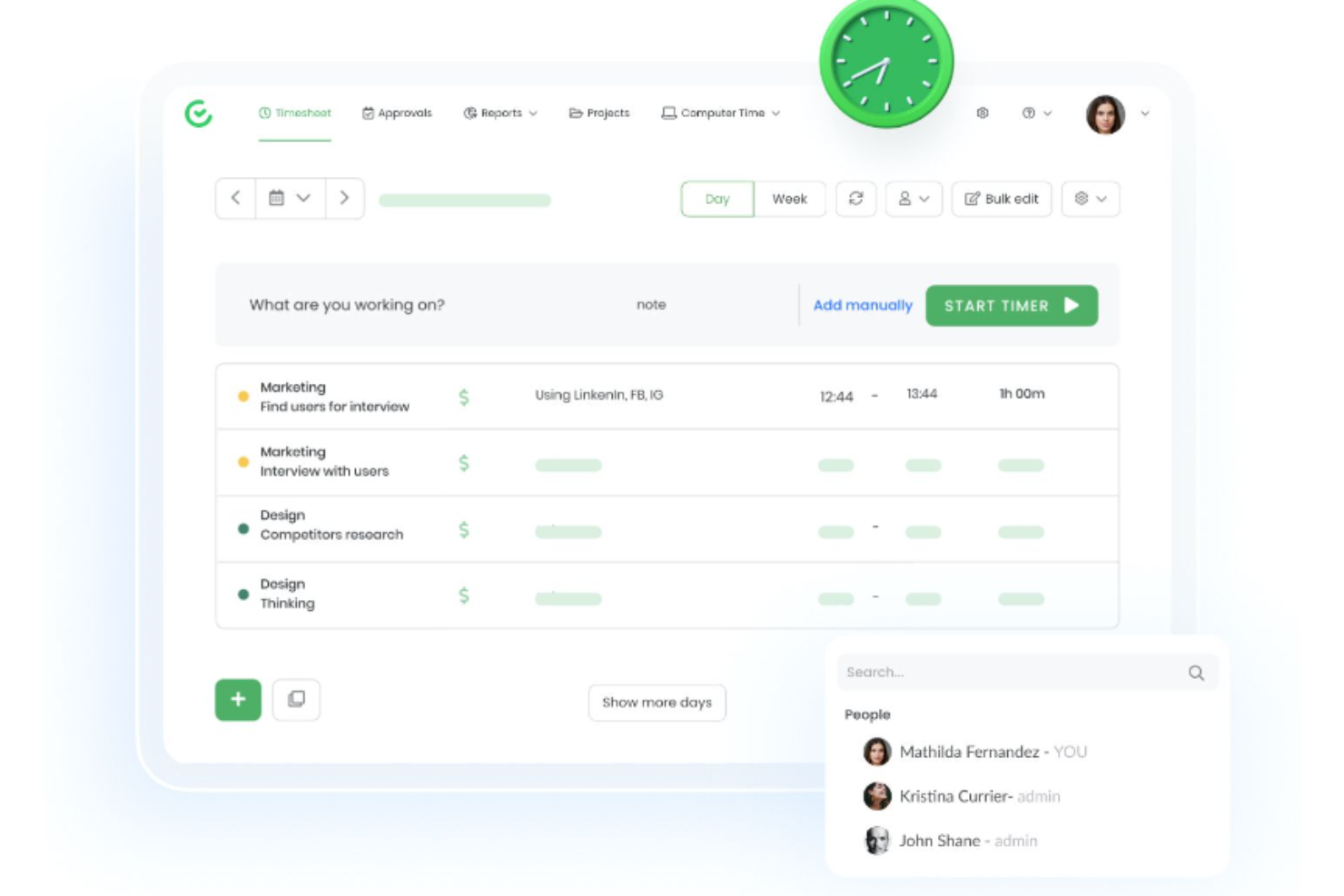
TimeCamp is a time tracking platform that combines automatic background activity capture, manual and timer-based entry, project and task organization, attendance management, billable time tracking, budget monitoring, and client invoicing.
Who Is TimeCamp Best For?
TimeCamp is a strong fit for agencies and professional services teams that need to track billable hours across multiple client projects without manually logging every minute.
Why I Picked TimeCamp
TimeCamp earns its spot on my shortlist because its automatic background tracking is genuinely set-and-forget: the desktop app captures activity, matches it to projects using keywords, and builds your timesheet without you lifting a finger. I love that you can layer billable rate cards on top, set at the user, project, or user-within-project level, so the hours TimeCamp captures automatically flow straight into client-ready billing. Budget alerts then notify you before a project runs over, which closes the loop on profitability without manual checking.
TimeCamp Key Features
- Timesheet approvals: Managers can submit, approve, reject, and reopen timesheets on a daily or weekly cycle, with configurable email alerts and reminders.
- Resource Planner: A capacity view shows team availability, workload, and project assignments across people and projects to surface scheduling conflicts.
- Attendance and overtime tracking: TimeCamp records clock-in and clock-out times, absences, leave, and overtime against configurable workday thresholds.
- Pivot table reports: Users can build custom pivot tables with configurable rows and columns, then save templates for team-wide visibility.
TimeCamp Integrations
TimeCamp offers 100+ integrations, including QuickBooks Online, Xero, Asana, Jira, ClickUp, Trello, Slack, and Microsoft Teams. Its REST API supports custom connections, and Zapier is also available.
Pros and Cons
Pros:
- Attendance logs include leave and overtime
- Budget reports clarify project costs and margins
- Background tracking captures overlooked billable hours
Cons:
- Account-wide approvals limit team-specific workflows
- Mobile syncing issues can disrupt field tracking

Journyx
Best for project cost accounting
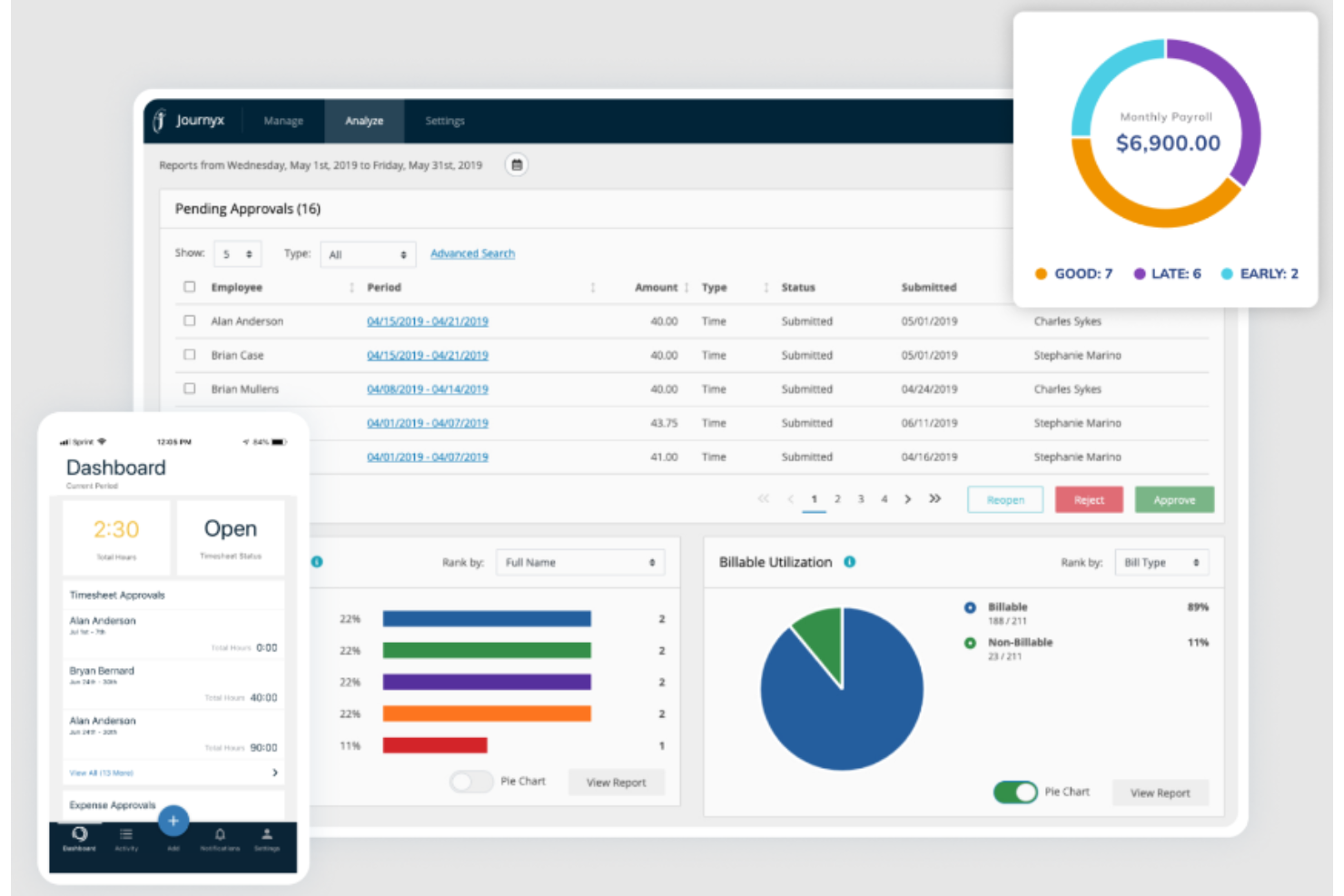
Journyx is a project time tracking solution that combines timesheet management, multi-level approval workflows, rate-based billing and payroll reporting, and resource capacity planning.
Who Is Journyx Best For?
Journyx suits project-driven teams that need to tie tracked hours directly to project costs, billing rates, and payroll exports.
Why I Picked Journyx
I picked Journyx as one of the best because it goes deeper on project cost accounting than most time tracking tools I've seen. I particularly like how rate policies let you set bill rates and pay rates at the user, project, or activity level, then generate reports that show exactly how much was billed, paid, and which rate rule applied. Pair that with the PX module's cost-to-date charts and budget visibility, and you get a clear picture of project margin without piecing it together from separate systems.
Journyx Key Features
- Multi-level approval workflows: Configurable approval chains pull department and function data from ERP, HR, or payroll systems to route timesheet submissions automatically.
- DCAA-compliant timekeeping tools: Daily email reminders, an audit log viewer, configurable printable timesheet reports, and data validation support government contracting timekeeping requirements.
- Mobile time and expense entry: Employees can log time, submit expenses, and get approvals through the iOS or Android app.
- Scheduled Project Status Reports: Reports display actual versus scheduled hours, assigned versus scheduled hours, and cost-to-date charts across active projects.
Journyx Integrations
Journyx offers native integrations with ADP, Paychex, Microsoft Project, Microsoft Dynamics 365 Business Central, and Microsoft Dynamics 365 Finance & Operations. It also supports REST, SOAP, Reportlink, and Zapier integrations for custom connectivity.
Pros and Cons
Pros:
- DCAA audit trails support compliance reporting
- PX forecasts resource availability and project margins
- Project rates clarify billable and payroll costs
Cons:
- Reports can lack dashboards or customization
- Submitted timesheets require manager rejection for corrections

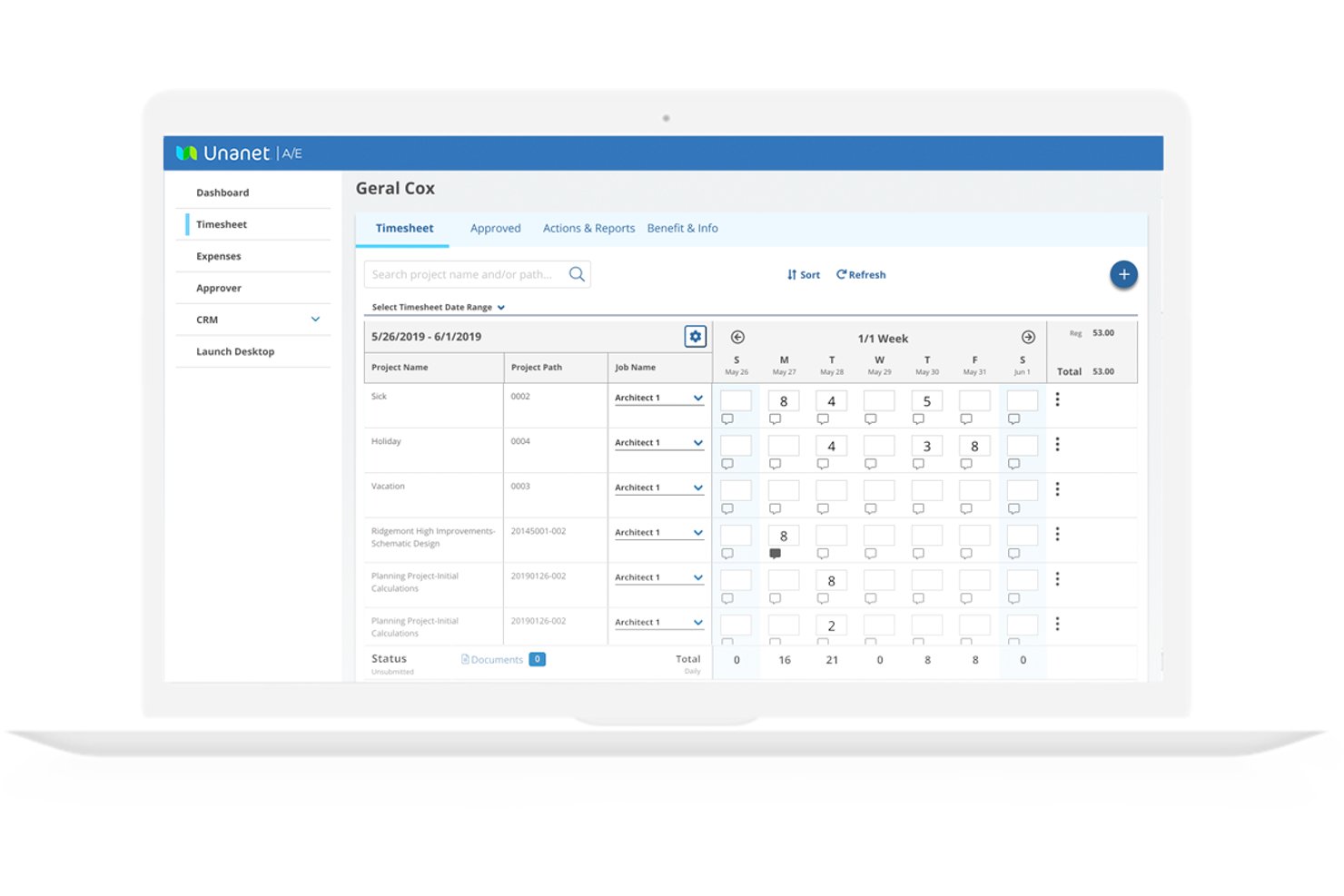
Unanet is a project-based ERP platform built for government contractors that connects time and expense tracking, project accounting, contract management, and compliance reporting in one system.
Who Is Unanet Best For?
Unanet ERP GovCon is a strong fit for government contractors that need time tracking, project billing, and DCAA compliance managed in a single system.
Why I Picked Unanet
Unanet earns its spot on my shortlist because it's purpose-built for government contractors who need DCAA-compliant timekeeping and project billing in one place. I particularly like how time entries flow directly into project burn, forecasts, and the general ledger in real time, eliminating the manual re-entry that slows down invoicing cycles. The contract-level funding alerts, which notify you when a project crosses a threshold like 75% of funded value, are exactly the kind of control a GovCon team needs to stay ahead of ceiling risks.
Unanet Key Features
- Resource forecast dashboard: Color-coded utilization view flags team members who are under-planned or allocated above 100%, across multiple periods and projects.
- Scenario-based resource planning: Build multiple plan sets, lock a baseline, and compare alternative staffing scenarios, including proposed work before a contract award.
- DCAA-oriented timekeeping controls: The system blocks advance time entry on government projects and maintains a full change history for every time and expense record.
- Mobile time and expense capture: iOS and Android apps support offline timesheet entry, receipt submission, and manager approvals, with entries syncing once a connection is restored.
Unanet Integrations
Unanet offers 100+ pre-built integrations, including QuickBooks, Salesforce, HubSpot, ADP, Paychex, Paylocity, UKG, and Workday. Enterprise-grade APIs support custom integrations, with REST API development available as a paid service.
Pros and Cons
Pros:
- DCAA timekeeping controls preserve auditable change histories
- Scenario plans expose staffing gaps before awards
- Time feeds project billing in real time
Cons:
- Correcting timesheets can trigger extra approval steps
- Reports can take extra work to tailor

Best for professional services billing and utilization
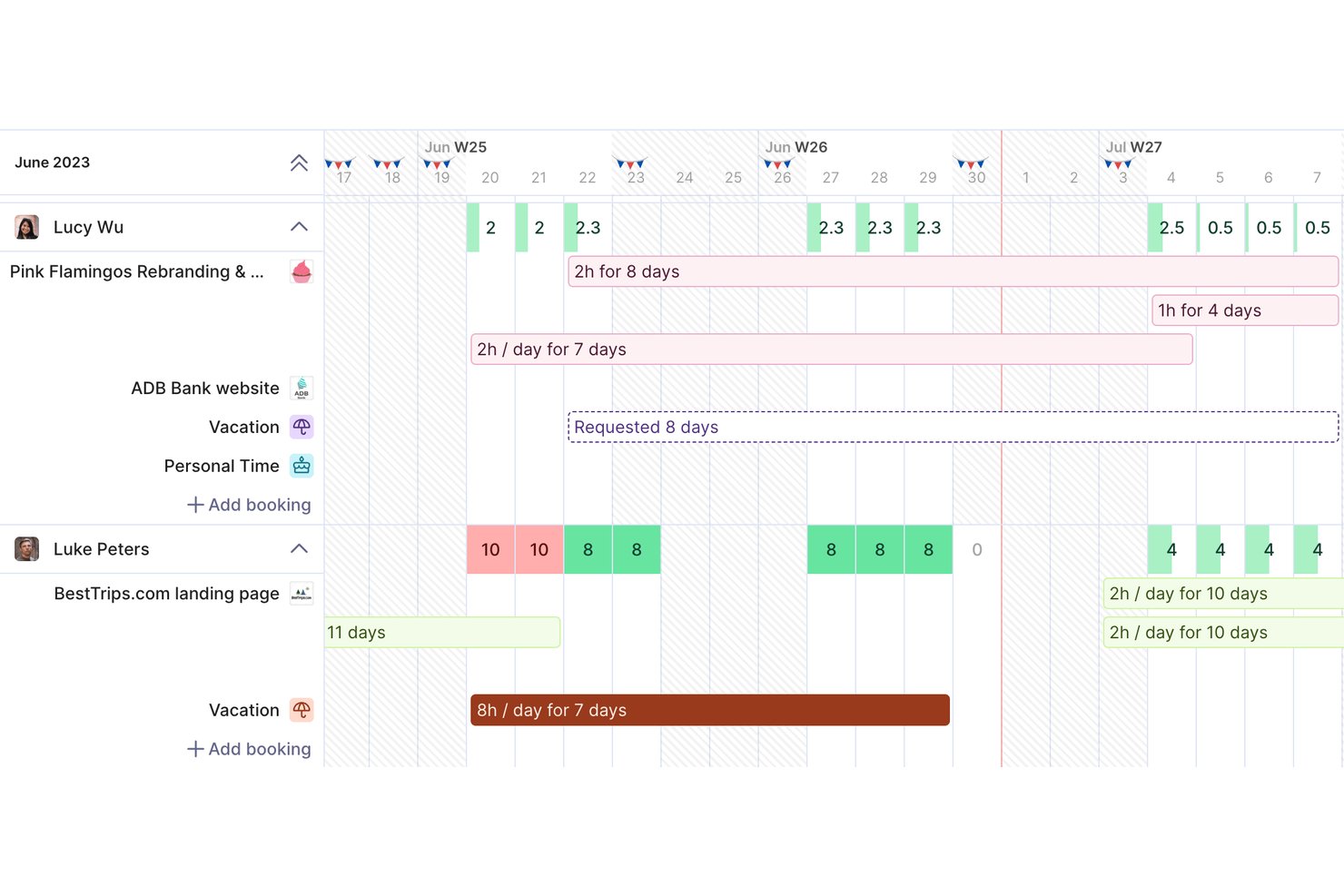
Productive is a professional services automation platform that brings together time tracking, resource planning, project budgeting, invoicing, and profitability reporting in a single connected workspace.
Who Is Productive Best For?
Productive is a strong fit for agencies and consulting firms that need time tracking, budgeting, and invoicing to work together in one place rather than across separate tools.
Why I Picked Productive
I picked Productive as one of the best because it's the only tool on my list that connects billable time directly to project budgets, profitability tracking, and invoicing in a single workspace. I love that you can run retainer, fixed-price, and time-and-materials budgets side by side, with budget-spend warnings that fire when billable hours hit a set percentage of estimated time. Pair that with utilization reporting and 50+ agency-specific report templates, and you get a clear picture of where your team's time is actually going.
Productive Key Features
- AI-assisted timesheet filling: Productive's AI matches your calendar events to projects and services to help you fill in time entries automatically.
- Multi-level approval chains: Assign multiple approvers to time entries, with options requiring all approvers or just one to finalize approval.
- Scenario Builder: Model different budget and resource scenarios for deals or projects to evaluate costs and profitability before committing.
- Expense management: Record, categorize, and track expenses with approval and payment status tracking linked directly to project budgets.
Productive Integrations
Productive offers native integrations with QuickBooks, Xero, NetSuite, Jira, Slack, HubSpot, BambooHR, Personio, and Google Calendar. It also provides an HTTP API with JSON:API conventions, webhooks, and Zapier.
Pros and Cons
Pros:
- Supports retainers, fixed-fee, and time-and-materials budgets
- Surfaces utilization and profitability in agency reports
- Connects billable hours with project profitability
Cons:
- Workload planning lacks financial and daily-load detail
- Timers only track the current day
New Product Updates from Productive
Productive Adds Voice Dictation, Slack Connector, Proposals, and Overtime
Productive adds voice dictation, a Slack Connector, proposal controls, and overtime tracking. These updates support faster AI interactions, client proposals, and time management. For more information, visit Productive’s official site.

Hubstaff
Best for GPS and remote workforce tracking
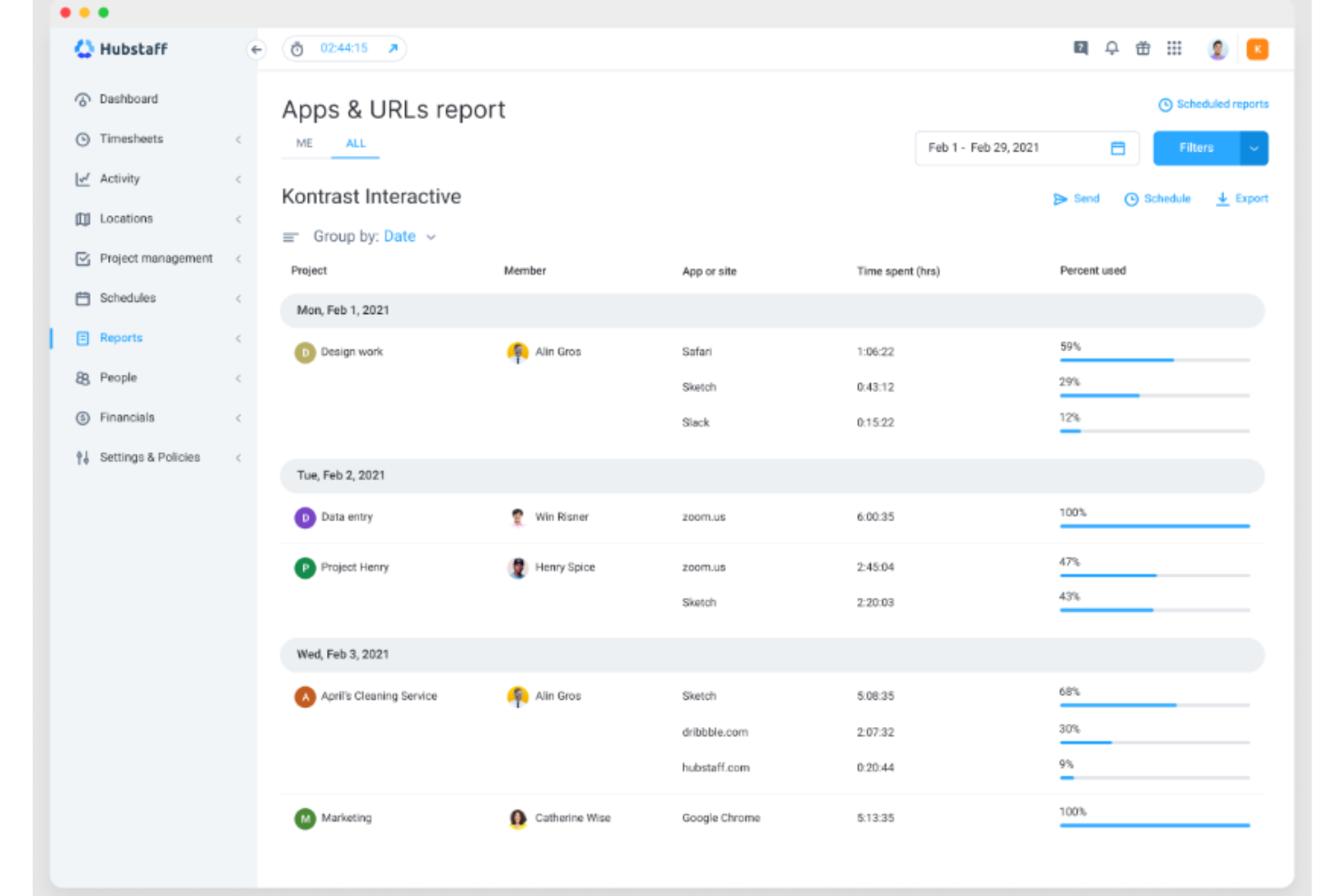
Hubstaff is a time tracking and workforce management platform that covers GPS-based location tracking, automated timesheets, productivity monitoring, project budgeting, and payroll integrations for distributed and field-based teams.
Who Is Hubstaff Best For?
Hubstaff is a strong fit for operations managers and HR teams overseeing distributed or field-based workforces who need GPS tracking, automated timesheets, and payroll-ready reporting in one place.
Why I Picked Hubstaff
I've included Hubstaff in my top picks because it's the strongest option here for teams managing field-based or remote workers who need verified, location-stamped hours. GPS tracking ties clock-ins to job sites in real time, and geofencing can automate those clock-ins entirely when a worker enters or leaves a boundary. Pair that with automatic timesheet generation and payroll triggers, and you get a tight loop from hours worked to payment with very little manual intervention.
Hubstaff Key Features
- Productivity monitoring: Track app and URL usage, idle time, and keyboard and mouse activity levels across your team.
- Project budgets and alerts: Set cost or hour-based budgets per project and receive real-time alerts when spending approaches the limit.
- Automated payroll triggers: Approved timesheets automatically initiate payments to team members through connected payment providers.
- Workforce capacity planning: View real-time utilization data to spot workload imbalances and adjust resources across your team.
Hubstaff Integrations
Hubstaff lists over 35 integrations, including Asana, ClickUp, Jira, QuickBooks, FreshBooks, Gusto, Deel, Wise, and Slack. It also offers an API for custom integrations and lists Zapier.
Pros and Cons
Pros:
- Utilization reports clarify team workloads
- Timesheet approvals reduce payroll follow-up
- GPS verifies field-team job-site hours
Cons:
- Sync issues can result in missing time
- Screenshots and activity tracking feel intrusive

BigTime
Best for budget management
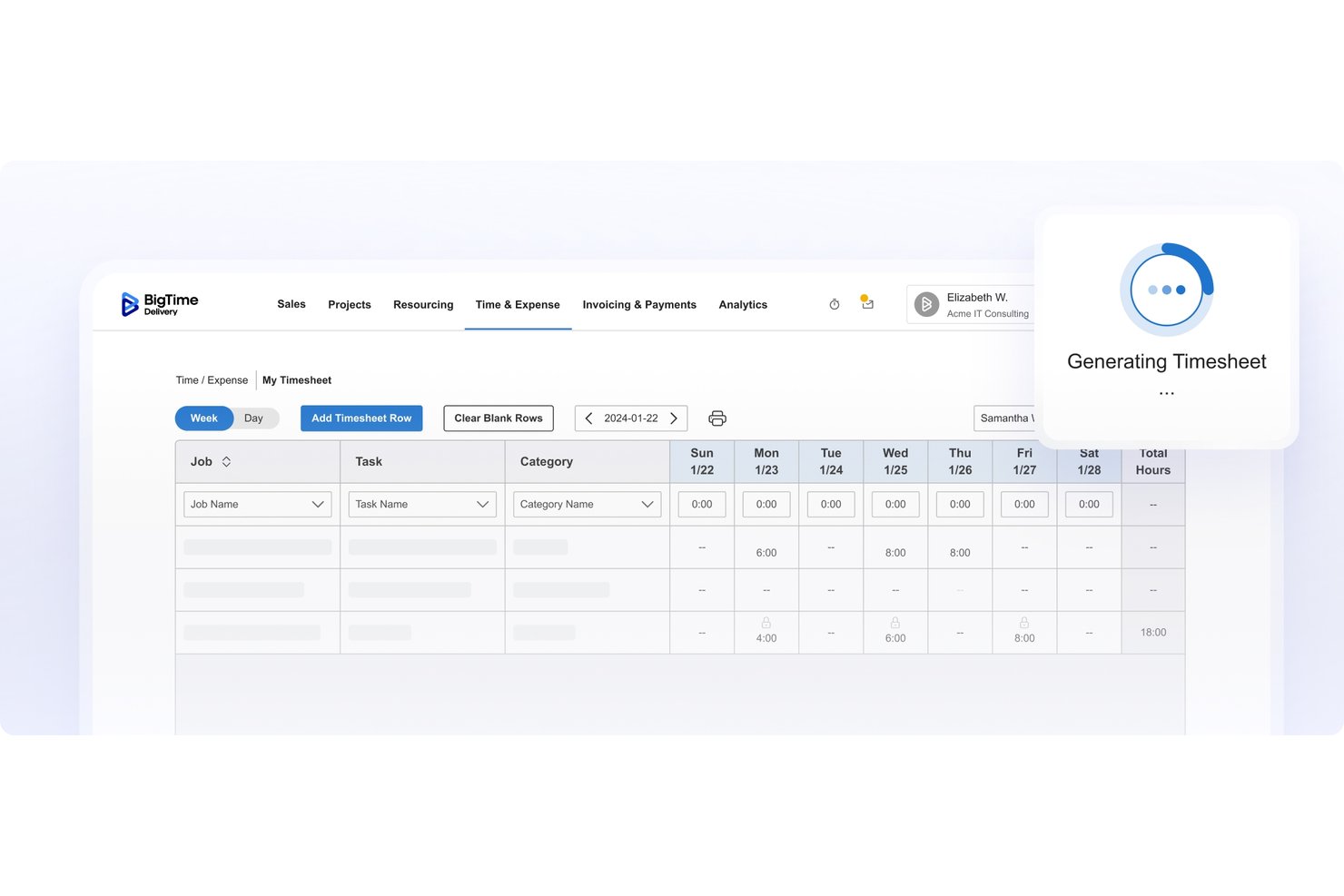
BigTime is a professional services automation (PSA) platform that covers the full project lifecycle—from quoting and resource planning through time tracking, billing, and invoicing.
Who Is BigTime Best For?
BigTime is a strong fit for professional services firms—consultancies, agencies, and similar billable-hours businesses—that need to connect project delivery directly to financial performance.
Why I Picked BigTime
I picked BigTime as one of the best ClickTime alternatives because of how tightly it connects time tracking to budget control. Budget alerts let you set thresholds for hours and dollars against the project timeline, flagging burn rate and margin issues before they escalate. Pair that with rate cards reusable across projects, and billable work flows directly into financial projections without manual reconciliation.
BigTime Key Features
- Resource demand and capacity planning: Plan and adjust staffing needs at the person and project level, with a heat map showing availability and real-time overallocation alerts.
- Scenario modeling and profitability forecasting: Model tentative projects and staffing scenarios to project costs, revenue, and profitability before committing resources.
- Configurable timesheet approval routing: Route timesheet reviews by project team, manager, department, or role, with bulk approval and rejection options built in.
- Native integrations with accounting tools: Connect directly to QuickBooks, Sage Intacct, and Lacerte to sync time, expenses, invoices, and client data across your finance stack.
BigTime Integrations
BigTime offers native integrations with QuickBooks Online and Desktop, Sage Intacct, Lacerte, Salesforce, HubSpot, Jira, and Google Calendar. It also provides a REST API for custom integrations.
Pros and Cons
Pros:
- Project time entries map to client tasks
- Resource scenarios flag staffing overallocations early
- Budget-to-actual reporting clarifies project profitability
Cons:
- Field mobile clock-ins draw user complaints
- Custom report filters confuse some reviewers
Outras alternativas ao ClickTime
Segue-se uma lista de alternativas adicionais ao ClickTime que selecionei, mas que não chegaram à lista principal. Vale a pena consultá-las se não encontrou acima aquilo que procura.
- Accelo
For end-to-end consulting engagement ops
- Kantata
For resource planning in services firms
- Toggl
For ease of use and flexibility
- Paymo
For small team workflows
- Avaza
For project collaboration
- Insightful
For productivity insights
- Monitask
With integrated productivity monitoring
- Deltek Replicon Time
For AI-powered time tracking
- Harvest
For integrated invoicing and time tracking
- TimeSolv
For legal professionals


Software de gestão de projetos relacionado
Se ainda não encontrou aquilo que procura, consulte estas ferramentas de gestão de projetos relacionadas que testámos e analisámos.
- Software de gestão de projetos
- Software de gestão de recursos
- Software de automatização de fluxos de trabalho
- Software de gestão de tarefas
- Ferramentas de colaboração
- Criador de gráficos de Gantt
How I Evaluate ClickTime Alternatives
I split my evaluation into three parts, giving the most weight to core needs: log project time, approve timesheets, and see billable costs. Next, I look for differentiators such as role-based rate cards. Finally, I consider factors beyond features, including onboarding, support, and pricing value.
Core Functionality (Table Stakes For This List)
When I'm selecting tools for my list, I score each one on a scale from 0 (does not offer the functionality) to 5 (excels in this area) for each core functionality listed below. I then convert the total into a percentage to help assess each tool's overall fit, with extra weight on any functionalities I’ve deemed essential.
- Time Tracking (Essential): I look for manual entry and timers tied to projects or tasks, so teams can record client work and internal effort accurately.
- Timesheet Approvals (Essential): I check for submission, manager approval, and status tracking, especially when project leads need to resolve missing or rejected hours before billing.
- Reporting & Analytics: I assess whether reports show hours, utilization, and project costs, with filters that help identify budget risks or uneven workloads.
- Billing Support: I look for billable and non-billable time labels and exports that let teams prepare client invoices from approved project hours.
- Third-Party Integrations: I check for connections to payroll, accounting, or project tools that reduce duplicate entry when time data moves between systems.
- Resource & Capacity Tracking: I evaluate employee and team workload views to spot over-allocation and availability before assigning upcoming project work.
Once I have a list of tools that meet the criteria, I consider what sets each platform apart.
Differentiating Factors (What Sets Vendors Apart)
Here's how I compare and contrast different vendors:
Standout Features
Budget alerts that fire when a project nears its hour or cost cap are a must—I've seen too many overruns caught only at invoice time. I also look for role-based rate cards that auto-apply different bill and cost rates by seniority or project type, since manually adjusting rates across a large team invites errors. Scenario-based resource planning rounds things out: before committing staff to a new engagement, I want to model options and see the margin impact upfront.
Beyond Features
I check whether a tool fits billable-hour business models—retainer, fixed-fee, and time-and-materials structures—since generic task trackers rarely handle the client/project/task hierarchies agencies and consultancies need. Integration depth with your finance stack matters just as much; native syncs with platforms like QuickBooks, Xero, or NetSuite prevent manual re-entry of approved hours into accounting or payroll. I also evaluate how easily distributed or on-site teams can adopt the tool, because mobile and offline time entry directly affects timesheet compliance and billing accuracy.
Porquê procurar uma alternativa ao ClickTime?
Pode estar à procura de uma alternativa ao ClickTime se experienciar alguma das situações seguintes.
- Preocupações com os custos: Considera o modelo de preços do ClickTime demasiado caro para o seu orçamento.
- Conjunto de funcionalidades: As funcionalidades disponibilizadas pelo ClickTime não respondem totalmente às suas necessidades de gestão de projetos.
- Experiência do utilizador: Considera, ou a sua equipa considera, a interface do ClickTime pouco intuitiva ou difícil de utilizar.
- Capacidades de integração: Precisa de uma ferramenta que se integre de forma mais eficaz com outro software que utiliza.
- Apoio ao cliente: Não está satisfeito com o nível de apoio ao cliente disponibilizado pelo ClickTime.
Principais funcionalidades do ClickTime
Eis algumas das principais funcionalidades do ClickTime para o ajudar a comparar e contrastar aquilo que as soluções alternativas oferecem:
- Folhas de horas online: Recolha dados essenciais e promova relatórios precisos
- Registo rápido de tempo: Permite aos membros da equipa registar horas de forma fácil e rápida, com funcionalidades para duplicar registos anteriores
- Personalização: Disponibiliza folhas de horas personalizáveis, com vários níveis de detalhe e períodos de submissão específicos
- Acompanhamento de horas faturáveis e não faturáveis: Permite marcar o trabalho como faturável ou não faturável
- Cronómetro: Disponibiliza uma ferramenta precisa de registo de tempo, com acompanhamento automático e lembretes para os utilizadores
- Acompanhamento de horas extraordinárias: Regista automaticamente as horas extraordinárias, quem trabalhou além do horário e os custos envolvidos
- Acompanhamento das despesas dos colaboradores: Simplifica o processo de acompanhamento e reembolso das despesas dos colaboradores
- Gestão de ausências: Ajuda a gerir ausências com tipos de licença personalizados e processos de aprovação
- Planeamento de recursos: Ajuda a atribuir horas de projeto e a gerir a disponibilidade dos colaboradores
- Estimativa dos custos do projeto: Disponibiliza funcionalidades para prever os custos dos projetos utilizando as tarifas dos colaboradores e dados históricos
- Compatibilidade com o Jira: Poderá precisar de uma ferramenta de gestão de projetos compatível com o Jira para melhorar o acompanhamento de problemas e tarefas