

10 Melhores ferramentas alternativas ao Camunda para automatização em 2026

Melhores alternativas ao Camunda — seleção


O Camunda é uma poderosa ferramenta de gestão de processos empresariais (BPM) que ajuda as organizações a automatizar e otimizar os seus fluxos de trabalho, aumentando a eficiência e a produtividade. No entanto, apesar dos pontos fortes e da popularidade do Camunda, pode não ser a opção mais adequada para todos os tipos de empresas e necessidades. Por isso, poderá precisar de uma alternativa. Contudo, com tantas opções disponíveis, pode ser difícil saber por onde começar.
Para o ajudar a iniciar a sua pesquisa, utilizei os meus conhecimentos e a minha experiência em software de gestão de projetos e recursos humanos para testar e comparar várias das principais alternativas ao Camunda. As minhas análises aprofundadas apresentam as vantagens e desvantagens, funcionalidades e integrações de cada ferramenta concebida para replicar as capacidades do Camunda.
Quer precise de simplificar as operações ou de gerir os fluxos de trabalho de forma mais eficiente, estou confiante de que encontrará a sua próxima alternativa ao Camunda na lista abaixo.
O que é o Camunda?
O Camunda é uma plataforma de software BPM de código aberto especializada na automatização de fluxos de trabalho e processos. Fornece ferramentas para modelar, executar e otimizar processos empresariais, permitindo às organizações simplificar fluxos de trabalho complexos e integrar vários sistemas e serviços.
O software é frequentemente utilizado para automatizar processos empresariais, permitir uma melhor gestão da tomada de decisões e melhorar a eficiência operacional geral.
Why Trust Our Software Recommendations
Our team has been testing and reviewing software since 2012. As project managers ourselves, we know how difficult—and important—it is to choose the right software.
For this guide, we evaluated tools using hands-on testing and independent research, scoring tools using our selection criteria. We also draw on insights from industry thought leaders and practicing project management experts.
Our reviews reflect our human editorial judgment, not a sales pitch.
Expert reviewers:
Tabela de comparação das alternativas ao Camunda
Esta tabela de comparação resume os detalhes de preços das minhas principais escolhas de alternativas ao Camunda:
| Tool | Best For | Trial Info | Price | ||
|---|---|---|---|---|---|
| 1 | Best with prebuilt connectors for apps | 30-day free trial available | Pricing upon request | Website | |
| 2 | Best for embedded iPaaS and app integrations | Free plan + free demo available | From $75/month | Website | |
| 3 | Best for AI-powered process automation | Free plan + demo available | Pricing upon request | Website | |
| 4 | Best for decision-making and workflow processing | Free trial + demo available | Pricing upon request | Website | |
| 5 | Best for intelligent document processing | 7-day free trial | From $4,000/month (billed annually) | Website | |
| 6 | Best for no-code workplace automation | Free trial + demo available | From ₹2,470/user/month (billed annually) | Website | |
| 7 | Best for scalable workflow orchestration | Free plan available | Pricing upon request | Website | |
| 8 | Best for integrated BPM and case management | 30-day free trial available | Pricing upon request | Website | |
| 9 | Best for enterprise workload assistance | Free demo available | From $2,400/month (billed annually) | Website | |
| 10 | Best for open-source process generaton | Free plan + demo available | Pricing upon request | Website |
Análises das melhores alternativas ao Camunda

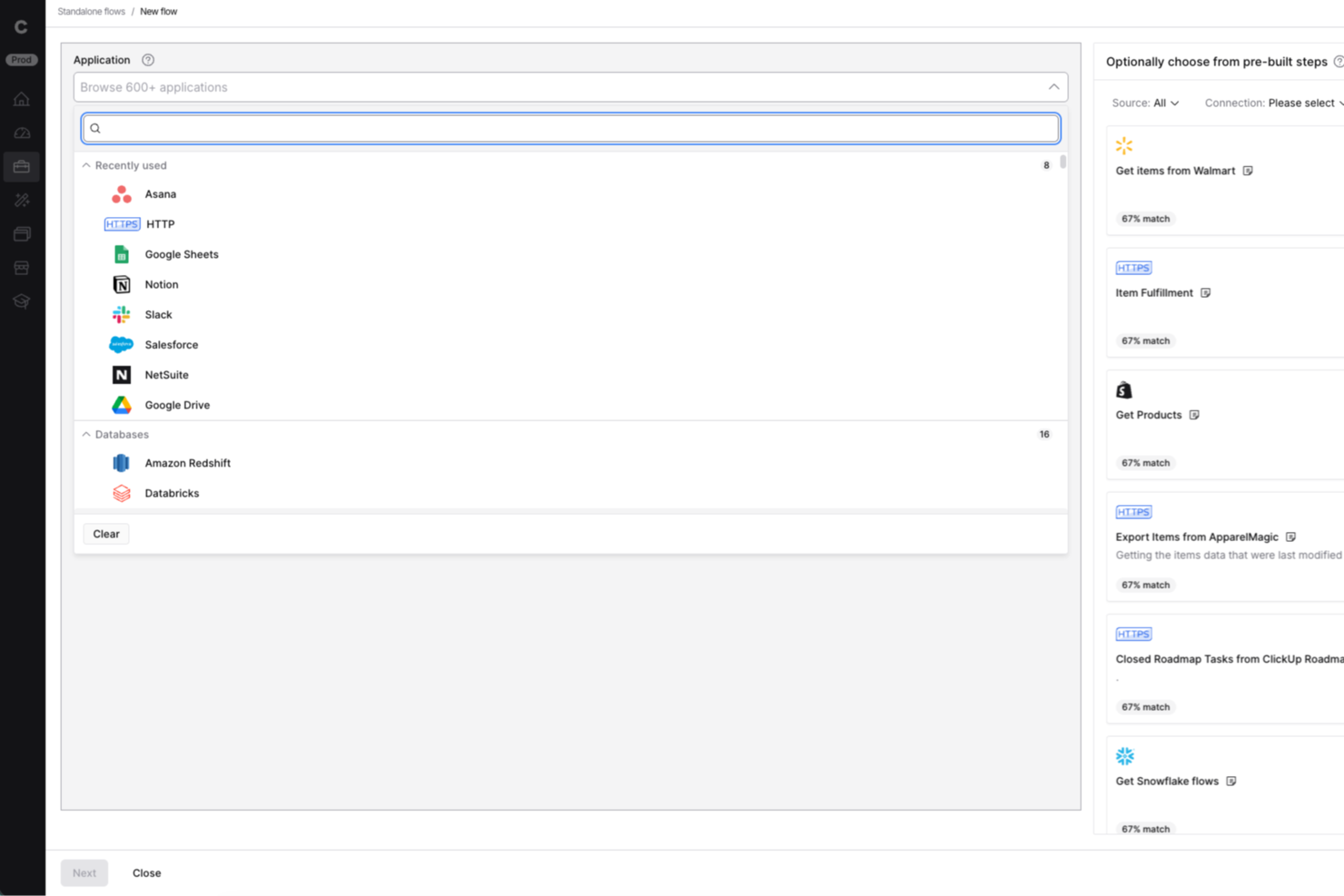
Celigo is a cloud-native intelligent automation platform that connects applications, automates multi-step workflows, manages APIs and EDI, and deploys AI agents across enterprise systems.
Who Is Celigo Best For?
Celigo works well for IT and automation teams that need to connect a large number of SaaS applications, particularly in NetSuite-heavy environments, without building integrations from scratch.
Why I Picked Celigo
I picked Celigo as one of the best because its Integration Marketplace gives you immediate access to over 1,000 prebuilt app connectors, cutting the time it takes to wire up systems like NetSuite, Salesforce, or Snowflake from weeks to hours. I especially like the Celigo tools feature, which lets you build reusable units of logic with schema-validated inputs and outputs that you can call from flows, APIs, AI agents, and MCP servers without rebuilding the same logic twice. The Agent Builder adds another layer by letting you connect LLM intent directly to those integrations, so multi-step cross-system work runs without manual handoffs.
Celigo Key Features
- Webhook-triggered flow execution: Celigo receives HTTP POST or PUT events from source applications and uses them to initiate multi-step integration flows automatically.
- Integration Lifecycle Management (ILM): ILM tracks integration revisions, supports diffing and merging changes, and lets teams revert to earlier versions across development and production environments.
- Extension framework for custom functions: You can host custom integration logic in an Express-based server or AWS Lambda and connect it directly to your Celigo flows.
- MCP Gateway for agent tool governance: The MCP Gateway controls which users can access which tools across Celigo and third-party MCP servers, and logs every call with identity and tool details.
Celigo Integrations
Celigo offers marketplace integrations with Salesforce, Oracle NetSuite, SAP, Snowflake, Microsoft Dynamics 365 Business Central, Walmart, Target, and Costco. It also supports HTTP, FTP, JDBC, AS2, GraphQL, webhooks, REST, SOAP, and API-based custom integrations.
Pros and Cons
Pros:
- Flow dashboards and logs help investigate failures
- Multi-step flows support branching and scheduled execution
- Reusable tools share logic across workflows and APIs
Cons:
- No human-task routing or case management
- No BPMN or DMN process modeling
New Product Updates from Celigo
Celigo Adds Agent Groups, Redshift, and Network Policies
Celigo adds on-premise agent groups, Amazon Redshift data ingestion, and network policies for webhooks and APIs. These updates improve availability, data syncing, and access control. For more information, visit Celigo’s official site.
 .

Workato
Best for embedded iPaaS and app integrations
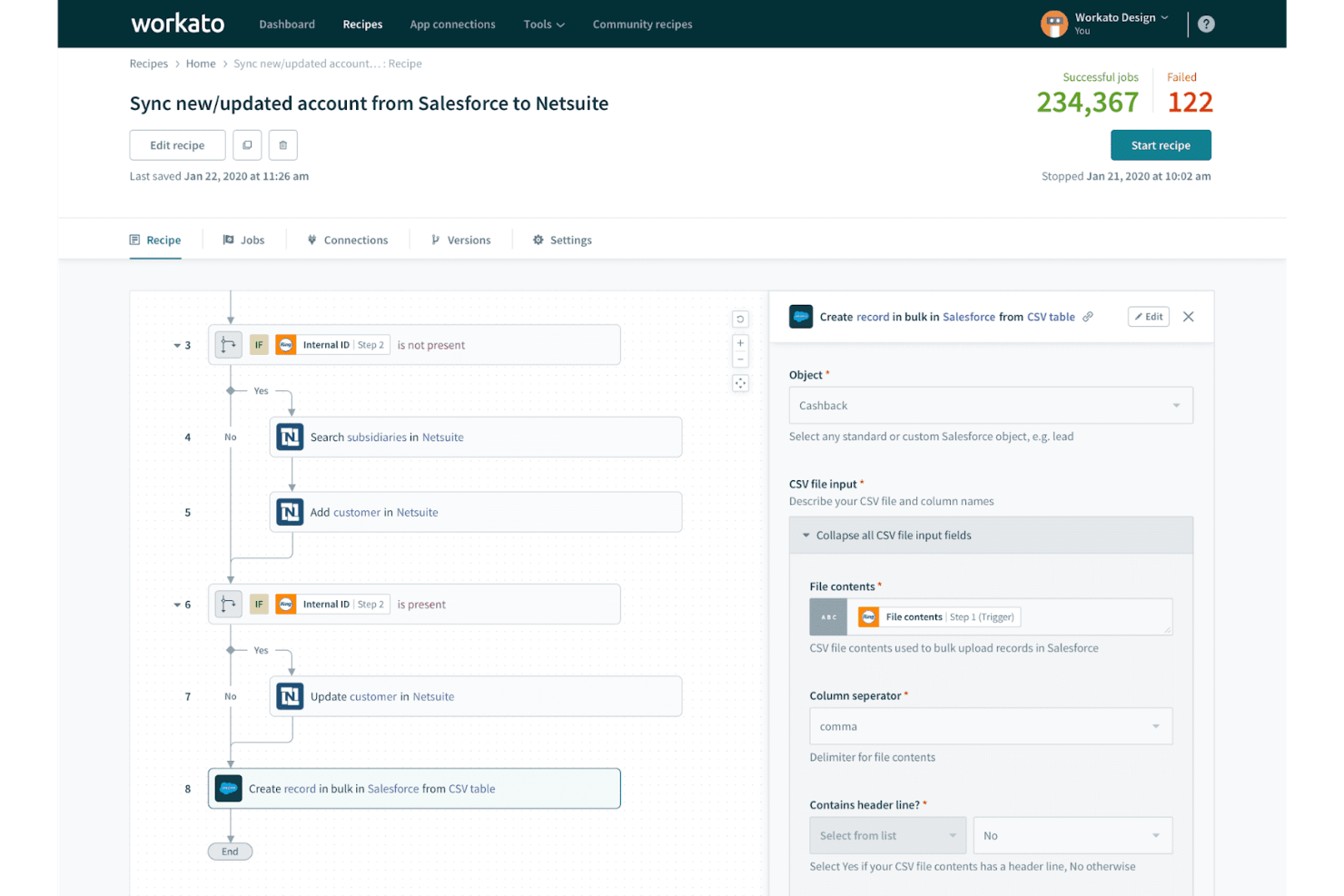
Workato is a cloud-based integration and automation platform that connects apps, data, and APIs through a visual recipe builder, supporting multi-step workflow orchestration, decision logic, human task routing, and an embedded iPaaS model for SaaS products.
Who Is Workato Best For?
Workato is a strong fit for enterprise teams that need to connect dozens of apps and automate cross-system workflows without building custom integration infrastructure from scratch.
Why I Picked Workato
I picked Workato as one of the best because its embedded iPaaS model is genuinely unlike what most process orchestration tools offer: you can place Workato's full integration and automation layer directly inside your own product UI, letting your customers build and trigger workflows without ever leaving your app. The recipe builder handles multi-step orchestration with conditional logic, loops, and parallel execution paths, and the Connector SDK lets my team build custom connectors for anything not already covered by the 1,200+ pre-built options.
Workato Key Features
- Recipe lifecycle management: Move recipe packages and their dependencies across separate development, test, and production workspaces to manage changes before they go live.
- Decision tables: Define condition rows with up to 2,000 rows, 20 input columns, and 20 output columns, and feed the outputs directly into subsequent recipe steps.
- On-premises agent: Connect private-network apps and databases to Workato cloud via an outbound TLS connection, with agent grouping available for high availability and load balancing.
- Workflow apps: Build no-code forms, dashboards, and role-based approval chains that insert human review or input steps into automated recipe workflows.
Workato Integrations
Workato offers 1,200+ native connectors, including Salesforce, Slack, and Marketo. It also supports REST and SOAP APIs, webhooks, polling, custom connectors through its Connector SDK, and connections to on-premises applications and databases.
Pros and Cons
Pros:
- Embedded automation fits directly inside products
- Business analysts can monitor production dashboards
- Flexible recipes coordinate cross-system workflows
Cons:
- No BPMN or DMN compatibility documented
- Complex recipes can become hard to debug

Appian
Best for AI-powered process automation
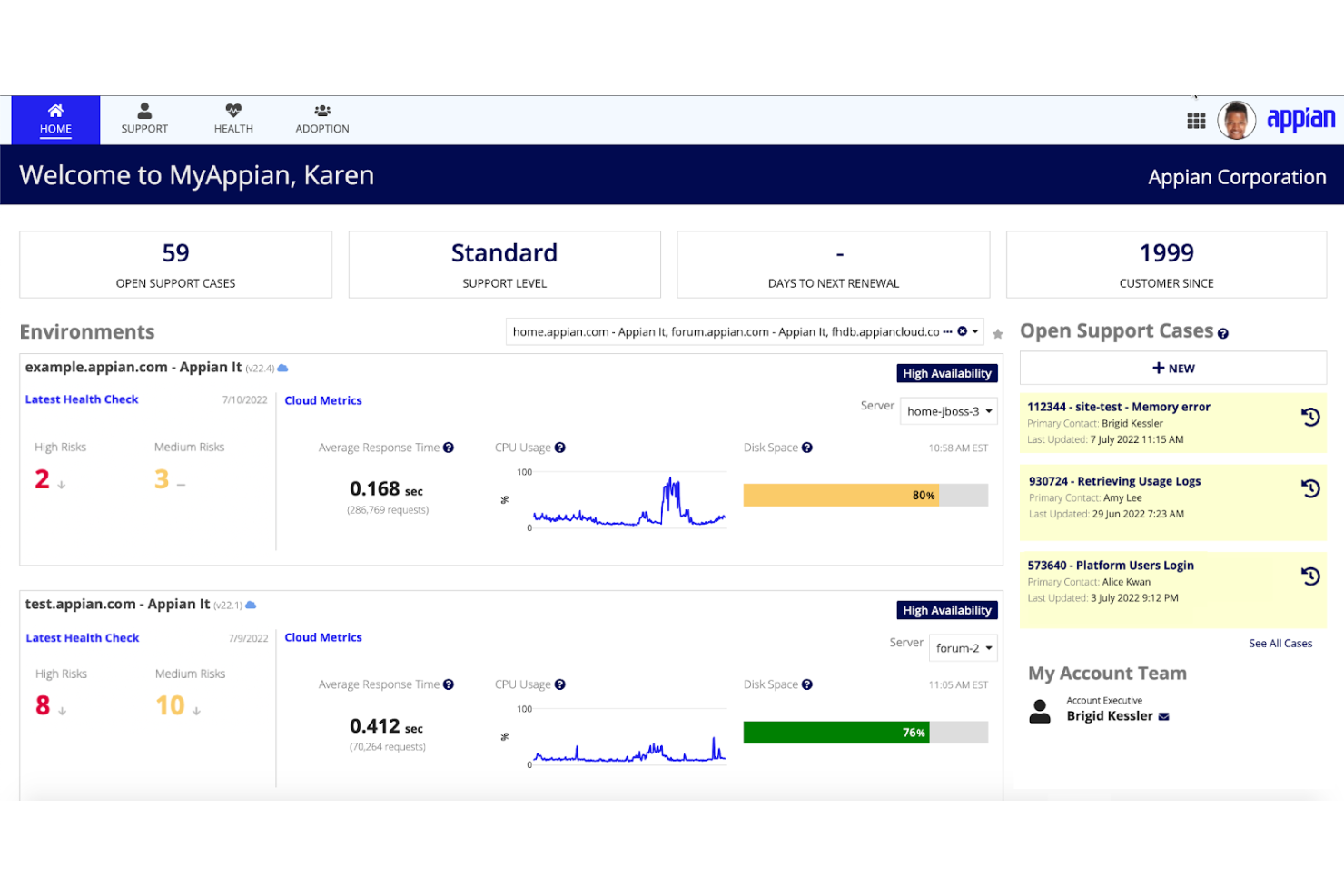
Appian is an enterprise process automation platform that combines BPMN-style process modeling, low-code application development, RPA, case management, and AI-driven workflow orchestration across cloud and self-managed deployments.
Who Is Appian Best For?
Appian is a strong fit for enterprise teams in regulated industries that need to automate complex, multi-step processes with built-in AI, governance, and compliance controls.
Why I Picked Appian
I've included Appian in my top picks because it brings genuinely sophisticated AI into the process automation layer, not just as a feature bolted on the side. I love how Appian lets you coordinate AI agents, RPA bots, and human tasks within a single BPMN-style process model, so a compliance review workflow can dynamically route between a bot, an AI agent, and a human reviewer without rebuilding the logic. Its Process Intelligence layer adds bottleneck and compliance analysis on top, which is something Camunda doesn't match natively.
Appian Key Features
- Data fabric: Connects and virtualizes enterprise data across disparate systems without requiring migration, giving processes access to live, unified data.
- Intelligent document processing: DocCenter classifies documents, extracts data, applies validation rules, and routes results directly into business workflows.
- Low-code RPA bot builder: Lets developers build bots to automate repetitive tasks across systems that lack APIs, with plan-based bot allowances.
- DMN-standard decision tables: Reusable, versioned decision objects support Unique, First, and Rule Order hit policies with built-in logic gap and overlap detection.
Appian Integrations
Appian offers hundreds of prebuilt connectors, including Salesforce, Google, Microsoft SharePoint, DocuSign, and AWS. It supports custom integrations through its Integration SDK, Web APIs, OpenAPI, REST, SOAP, and JDBC.
Pros and Cons
Pros:
- Process Intelligence reveals bottlenecks and compliance gaps
- Reviewers praise rapid workflow development
- Coordinates AI agents, bots, and human tasks
Cons:
- Complex customizations can demand specialist skills
- Camunda migration relies on dated third-party tooling

Pega
Best for decision-making and workflow processing

Pega Platform is an enterprise low-code platform that combines case management, workflow orchestration, robotic process automation, and AI-powered decisioning to automate and manage complex business processes end to end.
Who Is Pega Best For?
Pega Platform is a strong fit for enterprise teams that need to combine workflow orchestration with AI-powered decisioning across complex, multi-step business processes.
Why I Picked Pega
I picked Pega as one of the best Camunda alternatives because its AI-powered decisioning sets it apart from pure workflow engines. Where Camunda focuses on BPMN process execution, Pega combines case management with its Customer Decision Hub, which evaluates eligible actions in real time and records the rationale behind each decision. I've found that combination especially valuable for processes like financial-crime workflows or loan approvals, where the why behind a decision matters as much as the workflow itself.
Pega Key Features
- Process Mining: Translates event-log data into process models with associated metrics to identify slow, variable, or non-compliant workflows.
- Low-code application development: Lets developers and business users build enterprise applications using drag-and-drop tools in App Studio and Dev Studio.
- REST connector configuration: Supports direct integration with internal microservices and external endpoints, with configurable request and response mapping, custom headers, and query parameters.
- Assignment shapes and SLAs: Represents human tasks within process diagrams and links to routing rules and service-level agreements to manage task completion.
Pega Integrations
Native integrations are not clearly documented. Pega supports API-based custom integrations, including REST connections to internal microservices and vendor endpoints.
Pros and Cons
Pros:
- Real-time decisions record rationale for actions
- Visual low-code tools speed application building
- Handles complex case workflows end to end
Cons:
- Rigid UI limits pixel-specific interface design
- Platform-specific rules complicate debugging

Best for intelligent document processing
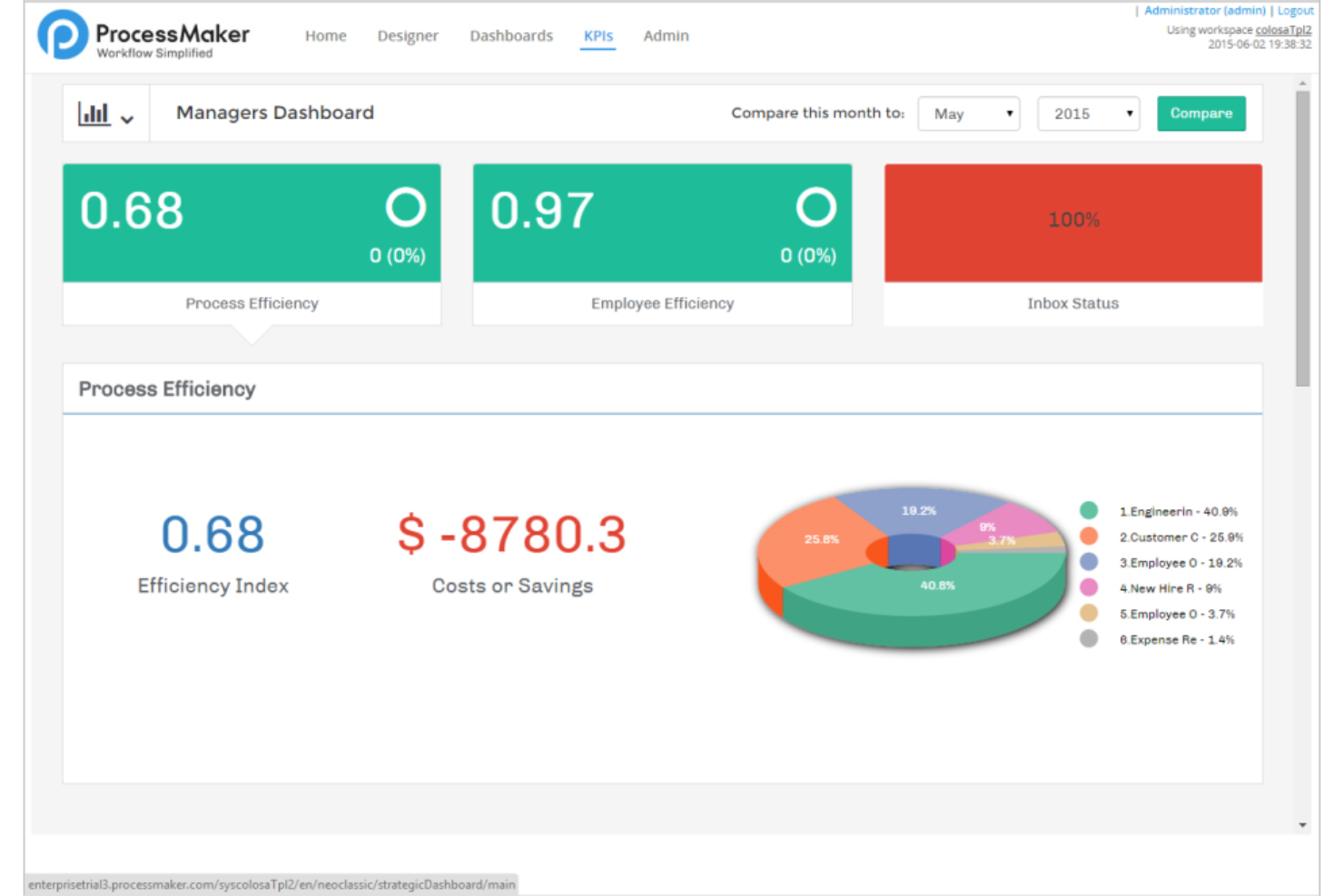
Decisions is a business process automation and orchestration platform that combines visual workflow design, a rules engine, AI agent coordination, and human task management in a single no-code environment.
Who Is ProcessMaker Best For?
ProcessMaker is a strong fit for enterprises that need to automate document-heavy workflows, like admissions processing, approvals, or compliance reviews, without building custom solutions from scratch.
Why I Picked Decisions
I picked Decisions as one of the best because its intelligent document processing capabilities go well beyond basic OCR. The platform uses AI-powered data extraction to automatically pull structured data from transcripts, forms, and other documents, then routes exceptions through approval workflows without manual intervention. I especially like that it combines this extraction layer with a visual rules engine, so you can define exactly how extracted data gets validated, enriched, and written back to downstream systems like a SIS.
Decisions Key Features
- Visual rules engine: Build and manage decision logic using decision tables, flowcharts, truth tables, and natural-language policies in a no-code visual editor.
- BPMN 2.0 import: Convert existing BPMN XML files directly into Decisions workflows, preserving activities, gateways, events, subprocesses, and tasks.
- Message queue integration: Connect to Amazon SQS, Apache Kafka, Azure Service Bus, ActiveMQ, and SolaceMQ so flows can produce or consume messages across systems.
- DevOps release traceability: Link deployments to Jira or Azure DevOps user stories and move work through governed promotion paths with quality gates and rollback triggers.
ProcessMaker Integrations
ProcessMaker documents Active Directory integration, plus Jira and Azure DevOps connections for release traceability. It supports REST, SOAP, .NET assemblies, and message queues including Apache Kafka, Azure Service Bus, and Amazon SQS.
Pros and Cons
Pros:
- Document extraction routes exceptions into approvals
- Reviewers value customizable task and case dashboards
- Visual rules govern BPMN step behavior
Cons:
- Some integrations require extra custom development
- BPMN imports lack documented Camunda compatibility

Yoroflow
Best for no-code workplace automation
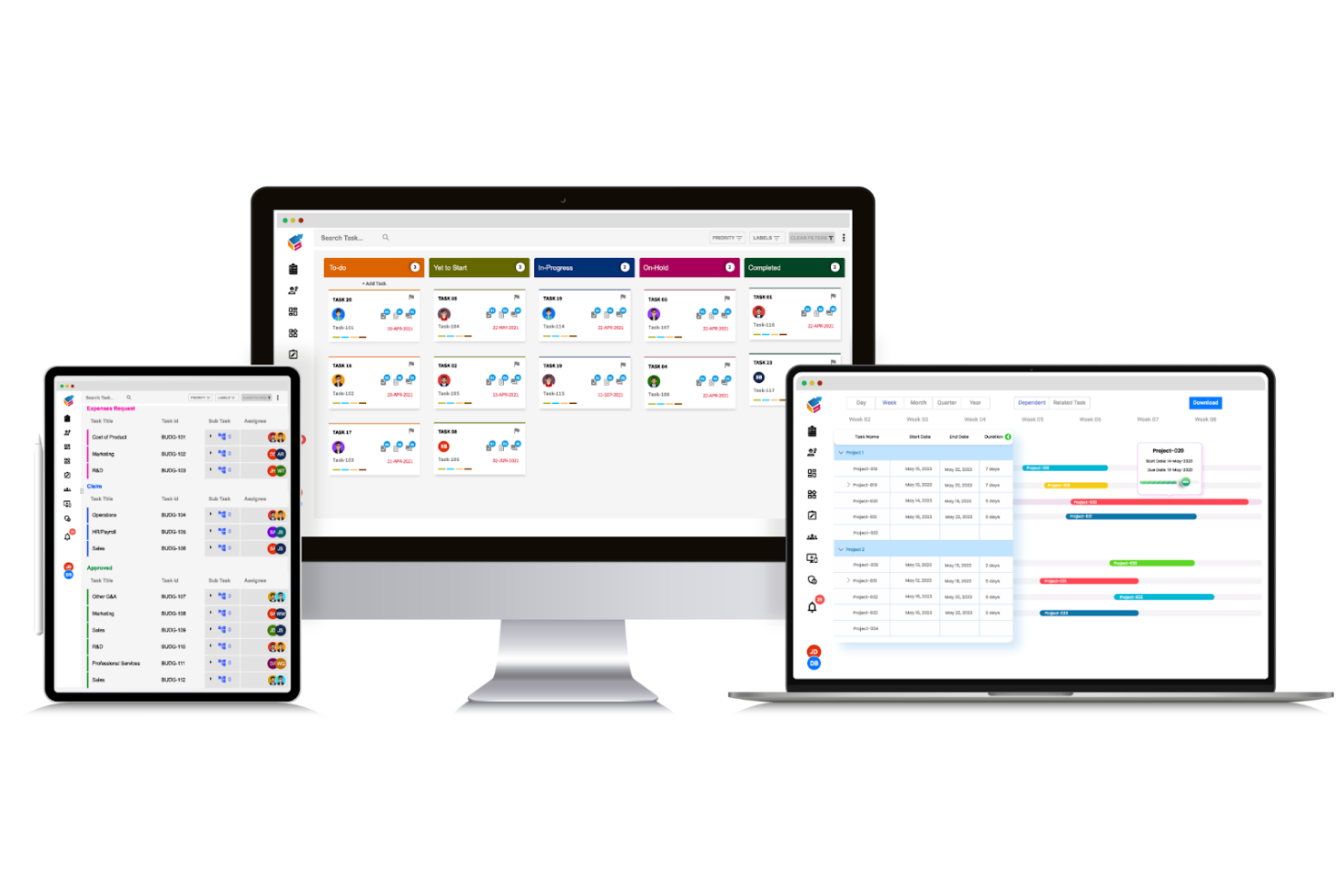
Yoroflow is a no-code workflow automation platform that combines process building, multi-tier approvals, task management, case management, and drag-and-drop workflow design with a broad library of native integrations.
Who Is Yoroflow Best For?
Yoroflow is a strong fit for operations and project teams at small to mid-sized companies that want to automate approvals, tasks, and business processes without writing a single line of code.
Why I Picked Yoroflow
I picked Yoroflow as one of the best because its no-code drag-and-drop process builder lets you replace Camunda's developer-heavy workflows without writing a single line of code. I especially like the multi-tier approval management and Decision Task node, which handle branching logic visually. If your team is moving away from BPMN-based engines to simplify operations, Yoroflow's dedicated migration support and data-import tools make that transition practical.
Yoroflow Key Features
- Rule-based workflow triggers: Set predefined conditions that automatically kick off workflows, route tasks, or approve requests without manual intervention.
- Pause Node with timeout controls: Configure wait steps in a workflow that trigger next actions based on user response or inactivity within a set timeframe.
- Custom admin dashboards: Build role-specific dashboards that surface real-time workflow activity, task status, and operational metrics in one view.
- No-code app builder: Create custom business applications using a visual drag-and-drop interface that connects with existing systems for data exchange.
Yoroflow Integrations
Yoroflow offers native integrations with Microsoft Teams, Slack, Google Drive, Gmail, HubSpot, QuickBooks, and Wrike. It supports custom connections through low-code GET/POST APIs and webservices, plus Zapier.
Pros and Cons
Pros:
- Multi-tier approvals connect human tasks to workflows
- Migration support and data-import tools ease transition
- Drag-and-drop workflows replace code-heavy setup
Cons:
- Very complex workflows require capacity testing
- No documented BPMN or DMN compatibility

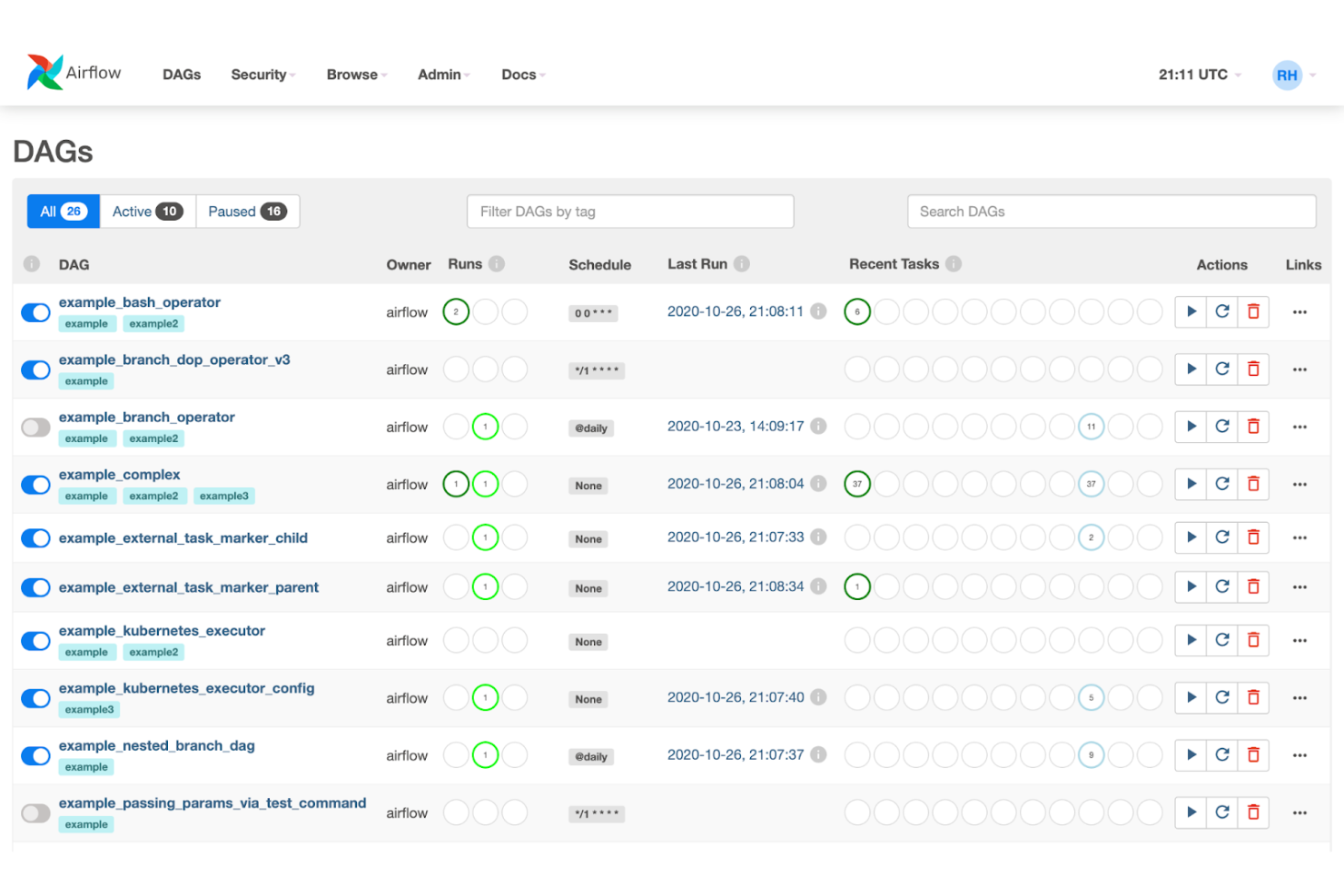
Apache Airflow is an open-source workflow orchestration platform that lets you author, schedule, and monitor pipelines as Python-defined DAGs, with built-in support for task dependencies, retries, parallel runs, and integrations across cloud platforms and third-party services.
Who Is Apache Airflow Best For?
Apache Airflow is a strong fit for developer-led teams that need to orchestrate complex, multi-step data pipelines with fine-grained control over task dependencies and scheduling.
Why I Picked Apache Airflow
Apache Airflow earns its spot on my shortlist because it handles scalable workflow orchestration better than most open-source tools I've worked with. Its Python-defined DAGs let developer teams model complex task dependencies, branching logic, and retry behavior directly in code, without a separate visual designer layer. I also like that its distributed architecture scales horizontally across workers and schedulers, so pipelines that grow from dozens to thousands of tasks don't require a platform rebuild.
Apache Airflow Key Features
- Python-defined DAGs: Author workflows as Python source files using standard language features like loops and decorators to generate task graphs dynamically.
- Human-in-the-loop (HITL) operators: Pause workflows to collect human input, approvals, or branch selections before execution continues.
- 80+ community provider packages: Install separately maintained providers to add operators, hooks, sensors, and custom connections for external services and cloud platforms.
- REST API: Trigger and manage workflows from external systems using stable, backward-compatible
/api/v2endpoints.
Apache Airflow Integrations
Apache Airflow offers integrations through 80+ community provider packages, including Google Cloud Platform, Amazon Web Services, and Microsoft Azure. Its stable REST API supports custom integrations and external workflow triggers.
Pros and Cons
Pros:
- Human approvals can pause task flows
- Retries and branching suit batch workflows
- Scales distributed orchestration across task graphs
Cons:
- No documented DMN or Camunda migration path
- Python DAGs replace visual BPMN modeling

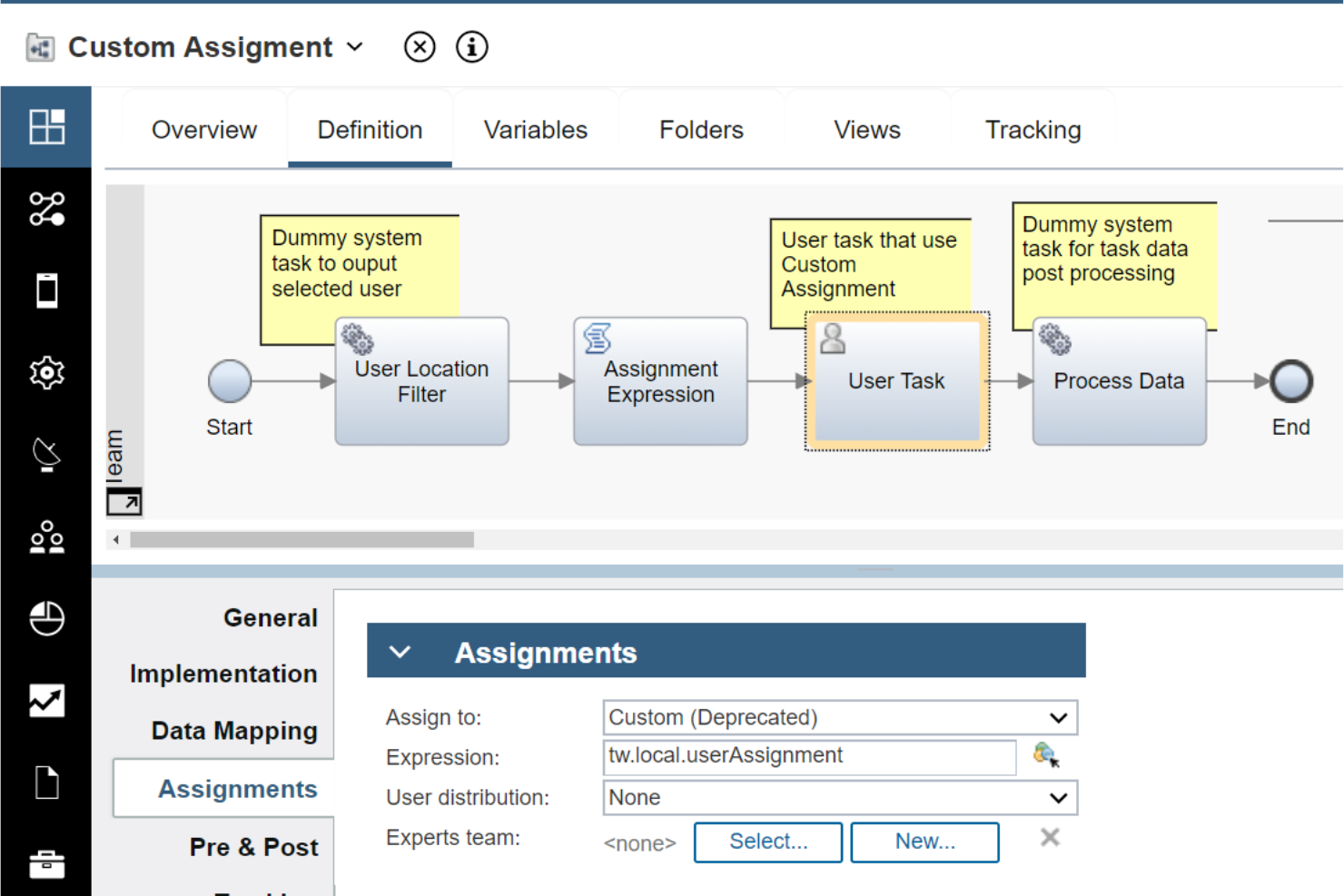
IBM Business Automation Workflow is an enterprise BPM and case management platform that combines process design, workflow orchestration, human task management, and real-time process monitoring with AI-powered automation capabilities.
Who Is IBM Business Automation Workflow Best For?
IBM Business Automation Workflow is a strong fit for enterprise teams in regulated industries—like financial services or insurance—that need to manage both structured workflows and complex case work within a single platform.
Why I Picked IBM Business Automation Workflow
IBM Business Automation Workflow earns its spot on my shortlist because it's one of the few platforms that genuinely unifies BPM and case management under one roof, rather than bolting case handling onto a pure process engine. I find the combination of structured workflow orchestration and dynamic case design especially useful when teams are managing something like an insurance claims process, where the workflow has defined stages but individual cases still require human judgment and ad hoc task routing. The platform also supports container deployments across Amazon EKS, Azure AKS, and Google GKE, so scaling that workload isn't a manual infrastructure headache.
IBM Business Automation Workflow Key Features
- OpenAPI-based REST service discovery: Generates external services and business objects directly from OpenAPI 2.0 or 3.0 JSON or YAML specifications for use in service flows.
- MCP agent connectivity: Connects Business Automation Workflow to external AI agents—including watsonx Orchestrate, Claude, and Copilot—through the open Model Context Protocol.
- Container deployment profiles: Provides small, medium, and large workload profiles for containerized deployments across Amazon EKS, Azure AKS, Google GKE, OpenShift, Rancher, and Tanzu.
- JavaScript and Java API extension points: Exposes process, case, and application APIs so developers can build or customize case interfaces using human services, coaches, and views.
IBM Business Automation Workflow Integrations
IBM Business Automation Workflow connects with watsonx Orchestrate, Claude, and Copilot through MCP. It supports REST, JavaScript, web service, and Java APIs, plus OpenAPI 2.0 and 3.0 service discovery for custom integrations.
Pros and Cons
Pros:
- Container profiles support large workloads
- Reviewers value process monitoring dashboards
- Unified BPM and case management
Cons:
- Reviewers report slowdowns under heavy workloads
- Reviewers describe the interface as dated

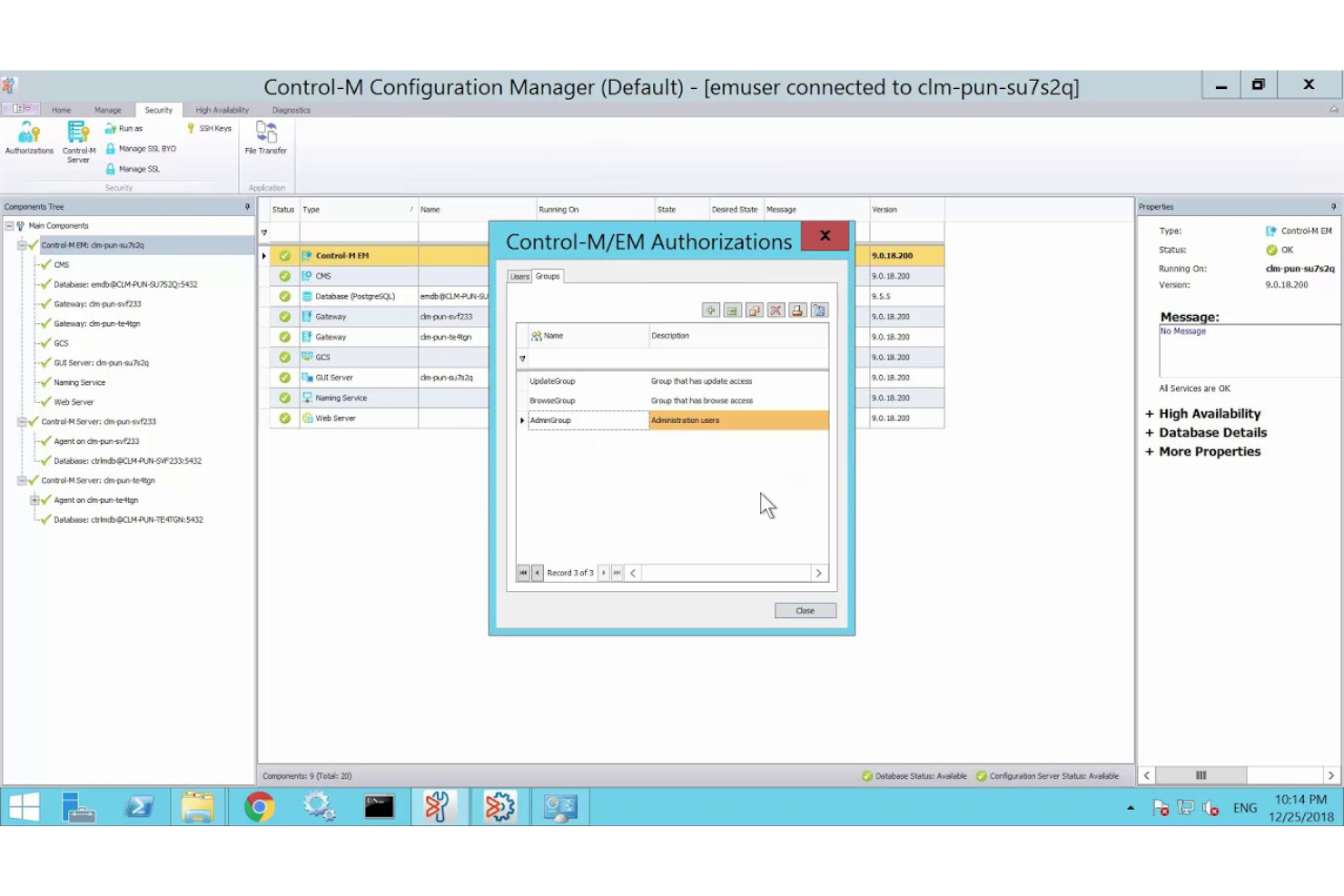
Control-M is an enterprise workload automation and orchestration platform from BMC Software that schedules, monitors, and coordinates application and data workflows across mainframe, cloud, and hybrid environments.
Who Is Control-M Best For?
Control-M is a strong fit for enterprise IT and operations teams that need to coordinate complex, cross-environment workload automation across mainframe, cloud, and hybrid infrastructure.
Why I Picked Control-M
I picked Control-M as one of the best because it handles enterprise workload automation at a scale and depth that few platforms match. Where Camunda excels at BPMN-driven process design, Control-M fills a different but equally critical need: orchestrating production workloads across mainframe, cloud, and hybrid environments from a single control plane. I especially like the SLA management and predictive delay detection, which means my team can catch a failing batch pipeline before it breaches a deadline rather than reacting after the fact.
Control-M Key Features
- Jobs-as-Code authoring: Define, test, and deploy job workflows as JSON artifacts managed in source control via REST API and CLI.
- Event-driven workflow triggers: Connect workflows to event sources including Kafka, AWS SQS, RabbitMQ, and Azure Service Bus to react to real-time events.
- Credential vault integration: Retrieve runtime credentials from Azure Key Vault, HashiCorp, and CyberArk for file transfer, database, and OS jobs.
- Control-M Archive Service: Store workflow execution history in a secure cloud archive and compare current and historical job runs for troubleshooting.
Control-M Integrations
Control-M offers integrations with Kafka, AWS SQS, RabbitMQ, Azure Service Bus, Azure Key Vault, HashiCorp, and CyberArk. It also supports REST APIs, webhooks, HTTP/HTTPS, MCP, and CI/CD workflows for custom orchestration.
Pros and Cons
Pros:
- Supports version-controlled jobs-as-code deployments
- Makes job status and SLA risks visible
- Coordinates complex batch dependencies across platforms
Cons:
- Omits DMN decisions and human-task workflows
- Doesn't provide documented BPMN process modeling

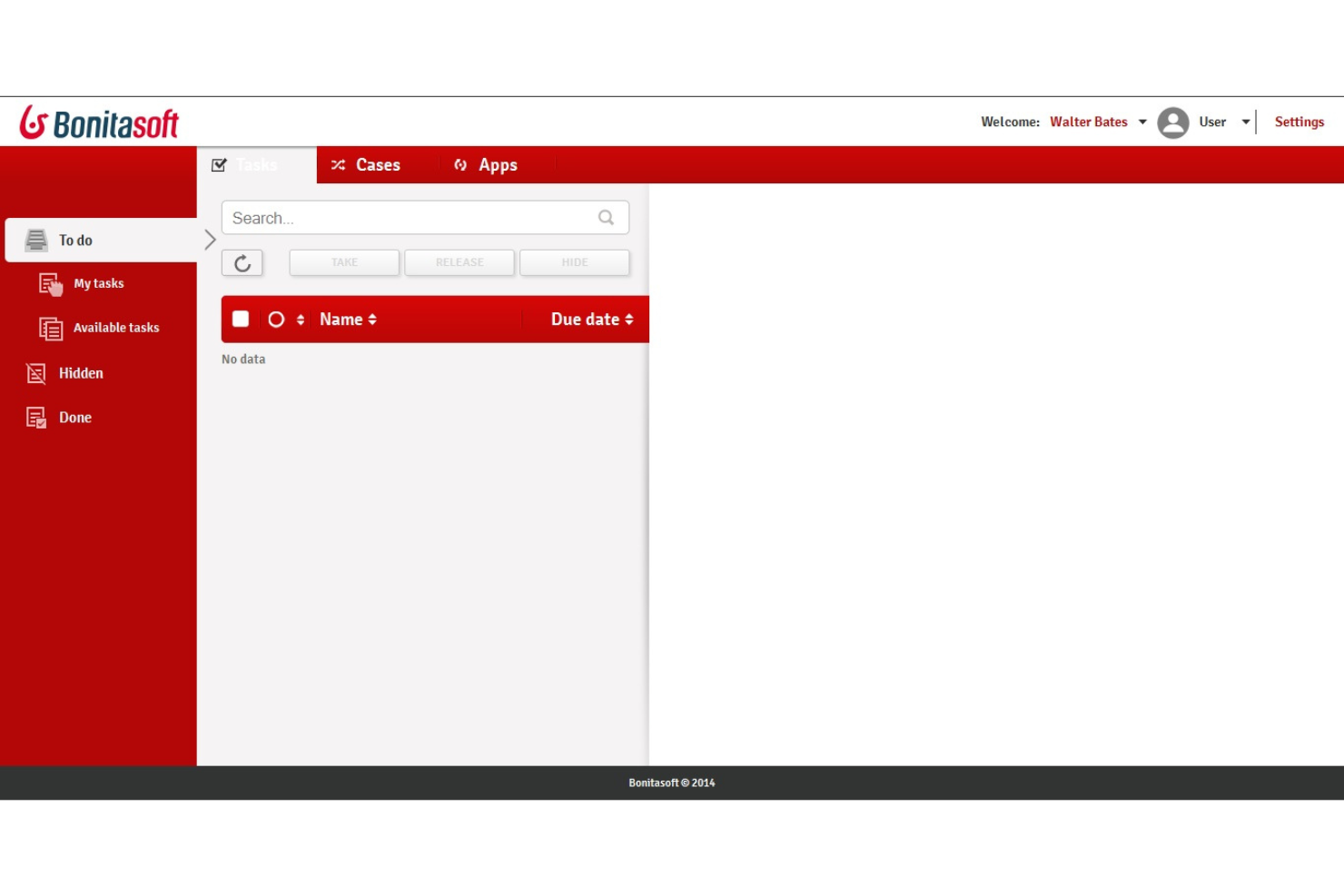
Bonita BPM is an open-source business process management platform that combines BPMN-based process modeling, workflow orchestration, adaptive case management, and a low-code UI builder for building and running process applications.
Who Is Bonitasoft Best For?
Bonita BPM is a strong fit for teams that want to build and run BPMN-based process applications on an open-source foundation without committing to a fully commercial platform from day one.
Why I Picked Bonitasoft
I've included Bonitasoft in my top picks because it's one of the few BPM platforms where the open-source foundation is genuinely usable, not just a stripped-down teaser. The Community edition builds from source via the Ofelia GitHub organization, and the BPA Studio lets you model BPMN processes with complex rules, exception paths, and SLA enforcement without touching the Enterprise tier. I also like that adaptive case management is built in, so knowledge workers can add or skip tasks in real time as conditions change.
Bonitasoft Key Features
- Actor-based task assignment: Maps process tasks to specific users, groups, roles, or memberships, with filters that route approvals to the appropriate person based on organizational relationships.
- Kubernetes deployment: Runs Bonita on Kubernetes for dynamic scaling, resource optimization, fault tolerance, and self-healing across your infrastructure.
- Custom connector creation: Lets you build and import your own connectors into Bonita Studio to integrate systems not covered by the existing catalog.
- Process Insights dashboards: Tracks case status, duration, SLA compliance, bottlenecks, and process-variant metrics across active and completed process instances.
Bonitasoft Integrations
Bonitasoft offers documented connectors for Salesforce, SAP, UiPath, Jira, LDAP/AD, databases, and generic web services. REST API access and custom connector creation support additional system orchestration.
Pros and Cons
Pros:
- Community source supports self-hosted evaluation
- Adaptive cases let workers adjust tasks
- BPMN modeling handles complex processes
Cons:
- No documented DMN decision modeling support
- No documented Camunda migration tooling
Outras alternativas ao Camunda
Segue-se uma lista de alternativas adicionais ao Camunda que selecionei. Embora não tenham ficado entre as 10 primeiras, continuam a ser opções valiosas que merecem uma pesquisa mais aprofundada.
- Flowable
For low-code business management
- CANEA ONE
For comprehensive quality management systems
- Kissflow
For low-code and no-code app development
- ClickUp
For project management and task tracking
- Tallyfy
For process documentation and automation
- Decisions
For complex workflow automation
- Prismatic
For embedded integrations in SaaS
- Orkes
For cloud-native workflow orchestration


Análises relacionadas de software de gestão de projetos
Se ainda não encontrou o que procura aqui, consulte estas outras ferramentas relacionadas que testámos e avaliámos:
- Software de gestão de projetos
- Software de gestão de recursos
- Software de automatização de fluxos de trabalho
- Software de controlo de tempo
- Software de gestão de tarefas
- Ferramentas de colaboração
- Criador de gráficos de Gantt
- Ferramentas de produtividade
- Software de acompanhamento de projetos
- Software de planeamento de projetos
How I Evaluate Camunda Alternatives
I evaluate in two layers: the baseline every process orchestration tool must hit and the differentiators that distinguish a microservices-native engine from a no-code BPM platform.
Core Functionality (Table Stakes For This List)
When I'm selecting tools for my list, I rank each one on a scale from 0 (does not offer the functionality) to 5 (excels in this area) for each core functionality listed below. Then, I calculate the tool's total score into a percentage. Each tool needs to achieve a minimum total score of 65% to be considered for inclusion.
- BPMN Workflow Modeling: I check whether the tool offers a visual BPMN 2.0 designer with versioning, so teams can model processes like order fulfillment or employee onboarding.
- Process Orchestration Engine: The engine needs to handle long-running, stateful workflows with retries and timers, like orchestrating multi-step payment processing across services.
- Decision Automation Support: I look for DMN decision tables or a built-in rules engine that lets you define routing logic, such as approval thresholds or claims adjudication rules.
- API & System Integrations: Each tool should offer REST APIs and connectors for linking into existing systems like ERPs, CRMs, and messaging platforms your services rely on.
- Human Task Management: I evaluate how the tool handles user tasks, including task inboxes, form builders, and assignment routing for steps that need manual review or approval.
- Process Monitoring & Analytics: Dashboards and audit logs matter here. I look for real-time visibility into active instances, SLA tracking, and bottleneck detection across running workflows.
Once I have a list of tools that meet this criteria, I consider what sets each platform apart.
Differentiating Factors (What Sets Vendors Apart)
Here's how I compare and contrast different vendors:
Standout Features
Process mining is a major differentiator. Tools that analyze event logs from your existing systems and surface optimization opportunities save weeks of manual process discovery. I also look for low-code process builders that let business analysts design and iterate on workflows without waiting on engineering. For teams running DevOps pipelines, Git-based versioning and CI/CD integration make it possible to promote process definitions across environments the same way you'd deploy application code.
Beyond Features
Deployment flexibility matters a lot here. Some teams need a fully managed SaaS option, while others in regulated industries require on-premise or hybrid setups with strict data residency controls. I also evaluate the licensing model closely, especially whether there's an open-source core or community edition your team can use to prototype before committing. Developer ecosystem rounds out my evaluation. Strong documentation, active community forums, and a healthy connector marketplace tell me a platform has staying power and won't leave your engineering team solving problems alone.
Por que razão procurar uma alternativa ao Camunda?
Embora o Camunda seja um software robusto, existem várias razões pelas quais poderá precisar de uma solução diferente. Poderá estar à procura de uma alternativa ao Camunda se estiver preocupado com:
- Custo: Embora o Camunda ofereça um conjunto sólido de funcionalidades, o seu preço poderá ser proibitivo para organizações com orçamentos limitados. Se o custo for uma preocupação importante, poderá ter de explorar alternativas mais acessíveis que ainda respondam às suas necessidades de automatização de fluxos de trabalho.
- Complexidade: O Camunda foi concebido para lidar com processos empresariais complexos, o que poderá ser excessivo para fluxos de trabalho mais simples. Se as necessidades da sua organização forem mais diretas, poderá considerar desnecessárias as funcionalidades abrangentes e a curva de aprendizagem acentuada do Camunda.
- Personalização: Embora o Camunda disponibilize uma estrutura sólida para a automatização de processos, poderá precisar de opções de personalização mais abrangentes para adaptar o software precisamente aos seus processos empresariais. Se considerar limitadas as capacidades de personalização do Camunda, poderá ser necessária uma alternativa mais flexível para responder aos seus requisitos específicos.
- Integração: Uma integração eficaz com os sistemas existentes é importante para uma automatização contínua dos fluxos de trabalho. Se o Camunda tiver dificuldades em integrar-se com o seu conjunto atual de software ou exigir uma configuração extensa, isso poderá perturbar as suas operações, tornando mais adequada uma alternativa com melhores capacidades de integração.
- Suporte: Um suporte ao cliente fiável é essencial, especialmente ao lidar com uma automatização de processos complexa. Se considerar que os serviços de suporte do Camunda são insuficientes em termos de capacidade de resposta ou conhecimentos especializados, poderá ter de considerar uma alternativa que ofereça um suporte mais acessível.
As alternativas ao Camunda oferecem funcionalidades e benefícios que poderão faltar ao Camunda, como preços mais acessíveis, interfaces mais simples, maior personalização, melhores capacidades de integração e um suporte ao cliente superior. Como tal, estas alternativas poderão adaptar-se melhor às suas necessidades e limitações específicas.
Principais funcionalidades das alternativas ao Camunda
Estas são algumas das principais funcionalidades das alternativas ao Camunda que o seu software alternativo deverá conseguir replicar ou melhorar para se adequar às suas necessidades.
- Otimização e gestão de fluxos de trabalho: A simplificação e gestão eficiente dos fluxos de trabalho são importantes para manter a produtividade e minimizar os estrangulamentos. Uma alternativa ao Camunda deverá oferecer ferramentas robustas para otimizar os processos dos fluxos de trabalho, garantindo que as tarefas são concluídas de forma eficiente e sem atrasos desnecessários.
- Automatização de processos empresariais (BPMN): A automatização de processos empresariais utilizando normas BPMN permite uma execução consistente e conforme as normas do setor. Uma alternativa ao Camunda deverá suportar BPMN para permitir às empresas automatizar fluxos de trabalho complexos, respeitando simultaneamente normas reconhecidas de modelação de processos.
- Modelação e conceção de processos: A capacidade de criar e conceber visualmente processos empresariais ajuda os utilizadores a compreender e aperfeiçoar os fluxos de trabalho. Uma alternativa ao Camunda deverá disponibilizar ferramentas intuitivas de modelação de processos, facilitando às equipas o mapeamento e a melhoria das suas operações empresariais.
- Ferramentas de IA para automatização: A utilização de IA para automatizar tarefas repetitivas pode melhorar significativamente a eficiência e reduzir a carga de trabalho manual. Uma boa alternativa ao Camunda deverá incorporar automatização orientada por IA para simplificar os processos e permitir às equipas concentrarem-se em atividades mais estratégicas.
- Ferramentas de gestão de projetos: A inclusão da gestão, atribuição e monitorização de tarefas, bem como de análises, é essencial para manter os projetos no caminho certo. Uma alternativa ao Camunda deverá integrar funcionalidades abrangentes de gestão de projetos para garantir que todos os aspetos de um projeto são geridos eficazmente do início ao fim.
- Integração com outras plataformas: A integração contínua com plataformas e ferramentas populares é vital para criar um ambiente de fluxos de trabalho unificado. Uma alternativa viável ao Camunda deverá suportar integrações com o software existente, garantindo um fluxo de dados e uma colaboração sem problemas entre diferentes sistemas.
- Regras empresariais e tomada de decisões: A definição e gestão de regras empresariais complexas permitem um controlo preciso sobre os processos automatizados. Uma alternativa ao Camunda deverá oferecer ferramentas robustas para a gestão de regras empresariais, permitindo às organizações tomar decisões informadas e consistentes nos seus fluxos de trabalho.
- Interface fácil de utilizar: Uma interface de utilizador personalizável e intuitiva é importante para a adoção pelos utilizadores e para a facilidade de utilização. Uma alternativa ao Camunda deverá disponibilizar uma interface fácil de utilizar que possa ser adaptada às necessidades de diferentes utilizadores, garantindo que a plataforma é acessível a todos os membros da equipa.
- Ferramentas de colaboração: Facilitar a colaboração entre equipas através de funcionalidades de comunicação e partilha é essencial para um trabalho de equipa eficaz. Uma alternativa ao Camunda deverá incluir ferramentas de colaboração que permitam aos membros da equipa comunicar, partilhar documentos e trabalhar em conjunto sem problemas nos projetos.
- Funcionalidades de comunicação com clientes: Melhorar as interações e a comunicação com os clientes ajuda a construir relações sólidas e a melhorar a prestação de serviços. Uma boa alternativa ao Camunda deverá oferecer funcionalidades que suportem uma comunicação eficaz com os clientes, como atualizações automatizadas, ciclos de feedback e mensagens personalizadas.
Uma alternativa sólida não deverá apenas igualar os pontos fortes do Camunda, mas também proporcionar maior flexibilidade, facilidade de utilização e ferramentas de colaboração melhoradas. Ao concentrar-se nestas funcionalidades essenciais, poderá escolher uma solução que apoie eficazmente os objetivos de gestão de processos da sua organização, garantindo simultaneamente facilidade de utilização e escalabilidade.