

10 melhores alternativas ao Google Workspace para equipas em 2026

Lista restrita das melhores alternativas ao Google Workspace


Enquanto gestor de projetos, o seu sucesso diário depende de manter equipas complexas organizadas e produtivas. Embora as ferramentas de produtividade baseadas na nuvem sejam muitas vezes essenciais para gerir tarefas e a comunicação entre plataformas, o Google Workspace nem sempre é a opção perfeita. Quer esteja a atingir os limites das ferramentas nativas da Google, quer precise de uma integração mais estreita com software especializado, encontrar a alternativa certa ao Google Workspace é fundamental para elevar os padrões da sua empresa.
Neste guia, analisei de forma independente as principais soluções de software que colmatam as lacunas deixadas pelo Google Workspace. A minha lista centra-se na gestão de projetos e na colaboração de alto desempenho, em vez de se focar no CRM tradicional, embora cada recomendação disponibilize integrações de terceiros para manter os dados dos seus clientes ligados.
Quer esteja à procura de uma substituição completa do conjunto de ferramentas, quer de uma aplicação web especializada para potenciar o seu fluxo de trabalho em dispositivos Microsoft ou Apple, estas alternativas ao Google Workspace foram concebidas para facilitar a sua vida profissional e tornar a sua equipa mais eficiente.
O que é o Google Workspace?
O Google Workspace, anteriormente conhecido como G Suite, é uma ferramenta de produtividade baseada na nuvem que ajuda as equipas a colaborar e a comunicar eficazmente em todo o ecossistema Google e não só. É habitualmente utilizado por profissionais de vários setores, incluindo gestores de projetos, profissionais de marketing, pequenas empresas e educadores, devido à sua capacidade para aumentar a produtividade e a colaboração das equipas.
Ferramentas como o Google Docs, o Google Sheets e o Google Meet permitem criar documentos, gerir dados e comunicar. Estas funcionalidades ajudam o utilizador e a sua equipa a manterem-se organizados e ligados. De um modo geral, o Google Workspace oferece uma plataforma versátil que se adapta a diferentes necessidades empresariais, tornando-se um recurso valioso para melhorar a eficiência no local de trabalho.
Tabela comparativa das alternativas ao Google Workspace
A tabela abaixo compara os preços das minhas principais alternativas ao Google Workspace.
| Tool | Best For | Trial Info | Price | ||
|---|---|---|---|---|---|
| 1 | Best for customizable task boards | Free plan available | From $5/user/month | Website | |
| 2 | Best for Office app integration | Free plan available | From $21/user/month (billed annually) | Website | |
| 3 | Best for knowledge management | 30-day free trial + free demo available | Pricing upon request | Website | |
| 4 | Best for project management features | Free plan + trial + demo available | From $12/user/month | Website | |
| 5 | Best for offline task management | Free plan available | Free to use | Website | |
| 6 | Best for secure collaboration | Free demo available | Pricing upon request | Website | |
| 7 | Best for team messaging integration | Free plan available | From $7.25/user/month (billed annually) | Website | |
| 8 | Best for work management | 30-day free trial + demo available | From $9/user/month (billed annually) | Website | |
| 9 | Best for enterprise project management | Free plan + 14-day trial + demo available | From $10/user/month (billed annually) | Website | |
| 10 | Best for video conferencing | Free plan available | From $13.33/user/month (billed annually) | Website |


Why Trust Our Software Recommendations
Our team has been testing and reviewing software since 2012. As project managers ourselves, we know how difficult—and important—it is to choose the right software.
For this guide, we evaluated tools using hands-on testing and independent research, scoring tools using our selection criteria. We also draw on insights from industry thought leaders and practicing project management experts.
Our reviews reflect our human editorial judgment, not a sales pitch.
Expert reviewers:
Análises das melhores alternativas ao Google Workspace
Abaixo encontram-se os meus resumos detalhados das melhores alternativas ao Google Workspace que entraram na minha lista restrita. As minhas análises apresentam uma visão detalhada das principais funcionalidades, vantagens e desvantagens, integrações e casos de utilização ideais de cada ferramenta, para o ajudar a encontrar a melhor opção para si.
Best for customizable task boards
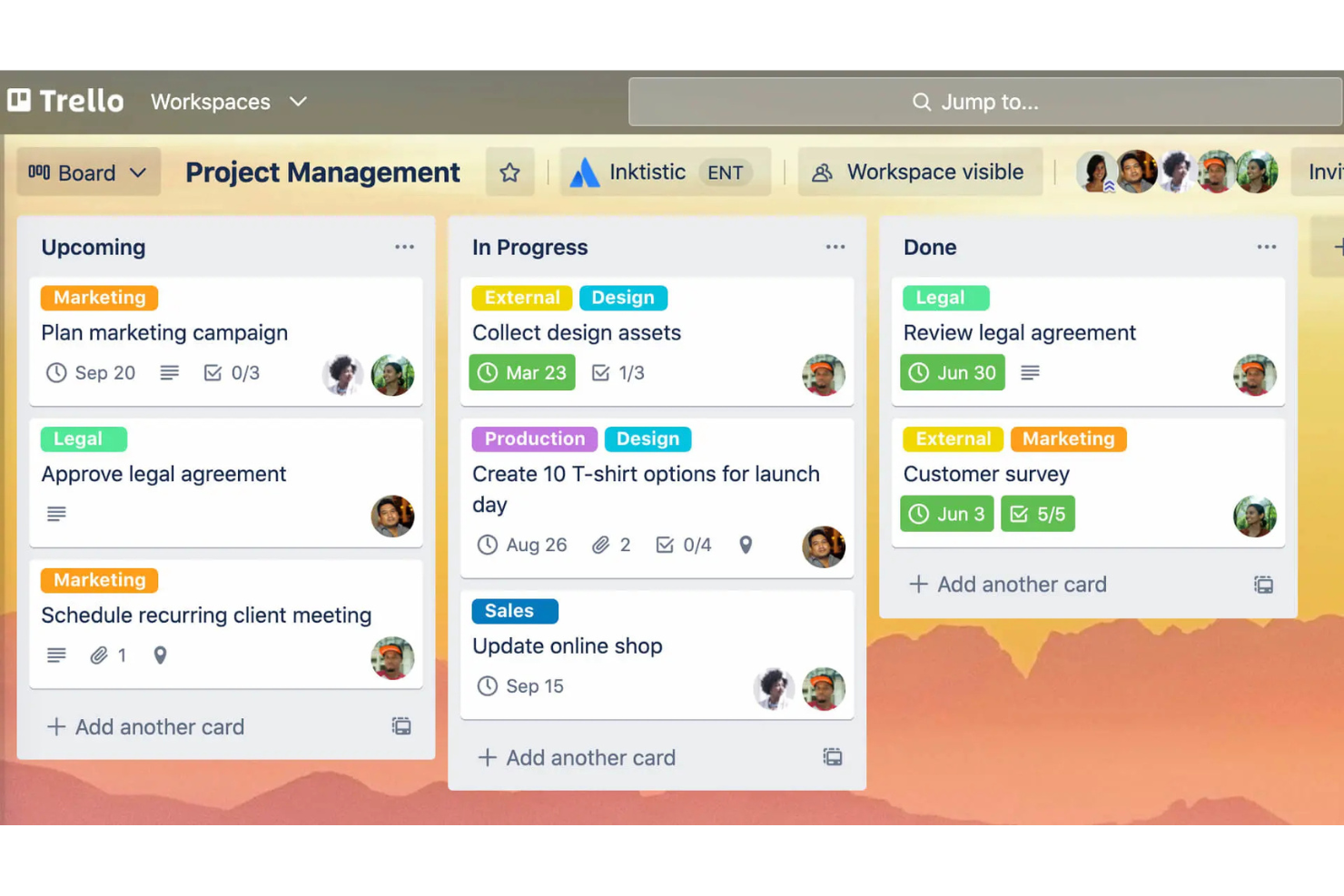
Atlassian Trello is a project management tool known for its user-friendly visual approach to organizing tasks using boards, lists, and cards. It's popular among teams of all sizes that need to manage projects and tasks effectively.
Why it's a good Google Workspace alternative: Atlassian Trello offers customizable task boards that cater to your team's specific needs, unlike Google Workspace's more standardized approach. You can create boards tailored to different projects, which allows for flexibility in how tasks are managed. The drag-and-drop feature makes it easy to move tasks across different stages. Atlassian Trello's visual interface helps you and your team see the big picture and track progress at a glance.
Standout Features and Integrations:
Features include the ability to add due dates and checklists to tasks, color-code labels for easy categorization, and the option to attach files directly to cards. You can also use Butler, Atlassian Trello's built-in automation tool, to automate repetitive tasks. Another feature is the power-ups, which strengthen the board's functionality with additional tools and integrations.
Integrations include Slack, Google Drive, Dropbox, Microsoft Teams, Evernote, Jira, GitHub, Salesforce, Mailchimp, Zendesk, and more.
Pros and Cons
Pros:
- Easy task movement
- Visual project tracking
- Customizable task boards
Cons:
- Poor for complex projects
- Lacks native time tracking

Best for Office app integration
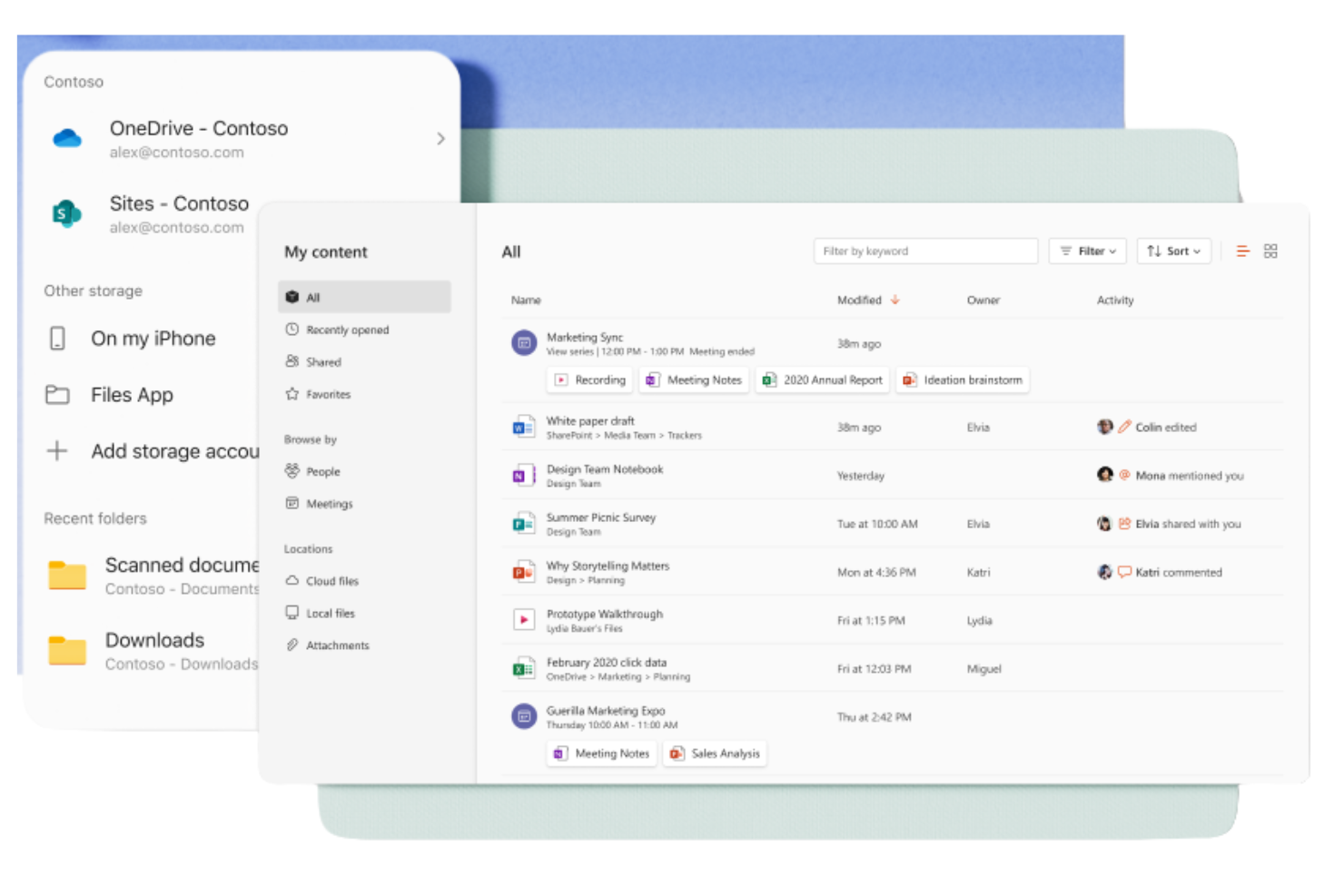
Microsoft 365 Copilot is a subscription-based suite of productivity tools designed for businesses and individuals to help them create, collaborate, and communicate. It's widely used by professionals who need access to Windows applications such as Word, Excel, and PowerPoint for everyday business functions.
Why it's a good Google Workspace alternative: Microsoft 365 Copilot provides smooth integration with Office apps, offering a familiar environment for users who rely heavily on these tools. With cloud storage through OneDrive, you can access and share documents readily. The suite also includes Microsoft Teams for communication and collaboration, making it a complete solution for business needs. Its strong security features keep your data protected at all times.
Standout Features and Integrations:
Features include advanced data analysis capabilities with Excel spreadsheets, which can help your team make informed decisions. The suite also offers customizable templates in Word and PowerPoint, allowing you to create professional documents and presentations. Additionally, Outlook provides an integrated email and calendar solution to keep you organized.
Integrations include Salesforce, Atlassian Trello, Asana, Dropbox, Zoom, Slack, Adobe Acrobat, GitHub, LinkedIn, DocuSign, and more.
Pros and Cons
Pros:
- In-depth security features
- Strong document collaboration
- Familiar interface for Microsoft Office users
Cons:
- Requires OneDrive for Excel
- Inconsistent output quality

Guru
Best for knowledge management
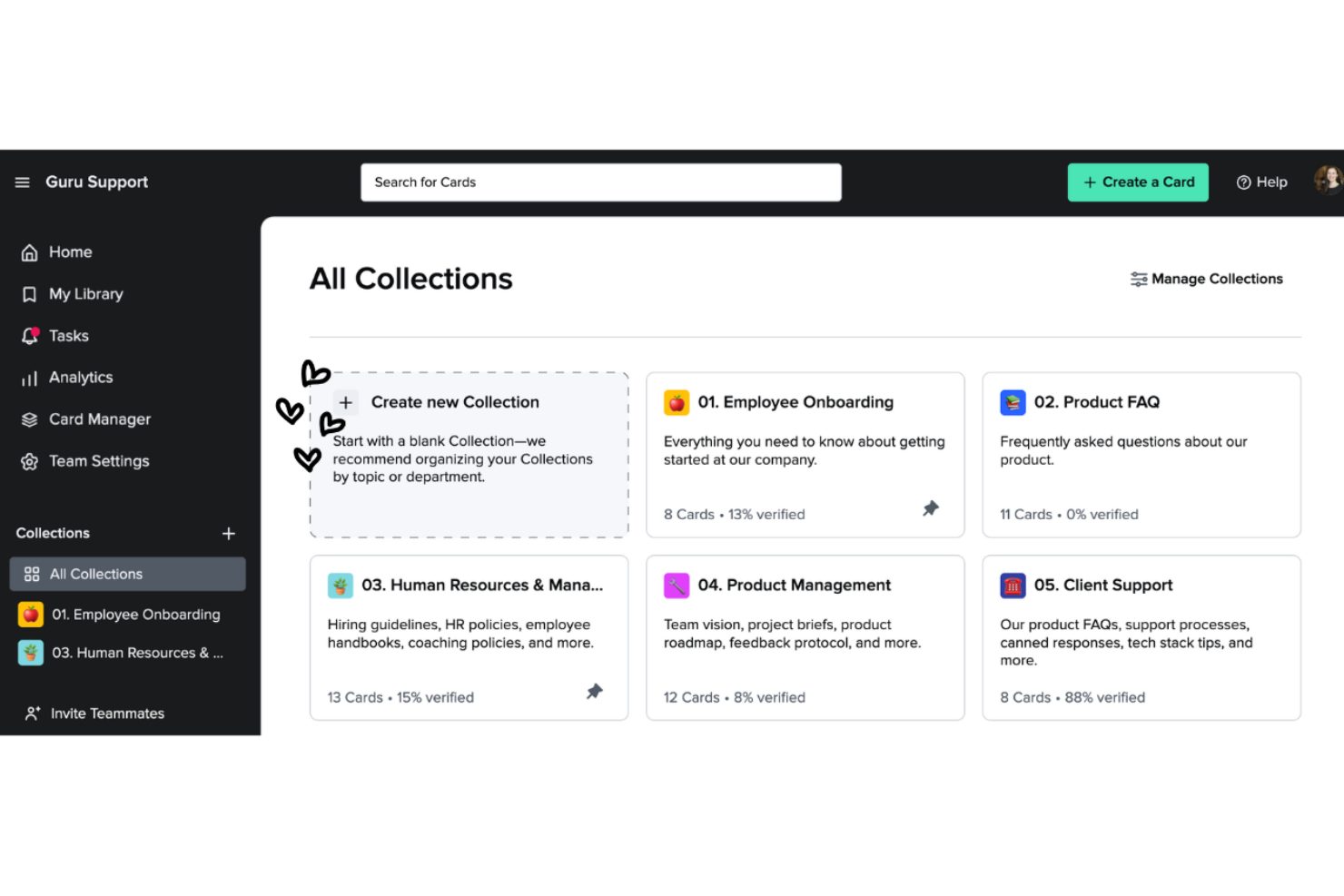
Guru is a knowledge management tool that helps teams capture, organize, and access information efficiently. It's popular among businesses that need to give their teams easy access to critical knowledge and resources.
Why it's a good Google Workspace alternative: Guru offers knowledge management capabilities that go beyond Google Workspace's document storage. Its card-based system lets you create and categorize information for quick retrieval. The verification feature keeps your team's knowledge up-to-date and accurate. Real-time updates and notifications keep everyone informed about the latest changes, fostering collaboration.
Standout Features and Integrations:
Features include a browser extension that allows you to access and capture information directly from your web browser, making it easy to gather and store knowledge. The analytics feature provides insights into how your team uses the knowledge base, which helps you identify gaps and areas for improvement. You can also benefit from the AI-powered suggestions that offer relevant information when you need it.
Integrations include Slack, Microsoft Teams, Salesforce, Zendesk, Intercom, Chrome, Outlook, Google Workspace, Zapier, and more.
Pros and Cons
Pros:
- Verification maintains accuracy
- Real-time updates
- Effective knowledge organization
Cons:
- Requires constant maintenance
- Formatting options are limited


ClickUp is a project management tool designed for teams and businesses of all sizes to help organize tasks, projects, and workflows. It offers an array of features that help optimize project management and increase productivity.
Why it's a good Google Workspace alternative: ClickUp provides extensive project management features that go beyond what Google Workspace offers. Task management lets you assign and track tasks with ease, and customizable dashboards allow you to view project progress in a way that suits you best. ClickUp's goal-setting feature lets your team align on objectives, keeping everyone on the same page.
Standout Features and Integrations:
Features include time tracking, which helps you monitor how much time is spent on tasks. The document management feature allows you to create and store documents directly within the platform. You can use the mind maps to visually organize ideas and plans, aiding in better project planning. Standard plan features include Kanban boards and 24/7 support.
Integrations include Slack, Google Drive, Dropbox, Microsoft Teams, Zoom, GitHub, Atlassian Trello, Salesforce, Zapier, and more.
Pros and Cons
Pros:
- Scalable for large teams
- Effective goal-setting features
- Detailed task management
Cons:
- Learning curve for advanced features
- Occasional performance issues


Super Productivity is an open-source task manager that integrates task management, time tracking, and note-taking, designed for developers, freelancers, and other professionals. It focuses on boosting productivity while protecting user privacy by keeping data offline.
Why it's a good Google Workspace alternative: Unlike Google Workspace, which relies heavily on cloud-based services, Super Productivity offers offline task management, protecting your privacy and giving you full control over your data. With features such as customizable boards, you can organize tasks in ways that suit your workflow. The focus mode and Pomodoro timer help you maintain concentration during work sessions. Additionally, its one-click time tracking and detailed work logging make it easy to monitor productivity. It's also compatible with Linux.
Standout Features and Integrations:
Features include customizable task management with options for subtasks and due dates, allowing you to tailor your workflow. Calendar integration provides a detailed daily overview to help you plan effectively. The plugin system lets you add functionality, making it adaptable to your needs.
Integrations include GitHub, GitLab, Jira, and more.
Pros and Cons
Pros:
- In-depth task management
- Strong privacy and offline usage
- Highly customizable workflows
Cons:
- No built-in cloud syncing
- Minimal team collaboration
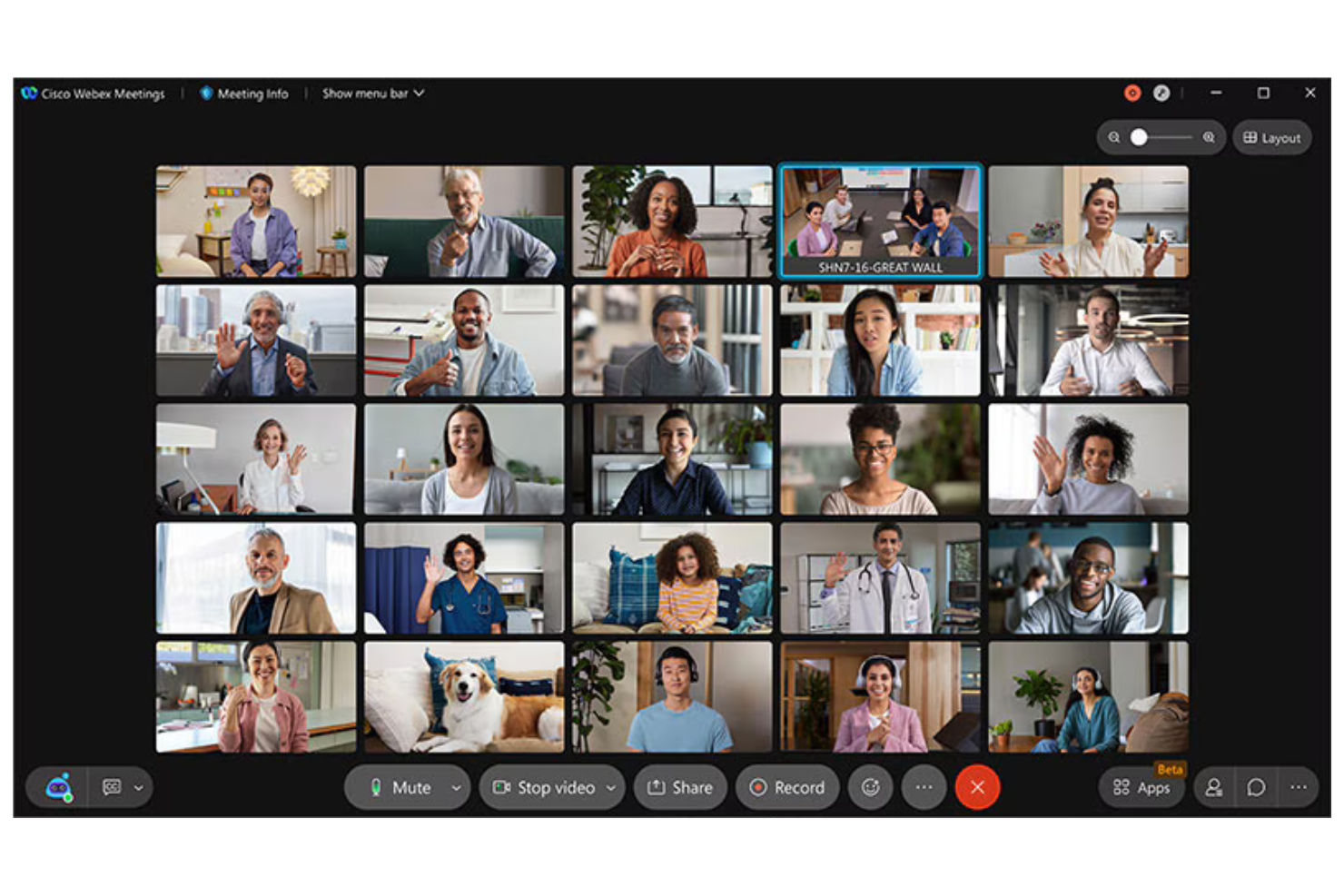
Cisco Webex is a video conferencing and collaboration platform used by businesses and educational institutions for virtual meetings, webinars, and team collaboration. It provides tools for remote communication, which makes it essential for teams that need reliable, secure connections.
Why it's a good Google Workspace alternative: Cisco Webex offers security features that keep meetings safe and private, setting it apart from Google Workspace's general tools. With end-to-end encryption, your communications remain confidential. The platform supports HD video and audio, providing clear and effective meetings. Additionally, its ability to host large-scale events makes it versatile for various business needs.
Standout Features and Integrations:
Features include customizable meeting layouts, allowing you to arrange video feeds according to your preferences. The platform also offers noise cancellation technology, which helps minimize background distractions during calls. Cisco Webex Assistant provides real-time transcription, making note-taking easier and more efficient.
Integrations include Microsoft Teams, Salesforce, Google Workspace, Slack, ServiceNow, Atlassian Trello, Dropbox, Zendesk, Asana, and more.
Pros and Cons
Pros:
- Noise cancellation technology
- High-quality video and audio
- Strong security features
Cons:
- The Interface can feel cluttered
- Requires technical knowledge for setup

Slack
Best for team messaging integration
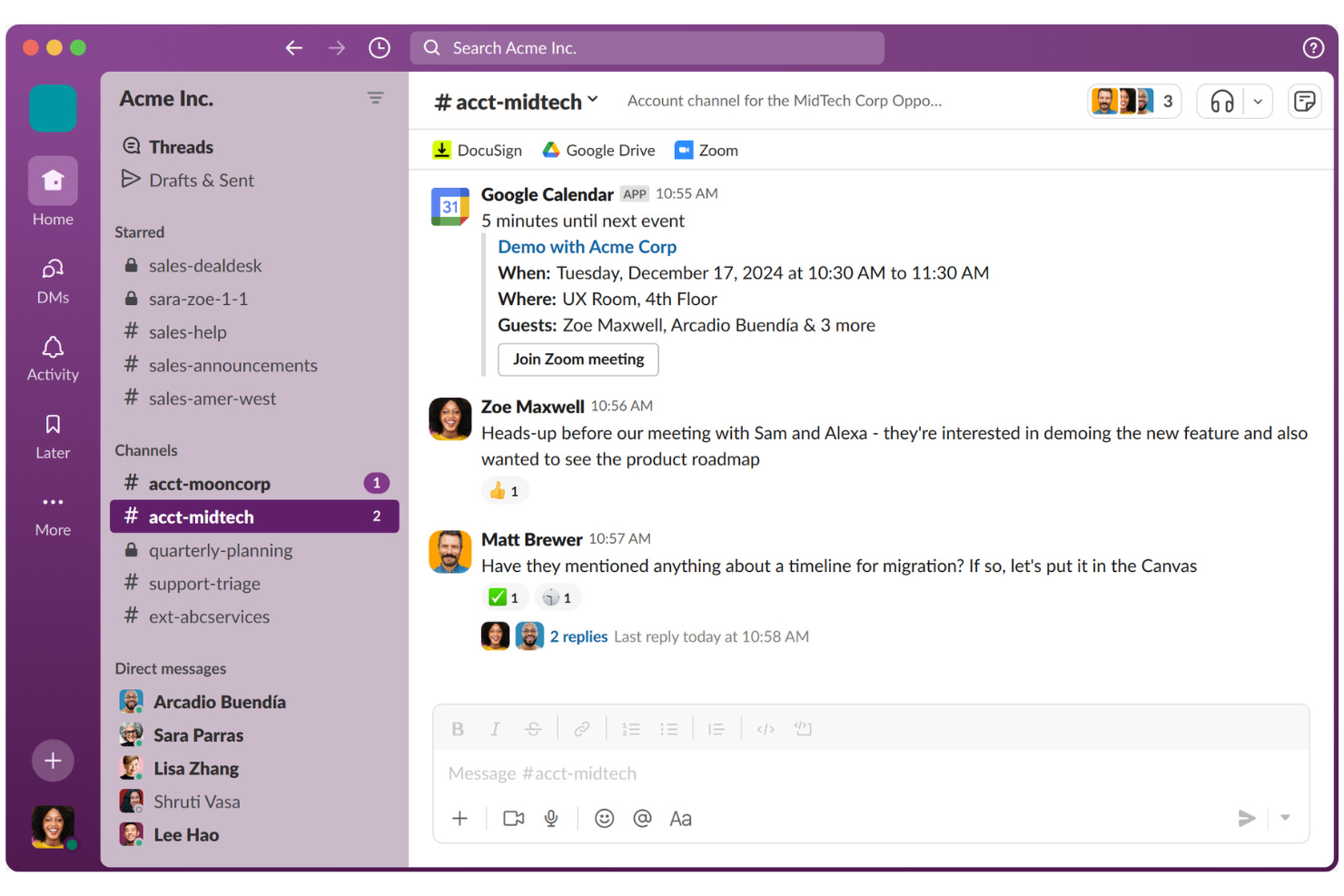
Slack is a collaboration platform designed to help teams communicate and collaborate efficiently. It's widely used by businesses of all sizes for messaging, file sharing, and organizing team communications.
Why it's a good Google Workspace alternative: Unlike Google Workspace's more document-focused approach, Slack excels in team messaging integration. Channels allow you to organize discussions by topics or projects, making communication clear and structured. Slack Connect lets you collaborate with external partners, expanding your communication network. With features such as Huddles for quick audio/video calls, your team can stay connected and responsive.
Standout Features and Integrations:
Features include the ability to create custom workflows using the Workflow Builder, which helps automate routine tasks. You can also use Slack's Canvas feature for document creation and sharing. Additionally, AI-powered tools assist in summarizing conversations and identifying key action items.
Integrations include Google Drive, Microsoft 365 Copilot, Dropbox, Salesforce, Zoom, Asana, Atlassian Trello, GitHub, Zendesk, and more.
Pros and Cons
Pros:
- Custom workflow creation
- Strong external collaboration
- Excellent messaging features
Cons:
- Notifications can be distracting
- Mobile sync can be buggy
Best for work management

Smartsheet is a work management and automation platform used by teams and organizations to plan, capture, manage, and report on work. It's a popular project management platform and is good for teams that need a flexible tool for tracking and managing projects.
Why it's a good Google Workspace alternative: Smartsheet offers work management capabilities that provide a more structured approach than Google Workspace. With its grid-based interface, you can organize tasks and projects efficiently. The platform's automation features help reduce manual work, allowing your team to focus on more important tasks. Smartsheet's reporting tools provide insights into project progress, helping you make data-driven decisions.
Standout Features and Integrations:
Features include the ability to create custom forms for data collection, which simplifies gathering information from your team. The platform provides Gantt chart views, making it easy to visualize project timelines and dependencies. You can also use dashboards to track key metrics and project statuses in real time.
Integrations include Microsoft Teams, Slack, Google Workspace, Salesforce, Jira, Box, Dropbox, DocuSign, ServiceNow, Tableau, and more.
Pros and Cons
Pros:
- Effective project tracking
- Strong automation feature
- Flexible work management tools
Cons:
- Pricing adds up with add-ons
- Mobile lacks Gantt views
New Product Updates from Smartsheet

Smartsheet Adds Non-Plan User Management in Admin Center
Smartsheet adds a Non plan users tab to the Seat types and true-up page in Admin Center. This lets system admins review non-plan users and add them to the plan or remove them from the organization in one place. For more information, visit Smartsheet’s official site.

Wrike
Best for enterprise project management
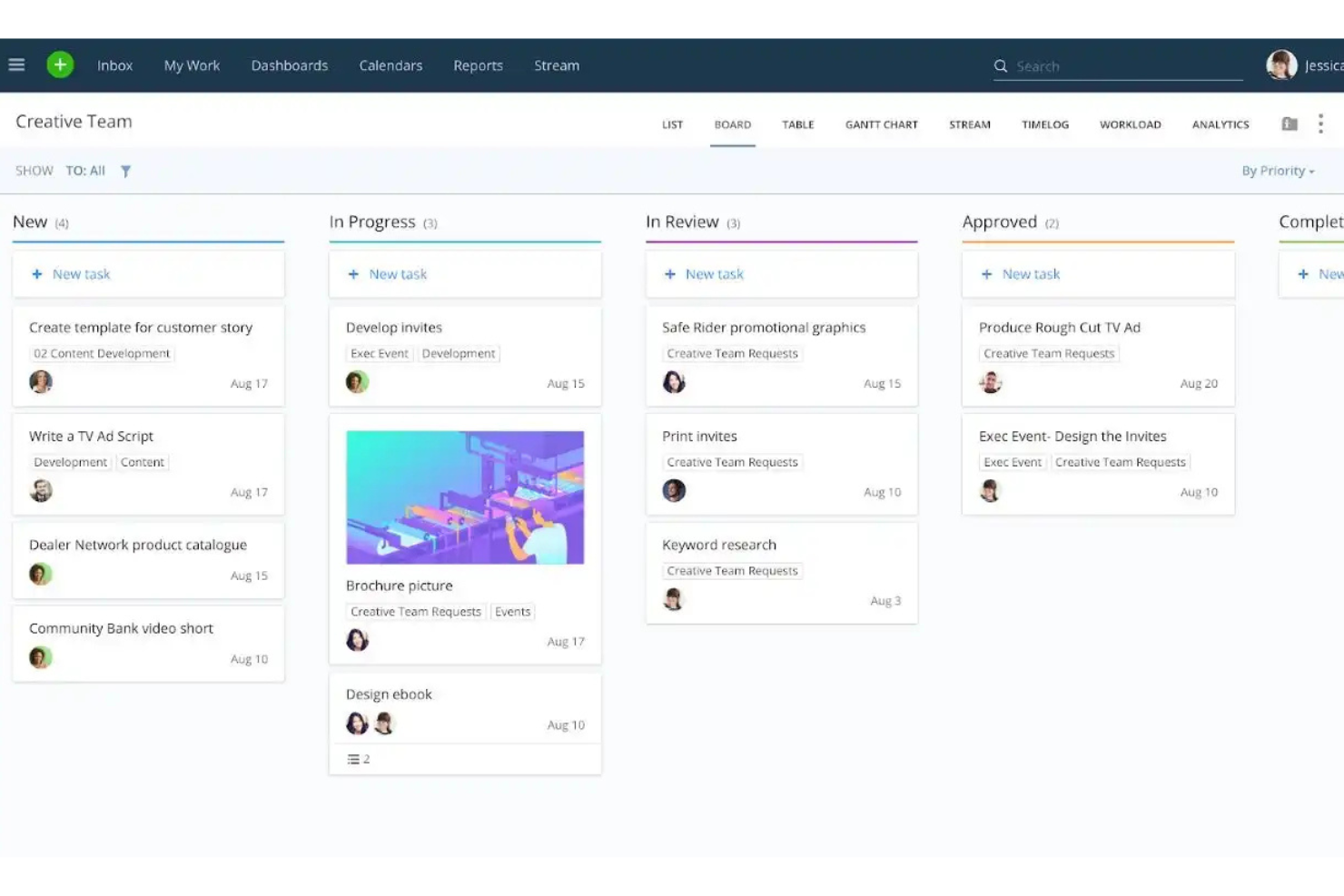
Wrike is a project management and collaboration platform designed for teams and enterprises that need to manage tasks, projects, and workflows efficiently. It's used by professionals who need a centralized tool for planning, executing, and tracking project progress.
Why it's a good Google Workspace alternative: Wrike offers enterprise project management features that provide more depth than Google Workspace's basic tools. Gantt charts help you visualize project timelines and dependencies clearly, and the platform's workload management module helps you allocate resources effectively across your team. Additionally, real-time reporting provides insights into project performance, enabling data-driven decisions. Both a free version and paid plans are available.
Standout Features and Integrations:
Features include custom request forms that simplify the intake process, helping your team capture all necessary information up front. The time-tracking feature helps monitor how long tasks take, aiding in productivity analysis. You can also create dashboards to view key metrics and project updates at a glance.
Integrations include Microsoft Teams, Salesforce, Google Drive, Slack, Dropbox, Box, Adobe Creative Cloud, Tableau, and more.
Pros and Cons
Pros:
- Real-time project tracking
- Effective resource allocation
- Extensive project management tools
Cons:
- Frequent unannounced UI shifts
- Some features are hidden in menus
New Product Updates from Wrike
Wrike Expands Gantt Planning, Approvals, and AI Work Intake
Wrike adds cross-project Gantt dependencies, flexible approval routing, and AI work intake through Wrike MCP. These updates give teams more control over planning, decision-making, and incoming work. For more information, visit Wrike’s official site.

Zoom
Best for video conferencing

Zoom is a video communication platform widely used by businesses, educational institutions, and individuals for virtual meetings and webinars. It facilitates real-time collaboration and communication through video, audio, and chat functions.
Why it's a good Google Workspace alternative: Zoom offers a dedicated platform for video conferencing, which is more specialized than Google Workspace's general communication tools. With features such as HD video and audio, your team can have clear and effective meetings. Breakout rooms allow for smaller group discussions within larger meetings, improving collaboration.
Standout Features and Integrations:
Features include virtual backgrounds that let you customize your meeting environment, adding a professional touch. Host controls provide you with the ability to manage participants effectively, keeping meetings running smoothly. Zoom also offers webinars and large meetings, accommodating up to thousands of participants, making it versatile for different needs.
Integrations include Microsoft Teams, Slack, Salesforce, Google Calendar, Outlook, Dropbox, HubSpot, Calendly, Zapier, Asana, and more.
Pros and Cons
Pros:
- Effective host controls
- Versatile meeting options
- High-quality video and audio
Cons:
- Security concerns in the past
- Can consume significant bandwidth
Outras alternativas ao Google Workspace
Eis algumas alternativas adicionais ao Google Workspace que não entraram na minha lista restrita, mas que vale a pena consultar:
- Obsidian
For personal knowledge management
- Routine
For integrated task and calendar management
- Zoho Workplace
For affordable, all-in-one suite migration


How I Evaluate Google Workspace Alternatives
I split my evaluation into baseline requirements—real-time docs, business email, cloud storage—and the differentiators that make one platform worth migrating to over another.
Core Functionality (Table Stakes For This List)
When I'm selecting tools for my list, I rank each one on a scale from 0 (does not offer the functionality) to 5 (excels in this area) for each core functionality listed below. Then, I calculate the tool's total score into a percentage. Each tool needs to achieve a minimum total score of 65% to be considered for inclusion.
- Document Collaboration: I check whether teams can co-edit docs, spreadsheets, and slides in real time with commenting, version history, and change tracking.
- Cloud Storage & File Sharing: Each platform's storage, folder structure, and sharing permissions matter—especially for teams passing deliverables to external stakeholders.
- Business Email & Calendar: I look for custom-domain email and shared calendars with scheduling tools, since most project teams rely on these daily.
- Team Communication: Built-in chat, video calls, or channels keep conversations close to the work. Platforms like Zoho Workplace and Microsoft 365 bundle these natively.
- Task & Project Tracking: I evaluate whether the platform offers assignable tasks, due dates, or project views—features that connect productivity tools to actual delivery.
- Third-Party Integrations: Connecting to tools like Jira, Asana, or Slack through native integrations or an open API is essential for fitting into an existing PM stack.
Once I have a list of tools that meet this criteria, I consider what sets each platform apart.
Differentiating Factors (What Sets Vendors Apart)
Here's how I compare and contrast different vendors:
Standout Features
AI-powered assistants add real value here—I look for platforms where AI can draft documents, summarize threads, or auto-generate tasks from notes. Client and guest portals matter when your team shares deliverables externally. Platforms like Notion and Zoho Workplace offer limited external access without requiring paid seats. No-code automation builders are worth evaluating too, since triggering approvals or routing tasks across tools can replace standalone workflow apps entirely.
Beyond Features
Migration ease is the first thing I evaluate—switching from Google Workspace means moving years of files, emails, and folder structures. Platforms like Microsoft 365 and Zoho Workplace offer dedicated import tools that reduce that friction. Pricing models also vary widely; I check whether guest or external collaborator access requires paid seats, since project teams often loop in contractors. Security certifications like SOC 2 and GDPR compliance matter too, especially for teams handling sensitive project data across regions.
Por que procurar uma alternativa ao Google Workspace?
Embora o Google Workspace seja uma boa opção como ferramenta de produtividade baseada na nuvem, existem vários motivos pelos quais alguns utilizadores procuram soluções alternativas. Poderá estar à procura de uma alternativa ao Google Workspace porque:
- Precisa de melhores controlos de privacidade dos dados
- A sua equipa necessita de funcionalidades mais avançadas
- Depara-se com problemas de integração com outras ferramentas
- Pretende mais opções de personalização
- A sua empresa precisa de alojamento local dos dados
- Procura uma solução mais económica
Se alguma destas situações lhe é familiar, veio ao sítio certo. A minha lista inclui várias opções de ferramentas de produtividade baseadas na nuvem, mais adequadas para equipas que enfrentam estes desafios com o ecossistema Google e procuram soluções alternativas.
Características
Eis algumas das principais características do Google Workspace para o ajudar a comparar as soluções alternativas:
- E-mail profissional: Disponibiliza o serviço de e-mail e alojamento de e-mail do Gmail com nomes de domínio personalizados e e-mails empresariais para reforçar a credibilidade da sua marca.
- Gestão de ficheiros: Oferece opções seguras de armazenamento e partilha de ficheiros através do Google Drive para a sua equipa.
- Reuniões por vídeo: Utiliza o Google Meet para colaboração em tempo real e videoconferências. Se as reuniões são a parte do Google Workspace que pretende substituir, compare as alternativas ao Google Meet.
- Integração de aplicações: Integra-se facilmente com aplicações externas para melhorar os seus fluxos de trabalho.
- Gestão administrativa: Proporciona controlo centralizado sobre as contas de utilizador e as definições de segurança através da consola de administração.
- Segurança dos dados: Retém e monitoriza os dados empresariais para garantir a segurança através do Google Vault e suporta vários protocolos de autenticação.
- Criação de websites: Permite desenvolver facilmente websites com o Google Sites, sem conhecimentos de programação.
- Automatização: Automatiza tarefas para tornar os seus processos empresariais mais eficientes.
- Compatibilidade com dispositivos: Está otimizado para utilização em vários navegadores e sistemas operativos, incluindo Android e macOS, especialmente com o Google Chrome.
- Colaboração em tempo real: Permite que vários utilizadores editem documentos em simultâneo, melhorando o trabalho em equipa.