

De 10 beste programmene for tidsregistrering for små bedrifter vurdert i 2026

Beste tidsregistreringsprogramvare for små bedrifter – kortliste


Å drive en liten bedrift medfører sine egne utfordringer, særlig når det gjelder tidsregistrering. Hvert minutt teller, og det kan være en konstant kamp å holde oversikt over teamets tid og arbeidstimer. Det er her programvare for tidsregistrering kommer inn i bildet, slik at du kan administrere arbeidskostnader og øke produktiviteten.
Det riktige verktøyet utgjør hele forskjellen, så vi har testet en rekke alternativer for å gi deg et objektivt bilde av den beste tilgjengelige programvaren.
I denne artikkelen deler vi våre beste anbefalinger for den beste programvaren for tidsregistrering for små bedrifter. Du finner innsikt i funksjoner, fordeler og hva som gjør hvert alternativ unikt. La oss se nærmere på alternativene og finne det som passer best for teamet ditt.
Why Trust Our Software Recommendations
Our team has been testing and reviewing software since 2012. As project managers ourselves, we know how difficult—and important—it is to choose the right software.
For this guide, we evaluated tools using hands-on testing and independent research, scoring tools using our selection criteria. We also draw on insights from industry thought leaders and practicing project management experts.
Our reviews reflect our human editorial judgment, not a sales pitch.
Expert reviewers:
Sammenligningstabell: Tidsregistrering for små bedrifter
Denne sammenligningstabellen oppsummerer prisdetaljene for mine beste løsninger for tidsregistrering for små bedrifter.
| Tool | Best For | Trial Info | Price | ||
|---|---|---|---|---|---|
| 1 | Best for deskless teams | 14-day free trial | From $29/month (billed annually) | Website | |
| 2 | Best as an AI for business | Free demo available | From $8/user/month | Website | |
| 3 | Best for integrating calendar events | 14-day free trial + free demo available | From $6.42/user/month (billed annually) | Website | |
| 4 | Best for setting up accrual rules | 14-day free trial + free demo available | From $4.99/user/month + $19/month base fee (billed annually) | Website | |
| 5 | Best for quick task switching | Free plan + 30-day free trial + free demo available | From $9/user/month (billed annually) | Website | |
| 6 | Best for combining time and budget management | Free plan + 30-day free trial + free demo available | From $6/user/month (billed annually) | Website | |
| 7 | Best for multi-level timesheet approvals | 30-day free trial + free plan available | From $9/user/month (billed annually) | Website | |
| 8 | Best for browser extension tracking | Free plan + 7-day free trial available | From $4.99/user/month | Website | |
| 9 | Best for payroll integration | 30-day free trial | From $20/month + $10/user/month | Website | |
| 10 | Best for AI time tracking insights | Free 14-day trial + free demo available | From $9/user/month (billed annually) | Website |


Anmeldelser av den beste tidsregistreringsprogramvaren for små bedrifter
Nedenfor finner du detaljerte sammendrag av den beste programvaren for tidsregistrering for små bedrifter som kom med på kortlisten vår. Hvert alternativ gir en detaljert gjennomgang av de viktigste funksjonene, fordeler og ulemper, integrasjoner og ideelle bruksområder, slik at du kan finne det beste verktøyet for deg.
Best for deskless teams
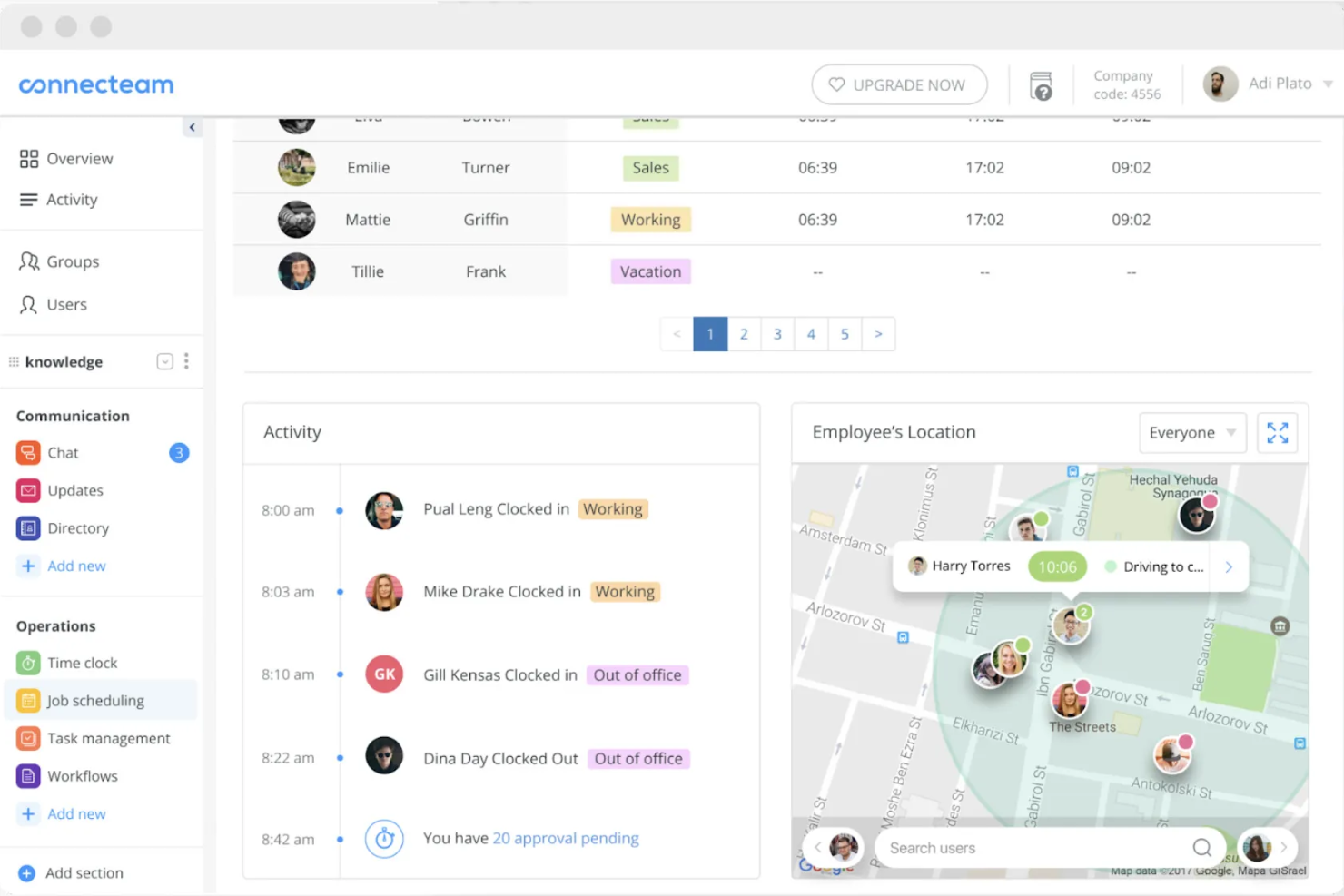
Connecteam is a time tracking and workforce management software designed for deskless teams across industries. It enables users to track time, manage schedules, and communicate efficiently.
Why I picked Connecteam: It caters specifically to deskless teams, making it easy for your team to clock in and out from any location. You can manage schedules and communicate with employees directly through the app. The tool also offers GPS tracking, providing accurate time entries.
Standout features and integrations:
Features include task management tools that help assign and prioritize tasks efficiently for better team management. You can also use the communication tools to send instant updates and messages to your team. Connecteam offers shift management, allowing you to quickly create and adjust schedules.
Integrations include QuickBooks, Xero, Zapier, Wix, Shopify, and more.
Pros and Cons
Pros:
- Free small-business plan with core tools
- All-in-one hub for deskless operations
- GPS breadcrumbs show entire shift routes
Cons:
- The feature-rich app can overwhelm new admins
- Reporting and analytics remain fairly limited
New Product Updates from Connecteam

Connecteam Expands Break and Timesheet Controls
Connecteam adds flexible break thresholds, personalized policies, auto-end options, a centralized exceptions report, and improved timesheet issue visibility to help teams manage breaks and timesheets more effectively. For more information, visit Connecteam’s official site.
 .
.
Best as an AI for business
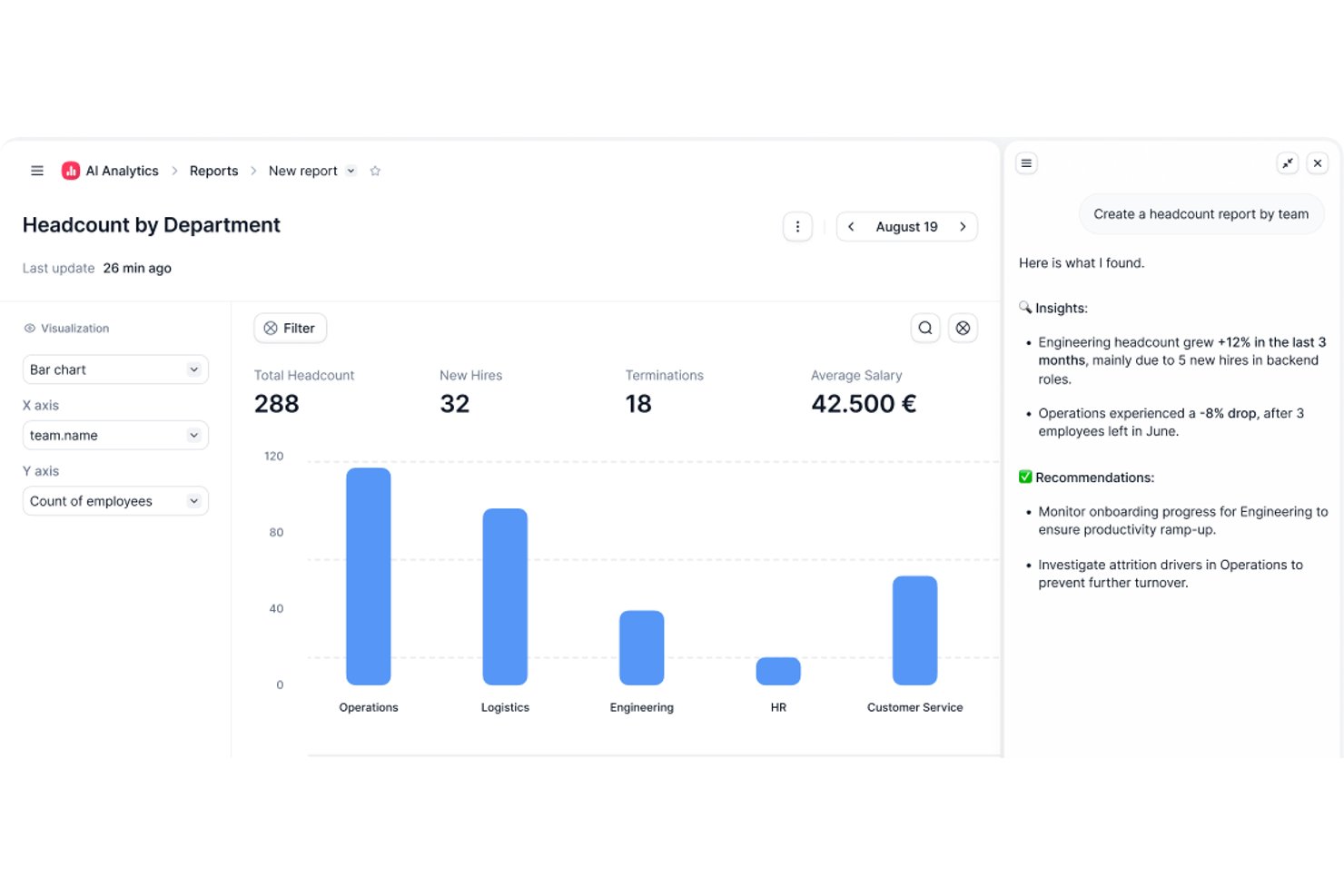
Factorial is an AI-powered HR and business operations platform that brings time tracking, project management, scheduling, and reporting together with an AI layer that handles day-to-day tasks like timetable planning and policy questions.
Who Is Factorial Best For?
Factorial is a strong fit for small businesses that want AI handling day-to-day operations—timetable planning, policy questions, and reporting—alongside time tracking.
Why I Picked Factorial
I've included Factorial in my top picks because it brings AI directly into daily business operations, handling tasks like timetable planning, report generation, and answering employee policy questions without manual effort. I especially like how its AI-powered reporting lets you query project data in plain language, and how live margin tracking by project phase keeps profitability visible in real time.
Factorial Key Features
- Smart project quoting: Build phase-level cost quotes based on team capacity and automatically convert approved quotes into active projects.
- Multi-method clock-in: Employees can clock in via QR code, GPS, geofencing, or mobile app, with entries linked directly to assigned projects.
- Phase-by-phase margin tracking: Monitor budget consumption and profitability at the individual project phase level as costs are logged in real time.
- Natural language reporting: Use the Factorial One AI assistant to query project and HR data in plain language and generate reports without manual setup.
Factorial Integrations
Factorial offers integrations with Monday.com, Microsoft Power BI, Slack, Google Workspace, Okta, Sage, and Microsoft Business Central. It also provides a public API and supports Zapier.
Pros and Cons
Pros:
- GPS and QR clock-ins suit field teams
- Phase-level margins expose project profitability
- AI answers policy questions and creates reports
Cons:
- No native client invoicing from tracked hours
- HR-first design limits dedicated timer depth

DeskTime
Best for integrating calendar events
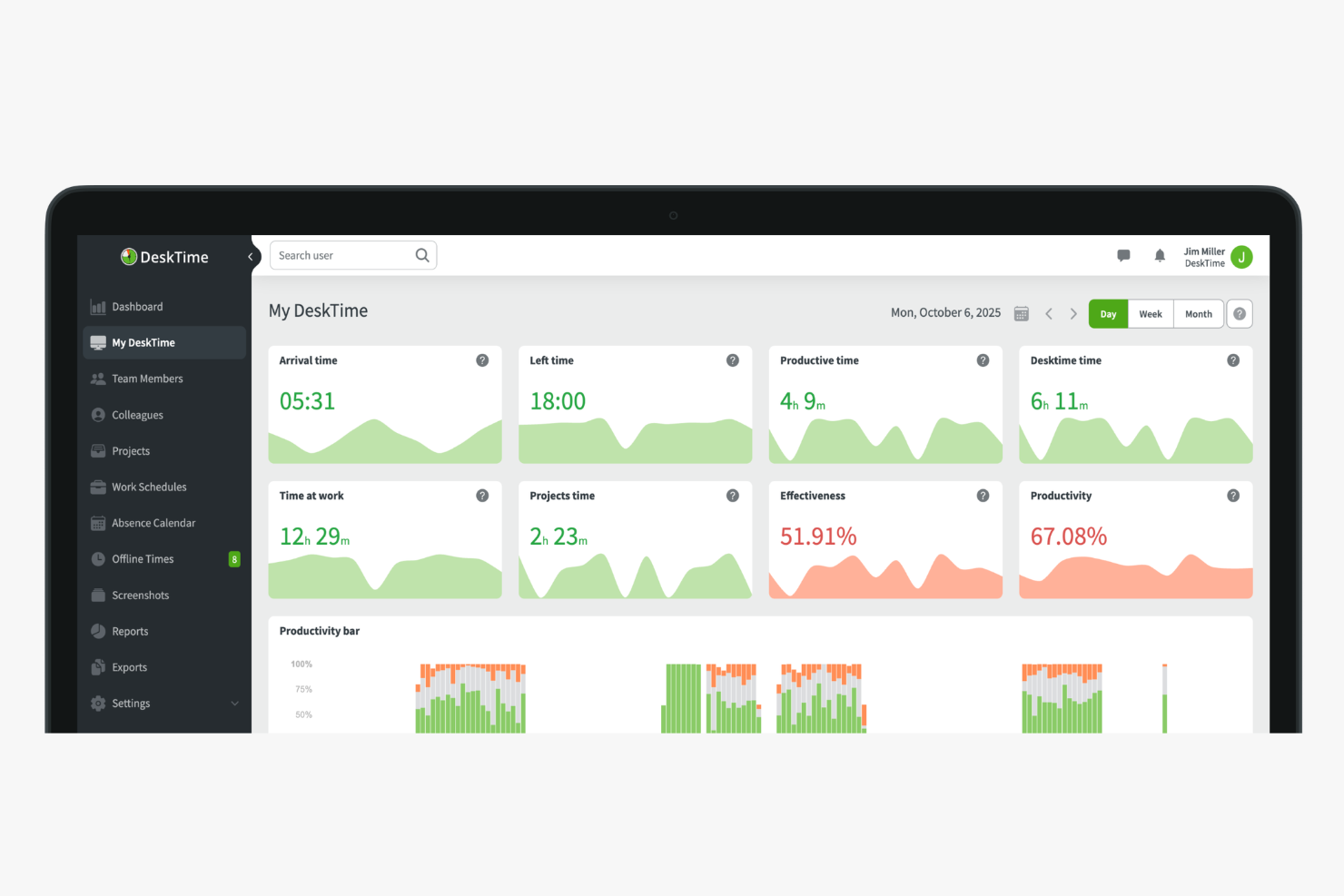
DeskTime is an automatic time tracking tool that logs app and URL usage, tracks project-level hours, calculates employee productivity, and manages attendance and absences for small teams.
Who Is DeskTime Best For?
DeskTime is a good fit for small business owners and team leads who need automatic time tracking without relying on employees to log hours manually.
Why I Picked DeskTime
I've included DeskTime in my top picks because of how it connects with Google Calendar and Outlook Calendar to fill meeting times directly into the daily timeline. Instead of manually logging time spent in a standup or a client call, DeskTime pulls those events in automatically. That means your tracked hours actually reflect how the day was spent, including time in meetings, without asking anyone to do extra data entry. I think that matters a lot for small teams where no one has time to maintain a second system.
DeskTime Key Features
- Shift scheduling: Plan and assign work shifts for team members directly within DeskTime's schedule view.
- Cost calculation: Assign hourly rates to employees or projects and have DeskTime calculate labour costs from tracked time.
- Custom reports: Filter time and productivity data by employee, project, or date range and export the results.
- Private time mode: Let employees pause tracking for personal tasks without recording any activity.
DeskTime Integrations
Integrations include Google Calendar, Outlook Calendar, Trello, Gitlab, Asana, Jira, and Zapier.
Pros and Cons
Pros:
- Supports offline and away-from-desk logging
- Classifies activity as productive or unproductive
- Tracks app and website time automatically
Cons:
- Lacks predictive web category filtering
- Mobile app has limited tracking features

Best for setting up accrual rules
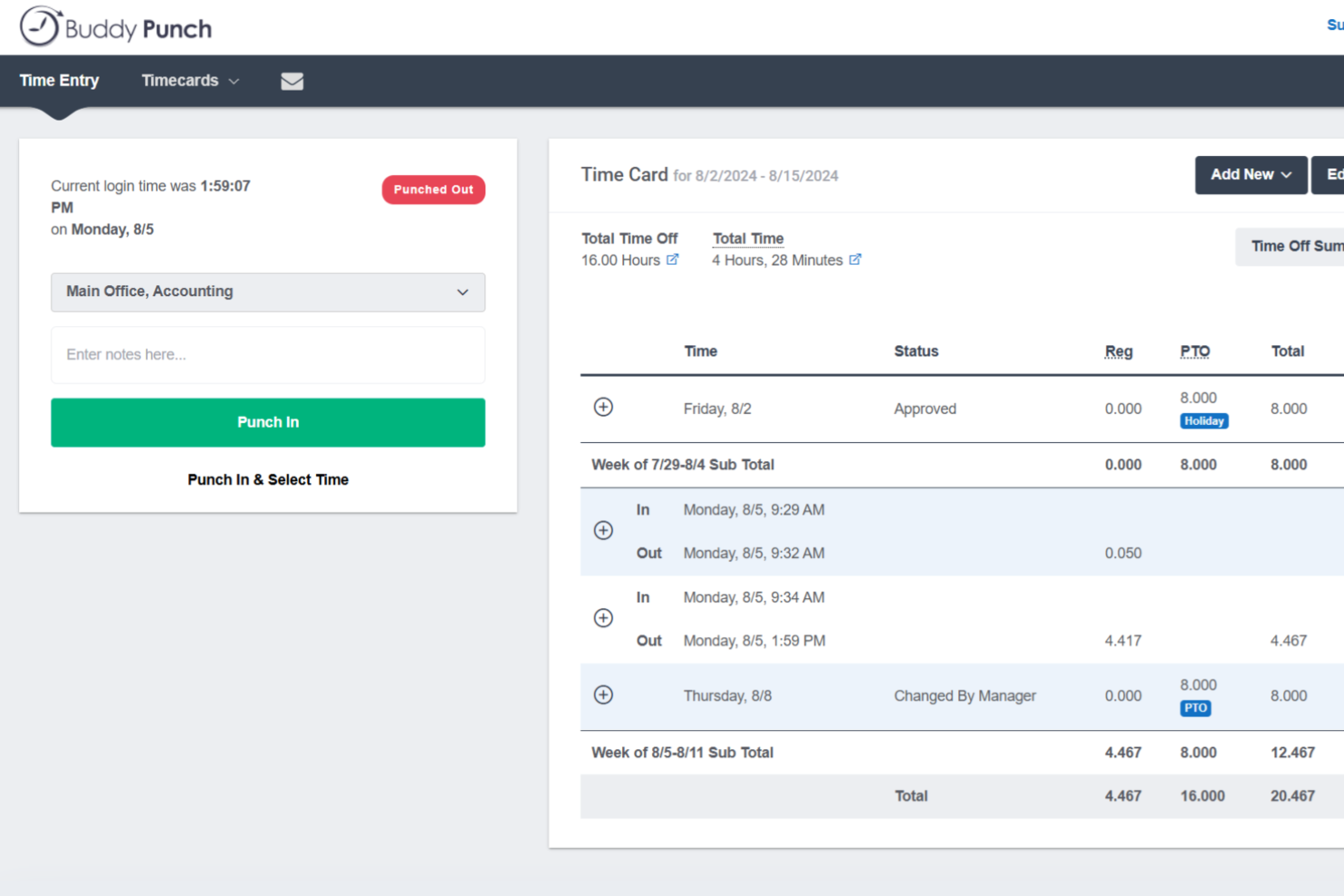
Buddy Punch is a time tracking platform built for small businesses with hourly workforces, combining employee clock-in/out, PTO management, scheduling, GPS tracking, and payroll integrations in one place.
Who Is Buddy Punch Best For?
Buddy Punch is a strong fit for small businesses that manage hourly, shift-based, or field employees across industries like retail, construction, healthcare, and hospitality.
Why I Picked Buddy Punch
I've included Buddy Punch in my top picks because its PTO management is genuinely one of the most hands-off systems I've used. You set up accrual rules once, and Buddy Punch automatically adds hours to employee balances on your schedule. Employees can check their own balances and submit time-off requests directly from the app, and when you approve a request, Buddy Punch automatically deducts the hours from their balance, adds the time to their timesheet, and flags the absence on the upcoming schedule. That's three manual steps your team no longer has to do.
Buddy Punch Key Features
- GPS tracking: Logs an employee's location at the time they punch in or out, so you always know where field or remote workers are clocking from.
- Drag-and-drop scheduling: Build and publish employee schedules visually, with shift assignments your team can view directly from the mobile app.
- Punch rounding: Automatically rounds clock-in and clock-out times to the nearest set interval, reducing manual timesheet corrections at the end of each pay period.
- Overtime alerts: Notifies managers when an employee is approaching overtime thresholds before the hours are logged.
Buddy Punch Integrations
Buddy Punch offers native integrations focused on payroll, including QuickBooks Online, QuickBooks Desktop, ADP Workforce Now, Gusto, Paychex, Paycor, Paylocity, Rippling, Workday, and SurePayroll, with 17+ payroll integrations in total. It also connects with Zapier and provides an API for custom integrations, plus single sign-on support through Google, Apple, Okta, and OneLogin.
Pros and Cons
Pros:
- Built-in PTO accruals and time-off calendar
- Geofencing blocks off-site clock-ins automatically
- Multiple clock-in methods including text-to-punch
Cons:
- Mobile app lacks some web version features
- No offline mode for areas without internet
Toggl
Best for quick task switching
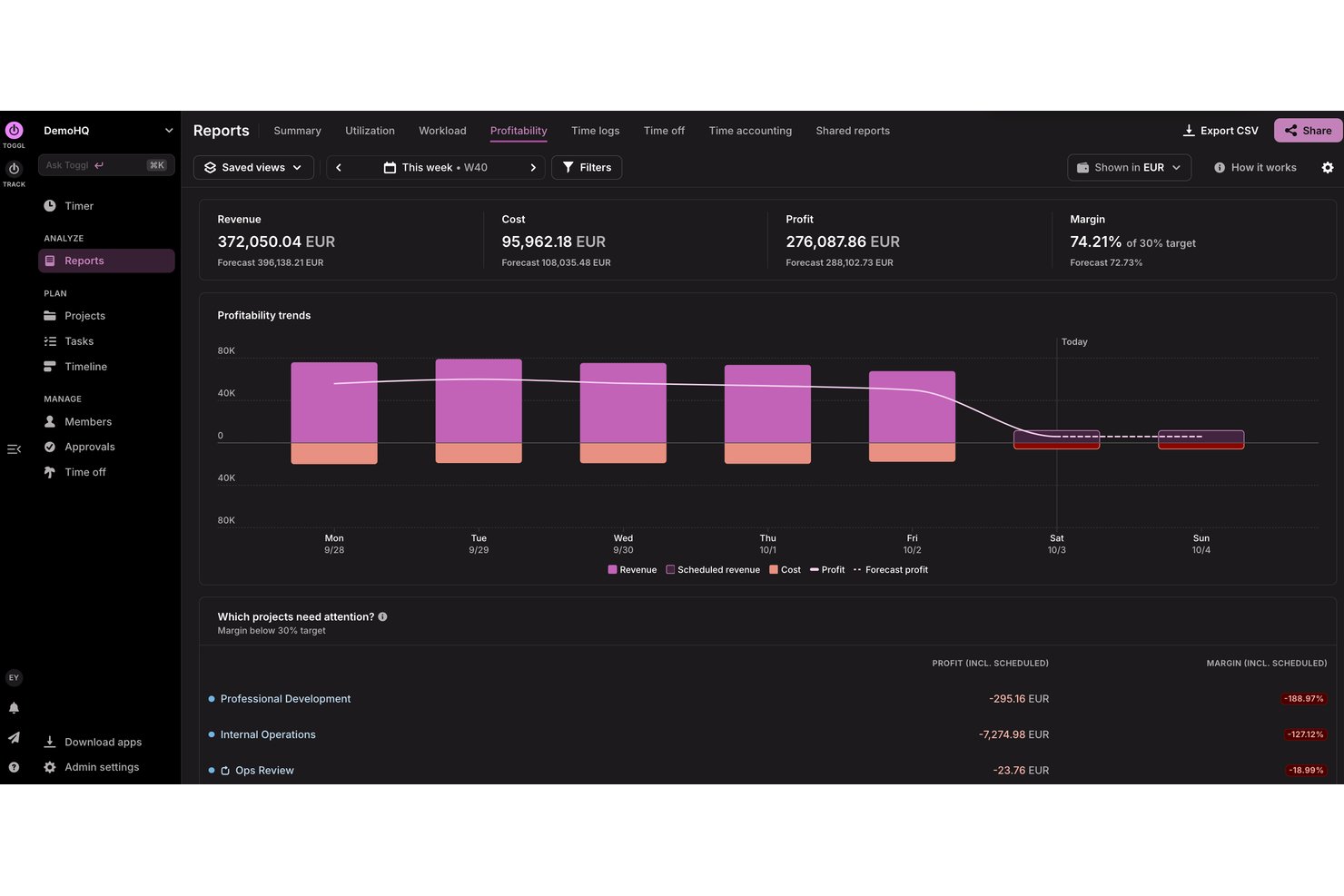
Toggl is a tool for freelancers and small to medium-sized businesses to track time, plan capacity, analyze profitability, and manage projects with ease.
Why I picked Toggl: Its simple interface lets you start tracking time without extensive training. You can quickly switch between tasks to maintain accurate time entries and access detailed reports that provide insights into time usage. Its focus on simplicity makes it a great choice for teams that value ease of use.
Standout features and integrations:
Features include a timer that allows you to track time with a single click, as well as automatic tracking on desktop. You can also use the reporting feature to gain insights into how time is spent across projects, as well as into project profitability and team capacity. The tool provides reminders and notifications to help you stay on top of your tasks. You can also use Toggl AI to get plain-language answers to questions about how time is spent, how much time a team has logged, and much more
Integrations include Google Calendar, Outlook, Jira, Asana, Todoist, GitHub, and more
Pros and Cons
Pros:
- Calendar view clarifies daily time blocks
- Intuitive interface freelancers love
- Generous free tier for small teams
Cons:
- No GPS tracking or geofencing
- Frequent feature changes confuse existing users

actiTIME
Best for combining time and budget management
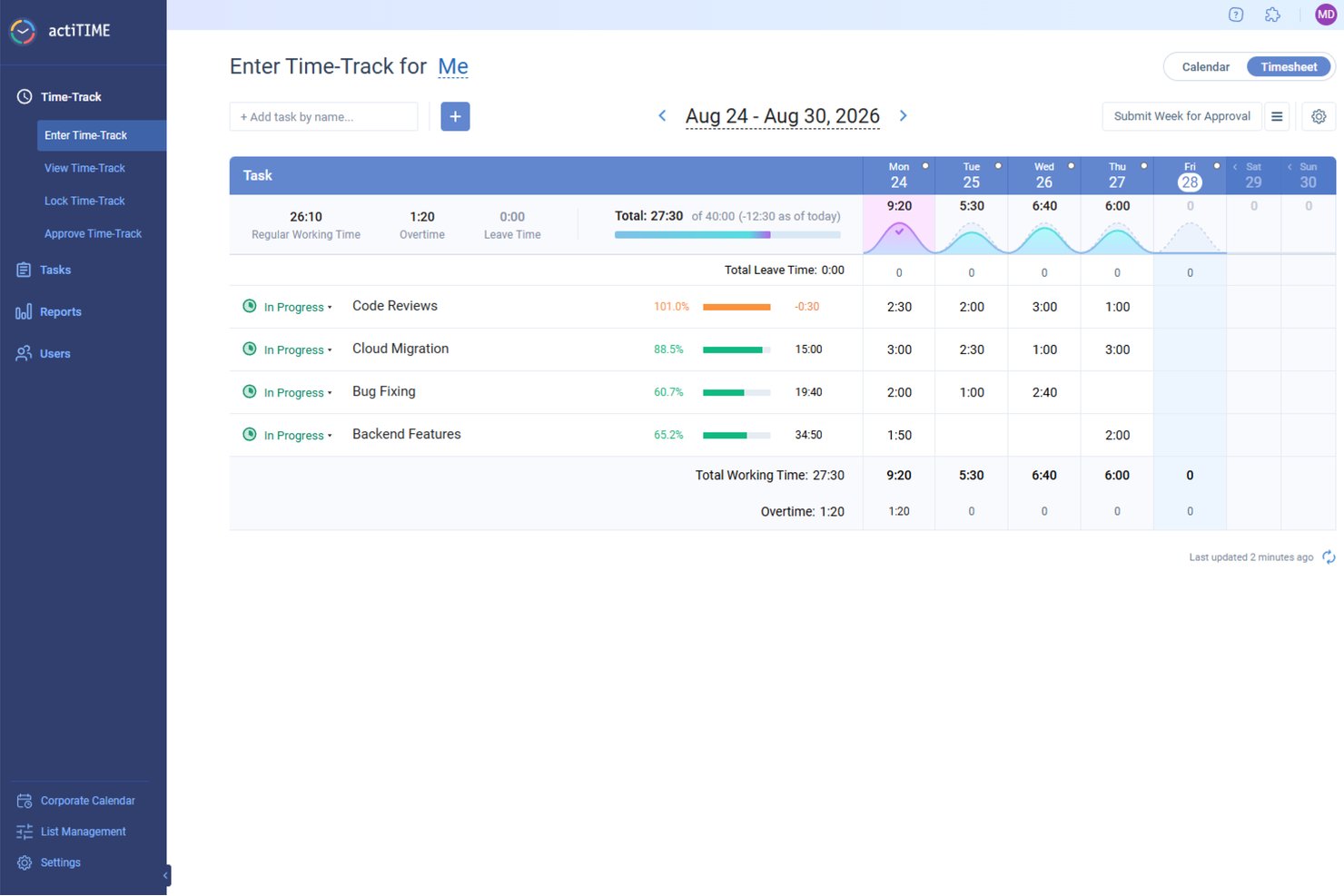
For small businesses seeking an efficient way to manage time and budget, actiTIME offers a tailored solution that addresses these needs with precision. Designed to support project tracking, budget management, and team collaboration, it appeals to a wide range of industries. By integrating easily with tools like QuickBooks, actiTIME ensures your operations are not only timely but also cost-effective, allowing you to stay focused on delivering quality work.
Why I Picked actiTIME
I picked actiTIME because its unique ability to combine time tracking with budget management makes it highly relevant for small businesses. One standout feature is its project tracking, which allows you to assign tasks, set deadlines, and monitor progress, ensuring projects are completed on time. Additionally, the budget management tools enable you to track project costs and set financial goals, helping your team stay within budget. With these features, actiTIME directly addresses the challenges of time and budget management, making it a great choice for small businesses.
actiTIME Key Features
In addition to its project tracking and budget management capabilities, I also found several other features that cater to small business needs:
- Reporting and Analytics: Generate detailed reports on time usage, project progress, and team performance to make informed decisions.
- Billing and Invoicing: Customize billing rates and generate invoices based on tracked time and expenses.
- Leave Management: Manage paid time off (PTO) and set accrual rules to ensure accurate leave tracking.
- Team Management: Assign work, manage roles, and monitor team performance to optimize productivity.
actiTIME Integrations
Integrations include QuickBooks, Zapier, and an API for custom integrations.
Pros and Cons
Pros:
- Offers customizable workflows for project management
- Allows for detailed financial and time reporting
- Includes mobile apps for both Android and iOS devices
Cons:
- Per user pricing can add up for smaller businesses
- Lacks some advanced features, like GPS and facial recognition
New Product Updates from actiTIME

actiTIME Visual Hour Indicator and Time-Track Report Redesign
actiTIME adds a wave-style hour indicator to the Timesheet and Calendar views and refreshes the Time-Track report for smoother navigation and clearer visuals. For more information, visit actiTIME's official site.
Beebole
Best for multi-level timesheet approvals
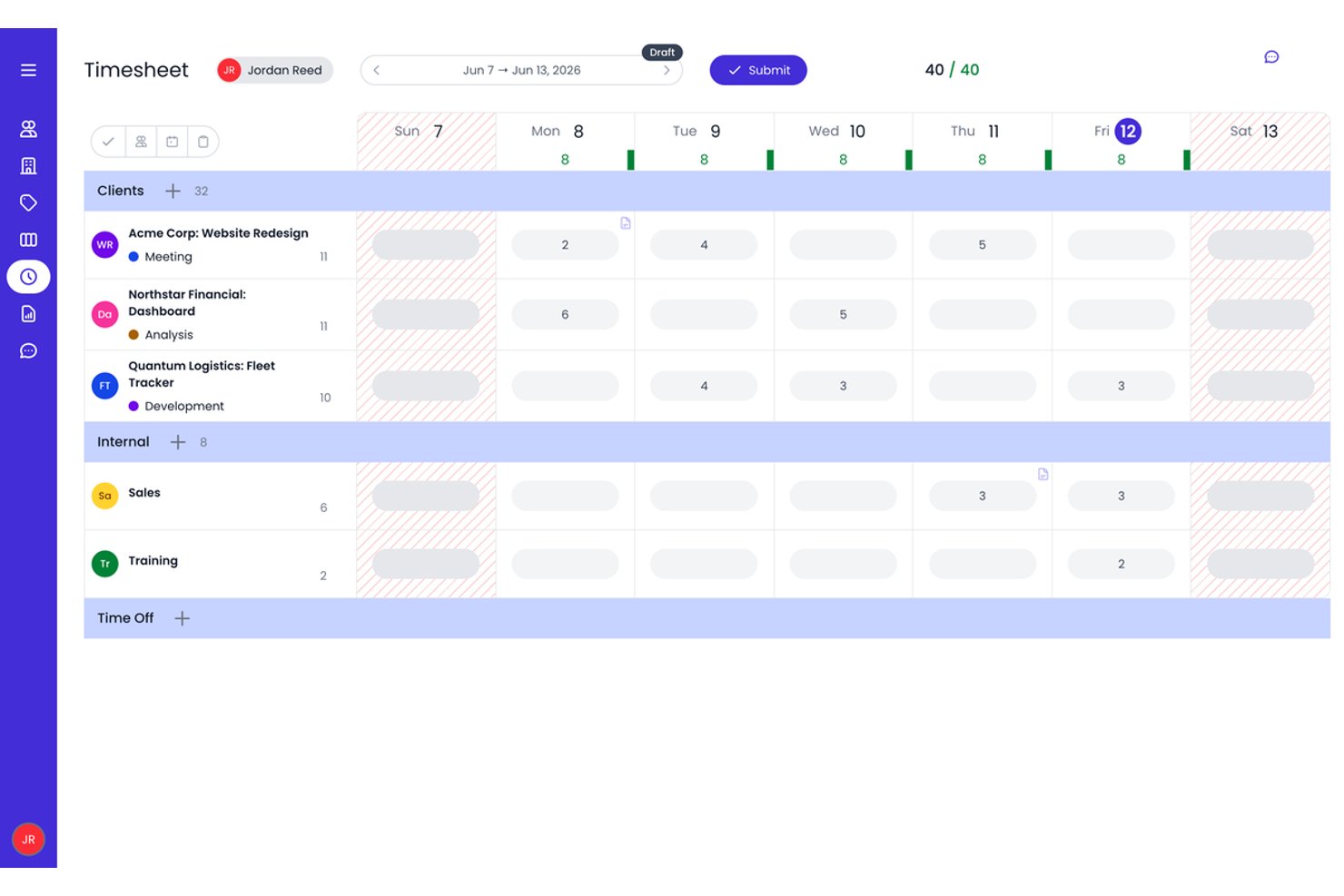
Beebole is a time tracking platform for small businesses that combines project-based time logging, multi-level timesheet approvals, resource planning, and custom reporting.
Who Is Beebole Best For?
Beebole is a strong fit for small business project managers and agency operators who need structured, multi-stage timesheet approval workflows alongside project-level billing rate controls.
Why I Picked Beebole
Beebole earns its spot on my shortlist because of how seriously it takes timesheet approvals. You can configure multi-stage approval chains, so a time entry might move from team lead to department head to finance before it's locked, which I find invaluable for client billing accuracy. I also like that planned work assigned in the resource planning view flows directly into individual timesheets, giving you a live plan-vs.-actual view without any manual reconciliation.
Beebole Key Features
- AI-suggested time entries: Beebole analyzes your desktop and browser activity to automatically suggest time entries, reducing manual logging.
- Custom report builder: Build multi-dimensional reports across 11 chart types, then schedule automated delivery or export directly to Excel or Google Sheets.
- Multi-currency billing rates: Set billable rates per user, project, client, or task in any currency, supporting teams with cross-border clients.
- Built-in resource planning: Visualize team capacity and workload across Gantt, Kanban, and Staffing views without leaving the platform.
Beebole Integrations
Beebole offers nine native integrations, including Asana, Jira, Linear, monday.com, QuickBooks Online, Xero, BambooHR, Google Calendar, and Microsoft Outlook Calendar. It also supports a GraphQL API, webhooks, and Zapier.
Pros and Cons
Pros:
- Highly customizable reporting and data exports
- AI-suggested time entries reduce manual logging
- Multi-level timesheet approval workflows built in
Cons:
- Advanced features gated to highest plan
- No native mobile app or GPS tracking

Clockify
Best for browser extension tracking

Clockify is a time tracking software for teams and individuals across various industries, including freelancers and consultants. It helps users track work hours and manage projects efficiently.
Why I picked Clockify: It offers a browser extension with real-time timers and detailed reports, making it easy to track time and productivity directly in your browser without switching between apps. This feature is perfect for those who spend most of their time online and want an easy way to log hours. Clockify also supports unlimited users, making it an ideal choice for growing teams.
Standout features and integrations:
Features include timekeeping with real-time timers, detailed time reports that provide insights into team productivity, and project management functionalities that allow you to organize tasks and deadlines effectively.
Integrations include Jira, QuickBooks, monday.com, Google Calendar, Notion, GitHub, and more.
Pros and Cons
Pros:
- Supports five users on the forever free plan
- Browser extension simplifies web-based tracking
- Detailed reports across clients and projects
Cons:
- Limited functionality when used offline
- No built-in payroll processing tools

Best for payroll integration
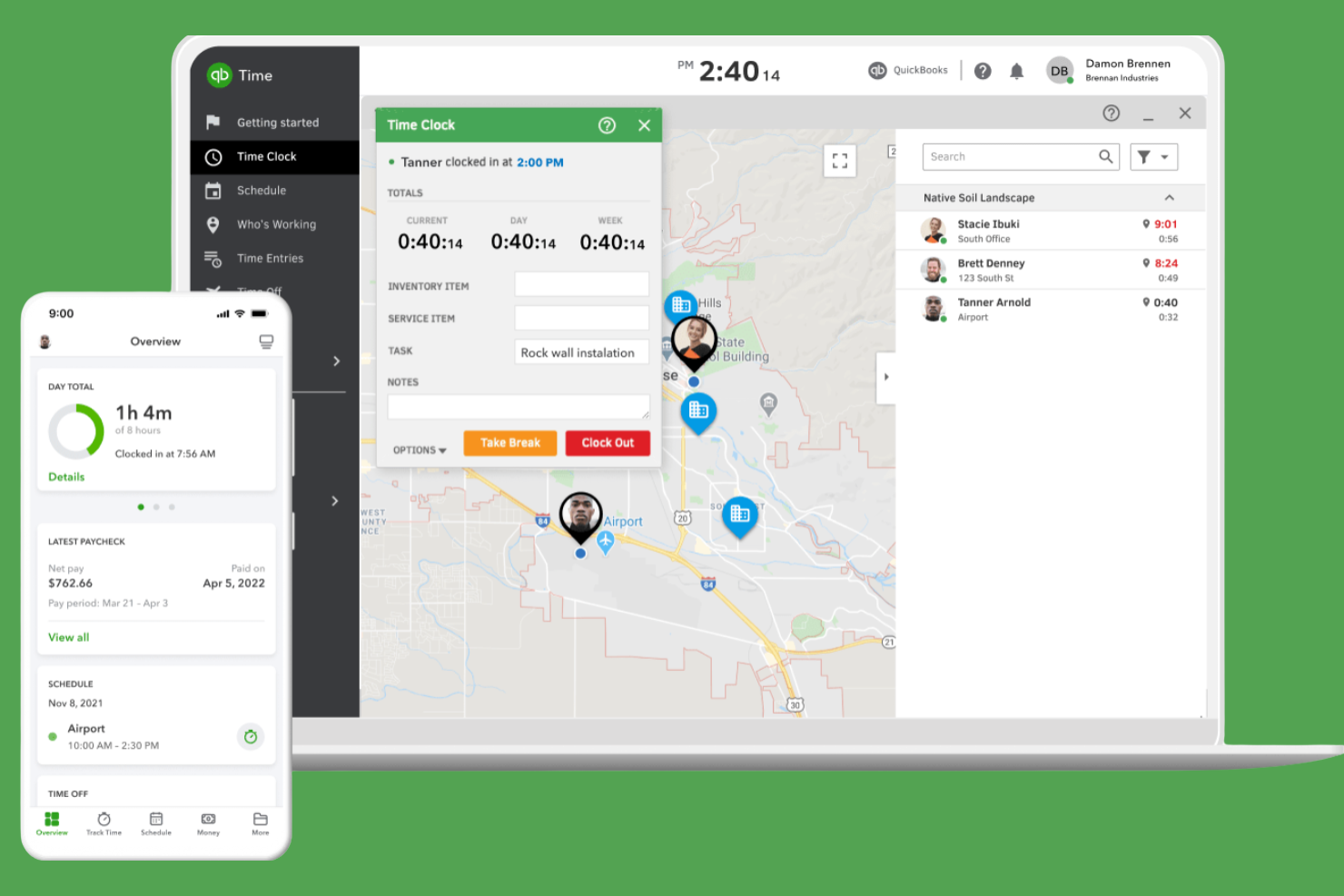
QuickBooks Time is a time tracking software for efficient payroll management. It serves small to medium-sized businesses by tracking employee hours and integrating with payroll systems.
Why I picked QuickBooks Time: It excels in payroll integration, making it easy to manage wages and tax calculations. The tool provides GPS tracking to monitor remote workers, providing accurate time entries and customized alerts for clock-ins and clock-outs.
Standout features and integrations:
Features include GPS tracking to monitor remote workers effectively. You can also set up job and shift scheduling to organize your team’s workload. The tool provides mobile time tracking, allowing your team to log hours from anywhere.
Integrations include ADP, Square, Paychex, and more.
Pros and Cons
Pros:
- Strong GPS tools for field crews
- Geofencing reduces time theft on jobs
- Deep native integration with QuickBooks payroll
Cons:
- Interface changes frustrate some long-time users
- Pricing gets expensive as headcount grows

Timely
Best for AI time tracking insights
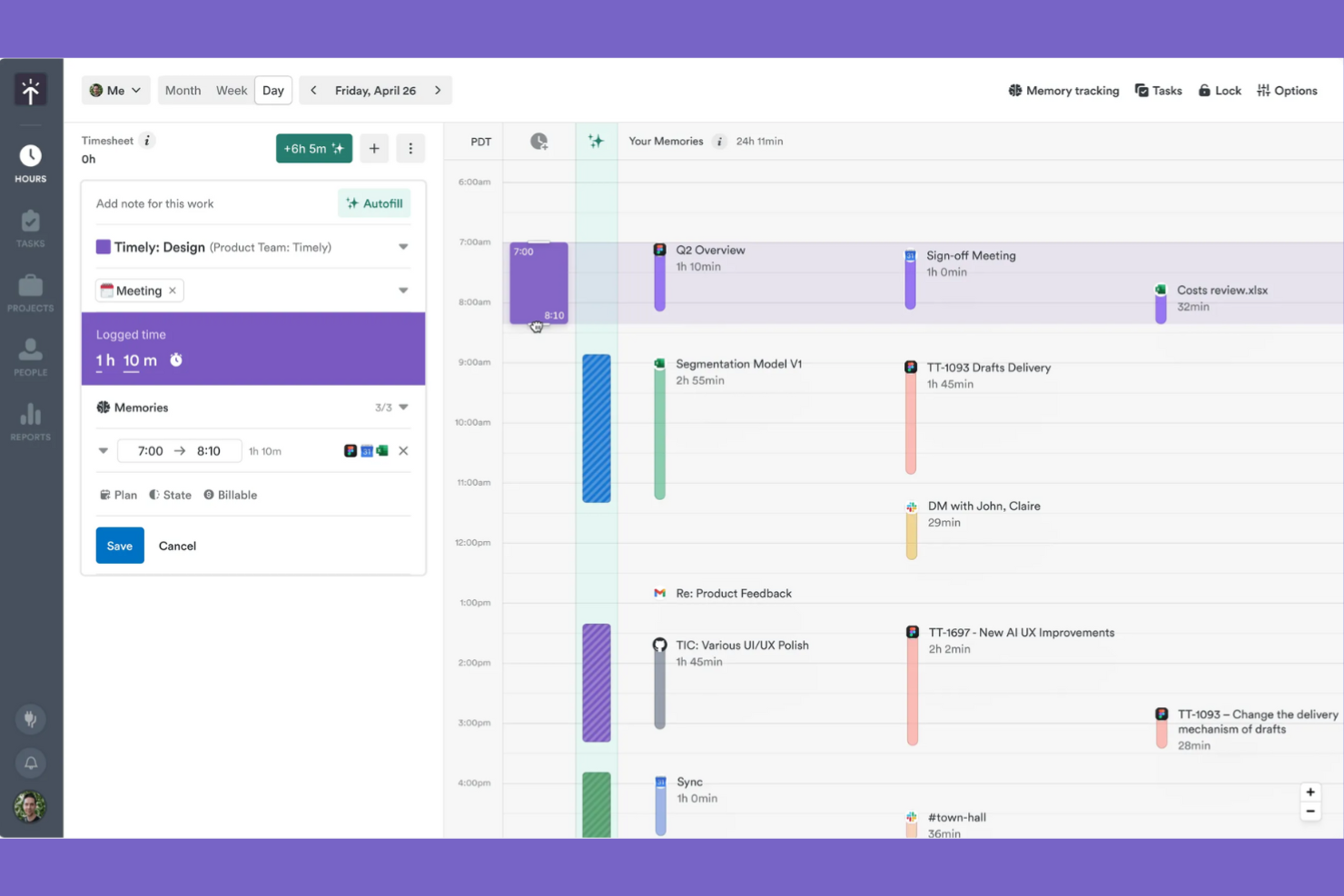
Timely is a time tracking software for small businesses, freelancers, and larger teams who want to efficiently manage projects and optimize productivity.
Why I picked Timely: It's known for its AI-driven tracking, which automatically logs your work activities without manual input. This feature suits teams managing multiple tasks that want to maintain accurate time tracking. The tool offers detailed project reports that help you understand where time is being spent.
Standout features and integrations:
Features include project budgeting to help you manage financial resources effectively. You can also use the tool's timeline view to get a visual representation of your team's workload. The reporting feature offers insights into productivity and time allocation.
Integrations include Outlook Calendar, Google Calendar, GitHub, Zoom, Jira, and more.
Pros and Cons
Pros:
- Strong project budgets and profitability views
- Frictionless UX encourages consistent time logging
- AI memory tracker auto-builds timesheets
Cons:
- AI categorizations sometimes need manual corrections
- Higher pricing than many small-business tools
Annen programvare for tidsregistrering for små bedrifter
Her er flere løsninger for tidsregistrering for små bedrifter som ikke kom med på kortlisten min, men som likevel er verdt å ta en titt på:
- My Hours
For customizable reports
- TimeCamp
For automatic time tracking
- RescueTime
For productivity insights
- Time Doctor
For remote team monitoring
- Timesheets.com
For HR integration
- Harvest
For project time invoicing
- Insightful
For real-time analytics and time mapping
- Homebase
For shift scheduling
- Paymo
For task management integration
- FreshBooks
For invoicing simplicity
- Hubstaff
For GPS location tracking


How I Evaluate Time Tracking Software for Small Business
I evaluate these tools in two layers: baseline capabilities a tool must have—like project-based timers and billable rate tracking—and differentiators that matter most to small business teams.
Core Functionality (Table Stakes For This List)
When I'm selecting tools for my list, I rank each one on a scale from 0 (does not offer the functionality) to 5 (excels in this area) for each core functionality listed below. Then, I calculate the tool's total score into a percentage. Each tool needs to achieve a minimum total score of 65% to be considered for inclusion.
- Project & Task Time Tracking: I check whether you can log hours against specific projects, tasks, and clients—using both live timers and manual entry—since that's how most small teams actually work.
- Timesheet Management: The tool should let team members submit timesheets and managers approve or reject them, ideally with reminders so you're not chasing people at the end of each pay period.
- Billable Hours & Rate Configuration: I look for the ability to set per-user, per-project, or per-client rates and flag entries as billable or non-billable, which is essential for agencies juggling multiple retainers.
- Reporting & Analytics: Good reporting means more than a basic time summary. I evaluate whether you can filter by project, team member, or date range and export data for client-facing or internal budget reviews.
- Team & User Management: Small teams still need role-based access. I look at how the tool handles permissions—for example, letting a project lead see their team's hours without exposing company-wide billing data.
- PM & Accounting Integrations: I evaluate native connections to tools like QuickBooks, Xero, Asana, and Jira, plus whether the platform supports Zapier or an open API for custom workflows your team already relies on.
Once I have a list of tools that meet this criteria, I consider what sets each platform apart.
Differentiating Factors (What Sets Vendors Apart)
Here's how I compare and contrast different vendors:
Standout Features
Budget alerts matter a lot when you're running multiple client projects on tight margins—I look for tools that notify you before a project exceeds its hour cap, not after. Built-in invoicing is another differentiator, especially for agency owners who want to go from tracked hours to a client-ready invoice without exporting to a separate billing tool. I also evaluate resource scheduling features tied to time data, since small teams juggling concurrent projects need a clear view of who's available and who's overbooked.
Beyond Features
Pricing structure is one of the first things I check. Small teams need transparent per-user pricing without enterprise minimums—and a free tier or starter plan helps when you're onboarding a team of five, not fifty. Time-to-value also matters: I look for self-serve setup with templates and in-app guidance so a non-technical project lead can get their team logging hours within a day. Cross-platform accessibility rounds it out, since distributed teams need native desktop, mobile, and browser extension options with offline sync to keep time entries accurate regardless of where they're working.
Slik velger du programvare for tidsregistrering for små bedrifter
Det er lett å sette seg fast i lange funksjonslister og komplekse prisstrukturer. For å hjelpe deg med å holde fokus mens du går gjennom den unike prosessen din for valg av programvare, er her en sjekkliste over faktorer du bør ha i tankene:
| Faktor | Hva du bør vurdere |
|---|---|
| Skalerbarhet | Kan verktøyet vokse sammen med virksomheten din? Sjekk om det støtter flere brukere eller flere funksjoner etter hvert som teamet vokser. |
| Integrasjoner | Fungerer det med de eksisterende systemene dine? Bekreft at det kan integreres med lønnssystemer, prosjektstyringsverktøy og andre verktøy du bruker. |
| Tilpasningsmuligheter | Kan du tilpasse det til arbeidsflyten din? Se etter alternativer for å tilpasse rapporter, dashbord og brukerroller. |
| Brukervennlighet | Er det enkelt for teamet ditt å ta i bruk? Test om grensesnittet er intuitivt, og se på brukeranmeldelser for tilbakemeldinger om brukervennligheten. |
| Implementering og opplæring | Hvor lang tid tar det å komme i gang? Vurder hvor tilgjengelige opplæringsressurser som videoer, webinarer eller produktomvisninger er. |
| Kostnad | Er prisene tydelige og innenfor budsjettet? Ta hensyn til totalkostnaden, inkludert eventuelle skjulte gebyrer eller rabatter for årsabonnementer. |
| Sikkerhetstiltak | Beskytter det dataene dine? Se etter kryptering, tilgangskontroller og samsvar med personvernregelverk som GDPR. |
| Tilgjengelig kundestøtte | Får du hjelp når du trenger det? Sjekk om kundestøtte er tilgjengelig døgnet rundt og gjennom flere kanaler, for eksempel chat, e-post eller telefon. |
Hva er tidsregistreringsprogramvare for små bedrifter?
Tidsregistreringsprogramvare for små bedrifter hjelper med å overvåke og registrere de ansattes arbeidstid. Disse verktøyene brukes ofte av ledere, HR-medarbeidere og eiere av små bedrifter for å sikre korrekte lønnsutbetalinger og øke produktiviteten. Funksjoner som tidsregistrering, rapportering og integrasjoner med lønnssystemer bidrar til effektiv administrasjon og nøyaktige data. Alt i alt hjelper disse verktøyene bedrifter med å spare tid og redusere feil ved registrering av de ansattes arbeidstid.
Funksjoner
Når du velger tidsregistreringsprogramvare for en liten bedrift, bør du se etter følgende viktige funksjoner:
- Tidsregistrering: Gjør det mulig for ansatte å registrere arbeidstiden nøyaktig ved hjelp av tidsklokker på nettet, mobilen eller i en kiosk, noe som støtter presise lønnsutbetalinger og fakturering.
- Rapportering: Gir detaljert innsikt i tidsbruken, slik at ledere kan analysere produktiviteten og finne områder som kan forbedres.
- Integrasjoner: Kobles til lønns- og prosjektstyringsverktøy for å støtte driften og redusere manuell dataregistrering.
- GPS-sporing: Overvåker hvor ansatte som jobber utenfor kontoret befinner seg, og gir nøyaktige tidsregistreringer for feltarbeid.
- Automatisk tidsregistrering: Registrerer arbeidsaktiviteter uten manuell inntasting for å automatisere tidsregistreringen, spare tid og redusere feil.
- Skiftplanlegging: Hjelper bedrifter med å planlegge og administrere ansattes skift, slik at alle holdes informert og organisert.
- Utgiftsregistrering: Overvåker prosjektkostnader og utgifter, noe som bidrar til budsjettstyring og økonomisk planlegging.
- Tilpassbart dashbord: Lar brukere tilpasse grensesnittet slik at det viser den mest relevante informasjonen for deres behov.
- Mobil tilgang: Gjør det mulig for ansatte å registrere tid og bruke funksjoner hvor som helst i en nettleser, skrivebordsapp eller på iOS- og Android-enheter, noe som gir større fleksibilitet og brukervennlighet.
- Sikkerhetstiltak: Beskytter sensitive data med kryptering og tilgangskontroller, og bidrar til samsvar med personvernregelverk.
Fordeler
Implementering av tidsregistreringsprogramvare i en liten bedrift gir flere fordeler for teamet og virksomheten. Her er noen av fordelene du kan se frem til:
- Nøyaktige lønnsutbetalinger: Gir presis beregning av de ansattes lønn ved å registrere arbeidstid og integreres med lønnssystemer.
- Økt produktivitet: Viser hvordan tiden brukes, slik at ledere og ansatte kan optimalisere arbeidsvaner og fokusere på prioriteringer.
- Kostnadsstyring: Overvåker prosjektutgifter og sammenligner tidsbruk med budsjetter for å bidra til kostnadskontroll og bedre økonomisk planlegging.
- Større ansvarlighet: Gir åpenhet rundt de ansattes arbeidstid, og oppmuntrer til ansvar og tillit i teamene.
- Fleksibel planlegging: Gjør det enkelt å planlegge og justere skift, slik at teammedlemmene holdes informert og arbeidsplanene fungerer smidig.
- Datadrevet innsikt: Gir verdifulle rapporter og analyser som støtter informerte beslutninger og strategisk planlegging.
- Større bekvemmelighet: Lar ansatte registrere tid og bruke funksjoner fra mobile enheter, noe som gir fleksibilitet og brukervennlighet.
Kostnader og priser
Å velge programvare for tidsregistrering for små bedrifter krever en forståelse av de ulike prismodellene og abonnementene som er tilgjengelige. Kostnadene varierer basert på funksjoner, teamstørrelse, tilleggstjenester og betalingsmetode, for eksempel månedlig betaling med kredittkort. Tabellen nedenfor oppsummerer vanlige abonnementer, gjennomsnittsprisene deres og typiske funksjoner som er inkludert i løsninger for tidsregistrering for små bedrifter:
Sammenligningstabell for programvare for tidsregistrering for små bedrifter
| Abonnementstype | Gjennomsnittspris | Vanlige funksjoner |
|---|---|---|
| Gratisabonnement | $0 | Grunnleggende tidsregistrering, begrenset rapportering og mobiltilgang. |
| Personlig abonnement | $5-$10/bruker/måned | Tidsregistrering, grunnleggende rapportering, mobiltilgang og begrensede integrasjoner. |
| Bedriftsabonnement | $10-$25/bruker/måned | Avansert rapportering, verktøy for prosjektstyring, integrasjoner med lønnssystemer og tilpassbare oversikter. |
| Foretaksabonnement | $15+/bruker/måned | Fullstendig rapportering, fullstendige integrasjoner, dedikert kundestøtte og avanserte sikkerhetsfunksjoner. |
Vanlige spørsmål om programvare for tidsregistrering for små bedrifter
Her er noen svar på vanlige spørsmål om programvare for tidsregistrering for små bedrifter:
Hvordan fungerer programvare for tidsregistrering?
Programvare for tidsregistrering registrerer tiden du og teamet ditt bruker på ulike oppgaver og prosjekter. Vanligvis starter du en tidtaker når du begynner på en oppgave, og stopper den når du er ferdig. Mange verktøy tilbyr også automatisk registrering som logger tid basert på aktiviteten på datamaskinen din. Dette bidrar til nøyaktig fakturering og produktivitetsanalyse. Du kan se og analysere den registrerte tiden gjennom rapporter, slik at du kan ta veloverveide beslutninger om arbeidsflyt og effektivitet.
Kan programvare for tidsregistrering integreres med verktøy for prosjektstyring?
Mange plattformer for tidsregistrering tilbyr direkte integrasjoner med verktøy som Asana, Trello, Jira eller Monday.com. Dette lar deg knytte registrerte timer direkte til bestemte oppgaver eller prosjekter, noe som gjør det enklere å analysere produktivitet og styre budsjetter.
Kan programvare for tidsregistrering brukes uten nettforbindelse?
Noe programvare for tidsregistrering kan brukes uten nettforbindelse. Med disse verktøyene kan du registrere timer uten nett og synkronisere dataene når du er på nett igjen. Dette er spesielt nyttig for team som arbeider i avsidesliggende områder eller områder med ustabil forbindelse. Sjekk om programvaren du vurderer, tilbyr funksjonalitet uten nett, siden dette kan variere. Funksjonalitet uten nett gjør at du kan fortsette å registrere tid uten avbrudd og opprettholde nøyaktige oppføringer.
Hvordan kan programvare for tidsregistrering bidra til å redusere prosjektoverskridelser?
Tidsregistrering gir deg sanntidsinnsikt i hvor lang tid oppgaver faktisk tar. Du kan oppdage ukontrollert utvidelse av prosjektomfanget tidlig og justere teamets arbeidsmengde eller prosjektplan før overskridelser oppstår. Det hjelper deg også med å lage mer nøyaktige estimater for fremtidige prosjekter.
Er programvare for tidsregistrering sikker?
Det meste av programvaren for tidsregistrering inneholder sikkerhetsfunksjoner som beskytter dataene dine. Disse kan omfatte kryptering, regelmessige sikkerhetskopier og tilgangskontroller som begrenser sensitiv informasjon til autoriserte brukere. Når du velger et verktøy, bør du gjennomgå sikkerhetspolicyene og samsvaret med personvernforordninger som GDPR. Det er viktig å ha sikkerhetstiltak på plass for å beskytte virksomhetsinformasjonen din og opprettholde kundenes tillit.
Trenger jeg teknisk ekspertise for å sette det opp?
Du trenger ikke avansert teknisk ekspertise for å sette opp det meste av programvaren for tidsregistrering. Disse verktøyene har brukervennlige grensesnitt og inneholder ofte trinnvise veiledninger eller opplæringsmateriale som hjelper deg med oppsettet. Mange leverandører tilbyr kundestøtte via chat, e-post eller telefon for å hjelpe med eventuelle spørsmål. Med litt innledende veiledning kan du få programvaren i drift raskt, slik at du kan fokusere på å registrere tid effektivt.
