

22 verktøy for KI-automatisering valgt ut for 2026

Kortliste over AI-automatiseringsverktøy


AI-automatiseringsverktøy er programvareplattformer som bruker kunstig intelligens til å automatisere repetitive oppgaver, administrere arbeidsflyter og koordinere prosjektaktiviteter på tvers av team. Hvis du leter etter de beste AI-automatiseringsverktøyene, ønsker du sannsynligvis å redusere manuelt arbeid, få bedre oversikt over prosjekter og holde tritt med skiftende prioriteringer.
Med så mange tilgjengelige alternativer er det vanskelig å vite hvilke verktøy som faktisk passer teamets behov og kan integreres med de eksisterende prosessene. Denne listen hjelper deg med å sammenligne de beste løsningene raskt, forstå de unike funksjonene deres og velge riktig plattform for å nå målene dine for prosjektleveranser i 2026.
Hvorfor du kan stole på våre programvareanbefalinger
Teamet vårt har testet og anmeldt programvare siden 2012. Vi er selv prosjektledere, så vi vet hvor vanskelig og hvor viktig det er å velge riktig programvare.
I denne guiden har vi vurdert verktøyene gjennom praktisk testing og uavhengig research og gitt dem poeng ut fra våre utvelgelseskriterier. Vi bygger også på innsikt fra ledende eksperter i bransjen og erfarne prosjektledere.
Anmeldelsene våre bygger på vår egen redaksjonelle vurdering. De er ikke et salgsargument.
Ekspertanmeldere:
Sammenligningstabell for AI-automatiseringsverktøy
Denne sammenligningstabellen oppsummerer prisopplysningene for mine beste utvalgte AI-automatiseringsverktøy.
| Tool | Best For | Trial Info | Price | ||
|---|---|---|---|---|---|
| 1 | Best for creative and marketing workflows | Free demo available | Pricing upon request | Website | |
| 2 | Best for AI workflow orchestration | 30-day free trial available | Pricing upon request | Website | |
| 3 | Best for Copilot-assisted planning in Microsoft 365 | 30-day free trial available | From $10.00 | Website | |
| 4 | Best for AI-structured workflows built on relational data | Free plan available; 14-day free trial | From $20/user/month (billed annually) | Website | |
| 5 | Best for lightweight AI-style automation on Kanban boards | Free plan + free trial available | From $5/user/month (billed annually) | Website | |
| 6 | Best for AI-powered client service delivery | Free plan + 14-day trial + demo available | From $9.99/user/month (billed annually) | Website | |
| 7 | Best for AI-driven agile execution | Free plan + 7-day free trial available | From $8.48/user/month | Website | |
| 8 | Best for AI-unifying tasks, docs, and knowledge in one workspace | Free plan + 14-day free trial + free demo available | From $7/user/month (billed annually) | Website | |
| 9 | Best for AI-powered docs + databases | Free plan + trial available | From $10/user/month | Website | |
| 10 | Best for AI-assisted workflow orchestration | Free plan available | From $10.99/user/month (billed annually) | Website |

Anmeldelser av AI-automatiseringsverktøy
Nedenfor finner du mine detaljerte sammendrag av AI-automatiseringsverktøyene som kom med på kortlisten. Anmeldelsene mine gir en detaljert gjennomgang av funksjonene, de beste bruksområdene og integrasjonene til hver plattform, slik at du kan finne den beste løsningen for deg.

Best for creative and marketing workflows
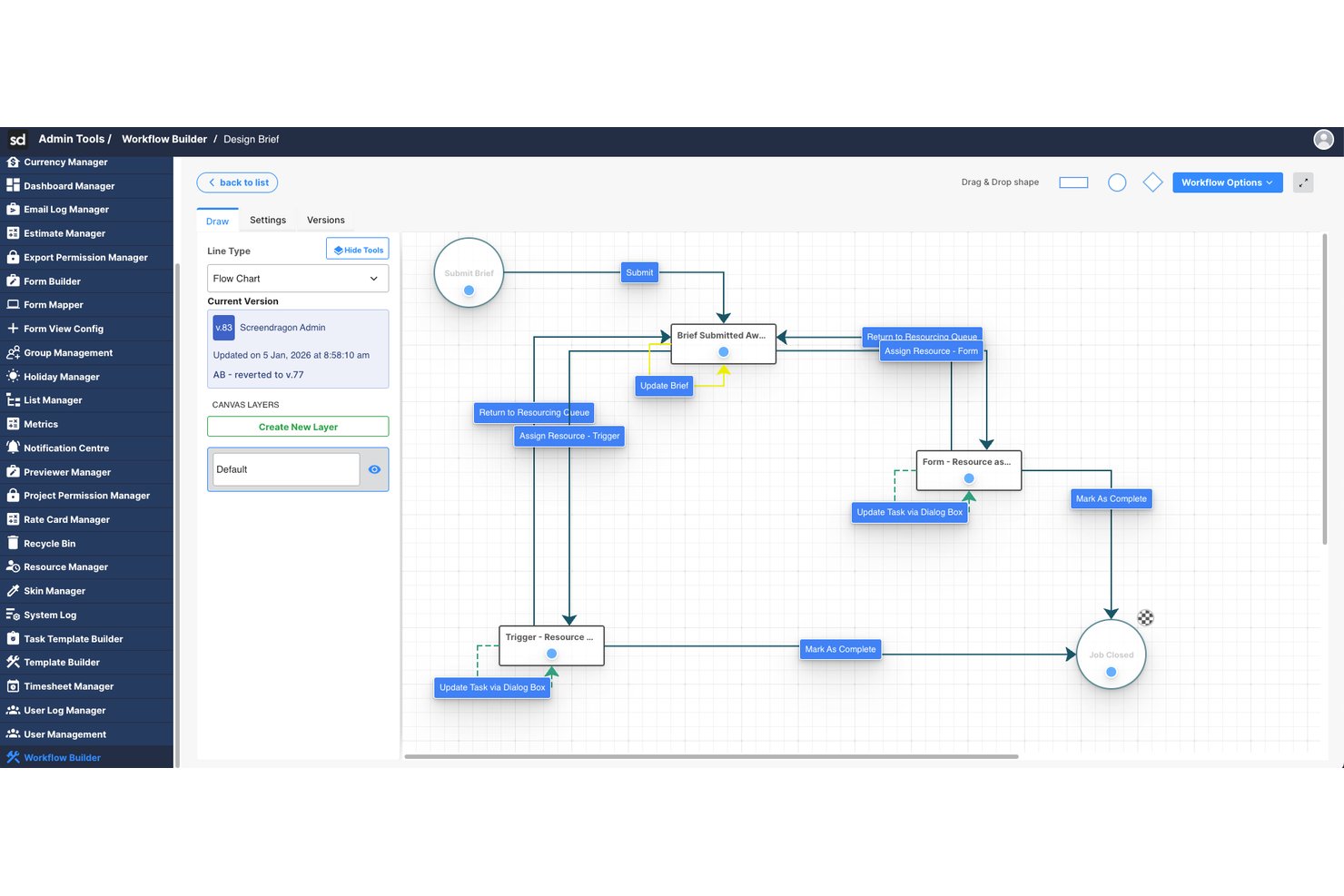
Screendragon is an enterprise work management platform that uses AI agents and no-code workflow automation to orchestrate creative and marketing operations, including approvals, resource management, and project execution.
Who Is Screendragon Best For?
Screendragon is a strong fit for enterprise marketing teams and creative agencies managing high-volume, multi-stakeholder workflows across departments or global business units.
Why I Picked Screendragon
Screendragon earns its spot on my shortlist because of how deeply AI is woven into the creative production process. I particularly like the AI Hub, which lets my team deploy governance-controlled AI agents directly inside live marketing workflows. In practice, that means brief generation, compliance reviews, and brand-aligned copy localization all happen automatically, without anyone chasing approvals or formatting documents manually.
Screendragon Key Features
- No-code workflow builder: Create and customize multi-step marketing workflows without writing any code.
- Dynamic forms: Build custom intake forms that trigger automated routing and approvals.
- Integrated resource management: Allocate, schedule, and balance teams across complex creative projects.
- Granular permissions and governance: Set detailed user access controls to secure data and workflows across regions or departments.
Screendragon Integrations
Screendragon offers native integrations with HubSpot, Microsoft Power BI, Ziflow, Brandfolder, Workato, and Smartsheet. An API is available for custom integrations.
Pros and Cons
Pros:
- Strong resource management across large portfolios
- Built-in governance controls for AI-driven actions
- Automates complex creative approval workflows
Cons:
- Reporting customization is limited for advanced users
- Mainly suited to marketing and creative teams
New Product Updates from Screendragon
Screendragon Unveils New AI Hub
Screendragon introduced AI Hub, a new capability that lets teams build and manage AI agents directly within workflows. The update helps marketing teams automate tasks, maintain governance controls, and scale AI-driven operations more efficiently. For more information, visit Screendragon's official site.


Celigo is an AI-powered automation platform built for teams that need to connect disconnected systems and reduce manual work across complex business processes. It helps IT, operations, and business teams automate workflows, sync data across cloud and on-premise apps, and manage integrations at scale. Its strength lies in combining low-code integration tools with AI-assisted automation for more efficient cross-system orchestration.
Who Is Celigo Best For?
Celigo is a good fit for IT teams and operations leaders at mid-sized to large businesses that need to automate and connect multiple business applications.
Why I Picked Celigo
I picked Celigo because it gives your team the tools to orchestrate AI-driven workflows across multiple business systems from one platform. You can use its prebuilt connectors and low-code builder to connect apps like Salesforce, NetSuite, and Shopify without starting from scratch. I also like that Celigo supports AI agents and workflow automation, which helps you reduce manual steps and keep data moving between systems. This makes it a good fit if your team needs to manage complex processes across a growing software stack.
Celigo Key Features
Some other features in Celigo support teams managing AI-driven automation across connected business systems:
- AI-guided integration builder: Uses AI-driven suggestions to help your team build and customize integrations more efficiently
- Error management dashboard: Gives you a central place to monitor, diagnose, and resolve integration issues
- Role-based access controls: Lets you set user permissions to manage integrations securely across teams
- Audit logs: Tracks workflow activity and system changes for better visibility and troubleshooting
Celigo Integrations
Integrations include NetSuite, Salesforce, Shopify, SAP, Snowflake, HubSpot, Jira, Slack, QuickBooks, and Google Sheets.
Pros and Cons
Pros:
- Scheduled and on-demand flows support flexible workflow automation needs
- Error dashboards help teams identify and resolve failed flows faster
- Prebuilt connectors speed up automation across common business systems
Cons:
- Error messages could be more descriptive during troubleshooting
- Custom field mapping can be difficult for more complex logic
New Product Updates from Celigo
Celigo Adds Shopify–Microsoft Business Central Integration Template
Celigo adds a pre-built Shopify–Microsoft Business Central integration template for D2C and B2B commerce. This helps merchants launch connected commerce workflows faster. For more information, visit Celigo’s official site.
 .
Best for Copilot-assisted planning in Microsoft 365
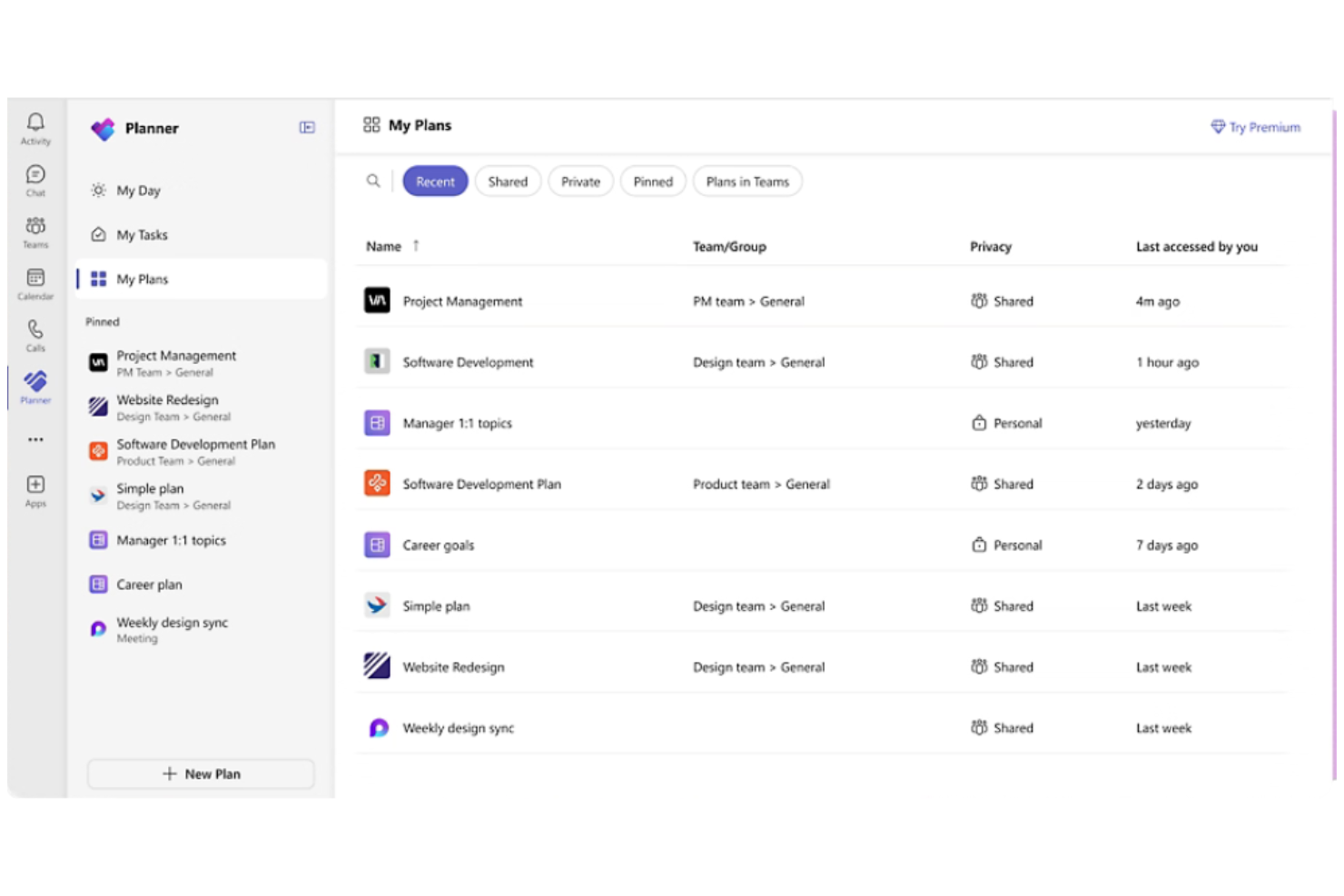
If your team already relies on Microsoft 365, Microsoft Planner offers a way to automate task management directly within your existing workflows. It’s designed for organizations that want to connect project planning, file sharing, and communication across Outlook, Teams, and OneDrive. Planner’s integration with Microsoft Copilot brings AI-powered task suggestions and automated updates to help teams keep projects on track.
Why I Picked Microsoft Planner
Because Microsoft Planner is built into the Microsoft 365 ecosystem, it’s a natural fit for teams that want to automate project tasks without leaving their familiar tools.
Its integration with Microsoft Copilot means you can use AI to generate task lists, assign work, and receive automated project updates right inside Teams or Outlook. I appreciate how Planner automatically syncs with other Microsoft 365 apps, so files, conversations, and deadlines stay connected across your workspace. For organizations already using Microsoft 365, Planner’s AI-driven automation features help centralize and simplify project management.
Features
Some other features that make Microsoft Planner useful for automation and project tracking include:
- Task Buckets: Organize tasks into customizable columns for different project stages or categories.
- Due Date Reminders: Automatically send notifications to team members as deadlines approach.
- Progress Tracking: Visualize task status with built-in charts and dashboards.
- Attachment Support: Add files and documents directly to tasks for easy reference.
Integrations
Integrations include Microsoft Teams, Outlook, OneDrive, SharePoint, Microsoft To Do, Microsoft Loop, Viva Goals, Power Automate, Microsoft Project, and Excel.
Pros and Cons
Pros:
- Power Automate enables advanced workflow automation
- Task updates sync across Microsoft 365 apps
- Copilot generates automated task suggestions
Cons:
- Limited automation outside the Microsoft ecosystem
- No AI-driven workflow approvals available
Airtable
Best for AI-structured workflows built on relational data
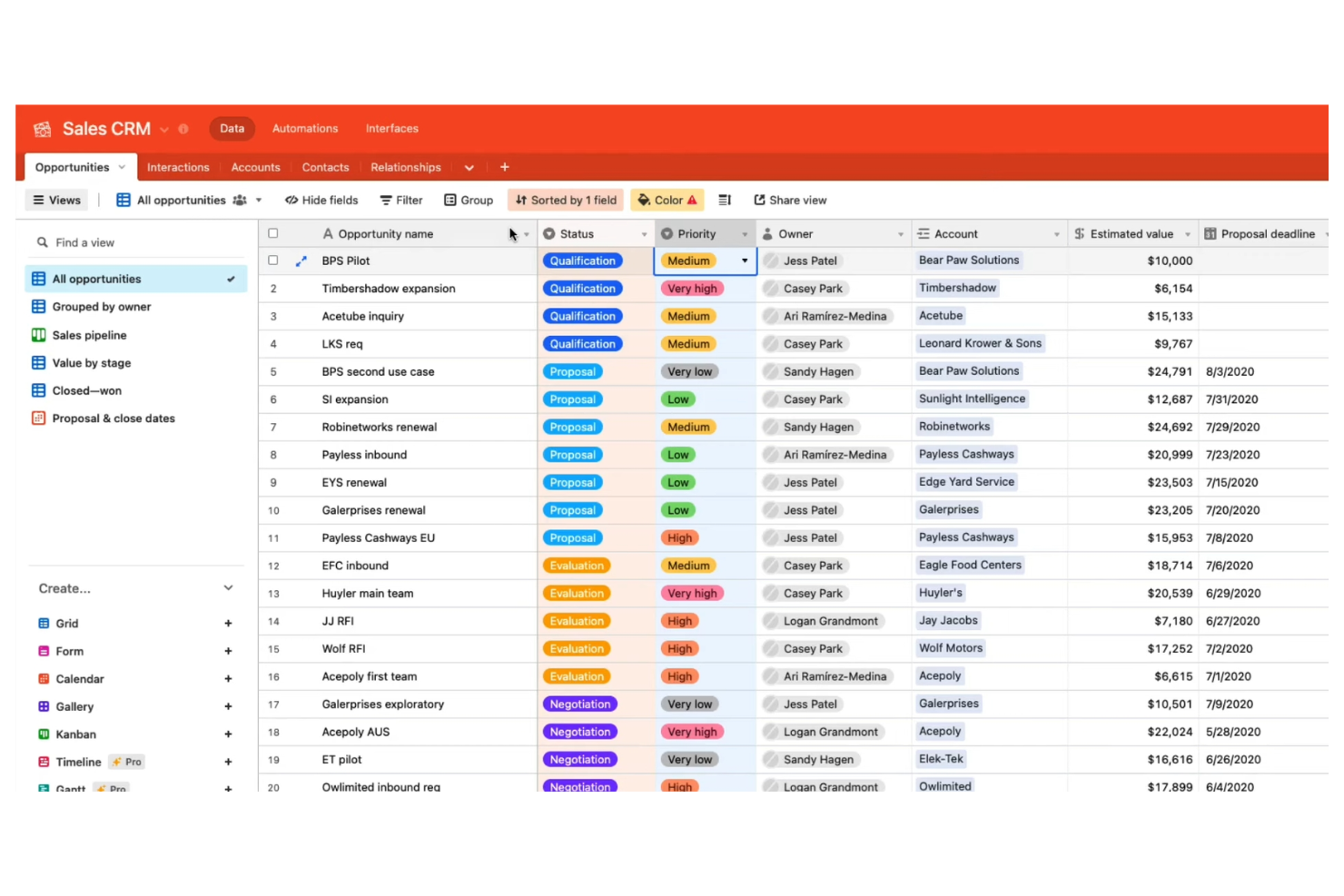
Airtable stands out for teams that need to automate workflows built on complex, relational data. It’s a strong fit for product managers, marketing teams, and operations leads who want to connect databases, trigger actions, and manage projects in a highly customizable environment. Airtable’s automation features let you build logic-driven workflows that update records, send notifications, and integrate with other tools—all from a flexible database interface.
Why I Picked Airtable
What sets Airtable apart is its database-driven approach to project tracking, which is especially valuable for teams managing complex, interconnected data. You can design custom tables with linked records, then use built-in automation to trigger actions like updating fields, sending notifications, or creating tasks based on changes in your data.
I appreciate how Airtable’s automation builder lets you set up multi-step workflows that respond to specific conditions within your database. For project managers who need granular control over data and workflow automation, Airtable offers a flexible and scalable solution.
Features
Some other features that make Airtable useful for automation and project management include:
- Interface Designer: Build custom dashboards and visual interfaces for your data without coding.
- AI Field Type: Add AI-powered fields to generate summaries, categorize data, or extract insights directly in your tables.
- Sync: Automatically sync data between different Airtable bases or with external sources.
- Revision History: Track changes to records and revert to previous versions when needed.
Integrations
Integrations include Google Drive, Salesforce, Slack, Jira, Zendesk, Box, Dropbox, GitHub, Gmail, and ChatGPT.
Pros and Cons
Pros:
- Interface Designer builds custom dashboards for automations
- Automations trigger multi-step workflows from changes
- AI fields generate summaries and categorize data
Cons:
- AI features require higher-tier plans
- Automation runs are limited per workspace

Trello
Best for lightweight AI-style automation on Kanban boards
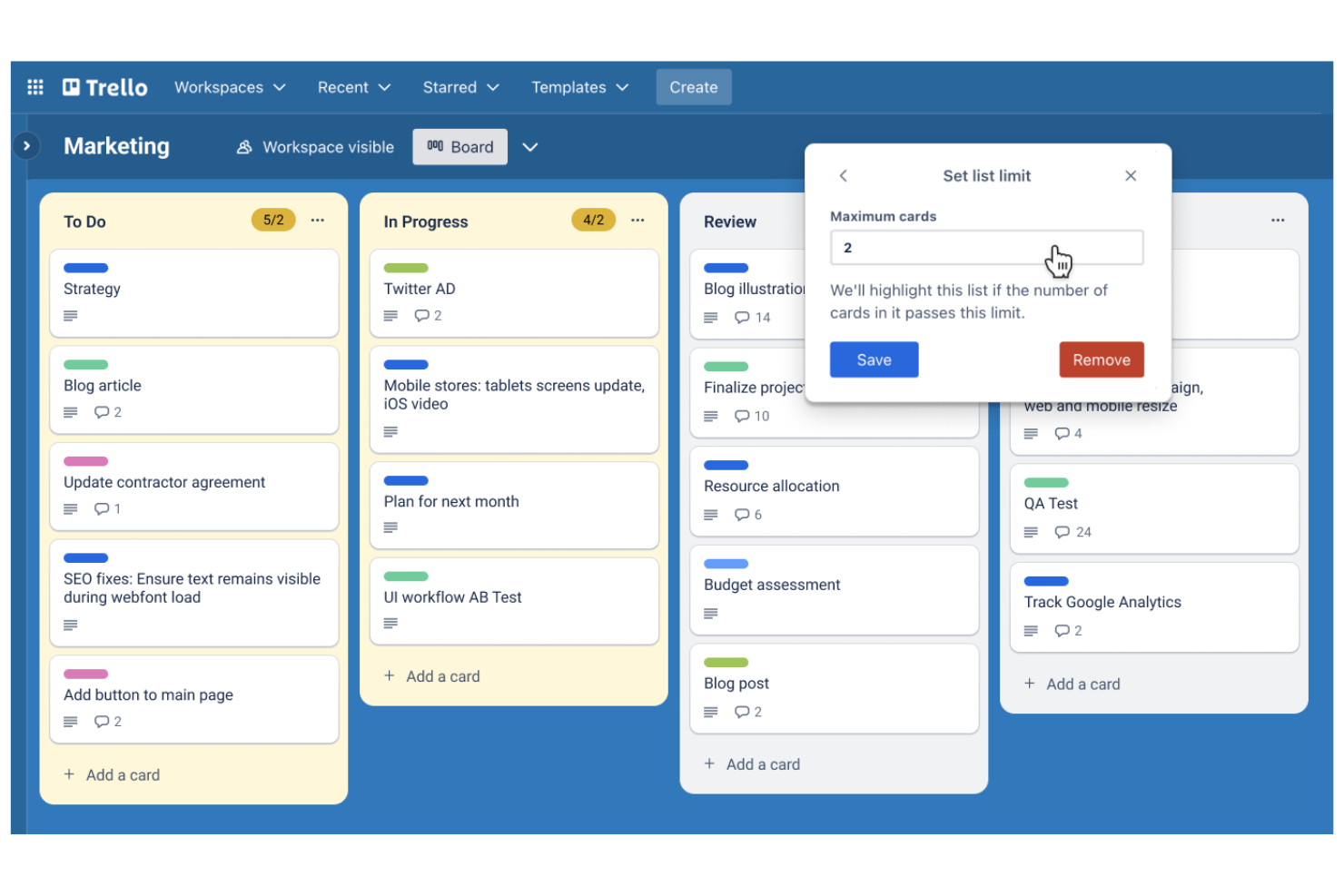
Trello brings AI-powered automation to kanban-style project boards, making it a fit for teams that want visual task management with minimal setup. It’s especially useful for marketing, product, and operations teams that need to automate repetitive card actions and keep workflows moving. With built-in automation for card sorting, due date reminders, and rule-based triggers, Trello helps teams manage projects without manual board updates.
Why I Picked Trello
For teams that rely on kanban-style project boards, Trello stands out by embedding automation directly into its visual workflow. Its built-in automation tool, Butler, lets you set up rules that move cards, assign tasks, or send reminders based on board activity. I like that you can automate recurring actions, such as sorting cards by due date or tagging items when they reach certain columns. These features make Trello a strong choice for anyone looking to add AI-driven automation to a kanban board without extra complexity.
Features
Some other features in Trello that support automation and project management include:
- Custom Card Templates: Create reusable templates for common task types or workflows.
- Calendar Power-Up: Visualize cards with due dates on a calendar view for better scheduling.
- Advanced Checklists: Add checklists with assignable items and due dates to individual cards.
- Card Aging Automation: Automatically highlight or fade cards that haven’t been updated in a set period.
Integrations
Integrations include Slack, Jira, Miro, GitLab, Dropbox, Evernote, Pipedrive, Egnyte, Testmo, and Pastel.
Pros and Cons
Pros:
- AI can suggest due dates for tasks
- Rule-based triggers automate repetitive board actions
- Butler automates card movement and notifications
Cons:
- No native AI for document summarization
- AI automation is limited to board-level actions

Best for AI-powered client service delivery
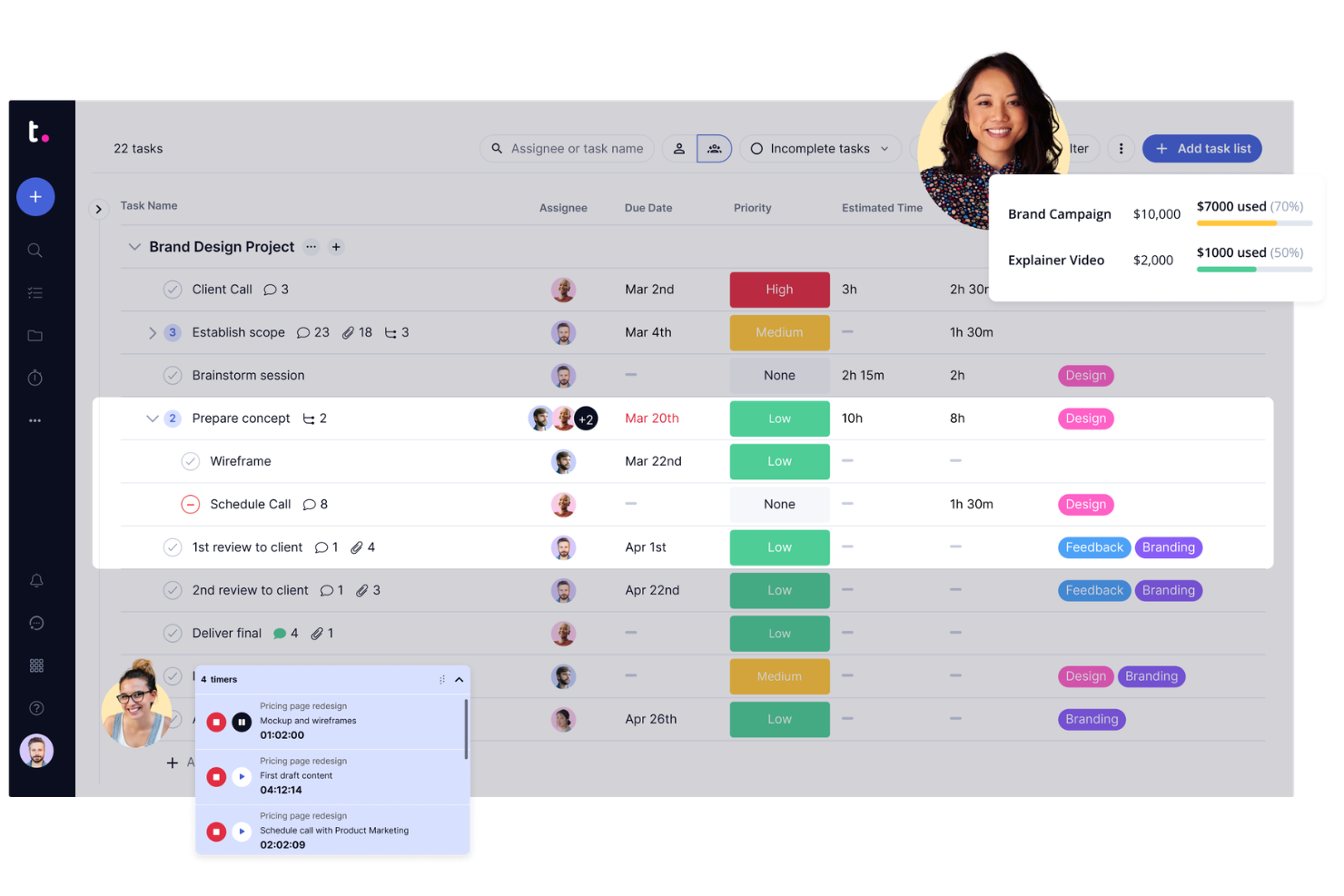
If your team manages projects for clients and needs automation built for transparency, Teamwork.com is worth a look. Agencies and service providers use it to automate client communications, approvals, and billing while keeping project data accessible to both internal and external stakeholders. Its client-facing features and workflow automation help teams reduce manual updates and keep clients in the loop without extra effort.
Why I Picked Teamwork.com
Unlike many project management platforms, Teamwork.com is designed with client collaboration and visibility at its core. I picked it because its automation features—like automated client status updates and approval workflows—help agencies and service teams keep clients informed without manual follow-up.
The platform also supports automated billing and time tracking, so you can connect project progress directly to client invoices. These features make Teamwork.com a strong choice for teams that need to automate both internal processes and client-facing interactions.
Features
Some other features that make Teamwork.com useful for project teams include:
- Task Automation Triggers: Set up rules to automatically assign, update, or move tasks based on project activity.
- Project Templates: Create and reuse project templates to automate the setup of recurring client projects.
- Workload Planner: Visualize and balance team capacity with drag-and-drop workload planning.
- Integrated Chat: Communicate with team members and clients directly within the platform using built-in chat.
Integrations
Integrations include Slack, Microsoft Office, Harvest, Xero, HubSpot, Google Drive, Dropbox, QuickBooks, ChatGPT, and Stripe.
Pros and Cons
Pros:
- Task triggers can assign or escalate work
- Supports automated invoice and billing workflows
- Automates client status updates and reminders
Cons:
- No AI-driven document summarization features
- No built-in AI for meeting transcription

Jira
Best for AI-driven agile execution
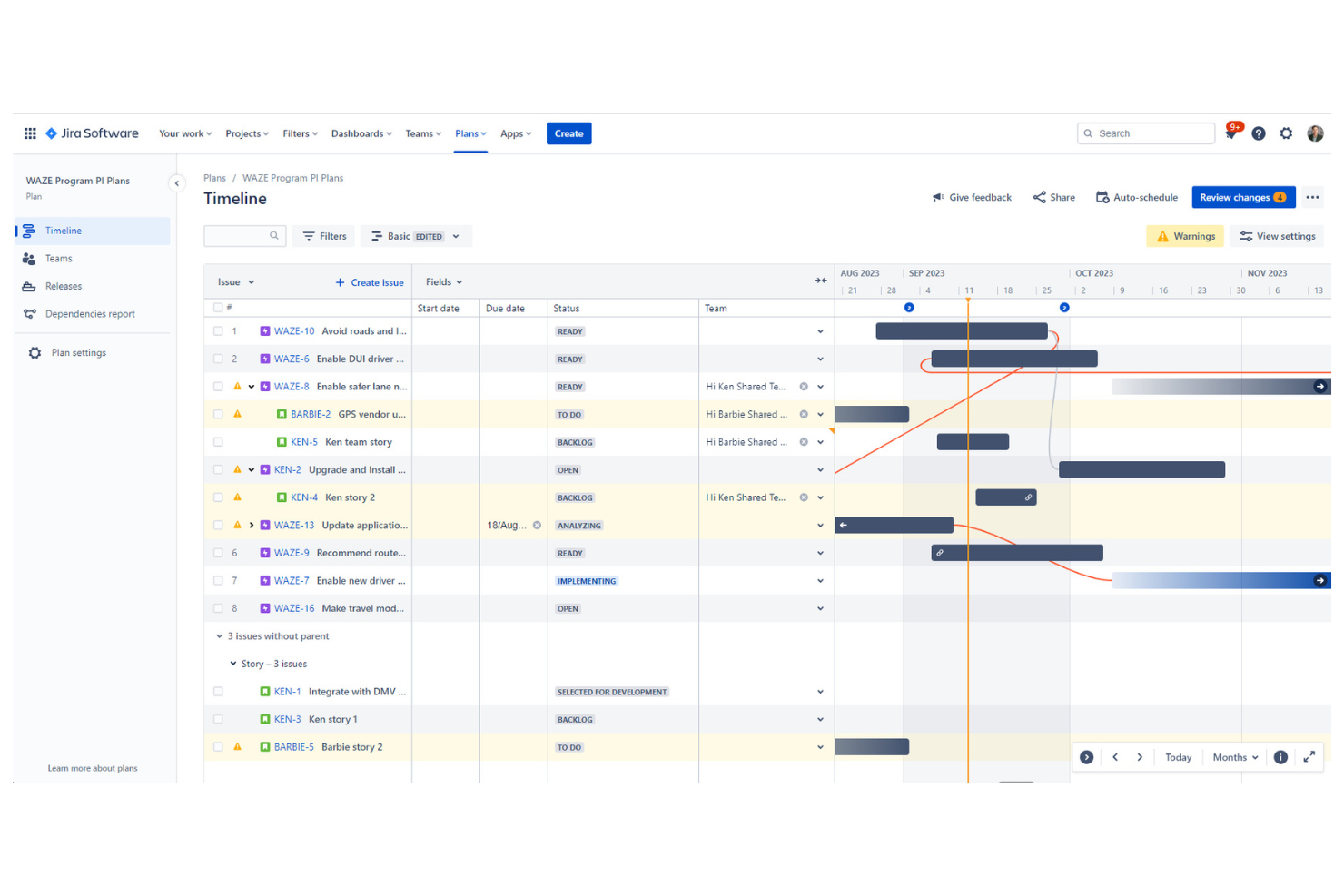
Jira is purpose-built for teams managing agile projects and sprint cycles, especially in software development and IT. It appeals to project managers and scrum masters who need automation for backlog grooming, sprint planning, and tracking work across distributed teams. With built-in AI features for issue triage and workflow automation, Jira helps teams prioritize tasks and keep projects moving without manual intervention.
Why I Picked Jira
When it comes to agile sprint planning, Jira offers automation features that directly support fast-moving development teams. Its AI-powered issue triage helps prioritize and assign tasks based on urgency and workload, which is essential for keeping sprints on track. I appreciate how Jira’s automation rules can update statuses, trigger notifications, and move issues between boards without manual input.
These capabilities make Jira a strong choice for teams that want to automate repetitive sprint management tasks and focus on delivering value.
Features
Some other features in Jira that support automation and agile workflows include:
- Custom Workflow Designer: Build and modify workflows with drag-and-drop tools to match your team’s processes.
- Advanced Roadmaps: Visualize project timelines, dependencies, and resource allocation across multiple teams.
- Bulk Issue Actions: Update, transition, or assign multiple issues at once using batch operations.
- Automation Template Library: Access pre-built automation templates for common agile and project management scenarios.
Integrations
Integrations include Slack, Microsoft Teams, Google Drive, Figma, Zoom, GitHub, Salesforce, Miro, QMetry, and Google Docs.
Pros and Cons
Pros:
- Bulk actions automate repetitive backlog management
- Automation rules support multi-step sprint workflows
- AI auto-triages and assigns incoming issues
Cons:
- Workflow automation setup can require admin access
- No native AI for code review automation


ClickUp brings together tasks, docs, goals, and automation in a single workspace, making it a strong fit for teams looking to consolidate their tools. Operations leads and project managers can use ClickUp to automate repetitive processes, centralize project communication, and manage everything from sprints to documentation. Its flexible structure and built-in AI features help teams reduce context switching and keep all work in one place.
Why I Picked ClickUp
For teams aiming to bring all their work into one place, ClickUp stands out with its all-in-one workspace consolidation. The platform combines task management, document collaboration, and AI-powered automation within a single environment, so you don’t have to juggle multiple tools.
I like that ClickUp’s AI features can generate summaries, automate routine updates, and assist with content creation directly inside your workflows. This unified approach helps project managers and operations leads keep everything organized and automate processes without leaving the platform.
Features
Some other features in ClickUp that support automation and workspace management include:
- Custom Automations Builder: Set up multi-step automations using triggers, conditions, and actions tailored to your workflows.
- Whiteboards: Visualize ideas, map out processes, and connect whiteboard elements directly to tasks.
- Goal Tracking: Set, track, and update progress on goals with automated status updates.
- Workload View: Monitor team capacity and task allocation with a visual workload dashboard.
Integrations
Integrations include Slack, GitHub, GitLab, HubSpot, Google Drive, Outlook, Figma, Zoom, Microsoft Teams, and Dropbox.
Pros and Cons
Pros:
- AI can rewrite or expand task descriptions
- Custom automation builder supports complex logic
- Whiteboards link directly to automated tasks
Cons:
- No native AI for image or file analysis
- AI suggestions sometimes miss project-specific context

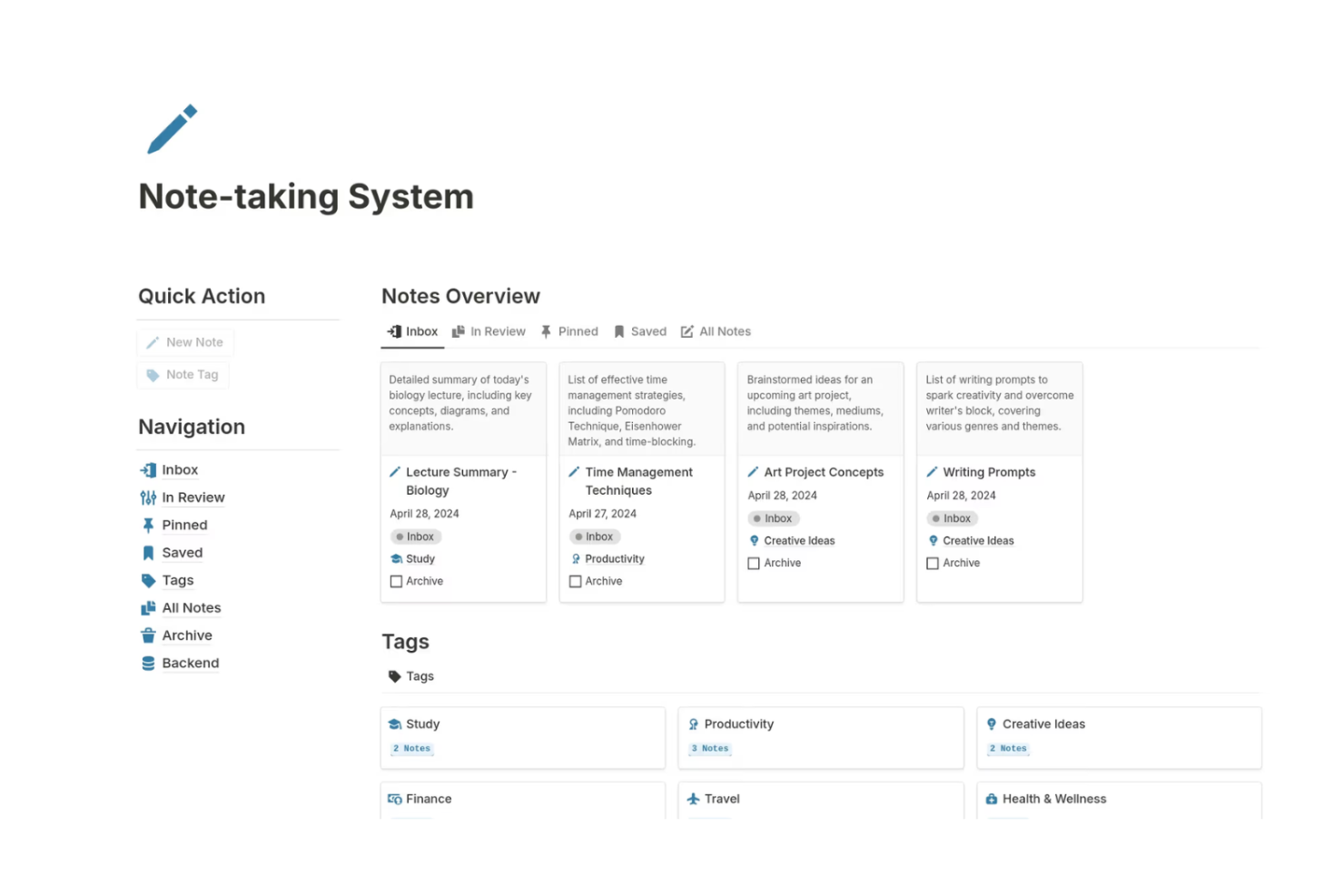
Notion brings together note-taking, project management, and AI-powered automation in a single workspace. It’s especially useful for product teams, content creators, and startups that want to connect meeting notes, tasks, and documentation with AI features like auto-summarization and smart task suggestions. Notion’s flexible databases and AI blocks help teams automate routine work while keeping everything organized in one place.
Why I Picked Notion
Notion stands out for teams that want to combine notes, project tasks, and AI automation in a single workspace. Its AI blocks let you generate summaries, draft content, and automate repetitive documentation tasks directly within your notes and project boards.
I like how you can link databases so that meeting notes, tasks, and project timelines all update together, making it easier to keep information connected and actionable. For teams looking to automate knowledge management and task tracking without switching between tools, Notion offers a unified and flexible solution.
Features
Some other features that make Notion valuable for automation and project management include:
- Custom Templates: Create and reuse templates for recurring project workflows or documentation.
- API Access: Connect Notion to other tools and automate data flows using its public API.
- Permissions and Sharing: Set granular access controls for pages, databases, and workspaces.
- Version History: Review and restore previous versions of any page or database.
Integrations
Integrations include Slack, Jira, GitHub, Asana, Google Drive, Figma, Trello, GitLab, Typeform, and Webex.
Pros and Cons
Pros:
- Page mentions enable automated cross-linking of tasks
- Custom templates support repeatable automation workflows
- AI autofill generates content for project docs
Cons:
- Limited native automation triggers compared to competitors
- Bulk automation actions are not natively supported
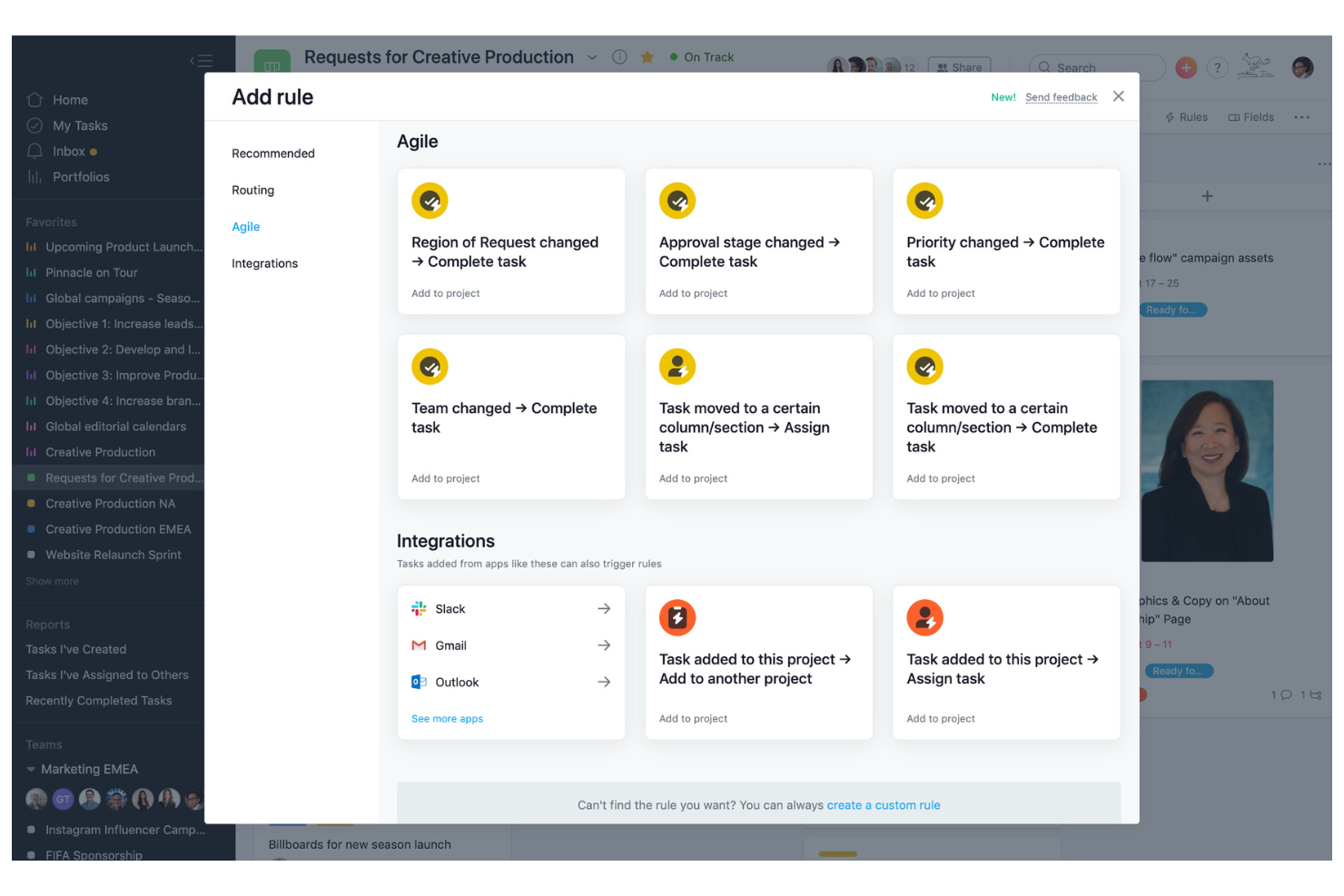
Asana offers a platform built for flexible workflow automation and detailed process customization, with AI features that help teams run those workflows with less manual oversight. Project managers and cross-functional teams use it to automate task assignments, approvals, and status updates, while Asana AI can draft project status updates and summarize work so it’s easier to spot blockers and next steps. Its rule-based automation reduces manual coordination and keeps complex projects moving forward.
Why I Picked Asana
I chose Asana for its strong focus on workflow customization, which is essential for teams looking to automate unique processes—and its growing layer of AI assistance that turns project activity into clear, actionable updates. Asana’s rule builder lets you set up automated triggers for task assignments, status changes, and notifications based on project needs.
I also like that Asana AI can generate smart status updates and surface key changes through summaries, which helps reduce the time spent chasing updates across stakeholders. Combined with custom templates and multi-step workflow automation, these capabilities help teams reduce manual work and keep projects aligned with their preferred processes.
Features
Some other features in Asana that support automation and project management include:
- Timeline View: Visualize project schedules and dependencies with a drag-and-drop Gantt chart interface.
- Workload Management: Monitor team capacity and balance assignments to avoid overloading team members.
- Milestone Tracking: Mark key project milestones to track progress and highlight important deadlines.
- Forms Automation: Collect and route requests or project inputs automatically using customizable forms.
Integrations
Integrations include Slack, Google Drive, Microsoft Teams, Salesforce, Tableau, Jira, Zoom, Dropbox, GitHub, and Outlook.
Pros and Cons
Pros:
- Visual timeline for tracking dependencies
- Custom templates for unique workflow needs
- Rule-based automation for recurring tasks
Cons:
- Workflow automation is limited to the project level only
- Limited AI-driven suggestions for process optimization
Andre AI-automatiseringsverktøy
Her er noen flere alternativer for AI-automatiseringsverktøy som ikke kom med på kortlisten, men som likevel er verdt å sjekke ut:
- Smartsheet
For AI-enhanced spreadsheet-style project work
- Wrike
For AI-powered cross-team workflows
- Zoho Projects
For AI-assisted time + project delivery
- monday.com
For AI-powered visual work tracking
- cloudsquid
For financial document workflows
- Hootsuite
For AI-assisted social media management at scale
- Kantata
Teams with billable services that want AI-assisted planning and workflow automation
- Forecast
For resource allocation powered by AI-driven insights
- Scoro
With integrated billing tools
- Hive
For using AI prompts to create structured project plans and tasks
- Motion
With AI-powered scheduling
- ChatGPT
For conversational AI task automation
- OpenAI
For building custom AI agents and automation workflows
- Zapier
For no-code AI workflow automation across apps
- Gemini
For AI-powered automation inside Google Workspace


How I Evaluate AI Automation Tools
Every tool here earns its spot by delivering real AI value—drafting plans, flagging risks, or rebalancing workloads without manual input. I evaluate in two layers: the core functionality a tool needs to make the list and the differentiators that set one option apart from another.
Core Functionality (Table Stakes For This List)
When I'm selecting tools for my list, I rank each one on a scale from 0 (does not offer the functionality) to 5 (excels in this area) for each core functionality listed below. Then, I calculate the tool's total score into a percentage. Each tool needs to achieve a minimum total score of 65% to be considered for inclusion.
- AI Workflow Automation: I look for AI that triggers and runs multi-step workflows—like auto-escalating overdue tasks or routing approvals when a sprint scope changes.
- Intelligent Task Management: Each tool should use AI to create, assign, and reprioritize tasks based on project context, team capacity, and dependencies.
- Generative Project Content: I evaluate whether the AI can draft real project artifacts like status reports, kickoff briefs, or sprint summaries from existing data.
- Predictive Analytics & Forecasting: Tools earn higher marks when their AI flags delivery risks or forecasts resource gaps before they become blockers.
- Natural Language Interface: I check whether users can query project data or build automations by typing plain-language requests instead of navigating complex menus.
- Integrations & Data Sync: The tool should connect with widely used PM, communication, and developer platforms to pull and push data across the stack.
Once I have a list of tools that meet this criteria, I consider what sets each platform apart.
Differentiating Factors (What Sets Vendors Apart)
Here's how I compare and contrast different vendors:
Standout Features
Autonomous AI agents are a big differentiator—I look for tools where AI can independently plan and execute a sequence of tasks, like spinning up a project timeline after a kickoff without manual prompting. Meeting intelligence is another feature I value, especially when it auto-extracts action items from recorded calls and syncs them into the task board. I also evaluate resource optimization AI, which recommends staffing adjustments and flags burnout risks across a portfolio before managers spot the trend.
Beyond Features
AI trust and governance matter a lot when automations touch live project data. I evaluate whether a tool lets managers review and override AI decisions before execution—like approving a recommended scope change before it reshuffles the sprint. Data privacy is closely tied to this; I check for enterprise certifications and clear policies on whether customer data trains shared models. I also consider time-to-value, looking at whether a platform offers guided setup, pre-built automation recipes, and onboarding support that gets teams running within days, not months.
Slik velger du et AI-automatiseringsverktøy
Det er lett å gå seg vill i lange funksjonslister og komplekse prisstrukturer. For å hjelpe deg med å holde fokus mens du går gjennom den unike prosessen din for valg av programvare, får du her en sjekkliste over faktorer du bør ha i tankene:
| Faktor | Hva du bør vurdere |
|---|---|
| Skalerbarhet | Vil verktøyet håndtere teamets vekst og økte automatiseringsbehov over tid? Sjekk begrensninger for brukere, arbeidsflyter og data. |
| Integrasjoner | Kan verktøyet kobles til de eksisterende systemene dine (CRM, ERP, chat, fillagring)? Lag en liste over integrasjonene du må ha, før du setter opp kortlisten. |
| Tilpasningsmuligheter | Kan du tilpasse automatiseringsregler, arbeidsflyter og varsler slik at de passer teamets prosesser? Unngå verktøy som tvinger deg til å bruke rigide maler. |
| Brukervennlighet | Vil teamet ditt ta i bruk verktøyet raskt, eller vil det kreve omfattende opplæring? Se etter tydelig navigasjon og få trinn i oppsettet. |
| Implementering og innføring | Hvor lang tid vil det ta å komme i gang? Spør om støtte til migrering, ressurser for innføring og vanlig tid til verdiskaping for lignende team. |
| Kostnad | Er prisnivåene transparente og forutsigbare når du skalerer? Vær oppmerksom på skjulte gebyrer, kostnader per automatisering eller nødvendige tillegg. |
| Sikkerhetstiltak | Tilbyr verktøyet kryptering, tilgangskontroller og samsvar med bransjestandardene dine? Bekreft hvor dataene lagres og om aktivitetslogging er tilgjengelig, hvis det er nødvendig. |
| Tilgjengelig brukerstøtte | Vil du få tilgang til rask hjelp hvis det oppstår problemer? Sjekk om det finnes live-chat, telefonstøtte og garantier for svartid, særlig hvis automatiseringene er avgjørende for virksomheten. |
Hva er AI-automatiseringsverktøy?
Verktøy for AI-automatisering er programvareplattformer som bruker kunstig intelligens til å automatisere repetitive oppgaver, arbeidsflyter og beslutningsprosesser på tvers av virksomhetens drift. Disse verktøyene hjelper team med å redusere manuelt arbeid, forbedre nøyaktigheten og få innsikt ved å bruke maskinlæring, behandling av naturlig språk eller prediktiv analyse.
Prosjektledere, IT-team og virksomhetsledere bruker verktøy for AI-automatisering til å effektivisere prosesser, øke effektiviteten og støtte datadrevet beslutningstaking i dynamiske miljøer.
Funksjoner
Når du vurderer en plattform for AI-automatisering, bør du se etter verktøy som kombinerer konfigurasjon uten kode med intelligente AI-modeller for å støtte reelle forretningsprosesser i stor skala. Det riktige systemet bør gjøre det enklere å utforme, automatisere og forbedre arbeidsflyter uten at det kreves teknisk ekspertise.
- Arbeidsflytbygger: En arbeidsflytbygger uten kode lar deg utforme, visualisere og administrere prosesser i flere trinn ved hjelp av dra-og-slipp-verktøy eller regelbasert logikk. Dette gjør det enklere å ta i bruk AI-agenter som håndterer repetitive trinn og sørger for at arbeidet går videre automatisk.
- Oppgavetildeling: Tildel oppgaver automatisk eller manuelt til bestemte teammedlemmer eller grupper basert på prosjektbehov. AI-modeller kan bidra til å prioritere tildelinger basert på arbeidsmengde eller tidsfrister, noe som sikrer bedre koordinering.
- Varsler og meldinger: Send oppdateringer i sanntid om endringer i oppgaver, tidsfrister eller fremdrift i arbeidsflyten via e-post, meldinger i appen eller push-varsler. AI-agenter kan utløse varsler når risikomønstre eller forsinkelser oppdages.
- Rollebasert tilgangskontroll: Angi tillatelser og begrens tilgangen til sensitive data eller handlinger basert på brukerroller. Dette støtter sikker automatisering på tvers av avdelinger og beskytter kritiske forretningsprosesser.
- Revisjonslogger: Spor og registrer alle brukerhandlinger og endringer i arbeidsflyter, slik at det opprettes en transparent historikk for samsvar og feilsøking.
- Integrasjonssenter: Koble til andre forretningsverktøy og plattformer slik at data flyter mellom systemer og reduserer manuell dataregistrering. En god automatiseringsplattform sørger for at arbeidsflytene dine strekker seg utover én enkelt app.
- Rapporteringsdashbord: Se resultatmålinger, fullføringsgrad for oppgaver og flaskehalser i prosesser i sanntid. I mer avanserte systemer genererer AI sammendrag og innsikt fra dataene dine for å fremheve trender og nye risikoer.
- Malsamling: Få tilgang til forhåndsbygde maler for arbeidsflyter og oppgaver som kan tilpasses og gjenbrukes for tilbakevendende prosesser, noe som bidrar til å redusere oppsettstiden og forkorte læringskurven.
- Kalendervisning: Vis oppgaver, tidsfrister og prosjektmilepæler i et visuelt kalenderformat for enklere planlegging og tidsstyring.
- Mobil tilgang: Administrer arbeidsflyter, godkjenn oppgaver og motta varsler fra hvilken som helst enhet, slik at fjernteam og beslutningstaking på farten støttes.
Fordeler
Innføring av verktøy for AI-automatisering kan forbedre hvordan organisasjonen din administrerer arbeid og gjennomfører forretningsprosesser betydelig.
- Redusert manuelt arbeid: AI-agenter automatiserer repetitive oppgaver og regelbaserte AI-arbeidsflyter, slik at teamet ditt kan fokusere på strategiske initiativer med høyere verdi.
- Forbedret nøyaktighet: Automatiserte prosesser følger den samme logikken hver gang, noe som reduserer menneskelige feil og forbedrer påliteligheten og kvaliteten på data på tvers av systemer.
- Raskere prosjektleveranser: Automatisert oppgaveruting, varsler og utløsere for arbeidsflyter holder prosjektene i fremdrift uten unødvendige forsinkelser, slik at taktiske resultater leveres på kortere tid.
- Bedre ressursfordeling: AI-modeller analyserer data om arbeidsmengde og prosjektplaner for å støtte smartere prognoser og planlegging av arbeidsmengde.
- Bedre oversikt: Dashbord i sanntid, revisjonslogger og AI-generert innsikt gir klarhet i prosjektstatus, ytelsesgap og driftsrisikoer.
- Bedre samsvar: Rollebaserte tilgangskontroller og revisjonsspor bidrar til å håndheve styringspolicyer og regulatoriske krav.
- Skalerbar drift: Etter hvert som organisasjonen vokser, tilpasser en fleksibel automatiseringsplattform seg økende arbeidsmengder, mer komplekse arbeidsflyter og forretningsprosesser i utvikling uten å tilføre friksjon i driften.
Kostnader og priser
Valg av verktøy for AI-automatisering krever en forståelse av de ulike prismodellene og abonnementene som er tilgjengelige. Kostnadene varierer basert på funksjoner, teamstørrelse, tillegg og mer. Tabellen nedenfor oppsummerer vanlige abonnementer, gjennomsnittsprisene deres og typiske funksjoner som er inkludert i løsninger for verktøy for AI-automatisering:
Sammenligningstabell over abonnementer for verktøy for AI-automatisering
| Abonnementstype | Gjennomsnittspris | Vanlige funksjoner |
|---|---|---|
| Gratisabonnement | $0 | Grunnleggende arbeidsflytautomatisering, begrensede integrasjoner, tilgang for én bruker og brukerstøtte fra fellesskapet. |
| Personlig abonnement | $5-$15 per bruker/måned | Arbeidsflyter med flere trinn, grunnleggende rapportering, e-postvarsler og begrensede tilpasningsmuligheter. |
| Bedriftsabonnement | $20-$40 per bruker/måned | Avansert automatisering, verktøy for teamsamarbeid, integrasjonssentral, revisjonslogger og prioritert brukerstøtte. |
| Storselskapsabonnement | $400+ per bruker/måned (varierer mye) | Tilpassede arbeidsflyter, avansert sikkerhet, dedikert onboarding, samsvarsfunksjoner og førsteklasses brukerstøtte. |
Vanlige spørsmål om AI-automatiseringsverktøy
Her er noen svar på vanlige spørsmål om AI-automatiseringsverktøy:
Hvordan skiller AI-automatiseringsverktøy seg fra tradisjonell automatiseringsprogramvare?
AI-automatiseringsverktøy bruker maskinlæring og dataanalyse til å ta beslutninger, tilpasse arbeidsflyter og gi anbefalinger, mens tradisjonell automatiseringsprogramvare baserer seg på faste regler og manuell konfigurering. Dette gjør at AI-verktøy kan håndtere mer komplekse og dynamiske prosesser og forbedres over tid etter hvert som de lærer av data.
Kan AI-automatiseringsverktøy integreres med eldre systemer?
Ja, mange AI-automatiseringsverktøy tilbyr integrasjonsmuligheter for eldre systemer gjennom API-er, mellomvare eller tilpassede koblinger. Før du velger et verktøy, bør du kontrollere om det støtter den eksisterende programvarestakken din, og om integrasjonen vil kreve ytterligere utvikling eller tredjepartstjenester.
Hvilke sikkerhetshensyn bør jeg ha i tankene når jeg bruker AI-automatiseringsverktøy?
Du bør se etter funksjoner som datakryptering, tilgangskontroller, revisjonslogger og samsvarssertifiseringer. Sørg for at verktøyet er i tråd med organisasjonens retningslinjer for personvern og bransjereguleringer, og spør leverandørene om rutinene deres for hendelseshåndtering og datalagring.
Hvor lang tid tar det å implementere et AI-automatiseringsverktøy?
Implementeringstiden varierer avhengig av hvor komplekse arbeidsflytene dine er, og hvor mye tilpasning som kreves. Enkle oppsett kan ta noen dager, mens mer komplekse integrasjoner og onboarding kan ta flere uker. Spør leverandørene om typiske tidsrammer og tilgjengelige ressurser for onboarding.
Finnes det skjulte kostnader med AI-automatiseringsverktøy?
Ja, noen verktøy kan kreve ekstra betaling for premiumintegrasjoner, avanserte funksjoner eller høyere bruksgrenser. Gå alltid gjennom prisopplysningene, spør om kostnader for tillegg og avklar hva som er inkludert i hvert abonnement før du tar en beslutning.
Hva skjer videre:
Hvis du holder på å undersøke AI-automatiseringsverktøy, kan du ta kontakt med en SoftwareSelect-rådgiver for gratis anbefalinger.
Du fyller ut et skjema og tar en kort prat der de går gjennom behovene dine i detalj. Deretter får du en kortliste over programvare du kan vurdere. De støtter deg gjennom hele kjøpsprosessen, inkludert prisforhandlinger.