

10 beste alternativer til Toggl for tidsregistrering i 2026

Kortliste over alternativer til Toggl


Et godt alternativ til Toggl tilbyr pålitelig tidsregistrering, fleksibel rapportering og funksjoner som passer inn i teamets arbeidsflyt – uten å gjøre ting mer komplisert. Hvis du leter etter de beste alternativene til Toggl, ser du sannsynligvis etter en løsning for tidsregistrering som håndterer skiftende prosjektbehov, støtter nøyaktig fakturering og holder distribuerte team ansvarlige.
Med så mange tilgjengelige alternativer er det vanskelig å vite hvilke plattformer som faktisk leverer på disse grunnleggende behovene. Denne listen går gjennom de beste alternativene til Toggl for 2026, inkludert kraftige produktivitetsverktøy som Hubstaff, TimeCamp og Everhour. Vi har sammenlignet funksjonene for tidsregistrering, slik at du kan se viktige forskjeller og velge det som passer best til teamets behov for prosjektstyring.
Hva er Toggl?
Toggl (nå vanligvis omtalt som Toggl Track) er en programvare for tidsregistrering som er utviklet for å hjelpe enkeltpersoner og små team med å registrere arbeidstimer, følge med på produktivitet og generere detaljerte rapporter. Den tilbyr funksjoner som tidtakere med ett klikk, manuell registrering av tid, sporing av prosjekter og kunder samt et robust API for integrasjoner med populære verktøy.
Toggl brukes mye av eksterne team, frilansere og bedrifter som trenger nøyaktige tidsregistreringer for fakturering, lønnsutbetaling eller prosjektanalyse. Selv om det finnes en gratisversjon for tidsregistrering, oppgraderer mange brukere etter hvert til betalte abonnementer for å få tilgang til avanserte rapporteringsfunksjoner og innsikt i teamet.
Sammenligningstabell for alternativer til Toggl
Tabellen nedenfor sammenligner prisdetaljene for mine beste alternativer til Toggl.
| Tool | Best For | Trial Info | Price | ||
|---|---|---|---|---|---|
| 1 | Best for automatic background activity tracking | 14-day free trial + free demo available | From $3.99/user/month (billed annually) | Website | |
| 2 | Best for browser extension tracking | Free plan + 7-day free trial available | From $4.99/user/month | Website | |
| 3 | Best with AI-powered time tracking | Free 14-day trial + free demo available | From $9/user/month (billed annually) | Website | |
| 4 | Best for client billing management | Free plan + 14-day free trial + free demo available | From $4/user/month (billed annually) | Website | |
| 5 | Best for billing-focused project time tracking | 14-day free trial + free plan + free demo available | From $3.99/user/month (billed annually) | Website | |
| 6 | Best for tracking time inside project management tools | Free plan + 14-day free trial available | From $8.50/user/month (billed annually) | Website | |
| 7 | Best for payroll-ready attendance and time off | Free plan available + 14-day free trial | From $5.83/user/month (billed annually) | Website | |
| 8 | Best for team collaboration features | Free plan + free demo + 14-day free trial available | From $3.75/user/month (billed annually) | Website | |
| 9 | Best for compliance and audit needs | Free demo available | Pricing upon request | Website | |
| 10 | Best for task and project workflows | Free plan + 15-day free trial available | From $9.90/month | Website |

Why Trust Our Software Recommendations
Our team has been testing and reviewing software since 2012. As project managers ourselves, we know how difficult—and important—it is to choose the right software.
For this guide, we evaluated tools using hands-on testing and independent research, scoring tools using our selection criteria. We also draw on insights from industry thought leaders and practicing project management experts.
Our reviews reflect our human editorial judgment, not a sales pitch.
Expert reviewers:
Anmeldelser av alternativer til Toggl
Nedenfor finner du mine detaljerte sammendrag av alternativene til Toggl som kom med på kortlisten. Anmeldelsene mine gir en detaljert gjennomgang av funksjonene, de beste bruksområdene og integrasjonene til hvert verktøy, slik at du kan finne det som passer best for deg.

Best for automatic background activity tracking
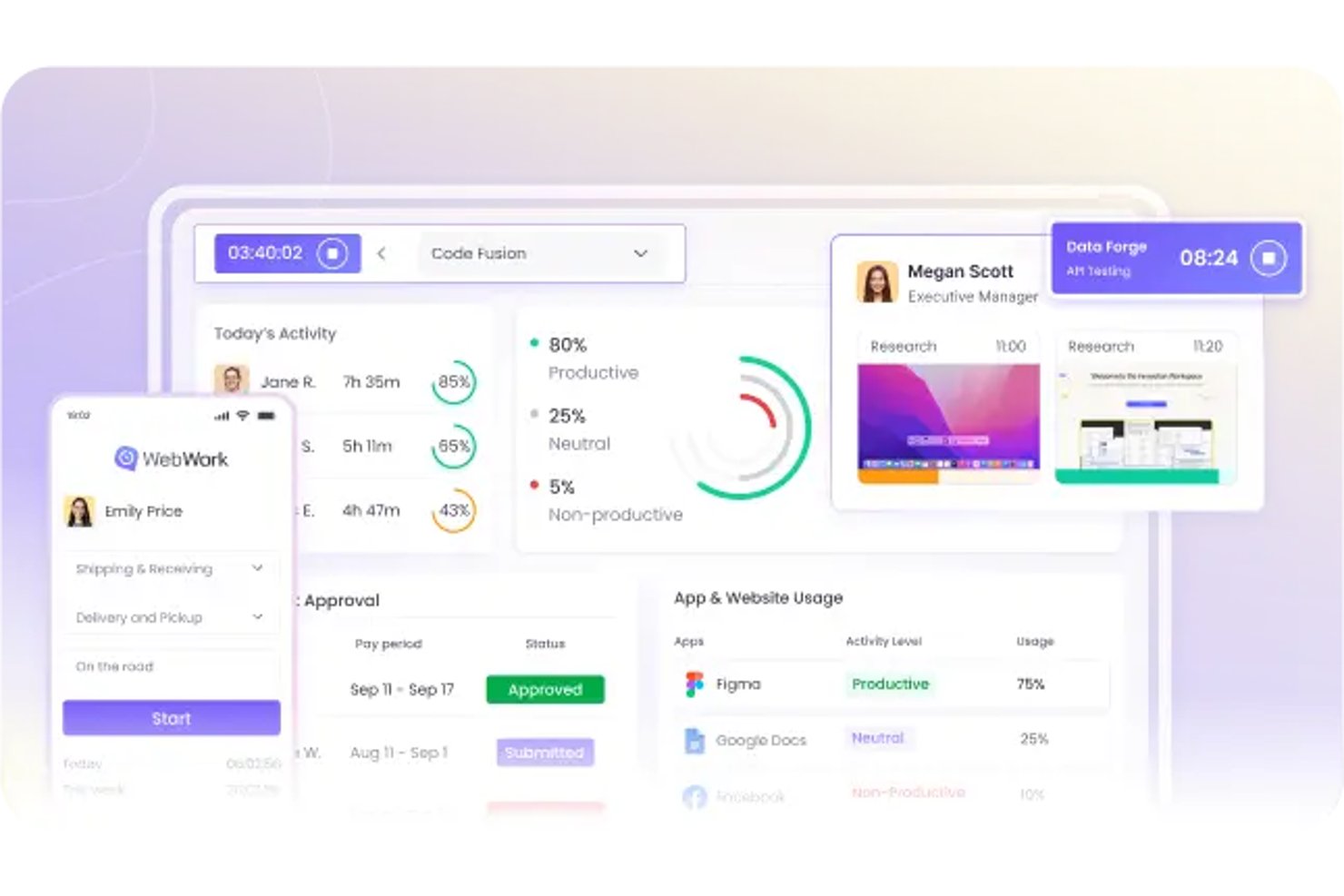
WebWork Time Tracker is a time tracking solution for remote and distributed teams that helps project managers monitor work hours, project progress, and accountability beyond Toggl.
Who Is WebWork Time Tracker Best For?
WebWork Time Tracker suits remote and distributed teams that need automatic activity visibility alongside project time and progress tracking.
Why WebWork Time Tracker Is a Good Toggl Alternative
I picked WebWork Time Tracker because it records background activity without relying on constant manual timers. I like its app and website tracking, activity levels, and optional screenshots for checking where project hours go. My team uses those signals to spot idle time, verify remote work, and investigate unexpected gaps in delivery.
WebWork Time Tracker Key Features
- Manual time entries: Add hours manually when automatic tracking misses work.
- Timesheets: Convert tracked hours into organized timesheets for review.
- Time reports: Generate reports by project, task, user, or date range.
- Invoicing: Turn recorded hours into client invoices for billable work.
WebWork Time Tracker Integrations
WebWork Time Tracker offers native integrations with Asana, Jira, ClickUp, Slack, Trello, QuickBooks, Google Calendar, Outlook Calendar, Salesforce, and Todoist. It also connects with Zapier and Make and provides a REST API for custom integrations.
Pros and Cons
Pros:
- Reports reveal idle time across projects
- Combines screenshots with app and website logs
- Captures background activity without manual timers
Cons:
- Mobile app trails desktop functionality
- Activity scores undervalue reading and planning work

Clockify
Best for browser extension tracking
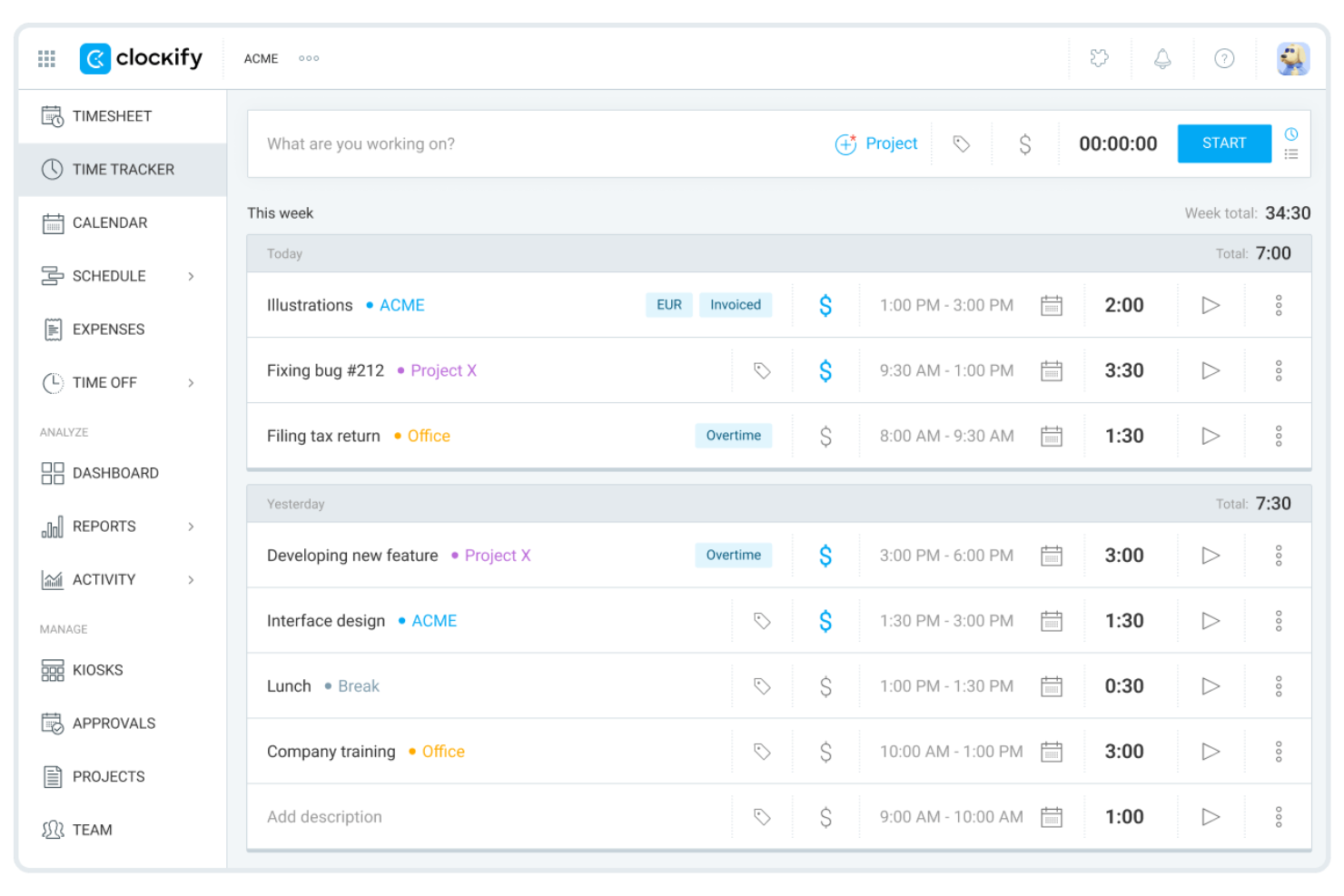
Clockify is a time-tracking tool designed for teams that need unlimited users without extra costs. It’s a strong fit for growing businesses, agencies, or organizations managing multiple projects and clients. If you want simple time tracking with flexible reporting and no user limits, Clockify stands out from Toggl and many other options.
Why It’s a Good Toggl Alternative
I selected Clockify because its browser extension allows team members to trigger tracking timers directly inside existing web applications without breaking focus. Digital project managers can start, pause, or switch task logs directly within platform tools like Asana or Jira, preventing tracking friction. This makes it ideal for project leads who want to capture precise project hours and cut down on administrative overhead across distributed project teams.
Clockify Key Features
Some other features in Clockify that stand out for time-tracking teams include:
- Timesheet Approvals: Managers can review and approve submitted timesheets before they’re finalized.
- Time Off Tracking: Track employee leave, holidays, and absences directly within the platform.
- Billable Rates: Assign different hourly rates to users or projects for accurate client billing.
- Kiosk Mode: Set up a shared device for on-site teams to clock in and out using a PIN code.
Clockify Integrations
Integrations include Jira, Asana, Trello, QuickBooks, Google Calendar, Outlook, GitHub, GitLab, Basecamp, and Monday.
Pros and Cons
Pros:
- Self-hosting option available
- Great Chrome extension
- Simple visual reports
Cons:
- Syncing issues across devices
- Lacks deep invoice features

Timely
Best with AI-powered time tracking
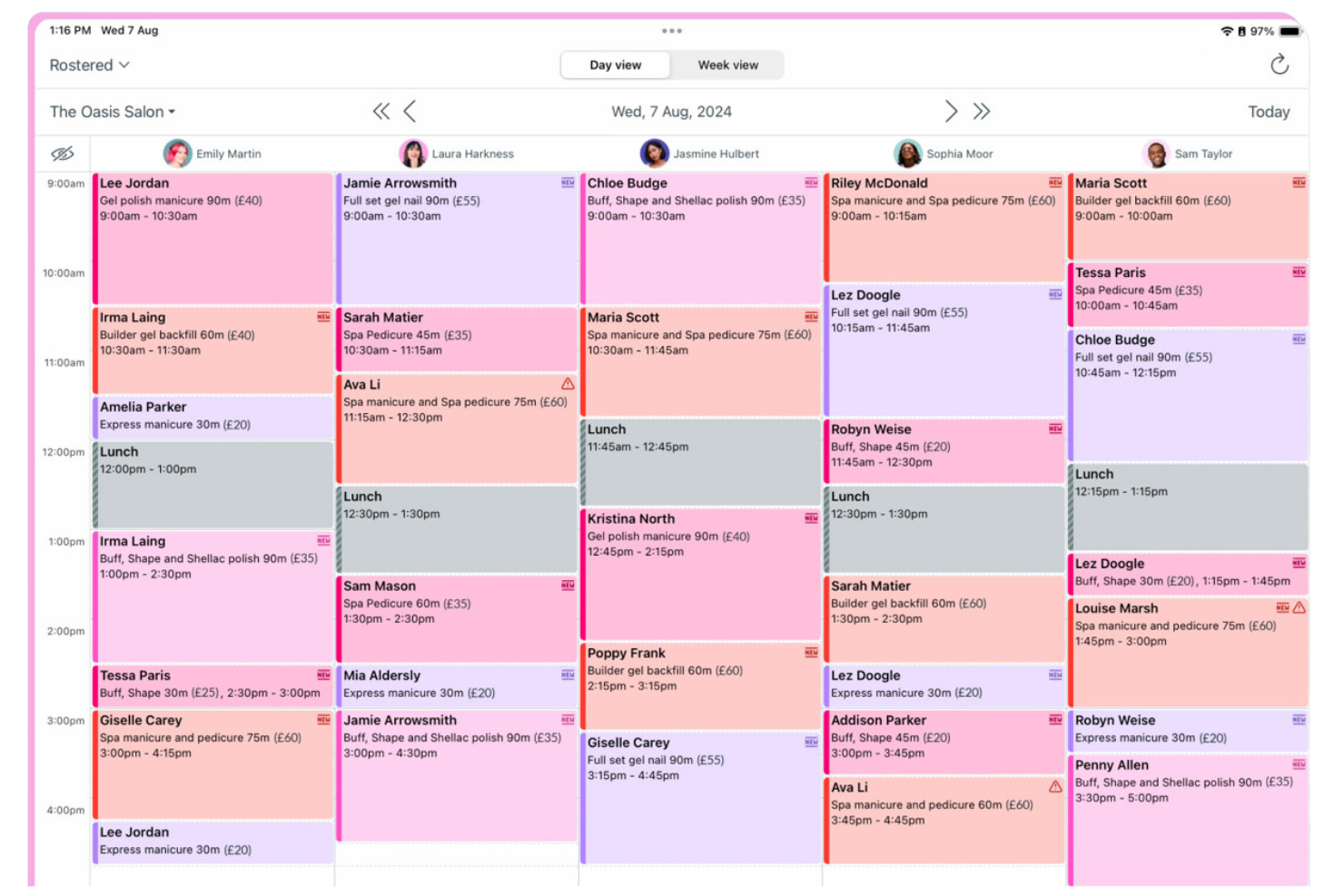
Timely uses AI to automatically track work activity, making it a strong fit for teams that want to reduce manual time entry. It’s especially useful for agencies, consultancies, and remote teams that need accurate, real-time records of billable hours without constant user input. Unlike Toggl, Timely captures work across apps and devices in the background, so you get a complete timeline with less effort.
Why It’s a Good Toggl Alternative
What sets Timely apart is its use of AI to automate time tracking, which is especially valuable for teams that want to avoid manual timers and timesheets. I picked Timely because it records work activity in the background, capturing time spent across apps, documents, and meetings without user intervention.
The Memory Tracker feature creates a private timeline of your workday, so you can review and log hours with accuracy. This approach helps teams get a more complete and reliable record of billable time compared to traditional manual tracking tools.
Timely Key Features
Some other features that make Timely appealing for time-tracking teams include:
- Project Budgeting: Set project budgets and monitor tracked hours against them in real time.
- Team Dashboards: View team activity, capacity, and logged hours from a centralized dashboard.
- Billable vs Non-Billable Tracking: Categorize time entries as billable or non-billable for accurate client invoicing.
- Calendar Integration: Sync with Google Calendar or Outlook to automatically pull in meetings and events.
Timely Integrations
Integrations include Asana, ClickUp, monday.com, Trello, Gmail, Google Calendar, Zoom, Microsoft Teams, Jira, and QuickBooks.
Pros and Cons
Pros:
- Catches hidden billable hours
- Beautiful visual calendar UI
- High employee privacy focus
Cons:
- Complex billing setup
- Can drain laptop battery

My Hours
Best for client billing management
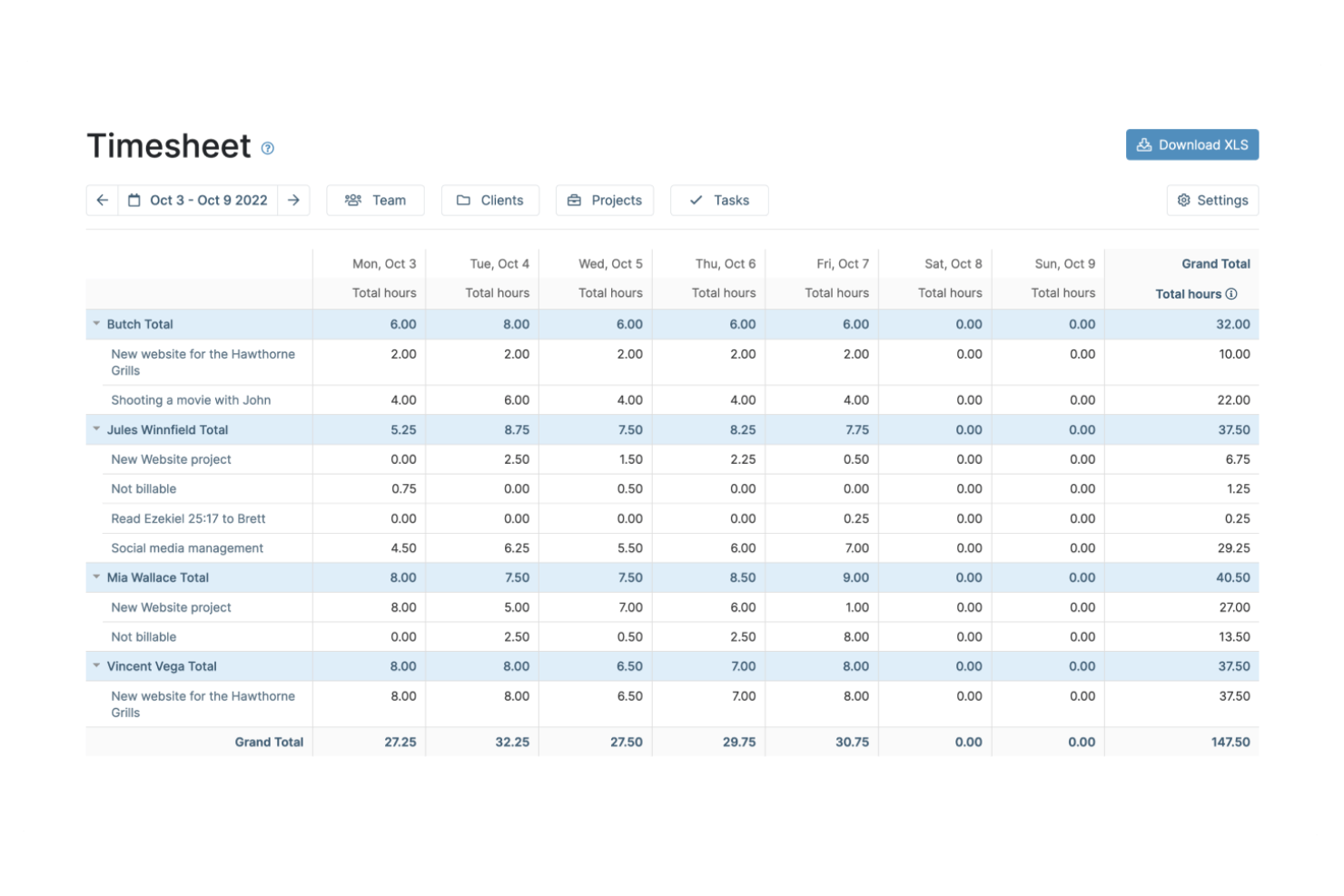
If you’re looking for time-tracking software with advanced client billing features, My Hours is worth a closer look. It’s designed for freelancers, agencies, and service-based businesses that need to manage billable hours, invoicing, and project budgets in one place. My Hours stands out from Toggl by offering built-in tools for tracking billable rates, generating invoices, and handling detailed client billing workflows.
Why It’s a Good Toggl Alternative
Unlike many time-tracking tools, My Hours is built with client billing management at its core. I picked My Hours because it lets you assign billable rates to different projects or clients and generate invoices directly from tracked time.
The platform also supports detailed reporting on billable versus non-billable hours, which helps you keep client billing accurate and transparent. For teams or freelancers who need more than just time tracking, these billing features make My Hours a strong Toggl alternative.
My Hours Key Features
Some other features in My Hours that are useful for project-based teams include:
- Task Organization: Break down projects into tasks and sub-tasks for more granular tracking.
- Customizable Reports: Generate and export detailed reports based on projects, clients, or team members.
- Team Management: Assign roles and permissions to control access and responsibilities within your team.
- Mobile App: Track time and manage projects on the go with dedicated iOS and Android apps.
My Hours Integrations
Integrations include QuickBooks Online, Xero, Trello, Asana, and Jira.
Pros and Cons
Pros:
- Generous free tier limits
- Clean project cost tracking
- Good client reporting tools
Cons:
- No automated idle detection
- Not meant for large teams

TimeCamp
Best for billing-focused project time tracking
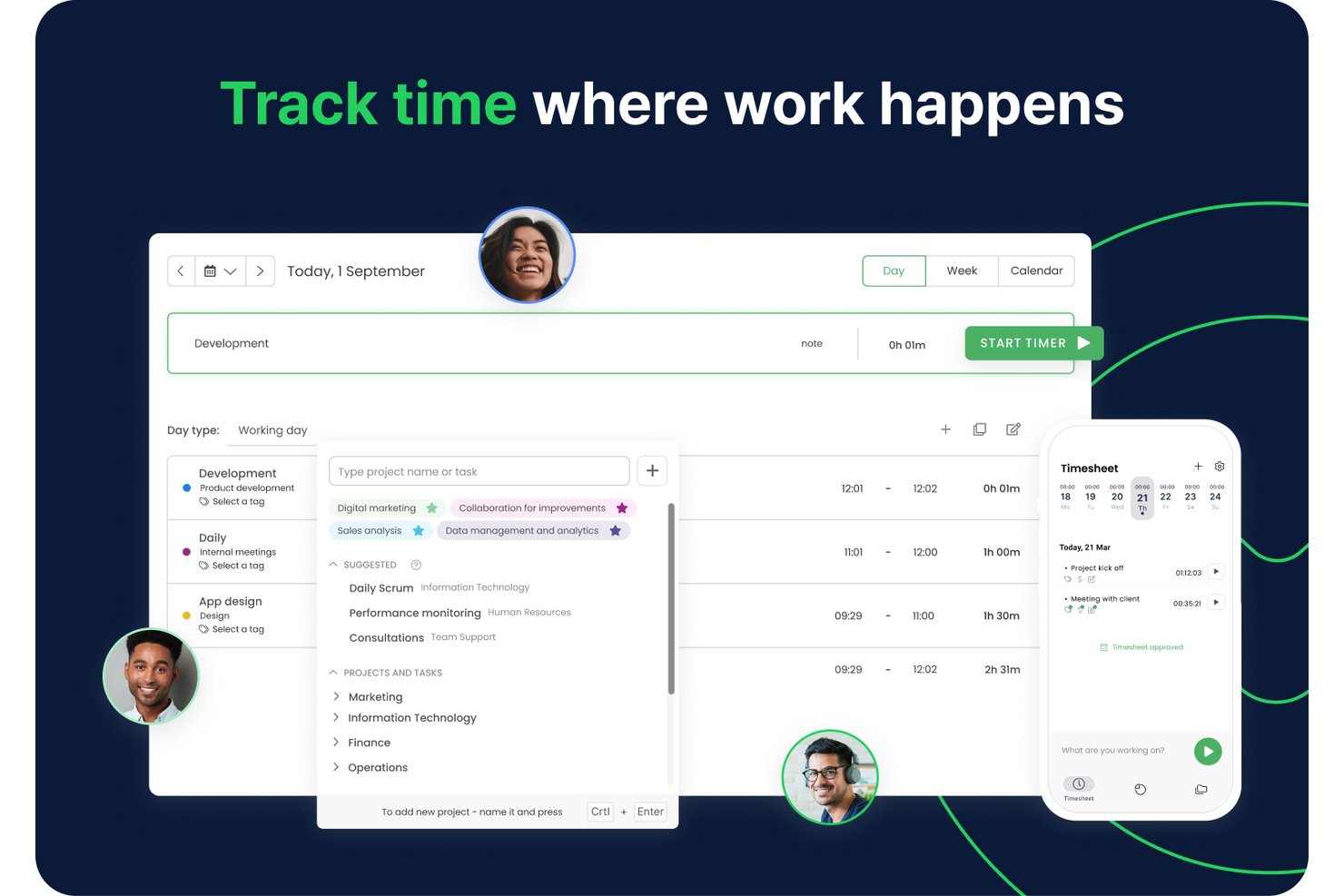
TimeCamp is a project time-tracking tool for teams that need a Toggl alternative to see where work hours go, organize timesheets, and track time across projects and tasks.
Who Is TimeCamp Best For?
TimeCamp suits agencies, consultancies, and client-service teams that need to track billable project hours and support client invoicing.
Why I Picked TimeCamp
I picked TimeCamp as a Toggl alternative because it’s built for billing-focused project time tracking. I can assign billable rates by project or task, then turn tracked hours and expenses into client invoices. Project budgets and threshold alerts help me catch overruns before they eat into a fixed-fee engagement.
TimeCamp Key Features
- Automatic time tracking: The desktop app records app and website activity in the background.
- Timesheet approvals: Managers can review and approve timesheets through daily or weekly workflows.
- Attendance tracking: Track attendance, overtime, and time off with an attendance calendar.
- Project integrations: Connect TimeCamp with tools such as Jira, Asana, Trello, and GitHub.
TimeCamp Integrations
TimeCamp integrations include Jira, Asana, ClickUp, Trello, GitHub, QuickBooks Online, Xero, Google Calendar, Slack, and Zapier. It also offers a public API for custom integrations.
Pros and Cons
Pros:
- Flexible daily, weekly, or real-time time entry
- Budget alerts help protect fixed-fee project margins
- Background tracking can recover forgotten billable hours
Cons:
- Limited report filters complicate client comparisons
- Mobile sync delays can leave reports incomplete

Everhour
Best for tracking time inside project management tools
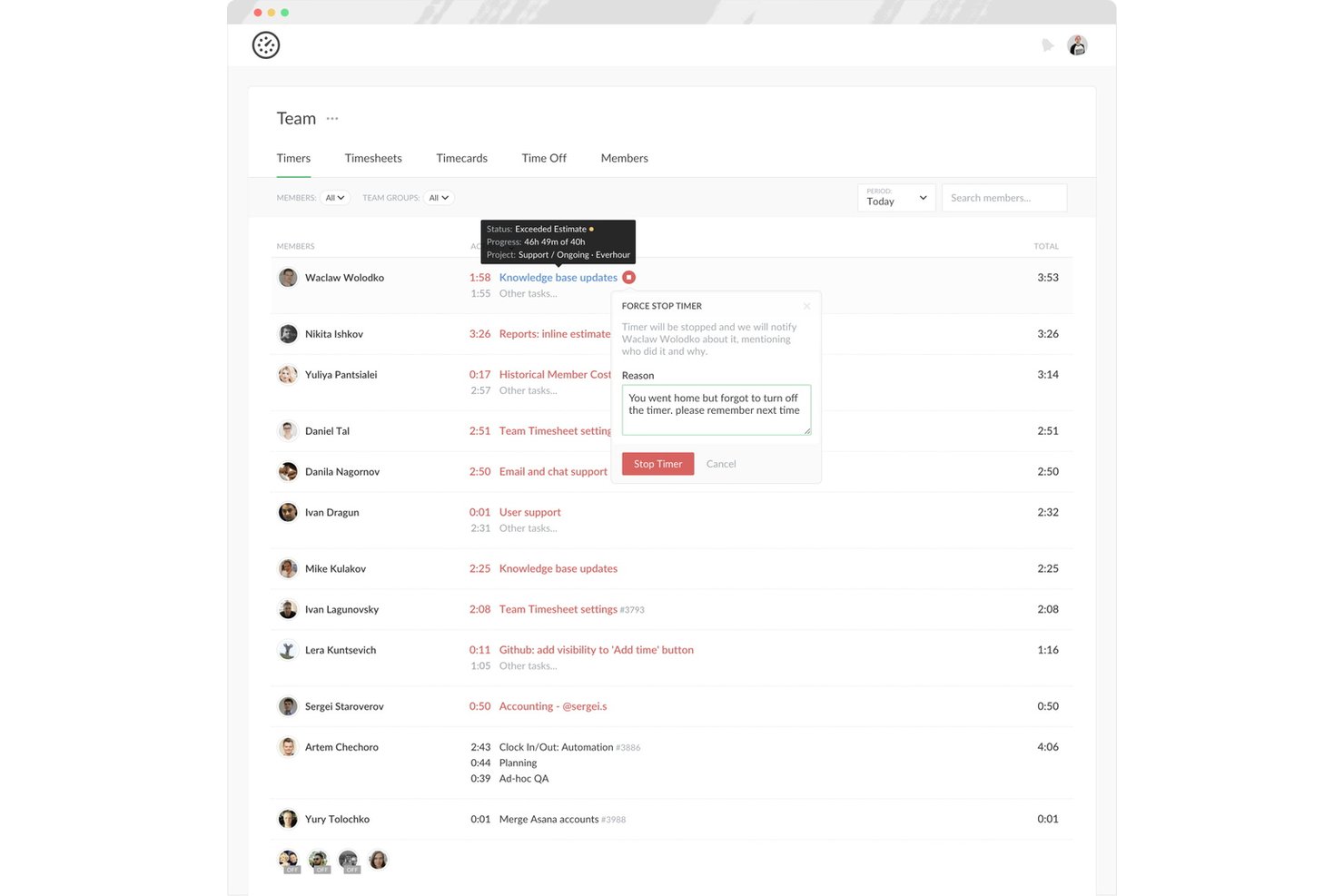
Everhour is a time tracking and project budgeting tool for agencies and tech teams that need to monitor billable hours, labor costs, and workload without adding more administrative overhead.
Who Is Everhour Best For?
Everhour suits project managers and delivery teams who want to track time directly in the project management tools they already use.
Why I Picked Everhour
I picked Everhour as a Toggl alternative because it’s built for tracking time inside project management tools. I like that its timer sits on tasks in tools such as Asana and Jira, so I can log work against the task itself. Project budget tracking also helps me compare logged hours with estimates as delivery progresses.
Everhour Key Features
- Manual time entry: Add or edit hours and attach notes to entries.
- Timesheet approvals: Review, approve, and lock team timesheets.
- Time reminders: Set tracking prompts and configure timers to stop at day’s end.
- Custom reports: Filter, chart, schedule, and export reports on tracked time.
Everhour Integrations
Everhour lists 20 native integrations, including Asana, Basecamp, ClickUp, Jira, Linear, monday.com, Trello, Wrike, GitHub, and Slack. It also connects with Zapier and offers a public API for custom integrations.
Pros and Cons
Pros:
- Reports billable and nonbillable team hours
- Compares logged hours with project estimates
- Logs time directly against active tasks
Cons:
- Timers can miss work after page switches
- Mobile app offers fewer tracking controls
TMetric
Best for payroll-ready attendance and time off
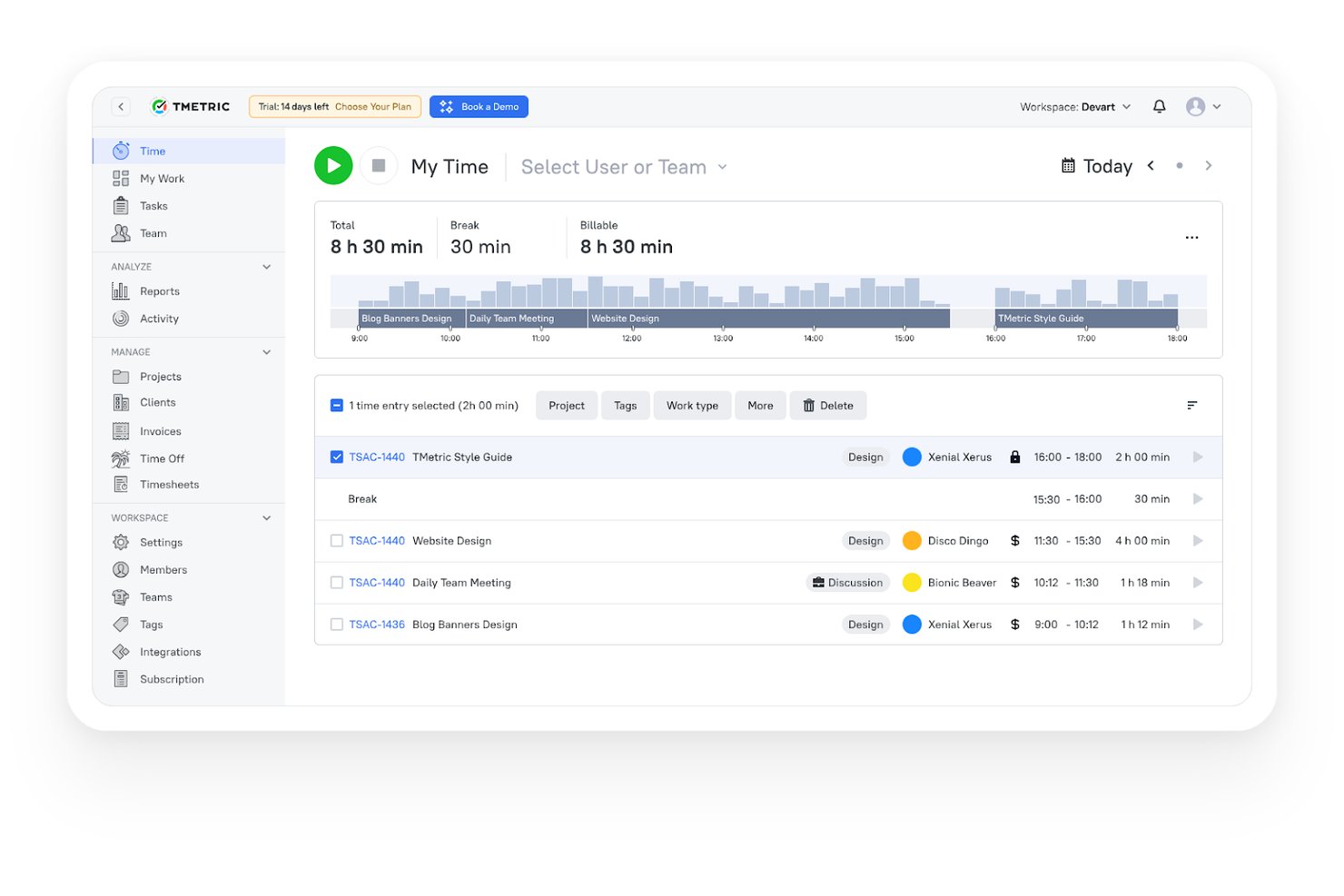
Built for freelancers and growing teams, TMetric is a time-tracking platform that links work hours to projects and budgets, helping you see where time goes and prepare accurate client billing.
Who Is TMetric Best For?
TMetric is a good fit for teams that need attendance and time-off records organized for payroll alongside project time tracking.
Why I Picked TMetric
I picked TMetric as a Toggl alternative for its “Best for payroll-ready attendance and time off” focus. I like that managers can set leave policies, review time-off requests, and check staff absences on a shared calendar. Its Team Summary brings together work hours, PTO, time balances, and costs for payroll preparation.
TMetric Key Features
- Offline time tracking: Record work time without an internet connection and sync it later.
- Project budgets: Set budgets and track project costs, revenue, margin, and burn rate.
- Invoice generation: Create invoices from tracked billable time.
- Project management integrations: Connect TMetric with tools such as Jira, Asana, and Notion.
TMetric Integrations
TMetric documents 50+ integrations, including Jira, Asana, Trello, ClickUp, Notion, Google Calendar, QuickBooks Online, and Xero. It also connects with Zapier and offers an open API for custom integrations.
Pros and Cons
Pros:
- Reports connect hours, budgets, and billable costs
- Offline entries sync after reconnection
- PTO balances and approvals share one calendar
Cons:
- No automatic breaks or overtime tracking
- Mobile apps offer fewer reporting and admin controls

Best for team collaboration features
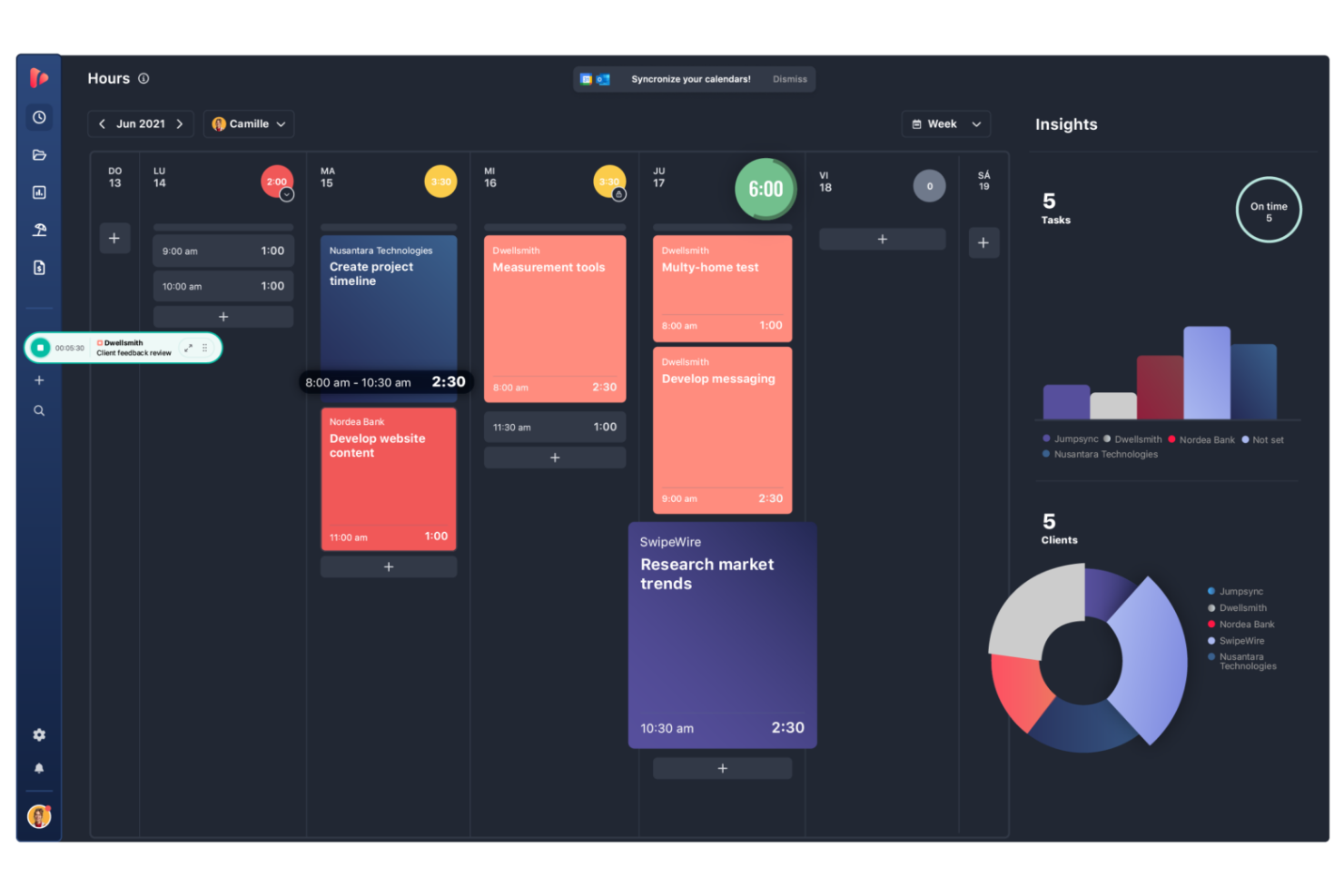
If your team needs to coordinate projects and track time together, TrackingTime puts collaboration at the center of its platform. It’s a strong fit for creative agencies, consultancies, and distributed teams that need shared task management and real-time visibility into workloads. Unlike Toggl, TrackingTime emphasizes features like shared timelines, team dashboards, and collaborative task tracking to keep everyone aligned.
Why It’s a Good Toggl Alternative
For teams that need to work closely together, TrackingTime offers collaboration features that go beyond what you’ll find in Toggl. I picked TrackingTime because it lets users assign tasks, share project timelines, and monitor team workloads in real time.
The platform’s shared dashboards and group time entries help everyone stay on the same page and make it easier to coordinate project work. These features make TrackingTime a strong choice for teams that value transparency and collective progress tracking.
TrackingTime Key Features
Some other features that make TrackingTime useful for teams include:
- Automated Time Tracking: The platform can automatically track time based on activity and app usage.
- Customizable Reports: Generate detailed reports filtered by client, project, or team member.
- Calendar Integration: Sync tracked time with Google Calendar and Outlook.
- Billable Hours Tracking: Mark tracked time as billable or non-billable for client invoicing.
TrackingTime Integrations
Integrations include Asana, Trello, Jira, GitHub, Slack, Microsoft Teams, and Basecamp.
Pros and Cons
Pros:
- Flexible reporting options
- Highly affordable pricing
- Tracks time inside other apps
Cons:
- Syncing issues occur often
- Interface can feel cluttered
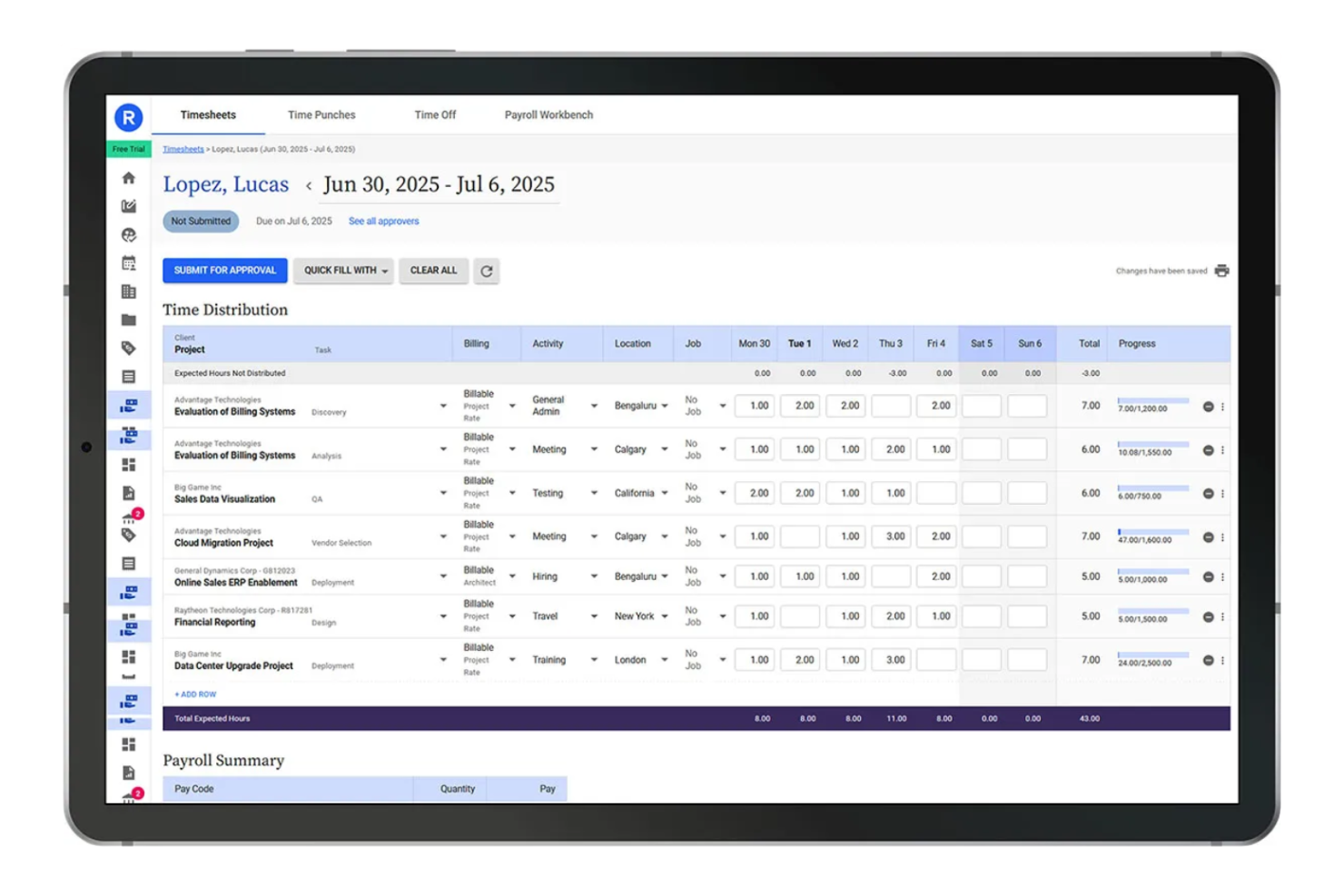
Replicon offers advanced time tracking with built-in controls for organizations that need to meet strict compliance and audit requirements. It’s designed for teams in regulated industries or those managing complex labor laws and audit trails. Replicon stands out from Toggl by providing configurable compliance rules, detailed audit logs, and support for global labor regulations.
Why It’s a Good Toggl Alternative
When compliance and audit readiness are top priorities, Replicon offers features that go beyond basic time tracking. I picked Replicon because it lets you set up custom compliance rules and automate policy enforcement, which is essential for businesses facing strict labor regulations.
The platform also provides detailed audit trails and real-time validation of timesheet data, making it easier to prepare for audits or internal reviews. These capabilities make Replicon a strong choice for organizations that need to demonstrate compliance and maintain accurate records.
Replicon Key Features
Some other features that make Replicon useful for time-tracking teams include:
- Mobile Timesheet App: Employees can submit and manage timesheets from their smartphones.
- Multi-Currency Support: Track and manage time and expenses in different currencies for global teams.
- Resource Management: Allocate and monitor resources across projects with built-in planning tools.
- Customizable Reporting: Build and export detailed reports tailored to your organization’s needs.
Replicon Integrations
Integrations include SAP, Oracle, Workday, ADP, Salesforce, Jira, and ServiceNow.
Pros and Cons
Pros:
- Highly secure data storage
- Deep enterprise integrations
- Strong audit and approvals
Cons:
- Long deployment timelines
- Time entry is highly rigid

Paymo
Best for task and project workflows
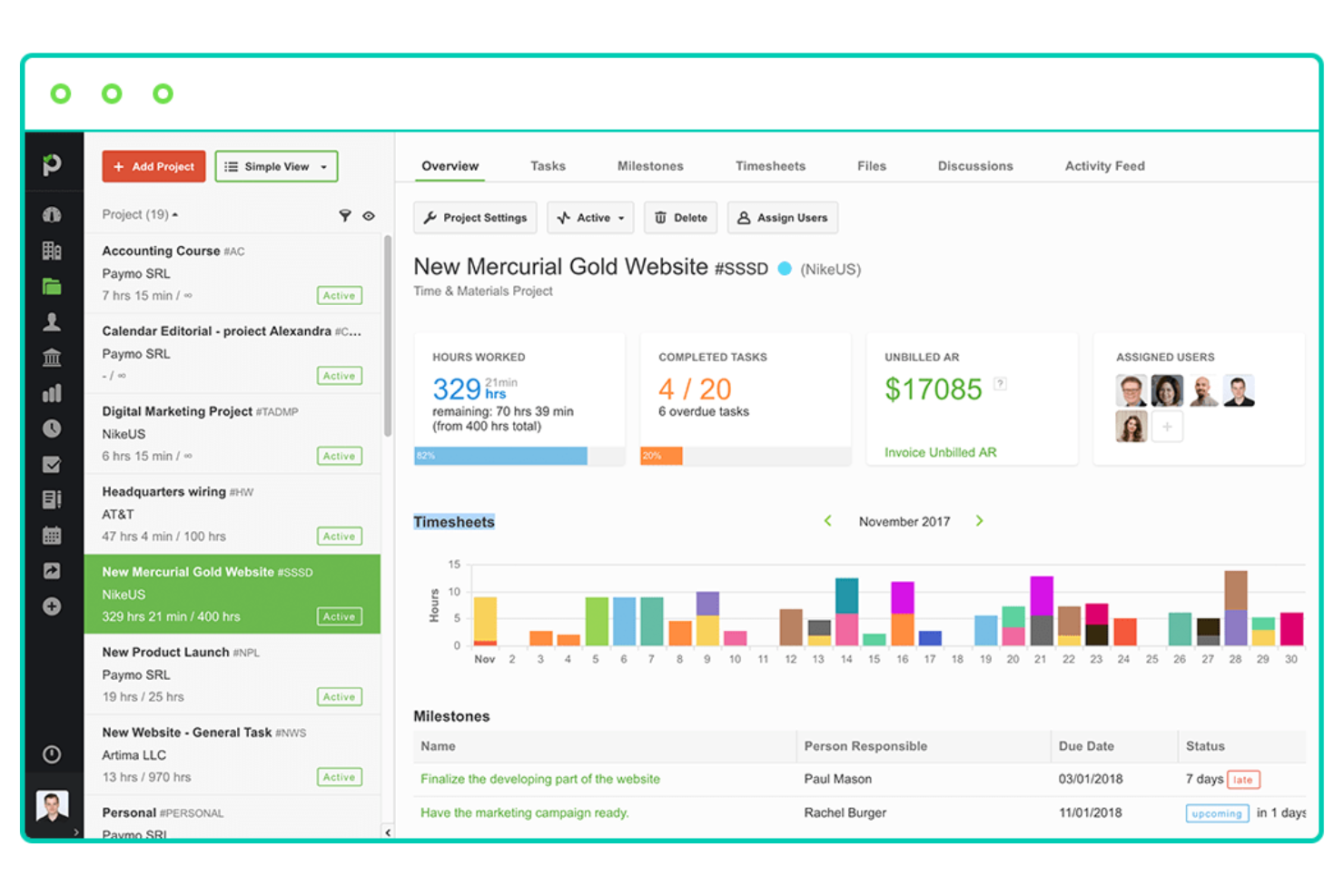
Paymo is often used by teams that need more than basic time tracking through its project and task management capabilities. The tool is designed for agencies, consultancies, and service-based teams that want to connect time tracking directly to project workflows. Unlike Toggl, Paymo lets you manage tasks, track progress, and handle invoicing all in one place.
Why It’s a Good Toggl Alternative
If your team needs to manage both time tracking and project workflows in one place, Paymo is worth considering. I picked Paymo because it combines time tracking with Kanban boards, task lists, and project templates, making it easy to organize and monitor work from start to finish.
You can assign tasks, set deadlines, and visualize project progress alongside tracked hours. This all-in-one approach helps teams keep project delivery and time management tightly connected.
Paymo Key Features
Some other features that make Paymo stand out for time-tracking and project management include:
- Built-In Time Tracker: Track time directly from the desktop or mobile app without switching tools.
- Automatic Time Tracking: Use Paymo Track to automatically record time spent on different activities.
- Invoicing and Estimates: Generate invoices and estimates based on tracked time and project data.
- Resource Scheduling: Allocate team members to projects and visualize workloads on a timeline.
Paymo Integrations
Integrations include Google Drive, Google Calendar, Slack, QuickBooks Online, Typeform, Pomodone, LambdaTest, Rethink, and Shift.
Pros and Cons
Pros:
- Replaces multiple tools
- Good resource scheduling
- Native invoicing capability
Cons:
- Steep pricing for full features
- Timer takes getting used to
Andre alternativer til Toggl
Her er noen flere alternativer til Toggl som ikke kom med på kortlisten min, men som likevel er verdt å sjekke ut:
- Productive
For agency project budget tracking
- Beebole
For project budget and utilization tracking
- Timesheets.com
For small business HR functions
- Jibble
For free unlimited-user attendance tracking
- Scoro
For integrated business management
- ClickUp
For tracking time within your project workspace
- Hubstaff
For monitoring distributed team output
- QuickBooks Time
For payroll integration
- BigTime
For professional services billing and forecasting
- Harvest
For invoicing and expense tracking


How I Evaluate Toggl Alternatives
I split my evaluation into two layers: baseline criteria every tool must meet—like billable rate tracking and timesheet approvals—and differentiators that separate good from great.
Core Functionality (Table Stakes For This List)
When I'm selecting tools for my list, I rank each one on a scale from 0 (does not offer the functionality) to 5 (excels in this area) for each core functionality listed below. Then, I calculate the tool's total score into a percentage. Each tool needs to achieve a minimum total score of 65% to be considered for inclusion.
- Time Tracking Methods: I check whether tools offer timer-based, manual, and mobile entry so teams can log hours whether they're at a desk, in a meeting, or working offline.
- Project & Task Structure: Each tool should let you organize time entries under projects, tasks, and assignees rather than logging hours into a flat, unstructured list.
- Timesheets & Approvals: I look for weekly or biweekly timesheet views with at least a basic approval workflow, since most agency and services teams need a manager sign-off step.
- Reporting & Analytics: Good reports go beyond raw time totals. I evaluate whether you can filter by client, project, or team member and export the results in formats like CSV or PDF.
- Billable Rates & Invoicing: Tools like Harvest and Clockify handle billable vs. non-billable tagging differently, so I check whether you can set rates per project, per user, or both.
- Integrations & API Access: I look at native connections with tools PMs already use daily—Jira, Asana, Slack, QuickBooks—plus whether an open API exists for custom workflows.
Once I have a list of tools that meet this criteria, I consider what sets each platform apart.
Differentiating Factors (What Sets Vendors Apart)
Here's how I compare and contrast different vendors:
Standout Features
Resource and capacity planning is a major differentiator. Tools like Forecast and Teamwork let you visualize team workloads and open availability, which helps when you're juggling multiple projects at once. I also look for budget and profitability alerts that flag when a project is approaching its hour cap or margin threshold before it's too late. Client-facing portals matter too—sharing a read-only view of logged hours with a client saves you from building manual status reports every week.
Beyond Features
Pricing structure matters a lot when you're switching from Toggl. I evaluate whether a tool offers a usable free tier for small teams and whether approval workflows and reporting are locked behind enterprise plans. Platform coverage is another big one—distributed teams need desktop, mobile, and browser extension options with offline sync for on-site or travel work. For enterprise PMOs, I also check for SOC 2 compliance, SSO/SAML support, and role-based permissions, since these tend to be procurement blockers that can stall a rollout.
Hvorfor se etter et alternativ til Toggl?
Selv om Toggl er et godt valg når det gjelder programvare for tidsregistrering, finnes det flere grunner til at noen brukere ser etter alternative løsninger. Det kan hende du ser etter et alternativ til Toggl fordi …
- Du trenger innebygde funksjoner for lønn eller HR
- Teamet ditt trenger GPS- eller posisjonssporing
- Du ønsker mer omfattende funksjoner for prosjektstyring
- Du trenger mer avanserte rapporteringsalternativer
- Organisasjonen din må oppfylle strenge samsvarsstandarder
- Du foretrekker et verktøy med innebygd fakturering
Hvis noe av dette høres kjent ut, har du kommet til rett sted. Listen min inneholder flere programvarealternativer for tidsregistrering som egner seg bedre for team som møter disse utfordringene med Toggl og ser etter alternative løsninger.
Viktige funksjoner i Toggl
Her er noen av de viktigste funksjonene i Toggl, som kan hjelpe deg med å sammenligne hva alternative løsninger tilbyr:
- Tidtaker med ett klikk for registrering av arbeidstimer
- Manuell tidsregistrering og redigering
- Organisering av prosjekter og klienter
- Detaljert rapportering og analyse
- Fakturerbare satser og sporing av arbeidskostnader
- Nettleserutvidelse for rask tilgang
- Administrasjon av teammedlemmer og roller
- Kalenderintegrasjon for planlegging
- Mobilapper for iOS og Android
- Mulighet for tidsregistrering uten nett