

10 beste programmer for byggeplanlegging, gjennomgått i 2026



Det er krevende å administrere byggeprosjekter. Du må holde oversikt over tidsfrister, ressurser og uventede tilbakeslag. Det er her programvare for byggeplanlegging kommer inn. Den hjelper deg med å holde oversikt over oppgaver, fordele ressurser effektivt og overholde tidsplanene.
Jeg tester og vurderer programvare uavhengig, og jeg har erfaring fra prosjektstyringsbransjen. Jeg mener at programvare for byggeplanlegging kan gjøre de daglige utfordringene dine enklere. Målet mitt er å presentere en objektiv vurdering av de beste tilgjengelige alternativene.
I denne artikkelen finner du mine beste anbefalinger for verktøy for byggeplanlegging. Jeg går gjennom funksjoner, fordeler og ulemper, samt hvem de passer best for. Enten du leder et lite team eller et stort prosjekt, finnes det noe her for deg. La oss se nærmere på alternativene og finne den rette løsningen for dine behov.
Why Trust Our Software Recommendations
Our team has been testing and reviewing software since 2012. As project managers ourselves, we know how difficult—and important—it is to choose the right software.
For this guide, we evaluated tools using hands-on testing and independent research, scoring tools using our selection criteria. We also draw on insights from industry thought leaders and practicing project management experts.
Our reviews reflect our human editorial judgment, not a sales pitch.
Expert reviewers:
Sammenligningstabell for programvare for byggeplanlegging
Sammenlign prisopplysningene for mine beste anbefalinger av programvare for byggeplanlegging i tabellen nedenfor.
| Tool | Best For | Trial Info | Price | ||
|---|---|---|---|---|---|
| 1 | Best for AI-driven scheduling for mobile teams | 14-day free trial | From $29/month (billed annually) | Website | |
| 2 | Best for complex capital project controls | Free demo available | Pricing upon request | Website | |
| 3 | Best for integrated accounting tools | Free demo available | Pricing upon request | Website | |
| 4 | Best for Microsoft users | 30-day free trial | From $10/user/month (billed annually) | Website | |
| 5 | Best for ready-made templates | Free plan + free demo available | From $3.99/seat/month (billed annually) | Website | |
| 6 | Best for dispatching tasks | Free demo available | Pricing upon request | Website | |
| 7 | Best for AI-supported shift scheduling | 14-day free trial + free demo available | From $5/user/month | Website | |
| 8 | Best for large projects | Free demo available | Pricing upon request | Website | |
| 9 | Best for field management | Free plan available | From $39/user/month (billed annually) | Website | |
| 10 | Best for payroll integration | 14-day free trial + free demo available | From $6/user/month (billed annually) | Website |
Anmeldelser av den beste programvaren for byggeplanlegging
Nedenfor finner du mine detaljerte sammendrag av den beste programvaren for byggeplanlegging som kom med på kortlisten min. I anmeldelsene mine får du en grundig gjennomgang av de viktigste funksjonene, fordelene og ulempene, integrasjonene og ideelle bruksområdene for hvert verktøy, slik at du kan finne det som passer best for deg.
Best for AI-driven scheduling for mobile teams
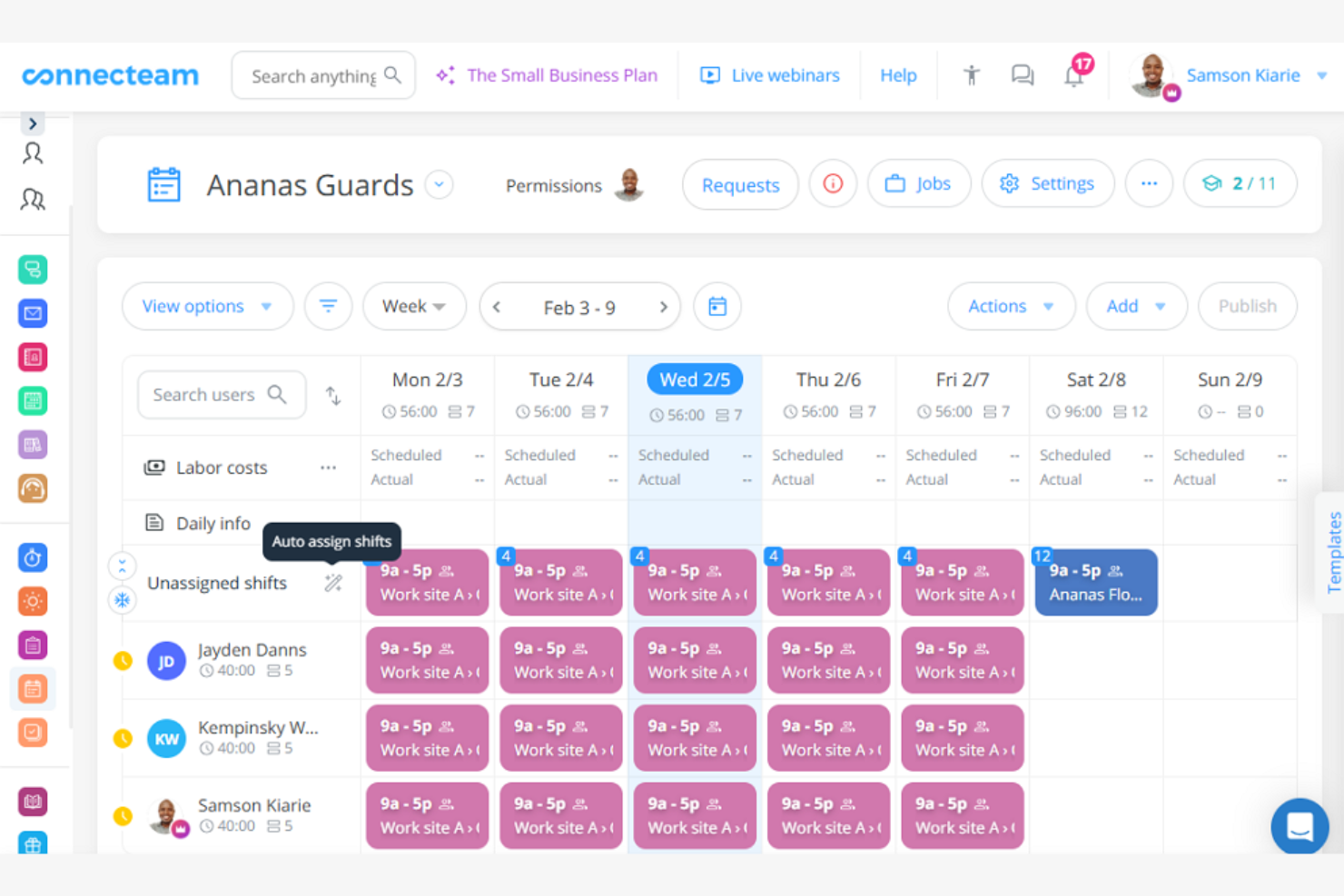
Connecteam is a construction scheduling app designed for mobile teams. It helps manage schedules, tasks, and communications, making it suitable for teams on the go.
Why I picked Connecteam: Connecteam is tailored for mobile teams, offering scheduling features that make it easy to access information from anywhere. You can send instant notifications, keeping everyone informed. Its mobile-first design allows your team to manage tasks and communicate efficiently. The app's focus on mobility makes it ideal for teams that need flexibility in the field.
Standout Features and Integrations:
Features include GPS tracking, which helps you monitor team locations and accountability. The app also offers task management tools, allowing you to assign and track tasks in real time. Additionally, Connecteam provides in-app chat, so your team can communicate without switching between platforms.
Integrations include QuickBooks, Gusto, Xero, and more.
Pros and Cons
Pros:
- In-app communication
- GPS tracking feature
- Mobile-first design
Cons:
- Basic reporting tools
- Limited customization options
New Product Updates from Connecteam

Connecteam Expands Break and Timesheet Controls
Connecteam adds flexible break thresholds, personalized policies, auto-end options, a centralized exceptions report, and improved timesheet issue visibility to help teams manage breaks and timesheets more effectively. For more information, visit Connecteam’s official site.
 .
.
InEight
Best for complex capital project controls
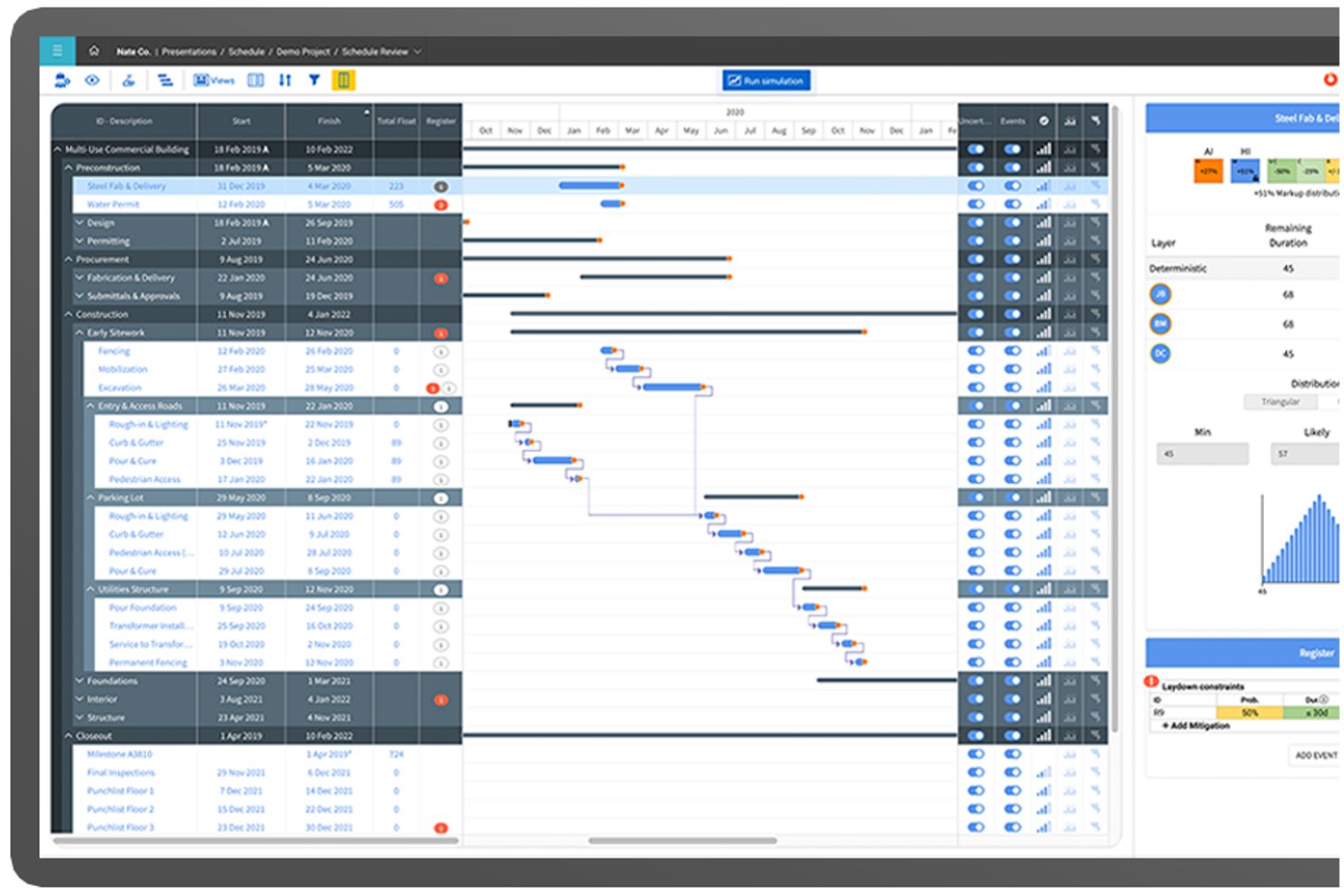
InEight is a modular project controls platform built for capital construction that integrates CPM scheduling, cost management, estimating, document control, and risk analysis across complex, large-scale projects.
Who Is InEight Best For?
InEight is built for enterprise contractors, EPCs, and owners delivering large-scale capital projects in infrastructure, energy, mining, and transportation.
Why I Picked InEight
InEight earns its spot because no other tool I've tested handles capital project scheduling at this scale. I like that the DCMA 14-point schedule health assessment and Monte Carlo risk analysis are built directly into the scheduling module. On a project with 80,000+ activities, I can identify critical path vulnerabilities before they compound. Integrated look-ahead planning ties short-interval field schedules to the master schedule, eliminating disconnected side plans.
InEight Key Features
- 4D BIM scheduling: Links schedule activities to 3D BIM models, enabling visual construction sequencing and clash detection.
- AI-powered risk analysis: Analyzes schedule data to flag risks, predict probable delays, and recommend mitigation steps.
- Submittal and procurement linking: Connects material lead times, submittals, and procurement data directly to schedule tasks.
- Weather and calendar intelligence: Automatically adjusts schedules based on weather forecasts and project-specific calendars.
InEight Integrations
InEight offers native integrations with Oracle Primavera P6, SAP, Oracle E-Business Suite, Autodesk Civil 3D, Navisworks, Revit, QuickBooks, Sage 300, Bluebeam Revu, Microsoft Excel, and SharePoint. An open API is available for custom integrations.
Pros and Cons
Pros:
- Built-in DCMA 14-point schedule health checks
- Integrated Monte Carlo risk analysis engine
- Handles extremely large, complex project schedules
Cons:
- Field teams report steep onboarding curve
- Desktop UI is dated compared to peers
CMiC
Best for integrated accounting tools

CMiC is a construction ERP platform built for general contractors, subcontractors, and civil/heavy-highway firms that combines project scheduling, project controls, financials, document management, and field operations in a single database.
Who Is CMiC Best For?
CMiC is a strong fit for mid-to-large general contractors and specialty contractors who need a single platform to manage both field operations and back-office financials.
Why I Picked CMiC
CMiC is one of my top picks because I love how its accounting module is purpose-built for construction rather than adapted from a generic system. Job costing, progress billing, retention management, and subcontractor accounting are core to how the platform operates—not bolt-ons. When a change order hits, the cost flows directly into the general ledger and the job cost record simultaneously, so my schedule and budget stay aligned without manual reconciliation across separate tools.
CMiC Key Features
- Gantt-based project scheduling: Build and manage project schedules with task dependencies, milestones, and critical path tracking across multiple projects.
- Resource management: Assign and track labor and equipment across project phases to avoid allocation conflicts.
- Submittal and RFI tracking: Log, route, and monitor submittals and RFIs directly within the project record.
- Equipment management: Track equipment hours, maintenance, and cost allocations against specific job budgets.
CMiC Integrations
CMiC offers partner-built integrations with Procore, DocuSign, Autodesk ProEst, Oracle Textura, Clearstory, HammerTech, SiteSense, Arcoro, GCPay, and EarthCam, among others. It also includes a CMiC-built Power BI connector and an API for custom integrations. Zapier support is not clearly documented.
Pros and Cons
Pros:
- Replaces multiple point solutions with one platform
- Built-in job costing per cost code
- Single database ties financials to project data
Cons:
- Interface feels dated and cluttered
- Frequent performance lags during peak use
Best for Microsoft users
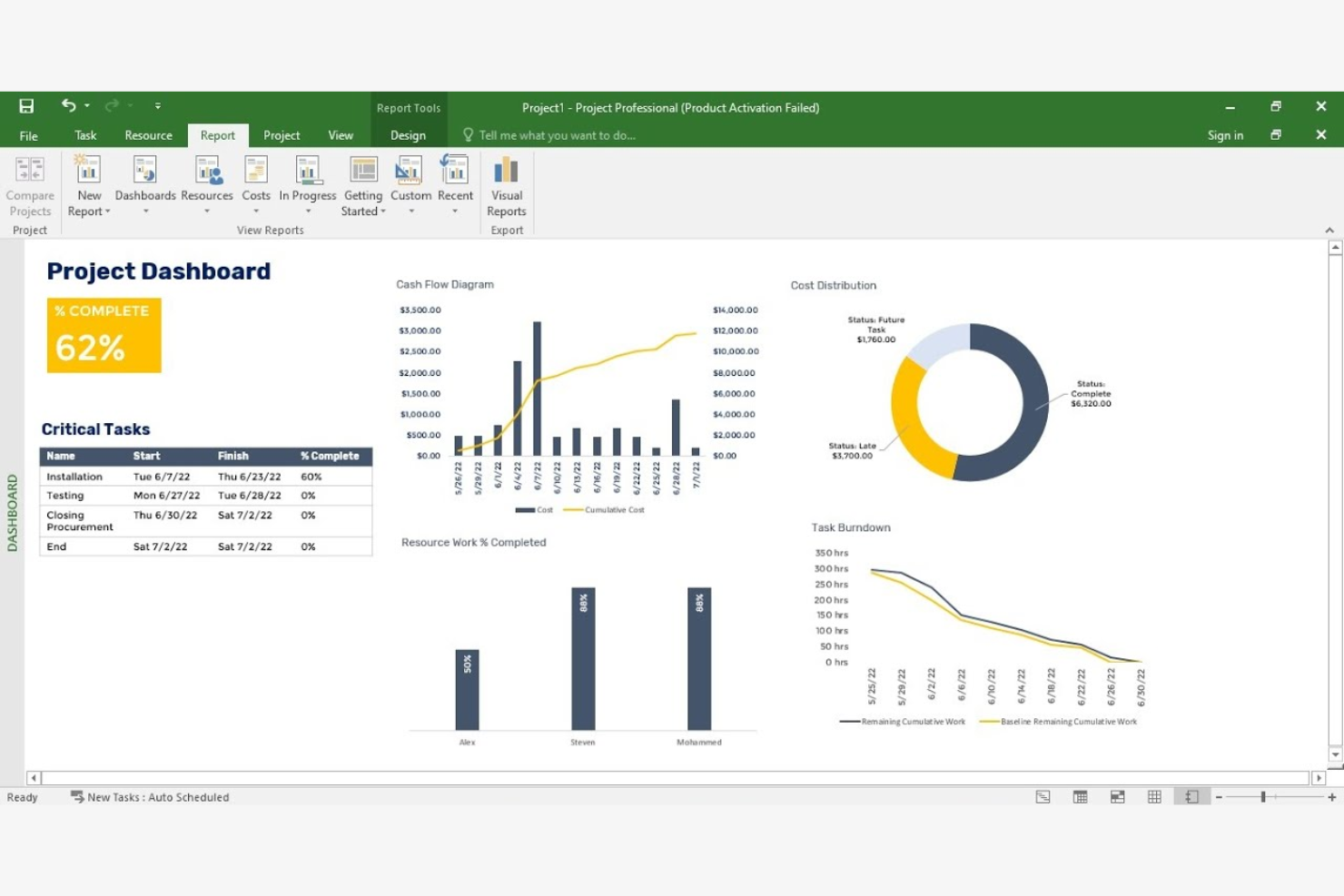
Microsoft Project is a project management software ideal for users familiar with Microsoft products. It helps teams plan, execute, and track projects efficiently, providing tools for scheduling, task management, and resource allocation.
Why I picked Microsoft Project: Microsoft Project is tailored for users who are already comfortable with the Microsoft ecosystem. It offers a familiar interface that integrates well with other Microsoft applications, making it easy for your team to adapt. The software provides detailed scheduling tools, allowing you to plan and manage complex projects. Its resource management features ensure you can allocate and track resources effectively.
Standout Features and Integrations:
Features include Gantt chart capabilities, which help you visualize project timelines and dependencies. The software also offers budget tracking, so you can keep an eye on project expenses. Additionally, Microsoft Project supports multiple project views, giving you flexibility in how you display project data.
Integrations include Microsoft Dynamics 365, Atlassian Jira, and more.
Pros and Cons
Pros:
- Budget tracking capabilities
- Supports multiple project views
- Familiar interface for Microsoft users
Cons:
- Requires Microsoft ecosystem familiarity
- Desktop access only

Plaky
Best for ready-made templates

Plaky is a construction scheduling software geared toward teams that benefit from structured templates. It serves project managers looking to simplify scheduling and task management with predefined templates.
Why I picked Plaky: Plaky excels in offering a variety of ready-made templates that you can use to save time in setup. These templates cover different construction project needs, providing a structured approach to scheduling. Its intuitive design helps you quickly adapt and implement schedules. The tool's focus on schedule templates makes it ideal for those who want a straightforward solution.
Standout Features and Integrations:
Features include a drag-and-drop interface that simplifies task adjustments, making it easy to update schedules. It also offers customizable templates, allowing you to tweak them to fit your specific project needs. Additionally, real-time team collaboration tools help everyone stay coordinated and informed.
Integrations include Pumble and more.
Pros and Cons
Pros:
- Visual board grouping and filtering
- Collaboration tools with real-time updates
- Template customization
Cons:
- Limited advanced task management
- Narrow third-party integrations

Best for dispatching tasks

FieldPulse is a scheduling and dispatching software tailored for small to medium-sized service businesses. It helps coordinate field operations, manage team schedules, and align job assignments.
Why I picked FieldPulse: FieldPulse is designed to dispatch tasks, making it ideal for teams that need quick job assignments. You can assign jobs with a few clicks, ensuring your team knows what to do and when. The cloud-based software provides a centralized dashboard to monitor job progress, which helps maintain oversight. Its focus on task dispatching makes it a valuable tool for businesses needing fast and effective job coordination.
Standout Features and Integrations:
Features include customer management tools that keep your client information organized and accessible. FieldPulse also offers invoicing capabilities, allowing you to create and send invoices directly from the app. Additionally, you can access detailed job history, helping you track past work and improve future performance.
Integrations include QuickBooks, Angi, Payrix, and more.
Pros and Cons
Pros:
- Detailed job history tracking
- Centralized job monitoring
- Direct invoicing from the app
Cons:
- Limited mileage tracking
- Lacks auto-route optimization

Deputy
Best for AI-supported shift scheduling
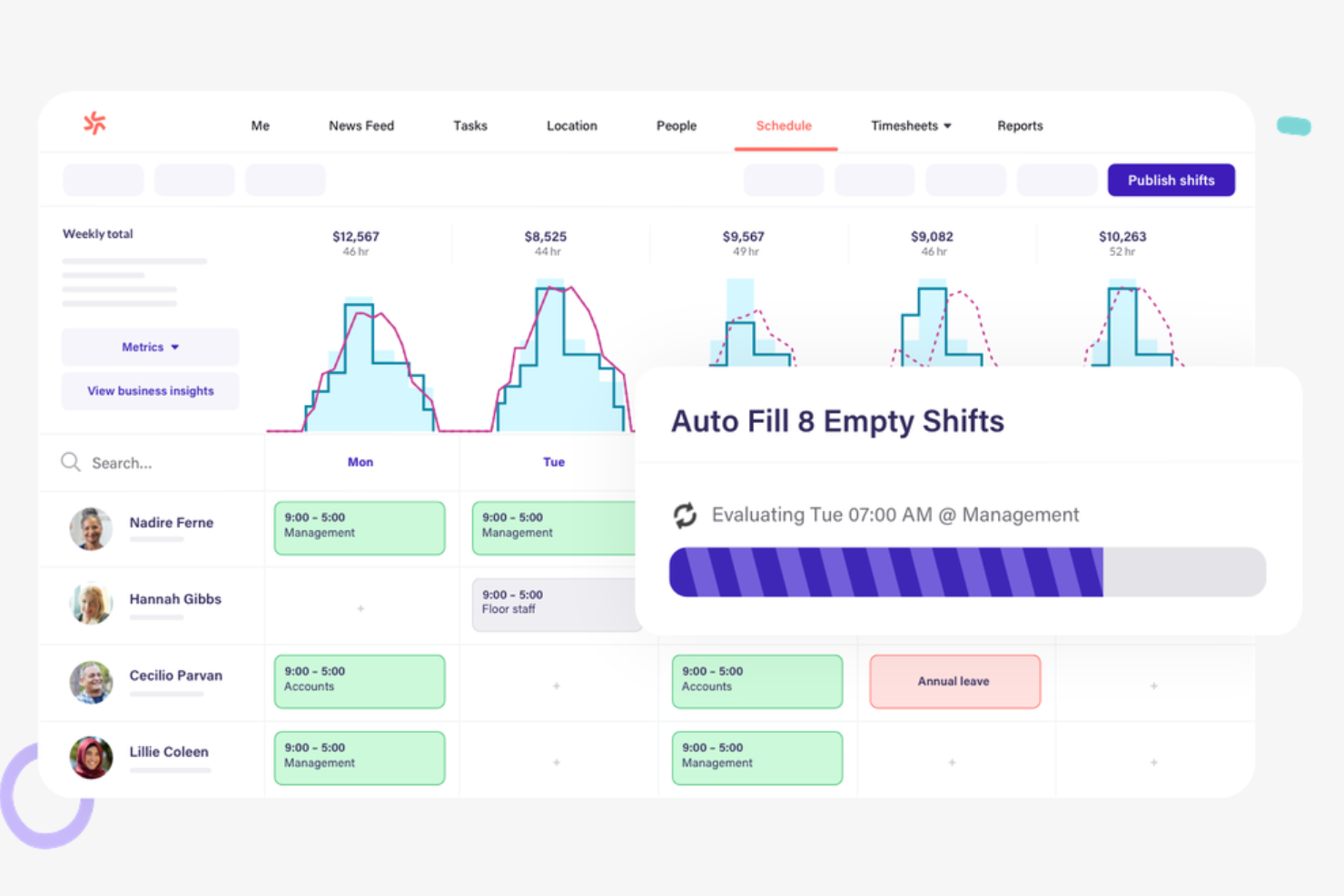
Deputy is a shift scheduling software designed for construction companies needing efficient workforce management. It helps managers organize employee shifts and track time and attendance.
Why I picked Deputy: Deputy excels in shift scheduling, making it a great choice for teams that require organized and efficient shift management. You can create and publish construction project schedules quickly, so your team is always informed. The software provides time tracking, helping you manage attendance accurately. Its focus on shift scheduling makes it ideal for businesses with variable shifts and hours.
Standout Features and Integrations:
Features include a communication platform that allows you to send messages and updates directly to your team. Deputy also offers task assignment tools, enabling you to allocate tasks alongside shifts. Additionally, the software supports compliance management, helping you adhere to labor laws.
Integrations include Xero, QuickBooks, ADP, Gusto, Square, Vend, NetSuite, and more.
Pros and Cons
Pros:
- Add-ons available to tailor the platform
- Mobile time and attendance tracking
- Supports shift swapping
Cons:
- Poor subcontractor schedule management
- Manual shift template configuration required

Procore
Best for large projects
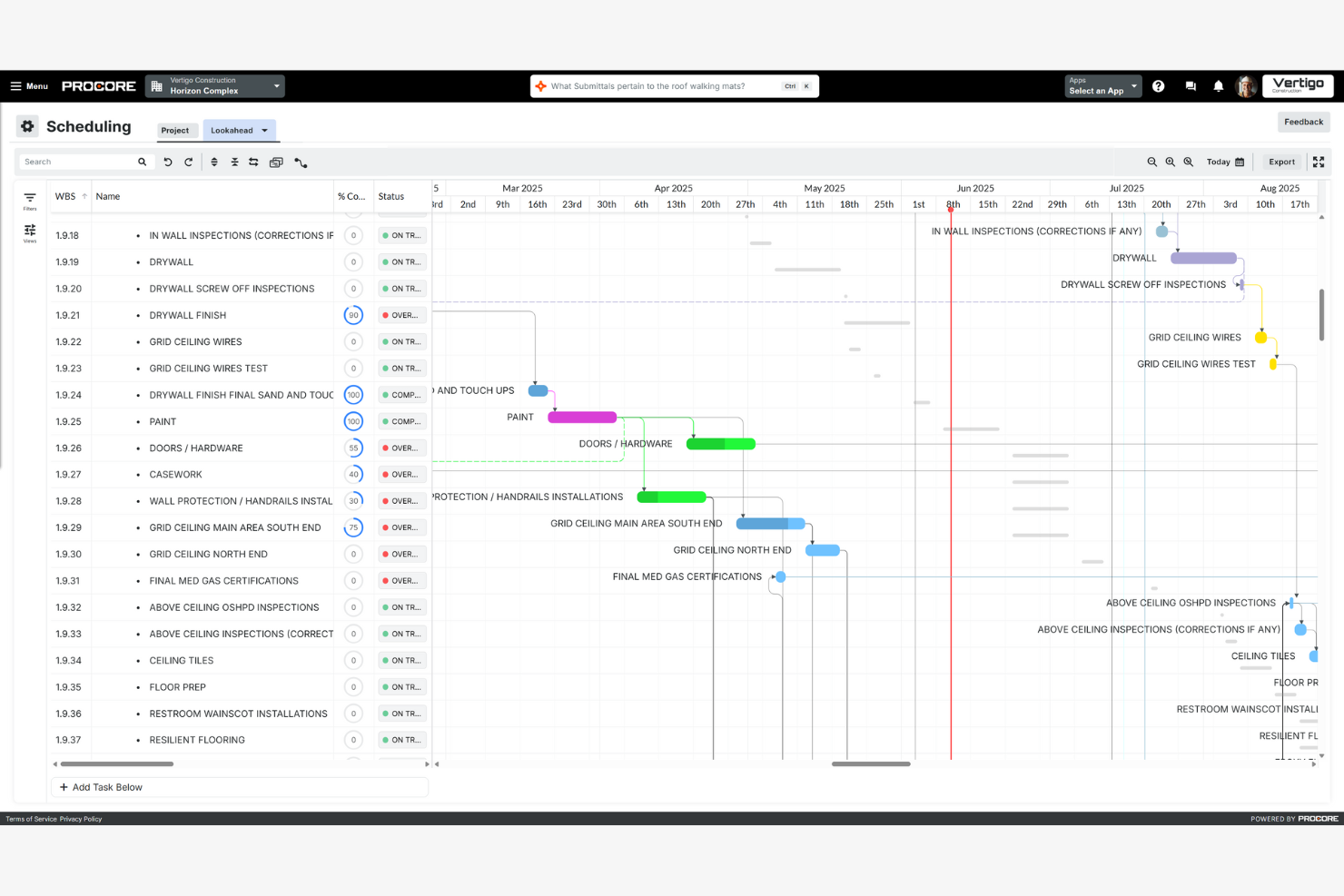
Procore is a construction management platform aimed at large-scale projects. It helps teams manage schedules, documents, and communication across complex projects.
Why I picked Procore: Procore is ideal for large projects, offering features that accommodate extensive project management needs and critical path methods. You can manage schedules with precision, helping your team stay on track. The platform provides tools for document management, making it easy to keep all project information organized. Its ability to handle complex projects makes it a valuable tool for large teams needing detailed oversight.
Standout Features and Integrations:
Features include advanced reporting tools that give you insights into project performance and profitability. You can also use the platform's bidding tools to manage and track bids efficiently. Additionally, Procore offers a daily log feature, helping you document daily activities and issues.
Integrations include Microsoft 365, Bluebeam, Docusign, and more.
Pros and Cons
Pros:
- Detailed document management
- Unlimited users and data storage
- Handles complex project needs
Cons:
- Limited flexibility with dashboards
- Cost based on annual construction volume

Best for field management
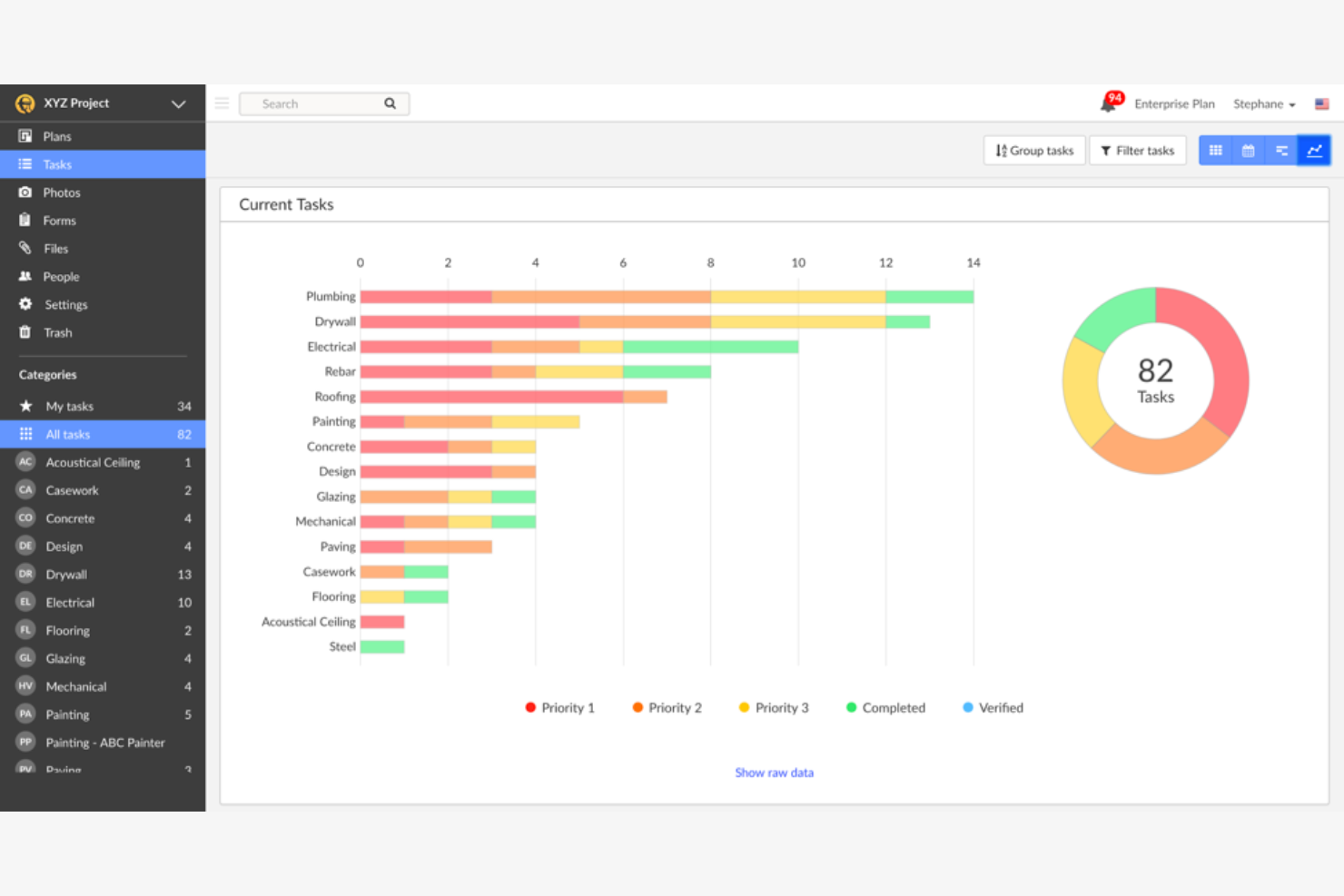
Fieldwire is a construction scheduling tool aimed at teams needing effective field management. It provides solutions for task coordination and site inspections, focusing on real-time collaboration.
Why I picked Fieldwire: Fieldwire excels in managing tasks directly on the field, making it a great choice for teams that require on-the-ground coordination. You can assign tasks and track progress in real time, keeping your team aligned. The software's blueprint markup feature allows you to annotate plans directly on-site, which helps with communication. Its emphasis on field management makes it a suitable option for teams working across multiple sites.
Standout Features and Integrations:
Features include punch list management, which helps you track and resolve issues promptly. It also offers document storage, ensuring your team has access to important files anytime. Additionally, Fieldwire supports daily reports, providing insights into day-to-day activities.
Integrations include Box, Dropbox, and more.
Pros and Cons
Pros:
- Supports multiple site coordination
- Effective punch list management
- Blueprint markup tool
Cons:
- Minimal design flexibility
- Limited cost management features

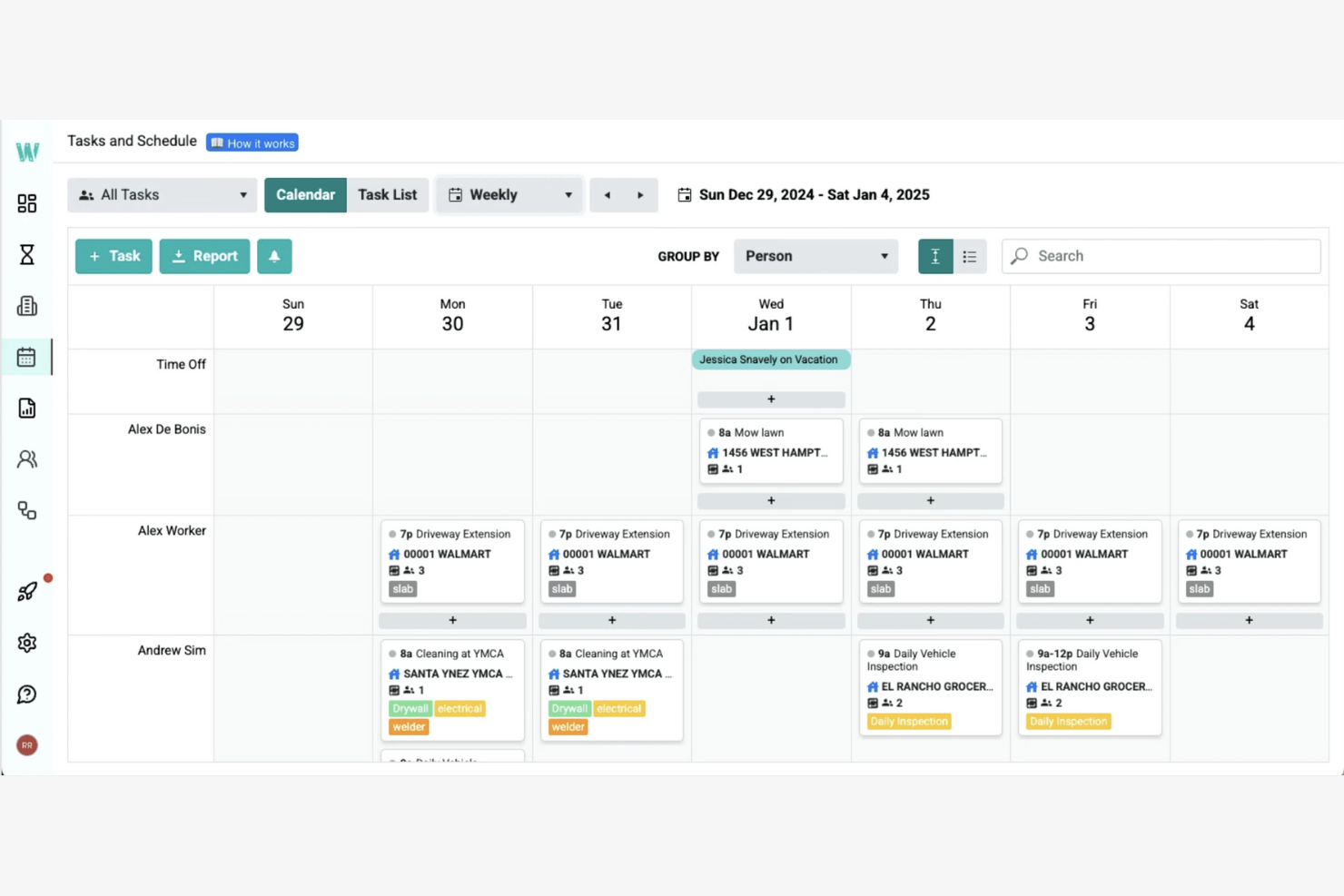
Workyard is a contractor scheduling software designed for construction teams needing efficient payroll integration. It helps manage work schedules, track time, and support payroll processes.
Why I picked Workyard: Workyard excels in integrating payroll with job schedules for accurate time tracking. You can sync time logs with payroll, reducing manual entry errors. The app provides GPS tracking, which adds an extra layer of accuracy to time reports. Its focus on payroll integration makes it ideal for teams looking to simplify payment processes.
Standout Features and Integrations:
Features include detailed reporting tools that help you analyze workforce productivity. Workyard also offers customizable scheduling, allowing you to tailor shifts to your team's needs. The app supports photo verification, helping to show that work is completed as planned.
Integrations include QuickBooks, Gusto, ADP, and more.
Pros and Cons
Pros:
- Detailed productivity reports
- Photo verification feature
- Automated travel time and mileage
Cons:
- Basic mobile app design
- Limited customer support hours
Annen programvare for byggeplanlegging
Her er noen flere alternativer for programvare for byggeplanlegging som ikke kom med på kortlisten min, men som likevel er verdt å se nærmere på:
- Outbuild
For resource allocation
- SmartPM
For analytics and automated reporting
- Planera
For project forecasting
- Buildxact
For residential builders
- GanttPRO
For Gantt chart focus
- Buildertrend
For client communication
- Autodesk Construction Cloud
For integration capabilities
- Houzz Pro
For residential projects
- JobTread
For budget management
- Kahua
For enterprise solutions
- Touchplan
For collaborative planning
- Phoenix Project Manager
For critical path analysis


How I Evaluate Construction Scheduling Software
I look at construction scheduling tools in two layers: the CPM, field access, and progress tracking basics that qualify a tool, and the differentiators that make one worth picking over another.
Core Functionality (Table Stakes For This List)
When I'm selecting tools for my list, I rank each one on a scale from 0 (does not offer the functionality) to 5 (excels in this area) for each core functionality listed below. Then, I calculate the tool's total score into a percentage. Each tool needs to achieve a minimum total score of 65% to be considered for inclusion.
- CPM Scheduling & Gantt Charts: I check whether a tool supports true Critical Path Method logic with dependency types, lag/lead times, and milestones—not just a visual Gantt with drag-and-drop bars.
- Resource & Crew Management: Assigning subs, crews, and equipment to individual tasks matters, but I also look for leveling tools that flag conflicts across concurrent jobsites.
- Baseline & Progress Tracking: I evaluate how each platform handles baseline comparisons and variance reporting—for example, whether a super can log actual progress that updates the schedule in real time.
- Look-Ahead & Pull Planning: Short-interval planning is how field teams actually run their weeks, so I look for dedicated 3- or 6-week look-ahead views and any pull planning features with constraint tracking.
- Field Collaboration & Mobile Access: A scheduler sitting in a trailer shouldn't be the only person updating the schedule. I look for mobile apps that let field crews view tasks, post updates, and attach photos on-site.
- Construction-Specific Integrations: The tool needs to connect with the platforms construction teams already use. I check for native integrations with tools like Procore, Autodesk Construction Cloud, or Primavera P6.
Once I have a list of tools that meet this criteria, I consider what sets each platform apart.
Differentiating Factors (What Sets Vendors Apart)
Here's how I compare and contrast different vendors:
Standout Features
4D BIM scheduling is a major differentiator. I look for tools that link tasks to 3D models so teams can simulate build sequences and spot clashes before they reach the field. Submittal and procurement linking also carries real weight—a delayed material delivery can derail even a solid CPM schedule. Weather intelligence is worth evaluating too, especially for teams managing outdoor trades across seasons, where auto-adjusted timelines save hours of manual rework each week.
Beyond Features
Pricing structure matters a lot in this space. Some vendors charge per user, others per project, and a few offer unlimited seats with tiered modules. For a GC with dozens of field users who only need view access, the wrong model can inflate costs fast. I also evaluate implementation and training support—construction schedulers often have deep CPM expertise but limited patience for clunky software rollouts. Audit trails and version history are worth checking too, since scheduled records frequently become evidence in delay claims and disputes.
Slik velger du programvare for byggeplanlegging
Det er lett å gå seg vill i lange funksjonslister og kompliserte prismodeller. For å hjelpe deg med å holde fokus mens du går gjennom den unike prosessen din for valg av programvare, får du her en sjekkliste over faktorer du bør ha i bakhodet:
| Faktor | Hva du bør vurdere |
|---|---|
| Skalerbarhet | Kan programvaren vokse sammen med virksomheten din? Vurder om den støtter større prosjektomfang og flere brukere uten store kostnadsøkninger. |
| Integrasjoner | Kan den integreres med verktøyene du bruker i dag? Se etter sømløs dataflyt mellom programvaren for byggeplanlegging og eksisterende systemer du er avhengig av. |
| Tilpasningsmuligheter | Kan du tilpasse programvaren til arbeidsflytene dine? Vurder om den tillater endringer som passer teamets unike prosesser og prosjektbehov. |
| Brukervennlighet | Er grensesnittet intuitivt for teamet ditt? Sørg for at nye brukere kan lære seg systemet raskt uten omfattende opplæring. |
| Implementering og oppstart | Hvor lang tid tar det å komme i gang? Vurder tiden og ressursene som kreves for oppsettet, og om leverandøren tilbyr tilstrekkelig støtte. |
| Kostnad | Passer prisen inn i budsjettet ditt? Sammenlign kostnadene hos ulike leverandører, inkludert skjulte gebyrer eller trinnvise abonnementer som kan påvirke de langsiktige utgiftene dine. |
| Sikkerhetstiltak | Er dataene dine sikre? Se etter kryptering, regelmessige oppdateringer og samsvar med bransjestandarder for å beskytte sensitiv informasjon. |
Hva er programvare for byggeplanlegging?
Programvare for byggeplanlegging er et verktøy som er utviklet for å hjelpe med å administrere og planlegge byggeprosjekter ved å organisere oppgaver og tidsplaner. Disse verktøyene brukes vanligvis av prosjektledere, entreprenører og ingeniører for å forbedre effektiviteten og koordineringen på byggeplasser.
Funksjoner for oppgaveplanlegging, ressursfordeling og tidslinjestyring hjelper team med å holde seg på rett spor og overholde tidsfrister. Samlet sett hjelper disse verktøyene med prosjektstyring og samarbeid, noe som fører til mer vellykkede prosjektresultater.
Funksjoner
Når du velger programvare for byggeplanlegging, bør du se etter følgende viktige funksjoner:
- Oppgaveplanlegging: Gjør det mulig å organisere og tildele oppgaver til teammedlemmer, slik at alle kjenner sitt ansvar og tidsfristene sine.
- Ressursfordeling: Hjelper med å styre fordelingen av ressurser som arbeidskraft og materialer, og optimaliserer bruken av dem gjennom hele prosjektet.
- Tidslinjestyring: Gir en visuell tidslinje for å følge prosjektets fremdrift og justere tidsplaner etter behov for å overholde tidsfrister.
- Samarbeidsverktøy: Muliggjør kommunikasjon i teamet og deling av dokumenter, noe som fremmer bedre koordinering og samarbeid i prosjekter.
- Sanntidsanalyse: Gir innsikt i prosjektets resultater, slik at du kan ta velinformerte beslutninger og identifisere områder som kan forbedres.
- Mobiltilgang: Gjør det mulig for teammedlemmer å få tilgang til prosjektinformasjon og oppdateringer mens de er på farten, slik at de alltid er informert.
- Tilpassbare maler: Tilbyr ferdiglagde maler som du kan endre for å dekke de spesifikke behovene i prosjektet, slik at du sparer tid på oppsett.
- Integrasjonsmuligheter: Kobler sammen andre verktøy og annen programvare, noe som legger til rette for dataflyt og mer effektive arbeidsprosesser.
- Risikostyring: Identifiserer potensielle prosjektrisikoer tidlig, slik at du kan redusere problemer før de påvirker prosjektet.
- Budsjettoppfølging: Overvåker prosjektutgifter i sanntid, slik at du kan holde deg innenfor budsjettet og unngå økonomiske overraskelser.
Fordeler
Implementering av programvare for byggeplanlegging gir flere fordeler for teamet og virksomheten din. Her er noen av fordelene du kan se frem til:
- Bedre effektivitet: Automatisering av oppgaveplanlegging og ressursfordeling hjelper teamet med å arbeide mer effektivt og reduserer manuelle feil.
- Bedre samarbeid: Samarbeidsverktøy og mobiltilgang holder alle tilkoblet og informert, noe som forbedrer lagarbeid og kommunikasjon.
- Bedre beslutningstaking: Sanntidsanalyse og funksjoner for risikostyring gir innsikt som hjelper deg med å ta velinformerte beslutninger og håndtere potensielle problemer tidlig.
- Tidsbesparelser: Tilpassbare maler og tidslinjestyring støtter prosjektplanlegging og sparer tid på oppsett og justeringer.
- Kostnadskontroll: Budsjettoppfølging gjør det mulig å overvåke utgiftene nøye, slik at du kan holde deg innenfor budsjettet og unngå uventede kostnader.
- Større åpenhet: Integrasjonsmuligheter bidrar til at data flyter sømløst mellom verktøyene, slik at du får en tydelig oversikt over prosjektets fremdrift og resultater.
- Proaktiv problemløsning: Funksjoner som risikostyring og sanntidsoppdateringer gjør det mulig å forutse og løse problemer før de påvirker prosjektet.
Kostnader og priser
Valg av programvare for byggeplanlegging krever en forståelse av de ulike prismodellene og abonnementene som er tilgjengelige. Kostnadene varierer basert på funksjoner, teamstørrelse, tillegg og mer. Tabellen nedenfor oppsummerer vanlige abonnementer, gjennomsnittsprisene deres og typiske funksjoner som er inkludert i programvareløsninger for byggeplanlegging:
Sammenligningstabell for abonnementer på programvare for byggeplanlegging
| Abonnementstype | Gjennomsnittspris | Vanlige funksjoner |
|---|---|---|
| Gratisabonnement | $0 | Grunnleggende oppgaveplanlegging, begrenset antall brukere og minimal brukerstøtte. |
| Personlig abonnement | $4-$39/user/month | Oppgaveplanlegging, ressursfordeling, tidslinjestyring og grunnleggende analyse. |
| Bedriftsabonnement | $40-$370/user/month | Avansert planlegging, samarbeidsverktøy, mobiltilgang og integrasjonsmuligheter. |
| Virksomhetsabonnement | $509-$2,000/user/month | Tilpassbare funksjoner, førsteklasses brukerstøtte, sikkerhetstiltak og avansert rapportering. |
Vanlige spørsmål om programvare for byggeplanlegging
Her er noen svar på vanlige spørsmål om programvare for byggeplanlegging:
Hva er hovedformålet med programvare for byggeplanlegging?
Hovedformålet med programvare for byggeplanlegging er å hjelpe med å administrere og organisere tidsplaner for byggeprosjekter, også under forprosjektfasen. Den lar deg tildele oppgaver, fordele ressurser og følge fremdriften, slik at prosjektene dine holder tidsplanen. Denne programvaren bidrar til å redusere forsinkelser ved å gi en tydelig oversikt over prosjektfaser og frister, noe som gjør det enklere å koordinere med teamet og underentreprenørene dine.
Hvordan bruker digitale prosjektledere programvare for byggeplanlegging til å samarbeide med teamene sine?
Digitale prosjektledere bruker programvare for byggeledelse til å tildele oppgaver, fastsette frister og følge med på ferdigstillelsen. Innebygde kommunikasjonsfunksjoner gjør det mulig å oppdatere informasjon underveis, mens delte oversikter gir alle en oppdatert oversikt over prosjektets tidsplaner. Dette reduserer misforståelser og hjelper deg med å administrere ressurser mer effektivt
Kan programvare for byggeplanlegging integreres med andre verktøy?
Ja, de fleste programmer for byggeplanlegging kan integreres med andre verktøy. Integrasjonsmulighetene lar deg koble programvaren til prosjektstyrings-, regnskaps- og andre verktøy for byggevirksomheten som du allerede bruker. Dette gir en jevn informasjonsflyt og reduserer behovet for å legge inn data flere ganger. Ta kontakt med leverandørene for å få informasjon om spesifikke integrasjonsmuligheter og kontrollere kompatibiliteten med de eksisterende systemene dine.
Hvordan kan programvare for byggeplanlegging bidra til å minimere prosjektforsinkelser?
Programvare for byggeplanlegging bidrar til å minimere forsinkelser ved å følge fremdriften, synliggjøre avhengigheter og varsle deg om konflikter eller milepæler som ikke er nådd. Du kan raskt justere tidsplaner og umiddelbart kommunisere endringer til interessenter, spesialentreprenører og underentreprenører. Dette bidrar til å holde alle ansvarlige og gjøre tidsplanene oversiktlige.
Kreves det opplæring for å bruke programvare for byggeplanlegging?
Ja, det kreves ofte noe opplæring for å bruke programvare for byggeplanlegging effektivt. Mange leverandører i byggebransjen tilbyr opplæringsressurser som webinarer, videoveiledninger og brukerveiledninger for å hjelpe deg og teamet ditt med å komme i gang. Ved å benytte deg av disse ressursene kan du fremskynde introduksjonsprosessen og hjelpe teamet ditt med å utnytte programvarens funksjoner maksimalt.
Hva er de vanligste utfordringene ved innføring av programvare for byggeplanlegging?
Vanlige utfordringer omfatter motstand mot endring, problemer med migrering av data fra regneark og behov for opplæring. Sett av midler til introduksjon og sørg for praktisk opplæring av teamet ditt. Start med et pilotprosjekt for å teste funksjonene og håndtere utfordringer før du ruller ut programvaren i hele organisasjonen.