

10 alternative verktøy til Process Street for arbeidsflyter i 2026

Kortliste over de beste alternativene til Process Street


Med så mange ulike alternativer til Process Street tilgjengelig kan det være vanskelig å finne ut hvilket alternativ som passer for deg. Jeg hjelper deg! I dette innlegget gjør jeg valget enklere ved å dele mine personlige erfaringer med å jobbe med dusinvis av ulike alternativer til Process Street, samt mine anbefalinger av de beste alternativene totalt sett.
Hva er Process Street?
Process Street er en programvare for arbeidsflyt- og prosessadministrasjon som er utviklet for å forenkle måten team håndterer tilbakevendende oppgaver og prosedyrer på. Den brukes av virksomheter i ulike størrelser til å opprette, administrere og spore arbeidsflytene sine på en sentralisert plattform. Programvaren bidrar til å effektivisere koordineringen av komplekse prosesser og sikrer konsistens og effektivitet i gjennomføringen av oppgaver. Vanlige brukere inkluderer driftsledere, HR-avdelinger og team som trenger å standardisere repetitive oppgaver for å spare tid og redusere feil.
Hvorfor du kan stole på våre programvareanbefalinger
Teamet vårt har testet og anmeldt programvare siden 2012. Vi er selv prosjektledere, så vi vet hvor vanskelig og hvor viktig det er å velge riktig programvare.
I denne guiden har vi vurdert verktøyene gjennom praktisk testing og uavhengig research og gitt dem poeng ut fra våre utvelgelseskriterier. Vi bygger også på innsikt fra ledende eksperter i bransjen og erfarne prosjektledere.
Anmeldelsene våre bygger på vår egen redaksjonelle vurdering. De er ikke et salgsargument.
Ekspertanmeldere:
Sammenligningstabell for alternativer til Process Street
| Tool | Best For | Trial Info | Price | ||
|---|---|---|---|---|---|
| 1 | Best for Kanban method enthusiasts | Free plan + 14-day trial available | From €6/user/month | Website | |
| 2 | Best for milestone-driven planning | Free plan + 14-day free trial available | From $10/user/month (billed annually) | Website | |
| 3 | Best for centralized project control | 14-day free trial | From $45/month (billed annually) | Website | |
| 4 | Best for client work management | Free plan available; 14-day free trial | From $9.99/user/month (billed annually) | Website | |
| 5 | Best for agile software development | Free plan + 7-day free trial available | From $8.48/user/month | Website | |
| 6 | Best for AI-powered workflow creation | Free plan available | Pricing upon request | Website | |
| 7 | Best for visual task management | Free plan + Free trial available | From $5/user/month (billed annually) | Website | |
| 8 | Best for all-in-one workspace | Free plan + trial available | From $10/user/month | Website | |
| 9 | Best for automation | 14-day free trial | Pricing upon request | Website | |
| 10 | Best for comprehensive reporting | Free plan + 15-day free trial + free demo available | From $4/user/month (billed annually) | Website |

Oversikt over de beste alternativene til Process Street
Her er mine detaljerte vurderinger av hver programvare på denne listen, inkludert hva de gjør bra, og de beste bruksområdene for hver av dem.

Best for Kanban method enthusiasts
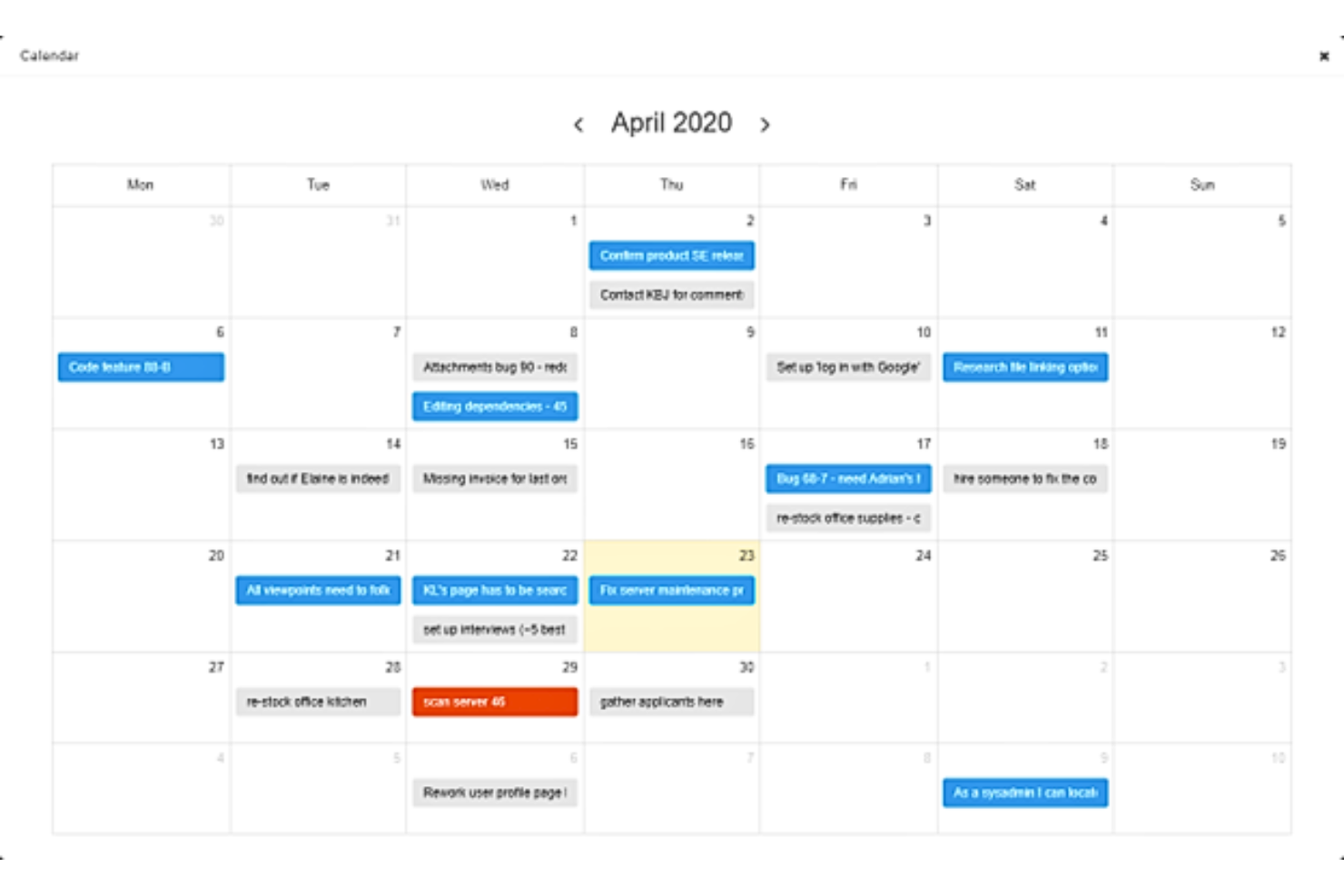
Kanban Tool is a visual project management platform built around Kanban boards, offering task cards, customizable workflows, checklist templates, time tracking, and analytics.
Who Is Kanban Tool Best For?
Kanban Tool is a natural fit for teams that already organize work visually and want a clean, board-driven setup without a lot of overhead.
Why I Picked Kanban Tool
I picked Kanban Tool because it's one of the most focused Kanban-native platforms available, and that focus pays off if your team already thinks in boards, columns, and swimlanes. Checklist Templates let you attach reusable, nested step lists to any card, which gets you close to standardized recurring processes. The built-in analytics, including Cumulative Flow and Lead and Cycle Time charts, give you a real read on where work stalls across your workflow stages.
Kanban Tool Key Features
- Process automation: Event-triggered and periodic rules automatically assign tasks, update fields, move cards, and send notifications across your board.
- Custom fields: Cards support up to 15 field types, including dropdowns, dates, user lists, progress indicators, and multiple-choice grids.
- Time tracking: Automatic work timers start and pause as tasks move through workflow stages, with detailed time reports by member, board, and swimlane.
- AI Assistant: Suggests board layouts, card types, task names, and checklist steps based on prompts or task descriptions.
Kanban Tool Integrations
Kanban Tool offers native integrations with Google Drive, OneDrive, Box, Dropbox, and Outlook, plus Google Calendar connectivity. It also supports Zapier and provides API v1 and v3, an SDK, and DevKit for custom integrations.
Pros and Cons
Pros:
- Lead-time charts reveal workflow delays
- Swimlanes expose ownership and delivery bottlenecks
- Reusable checklist templates standardize repeated task steps
Cons:
- No built-in approvals or required sign-offs
- Recurring cards don't create multi-step runs
Nifty
Best for milestone-driven planning
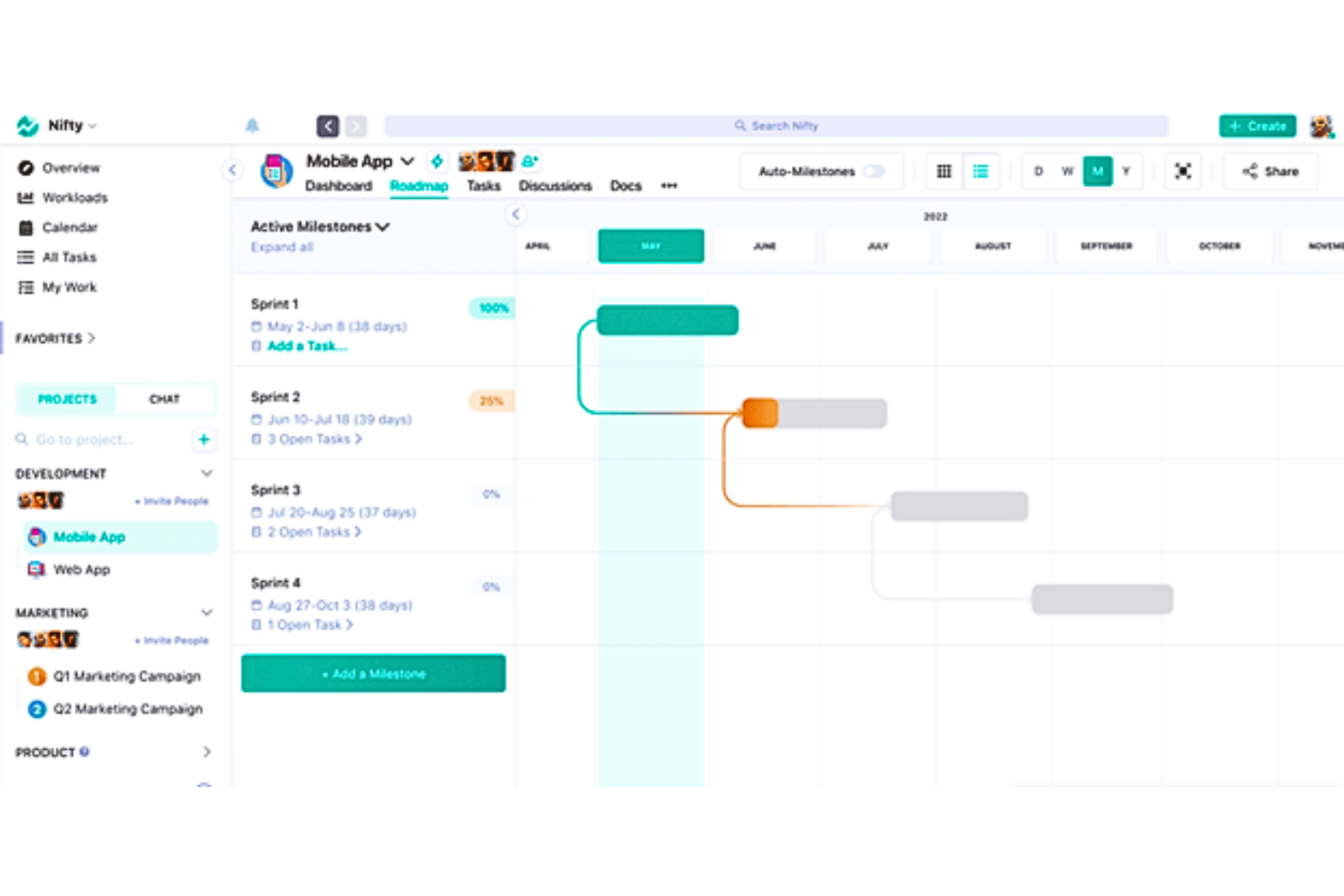
Nifty is a project management platform that combines milestone tracking, task management, workflow automation, and collaborative docs in a single workspace.
Who Is Nifty Best For?
Nifty suits project managers and cross-functional teams who organize work around milestones and need a single place for tasks, docs, and client visibility.
Why I Picked Nifty
I picked Nifty as one of the best because milestone-driven planning is genuinely where it shines: you can link tasks directly to milestones, watch progress roll up automatically, and see dependencies unlock in real time across projects. I also like the AI Workflow Builder, which lets me generate a full project structure, including statuses, lists, and custom fields, from a simple prompt and save it as a reusable template. Recurring milestones make it easy to standardize cyclical work without rebuilding from scratch each time.
Nifty Key Features
- Workflow automations: Build if/then rules that trigger actions like task assignment, date setting, or status changes based on task events or custom-field values.
- Cross-project reporting dashboard: Track task progress, workloads, and timelines across multiple projects using filterable, customizable report widgets.
- Guest and client access: Invite external collaborators to individual projects so they can complete tasks, comment, and share files without a paid seat.
- File proofing: Collect feedback directly on uploaded files and automatically generate subtasks from reviewer comments.
Nifty Integrations
Nifty offers native integrations with Slack, GitHub, Google Drive, Microsoft 365, Microsoft Teams, Zoom, Webex, HubSpot, Typeform, and Miro. It also provides an API, webhooks, and Zapier connectivity for custom integrations.
Pros and Cons
Pros:
- Clients can follow work and comment
- Cross-project progress reduces status chasing
- Milestones tie tasks to delivery goals
Cons:
- SOP documents lack dedicated version controls
- Approvals rely on status-based handoffs

ProofHub
Best for centralized project control
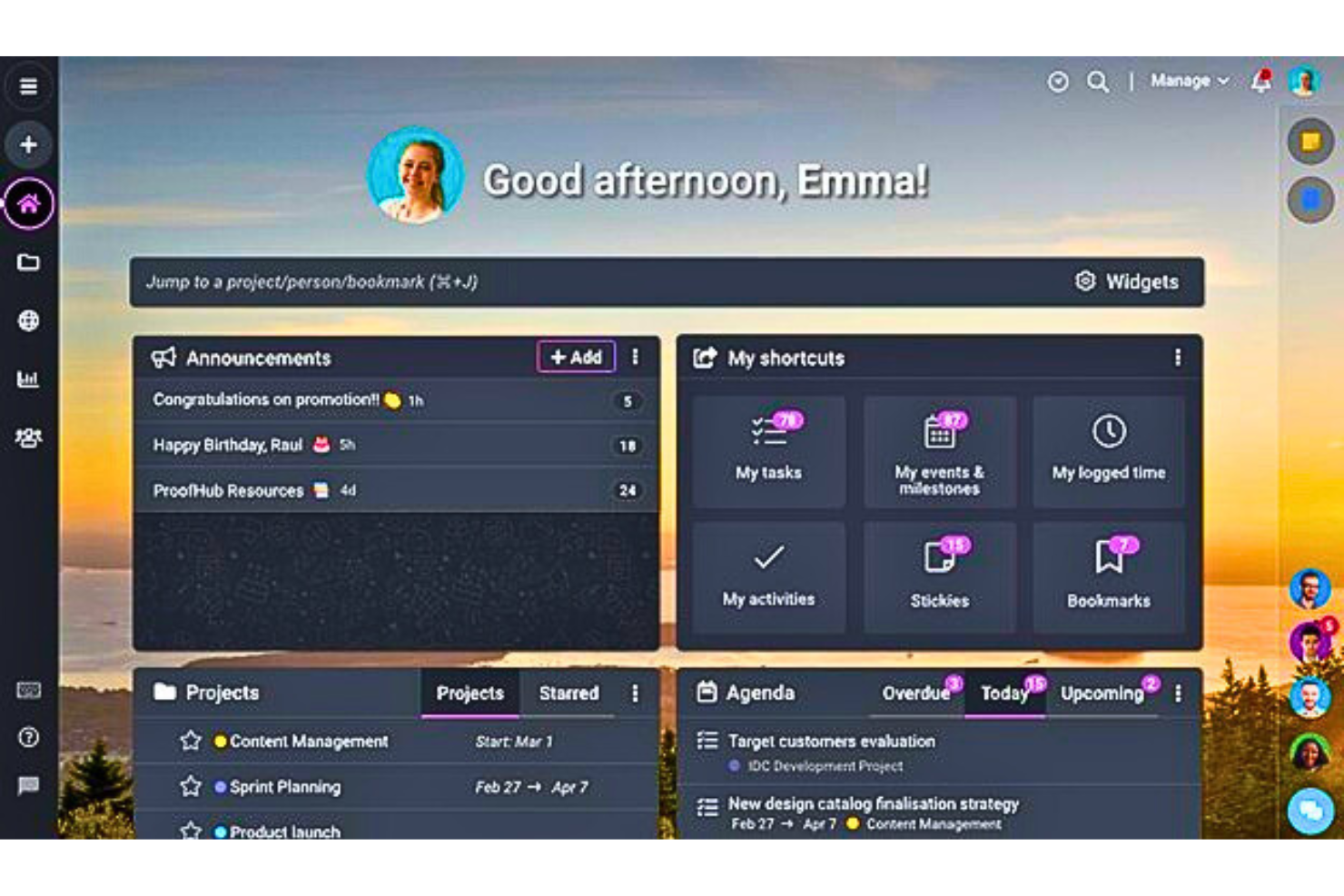
ProofHub is a project management and team collaboration platform that centralizes tasks, workflows, file proofing, and reporting across projects.
Who Is ProofHub Best For?
ProofHub suits project-based teams that want tasks, files, communication, and progress tracking consolidated in one place.
Why I Picked ProofHub
I picked ProofHub as one of the best because it pulls tasks, files, communication, and progress reporting into a single workspace, which cuts down on the tool-switching that typically fragments project visibility. I particularly like how custom workflow stages let you map your team's actual process, while project templates make it easy to spin up repeat projects without rebuilding structure from scratch. Workload and custom task reports give you a real read on who's doing what and where things stand across active work.
ProofHub Key Features
- File proofing and annotation: Review and mark up image and PDF files directly in the platform, then resolve comments and approve files without leaving the project.
- Recurring tasks: Schedule tasks to repeat daily, weekly, monthly, or yearly so routine work gets recreated automatically on a set cycle.
- Built-in chat and discussions: Communicate with teammates through one-to-one chat, group chat, and threaded discussion topics tied to specific projects.
- Time tracking and timesheets: Log time manually or with a timer, set estimates on tasks, and export timesheet data to accounting tools like QuickBooks or FreshBooks.
ProofHub Integrations
ProofHub offers native integrations with Slack, Box, Dropbox, Google Calendar, iCal, OneDrive, FreshBooks, FreshBooks Classic, and QuickBooks. Its API supports custom integrations.
Pros and Cons
Pros:
- Workload reports expose cross-project task allocation
- Visual proofing keeps creative approvals in context
- Project tasks, files, and discussions stay centralized
Cons:
- No live workflow-run dashboard or SOP library
- No conditional branches or automated task handoffs

Best for client work management
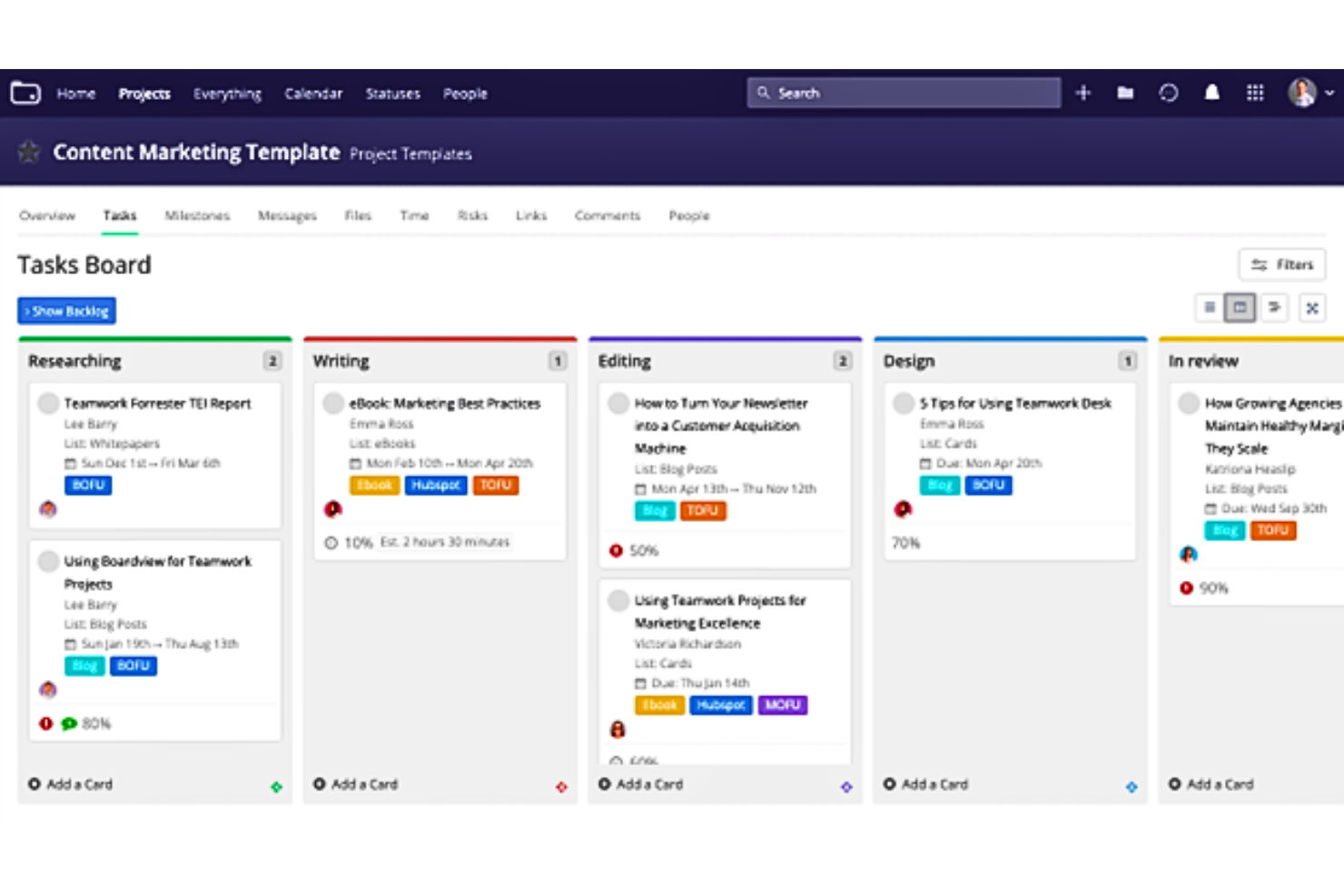
Teamwork.com is a project and resource management platform built for client work, combining project templates, repeating tasks, workflow automations, multi-approver proofing, and intake forms to manage recurring delivery processes.
Who Is Teamwork.com Best For?
Teamwork.com is a strong fit for agencies and professional services teams that need to manage recurring client deliverables alongside project budgets, approvals, and capacity planning in one place.
Why I Picked Teamwork.com
I picked Teamwork.com as one of the best because it's built specifically for recurring client work, which means project templates aren't just organizational scaffolding, they carry automations, forms, and multi-approver proofs into every new project you spin up. I love that external approvers can review and sign off on proofs without needing an account, which makes getting client sign-off on deliverables fast and traceable. Repeating tasks with flexible recurrence schedules keep ongoing workflows on track without manual setup each cycle.
Teamwork.com Key Features
- Role-based permissions: Configure access to forms, budgets, profitability data, and hourly rates separately for each user type at the project level.
- Custom reporting: Build reports filtered by project, user, task, or milestone with scheduled delivery and permission-aware viewing.
- Kanban board view: Visualize task status across workflow stages and trigger automations directly from board column changes.
- External reviewer access: Invite clients or stakeholders to review and approve proofs via email link without requiring a Teamwork.com account.
Teamwork.com Integrations
Teamwork.com offers 150+ integrations, including native Slack, Microsoft Office, Google Sheets, Google Docs, SharePoint, and OneDrive connections, plus marketplace integrations for Jira. It also provides an API, webhooks, MCP server, and Zapier.
Pros and Cons
Pros:
- Project tracking clarifies deadlines and task ownership
- External clients can approve proofs without accounts
- Reusable templates support recurring client workflows
Cons:
- No dedicated SOP library or workflow-run dashboard
- Navigation can make features hard to find

Jira
Best for agile software development
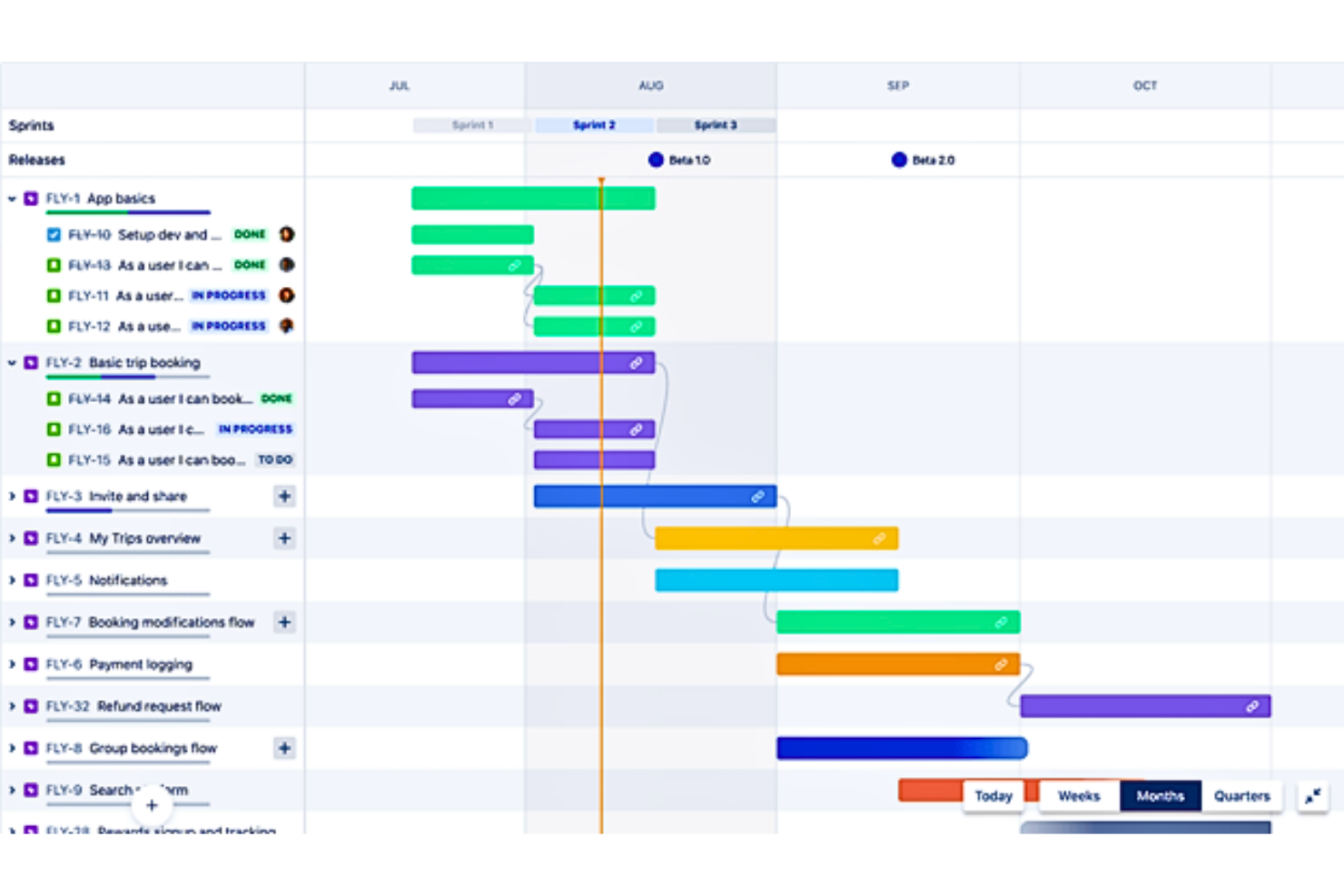
Jira is Atlassian's project and work management platform that combines boards, customizable workflows, automation, approval steps, and reporting to help teams plan, track, and deliver work.
Who Is Jira Best For?
Jira is a strong fit for software and product teams that need to manage agile workflows, track development work, and automate task handoffs across engineering, design, and QA.
Why I Picked Jira
I picked Jira as one of the best process street alternatives because it's built for teams that need agile workflow management baked into how they track and deliver work. Its visual workflow editor lets you configure statuses, transitions, and approval steps so work can't advance until a sign-off is complete, which mirrors Process Street's gate-style controls. I also like that no-code automation handles conditional branching and task handoffs across spaces without requiring developer involvement.
Jira Key Features
- Visual workflow editor: Configure and publish workflow statuses, transitions, and rules using a diagram or text view without writing code.
- Audit log: Track configuration and permission changes, workflow and status changes, and work-item deletions with the actor and timestamp recorded.
- Space templates: Start projects with preconfigured templates for operations, HR, IT, legal, and finance teams, including process control and policy management.
- Role-based permissions: Assign user roles to control what team members can create, view, comment on, and manage within a space.
Jira Integrations
Jira offers over 3,000 Marketplace integrations, with documented connections including Confluence, Figma, Slack, and Gmail. Its REST API v3 supports custom integrations, while GitHub Copilot, Claude, and Cursor can connect as third-party agents.
Pros and Cons
Pros:
- Audit logs record workflow configuration changes
- Boards expose owners, status, and blockers
- Conditional workflows route approvals and handoffs
Cons:
- Setup demands ongoing admin configuration
- Templates don’t copy active checklist runs

Best for AI-powered workflow creation
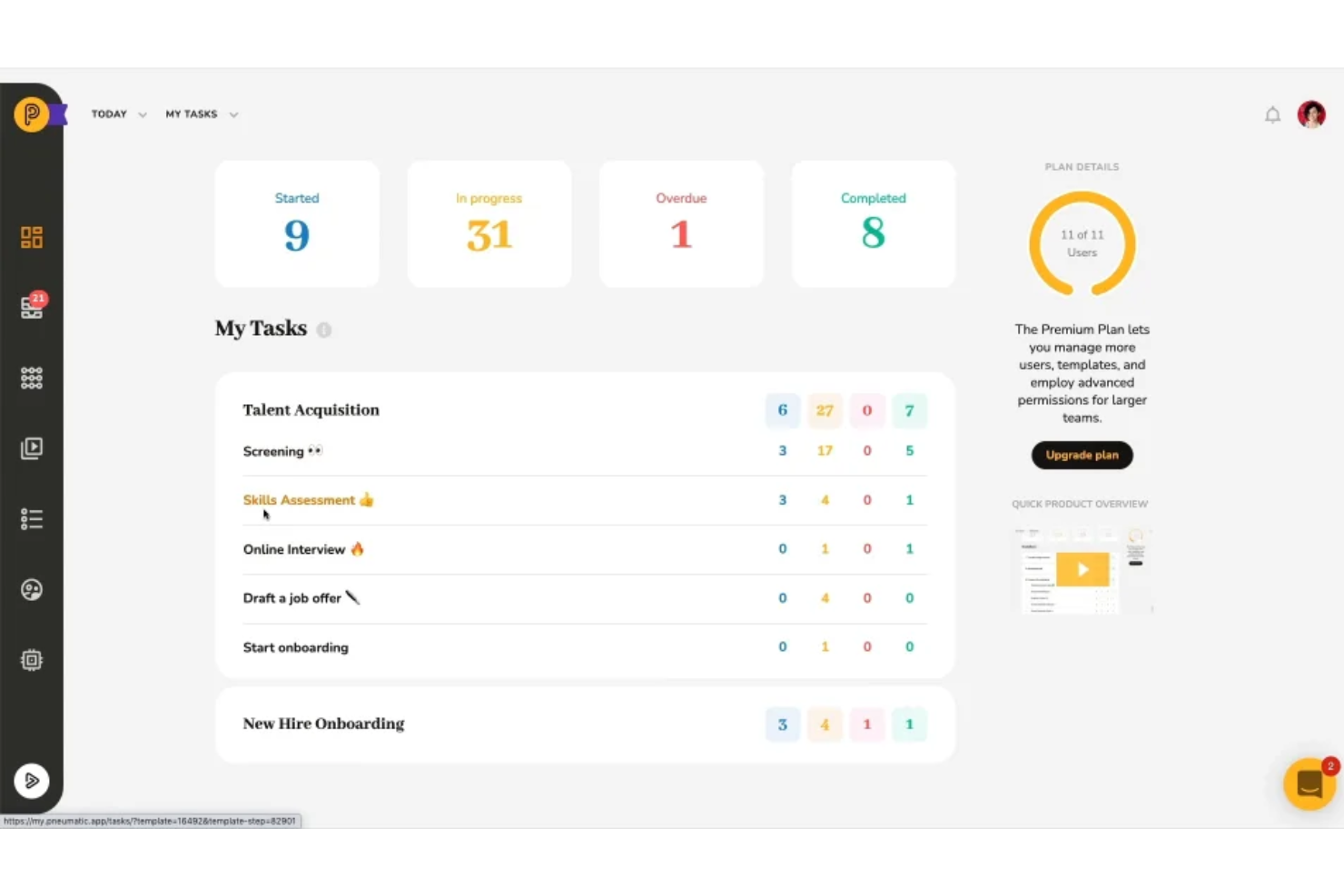
Pneumatic Workflow is an open-source workflow management platform that lets teams build reusable process templates, automate task assignments, and run AI-assisted workflows with conditional logic and real-time tracking.
Who Is Pneumatic Workflow Best For?
Pneumatic Workflow is a strong fit for small and scaling teams that want to turn repeatable processes into AI-generated, trackable workflows without paying per seat.
Why I Picked Pneumatic Workflow
I've included Pneumatic Workflow in my top picks because its AI-powered workflow builder genuinely changes how fast you can go from idea to running process. You describe what you need, and the AI generates a structured, step-by-step template you can immediately use or refine. I also like that you can embed video instructions directly inside tasks, so your team gets full context right where the work happens, without hunting through separate documents.
Pneumatic Workflow Key Features
- Shareable kickoff forms: Public forms let anyone without a Pneumatic account submit information to trigger a workflow from a template.
- Conditional step logic: AND/OR branching rules use kickoff form values or task outputs to include, skip, or end workflow steps automatically.
- Guest performer access: External users can be invited to specific tasks to review, comment, complete, or return work without a full account.
- Real-time template updates: Edits made to a template apply automatically to all workflow instances already in progress.
Pneumatic Workflow Integrations
Pneumatic Workflow supports integrations through Zapier and Make, including Google Docs workflows, plus native video embeds from YouTube, Loom, and Wistia. Its HTTP API and webhooks support custom integrations.
Pros and Cons
Pros:
- Reviewers praise automated task routing
- Dashboards surface overdue tasks by stage
- AI drafts reusable workflow templates
Cons:
- Upcoming steps can remain hidden until completion
- Sequential workflows exclude parallel task paths
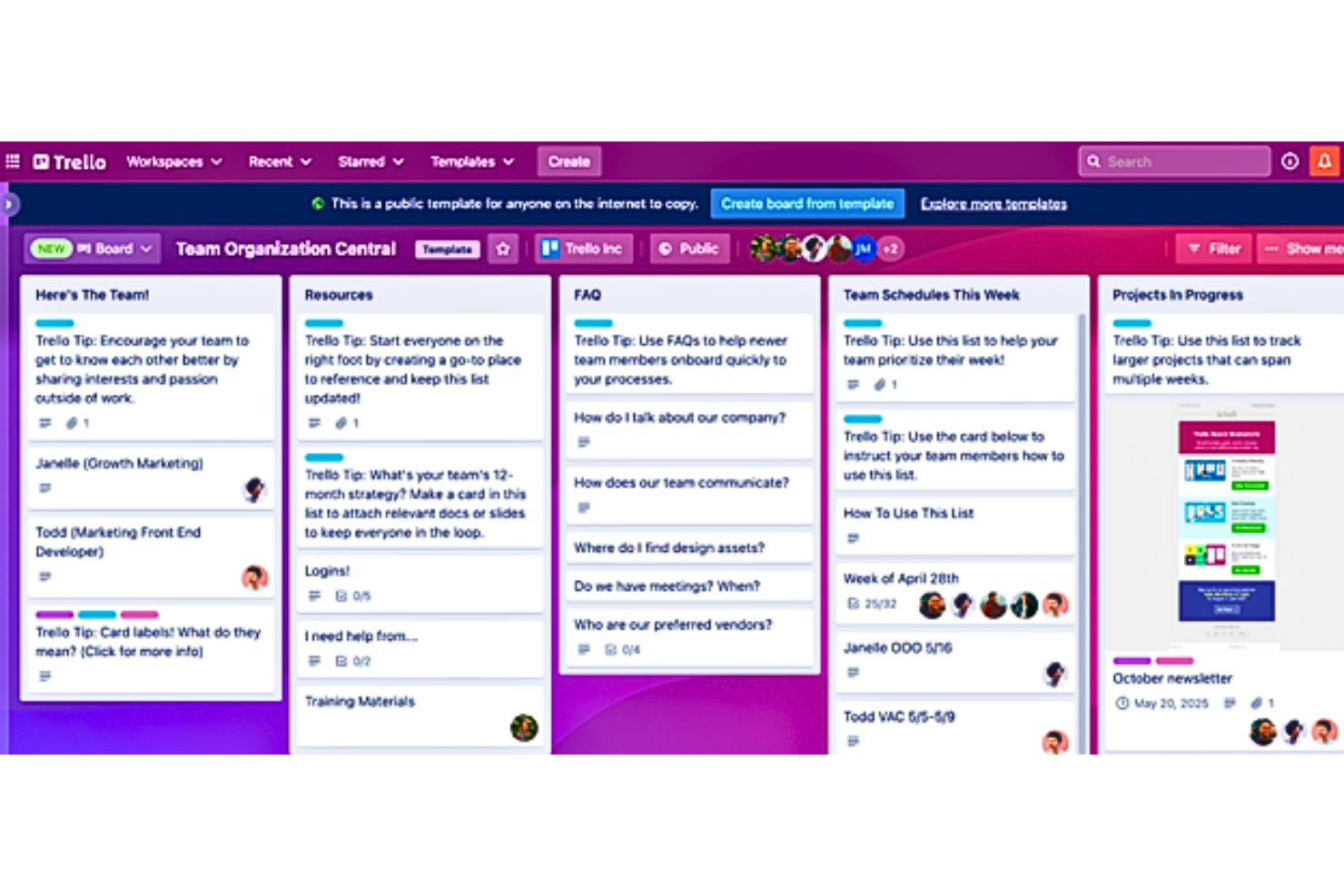
Trello is a visual task management tool from Atlassian that organizes work across boards, lists, and cards, with built-in automation, checklist tracking, and multi-view layouts for managing recurring tasks and team workflows.
Who Is Trello Best For?
Trello fits teams that want a visual, low-friction way to track recurring tasks and handoffs without needing a dedicated process management platform.
Why I Picked Trello
I picked Trello as one of the best because its board-and-card model makes recurring task workflows genuinely visual, which is something most dedicated process tools can't replicate as naturally. I like how Butler automation can move cards through stages automatically, like pushing everything from "In Progress" to "Needs Approval" with a single board button. Workspace templates and Card Repeater let my team standardize repeating work without rebuilding from scratch each cycle.
Trello Key Features
- Custom Fields: Add checkbox, date, dropdown, number, or text fields to cards to capture structured task data and reference those values in automation conditions.
- Dashcards: Track filtered sets of cards across Workspace boards and view counts, sums, and numeric metrics drawn from Custom Field values.
- Advanced checklists: Attach checklists to cards with individual assignees and due dates per checklist item, available on Standard and higher plans.
- AI board builder: Generate a full board with lists, cards, checklists, due dates, and labels from a text prompt on web and desktop.
Trello Integrations
Trello’s directory lists 236 marketplace integrations, including Slack, Jira Cloud, Microsoft Teams, Google Drive, Confluence, and Miro. It also provides a REST API for custom integrations.
Pros and Cons
Pros:
- Butler automates routine card moves and reminders
- Reusable templates and repeated cards standardize routines
- Visual board stages clarify recurring handoffs
Cons:
- No centralized SOP library or workflow-run analytics
- No native approval gates or decision trails

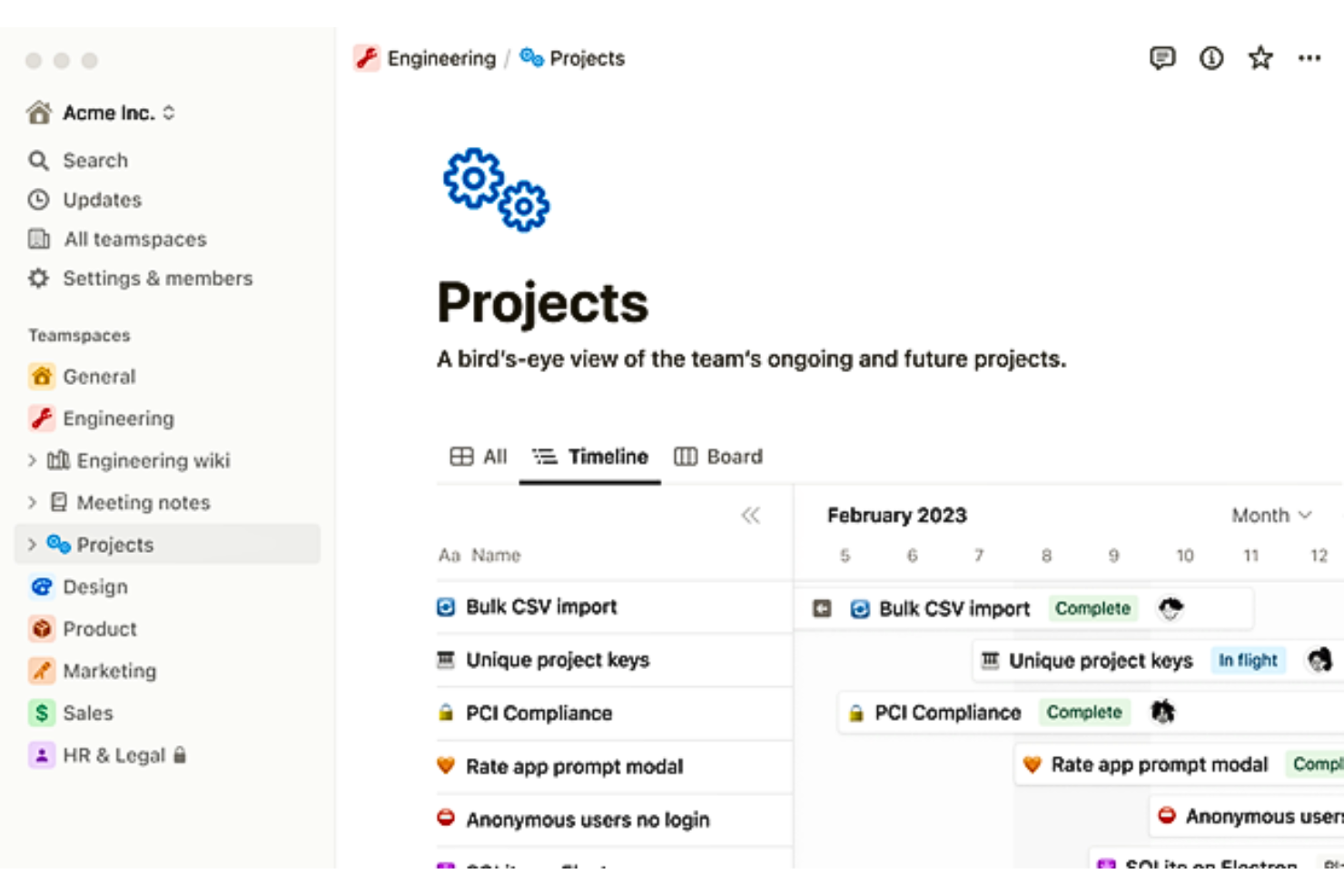
Notion is a flexible workspace platform that combines block-based documents, structured databases, repeating templates, and database automations to help teams document processes, organize knowledge, and manage recurring operational work.
Who Is Notion Best For?
Notion works well for teams that want a single workspace for documentation, knowledge management, and light process tracking without needing dedicated workflow enforcement tools.
Why I Picked Notion
I've included Notion in my top picks because it pulls documentation, databases, and recurring workflows into one workspace, which is genuinely useful when you're tired of bouncing between separate tools. I like that database templates can be scheduled to spin up automatically on daily, weekly, or monthly intervals, so recurring operational checklists don't rely on anyone remembering to create them. Notion Agent can also draft SOPs directly from your existing workspace content, which speeds up the process of standardizing procedures your team already follows.
Notion Key Features
- Block-based document editor: Build documents with mixed content blocks—text, images, embeds, code, and sub-pages—within a single page.
- Database automations: Trigger automated actions like property edits, email notifications, and webhooks when a page is added or a property value changes.
- Audit log: Track and export a filterable record of workspace events, including page edits, automation changes, and form submissions.
- Notion Agent: Use an AI agent to create or edit pages, databases, and forms using context pulled from your existing workspace content.
Notion Integrations
Notion offers marketplace integrations with Slack, Google Drive, GitHub, Salesforce, Jira, and Asana. It also provides an API, webhooks, SCIM API, SDK, CLI, External Agents API, and MCP for custom integrations.
Pros and Cons
Pros:
- Database views make work status visible
- SOPs and project context stay together
- Recurring templates create repeatable operational checklists
Cons:
- No enforced approval or sign-off stages
- Automations can't chain or branch workflows

Wrike
Best for automation
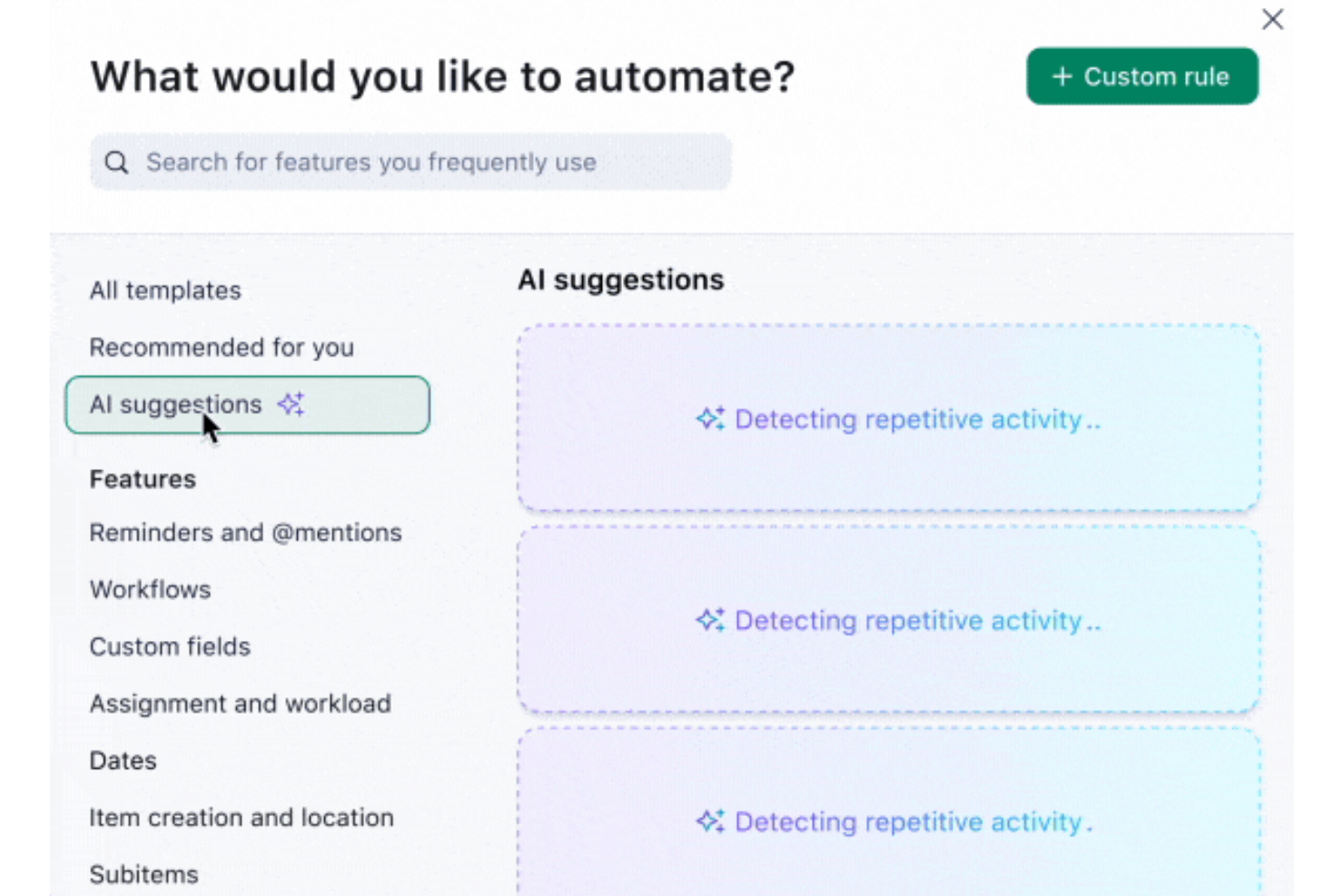
Wrike is a work management platform that combines workflow automation, dynamic request forms, reusable blueprints, approval tracking, and real-time dashboards to help teams standardize and execute recurring processes.
Who Is Wrike Best For?
Wrike is a strong fit for mid-sized to enterprise teams that need to automate multi-step workflows, route approvals, and track recurring work across departments from a single platform.
Why I Picked Wrike
Wrike earns its spot on my shortlist because its no-code WHEN–IF–THEN automation engine does the heavy lifting that Process Street handles with checklists. I'm particularly impressed by how dynamic request forms branch conditionally based on answers, automatically routing created tasks to the right assignee, status, and approval chain without manual intervention. Blueprints let you save entire multi-step project structures and relaunch them on demand, which keeps recurring workflows consistent across teams at scale.
Wrike Key Features
- Role-based access controls: Assign Full, Editor, Limited, or Read Only access roles to control who can create, edit, or approve work across spaces, folders, and projects.
- Real-time dashboards: Build custom dashboards with configurable widgets to monitor active, overdue, and completed tasks alongside approval counts and team capacity.
- 400+ pre-built native integrations: Connect Wrike to tools like Slack, Jira, Salesforce, GitHub, and HubSpot via native integrations, an open REST API, and Wrike Integrate.
- Time tracking: Log hours worked on tasks and projects from the Business plan onward, with time data available to sync with external finance systems.
Wrike Integrations
Wrike offers 400+ pre-built native integrations, including Slack, Jira, Salesforce, HubSpot, and Google Drive. It also provides an open REST API and Wrike Integrate for custom integrations and workflow automation.
Pros and Cons
Pros:
- Dashboards show ownership, delays, and capacity
- Blueprints standardize recurring workflows
- Automates conditional handoffs and approvals
Cons:
- Setup and navigation can overwhelm newcomers
- Request forms and blueprints require Business
New Product Updates from Wrike

Wrike Redesigns AI Agent Builder
Wrike redesigns its AI Agent Builder with a side-by-side setup, Scopes, sentence-style triggers and actions, and clearer filters. These changes make it easier to configure, test, and manage agent behavior. For more information, visit Wrike’s official site.

Best for comprehensive reporting
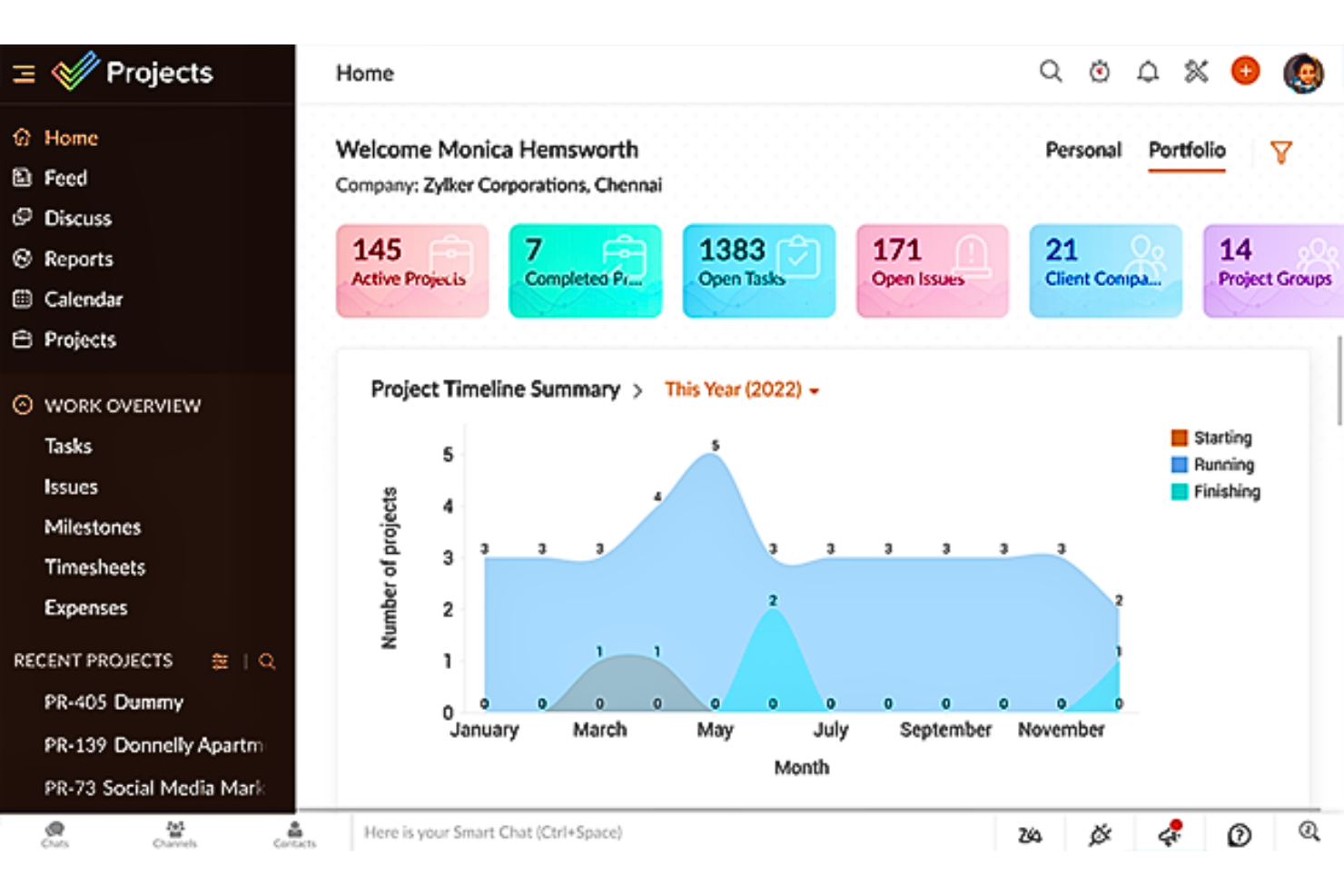
Zoho Projects is a project management platform that combines task planning, Gantt charts, reusable workflow templates, automation via Blueprints and workflow rules, and reporting dashboards.
Who Is Zoho Projects Best For?
Zoho Projects is a strong fit for operations managers and IT administrators who need project tracking, dashboards, and workflow automation within a broader Zoho ecosystem.
Why I Picked Zoho Projects
I've included Zoho Projects in my top picks because its reporting capabilities give operations managers a genuinely detailed picture of where work stands across projects. Custom dashboards let you surface task status, overdue items, and budget health in one view, and the portfolio dashboard rolls that up across multiple projects simultaneously. I also find the Blueprint workflow tool useful for gating task progress behind checklist completion, which brings some structure to recurring operational processes.
Zoho Projects Key Features
- Blueprint workflow automation: Design task workflows with status transitions, participant assignments, automated field updates, and email alerts that fire when conditions are met.
- Reusable checklist templates: Attach checklist templates to tasks or issues, with completed items recording who checked each item and when.
- Gantt chart with dependency tracking: Visualize project schedules, link tasks in sequence, and reschedule dependent tasks when timelines shift.
- Resource management: Review team workload across projects and reassign tasks to balance allocation in real time.
Zoho Projects Integrations
Zoho Projects documents 50+ marketplace integrations, including native connections with Zoho Forms, Zoho Sign, Zoho WorkDrive, Google Drive, Microsoft Teams, and Slack. It also supports Zapier and REST APIs for custom integrations.
Pros and Cons
Pros:
- Gantt dependencies clarify cross-team delivery timelines
- Reusable checklists pair with Blueprint stage gates
- Project dashboards surface overdue work and budgets
Cons:
- Approval history centers on timesheets, not workflows
- Checklist runs lack portfolio-wide completion reporting
New Product Updates from Zoho Projects
Zoho Projects Adds CodeX Scripts for Custom Modules
Zoho Projects now supports CodeX Scripts for custom modules, enabling conditional logic and rules for creating, updating, and deleting records. For more information, visit Zoho Projects' official site.
 .
Andre alternativer til Process Street
Nedenfor finner du en liste over flere alternativer til Process Street som vi valgte ut, men som ikke kom med på topplisten. Det er absolutt verdt å ta en titt på dem.
- GoodDay
For customizable workspaces
- Smartsheet
Good for spreadsheet-like interface
- Asana
For workflow customization
- Basecamp
For client-facing communication
- Adobe Workfront
Good for enterprise work management
- Podio
Good for CRM integration
- Kantata
Good for resource management
- monday AI Workspace
With AI-driven risk identification
- Taskworld
Good for visual task boards
- ProcessMaker
For small business workflow management
- MeisterTask
Good for Kanban boards
- ClickUp
Good for all-in-one solution
- Airtable
For database-driven projects
- Pipefy
Good for business process automation
- Quire
Good for nested task lists
- Hive
Good for email integration
- Kissflow
Good for no-code, low-code app customization
- Microsoft To Do
Good for task management


How I Evaluate Process Street Alternatives
I split my evaluation into baseline requirements—like reusable workflow templates and conditional logic—and differentiators that separate tools built for ops teams from generic task managers.
Core Functionality (Table Stakes For This List)
When I'm selecting tools for my list, I rank each one on a scale from 0 (does not offer the functionality) to 5 (excels in this area) for each core functionality listed below. Then, I calculate the tool's total score into a percentage. Each tool needs to achieve a minimum total score of 65% to be considered for inclusion.
- Recurring Workflow Templates: I check whether you can build a process once and launch it repeatedly—like spinning up a new client onboarding checklist for every deal that closes.
- Conditional Logic: Each tool should support if/then branching so steps adapt based on inputs, such as routing an approval to legal only when contract value exceeds a set tier.
- Task Assignments & Due Dates: I evaluate how each platform handles step-level ownership, deadlines, and dependencies across a multi-person workflow run.
- Approvals & Workflow Automation: Built-in approval gates and triggered actions matter here—think auto-notifying a manager when a QA checklist is complete and ready for sign-off.
- Form & Data Capture: Structured fields within workflow steps should collect and reuse data, like pulling a new hire's start date into every downstream task automatically.
- Integrations & API Access: I look at native connections to tools like Slack, Jira, and Salesforce, plus API or Zapier support for plugging into your existing stack.
Once I have a list of tools that meet this criteria, I consider what sets each platform apart.
Differentiating Factors (What Sets Vendors Apart)
Here's how I compare and contrast different vendors:
Standout Features
Process analytics is a big differentiator. I look for dashboards that surface bottleneck steps, average completion times, and overdue rates across workflow runs—so an ops manager can spot where employee onboarding stalls every quarter. AI-powered workflow generation is also worth evaluating, since it can turn a rough SOP document into a structured, runnable template in minutes. Client-facing portals matter too if your team runs external processes like vendor intake or customer onboarding that require guest access without a paid seat.
Beyond Features
Pricing structure matters a lot in this space. Some platforms charge per user while others bill per workflow run, and that distinction can shift costs drastically for a team running hundreds of onboarding checklists each month. I also evaluate use case specialization—a tool built around IT change management feels very different from one optimized for client onboarding in professional services. Integration ecosystem fit rounds out my evaluation, since most teams need their process tool feeding data into Jira tickets, Salesforce records, or Slack channels without manual re-entry.
Hvorfor bruke et alternativ til Process Street?
Process Street er et verktøy for arbeidsflyt- og prosessadministrasjon som gir virksomheter en enkel måte å administrere tilbakevendende sjekklister og prosedyrer på. Det er utviklet for team og bedrifter som ønsker å effektivisere standardiserte arbeidsprosedyrer, opprette arbeidsflyter og følge fremdriften i prosessene sine. Plattformen er spesielt nyttig for dem som trenger å administrere flere sjekklister og sikre at teamet følger prosedyrene nøyaktig og konsekvent.
Her er imidlertid noen grunner til at du kanskje ser etter et alternativ til Process Street:
- Kostnadshensyn, ettersom noen brukere kan oppleve at prismodellen til Process Street ligger utenfor budsjettet deres.
- Behovet for mer avanserte funksjoner eller tilpasningsmuligheter som ikke er tilgjengelige i Process Street.
- Et ønske om et annet brukergrensesnitt som kan være mer intuitivt eller brukervennlig for enkelte team.
- Ønsket om bedre integrasjonsmuligheter med andre verktøy og annen programvare som allerede brukes i virksomheten.
- Behovet for mer omfattende rapporterings- og analysefunksjoner for å få dypere innsikt i prosesseffektivitet og teamets resultater.
- Behovet for et verktøy som støtter et høyere automatiseringsnivå for komplekse prosesser eller prosesser med flere trinn.
- En virksomhet kan ha unike behov knyttet til arbeidsflyter som krever en mer spesialisert løsning enn det Process Street tilbyr.
Viktige funksjoner du bør se etter i et alternativ til Process Street
Når du bytter fra Process Street til et alternativt verktøy, er det visse funksjoner du ikke ønsker å miste. Du bør se etter et verktøy som håndterer disse funksjonene like godt som eller bedre enn Process Street når du foretar byttet. Dette er de viktigste funksjonene jeg vurderer når jeg ser på alternativer til Process Street.
- Maler: Brukere kan opprette maler for gjentakende prosesser, som kan tilpasses og gjenbrukes for å sikre konsistens og effektivitet.
- Betinget logikk: Denne funksjonen lar brukere bygge dynamiske sjekklister som tilpasses basert på inndata, og viser eller skjuler oppgaver etter behov.
- Rolletildelinger: Oppgaver i en sjekkliste kan tildeles bestemte teammedlemmer, noe som sikrer ansvarlighet og tydelighet rundt hvem som har ansvaret for hvert trinn.
- Integrasjonsmuligheter: Process Street integreres med over tusen apper via Zapier, webhooks og API, slik at organisasjoner får sømløs tilkobling til andre verktøy de bruker.
- Sporing og rapportering: Programvaren gir oversikt over oppgaver og prosesser, og tilbyr detaljerte rapporteringsfunksjoner for å analysere ytelse, følge fremdrift og identifisere forbedringsområder.
- API: Refererer til programmeringsgrensesnitt for applikasjoner som lar ulike programvaresystemer kommunisere.
- Varsler: Funksjoner som varsler brukere om viktige hendelser, oppdateringer eller handlinger som kreves.
- Tillatelser: Innstillinger som styrer hva ulike brukere kan se og gjøre i programvaren.
- Godkjenninger: Funksjoner som gjør det mulig for autoriserte brukere å gjennomgå og godkjenne bestemte handlinger.
- Automatiserte arbeidsflyter: Prosesser som automatiserer oppgaver basert på bestemte utløsere eller betingelser.
- Forfallsdatoer: Funksjoner som hjelper med å håndtere tidsfrister i oppgaver eller prosjekter.
- Mobilapp: Refererer til at programvaren er tilgjengelig på mobile enheter.
Disse kriteriene er forankret i de praktiske behovene til virksomheter som er avhengige av arbeidsflytautomatisering og prosesshåndtering for å holde seg konkurransedyktige og effektive. Hver funksjon adresserer direkte et spesifikt krav eller en utfordring brukere kan møte når de håndterer digitale prosjekter.
Finnes det gratis alternativer til Process Street?
Process Street er et populært verktøy for håndtering av arbeidsflyter og sjekklister, men det finnes flere gratis alternativer som tilbyr lignende funksjonalitet. Her er noen av de gratis alternativene til Process Street:
- Asana (gratis for 10 brukere): En plattform for arbeidsstyring som hjelper team med å organisere og håndtere alt arbeidet sitt, fra små prosjekter til strategiske initiativer.
- Trello (gratis for 10 tavler): Et samarbeidsverktøy som organiserer prosjektene dine i tavler, lister og kort for å prioritere og organisere arbeidet ditt.
- Bitrix24 (gratis med begrenset funksjonalitet): En samarbeidsplattform med en samling verktøy for sosialt samarbeid, kommunikasjon og administrasjon for teamet ditt.
- Airtable (gratis for 5 samarbeidspartnere): Et skybasert programvareselskap som kombinerer et tradisjonelt regneark med en database.
- Todoist (gratis for 5 prosjekter): En nettbasert app for oppgavehåndtering og gjøremålslister, med funksjoner for håndtering av oppgaver og prosjekter.
- Notion (gratis for opptil 10 samarbeidspartnere): Et alt-i-ett-arbeidsområde for notater, prosjektstyring og oppgavehåndtering.
- Zoho Projects (gratis for 2 prosjekter): Et skybasert prosjektstyringsverktøy som hjelper deg med å planlegge arbeidet og følge med på fremdriften.
- nTask (gratis for 5 brukere): En plattform for oppgavehåndtering som er utviklet for å effektivisere arbeidsflyten og forbedre produktiviteten.
Disse verktøyene tilbyr en rekke funksjoner, fra oppgavehåndtering til databasefunksjonalitet, og dekker ulike forretningsbehov. De kan brukes av team i alle størrelser til å organisere, planlegge og samarbeide om arbeidsprosessene sine.