

I 10 migliori software gratuiti di gestione delle attività con IA recensiti nel 2026

Elenco dei migliori software gratuiti di gestione delle attività basati sull'AI


I migliori software gratuiti di gestione delle attività basati sull'AI aiutano le organizzazioni con budget limitati a stabilire le priorità, assegnare le attività e mantenere la visibilità sui progetti. Quando le scadenze si sovrappongono, la comunicazione si perde nelle conversazioni via e-mail o le attività non hanno un responsabile, i progetti si bloccano e il lavoro importante viene trascurato. La piattaforma giusta centralizza il monitoraggio delle attività, la pianificazione e gli aggiornamenti sullo stato, così i team sanno esattamente cosa fare dopo.
Ho testato decine di strumenti basandomi sulla mia esperienza nella gestione di progetti con team composti da 5–20 persone, per individuare quelli più efficaci. Trova lo strumento giusto per ridurre la complessità, migliorare la responsabilità e mantenere i progetti in movimento con il minimo attrito.
Perché fidarsi dei nostri consigli sui software
Il nostro team testa e recensisce software dal 2012. In quanto project manager noi stessi, sappiamo quanto sia difficile — e importante — scegliere il software giusto.
Per questa guida, abbiamo valutato gli strumenti attraverso test pratici e ricerche indipendenti, assegnando un punteggio agli strumenti in base ai nostri criteri di selezione. Ci basiamo inoltre sulle competenze di leader di pensiero del settore e di professionisti attivi nella gestione dei progetti.
Le nostre recensioni riflettono il nostro giudizio editoriale umano, non un discorso di vendita.
Revisori esperti:
Tabella comparativa dei software gratuiti di gestione delle attività basati sull'AI
Questa tabella comparativa riassume i dettagli sui prezzi delle mie migliori selezioni di software gratuiti di gestione delle attività basati sull’AI:
| Tool | Best For | Trial Info | Price | ||
|---|---|---|---|---|---|
| 1 | Il migliore per monitorare il tempo rispetto alle attività create dall'AI | Piano gratuito disponibile; prova gratuita di 30 giorni; demo gratuita disponibile | A partire da $9/utente/mese (con fatturazione annuale) | Website | |
| 2 | Ideale per l'identificazione dei rischi tramite AI | Piano gratuito disponibile | Da $9/utente/mese (fatturato annualmente) | Website | |
| 3 | Ideale per interfaccia intuitiva | Prova gratuita + piano gratuito + demo gratuita disponibili | Da $13/utente/mese (fatturazione annuale) | Website | |
| 4 | Ideale per la collaborazione di squadra | Piano gratuito disponibile | Da $4/utente/mese (fatturato annualmente) | Website | |
| 5 | Ideale per semplici elenchi di attività | Piano gratuito disponibile | Da $5/utente/mese (fatturato annualmente) | Website | |
| 6 | Ideale per il tracciamento dei bug | Piano gratuito + prova gratuita di 30 giorni disponibile | Da $35/mese (fino a 30 utenti) | Website | |
| 7 | Ideale per le tappe di progetto | Piano gratuito disponibile per sempre | Da $39/mese (fatturazione annuale) | Website | |
| 8 | Ideale per modelli di progetto | Prova gratuita di 30 giorni + demo gratuita disponibile | Da $9.99/utente/mese (fatturato annualmente) | Website | |
| 9 | Ideale per la sincronizzazione dei calendari | Piano gratuito disponibile | Da $10/postazione/mese | Website | |
| 10 | Ideale per l’integrazione con la chat | Piano gratuito disponibile | Da $0.80/utente/mese (fatturazione annuale) | Website |


Recensioni dei migliori software gratuiti di gestione delle attività basati sull'AI
Leggi le mie recensioni dettagliate di ciascuno dei migliori software gratuiti di gestione delle attività basati sull’AI. Analizzo le funzionalità principali, i pro & i contro, le integrazioni e ciò che è gratuito per ciascuno dei migliori strumenti di gestione delle attività basati sull’AI.
Toggl
Il migliore per monitorare il tempo rispetto alle attività create dall'AI
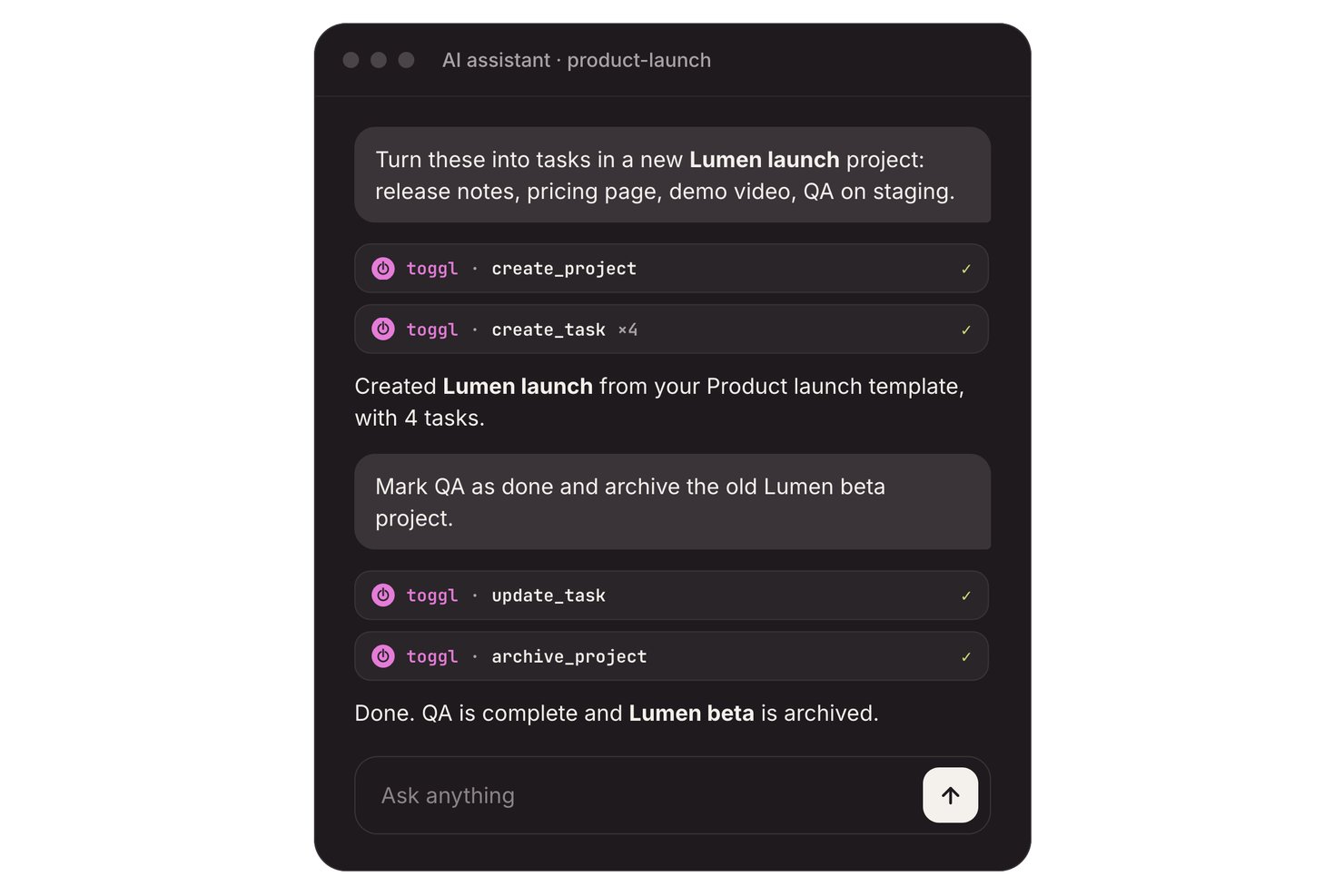
Toggl è una piattaforma di gestione delle attività basata sull'intelligenza artificiale, con bacheche delle attività, stime e monitoraggio del tempo, oltre a un Creatore di attività AI che trasforma prompt, note e foto di liste di cose da fare in attività modificabili.
Per chi è più adatto Toggl?
I freelance e i team composti da un massimo di tre persone possono trasformare le note in attività e confrontare il lavoro pianificato con il tempo monitorato.
Perché ho scelto Toggl
Ho scelto Toggl come “Il migliore per monitorare il tempo rispetto alle attività create dall'AI” perché collega il lavoro generato all'impegno effettivo. Il suo Creatore di attività AI gratuito trasforma prompt, note delle riunioni o foto di liste di cose da fare in attività modificabili; posso aggiungere stime e poi monitorare il tempo per ogni attività. Il piano gratuito supporta fino a tre utenti.
Funzionalità principali di Toggl
- Attività ricorrenti: Imposta la ripetizione delle attività secondo una pianificazione.
- Sottoattività e commenti: Aggiungi sottoattività e commenti ai record delle attività.
- Integrazioni con il calendario: Trasforma gli eventi del calendario in attività o registrazioni del tempo.
- Modalità concentrazione: Usa sessioni di lavoro concentrate con brevi pause.
Integrazioni di Toggl
Toggl si collega ai calendari Google Calendar e Outlook e offre integrazioni con Jira e Asana nel piano Premium. Un'API REST e i webhook supportano le integrazioni personalizzate.
Cosa è gratuito?
Toggl offre un piano gratuito per un massimo di tre utenti, che include il suo Creatore di attività AI. Le integrazioni con Jira e Asana richiedono il piano Premium.
Pros and Cons
Pros:
- L'AI trasforma le note in attività modificabili
- I timer delle attività confrontano le stime con i dati effettivi
- I recensori apprezzano il monitoraggio del tempo rapido e leggero
Cons:
- La collaborazione gratuita è limitata a tre utenti
- L'AI non pianifica né assegna priorità alle attività in modo proattivo

Ideale per l'identificazione dei rischi tramite AI
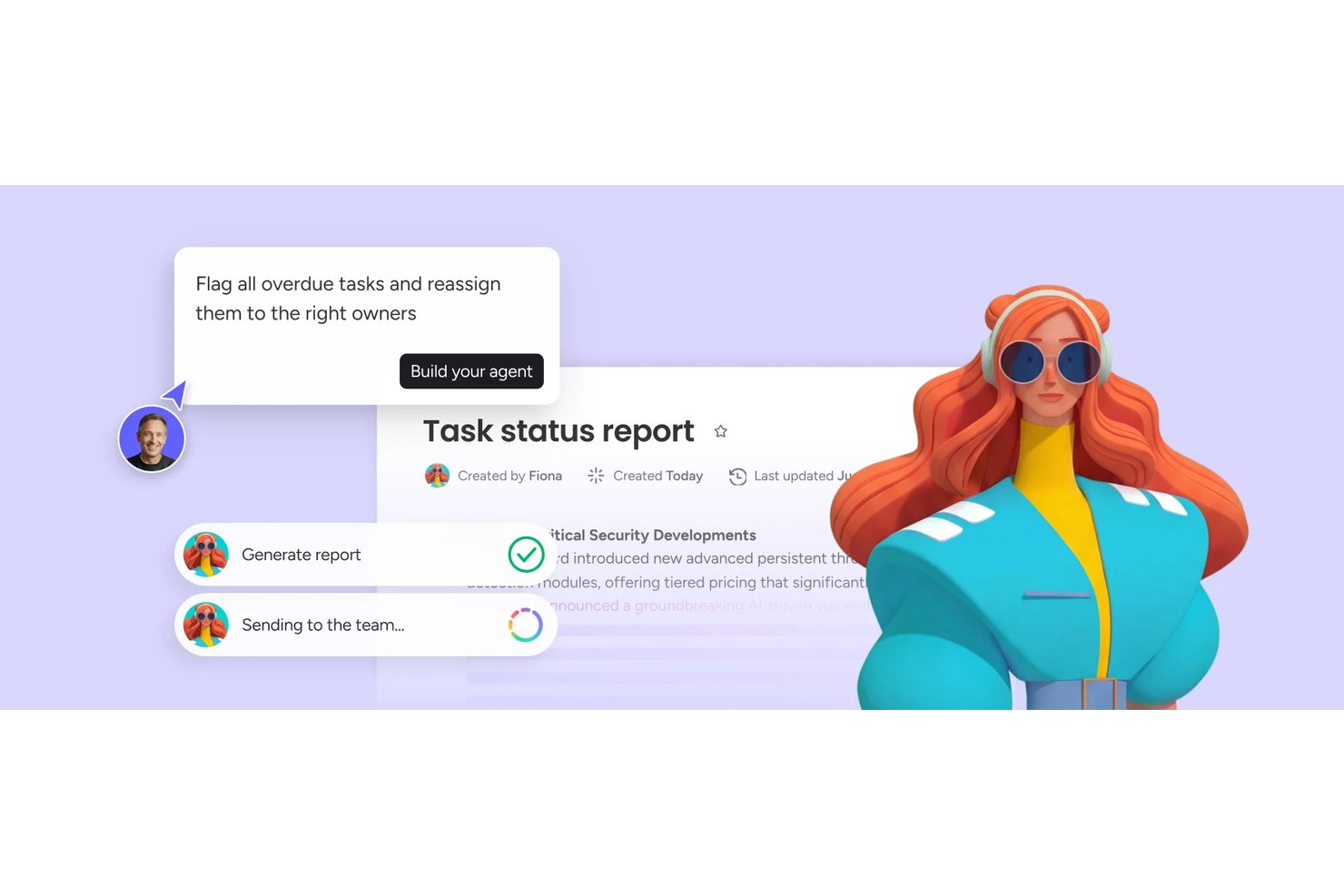
monday AI Workspace è una piattaforma di gestione del lavoro potenziata dall'intelligenza artificiale che combina automazione delle attività, pianificazione intelligente dei progetti, agenti AI e identificazione dei rischi in tempo reale su board, timeline e dashboard.
Per chi è ideale monday AI Workspace?
È particolarmente adatto a project manager e team trasversali di aziende di medie e grandi dimensioni che gestiscono contemporaneamente più flussi di lavoro complessi.
Perché ho scelto monday AI Workspace
Ho inserito monday AI Workspace nella mia lista di preferiti perché la sua intelligenza artificiale gestisce i rischi prima che diventino un vero problema. Mi piace che tenga traccia attivamente delle dipendenze tra le board e segnali i conflitti, come sovrallocazione delle risorse o tappe ritardate, senza che debba andare a cercarli. Il Notetaker AI delle riunioni si integra anche direttamente nel contesto del progetto, così gli elementi d'azione e i rischi emergono automaticamente durante gli standup.
Caratteristiche principali di monday AI Workspace
- Costruttore di workflow AI: Orquestra flussi di lavoro multi-step collegando agenti e regole di automazione direttamente nelle board.
- Costruttore di app Vibe: Permette di trasformare esigenze o richieste di processo in app personalizzate tramite semplici descrizioni o prompt.
- Assistente Sidekick AI: Offre guida tramite chat per interrogare dati di progetto, suggerire azioni o redigere aggiornamenti contestuali.
- Board di progetto multi-vista: Supporta viste Kanban, Gantt, calendario e timeline per monitorare l'avanzamento dei progetti.
Integrazioni di monday AI Workspace
monday AI Workspace offre centinaia di integrazioni native e app di marketplace, tra cui Slack, Salesforce, HubSpot, Google Workspace, Microsoft Teams, GitHub, Zoom, Asana, Trello e Dropbox. Supporta Zapier e mette a disposizione un'API per integrazioni personalizzate.
Cosa è gratuito?
monday AI Workspace offre una prova gratuita di 14 giorni che ti permette di accedere alle funzionalità dei piani a pagamento, inclusi strumenti AI, senza necessità di carta di credito. Al termine della prova sarà necessario passare a un piano a pagamento per continuare a usare le funzionalità AI, poiché il piano gratuito per sempre (limitato a 2 postazioni e 3 board) non include l'intelligenza artificiale.
Pros and Cons
Pros:
- Gli agenti AI gestiscono l'intero ciclo di vita delle attività
- Gli avvisi di rischio emergono prima che le scadenze vengano superate
- Converte le note delle riunioni in attività assegnate
Cons:
- Funzionalità AI disponibili solo nei piani a pagamento
- Piano gratuito limitato a due postazioni
New Product Updates from monday AI Workspace
monday AI Workspace Adds Human Approval Routing
monday AI Workspace adds a human-in-the-loop approval block to AI Workflows, sending approval requests and routing workflow paths based on responses. For more information, visit monday AI Workspace's official site.
Ideale per interfaccia intuitiva
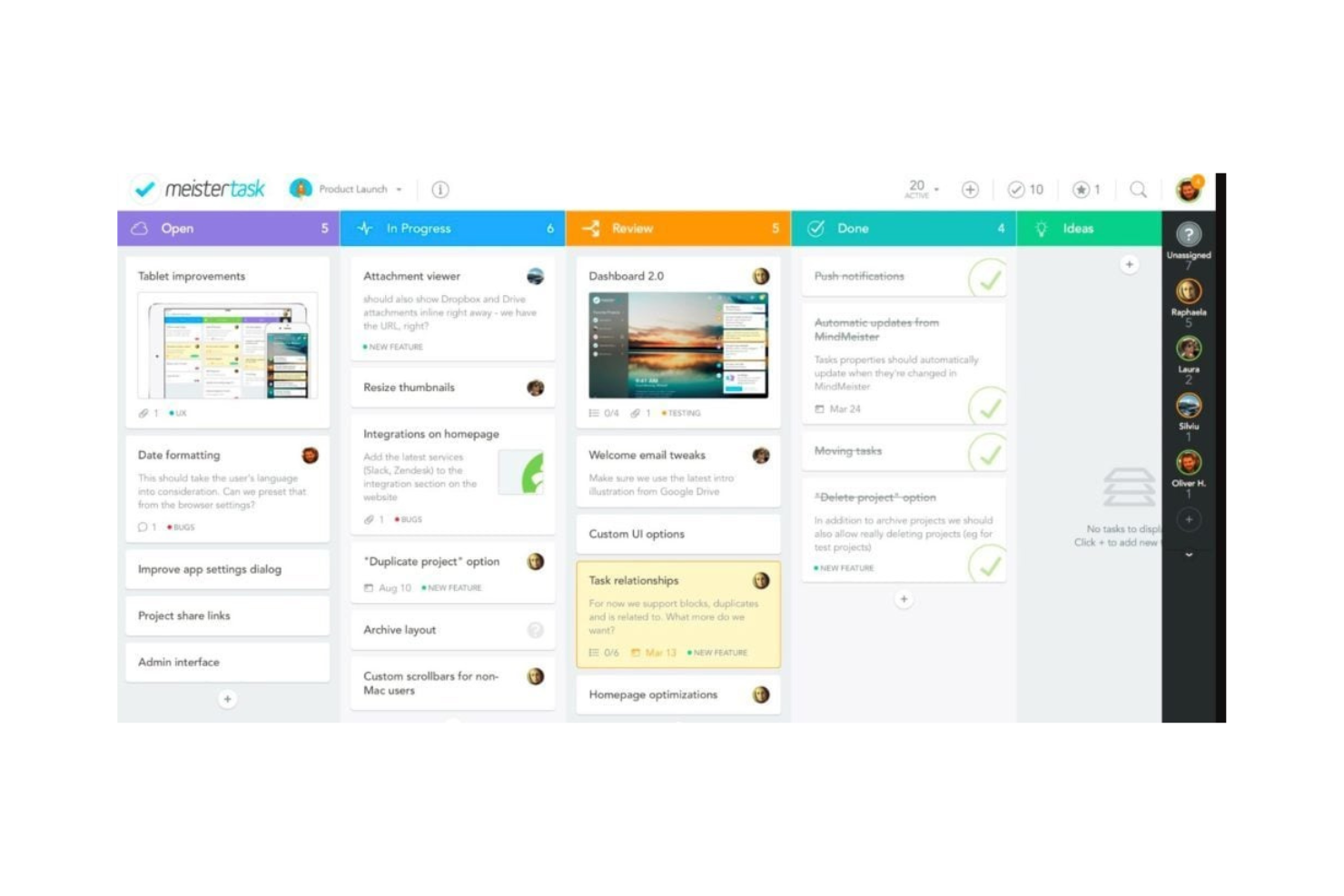
MeisterTask è uno strumento di gestione delle attività e dei progetti per team e singoli che desiderano una piattaforma visivamente accattivante e facile da usare. È utilizzato principalmente da professionisti creativi e team che hanno bisogno di un'organizzazione semplice delle attività e collaborazione efficace.
Perché ho scelto MeisterTask: Il piano gratuito di MeisterTask include funzionalità come timeline delle attività, bacheche di progetto personalizzabili e automazione delle attività. Offre un'interfaccia intuitiva che rende facile per il tuo team adottare e utilizzare lo strumento senza una lunga curva di apprendimento. MeisterAI può generare contenuti, trovare informazioni nelle tue note e aiutare con la scrittura quotidiana. Anche la versione gratuita consente attività e progetti illimitati, ideale per team che necessitano di flessibilità.
Caratteristiche principali e integrazioni:
Caratteristiche includono una schermata iniziale che riunisce le attività in arrivo e le notifiche, report che mostrano i progressi del tuo team e la possibilità di trasformare email o note di riunione in attività.
Integrazioni includono Slack, Microsoft Teams, Outlook e Gmail.
Cosa è gratis? MeisterTask offre un piano gratuito con attività illimitate e fino a 3 progetti.
Pros and Cons
Pros:
- Interfaccia intuitiva e facile da usare
- Adatto a team creativi
- Bacheche di progetto personalizzabili
Cons:
- Funzionalità di reportistica di base
- Nessun accesso offline

Taskade
Ideale per la collaborazione di squadra

Taskade è uno strumento collaborativo di gestione delle attività pensato per i team che desiderano aumentare la produttività e migliorare la comunicazione. È ideale per i team remoti e per le organizzazioni che danno priorità alla collaborazione sulle attività.
Perché ho scelto Taskade: L'offerta gratuita di Taskade include funzionalità come liste di cose da fare, note collaborative e videochat. È perfetto per la collaborazione di squadra e permette al team di lavorare insieme in tempo reale. Le funzionalità di intelligenza artificiale consentono di generare attività e scrivere contenuti, oltre a supportare il brainstorming per permettere al team di essere più veloce. La versione gratuita consente di creare attività e progetti illimitati.
Funzionalità e integrazioni principali:
Funzionalità includono una funzionalità di videochat integrata che permette di comunicare senza cambiare app, mappe mentali per visualizzare i progetti e modelli di attività per iniziare rapidamente.
Integrazioni includono Slack, Google Drive, Zapier, GitHub e Microsoft Teams.
Cosa offre gratis? Taskade offre un piano gratuito per sempre con 3 app AI e 1 workspace.
Pros and Cons
Pros:
- Strumenti di collaborazione in tempo reale
- Videochat integrata
- Adatto ai team remoti
Cons:
- Può risultare complesso per i nuovi utenti
- Opzioni di personalizzazione di base
Trello
Ideale per semplici elenchi di attività
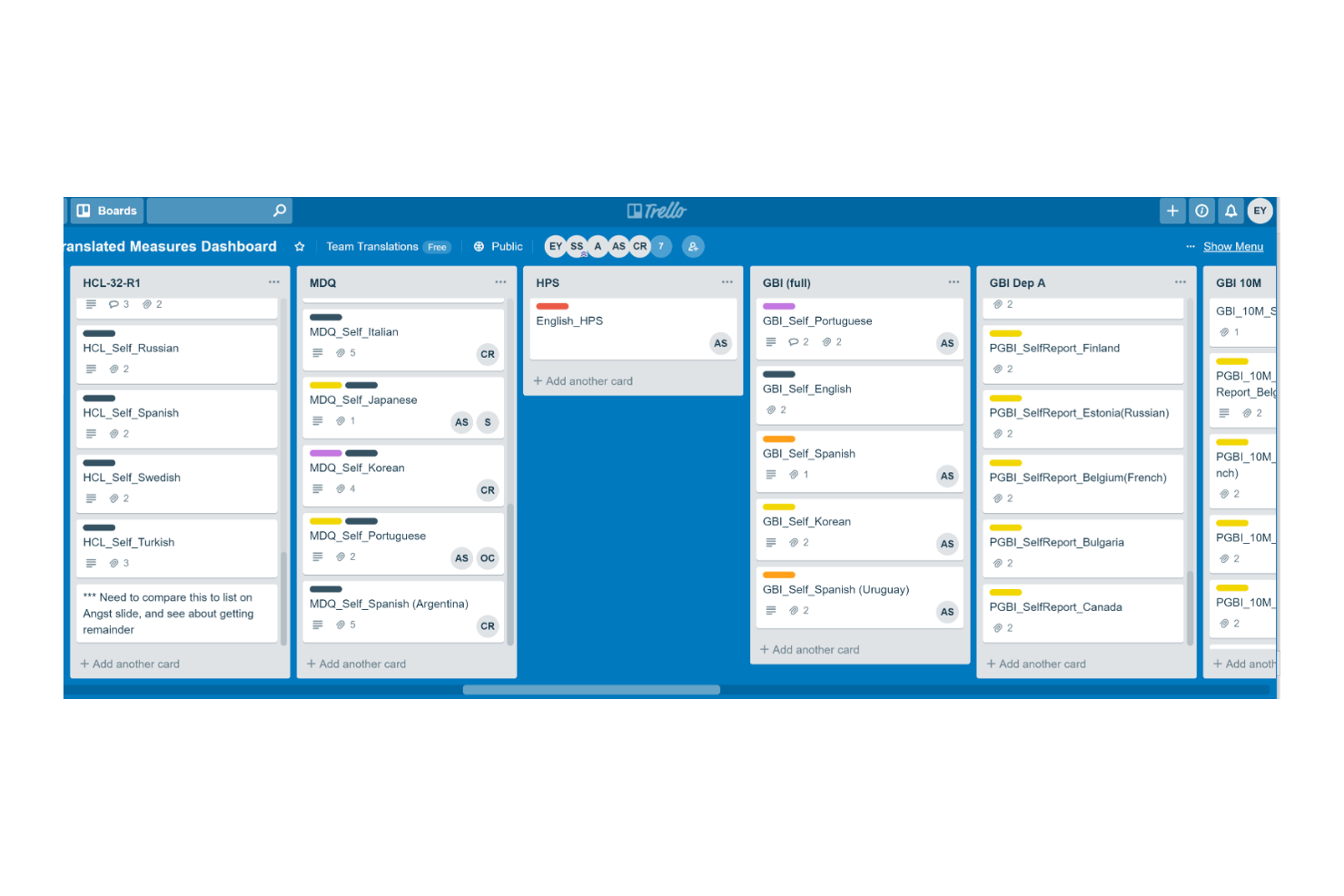
Trello è uno strumento di gestione dei progetti pensato per i team che desiderano organizzare e gestire le attività in modo efficiente. È ampiamente utilizzato da singoli e piccoli gruppi per il monitoraggio delle attività e la collaborazione.
Perché ho scelto Trello: L'offerta gratuita di Trello include funzionalità come bacheche di lavoro, gestione delle attività tramite schede e automazioni di base. È ideale per creare semplici elenchi di attività e ti permette di catturare e organizzare visivamente i compiti. Le funzionalità AI integrate possono suggerire l'organizzazione delle attività, generare riepiloghi e aiutare ad automatizzare i passaggi ripetitivi (tramite Butler).
Caratteristiche e integrazioni principali:
Caratteristiche includono la possibilità di creare attività, assegnarle al team e impostare scadenze. Trello permette anche di allegare file e commenti alle attività e di mantenere tutte le informazioni in un unico posto.
Integrazioni includono Slack, Microsoft Teams, Google Drive, Dropbox, Evernote, Salesforce, Jira, GitHub e Confluence.
Cosa offre gratis? Trello offre un piano gratuito con carte illimitate e 10 bacheche per spazio di lavoro.
Pros and Cons
Pros:
- Facile da usare per i principianti
- Organizzazione flessibile delle attività
- Gestione visiva delle attività
Cons:
- Funzionalità limitate nel piano gratuito
- Opzioni di personalizzazione limitate
Backlog
Ideale per il tracciamento dei bug

Backlog è uno strumento di gestione progetti e collaborazione pensato per sviluppatori e team focalizzati sullo sviluppo software e il tracciamento dei bug. Viene utilizzato dai team di sviluppo per gestire le attività, monitorare i bug e collaborare sul codice.
Perché ho scelto Backlog: Backlog offre un piano gratuito che include funzionalità come la gestione delle attività, il tracciamento dei bug e il controllo delle versioni. Puoi segnalare e gestire facilmente i bug, e la versione gratuita supporta anche wiki di progetto e condivisione dei file, elementi essenziali per i team di sviluppo software. I riepiloghi delle segnalazioni alimentati dall’IA facilitano l’individuazione e la risoluzione dei bug.
Caratteristiche e integrazioni principali:
Funzionalità includono diagrammi di Gantt integrati che aiutano a visualizzare le tempistiche e le dipendenze dei progetti, oltre alla possibilità di suddividere le attività più grandi in sotto-attività gestibili.
Integrazioni includono Slack, Redmine, Jira, Cacoo, Jenkins, Dropbox e Google Drive.
Cosa offre gratuitamente? Backlog propone un piano gratuito per sempre con 1 progetto, 100MB di spazio di archiviazione e 10 utenti.
Pros and Cons
Pros:
- Strumenti efficaci per il tracciamento dei bug
- Adatto ai team di sviluppo
- Supporta le sotto-attività
Cons:
- Curva di apprendimento per i nuovi utenti
- Opzioni di personalizzazione basilari

Nifty
Ideale per le tappe di progetto
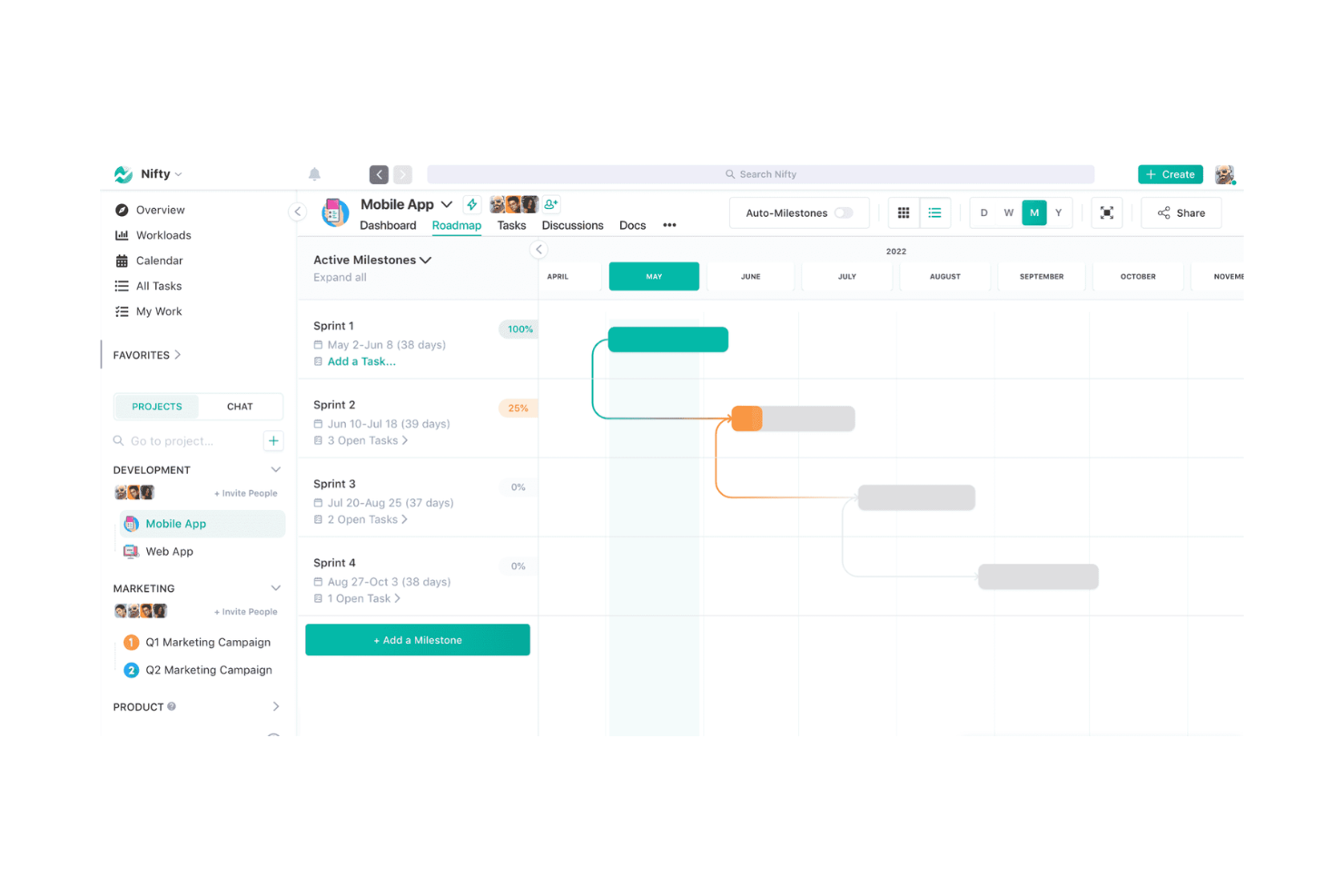
Nifty è uno strumento di gestione progetti pensato per i team che devono gestire attività, scadenze e comunicazioni in un unico posto. È l'ideale se il tuo obiettivo principale sono le tappe fondamentali del progetto e il monitoraggio degli obiettivi.
Perché ho scelto Nifty: L'offerta gratuita di Nifty include funzionalità come gestione delle attività, monitoraggio delle tappe fondamentali e chat di squadra. Ti aiuta a impostare e monitorare le tappe progetto con facilità. La versione gratuita supporta membri e attività illimitati, ideale per team in crescita. Le funzionalità di intelligenza artificiale di Orbit AI supportano pianificazione, prioritizzazione ed esecuzione, riducendo lo sforzo manuale.
Funzionalità e integrazioni principali:
Funzionalità includono il rilevamento del tempo per monitorare quanto tempo il tuo team dedica alle attività e rapporti automatici di avanzamento che mantengono aggiornate le parti interessate.
Le integrazioni includono Slack, Google Drive, Zoom, GitHub, Miro e Typeform.
Cosa è gratis? Nifty offre un piano gratuito per sempre con 100MB di spazio di archiviazione e fino a 2 progetti attivi.
Pros and Cons
Pros:
- Monitoraggio efficace delle tappe
- Report automatici di avanzamento
- Supporta la gestione documentale
Cons:
- Richiede connessione internet
- Curva di apprendimento per i nuovi utenti

Ideale per modelli di progetto
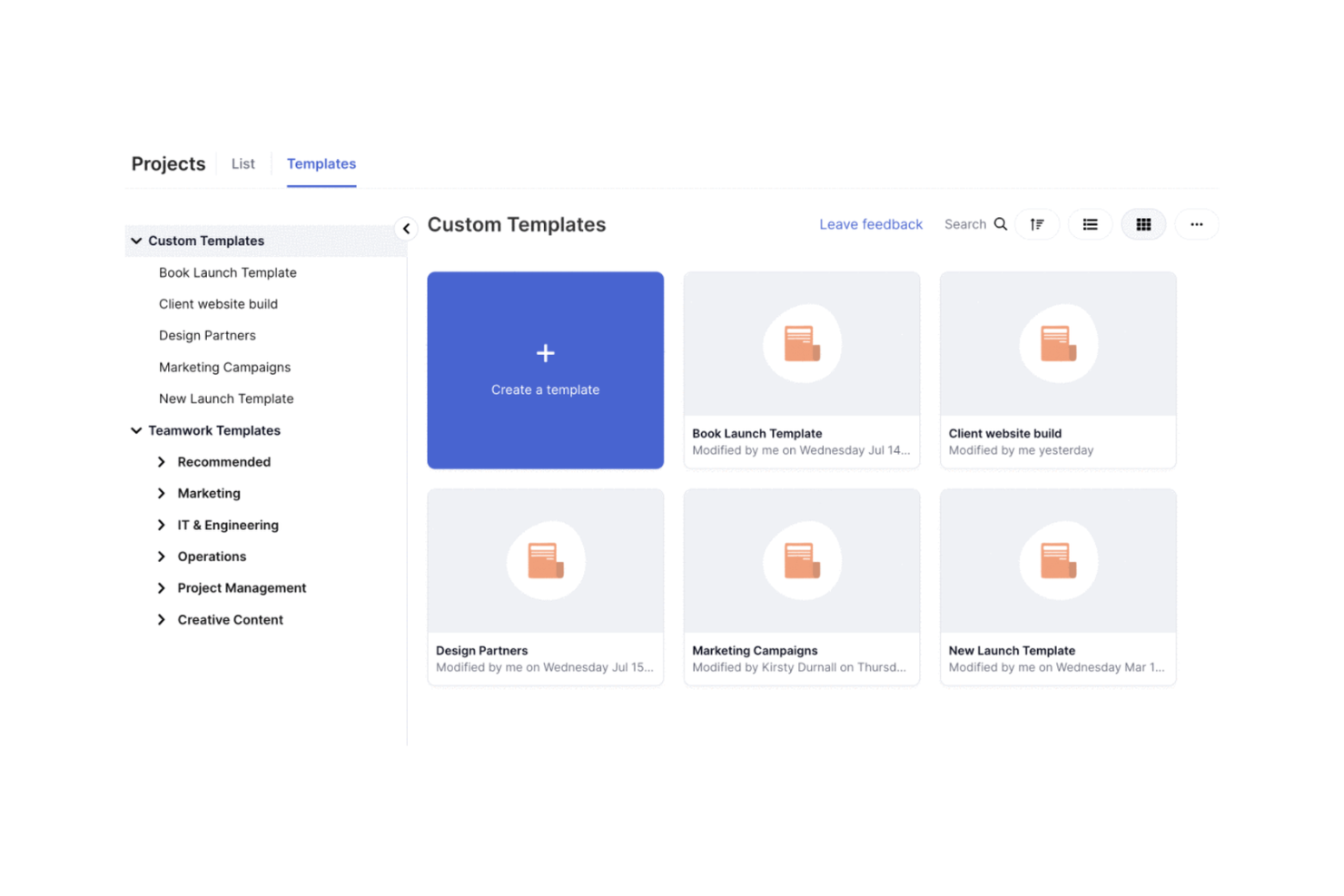
Teamwork.com è uno strumento di gestione progetti e risorse che aiuta a semplificare i progetti dei clienti e la redditività. È particolarmente utile per agenzie, servizi IT e società di consulenza che necessitano di flussi di lavoro efficienti e pianificazione delle risorse.
Perché ho scelto Teamwork.com: Il piano gratuito di Teamwork.com offre funzionalità come gestione dei progetti, pianificazione delle risorse e gestione dei clienti. Puoi creare modelli di progetto per gestire attività ripetitive. Hai inoltre accesso a strumenti AI come assistenti di progetto e assegnazioni intelligenti.
Funzionalità distintive e integrazioni:
Funzionalità includono report personalizzabili che aiutano a monitorare l'utilizzo fatturabile e la gestione delle risorse. Puoi gestire in modo efficace il tempo fatturabile e le comunicazioni con i clienti.
Integrazioni includono Slack, Google Drive, Dropbox, QuickBooks, HubSpot, Salesforce, Zapier, Xero e Harvest.
Cosa è gratuito? Il piano gratuito di Teamwork.com include l'accesso alle funzionalità AI e fino a 5 progetti.
Pros and Cons
Pros:
- Modelli di progetto completi
- Assistenti di progetto basati su AI
- Funzionalità di reportistica personalizzabili
Cons:
- Richiede configurazione per un uso ottimale
- Complessità per i nuovi utenti

Reclaim
Ideale per la sincronizzazione dei calendari
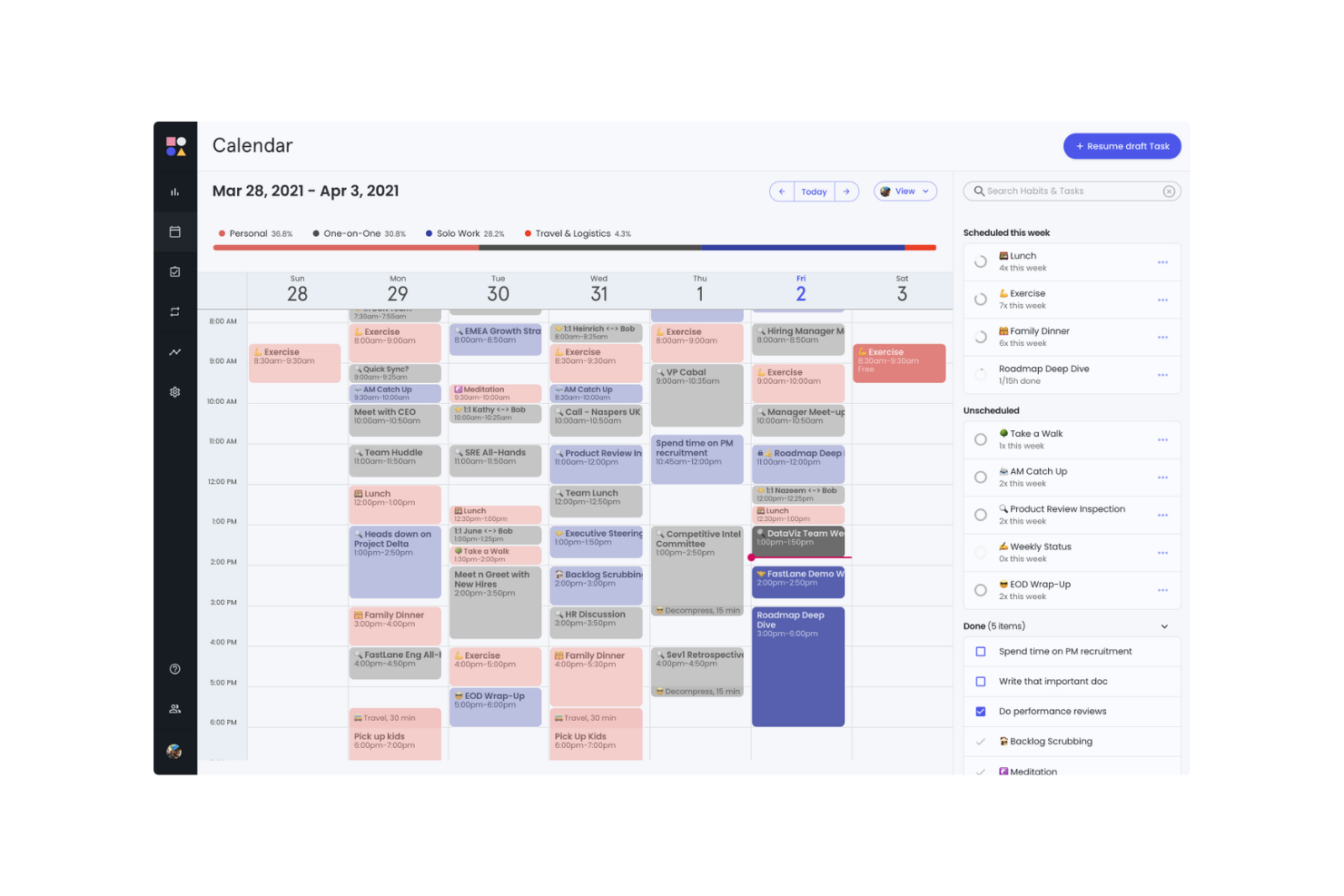
Reclaim è un'app di calendario potenziata dall'IA per individui, team e organizzazioni. Aiuta gli utenti che fanno affidamento sulla gestione del calendario a ottimizzare i propri programmi, la produttività e l'equilibrio tra lavoro e vita privata.
Perché ho scelto Reclaim: L'offerta gratuita di Reclaim include funzionalità come tempo di concentrazione, riunioni intelligenti e sincronizzazione del calendario con Google Calendar. È particolarmente utile per sincronizzare il tuo calendario tra diverse piattaforme. La versione gratuita ti consente di gestire efficacemente attività lavorative e personali con funzioni come tempi di buffer e monitoraggio del tempo.
Funzionalità e integrazioni principali:
Funzionalità includono pianificazione e riprogrammazione di eventi tramite IA, tempo di concentrazione, abitudini e attività. Il planner può anche costruire un programma giornaliero attorno ai tuoi obiettivi.
Integrazioni includono Slack, Asana, ClickUp, Todoist, Jira, Linear, Google Tasks e Zoom.
Cosa è gratuito? Reclaim offre una versione gratuita con 1 utente per team e un intervallo di pianificazione di 1 settimana.
Pros and Cons
Pros:
- Sincronizzazione del calendario efficace
- Utile per la gestione del tempo di concentrazione
- Adatta all'uso individuale
Cons:
- Curva di apprendimento per i nuovi utenti
- Non ideale per la gestione di progetti complessi

Swit è uno strumento collaborativo di gestione del lavoro per i team che desiderano combinare la gestione delle attività con la comunicazione. Offre un sistema integrato di chat e gestione delle attività per migliorare il lavoro di squadra e la produttività.
Perché ho scelto Swit: L’offerta gratuita di Swit include funzionalità come bacheche per le attività, canali di chat e condivisione file. Permette al tuo team di comunicare e gestire le attività in un unico posto. La versione gratuita supporta attività e canali di chat illimitati, offrendo grande flessibilità. Le funzionalità di intelligenza artificiale in Swit Snap supportano la scrittura, la sintesi e l’automazione dei passaggi di routine.
Funzionalità e integrazioni principali:
Funzionalità includono dashboard per monitorare l’avanzamento del lavoro e il carico di lavoro, e plug-in per impostare obiettivi e approvazioni. È anche possibile gestire i permessi ospite per coinvolgere in sicurezza collaboratori esterni.
Integrazioni includono Google Drive, Microsoft Teams e Jira.
Cosa è gratuito? Swit offre un piano gratuito per sempre con utenti illimitati e 2 workspace.
Pros and Cons
Pros:
- Adatto a team interfunzionali
- Condivisione file semplice
- Supporta la collaborazione da remoto
Cons:
- Strumenti di reportistica di base
- Opzioni di personalizzazione limitate
Altri software gratuiti di gestione delle attività basati sull'AI
Ecco alcune ulteriori opzioni di software di gestione delle attività basati sull’AI che offrono anche piani o prove gratuite. Sebbene questi strumenti non siano entrati nel mio elenco, vale comunque la pena prenderli in considerazione:
- Miro
Ideale per la collaborazione visiva
- Connecteam
Ideale per forza lavoro mobile
- GoodDay
Ideale per il monitoraggio del tempo senza registrazioni manuali
- ClickUp
Ideale per attività e membri illimitati


Come valuto i software gratuiti di gestione attività con AI
Quando un Project Manager ha bisogno di trasformare una discussione su Slack in uno sprint backlog gratuitamente, suddivido la mia valutazione su due livelli: le funzionalità AI di base per le attività e i fattori di differenziazione che distinguono uno strumento dall'altro.
Funzionalità di base (Requisiti minimi per questa lista)
Quando seleziono gli strumenti per la mia lista, attribuisco a ciascuno un punteggio da 0 (non offre la funzionalità) a 5 (eccelle in quest'area) per ogni funzionalità di base riportata di seguito. Poi calcolo il punteggio totale dello strumento in percentuale. Ogni strumento deve raggiungere un punteggio totale minimo del 65% per essere incluso.
- Automazione delle attività tramite AI: Verifico se lo strumento può creare, assegnare o aggiornare automaticamente le attività in risposta a trigger e input—come generare attività di follow-up dopo un cambio di stato.
- Piano gratuito utilizzabile: Il livello gratuito deve includere vere funzionalità AI, non solo le basi del project management. Controllo i limiti di utilizzo dell'AI e che siano disponibili abbastanza posti per un piccolo team.
- Prioritizzazione e pianificazione intelligente: Valuto come l'AI classifica e sequenzia il lavoro. I migliori strumenti considerano scadenze, dipendenze e capacità del team—non solo le date di consegna.
- Input delle attività in linguaggio naturale: Si può digitare “lancia la campagna con cinque sotto-attività entro venerdì” e ottenere una suddivisione strutturata? Cerco un vero parsing NLP, non una semplice rilevazione di parole chiave.
- Basi di project management: Ogni strumento deve comunque avere solide funzioni di base: elenchi di attività, visualizzazione a bacheca e timeline, assegnatari, scadenze e tracciamento dei progressi.
- Collaborazione e assegnazione al team: Valuto la presenza di spazi di lavoro condivisi, commenti sulle attività, menzioni e notifiche—funzionalità che aiutano i team distribuiti a tenere traccia delle responsabilità.
Una volta individuati gli strumenti che soddisfano questi criteri, considero cosa distingue ciascuna piattaforma.
Fattori di differenziazione (Cosa distingue i fornitori)
Ecco come confronto e metto a paragone i diversi fornitori:
Caratteristiche distintive
L'AI che trasforma le riunioni in attività è un importante elemento di differenziazione. Cerco strumenti che estraggano i punti d'azione da un riepilogo chiamata o thread Slack e li convertano in attività assegnate e con deadline. Hanno notevole valore anche gli insight predittivi sui rischi: i migliori strumenti segnalano in anticipo ritardi sulla timeline o conflitti di risorse prima del prossimo aggiornamento. Un assistente AI conversazionale completa il quadro, permettendo ai project manager di interrogare lo stato dello sprint o riassegnare attività tramite chat invece di navigare nelle dashboard.
Oltre le funzionalità
La generosità del piano gratuito ha un peso rilevante. Controllo quanti prompt AI, automazioni e utenti sono permessi da uno strumento prima che le feature vengano bloccate dai paywall. Anche la sicurezza dei dati e la privacy nell'AI sono fondamentali—verifico se i fornitori dichiarano chiaramente se i dati dei progetti servono per addestrare i loro modelli AI, dato che i project manager gestiscono spesso informazioni sensibili. L’integrazione con altri strumenti completa la valutazione. Un software gratuito di gestione attività con AI che si collega a Slack, GitHub o Google Calendar si integra bene nei flussi di lavoro già esistenti, mentre uno isolato crea più problemi che benefici.
Come scegliere un software gratuito di gestione delle attività basato sull'AI
Elenchi di funzionalità complessi e strutture tariffarie articolate possono rendere difficile capire cosa si sta realmente ottenendo da uno strumento gratuito di gestione delle attività basato sull'AI. Per aiutarti a rimanere concentrato mentre esamini il processo di selezione del software, ecco alcuni fattori da tenere presenti:
| Fattore | Cosa considerare |
|---|---|
| Ambito dell'offerta gratuita | Verifica quali funzionalità sono incluse nel piano gratuito. Soddisfa le tue esigenze di base senza costi nascosti? |
| Scalabilità | Valuta se il software può crescere insieme al tuo team. È in grado di gestire un numero crescente di attività e utenti man mano che l'organizzazione si espande? |
| Integrazioni | Cerca la compatibilità con gli strumenti che il tuo team utilizza già, come calendari, app di comunicazione o soluzioni di archiviazione dei file. |
| Semplicità d'uso | Valuta la curva di apprendimento. Il tuo team può adattarsi rapidamente all'interfaccia senza una formazione approfondita? |
| Personalizzazione | Determina se il software consente di personalizzare i flussi di lavoro e i pannelli di controllo in base ai processi e alle preferenze specifiche del tuo team. |
| Accesso da dispositivi mobili | Assicurati che il software disponga di un'app mobile o di un design reattivo, così da poter gestire le attività ovunque ti trovi. |
| Assistenza | Considera il livello di assistenza clienti disponibile. Sono presenti chat dal vivo, assistenza via e-mail o telefonica per aiutarti quando riscontri problemi? |
| Sicurezza | Verifica le misure di sicurezza dei dati del software. È conforme agli standard del settore per proteggere le informazioni del tuo team? |
Che cos'è un software gratuito di gestione delle attività basato sull'AI?
Il software gratuito di gestione delle attività basato sull'intelligenza artificiale è progettato per aiutare team e singoli utenti con un budget limitato a organizzare, monitorare e gestire le attività. Gli strumenti che offrono piani gratuiti o periodi di prova consentono agli utenti di accedere alle funzionalità di base senza impegno finanziario.
Le app di gestione delle attività monitorano e organizzano le attività e consentono di visualizzare cosa deve essere fatto e entro quando. Forniscono dati sull'avanzamento e sul completamento, rendendo più semplice gestire i carichi di lavoro del team e migliorare l'efficienza. Queste app includono spesso funzionalità come la definizione delle priorità delle attività e le integrazioni, per aiutarti a gestire i flussi di lavoro, migliorare il coordinamento e mantenere visibili le attività.
Funzionalità del software gratuito di gestione delle attività basato sull'intelligenza artificiale
Esaminiamo le funzionalità comunemente presenti nel software di gestione delle attività basato sull'intelligenza artificiale e quali sono generalmente incluse nei piani gratuiti rispetto a quelli a pagamento.
Funzionalità generalmente gratuite del software di gestione delle attività basato sull'intelligenza artificiale
- Creazione e assegnazione delle attività: consente di creare attività e assegnarle ai membri del team, così tutti conoscono le proprie responsabilità.
- Strumenti di collaborazione di base: consentono la comunicazione del team tramite commenti e note sulle attività, facilitando il feedback e la discussione.
- Monitoraggio delle date di scadenza e dei termini: aiuta a monitorare le tempistiche e le scadenze delle attività, così i progetti vengono completati in tempo.
- Integrazione con i calendari: sincronizza le attività con le app di calendario per fornire una visione chiara delle prossime scadenze e degli impegni.
- Accesso tramite app mobile: offre la gestione delle attività in mobilità tramite app mobile, così il team può aggiornare le attività ovunque si trovi.
Funzionalità generalmente a pagamento del software di gestione delle attività basato sull'intelligenza artificiale
- Report e analisi avanzati: offrono informazioni sulle prestazioni del team e sull'avanzamento dei progetti tramite report e analisi dettagliati.
- Flussi di lavoro personalizzabili: consentono di adattare i flussi di lavoro delle attività a processi specifici e di migliorare efficienza e organizzazione.
- Automazione delle attività ripetitive: fa risparmiare tempo automatizzando le attività di routine e riducendo il lavoro manuale per aumentare la produttività.
- Assistenza prioritaria: consente di ottenere tempi di risposta più rapidi e un'assistenza dedicata per risolvere i problemi.
- Monitoraggio del tempo e fatturazione: monitora il tempo dedicato alle attività e ai progetti, risultando utile per fatturare i clienti e gestire le risorse in modo efficiente.
Vantaggi del software gratuito di gestione delle attività basato sull'intelligenza artificiale
L'implementazione di un software gratuito di gestione delle attività basato sull'intelligenza artificiale offre diversi vantaggi al team e all'azienda. Eccone alcuni:
- Risparmio sui costi: consente di accedere alle funzionalità essenziali per la gestione delle attività senza spendere denaro, così puoi destinare le risorse finanziarie ad altre aree dell'azienda.
- Organizzazione migliorata: mantiene attività, scadenze e priorità organizzate in un unico luogo, aiutando il team a rimanere concentrato ed efficiente.
- Collaborazione migliorata: facilita la comunicazione e la collaborazione tra i membri del team con funzionalità di chat e commenti di base.
- Maggiore accessibilità: consente di gestire le attività in mobilità tramite l'accesso all'app mobile, così il team può lavorare ovunque.
- Migliore gestione del tempo: utilizza le integrazioni con i calendari e il monitoraggio delle scadenze per garantire il completamento puntuale delle attività e dei progetti.
- Scalabilità: inizia con un piano gratuito e passa a un piano superiore man mano che il team cresce, ottenendo flessibilità senza un impegno finanziario immediato.
Costi e prezzi del software gratuito di gestione delle attività basato sull'intelligenza artificiale
Potresti cercare le migliori opzioni di software per la gestione delle attività basato sull'intelligenza artificiale disponibili gratuitamente, ma poiché i piani gratuiti offrono solo funzionalità limitate, è molto probabile che in futuro dovrai passare a un piano superiore per ottenere funzionalità più avanzate.
La tabella seguente riassume i piani comuni, i prezzi medi e le funzionalità generalmente incluse nelle soluzioni software per la gestione delle attività basato sull'intelligenza artificiale:
Tabella di confronto dei piani per il software di gestione delle attività basato sull'intelligenza artificiale
| Tipo di piano | Prezzo medio | Funzionalità comuni |
|---|---|---|
| Piano gratuito | $0 | Gestione di base delle attività, numero limitato di utenti e integrazioni di base. |
| Piano personale | $5-$15/utente/mese | Prioritizzazione delle attività, sincronizzazione del calendario e accesso all'app mobile. |
| Piano aziendale | $15-$25/utente/mese | Reportistica avanzata, strumenti per la collaborazione del team e funzionalità di automazione. |
| Piano aziendale | $25-$50/utente/mese | Flussi di lavoro personalizzati, supporto dedicato e funzionalità di sicurezza avanzate. |
Domande frequenti sui software gratuiti di gestione delle attività con IA
Ecco alcune risposte alle domande comuni sui software gratuiti di gestione delle attività con IA:
I software di gestione delle attività con IA possono sostituire il mio calendario o la mia agenda?
Gli strumenti di gestione delle attività con IA possono suggerire dove e quando programmare le attività in base alle scadenze e alla disponibilità, ma di solito non sostituiscono un calendario per riunioni, viaggi o impegni personali. Avrai comunque bisogno di uno strumento di calendario dedicato, ma gli strumenti di IA possono aiutarti a inserire il lavoro negli spazi disponibili del tuo programma esistente.
Quanto sono efficaci gli strumenti gratuiti di IA per la collaborazione tra team?
Molti strumenti gratuiti per la gestione delle attività con IA consentono una collaborazione di base (attività condivise, commenti, elenchi), ma le funzionalità avanzate di coordinamento, come il monitoraggio delle dipendenze, le autorizzazioni, il bilanciamento del carico di lavoro o le analisi IA tra progetti, sono spesso riservate ai piani a pagamento. Assicurati di controllare le specifiche degli strumenti che ti interessano per verificare cosa viene offerto.
Posso passare dal piano gratuito a quello a pagamento senza perdere i miei dati o la configurazione?
Sì, la maggior parte dei fornitori garantisce il trasferimento delle attività, delle impostazioni e della cronologia; otterrai semplicemente l’accesso a un numero maggiore di funzionalità e a una capacità più ampia. Esegui sempre il backup dei tuoi dati prima di effettuare l’upgrade, per sicurezza.
I software gratuiti di gestione delle attività con IA possono integrarsi con altri strumenti?
Sì, molti strumenti gratuiti di gestione delle attività con IA offrono integrazioni con applicazioni popolari come Slack, Google Calendar e Dropbox. Questo consente di sincronizzare le attività e collaborare con gli strumenti che già utilizzi, migliorando la produttività del tuo team senza costi aggiuntivi.