

I 10 migliori software per la gestione dei progetti immobiliari nel 2026

10 Elenco dei migliori software per la gestione dei progetti immobiliari
- 9. Northspyre


La gestione dei progetti immobiliari comporta una pressione costante, perché è necessario monitorare budget, tempistiche, approvazioni e appaltatori, assicurandosi al contempo che ogni dettaglio proceda senza intoppi nella giusta direzione.
Il software per la gestione dei progetti immobiliari può semplificare questo lavoro. Aiuta a rimanere organizzati, evitare ritardi, gestire più proprietà e mantenere tutti allineati tra team e tempistiche.
In questo elenco passerò in rassegna i migliori strumenti disponibili. Ho testato ciascuno di essi concentrandomi sulla capacità di gestire le esigenze concrete della gestione dei progetti immobiliari.
Perché fidarsi dei nostri consigli sui software
Il nostro team testa e recensisce software dal 2012. In quanto project manager noi stessi, sappiamo quanto sia difficile — e importante — scegliere il software giusto.
Per questa guida, abbiamo valutato gli strumenti attraverso test pratici e ricerche indipendenti, assegnando un punteggio agli strumenti in base ai nostri criteri di selezione. Ci basiamo inoltre sulle competenze di leader di pensiero del settore e di professionisti attivi nella gestione dei progetti.
Le nostre recensioni riflettono il nostro giudizio editoriale umano, non un discorso di vendita.
Revisori esperti:
Tabella comparativa dei software per la gestione dei progetti immobiliari
Questa tabella comparativa riassume i dettagli dei prezzi dei software per la gestione dei progetti immobiliari che ho selezionato come migliori.
| Tool | Best For | Trial Info | Price | ||
|---|---|---|---|---|---|
| 1 | Ideale per il controllo del budget di sviluppo in tempo reale | Demo gratuita disponibile | Da $375/progetto al mese (fatturato annualmente) | Website | |
| 2 | Ideale per operazioni aziendali integrate | Prova gratuita di 15 giorni + piano gratuito + demo gratuita disponibile | Da $4/utente/mese (fatturazione annuale) | Website | |
| 3 | Ideale per dashboard personalizzabili | Prova gratuita di 14 giorni + piano gratuito disponibile | A partire da $10/utente/mese (fatturazione annuale) | Website | |
| 4 | Ideale per coordinare i team immobiliari in un unico spazio di lavoro | Piano gratuito disponibile | A partire da $10/utente/mese | Website | |
| 5 | Ideale per una visibilità completa sui progetti | Prova gratuita di 14 giorni + demo gratuita disponibile | A partire da $8/utente/mese (con fatturazione annuale) | Website | |
| 6 | Ideale per il coordinamento di appaltatori su larga scala | Demo gratuita disponibile | Prezzi su richiesta | Website | |
| 7 | Ideale per la gestione dei costi di costruzione e il coordinamento degli appaltatori | Demo gratuita disponibile | Prezzi disponibili su richiesta | Website | |
| 8 | Ideale per il monitoraggio dello sviluppo guidato dagli investimenti | Demo gratuita disponibile | Prezzi su richiesta | Website | |
| 9 | Dimostrazione gratuita disponibile | Prezzi su richiesta | Website | ||
| 10 | Ideale per la supervisione finanziaria di più progetti | Prova gratuita di 14 giorni | A partire da $19.90/utente/mese (fatturato annualmente) | Website |


Recensioni dei migliori software per la gestione dei progetti immobiliari
Di seguito trovi le mie sintesi dettagliate dei migliori software per la gestione dei progetti immobiliari inclusi nel mio elenco ristretto. Le mie recensioni offrono uno sguardo approfondito sulle funzionalità principali, sui vantaggi & svantaggi, sulle integrazioni e sui casi d’uso ideali di ogni strumento, per aiutarti a trovare quello più adatto a te.

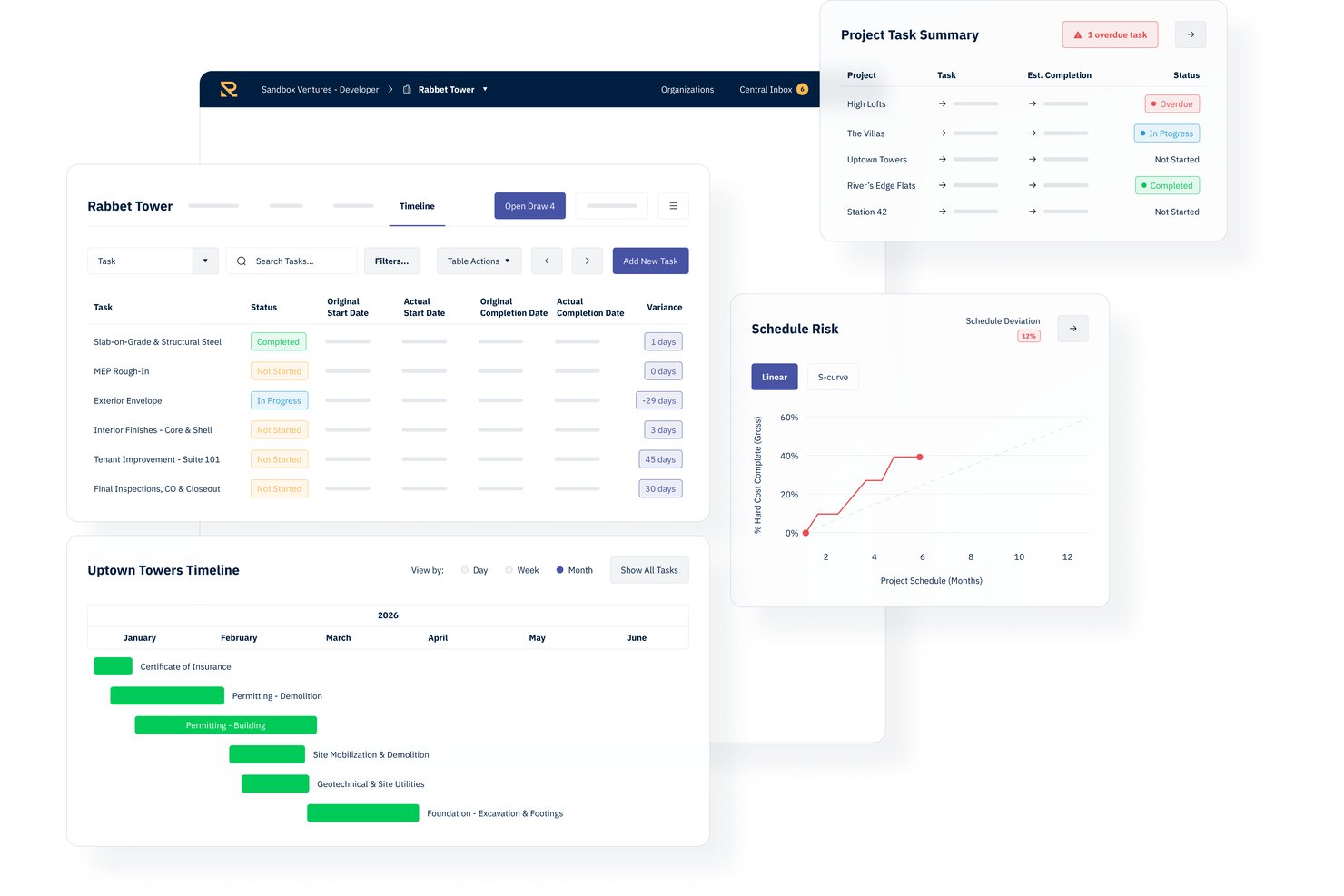
Rabbet è una piattaforma di gestione per lo sviluppo immobiliare che centralizza budget, contratti, creazione di package per le richieste di pagamento, elaborazione dei documenti e monitoraggio dei flussi di cassa del portafoglio per i team di sviluppo.
Per chi è pensato Rabbet?
Rabbet è particolarmente adatto a sviluppatori immobiliari e team finanziari di sviluppo che gestiscono progetti di costruzione attivi con regolari cicli di richiesta di fondi dai finanziatori.
Perché ho scelto Rabbet
Rabbet merita un posto nella mia shortlist per come gestisce l'elaborazione dei documenti nella fase di richiesta di fondi. Adoro l'AI Document Router, che suddivide automaticamente i PDF caricati per tipologia di documento e classifica fatture, liberatorie e richieste di pagamento senza necessità di ordinamento manuale. Il mio team può così concentrarsi su revisione e approvazione invece che inseguire la documentazione. Gli elementi mancanti vengono segnalati prima dell'invio della richiesta, riducendo così il numero di package respinti dai finanziatori.
Caratteristiche principali di Rabbet
- Monitoraggio budget in tempo reale: Traccia i costi previsti ed effettivi del progetto in tempo reale, con avvisi sulle variazioni.
- Dashboard portafoglio: Visualizza lo stato dei finanziamenti, le tempistiche delle richieste e i requisiti di liquidità per tutti i progetti contemporaneamente.
- Gantt chart e timeline: Organizza, visualizza e aggiorna le pianificazioni dei progetti con avvisi automatici sulle milestone.
- Integrazione con i sistemi contabili: Sincronizza direttamente i dati di fatturazione e pagamento con QuickBooks, Yardi, MRI, Bill.com e NexusPayables.
Integrazioni Rabbet
Rabbet offre integrazioni native con QuickBooks, Yardi Voyager, MRI, Bill.com, NexusPayables e AvidXChange. È disponibile un'API per integrazioni personalizzate e il single sign-on è supportato nei piani di livello superiore.
Pros and Cons
Pros:
- Automazione della fatturazione con avanzata analisi AI dei documenti
- I workflow di gestione delle richieste di pagamento riducono i passaggi manuali di revisione
- La dashboard portafoglio monitora più progetti contemporaneamente
Cons:
- Le opzioni di report avanzati sono in parte limitate
- Non è disponibile una funzionalità tramite app mobile

Ideale per operazioni aziendali integrate

Zoho Projects è uno strumento completo di gestione dei progetti che facilita la pianificazione e la collaborazione. Si distingue per la sua capacità di integrarsi profondamente con una suite di applicazioni aziendali, migliorando l'efficienza operativa complessiva.
Perché ho scelto Zoho Projects: Ho scelto Zoho Projects per le sue solide capacità di integrazione che semplificano i processi aziendali, rendendolo una scelta eccellente per la gestione di progetti complessi con molteplici componenti in movimento. La sua caratteristica distintiva è il collegamento senza soluzione di continuità con altre app Zoho e servizi di terze parti, motivo per cui è ideale per le operazioni aziendali integrate. Questo strumento si differenzia notevolmente dagli altri software di gestione di progetti immobiliari offrendo una soluzione completa che può adattarsi a una vasta gamma di esigenze aziendali, assicurando che tutto, dal monitoraggio dei progetti alla gestione delle risorse, funzioni in modo armonioso.
Funzionalità e integrazioni principali:
Le funzionalità includono gestione delle attività, monitoraggio del tempo e strumenti di collaborazione, permettendo ai team di lavorare in modo efficiente e rimanere allineati sugli obiettivi del progetto. Offre inoltre la capacità di integrarsi con un vasto ecosistema di app, sia all'interno della suite Zoho che su piattaforme esterne. Questa connettività consente un flusso di lavoro più coeso, aumentando la produttività e la visibilità del progetto.
Si integra nativamente con Zoho CRM, Zoho Books, Zoho Invoice, Zoho Analytics, Zoho Cliq, Zoho Desk, Zoho Mail, Slack, Google Drive e GitHub, tra gli altri.
Pros and Cons
Pros:
- Funzionalità di gestione dei progetti complete
- Capacità di integrazione estese
- Tariffazione accessibile
Cons:
- Curva di apprendimento per i nuovi utenti
- Opzioni di personalizzazione limitate
- Le prestazioni possono diminuire con progetti di grandi dimensioni
New Product Updates from Zoho Projects
Zoho Projects Adds CodeX Scripts for Custom Modules
Zoho Projects now supports CodeX Scripts for custom modules, enabling conditional logic and rules for creating, updating, and deleting records. For more information, visit Zoho Projects' official site.
 .
.
Wrike
Ideale per dashboard personalizzabili

Wrike è uno strumento di gestione dei progetti che aiuta i team a organizzare le attività, collaborare sui progetti e monitorare i progressi. Offre diverse funzionalità per gestire i flussi di lavoro e migliorare la produttività.
Perché ho scelto Wrike: I dashboard personalizzabili di Wrike ti permettono di creare visualizzazioni adatte ai tuoi progetti immobiliari. Puoi monitorare attività, scadenze e carichi di lavoro del team in un unico posto, facilitando il controllo degli annunci immobiliari, delle comunicazioni con i clienti e degli stati delle transazioni. Questo ti aiuta a rimanere organizzato e rispondere rapidamente ai cambiamenti.
Funzionalità e integrazioni principali:
Le funzionalità includono diagrammi di Gantt, bacheche kanban, flussi di lavoro personalizzati, collaborazione in tempo reale, moduli di richiesta dinamici, modelli di progetto, gestione del carico di lavoro, monitoraggio del tempo, revisione dei documenti, accesso tramite app mobile, reportistica e analisi e integrazione con il calendario.
Le integrazioni comprendono Salesforce, Microsoft Teams, Zoom, Adobe Creative Cloud, Google Drive, Microsoft SharePoint, OneDrive, Wrike for Gmail, Google Sheets, Power BI, Miro e Trello.
Pros and Cons
Pros:
- Capacità di automazione dei flussi di lavoro
- Buone funzionalità di gestione delle risorse
- Varie visualizzazioni di progetto
Cons:
- La piattaforma può risultare complicata da imparare
- Spazio di archiviazione limitato nei piani base
New Product Updates from Wrike
Wrike Adds Klaxoon MCP Integration
Wrike’s Klaxoon MCP integration is now generally available, enabling AI agents to navigate between Wrike tasks and attached whiteboards, read task context, and manage whiteboard attachments via API. For more information, visit Wrike's official site.

ClickUp
Ideale per coordinare i team immobiliari in un unico spazio di lavoro
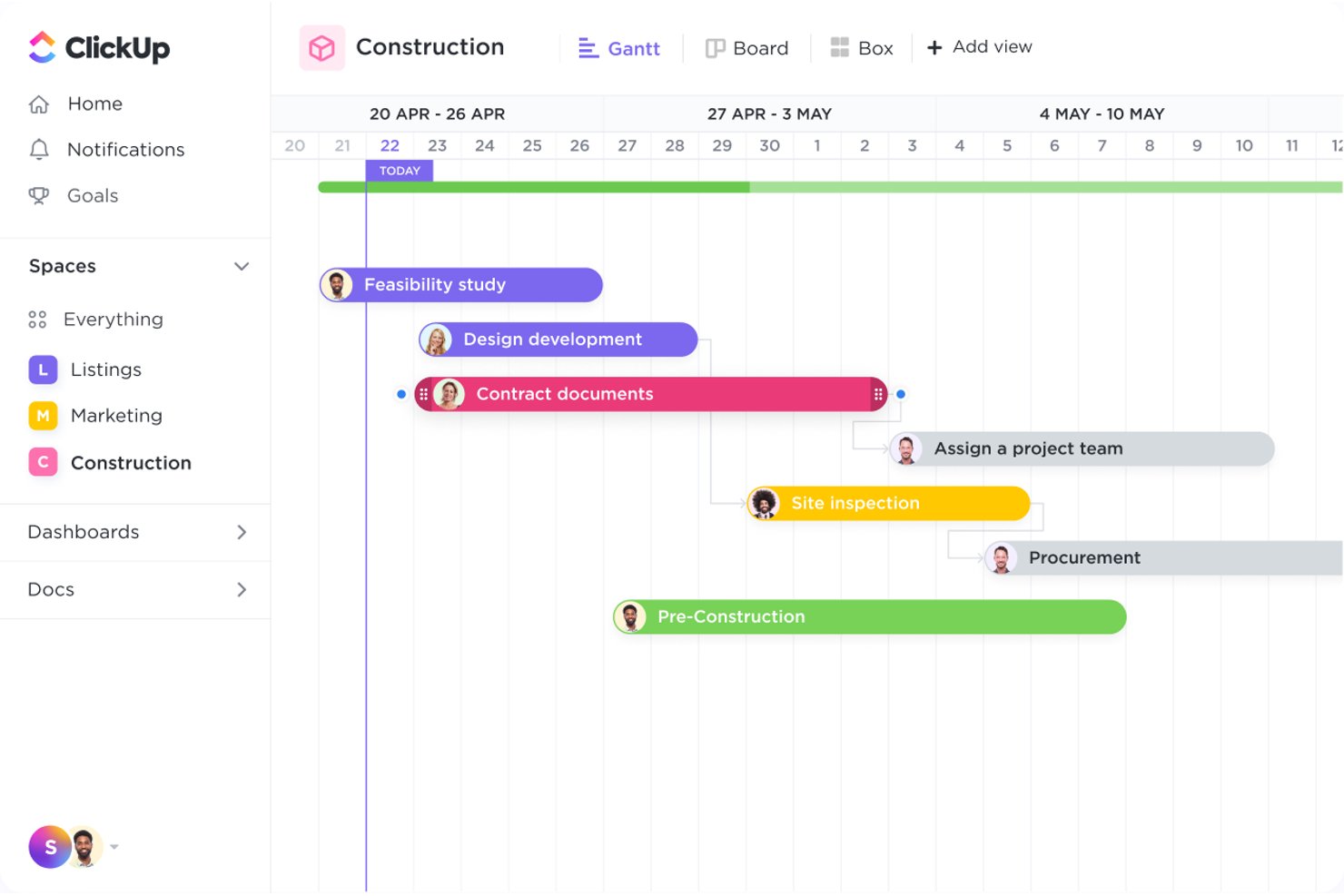
ClickUp è una piattaforma tutto-in-uno per la gestione del lavoro che combina il monitoraggio delle attività, la pianificazione con diagrammi di Gantt, Documenti collaborativi, pannelli di controllo e chat integrata per coordinare i progetti immobiliari tra i diversi team.
A chi è più adatto ClickUp?
ClickUp è ideale per i team immobiliari che desiderano gestire attività, documenti, comunicazioni e report in un unico spazio di lavoro invece di destreggiarsi tra più strumenti.
Perché ho scelto ClickUp
Ho scelto ClickUp come uno dei migliori perché consolida davvero ogni livello del coordinamento dei team immobiliari in un unico spazio di lavoro. Apprezzo il modo in cui i diagrammi di Gantt con il monitoraggio delle dipendenze consentono di mappare le fasi di costruzione dalla selezione del sito fino alle liste dei lavori da completare, riprogrammando automaticamente le attività successive quando le tempistiche cambiano. Abbinando questa funzione ai Documenti collegati per centralizzare progetti e permessi, e ai canali di chat direttamente associati alle attività, l'intero team lavora a partire da un'unica fonte affidabile invece di utilizzare strumenti sparsi.
Funzionalità principali di ClickUp
- Campi personalizzati: Aggiungi alle attività campi di tipo Valuta, Numero, Posizione e formula per acquisire dati specifici delle proprietà, come prezzi, offerte e calcoli del budget.
- Autorizzazioni per gli ospiti: Invita appaltatori e fornitori come ospiti con accesso di sola visualizzazione, commento o modifica limitato esclusivamente agli elementi che condividi con loro.
- Pannelli di controllo: Crea viste di report in tempo reale che combinano grafici, dati sul carico di lavoro e stato delle attività su più progetti e proprietà.
- Modalità offline: Crea attività e visualizza il lavoro aperto in precedenza anche senza connessione, con sincronizzazione automatica dei dati quando torni online.
Integrazioni di ClickUp
ClickUp offre oltre 50 integrazioni native, tra cui QuickBooks Online Sync, Google Drive, Dropbox, Box, HubSpot e Salesforce. Fornisce inoltre un'API pubblica, webhook, OAuth, MCP e Zapier per connessioni personalizzate.
Pros and Cons
Pros:
- Le dipendenze del diagramma di Gantt mantengono visibili le tempistiche del progetto
- I pannelli di controllo mostrano lo stato delle proprietà
- Le attività condivise coordinano fornitori e team
Cons:
- Nessuna gestione dedicata degli stanziamenti per la costruzione
- Gli spazi di lavoro di grandi dimensioni possono caricarsi lentamente

Workzone
Ideale per una visibilità completa sui progetti
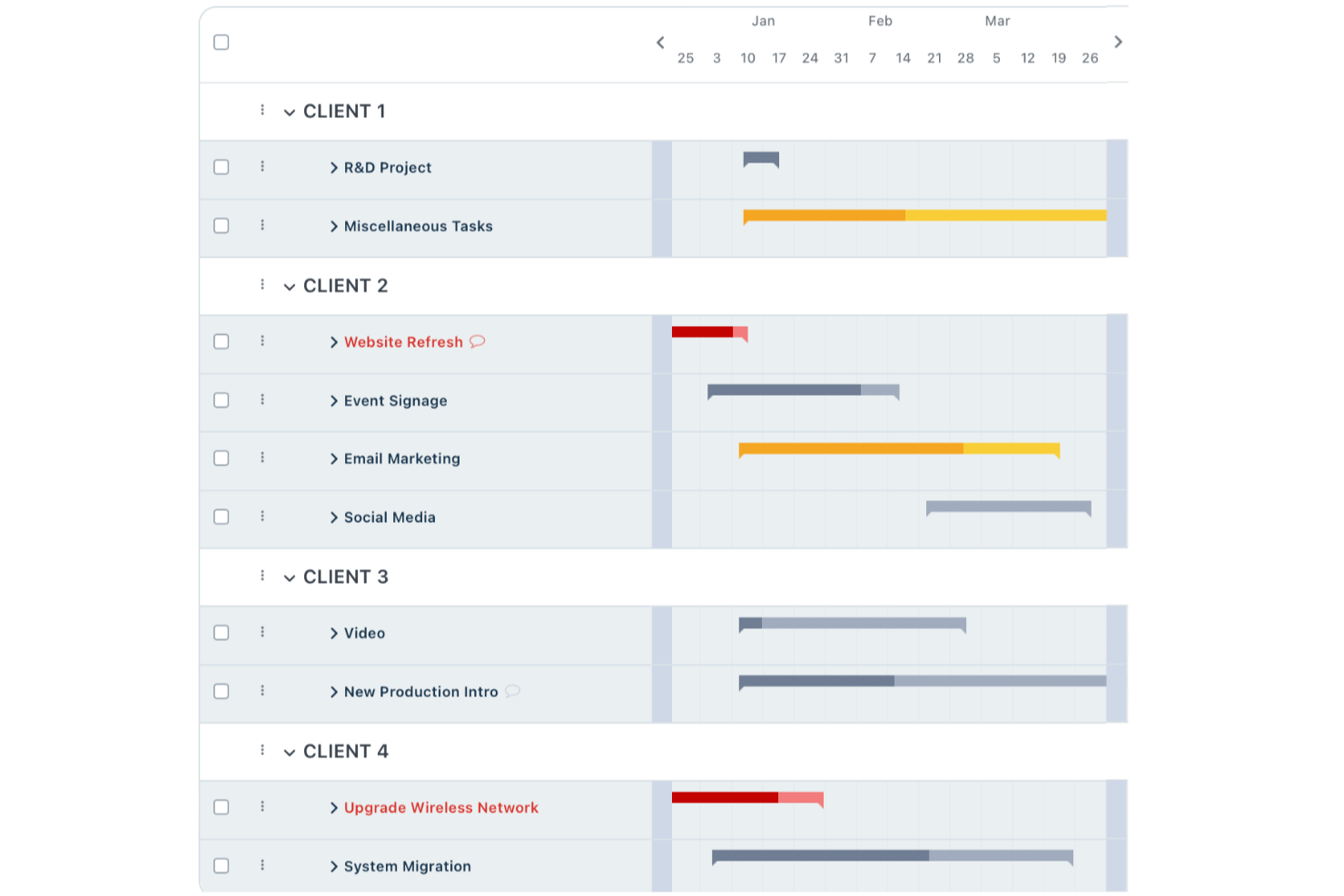
Workzone è una piattaforma di gestione dei progetti che include il monitoraggio delle attività, la visibilità del portafoglio multi-progetto, l'approvazione dei documenti e la collaborazione con gli appaltatori tra team e portafogli immobiliari.
Per chi è più adatto Workzone?
Workzone è una soluzione adatta ai team che gestiscono portafogli immobiliari e necessitano di visibilità tra progetti e di una collaborazione strutturata con gli appaltatori, senza la complessità dei software specifici per l'edilizia.
Perché ho scelto Workzone
Ho scelto Workzone come una delle migliori soluzioni perché la sua Visualizzazione del portafoglio offre ai team immobiliari una reale visibilità tra progetti, mostrando contemporaneamente cosa è in linea con i piani, cosa è a rischio e cosa richiede attenzione in ogni proprietà e iniziativa. Apprezzo molto il fatto che le dipendenze tra attività ricalcolino automaticamente le date quando cambia un'attività predecessore, così un ritardo nei lavori si ripercuote sul programma senza aggiornamenti manuali. I tipi di utente Revisore e Partner consentono inoltre di coinvolgere appaltatori e consulenti in spazi di lavoro specifici senza esporre l'intero portafoglio.
Funzionalità principali di Workzone
- Modelli di progetto riutilizzabili: Crea flussi di lavoro standardizzati con attività, responsabili, tempistiche e dipendenze preimpostati, quindi applicali a ogni nuova proprietà o progetto di allestimento.
- Approvazioni dei documenti in più fasi: Inoltra i file attraverso fasi di approvazione configurabili con approvatori, regole e scadenze definiti, monitorando i progressi nel pannello di controllo delle approvazioni.
- Monitoraggio di tempi e spese: Registra ore e spese direttamente sui progetti per avere visibilità su budget e fatturazione nell'intero portafoglio.
- Accesso degli utenti esterni basato sui ruoli: Assegna ad appaltatori e consulenti il ruolo di Partner o Revisore, fornendo loro un accesso limitato a cartelle e attività specifiche senza esporre l'intero account.
Integrazioni di Workzone
Workzone dispone di integrazioni native con Microsoft Teams, Slack, Google Drive e OneDrive. Si integra inoltre con QuickBooks, FreshBooks e Harvest, offre un'API REST e supporta oltre 1.000 integrazioni con applicazioni web tramite Zapier.
Pros and Cons
Pros:
- I pannelli di controllo del portafoglio segnalano i progetti immobiliari a rischio
- Le dipendenze modificano automaticamente le date delle attività successive
- L'accesso dei partner limita la collaborazione con gli appaltatori
Cons:
- Nessuna gestione strutturata degli stati di avanzamento dei lavori o degli ordini di modifica
- Nessun monitoraggio dei permessi o archivio strutturato delle proprietà
New Product Updates from Workzone

Workzone Enterprise Adds Multi-Stage Approval Workflows
Workzone Enterprise now includes Approval Workflows, enabling multi-stage document approvals to standardize complex processes and reduce manual effort. For more information, visit Workzone's official site.
 .
.
Procore
Ideale per il coordinamento di appaltatori su larga scala
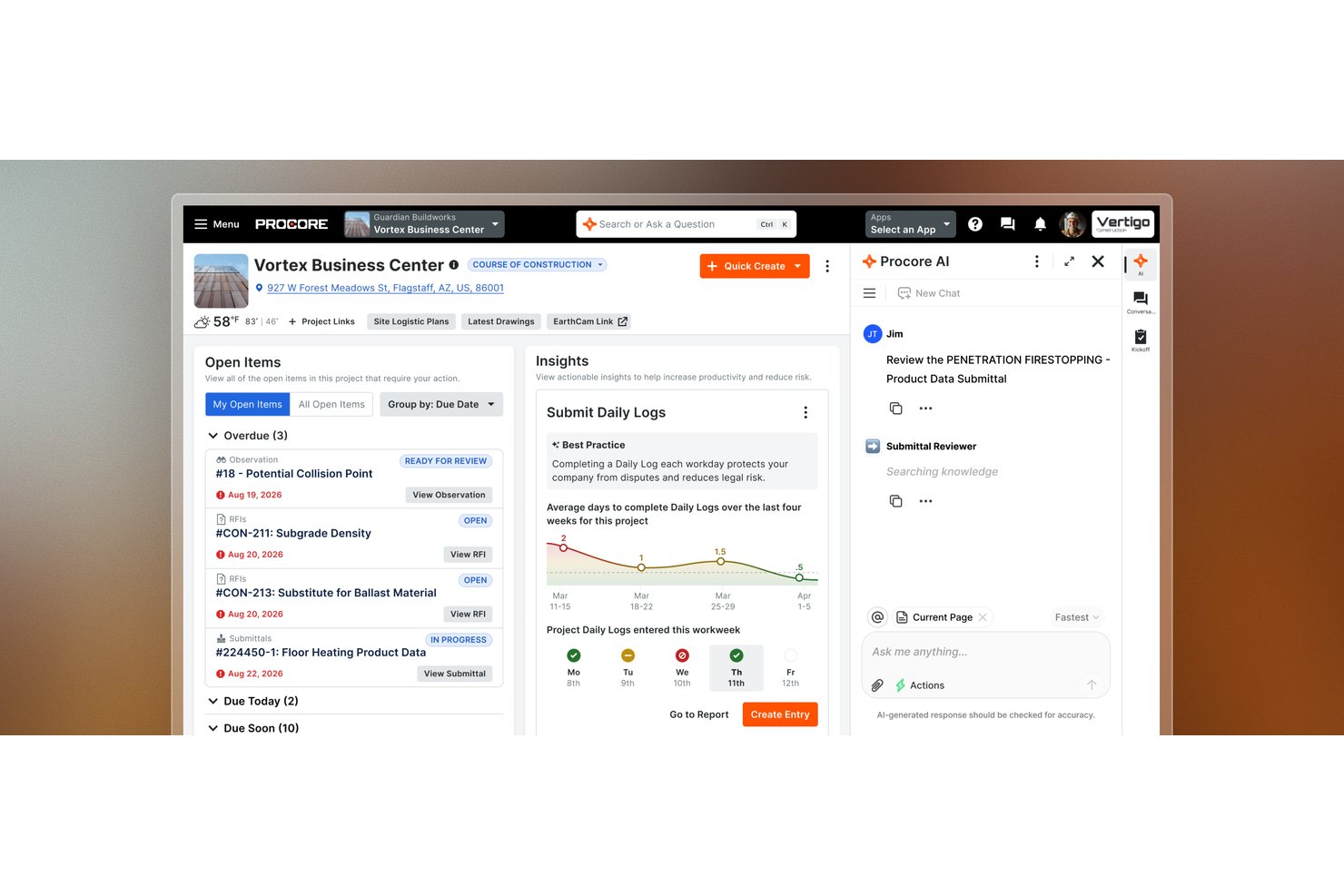
Procore è una piattaforma di gestione dei progetti di costruzione che riunisce la pianificazione, la gestione delle gare d'appalto, la definizione del budget, i flussi di lavoro RFI, il controllo dei documenti e il coordinamento tra cantiere e ufficio nei progetti di sviluppo.
Per chi è più indicato Procore?
Procore è particolarmente adatto agli sviluppatori immobiliari e ai responsabili di progetti di costruzione che gestiscono grandi cantieri con più appaltatori, in cui la sfida principale consiste nel coordinare gare d'appalto, RFI, pianificazioni e budget tra team esterni.
Perché ho scelto Procore
Ho scelto Procore come una delle soluzioni migliori perché è progettato tenendo conto delle esigenze concrete dei grandi cantieri con più appaltatori, dove mantenere allineate decine di squadre esterne rappresenta la parte più difficile del lavoro. La gestione delle gare d'appalto consente di distribuire i pacchetti di gara, monitorare la copertura e raccogliere le risposte in un unico luogo, mentre la sincronizzazione RFI tra account mantiene aggiornamenti di stato e allegati sincronizzati tra il tuo account e quello di ciascun appaltatore, senza dover inseguire le email. Apprezzo inoltre il fatto che i budget di progetto siano collegati direttamente ai dati del cantiere, così gli eventi di modifica e le approvazioni delle fatture dei subappaltatori confluiscono nei PDF delle richieste di pagamento del proprietario senza necessità di riconciliazione manuale.
Funzionalità principali di Procore
- Reportistica a 360°: Crea report a livello aziendale o di progetto su vari set di dati, tra cui dati finanziari, esecuzione dei progetti e directory del portafoglio.
- Acquisizione dei rapporti giornalieri: Registra le condizioni del cantiere, l'attività delle squadre e le note sull'avanzamento direttamente dal campo, per garantire la visibilità all'ufficio.
- Gestione delle liste di rilievi: Crea, assegna e monitora gli elementi delle liste di rilievi fino alla loro risoluzione durante la chiusura del progetto.
- Autorizzazioni basate sui ruoli: Assegna modelli di autorizzazione e ruoli di progetto agli utenti interni, ai subappaltatori e alle aziende esterne a livello di progetto.
Integrazioni di Procore
Tra le integrazioni rilevanti disponibili nel marketplace figurano Yardi, MRI, Oracle NetSuite, QuickBooks Connector, Sage, Microsoft Project, Oracle Primavera P6 e DocuSign. Procore offre inoltre API REST e webhook per integrazioni personalizzate.
Pros and Cons
Pros:
- I flussi di lavoro per gare d'appalto e RFI coordinano gli appaltatori esterni
- Disegni e RFI centralizzati chiariscono le responsabilità degli appaltatori
- Il monitoraggio del budget e degli ordini di modifica migliora la visibilità sui costi
Cons:
- La reportistica finanziaria può risultare macchinosa per gli utenti
- La pianificazione del portafoglio è meno avanzata rispetto agli strumenti di programmazione specializzati

Ideale per la gestione dei costi di costruzione e il coordinamento degli appaltatori
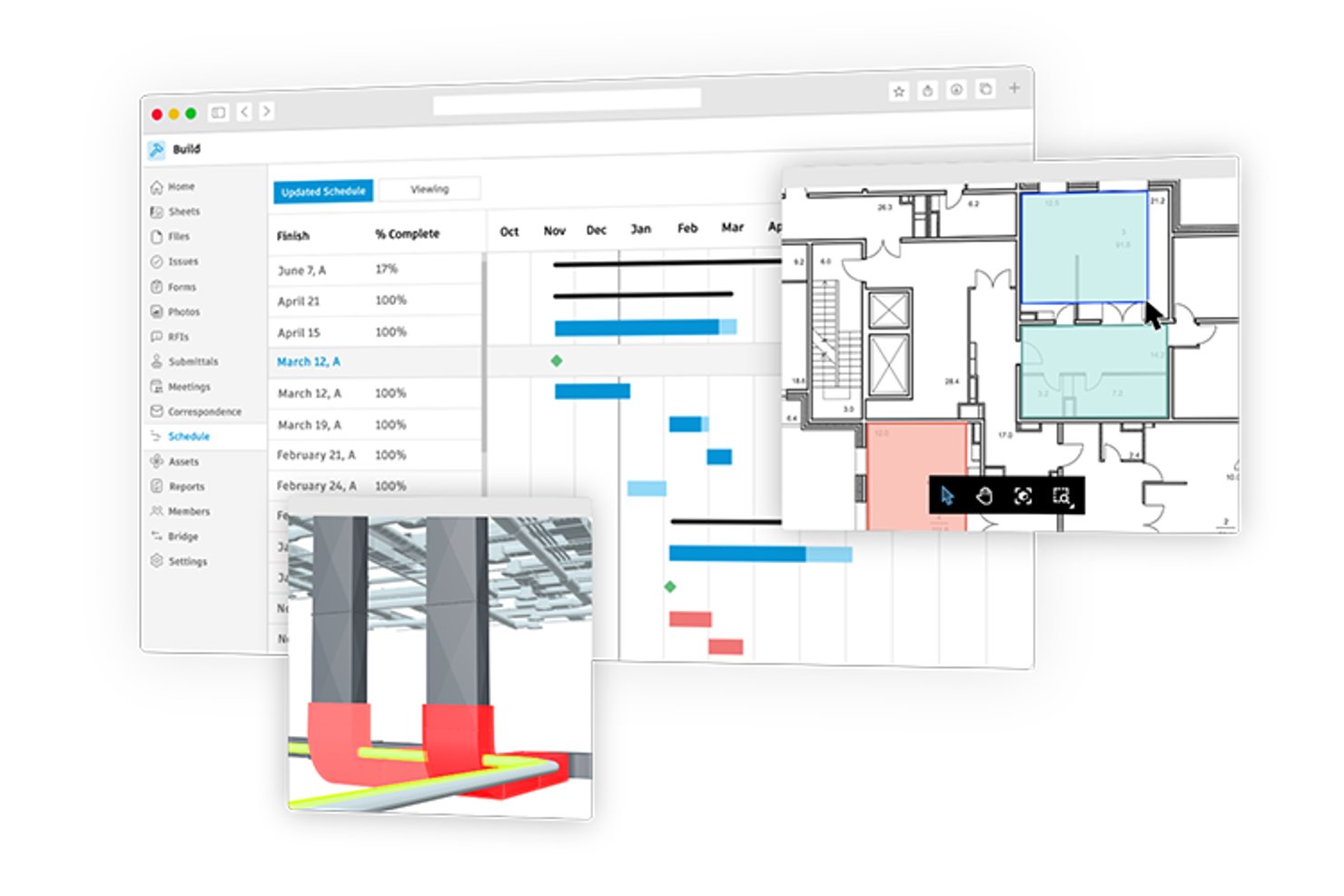
Autodesk Forma Build è un software per la gestione dei progetti di costruzione che copre la gestione dei costi, il monitoraggio dei contratti, i flussi di lavoro per RFI e l'invio dei documenti, la gestione della pianificazione e il coordinamento degli appaltatori tra i team d'ufficio e quelli sul campo.
Per chi è più adatto Autodesk Construction Cloud?
Autodesk Construction Cloud è particolarmente adatto ai responsabili di progetto del settore delle costruzioni che devono collegare in un'unica piattaforma il monitoraggio dei costi, i flussi di lavoro degli appaltatori e i team sul campo.
Perché ho scelto Autodesk Construction Cloud
Ho scelto Autodesk Construction Cloud (Forma Build) come una delle soluzioni migliori perché collega il monitoraggio dei costi e il coordinamento degli appaltatori in un modo difficile da replicare in un progetto di costruzione. Apprezzo in particolare il modo in cui gli ordini di modifica sono collegati direttamente agli RFI e alle voci di budget, così quando un appaltatore segnala una condizione del sito, l'impatto sui costi è tracciabile dalla richiesta fino all'approvazione. Il flusso di lavoro collaborativo per gli ordini di modifica potenziali consente inoltre agli appaltatori esterni di rispondere alle voci di costo con accesso limitato alla modifica, mantenendo protetti i dati finanziari sensibili e consentendo al contempo di portare avanti le approvazioni.
Funzionalità principali di Autodesk Construction Cloud
- Importazione e sincronizzazione della pianificazione: importa e sincronizza le pianificazioni dei progetti da P6, Microsoft Project o ASTA e confronta nel tempo le diverse versioni della pianificazione.
- Piani di lavoro settimanali: crea piani previsionali da tre a sei settimane collegati alla pianificazione principale, registra gli impegni delle diverse categorie professionali e monitora l'affidabilità del piano con gli indicatori PPC e le metriche di varianza.
- Analisi dei rischi con Construction IQ: l'apprendimento automatico analizza i dati del progetto per evidenziare le aree ad alto rischio nella progettazione, nella qualità, nella sicurezza e nei controlli di progetto.
- Connettore dati: estrae i dati a livello di progetto e di centro, inclusi costi, pianificazione, RFI e risorse, in file CSV da utilizzare con gli strumenti di analisi aziendale, con estrazioni pianificate giornaliere, settimanali o mensili.
Integrazioni di Autodesk Construction Cloud
Autodesk Construction Cloud offre oltre 400 integrazioni, tra cui Sage 300, Viewpoint Vista, CMiC, Sage Intacct, Acumatica e QuickBooks tramite Agave. Le API e i webhook di Forma supportano le integrazioni personalizzate.
Pros and Cons
Pros:
- I recensori elogiano i disegni centralizzati e il controllo delle versioni
- Gli utenti apprezzano il monitoraggio del budget per i lavori di costruzione
- I team sul campo possono accedere senza connessione ai file del progetto
Cons:
- Nessun registro della proprietà o degli affittuari a livello di immobile
- Le tappe fondamentali del portafoglio dipendono dai dati estratti

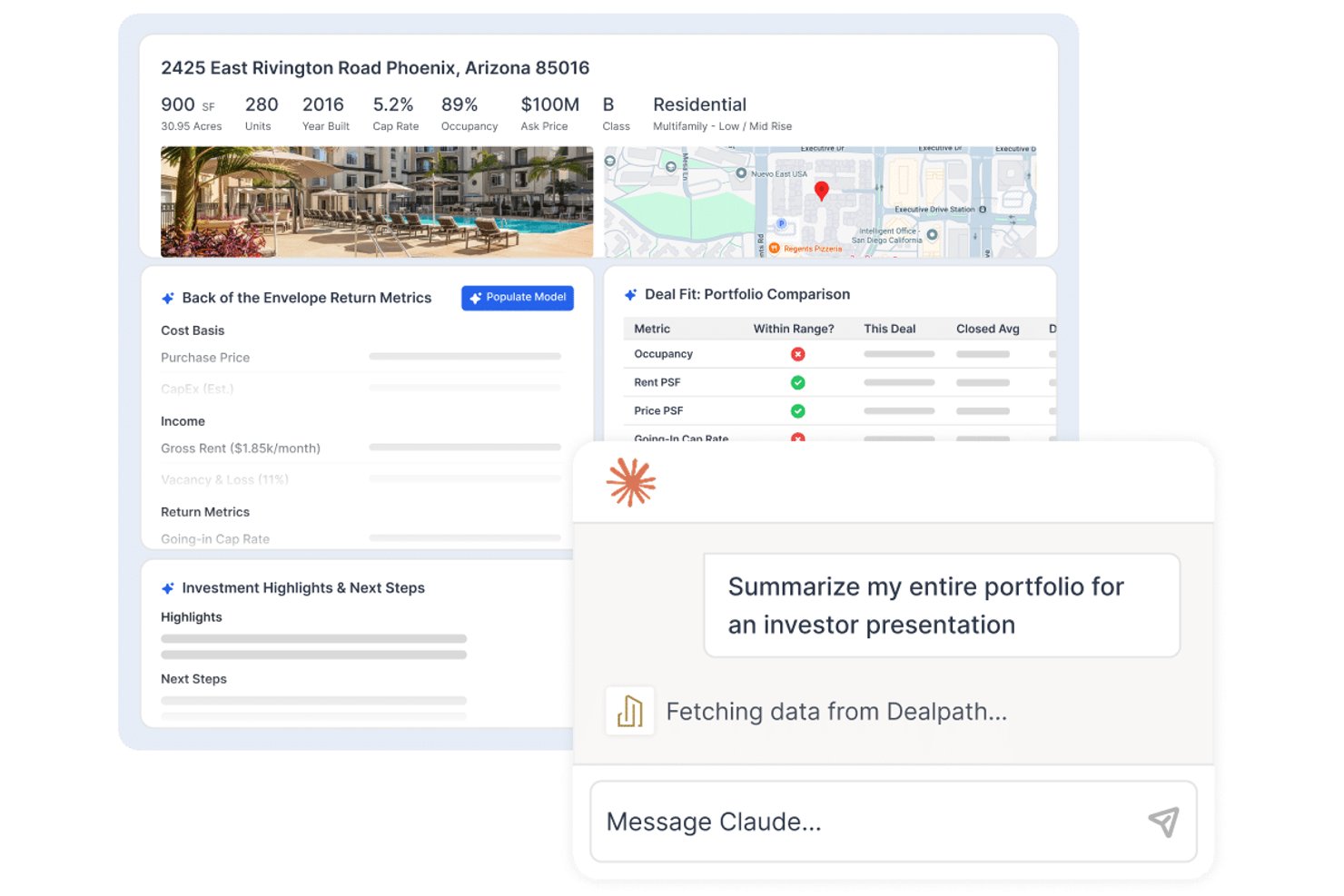
Dealpath è una piattaforma di gestione delle operazioni immobiliari pensata per i team d'investimento, che offre monitoraggio della pipeline, flussi di lavoro per i progetti di sviluppo, selezione delle operazioni basata sull'IA, report e analisi, oltre a strumenti di collaborazione per acquisizioni, dismissioni e sviluppo.
Per chi è più adatto Dealpath?
Dealpath è particolarmente adatto ai team d'investimento immobiliare—sviluppatori, finanziatori e REIT—che necessitano di un monitoraggio strutturato delle operazioni nell'ambito di acquisizioni, sviluppo e gestione del portafoglio.
Perché ho scelto Dealpath
Ho scelto Dealpath come una delle soluzioni migliori perché è progettato specificamente per i team d'investimento che devono gestire progetti di sviluppo nell'ambito di un ciclo di vita più ampio delle operazioni, non solo come attività di costruzione autonome. Apprezzo molto il modo in cui monitora i progetti dalla selezione del sito fino alle autorizzazioni, alla costruzione e alla stabilizzazione, con dipendenze tra le attività basate sui ruoli che aggiornano automaticamente le date previste delle tappe fondamentali quando cambiano le tempistiche. I report sullo sviluppo consentono al mio team di confrontare simultaneamente i budget con i dati effettivi di più progetti, esattamente ciò che richiede il monitoraggio dello sviluppo guidato dagli investimenti.
Funzionalità principali di Dealpath
- Selezione delle operazioni tramite IA: Elabora memorandum informativi, registri degli affitti e proiezioni finanziarie per generare una scheda riepilogativa con i punti salienti dell'operazione e un'analisi preliminare.
- Annunci di Dealpath Connect: Consente ai team di consultare e filtrare gli annunci di intermediazione istituzionale di JLL, CBRE e Cushman & Wakefield, per poi trasferirli direttamente nella pipeline.
- CRM e monitoraggio delle relazioni: Registra i contatti con i broker, le chiamate, le riunioni e le proposte insieme ai dati delle operazioni, per gestire le relazioni di approvvigionamento.
- Pannelli di controllo per report configurabili: Consente ai team di creare report personalizzati con analisi dettagliate per fase del progetto, area geografica o settore sull'intero portafoglio di sviluppo.
Integrazioni di Dealpath
Le integrazioni di Dealpath includono MRI Software, CompStak, Real Capital Analytics, Esri, Cherre, NavigatorCRE, Box, Dropbox e gli strumenti Microsoft. La sua API aperta supporta connessioni personalizzate, incluse quelle con Yardi e le piattaforme di gestione degli asset.
Pros and Cons
Pros:
- Le attività, le scadenze e i promemoria rimangono visibili
- I report del portafoglio confrontano fianco a fianco l'avanzamento delle operazioni
- I dati centralizzati delle operazioni rendono le informazioni più facili da trovare
Cons:
- Nessun flusso di lavoro documentato per le richieste di erogazione dei prestiti edilizi
- Nessun flusso di lavoro per RFI o richieste di sottomissione
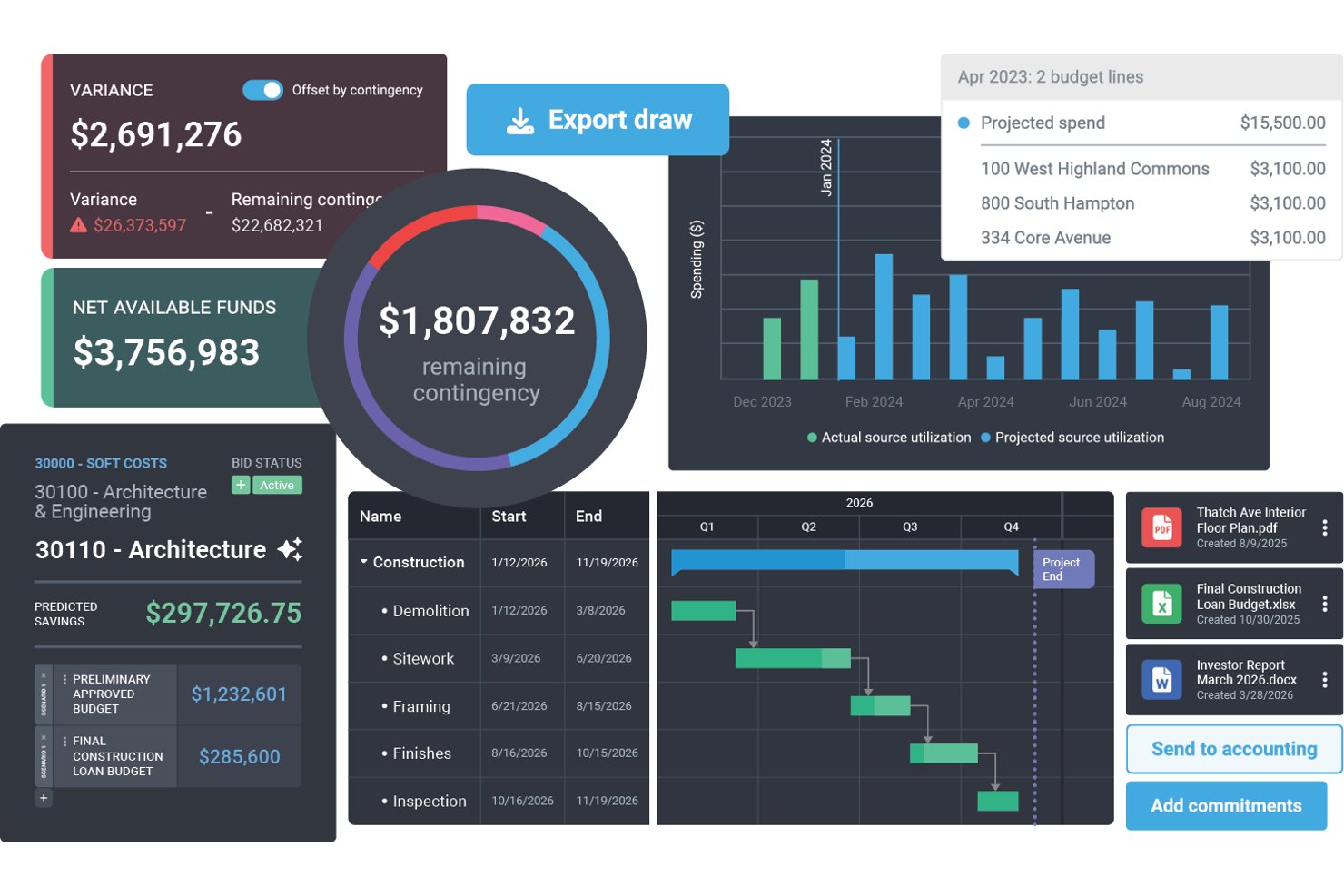
Northspyre è una piattaforma di gestione dei progetti di sviluppo immobiliare che centralizza il monitoraggio del budget, la gestione delle richieste di erogazione, il coordinamento dei fornitori, il controllo dei documenti e l'analisi del portafoglio tra i progetti di sviluppo.
A chi è più adatto Northspyre?
Northspyre è pensato per i team di sviluppo immobiliare che gestiscono progetti di investimento e hanno bisogno di uno stretto controllo sui budget, sulle richieste di erogazione e sulla reportistica per i finanziatori nell'intero portafoglio.
Perché ho scelto Northspyre
Ho scelto Northspyre come una delle migliori soluzioni per la sua efficacia nella gestione delle richieste di erogazione e della reportistica per i finanziatori nel settore dello sviluppo immobiliare. Quando preparo un pacchetto di richiesta di erogazione, la Lista di controllo della conformità per il finanziatore verifica la preparazione di voci di budget, documentazione, contratti, rinunce ai privilegi e assicurazioni prima dell'invio. Il Portale per i finanziamenti offre a finanziatori e partner finanziari accesso 24 ore su 24, 7 giorni su 7 ai pacchetti di richiesta di erogazione attuali e storici, riducendo gli scambi di comunicazioni che in genere rallentano i cicli di finanziamento.
Funzionalità principali di Northspyre
- Report dei costi previsti: Visualizza e prevede budget e costi dei progetti, inclusi i costi potenziali e gli scenari peggiori, per prevenire i superamenti di budget.
- Mercato dei fornitori: Trova fornitori prequalificati e invitali a fare offerte per specifici ambiti di lavoro direttamente dalla piattaforma.
- Copilota COI: Imposta i requisiti assicurativi dei fornitori in base al tipo di polizza e ricevi avvisi generati dall'intelligenza artificiale quando i certificati assicurativi mancano o sono scaduti.
- Gestore del portafoglio: Visualizza l'avanzamento dei progetti, lo storico delle spese e le metriche principali di tutti i progetti attivi e storici in un unico pannello di controllo.
Integrazioni di Northspyre
Northspyre offre integrazioni native con Yardi Voyager, MRI, Sage Intacct, QuickBooks Online, QuickBooks Desktop, AppFolio, Entrata, RealPage, Acumatica e Oracle JD Edwards EnterpriseOne. La sua API aperta supporta connessioni personalizzate.
Pros and Cons
Pros:
- Preparazione più rapida dei pacchetti di richiesta di erogazione pronti per i finanziatori
- Visibilità sul budget e sui costi dell'intero portafoglio
- I registri centralizzati riducono la necessità di gestire numerosi fogli di calcolo
Cons:
- La previsione dei costi futuri può essere difficile
- I flussi di lavoro per fatture e rinunce ai privilegi frustrano gli utenti

Scoro
Ideale per la supervisione finanziaria di più progetti

Scoro è una piattaforma di automazione dei servizi professionali che riunisce la pianificazione dei progetti, la definizione del budget, la gestione delle risorse, il monitoraggio del tempo e la fatturazione dei clienti in un unico spazio di lavoro connesso.
Per chi è più adatto Scoro?
Scoro è adatto ai team che lavorano su progetti e devono gestire budget, tempo e fatturazione di più progetti attivi da un'unica piattaforma.
Perché ho scelto Scoro
Ho scelto Scoro come una delle soluzioni migliori perché la sua supervisione finanziaria di più progetti va oltre quella di un semplice strumento per il monitoraggio del budget. Quando gestisco diversi progetti contemporaneamente, l'elenco dei progetti di Scoro mostra colonne finanziarie aggiornate in tempo reale, come entrate, costo della manodopera e profitto, per ogni progetto attivo simultaneamente. La scheda del budget suddivide poi i costi preventivati rispetto a quelli effettivi con grafici del consumo del budget, permettendomi di individuare quale progetto sta erodendo il margine prima che diventi un problema più grande.
Funzionalità principali di Scoro
- Visualizzazione della cronologia del progetto: Traccia tutti i progetti attivi e imminenti su un'unica cronologia, mostrando fasi, traguardi e avanzamento dell'intero portafoglio.
- Portale clienti: Fornisce ai contatti esterni un accesso ai file di progetto, alle attività, alle fatture e ai commenti basato sulle autorizzazioni, senza richiedere un account Scoro completo.
- Integrazioni contabili: Sincronizza i dati finanziari dei progetti in modo bidirezionale con Xero, QuickBooks, Sage Intacct ed Exact Online per mantenere allineati i dati di fatturazione.
- Campi personalizzati: Consente di aggiungere ai progetti punti dati specifici dell'azienda, rendendoli disponibili nelle colonne degli elenchi, nei filtri e nei report dell'intero spazio di lavoro.
Integrazioni di Scoro
Scoro offre oltre 40 integrazioni documentate, tra cui connessioni native a Xero, Sage Intacct, QuickBooks, Exact Online, Avalara e Stripe. Fornisce inoltre un'API e supporta Zapier.
Pros and Cons
Pros:
- Monitora i costi dei progetti rispetto alle stime
- Mostra lo stato finanziario dei portafogli di progetti
- I recensori apprezzano il monitoraggio collegato di tempo e budget
Cons:
- Non sono disponibili flussi di lavoro per le erogazioni edilizie o gli ordini di modifica
- La collaborazione con gli appaltatori non offre funzionalità per le offerte né messaggistica integrata
New Product Updates from Scoro

Scoro Adds Time Mobile App and ELI Improvements
Scoro adds the Scoro Time mobile app for iOS/Android to track time anywhere and expands ELI with attachments, smarter filtering, and trigger-based actions. For more information, visit Scoro's official site.
Altri software per la gestione dei progetti immobiliari
Ecco alcune ulteriori opzioni di software per la gestione dei progetti immobiliari che non sono entrate nel mio elenco ristretto, ma che vale comunque la pena prendere in considerazione:
- Smartsheet
Ideale per la visibilità di portafogli multi-sito
- Nifty
Ideale per visualizzare i traguardi nei progetti
- Buildertrend
Ideale per il coordinamento di appaltatori e subappaltatori
- JIRA
Ideale per i flussi di lavoro delle squadre di costruzione agili
- JobTread
Ideale per la definizione del budget delle ristrutturazioni e le offerte degli appaltatori
- Kahua
Ideale per il trasferimento dei cespiti nei portafogli di costruzione


Come Valuto i Software di Gestione Progetti Immobiliari
Divido la mia valutazione in due livelli: i requisiti di base che ogni strumento deve soddisfare—come il monitoraggio delle fasi e la gestione del budget—e i fattori distintivi che mostrano se è progettato specificamente per il settore immobiliare.
Funzionalità di Base (Requisiti Indispensabili per Questa Lista)
Quando seleziono gli strumenti per la mia lista, valuto ciascuno su una scala da 0 (non offre la funzionalità) a 5 (eccelle in questo ambito) per ognuna delle funzionalità di base elencate di seguito. Poi, calcolo il punteggio totale dello strumento in percentuale. Ogni strumento deve ottenere un punteggio totale minimo del 65% per essere preso in considerazione.
- Monitoraggio dei Progetti Immobiliari: Cerco workflow basati sulle fasi che rispecchiano i cicli di vita degli immobili—come le fasi di autorizzazione, progettazione, costruzione e consegna agli inquilini.
- Gestione di Budget e Costi: Ogni strumento dovrebbe gestire il costing delle attività, le varianti e il monitoraggio degli stati d'avanzamento dei pagamenti, così i team possono controllare la spesa sulle iniziative in corso.
- Gestione di Documenti e Disegni: Verifico se una piattaforma supporta l'archiviazione con controllo versione per planimetrie, permessi, contratti e disegni di costruzione.
- Collaborazione con Stakeholder e Fornitori: Gli strumenti dovrebbero permettere di coinvolgere appaltatori esterni, architetti e consulenti tramite accesso basato sui ruoli invece che con licenze utente complete.
- Pianificazione e Monitoraggio delle Scadenze: Valuto se la piattaforma offre viste Gantt o pianificazione su percorso critico adatta a cronoprogrammi di costruzioni multi-fase e dipendenze tra i vari siti.
- Dashboard per Immobili e Portafogli: La reportistica dovrebbe sintetizzare KPI su più immobili—stato del budget, completamento delle milestone, RFIs aperti—in viste dedicate sia per la dirigenza sia per gli investitori.
Una volta che ho una lista di strumenti che rispettano i criteri, considero cosa distingue ciascuna piattaforma dalle altre.
Fattori Differenzianti (Cosa Distingue i Fornitori)
Ecco come confronto e metto a confronto i diversi fornitori:
Funzionalità Distintive
L'accesso da mobile in cantiere è importante quando il team divide il tempo tra i diversi siti o tra campo e ufficio. Cerco app che permettano ai supervisori di registrare punch list e caricare foto dei progressi direttamente sul posto. L'integrazione con BIM e CAD è un altro fattore distintivo—visualizzare e annotare i disegni di costruzione direttamente sulla piattaforma evita al team di passare continuamente tra strumenti diversi. Controllo anche se esistono workflow automatici per le richieste di pagamento, poiché raccogliere manualmente la documentazione per i finanziamenti nelle tabelle di calcolo rallenta ogni ciclo di erogazione.
Oltre le Funzionalità
L'integrazione con sistemi contabili immobiliari come Sage 300 CRE, Yardi o MRI è una considerazione fondamentale—senza di questa, i team finiscono per riconciliare i budget manualmente tra le varie piattaforme. Valuto anche quanto bene uno strumento possa scalare su portafogli di dimensioni diverse. Una società che gestisce tre progetti avrà bisogni molto diversi rispetto a chi ne segue cinquanta distribuiti su più regioni. Il costo totale di possesso completa la mia valutazione, in particolare per quanto riguarda il prezzo dell'accesso dei collaboratori esterni, dato che i progetti immobiliari coinvolgono tipicamente decine di parti esterne.
Come scegliere un software per la gestione dei progetti immobiliari
È facile perdersi in lunghi elenchi di funzionalità e strutture tariffarie complesse. Per aiutarti a rimanere concentrato mentre affronti il tuo processo di selezione del software, ecco una lista di fattori da tenere a mente:
| Fattore | Cosa considerare |
| Scalabilità | Assicurati che il software possa gestire più proprietà, progetti e utenti man mano che il tuo portafoglio cresce. |
| Integrazioni | Cerca integrazioni con gli strumenti che già utilizzi, come software di contabilità, programmi CAD o piattaforme per l'archiviazione dei documenti. |
| Personalizzazione | Dovresti poter adattare i flussi di lavoro, i pannelli di controllo e gli strumenti di reportistica al processo del tuo team. |
| Semplicità d'uso | La piattaforma dovrebbe essere intuitiva, soprattutto per i team sul campo o gli appaltatori che potrebbero non avere molta dimestichezza con la tecnologia. |
| Budget | Verifica che il prezzo sia adeguato alle dimensioni del tuo progetto. Alcuni strumenti applicano un costo per utente, per progetto o in base alle funzionalità. |
| Misure di sicurezza | Cerca controlli sui permessi, crittografia dei dati e registri di audit, soprattutto se gestisci informazioni finanziarie o legali sensibili. |
| Accesso da dispositivi mobili | I team sul campo devono poter accedere a programmi, planimetrie e file direttamente sul posto utilizzando telefoni o tablet. |
| Strumenti di reportistica | Scegli un software che fornisca report di facile lettura su costi, tempistiche e utilizzo delle risorse per ogni progetto. |
Tendenze dei software per la gestione dei progetti immobiliari nel 2025
Nella mia ricerca, ho raccolto innumerevoli aggiornamenti sui prodotti, comunicati stampa e registri delle versioni di diversi fornitori di software per la gestione dei progetti immobiliari. Ecco alcune delle tendenze emergenti che sto tenendo d’occhio:
- Rilevamento dei rischi basato sull’IA: Un numero sempre maggiore di strumenti utilizza l’IA per segnalare potenziali ritardi o sforamenti del budget prima che si verifichino. Alcune piattaforme avvisano ora anche gli utenti quando è probabile che i permessi subiscano ritardi, sulla base dei dati storici o delle condizioni meteorologiche.
- Integrazione dei gemelli digitali: Alcuni fornitori stanno aggiungendo il supporto per i gemelli digitali, per offrire ai responsabili di progetto una visualizzazione digitale in tempo reale degli edifici durante la costruzione. Questo aiuta a individuare prima i problemi di costruzione e a migliorare il coordinamento.
- Portali rivolti ai clienti: I software stanno iniziando a includere dashboard per i clienti che mostrano aggiornamenti in tempo reale, approvazioni e documenti importanti. È un modo per tenere i clienti aggiornati senza ricorrere a continui scambi di e-mail.
- Previsione dei costi integrata: Gli strumenti di previsione ora vanno oltre i budget statici e adeguano le stime in base alle tendenze del mercato del lavoro, ai prezzi dei materiali o ai problemi dei fornitori. Alcuni fornitori utilizzano anche flussi di dati in tempo reale per aggiornare le stime al variare delle condizioni.
- Strumenti per il flusso di lavoro dei permessi: Un numero sempre maggiore di strumenti introduce funzionalità per monitorare le tempistiche dei permessi, segnalare i documenti mancanti e registrare le comunicazioni con le autorità. Questi strumenti aiutano i team a mantenere la conformità ed evitare ritardi.
Che cos’è il software per la gestione dei progetti immobiliari?
Il software per la gestione dei progetti immobiliari è uno strumento specializzato progettato per assistere sviluppatori, responsabili di progetto e professionisti del settore immobiliare nella supervisione di tutti gli aspetti dello sviluppo immobiliare, dall’avvio al completamento. Facilita la pianificazione, l’esecuzione e il monitoraggio dei progetti, garantendo che vengano consegnati nei tempi previsti, rispettando il budget e le specifiche definite in precedenza.
I componenti del software per la gestione dei progetti immobiliari includono la pianificazione delle attività, la gestione del budget, l’archiviazione dei documenti, gli strumenti di comunicazione e le funzionalità di reportistica. Integra diverse funzioni, come la pianificazione del progetto, l’allocazione delle risorse, le proiezioni finanziarie e il monitoraggio delle prestazioni, in un’unica piattaforma.
Funzionalità del software per la gestione dei progetti immobiliari
Quando scegli un software per la gestione dei progetti immobiliari, presta attenzione alle seguenti funzionalità chiave:
- Reportistica del portafoglio: Mostra le prestazioni di più progetti di sviluppo per aiutarti a prendere decisioni strategiche migliori.
- Pianificazione delle attività: Ti consente di assegnare attività con scadenze e dipendenze per mantenere sotto controllo le tempistiche della costruzione.
- Monitoraggio del budget: Ti aiuta a controllare la spesa rispetto ai costi previsti e a segnalare tempestivamente gli sforamenti.
- Gestione dei documenti: Archivia progetti, contratti e permessi in un unico luogo, facilitandone l’accesso e la condivisione.
- Allocazione delle risorse: Tiene traccia dell’utilizzo della manodopera e delle attrezzature nei diversi progetti, evitando doppie prenotazioni o tempi di inattività.
- Visualizzazioni con diagramma di Gantt: Rappresenta visivamente le tempistiche del progetto, consentendoti di vedere a colpo d’occhio fasi, traguardi e colli di bottiglia.
- Monitoraggio delle varianti: Registra le modifiche al progetto e il loro impatto su costi e tempistiche, contribuendo a ridurre le controversie.
- Comunicazione con gli stakeholder: Offre funzionalità di messaggistica o dashboard per mantenere aggiornati clienti e partner.
- Monitoraggio dei permessi: Controlla le tempistiche delle approvazioni e le scadenze per aiutarti a rispettare le normative locali.
- Checklist per le ispezioni: Fornisce modelli per le ispezioni in cantiere, assicurando il rispetto degli standard e dei protocolli di sicurezza.
Vantaggi del software per la gestione dei progetti immobiliari
L’implementazione di un software per la gestione dei progetti immobiliari può offrire diversi vantaggi al tuo team e alla tua azienda. Ecco alcuni dei benefici che puoi aspettarti:
- Meno ritardi: Strumenti come la pianificazione delle attività e il monitoraggio dei permessi aiutano a individuare tempestivamente gli ostacoli e a mantenere i lavori in corso.
- Migliore controllo dei costi: Le funzionalità di monitoraggio del budget e previsione dei costi aiutano a tenere sotto controllo le spese ed evitare sforamenti.
- Meno burocrazia: Gli strumenti di gestione dei documenti riducono la necessità di stampare e inviare e-mail, oltre a limitare il rischio di perdere file.
- Comunicazione più chiara: Le dashboard condivise e gli strumenti di messaggistica facilitano l’aggiornamento di clienti e membri del team.
- Decisioni più efficaci: Gli strumenti di reportistica offrono una visione dell’avanzamento del progetto, dell’utilizzo delle risorse e delle spese.
- Conformità più semplice: Il monitoraggio dei permessi e le funzionalità di ispezione aiutano a rispettare le normative locali e i requisiti di sicurezza.
- Migliore pianificazione del carico di lavoro: Gli strumenti di allocazione delle risorse consentono di assegnare in modo più efficiente la manodopera e le attrezzature ai diversi progetti.
Costi e prezzi del software per la gestione dei progetti immobiliari
La scelta di un software per la gestione dei progetti immobiliari richiede la conoscenza dei vari modelli di prezzo e dei piani disponibili. I costi variano in base alle funzionalità, alle dimensioni del team, ai componenti aggiuntivi e ad altri fattori. La tabella seguente riassume i piani più comuni, i relativi prezzi medi e le funzionalità generalmente incluse nelle soluzioni software per la gestione dei progetti immobiliari:
| Tipo di piano | Prezzo medio | Funzionalità comuni |
| Gratuito | $0 | Gestione di base delle attività, numero limitato di utenti, integrazioni essenziali |
| Base | $10 - $25/utente/mese | Gestione delle attività e dei progetti, monitoraggio del budget, alcuni report personalizzati |
| Professionale | $25 - $50/utente/mese | Tutte le funzionalità del piano Base, oltre a report avanzati, maggiori opzioni di integrazione e più possibilità di personalizzazione |
| Aziendale | $50+/utente/mese | Tutte le funzionalità del piano Professionale, oltre a personalizzazione completa, assistenza dedicata e opzioni di sicurezza avanzate |
Domande frequenti sul software per la gestione dei progetti immobiliari
Ecco alcune domande frequenti sul software per la gestione dei progetti immobiliari:
Chi utilizza il software per la gestione dei progetti immobiliari?
Questo software viene generalmente utilizzato da sviluppatori immobiliari, responsabili di progetto, costruttori e responsabili della costruzione che hanno il compito di supervisionare lo sviluppo dei progetti immobiliari dall’ideazione al completamento.
Quanto costa il software per la gestione dei progetti immobiliari?
I costi possono variare notevolmente in base alle funzionalità e alla scalabilità del sistema. I piani di base possono partire da circa $25 per utente al mese, mentre le opzioni più avanzate possono costare $50 per utente al mese o più; le soluzioni aziendali spesso richiedono prezzi personalizzati.
Il software per la gestione dei progetti immobiliari può aiutare nella gestione della conformità?
Sì, molti strumenti per la gestione dei progetti immobiliari includono funzionalità che aiutano a garantire che i progetti siano conformi alle leggi e alle normative pertinenti, riducendo il rischio di sanzioni e problemi legali.
Il software per la gestione dei progetti immobiliari è adatto ai progetti di piccole dimensioni?
Sì, sono disponibili diverse opzioni software adatte a progetti di varie dimensioni. I progetti più piccoli possono trarre vantaggio da sistemi meno complessi che offrono funzionalità di base e possono risultare più convenienti.
Come si integra il software per la gestione dei progetti immobiliari con altri strumenti?
La maggior parte dei sistemi per la gestione dei progetti immobiliari offre funzionalità di integrazione con strumenti come software CRM, sistemi contabili, piattaforme di comunicazione e altro ancora. Questo contribuisce a semplificare i vari aspetti della gestione dei progetti e a centralizzare le informazioni.
Cosa dovrei cercare nella scelta di un software per la gestione dei progetti immobiliari?
Tra le funzionalità principali da considerare ci sono il monitoraggio delle attività e dei progetti, la gestione del budget, l’archiviazione dei documenti, le funzionalità di comunicazione in tempo reale, le opzioni di personalizzazione, la facilità d’uso e la qualità dell’assistenza clienti. È inoltre importante scegliere un software che possa crescere insieme alle esigenze della propria attività.