

I 10 migliori software per agenzie di marketing recensiti nel 2026

Elenco dei migliori software per agenzie di marketing


Gestire un'agenzia di marketing può essere un lavoro impegnativo. Devi conciliare le richieste dei clienti, le scadenze ravvicinate e il coordinamento del team. È facile sentirsi sopraffatti. È qui che entra in gioco il software per agenzie di marketing. Questi strumenti possono aiutarti a mantenere tutto organizzato e a far funzionare le attività senza intoppi.
In base alla mia esperienza nel testare e recensire software, ho individuato le migliori soluzioni per affrontare queste sfide. Il mio obiettivo è offrirti una panoramica imparziale dei migliori software per agenzie di marketing. Ti mostrerò le funzionalità, i vantaggi e i potenziali svantaggi di ogni strumento.
Proseguendo nella lettura, scoprirai quale software risponde alle esigenze specifiche del tuo team. Che tu dia priorità alla collaborazione, all'automazione o all'analisi dei dati, qui troverai qualcosa di adatto a te.
Perché fidarsi dei nostri consigli sui software
Il nostro team testa e recensisce software dal 2012. In quanto project manager noi stessi, sappiamo quanto sia difficile — e importante — scegliere il software giusto.
Per questa guida, abbiamo valutato gli strumenti attraverso test pratici e ricerche indipendenti, assegnando un punteggio agli strumenti in base ai nostri criteri di selezione. Ci basiamo inoltre sulle competenze di leader di pensiero del settore e di professionisti attivi nella gestione dei progetti.
Le nostre recensioni riflettono il nostro giudizio editoriale umano, non un discorso di vendita.
Revisori esperti:
Tabella comparativa dei software per agenzie di marketing
Questa tabella comparativa riassume i dettagli dei prezzi delle mie migliori selezioni di software per agenzie di marketing:
| Tool | Best For | Trial Info | Price | ||
|---|---|---|---|---|---|
| 1 | Ideale per informazioni sulla redditività delle agenzie | Prova gratuita di 14 giorni + demo gratuita disponibile | Da $10/mese (fatturazione annuale) | Website | |
| 2 | Ideale per la gestione aziendale tutto-in-uno | Prova gratuita di 14 giorni + demo gratuita disponibile | Da $19.90/utente/mese (fatturato annualmente) | Website | |
| 3 | Ideale per l'automazione personalizzata senza codice | Demo gratuita disponibile | Prezzo su richiesta | Website | |
| 4 | Ideale per documenti e database potenziati dall'IA | Piano gratuito + demo gratuita disponibile | Da $10/membro/mese (fatturati annualmente) | Website | |
| 5 | Ideale per strategie di inbound marketing | Piano gratuito + demo gratuita disponibile | A partire da $7/utente/mese (fatturazione annuale) | Website | |
| 6 | Ideale per l'automazione dell'email marketing | Prova gratuita di 14 giorni + demo gratuita disponibile | Da $15/mese (fatturato annualmente) | Website | |
| 7 | Ideale per la collaborazione a distanza assistita dall'IA | Prova gratuita di 30 giorni + demo gratuita disponibile | Da $9.99/utente/mese (fatturazione annuale) | Website | |
| 8 | Ideale per strumenti di automazione del marketing | Prova gratuita di 14 giorni | A partire da $97/mese | Website | |
| 9 | Ideale per gestire le testimonianze dei clienti | Piano gratuito disponibile | A partire da $9.99/mese | Website | |
| 10 | Ideale per i flussi di lavoro delle agenzie assicurative | Demo gratuita disponibile | Prezzo su richiesta | Website |


Recensione dei migliori software per agenzie di marketing
Di seguito trovi le mie sintesi dettagliate dei migliori software per agenzie di marketing che sono entrati nella mia selezione. Le mie recensioni offrono uno sguardo approfondito alle funzionalità principali, ai pro e ai contro, alle integrazioni e ai casi d’uso ideali di ogni strumento, per aiutarti a trovare quello più adatto a te.

Ideale per informazioni sulla redditività delle agenzie

Productive è un software per l'automazione dei servizi professionali progettato per agenzie e aziende di servizi. Aiuta nella pianificazione delle risorse, nella gestione dei progetti e nella gestione finanziaria.
Perché ho scelto Productive: Lo strumento offre un monitoraggio della redditività in tempo reale e previsioni di crescita, elementi essenziali per le agenzie che vogliono aumentare la redditività. Funzionalità come la gestione automatizzata delle attività e l'automazione dei flussi di lavoro lo distinguono dalla concorrenza. Si integra con strumenti come Xero e Slack per fornire un flusso di lavoro senza intoppi, oltre a consentire la connessione a app di terze parti tramite Open API. Productive offre anche soluzioni specifiche per vari ruoli, assicurando che tutti i membri del team possano beneficiarne.
Caratteristiche principali e integrazioni:
Caratteristiche includono insights sulla redditività in tempo reale, gestione automatica delle attività e report personalizzati sull'utilizzo fatturabile. Queste funzionalità aiutano a monitorare le prestazioni finanziarie e a ottimizzare le operazioni. Il software supporta anche la previsione dei ricavi, facilitando la pianificazione della crescita.
Integrazioni includono Xero, Slack, QuickBooks, Jira, Zapier e altri.
Pros and Cons
Pros:
- Insights in tempo reale sulla redditività Report su misura per agenzie Migliora la comunicazione con i clienti
- Report su misura per agenzie
- Migliora la comunicazione con i clienti
Cons:
- Opzioni di personalizzazione limitate
- Può essere troppo complesso per i nuovi utenti
New Product Updates from Productive
Productive Adds Voice Dictation, Slack Connector, Proposals, and Overtime
Productive adds voice dictation, a Slack Connector, proposal controls, and overtime tracking. These updates support faster AI interactions, client proposals, and time management. For more information, visit Productive’s official site.

Scoro
Ideale per la gestione aziendale tutto-in-uno

Scoro è un software di gestione aziendale pensato per agenzie e studi professionali. Offre strumenti per la gestione dei progetti, la fatturazione e la reportistica per migliorare l'efficienza operativa.
Perché ho scelto Scoro: Fornisce una soluzione all-in-one che integra la gestione dei progetti con la fatturazione e la reportistica. I dashboard KPI in tempo reale della piattaforma ti offrono informazioni sulle prestazioni aziendali. Il sistema di monitoraggio del tempo di Scoro garantisce una fatturazione accurata e una corretta allocazione delle risorse. I report personalizzabili ti aiutano ad adattare la presentazione dei dati secondo le tue esigenze.
Funzionalità principali e integrazioni:
Funzionalità comprendono strumenti di gestione dei progetti che ti permettono di pianificare e monitorare i progetti dall'inizio alla fine. La funzione di fatturazione semplifica l'emissione delle fatture e il monitoraggio dei ricavi. Inoltre, Scoro offre un sistema CRM per migliorare le relazioni con i clienti e la gestione del funnel di vendita.
Integrazioni disponibili con Xero, QuickBooks, Dropbox, Google Calendar, Salesforce e altri ancora.
Pros and Cons
Pros:
- Dashboard KPI in tempo reale
- Soluzione gestionale tutto-in-uno
- CRM efficace
Cons:
- L'app mobile non ha funzionalità complete
- La configurazione richiede tempo significativo
New Product Updates from Scoro

Scoro Adds Time Mobile App and ELI Improvements
Scoro adds the Scoro Time mobile app for iOS/Android to track time anywhere and expands ELI with attachments, smarter filtering, and trigger-based actions. For more information, visit Scoro's official site.

Ideale per l'automazione personalizzata senza codice
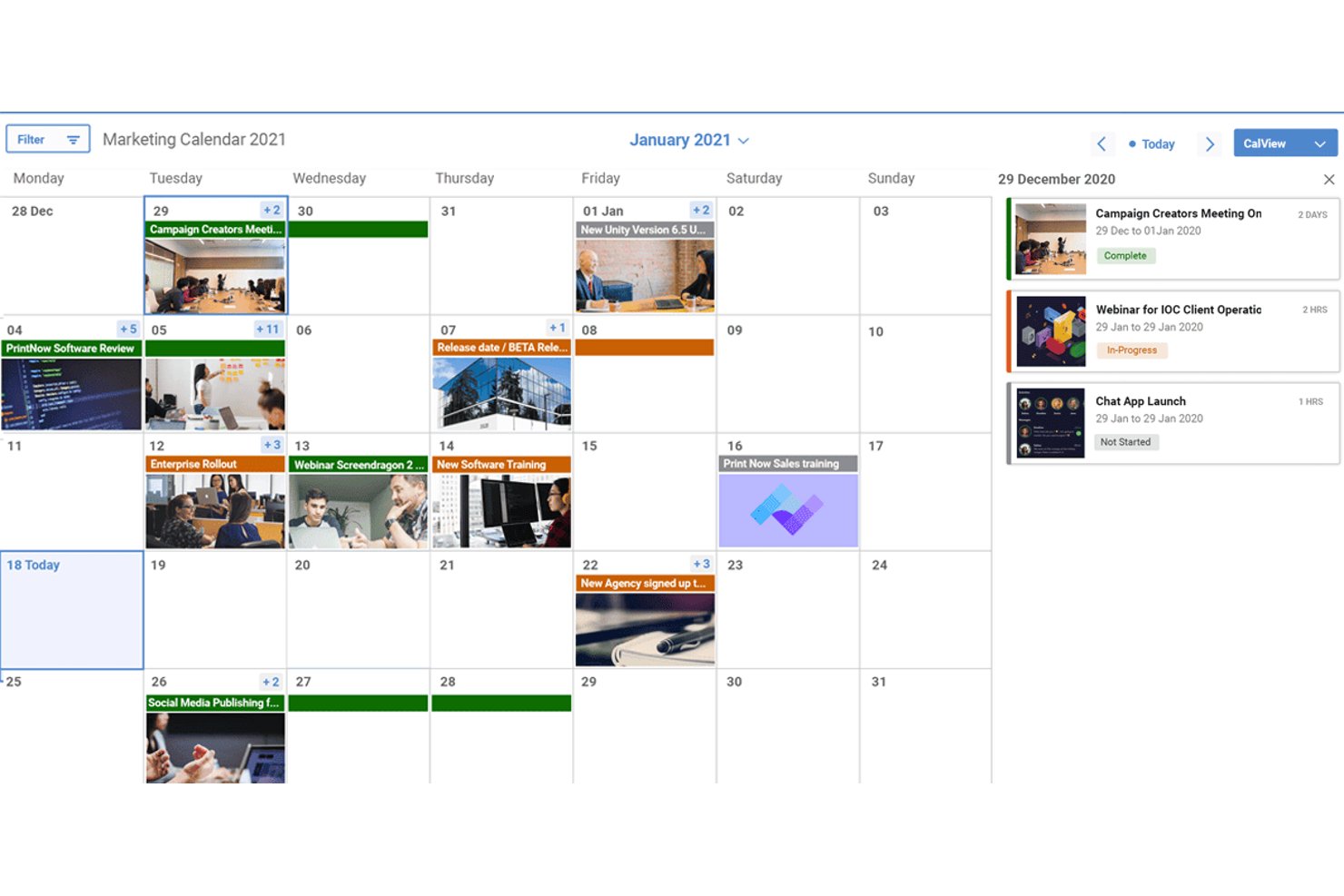
Screendragon è una piattaforma aziendale per la gestione del lavoro, progettata per le attività di marketing e delle agenzie, che combina gestione dei progetti, pianificazione delle risorse, approvazioni creative, monitoraggio dei budget e orchestrazione dei flussi di lavoro basata sull'intelligenza artificiale in un unico sistema.
Per chi è più indicato Screendragon?
Screendragon è adatto alle agenzie di marketing di medie e grandi dimensioni e ai team interni delle agenzie che gestiscono elevati volumi di lavoro per più clienti, in genere con almeno 30 utenti.
Perché ho scelto Screendragon
Screendragon si è guadagnato un posto tra le migliori soluzioni della mia selezione perché il suo strumento per la creazione di flussi di lavoro senza codice consente ai team operativi delle agenzie di progettare, modificare e governare processi personalizzati senza coinvolgere il reparto IT. Apprezzo in particolare la funzionalità dei moduli dinamici, che sostituisce i brief inviati tramite e-mail e dispersi tra le conversazioni con una raccolta strutturata delle richieste che attiva sequenze di approvazione automatizzate. Il confronto affiancato delle versioni e l'instradamento delle approvazioni in più fasi sono davvero utili quando si gestiscono revisioni creative per più account cliente contemporaneamente.
Funzionalità principali di Screendragon
- Pianificazione della capacità delle risorse: Il pianificatore visivo riunisce la disponibilità e i carichi di lavoro del team per più progetti contemporanei.
- Monitoraggio del budget delle campagne: I pannelli di controllo in tempo reale mostrano i budget dei progetti, la spesa prevista e i risultati finanziari per campagna.
- Gestione delle risorse digitali: Archivio centralizzato per archiviare, etichettare e riutilizzare le risorse creative nelle campagne dei clienti.
- Controlli avanzati delle autorizzazioni: Le impostazioni di accesso basate sul ruolo e sulla regione proteggono i dati riservati dei clienti nelle strutture di agenzia complesse.
Integrazioni di Screendragon
Screendragon offre integrazioni native con HubSpot, Microsoft Power BI, Ziflow, Brandfolder, Workato e Smartsheet. È disponibile un'API per le integrazioni personalizzate.
Pros and Cons
Pros:
- Strumento per la creazione di flussi di lavoro senza codice, pensato per le agenzie
- Approvazioni creative in più fasi con controllo delle versioni
- Autorizzazioni dettagliate proteggono i dati sensibili tra clienti diversi
Cons:
- L'inserimento dei nuovi utenti richiede molto tempo
- La flessibilità dei report è limitata rispetto ai concorrenti
New Product Updates from Screendragon
Screendragon Unveils New AI Hub
Screendragon introduced AI Hub, a new capability that lets teams build and manage AI agents directly within workflows. The update helps marketing teams automate tasks, maintain governance controls, and scale AI-driven operations more efficiently. For more information, visit Screendragon's official site.

Ideale per documenti e database potenziati dall'IA
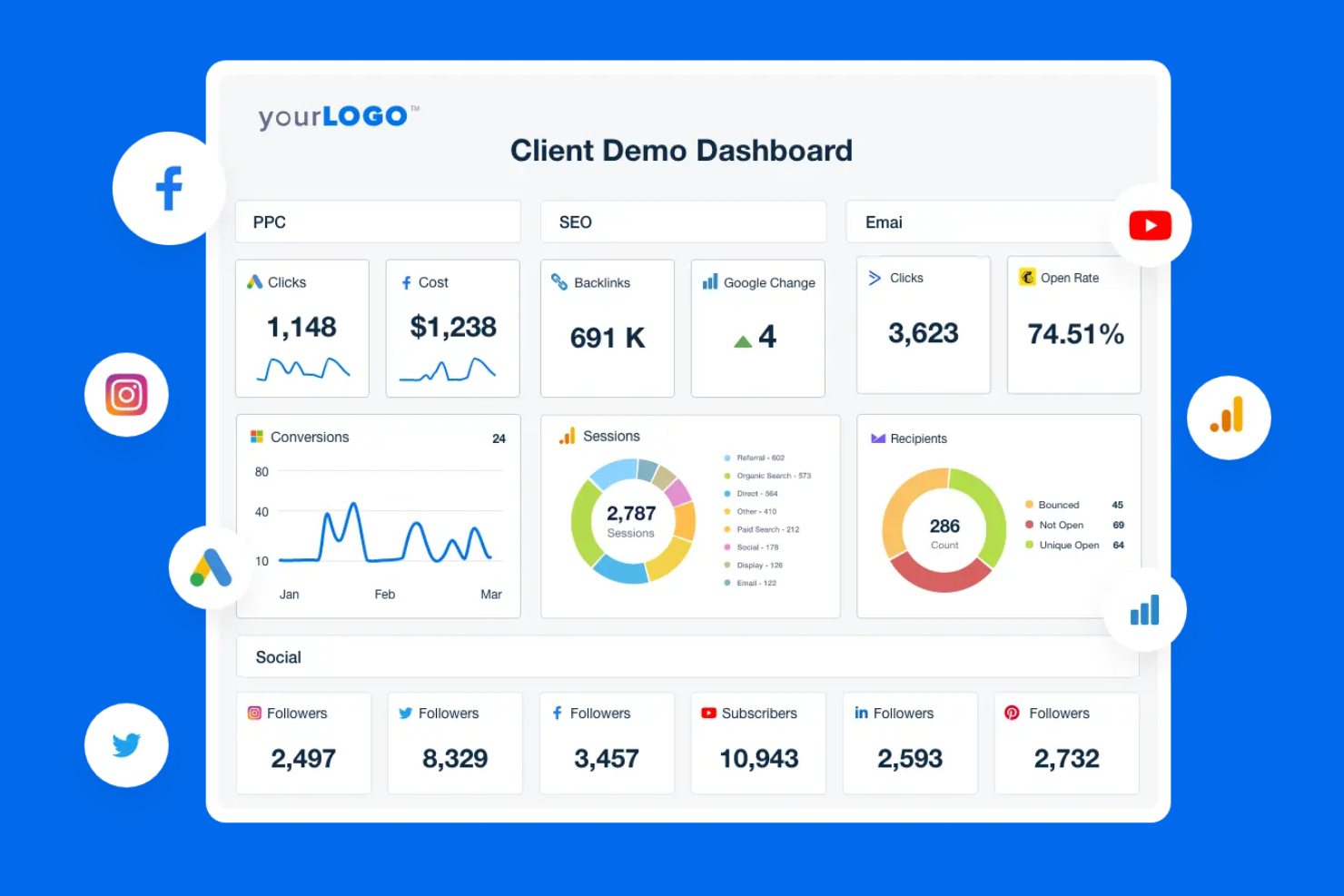
Notion unisce la presa di appunti, la gestione dei progetti e l'automazione potenziata dall'IA in un unico ambiente di lavoro. È particolarmente utile per team di prodotto, creatori di contenuti e startup che desiderano collegare note delle riunioni, attività e documentazione con funzionalità AI come il riassunto automatico e i suggerimenti intelligenti per le attività. I database flessibili e i blocchi AI di Notion aiutano i team ad automatizzare il lavoro di routine mantenendo tutto organizzato in un solo posto.
Perché ho scelto Notion
Notion si distingue per i team che vogliono combinare note, attività di progetto e automazione AI in uno spazio di lavoro unico. I suoi blocchi IA permettono di generare riassunti, redigere contenuti e automatizzare attività ripetitive di documentazione direttamente all'interno delle note e delle bacheche di progetto.
Mi piace come si possano collegare i database affinché le note delle riunioni, le attività e le timeline dei progetti si aggiornino tutte insieme, rendendo più semplice mantenere le informazioni collegate e operative. Per i team che cercano di automatizzare la gestione della conoscenza e il monitoraggio delle attività senza dover passare da uno strumento all'altro, Notion offre una soluzione unificata e flessibile.
Funzionalità
Altre funzionalità che rendono Notion prezioso per l'automazione e la gestione dei progetti includono:
- Modelli personalizzati: Crea e riutilizza modelli per flussi di lavoro o documentazione ricorrenti nei progetti.
- Accesso API: Collega Notion ad altri strumenti e automatizza i flussi di dati tramite la sua API pubblica.
- Permessi e condivisione: Imposta controlli di accesso granulari per pagine, database e workspace.
- Cronologia delle versioni: Rivedi e ripristina versioni precedenti di qualsiasi pagina o database.
Integrazioni
Le integrazioni includono Slack, Jira, GitHub, Asana, Google Drive, Figma, Trello, GitLab, Typeform e Webex.
Pros and Cons
Pros:
- La compilazione automatica tramite IA genera contenuti per i documenti di progetto
- Modelli personalizzati supportano flussi di lavoro automatici e ripetibili
- Le menzioni di pagine permettono il collegamento automatico delle attività
Cons:
- Le azioni di automazione bulk non sono supportate nativamente
- Trigger di automazione nativi limitati rispetto ai concorrenti

HubSpot
Ideale per strategie di inbound marketing

HubSpot è una piattaforma di customer relationship management (CRM) e marketing per l'inbound marketing, le vendite e l'assistenza clienti. Serve i team di marketing fornendo strumenti per attrarre visitatori, convertire lead e fidelizzare i clienti.
Perché ho scelto HubSpot: Eccelle nelle strategie di inbound marketing, offrendo una suite di strumenti per gestire il content marketing, i social media, le relazioni con i clienti e la fidelizzazione. Il sistema CRM è integrato, consentendo al tuo team di tracciare lead e interazioni in modo efficace. Il sistema di gestione dei contenuti di HubSpot ti aiuta a creare e ottimizzare contenuti di marketing per un maggiore coinvolgimento. La funzione di email marketing è avanzata, con opzioni di automazione per coltivare i lead in modo efficace.
Funzionalità principali e integrazioni:
Funzionalità che includono un builder per landing page che ti permette di progettare pagine senza competenze di programmazione. Lo strumento di gestione dei social media ti aiuta a programmare e monitorare i post su più piattaforme. Inoltre, la dashboard di analisi offre approfondimenti sulle prestazioni di marketing, aiutandoti a prendere decisioni basate sui dati.
Integrazioni che includono Salesforce, Mailchimp, Shopify, Zoom, Slack e altri.
Pros and Cons
Pros:
- Sistema CRM integrato
- Potenti strumenti di email marketing
- Funzionalità di gestione dei contenuti
Cons:
- Costi obbligatori di onboarding a pagamento
- I contratti annuali possono essere rigidi

Ideale per l'automazione dell'email marketing

ActiveCampaign è una piattaforma di automazione del marketing che si rivolge principalmente a piccole e medie imprese. Si concentra sull'email marketing, la gestione delle relazioni con i clienti e l'automazione delle vendite.
Perché ho scelto ActiveCampaign: Eccelle nell'automazione dell'email marketing, offrendo funzionalità avanzate per personalizzare le tue campagne. I flussi di lavoro automatizzati della piattaforma aiutano a coinvolgere efficacemente il pubblico. I suoi strumenti di segmentazione consentono di indirizzare gruppi specifici di clienti. ActiveCampaign offre anche analisi dettagliate per monitorare le prestazioni delle tue campagne.
Funzionalità e integrazioni principali:
Funzionalità includono un editor di email drag-and-drop che semplifica la creazione di email coinvolgenti. La funzione di lead scoring della piattaforma aiuta a dare priorità agli sforzi di vendita. Inoltre, lo strumento di tracciamento del sito consente di capire come i tuoi contatti interagiscono con il sito web.
Integrazioni comprendono Shopify, Salesforce, WordPress, Zapier, WooCommerce, Facebook e altro ancora.
Pros and Cons
Pros:
- Flussi di lavoro avanzati per l'automazione delle email
- Analisi dettagliate delle campagne
- Strumenti di segmentazione efficaci
Cons:
- Supporto telefonico limitato ai livelli superiori
- Diventa costoso con l'aumentare delle liste di contatti

Ideale per la collaborazione a distanza assistita dall'IA
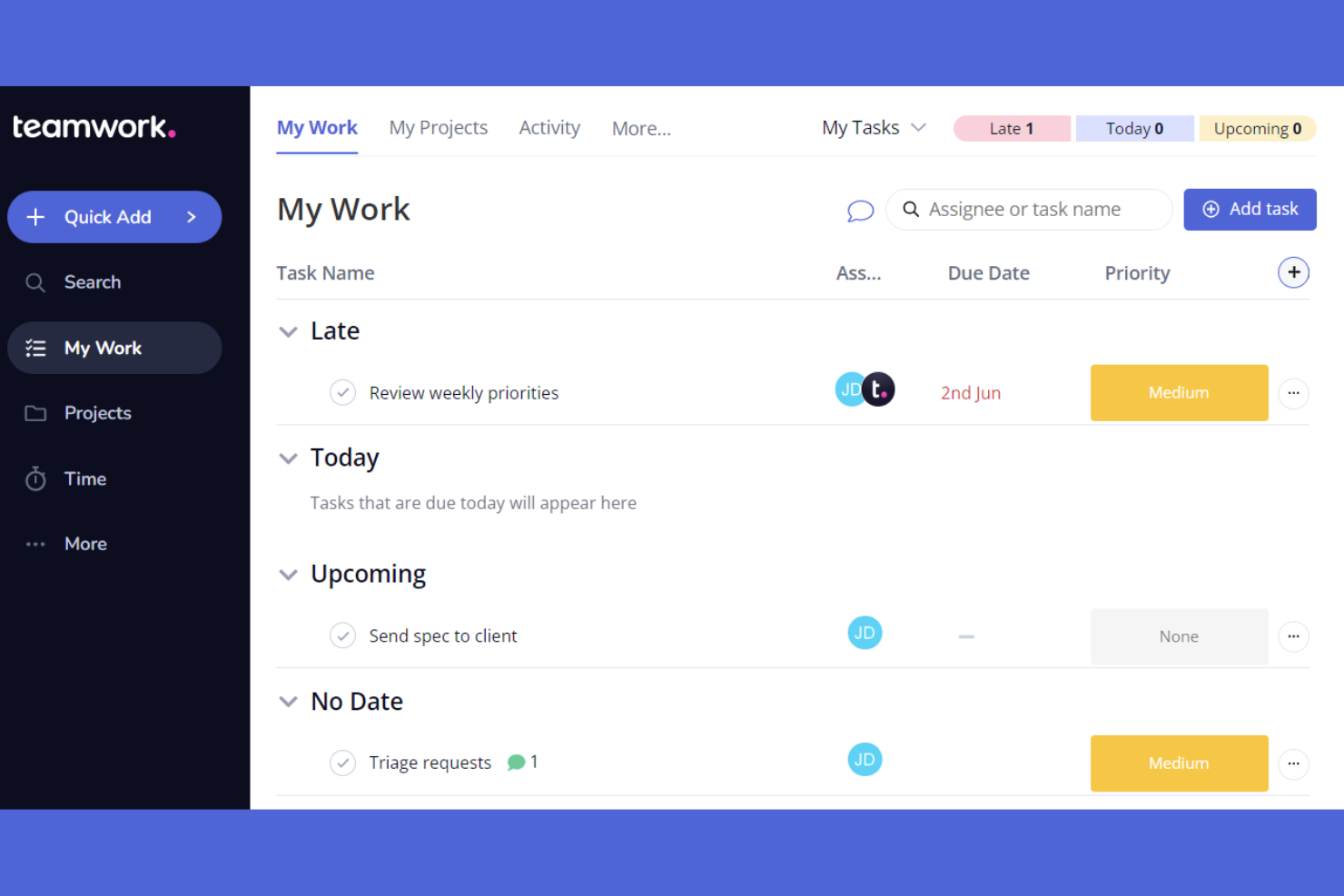
Teamwork.com è un software di project management basato sull'intelligenza artificiale, progettato per i team che lavorano da remoto. Aiuta nella gestione delle attività, nella collaborazione tra i membri del team e nel monitoraggio dei progetti.
Perché ho scelto Teamwork.com: Offre funzionalità che favoriscono la collaborazione a distanza, rendendolo adatto ai team distribuiti. Le funzioni di chat integrata e condivisione dei file semplificano la comunicazione. Teamwork.com offre anche modelli per diversi tipi di progetti, migliorando la sua utilità per i team remoti.
Funzionalità e integrazioni principali:
Funzionalità includono grafici Gantt per la pianificazione dei progetti, uno strumento di rilevamento del tempo per monitorare la produttività e la gestione del carico di lavoro per bilanciare gli sforzi del team. Queste funzionalità aiutano ad allocare efficacemente le risorse. Il software offre anche un portale clienti, utile per le agenzie che devono condividere aggiornamenti con i clienti.
Integrazioni includono Slack, HubSpot, Xero, Microsoft Office, ChatGPT, Stripe e altro ancora.
Pros and Cons
Pros:
- Modelli di progetto personalizzabili
- Funzione chat integrata
- Accesso al portale clienti
Cons:
- Può risultare confuso con molti progetti
- Strumenti chiave accessibili solo nei piani superiori

HighLevel è una piattaforma di automazione del marketing pensata per agenzie e marketer. Facilita la gestione dei lead, l’interazione con i clienti e l’automazione delle campagne.
Perché ho scelto GoHighLevel: La piattaforma eccelle nell’offrire strumenti di automazione del marketing che semplificano la comunicazione con i clienti e la conversione dei lead. Offre una casella di posta unificata per gestire i messaggi provenienti da diversi canali. I flussi di lavoro automatici fanno risparmiare tempo e garantiscono un follow-up costante dei clienti. HighLevel offre anche dashboard personalizzabili per monitorare le metriche chiave, mantenendo il tuo team sempre informato.
Funzionalità e integrazioni principali:
Funzionalità includono un generatore di funnel per creare funnel di vendita, un sistema di prenotazione appuntamenti per gestire le richieste e un'area membri per l’accesso dei clienti. Queste funzionalità aiutano a migliorare le tue attività di marketing, semplificando l’interazione con i clienti. Il software include anche un sistema CRM per organizzare e tracciare i lead in modo efficiente.
Integrazioni includono Mailchimp, Stripe, Shopify, QuickBooks e altri.
Pros and Cons
Pros:
- Inbox unificata per i messaggi
- Generatore di funnel incluso
- Area membri inclusa
Cons:
- Opzioni di reportistica complesse
- Funzionalità a volte soggette a bug

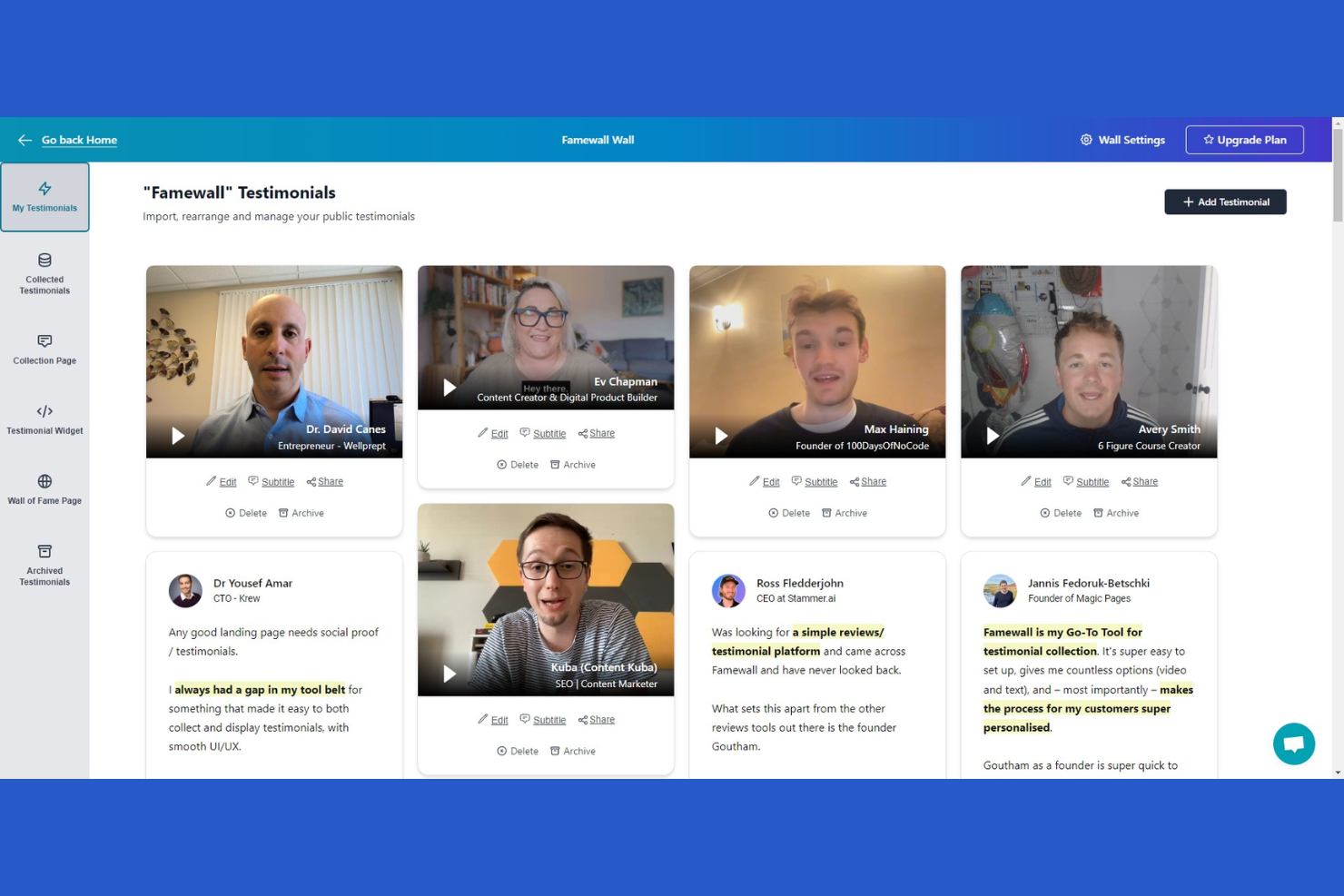
Famewall è una piattaforma per la gestione delle testimonianze, pensata per le aziende che desiderano mettere in evidenza i feedback dei clienti. Aiuta marketer e titolari di aziende a raccogliere, mostrare e gestire efficacemente le testimonianze.
Perché ho scelto Famewall: È specializzata nella gestione delle testimonianze dei clienti e fornisce strumenti per raccoglierle e mostrarle sul tuo sito web. La piattaforma consente di raccogliere e gestire le testimonianze per più progetti in un unico posto. Il software offre anche analisi delle testimonianze basate sull'intelligenza artificiale, per aiutarti ad analizzare i dati dei clienti e sviluppare strategie di marketing.
Caratteristiche principali e integrazioni:
Le funzionalità includono widget personalizzabili che consentono di adattare l'aspetto delle testimonianze al tuo marchio. Il software offre un semplice link per raccogliere le testimonianze, rendendo facile per i clienti inviare feedback. Inoltre, gli strumenti di moderazione aiutano a filtrare e selezionare le testimonianze migliori da mostrare.
Pros and Cons
Pros:
- Widget personalizzabili per le testimonianze
- Link semplice per raccogliere feedback
- Strumenti di moderazione per il controllo della qualità
Cons:
- Funzionalità di analisi limitate
- Ritardi occasionali nella sincronizzazione


HawkSoft è un sistema gestionale progettato specificamente per le agenzie assicurative. Aiuta i professionisti del settore assicurativo a gestire le polizze, monitorare i sinistri e gestire le interazioni con i clienti in modo efficiente.
Perché ho scelto HawkSoft: Si concentra sull'ottimizzazione dei flussi di lavoro delle agenzie assicurative, offrendo strumenti per semplificare la gestione delle polizze e dei sinistri. La funzione di gestione documentale permette di organizzare e accedere facilmente ai file dei clienti. Gli strumenti di reportistica di HawkSoft offrono una panoramica sulle prestazioni e sulle operazioni dell'agenzia. Gli strumenti per la comunicazione con i clienti aiutano a mantenere relazioni solide con la clientela.
Caratteristiche principali e integrazioni:
Caratteristiche includono una dashboard intuitiva che offre una panoramica immediata delle operazioni dell'agenzia. La funzione di gestione delle attività consente di tenere traccia delle attività quotidiane e delle scadenze. Inoltre, i promemoria automatici assicurano che non vengano mai persi follow-up importanti con i clienti.
Integrazioni includono ePayPolicy, Microsoft 365, QuickBooks e altri.
Pros and Cons
Pros:
- Ottimizzato per i flussi di lavoro assicurativi
- Gestione documentale approfondita
- Capacità di reportistica dettagliata
Cons:
- Può essere difficile personalizzare i flussi di lavoro
- La ricerca richiede login email specifico
Altri software per agenzie di marketing
Ecco alcune altre opzioni di software per agenzie di marketing che non sono entrate nella mia selezione, ma che vale comunque la pena prendere in considerazione:
- Resource Guru
Ideale per le esigenze di pianificazione delle risorse
- Wrike
Ideale per opzioni di personalizzazione dei progetti


Come Valuto il Software per Agenzie di Marketing
Valuto gli strumenti per agenzie su due livelli: requisiti fondamentali come la gestione di oltre 20 account clienti senza contaminazioni di dati, e fattori differenzianti che rendono una piattaforma davvero migliore per il tuo team.
Funzionalità di Base (Requisiti Essenziali per Questa Lista)
Quando seleziono gli strumenti per la mia lista, valuto ciascuno su una scala da 0 (non offre la funzionalità) a 5 (eccelle in quest’area) per ogni funzionalità fondamentale elencata qui sotto. Poi calcolo il punteggio totale dello strumento come percentuale. Ogni strumento deve raggiungere un punteggio totale minimo del 65% per essere considerato per l’inclusione.
- Gestione Progetti Multi-Cliente: Cerco spazi di lavoro separati per ciascun cliente con tempistiche, permessi e template distinti, così una campagna retail non si mescola mai al board di un cliente del settore sanitario.
- Pianificazione delle Risorse & della Capacità: Ogni strumento dovrebbe permettere di visualizzare chi è sovraccarico e chi è disponibile, specialmente quando un team creativo è coinvolto su cinque account attivi.
- Timesheet & Fatturazione: Verifico se le registrazioni delle ore sono collegate direttamente ai task e alle tariffe fatturabili, per permettere di tracciare le ore su una campagna social e generare una fattura dagli stessi dati.
- Revisione Creativa & Approvazioni: La piattaforma deve supportare annotazioni su immagini, video e PDF con fasi di approvazione strutturate, così il feedback dei clienti non si perde tra le email.
- Portale di Collaborazione per Clienti: Valuto se gli stakeholder esterni possono accedere per visualizzare i progressi, caricare briefing e lasciare feedback senza aver bisogno di un account completo o vedere dati di altri clienti.
- Monitoraggio del Budget di Campagna: È importante il controllo budget/previsione a livello di progetto, per individuare subito una campagna che rischia di sforare e proteggere così i margini.
Dopo aver stilato una lista di strumenti che soddisfano questi criteri, valuto ciò che distingue ciascuna piattaforma.
Fattori Differenzianti (Cosa Distingue i Fornitori)
Ecco come confronto e metto a confronto i diversi fornitori:
Funzionalità Distintive
Il branding white-label è un grande elemento differenziante. Quando il tuo portale clienti presenta il logo e i colori della tua agenzia, rafforza la fiducia in ogni ciclo di revisione. Gli strumenti per la gestione delle fee ricorrenti sono altrettanto fondamentali, soprattutto quando devi gestire il riporto delle ore mensili non utilizzate e rilevare tempestivamente lo sforamento degli accordi prima che diventi un problema nella conversazione col cliente. Cerco anche la presenza di una gestione integrata delle risorse digitali, così il team può taggare, archiviare e riutilizzare file creativi su più account invece di scavare nei drive condivisi.
Oltre le Funzionalità
La profondità dell’integrazione con gli strumenti di marketing è la prima cosa che verifico. Una piattaforma per agenzie che si collega a Google Ads, Meta, Adobe Creative Cloud e il tuo CRM consente il flusso continuo dei dati delle campagne senza esportazioni manuali. Anche la trasparenza dei costi è importante—valuto se aggiungere clienti e ospiti fa aumentare i costi man mano che crescono gli account. Infine, i controlli per la riservatezza, come permessi dettagliati e SSO, sono fondamentali quando si gestiscono dati sensibili di campagne per brand concorrenti.
Come scegliere il software per agenzie di marketing
È facile perdersi in lunghi elenchi di funzionalità e strutture tariffarie complesse. Per aiutarti a rimanere concentrato mentre affronti il tuo processo di selezione del software, ecco una lista di fattori da tenere a mente:
| Fattore | Cosa considerare |
|---|---|
| Scalabilità | Il software crescerà insieme alla tua agenzia? Verifica se è in grado di gestire un numero crescente di clienti e progetti senza problemi di prestazioni. |
| Integrazioni | Si collega agli strumenti che già utilizzi? Cerca integrazioni native con piattaforme CRM, di posta elettronica e di analisi dei dati per evitare interruzioni del flusso di lavoro. |
| Personalizzazione | Puoi adattare il software ai tuoi processi? Verifica se ti consente di personalizzare dashboard, report e flussi di lavoro in base alle esigenze della tua agenzia. |
| Semplicità d'uso | L'interfaccia è intuitiva per il tuo team? Controlla se il software presenta un layout semplice e una navigazione agevole per ridurre i tempi di formazione e favorire l'adozione. |
| Implementazione e avvio | Quanto velocemente puoi iniziare? Valuta la disponibilità di materiali di formazione, assistenza e risorse per favorire una transizione fluida al nuovo software. |
| Costo | Il prezzo rientra nel tuo budget? Confronta il costo con le funzionalità offerte. Fai attenzione ai costi nascosti o agli addebiti aggiuntivi che potrebbero incidere sul tuo budget. |
| Misure di sicurezza | Protegge i tuoi dati? Assicurati che il software sia conforme alle normative sulla protezione dei dati e offra crittografia, backup e controlli sicuri per l'accesso degli utenti. |
| Disponibilità dell'assistenza | Quando puoi ricevere aiuto? Verifica se il fornitore offre assistenza 24 ore su 24, 7 giorni su 7, e diverse opzioni di contatto, come chat, email e telefono, per risolvere rapidamente i problemi. |
Che cos'è il software per agenzie di marketing?
Il software per agenzie di marketing è un insieme di strumenti progettati per aiutare le agenzie a gestire i progetti, monitorare le campagne e collaborare con i clienti. I professionisti del marketing, i responsabili di progetto e i team creativi utilizzano generalmente questi strumenti per aumentare la produttività e realizzare campagne di successo. Le funzionalità di gestione delle attività, comunicazione con i clienti e reporting aiutano a organizzare i flussi di lavoro, mantenere le relazioni con i clienti e analizzare le prestazioni. Nel complesso, questi strumenti forniscono alle agenzie la struttura e gli approfondimenti necessari per operare in modo efficiente e raggiungere i propri obiettivi.
Caratteristiche
Quando scegli il software per agenzie di marketing, presta attenzione alle seguenti caratteristiche principali:
- Gestione delle attività: organizza e assegna priorità alle attività per mantenere i progetti in linea e garantire il rispetto delle scadenze.
- Comunicazione con i clienti: facilita l'interazione con i clienti per mantenere relazioni solide e gestire le aspettative.
- Strumenti di reporting: forniscono report e approfondimenti in tempo reale sulle prestazioni delle campagne, aiutando i team a prendere decisioni informate e ad apportare modifiche.
- Dashboard personalizzabili: consentono agli utenti di personalizzare la propria visualizzazione per concentrarsi sui dati e sulle metriche più rilevanti.
- Funzionalità di integrazione: si collegano ad altri strumenti, come piattaforme CRM e di posta elettronica, per creare un flusso di lavoro coerente.
- Monitoraggio del tempo: monitora il tempo dedicato alle attività e ai progetti per migliorare la produttività e la precisione della fatturazione.
- Flussi di lavoro automatizzati: automatizzano le attività ripetitive per risparmiare tempo e ridurre gli errori manuali.
- Pianificazione delle risorse: aiuta ad allocare le risorse in modo efficiente per evitare conflitti e ottimizzare la produttività del team.
- Misure di sicurezza: proteggono i dati sensibili mediante crittografia e controlli degli accessi per garantire la conformità alle normative.
- Supporto per l'inserimento: fornisce materiali formativi e risorse per aiutare i team a passare senza problemi al nuovo software.
Vantaggi
L'implementazione di un software per agenzie di marketing offre diversi vantaggi al tuo team e alla tua azienda. Ecco alcuni dei vantaggi che puoi aspettarti:
- Maggiore organizzazione: mantieni organizzati progetti e attività grazie alle funzionalità di gestione delle attività, assicurandoti che nulla venga trascurato.
- Migliore comunicazione: facilita una comunicazione più efficace con clienti e team attraverso strumenti integrati di messaggistica e collaborazione.
- Decisioni basate sui dati: offre strumenti di reporting che forniscono approfondimenti sulle prestazioni, aiutandoti a prendere decisioni strategiche informate.
- Efficienza del tempo: automatizza le attività ripetitive e monitora il tempo dedicato ai progetti, risparmiando tempo e aumentando la produttività.
- Ottimizzazione delle risorse: assegna le risorse in modo efficace con strumenti di pianificazione, prevenendo i conflitti e massimizzando la produttività del team.
- Flessibilità di personalizzazione: adatta dashboard e flussi di lavoro alle esigenze specifiche della tua agenzia, migliorandone l'usabilità.
- Sicurezza dei dati: protegge le informazioni sensibili con misure di sicurezza, garantendo la conformità alle normative sulla protezione dei dati.
Costi e prezzi
La scelta del software per agenzie di marketing richiede una conoscenza dei vari modelli e piani tariffari disponibili. I costi variano in base alle funzionalità, alle dimensioni del team, ai componenti aggiuntivi e ad altri fattori. La tabella seguente riassume i piani più comuni, i prezzi medi dei piani a pagamento e le funzionalità generalmente incluse nelle soluzioni software per agenzie di marketing:
Tabella comparativa dei piani per il software per agenzie di marketing
| Tipo di piano | Prezzo medio | Funzionalità comuni |
|---|---|---|
| Piano gratuito | $0 | Gestione di base delle attività, reporting limitato e comunicazione di base con i clienti. |
| Piano personale | $5-$25/utente/mese | Gestione delle attività, strumenti di comunicazione con i clienti e funzionalità di reporting di base. |
| Piano aziendale | $35-$800/mese | Reporting avanzato, funzionalità di collaborazione del team e integrazione con altri strumenti. |
| Piano aziendale avanzato | $145-$3600/mese | Dashboard personalizzabili, funzionalità di sicurezza migliorate e opzioni di supporto e formazione dedicati. |
Domande frequenti sul software per agenzie di marketing
Ecco alcune risposte alle domande comuni sul software per agenzie di marketing:
Come faccio a sapere se la mia agenzia ha bisogno di un software per agenzie di marketing?
Se il tuo team ha difficoltà a gestire più campagne per i clienti e a monitorare le prestazioni, un software per agenzie di marketing potrebbe essere utile. Valuta i processi attuali e individua le aree in cui l’automazione e una migliore organizzazione potrebbero aumentare l’efficienza. Se riscontri frequenti colli di bottiglia o errori, probabilmente è arrivato il momento di prendere in considerazione soluzioni software.
Il software per agenzie di marketing può integrarsi con gli strumenti che già utilizzo?
Sì, la maggior parte dei software per agenzie di marketing offre funzionalità di integrazione con strumenti diffusi come sistemi CRM e SaaS, piattaforme di posta elettronica e strumenti di analisi. Controlla l’elenco delle integrazioni del software per assicurarti che si connetta agli strumenti che utilizzi attualmente. Questa compatibilità aiuta a mantenere un flusso di lavoro fluido e previene i silos di dati.
Quanto è sicuro il software per agenzie di marketing?
Il livello di sicurezza varia a seconda del fornitore, ma la maggior parte dei software affidabili include crittografia, controlli degli accessi degli utenti e funzionalità di backup dei dati. Cerca un software conforme alle normative sulla protezione dei dati pertinenti al tuo settore. Chiedi sempre informazioni sulle misure di sicurezza del fornitore per assicurarti che i tuoi dati rimangano al sicuro.
Cosa devo valutare prima di acquistare un software per agenzie di marketing?
Prima dell’acquisto, valuta le esigenze del tuo team, il budget e la scalabilità del software. Considera la curva di apprendimento e se il tuo team può adattarsi rapidamente. Consulta le recensioni degli utenti e richiedi dimostrazioni per vedere il software in azione. Questa analisi ti aiuterà a prendere una decisione informata.