

10 migliori alternative a Redmine per i team di progetto nel 2026

Le migliori alternative a Redmine in sintesi


Se Redmine non soddisfa le esigenze specifiche del tuo team a causa della mancanza di determinate funzionalità o di un'interfaccia poco intuitiva, esistono molte alternative a Redmine che puoi utilizzare per gestire scadenze, risorse e dinamiche del team.
Il software giusto può aiutarti a organizzarti e a migliorare la produttività. Ho utilizzato la mia esperienza nel testare e recensire gli strumenti di gestione dei progetti per esaminare le principali alternative a Redmine e aiutarti a trovare quella più adatta al tuo team.
Ti guiderò attraverso ogni opzione e ti spiegherò cosa le distingue, così potrai capire quale strumento ti aiuterà meglio ad affrontare le tue sfide.
Che cos'è Redmine?
Redmine è un software di gestione dei progetti che aiuta i team a organizzare e monitorare i propri progetti. È comunemente utilizzato da responsabili di progetto, sviluppatori e professionisti IT che devono gestire attività, scadenze e risorse in modo efficiente.
Funzionalità come il monitoraggio dei problemi, la registrazione del tempo e i diagrammi di Gantt ti aiutano a mantenere i progetti nei tempi previsti e il team allineato.
Tabella di confronto delle alternative a Redmine
Questa tabella di confronto riassume i dettagli sui prezzi delle principali alternative a Redmine che ho selezionato:
| Tool | Best For | Trial Info | Price | ||
|---|---|---|---|---|---|
| 1 | Ideale per funzionalità personalizzabili in diversi settori | Piano gratuito + demo gratuita disponibile | Da $7/utente/mese (fatturato annualmente) | Website | |
| 2 | Ideale per la gestione visiva delle attività | Piano gratuito disponibile | Da $5/utente/mese (fatturato annualmente) | Website | |
| 3 | Ideale per l'automazione dei flussi di lavoro tramite intelligenza artificiale | Piano gratuito + demo gratuita disponibile | Da $10.99/utente/mese (fatturazione annuale) | Website | |
| 4 | Ideale per il controllo sicuro dei dati | Piano gratuito disponibile | Da $7.25/utente/mese (fatturato annualmente) | Website | |
| 5 | Ideale per gestire progetti complessi rivolti ai clienti e team | Prova gratuita di 30 giorni + demo gratuita disponibile | Da $9.99/utente/mese (fatturato annualmente) | Website | |
| 6 | Ideale per collaborazione di team e visibilità | Prova gratuita di 30 giorni + demo gratuita disponibile | Da $15/utente/mese | Website | |
| 7 | Ideale per team agili | È disponibile un piano gratuito | Da €5/mese | Website | |
| 8 | Ideale per la gestione delle attività | Demo gratuita disponibile | Prezzo su richiesta | Website | |
| 9 | Ideale per flussi di lavoro personalizzabili | Piano gratuito disponibile | Da $9/utente/mese (fatturazione annuale) | Website | |
| 10 | Ideale per organizzare le attività grazie alle funzionalità di trascinamento semplici | Prova gratuita di 30 giorni + piano gratuito disponibile | A partire da $7.65/membro/mese (fatturati annualmente) | Website |

Perché fidarsi dei nostri consigli sui software
Il nostro team testa e recensisce software dal 2012. In quanto project manager noi stessi, sappiamo quanto sia difficile — e importante — scegliere il software giusto.
Per questa guida, abbiamo valutato gli strumenti attraverso test pratici e ricerche indipendenti, assegnando un punteggio agli strumenti in base ai nostri criteri di selezione. Ci basiamo inoltre sulle competenze di leader di pensiero del settore e di professionisti attivi nella gestione dei progetti.
Le nostre recensioni riflettono il nostro giudizio editoriale umano, non un discorso di vendita.
Revisori esperti:
Recensioni delle migliori alternative a Redmine
Di seguito trovi riepiloghi dettagliati delle migliori alternative a Redmine incluse nella mia selezione. Le mie recensioni offrono uno sguardo approfondito sulle funzionalità principali, sui pro e contro, sulle integrazioni e sui casi d’uso ideali di ciascuno strumento, per aiutarti a trovare quello più adatto a te.

ClickUp
Ideale per funzionalità personalizzabili in diversi settori
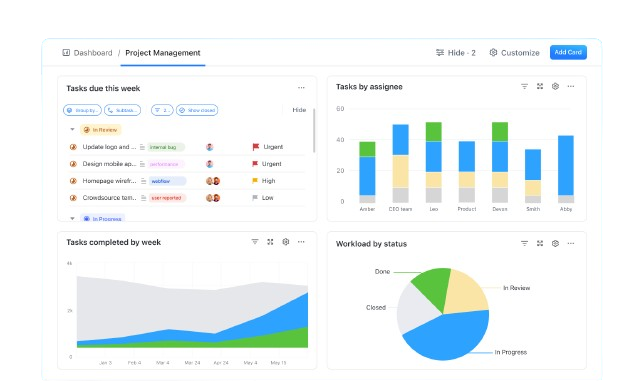
ClickUp è uno strumento di gestione dei progetti progettato per team di tutte le dimensioni. Offre una piattaforma flessibile per gestire attività, progetti e flussi di lavoro, ed è ampiamente utilizzato da aziende in diversi settori, tra cui marketing, sviluppo software ed educazione.
Perché ClickUp è una valida alternativa a Redmine: ClickUp offre ampie opzioni di personalizzazione che ti permettono di adattare i flussi di lavoro alle esigenze del tuo team. Puoi creare stati attività personalizzati, modelli e viste, il che rende facile adattare il software a qualsiasi tipo di progetto. Le funzionalità di automazione aiutano a eliminare il lavoro manuale e a migliorare l'efficienza. Questa flessibilità rende ClickUp una scelta versatile per i team che desiderano una soluzione di gestione progetti più adattabile.
Funzionalità e integrazioni principali:
Funzionalità includono viste attività personalizzabili, automazione e gestione del carico di lavoro. Puoi impostare priorità personalizzate, scadenze e monitoraggio per soddisfare gli obiettivi del tuo progetto. La funzione di monitoraggio del tempo consente ai team di controllare quanto tempo viene dedicato a ciascuna attività.
Integrazioni includono Slack, Google Drive, Zoom, Dropbox, Microsoft Teams, GitHub, Zapier, GitLab, OneDrive e Jira.
Pros and Cons
Pros:
- Automazioni avanzate dei flussi di lavoro
- Monitoraggio del tempo per i progetti
- Opzioni di reportistica complete
Cons:
- Curva di apprendimento ripida
- Complesso per team più piccoli

Trello
Ideale per la gestione visiva delle attività
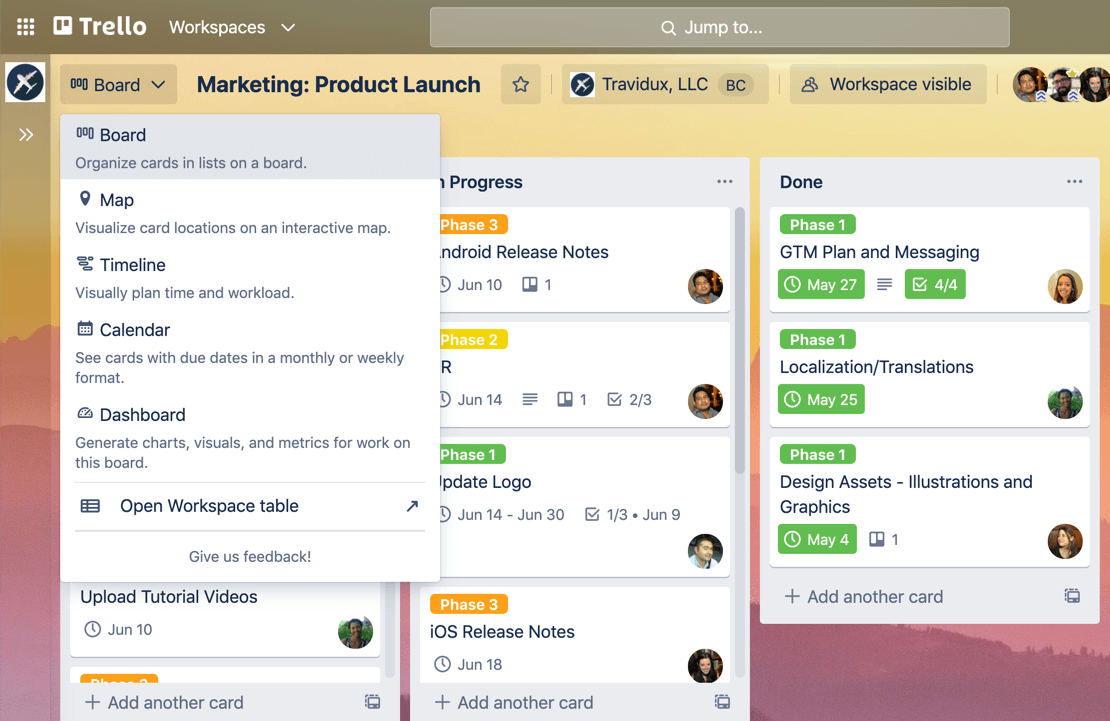
Trello è uno strumento di gestione progetti visivo che utilizza bacheche, liste e schede per aiutare i team a organizzare attività e progetti. È popolare tra team creativi, liberi professionisti e piccole imprese per la sua interfaccia intuitiva e la gestione dei flussi di lavoro flessibile.
Perché è una buona alternativa a Redmine: Trello offre un approccio visivo semplice e intuitivo alla gestione delle attività tramite il sistema di bacheche e schede. Consente al tuo team di organizzare facilmente attività e progetti. L'interfaccia drag-and-drop rende semplice spostare le attività tra le liste, e la flessibilità nella configurazione dei flussi di lavoro lo rende ideale per i team che desiderano personalizzare il proprio approccio di gestione dei progetti.
Funzionalità e integrazioni principali:
Funzionalità includono bacheche personalizzabili che consentono al team di organizzare i progetti in modo visivo. È possibile aggiungere checklist alle schede per monitorare dettagliatamente le attività. Etichette e date di scadenza aiutano a dare priorità alle attività e a gestire in modo efficace le scadenze.
Integrazioni includono Slack, Google Drive, Dropbox, Microsoft Teams, Jira, Salesforce, Confluence, Bitbucket, Evernote e GitHub.
Pros and Cons
Pros:
- Interfaccia visiva intuitiva
- Funzionalità drag-and-drop semplice
- Adatto a piccoli team
Cons:
- Non ideale per progetti complessi
- Scalabilità limitata

Asana
Ideale per l'automazione dei flussi di lavoro tramite intelligenza artificiale
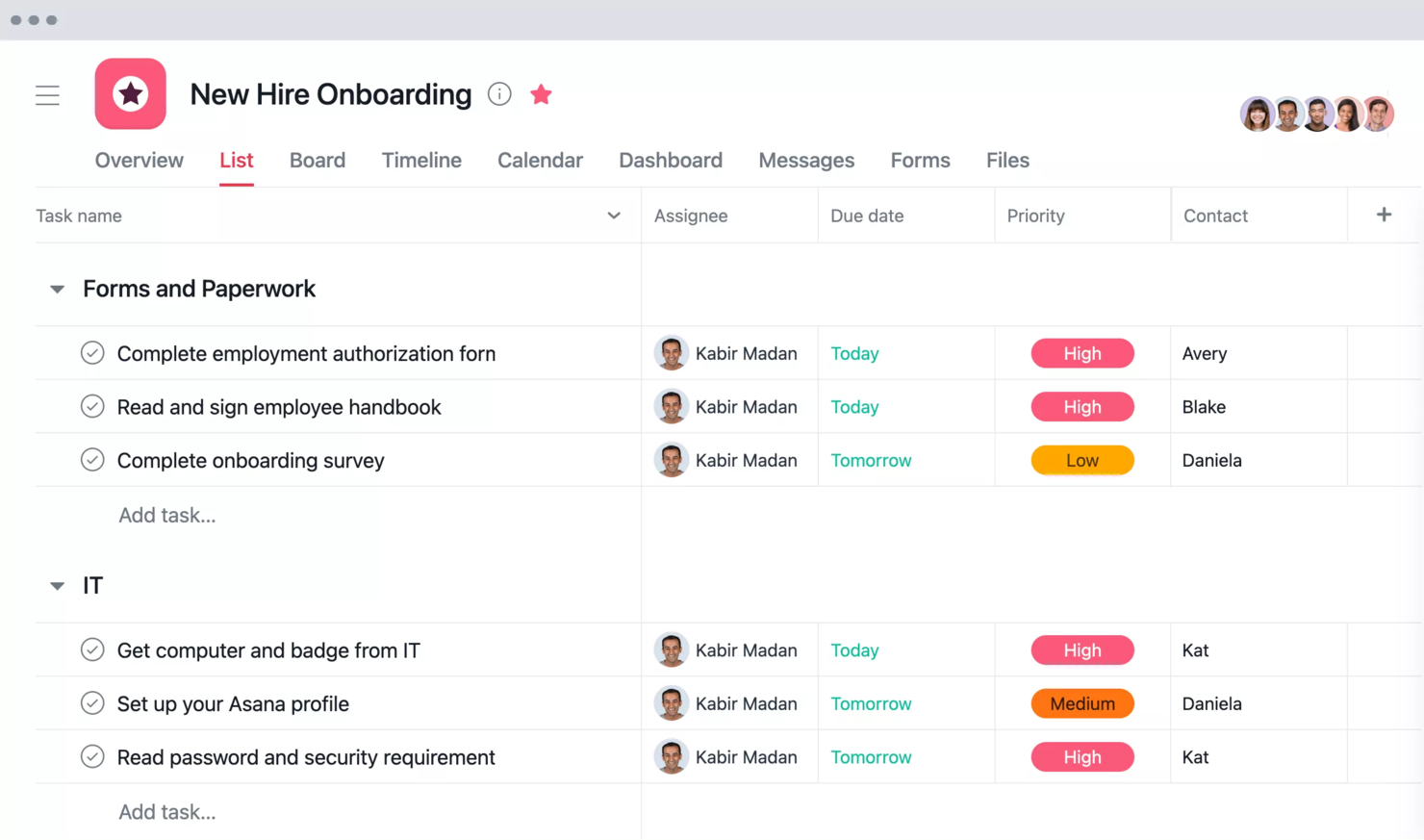
Asana è una piattaforma di gestione del lavoro progettata per aiutare i team a organizzare, monitorare e gestire le loro attività. È ampiamente utilizzata da aziende di ogni dimensione per migliorare la collaborazione e la visibilità sui progetti.
Perché è una buona alternativa a Redmine: Asana offre automazione dei flussi di lavoro tramite intelligenza artificiale, consentendo al tuo team di automatizzare le attività ripetitive e concentrarsi su compiti più prioritari. A differenza di Redmine, Asana offre una timeline visiva del progetto che ti aiuta a monitorare l'avanzamento. La funzione delle dipendenze tra le attività assicura che il tuo team sappia cosa deve essere completato prima di passare al task successivo. I campi personalizzati di Asana ti permettono inoltre di adattare i dati del progetto alle tue esigenze specifiche.
Funzionalità e integrazioni principali:
Funzionalità includono modelli di progetto che ti aiutano a partire rapidamente. La visualizzazione del carico di lavoro ti permette di vedere come sono distribuiti i compiti tra i membri del team. Le pietre miliari ti aiutano a monitorare i traguardi importanti del progetto e le scadenze.
Integrazioni includono Slack, Microsoft Teams, Google Drive, Dropbox, Salesforce, Zoom, Jira, GitHub, Adobe Creative Cloud e Zapier.
Pros and Cons
Pros:
- Automazione basata su intelligenza artificiale
- Campi personalizzabili
- Adatto a team di tutte le dimensioni
Cons:
- Può risultare complesso da configurare
- Accesso offline limitato

Ideale per il controllo sicuro dei dati
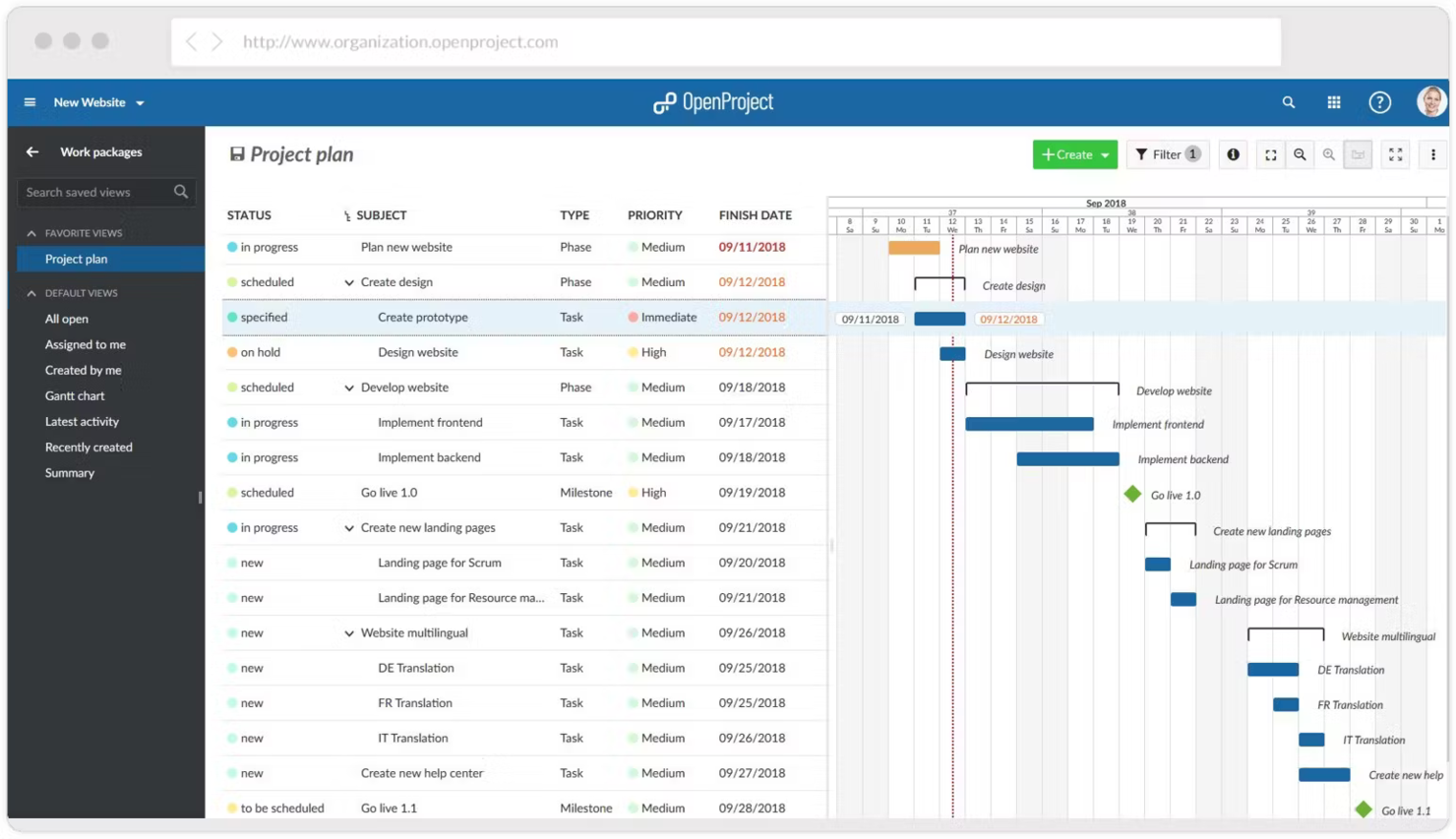
OpenProject è un software open-source per la gestione dei progetti progettato per i team che desiderano gestire i progetti in un ambiente sicuro. Si rivolge a settori come l'edilizia, la sanità e la tecnologia e si concentra sulla pianificazione dei progetti, la programmazione e la collaborazione.
Perché è una buona alternativa a Redmine: OpenProject offre un controllo sicuro dei dati con opzioni di installazione on-premise, ideale per i settori che gestiscono informazioni sensibili. Le sue funzionalità includono una pianificazione avanzata dei progetti e la gestione delle attività. OpenProject pone una forte enfasi sulla sicurezza e sulla trasparenza. La capacità del software di offrire sia opzioni cloud che di self-hosting ti dà flessibilità nella gestione dei tuoi dati.
Funzionalità e integrazioni principali:
Funzionalità includono strumenti avanzati di pianificazione dei progetti che ti aiutano a visualizzare le tempistiche e a monitorare i progressi. Le capacità di gestione delle attività permettono al tuo team di rimanere organizzato e concentrato sulle priorità. Le funzionalità di monitoraggio del tempo ti consentono di tenere traccia efficacemente delle ore di progetto.
Integrazioni includono GitHub, GitLab, Bitbucket, Jenkins, Slack, Nextcloud, Rocket.Chat, Redmine e LDAP.
Pros and Cons
Pros:
- Potenti funzionalità di sicurezza dei dati
- Opzioni di hosting flessibili
- Adatto a vari settori
Cons:
- Non ideale per utenti non tecnici
- Meno opzioni di personalizzazione

Ideale per gestire progetti complessi rivolti ai clienti e team
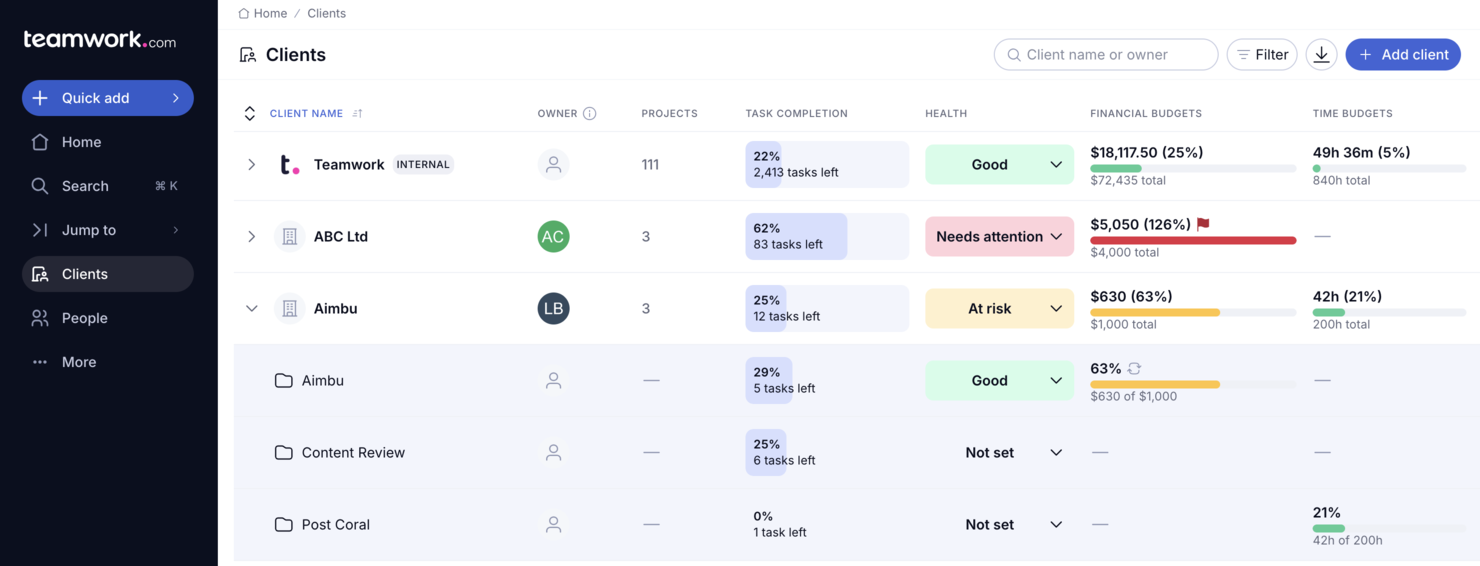
Teamwork.com è una piattaforma di gestione progetti progettata per team che gestiscono progetti rivolti ai clienti. Offre strumenti per gestire attività, scadenze, comunicazioni e collaborazione con i clienti.
Perché Teamwork.com è una buona alternativa a Redmine: Teamwork.com offre una serie di funzionalità che aiutano a gestire progetti clienti complessi. Puoi organizzare facilmente le attività, monitorare le scadenze e assegnare i compiti ai membri del team. Include anche strumenti di monitoraggio del tempo e di reportistica per aiutarti a mantenere tutto sotto controllo. La piattaforma è particolarmente utile se hai bisogno di un approccio più focalizzato sul cliente, grazie a strumenti che consentono di condividere aggiornamenti di progetto direttamente con i clienti.
Funzionalità distintive & integrazioni:
Funzionalità includono gestione delle attività con flussi di lavoro personalizzabili, monitoraggio del tempo per il tracciamento dei progetti e reportistica per la valutazione dei progressi. Puoi anche gestire documenti e collaborare direttamente con i clienti su attività e aggiornamenti. Teamwork.com supporta molteplici visualizzazioni, come lista, board e Gantt, per una gestione flessibile dei progetti.
Integrazioni includono Slack, Microsoft Teams, Google Workspace, Zapier, Trello, Dropbox, Jira, QuickBooks, FreshBooks e Xero.
Pros and Cons
Pros:
- Gestione semplice delle comunicazioni con i clienti
- Gestione delle attività e visualizzazioni di progetto flessibili
- Opzioni di reportistica dettagliata e monitoraggio del tempo
Cons:
- Curva di apprendimento per i nuovi utenti
- Potrebbe sembrare caotico con troppe funzionalità

Basecamp
Ideale per collaborazione di team e visibilità

Basecamp è uno strumento di gestione progetti progettato per aiutare i team a collaborare e organizzare il lavoro in un unico luogo. È molto popolare tra piccole imprese, startup e team creativi per la sua semplicità e l'enfasi sulla comunicazione di squadra.
Perché è una buona alternativa a Redmine: Basecamp offre una piattaforma centralizzata per la collaborazione del team, semplificando la comunicazione e la condivisione dei file. A differenza di Redmine, fornisce elenchi di cose da fare e bacheche dei messaggi per mantenere il team allineato sugli obiettivi del progetto. Il design semplice riduce la curva di apprendimento, rendendolo facile da usare per tutti i membri del team.
Funzionalità e integrazioni principali:
Funzionalità includono registrazioni automatiche che invitano regolarmente i membri del team a condividere aggiornamenti, mantenendo tutti allineati. La tabella delle schede consente di organizzare le attività in modo visivo. Gli strumenti di pianificazione di Basecamp aiutano a definire chiaramente scadenze e traguardi per tutti i membri del team.
Integrazioni includono Zapier, Slack, Google Drive, Dropbox, OneDrive, HubSpot, Trello, Todoist, Microsoft Teams e Asana.
Pros and Cons
Pros:
- Design semplice e intuitivo
- Ottimo per piccoli team
- Riduce la frequenza delle riunioni
Cons:
- Non ideale per progetti di grandi dimensioni
- Opzioni di reportistica di base

Taiga
Ideale per team agili
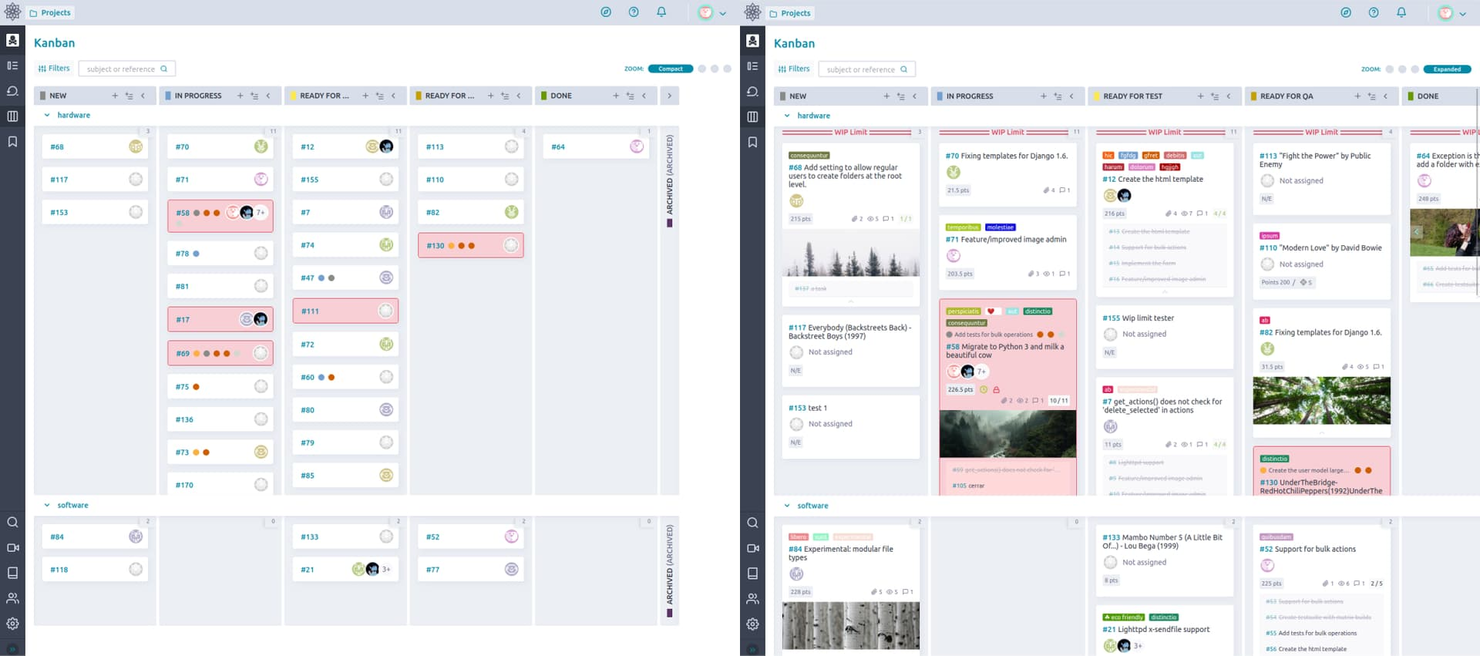
Taiga è un software open-source per la gestione agile dei progetti, progettato per team cross-funzionali. Semplifica la pianificazione dei progetti, l'interazione del team e il monitoraggio dei progressi per manager e team che lavorano secondo la metodologia agile.
Perché è una buona alternativa a Redmine: Taiga è sviluppato per i team agili e offre bacheche Kanban e Scrum personalizzabili per mantenere il tuo team organizzato e flessibile. A differenza di Redmine, Taiga include un monitoraggio dei problemi integrato, che rende più fluido il flusso di lavoro. La sua interfaccia intuitiva facilita la pianificazione dei progetti, soprattutto per soluzioni agili.
Funzionalità e integrazioni principali:
Funzionalità includono strumenti per la pianificazione di backlog e sprint che ti permettono di dare priorità al lavoro e mantenere l'attenzione sugli obiettivi del progetto. Le capacità di reportistica di Taiga offrono informazioni dettagliate sulle prestazioni del team e sull'avanzamento dei progetti.
Integrazioni comprendono GitHub, GitLab, Bitbucket, Gogs, Gitea, Slack, Mattermost, Nextcloud, Zapier e Toggl.
Pros and Cons
Pros:
- Flessibilità open-source
- Funzionalità focalizzate sull'agilità
- Opzione di self-hosting
Cons:
- Può richiedere una configurazione tecnica
- Non ideale per team non agili

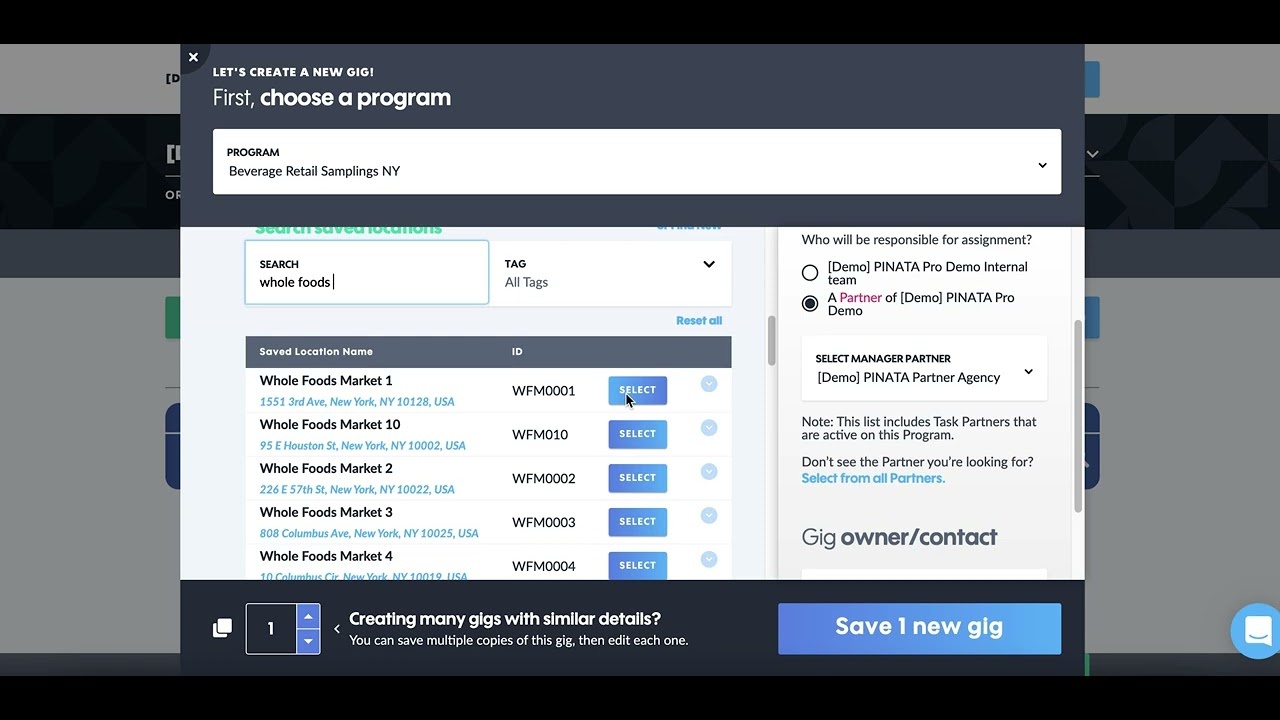
PINATA è una piattaforma di gestione delle attività progettata per i team di vendita, marketing e logistica che operano in prima linea, per gestire le operazioni nel mondo reale. Ti aiuta a migliorare efficienza, precisione e collaborazione inter-team attraverso una migliore coordinazione delle attività quotidiane.
Perché è una valida alternativa a Redmine: PINATA offre standardizzazione dei processi, gestione delle risorse umane e gestione strutturata delle attività. Lo strumento migliora l'engagement e le prestazioni degli operatori in prima linea e consente di monitorare e analizzare facilmente le attività, permettendo responsabilizzazione e risultati misurabili. Pensato per settori come retail, distribuzione e somministrazione di personale, fornisce supporto specializzato per le tue esigenze operative.
Funzionalità e integrazioni principali:
Funzionalità includono insight basati sui dati che aiutano il tuo team a prendere decisioni informate. La standardizzazione dei processi assicura che le attività vengano eseguite in modo coerente ed efficiente. Gli strumenti di collaborazione tra team mantengono tutti allineati e informati.
Integrazioni includono Salesforce, Slack, Google Workspace, Microsoft Teams, Dropbox, Box, Trello, Asana, Jira e monday.com.
Pros and Cons
Pros:
- Forti funzionalità di gestione delle risorse umane
- Offre insight basati sui dati
- Supporta la standardizzazione dei processi
Cons:
- Potrebbe richiedere conoscenze specifiche di settore
- Richiede configurazione per un utilizzo ottimale

Ideale per flussi di lavoro personalizzabili

monday.com è un sistema operativo per il lavoro che consente ai team di gestire progetti e flussi di lavoro con sicurezza. È ampiamente utilizzato dalle organizzazioni che necessitano di una piattaforma flessibile per gestire attività, progetti e lavoro di squadra.
Perché è una buona alternativa a Redmine: monday.com offre flussi di lavoro personalizzabili, che permettono al tuo team di adattare la piattaforma alle esigenze specifiche dei progetti. Fornisce un monitoraggio visivo dei progetti con bacheche e cronologie per migliorare chiarezza e concentrazione. Le funzionalità di automazione della piattaforma aiutano il team a ridurre i compiti manuali e ad aumentare l'efficienza. L'interfaccia intuitiva di monday.com rende facile la collaborazione e la gestione dei progetti da parte dei team.
Caratteristiche principali & integrazioni:
Caratteristiche includono il monitoraggio visivo dei progetti che consente di vedere i progressi a colpo d'occhio. Le funzionalità di automazione riducono le attività manuali e migliorano l'efficienza. L'interfaccia intuitiva facilita la collaborazione e la gestione dei progetti da parte del team.
Integrazioni includono Slack, Zoom, Google Drive, Microsoft Teams, Dropbox, Zendesk, Shopify, Jira, Asana e Salesforce.
Pros and Cons
Pros:
- Flussi di lavoro altamente personalizzabili
- Potenti funzionalità di automazione
- Interfaccia intuitiva
Cons:
- Richiede configurazione per un uso ottimale
- Accesso offline limitato
New Product Updates from monday AI Workspace
monday AI Workspace Adds Human Approval Routing
monday AI Workspace adds a human-in-the-loop approval block to AI Workflows, sending approval requests and routing workflow paths based on responses. For more information, visit monday AI Workspace's official site.

Quire
Ideale per organizzare le attività grazie alle funzionalità di trascinamento semplici
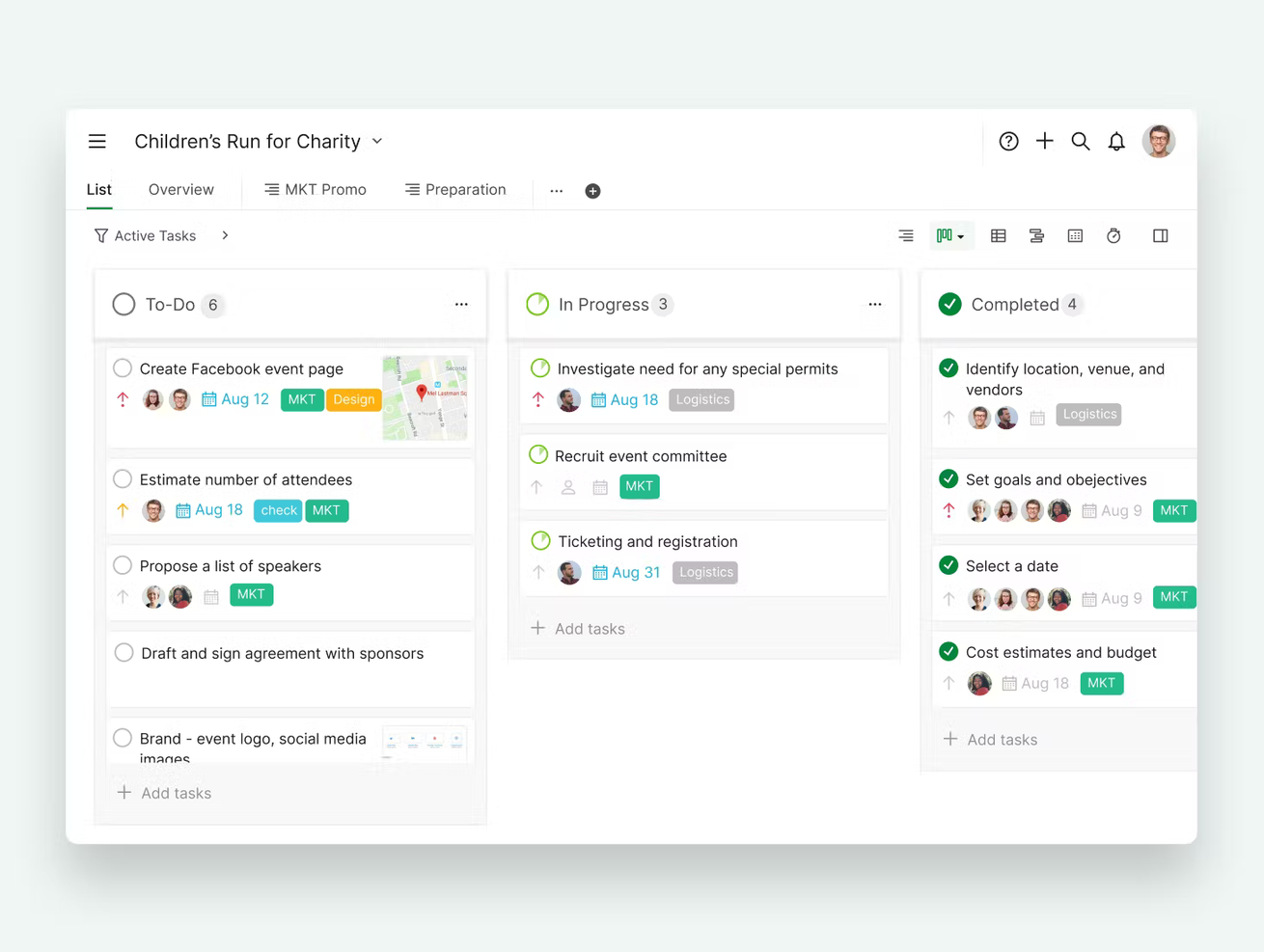
Quire è un software di gestione delle attività progettato per aiutare i team a rimanere organizzati. È ampiamente utilizzato da team creativi, startup e piccole imprese per pianificare e monitorare visivamente le attività.
Perché Quire è una buona alternativa a Redmine: La gestione delle attività tramite trascinamento di Quire consente di organizzare facilmente le attività senza complessità. Puoi creare e gestire attività, sotto-attività e progetti in modo visivamente chiaro, facilitando la collaborazione nel tuo team. Lo strumento offre anche un'interfaccia semplice che riduce il tempo necessario per imparare a usarlo. Questo lo rende una scelta ideale se cerchi una soluzione intuitiva per organizzare il tuo lavoro.
Funzionalità e integrazioni principali:
Le funzionalità includono la possibilità di creare attività con descrizioni dettagliate e date di scadenza. Puoi utilizzare la bacheca in stile Kanban per una migliore visualizzazione delle attività. Offre anche dipendenze tra attività, il che semplifica la gestione delle tappe fondamentali di un progetto.
Le integrazioni includono Slack, Google Drive, Dropbox, Zapier, GitHub e Microsoft Teams.
Pros and Cons
Pros:
- Riorganizzazione delle attività facile
- Adatto a team creativi
- Interfaccia semplice
Cons:
- Non ideale per team numerosi
- Capacità di report limitate
New Product Updates from Quire

Quire Adds Task and Standalone Reminders
Quire adds task reminders and standalone reminders with shared notifications, recurring schedules, and automatic date tracking. These updates help teams stay ahead of deadlines and manage reminders that do not need a task. For more information, visit Quire’s official site.
 .
.Altre alternative a Redmine
Ecco alcune alternative aggiuntive a Redmine che non sono entrate nella mia selezione, ma che vale comunque la pena prendere in considerazione:


Come valuto le alternative a Redmine
Valuto ogni strumento su due livelli: le funzionalità di base — tracciamento dei problemi, registrazione del tempo, viste Gantt — che ne permettono l'inclusione nell'elenco e gli elementi distintivi che lo differenziano.
Funzionalità di base (requisiti fondamentali per questo elenco)
Quando seleziono gli strumenti per il mio elenco, assegno a ciascuno un punteggio su una scala da 0 (non offre la funzionalità) a 5 (eccelle in quest'area) per ogni funzionalità di base elencata di seguito. Quindi trasformo il punteggio totale dello strumento in una percentuale. Ogni strumento deve raggiungere un punteggio totale minimo del 65% per essere preso in considerazione.
- Tracciamento di problemi e bug: verifico se è possibile creare, assegnare e stabilire la priorità dei problemi con stati configurabili, ad esempio spostando un bug da "segnalato" a "in revisione" fino a "risolto".
- Gestione di progetti e attività: ogni strumento dovrebbe consentire di organizzare il lavoro in progetti con sottoattività, traguardi e dipendenze, così che i team possano mappare i risultati da consegnare negli sprint.
- Diagrammi di Gantt e roadmap: cerco viste interattive della sequenza temporale in cui sia possibile trascinare le attività, modificare le dipendenze e visualizzare i flussi di lavoro sovrapposti nell'arco di un ciclo di rilascio.
- Monitoraggio del tempo: i team che migrano da Redmine spesso fanno affidamento sui registri delle ore, quindi valuto se uno strumento supporta la registrazione delle ore associate a problemi specifici, con suddivisioni nei report.
- Flussi di lavoro e campi personalizzati: verifico fino a che punto sia possibile personalizzare i tipi di problema, i set di campi e le regole di transizione, ad esempio richiedendo l'approvazione del controllo qualità prima che un problema passi allo stato "completato".
- Integrazione con il controllo delle versioni: collegare commit e richieste di pull da GitHub, GitLab o Bitbucket ai problemi corrispondenti è un flusso di lavoro fondamentale che valuto in ogni strumento di questo elenco.
Una volta ottenuto un elenco di strumenti che soddisfano questi criteri, valuto ciò che distingue ciascuna piattaforma.
Fattori distintivi (ciò che differenzia i fornitori)
Ecco come confronto i diversi fornitori:
Funzionalità di spicco
Le bacheche Agile con pianificazione degli sprint sono importanti in questo caso, perché molti utenti di Redmine fanno affidamento sui plugin per il supporto a Scrum o Kanban. Cerco strumenti che offrano direttamente funzionalità native per la gestione del backlog, il monitoraggio della velocità e le viste a bacheca. Vale la pena considerare anche un'opzione di hosting autonomo: i team che abbandonano Redmine spesso dispongono di un'infrastruttura locale che desiderano continuare a utilizzare. Valuto inoltre le funzionalità di automazione, come l'assegnazione automatica dei problemi in base alle etichette o l'attivazione di modifiche di stato quando si avvicina la scadenza di uno sprint.
Oltre le funzionalità
Il supporto alla migrazione è molto importante quando si passa da Redmine. Verifico se uno strumento è in grado di importare i problemi, i registri del tempo e gli allegati esistenti, in modo che il team non perda anni di cronologia dei progetti. Anche l'ecosistema per gli sviluppatori è importante: un'API REST e il supporto per i webhook consentono di collegare pipeline CI/CD o creare integrazioni personalizzate da cui il team dipende. Infine, considero anche distribuzione e licenze. Alcuni team hanno bisogno del cloud, altri devono rimanere su infrastruttura locale, e valuto se ogni fornitore supporta il modello più adatto alla vostra infrastruttura.
Perché cercare un'alternativa a Redmine?
Sebbene Redmine sia una buona scelta come software di gestione dei progetti, esistono diversi motivi per cui alcuni utenti cercano soluzioni alternative. Potresti essere alla ricerca di un'alternativa a Redmine perché…
- Hai bisogno di un'interfaccia più intuitiva
- Il tuo team necessita di opzioni avanzate di personalizzazione
- Vuoi una migliore integrazione con altri strumenti
- Hai bisogno dell'accesso da dispositivi mobili per il lavoro da remoto
- I tuoi progetti richiedono funzionalità di reportistica più complete
- Hai bisogno di un'assistenza clienti migliore
Se ti riconosci in una di queste situazioni, sei nel posto giusto. La mia lista include diverse opzioni di software per la gestione dei progetti più adatte ai team che affrontano queste difficoltà con Redmine e sono alla ricerca di soluzioni alternative.
Principali funzionalità di Redmine
Ecco alcune delle principali funzionalità di Redmine, per aiutarti a confrontare ciò che offrono le soluzioni alternative:
- Supporto per più progetti: Gestisci più progetti e sottoprogetti, avendo così la possibilità di gestire priorità concorrenti e servire una varietà di clienti e parti interessate.
- Controllo degli accessi flessibile basato sui ruoli: Assegna ruoli e autorizzazioni diversi ai membri del team e assicurati che le persone giuste abbiano il livello di accesso corretto.
- Sistema personalizzabile di monitoraggio dei problemi: Monitora i problemi con campi personalizzabili, semplificando il controllo e la gestione delle attività.
- Diagrammi di Gantt: Visualizza le tempistiche e le dipendenze del progetto per mantenere il team nei tempi previsti.
- Monitoraggio del tempo: Registra e gestisci il tempo dedicato alle attività per aiutare il team a rispettare le scadenze.
- Wiki e forum specifici per progetto: Promuovi la collaborazione del team attraverso wiki e forum dedicati a ogni progetto.
- Integrazione con i sistemi di controllo delle versioni: Integra diversi sistemi di controllo delle versioni per una gestione semplice del codice.
- Feed e notifiche via e-mail: Mantieni aggiornato il team con feed RSS e notifiche via e-mail per qualsiasi modifica.
- Supporto multilingue: Puoi accedere alla piattaforma in 49 lingue, rendendola adatta ai team internazionali.
- Compatibilità con i database: Utilizza database MySQL, PostgreSQL e SQLite per una gestione flessibile dei dati.