

Le 10 migliori alternative a Coda per i team di progetto nel 2026

Le migliori alternative a Coda - Selezione
- 2. Taskade


Se Coda non soddisfa le esigenze specifiche del tuo team a causa della mancanza di determinate funzionalità o perché non si adatta al tuo flusso di lavoro, esistono molte alternative a Coda che possono fare la differenza nella fluidità dei tuoi progetti.
Il software giusto può risolvere problemi come la disorganizzazione e la scarsa comunicazione. Ho utilizzato la mia esperienza nel testare e recensire gli strumenti di gestione dei progetti per esaminare le migliori alternative a Coda e aiutarti a trovare quella più adatta al tuo team.
Ti guiderò attraverso ogni opzione e spiegherò cosa le distingue, così potrai capire con chiarezza quale strumento può aiutarti ad affrontare le tue sfide.
Che cos'è Coda?
Coda è un software di gestione dei progetti che combina documenti, fogli di calcolo e app in un'unica piattaforma flessibile. È popolare tra project manager, responsabili dei team e professionisti creativi che desiderano uno strumento per organizzare i progetti e collaborare in modo efficace.
La struttura basata su tabelle di Coda, le funzionalità di integrazione e i modelli personalizzabili ti aiutano a organizzare i dati, automatizzare le attività e migliorare la collaborazione del team. Offre inoltre uno spazio di lavoro versatile in cui il tuo team può gestire progetti e idee in modo efficiente.
Perché fidarsi dei nostri consigli sui software
Il nostro team testa e recensisce software dal 2012. In quanto project manager noi stessi, sappiamo quanto sia difficile — e importante — scegliere il software giusto.
Per questa guida, abbiamo valutato gli strumenti attraverso test pratici e ricerche indipendenti, assegnando un punteggio agli strumenti in base ai nostri criteri di selezione. Ci basiamo inoltre sulle competenze di leader di pensiero del settore e di professionisti attivi nella gestione dei progetti.
Le nostre recensioni riflettono il nostro giudizio editoriale umano, non un discorso di vendita.
Revisori esperti:
Tabella di confronto delle alternative a Coda
Confronta fianco a fianco i dettagli sui prezzi e altre specifiche delle alternative a Coda:
| Tool | Best For | Trial Info | Price | ||
|---|---|---|---|---|---|
| 1 | Ideale per i cruscotti del portafoglio dei progetti | Prova gratuita di 14 giorni | A partire da $15/utente/mese (con fatturazione annuale) | Website | |
| 2 | Piano gratuito disponibile | A partire da $20/mese | Website | ||
| 3 | Ideale per i team open source basati innanzitutto su database | Piano gratuito disponibile | A partire da $10/utente/mese (fatturato annualmente) | Website | |
| 4 | Ideale per la documentazione dei team collegata a Jira | Piano gratuito disponibile | Da $5.78/utente/mese | Website | |
| 5 | Ideale per app aziendali integrate | Piano gratuito disponibile | A partire da $38.90/utente/mese | Website | |
| 6 | La scelta migliore per documenti e banche dati in un unico spazio di lavoro | Piano gratuito disponibile | A partire da $10/user/month (con fatturazione annuale) | Website | |
| 7 | Ideale per la pianificazione del carico di lavoro tra progetti | Prova gratuita di 14 giorni | A partire da $9/utente/mese (con fatturazione annuale) | Website | |
| 8 | Ideale per progetti basati su database relazionali | Piano gratuito disponibile; prova gratuita di 14 giorni | A partire da $20/utente/mese (con fatturazione annuale) | Website | |
| 9 | Ideale per la produttività tutto-in-uno | Piano gratuito disponibile | Da $12/utente/mese | Website | |
| 10 | Ideale per la pianificazione tra progetti e la gestione del carico di lavoro | Piano gratuito + demo gratuita disponibile | Da $10.99/utente/mese (fatturato annualmente) | Website |

Recensioni delle migliori alternative a Coda
Di seguito trovi i miei riepiloghi dettagliati per ciascuna delle migliori alternative a Coda incluse nella mia selezione. Le mie recensioni offrono uno sguardo approfondito alle funzionalità principali, ai pro e contro, alle integrazioni e ai casi d’uso ideali di ogni strumento, per aiutarti a trovare quello più adatto a te.

Ideale per i cruscotti del portafoglio dei progetti
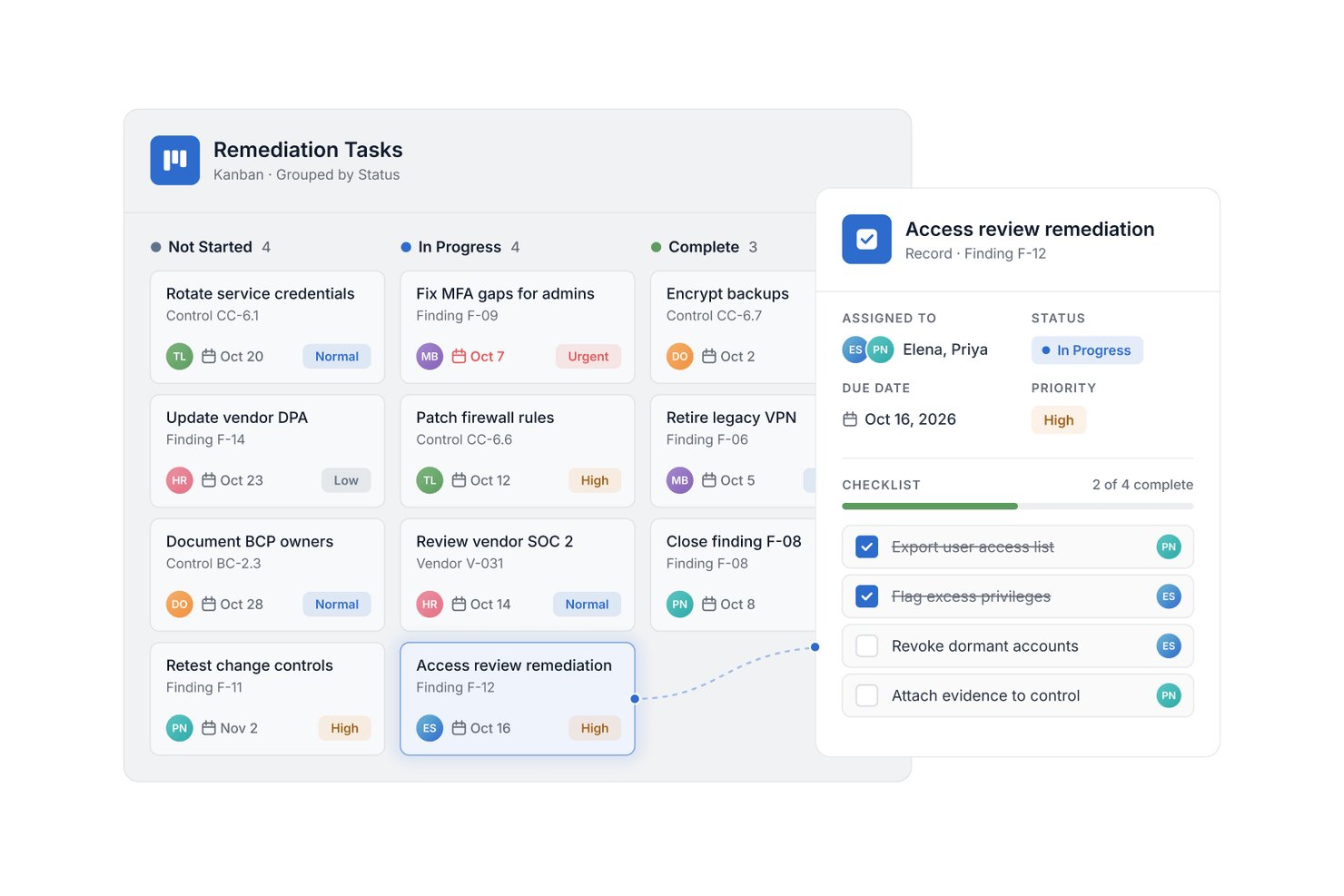
SmartSuite è una piattaforma configurabile per la gestione del lavoro, pensata per i team di progetto che devono coordinare attività interfunzionali, chiarire le responsabilità e monitorare i progressi tramite flussi di lavoro condivisi.
Per chi è più adatto SmartSuite?
SmartSuite è adatto ai team di progetto e agli uffici di gestione dei progetti (PMO) che necessitano di cruscotti del portafoglio per monitorare stato, responsabilità e priorità tra più iniziative.
Perché ho scelto SmartSuite
Ho scelto SmartSuite, la mia scelta come “ideale per i cruscotti del portafoglio dei progetti”, come alternativa a Coda perché i suoi cruscotti monitorano stato, responsabilità e priorità tra le iniziative. Mi piace abbinare queste visualizzazioni a flussi di lavoro condivisi e configurabili, così i team interfunzionali possono gestire il lavoro dei progetti in modo coerente.
Funzionalità principali di SmartSuite
- Diagrammi di Gantt: Mappa attività, dipendenze e traguardi su una sequenza temporale.
- Monitoraggio del tempo: Registra le ore associate agli elementi tramite un cronometro o un inserimento manuale.
- Moduli: Raccogli richieste e dati iniziali come elementi strutturati.
- Automazioni: Configura regole di attivazione e azione per approvazioni e attività in ritardo.
Integrazioni di SmartSuite
SmartSuite documenta 16 integrazioni native, tra cui Microsoft Teams, Jira Cloud, Salesforce, HubSpot, Gmail, Outlook, Google Drive, Google Sheets, Box e Dropbox; è supportato anche Zapier. SmartSuite offre un'API REST e notifiche automatiche per integrazioni personalizzate.
Pros and Cons
Pros:
- I cruscotti del portafoglio mettono in evidenza lo stato delle iniziative in corso contemporaneamente
- Gli elementi collegati associano i piani ai dati operativi
- Le automazioni senza codice instradano le approvazioni e le attività in ritardo
Cons:
- Le opzioni delle formule limitano le analisi complesse in stile foglio di calcolo
- Le prestazioni nei periodi di punta possono rallentare il caricamento delle pagine

Taskade
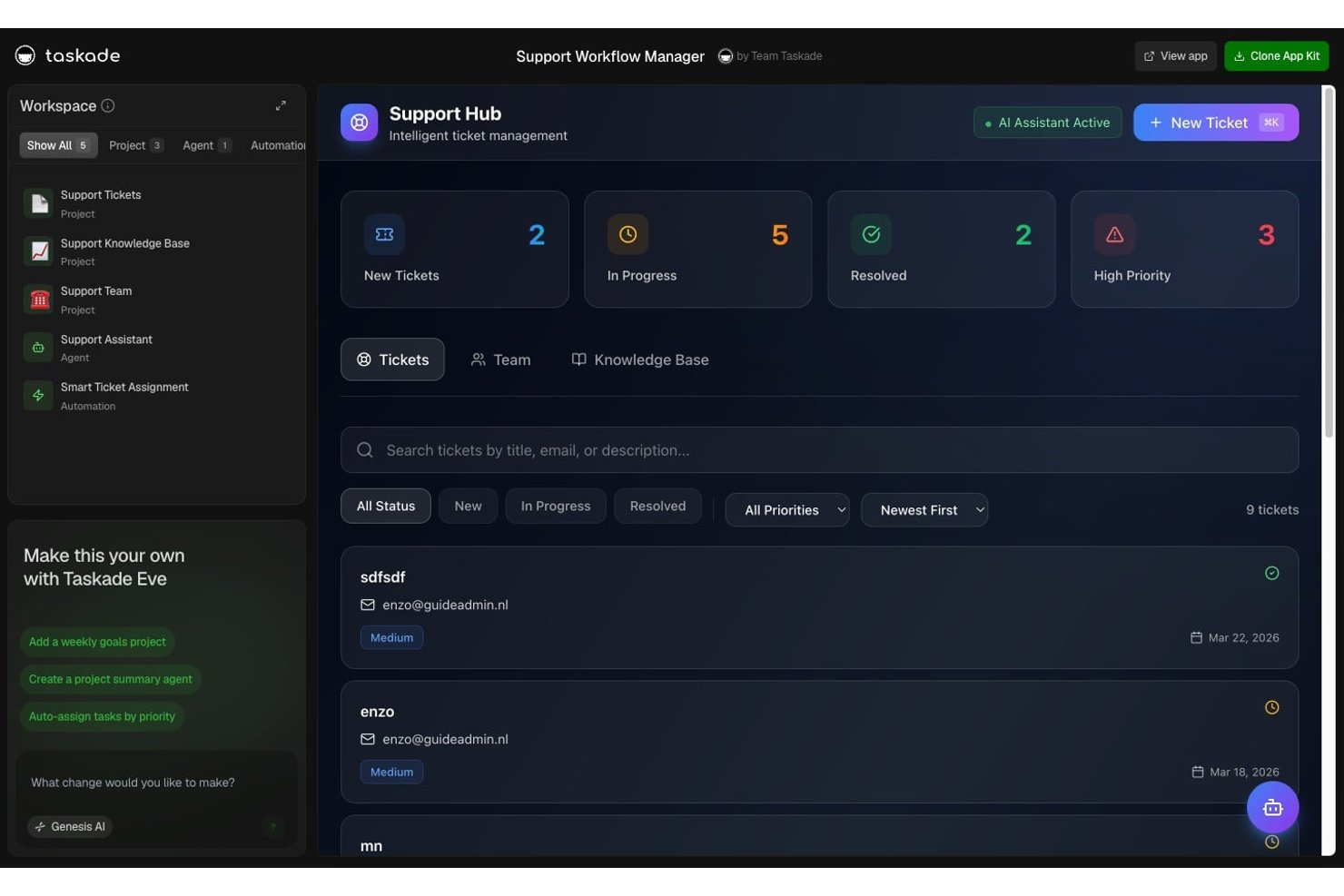
Taskade è uno spazio di lavoro collaborativo per progetti destinato ai team di prodotto, ingegneria e ai team interfunzionali che desiderano riunire attività, note e conversazioni del team per coordinare il lavoro e mantenere visibile il contesto del progetto.
Per chi è più adatto Taskade?
Taskade è adatto ai team di prodotto e operativi che desiderano creare applicazioni e flussi di lavoro basati sull'intelligenza artificiale senza scrivere codice.
Perché ho scelto Taskade
Ho scelto Taskade come alternativa a Coda per la creazione di applicazioni di intelligenza artificiale senza codice. Un'istruzione può generare un'applicazione ospitata collegata ai dati del progetto, agli agenti di intelligenza artificiale e alle automazioni. Mi piace il fatto che un team di prodotto possa creare un monitoraggio del lancio in cui un agente risponde alle domande contenute nei documenti del progetto e i flussi di lavoro aggiornano i record man mano che il lavoro procede.
Funzionalità principali di Taskade
- Visualizzazioni del progetto: passa dalla visualizzazione a elenco, bacheca, tabella, mappa mentale o calendario per gli stessi dati del progetto.
- Diagramma di Gantt: mappa le attività su una sequenza temporale con dipendenze e traguardi.
- Attività ricorrenti: imposta la ripetizione delle attività su base giornaliera, settimanale, mensile o annuale.
- Campi personalizzati: aggiungi campi dati strutturati alle visualizzazioni del progetto.
Integrazioni di Taskade
Taskade offre oltre 100 integrazioni native, tra cui Slack, Microsoft Teams, Google Calendar, Google Sheets, GitHub, Jira, Linear, Stripe, HubSpot e Salesforce, e si connette a Zapier. Supporta inoltre webhook in entrata, richieste HTTP e un'API per integrazioni personalizzate.
Pros and Cons
Pros:
- Le applicazioni create tramite istruzioni si connettono ai dati del progetto
- Modelli di attività pronti all'uso che supportano i flussi di lavoro più comuni
- Mappe mentali e molteplici visualizzazioni delle attività
Cons:
- I crediti di intelligenza artificiale condivisi limitano la creazione prolungata di applicazioni
- Nessun accesso offline al lavoro del progetto
Baserow
Ideale per i team open source basati innanzitutto su database
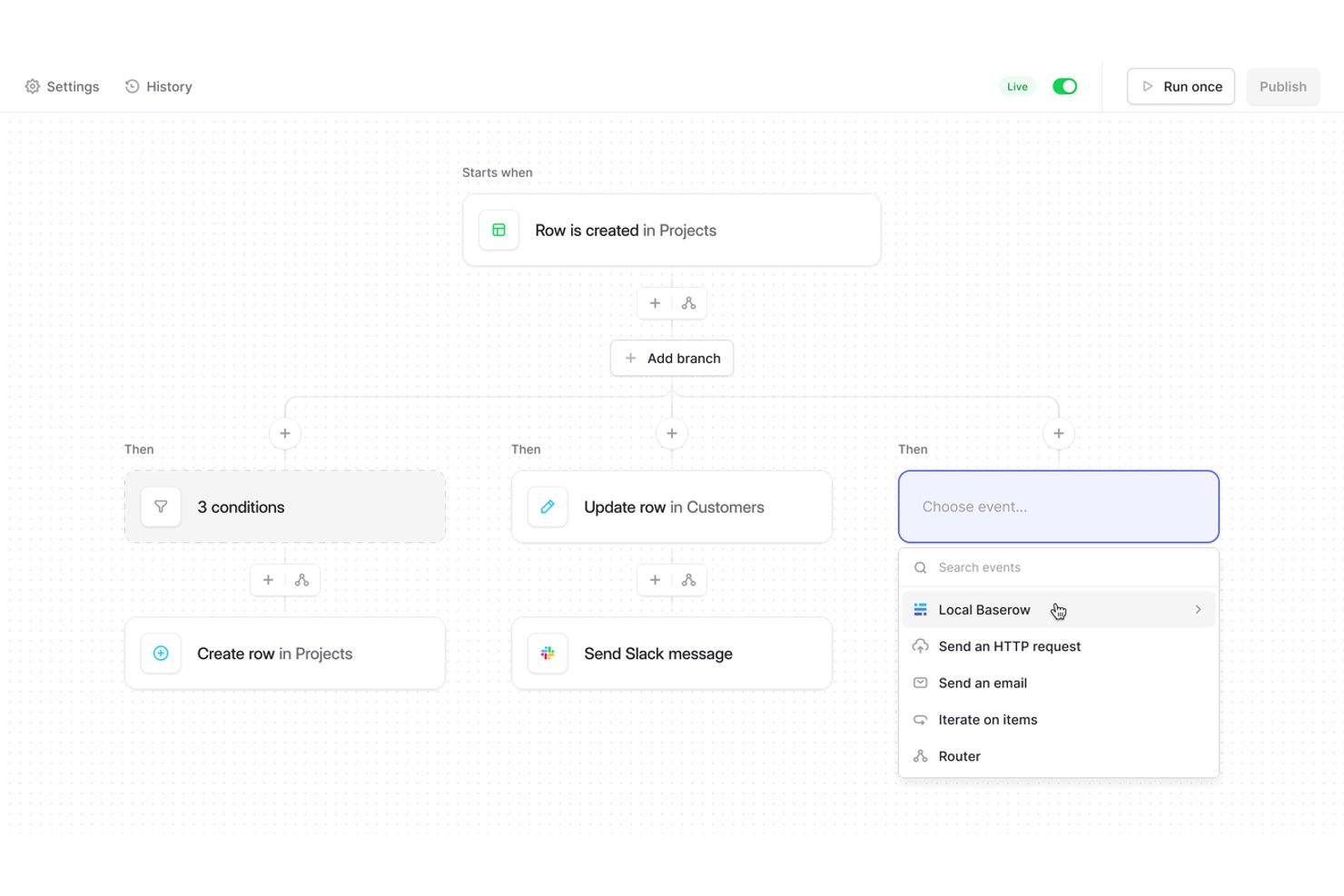
Baserow offre ai team di prodotto e operativi uno spazio di lavoro collaborativo per organizzare i dati dei progetti, collegare i record correlati e creare flussi di lavoro condivisi senza dover fare affidamento su fogli di calcolo e documenti frammentati.
Per chi è più adatto Baserow?
Baserow è adatto ai team tecnici e operativi che desiderano strumenti open source basati innanzitutto su database, adattabili ai propri flussi di lavoro.
Perché ho scelto Baserow
Ho scelto Baserow come alternativa a Coda per la categoria “Ideale per i team open source basati innanzitutto su database”. I campi con tabelle collegate connettono progetti, responsabili e risultati, mentre le viste filtrate offrono a ogni flusso di lavoro la propria selezione degli stessi record. Apprezzo anche l’opzione con hosting autonomo quando un team ha bisogno di conservare i dati dei progetti su un’infrastruttura sotto il proprio controllo.
Funzionalità principali di Baserow
- Vista modulo: Crea moduli che aggiungono le risposte inviate come righe del database.
- Vista Kanban: Visualizza i record come schede raggruppate in colonne.
- Vista calendario: Inserisci i record in un calendario utilizzando i campi data.
- API REST: Accedi ai record del database e aggiornali tramite endpoint API.
Integrazioni di Baserow
Baserow offre integrazioni documentate con Make e Zapier, oltre a un’API REST per le integrazioni personalizzate.
Pros and Cons
Pros:
- L’hosting autonomo mantiene i dati dei progetti sotto il tuo controllo
- I record collegati connettono il lavoro tra le tabelle del database
- Le viste riorganizzano i record condivisi per flusso di lavoro
Cons:
- Il generatore di applicazioni offre un controllo limitato dello stile
- I recensori segnalano prestazioni più lente con l’aumentare della quantità di dati

Ideale per la documentazione dei team collegata a Jira
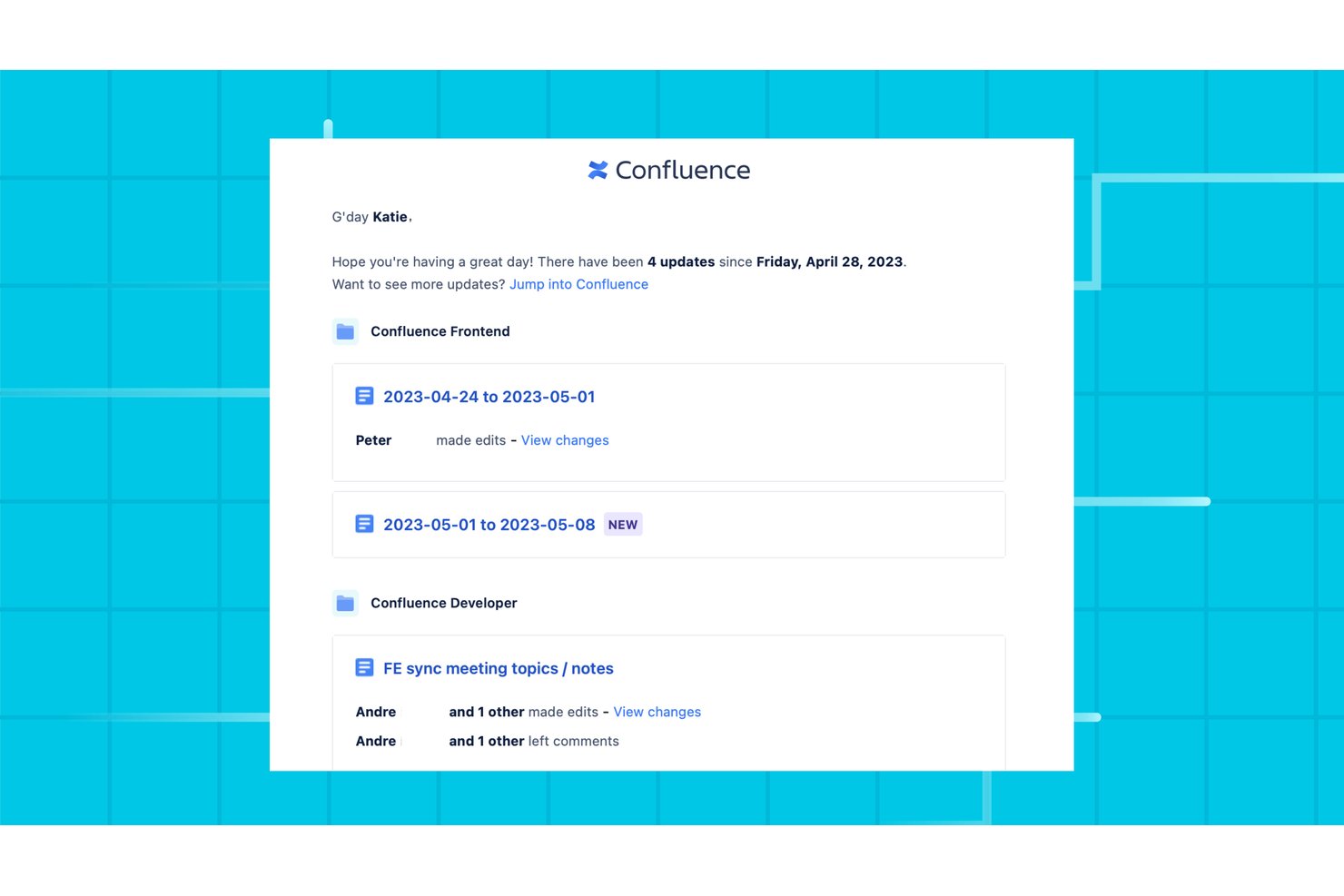
Confluence è uno spazio di lavoro collaborativo per i team di prodotto, ingegneria e operations che devono documentare le decisioni, condividere le conoscenze sui progetti e mantenere requisiti e piani accessibili mentre il lavoro cambia.
Per chi è più adatto Confluence?
Confluence è adatto ai team di prodotto e ingegneria che desiderano collegare piani di progetto, decisioni e requisiti al lavoro svolto in Jira.
Perché ho scelto Confluence
Ho scelto Confluence per la documentazione dei team collegata a Jira perché le macro per problemi e filtri di Jira mostrano i dettagli dei ticket nelle pagine dei progetti. Mi piace il fatto che i team possano conservare i requisiti e i registri delle decisioni accanto al lavoro di Jira che descrivono, rendendo più semplice ricostruire il percorso di una modifica, dalla motivazione al problema pertinente.
Funzionalità principali di Confluence
- Modelli di pagina: Avvia le pagine con modelli per note delle riunioni, piani di progetto e registri delle decisioni.
- Commenti in linea: Lascia feedback sul testo selezionato e menziona i colleghi nei commenti della pagina.
- Cronologia delle pagine: Esamina le versioni precedenti delle pagine e ripristinane una quando necessario.
- Lavagne bianche: Abbozza idee e organizza note adesive su una tela visiva condivisa.
Integrazioni di Confluence
Confluence offre un'integrazione nativa con Jira per visualizzare elementi di lavoro, report e collegamenti nelle pagine, oltre a incorporamenti di Loom integrati. Le integrazioni supportate da Atlassian collegano Confluence a Slack, Microsoft Teams e Trello, mentre migliaia di altre app sono disponibili tramite Atlassian Marketplace.
Pros and Cons
Pros:
- L'organizzazione basata sugli spazi mantiene raggruppate le conoscenze dei progetti
- La cronologia delle pagine rende tracciabili le modifiche e i ripristini
- I modelli velocizzano la documentazione ripetitiva dei progetti
Cons:
- La ricerca può restituire risultati incoerenti o difficili da ordinare
- La modifica e la formattazione delle pagine possono risultare macchinose

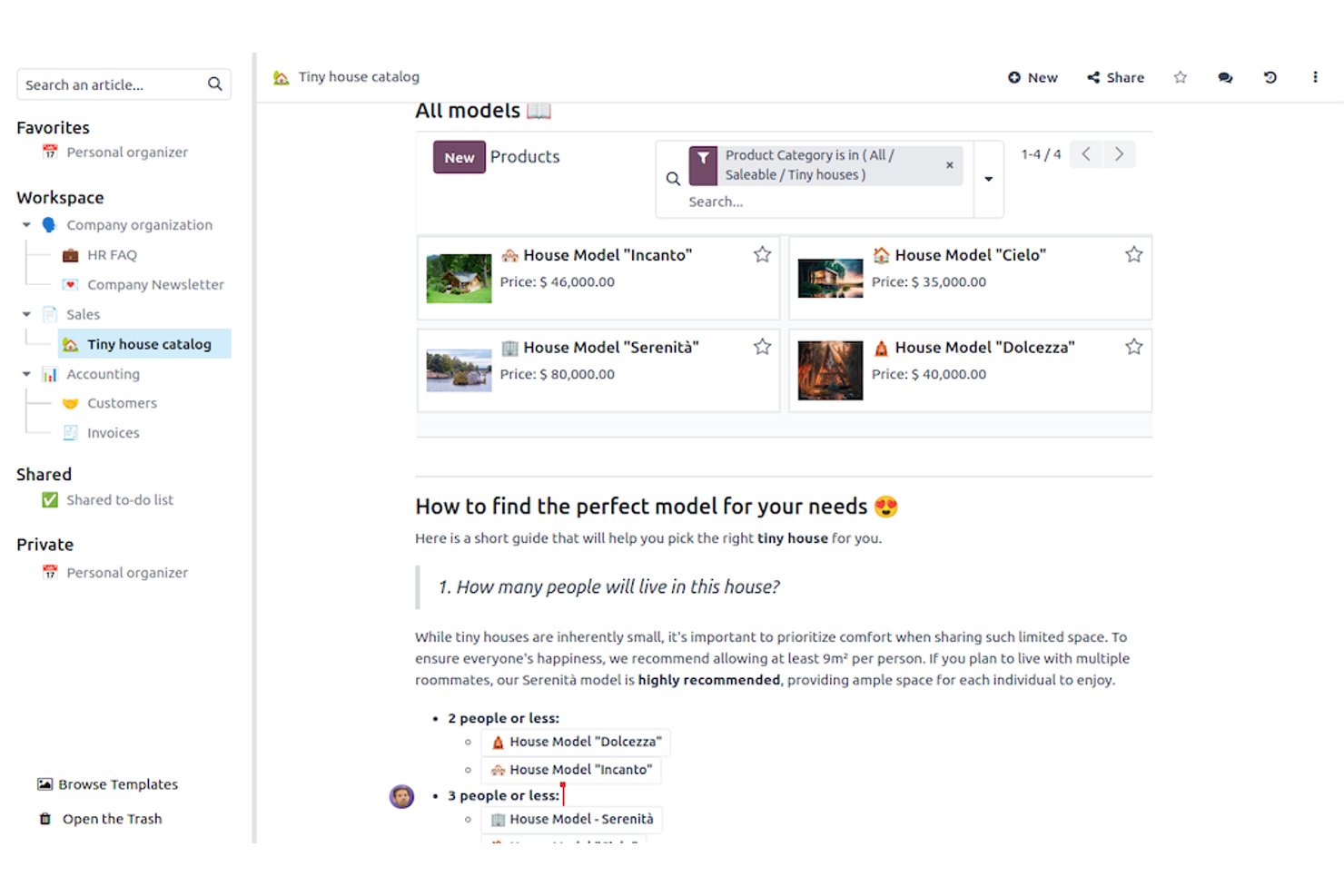
Odoo è una piattaforma di gestione aziendale con strumenti per i progetti collegati ad app per aree come vendite e finanza, che aiuta i team interfunzionali a coordinare il lavoro sui progetti con le attività operative quotidiane.
Per chi è più adatto Odoo?
Odoo è adatto ai team operativi che desiderano gestire i progetti all'interno di una suite più ampia di app aziendali connesse.
Perché ho scelto Odoo
Ho scelto Odoo come alternativa a Coda perché abbina il lavoro sui progetti ad app aziendali integrate. La sua app Progetti tiene traccia delle attività e dei fogli presenze, mentre i collegamenti a Vendite e Contabilità aiutano i team a collegare il lavoro di consegna agli ordini dei clienti e alle fatture. Apprezzo questa combinazione quando lo stato del progetto deve essere visualizzato insieme ai dati operativi.
Funzionalità principali di Odoo
- Visualizzazione Gantt: Pianifica il lavoro su una timeline e controlla scadenze, avanzamento e dipendenze.
- Visualizzazione calendario: Riprogramma il lavoro trascinando gli elementi su nuove date.
- Visualizzazione Kanban: Sposta il lavoro tra le fasi e filtra o raggruppa la bacheca.
- Attività ricorrenti: Imposta la ripetizione delle attività su base giornaliera, settimanale o mensile.
Integrazioni di Odoo
Odoo collega Progetti alle sue app Vendite e Contabilità, mentre la sua app Calendario si sincronizza con Google Calendar e Outlook; Odoo CRM è inoltre disponibile tramite Zapier. Odoo fornisce un'API esterna per integrazioni personalizzate nei piani Custom.
Pros and Cons
Pros:
- Le visualizzazioni Gantt, Kanban e calendario supportano la pianificazione
- I fogli presenze delle attività rendono visibili l'impegno e i costi del progetto
- Le attività ricorrenti e le dipendenze supportano flussi di lavoro ripetibili
Cons:
- L'assegnazione della pianificazione e dei fogli presenze può risultare confusa
- I controlli dei progetti sembrano meno completi rispetto alle piattaforme dedicate

Notion
La scelta migliore per documenti e banche dati in un unico spazio di lavoro

Notion è una piattaforma flessibile di gestione dei progetti per le squadre di prodotto e ingegneria che devono coordinare il lavoro, condividere il contesto dei progetti e mantenere visibili le decisioni tra le squadre.
A chi è più adatto Notion?
Notion è adatto ai responsabili di prodotto e ai responsabili delle squadre che hanno bisogno di un centro flessibile per i piani di progetto, le decisioni e le conoscenze della squadra.
Perché ho scelto Notion
Ho scelto Notion come alternativa a Coda perché è “La scelta migliore per documenti e banche dati in un unico spazio di lavoro”. Uso le proprietà delle banche dati e le viste collegate per monitorare un piano di sviluppo del prodotto, poi apro la pagina di ogni elemento per consultare specifiche, decisioni e note delle riunioni. In questo modo il contesto della distribuzione rimane accanto al lavoro.
Caratteristiche principali di Notion
- Automazioni delle banche dati: Attiva azioni quando una proprietà cambia o viene eseguita una pianificazione.
- Moduli: Raccogli le richieste di progetto e aggiungi gli invii a una banca dati.
- Sottoattività e dipendenze: Suddividi le attività in passaggi più piccoli e collega il lavoro dipendente.
- Modelli di progetto: Avvia i progetti con strutture di attività e impaginazioni di pagina riutilizzabili.
Integrazioni di Notion
Notion si integra con Slack e GitHub e la sua galleria delle connessioni include Google Drive e Figma; inoltre, si collega a Zapier. L'API di Notion supporta integrazioni personalizzate.
Pros and Cons
Pros:
- Le pagine associano le decisioni ai dati strutturati delle attività
- Le viste collegate delle banche dati mantengono le specifiche accanto alle attività
- I modelli riutilizzabili riducono la configurazione ripetitiva dei progetti
Cons:
- Le banche dati di grandi dimensioni possono caricarsi lentamente
- Le funzionalità di reportistica sono inferiori a quelle delle piattaforme dedicate ai progetti

Ideale per la pianificazione del carico di lavoro tra progetti
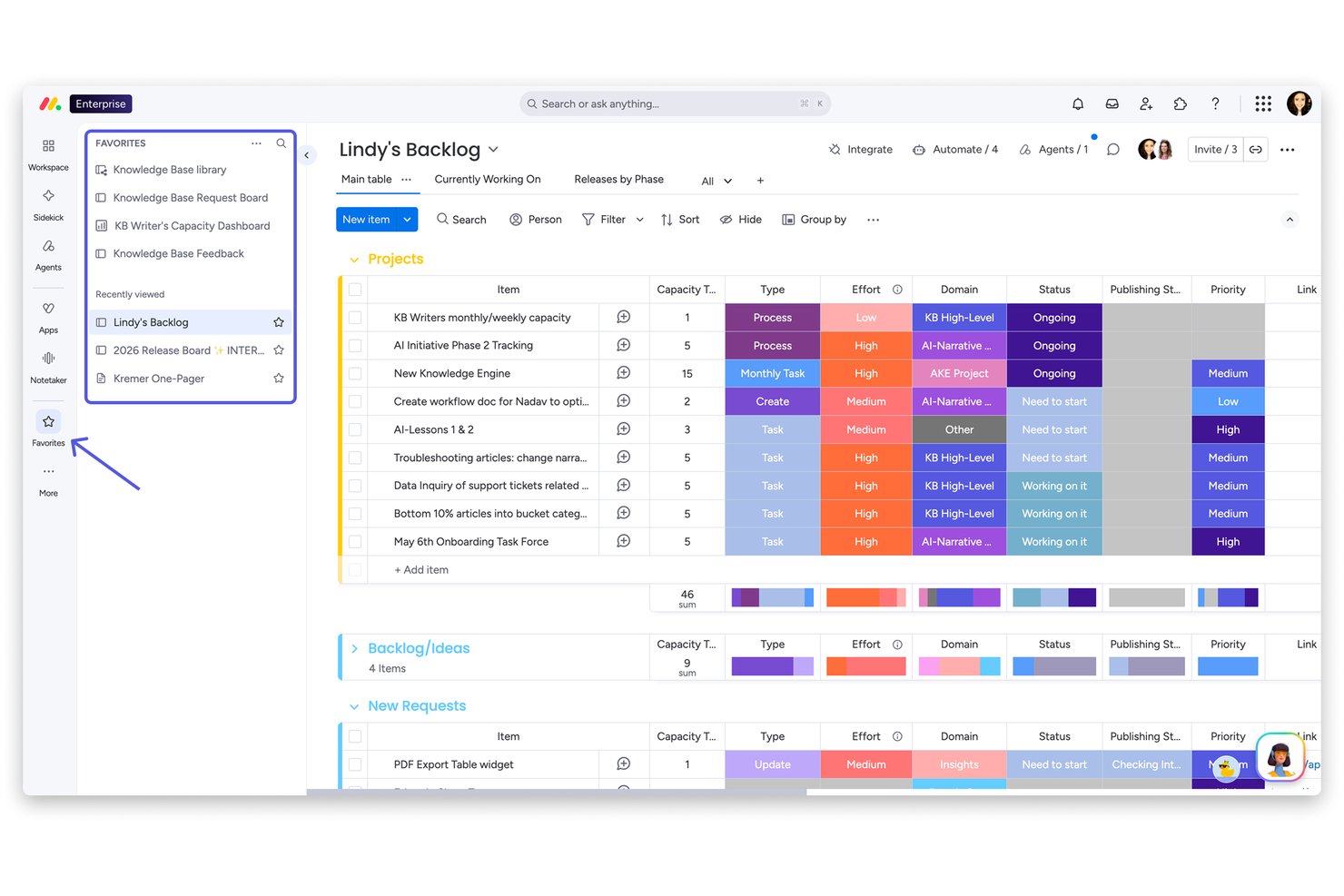
monday AI Workspace offre ai team di prodotto, ingegneria e progettazione una piattaforma visiva per la gestione dei progetti, che consente di coordinare attività e flussi di lavoro, chiarire le responsabilità e monitorare i progressi nelle attività interfunzionali.
Per chi è più adatto monday AI Workspace?
monday AI Workspace è adatto ai responsabili di progetto e ai responsabili della consegna che hanno bisogno di una visione condivisa della capacità del team tra iniziative simultanee.
Perché ho scelto monday AI Workspace
Ho scelto monday AI Workspace perché la sua pianificazione del carico di lavoro tra progetti mi aiuta a vedere dove le iniziative concorrenti richiedono l'impiego delle stesse persone. Uso le sue viste visive dei progetti per monitorare la responsabilità delle attività e i progressi tra prodotto, ingegneria e progettazione, quindi verifico la capacità del team prima di modificare le priorità o assegnare altro lavoro.
Funzionalità principali di monday AI Workspace
- WorkForms: Raccogli le richieste di progetto tramite moduli che inviano le richieste a una bacheca.
- Automazioni: Imposta regole per spostare gli elementi tra le bacheche o creare bacheche di progetto a partire da modelli.
- Dipendenze e diagramma di Gantt: Collega le attività dipendenti e visualizza le loro relazioni su un diagramma di Gantt.
- Documenti di lavoro basati sull'IA: Crea bozze di sintesi del progetto e genera contenuti di supporto nei documenti di lavoro.
Integrazioni di monday AI Workspace
monday.com offre oltre 850 integrazioni e app, tra cui Slack, Google Calendar, Microsoft Teams, GitHub, GitLab, Salesforce, HubSpot e Outlook. Supporta inoltre Zapier e fornisce un'API e SDK per integrazioni personalizzate.
Pros and Cons
Pros:
- Le viste del carico di lavoro tra progetti evidenziano i conflitti di capacità
- Le bacheche visive chiariscono le responsabilità tra i flussi di lavoro
- Moduli e automazioni indirizzano le richieste nei progetti
Cons:
- Il lavoro incentrato sui documenti risulta meno naturale rispetto a Coda
- La suddivisione delle attività annidate si ferma a un solo livello
New Product Updates from monday AI Workspace
monday AI Workspace Adds Human Approval Routing
monday AI Workspace adds a human-in-the-loop approval block to AI Workflows, sending approval requests and routing workflow paths based on responses. For more information, visit monday AI Workspace's official site.

Airtable
Ideale per progetti basati su database relazionali

Airtable offre ai team di prodotto e ingegneria uno spazio di lavoro flessibile per pianificare i progetti, collegare le attività correlate e modificare i flussi di lavoro quando cambiano requisiti, responsabili e scadenze.
Per chi è più adatto Airtable?
Airtable è adatto ai responsabili della gestione dei progetti dei team tecnologici che necessitano di dati di progetto strutturati e interconnessi, invece di un flusso di lavoro basato su un elenco fisso di attività.
Perché ho scelto Airtable
Ho scelto Airtable come soluzione “Ideale per progetti basati su database relazionali” perché i record collegati connettono funzionalità, responsabili e rilasci senza duplicare i dati del progetto. Mi piace utilizzare le viste filtrate per offrire ai team di prodotto e ingegneria prospettive diverse sullo stesso elenco di attività, mentre i riepiloghi mostrano i progressi tra i vari rilasci.
Funzionalità principali di Airtable
- Automazioni: Attivano azioni o notifiche quando i record soddisfano condizioni specifiche.
- Progettazione delle interfacce: Consente di creare pannelli di controllo e pagine di progetto personalizzate per diversi ruoli del team.
- Vista cronologica: Permette di pianificare il lavoro su una sequenza temporale e modificare le date delle attività.
- Moduli: Consentono di raccogliere richieste o aggiornamenti di progetto e aggiungere le risposte a una tabella.
Integrazioni di Airtable
Airtable offre integrazioni native con Slack, Google Drive, Google Calendar, Box e Salesforce, che richiede un piano Enterprise. Si connette inoltre a Zapier e offre un'API web per integrazioni personalizzate.
Pros and Cons
Pros:
- I record collegati mantengono connessi i dati del progetto
- Le diverse viste adattano gli elenchi delle attività ai ruoli del team
- Le automazioni gestiscono le azioni di routine attivate dai record
Cons:
- Gli hub di progetto incentrati sui documenti sono più adatti a Coda
- I programmi con molte dipendenze spesso richiedono soluzioni alternative

ClickUp
Ideale per la produttività tutto-in-uno

ClickUp è una piattaforma di gestione dei progetti per i team di prodotto e ingegneria che riunisce attività, documentazione e lavoro interfunzionale in un unico spazio di lavoro, con l'idoneità indicata 'Ideale per la produttività tutto-in-uno'.
Per chi è più adatto ClickUp?
ClickUp è adatto ai responsabili di progetto che coordinano il lavoro di prodotto e ingegneria tra più team.
Perché ho scelto ClickUp
Ho scelto ClickUp come alternativa a Coda perché le sue attività e i suoi documenti si trovano in un unico spazio di lavoro, in linea con l'indicazione 'Ideale per la produttività tutto-in-uno'. Mi piace il fatto che i responsabili di prodotto possano documentare i requisiti nei documenti, collegarli alle attività di consegna e monitorare i responsabili dell'ingegneria al variare dell'ambito.
Funzionalità principali di ClickUp
- Visualizzazioni dei progetti: Passa dalle visualizzazioni Elenco, Bacheca, Calendario e Gantt.
- Campi personalizzati: Aggiungi dettagli come priorità, impegno o stato agli elementi di lavoro.
- Automazioni del flusso di lavoro: Imposta regole per attivare azioni quando vengono soddisfatte determinate condizioni.
- Monitoraggio del tempo: Registra il tempo dedicato agli elementi di lavoro e consulta i fogli presenze.
Integrazioni di ClickUp
ClickUp documenta integrazioni native con Slack, GitHub, GitLab, Bitbucket, Google Drive, Google Calendar, Zoom, HubSpot, Figma e Microsoft Teams, oltre a connettersi a Zapier. Offre inoltre un'API pubblica per le integrazioni personalizzate.
Pros and Cons
Pros:
- Collega direttamente i documenti di progetto alle attività di consegna
- Le sottoattività nidificate e le dipendenze chiariscono i responsabili della consegna
- Più visualizzazioni associano lo stato delle attività al carico di lavoro
Cons:
- Le tabelle dei documenti possono frustrare i team che sostituiscono Coda
- Gli spazi di lavoro di grandi dimensioni possono caricarsi lentamente


Asana offre ai team di prodotto, ingegneria e marketing una piattaforma condivisa per la gestione del lavoro, che consente di pianificare i progetti, assegnare attività e mantenere chiare priorità e responsabilità al variare dei requisiti.
Per chi è più adatto Asana?
Asana è adatto ai project manager che supervisionano portafogli interfunzionali e hanno bisogno di una visibilità condivisa su responsabilità e tempistiche di consegna.
Perché ho scelto Asana
Ho scelto Asana come alternativa a Coda per la pianificazione tra progetti e la gestione del carico di lavoro: i portafogli mi aiutano a monitorare la consegna tra le diverse iniziative, mentre la funzionalità Carico di lavoro mostra le assegnazioni rispetto alla capacità del team. Utilizzo le tempistiche dei progetti e le dipendenze per individuare quando un ritardo in un flusso di lavoro rischia di compromettere un altro e riassegnare le responsabilità prima che cambino le scadenze.
Funzionalità principali di Asana
- Campi personalizzati: Aggiungi valori strutturati, come stato, priorità o impegno, alle attività del progetto.
- Moduli: Raccogli richieste tramite moduli che creano attività in un progetto.
- Regole: Imposta trigger e azioni per automatizzare gli aggiornamenti ricorrenti delle attività.
- Approvazioni: Contrassegna le attività per la revisione e registra l'approvazione o le modifiche richieste.
Integrazioni di Asana
La directory delle app di Asana include oltre 200 integrazioni di partner, tra cui Slack, Google Drive, Microsoft Teams, Jira Cloud, GitHub, GitLab, Dropbox e Zapier. Asana offre anche un'API per le integrazioni personalizzate.
Pros and Cons
Pros:
- I portafogli evidenziano i rischi di consegna tra progetti
- Il carico di lavoro mette in relazione le assegnazioni con la capacità del team
- Le dipendenze chiariscono l'impatto dei ritardi sulle tempistiche successive
Cons:
- Meno adattabile rispetto ai sistemi di documenti e tabelle di Coda
- La personalizzazione dei report per gli stakeholder può sembrare limitata
Altre alternative a Coda
Ecco alcune alternative aggiuntive a Coda che non sono entrate nella mia selezione, ma che vale comunque la pena prendere in considerazione:
- Fibery
Ideale per la modellazione di dati relazionali tra i team
- Smartsheet
Ideale per la pianificazione Gantt su scala aziendale
- Wrike
Ideale per il monitoraggio del portafoglio tra più progetti
- Lark
Ideale per i team operativi con un budget da startup
- Softr
Ideale per la creazione di portali per clienti senza codice
- Aha!
Ideale per la pianificazione dei piani di prodotto
- FuseBase
Ideale per la collaborazione tramite portali per i clienti
- NocoDB
Ideale per il monitoraggio di database auto-ospitati
- Bitrix24
Ideale per la collaborazione di team basata sul CRM


Come valuto le alternative a Coda
Divido la valutazione in due livelli: le funzionalità di base che ogni strumento deve garantire — database relazionali, viste delle attività e collaborazione in tempo reale — e i fattori distintivi che differenziano le opzioni migliori.
Funzionalità principali (requisiti essenziali per questo elenco)
Quando seleziono gli strumenti per il mio elenco, assegno a ciascuno un punteggio su una scala da 0 (non offre la funzionalità) a 5 (eccelle in quest'area) per ogni funzionalità principale elencata di seguito. Quindi, calcolo il punteggio totale dello strumento e lo converto in percentuale. Ogni strumento deve raggiungere un punteggio totale minimo del 65% per essere preso in considerazione.
- Documenti e database flessibili: verifico se è possibile creare tabelle relazionali all'interno dei documenti, ad esempio collegando una tabella del lavoro arretrato di uno sprint a un documento sintetico di progetto, e fare riferimento ai dati tra diverse pagine.
- Viste multiple dei progetti: ogni strumento dovrebbe consentire di visualizzare lo stesso insieme di dati come tabella, bacheca kanban, calendario e sequenza temporale, così da poter pianificare gli sprint e monitorare le tappe.
- Gestione delle attività e dei progetti: cerco assegnatari, scadenze, dipendenze e sottoattività che permettano di gestire un vero flusso di lavoro per la distribuzione, non solo di organizzare un elenco di cose da fare.
- Collaborazione in tempo reale: le squadre hanno bisogno di modifica collaborativa in tempo reale, commenti organizzati in discussioni e @menzioni, affinché un gruppo distribuito possa aggiornare un documento di progetto senza conflitti tra versioni.
- Automazioni e flussi di lavoro: valuto se sia possibile configurare eventi di attivazione come l'assegnazione automatica delle attività quando cambia uno stato o l'invio di una notifica su Slack quando cambia una scadenza.
- Integrazioni e API: lo strumento dovrebbe connettersi all'insieme di strumenti già in uso — Slack, GitHub, Google Workspace, Jira — e offrire anche un'API aperta per la sincronizzazione personalizzata dei dati.
Una volta ottenuto un elenco di strumenti che soddisfano questi criteri, considero ciò che distingue ogni piattaforma.
Fattori distintivi (ciò che differenzia i fornitori)
Ecco come confronto e metto a confronto i diversi fornitori:
Funzionalità distintive
Le funzionalità di intelligenza artificiale sono importanti in questo caso: cerco strumenti che consentano di riassumere il documento di una retrospettiva dello sprint o di generare elenchi di attività dagli appunti di una riunione senza dover cambiare applicazione. Anche i cruscotti di portafoglio sono un elemento distintivo, soprattutto quando è necessario aggregare lo stato di più flussi di lavoro per un aggiornamento destinato a un comitato direttivo. Valuto inoltre i portali per clienti o ospiti, poiché i responsabili di progetto delle agenzie e i responsabili dei servizi ai clienti spesso devono condividere l'avanzamento di un progetto in tempo reale senza aggiungere i portatori di interesse esterni come utenti a pagamento.
Oltre le funzionalità
I percorsi di migrazione meritano particolare attenzione: verifico se uno strumento è in grado di importare documenti e tabelle di Coda senza perdere formule o riferimenti collegati. Anche la struttura dei prezzi è importante, in particolare il modo in cui un fornitore gestisce gli account degli utenti con accesso in sola visualizzazione e degli ospiti, poiché la maggior parte degli spazi di lavoro per i progetti coinvolge portatori di interesse che necessitano soltanto dell'accesso in lettura. Valuto inoltre il livello di sicurezza, cercando la conformità SOC 2, il supporto per SSO/SAML e i log di controllo che le squadre IT aziendali generalmente richiedono prima di approvare un nuovo strumento per gli spazi di lavoro.
Perché cercare un'alternativa a Coda?
Sebbene Coda sia una buona scelta come software di gestione dei progetti, alcuni utenti cercano soluzioni alternative. Potresti essere alla ricerca di un'alternativa a Coda perché…
- Hai bisogno di funzionalità avanzate per la reportistica
- Il tuo team richiede l'accesso offline
- Desideri più opzioni di integrazione
- Hai bisogno di un'interfaccia utente più semplice
- La tua azienda sta crescendo rapidamente
- Hai bisogno di un supporto migliore per le app mobili
Se ti riconosci in una di queste situazioni, sei nel posto giusto. La mia lista include diverse opzioni di software per la gestione dei progetti più adatte ai team che affrontano queste difficoltà e cercano soluzioni alternative.
Funzionalità principali di Coda
Ecco alcune delle funzionalità principali di Coda, per aiutarti a confrontarlo con ciò che offrono le soluzioni alternative:
- Integrazione: Si connette con oltre 600 strumenti per migliorare i flussi di lavoro del tuo team.
- Coda AI: Un assistente IA che aiuta il tuo team a trovare informazioni, generare contenuti e automatizzare le attività in modo efficiente.
- Modelli personalizzabili: Offre modelli per diversi team per aiutarti a ottimizzare i tuoi processi.
- Hub del team: Spazi centralizzati in cui il tuo team può collaborare su strategie, programmi e progetti.
- Collaborazione dinamica: Combina la familiarità dei documenti con il coinvolgimento tipico delle app per migliorare il lavoro di squadra.
- Gestione dei dati: Sincronizza tabelle e modifiche tra i documenti per sostituire i fogli di calcolo tradizionali e offrire una gestione dei dati migliore.
- Prezzi: I piani tariffari di Coda partono da $10 al mese per creatore di documenti e arrivano fino a un piano Enterprise personalizzato. È disponibile anche un piano gratuito.