Los 10 mejores programas de gestión de proyectos de marketing para 2026

10 Lista de los mejores programas de gestión de proyectos de marketing


El mejor software de gestión de proyectos de marketing te ayuda a entregar campañas y proyectos a tiempo, dentro del presupuesto y respetando el alcance. Sin esta herramienta, te encontrarás con malentendidos con los clientes, plazos incumplidos y falta de claridad sobre quién es responsable de cada tarea, todo lo cual puede provocar el fracaso del proyecto.
He utilizado mis 15 años de experiencia en marketing y gestión de proyectos para evaluar más de 25 herramientas de gestión de proyectos de marketing. Lee a continuación mi análisis de cada herramienta, sus funciones clave y casos de uso. Te ayudaré a encontrar la herramienta adecuada para mejorar la visibilidad, la responsabilidad y la colaboración en tus proyectos de marketing, así como a hacer un seguimiento de las cargas de trabajo del equipo, del tiempo y el presupuesto utilizados y del retorno de la inversión del proyecto.
Por qué confiar en nuestras recomendaciones de software
Nuestro equipo lleva probando y evaluando software desde 2012. Como gestores de proyectos, sabemos lo difícil —y lo importante— que es elegir el software adecuado.
Para esta guía, evaluamos las herramientas mediante pruebas prácticas e investigación independiente, puntuando las herramientas según nuestros criterios de selección. También nos basamos en la experiencia de líderes de opinión del sector y de profesionales en activo de la gestión de proyectos.
Nuestras reseñas reflejan nuestro criterio editorial humano, no un discurso de ventas.
Revisores expertos:
Tabla comparativa de software de gestión de proyectos de marketing
Esta tabla comparativa resume los detalles de precios de mis principales selecciones de software de gestión de proyectos de marketing:
| Tool | Best For | Trial Info | Price | ||
|---|---|---|---|---|---|
| 1 | Mejor para soluciones de extremo a extremo | 14 días de prueba gratis | Desde $8/usuario/mes | Website | |
| 2 | Ideal para agencias y servicios profesionales | 14 días de prueba gratuita | Desde $12.50/usuario/mes | Website | |
| 3 | Ideal para el seguimiento del rendimiento financiero | Prueba gratuita de 14 días + demo gratuita disponible | Desde $19.90/usuario/mes (facturación anual) | Website | |
| 4 | Ideal para organizaciones en crecimiento | 14 días de prueba gratuita | Desde $9.80/usuario/mes | Website | |
| 5 | Ideal para flujos de trabajo de proyectos de marketing impulsados por IA | Demostración gratuita | Desde $20/usuario/mes | Website | |
| 6 | Ideal para la entrega de servicios de ciclo completo | Demostración gratuita disponible | Precios a consultar | Website | |
| 7 | Ideal para diversas vistas de proyectos | Prueba gratuita de 14 días | Desde $12/usuario/mes | Website | |
| 8 | Ideal para objetivos y hitos de campañas | Prueba gratuita de 15 días + plan gratuito + demo gratis disponible | Desde $4/usuario/mes (facturado anualmente) | Website | |
| 9 | Ideal para profesionales independientes y marketing de pequeñas empresas | Prueba gratuita de 14 días disponible | Desde $29/mes | Website | |
| 10 | Ideal para automatizaciones sin código | Prueba gratuita de 30 días | Desde $35/usuario/mes (facturado anualmente) | Website |


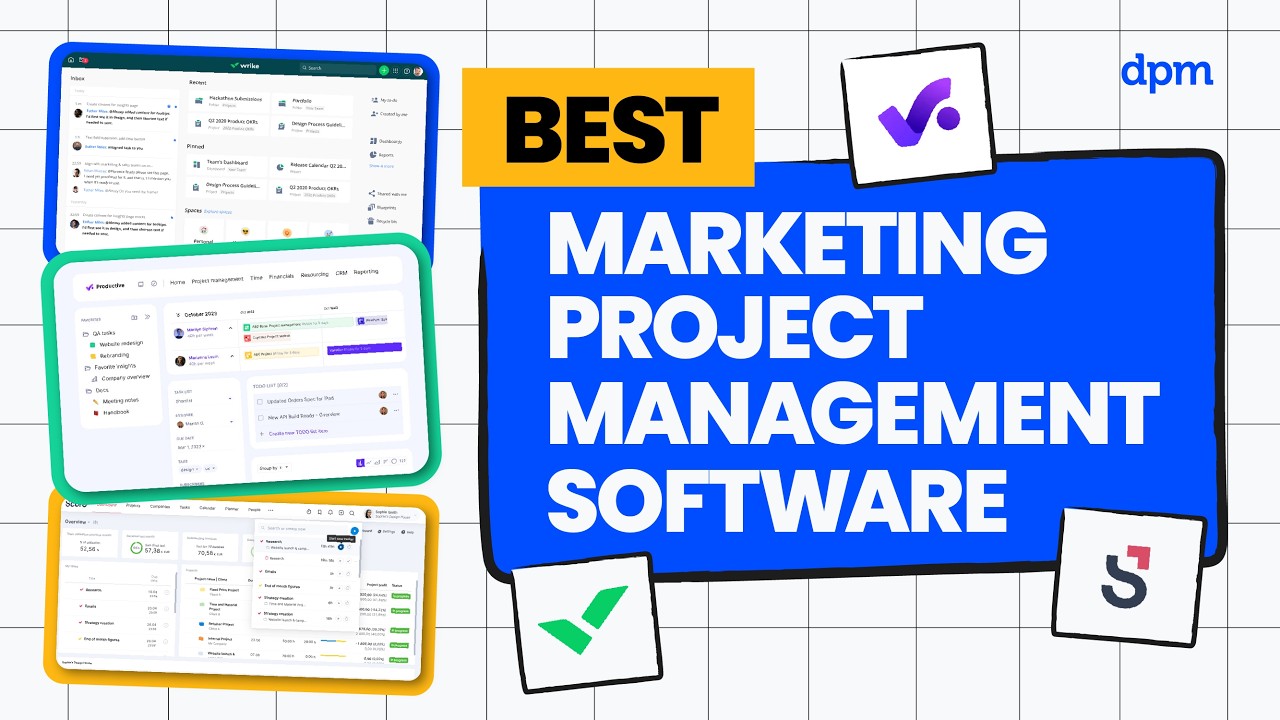
Reseñas del mejor software de gestión de proyectos de marketing
Estas son mis reseñas del mejor software de gestión de proyectos para agencias de marketing que he utilizado.

Mejor para soluciones de extremo a extremo
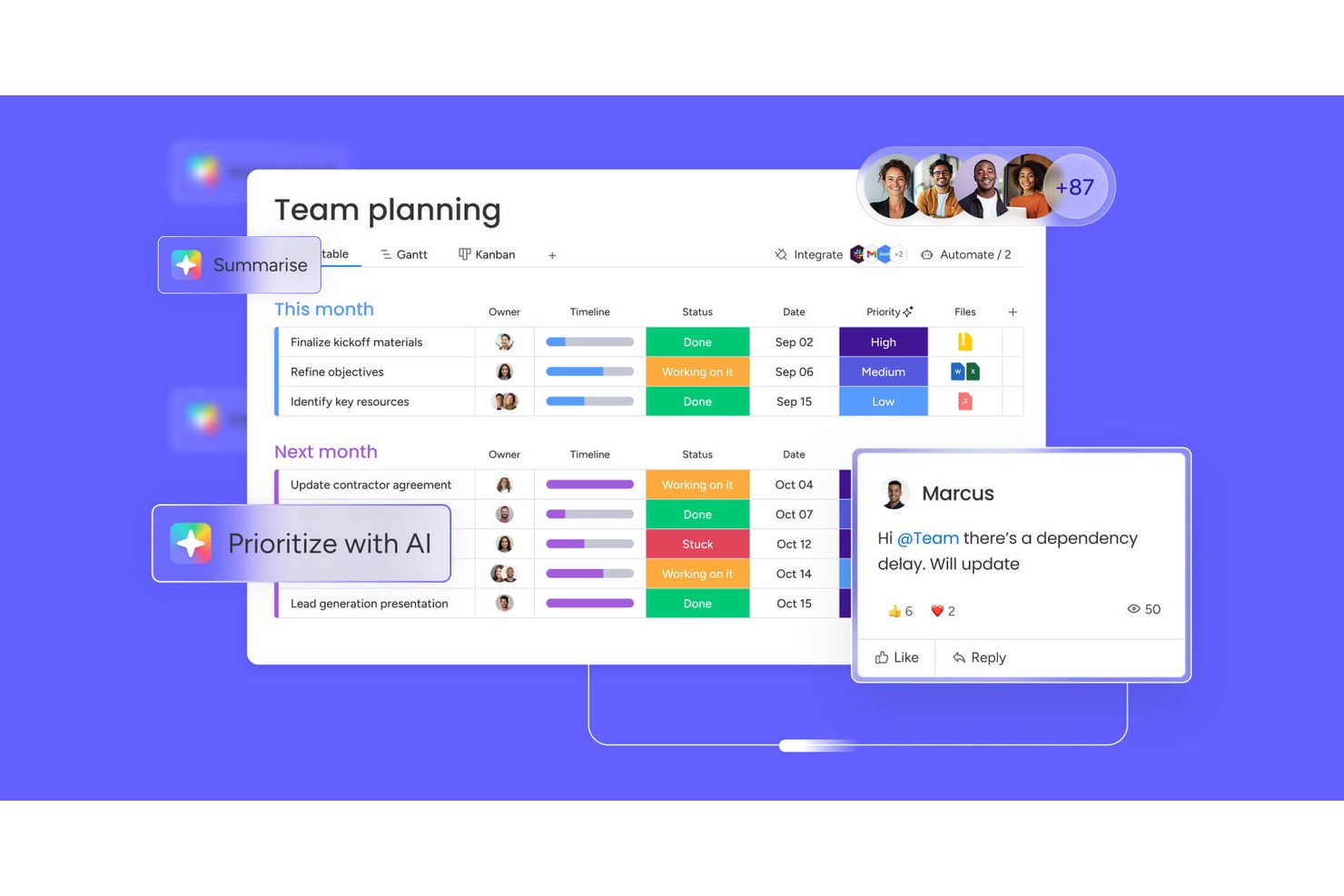
monday AI Workspace es una plataforma configurable de gestión de trabajo que combina la planificación de campañas, flujos de trabajo impulsados por IA, gestión de recursos e informes interdepartamentales para proyectos y portafolios de marketing.
¿Para quién es mejor monday AI Workspace?
Es ideal para equipos de operaciones de marketing de tamaño medio a empresarial y agencias internas que gestionan múltiples campañas simultáneas con diferentes partes interesadas interfuncionales.
Por qué elegí monday AI Workspace
Incluí monday AI Workspace en mi lista porque es una de las pocas plataformas donde puedo ejecutar una campaña desde el briefing hasta el lanzamiento sin cambiar de herramienta. Me gusta especialmente el Constructor de Flujos de Trabajo con IA, que me permite encadenar agentes y automatizaciones para que tareas como la recepción de briefs y las actualizaciones a las partes interesadas se realicen sin intervención manual. El Bloque de Aprobación Humana lo hace práctico: puedo incluir puntos de aprobación directamente en el flujo de trabajo y pasar automáticamente a la siguiente etapa en cuanto se reciba la aprobación.
Características clave de monday AI Workspace
- Vistas de planificación múltiples: Cambia fácilmente entre vistas de Gantt, Kanban, calendario, cronograma y tabla para programación avanzada de campañas.
- Formularios de ingreso personalizables: Captura, redirige y prioriza briefs creativos y solicitudes de marketing de forma automática dentro de tu espacio de trabajo.
- Planificación de carga de trabajo y capacidad: Visualiza y asigna los recursos del equipo en función de la disponibilidad y el rol a través de proyectos simultáneos.
- Integraciones nativas con herramientas de marketing: Conéctate directamente con herramientas como Adobe Creative Cloud, HubSpot, Salesforce y Google Ads para centralizar activos y actividades de campaña.
Integraciones de monday AI Workspace
monday AI Workspace ofrece cientos de integraciones nativas, incluyendo Slack, Google Workspace, Microsoft 365, Salesforce, Jira, GitHub, Zoom, Dropbox, HubSpot y Zendesk. También es compatible con Zapier y proporciona una API para integraciones personalizadas.
Pros and Cons
Pros:
- La redacción de briefs impulsada por IA acelera el inicio de campañas
- Los formularios de ingreso automatizan la redirección de solicitudes creativas
- Las vistas de portafolio cruzado mejoran la visibilidad de múltiples proyectos
Cons:
- Las herramientas de revisión nativas son inferiores a las alternativas especializadas
- La complejidad de la configuración de automatizaciones aumenta con la escala de la campaña
New Product Updates from monday AI Workspace
monday AI Workspace Adds Human Approval Routing
monday AI Workspace adds a human-in-the-loop approval block to AI Workflows, sending approval requests and routing workflow paths based on responses. For more information, visit monday AI Workspace's official site.

Ideal para agencias y servicios profesionales

Productive es un software integral de gestión para agencias que te brinda las herramientas y datos necesarios para mantener tu agencia o empresa de servicios profesionales funcionando sin problemas.
Danyon Togia, fundador de la agencia de SEO Expert SEO, dice que Productive ha sido ideal para su equipo. “Usar Productive fue como finalmente tener mi factura de internet, luz y gas con una sola compañía”, comenta. Y ha supuesto una gran diferencia: “Tener todo en un solo sistema significó menos malabares, más enfoque y un flujo de trabajo más fluido en cada proyecto para mí y mi equipo”, afirma.
Por qué elegí Productive
Productive ofrece gestión de clientes y prospectos en el embudo de ventas, lo que también te permite administrar el flujo de acuerdos y organizar las ventas. La función de planificación de recursos, el temporizador y las funciones de colaboración en tareas te ayudan a asegurar que el trabajo se complete a tiempo, facturar a los clientes precisamente y mantener al equipo colaborando. También obtienes informes útiles sobre rentabilidad y gastos que ayudan a gestionar las finanzas, así como reportes en tiempo real sobre márgenes, utilización e historial individual de empleados o contratistas con la empresa e informes salariales.
Funciones clave de Productive
Productive también ofrece varias funciones que pueden ayudarte, a ti y a tu equipo, a mejorar el proceso de gestión de proyectos de marketing.
- Gestión de tareas: Puedes agilizar la asignación de tareas y el seguimiento del progreso para que tu equipo se mantenga alineado con los objetivos del proyecto.
- Portal para clientes: Ofrece un espacio dedicado para que los clientes vean actualizaciones de proyectos y colaboren, lo que mejora la transparencia y la comunicación.
- Tableros personalizados: Permite crear vistas personalizadas de datos de proyectos y enfocarse en los indicadores más importantes.
- Información impulsada por IA: Las funciones de inteligencia artificial ofrecen analíticas predictivas e insights que te ayudan a tomar decisiones proactivas.
Integraciones de Productive
Las integraciones incluyen Xero, QuickBooks, HubSpot, Jira, Slack, Zapier, Google Calendar y Sage.
Pros and Cons
Pros:
- Alinea la entrega con el seguimiento financiero
- Permite simular cambios de personal o presupuesto
- Señala proyectos que se desvían del presupuesto
Cons:
- La profundidad de los informes puede requerir configuración
- Curva de aprendizaje pronunciada para el uso completo de funciones
New Product Updates from Productive
Productive Adds Voice Dictation, Slack Connector, Proposals, and Overtime
Productive adds voice dictation, a Slack Connector, proposal controls, and overtime tracking. These updates support faster AI interactions, client proposals, and time management. For more information, visit Productive’s official site.

Scoro
Ideal para el seguimiento del rendimiento financiero

Scoro es un software integral de gestión del trabajo diseñado para diferentes servicios profesionales, como el marketing. Cuenta con un conjunto de herramientas para apoyar la entrega de proyectos de marketing desde la concepción hasta la facturación.
Por qué elegí Scoro
La plataforma es una solución de gestión de proyectos todo en uno que proporciona control y visibilidad sobre cada parte de tu proyecto de marketing, como la elaboración de presupuestos y facturación, embudos de ventas, cuentas de clientes, planificación de recursos, cronogramas y asignación de tareas. Me gustó que Scoro tenga un panel centralizado e intuitivo que ofrece una visión general de todas las actividades de marketing, permitiendo a los equipos hacer un seguimiento de cada campaña desde el principio hasta su ejecución.
Además, Scoro ofrece análisis exhaustivos y capacidades de informes en tiempo real. Los gerentes de marketing pueden aprovechar estas herramientas para evaluar el rendimiento de las campañas frente a los KPI y ajustar las estrategias en tiempo real.
Principales características de Scoro
Scoro ofrece una variedad de otras herramientas que pueden mejorar aún más los procesos de gestión de proyectos de marketing de tu equipo.
- Informes y análisis: Haz seguimiento y analiza la rentabilidad por cliente, servicio, equipo o proyecto, con perspectivas sobre el rendimiento y las finanzas de la agencia.
- Automatización y facturación: Automatiza tareas repetitivas y la facturación de servicios recurrentes para ayudar a tu agencia a cobrar más rápido y mantener la rentabilidad.
- Herramientas de colaboración: Facilita la comunicación entre los miembros del equipo a través de hilos de discusión y comentarios para mantener a todos conectados.
- Gestión de tiempo y calendarios: Utiliza temporizadores integrados y un calendario unificado para gestionar el seguimiento del tiempo, reuniones y plazos.
Integraciones de Scoro
Las integraciones incluyen Google Calendar, HubSpot, Jira, Slack, Xero, QuickBooks, Zendesk, WooCommerce, Asana, Dropbox, PayPal, Expensify, Stripe, Mailchimp, Sage Intacct, Microsoft Exchange y más. También puedes conectar otras aplicaciones mediante su integración con Zapier.
Pros and Cons
Pros:
- Vincula presupuestos directamente a los planes de proyecto
- Combina finanzas con operaciones de proyectos
- Ofrece soporte multimoneda y para varias entidades
Cons:
- La interfaz puede resultar recargada en usos avanzados
- La personalización en plantillas puede ser limitada
New Product Updates from Scoro

Scoro Adds Time Mobile App and ELI Improvements
Scoro adds the Scoro Time mobile app for iOS/Android to track time anywhere and expands ELI with attachments, smarter filtering, and trigger-based actions. For more information, visit Scoro's official site.

Wrike
Ideal para organizaciones en crecimiento
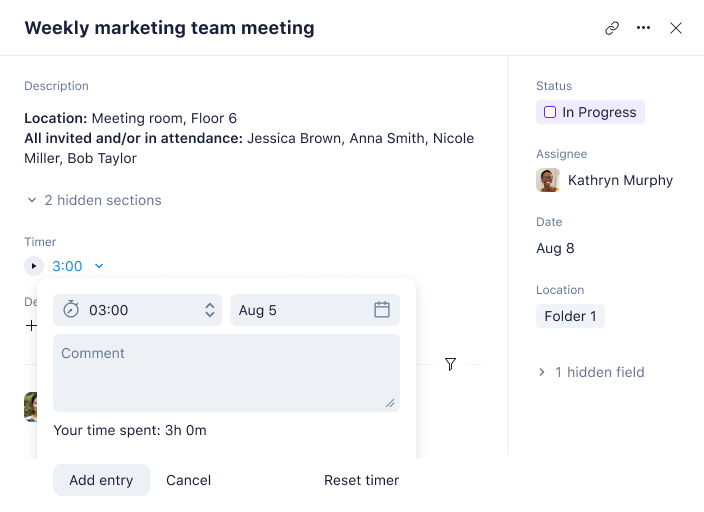
Wrike es una galardonada plataforma de gestión de proyectos de marketing diseñada para mejorar los procesos de gestión de proyectos de marketing, permitiendo una mayor productividad y aumentando el retorno de inversión.
Hablé con Nicola Leiper, Directora y Jefa de Gestión de Proyectos en Espresso Translations, sobre la experiencia de su equipo con Wrike. 'Wrike salvó el acuerdo más importante que tenía con un cliente cuando nuestro proyecto farmacéutico se desvió del camino', explica. 'Estábamos lidiando con plazos de cumplimiento médico y preguntas regulatorias que lo estaban retrasando todo. Dibujé un flujo de trabajo en Wrike y pude ver claramente en qué punto se expandiría el problema y, en cuestión de minutos, todo nuestro equipo estaba en una mejor posición', cuenta, haciendo alusión a algunos rápidos ajustes de recursos y resolución de problemas.
Por qué elegí Wrike
Es altamente configurable y escalable, y puedes personalizar flujos de trabajo, paneles, informes y formularios de solicitud para maximizar tu esfuerzo. Wrike te permite cambiar entre tableros Kanban, diagramas de Gantt interactivos con función de arrastrar y soltar, y vistas de carga de trabajo para visualizar prioridades.
También incluye seguimiento de tiempo y gastos, gestión de tareas y proyectos, revisión visual, plantillas para tareas comunes de marketing, creación de informes, así como gestión y asignación de recursos. Wrike es especialmente ideal para la colaboración en diseño y contenidos gracias a su interfaz visualmente atractiva y la capacidad de comunicarte directamente dentro de las tareas.
Incluso ofrece la opción de crear flujos de solicitud y aprobación, y permite a los miembros del equipo editar y gestionar archivos y documentos en un solo lugar.
Principales funciones de Wrike
Wrike ofrece otras funciones que son invaluables para la gestión de proyectos de marketing.
- Gestión de recursos: Esta función te ayuda a equilibrar las cargas de trabajo de tu equipo y asegurarte de que los proyectos se completen a tiempo sin sobrecargar a ningún miembro.
- Calendarios de marketing: Ofrece una visión global de los calendarios de producción de contenidos y plazos de las campañas para lograr alineación entre equipos y proyectos.
- Paneles: Puedes realizar un seguimiento visual del rendimiento de tus campañas y eventos y obtener información que te ayude a tomar decisiones informadas.
- Revisión colaborativa: Tú y tu equipo pueden revisar y aprobar activos digitales en un solo lugar, lo que ayuda a agilizar la retroalimentación y las revisiones.
Integraciones de Wrike
Las integraciones incluyen más de 400 integraciones nativas preestablecidas, entre las que destacan los softwares de gestión de archivos más populares de Microsoft, Google y Dropbox, así como herramientas de ventas y marketing como Salesforce y Marketo, y aplicaciones creativas de Adobe.
Pros and Cons
Pros:
- Maneja flujos de trabajo complejos a medida que los equipos crecen
- Agentes de IA ayudan a delegar tareas rutinarias
- Potentes herramientas de revisión y validación de activos
Cons:
- La abundancia de funciones puede abrumar a equipos pequeños
- Algunas funciones están limitadas a complementos adicionales
New Product Updates from Wrike
Wrike Adds Klaxoon MCP Integration
Wrike’s Klaxoon MCP integration is now generally available, enabling AI agents to navigate between Wrike tasks and attached whiteboards, read task context, and manage whiteboard attachments via API. For more information, visit Wrike's official site.

Ideal para flujos de trabajo de proyectos de marketing impulsados por IA
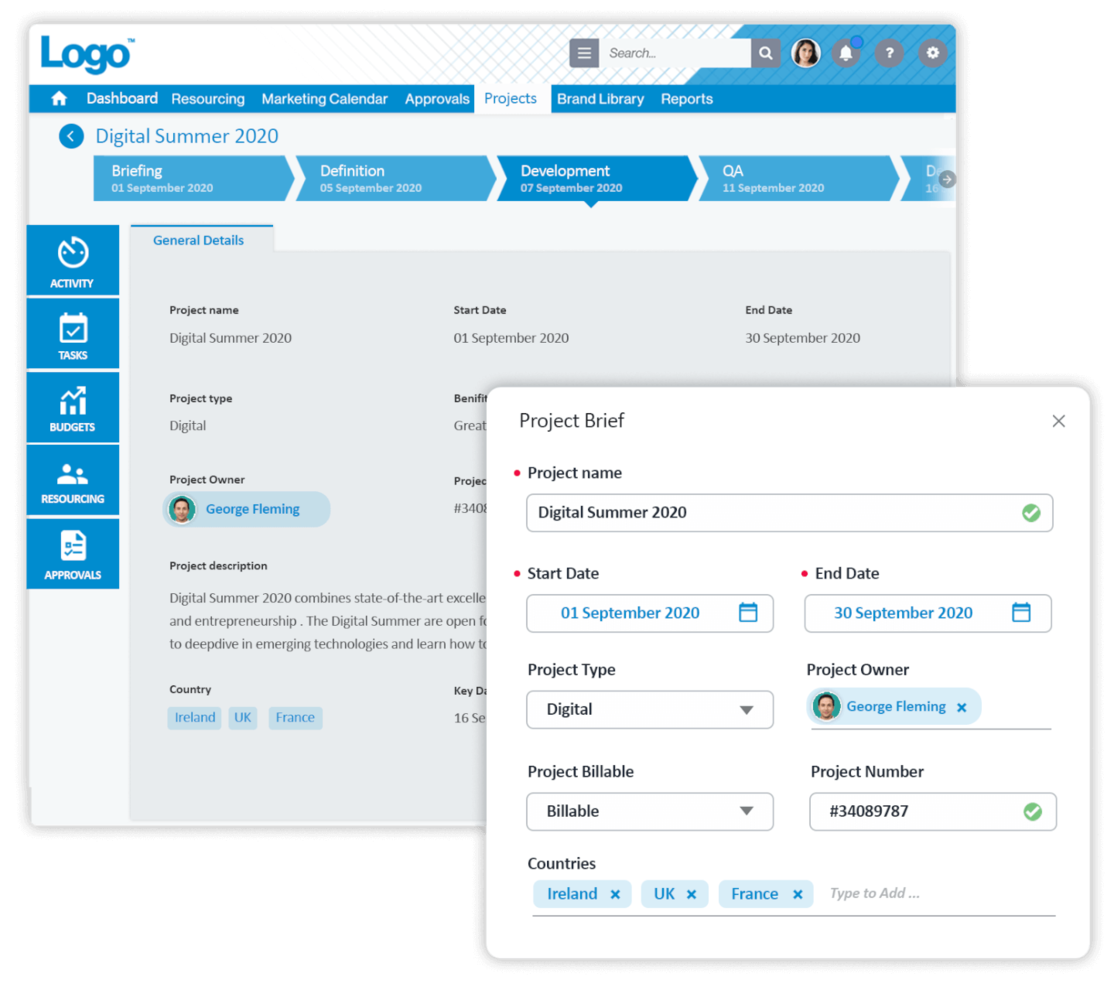
Screendragon es un software de gestión de proyectos de marketing altamente configurable, utilizado y valorado por empresas Fortune 500 y agencias globales como Kellogg’s, BP, el Comité Olímpico Internacional y McCann World Group.
Recientemente hablé con Gal Cohen, cuyo equipo utiliza Screendragon en sus proyectos de reparación e instalación de puertas. 'Reunió toda la comunicación, tareas y cronogramas en una sola plataforma, lo que ha mejorado enormemente la capacidad de mi equipo', comenta. 'La posibilidad de tener todo bajo un mismo techo facilitó mucho mantener el orden y cumplir con los plazos exigidos', explica.
Por qué elegí Screendragon
Sus flujos de trabajo de marketing potenciados con IA utilizan automatización para eliminar tareas repetitivas, acelerar aprobaciones y simplificar procesos complejos. Esto libera a los equipos creativos y de marketing para que se centren en trabajos de mayor valor mientras mantienen los proyectos encaminados. Además de sus capacidades de automatización, Screendragon ofrece una interfaz visual fácil de usar y una funcionalidad sólida de extremo a extremo. Los equipos también se benefician de opciones de personalización flexibles como experiencia de usuario con la marca, formularios inteligentes personalizados, paneles de control individuales y niveles de permisos avanzados, lo que lo convierte en una excelente opción para organizaciones grandes y globales.
Además, la gestión de tareas permite aún más flexibilidad, con tableros Kanban visuales, diagramas de Gantt interactivos y vistas de lista como opciones para las interfaces.
Funciones clave de Screendragon
Screendragon también ofrece varias otras funciones para la gestión de proyectos de marketing que se adaptan a las necesidades de tu equipo.
- Paneles de control personalizables: Estos te permiten personalizar tus informes y mantener los indicadores clave y el estado de los proyectos en primer plano.
- Formularios dinámicos: Con esta función puedes crear y modificar formularios para capturar datos específicos del proyecto y recopilar y analizar fácilmente información adaptada a los requisitos de tu equipo.
- Pronóstico de recursos con IA: Esta función te ayuda a predecir y asignar recursos de manera eficaz, y a minimizar el riesgo de infrautilización o sobrecarga de los miembros del equipo.
- Biblioteca de plantillas: Obtienes acceso a más de 100 plantillas y ejemplos que proporcionan a tu equipo un punto de partida para los proyectos, ayudan a mantener la coherencia y ahorran tiempo en la configuración.
Integraciones de Screendragon
Las integraciones incluyen los principales sistemas ERP como SAP y PeopleSoft. Ofrece miles de integraciones con aplicaciones populares a través de Zapier, como Jira, Trello, Slack, Box, Google Drive, Office 365 y Microsoft Dynamics. También cuenta con una API abierta que permite configurar integraciones personalizadas con cualquier sistema.
Pros and Cons
Pros:
- Automatiza el equilibrio de cargas de trabajo entre los miembros del equipo
- Refuerza la gobernanza mediante registros de auditoría
- Vincula revisiones creativas a los flujos del proyecto
Cons:
- La configuración e implementación requieren una planificación profunda
- Algunos módulos pueden ser excesivos para equipos pequeños
New Product Updates from Screendragon
Screendragon Unveils New AI Hub
Screendragon introduced AI Hub, a new capability that lets teams build and manage AI agents directly within workflows. The update helps marketing teams automate tasks, maintain governance controls, and scale AI-driven operations more efficiently. For more information, visit Screendragon's official site.

Kantata
Ideal para la entrega de servicios de ciclo completo

Kantata es una solución de gestión del trabajo diseñada específicamente para las necesidades de agencias y equipos de servicios profesionales. Te ayuda a mantener campañas, proyectos de clientes y recursos alineados en un solo lugar para que tu equipo entregue el trabajo a tiempo, dentro del presupuesto y a gran escala.
Recientemente hablé con Cal Singh, jefe de marketing y asociaciones en Equipment Finance Canada, sobre cómo su equipo utiliza Kantata. 'Usamos Kantata específicamente para mantener todas las piezas móviles de un proyecto de marketing organizadas en un solo lugar', dice. Esto tuvo un impacto positivo en los proyectos y la moral del equipo: 'Podemos ver tareas, plazos y cargas de trabajo del equipo juntos, lo que hace que gestionar campañas y asociaciones (y nuestros niveles de estrés) sea claro y manejable', explica.
Por qué elegí Kantata
Kantata me llamó la atención porque unifica tus proyectos, recursos y finanzas en un solo sistema, respalda todo el ciclo de vida del proyecto y te da una visión clara de la rentabilidad y el rendimiento.
Sus herramientas de planificación de recursos centradas en las personas también aseguran que tus diseñadores, redactores y gestores de cuentas se asignen de manera efectiva según habilidades y disponibilidad, reduciendo el agotamiento y mejorando los resultados. Con visibilidad en tiempo real del progreso de la campaña, el consumo del presupuesto y la salud de la cartera, además de paneles de inteligencia empresarial integrados, tu equipo puede rastrear la productividad y la satisfacción del cliente mientras mantiene la colaboración.
Características principales de Kantata
Kantata ofrece varias funciones adicionales que atienden las necesidades de gestión de proyectos de marketing
- Plantillas de proyectos: Puedes simplificar la configuración de proyectos con plantillas personalizables diseñadas para diversas actividades de marketing, mantener la coherencia y ahorrar tiempo.
- Gestión de tareas: Esto te permite organizar y priorizar tareas fácilmente, para que puedas darle a tu equipo una dirección clara y mejorar la productividad general.
- Herramientas de colaboración: Puedes mejorar la comunicación entre los miembros del equipo y los clientes y fomentar un ambiente colaborativo que impulse el éxito de los proyectos.
- Informes y análisis: Puedes acceder a informes y análisis detallados para monitorear el desempeño del proyecto, ajustar estrategias fácilmente y alcanzar los objetivos.
Integraciones de Kantata
Las integraciones incluyen Slack, Sage, Quickbooks, Expensify, BambooHR, NetSuite, Jira, Salesforce, Xero y Google Workspace.
Pros and Cons
Pros:
- Detecta riesgos de proyecto con anticipación
- Unifica la planificación, la entrega y las finanzas
- Soporta múltiples monedas y entidades
Cons:
- La implementación puede requerir soporte externo
- La complejidad de la personalización puede aumentar con la escala
New Product Updates from Kantata

Kantata Adds Access Group Change History
Kantata adds Access Groups History, letting account administrators track changes to group details, membership, and permissions in Recent History. The update also makes these events available through the Subscribed Events API for broader monitoring. For more information, visit Kantata’s official site.
 .
.
Hive
Ideal para diversas vistas de proyectos

Hive es una herramienta de gestión de proyectos y una plataforma de colaboración que impulsa a empresas como Starbucks, Uber, WeWork e IBM. Hive es el primer software construido por la comunidad en el mundo, con una hoja de ruta compuesta íntegramente por funciones votadas por los clientes.
Por qué elegí Hive
Con vistas de proyectos flexibles, dependencias y miles de integraciones, Hive optimiza tu trabajo en una plataforma centralizada y ofrece mucho más que solo diagramas de Gantt. Utilizado por equipos de diferentes tamaños, desde 10 hasta 1,000 personas, Hive es una excelente opción para un equipo de marketing con estilos de trabajo diversos.
Las capacidades de seguimiento de tiempo, análisis y vistas flexibles de Hive permiten una comprensión transparente del trabajo de otros miembros del equipo y de los proyectos próximos. Hive también cuenta con integraciones completas de correo electrónico dentro de su herramienta de gestión de proyectos, lo que permite enviar y recibir mensajes de Gmail y Outlook desde la aplicación. Elige Hive si buscas una herramienta completa y bien organizada que pueda escalarse hacia arriba o hacia abajo según las necesidades del equipo.
Funciones clave de Hive
Hive ofrece una variedad de funciones adicionales diseñadas para equipos de marketing.
- Revisión y aprobaciones: Puedes agilizar el proceso de retroalimentación de diseños con herramientas que centralizan los comentarios y las revisiones.
- Metas: Esto te permite establecer y visualizar hitos del proyecto para asegurar que tus campañas de marketing se mantengan encaminadas.
- Formularios: Puedes recopilar comentarios y solicitudes de clientes fácilmente, lo que facilita una mejor comunicación y alineación de proyectos.
- Recursos: Esto te permite gestionar las asignaciones de equipo y visualizar la disponibilidad para mantener una asignación óptima de recursos para tus proyectos de marketing.
Integraciones de Hive
Las integraciones incluyen más de mil aplicaciones de terceros pero requieren un plan de pago a través de Zapier.
Pros and Cons
Pros:
- Ofrece flujos de trabajo personalizables para adaptarse a diversas necesidades de marketing
- Portales para clientes integrados para mejorar la comunicación y la transparencia
- Proporciona plantillas de proyectos para una ejecución consistente de campañas
Cons:
- Personalización limitada en ciertos elementos del panel
- La complejidad en la configuración requiere tiempo de capacitación

Ideal para objetivos y hitos de campañas
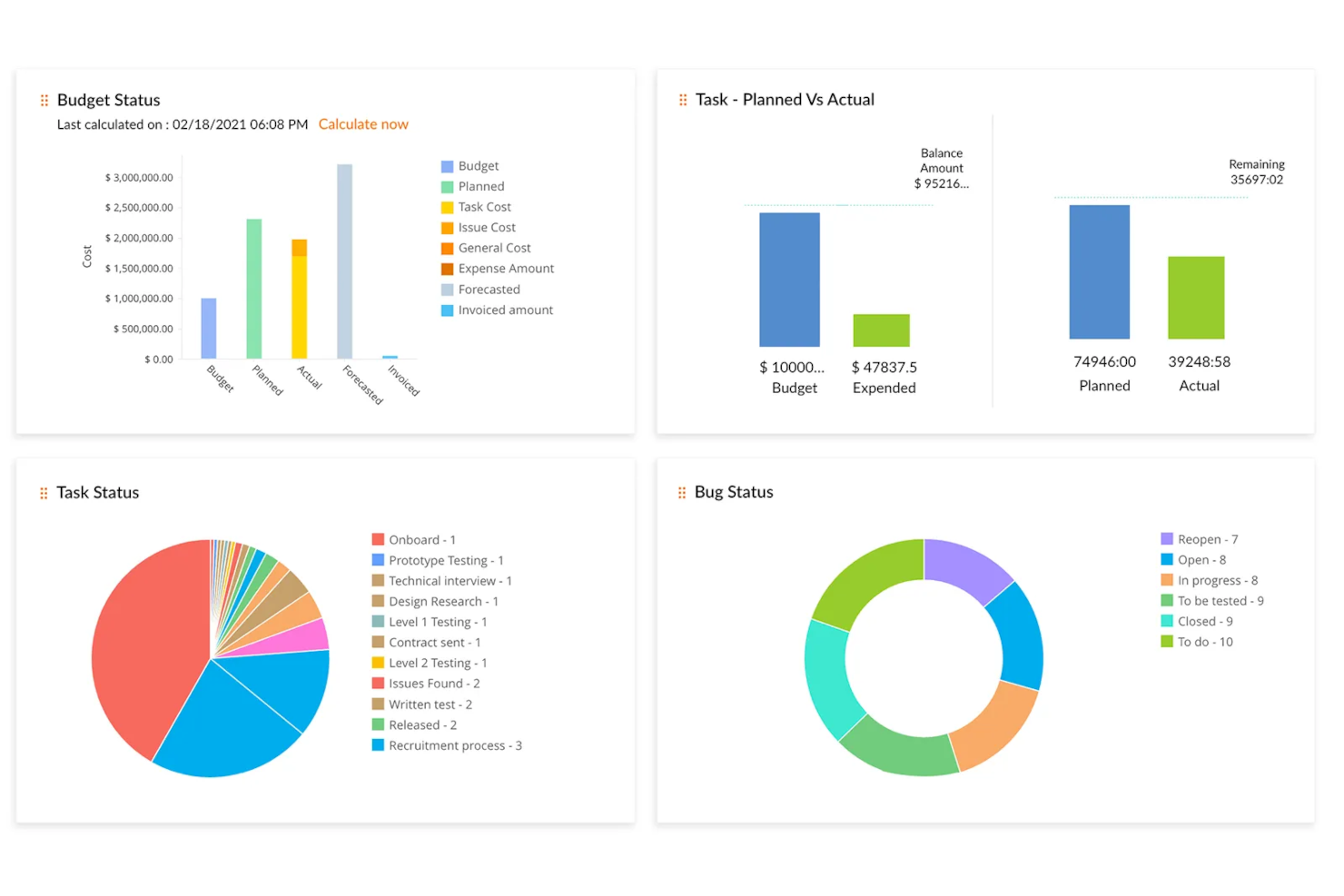
Zoho Projects es una plataforma de gestión de proyectos basada en la nube que está bien equipada para equipos de marketing. Cuenta con funciones personalizables como vistas individuales, campos personalizados de proyecto, plantillas de proyectos y un panel de informes.
Hablé con Martin Cox, Director de la agencia Postino, sobre cómo él y su equipo utilizan esta herramienta. 'El software en sí es fabuloso: es completo, está bien construido y es realmente capaz como solución de gestión de proyectos', comenta. Mencionó que tiene una curva de aprendizaje pronunciada, pero dice que es una gran herramienta 'si puedes superar esto'.
Por qué elegí Zoho Projects
Los equipos de marketing pueden dividir sus campañas en proyectos más pequeños, tareas y subtareas, las cuales pueden definirse y asignarse a los miembros adecuados del equipo. Los hitos y objetivos ayudan a los miembros del equipo a ver el panorama general y a hacer seguimiento del progreso y el impacto de sus iniciativas más grandes. Los usuarios pueden diseñar flujos de trabajo visuales con la función de Blueprints de arrastrar y soltar, que pueden guardarse y reutilizarse para proyectos futuros.
Las funciones del software cubren la planificación de proyectos, programación, presupuestación e informes. Los equipos de marketing pueden usar estas herramientas para mantener sus proyectos y campañas dentro del presupuesto, monitorear su progreso y rastrear el tiempo de cada miembro del equipo. La colaboración en documentos permite que los equipos de marketing organicen y trabajen fácilmente en archivos con control de versiones, notas e historial de revisiones. El panel incluye capacidades de informes prediseñados y personalizados, permitiendo a los usuarios hacer seguimiento de los KPIs que sean más importantes para ellos.
Funciones clave de Zoho Projects
Hay varias otras funciones de Zoho Projects que se adaptan a los requisitos específicos de los equipos de marketing.
- Integraciones: Zoho Projects puede conectarse sin inconvenientes con otras aplicaciones de Zoho como CRM y herramientas de analítica, lo cual ayuda a mejorar su proceso general de gestión de proyectos.
- Almacenamiento en la nube: Esto centraliza los documentos para facilitar el acceso y la organización, y asegura que su equipo pueda colaborar eficazmente sin el problema de archivos desordenados.
- Vistas y paneles personalizados: Puede personalizar su espacio de trabajo para una gestión eficiente de tareas y obtener una visión general del proyecto adaptada al flujo de trabajo único de su equipo.
- Tareas recurrentes: Esto facilita la programación de sus actividades de marketing recurrentes, permite automatizar tareas repetitivas y libera al equipo para centrarse en iniciativas más estratégicas.
Integraciones de Zoho Projects
Las integraciones incluyen Box, Dropbox, GitHub, Google Workspace, Microsoft Teams, Slack y Zendesk.
Pros and Cons
Pros:
- Visibilidad de hitos integrada en los planes de proyecto
- Transiciones de tareas automatizadas mediante reglas de blueprint
- Información sobre la carga de trabajo de recursos incluida
Cons:
- Algunas funciones avanzadas requieren planes superiores
- Las funciones de IA pueden requerir configuración o ajustes
New Product Updates from Zoho Projects
Zoho Projects Adds CodeX Scripts for Custom Modules
Zoho Projects now supports CodeX Scripts for custom modules, enabling conditional logic and rules for creating, updating, and deleting records. For more information, visit Zoho Projects' official site.
 .
.
Enji
Ideal para profesionales independientes y marketing de pequeñas empresas

Enji es una plataforma de gestión de proyectos de marketing diseñada para equipos que desean planificar, programar, organizar y ejecutar campañas, contenido y flujos de trabajo de marketing utilizando calendarios dedicados, plantillas y procesos guiados.
¿Para quién es Enji?
Enji es ideal para pequeños equipos de marketing y profesionales independientes que necesitan una forma estructurada de planificar y gestionar campañas sin una configuración compleja.
Por qué elegí Enji
Enji destaca por sus calendarios de contenido de marketing integrados y flujos de trabajo guiados para la planificación de campañas. Cuando los usuarios crean una estrategia de marketing en Enji, la plataforma genera automáticamente tareas y cronogramas vinculados a los objetivos de la campaña, reduciendo la necesidad de crear flujos de trabajo manualmente. El calendario combina tareas de marketing, planificación de contenido, gestión de campañas y programación de redes sociales en una sola vista, con filtros para diferentes tipos de actividad. Los usuarios pueden redactar contenido, programar publicaciones, gestionar tareas y hacer seguimiento del progreso de las campañas directamente desde la interfaz del calendario. Enji también incluye paneles de KPI que consolidan los datos de desempeño de marketing para reportes y análisis continuos.
Características clave de Enji
- Redacción de contenido con IA: Enji utiliza inteligencia artificial para generar ideas de contenido y redactar publicaciones para cada canal en la voz de tu marca.
- Programación y publicación en redes sociales: Conecta tus cuentas sociales y Enji publica automáticamente las publicaciones programadas en plataformas como Instagram, Pinterest, LinkedIn y TikTok.
- Panel de seguimiento de KPI: Enji reúne las analíticas sociales y del sitio web en un solo lugar para que puedas monitorear el rendimiento sin cambiar de pestañas.
- Gestión de marca: Guarda la voz de tu marca, elementos visuales y detalles empresariales clave en un solo sitio para mantener el contenido coherente en todas las campañas.
Integraciones de Enji
Enji no publica una lista de integraciones disponibles.
Pros and Cons
Pros:
- Sugerencias generadas por IA para ideas de contenido y publicaciones
- La configuración del perfil de marca mantiene el mensaje coherente
- Programación nativa para los principales canales sociales incluida
Cons:
- No se admite actualmente la carga masiva de publicaciones
- Las plantillas de campañas no son específicas por industria

Quickbase
Ideal para automatizaciones sin código
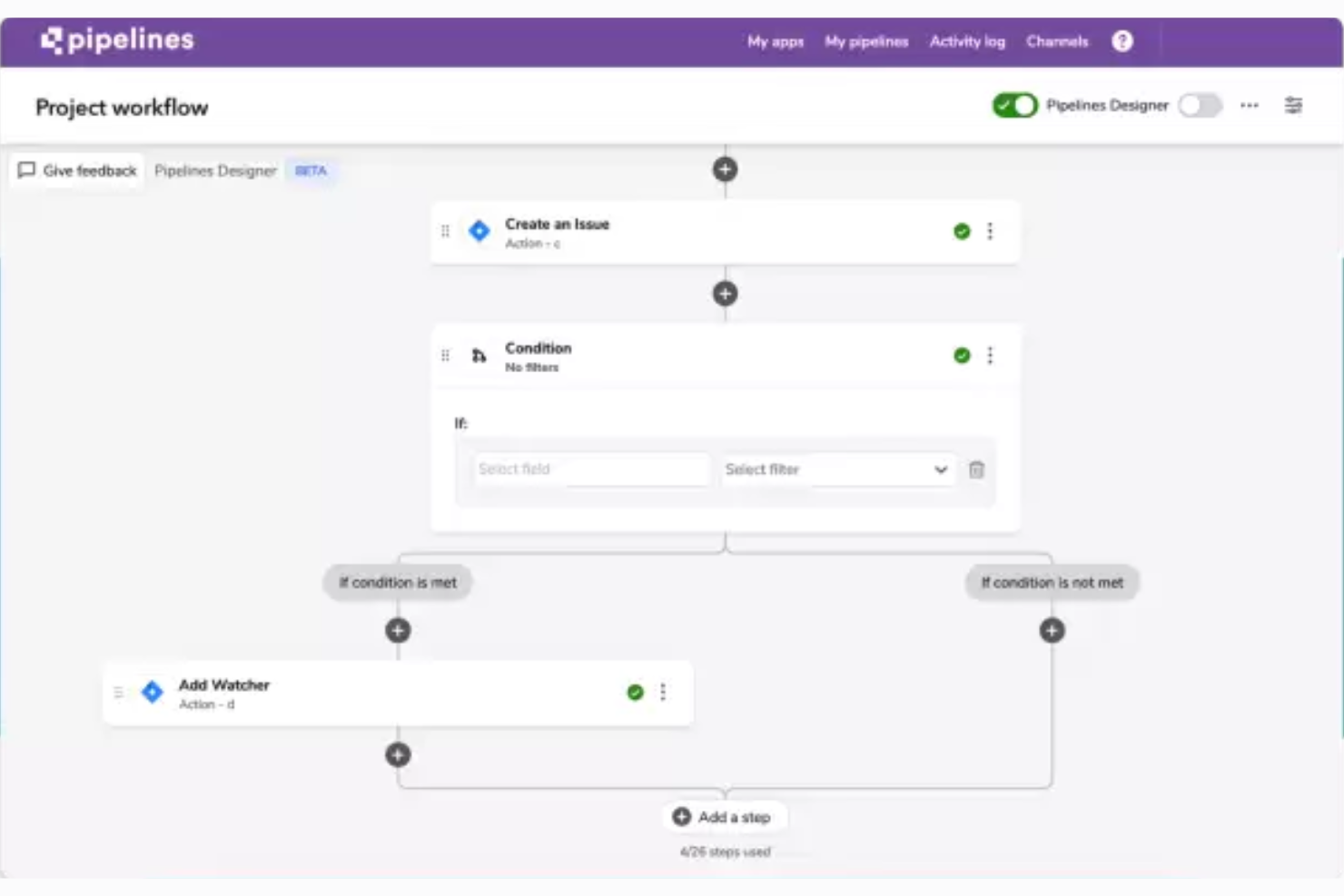
QuickBase es una herramienta de gestión de flujos de trabajo de proyectos que te ayuda a crear aplicaciones empresariales personalizadas para facilitar varios procesos centrales del negocio.
Jensen Savage, quien utiliza Quickbase como CEO de la agencia de marketing Savage Growth Partners, dice que 'Quickbase es altamente personalizable, lo cual es especialmente útil si gestionas proyectos complejos o tienes que colaborar entre departamentos o equipos.'
Por qué elegí Quickbase
Este software es versátil y fácil de usar, lo que lo hace adecuado para prácticamente cualquier contexto empresarial. Puedes utilizar el constructor sin código para crear aplicaciones, integraciones y automatizaciones que respalden el trabajo de tu equipo de marketing. Esto puede permitirte aliviar cargas de trabajo manuales y asegurar la coherencia en tus procesos.
Cuando creas un flujo de trabajo personalizado o una automatización sin código en el software, puedes establecer reglas claras y mejores prácticas para cómo gestionar tareas específicas. Esto ayudará a que tu equipo cree procesos compartidos a los que todos puedan adherirse fácilmente. Es especialmente útil si trabajas con una cartera de clientes o dentro de una agencia.
Funciones clave de Quickbase
Quickbase incluye varias otras funciones que se adaptan a las necesidades de tus equipos de marketing.
- Gestión de recursos: Esta función permite que tu equipo asigne y controle los recursos de manera efectiva, lo que mantiene una utilización óptima y minimiza los cuellos de botella en las campañas de marketing.
- Supervisión de tareas: Puedes asignar, rastrear y gestionar tareas en tus proyectos de marketing para mantener a todos alineados y a tiempo.
- Almacenamiento de documentos: Quickbase ofrece una ubicación centralizada para almacenar y acceder a los documentos importantes del proyecto, lo que hace que la colaboración sea fluida y asegura que todos tengan la información más actualizada.
- Seguimiento de presupuesto: Puedes monitorear de cerca tu presupuesto de marketing con el seguimiento de presupuesto de Quickbase, lo que te ayuda a gestionar los costos y asignar fondos donde más se necesitan.
Integraciones de Quickbase
Las integraciones incluyen Outlook, Microsoft Teams, Google Workspace, Slack, Box, Dropbox, OneDrive, Trello, Asana, Jira, Zendesk y Docusign.
Pros and Cons
Pros:
- Los paneles responden en tiempo real
- Gestiona lógica condicional y ramificación en las canalizaciones
- Permite crear flujos de trabajo complejos sin código
Cons:
- La interfaz puede parecer menos moderna que la de los competidores
- Curva de aprendizaje elevada para flujos de trabajo avanzados
Otros programas de gestión de proyectos de marketing
https://www.youtube.com/watch?v=oICi7bL1ZAk Si no has encontrado lo que buscabas arriba, aquí tienes algunas opciones sólidas más.
- Miro
Ideal para la colaboración visual
- ClickUp
Mejor plan gratuito robusto
- Kintone
Ideal para crear aplicaciones de marketing personalizadas
- Workzone
Ideal para la gestión de solicitudes, revisiones y aprobaciones
- Teamwork.com
Ideal para la visibilidad de proyectos
- Adobe Workfront
Mejor para flujos de trabajo de proyectos
- Bonsai Agency Software
Ideal para proyectos de agencia de principio a fin
- Basecamp
Ideal para tableros de proyectos
- Planview AdaptiveWork
Mejor para marketing digital
- Function Point
Mejor en usabilidad y experiencia de usuario
- Ravetree
Ideal para operaciones de marketing todo en uno
- Workamajig Platinum
Ideal para equipos de todos los tamaños
- Height
Ideal para la colaboración con clientes
- Air
Ideal para búsquedas de activos impulsadas por IA
- GoodDay
Ideal para diversas metodologías de gestión de proyectos
- RoboHead
Ideal para funciones de recopilación de comentarios


¡Echa un vistazo a nuestro vídeo sobre las 5 mejores herramientas de gestión de proyectos de marketing!


Reseñas relacionadas de software de gestión de proyectos
Si todavía no has encontrado aquí lo que buscas, consulta estas otras herramientas relacionadas que hemos probado y evaluado:
- Software de gestión de proyectos
- Software de gestión de proyectos de producción de vídeo
- Software de gestión de recursos
- Software de automatización de flujos de trabajo
- Software de seguimiento del tiempo
- Software de gestión de tareas
- Herramientas de colaboración
- Software de gestión de proyectos de relaciones públicas
- Software de gestión de proyectos de SEO
Cómo evalúo el software de gestión de proyectos de marketing
Evalúo las herramientas en dos niveles: los requisitos básicos como la planificación de campañas y la revisión creativa, y los diferenciadores que distinguen una opción de otra.
Funcionalidad principal (Condiciones mínimas para esta lista)
Cuando selecciono herramientas para mi lista, califico cada una en una escala de 0 (no ofrece la funcionalidad) a 5 (destaca en esta área) por cada funcionalidad principal que se menciona a continuación. Luego, calculo la puntuación total de la herramienta como un porcentaje. Cada herramienta necesita alcanzar una puntuación mínima total del 65% para ser considerada para inclusión.
- Planificación y programación de campañas: Reviso si puedes mapear una campaña multicanal en vistas de diagrama de Gantt, calendario y tablero, con dependencias y hitos entre tareas.
- Flujo de trabajo creativo y revisión: El ciclo de revisión es importante—busco anotaciones visuales, comparación de versiones y rutas de aprobación estructuradas para activos como anuncios y páginas de destino.
- Gestión de recursos de marketing: Equilibrar la carga de trabajo entre diseñadores, redactores y estrategas requiere vistas de capacidad, así que evalúo cómo cada herramienta muestra los datos de utilización.
- Gestión de activos digitales: Los equipos gestionan cientos de archivos por campaña. Busco bibliotecas de activos centralizadas con control de versiones, etiquetado y permisos más allá de los simples archivos adjuntos.
- Integraciones con el stack de marketing: Una herramienta debería conectarse con tus aplicaciones creativas, CRM, MAP y plataformas sociales; herramientas como Asana, monday.com y Wrike manejan esto de formas distintas.
- Informes y paneles de marketing: Evalúo si los paneles van más allá de la finalización de tareas y cubren la salud de los plazos, la utilización del equipo y los KPIs a nivel de campaña en una sola vista.
Una vez que tengo una lista de herramientas que cumplen los criterios, considero qué distingue a cada plataforma.
Factores diferenciadores (Qué distingue a los proveedores)
Así es como comparo y contrasto diferentes proveedores:
Características destacadas
La automatización de la recepción de solicitudes es un gran diferenciador. Cuando un responsable de producto envía una solicitud de campaña a través de un formulario estructurado que genera automáticamente tareas y las deriva al equipo correcto, se elimina el ida y vuelta que retrasa los lanzamientos. También evalúo las capacidades de IA; algunas herramientas ahora redactan briefs o resumen hilos de retroalimentación, lo cual ahorra tiempo real durante los ciclos de revisión. Los portales para partes interesadas también son importantes, especialmente para equipos que gestionan solicitudes de ventas o ejecutivos que necesitan visibilidad de proyectos sin una licencia completa.
Más allá de las características
Considero qué tan bien se adapta una herramienta a la estructura específica de tu equipo de marketing. Un equipo de contenido de cinco personas tiene necesidades muy distintas a una agencia interna de 50 personas que ejecuta campañas simultáneas para varias marcas. El tiempo para lograr el valor también es importante—busco plantillas de marketing preconstruidas como manuales de lanzamiento de campaña y calendarios editoriales que ayuden a los equipos a empezar rápido. La transparencia en la información de precios completa mi evaluación, especialmente cómo los proveedores manejan los asientos de revisores y partes interesadas, ya que los equipos de marketing suelen tener muchos más colaboradores que usuarios con licencia.
Cómo elegir un software de gestión de proyectos de marketing
Al preseleccionar, probar y elegir un software de gestión de proyectos de marketing, considera lo siguiente:
- ¿Qué problema intentas resolver? Empieza por identificar la carencia de funcionalidades de gestión de proyectos de marketing que intentas cubrir para aclarar las características y funciones que debe ofrecer el software de gestión de proyectos de marketing.
- ¿Quién tendrá que utilizarlo? Para evaluar el coste y los requisitos, considera quién utilizará el software y cuántas licencias necesitarás. Tendrás que evaluar si solo necesitará acceso el equipo de marketing o toda la organización. Cuando esto esté claro, conviene considerar si estás priorizando la facilidad de uso para todos o la velocidad para los usuarios avanzados.
- ¿Con qué otras herramientas debe funcionar? Aclara qué herramientas vas a sustituir, cuáles se mantendrán y con qué herramientas necesitarás integrarlo, como software de contabilidad, CRM o recursos humanos. Esto puede ser tan específico como buscar un software de gestión de proyectos que se integre con Salesforce o simplemente un software de gestión de proyectos con CRM en general. Tendrás que decidir si las herramientas deben integrarse entre sí o, como alternativa, si puedes sustituir varias herramientas por una única herramienta consolidada de gestión de proyectos de marketing digital.
- ¿Qué resultados son importantes? Considera el resultado que debe ofrecer el software para que se considere un éxito, qué capacidad quieres obtener, qué quieres mejorar y cómo medirás el éxito. Por ejemplo, un resultado podría ser la posibilidad de obtener una mayor visibilidad del rendimiento.
- ¿Cómo funcionaría dentro de tu organización? Considera la elección del software junto con tus flujos de trabajo y tu metodología de entrega. Evalúa qué funciona bien y qué áreas están causando problemas. Cada empresa es diferente; no des por hecho que, porque una herramienta sea popular, funcionará en tu organización.
Tendencias en el software de gestión de proyectos de marketing
Estas tendencias no solo demuestran el rápido ritmo de la innovación, sino que también ponen de relieve las áreas en las que los equipos de marketing buscan una funcionalidad y una eficiencia mejoradas.
- Mayor uso de la realidad aumentada (AR) y la realidad virtual (VR): Cada vez más herramientas de gestión de proyectos de marketing integran tecnologías de realidad aumentada y realidad virtual para ofrecer experiencias inmersivas de planificación y visualización. Esto indica un cambio hacia procesos de planificación más atractivos y experienciales en el software de gestión de proyectos para agencias de marketing.
- Funciones de seguimiento de la sostenibilidad: En consonancia con la creciente importancia de la responsabilidad social corporativa, algunas de las mejores herramientas de gestión de proyectos de marketing incorporan funciones que ayudan a los equipos a realizar un seguimiento de la sostenibilidad de sus campañas. Esto incluye la supervisión de la huella de carbono, el uso sostenible de los recursos y el abastecimiento ético. Cada vez más herramientas para agencias de publicidad ofrecen información sobre el impacto medioambiental de las actividades de marketing.
- Cadena de bloques para mejorar la seguridad y la transparencia: Las plataformas de gestión de proyectos de marketing ofrecen tecnología de cadena de bloques para ayudar con la seguridad y la transparencia, especialmente en áreas como la elaboración de presupuestos y el gasto. Al utilizar la cadena de bloques, estas herramientas de gestión de proyectos para marketing pueden proporcionar registros a prueba de manipulaciones de las transacciones y los cambios en los proyectos, lo que fomenta la confianza entre las partes interesadas y mantiene seguros los datos de marketing.
- Asistentes de IA personalizados para la planificación de marketing: Muchas herramientas ofrecen ahora asistentes de IA personalizados para la gestión de proyectos de marketing. Estos asistentes proporcionan orientación personalizada, automatizan la priorización de tareas y ofrecen información basada en el análisis de datos.
- Integración con plataformas de comercio electrónico: A medida que el comercio electrónico continúa dominando el panorama minorista, las herramientas de gestión de proyectos de marketing ofrecen cada vez más integraciones directas con las principales plataformas de comercio electrónico. Esto te permite planificar, ejecutar y supervisar sin problemas campañas vinculadas directamente a los canales de venta en línea. Esto refleja la creciente necesidad de que los esfuerzos de marketing estén estrechamente alineados con los resultados de ventas.
¿Qué es un software de gestión de proyectos de marketing?
El software de gestión de proyectos de marketing es una herramienta que ayuda a los equipos de marketing a planificar, ejecutar y realizar un seguimiento de sus proyectos y campañas. Combina funciones de gestión de proyectos, como la asignación de tareas, la asignación de recursos y el seguimiento del progreso, con funciones utilizadas por los equipos de marketing, como calendarios de marketing, plantillas de campañas y gestión de recursos para materiales de marketing y de marca.
El software de gestión de proyectos es un tipo de software para agencias de marketing que te ayuda a gestionar mejor las cargas de trabajo, cumplir los plazos y alcanzar los objetivos de marketing, lo que se traduce en campañas más exitosas que tienen un impacto significativo en el público objetivo.
Funciones del software de gestión de proyectos de marketing
Al seleccionar un software de gestión de proyectos de marketing, presta atención a las siguientes funciones clave:
- Gestión de tareas: Puedes organizar, asignar y priorizar tareas para que tu equipo sepa qué debe hacerse y cuándo. Esto ayuda a todos a mantenerse encaminados y cumplir los plazos.
- Herramientas de colaboración: Tú y tu equipo podéis comunicaros, compartir actualizaciones y trabajar juntos en documentos en tiempo real, para que todos permanezcan conectados y los proyectos avancen sin problemas.
- Asignación de recursos: Esto te permite supervisar y asignar recursos (por ejemplo, personas, tiempo o presupuestos), evitar cuellos de botella y aprovechar al máximo los talentos de tu equipo.
- Seguimiento del tiempo: Puedes controlar cuánto tardan las tareas y los proyectos, lo que ayuda a planificar el futuro y te permite ver en qué áreas tu equipo puede trabajar de forma más eficiente.
- Intercambio y almacenamiento de archivos: Esto te permite cargar, almacenar y compartir archivos del proyecto para que todos tengan fácil acceso a las versiones más recientes.
- Plantillas de proyectos: Puedes utilizar plantillas prediseñadas para poner en marcha los proyectos rápidamente, estandarizar tus flujos de trabajo y evitar reinventar la rueda cada vez.
- Calendario y programación: Esto te permite centralizar reuniones, plazos e hitos en un calendario compartido para que todo el equipo pueda ver lo que se aproxima y planificar en consecuencia.
- Seguimiento del presupuesto: Puedes supervisar los gastos del proyecto y mantenerte dentro del presupuesto registrando los costes, detectando a tiempo los excesos y tomando decisiones inteligentes sobre el gasto.
Funciones habituales de inteligencia artificial del software de gestión de proyectos de marketing
Además de las funciones estándar del software de gestión de proyectos de marketing mencionadas anteriormente, muchas de estas soluciones incorporan funciones de inteligencia artificial como:
- Priorización automatizada de tareas: Puedes utilizar la inteligencia artificial para analizar los plazos, la carga de trabajo y las dependencias, y priorizar automáticamente las tareas para mantener en primer plano el trabajo importante.
- Plazos predictivos de los proyectos: Esto te permite utilizar la inteligencia artificial para predecir las fechas de finalización mediante el análisis del rendimiento anterior y del progreso actual, de modo que puedas establecer expectativas realistas.
- Optimización inteligente de recursos: Esta herramienta de inteligencia artificial puede analizar las habilidades, la disponibilidad y la actividad anterior de tu equipo para recomendar la mejor asignación de recursos para cada proyecto.
- Sugerencias y optimización de contenido: Esta función de inteligencia artificial puede recomendar titulares, palabras clave o elementos de diseño para campañas de marketing basándose en las tendencias o en lo que ha demostrado obtener buenos resultados.
- Informes automatizados: Puedes utilizar la inteligencia artificial para recopilar métricas clave y elaborar informes fáciles de comprender que proporcionen información inmediata sobre el estado del proyecto.
Ventajas del software de gestión de proyectos de marketing
A continuación, describo cinco ventajas principales que el mejor software de gestión de marketing ofrece a los usuarios y las organizaciones:
- Colaboración mejorada: Los miembros del equipo pueden comunicarse y colaborar en tiempo real. Al utilizar una herramienta de gestión de proyectos para marketing, eliminas las barreras de comunicación y consigues que todos estén alineados y trabajen juntos, independientemente de su ubicación física.
- Mayor productividad: La automatización y la simplificación de los procesos liberan tiempo para que los miembros del equipo se centren en tareas más estratégicas y creativas, lo que aumenta la productividad y la eficiencia generales de la organización.
- Mayor visibilidad de los proyectos: Gracias a los paneles y las funciones de elaboración de informes en tiempo real, las partes interesadas obtienen una visión general completa del progreso del proyecto. Esto te permite tomar decisiones fundamentadas rápidamente, ajustar las estrategias según sea necesario y asegurarte de que los proyectos avanzan según lo previsto para cumplir los plazos y objetivos.
- Mejor gestión de los recursos: El software te permite asignar y supervisar mejor los recursos, incluidos los presupuestos, el tiempo y el personal. Una gestión eficaz de los recursos ayuda a las organizaciones a optimizar su uso, reducir el desperdicio y asegurarse de que los proyectos se completen dentro de las limitaciones presupuestarias.
- Escalabilidad: El software de gestión de proyectos de marketing puede crecer junto con tu empresa y adaptarse a más usuarios, proyectos y complejidad con el tiempo. Esto te permite seguir utilizando el sistema a medida que crece tu empresa y evitar cambios o actualizaciones de software costosos y lentos.
Costes y precios del software de gestión de proyectos de marketing
A continuación, se desglosan las opciones de planes más habituales para ayudarte a tomar una decisión informada:
Tabla comparativa de planes para software de gestión de proyectos de marketing
| Tipo de plan | Precio medio | Funciones habituales |
|---|---|---|
| Gratuito | $0 | Acceso para un número limitado de usuarios, funciones básicas de gestión de proyectos, espacio de almacenamiento limitado, asistencia de la comunidad |
| Básico | $10-20 por usuario/mes | Acceso para más usuarios, herramientas mejoradas de gestión de proyectos, integraciones con otras herramientas, funciones básicas de generación de informes, asistencia por correo electrónico |
| Profesional | $20-50 por usuario/mes | Funciones avanzadas de gestión de proyectos, paneles e informes personalizables, herramientas de colaboración, asistencia prioritaria, mayor espacio de almacenamiento |
| Empresarial | Precio personalizado | Personalizable para adaptarse al tamaño y las necesidades de la organización, funciones avanzadas de seguridad, gestor de cuenta dedicado, incorporación y formación continua, almacenamiento e integraciones ilimitados |
Preguntas frecuentes sobre el software de gestión de proyectos de marketing
Encuentra respuestas a las preguntas más frecuentes sobre este tema.
¿Cómo puede el software de gestión de proyectos de marketing ayudar a mi equipo a colaborar mejor?
El software de gestión de proyectos de marketing ayuda a tu equipo a colaborar al centralizar la comunicación, los archivos y los comentarios en una sola plataforma. Puedes asignar tareas, compartir actualizaciones y dar comentarios sobre recursos creativos sin tener que cambiar constantemente de aplicación. Las notificaciones y los calendarios compartidos mantienen a todo el mundo alineado y reducen los malentendidos.
La mayoría de las herramientas ofrecen funciones como hilos de comentarios, flujos de trabajo de aprobación y control de versiones de documentos, para que tu equipo pueda trabajar conjuntamente de forma eficiente, incluso si trabaja a distancia.
¿Pueden las herramientas de gestión de proyectos de marketing integrarse con otras plataformas de marketing (como CRM, correo electrónico o DAM)?
Sí, la mayoría de las herramientas de gestión de proyectos de marketing pueden integrarse con plataformas populares como CRM, herramientas de marketing por correo electrónico y sistemas de gestión de recursos digitales. Esto te permite sincronizar contactos, automatizar la creación de tareas en función de los planes de tus campañas de marketing y acceder a recursos creativos sin salir del panel de tu proyecto.
Antes de elegir una herramienta, consulta su lista de integraciones. También puedes utilizar herramientas como Zapier para crear integraciones personalizadas si no hay una conexión directa disponible.
¿Cuál es la mejor forma de incorporar a mi equipo de marketing a un nuevo software de gestión de proyectos?
Para incorporar a tu equipo al nuevo software, empieza ofreciendo una breve sesión de formación o un vídeo explicativo sobre las funciones que más utilizará el equipo. Configurad juntos vuestro primer proyecto activo para que los miembros del equipo vean la herramienta en funcionamiento. Asigna tareas sencillas y fomenta las preguntas.
Comparte guías o fichas de consulta. La asistencia continua y destacar los logros —como recibir comentarios más rápido o disponer de plazos claros— puede motivar a tu equipo a adoptar la nueva plataforma.
¿Cómo hago un seguimiento del rendimiento de las campañas y de los plazos mediante un software de gestión de proyectos de marketing?
Puedes utilizar funciones del software de gestión de proyectos de marketing, como paneles de proyectos, cronogramas e informes personalizables, para hacer un seguimiento de tus campañas de marketing de principio a fin.
Establece hitos y plazos claros para cada fase. Muchas herramientas permiten adjuntar KPI o métricas directamente a los proyectos, para que puedas supervisar el rendimiento en tiempo real. Los recordatorios automáticos y las barras de progreso te ayudan a detectar posibles retrasos con antelación.
¿Qué herramientas de gestión de proyectos de marketing son adecuadas para equipos remotos o distribuidos?
Muchas herramientas de gestión de proyectos de marketing están diseñadas pensando en equipos remotos y distribuidos. Busca funciones como chat en tiempo real, integración de vídeo, intercambio de archivos y acceso basado en la nube desde cualquier dispositivo. Las herramientas con gestión de zonas horarias, comunicación asíncrona y aplicaciones móviles también facilitan que los equipos remotos se mantengan conectados y sean productivos.
¿Hasta qué punto están seguros mis datos de marketing al utilizar un software de gestión de proyectos?
La mayoría de las plataformas de gestión de proyectos de marketing de buena reputación ofrecen sólidas funciones de seguridad, como cifrado de datos, permisos basados en roles y copias de seguridad periódicas. Elige herramientas con certificaciones de cumplimiento pertinentes para tu sector (por ejemplo, RGPD o SOC 2). Consulta la política de privacidad de datos del proveedor y pregunta por opciones como los registros de auditoría o el inicio de sesión único, que son herramientas excelentes para mantener seguros tus datos de marketing.