

10 alternativas a WorkflowMax para la gestión de trabajos en 2026

10 Selección de las mejores alternativas a WorkflowMax


Gestionar proyectos puede ser complicado. Tienes que ocuparte de los plazos, los recursos y la dinámica del equipo. Es natural que busques una herramienta de gestión de proyectos que se adapte realmente a tus necesidades.
Si WorkflowMax no cumple tus expectativas, no eres la única persona en esta situación. Puede que le falten funciones o que no sea lo bastante fácil de usar. Lo entiendo: quieres un software que te haga la vida más sencilla, no más difícil.
Explorar alternativas a WorkflowMax puede abrirte nuevas posibilidades. Compartiré reseñas imparciales de las mejores opciones que podrían adaptarse mejor a las necesidades de tu equipo.
Encontrarás información sobre las funciones, la facilidad de uso y los aspectos que diferencian a cada opción. Descubramos cuál es la más adecuada para tus desafíos de gestión de proyectos.
¿Qué es WorkflowMax?
WorkflowMax, de BlueRock, es un software de gestión de proyectos diseñado para ayudarte a gestionar tus proyectos de principio a fin. Lo utilizan habitualmente profesionales creativos, contables y consultores que necesitan hacer un seguimiento de su tiempo, sus tareas y su facturación. Las funciones de control del tiempo, gestión de trabajos y facturación te ayudan a organizar tu trabajo, gestionar tu equipo y cumplir los plazos. En general, WorkflowMax ofrece una solución centralizada para gestionar tus proyectos de forma eficaz.
Resumen de las mejores alternativas a WorkflowMax
Esta tabla comparativa resume las funciones y los detalles de precios de mis principales alternativas a WorkflowMax para ayudarte a encontrar la mejor opción según tu presupuesto y las necesidades de tu empresa.
| Tool | Best For | Trial Info | Price | ||
|---|---|---|---|---|---|
| 1 | Ideal para sustituir varias herramientas | Prueba gratuita de 7 días y plan gratuito disponibles | Desde $39/mes | Website | |
| 2 | Ideal para tableros de tareas sencillos | Prueba gratuita de 14 días | Desde $5/usuario/mes (facturado anualmente) | Website | |
| 3 | Ideal para equipos empresariales que utilizan muchas herramientas | Plan gratuito disponible | Desde $10.99/usuario/mes (facturado anualmente) | Website | |
| 4 | Ideal para equipos de proyectos facturables | Plan gratuito disponible | Desde $11.95/mes | Website | |
| 5 | Ideal para autónomos que gestionan contratos | Prueba gratuita de 7 días | Desde $9/usuario/mes (facturado anualmente) | Website | |
| 6 | Ideal para la comunicación en pequeñas empresas | Prueba gratuita de 30 días + demostración gratuita disponible | Desde $15/usuario/mes | Website | |
| 7 | Ideal para proyectos con chat integrado | Plan gratuito + prueba gratuita disponible | Desde $69/organización/mes | Website | |
| 8 | Ideal para el seguimiento del tiempo y la facturación | Plan gratuito + prueba gratuita de 30 días disponible | Desde $9/plaza/mes (facturado anualmente) | Website | |
| 9 | Ideal para CRM modular y proyectos | Prueba gratuita de 14 días + demostración gratuita disponible | Desde $15/usuario/mes (facturado anualmente) | Website | |
| 10 | Ideal para grandes agencias de publicidad | Demostración gratuita disponible | Desde $47/usuario/mes | Website |
Por qué confiar en nuestras recomendaciones de software
Nuestro equipo lleva probando y evaluando software desde 2012. Como gestores de proyectos, sabemos lo difícil —y lo importante— que es elegir el software adecuado.
Para esta guía, evaluamos las herramientas mediante pruebas prácticas e investigación independiente, puntuando las herramientas según nuestros criterios de selección. También nos basamos en la experiencia de líderes de opinión del sector y de profesionales en activo de la gestión de proyectos.
Nuestras reseñas reflejan nuestro criterio editorial humano, no un discurso de ventas.
Revisores expertos:
Reseñas de las mejores alternativas a WorkflowMax
A continuación encontrarás mis resúmenes detallados de las mejores alternativas a WorkflowMax que han entrado en mi selección. Mis reseñas ofrecen un análisis detallado de las funciones principales, las ventajas y desventajas, las integraciones y los casos de uso ideales de cada herramienta para ayudarte a encontrar la mejor opción para ti.

Flowlu
Ideal para sustituir varias herramientas
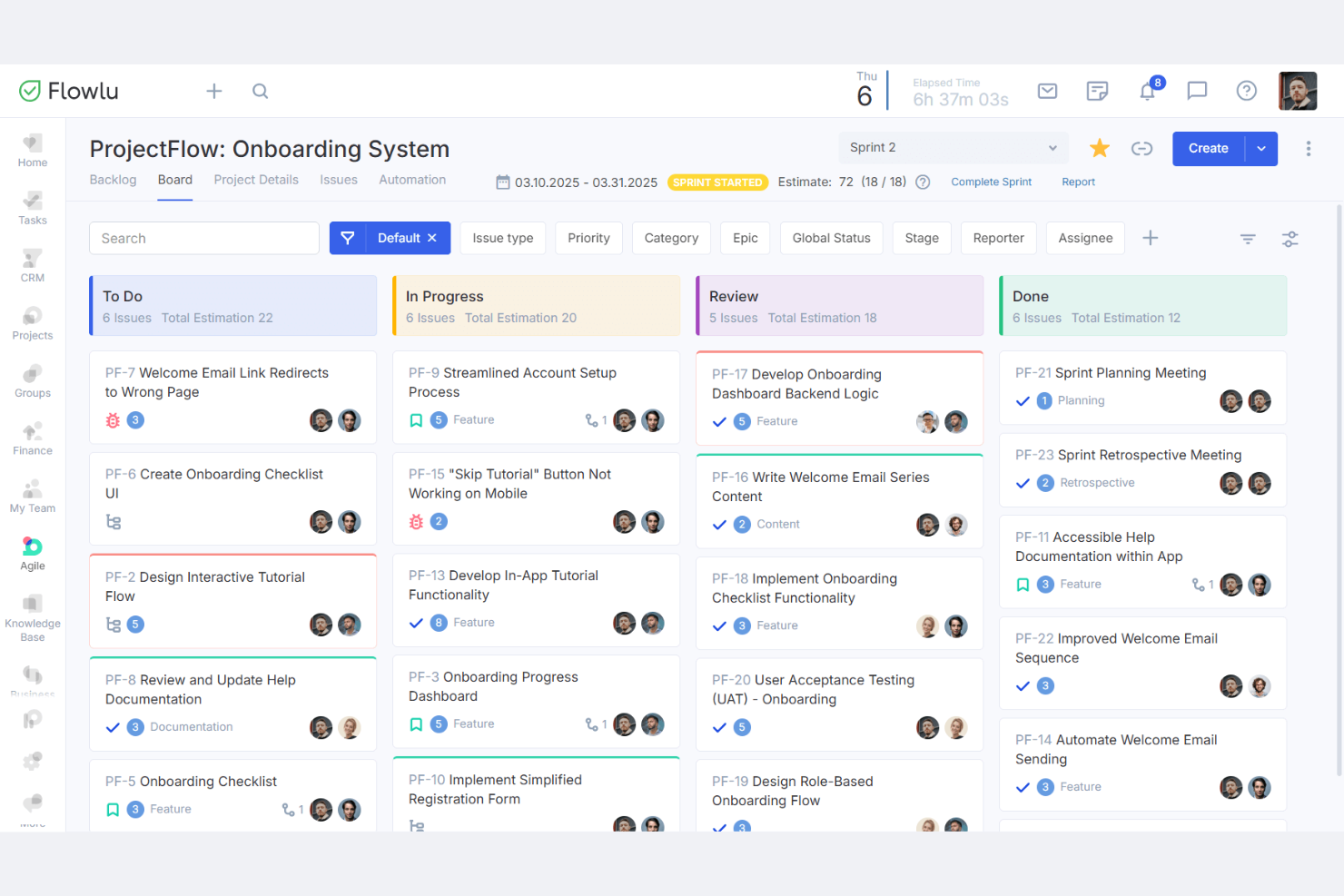
Flowlu es un software de gestión empresarial todo en uno diseñado para pequeñas y medianas empresas. Proporciona herramientas para la gestión de proyectos, CRM, facturación y gestión financiera.
Por qué Flowlu es una buena alternativa a WorkflowMax: Flowlu ofrece una solución rentable con funciones integradas de CRM y gestión de proyectos. Te permite gestionar las relaciones con los clientes y los proyectos en un solo lugar, reduciendo la necesidad de utilizar varias herramientas. Las funciones de facturación y gestión financiera te ayudan a hacer un seguimiento eficiente de las finanzas de tu empresa. Esto convierte a Flowlu en una opción ideal para las empresas que buscan ahorrar costes mientras gestionan sus operaciones.
Funciones e integraciones destacadas:
Las funciones incluyen la gestión de tareas para organizar el trabajo, mapas mentales para generar ideas y planificar, y una base de conocimientos para almacenar información importante. Estas funciones ayudan a tu equipo a colaborar y mantenerse informado.
Las integraciones incluyen Slack, Google Calendar, Trello, Dropbox, Stripe, PayPal, Mailchimp y mucho más.
Pros and Cons
Pros:
- Rentable para pequeñas empresas
- CRM y gestión de proyectos integrados
- Gestión financiera integrada
Cons:
- La interfaz puede parecer desordenada para algunos usuarios
- Puede ser complejo de aprender y configurar

Trello
Ideal para tableros de tareas sencillos
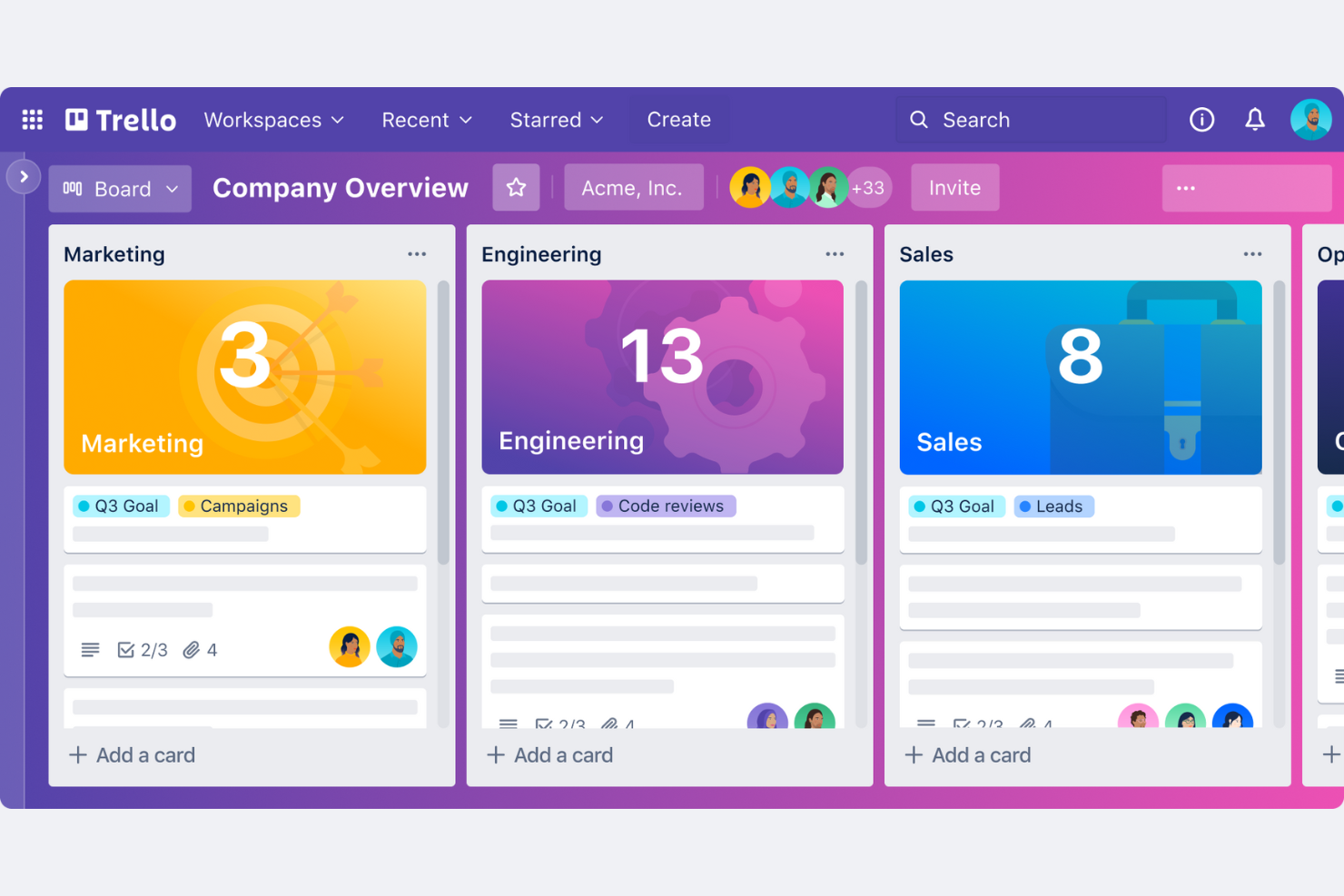
Trello es una herramienta visual de gestión de proyectos que utiliza tableros, listas y tarjetas para ayudar a los equipos a organizar tareas y proyectos. Está diseñada para pequeñas empresas y equipos que buscan una forma sencilla de gestionar flujos de trabajo y colaborar.
Por qué Trello es una buena alternativa a WorkflowMax: Trello ofrece una interfaz intuitiva que los equipos pequeños pueden adoptar rápidamente. El sistema de tableros visuales permite ver todo el proyecto de un vistazo. Es flexible y permite personalizar los tableros para adaptarlos a tu flujo de trabajo. La sencillez de Trello lo hace ideal para pequeñas empresas que necesitan una solución sencilla de gestión de proyectos.
Funciones e integraciones destacadas:
Las funciones incluyen tableros personalizables para adaptarse a tu flujo de trabajo, funcionalidad de arrastrar y soltar para gestionar tareas fácilmente, y listas de comprobación para mantener las tareas organizadas. Estas funciones ayudan a tu equipo a mantenerse al día con las tareas sin sentirse abrumado.
Las integraciones incluyen Slack, Google Drive, Microsoft Teams, Dropbox, GitHub, Evernote, Salesforce, Jira, GitLab, Zapier y más.
Pros and Cons
Pros:
- Fácil para equipos pequeños
- Interfaz visual intuitiva
- Adopción rápida
Cons:
- Puede ser demasiado sencillo para proyectos grandes
- No incluye seguimiento del tiempo

Asana
Ideal para equipos empresariales que utilizan muchas herramientas
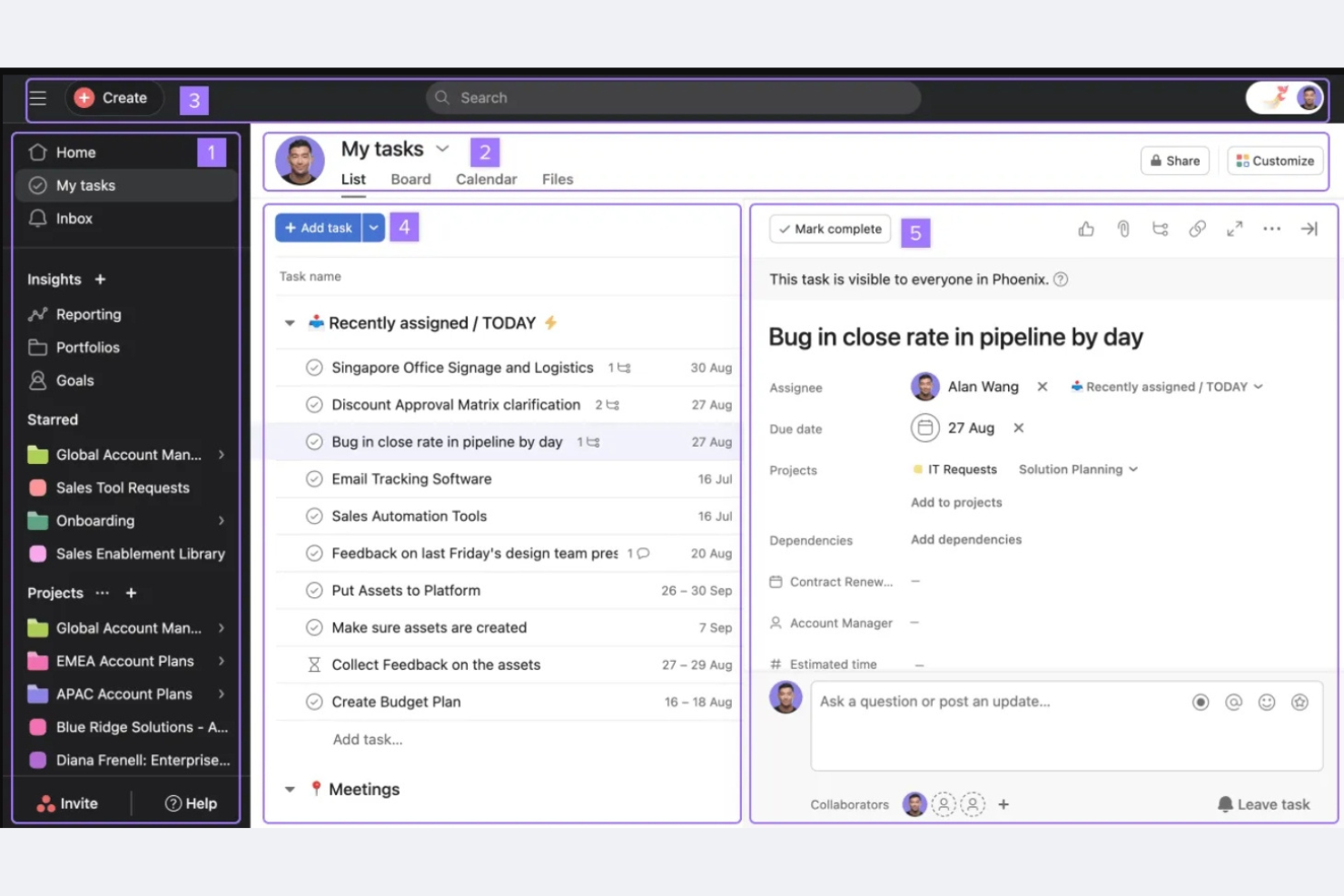
Asana es una herramienta de gestión de proyectos diseñada para ayudar a los equipos a organizar, supervisar y gestionar su trabajo. Está dirigida a empresas de todos los tamaños y ofrece funciones de gestión de tareas, seguimiento de proyectos y colaboración.
Por qué Asana es una buena alternativa a WorkflowMax: Asana ofrece amplias capacidades de integración, lo que la convierte en una excelente opción para empresas que necesitan conectividad con otras herramientas. Proporciona funciones avanzadas de seguimiento de proyectos para mantener a los miembros de tu equipo alineados. El sistema de gestión de tareas permite asignarlas y establecer fechas límite para la persona responsable. La flexibilidad de Asana para gestionar flujos de trabajo complejos satisface diversas necesidades empresariales.
Funciones destacadas e integraciones:
Las funciones incluyen campos personalizados para adaptar los proyectos a tus necesidades, una vista de cronograma para la planificación visual de proyectos y la gestión de la carga de trabajo para equilibrar los esfuerzos del equipo. Estas funciones ayudan a tu equipo a mantenerse organizado y cumplir los plazos de manera eficaz.
Las integraciones incluyen Slack, Microsoft Teams, Google Drive, Dropbox, GitHub, Salesforce, Trello, Zoom, Zapier y más.
Pros and Cons
Pros:
- Amplias opciones de integración
- Admite flujos de trabajo complejos
- Gestión de tareas personalizable
Cons:
- Funcionalidad sin conexión limitada
- No ofrece facturación ni contabilidad nativas
Avaza
Ideal para equipos de proyectos facturables
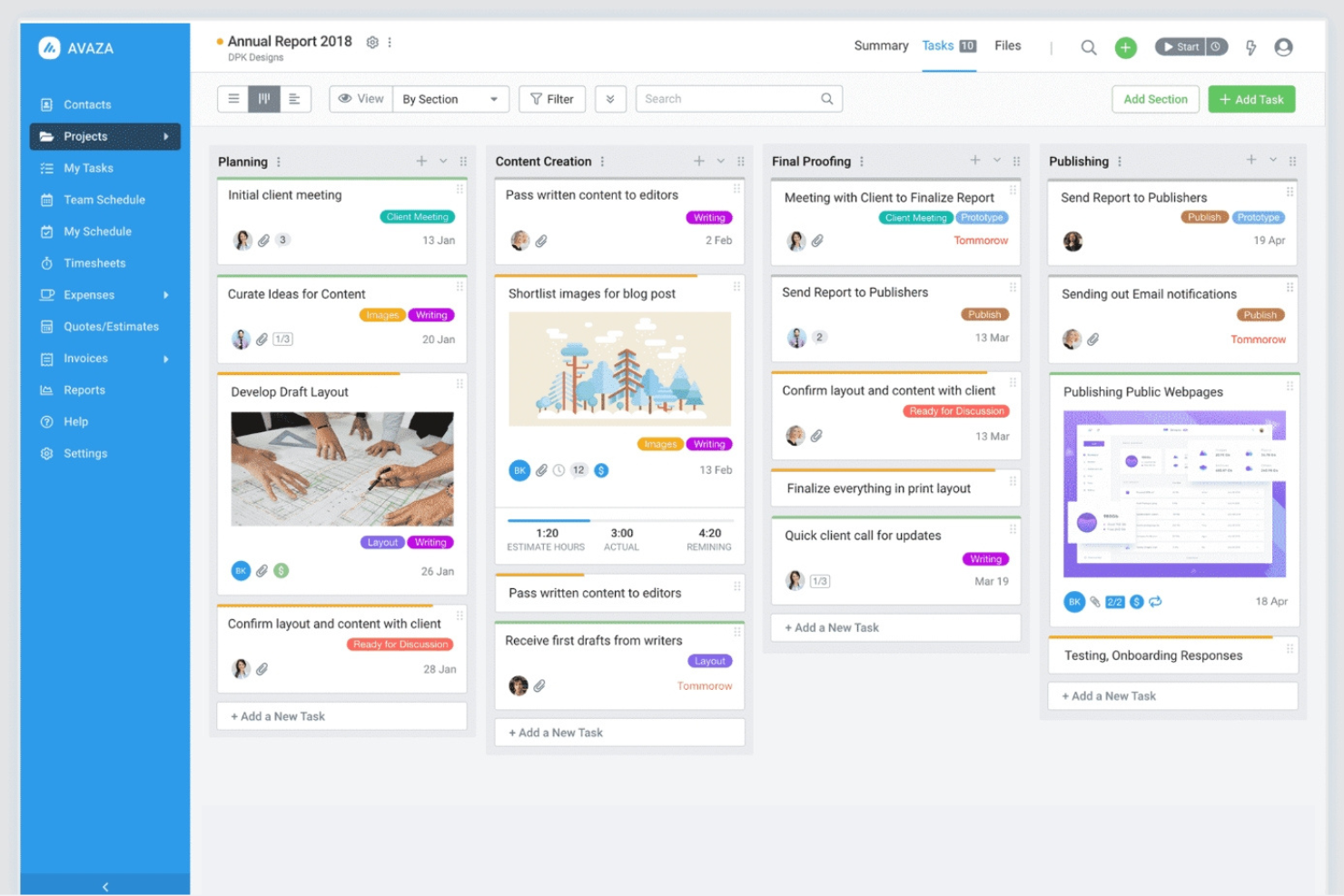
Avaza es una herramienta integral de gestión de proyectos y colaboración diseñada para empresas de todos los tamaños. Ayuda a los equipos a gestionar proyectos, registrar el tiempo y administrar la facturación en una sola plataforma.
Por qué Avaza es una buena alternativa a WorkflowMax: Avaza combina el registro del tiempo, la gestión de proyectos y la facturación en un único flujo de trabajo, lo que la hace especialmente útil para equipos de servicios que facturan por tiempo o por entregables. Su fortaleza radica en conectar directamente el trabajo del proyecto con la facturación del cliente sin necesidad de complementos.
Funciones e integraciones destacadas:
Las funciones incluyen vistas de tareas personalizables para adaptarse a tu flujo de trabajo, gestión de gastos para realizar un seguimiento de los costes y programación visual de los recursos del proyecto para mantener a los equipos encaminados. Estas funciones ayudan a tu equipo a trabajar de forma eficiente y mantenerse organizado.
Las integraciones incluyen Xero, QuickBooks, Slack, Google Drive, Dropbox, Zapier, Stripe, Evernote, Mailchimp y más.
Pros and Cons
Pros:
- Programación sencilla de recursos
- Funciones completas de facturación
- Chat interno del equipo
Cons:
- Puede requerir tiempo de configuración
- Requiere una introducción de datos constante

Bonsai
Ideal para autónomos que gestionan contratos
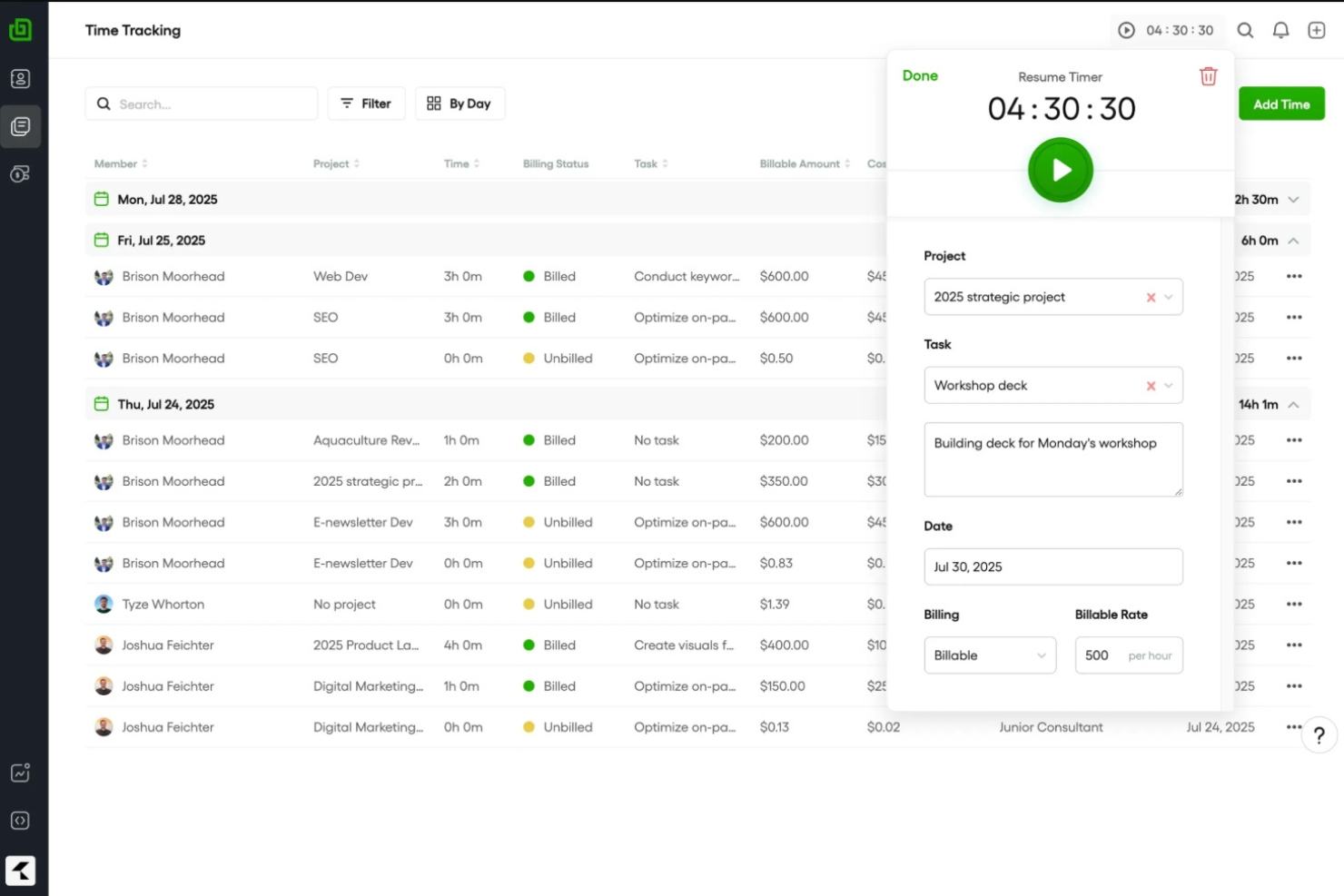
Bonsai es una plataforma diseñada para autónomos y empresas de servicios, que ofrece herramientas para gestionar contratos, propuestas y pagos. Ayuda a optimizar el flujo de trabajo mediante la integración del seguimiento del tiempo, la facturación y la gestión de clientes.
Por qué Bonsai es una buena alternativa a WorkflowMax: Bonsai se centra en autónomos y empresas de servicios, y ofrece plantillas de contratos y creación de propuestas. La función de facturación te ayuda a recibir los pagos a tiempo, mientras que el seguimiento del tiempo garantiza una facturación precisa. La configuración rápida con una configuración mínima la convierte en una excelente opción para quienes necesitan una herramienta de gestión de servicios todo en uno sin un proceso de incorporación prolongado.
Funciones e integraciones destacadas:
Las funciones incluyen recordatorios automatizados para garantizar pagos puntuales, un portal del cliente para facilitar la comunicación y herramientas de gestión fiscal para simplificar las tareas financieras. Estas funciones te ayudan a mantenerte organizado y a centrarte en hacer crecer tu negocio. Las integraciones disponibles dependen del plan, y se requiere el plan Elite para la integración con Xero.
Las integraciones incluyen QuickBooks, Xero, Zapier, Google Calendar, Calendly y más.
Pros and Cons
Pros:
- Las plantillas de contratos integradas reducen el tiempo de configuración legal
- Las propuestas, la facturación y los pagos se gestionan en un solo flujo de trabajo
- Incorporación rápida con una configuración mínima
Cons:
- No hay integraciones en los planes Basic o Essential
- Carece de opciones avanzadas de informes
Basecamp
Ideal para la comunicación en pequeñas empresas
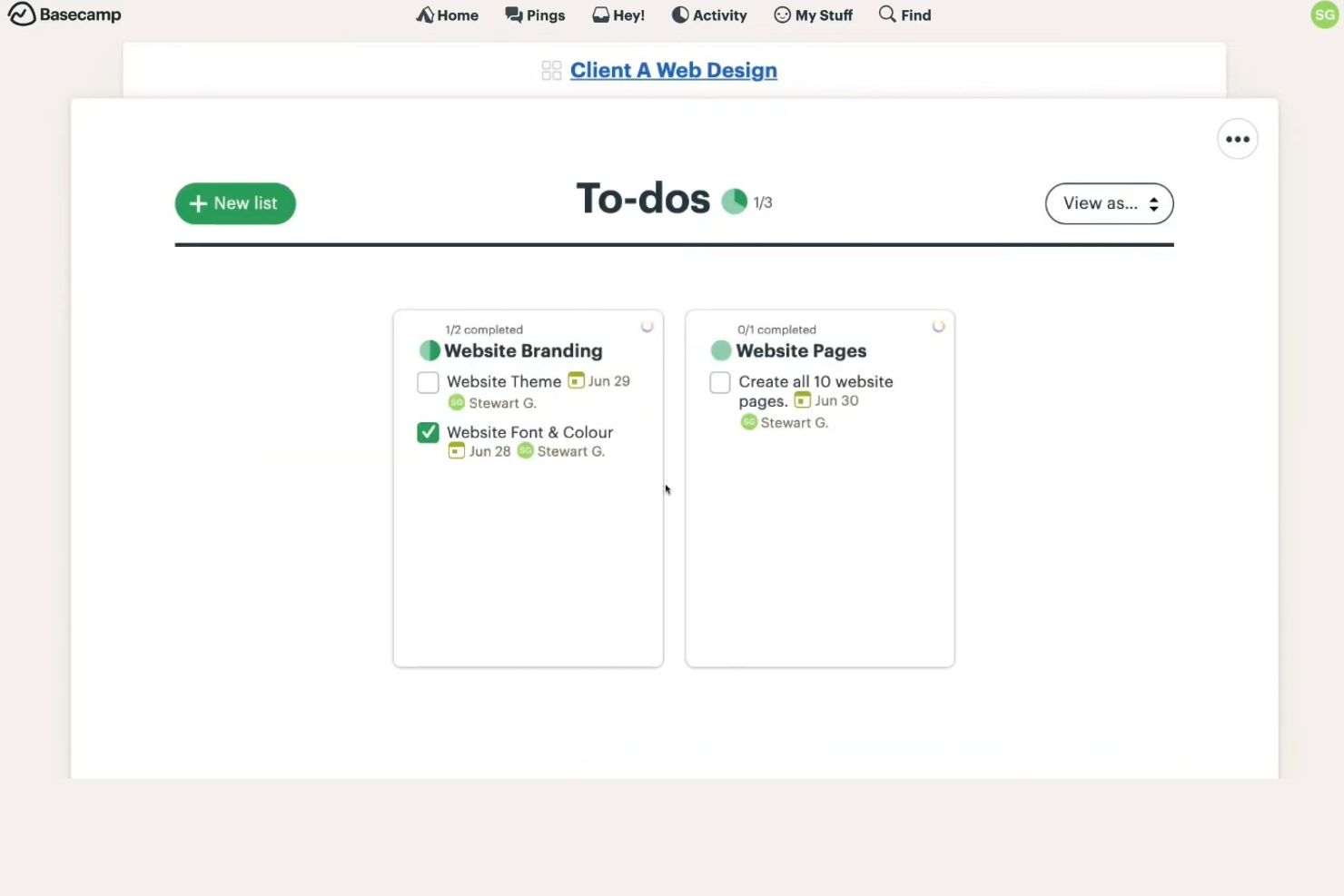
Basecamp es una herramienta de gestión de proyectos y colaboración en equipo diseñada para pequeñas empresas y equipos. Ayuda a los usuarios a organizar proyectos, asignar tareas y comunicarse eficazmente.
Por qué Basecamp es una buena alternativa a WorkflowMax: Basecamp ofrece una interfaz sencilla que resulta fácil de usar para las pequeñas empresas. Proporciona listas de tareas pendientes, paneles de mensajes y herramientas de programación para mantener al equipo encaminado. La plataforma centralizada permite una comunicación y un intercambio de documentos fluidos. La simplicidad de Basecamp garantiza que incluso los usuarios sin conocimientos técnicos puedan gestionar proyectos de manera eficiente.
Funciones e integraciones destacadas:
Las funciones incluyen registros automáticos para las actualizaciones del equipo, almacenamiento de archivos para mantenerlo todo en un mismo lugar y una función de gráfico de progreso para visualizar el avance del proyecto. Estas funciones ayudan al equipo a mantenerse organizado y comunicarse eficazmente.
Las integraciones incluyen Zapier, Harvest, Everhour y más.
Pros and Cons
Pros:
- Interfaz sencilla
- Comunicación centralizada
- Intercambio eficaz de documentos
Cons:
- Carece de flujos de trabajo avanzados integrados
- Las funciones de gestión de tareas carecen de dependencias y estructuras avanzadas de gestión de proyectos

Bitrix24
Ideal para proyectos con chat integrado
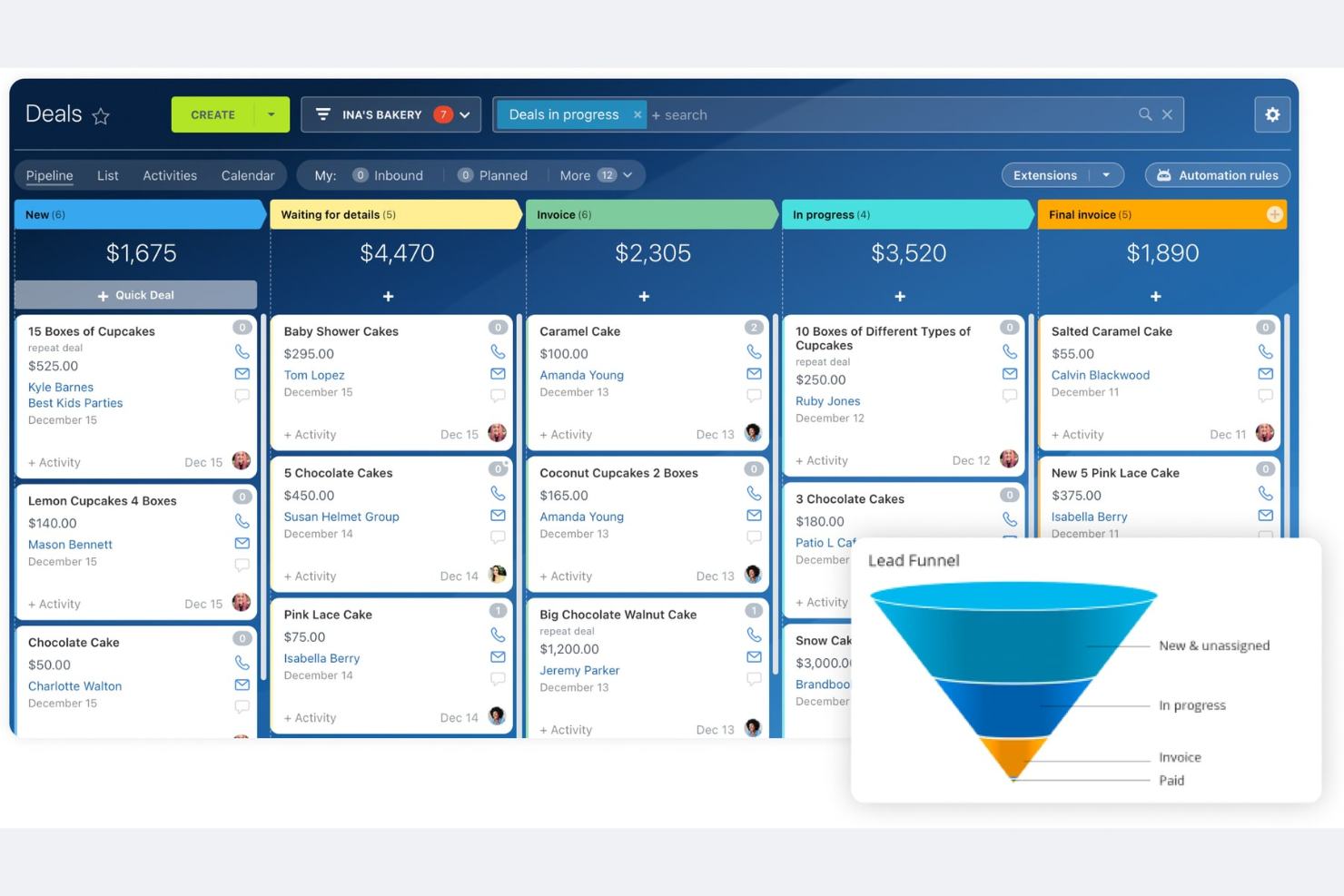
Bitrix24 es una plataforma integral de gestión empresarial que atiende a empresas de todos los tamaños y ofrece herramientas para CRM, gestión de proyectos, comunicación y colaboración. Ayuda a los equipos a gestionar tareas, comunicarse y automatizar flujos de trabajo de manera eficiente.
Por qué Bitrix24 es una buena alternativa a WorkflowMax: Bitrix24 ofrece una solución integral que combina la gestión de proyectos con herramientas de CRM y comunicación. Puedes gestionar tareas y proyectos mientras mantienes a tu equipo conectado mediante sus funciones de comunicación integradas. Las herramientas de automatización te permiten simplificar los procesos y aumentar la productividad. Esto lo convierte en una opción ideal para empresas que buscan un espacio de trabajo integrado para gestionar múltiples funciones.
Características e integraciones destacadas:
Las funciones incluyen la automatización de tareas para reducir el trabajo manual, una intranet social para la colaboración del equipo y un sistema de gestión de documentos para mantener los archivos organizados. Estas funciones ayudan a tu equipo a trabajar de manera eficiente y mantenerse conectado.
Las integraciones incluyen Google Drive, Microsoft Office, Mailchimp, Dropbox, Xero y más.
Pros and Cons
Pros:
- Conjunto completo de herramientas
- CRM y comunicación integrados
- Intranet social para la colaboración
Cons:
- Curva de aprendizaje más pronunciada
- Puede consumir muchos recursos

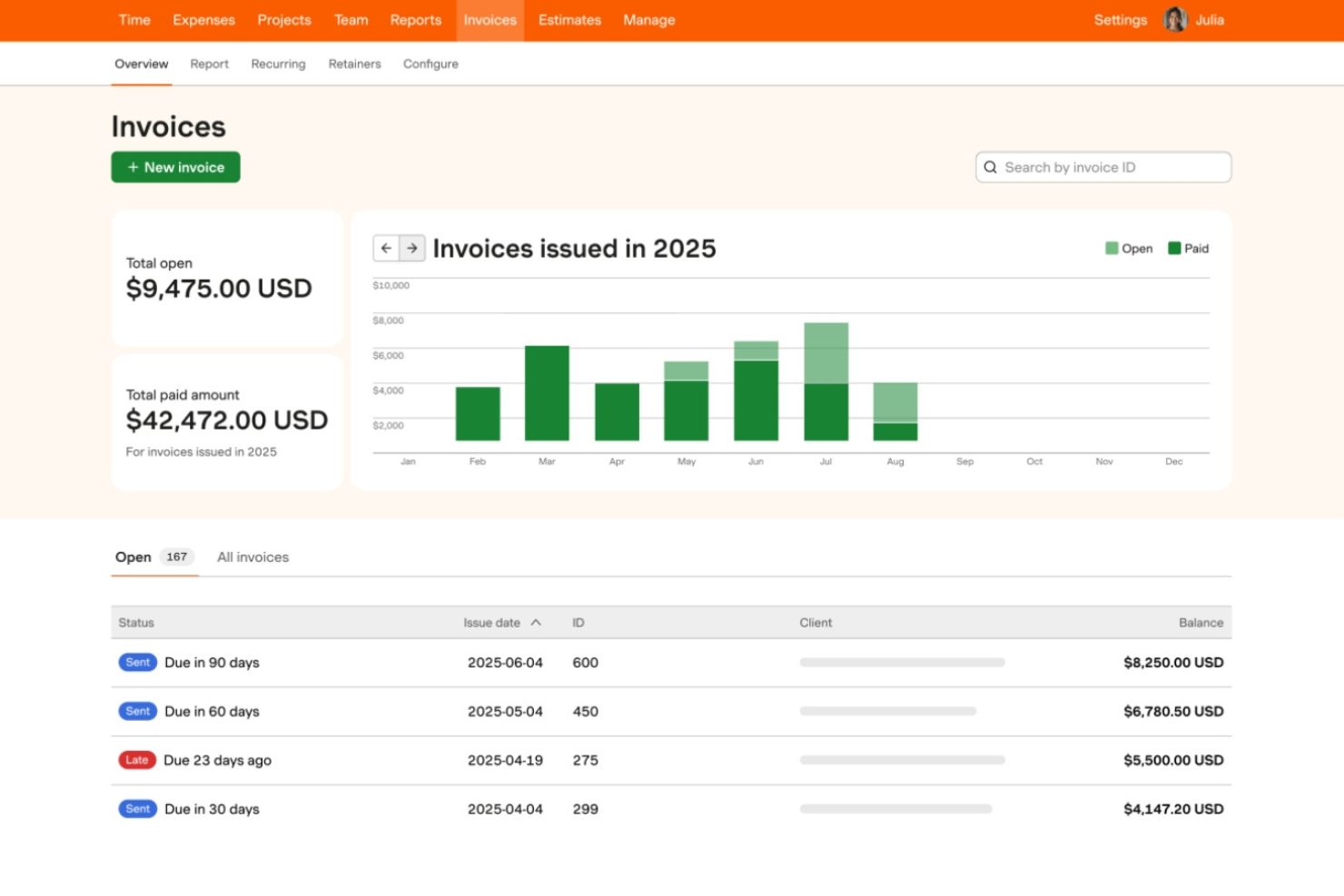
Harvest es un software de seguimiento del tiempo y facturación diseñado para ayudar a autónomos, consultores y pequeñas empresas a gestionar sus horas facturables y gastos. Permite a los usuarios registrar el tiempo, generar facturas y obtener información sobre los costes de los proyectos.
Por qué Harvest es una buena alternativa a WorkflowMax: Harvest ofrece un seguimiento del tiempo fácil de usar, lo que lo hace ideal para quienes se centran en gestionar horas facturables. La función de facturación ayuda a crear y enviar facturas rápidamente para que puedas cobrar antes. Sus herramientas de informes proporcionan información sobre los costes de los proyectos y el rendimiento del equipo. Esto lo convierte en una herramienta valiosa para las empresas que necesitan controlar de cerca el tiempo y las finanzas.
Funciones e integraciones destacadas:
Las funciones incluyen el seguimiento de gastos para simplificar la gestión financiera, informes detallados para obtener mejores perspectivas y aprobaciones de hojas de horas para simplificar los procesos del equipo. Estas funciones te ayudan a gestionar las finanzas y mejorar la eficiencia de los proyectos.
Las integraciones incluyen Asana, JIRA, Trello, Slack, Zapier, Basecamp, GitHub, Google Calendar y más.
Pros and Cons
Pros:
- Ideal para pequeñas empresas o autónomos
- Seguimiento del tiempo fácil de usar
- Proceso de facturación rápido
Cons:
- Funciones limitadas de gestión de proyectos
- Carece de personalización avanzada

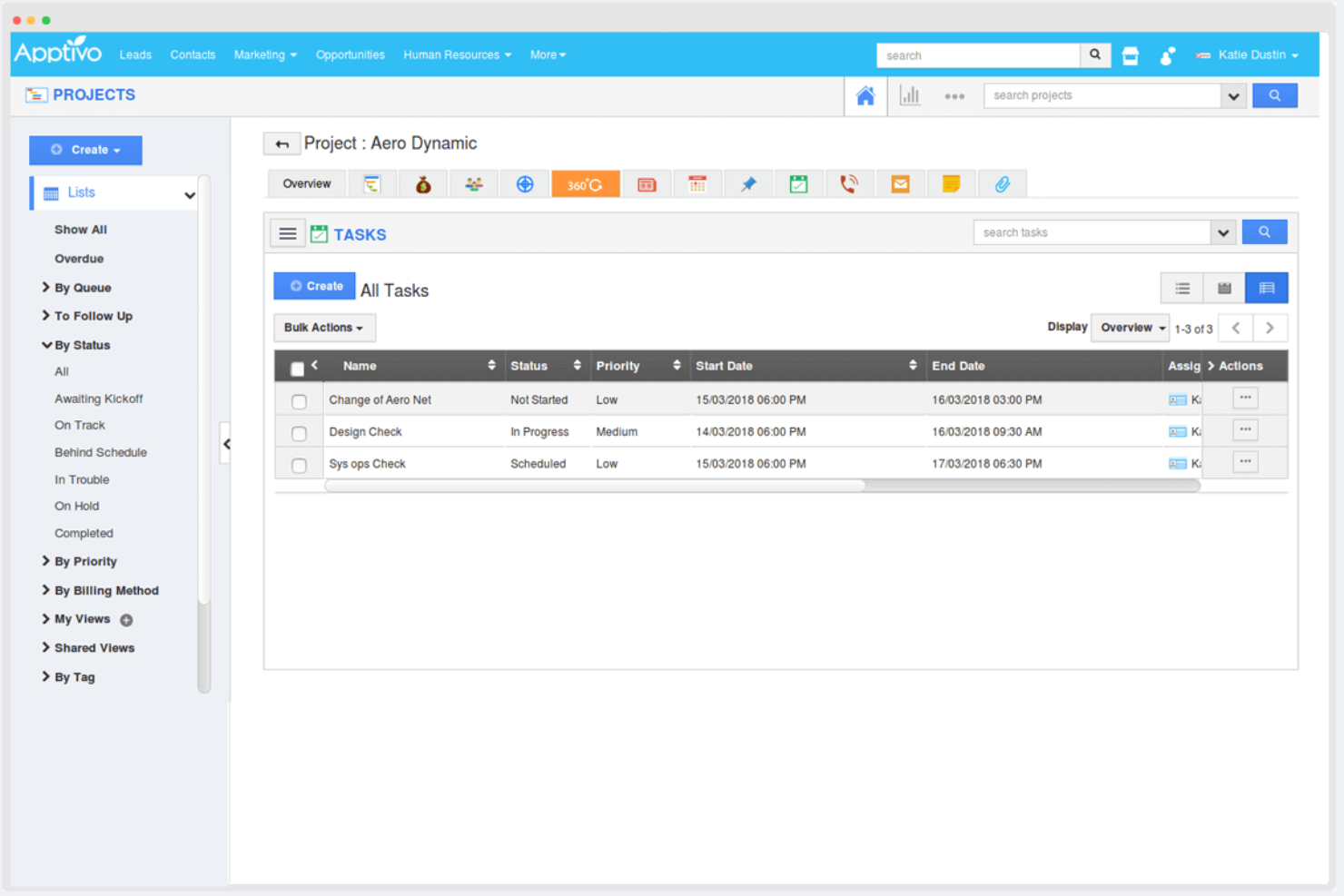
Apptivo es un software de gestión empresarial que atiende a pequeñas y medianas empresas y ofrece un conjunto de aplicaciones para CRM, gestión de proyectos, facturación y mucho más. Ayuda a las empresas a gestionar sus operaciones de manera eficiente al proporcionar herramientas personalizables que se adaptan a diversas necesidades empresariales.
Por qué Apptivo es una buena alternativa a WorkflowMax: Apptivo ofrece un alto nivel de personalización, lo que lo hace ideal para empresas que necesitan soluciones adaptadas. Sus funciones de CRM y gestión de proyectos permiten realizar un seguimiento de los clientes potenciales y gestionar proyectos en un solo lugar. Las herramientas de facturación y gestión de gastos ayudan a optimizar los procesos financieros. Esta flexibilidad respalda diversas operaciones empresariales y proporciona una solución de gestión integral.
Características e integraciones destacadas:
Las características incluyen un canal de ventas para realizar un seguimiento de los clientes potenciales, herramientas de gestión de proyectos para organizar tareas y funciones de generación de informes para obtener información empresarial. Estas características ayudan a tu equipo a gestionar las tareas y tomar decisiones informadas.
Las integraciones incluyen Office 365, Slack, QuickBooks, PayPal, Dropbox, RingCentral, G Suite, Xero, Stripe y mucho más.
Pros and Cons
Pros:
- Admite diversas operaciones
- Gestión centralizada de tareas
- Gestión financiera flexible
Cons:
- Requiere tiempo para personalizar
- Puede requerir conocimientos técnicos

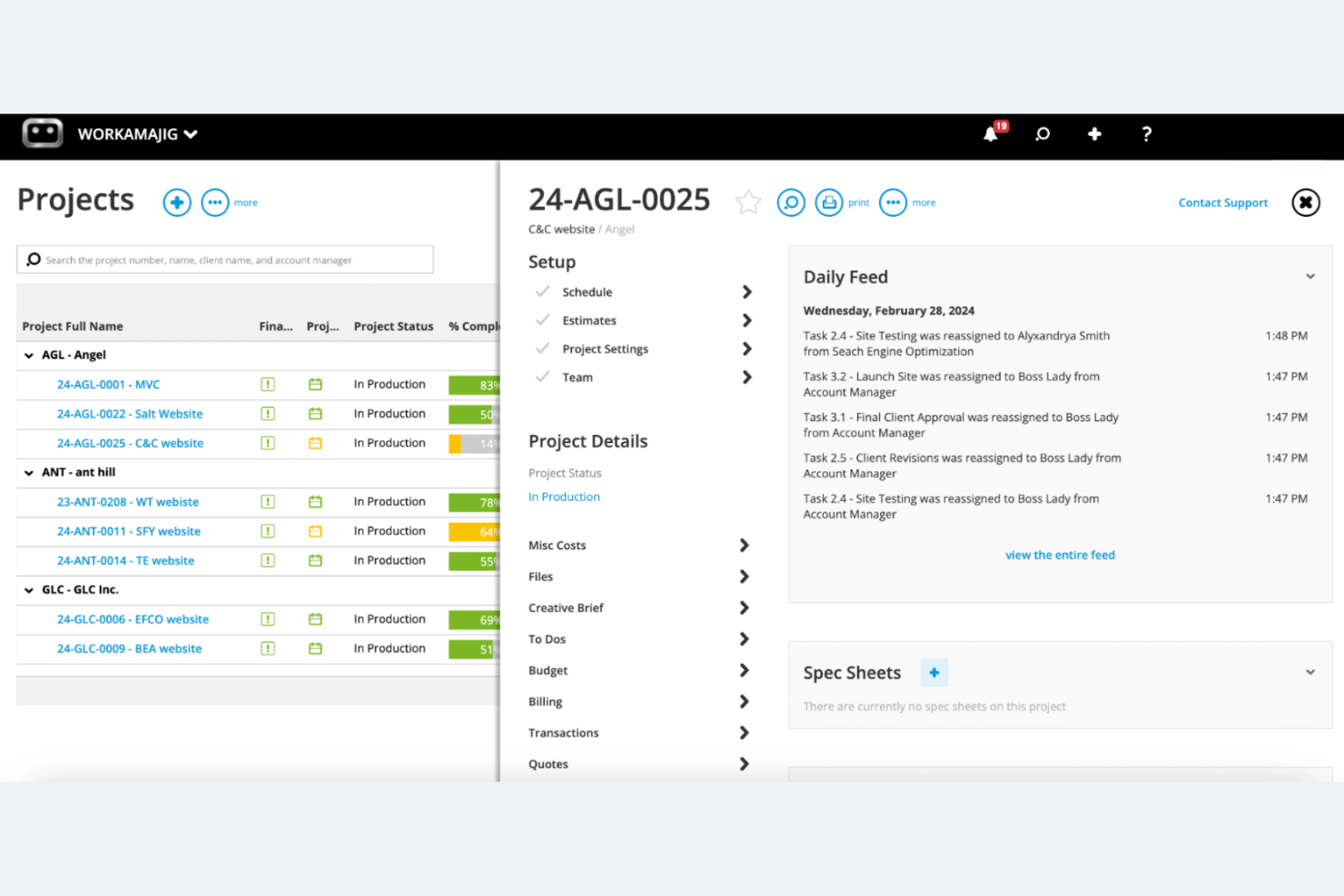
Workamajig es un software de gestión de proyectos diseñado para agencias de publicidad y marketing. Ofrece gestión de proyectos, CRM de ventas y gestión de recursos en un solo sistema.
Por qué Workamajig es una buena alternativa a WorkflowMax: Workamajig está adaptado para agencias creativas grandes o en crecimiento y equipos creativos internos, y ofrece funciones como contabilidad totalmente integrada, CRM y herramientas detalladas de generación de informes. Estas capacidades te ayudan a gestionar proyectos, recursos y finanzas sin tener que combinar varias herramientas. Permite a los equipos grandes o distribuidos realizar un seguimiento de los costes de los proyectos, el tiempo y la rentabilidad, todo dentro de una única plataforma nativa.
Funciones e integraciones destacadas:
Las funciones incluyen contabilidad nativa, asistencia especializada con formación y herramientas de generación de informes en tiempo real. Estas funciones ayudan a tu equipo a gestionar las finanzas, obtener información y garantizar que los proyectos se completen a tiempo.
Las integraciones incluyen BIONIC, Edenred Pay, AvidXchange, Avalara, Google Calendar y muchas más.
Pros and Cons
Pros:
- Adaptado para agencias de publicidad grandes y en crecimiento
- Funciones de contabilidad integradas
- Asistencia especializada disponible
Cons:
- Proceso de configuración complejo
- Curva de aprendizaje más pronunciada que la de las herramientas ligeras de gestión de proyectos
Otras alternativas a WorkflowMax
Estas son algunas alternativas adicionales a WorkflowMax que no han entrado en mi selección, pero que merece la pena conocer:
- ManyRequests
Ideal para crear portales de clientes con marca personalizada
- Quire
Ideal para equipos ágiles y Scrum
- ROLL
Ideal para la entrega de proyectos creativos


Wie ich WorkflowMax-Alternativen bewerte
Ich teile jede Bewertung in zwei Ebenen: Die grundlegenden Anforderungen wie Jobkalkulation, Stundenzettel und Rechnungsstellung, die ein Tool erfüllen muss, und die Unterscheidungsmerkmale wie Migrationsunterstützung und Xero-Synchronisation, die die besten Tools hervorheben.
Kernfunktionen (Grundvoraussetzungen für diese Liste)
Bei der Auswahl von Tools für meine Liste bewerte ich jedes einzelne auf einer Skala von 0 (bietet die Funktion nicht an) bis 5 (überdurchschnittlich stark in diesem Bereich) in Bezug auf jede unten aufgeführte Kernfunktion. Anschließend berechne ich die Gesamtpunktzahl des Tools als Prozentsatz. Jedes Tool muss mindestens einen Gesamtwert von 65 % erreichen, um berücksichtigt zu werden.
- Job- & Projektmanagement: Ich achte auf strukturierte Auftragserstellung mit Aufgaben, Meilensteinen und Statusverfolgung, damit ein Team ein Projekt vom Briefing bis zur Auslieferung begleiten kann.
- Zeiterfassung & Stundenzettel: Das Tool sollte es dem Personal ermöglichen, bezahlte und unbezahlte Stunden über Timer, Stundenzettel oder mobile Eingabe bestimmten Jobs oder Aufgaben zuzuordnen.
- Angebotserstellung & Rechnungsstellung: Ich prüfe, ob man ein Kundenangebot erstellen, es freigeben lassen und anschließend in eine Rechnung umwandeln kann, die an erfasste Zeiten oder Festpreise gekoppelt ist.
- Jobkalkulation & Budgetierung: Jedes Tool sollte es ermöglichen, ein Projektbudget festzulegen und tatsächliche Arbeitszeiten, Ausgaben und Kosten während des Projektverlaufs damit zu vergleichen.
- Integration mit Buchhaltungssoftware: Eine native Synchronisation mit Xero oder QuickBooks ist hier wichtig, da viele WorkflowMax-Nutzer diese Buchhaltungsanbindung für Rechnungen und Zahlungen benötigen.
- WIP- & Profitabilitätsberichte: Ich prüfe Berichte zu laufenden Arbeiten, Projektmargen und Auslastungsraten, damit Unternehmensinhaber unrentable Aufträge frühzeitig erkennen können.
Nachdem ich eine Liste von Tools zusammengestellt habe, die diese Kriterien erfüllen, prüfe ich, was jede Plattform besonders macht.
Differenzierende Faktoren (Was Anbieter unterscheidet)
So vergleiche und unterscheide ich die verschiedenen Anbieter:
Herausragende Funktionen
Ressourcen- und Kapazitätsplanung ist hier ein großer Unterschied. Ich suche nach Tools, die die Verfügbarkeit und Auslastung des Personals über mehrere parallele Projekte hinweg darstellen, damit Manager Überlastungen vermeiden können. Ein Kundenportal liefert ebenfalls echten Mehrwert, indem es Kunden ermöglicht, Angebote zu genehmigen oder den Projektfortschritt ohne ständige E-Mail-Rückfragen einzusehen. Für Handwerks- und Außendienstteams macht eine mobile App, die Zeiterfassung und Spesenerfassung vor Ort unterstützt, einen entscheidenden Unterschied für die Genauigkeit der Jobkalkulation.
Mehr als nur Funktionen
Migrationsunterstützung ist aktuell sehr wichtig. Ich prüfe, ob Anbieter spezielle Import-Tools oder geführte Migrationspfade für den Umzug von Kundendaten, Auftragsverlauf und Zeiteinträgen aus WorkflowMax anbieten. Die Branchenpassung ist ein weiterer Aspekt – ein Tool, das für Kreativagenturen entwickelt wurde, passt eventuell nicht für ein Ingenieurbüro. Deshalb bewerte ich, ob Vorlagen und Abläufe Ihre Branche gezielt abdecken. Auch Transparenz bei den Preisen ist entscheidend, insbesondere wie sich die Kosten entwickeln, wenn Ihr Team von wenigen auf viele Nutzer wächst.
¿Por qué buscar una alternativa a WorkflowMax?
Aunque WorkflowMax es una buena opción de software de gestión de proyectos, hay varios motivos por los que algunas personas usuarias buscan soluciones alternativas. Es posible que estés buscando una alternativa a WorkflowMax por alguno de los siguientes motivos:
- Necesitas más opciones de personalización
- Tu equipo necesita mejores herramientas de generación de informes
- Quieres más posibilidades de integración
- Tu empresa se está expandiendo a nivel internacional
- Necesitas una interfaz de usuario más sencilla
- Tu equipo necesita compatibilidad con Agile
Si te identificas con alguno de estos puntos, has llegado al lugar adecuado. Mi lista incluye varias opciones de software de gestión de proyectos más adecuadas que WorkflowMax para los equipos que se enfrentan a estos desafíos.
Funciones principales de WorkflowMax
Estas son algunas de las funciones principales de WorkflowMax, para que puedas contrastar y comparar lo que ofrecen las soluciones alternativas:
- Estimación y presupuestos de trabajos: Crea presupuestos y estimaciones personalizables para simplificar tu proceso de ventas.
- Seguimiento del tiempo: Registra con precisión las horas facturables para garantizar que maximices los ingresos de tu equipo.
- Facturación: Genera facturas profesionales para agilizar los pagos y gestionar el flujo de caja.
- Gestión de clientes potenciales: Haz un seguimiento de los clientes potenciales y de los embudos de ventas para optimizar tus esfuerzos de desarrollo empresarial.
- Gestión de proyectos: Supervisa las tareas y los plazos desde una única plataforma para mantener tus proyectos encauzados.
- Gestión de documentos: Accede de forma centralizada a los documentos importantes de los proyectos para recuperarlos y colaborar fácilmente.
- Informes y panel de control: Utiliza datos en tiempo real para tomar decisiones fundamentadas y mejorar el rendimiento empresarial.
- Opciones de personalización: Adapta las facturas, los informes y otros documentos a las necesidades específicas de tu empresa.
- Integraciones: Conecta con programas de contabilidad basados en la nube, como Xero y QuickBooks, para mejorar la eficiencia y reducir el trabajo manual.
¿Qué viene después?
Si estás investigando programas de gestión de proyectos, ponte en contacto con un asesor de SoftwareSelect para recibir recomendaciones gratuitas.
Rellenarás un formulario y mantendrás una breve conversación en la que analizarán en detalle tus necesidades. Después, recibirás una lista reducida de programas para revisar. Incluso te ayudarán durante todo el proceso de compra, incluidas las negociaciones de precios.