



Zoho Projects vs. monday.com: Expertenvergleich für 2026



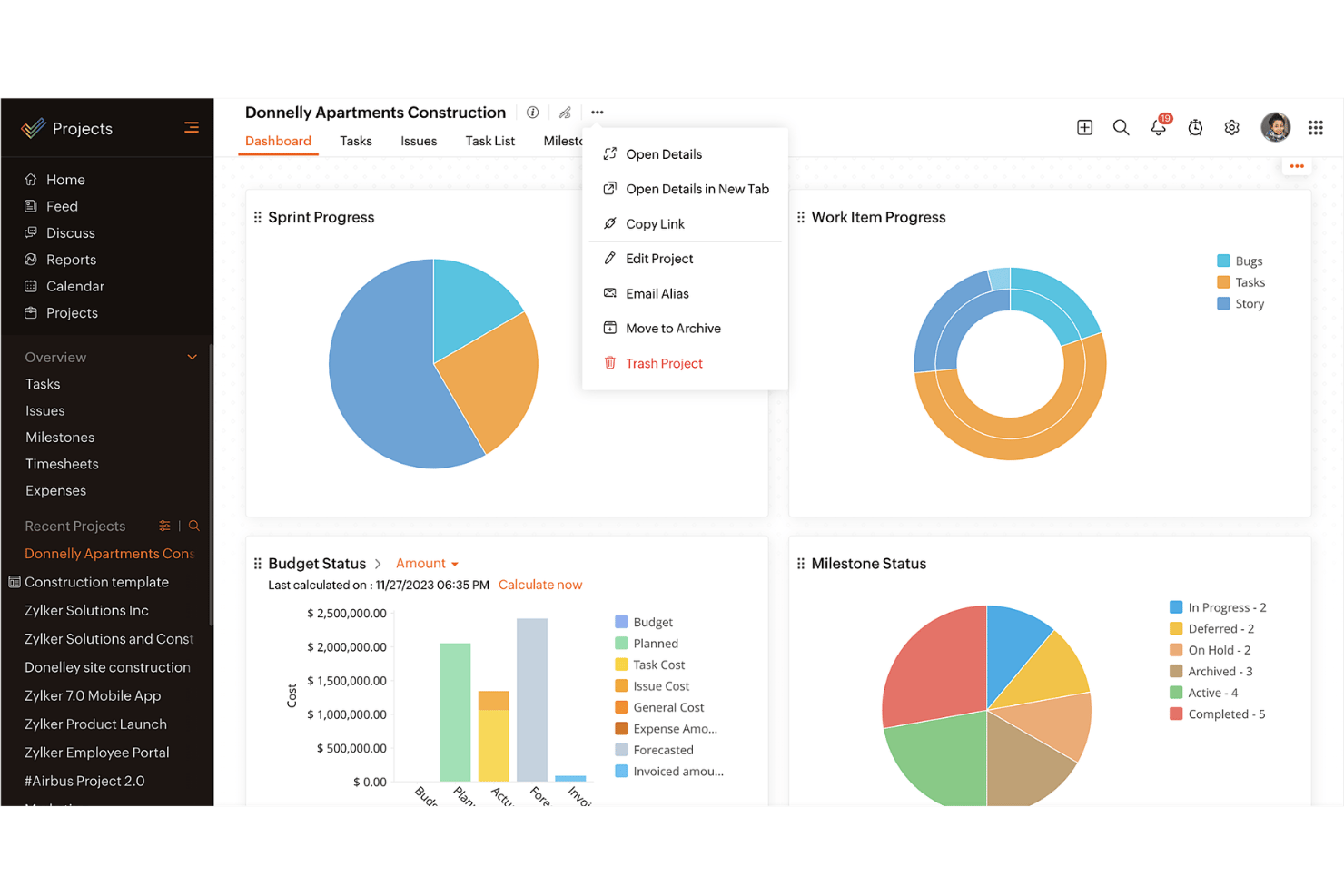
Zoho Projects bietet eine leistungsstarke Plattform, um die Aufgaben und Zeitpläne Ihres Teams effizient zu verwalten. monday.com stellt eine visuell intuitive Benutzeroberfläche zur Verfügung, um Ihre Arbeit zu organisieren und effektiv zusammenzuarbeiten. Während beide Tools dabei helfen, Projektabläufe zu optimieren, ist Zoho Projects für seine umfassenden Berichtsfunktionen bekannt, während monday.com mit anpassbaren Dashboards punktet. In diesem Artikel finden Sie einen detaillierten Vergleich dieser Projektmanagement-Software, einschließlich ihrer Funktionen, Vor- und Nachteile sowie Preise.
Zoho Projects vs. monday AI Workspace: An Overview
Zoho Projects
monday AI Workspace

Warum Sie unseren Software-Empfehlungen vertrauen können
Unser Team testet und bewertet Software seit 2012. Als Projektmanager wissen wir selbst, wie schwierig – und wichtig – es ist, die richtige Software auszuwählen.
Für diesen Leitfaden haben wir Tools mithilfe von praktischen Tests und unabhängiger Recherche bewertet und dabei unsere Bewertungskriterien angewendet. Zudem greifen wir auf Erkenntnisse von Branchenvordenkern und praktizierenden Projektmanagement-Experten zurück.
Unsere Bewertungen spiegeln unser menschliches redaktionelles Urteilsvermögen wider, keine Verkaufsstrategie.
Expertenprüfer:
Zoho Projects vs. monday AI Workspace Pricing Comparison
| Zoho Projects | monday AI Workspace | |
|---|---|---|
| Free Trial | Free plan available | Free plan available |
| Pricing | From $4/user/month (billed annually) | From $9/user/month (billed annually) |
Zoho Projects vs. monday.com Preise & versteckte Kosten
Zoho Projects Preise basieren auf einem gestaffelten Abonnementmodell und bieten verschiedene Pläne mit unterschiedlichen Funktionen. Nutzer können auf zusätzliche Kosten für weitere Benutzer oder Premium-Support stoßen. monday.com Preise verfolgen einen ähnlichen gestaffelten Ansatz, betonen jedoch ihre Flexibilität mit Add-ons und Integrationen, was wiederum zu zusätzlichen Ausgaben führen kann. Um das richtige Tool für Ihre Bedürfnisse zu wählen, sollten Sie nicht nur die Grundgebühr des Abonnements, sondern auch die benötigten Funktionen und den gewünschten Support für Ihr Team berücksichtigen. Prüfen Sie die Skalierbarkeit des Preismodells, um sicherzustellen, dass es mit dem Wachstum und der Komplexität Ihres Projekts übereinstimmt.
Zoho Projects vs. monday AI Workspace Feature Comparison
Mit den umfassenden Aufgabenmanagement-Funktionen von Zoho Projects können Sie den Fortschritt einfach nachverfolgen und Meilensteine festlegen, was besonders für die Verwaltung komplexer Projekte mit engen Zeitplänen wertvoll ist. Die leistungsstarken Automatisierungen von monday.com eignen sich hervorragend, um wiederkehrende Aufgaben zu vereinfachen und eine nahtlose Integration mit anderen Tools zu ermöglichen – besonders in einem schnelllebigen Umfeld, in dem häufige Updates erforderlich sind. Während Zoho Projects bei strukturierten Projektzeitplänen punktet, bietet monday.com Flexibilität durch individuell anpassbare Automatisierungen. Beide unterstützen unterschiedliche Aspekte des Projektmanagements.
| Zoho Projects | monday AI Workspace | |
|---|---|---|
| API | ||
| Batch Permissions & Access | ||
| Budgeting | ||
| Calendar Management | ||
| Collaboration Support | ||
| Contact Management | ||
| Contact Sharing | ||
| Customer Management | ||
| Dashboard | ||
| Dashboards | ||
| Data Export | ||
| Data Import | ||
| Data Visualization | ||
| Dependency Tracking | ||
| Document Sharing | ||
| Expense Tracking | ||
| External Integrations | ||
| File Sharing | ||
| Gantt Charts | ||
| Kanban Boards | ||
| Multi-User | ||
| Notifications | ||
| Project Management | ||
| Resource Management | ||
| Scheduling | ||
| Task Scheduling/Tracking | ||
| Third-Party Plugins/Add-Ons | ||
| Time Management | ||
| Travel Management | ||
| Workflow Management |
Zoho Projects vs. monday.com Integrationen
| Integration | Zoho Projects | monday.com |
|---|---|---|
| Slack | ✅ | ✅ |
| Microsoft Teams | ✅ | ✅ |
| Google Drive | ✅ | ✅ |
| Dropbox | ✅ | ✅ |
| Salesforce | ❌ | ✅ |
| HubSpot | ❌ | ✅ |
| Zendesk | ✅ | ❌ |
| QuickBooks | ❌ | ✅ |
| API | ✅ | ✅ |
| Zapier | ✅ | ✅ |
Mit der Integration von Zoho Projects in Slack können Sie die Kommunikation optimieren, indem Sie sofortige Benachrichtigungen direkt im Chat erhalten – ideal für Teams, die stark auf Echtzeit-Nachrichten setzen. Die HubSpot-Integration von monday.com eignet sich hervorragend für vertriebsorientierte Projekte, da sie eine nahtlose Synchronisierung von Deals und Kontakten ermöglicht und so die Projektübersicht und das Kundenbeziehungsmanagement verbessert. Beide Tools bieten Integrationen, die auf unterschiedliche Bedürfnisse zugeschnitten sind – sei es für bessere Kommunikation oder für ein optimiertes Verkaufs-Tracking.
Zoho Projects vs. monday.com Sicherheit, Compliance & Zuverlässigkeit
| Faktor | Zoho Projects | monday.com |
|---|---|---|
| Datenverschlüsselung | Zoho Projects verschlüsselt Daten während der Übertragung und im Ruhezustand mit moderner AES-256-Verschlüsselung. | monday.com nutzt ebenfalls AES-256-Verschlüsselung, um Daten sowohl beim Transfer als auch im Ruhezustand zu schützen. |
| Regulatorische Compliance | Zoho Projects erfüllt die Anforderungen der DSGVO und gewährleistet so Datenschutz und Datensicherheit für europäische Nutzer. | monday.com entspricht der DSGVO sowie weiteren internationalen Datenschutzbestimmungen. |
| Betriebszuverlässigkeit | Zoho Projects garantiert eine Verfügbarkeit von 99,9 % und stellt so minimale Unterbrechungen für Ihr Team sicher. | monday.com bietet ein 99,9 % Uptime-SLA und stellt einen zuverlässigen Zugriff auf Ihre Projekte bereit. |
| Zugriffskontrollen | Zoho Projects bietet rollenbasierte Zugriffskontrollen, sodass Sie Benutzerberechtigungen individuell festlegen können. | monday.com verfügt über anpassbare Zugriffskontrollen, mit denen Sie festlegen können, wer Informationen ansehen oder bearbeiten darf. |
Zoho Projects und monday.com legen beide großen Wert auf Sicherheit und Compliance. Sie bieten leistungsfähige Verschlüsselung und erfüllen gängige Vorschriften. Um den richtigen Anbieter auszuwählen, prüfen Sie die spezifischen Sicherheitsfeatures in Hinblick auf die Compliance-Anforderungen Ihrer Branche und achten Sie auf die Zuverlässigkeitsgarantien, die einen kontinuierlichen Zugriff auf Ihre Projektdaten sicherstellen.
Zoho Projects vs. monday.com Benutzerfreundlichkeit
| Faktor | Zoho Projects | monday.com |
|---|---|---|
| Benutzeroberfläche | Zoho Projects verfügt über eine strukturierte Oberfläche mit Fokus auf detaillierte Projektzeitleisten und Aufgabenlisten. | monday.com bietet eine ansprechende und farbenfrohe Benutzeroberfläche mit individuell gestaltbaren Boards. |
| Onboarding-Erlebnis | Zoho Projects stellt geführte Tutorials und Hilfedokumentationen bereit, um neuen Nutzern den Einstieg zu erleichtern. | monday.com bietet einen intuitiven Onboarding-Prozess mit interaktiven Tutorials und Vorlagen. |
| Einrichtungsprozess | Zoho Projects erfordert eine umfassendere Einrichtung mit zahlreichen Konfigurationsmöglichkeiten. | monday.com ermöglicht eine schnelle Einrichtung mit Drag-and-Drop-Funktion und vorgefertigten Vorlagen. |
| Kundensupport | Zoho Projects bietet umfangreichen Support über Online-Ressourcen und Live-Chat. | monday.com stellt einen 24/7-Support mit einer großen Auswahl an Video-Tutorials und Webinaren bereit. |
Zoho Projects ist ideal für Anwender, die einen detaillierten und strukturierten Ansatz bevorzugen, allerdings kann die Einrichtung komplexer sein. monday.com besticht durch seine visuelle Attraktivität und eine besonders benutzerfreundliche, intuitive Bedienung – so gelingt der Projektstart besonders leicht und unkompliziert.
Zoho Projects vs monday AI Workspace: Pros & Cons
Zoho Projects
- Task dependencies are highly visual and easy to set up.
- Built-in time tracking integrates smoothly with billing features.
- Customizable project templates support repeatable workflows.
- Reporting customization can be limited for advanced needs.
- Mobile app notifications do not always sync in real time.
- Gantt chart drag-and-drop can feel sluggish with large projects.
monday AI Workspace
- The interface is easy to use, with simple drag and drop timeline and charting mechanics.
- You can create forms that live within your project as a view.
- There is a long list of supported integrations
- The Gantt view isn't useful for building a project.
- Recurring tasks are considered automations and limited to higher tier plans.
- There is a steep learning curve for beginners.
Best Use Cases for Zoho Projects and monday AI Workspace
Zoho Projects
- Small Agencies Kanban boards, time tracking, and client billing streamline project delivery and reporting for agency teams.
- IT Departments Issue tracking, blueprint automations, and strong permission controls provide what IT teams need for complex internal projects.
- Consulting Firms Time sheets, detailed reports, and project-level billing help consultants keep track of client hours and invoicing.
- Remote Teams Robust collaboration tools, document sharing, and project forums help distributed users stay connected.
- Marketing Teams Reusable templates, task dependencies, and timeline tracking make repeated campaigns run smoothly and transparently.
- Construction Projects Gantt charts, milestones, and resource allocation features support the scheduling needs of construction and field project managers.
monday AI Workspace
- Creative departments With features like collaborative docs and a proofing screen, creative teams can improve feedback loops and increase delivery speeds.
- Marketing teams Its customizable dashboards and automation features let you track campaigns and workflows efficiently.
- Content creation monday.com's file management and commenting capabilities let teams manage media files and improve collaboration.
- Event planners The platform’s timeline views and easy collaboration features make managing multiple events straightforward.
- Product development You can track progress and updates across teams to maintain alignment and meet deadlines.
- Remote teams With collaborative features and real-time updates, remote teams can maintain productivity and communication effortlessly.
Wer sollte Zoho Projects nutzen und wer monday.com?
Meiner Meinung nach ist Zoho Projects ideal für Teams, die eine detaillierte Projektplanung und ausgeprägte Berichtsfunktionen benötigen – das macht die Software besonders geeignet für Branchen wie das Ingenieurwesen oder die IT. Wenn Ihre Arbeit einen strukturierten Ansatz mit starkem Fokus auf Zeitplanung und Aufgabenverwaltung fordert, ist Zoho Projects die richtige Wahl. monday.com hingegen halte ich für optimal für kreative Teams und Startups, die Flexibilität und visuelles Projektmanagement benötigen. Dank individuell gestaltbarer Boards und einfacher Integrationen eignet sich monday.com insbesondere für dynamische Umgebungen, in denen Zusammenarbeit und Anpassungsfähigkeit gefragt sind.
Differences Between Zoho Projects and monday AI Workspace
| Zoho Projects | monday AI Workspace | |
|---|---|---|
| Automation | Zoho Projects includes basic automation for task management. | monday.com offers advanced automation and seamless integrations with other tools. |
| Onboarding | Zoho Projects has guided onboarding with tutorials and documentation. | monday.com features an interactive onboarding process with templates and tutorials. |
| Pricing | Zoho Projects offers tiered plans with additional costs for premium features. | monday.com provides flexible plans with options for add-ons and integrations. |
| Reporting | Zoho Projects provides detailed reporting and analytics for project tracking. | monday.com offers customizable dashboards for visual project insights. |
| User Interface | Zoho Projects features a structured, timeline-focused interface. | monday.com has a colorful, board-based interface that's highly customizable. |
| Read Zoho Projects ReviewOpens new window | Visit monday AI WorkspaceOpens new window |
Similarities Between Zoho Projects and monday AI Workspace
| Collaboration | Each platform offers communication features, ensuring your team stays connected on project updates. |
|---|---|
| Customization | Zoho Projects and monday.com allow you to customize project views and workflows to suit your needs. |
| Integrations | Both tools integrate with popular apps like Slack and Google Drive, enhancing your team's workflow. |
| Security | Both provide strong encryption and compliance with regulations like GDPR to protect your data. |
| User Support | Zoho Projects and monday.com offer extensive support resources, including tutorials and live help. |
| Read Zoho Projects ReviewOpens new window Visit monday AI WorkspaceOpens new window | |