



Wrike vs. Zoho Projects: Vergleich & Expertenbewertungen 2026



Wrike ist eine Projektmanagement-Plattform, die Teams dabei hilft, Arbeit effizient und übersichtlich zu organisieren. Zoho Projects konzentriert sich auf die Aufgabenorganisation und die Zusammenarbeit im Team. Während beide Tools reibungslosere Projektabläufe unterstützen, unterscheiden sie sich in Bezug auf Anpassbarkeit und Integrationsmöglichkeiten – entscheidende Faktoren für Teams, die das passende Werkzeug suchen.
In diesem Artikel finden Sie einen detaillierten Vergleich dieser Projektmanagement-Software. Wir beleuchten Funktionen, Vor- und Nachteile, Preise und mehr.
Wrike vs. Zoho Projects: An Overview
Wrike
Zoho Projects
Warum Sie unseren Software-Empfehlungen vertrauen können
Unser Team testet und bewertet Software seit 2012. Als Projektmanager wissen wir selbst, wie schwierig – und wichtig – es ist, die richtige Software auszuwählen.
Für diesen Leitfaden haben wir Tools mithilfe von praktischen Tests und unabhängiger Recherche bewertet und dabei unsere Bewertungskriterien angewendet. Zudem greifen wir auf Erkenntnisse von Branchenvordenkern und praktizierenden Projektmanagement-Experten zurück.
Unsere Bewertungen spiegeln unser menschliches redaktionelles Urteilsvermögen wider, keine Verkaufsstrategie.
Expertenprüfer:
Wrike vs. Zoho Projects Pricing Comparison
| Wrike | Zoho Projects | |
|---|---|---|
| Free Trial | Free plan available; 14-day free trial | Free plan available; 15-day free trial |
| Pricing | From $10/user/month (billed annually) | From $5/user/month |
Wrike vs. Zoho Projects Feature Comparison
Dieser Vergleich nach Funktionen hebt die Kernfunktionen hervor, die Wrike und Zoho Projects bieten, damit Sie beurteilen können, welche Plattform Ihre Projektmanagement-Anforderungen am besten unterstützt.
| Wrike | Zoho Projects | |
|---|---|---|
| API | ||
| Batch Permissions & Access | ||
| Budgeting | ||
| Calendar Management | ||
| Collaboration Support | ||
| Contact Management | ||
| Contact Sharing | ||
| Customer Management | ||
| Dashboard | ||
| Dashboards | ||
| Data Export | ||
| Data Import | ||
| Data Visualization | ||
| Dependency Tracking | ||
| Document Sharing | ||
| Expense Tracking | ||
| External Integrations | ||
| File Sharing | ||
| Gantt Charts | ||
| Kanban Boards | ||
| Multi-User | ||
| Notifications | ||
| Project Management | ||
| Resource Management | ||
| Scheduling | ||
| Task Scheduling/Tracking | ||
| Third-Party Plugins/Add-Ons | ||
| Time Management | ||
| Travel Management | ||
| Workflow Management |
Wrike vs. Zoho Projects Integrationen
| Integration | Wrike | Zoho Projects |
| Slack | ✅ | ❌ |
| Microsoft Teams | ✅ | ✅ |
| Google Drive | ✅ | ✅ |
| Salesforce | ✅ | ❌ |
| Dropbox | ✅ | ✅ |
| QuickBooks | ❌ | ✅ |
| GitHub | ✅ | ❌ |
| Zoho CRM | ❌ | ✅ |
| API | ✅ | ✅ |
| Zapier | ✅ | ❌ |
Wrike lässt sich mit Slack integrieren, um die Kommunikation in Echtzeit zu unterstützen und Ihr Team auf dem Laufenden zu halten, ohne das Tool zu wechseln. Das ist besonders sinnvoll für Teams, die auf Sofortnachrichten setzen.
Zoho Projects verbindet sich mit Zoho CRM und ermöglicht dadurch einen reibungslosen Datenaustausch zwischen Vertrieb und Projektmanagement – vor allem für Unternehmen, die bereits das Zoho-Ökosystem nutzen. Während Wrike auf Werkzeuge für die Zusammenarbeit in Echtzeit setzt, legt Zoho Projects den Fokus auf Effizienz innerhalb des eigenen Produktuniversums.
Wrike vs. Zoho Projects Sicherheit, Compliance & Zuverlässigkeit
| Faktor | Wrike | Zoho Projects |
| Datenverschlüsselung | Wrike verwendet fortschrittliche AES-256-Verschlüsselung für ruhende sowie übertragene Daten. | Zoho Projects setzt AES-256-Verschlüsselung ein, um Daten sowohl während der Speicherung als auch der Übertragung zu schützen. |
| Regulatorische Compliance | Wrike ist DSGVO-konform und bietet Funktionen zur Unterstützung von HIPAA. | Zoho Projects entspricht der DSGVO und stellt Compliance-Tools für HIPAA bereit. |
| Betriebszuverlässigkeit | Wrike garantiert eine 99%-Verfügbarkeit dank einer robusten Infrastruktur. | Zoho Projects sichert eine 99,9%ige Verfügbarkeit zu, gestützt durch eine zuverlässige Serverarchitektur. |
Wrike und Zoho Projects bieten beide starke Sicherheits- und Compliance-Funktionen, doch Wrike kann mit seiner fortschrittlichen Verschlüsselung und gezielten Compliance-Optionen einen Vorteil bieten.
Berücksichtigen Sie bei der Anbieterauswahl die spezifischen Compliance-Anforderungen Ihrer Branche, Verschlüsselungsstandards, Verfügbarkeitsgarantien und die Frage, wie sich jedes Tool in Ihre Sicherheitsrichtlinien einfügt.
Wrike vs. Zoho Projects Benutzerfreundlichkeit
| Faktor | Wrike | Zoho Projects |
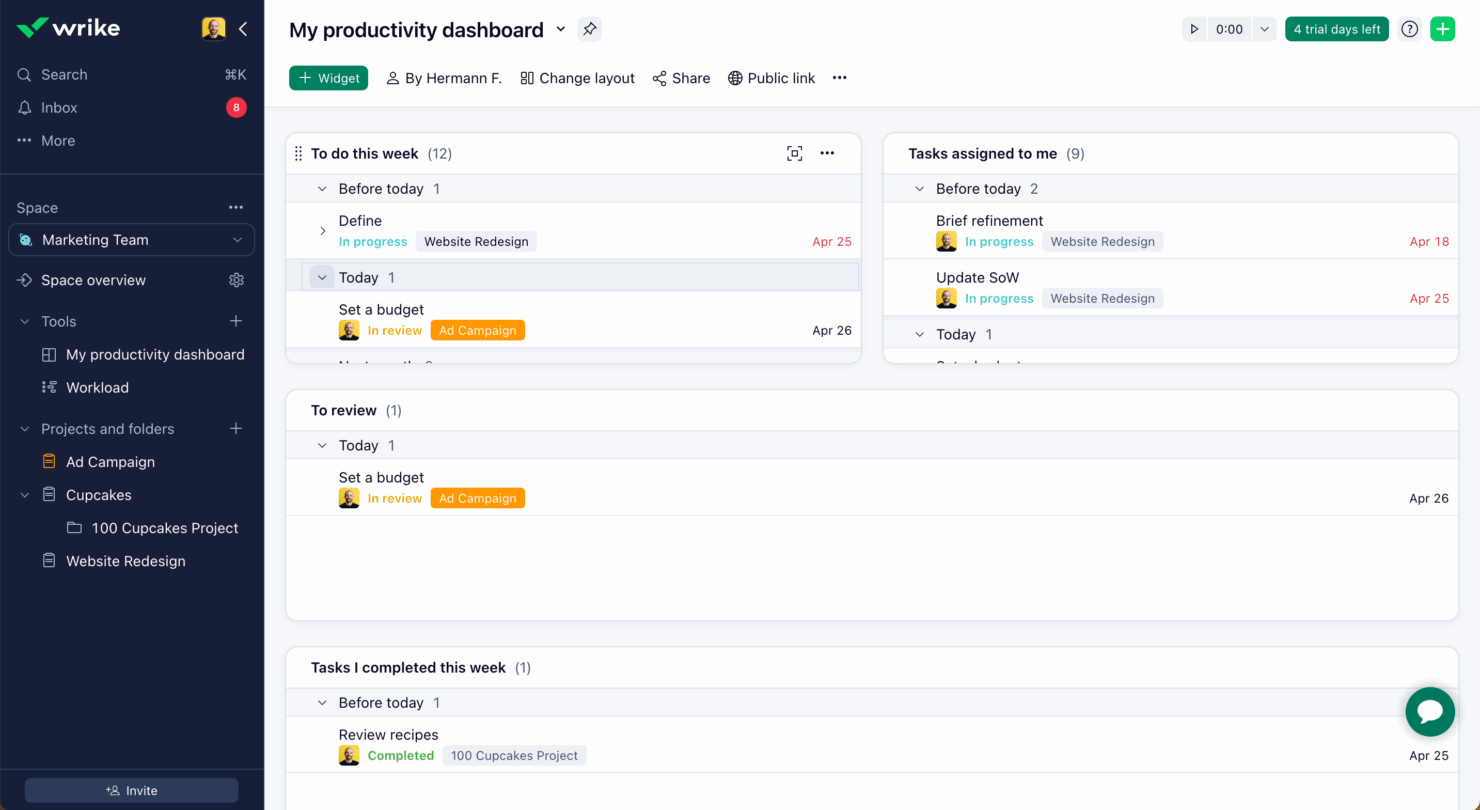
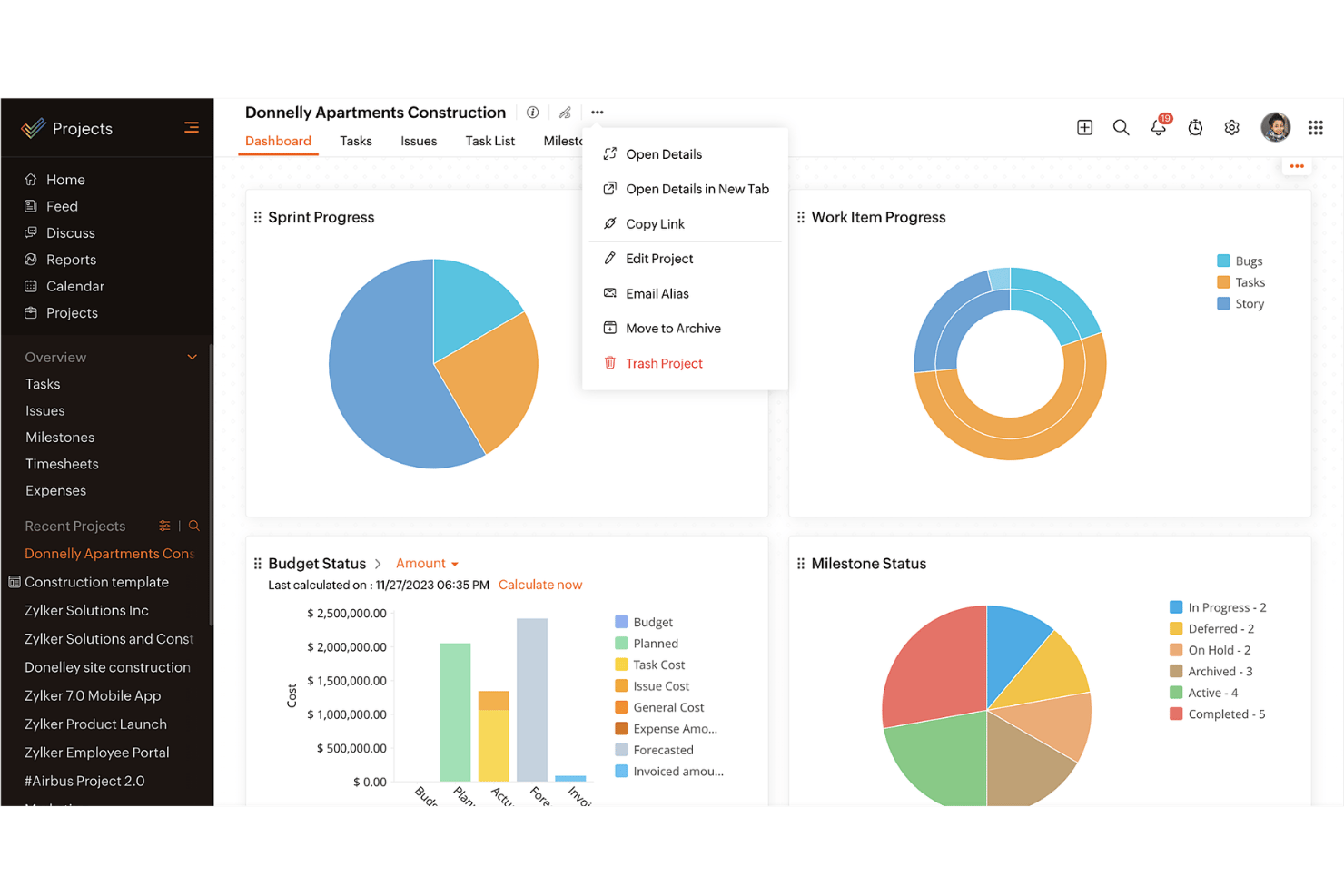
| Benutzeroberfläche | Wrike bietet eine übersichtliche, anpassbare Benutzeroberfläche, mit der Sie Dashboards nach Ihren Bedürfnissen gestalten können. | Zoho Projects stellt eine unkomplizierte Oberfläche mit logischen Navigationspfaden bereit. |
| Onboarding-Erlebnis | Wrike beinhaltet interaktive Tutorials und Ressourcen für einen schnellen Einstieg. | Zoho Projects bietet eine geführte Einrichtung mit hilfreichen Hinweisen und Tipps. |
| Support | Wrike bietet 24/7-Support mit einem umfassenden Help Center. | Zoho Projects bietet Support während der Geschäftszeiten und eine umfangreiche Wissensdatenbank. |
Die Benutzerfreundlichkeit von Wrike wird durch seine anpassbare Oberfläche und den Rund-um-die-Uhr-Support gestärkt, was es zu einer guten Wahl für Teams macht, die Flexibilität und ständige Unterstützung benötigen.
Zoho Projects überzeugt hingegen mit Einfachheit und intuitiver Navigation, auch wenn die eingeschränkten Supportzeiten für einige eine Herausforderung darstellen könnten.
Wrike vs Zoho Projects: Pros & Cons
Wrike
- Wrike's proofing feature allows you to compare file versions dynamically.
- The user-friendly interface ensures easy navigation for your team.
- Wrike's AI features are available in all plans at no extra cost.
- It can be unclear where form responses are stored within the tool.
- Some integrations require an additional cost, regardless of the plan.
- Two-factor authentication is only available with the enterprise plan.
Zoho Projects
- Task dependencies are highly visual and easy to set up.
- Built-in time tracking integrates smoothly with billing features.
- Customizable project templates support repeatable workflows.
- Reporting customization can be limited for advanced needs.
- Mobile app notifications do not always sync in real time.
- Gantt chart drag-and-drop can feel sluggish with large projects.
Best Use Cases for Wrike and Zoho Projects
Wrike
- Marketing Teams Wrike’s proofing feature helps you streamline creative approval processes with ease.
- Creative Agencies Wrike’s dynamic file version comparison keeps your creative projects on track.
- IT Departments Wrike’s user-friendly interface simplifies complex project coordination for your team.
- Product Development Wrike’s AI features boost your team’s productivity without extra costs.
- Event Management Wrike’s task scheduling ensures your events are planned and executed flawlessly.
- Construction Projects Wrike’s robust project tracking keeps your construction timelines and budgets in check.
Zoho Projects
- Small Agencies Kanban boards, time tracking, and client billing streamline project delivery and reporting for agency teams.
- IT Departments Issue tracking, blueprint automations, and strong permission controls provide what IT teams need for complex internal projects.
- Consulting Firms Time sheets, detailed reports, and project-level billing help consultants keep track of client hours and invoicing.
- Remote Teams Robust collaboration tools, document sharing, and project forums help distributed users stay connected.
- Marketing Teams Reusable templates, task dependencies, and timeline tracking make repeated campaigns run smoothly and transparently.
- Construction Projects Gantt charts, milestones, and resource allocation features support the scheduling needs of construction and field project managers.
Differences Between Wrike and Zoho Projects
Dieser Vergleich zeigt die wichtigsten Unterschiede zwischen Wrike und Zoho Projects auf, um Ihnen bei der Entscheidung zu helfen, welche Plattform am besten passt.
| Wrike | Zoho Projects | |
|---|---|---|
| Automation | Wrike offers advanced automation capabilities for complex workflows | Zoho Projects includes basic automation tools for task management. |
| Customization | Wrike offers extensive customization with dashboards and workflows. | Zoho Projects provides basic customization options for simpler setups. |
| Integrations | Wrike integrates with a wide range of third-party apps like Slack | Zoho Projects integrates well within the Zoho Ecosystem, like Zoho CRM. |
| Pricing | Wrike uses a tiered subscription with additional costs for premium features. | Zoho Projects follows a tiered pricing model with fewer hidden costs. |
| User Interface | Wrike features a clean, customizable UI for tailored experiences. | Zoho Projects has a straightforward interface with logical navigation. |
| Visit WrikeOpens new window | Read Zoho Projects ReviewOpens new window |
Similarities Between Wrike and Zoho Projects
Obwohl Wrike und Zoho Projects Unterschiede aufweisen, teilen sie auch mehrere Kernfunktionen, die ein effizientes Projektmanagement über Teams hinweg unterstützen.
| Collaboration | Both tools support team collaboration through features like file sharing and real-time updates. Wrike connects with various communication apps, while Zoho Projects includes built-in chat and discussion forums. |
|---|---|
| Mobile Usability | Wrike and Zoho Projects both offer mobile apps for managing projects on the go. Wrike’s app allows offline access, while Zoho Projects’ app is known for its user-friendly design. |
| Reporting | Both platforms offer reporting tools to help you track project progress. Wrike provides advanced analytics and fully customizable reports, while Zoho Projects includes pre-built reports that can be tailored to your needs. |
| Task Management | Both Wrike and Zoho Projects offer strong task management features that let you assign, track, and prioritize work efficiently. Wrike stands out with its detailed task dependencies, while Zoho Projects offers easy-to-use task lists and Kanban boards. |
| Time Tracking | Both solutions include time tracking to monitor hours spent on tasks. Wrike integrates time tracking directly into its project management workflow, while Zoho Projects provides built-in timers and detailed timesheet reports. |
| Visit WrikeOpens new window Read Zoho Projects ReviewOpens new window | |