

10 beste Zoom-Alternativen für Videokonferenzen im Jahr 2026

Kurzübersicht der besten Zoom-Alternativen


Als Projektmanager stehen Sie täglich vor der Herausforderung, Teams zu koordinieren, Zeitpläne zu verwalten und eine effektive Kommunikation sicherzustellen. Videokonferenz- und Online-Meeting-Software kann dazu beitragen, diese Herausforderungen zu bewältigen. Es ist jedoch wichtig, die richtigen Werkzeuge für die Zusammenarbeit entsprechend Ihren Anforderungen zu finden. Vielleicht suchen Sie nach einer Alternative zu Zoom-Meetings, die besser zu den spezifischen Anforderungen Ihres Teams passt – sei es durch mehr Sicherheit, die Integration mit bestehenden Werkzeugen oder eine verbesserte Benutzerfreundlichkeit.
Meiner Erfahrung nach ist das Verständnis dieser Anforderungen entscheidend für die Wahl der richtigen Lösung. In diesem Artikel gebe ich einen unvoreingenommenen Überblick über die besten kostenlosen Zoom-Alternativen und konzentriere mich darauf, was jede einzelne Lösung für unterschiedliche geschäftliche Herausforderungen besonders geeignet macht. Sie erhalten Einblicke, die Sie bei der Auswahl des besten Werkzeugs für Ihr Team unterstützen können.
Was ist Zoom?
Zoom ist eine Videokonferenzplattform und Online-Meeting-Software, mit der Sie und Ihr Team virtuell miteinander verbunden bleiben können. Nachdem Zoom während der Pandemie an Bedeutung gewonnen hatte, wird es heute von Fachleuten in verschiedenen Branchen eingesetzt, darunter Bildung, Gesundheitswesen und Unternehmensbereiche. Die Plattform bietet eine zuverlässige Lösung für Kommunikation und Zusammenarbeit. Funktionen wie Bildschirmfreigabe, Gruppenräume und die Aufzeichnung von Meetings helfen bei der Koordination von Besprechungen, der Förderung von Diskussionen und der Erfassung wichtiger Informationen. Insgesamt bietet Zoom eine wertvolle Lösung zur Aufrechterhaltung von Kommunikation und Produktivität in Umgebungen für Telearbeit oder hybriden Arbeitsumgebungen.
Vergleichstabelle der Zoom-Alternativen
Diese Vergleichstabelle fasst die Preisinformationen meiner besten ausgewählten Zoom-Alternativen zusammen:
| Tool | Best For | Trial Info | Price | ||
|---|---|---|---|---|---|
| 1 | Beste Integration in Google Workspace | Kostenlose Testversion verfügbar | Ab $9.20/Nutzer/Monat (jährlich abgerechnet) | Website | |
| 2 | Am besten für die Integration in Microsoft 365 | Kostenlose Testversion verfügbar | Ab $4.00/Benutzer/Monat (jährlich abgerechnet) | Website | |
| 3 | Am besten für Datenschutz und Datenhoheit | 14-tägige kostenlose Testversion | Ab $1/Host/Monat (jährlich abgerechnet) | Website | |
| 4 | Am besten für KI-gestützte Kundengespräche geeignet | 14-tägige kostenlose Testversion | Ab $15/Nutzer/Monat (jährlich abgerechnet) | Website | |
| 5 | Am besten für KI-gestützte, einheitliche Kommunikation für Mitarbeitende geeignet | 14-tägige kostenlose Testversion + kostenlose Demo | Ab 30 $/Nutzer/Monat (jährlich abgerechnet) | Website | |
| 6 | Ideal für sicherheitskontrollierte externe Meetings | Kostenlose Testversion + kostenlose Demo verfügbar | Ab 12 $/Organisator/Monat (jährliche Abrechnung) | Website | |
| 7 | Am besten für Webinare und die Interaktion bei Besprechungen in kleinen Unternehmen | Kostenlose Demo verfügbar | Ab $27.99/user/month (als Teil von Intermedia Unite) | Website | |
| 8 | Am besten für Spielen und soziale Interaktion geeignet | Kostenloser Tarif verfügbar | Ab $2.99/Benutzer/Monat | Website | |
| 9 | Ideal für Paarprogrammierung und Fehlerbehebung | Kostenloser Tarif verfügbar | Ab $20/Benutzer/Monat | Website | |
| 10 | Am besten für Open-Source-Videokonferenzen | Dauerhaft kostenlos | Dauerhaft kostenlos | Website |
Warum Sie unseren Software-Empfehlungen vertrauen können
Unser Team testet und bewertet Software seit 2012. Als Projektmanager wissen wir selbst, wie schwierig – und wichtig – es ist, die richtige Software auszuwählen.
Für diesen Leitfaden haben wir Tools mithilfe von praktischen Tests und unabhängiger Recherche bewertet und dabei unsere Bewertungskriterien angewendet. Zudem greifen wir auf Erkenntnisse von Branchenvordenkern und praktizierenden Projektmanagement-Experten zurück.
Unsere Bewertungen spiegeln unser menschliches redaktionelles Urteilsvermögen wider, keine Verkaufsstrategie.
Expertenprüfer:
Bewertungen der besten Zoom-Alternativen
Nachfolgend finden Sie meine ausführlichen Zusammenfassungen der besten Zoom-Alternativen, die es in meine Kurzübersicht geschafft haben. Meine Bewertungen bieten einen detaillierten Einblick in die wichtigsten Funktionen, Vor- und Nachteile, Integrationen, Zeitlimits und idealen Einsatzmöglichkeiten jedes Werkzeugs, damit Sie die beste Lösung für sich finden können.

Beste Integration in Google Workspace
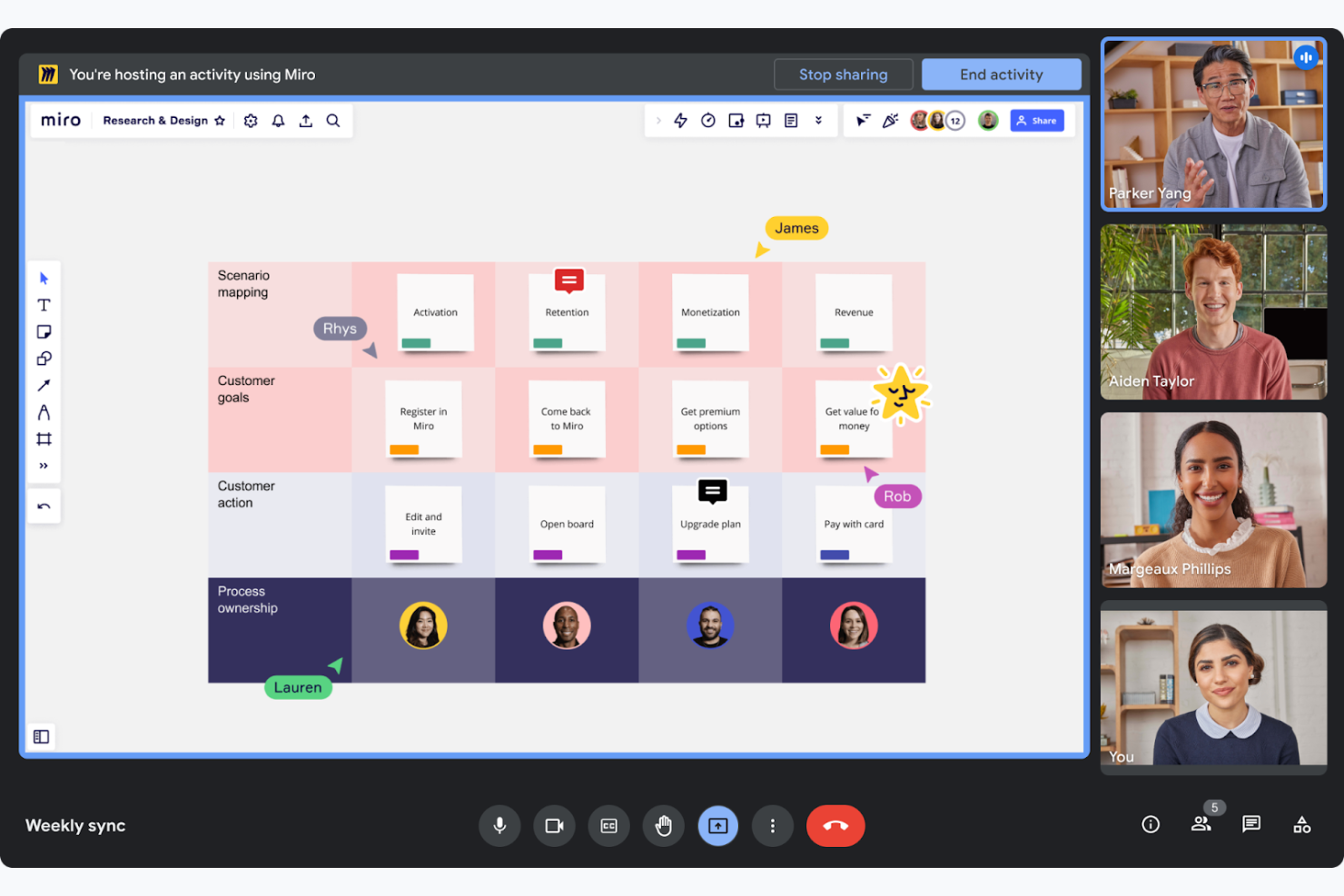
Google Meet ist ein Videokonferenztool, das virtuelle Besprechungen und die Zusammenarbeit für Unternehmen und Bildungseinrichtungen erleichtert. Es ermöglicht Ihrem Team, Besprechungen ganz einfach direkt über Webbrowser oder mobile Geräte abzuhalten.
Warum es eine gute Zoom-Alternative ist: Google Meet ist Bestandteil von Google Workspace. Dadurch können Sie Einzel- oder Teambesprechungen direkt über Google Kalender planen und während der Anrufe gemeinsam in Google Docs arbeiten. Diese enge Integration koordiniert die Arbeitsabläufe von Teams, die bereits die Produktivitätstools von Google verwenden. Außerdem funktioniert die Anwendung browserbasiert, sodass Sie keine zusätzliche Software installieren müssen, was sie zugänglich und praktisch macht.
Hervorzuhebende Funktionen und Integrationen:
Zu den Funktionen gehören Live-Untertitel in Echtzeit, die auf der Spracherkennungstechnologie von Google basieren und die Barrierefreiheit verbessern. Die Plattform unterstützt bis zu 250 Teilnehmer pro Anruf und eignet sich somit für große Besprechungen. Sie können Besprechungen außerdem aufzeichnen und direkt in Google Drive speichern, wodurch der Zugriff und die gemeinsame Nutzung erleichtert werden.
Zu den Integrationen gehören Google Kalender, Google Drive, Gmail, Google Docs, Google Tabellen, Google Präsentationen, Miro und mehr.
Pros and Cons
Pros:
- Unterstützt große Besprechungen
- Untertitel in Echtzeit verfügbar
- Einfache Planung von Besprechungen
Cons:
- Grundlegendes Oberflächendesign
- Gelegentliche Verbindungsprobleme

Am besten für die Integration in Microsoft 365
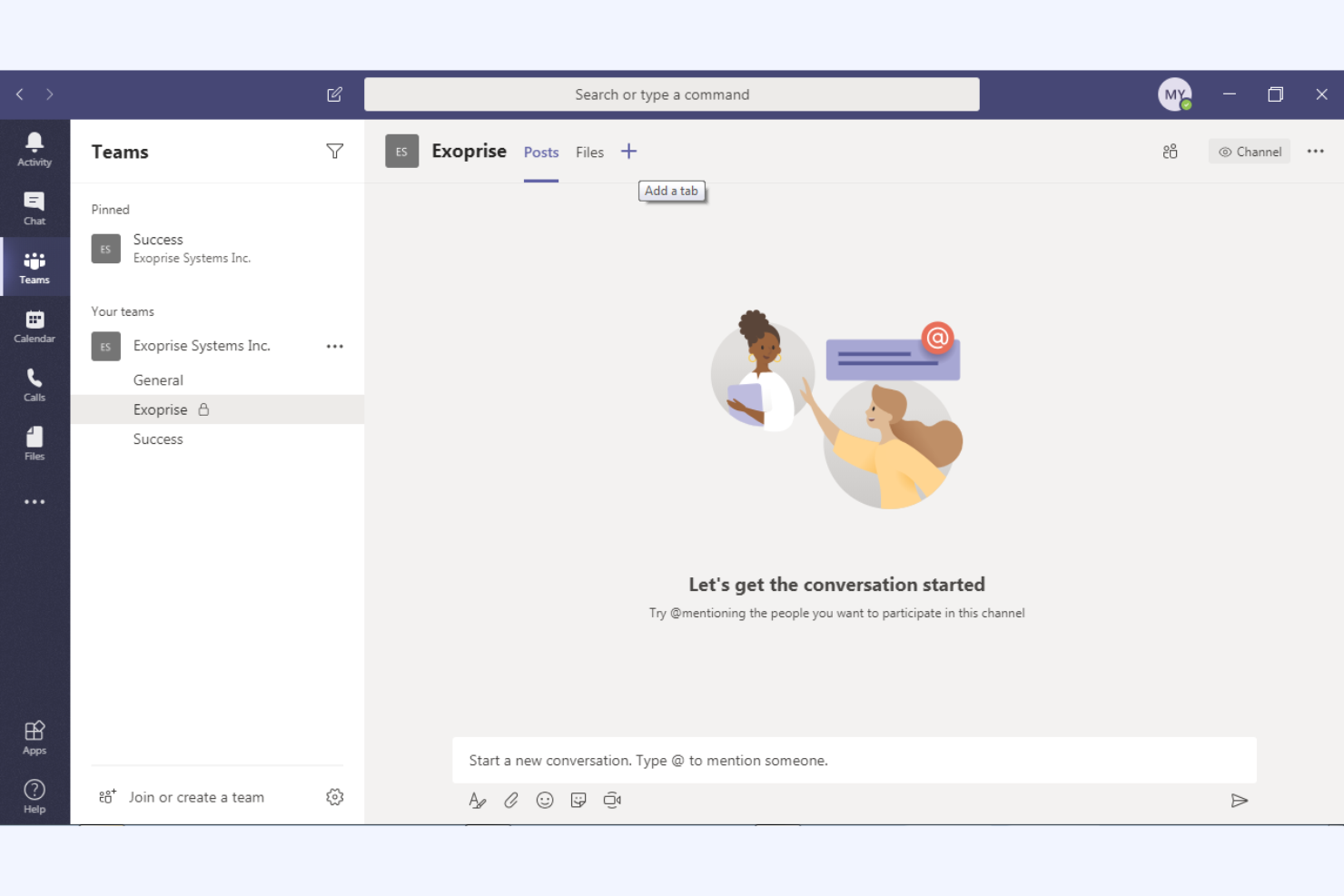
Microsoft Teams ist eine Kollaborationsplattform, die Chat, Videokonferenzen und Dateifreigabe integriert und hauptsächlich für Unternehmen und Bildungseinrichtungen konzipiert ist. Sie hilft Ihrem Team, effizient zu kommunizieren und Projekte innerhalb eines einheitlichen Arbeitsbereichs zu verwalten.
Warum es eine gute Zoom-Alternative ist: Microsoft Teams bietet eine umfassende Integration in das Microsoft 365-Ökosystem und steigert die Produktivität durch Funktionen zur Zusammenarbeit an Dokumenten in Echtzeit sowie die Kalendersynchronisierung. Diese Möglichkeiten machen die Plattform ideal, wenn Ihre Organisation bereits Microsoft-Produkte verwendet. Darüber hinaus unterstützen die umfangreichen Chat- und Kanalfunktionen die fortlaufende Teamkommunikation und das Projektmanagement und bieten damit eine umfassendere Lösung als die videofokussierte Plattform von Zoom.
Herausragende Funktionen und Integrationen:
Zu den Funktionen gehören Tools zur Aufgabenverwaltung, mit denen Sie Aufgaben innerhalb Ihres Teams zuweisen und verfolgen können. Die Plattform umfasst ein integriertes Wiki zum Dokumentieren und Teilen von Wissen und unterstützt Live-Veranstaltungen für ein größeres Publikum, wodurch sie vielseitig für unterschiedliche Kommunikationsanforderungen einsetzbar ist.
Zu den Integrationen gehören Microsoft Outlook, SharePoint, OneDrive, Power BI, Trello, Asana, GitHub, Salesforce und weitere.
Pros and Cons
Pros:
- Umfassende Integration in Microsoft 365
- Unterstützt große virtuelle Veranstaltungen
- Zusammenarbeit an Dokumenten in Echtzeit
Cons:
- Eingeschränkte Anpassungsmöglichkeiten
- Kann ressourcenintensiv sein

Am besten für Datenschutz und Datenhoheit
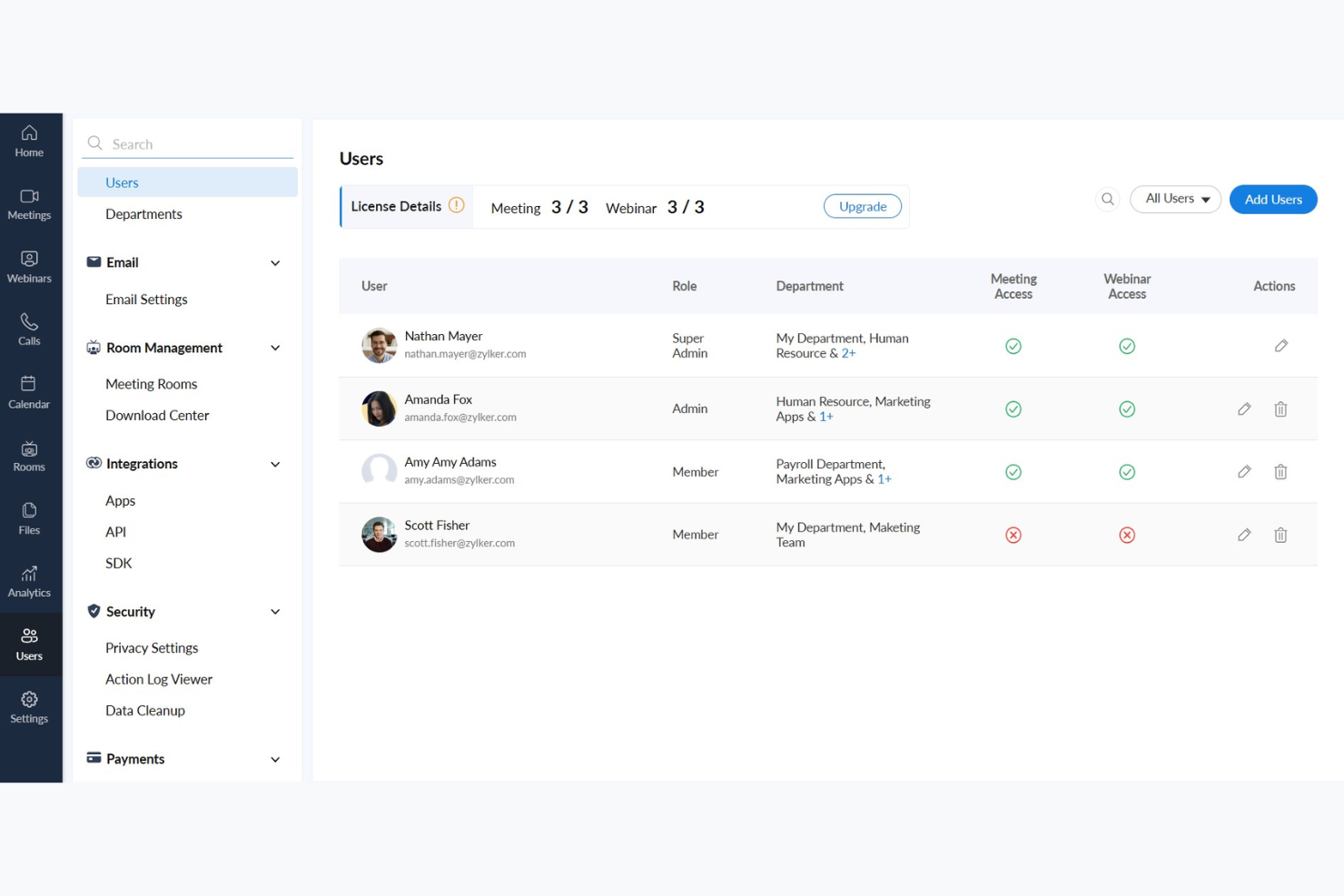
Zoho Meeting ist eine webbasierte Konferenzlösung für Unternehmen, die sichere und zuverlässige Online-Meeting-Tools benötigen. Sie richtet sich an Fachleute und Teams, die Webinare und virtuelle Meetings effizient durchführen möchten.
Warum es eine gute Zoom-Alternative ist: Zoho Meeting legt großen Wert auf Datenschutz und Datenhoheit und ist daher eine bevorzugte Wahl für alle, die sich um die Datensicherheit sorgen. Die Lösung bietet Funktionen wie Meeting-Verschlüsselung und anpassbare Anmeldeformulare und trägt so dazu bei, die Informationen Ihres Teams zu schützen. Die Plattform stellt außerdem detaillierte Analysen und Berichte für Webinare bereit, damit Sie die Beteiligung verfolgen und Ihre Präsentationen optimieren können.
Herausragende Funktionen und Integrationen:
Zu den Funktionen gehört die Bildschirmfreigabe, mit der Sie Ihre Ideen den Teilnehmern anschaulich präsentieren können. Die Plattform unterstützt Umfragen in Webinaren sowie Frage-und-Antwort-Sitzungen, sodass Sie Ihr Publikum effektiv einbinden können. Sie können Meetings und Webinare auch aufzeichnen und so eine wertvolle Ressource für spätere Nachschlagezwecke und Schulungen bereitstellen.
Zu den Integrationen gehören Zoho CRM, Zoho Projects, Zoho Connect, Google Calendar, Microsoft Outlook, Slack und weitere.
Pros and Cons
Pros:
- Fokus auf Datenschutz und Datensicherheit
- Detaillierte Analysen für Webinare
- Meeting-Verschlüsselung verfügbar
Cons:
- Begrenzte erweiterte Funktionen
- Begrenzte Skalierbarkeit für große Veranstaltungen

Dialpad
Am besten für KI-gestützte Kundengespräche geeignet

Dialpad ist eine cloudbasierte Kommunikationsplattform zur Verbesserung der Kommunikation durch KI-gestützte Erkenntnisse. Sie richtet sich an Unternehmen, die effiziente Sprach-, Video- und Nachrichtenlösungen zur Unterstützung der Interaktionen mit Kunden und Teams suchen.
Warum es eine gute Zoom-Alternative ist: Die KI-gestützten Funktionen von Dialpad bieten Transkriptionen in Echtzeit und Sprachanalysen, die während Gesprächen wertvolle Erkenntnisse liefern. Dies ermöglicht Ihrem Team, fundierte Entscheidungen zu treffen und die Kundeninteraktionen zu verbessern. Mit integrierter Anrufweiterleitung und anpassbaren Arbeitsabläufen unterstützt Dialpad effiziente Kommunikationsprozesse und ist damit eine vielseitige Alternative zu Zooms videobasiertem Ansatz.
Herausragende Funktionen und Integrationen:
Zu den Funktionen gehören Sprachintelligenz mit Gesprächscoaching in Echtzeit und Stimmungsanalyse, die Ihrem Team dabei helfen, Gespräche zu verbessern. Die Plattform unterstützt die Aufzeichnung in der Cloud, Cloud-Speicher und die Wiedergabe von Gesprächen, was für Schulungen und Qualitätssicherung nützlich ist. Darüber hinaus bietet Dialpad eine einheitliche Kommunikationserfahrung mit Sprache, Video und Nachrichten in einer App.
Zu den Integrationen gehören Salesforce, Microsoft 365, Google Workspace, Slack, HubSpot, Zendesk, ServiceNow, Okta und weitere.
Pros and Cons
Pros:
- KI-gestützte Erkenntnisse aus Gesprächen
- Transkription in Echtzeit
- Effiziente Anrufweiterleitung
Cons:
- Hardwarekompatibilität
- Gelegentliche Systemausfälle
Am besten für KI-gestützte, einheitliche Kommunikation für Mitarbeitende geeignet
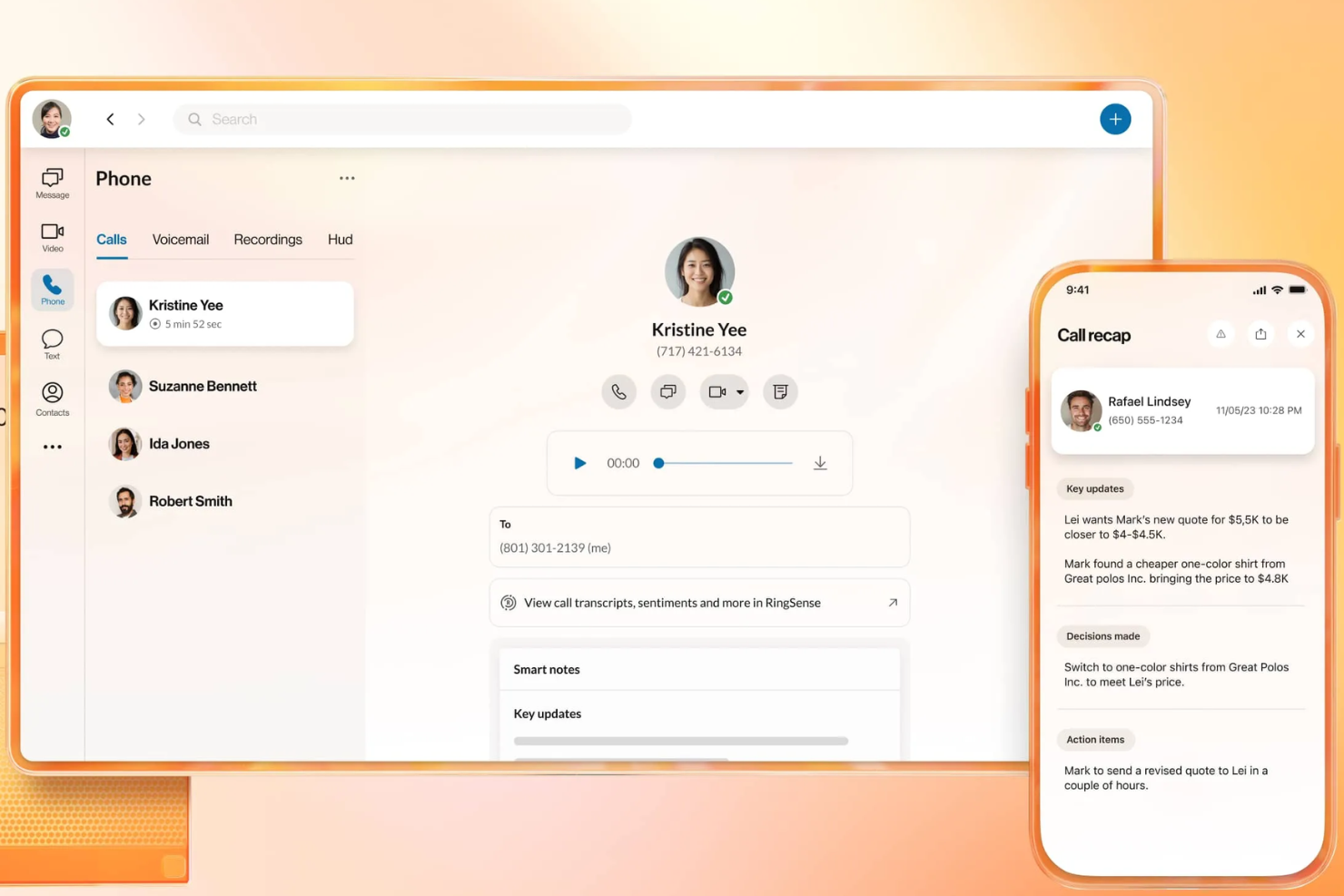
RingEX ist eine cloudbasierte Kommunikationsplattform, die darauf ausgelegt ist, die Kommunikationsfähigkeiten eines Unternehmens durch fortschrittliche Funktionen zu verbessern. Sie bietet zuverlässige Lösungen für Sprachkommunikation, Video und Nachrichten zur Zusammenarbeit im Team.
Warum es eine gute Zoom-Alternative ist: RingEX bietet KI-gestützte Einblicke und Analysen, die es Ihrem Team ermöglichen, während Gesprächen fundierte Entscheidungen zu treffen. Die Plattform unterstützt Funktionen wie Gesprächsaufzeichnung und Echtzeittranskription und stellt damit nützliche Ressourcen für Schulungen und Qualitätssicherung bereit. Darüber hinaus machen die anpassbaren Workflows und leistungsstarken Anrufverwaltungsfunktionen von RingEX die Plattform zu einer vielseitigen Wahl für Unternehmen jeder Größe.
Herausragende Funktionen und Integrationen:
Zu den Funktionen gehört eine fortschrittliche Anrufweiterleitung, die sicherstellt, dass Anrufe an die richtigen Teammitglieder geleitet werden. Die Plattform bietet Anrufanalysen, die Ihnen Einblicke in die Kommunikationsmuster Ihres Teams geben. Außerdem können Sie Videokonferenzen mit Bildschirmfreigabe nutzen, wodurch die Zusammenarbeit während virtueller Besprechungen verbessert wird.
Zu den Integrationen gehören Microsoft 365, Google Workspace, Salesforce, Slack, Zendesk, HubSpot, Zapier, Microsoft Teams, Okta und weitere.
Pros and Cons
Pros:
- KI-gestützte Anrufanalysen
- Anpassbare Anrufverwaltung
- Geeignet für große Unternehmen
Cons:
- Komplexe Einrichtung und Benutzeroberfläche
- Uneinheitliche Zuverlässigkeit der Anrufe
Ideal für sicherheitskontrollierte externe Meetings
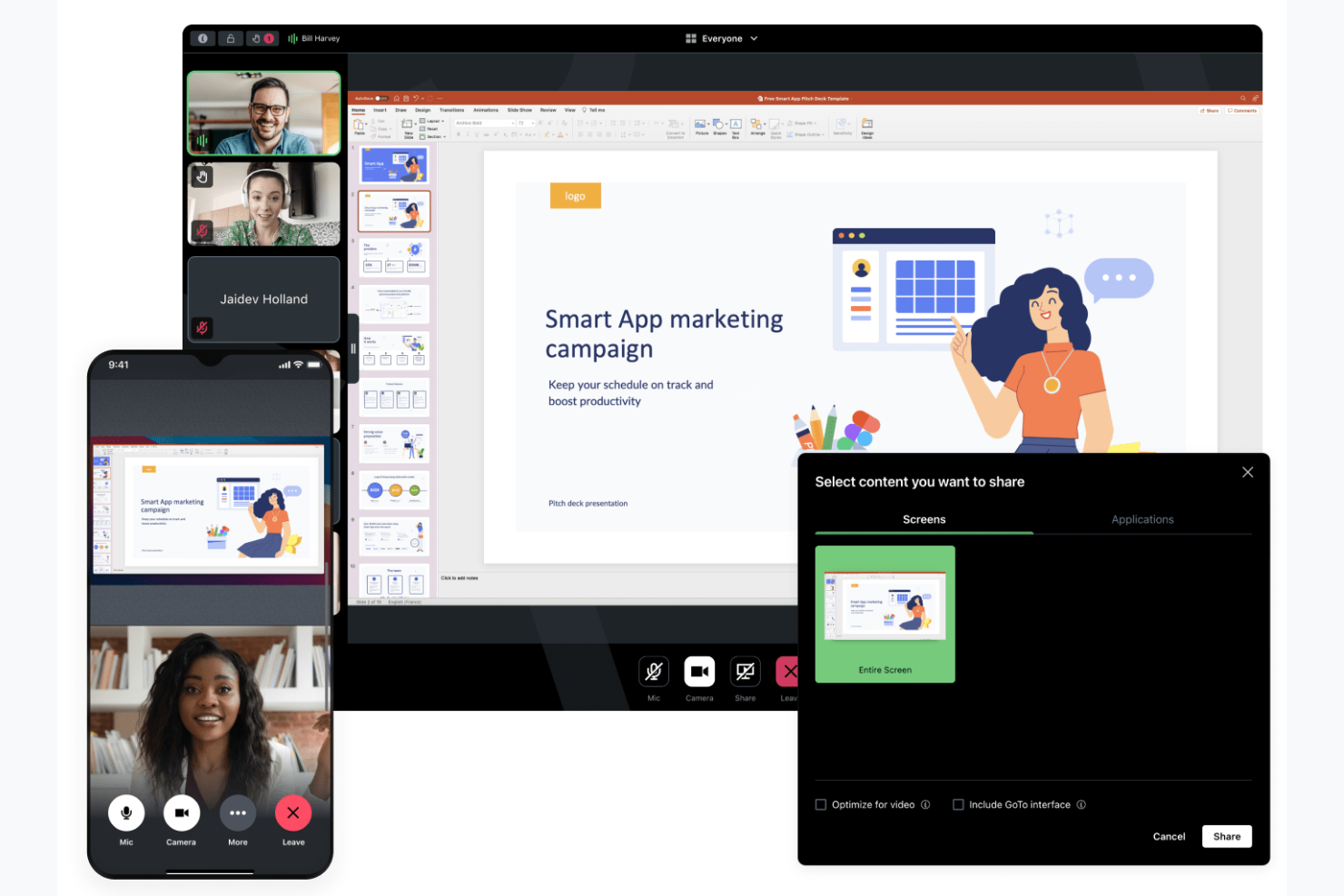
GoTo Meeting ist ein Webkonferenztool für Unternehmen, die eine zuverlässige Plattform zum Veranstalten virtueller Meetings benötigen. Es richtet sich an Fachleute aus verschiedenen Branchen und bietet Funktionen für effiziente Kommunikation und Zusammenarbeit.
Warum es eine gute Zoom-Alternative ist: GoTo Meeting konzentriert sich auf sichere und flexible Meetingoptionen mit Sicherheitsfunktionen wie Meetingverschlüsselung und Administratorkontrollen sowie anpassbaren Meetingeinstellungen. Diese Funktionen tragen dazu bei, dass Ihre Meetings privat bleiben und auf Ihre Bedürfnisse zugeschnitten sind. Die Plattform unterstützt HD-Videokonferenzen und bietet mobile Apps, was sie für unterwegs arbeitende Teams besonders praktisch macht.
Herausragende Funktionen und Integrationen:
Zu den Funktionen gehört eine Option zum direkten Anrufen von Teilnehmenden, die den Beitritt zu Meetings vereinfacht, sowie Zeichenwerkzeuge, mit denen Sie geteilte Bildschirme zur besseren Zusammenarbeit kommentieren können. Außerdem können Sie die personalisierten Meetingräume nutzen, die Ihrem Team einen festen Ort für Zusammenkünfte bieten.
Zu den Integrationen gehören Salesforce, Google Calendar, Zapier, Zoho CRM, Zendesk, Outlook, Trello und weitere.
Pros and Cons
Pros:
- Sichere Meetingverschlüsselung
- Flexible Meetingeinstellungen
- Videokonferenzen in HD-Qualität
Cons:
- Veraltete Benutzeroberfläche im Vergleich zu einigen Wettbewerbern
- Für den Beitritt zu einem Arbeitsablauf sind mehrere Schritte erforderlich

Am besten für Webinare und die Interaktion bei Besprechungen in kleinen Unternehmen

AnyMeeting ist eine Videokonferenzplattform für kleine bis mittelständische Unternehmen, die nach einer umfassenden Kommunikationslösung suchen. Als Teil der cloudbasierten Plattform Intermedia Unite bietet sie Tools für die Durchführung virtueller Besprechungen, Webinare und Telefonkonferenzen und unterstützt so Zusammenarbeit und Vernetzung.
Warum es eine gute Zoom-Alternative ist: AnyMeeting bietet eine integrierte Kommunikationssuite mit Funktionen wie Webinar-Veranstaltungen und der Transkription von Besprechungen. Diese Möglichkeiten machen die Plattform für Unternehmen geeignet, die mehr als nur Videokonferenzen benötigen. AnyMeeting bietet Bildschirmfreigabe und anpassbare Besprechungslayouts, sodass Ihr Team Besprechungen an die jeweiligen Anforderungen anpassen kann.
Hervorzuhebende Funktionen und Integrationen:
Zu den Funktionen gehört die Transkription von Besprechungen, die Ihre Besprechungen automatisch aufzeichnet und transkribiert, damit Sie einfach darauf zurückgreifen können. Die Plattform bietet Funktionen für Webinar-Veranstaltungen, mit denen sich große Zielgruppen einbinden lassen, sowie anpassbare Layouts, die das gesamte Erlebnis bei Besprechungen verbessern.
Zu den Integrationen gehören Microsoft Office 365, Google Calendar, Slack, Salesforce, Zendesk und weitere.
Pros and Cons
Pros:
- Unterstützt Webinar-Veranstaltungen
- Transkription von Besprechungen verfügbar
- Anpassbare Besprechungslayouts
Cons:
- Begrenzte erweiterte Funktionen
- Begrenzte Skalierbarkeit für größere Unternehmen

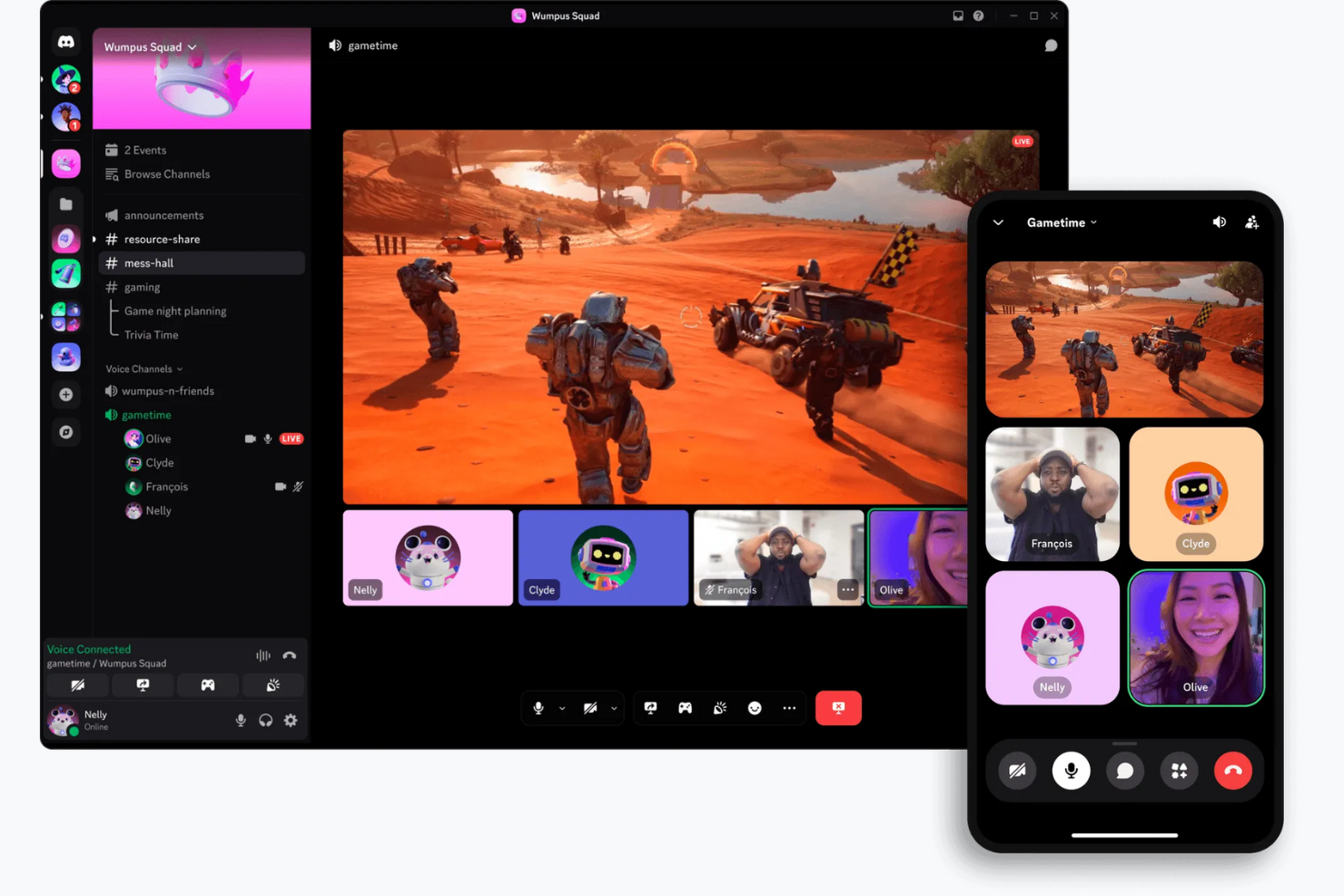
Discord ist eine Kommunikationsplattform, die hauptsächlich für Gamer und soziale Communities entwickelt wurde. Sie bietet Sprach-, Video- und Textchat-Funktionen und wird von Spielebegeisterten und Online-Communities häufig zur Interaktion und Zusammenarbeit in Echtzeit genutzt.
Warum Discord eine gute Alternative zu Zoom ist: Discord bietet dauerhafte Sprachkanäle, über die Ihr Team nach Belieben an Gesprächen teilnehmen und sie verlassen kann – anders als bei den geplanten Meetings von Zoom. Die Plattform stellt anpassbare Servereinstellungen und Rollen bereit, mit denen sich Benutzerberechtigungen verwalten und organisierte Diskussionsbereiche erstellen lassen. Darüber hinaus machen Discords kostenlose Version und die auf Communities ausgerichteten Funktionen, wie öffentliche Server und benutzerfreundliche Oberflächen, die Plattform ideal für informelle Treffen und soziale Interaktionen.
Hervorstechende Funktionen und Integrationen:
Zu den Funktionen gehört die Bildschirmfreigabe, mit der Sie Ihren Bildschirm für gemeinsames Spielen oder Arbeiten mit anderen teilen können, sowie Video- und Sprachanrufe. Sie können außerdem die Direktnachrichtenfunktion von Discord nutzen, um privat mit einzelnen Personen oder in kleinen Anrufen zu kommunizieren.
Zu den Integrationen gehören Spotify, Twitch, YouTube, Reddit, Patreon, Steam, GitHub und weitere.
Pros and Cons
Pros:
- Dauerhafte Sprachkanäle
- Anpassbare Servereinstellungen
- Auf Communities ausgerichtete Funktionen
Cons:
- Eingeschränkte Compliance- und Prüfungsfunktionen für Unternehmen
- Geringe Beschränkungen für die Größe von Datei-Uploads

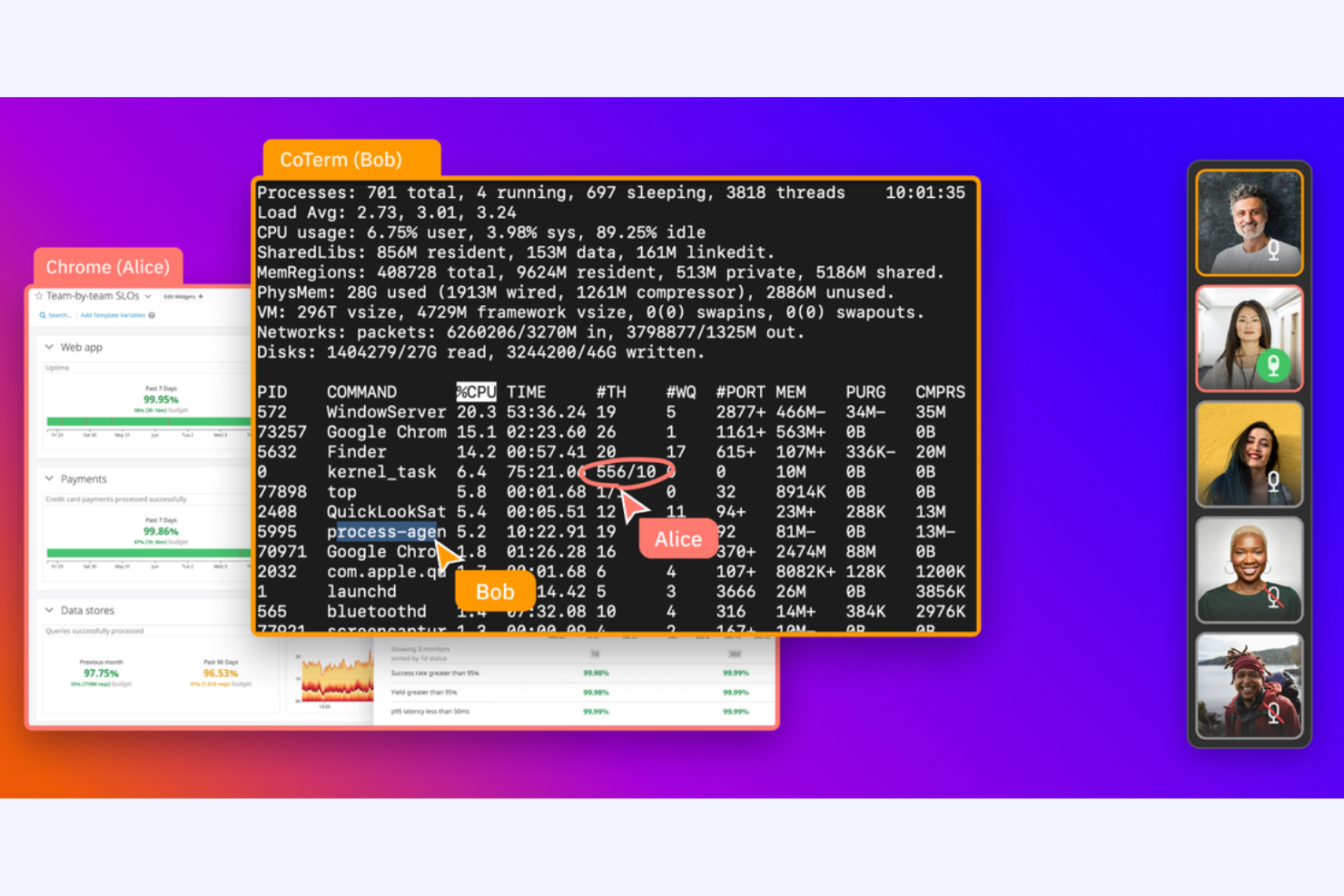
CoScreen ist ein Werkzeug zur Bildschirmfreigabe für Entwickler und Teams, die Zusammenarbeit in Echtzeit benötigen. Es wird von Softwareentwicklern und technischen Teams genutzt, um Sitzungen zur Paarprogrammierung und Fehlerbehebung zu erleichtern.
Warum es eine gute Zoom-Alternative ist: CoScreen ermöglicht mehreren Benutzern, ihre Bildschirme gleichzeitig freizugeben, wodurch es sich ideal für die technische Zusammenarbeit eignet. Im Gegensatz zu Zoom, das sich auf Videokonferenzen konzentriert, legt CoScreen den Schwerpunkt auf die Bearbeitung von Code und die Problemlösung in Echtzeit. Die Leistung mit geringer Latenz sorgt dafür, dass die Interaktionen Ihres Teams reibungslos und effizient ablaufen und eine effektive Zusammenarbeit in Programmierumgebungen ermöglicht wird.
Hervorstechende Funktionen und Integrationen:
Zu den Funktionen gehört die gleichzeitige Bildschirmfreigabe, mit der jeder in Ihrem Team seinen Bildschirm zur selben Zeit teilen kann. Sie können außerdem Videoanrufe mit geringer Latenz nutzen, um während der Sitzungen eine reibungslose Kommunikation sicherzustellen. CoScreen unterstützt die Bearbeitung von Code in Echtzeit und ist damit ein wertvolles Werkzeug für Entwickler, die gemeinsam an Projekten arbeiten.
Zu den Integrationen gehören Slack, GitHub, Jira, Asana, Google Calendar, Zoom, Visual Studio Code, IntelliJ IDEA und weitere.
Pros and Cons
Pros:
- Ideal für Paarprogrammierung
- Leistung mit geringer Latenz
- Bearbeitung von Code in Echtzeit
Cons:
- Auf Entwickler ausgerichtet
- Begrenzte nichttechnische Funktionen
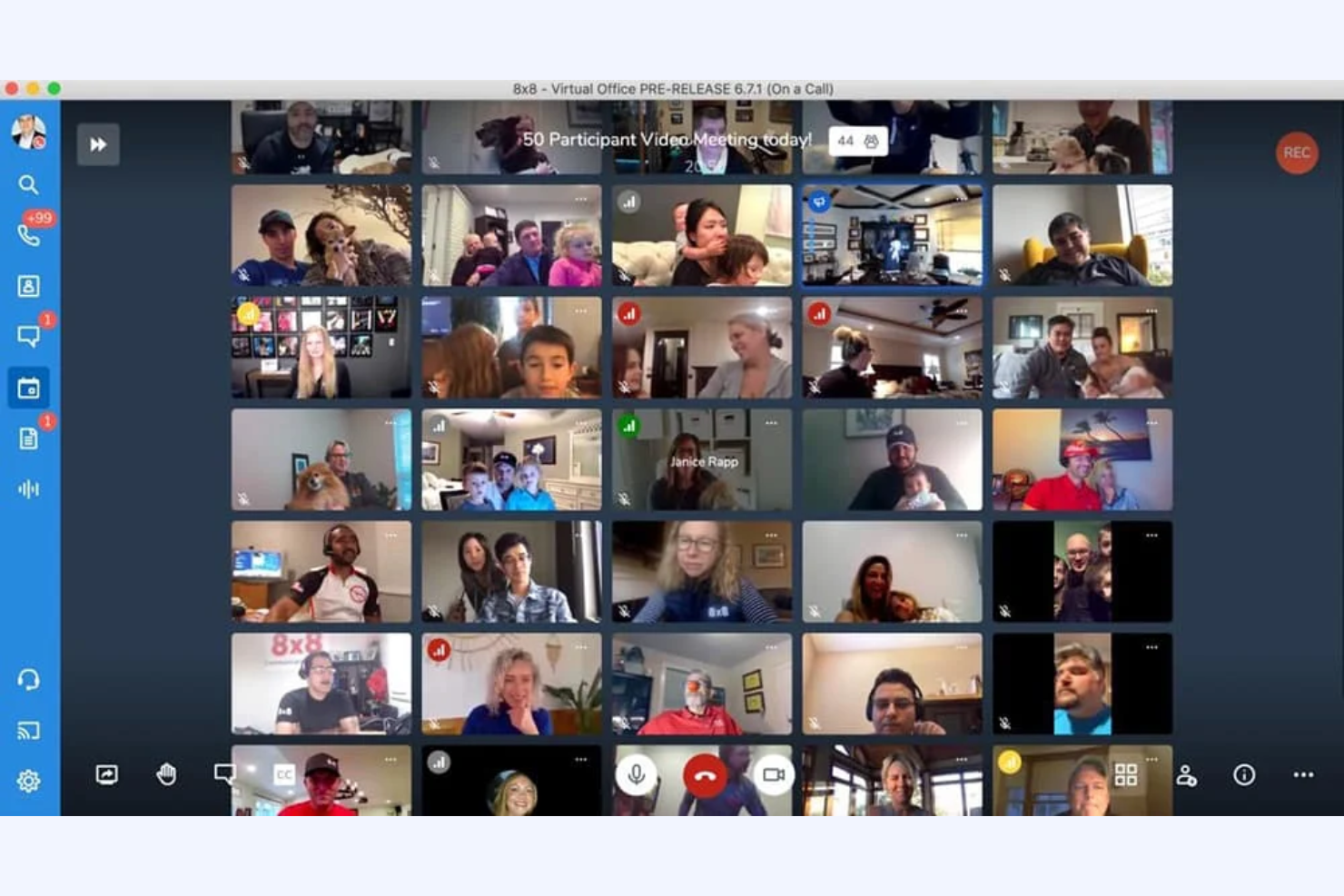
Jitsi ist ein Open-Source-Videokonferenztool für Einzelpersonen und Teams, die flexible und sichere Kommunikationslösungen suchen. Es bietet eine Plattform zum Hosten virtueller Meetings, ohne dass Benutzerkonten, Downloads oder ein kostenpflichtiger Tarif erforderlich sind.
Warum es eine gute Zoom-Alternative ist: Jitsi-Meetings bieten Kontrolle über Ihre Daten und Ihre Privatsphäre, was ideal ist, wenn Sie sich um die Sicherheit sorgen. Sie können Ihren eigenen Server anpassen und hosten und so sicherstellen, dass Ihre kostenlosen Videokonferenzen sicherer sind. Dank seines Open-Source-Charakters können Sie die Plattform außerdem anpassen und erweitern, damit sie Ihren spezifischen Anforderungen entspricht – im Gegensatz zu Zoom, einem geschlossenen System.
Besondere Funktionen und Integrationen:
Funktionen umfassen hochwertige Video- und Audioübertragung und sorgen so für eine klare Kommunikation während längerer Meetings. Sie können die Chat-Funktion der Plattform auch für textbasierte Kommunikation parallel zu Videoanrufen nutzen. Jitsi unterstützt die Bildschirmfreigabe, sodass Sie Informationen präsentieren und effektiv mit Ihrem Team zusammenarbeiten können.
Integrationen variieren je nach Hosting und Einrichtung und können über Open-Source-Plugins und APIs erweitert werden
Pros and Cons
Pros:
- Flexibilität durch Open Source
- Hoher Datenschutz
- Option zum Selbsthosting
Cons:
- Kann technische Kenntnisse erfordern
- Eingeschränkte Unterstützung für große Meetings
Weitere Zoom-Alternativen
Hier finden Sie einige weitere Alternativen zu Zoom für Videokonferenzsoftware, die es nicht in meine Kurzübersicht geschafft haben, aber dennoch einen Blick wert sind:
- ON24
Ideal für datenbasierte Webinare
- TeamViewer
Am besten für Fernsupport
- Miro
Am besten für gezielte visuelle Zusammenarbeit


So bewerte ich Zoom-Alternativen
Ich teile meine Bewertung in zwei Ebenen auf: grundlegende Anforderungen (wie HD-Video, Aufzeichnung und PM-Integrationen) sowie Unterscheidungsmerkmale, durch die sich die besten Tools für Projektteams abheben.
Kernfunktionen (Grundvoraussetzungen für diese Liste)
Bei der Auswahl der Tools für meine Liste bewerte ich jedes einzelne für jede unten aufgeführte Kernfunktion auf einer Skala von 0 (Funktion wird nicht angeboten) bis 5 (in diesem Bereich hervorragend). Anschließend rechne ich die Gesamtpunktzahl des Tools in einen Prozentsatz um. Jedes Tool muss eine Mindestgesamtpunktzahl von 65 % erreichen, um für die Aufnahme berücksichtigt zu werden.
- HD-Video- und Audioqualität: Ich bewerte, ob die Plattform stabiles, hochauflösendes Video für Gespräche bereitstellt – von einem kurzen 1:1-Check-in bis hin zu einer Sprint-Review oder Kundendemonstration mit mehr als 50 Personen.
- Bildschirmfreigabe und Zusammenarbeit: Projektteams arbeiten mit Boards, Zeitleisten und Dokumenten. Daher achte ich bei Arbeitssitzungen auf eine reibungslose Bildschirmfreigabe mit Anmerkungen, Fernsteuerung und Unterstützung mehrerer Präsentierender.
- Aufzeichnung und Transkription von Besprechungen: Die Erfassung von Entscheidungen aus der Sprintplanung und von Stakeholder-Feedback ist wichtig. Daher wird jedes Tool anhand von Cloud-Aufzeichnungen, der Genauigkeit der automatischen Transkription und der Durchsuchbarkeit vergangener Sitzungen bewertet.
- Chat und Nachrichten: Über den Chat während der Besprechung hinaus prüfe ich, ob es dauerhafte Kanäle und Diskussionen in Threads gibt, die Projektdiskussionen zwischen Besprechungen organisiert halten.
- Kalender- und PM-Tool-Integrationen: Ich achte auf native Verbindungen zu Google Calendar, Outlook und PM-Tools wie Jira, Asana oder Monday, damit Besprechungen direkt mit den von ihnen unterstützten Arbeitsabläufen verknüpft sind.
- Planung und Besprechungsverwaltung: Wiederkehrende Zeremonien wie Daily-Stand-ups und Retros benötigen eine einfache Planung. Daher bewerte ich Gastgebersteuerungen, eindeutige Besprechungslinks, Warteräume und automatische Einladungen.
Sobald ich eine Liste von Tools zusammengestellt habe, die diese Kriterien erfüllen, prüfe ich, wodurch sich die einzelnen Plattformen abheben.
Differenzierungsfaktoren (Wodurch sich Anbieter abheben)
So vergleiche ich die verschiedenen Anbieter:
Besondere Funktionen
KI-gestützte Zusammenfassungen von Besprechungen sind ein wichtiges Unterscheidungsmerkmal. Ich suche nach Tools, die automatisch Aktionspunkte und wichtige Entscheidungen erstellen, damit Projektleitungen nach jedem Daily-Stand-up oder jeder Retrospektive auf manuelle Notizen verzichten können. Gruppenräume sind ebenfalls wichtig, wenn Workshops oder Sprintplanungen mit mehreren Teilteams durchgeführt werden, die parallel arbeiten müssen. Für verteilte Teams in verschiedenen Zeitzonen lohnt sich auch die Bewertung asynchroner Videonachrichten, da Stakeholder damit kurze Statusupdates aufzeichnen können, anstatt noch einen weiteren Live-Anruf zu planen.
Über die Funktionen hinaus
Die Preisstruktur ist ein wichtiger Faktor, wenn man von Zoom wechselt. Ich bewerte, ob eine Lizenzierung pro Gastgeber für Teams sinnvoll ist, in denen nur wenige PMs Besprechungen durchführen, oder ob Modelle pro Benutzer besser geeignet sind, die alle abdecken. Sicherheit ist ein weiterer wichtiger Faktor – ich prüfe auf E2EE, SSO und Compliance-Zertifizierungen wie SOC 2 und GDPR, insbesondere bei Teams, die mit sensiblen Projektdaten von Kunden arbeiten. Auch die Integrationstiefe geht über das bloße Vorhandensein eines Konnektors hinaus. Ich prüfe, wie eng ein Tool mit dem PM-Stack verknüpft ist, etwa ob eine Besprechung automatisch an ein Jira-Ticket angehängt wird oder Notizen mit Confluence synchronisiert werden.
Warum nach einer Zoom-Alternative suchen?
Obwohl Zoom eine gute Wahl für Videokonferenz- und Online-Meeting-Software ist, gibt es eine Reihe von Gründen, warum manche Nutzer nach alternativen Lösungen suchen. Vielleicht suchen Sie nach einer Zoom-Alternative, weil …
- Sie erweiterte Sicherheitsfunktionen benötigen
- Ihr Team eine bessere Integration mit anderen Werkzeugen benötigt
- Sie mit Einschränkungen bei großen Meetings konfrontiert sind
- Sie mehr Anpassungsmöglichkeiten wünschen
- Ihr Team häufig Probleme mit der Verbindung hat
Wenn Sie sich in einem dieser Punkte wiedererkennen, sind Sie hier genau richtig. Meine Liste umfasst mehrere Optionen für Videokonferenz- und Online-Meeting-Software, die besser für Teams geeignet sind, die mit diesen Herausforderungen bei Zoom konfrontiert sind und nach alternativen Lösungen suchen.
Die wichtigsten Funktionen von Zoom
Hier sind einige der wichtigsten Funktionen von Zoom, die Ihnen dabei helfen, die Angebote alternativer Lösungen gegenüberzustellen und zu vergleichen:
- Virtuelle Hintergründe: Ändern Sie den Hintergrund Ihres Meetings in ein beliebiges Bild oder Video. Dies trägt zum Schutz der Privatsphäre bei und reduziert Ablenkungen.
- Kleingruppenräume: Teilen Sie Ihr Meeting für fokussierte Diskussionen während Workshops oder Teamaktivitäten in kleinere Gruppengespräche auf.
- Bildschirmfreigabe: Teilen Sie Ihren Desktop oder bestimmte Anwendungen mit Ihrem Team, um Informationen während Meetings effektiv zu präsentieren.
- Aufzeichnungen und Transkripte: Zeichnen Sie Meetings auf und erstellen Sie automatisch Transkripte. So steht eine Ressource für diejenigen zur Verfügung, die nicht teilnehmen konnten.
- Meeting-Chat: Nutzen Sie die Chat-Funktion, um Nachrichten an Teilnehmende zu senden, Dateien zu teilen und die Kommunikation während Meetings zu verbessern.
- Umfragen und Befragungen: Sammeln Sie Feedback oder treffen Sie mit Umfragen und Befragungen während des Meetings schnell Entscheidungen und binden Sie die Teilnehmenden aktiv ein.
- Ende-zu-Ende-Verschlüsselung: Stellen Sie mit einer Verschlüsselung die Sicherheit Ihrer Meetings sicher und schützen Sie Ihre Daten und Kommunikation.
- Warteraum: Kontrollieren Sie, wann Teilnehmende Ihrem Meeting beitreten, indem Sie sie vor Beginn der Sitzung in einen Warteraum setzen.
- Anmerkungswerkzeuge: Verwenden Sie Anmerkungswerkzeuge, um geteilte Inhalte hervorzuheben oder zu markieren und so die Zusammenarbeit und das Verständnis zu verbessern.
- Virtuelles Handheben: Ermöglichen Sie Teilnehmenden, virtuell die Hand zu heben, wenn sie sprechen möchten, und verwalten Sie so größere Meetings effizient.