En İyi 10 Wrike Rakibi ve Alternatifi: 2026’da İncelendi

10 En İyi Wrike Alternatifleri Kısa Listesi


En iyi Wrike alternatifleri, ekiplerin gerçekten kullandığı özelliklerden ödün vermeden daha hızlı işe alıştırma, daha az yapılandırma sorunu ve daha az bakım gereksinimi sunar. Wrike kurumsal düzeyde raporlama ve iş yükü planlamasında başarılı olsa da yalnızca projeleri ilerletmek isteyen ekipler için hantal veya gereğinden fazla karmaşık gelebilir.
Birçok ekip için Wrike ile ilgili sorun, neler yapabildiği değil, bunları gerçekleştirmek için gerekenlerdir. Zorlu kurulum sürecinden katı klasör tabanlı hiyerarşiye ve eklenti fiyatlandırma modeline kadar Wrike, ivmeyi korumak için çoğu zaman yönetici desteği gerektirir. Ekibiniz işi yürütmekten çok görünümleri özelleştirmeye ve izinleri yönetmeye zaman harcıyorsa değişiklik yapmanın zamanı gelmiş olabilir.
Onlarca proje yönetimi aracını test edip inceledim ve Wrike'ı büyük ve küçük ekiplerde kullandım. Bu rehberde, günümüzde mevcut olan en iyi Wrike alternatiflerini ele alıyor; hangi araçların iş akışlarını basitleştirdiğini, yapılandırma yükünü azalttığını ve modern ekiplerin çalışma temposuna daha iyi uyum sağladığını vurguluyorum.
Why Trust Our Software Recommendations
Our team has been testing and reviewing software since 2012. As project managers ourselves, we know how difficult—and important—it is to choose the right software.
For this guide, we evaluated tools using hands-on testing and independent research, scoring tools using our selection criteria. We also draw on insights from industry thought leaders and practicing project management experts.
Our reviews reflect our human editorial judgment, not a sales pitch.
Expert reviewers:
Wrike Alternatifleri Karşılaştırma Tablosu
Bu karşılaştırma tablosu, en iyi Wrike alternatifi seçimlerimin fiyatlandırma ayrıntılarını özetlemektedir:
Score legend (out of 5)
- Excellent 4.5–5
- Good 4–4.4
- Average 3–3.9
- Below average 2–2.9
- Poor 1–1.9
| Tool | Starting Price | Website | |||||||
|---|---|---|---|---|---|---|---|---|---|
| Best for ease of use and short learning curve | 4.0 out of 5 | 4 | 5 | 3 | 4 | 4 | 4 | $9/user/month Free plan + 14-day trial available | Book Demo |
| Best for growing marketing & agency teams | 4.2 out of 5 | 5 | 3 | 3 | 5 | 4 | 5 | Pricing upon request Not available | Book Demo |
| Best Wrike alternative for detailed team scheduling | 4.5 out of 5 | 5 | 5 | 4 | 5 | 3 | 5 | $10/user/month 14-day free trial | Book Demo |
| Best for task automation and customization | 4.0 out of 5 | 4 | 4 | 3 | 5 | 4 | 4 | Pricing upon request Free plan + 15-day trial + demo available | Website |
| Best for cutting costs for similar features | 4.5 out of 5 | 4 | 5 | 4 | 5 | 5 | 4 | $12/user/month Free plan + free demo available | Book Demo |
| Best for advanced project cost and performance analysis | 3.8 out of 5 | 2 | 4 | 5 | 5 | 2 | 5 | $10/user/month 14-day free trial | Website |
| Best for breaking down complex projects | 2.8 out of 5 | 1 | 4 | 3 | 4 | 3 | 2 | $7.65/user/month Free plan + 30-day free trial available | Website |
| Best for client work billing and time tracking | 4.2 out of 5 | 3 | 5 | 4 | 5 | 4 | 4 | $9.99/user/month Free plan + 14-day free trial + free demo available | Website |
| Best for enterprise creative and marketing workflows | 4.3 out of 5 | 4 | 4 | 4 | 5 | 4 | 5 | Pricing upon request Not available | Website |
| Best for agencies and professional service providers | 4.2 out of 5 | 2 | 5 | 4 | 5 | 4 | 5 | $39/user/month Free plan + free trial + free demo available | Website |
Karşılaştırılan En İyi 10 Wrike Alternatifi
En iyi Wrike alternatifleri, daha temiz kullanıcı arayüzleri, daha kolay kurulum ve çoğu zaman daha esnek fiyatlandırma sunar; özellikle de Wrike’ın tüm karmaşıklığına ihtiyaç duymayan ekipler için. Daha basit iş birliği, daha hızlı işe alıştırma veya Çevik iş akışlarına daha uygun araçlar arıyorsanız, Wrike’ın eksik bırakabileceği özellikleri sunabilecek mükemmel platformlar vardır.
Wrike güçlü özellikleriyle tanınsa da kullanım kolaylığına öncelik veren veya ek bir karmaşıklık olmadan daha fazla özelleştirmeye ihtiyaç duyan ekipler için bunaltıcı olabilir. Mevcut aracınız sizi yavaşlatıyor ya da görünürlüğü engelliyorsa değişiklik yapmayı düşünmenin zamanı gelmiş olabilir.
Wrike ve düzinelerce rakibi de dahil olmak üzere proje yönetimi yazılımlarını yıllardır test edip inceliyorum. Bu rehberde, günümüzde mevcut olan en iyi Wrike alternatiflerini ele alacak; her birinin nasıl performans gösterdiği ve hangi tür ekipler için en uygun olduğu konusunda net bilgiler sunacağım.
Bu Wrike incelemesinin devamında, her Wrike alternatifi için artıları ve eksileri, deneme bilgilerini, fiyatlandırmayı ve uzman görüşünü gözden geçiriyoruz. Ayrıca her seçimin ekibiniz ve proje gereksinimleriniz için neden daha iyi bir tercih olabileceğini de ele aldık.

Best for ease of use and short learning curve
monday AI Workspace is an AI-native work management platform built for cross-functional teams that need to plan, execute, and track projects without juggling multiple disconnected tools.
Who Is monday AI Workspace Best For?
It's a strong fit for mid-sized organizations where non-technical teams need to manage complex projects without relying on IT or specialized training.
Why I Picked monday AI Workspace
I've included monday AI Workspace in my top picks because the gap between getting started and doing real work is remarkably short. The Sidekick AI assistant lets my team build boards, set up automations, and connect workflows through a conversation, without digging through settings menus. On top of that, 200+ pre-built templates mean I can drop a sprint planning board or a marketing campaign tracker into place in minutes.
monday AI Workspace Key Features
- Guest access permissions: Invite clients or outside collaborators to view boards and add comments without needing a full paid license.
- AI-powered workflow builder: Automate multi-step workflows with native AI tools that connect multiple boards and trigger actions.
- Resource management dashboards: Visualize capacity, allocations, and workloads across projects to prevent burnout and balance teams.
- Portfolio-level reporting: Create cross-project dashboards with widgets for KPIs, budgets, and portfolio health in real time.
monday AI Workspace Integrations
monday AI Workspace offers hundreds of native integrations through its built-in integrations and marketplace, including Slack, Salesforce, HubSpot, Google Workspace, Microsoft 365, Adobe Creative Cloud, Jira, GitHub, Trello, and Zoom. It supports Zapier and provides an API for custom integrations.
Pros and Cons
Pros:
- Workload view balances team capacity across projects
- 200+ templates accelerate project setup immediately
- AI Sidekick builds boards and automations conversationally
Cons:
- Automations cap out on lower-priced plans
- Advanced reporting locked behind higher-tier plans
New Product Updates from monday AI Workspace
monday AI Workspace Adds Human Approval Routing
monday AI Workspace adds a human-in-the-loop approval block to AI Workflows, sending approval requests and routing workflow paths based on responses. For more information, visit monday AI Workspace's official site.
 .

Best for growing marketing & agency teams
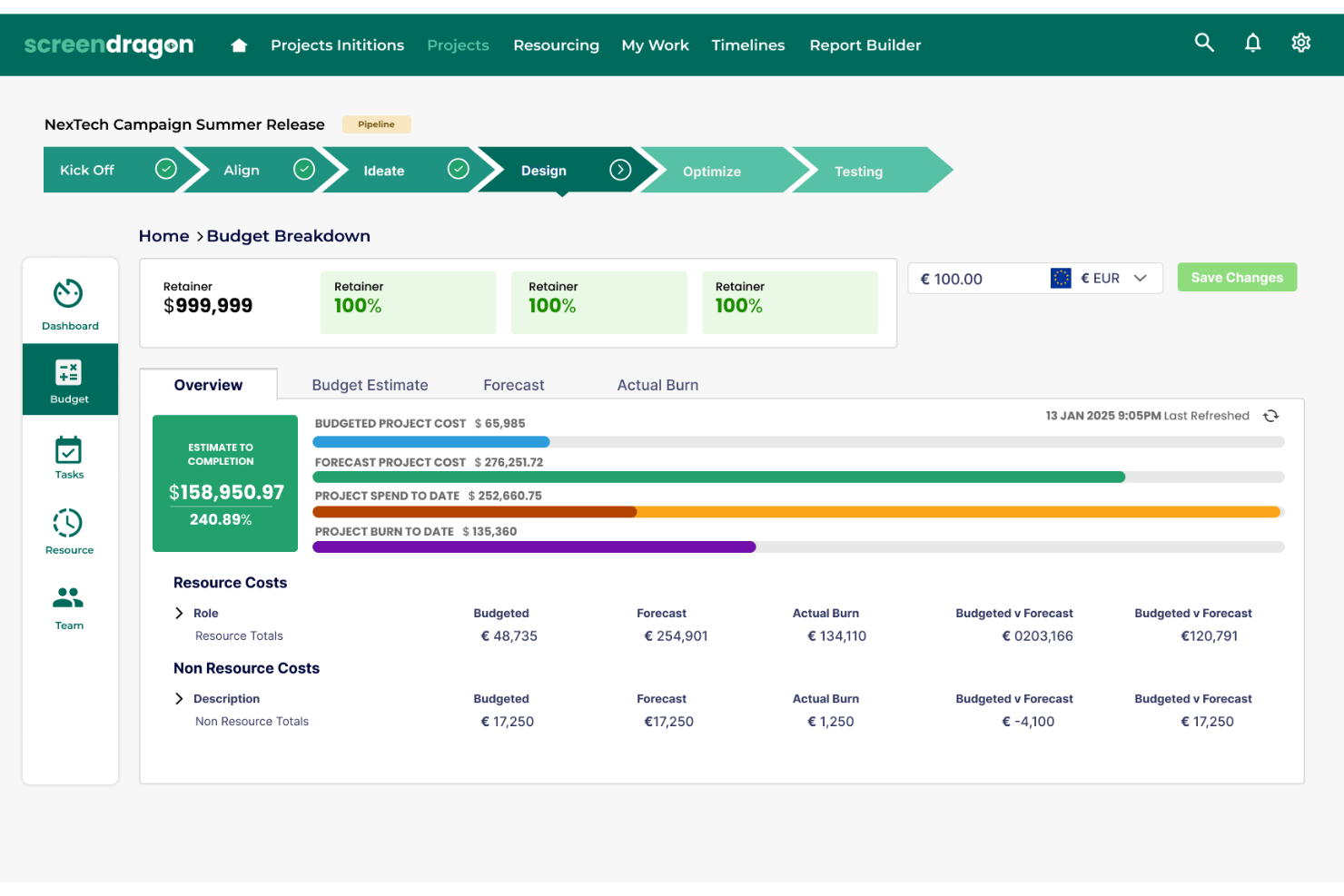
Screendragon is a work management platform for marketing and creative teams that connects campaign planning, project workflows, and collaboration to help manage briefs, deadlines, and approvals.
Who Is Screendragon Best For?
Screendragon suits growing marketing teams and agencies coordinating campaign work, creative reviews, and approvals across multiple stakeholders.
Why I Picked Screendragon
I picked Screendragon as a Wrike alternative for growing marketing and agency teams because it connects campaign planning with project workflows. I like how teams can coordinate briefs, deadlines, and approvals across stakeholders, keeping creative work moving from planning through review.
Screendragon Key Features
- Capacity views: Review resource allocations by task, hours, or percentage.
- Workload forecasting: Compare future project demand with team availability.
- Software integrations: Connect with tools such as Jira Software, Microsoft 365, and Adobe.
- Real-time dashboards: Track project status and milestones with configurable reports.
Screendragon Integrations
Screendragon offers pre-built integrations, including Aprimo, HubSpot, Microsoft Teams, Microsoft Power BI, Sitecore, Ziflow, Brandfolder, Smartsheet, Amazon S3, and Google Cloud Storage. A REST API is available for custom integrations.
Pros and Cons
Pros:
- Support responds quickly to user questions
- Resource and budget visibility spans projects
- Flexible workflows fit agency-specific approval steps
Cons:
- Extensive features take time to learn
- Large projects can make processes feel slow

Best Wrike alternative for detailed team scheduling
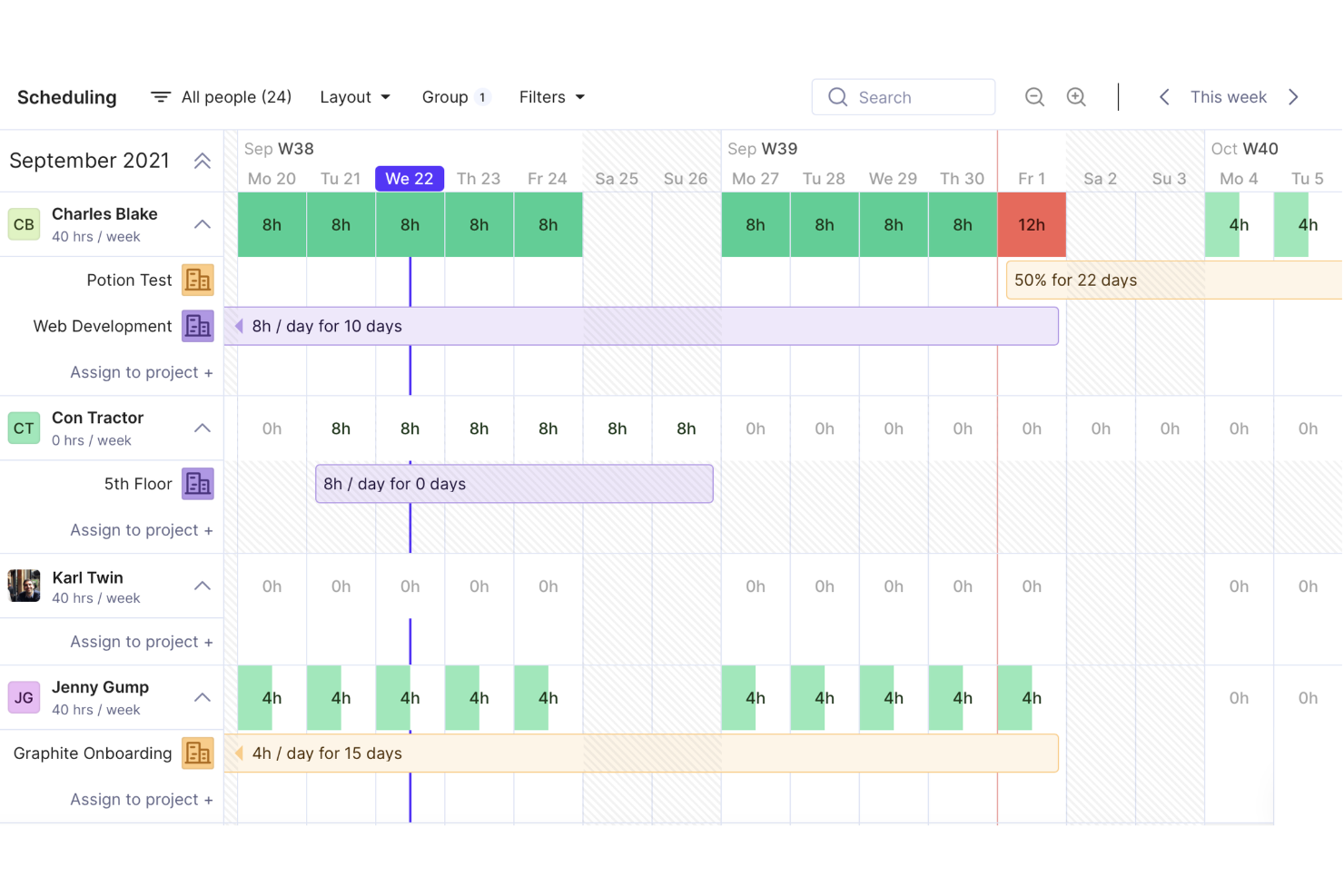
Productive is a project management and operations platform for agencies and professional services teams that connects project work with budgets and time tracking to improve delivery visibility and cost control.
Who Is Productive Best For?
Productive suits agency and professional services project managers who need detailed team schedules across multiple client engagements.
Why I Picked Productive
I picked Productive as a Wrike alternative because its detailed team scheduling is built around agency work across multiple client engagements. I like that project schedules connect to budgets and time tracking, so I can see how staffing plans relate to delivery costs and recorded hours. When several client projects compete for the same people, that combined view helps me assess allocation and budget impact.
Productive Key Features
- Task management: Organize work into projects, folders, task lists, tasks, and subtasks.
- Project docs: Create project specifications, meeting notes, and other documents.
- Project forms: Collect team or client requests and feedback through forms.
- Workflow automations: Trigger actions such as opening projects or sending Slack messages.
Productive Integrations
Productive supports integrations with Jira, Slack, Google Calendar, Microsoft Outlook, HubSpot, Xero, and QuickBooks, and connects with Zapier. It also offers an Open API and webhooks for custom integrations.
Pros and Cons
Pros:
- Time entries feed budget and profitability visibility
- Capacity views expose conflicts across client engagements
- Schedules link staffing plans to project budgets
Cons:
- Gantt sorting and edits can feel mouse-heavy
- Budget changes can require duplicate updates
New Product Updates from Productive
Productive Adds Email and Calendar Integrations for Agents
Productive adds Gmail, Outlook, Google Calendar, and Outlook Calendar connectors for its AI agents. These integrations let agents manage emails and create calendar events directly within Productive. For more information, visit Productive’s official site.
 .

Best for task automation and customization
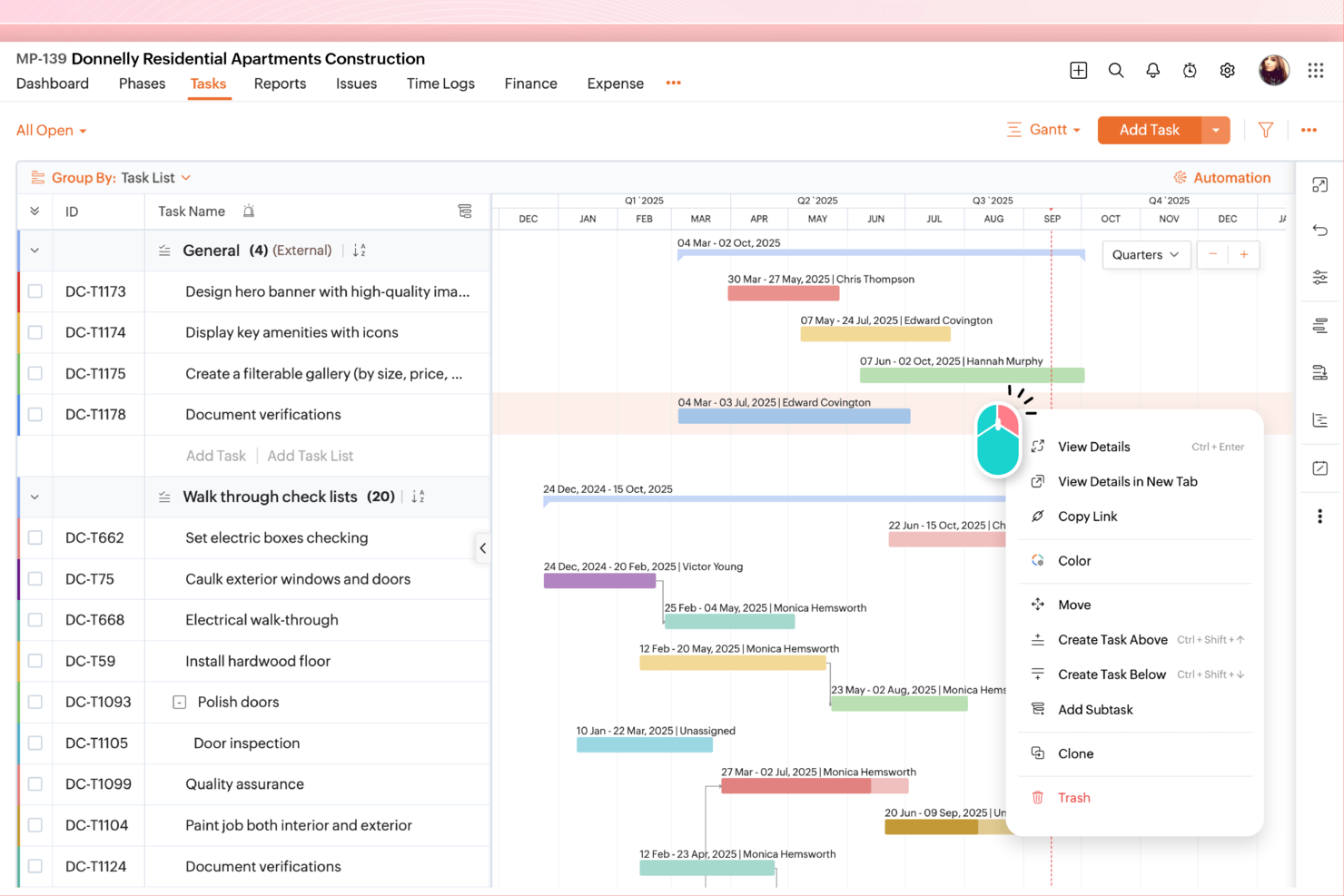
For product and engineering teams juggling shifting timelines and dependencies, Zoho Projects provides a shared workspace for project planning, task coordination, and progress tracking.
Who Is Zoho Projects Best For?
Zoho Projects suits project managers who need to automate recurring work and tailor task workflows across cross-functional teams.
Why I Picked Zoho Projects
I picked Zoho Projects for task automation and customization that map to real project workflows. I like its workflow rules for triggering task updates and notifications when work meets defined conditions. Custom fields and statuses let me tailor task tracking to a product release, such as separating review, QA, and launch readiness.
Zoho Projects Key Features
- Gantt charts: View project schedules, milestones, and task timelines.
- Task dependencies: Link tasks to show which work must happen first.
- Timesheets: Log hours against tasks and projects.
- Issue tracking: Record, assign, and track project issues.
Zoho Projects Integrations
Zoho Projects integrates with Zoho CRM, Zoho Sprints, Google Drive, Microsoft Teams, Slack, Dropbox, GitHub, Zendesk, and Zapier. It also provides a REST API for custom integrations.
Pros and Cons
Pros:
- Built-in timesheets connect hours to project work
- Visual dependencies clarify task sequencing
- Custom workflows automate task and client updates
Cons:
- Workflow and report setup takes extra effort
- Crowded interface can obscure project details
New Product Updates from Zoho Projects
Zoho Projects Adds CodeX Scripts for Custom Modules
Zoho Projects now supports CodeX Scripts for custom modules, enabling conditional logic and rules for creating, updating, and deleting records. For more information, visit Zoho Projects' official site.
 .

ClickUp
Best for cutting costs for similar features
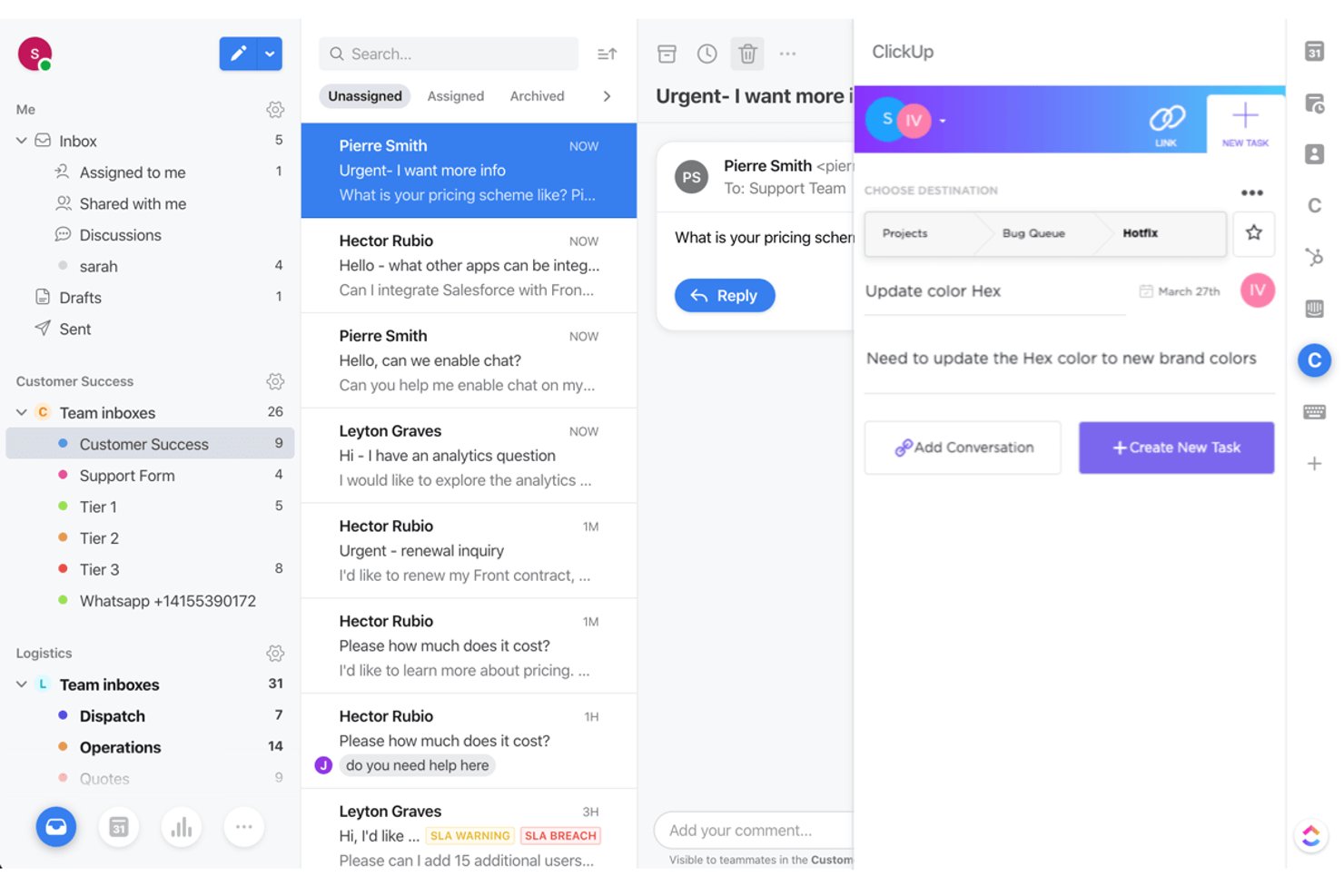
ClickUp gives product, engineering, and design teams a configurable workspace to plan projects, track dependencies, and coordinate work across tasks, docs, and team workflows.
Who Is ClickUp Best For?
ClickUp suits teams that want to consolidate project and collaboration work in one platform while keeping software costs in check.
Why I Picked ClickUp
I picked ClickUp as a Wrike alternative because it’s Best for cutting costs for similar features: I can map project dependencies, capture decisions in Docs, and coordinate delivery through configurable task workflows. That gives product, engineering, and design a shared place to manage project plans and execution.
ClickUp Key Features
- Native time tracking: Start a timer on a task or enter time manually.
- Dashboards: Create reports from task data with customizable cards.
- Goals: Set measurable targets and track progress toward them.
- Workload view: See assigned work by team member and date.
ClickUp Integrations
ClickUp offers native integrations with Slack, GitHub, GitLab, Bitbucket, Google Drive, Google Calendar, Microsoft Teams, Figma, Zoom, and HubSpot, and connects with Zapier. It also provides an API for custom integrations.
Pros and Cons
Pros:
- Workload views expose assignment bottlenecks
- Docs and task workflows share one workspace
- Task dependencies, statuses, and flexible views
Cons:
- Large boards can feel sluggish
- Dense settings can complicate workspace setup
New Product Updates from ClickUp
ClickUp Adds List Automations, Time Off Scheduling, and Org Charts
ClickUp adds template-based List automations, personal time off scheduling, a unified picker, automatic task date syncing, and Org Charts. These updates help teams automate project setup, manage availability, and organize work. For more information, visit ClickUp’s official site.
 .

Celoxis
Best for advanced project cost and performance analysis
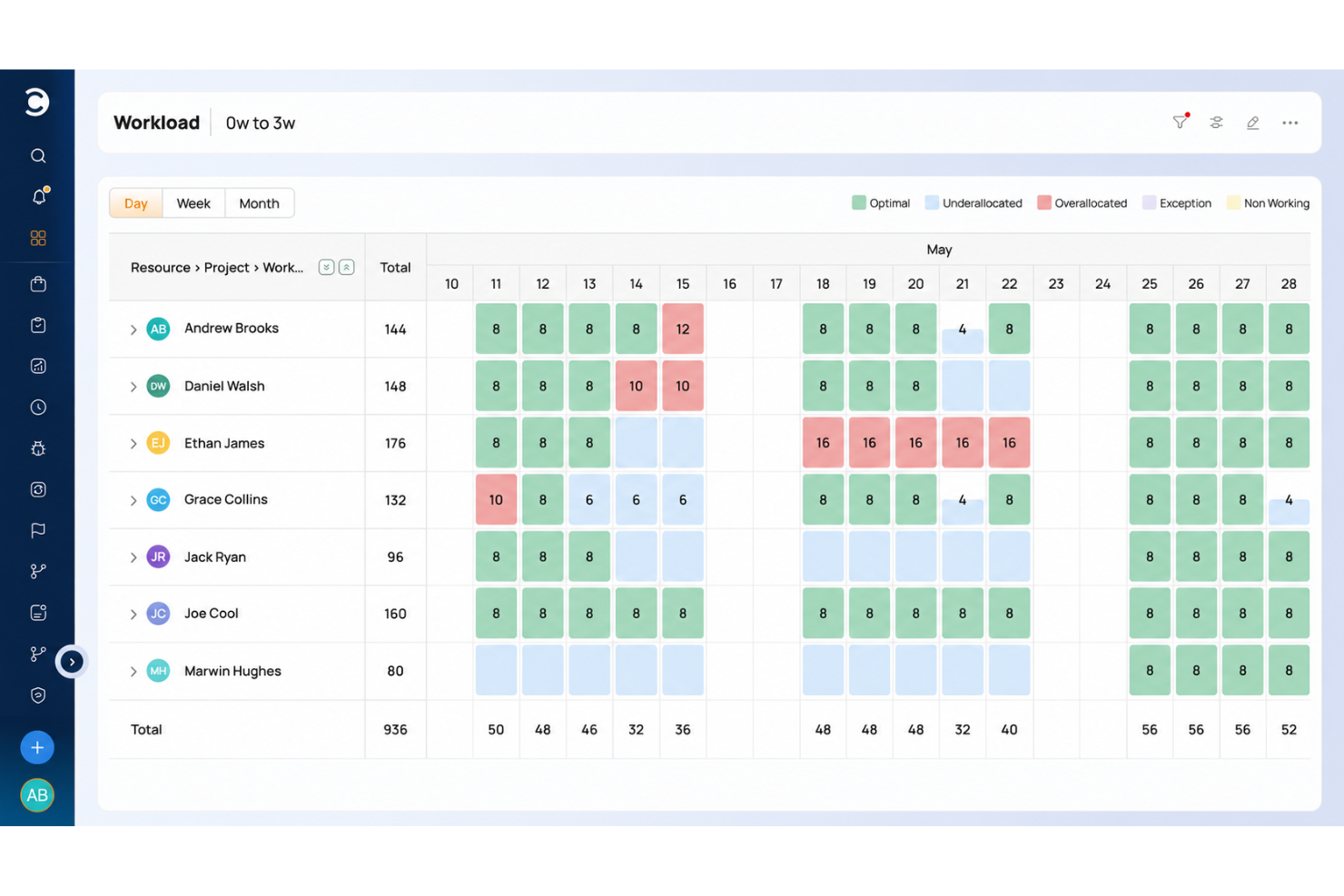
Celoxis is project management software for teams coordinating complex, cross-functional projects, with tools to plan schedules, manage resources, and keep work visible across teams.
Who Is Celoxis Best For?
Celoxis suits PMO leaders and project managers who need portfolio-level visibility into budgets, resource capacity, and delivery performance.
Why I Picked Celoxis
I picked Celoxis as “Best for advanced project cost and performance analysis” because it helps me track project costs alongside delivery progress. I like its budget and cost tracking for spotting spend variances, while project dashboards help compare schedule and performance across workstreams.
Celoxis Key Features
- Timesheets: Log project hours and review submitted time entries.
- Workflow automation: Set custom workflows, approval steps, and automated routing.
- Risk and issue registers: Record project risks and issues, then track their status.
- Demand intake: Use dynamic forms and scoring to assess project requests.
Celoxis Integrations
Celoxis offers 21 native integrations, including Jira, Azure DevOps, Microsoft Project, Microsoft 365 and Outlook, Google Drive, Salesforce, QuickBooks Online, Slack, GitHub, and Google Sheets; it also connects with Zapier. A REST API is available for custom integrations.
Pros and Cons
Pros:
- Gantt charts map dependencies and critical paths
- Surfaces resource capacity across project portfolios
- Tracks budget-versus-actual costs alongside project progress
Cons:
- Mobile experience trails the desktop version
- Initial setup and advanced configuration take time

Quire
Best for breaking down complex projects
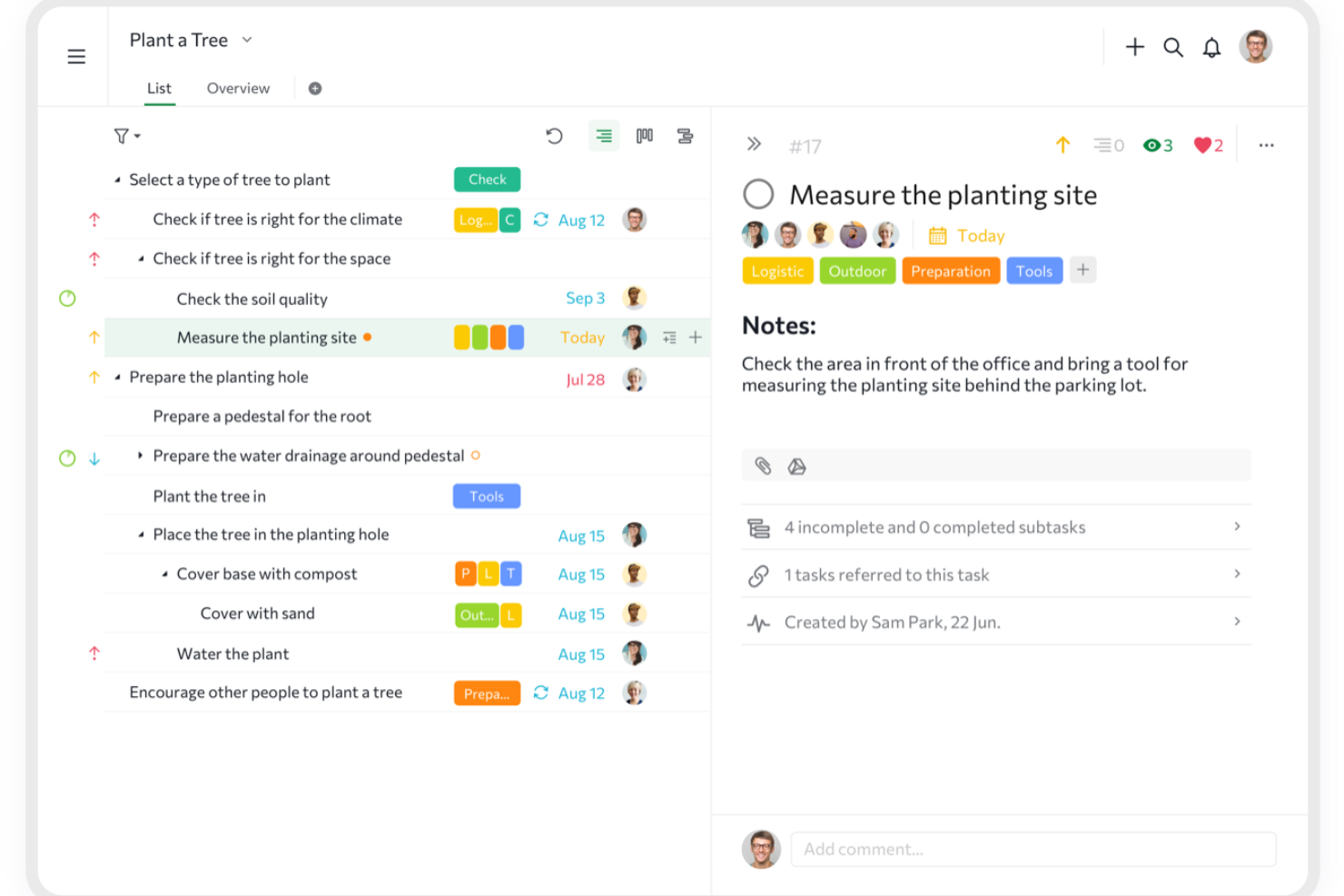
Quire is project management software for digital teams that need to organize detailed work, coordinate tasks across contributors, and keep shifting project plans visible.
Who Is Quire Best For?
Quire suits project managers in product and engineering teams who need to break large initiatives into trackable tasks.
Why I Picked Quire
I picked Quire as a Wrike alternative because it’s “Best for breaking down complex projects.” I like how nested task lists turn a product launch into initiatives, deliverables, and actionable subtasks, while Kanban boards show those tasks moving through review and delivery.
Quire Key Features
- Dynamic timeline: Schedule milestones and view project progress over time.
- Collaborative document: Keep project notes, ideas, and updates in a shared space.
- Interactive reports: Build dashboards from task data, time logs, and custom formulas.
- Calendar: Organize team agendas and review upcoming work.
Quire Integrations
Quire documents integrations with Slack, Microsoft Teams, GitHub, Dropbox, Google Calendar, Apple Calendar, and Outlook Calendar, and it connects with Zapier. Quire also provides an API for custom integrations.
Pros and Cons
Pros:
- Task dependencies help clarify delivery order
- Parent tasks stay grouped across board and timeline views
- Nested subtasks keep complex work organized
Cons:
- Mobile apps have fewer capabilities than desktop workflows
- Reporting offers limited customization for complex projects
New Product Updates from Quire
Quire Adds Custom Field Locking and Comment Reaction API Support
Quire adds custom field locking and API support for reading and setting emoji reactions on comments. These updates give teams more control over field data and expand comment interaction options for developers. For more information, visit Quire’s official site.
 .
Best for client work billing and time tracking
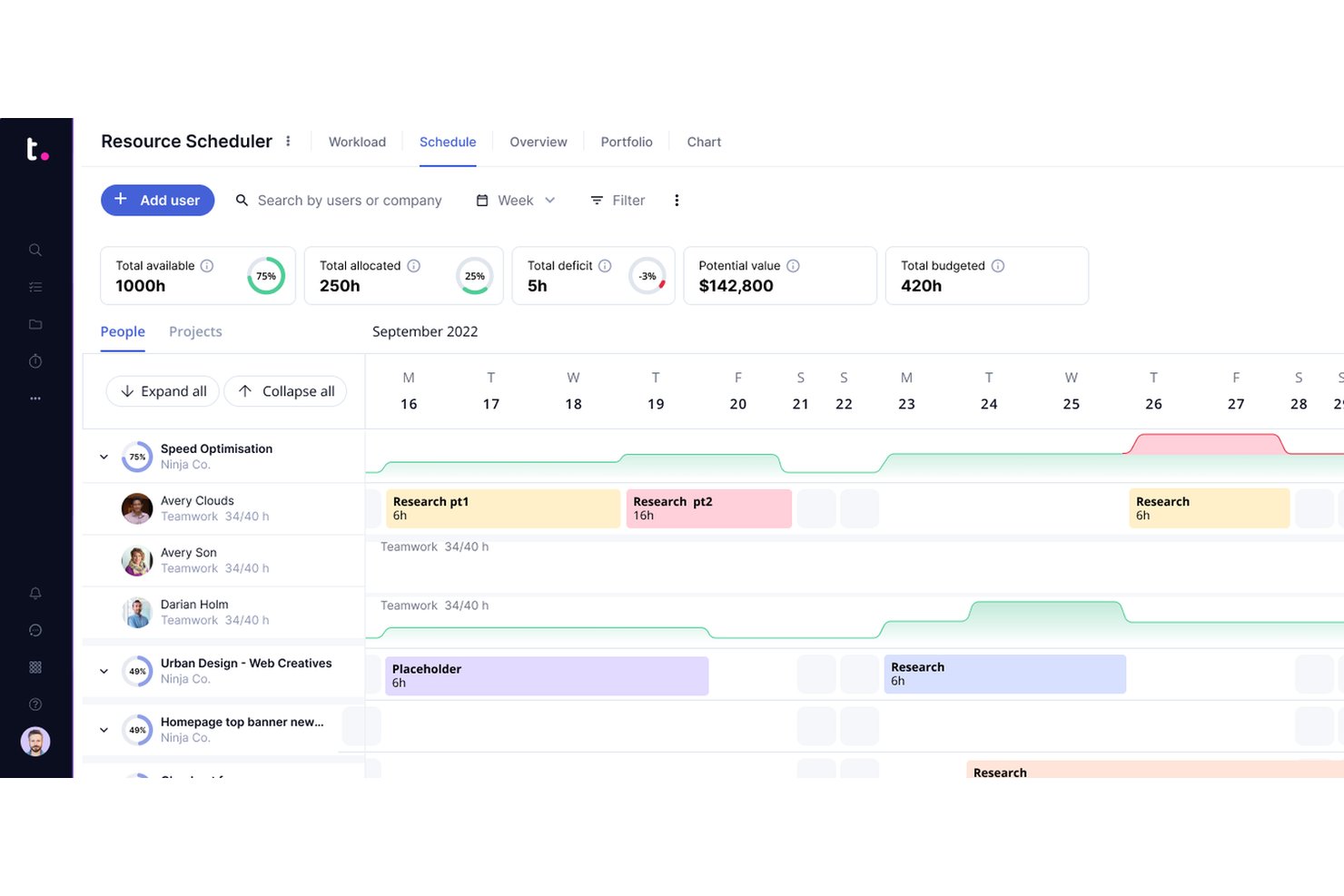
Teamwork.com is a project management platform for agencies and client-facing teams that need to coordinate tasks, deadlines, and collaboration across multiple customer projects.
Who Is Teamwork.com Best For?
Teamwork.com suits agency and professional-services project managers who need to track billable hours and coordinate delivery across client engagements.
Why I Picked Teamwork.com
I picked Teamwork.com as Best for client work billing and time tracking because its timers and timesheets let me log billable hours against client projects. I can compare project budgets with real-time margin reports to spot when delivery work is eroding profitability, making it a useful Wrike alternative for client-focused project management.
Teamwork.com Key Features
- Workload planner: View team capacity and scheduled work across projects.
- AI project wizard: Generate a project plan from a description of the work.
- Client approvals: Collect client feedback and approvals on project deliverables.
- AI comment summaries: Summarize project discussions to surface key points.
Teamwork.com Integrations
Teamwork.com lists 150+ integrations, including Slack, Microsoft Teams, Google Calendar, Outlook Calendar, Salesforce, HubSpot, QuickBooks Online Advanced, NetSuite, Harvest, and Zapier. It also offers an API for custom integrations.
Pros and Cons
Pros:
- Client approvals keep deliverable feedback in project context
- Budget and margin reports surface profitability risks
- Billable time tracking ties hours to client projects
Cons:
- Manual timer controls can complicate accurate time reporting
- Crowded navigation can make features hard to find

Best for enterprise creative and marketing workflows
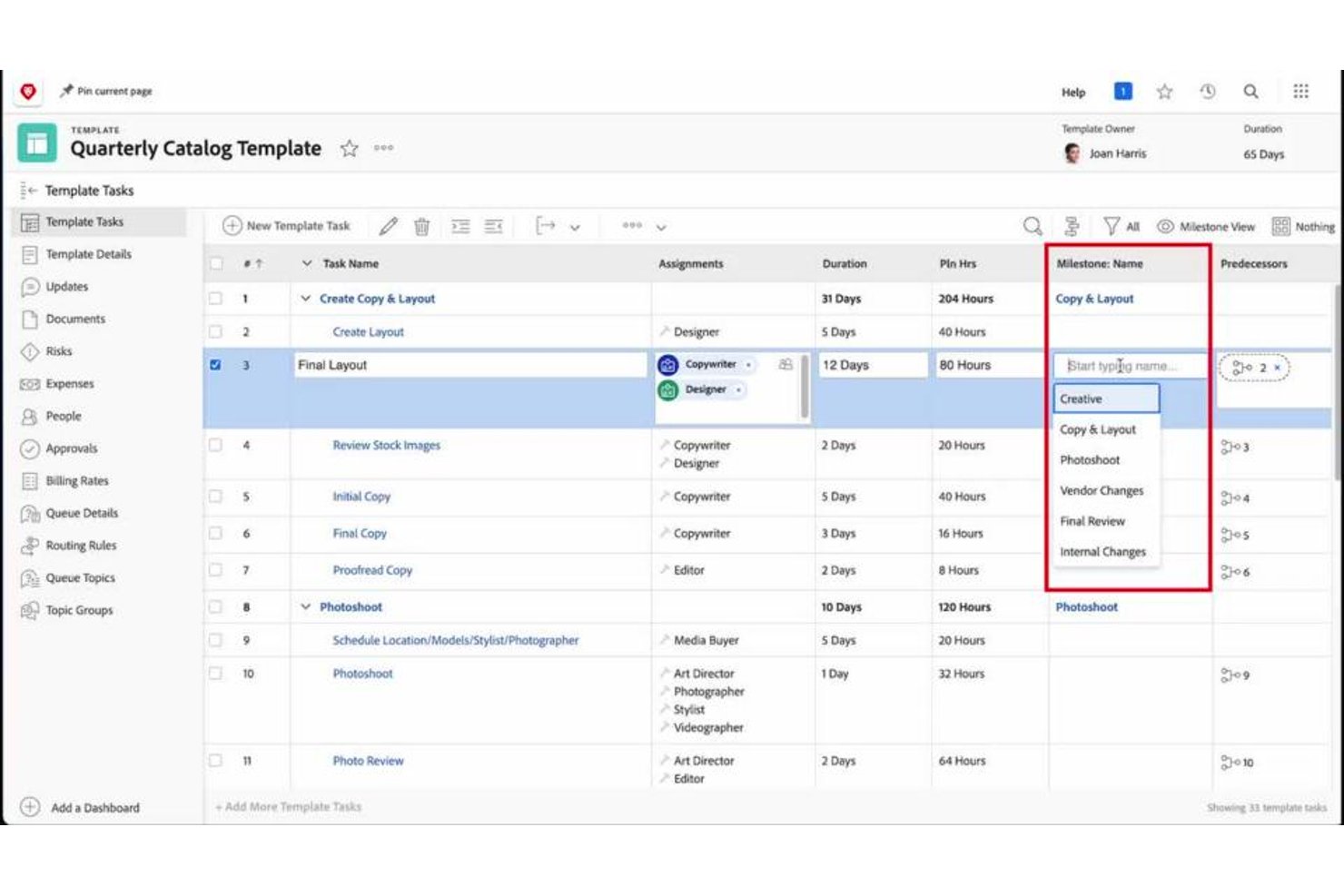
Adobe Workfront is an enterprise work management platform that helps teams plan campaigns, coordinate reviews, and track dependencies across projects; it’s Best for enterprise creative and marketing workflows.
Who Is Adobe Workfront Best For?
Adobe Workfront suits marketing operations and creative teams at large organizations that coordinate campaign work and approvals across departments.
Why I Picked Adobe Workfront
I picked Adobe Workfront because campaign plans connect with proofing and approval workflows, letting reviewers annotate creative assets and resolve feedback in context. Its project plans track dependencies across launch work, supporting its USP: Best for enterprise creative and marketing workflows.
Adobe Workfront Key Features
- Request queues: Route submitted work requests through configured queues.
- Resource management: Assign team members and review their workload across projects.
- Reports and dashboards: Build reports and dashboards to track project data.
- Portfolio management: Organize projects into portfolios and compare their status.
Adobe Workfront Integrations
Adobe Workfront has native integrations with Adobe Creative Cloud, Adobe Experience Manager Assets, Adobe Express, GenStudio for Performance Marketing, Microsoft Teams, and Slack. Workfront Fusion offers connectors to additional apps for a separate purchase, and its public REST API supports custom integrations.
Pros and Cons
Pros:
- Workload views expose team capacity
- Dependencies map campaign launch work
- Proofing keeps feedback attached to creative
Cons:
- Report building takes substantial configuration
- Dense navigation slows new users

Ravetree
Best for agencies and professional service providers

Ravetree is work management software for agencies and professional service providers, combining project planning, resource coordination, and time tracking to help teams manage client work and delivery capacity.
Who Is Ravetree Best For?
Ravetree suits project and operations managers at client-service firms who coordinate delivery teams, capacity, and billable work across multiple engagements.
Why I Picked Ravetree
I picked Ravetree as a Wrike alternative because it’s built for its stated niche: Best for agencies and professional service providers. I like that project planning, resource coordination, and time tracking sit together, so I can track client engagements alongside team capacity and billable work.
Ravetree Key Features
- CRM: Track accounts, contacts, sales pipelines, and prospect activities.
- Billing and invoicing: Create and email invoices for approved expenses and service items.
- Client portal: Let clients view project updates, approve files, and submit requests.
- Request forms: Customize fields and approval workflows for internal and client requests.
Ravetree Integrations
Ravetree documents integrations with Google Drive, Dropbox, OneDrive, Google Calendar, Outlook Calendar, HubSpot, QuickBooks, Xero, and Stripe, and it connects with Zapier. An API is available for custom integrations; Slack is listed as coming soon.
Pros and Cons
Pros:
- Client portals support approvals and updates
- Staffing, time, and billing share workflows
- Project budgets roll up by phase
Cons:
- Mobile app trails desktop functionality
- Work-item navigation can complicate orientation
Diğer Wrike Alternatifleri
Kısa listeme giremeyen ancak yine de göz atmaya değer bazı ek Wrike alternatifleri şunlardır:
- Smartsheet
For teams that want a spreadsheet-like interface
- Hive
For bringing all communication in a single place
- Asana
For tracking tasks across multiple projects
- MeisterTask
For integration of ideation and task management
- Scoro
For project management with built-in KPI tracking
- Airtable
For building custom workflows across departments
- Workzone
For industry-specific templates
- Parallax
For an intuitive, user-friendly interface
- Bonsai Agency Software
For in-platform project billing and invoicing
- Pneumatic Workflow
For streamlining digital projects


Wrike Alternatifleri Nedir?
Wrike alternatifleri; görev takibi, iş birliği ve iş akışı otomasyonu gibi Wrike'ın temel özelliklerinin çoğunu yineleyen, ancak farklı arayüzler, fiyatlandırma modelleri ve uzmanlık alanları sunan proje yönetimi araçlarıdır.
İşletmeler daha sezgisel bir tasarım, daha iyi entegrasyonlar, daha düşük maliyet veya ölçeklendirmesi daha kolay bir platform aradıklarında bu alternatiflere yönelir. Wrike'ın karmaşıklığından rahatsız olan veya yeni bir başlangıç yapmak isteyen ekipler için ideal olan bu araçlar, projeleri yönetmede verimliliği ve uyarlanabilirliği artırmaya yardımcı olur.
Wrike Hakkında
Wrike, departmanlar arası iletişim ve hızlı tempolu yaratıcı ekiplerin yararlanabileceği, özenle hazırlanmış şablon belgeler konusunda uzmanlaşan bir proje yönetimi çözümüdür. Uygulama içinde Alanlarınızı, Klasörlerinizi, Projelerinizi, Görevlerinizi ve Alt Görevlerinizi ihtiyaçlarınıza göre oluşturabilirsiniz.
Ayrıca kullanıcılar, yeni öğelerin iş akışı sistemine eklenme sürecini hızlandırmak için Blueprints (kendi geliştirdikleri) veya Templates (Wrike tarafından geliştirilen) özelliklerinden yararlanabilir. Ayrıca proje talep formları oluşturmanıza olanak tanıyan sezgisel bir özel talep formu oluşturucusu da bulunur. Bağlantı paylaşımıyla erişim sayesinde harici müşteriler de formu doldurabilir. Wrike'ın hareket hâlindeyken çalışmaya yönelik bir mobil uygulaması vardır ve entegrasyon konusunda oldukça esnektir. Google Dokümanlar, Microsoft programları, Amazon hizmetleri ve daha birçok uygulama da dâhil olmak üzere 150'den fazla uygulamaya bağlanır.
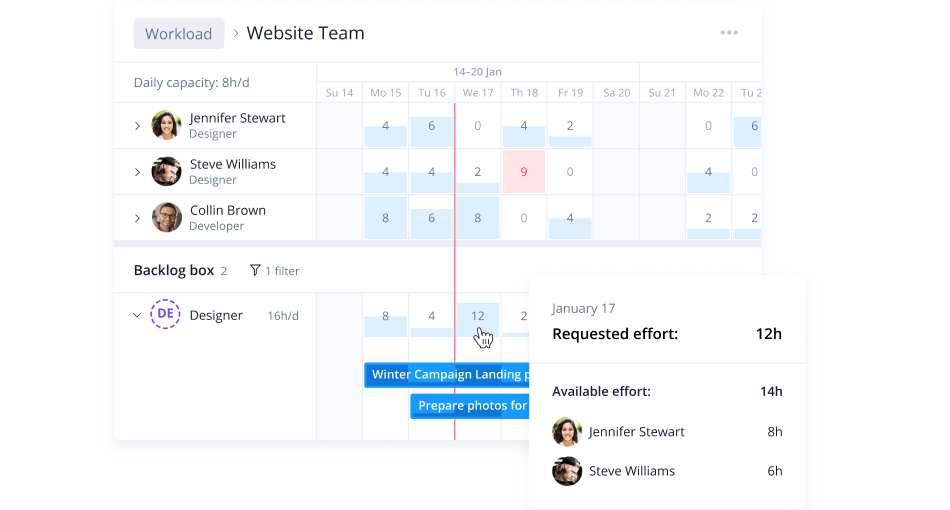
Wrike'ın özel raporları ve analizleri, olası riskleri kolayca öngörmenize olanak tanır; böylece ekibiniz rotasını ayarlayabilir ve buna göre plan yapabilir. Gösterge panelleri son derece görseldir ve anında anlaşılabilir bilgiler sunar. Bunun yanı sıra ayrıntılı bildirimler, portföyünüzü hızlıca ayarlamanıza ve gelir kaybını en aza indirmenize yardımcı olabilir.
Basit bir kullanıcı arayüzüyle Wrike, yöneticilerin yaklaşan projeleri gözünde canlandırmasına, hangi risklerin azaltılması gerektiğini kolayca görmesine ve kaynakları eksiklikleri dikkate alacak şekilde yönetmesine yardımcı olur. Piyasadaki en özelleştirilebilir ve yapılandırılabilir risk yönetimi yazılımı olan Wrike, departmanlar arası gerçek zamanlı iş birliğini mümkün kılar; ekiplerin olası riskleri iletişim kurarak birlikte çözüm üretmesine yardımcı olur. Wrike kullanımı oldukça kolay olsa da etkileşimli eğitimler, videolar, bir “başlangıç kılavuzu” ve canlı bir topluluk içeren özel yardım merkezinden de yararlanabilirsiniz.
Wrike, daha gelişmiş özelliklerini ve özelleştirme seçeneklerini 14 gün boyunca deneme fırsatıyla ücretsiz başlamanıza olanak tanır. Ücretli planlar kullanıcı/ay başına $9.80 fiyatından başlar.
How I Evaluate Wrike Alternatives
I split my evaluation into three parts. First—and this carries the most weight—I check whether a tool can track tasks across multiple projects and visualize work in more than one view. Then I look at standout features like request intake and budget tracking. Finally, I consider pricing transparency and onboarding quality.
Core Functionality (Table Stakes For This List)
When I'm selecting tools for my list, I score each one on a scale from 0 (does not offer the functionality) to 5 (excels in this area) for each core functionality listed below. I then convert the total into a percentage to help assess each tool's overall fit, with extra weight on any functionalities I’ve deemed essential.
- Task & Project Tracking (Essential): I look for clear assignments, due dates, statuses, subtasks, and dependencies to coordinate work across projects.
- Multiple Project Views (Essential): I check for views such as lists, boards, calendars, and timelines so teams can plan and track work in ways that suit them.
- Workflow Automation: I assess whether teams can set rules for recurring steps, such as updating a status or notifying an owner when a task changes.
- Resource & Workload: I look for capacity views that show who has too much assigned work and help managers rebalance tasks across projects.
- Cross-Team Collaboration: I check whether teams can comment, share files, and mention colleagues in context when project details or decisions change.
- Reporting & Dashboards: I evaluate whether reports and dashboards make progress, task status, and cross-project issues easy to review.
Once I have a list of tools that meet the criteria, I consider what sets each platform apart.
Differentiating Factors (What Sets Vendors Apart)
Here's how I compare and contrast different vendors:
Standout Features
I look for built-in visual proofing so creative teams can mark up images, PDFs, and videos without leaving the platform. Dynamic request forms also matter—I check whether intake submissions auto-route into structured tasks, since that cuts manual triage on high-volume teams. Budget tracking is another key differentiator. I evaluate whether a tool ties billable hours and cost variance to individual projects, which helps agencies and services teams catch overruns before invoicing.
Beyond Features
I check whether key capabilities like automation rules and workload views are locked behind higher-priced tiers, since that changes the real cost for a growing team. Onboarding speed matters too—I look for guided setup flows and ready-made templates that help non-technical users start managing work within days, not weeks. I also evaluate how well each platform scales across departments, because a tool that works for one marketing team but can't support portfolio-level visibility for a program manager overseeing IT and operations in the same instance creates more problems than it solves.
Wrike Alternatifi Nasıl Seçilir?
Uzun özellik listeleri ve karmaşık fiyatlandırma yapılarına takılıp kalmak kolaydır. Kendinize özgü yazılım seçimi süreciniz üzerinde çalışırken odağınızı korumanıza yardımcı olmak için aklınızda bulundurmanız gereken faktörlerden oluşan bir kontrol listesi hazırladık:
| Faktör | Dikkate Alınması Gerekenler |
|---|---|
| Ölçeklenebilirlik | Aracın ekibinizle birlikte büyüyebildiğinden emin olun. Artan proje ve kullanıcı sayısını destekleyen çözümleri tercih edin. |
| Entegrasyonlar | Yazılımın Slack, Google Workspace veya Salesforce gibi hâlihazırda kullandığınız araçlara bağlanıp bağlanmadığını kontrol edin. |
| Özelleştirilebilirlik | İş akışlarını ve gösterge panellerini ihtiyaçlarınıza göre uyarlamanız gerekir. Özellikleri ihtiyaçlarınıza uygun şekilde ayarlamanıza olanak tanıyan bir araç seçin. |
| Kullanım Kolaylığı | Ekibiniz, kapsamlı bir eğitim almadan aracı hızlıca anlayabilmeli ve kullanabilmelidir. |
| Bütçe | Yalnızca başlangıç maliyetini değil, gelecekteki giderleri de göz önünde bulundurun. Bütçenize uyan esnek fiyatlandırma seçeneklerini arayın. |
| Güvenlik Önlemleri | Çözümün şifreleme ve düzenlemelere uyum gibi güçlü veri koruma özellikleri sunduğundan emin olun. |
| Müşteri Desteği | Güvenilir destek kritik öneme sahiptir. 7/24 erişilebilirlik ve birden fazla iletişim seçeneği sunan bir hizmeti tercih edin. |
| Performans | Aracın görevleri nasıl işlediğini değerlendirin. Yoğun iş yükleri sırasında gecikme olmadan sorunsuz çalışmalıdır. |
Açıkçası sindirmesi gereken çok şey var ve doğru seçimi yapma konusunda üzerinizde büyük bir baskı olabilir. Bu nedenle, sizin ve kuruluşunuzun özel ihtiyaçlarına uygun proje yöneticisi araçlarını kısa listeye almanıza yardımcı olması için proje yönetimi yazılımı danışmanlığı hizmetimizi kullanmanızı öneririm.
Uygun Bir Wrike Alternatifi İçin Temel Özellikler
Alternatif çözümlerin sunduklarını karşılaştırmanıza yardımcı olmak için Wrike alternatifinin bazı temel özelliklerini aşağıda bulabilirsiniz:
- Özelleştirilebilir Panolar: Çalışma alanınızı ekibinizin ihtiyaçlarına uyacak şekilde düzenleyebilir ve proje şeffaflığını artırabilirsiniz. Paydaşların uyum içinde kalmasını sağlamak için gerçek zamanlı veri görselleştirmesi ve kolay paylaşım sunan, panoların sürükle ve bırak yöntemiyle özelleştirilmesine olanak tanıyan bir alternatif arayın.
- Prova ve Karşılaştırma Modu: Bu özellik, dosyaların farklı sürümlerini yan yana inceleyip karşılaştırmanıza olanak tanıyarak değişiklikleri kolayca fark etmenize yardımcı olur. Alternatifin, açıklama ekleme özelliklerine, sürüm takibine ve sorunsuz iş birliği için tasarım yazılımlarıyla entegrasyonlara sahip gelişmiş prova araçlarını içerdiğinden emin olun.
- Görev Yönetimi: Daha düzenli bir iş akışı sağlayarak görevleri ve alt görevleri zahmetsizce oluşturun. İyi bir alternatif; basit ve karmaşık iş akışlarını etkili bir şekilde yönetmek için sezgisel görev oluşturma, bağımlılık desteği ve önceliklendirme seçenekleri sunmalıdır.
- Zaman Takibi: Kaynakları ve teslim tarihlerini daha iyi yönetmek için görevlere harcanan zamanı takip edin. Ayrı bir araca ihtiyaç duymadan zaman dağılımı hakkında ayrıntılı bilgiler sunan, zaman takibini faturalandırma ve raporlamayla entegre eden bir alternatif seçin.
- İş Yükü Yönetimi: Bu özellik, ekip üyelerinin uygunluk durumuna ve iş yüküne göre görevleri verimli bir şekilde dağıtmanıza yardımcı olur. Darboğazları önlemek için gerçek zamanlı güncellemeler sağlayan ve görevlerin kolayca yeniden dağıtılmasına olanak tanıyan dinamik iş yükü yönetimi özelliklerini arayın.
- Entegrasyon Desteği: Süreçlerinizi kolaylaştırmak için çeşitli üçüncü taraf uygulamalarına bağlanın. Sorunsuz iş akışlarını korumak için alternatifin mevcut teknoloji yığınınızdaki temel entegrasyonları desteklediğinden veya özel bağlantılar için açık bir API sunduğundan emin olun.
- Ayrıntılı Raporlar: Bilinçli karar alma sürecine yardımcı olacak şekilde projeleriniz hakkında bilgiler sunan raporlar oluşturun. Alternatif, bilgileri farklı kitlelere göre uyarlamanıza olanak tanıyan, grafik ve çizelge gibi görsel öğeler içeren, son derece özelleştirilebilir raporlama seçenekleri sunmalıdır.
- Ölçeklenebilir Proje Yapıları: Ekip gereksinimleriniz geliştikçe proje boyutlarını ve yapılarını bu gereksinimlere uyacak şekilde ayarlayın. İhtiyaçlarınız arttıkça esneklik sağlamak için hiyerarşik yapıları, alt projeleri ve projeler arası bağlantıları destekleyen, karmaşıklık yaratmadan ölçeklenebilirlik sunan bir araç arayın.
Wrike alternatiflerini incelerken ekibinizin gelişen ihtiyaçlarını desteklemek için esneklik, gelişmiş iş birliği özellikleri ve ölçeklenebilirlik sunan araçlara odaklanın. Üretkenliği artıran ve iş akışlarını kolaylaştıran sezgisel arayüzlere, sorunsuz entegrasyonlara ve yenilikçi özelliklere sahip çözümlere öncelik verin.