

2026’nın En İyi 10 Yapay Zekâ Proje Portföyü Yönetimi Yazılımı

Yapay Zekâ Proje Portföy Yönetimi Yazılımları Kısa Listesi


Yapay zekâ proje portföy yönetimi yazılımı, kuruluşunuz genelindeki birden fazla projeyi düzenlemenize, önceliklendirmenize ve takip etmenize yardımcı olmak için yapay zekâdan yararlanır. Değişen öncelikleri yönetmenin, riskleri erkenden tespit etmenin ve paydaşların uyum içinde kalmasını sağlamanın yollarını arıyorsanız bu araçlar sizin için geliştirildi.
Bu rehberde ekibinizin daha bilinçli kararlar almasına, rutin işleri otomatikleştirmesine ve tüm proje portföyünüzü daha net bir şekilde görmesine yardımcı olabilecek en iyi yapay zekâ destekli platformları bulacaksınız. Özellikleri karşılaştırmak ve iş akışınıza ve hedeflerinize en uygun seçeneği bulmak için bu listeyi kullanın.
Why Trust Our Software Recommendations
Our team has been testing and reviewing software since 2012. As project managers ourselves, we know how difficult—and important—it is to choose the right software.
For this guide, we evaluated tools using hands-on testing and independent research, scoring tools using our selection criteria. We also draw on insights from industry thought leaders and practicing project management experts.
Our reviews reflect our human editorial judgment, not a sales pitch.
Expert reviewers:
Yapay Zekâ Proje Portföy Yönetimi Yazılımları Karşılaştırma Tablosu
Bu karşılaştırma tablosu, en iyi yapay zekâ proje portföy yönetimi yazılımı seçimlerim için fiyatlandırma ayrıntılarını özetlemektedir:
| Tool | Starting Price | Website | |
|---|---|---|---|
| Best for integrated portfolio scheduling | 4.5 out of 5 | $10/user/month 14-day free trial | Website |
| Best for AI-powered risk identification | 4.6 out of 5 | $9/user/month Free plan + 14-day trial available | Book Demo |
| Best for profitability-focused portfolio insights | 4.6 out of 5 | $10/user/month 14-day free trial | Book Demo |
| Best for predictive portfolio insights | 4.6 out of 5 | Pricing upon request Free demo available | Website |
| Best for AI project performance tracking | 4.3 out of 5 | $4/user/month Free plan available | Website |
| Best for AI portfolio forecasting | 4.2 out of 5 | Pricing upon request Free demo available | Website |
| Best for agentic AI across the PMO lifecycle | — | Pricing upon request Free demo available | Website |
| Best for collaborative portfolio tracking | 4.4 out of 5 | $9/user/month 30-day free trial + demo available | Book Demo |
| Best for end-to-end portfolio management | 4.5 out of 5 | $17/user/month 14-day free trial | Book Demo |
| Best for real-time portfolio analytics | 4.3 out of 5 | $10/user/month Free plan + 14-day trial + demo available | Book Demo |
Yapay Zekâ Proje Portföy Yönetimi Yazılımı İncelemeleri
Aşağıda kısa listeme giren yapay zekâ proje portföyü yönetimi yazılımlarının ayrıntılı özetlerini bulabilirsiniz. İncelemelerim, size en uygun seçeneği bulmanıza yardımcı olmak için her platformun özelliklerine, yeteneklerine ve entegrasyonlarına ayrıntılı bir bakış sunmaktadır.

Celoxis
Best for integrated portfolio scheduling

Celoxis is a project portfolio management platform for teams that need integrated project tracking, resource management, financial management, and customizable reporting in one system.
Who Is Celoxis Best For?
Project managers and PMOs at mid-sized to large organizations who need unified project, resource, and financial management in one platform.
Why I Picked Celoxis
I picked Celoxis as one of the best because I can manage project portfolios and financials in one place without switching tools. I use its built-in financial tracking to monitor budgets, costs, and revenue across multiple projects. My team relies on its customizable dashboards to visualize portfolio health and drill into financial metrics at a glance.
Celoxis Key Features
- AI-powered project risk analysis: Flags potential risks and delays using predictive analytics.
- Resource allocation engine: Assigns resources based on skills, availability, and workload.
- Custom workflow automation: Lets you automate approvals, notifications, and task assignments.
- Client portal: Provides external stakeholders with real-time project visibility and collaboration.
Celoxis Integrations
Celoxis offers native integrations with Jira, Salesforce, Microsoft Project, Google Drive, Excel, Outlook, Slack, QuickBooks, and Trello. An API is available for custom integrations.
Pros and Cons
Pros:
- Resource allocation engine with workload balancing
- Highly configurable dashboards and reports
- AI-powered project risk and delay analysis
Cons:
- Limited agile project management features
- No built-in time tracking for external users

Best for AI-powered risk identification
monday AI Workspace is an AI-powered work management platform that combines portfolio management, predictive risk analytics, resource optimization, and generative AI assistance across multi-project environments.
Who Is monday AI Workspace Best For?
It's a strong fit for enterprise PMO teams and portfolio managers overseeing multiple concurrent projects who need AI-driven risk visibility at scale.
Why I Picked monday AI Workspace
monday AI Workspace earns its spot on my shortlist because of how its AI risk analyzers work at the portfolio level. I like that the platform scans across all active projects simultaneously, detecting patterns like repeated vendor delays or cost overruns before they escalate. Risk alerts surface directly in the portfolio dashboard, so my team can act without switching context.
monday AI Workspace Key Features
- AI portfolio dashboards: Real-time, multi-project dashboards aggregate key KPIs, health scores, and progress indicators across your entire project portfolio.
- Generative AI assistant (Sidekick): Embedded AI copilot generates status updates, summaries, and answers natural language queries about portfolio data.
- Resource management module: Enables AI-driven resource allocation, capacity planning, and workload balancing across all portfolio projects.
- AI-powered scenario analysis: Lets you model what-if scenarios, compare portfolio alternatives, and visualize project trade-offs using machine learning.
monday AI Workspace Integrations
monday AI Workspace offers native integrations with Slack, Microsoft Excel, Google Drive, Microsoft Outlook, Jira, Gmail, Google Calendar, Dropbox, GitHub, and HubSpot CRM. It also supports Zapier and provides an API for custom integrations.
Pros and Cons
Pros:
- Robust resource allocation and workload balancing
- AI assistant generates project summaries and reports
- Real-time portfolio health and risk alerts
Cons:
- True portfolio features require enterprise plan
- Scenario modeling capabilities are limited
New Product Updates from monday AI Workspace
monday AI Workspace Adds Human Approval Routing
monday AI Workspace adds a human-in-the-loop approval block to AI Workflows, sending approval requests and routing workflow paths based on responses. For more information, visit monday AI Workspace's official site.
 .

Best for profitability-focused portfolio insights
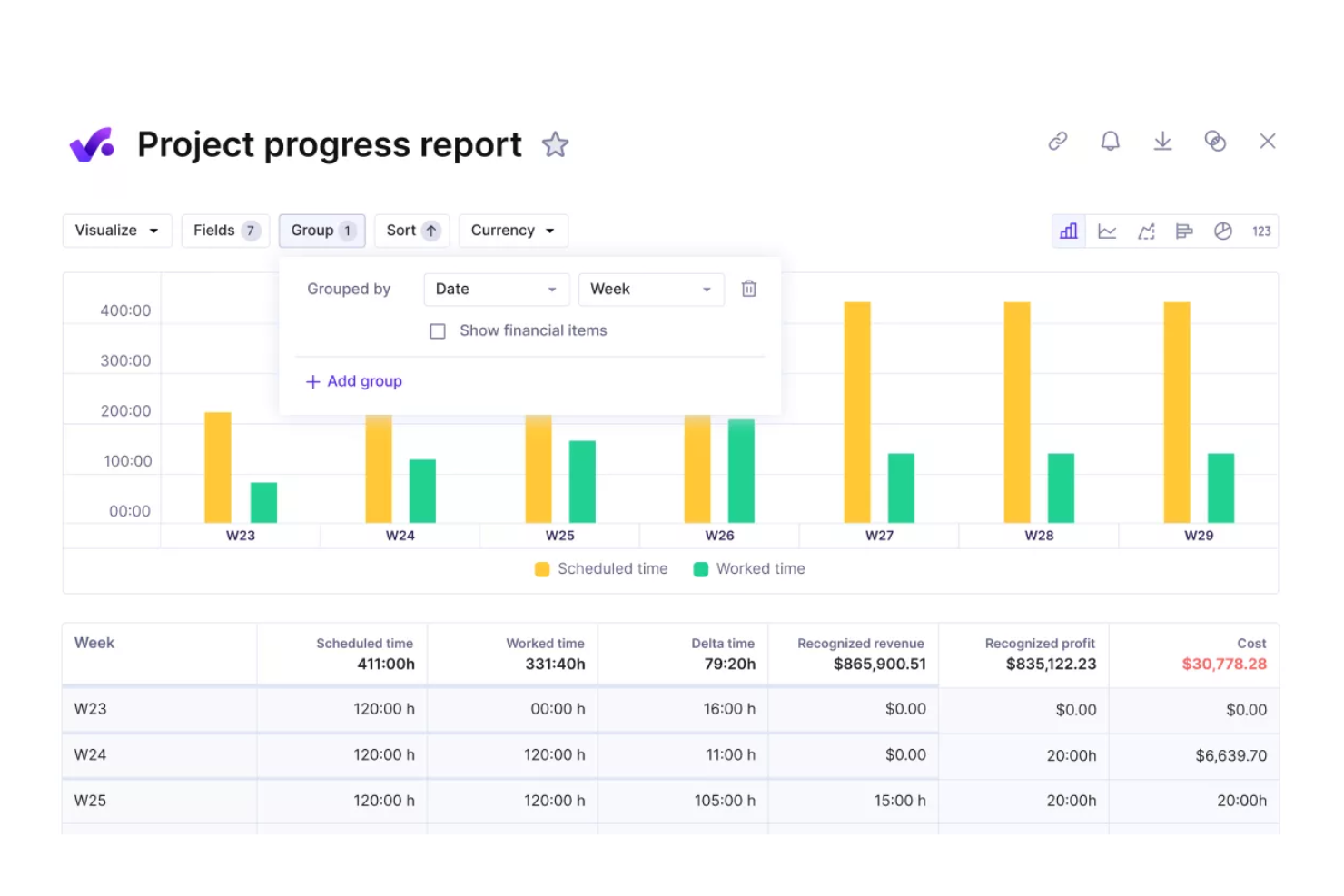
Productive is an agency management platform for project portfolio management that combines project budgeting, time tracking, resource planning, and client collaboration in one system.
Who Is Productive Best For?
Agencies and professional services teams that need unified project, budgeting, and resource management.
Why I Picked Productive
I picked Productive as one of the best because I rely on its PPM software capabilities to manage budgets, allocate resources, and track project progress in real time. My project teams use it to monitor billable hours, collaborate with clients, and keep communication and approvals in one place, which helps maintain visibility and control across multiple projects.
Productive Key Features
- Task management: Organize, assign, and track tasks across projects.
- Custom reporting: Build and export detailed reports on project data.
- Document storage: Store and share files directly within each project.
- Time off tracking: Manage team availability and vacation schedules.
Productive Integrations
Productive offers native integrations with Slack, Xero, QuickBooks, Google Calendar, HubSpot, and Jira. An API is available for custom integrations.
Pros and Cons
Pros:
- Built-in invoicing linked to project milestones
- Customizable project templates for repeatable workflows
- Portfolio-level budgeting with real-time updates
Cons:
- Resource allocation lacks advanced AI suggestions
- No native scenario planning for portfolios
New Product Updates from Productive
Productive Adds Email and Calendar Integrations for Agents
Productive adds Gmail, Outlook, Google Calendar, and Outlook Calendar connectors for its AI agents. These integrations let agents manage emails and create calendar events directly within Productive. For more information, visit Productive’s official site.
 .

Forecast
Best for predictive portfolio insights
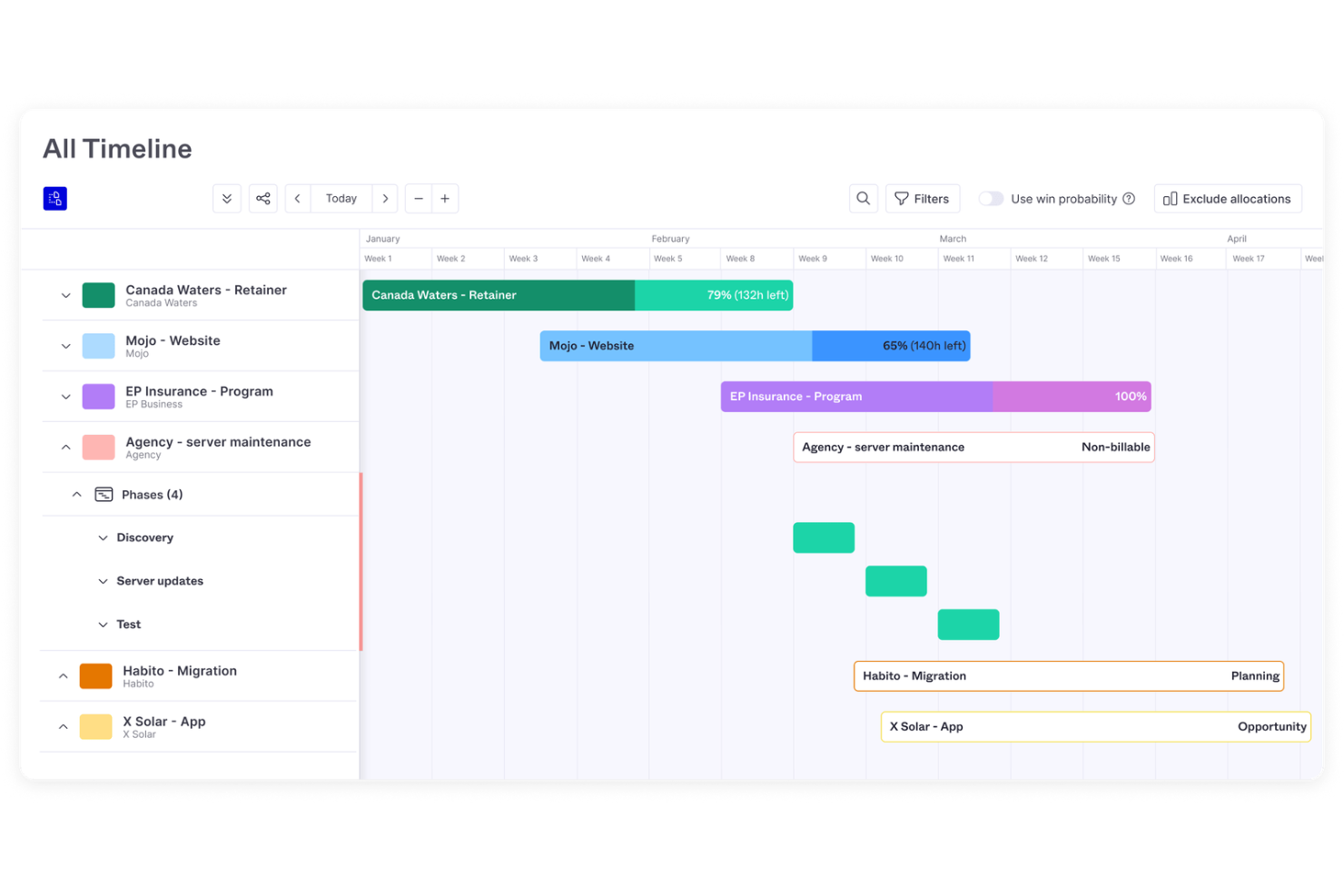
Forecast is an AI-driven project portfolio management platform that combines resource planning, financial tracking, project scheduling, and real-time analytics for teams managing multiple projects.
Who Is Forecast Best For?
Project managers and operations leads at mid-sized to large professional services firms.
Why I Picked Forecast
I picked Forecast as one of the best because I rely on its AI-powered project portfolio view to surface real-time resource and financial insights across all my projects. I use its dynamic heatmaps and utilization charts to spot bottlenecks and reallocate resources quickly. The platform’s automated financial forecasting helps me keep budgets and margins visible as projects evolve.
Forecast Key Features
- Task automation: Automates repetitive project management actions using AI.
- Custom project templates: Lets you standardize workflows across multiple projects.
- Role-based permissions: Controls access to sensitive project and financial data.
- Integrated time tracking: Captures billable and non-billable hours within each project.
Forecast Integrations
Forecast offers native integrations with Jira Cloud, Trello, Azure DevOps, GitHub, GitLab, Salesforce, HubSpot, Slack, QuickBooks, and Xero. It also connects with Zapier and provides an API for custom integrations.
Pros and Cons
Pros:
- Scenario modeling for resource allocation decisions
- Automated risk alerts for project portfolios
- Real-time utilization tracking across all projects
Cons:
- Gantt chart functionality is limited
- No advanced agile sprint management

GoodDay
Best for AI project performance tracking
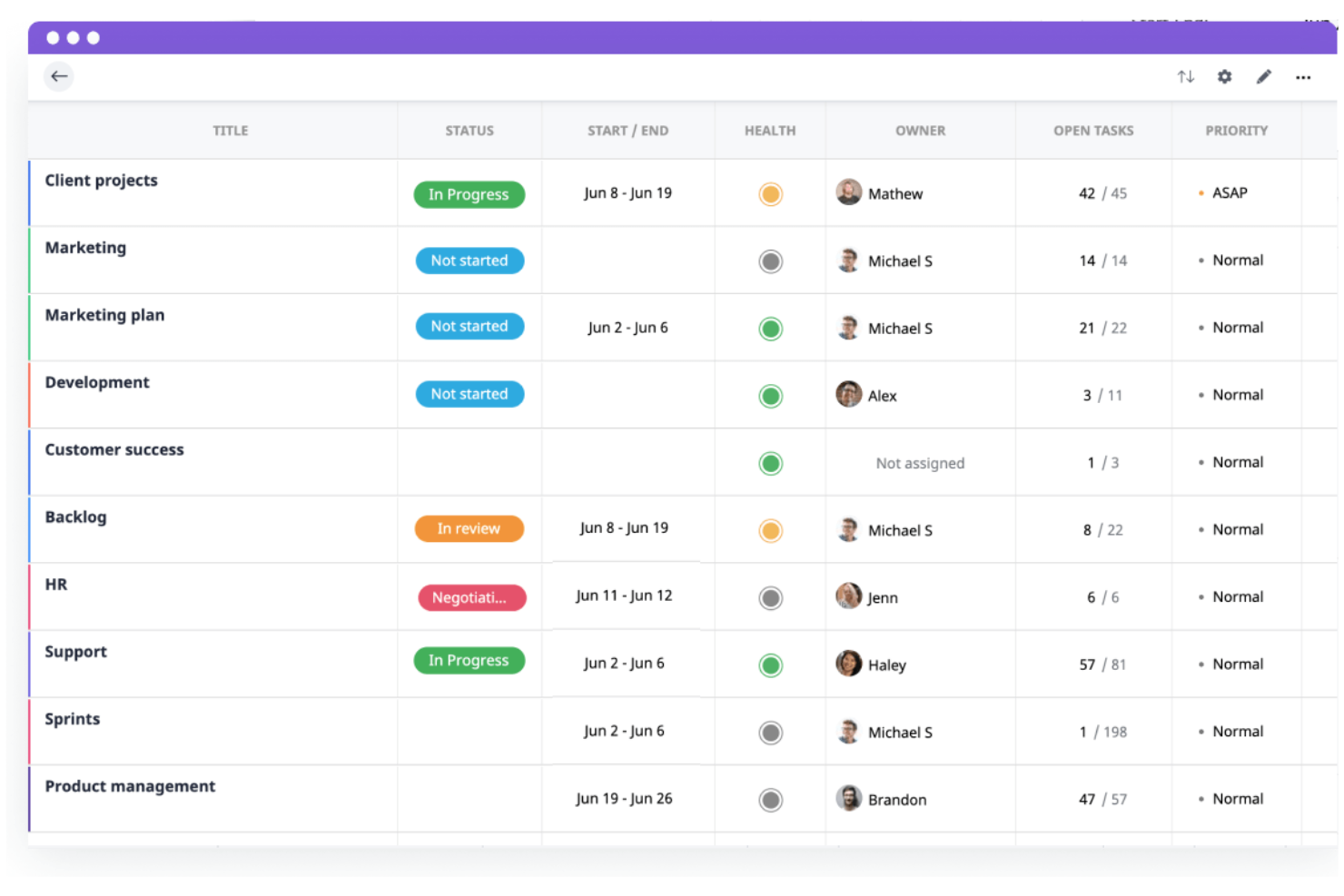
GoodDay is a project and work management platform for teams that want customizable workflows, visual project tracking, and integrated task, time, and resource management in one system.
Who Is GoodDay Best For?
Teams in mid-sized companies that need customizable project workflows and visual management tools.
Why I Picked GoodDay
I picked GoodDay as one of the best because I rely on its flexible workflow builder and visual project tracking to manage complex project portfolios. I use its customizable dashboards to monitor project health and progress at a glance. My team benefits from the ability to tailor work structures and automate recurring processes, which fits our need for adaptable project management.
GoodDay Key Features
- AI-powered project insights: Surface trends and risks across your project portfolio.
- Resource allocation calendar: Lets you assign and balance workloads visually.
- Built-in time tracking: Tracks time spent on tasks and projects automatically.
- Document management: Stores, organizes, and shares project files within the platform.
GoodDay Integrations
GoodDay offers native integrations with Google Workspace, Microsoft 365, Slack, Trello, Jira, GitHub, GitLab, Dropbox, and Zapier. An API is available for custom integrations.
Pros and Cons
Pros:
- Supports resource allocation and workload balancing
- Supports unlimited projects on all paid plans
- Built-in OKR tracking for strategic alignment
Cons:
- Portfolio scenario planning not currently supported
- Resource management lacks predictive AI tools
Best for AI portfolio forecasting
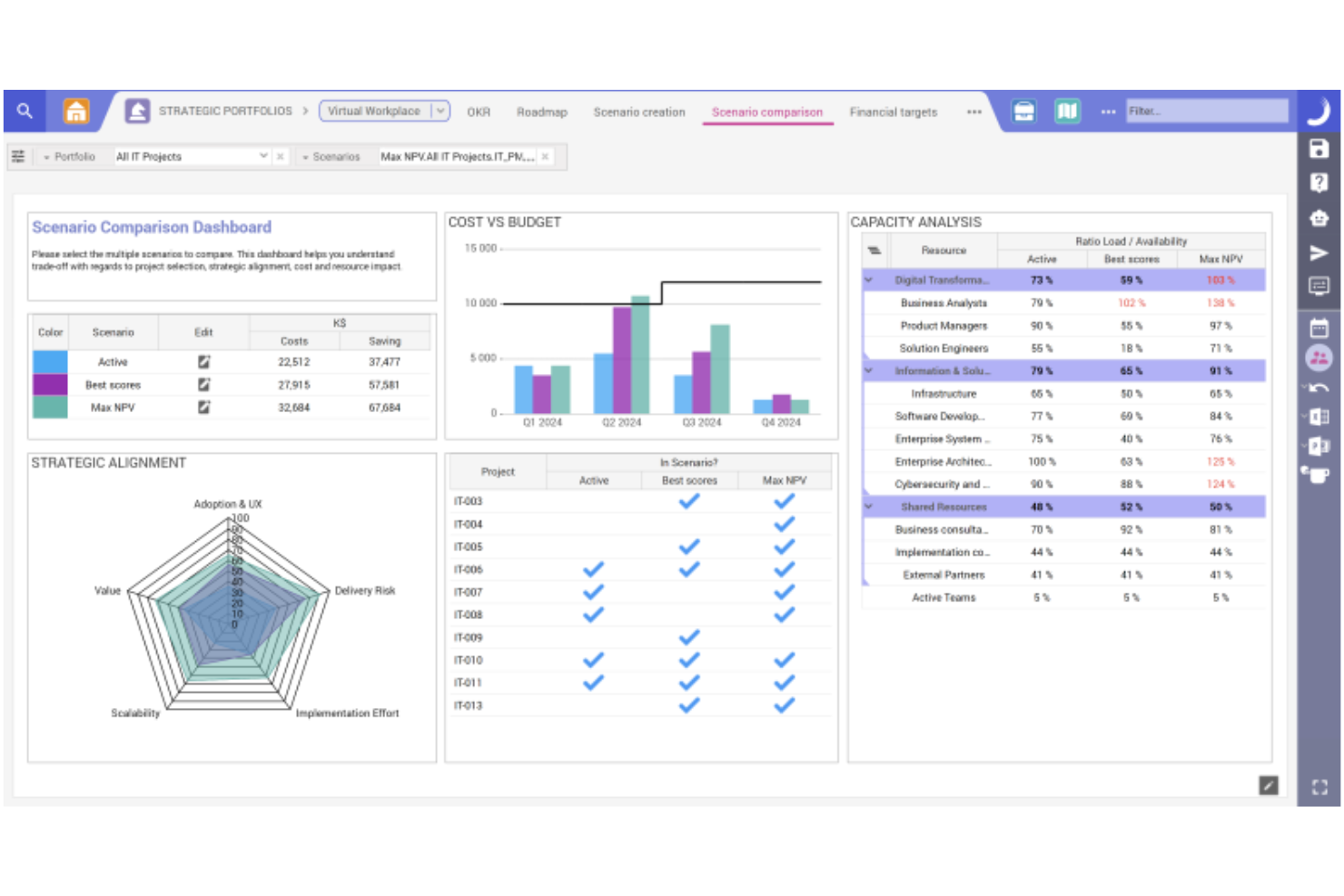
Planisware is an AI project portfolio management platform that brings together forecasting, scenario modeling, resource planning, and analytics for organizations managing complex project portfolios.
Who Is Planisware Best For?
Large enterprises and PMOs are managing complex, multi-project portfolios across industries like engineering, pharmaceuticals, and energy.
Why I Picked Planisware
I picked Planisware as one of the best because its AI-driven forecasting and scenario planning let me model multiple portfolio outcomes and adjust strategies quickly. I use its scenario comparison tools to evaluate resource impacts and project timelines side by side. The platform’s analytics help me spot risks and optimize project sequencing across large, complex portfolios.
Planisware Key Features
- Resource capacity planning: Allocate and balance resources across multiple projects and portfolios.
- Automated project scheduling: Generate and update project schedules based on real-time data and dependencies.
- Portfolio dashboard: Visualize project status, KPIs, and portfolio health in a single interface.
- Financial tracking: Monitor budgets, costs, and forecasts for all projects within your portfolio.
Planisware Integrations
Native integrations are not currently listed. The tool supports integrations via API for custom connections.
Pros and Cons
Pros:
- Detailed financial tracking and forecasting features
- Strong resource capacity and allocation tools
- Advanced scenario modeling for portfolio planning
Cons:
- Reporting customization options are sometimes restrictive
- Implementation requires significant time investment

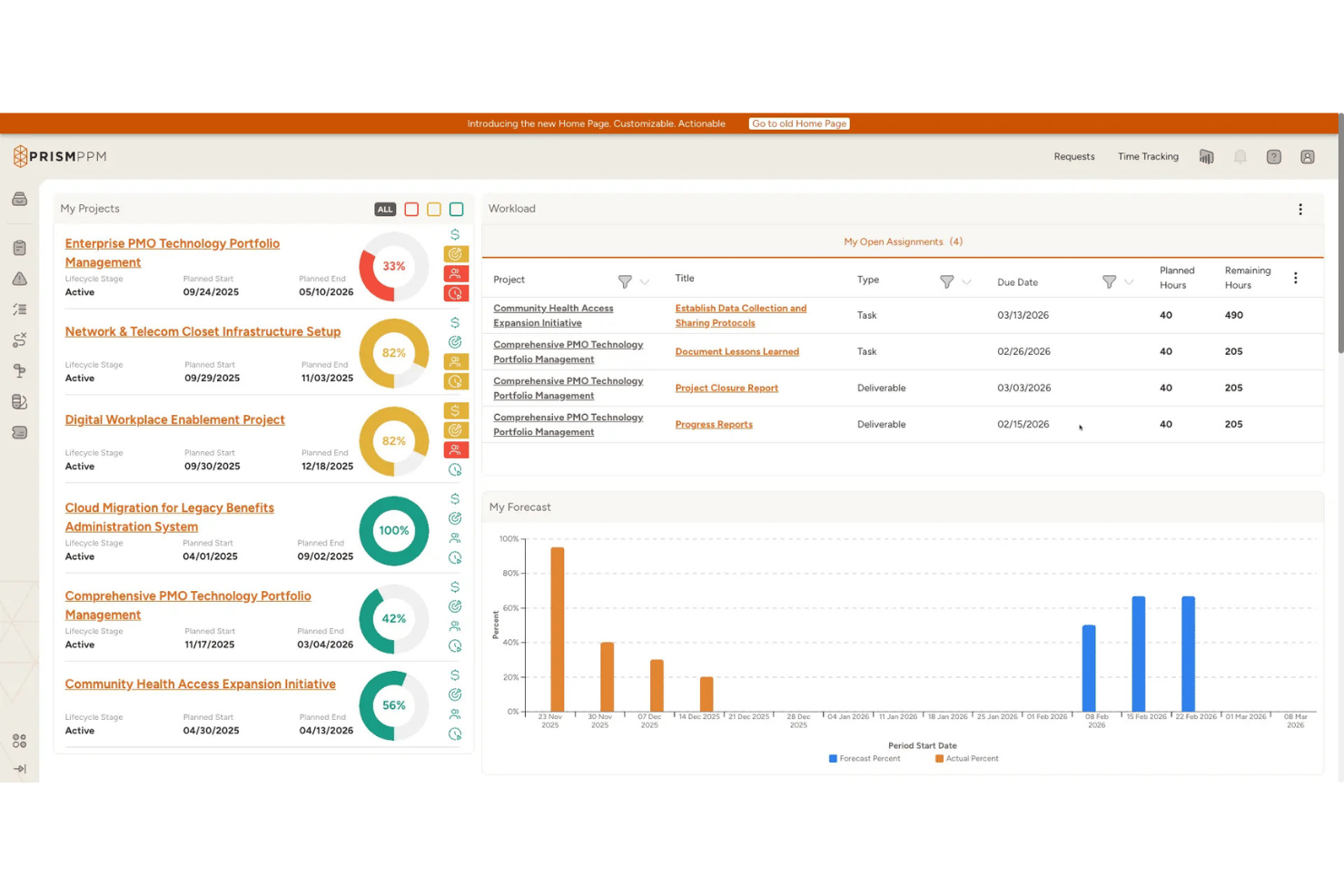
Prism PPM is an AI-powered project portfolio management platform built for PMOs, offering portfolio prioritization, resource optimization, scenario planning, risk analytics, and an agentic AI layer that autonomously executes multi-step actions across the portfolio lifecycle.
Who Is Prism PPM Best For?
Prism PPM is a strong fit for PMO directors and portfolio managers in mid-market organizations who need structured, AI-driven portfolio governance built on PMBOK best practices.
Why I Picked Prism PPM
Prism PPM earns its spot on my shortlist because its Agentic AI doesn't just surface insights—it autonomously executes multi-step actions across the portfolio lifecycle, which is rare at this price point. I'm particularly impressed by how the AI continuously re-prioritizes the project backlog using its Business Value Assessment scoring, factoring in strategic alignment, success probability, and forecasted ROI as conditions shift. Paired with AI-generated Portfolio Briefs that summarize risk, data hygiene, and alignment in one view, it gives PMO directors a genuinely proactive governance layer.
Prism PPM Key Features
- Strategy mapping: Links individual projects directly to organizational strategic pillars and OKRs, so your portfolio stays aligned to business goals.
- Benefits realization tracking: Baselines projects to measure earned value and track whether expected benefits materialize over time.
- Dependency management: Surfaces inter- and intra-project dependencies across programs to help you spot bottlenecks before they escalate.
- Data hygiene dashboard: Flags data quality gaps across the portfolio that could undermine reporting accuracy or AI-generated insights.
Prism PPM Integrations
Prism PPM’s documented connections include native bi-directional Jira sync, Power BI Gateway, Azure Databricks, Microsoft 365 tools such as Outlook, SharePoint, and OneDrive, plus Google Drive, Box, and Dropbox. Its API supports custom integrations.
Pros and Cons
Pros:
- Data hygiene dashboard flags reporting risks
- AI continuously reprioritizes project backlog
- Agentic AI executes multi-step portfolio actions
Cons:
- Narrow selection of native integration options
- AI features limited to higher-tier plans
Best for collaborative portfolio tracking
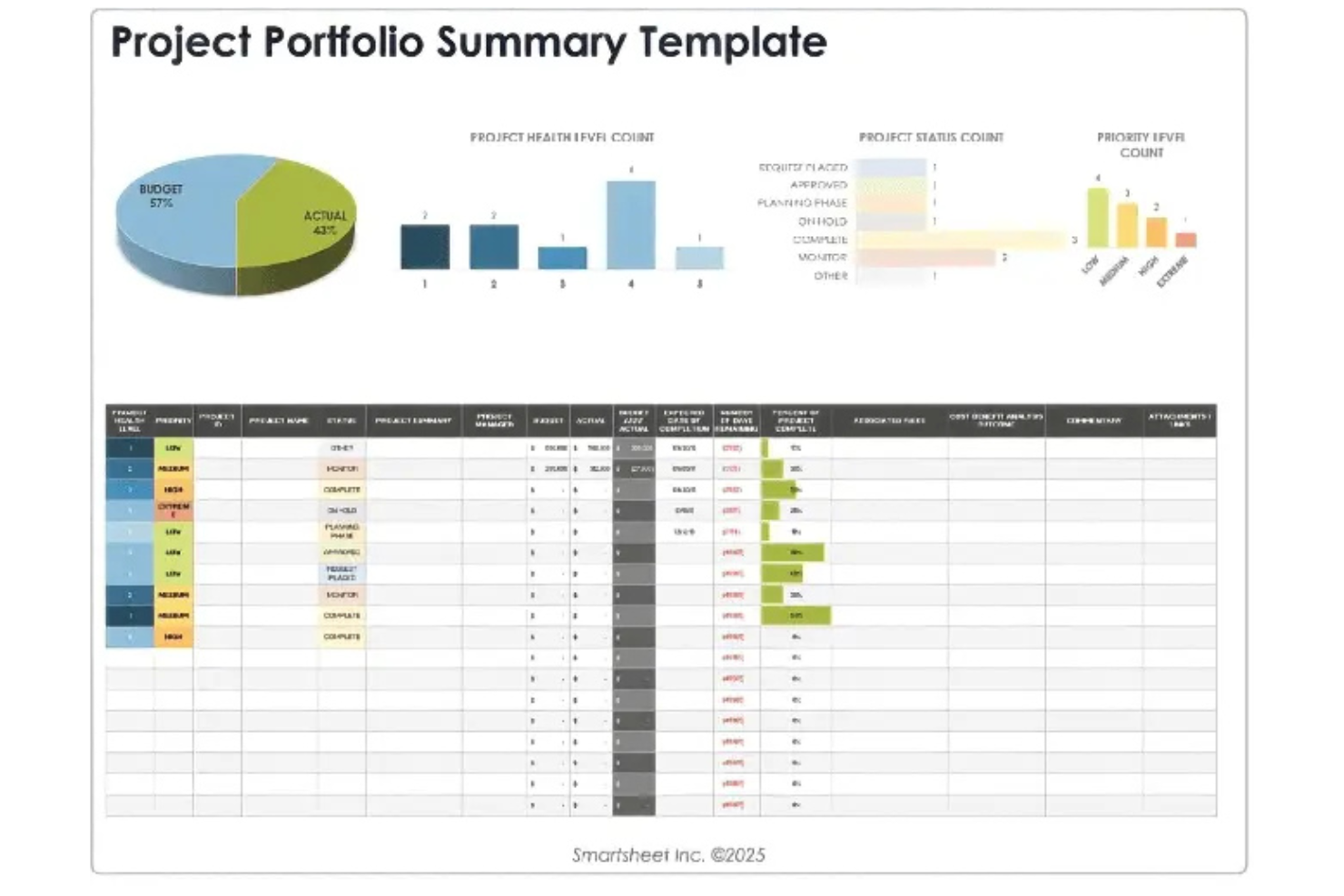
Smartsheet is a project portfolio management platform that combines grid, card, and Gantt views with workflow automation, resource management, and reporting tools for managing complex project portfolios.
Who Is Smartsheet Best For?
Project management teams at mid-sized and enterprise organizations who need flexible portfolio tracking and workflow automation.
Why I Picked Smartsheet
I picked Smartsheet as one of the best because I can switch between grid, card, and Gantt views to manage complex project portfolios the way my team prefers. I use its workflow automation to reduce manual updates and keep project data current. I rely on its flexible reporting tools to track portfolio status and share updates with stakeholders.
Smartsheet Key Features
- Resource management module: Allocate, monitor, and adjust team workloads across projects.
- Portfolio roll-up dashboards: Aggregate project data for high-level portfolio visibility.
- Automated approval workflows: Route requests and approvals through custom logic.
- Document attachment support: Attach files directly to rows for centralized access.
Smartsheet Integrations
Smartsheet offers native integrations with Google Workspace, Microsoft 365, Slack, Salesforce, Jira, DocuSign, Box, Dropbox, Tableau, and Zapier. An API is available for custom integrations.
Pros and Cons
Pros:
- Supports cross-team collaboration in real time
- Visual dashboards for tracking project health
- AI automations for project updates and alerts
Cons:
- No built-in scenario modeling for portfolios
- Automation limits on lower-tier plans
New Product Updates from Smartsheet

Smartsheet Adds Non-Plan User Management in Admin Center
Smartsheet adds a Non plan users tab to the Seat types and true-up page in Admin Center. This lets system admins review non-plan users and add them to the plan or remove them from the organization in one place. For more information, visit Smartsheet’s official site.
 .

Scoro
Best for end-to-end portfolio management
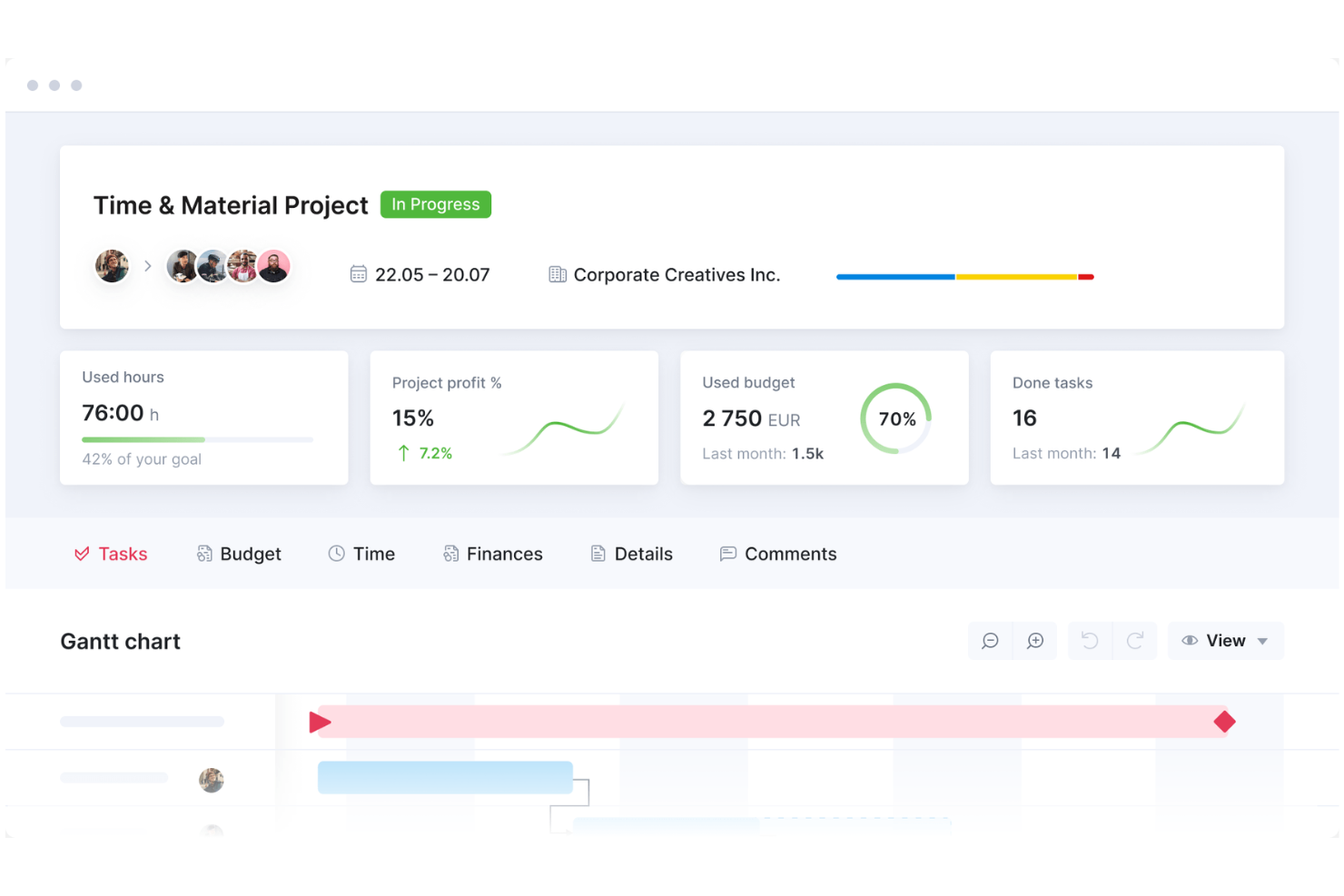
Scoro is a project portfolio management platform that brings together project planning, time tracking, billing, resource scheduling, and reporting in a single workspace.
Who Is Scoro Best For?
Professional services teams and agencies that need unified project, billing, and reporting tools.
Why I Picked Scoro
I picked Scoro as one of the best because I rely on its unified workspace to manage projects, time, and billing without switching tools. I use its built-in reporting to track project profitability and resource utilization in real time. My team benefits from integrated quoting and invoicing, which keeps our project financials tightly connected to delivery.
Scoro Key Features
- Task board: Lets you organize and prioritize tasks visually for each project.
- Calendar integration: Syncs project schedules with Google Calendar and Outlook.
- Custom fields: Allows you to tailor project data capture to your workflow.
- Permission management: Controls user access to sensitive project information.
Scoro Integrations
Scoro offers native integrations with Google Calendar, MS Exchange, Xero, Sage, Exact, Jira, and Azure. An API is available for custom integrations.
Pros and Cons
Pros:
- Custom fields for tailored project data
- Combines project, billing, and reporting in one platform
- Real-time project profitability tracking
Cons:
- No built-in AI-driven forecasting tools
- Limited agile board and sprint management
New Product Updates from Scoro

Scoro Adds Time Mobile App and ELI Improvements
Scoro adds the Scoro Time mobile app for iOS/Android to track time anywhere and expands ELI with attachments, smarter filtering, and trigger-based actions. For more information, visit Scoro's official site.
 .

Wrike
Best for real-time portfolio analytics

Wrike is a project portfolio management platform that offers customizable workspaces, advanced reporting, workflow automation, and resource management for teams managing multiple projects.
Who Is Wrike Best For?
Project managers and PMOs at mid-sized to large organizations who need customizable workspaces and advanced reporting for complex project portfolios.
Why I Picked Wrike
I picked Wrike as one of the best because I can tailor workspaces for each project portfolio and set up advanced reporting dashboards that track KPIs across multiple teams. I use its custom request forms to standardize project intake and automate approvals. My team relies on Wrike’s resource management tools to balance workloads and avoid bottlenecks.
Wrike Key Features
- AI-powered project risk prediction: Flags potential project delays using machine learning.
- Interactive Gantt charts: Lets you visualize timelines and dependencies for multiple projects.
- Time tracking tools: Tracks billable and non-billable hours within each project.
- Document version control: Stores, shares, and manages file versions directly in project folders.
Wrike Integrations
Wrike offers hundreds of native integrations through its built-in integrations and marketplace, including Google Workspace, Dropbox, GitHub, Adobe Creative Cloud, and Zoom. It also supports Zapier and provides an API for custom integrations.
Pros and Cons
Pros:
- Portfolio-level dashboards with real-time analytics
- Custom request forms for project intake
- AI-powered work intelligence for risk prediction
Cons:
- Resource management lacks granular forecasting
- AI features limited to enterprise plans
New Product Updates from Wrike

Wrike Redesigns Workspace Search With New Filters
Wrike introduces a redesigned Workspace Search interface with recent search shortcuts, item type and location filters, and parent-task context. These updates help users find relevant work items and navigate search results efficiently. For more information, visit Wrike’s official site.
 .
Diğer Yapay Zekâ Proje Portföy Yönetimi Yazılımları
İşte kısa listeme giremeyen ancak yine de göz atmaya değer bazı ek yapay zekâ proje portföy yönetimi yazılımı seçenekleri:
- Epicflow
For resource-focused portfolio planning
- Kantata
For resource optimization in portfolios
- Planview
For centralized portfolio visibility
- Asana
For visual portfolio tracking
- Profit.co
For OKR-driven portfolio tracking
- Oracle Primavera
For construction portfolio planning
- ServiceNow
For enterprise IT portfolio management
- Deltek
For services portfolio management
- ClickUp
For customizable portfolio workspaces
- PPM Express
For real-time portfolio insights
- ITONICS
For innovation portfolio management
- Cora Systems
For centralized enterprise portfolios
- ValueOps
For strategic portfolio management
- Triskell
For flexible portfolio management


How I Evaluate AI Project Portfolio Management Software
To earn a spot on my list, a tool can't just brand itself as AI-powered—I look for platforms where the AI actually changes how a PMO prioritizes work, allocates resources, or anticipates problems across an active portfolio. I break my evaluation into two layers: the core functionality a tool must offer to qualify, and the differentiating factors that set one vendor apart from another.
Core Functionality (Table Stakes For This List)
When I'm selecting tools for my list, I rank each one on a scale from 0 (does not offer the functionality) to 5 (excels in this area) for each core functionality listed below. Then, I calculate the tool's total score into a percentage. Each tool needs to achieve a minimum total score of 65% to be considered for inclusion.
- AI Portfolio Prioritization: I evaluate how the tool scores and ranks projects against strategic goals, looking for ML-driven models that go beyond manual weighting or static formulas.
- Predictive Risk Analytics: The platform should flag likely delays or budget overruns before they happen, using patterns from historical and real-time project data.
- Intelligent Resource Optimization: I check whether the AI can balance workloads and match skills across a multi-project portfolio, not just show who's available.
- Scenario Planning & Simulation: I look for what-if modeling that lets PMO leaders test trade-offs, like shifting funding between programs or delaying a launch.
- Multi-Project Portfolio Dashboards: Real-time, portfolio-level views with health scores and drill-downs matter here, not just single-project status boards stitched together.
- Generative AI Assistance: I evaluate whether the tool offers an AI copilot that can draft status reports, surface insights, or answer natural language questions about portfolio data.
Once I have a list of tools that meet the criteria, I consider what sets each platform apart.
Differentiating Factors (What Sets Vendors Apart)
Here's how I compare and contrast different vendors:
Standout Features
Cross-portfolio dependency mapping is a big one for me. When a delayed infrastructure project quietly pushes back three downstream launches, I want the tool to surface that risk automatically. Financial forecasting AI also earns attention—I look for models that project cost-to-completion and ROI across programs, not just at the individual project level. Benefits realization tracking rounds this out by helping PMO leaders prove whether delivered projects actually generated the value that justified their prioritization.
Beyond Features
Integration depth matters a lot here. A PPM tool that can't pull live data from Jira, Smartsheet, or your ERP leaves portfolio managers reconciling spreadsheets instead of making decisions. I also evaluate AI governance—specifically whether the vendor offers explainability into how its models generate recommendations and where your data resides. Implementation timelines round out my assessment. I look for vendors that provide prebuilt portfolio templates and methodology frameworks so a PMO can start seeing AI-driven insights within weeks, not quarters.
Yapay Zekâ Proje Portföy Yönetimi Yazılımı Nasıl Seçilir?
Uzun özellik listeleri ve karmaşık fiyatlandırma yapıları içinde kaybolmak kolaydır. Size özgü yazılım seçimi sürecinizde ilerlerken odağınızı korumanıza yardımcı olmak için göz önünde bulundurmanız gereken faktörleri içeren bir kontrol listesi hazırladık:
| Faktör | Dikkat Edilmesi Gerekenler |
|---|---|
| Ölçeklenebilirlik | Platform, mevcut ve gelecekteki proje hacminizi, ekip büyüklüğünüzü ve veri karmaşıklığınızı yönetebilecek mi? |
| Entegrasyonlar | CRM, ERP ve iletişim platformları gibi temel araçlarınıza yerel olarak bağlanabiliyor mu? |
| Özelleştirilebilirlik | İş akışlarını, panoları ve raporlamayı kuruluşunuzun süreçlerine uyacak şekilde özelleştirebilir misiniz? |
| Kullanım kolaylığı | Ekibiniz aracı hızlı bir şekilde benimseyecek mi, yoksa arayüz günlük çalışmaları yavaşlatacak mı? |
| Uygulama ve kullanıma alma | Çalışmaya başlamanız ne kadar sürecek ve hangi kaynaklara ya da desteğe ihtiyacınız olacak? |
| Maliyet | Fiyatlandırma katmanları açık mı ve bütçenizle ve zaman içindeki beklenen kullanımınızla uyumlu mu? |
| Güvenlik önlemleri | Yazılım, kuruluşunuzun veri gizliliği, erişim denetimi ve uyumluluk standartlarını karşılıyor mu? |
| Destek erişilebilirliği | Bölgenizde ve saat diliminizde, tercih ettiğiniz kanallar üzerinden hızlı yanıt veren destek sunuluyor mu? |
Yapay Zekâ Proje Portföy Yönetimi Yazılımı Nedir?
Yapay zekâ proje portföy yönetimi yazılımı, kuruluşların birden fazla projeyi yönetmesine, girişimleri önceliklendirmesine ve çalışmaları iş hedefleriyle uyumlu hâle getirmesine yardımcı olmak için yapay zekâdan yararlanır. Bu araçlar, planlama ve yürütmeyi geliştiren gelişmiş yapay zekâ özellikleriyle geleneksel PPM araçlarını ve proje yönetimi araçlarını genişletir.
Stratejik planlamayı destekler, dinamik yol haritaları oluşturur ve tüm proje yaşam döngüsü boyunca proje yürütümüne rehberlik ederler. Kaynaklar, riskler ve performans hakkında görünürlük sağlayarak ekip üyelerinin daha etkili iş birliği yapmasına ve risk azaltma alanlarını belirlemesine yardımcı olurlar.
Genel olarak bu platformlar projelerin birleşik bir görünümünü sunarak liderlerin portföyleri optimize etmesine ve daha akıllı, veriye dayalı kararlar almasına yardımcı olur.
Özellikler
Yapay zekâ destekli proje portföyü yönetimi yazılımı seçerken aşağıdaki temel özelliklere dikkat edin:
- Yapay zekâ destekli tahmin: Geçmiş ve gerçek zamanlı verilere dayanarak proje zaman çizelgelerini, kaynak ihtiyaçlarını ve bütçe sonuçlarını tahmin etmek için makine öğrenimini kullanır.
- Portföy gösterge panelleri: Daha iyi karar verme için tüm projelere ilişkin durumu, riskleri ve ilerlemeyi tek bakışta gösteren birleşik, görsel bir genel bakış sunar.
- Otomatik kaynak tahsisi: Manuel planlamayı azaltarak kişileri ve varlıkları uygunluk, beceriler ve iş yüküne göre projelere dinamik olarak atar.
- Senaryo planlama: Karar vermeden önce olası etkileri görmek için farklı proje veya portföy stratejilerini modellemenizi sağlar.
- Risk belirleme ve uyarılar: Ortaya çıkan riskleri veya darboğazları işaretlemek için proje verilerini izler ve paydaşlara proaktif bildirimler gönderir.
- Entegre finansal izleme: Projeler genelindeki bütçeleri, harcamaları ve tahminleri izleyerek maliyetleri ve kâr marjlarını gerçek zamanlı olarak yönetmenize yardımcı olur.
- Özelleştirilebilir iş akışları: Proje aşamalarını, onay süreçlerini ve görev yapılarını kuruluşunuzun ihtiyaçlarına uyacak şekilde düzenlemenize olanak tanır.
- Yerel entegrasyonlar: Verileri ve iş akışlarını merkezileştirmek için CRM, ERP ve iletişim platformları gibi diğer iş araçlarına doğrudan bağlanır.
- Role dayalı izinler: Hassas bilgilere ve işlemlere erişimi kontrol ederek doğru kişilerin rolleri için uygun olanları görmesini ve gerçekleştirmesini sağlar.
Faydalar
Yapay zekâ destekli proje portföyü yönetimi yazılımını uygulamak, ekibiniz ve işletmeniz için çeşitli faydalar sağlar. Yararlanabileceğiniz birkaç fayda şunlardır:
- Daha akıllı kaynak tahsisi: Yapay zekâ destekli araçlar, kişileri ve varlıkları en çok ihtiyaç duyulan yerlere atamanıza yardımcı olarak darboğazları ve aşırı rezervasyonu azaltır.
- Daha hızlı, veriye dayalı kararlar: Gerçek zamanlı gösterge panelleri ve tahminler, projelere öncelik vermek ve planları hızla ayarlamak için ihtiyaç duyduğunuz içgörüleri sağlar.
- Geliştirilmiş risk yönetimi: Otomatik uyarılar ve risk belirleme özellikleri, sorunları erken fark etmenize ve büyümeden önce müdahale etmenize yardımcı olur.
- Daha iyi portföy görünürlüğü: Birleşik gösterge panelleri ve raporlama, tüm projelerin durumunu, sağlığını ve finansal bilgilerini tek bir yerde görmenizi sağlar.
- Daha doğru bütçeleme: Entegre finansal izleme ve yapay zekâ destekli tahminler, maliyetleri yönetmenize ve sonuçları daha yüksek güvenle öngörmenize yardımcı olur.
- Tutarlı proje teslimi: Özelleştirilebilir iş akışları ve şablonlar süreçleri standartlaştırarak projeleri zamanında ve kapsam dahilinde teslim etmeyi kolaylaştırır.
- İş hedefleriyle daha iyi uyum: Senaryo planlama ve stratejik gösterge panelleri, proje portföyünüzün kuruluşunuzun hedeflerini desteklemesini sağlar.
Maliyetler ve Fiyatlandırma
Yapay zekâ destekli proje portföyü yönetimi yazılımını seçmek, mevcut çeşitli fiyatlandırma modellerinin ve planların anlaşılmasını gerektirir. Maliyetler özelliklere, ekip büyüklüğüne, eklentilere ve daha fazlasına göre değişir. Aşağıdaki tabloda yaygın planlar, bunların ortalama fiyatları ve yapay zekâ destekli proje portföyü yönetimi yazılımı çözümlerinde genellikle bulunan özellikler özetlenmiştir:
Yapay Zekâ Destekli Proje Portföyü Yönetimi Yazılımı İçin Plan Karşılaştırma Tablosu
| Plan Türü | Ortalama Fiyat | Yaygın Özellikler |
|---|---|---|
| Ücretsiz Plan | $0 | Temel proje takibi, sınırlı sayıda kullanıcı, basit gösterge panelleri ve e-posta desteği. |
| Kişisel Plan | $10-$25/kullanıcı/ay | Tek kullanıcı erişimi, temel proje yönetimi özellikleri, temel raporlama ve sınırlı entegrasyonlar. |
| İşletme Planı | $30-$60/kullanıcı/ay | Çok kullanıcılı erişim, gelişmiş gösterge panelleri, kaynak tahsisi, yapay zekâ destekli tahmin ve standart entegrasyonlar. |
| Kurumsal Plan | $70-$150/kullanıcı/ay | Sınırsız kullanıcı, özel iş akışları, gelişmiş güvenlik, özel destek ve tam API ile entegrasyonlar. |
AI Proje Portföyü Yönetimi Yazılımı SSS
AI proje portföyü yönetimi yazılımı hakkında sık sorulan bazı soruların yanıtları:
AI, proje portföyü yönetimini nasıl iyileştirir?
AI, kaynak tahsisini otomatikleştirerek, gerçek zamanlı içgörüleri ortaya çıkararak ve riskleri ya da gecikmeleri öngörerek proje portföyü yönetimini iyileştirir. Bu, daha hızlı ve bilinçli kararlar almanıza yardımcı olurken portföyünüz genelindeki manuel iş yükünü azaltır.
AI proje portföyü yönetimi yazılımı mevcut araçlarımla entegre olabilir mi?
Evet, çoğu çözüm CRM, ERP ve iletişim platformları gibi araçlara bağlanmak için yerel entegrasyonlar veya API’ler sunar. Sorunsuz veri akışı sağlamak ve manuel veri girişinden kaçınmak için entegrasyon seçeneklerini mutlaka kontrol edin.
AI proje portföyü yönetimi yazılımından en çok hangi tür kuruluşlar yararlanır?
Birden fazla ve karmaşık projeyi yöneten kuruluşlar (özellikle dağıtık ekipleri veya değişen öncelikleri olanlar) en fazla faydayı görür. Buna teknoloji şirketleri, danışmanlık firmaları ve işlevler arası proje çalışmaları yürüten işletmeler dahildir.
AI proje portföyü yönetimi yazılımını uygulamak zor mudur?
Uygulama süreci değişiklik gösterebilir; ancak birçok platform işe alıştırma desteği, şablonlar ve eğitim kaynakları sunar. Ekibinizin hızlı bir şekilde çalışmaya başlamasına yardımcı olmak için yönlendirmeli kurulum ve hızlı yanıt veren destek sunan çözümleri tercih edin.
AI proje portföyü yönetimi yazılımı ne kadar güvenlidir?
Çoğu sağlayıcı veri şifreleme, erişim denetimleri ve uyumluluk sertifikaları dahil olmak üzere kurumsal düzeyde güvenlik sunar. Kuruluşunuzun standartlarını karşıladığından emin olmak için bir sağlayıcının güvenlik belgelerini mutlaka inceleyin.