

2026’da İncelenen En İyi 10 Süreç Haritalama Yazılımı

En İyi Süreç Haritalama Yazılımları Kısa Listesi


Doğru süreç haritalama yazılımını bulmak gerçekten zor olabilir. Ekibinizin ihtiyaçlarına uyan ve karmaşık iş akışlarını basitleştirerek her adımda size açık ve verimli bir şekilde rehberlik eden bir araca ihtiyacınız var.
Doğru seçimi yapmanıza yardımcı olmak için birçok yazılım çözümünü test edip inceledim. Amacım, piyasadaki en iyi seçenekleri tek bir yerde, tarafsız ve kapsamlı bir araştırmaya dayanan incelemeyle sunmak.
Bu makalede, her aracı benzersiz kılan özelliklere ilişkin bilgiler bulacaksınız. İster kullanıcı dostu bir arayüz ister belirli özellikler arıyor olun, size yardımcı olacağım. Hadi başlayalım!
Why Trust Our Software Recommendations
Our team has been testing and reviewing software since 2012. As project managers ourselves, we know how difficult—and important—it is to choose the right software.
For this guide, we evaluated tools using hands-on testing and independent research, scoring tools using our selection criteria. We also draw on insights from industry thought leaders and practicing project management experts.
Our reviews reflect our human editorial judgment, not a sales pitch.
Expert reviewers:
Süreç Haritalama Yazılımları Karşılaştırma Tablosu
Bu karşılaştırma tablosu, en iyi süreç haritalama yazılımı seçimlerim için fiyatlandırma ayrıntılarını özetler:
| Tool | Starting Price | Website | |
|---|---|---|---|
| Best for 7,000+ process mapping templates use | 4.8 out of 5 | $8/user/month Free plan + 14-day trial available | Book Demo |
| Best for AI-powered workflow management | 4.6 out of 5 | Pricing upon request Free plan + free demo available | Website |
| Best for real-time collaboration | 4.6 out of 5 | $9.99/user/month Free plan + demo available | Website |
| Best for visual diagram variety | 4.4 out of 5 | $8/user/month Free plan + 30-day free trial available | Website |
| Best for beginners | 4.4 out of 5 | $99/user/year 7-day free trial + free demo available | Website |
| Best for agile teams who also map user stories | 4.5 out of 5 | $6/month Free demo + 30-day free trial available | Website |
| Best open-source process mapping solution | — | Pricing upon request Free plan available | Website |
| Best for low-code AI-powered process automation | — | Pricing upon request Free demo available | Website |
| Best for technical enterprise users | — | $245/license Free demo + 30-day free trial available | Website |
| Best for compliance tracking | — | Pricing upon request Free demo + 30-day free trial available | Website |
En İyi Süreç Haritalama Yazılımları İncelemeleri
Aşağıda, en iyi süreç haritalama yazılımları kısa listeme giren ürünlerin ayrıntılı özetlerini bulabilirsiniz. İncelemelerim, her aracın temel özelliklerine, artılarına ve eksilerine, entegrasyonlarına ve ideal kullanım alanlarına ayrıntılı bir bakış sunarak en uygun seçeneği bulmanıza yardımcı olur.

Miro
Best for 7,000+ process mapping templates use
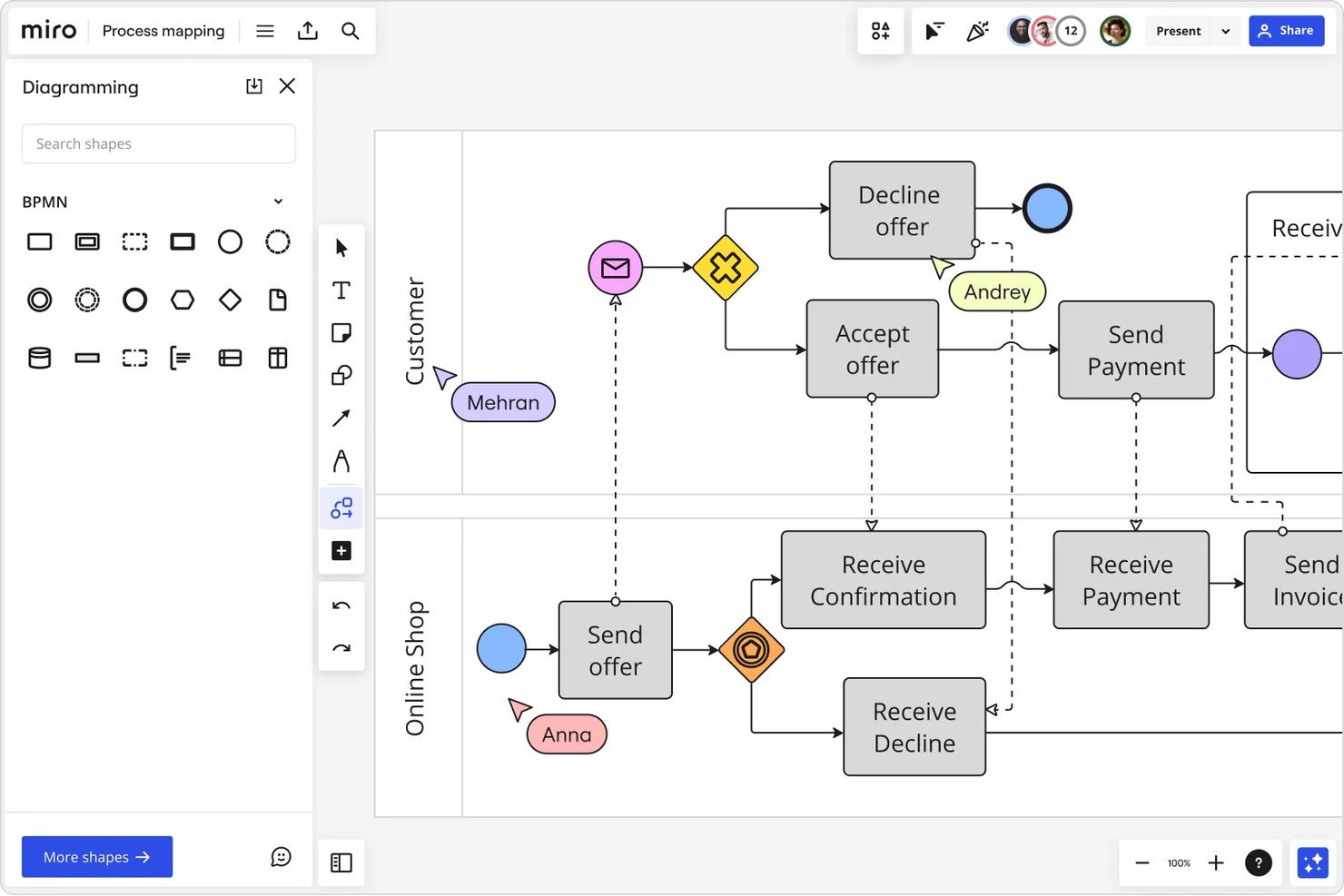
Miro is a visual collaboration platform that combines an infinite canvas, BPMN and UML diagramming, swimlane mapping, and AI-assisted flowchart creation for cross-functional process documentation.
Who Is Miro Best For?
Miro is a strong fit for enterprise and mid-market teams — particularly business analysts and PMO leads — who run frequent cross-functional workshops and process design sessions.
Why I Picked Miro
Miro earns its spot on my shortlist because of the sheer depth of its template library. With 7,000+ process mapping templates, I can pull up a BPMN swimlane or value stream map in seconds rather than building from scratch. What I find especially useful is that 80+ of those templates come with AI Sidekicks already embedded, so they actively guide the mapping session rather than just serving as a blank starting point.
Miro Key Features
- Advanced diagramming canvas: Supports infinite zoom, smart connectors, and auto-alignment for complex process maps.
- BPMN and UML notation libraries: Includes industry-standard shapes for technical mapping and swimlane diagrams.
- Real-time multiplayer collaboration: Enables multiple users to edit, comment, and review boards at once, complete with version history.
- Two-way integrations with project management tools: Natively connects with Jira, Asana, Azure DevOps, and Microsoft Teams for seamless workflow updates.
Miro Integrations
Miro offers 100+ native integrations, including Jira, Asana, ClickUp, Confluence, Azure DevOps, Microsoft 365, Google Workspace, Slack, Zoom, Airtable, and Zapier. An API is available for custom integrations.
Pros and Cons
Pros:
- Infinite canvas handles complex, multi-level process maps
- AI auto-generates maps from text prompts
- 7,000+ templates accelerate process documentation
Cons:
- Boards get slow with very large process diagrams
- BPMN validation is less rigorous than dedicated tools
New Product Updates from Miro
Miro Adds Japan Data Residency for Enterprise Customers
Miro has introduced Japan data residency for enterprise customers, offering in-region storage for production data, backups, and metadata, plus in-region compute infrastructure. For more information, visit Miro's official site.
 .

Pipefy
Best for AI-powered workflow management
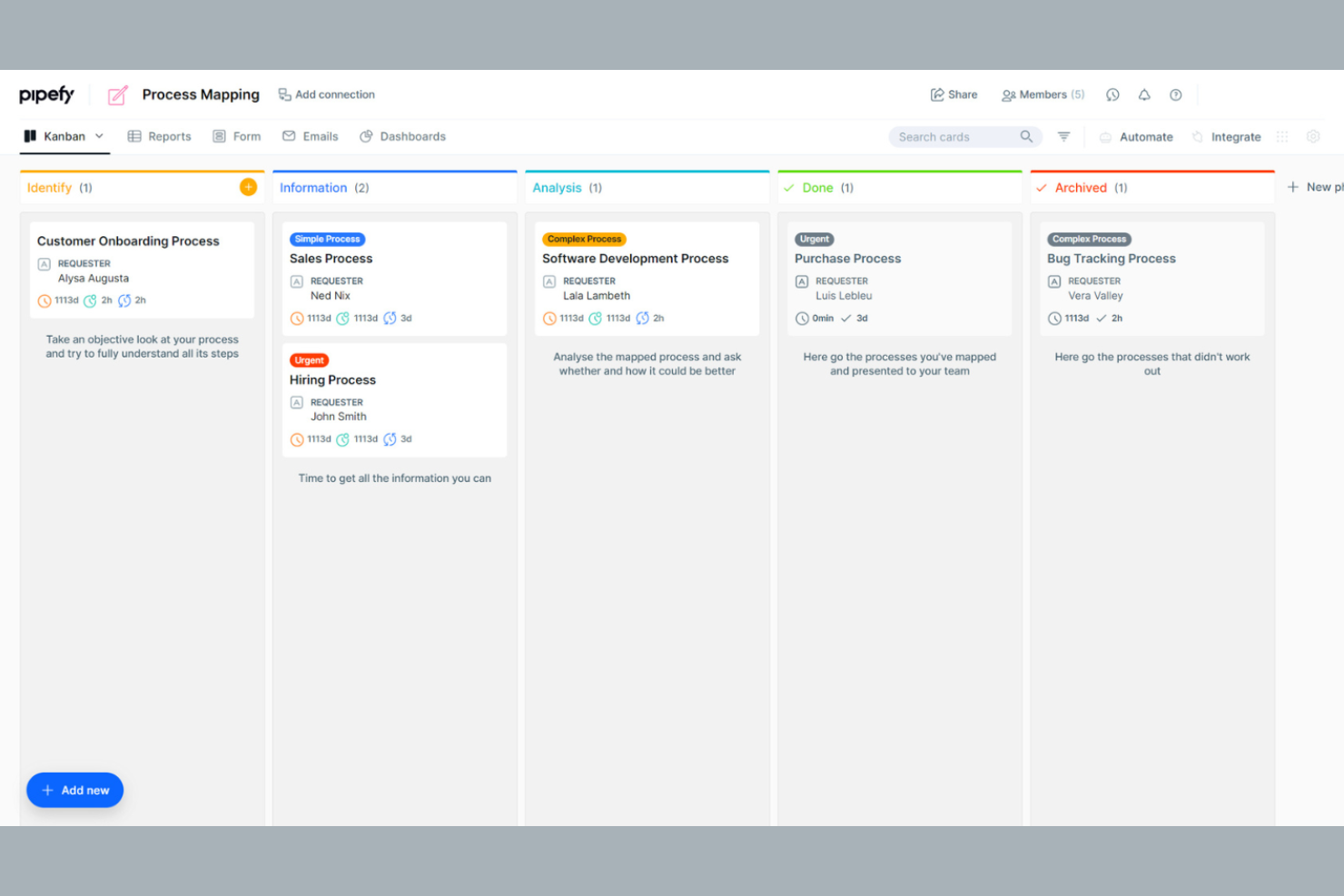
Pipefy is a workflow automation tool that caters to teams looking to optimize their business processes. It is ideal for businesses that need to manage tasks, track progress, and tighten operations across departments. The platform offers a user-friendly interface and customizable workflows to suit various business needs.
Why I picked Pipefy: Pipefy excels in workflow management, offering a variety of tools that support you in improving team efficiency.
Standout Features and Integrations:
Features include customizable templates that support step-by-step documentation of your processes and workflow automation tools to help you eliminate repetitive tasks. You can also track progress in real time, giving you visibility into your team's operations.
Integrations include Slack, Trello, Asana, Google Drive, Dropbox, Salesforce, Zendesk, HubSpot, and more.
Pros and Cons
Pros:
- Kanban-style task visualization
- Automation tools to reduce manual tasks
- Native AI Agent orchestration
Cons:
- Manual logic mapping
- Limited advanced features
Mural
Best for real-time collaboration
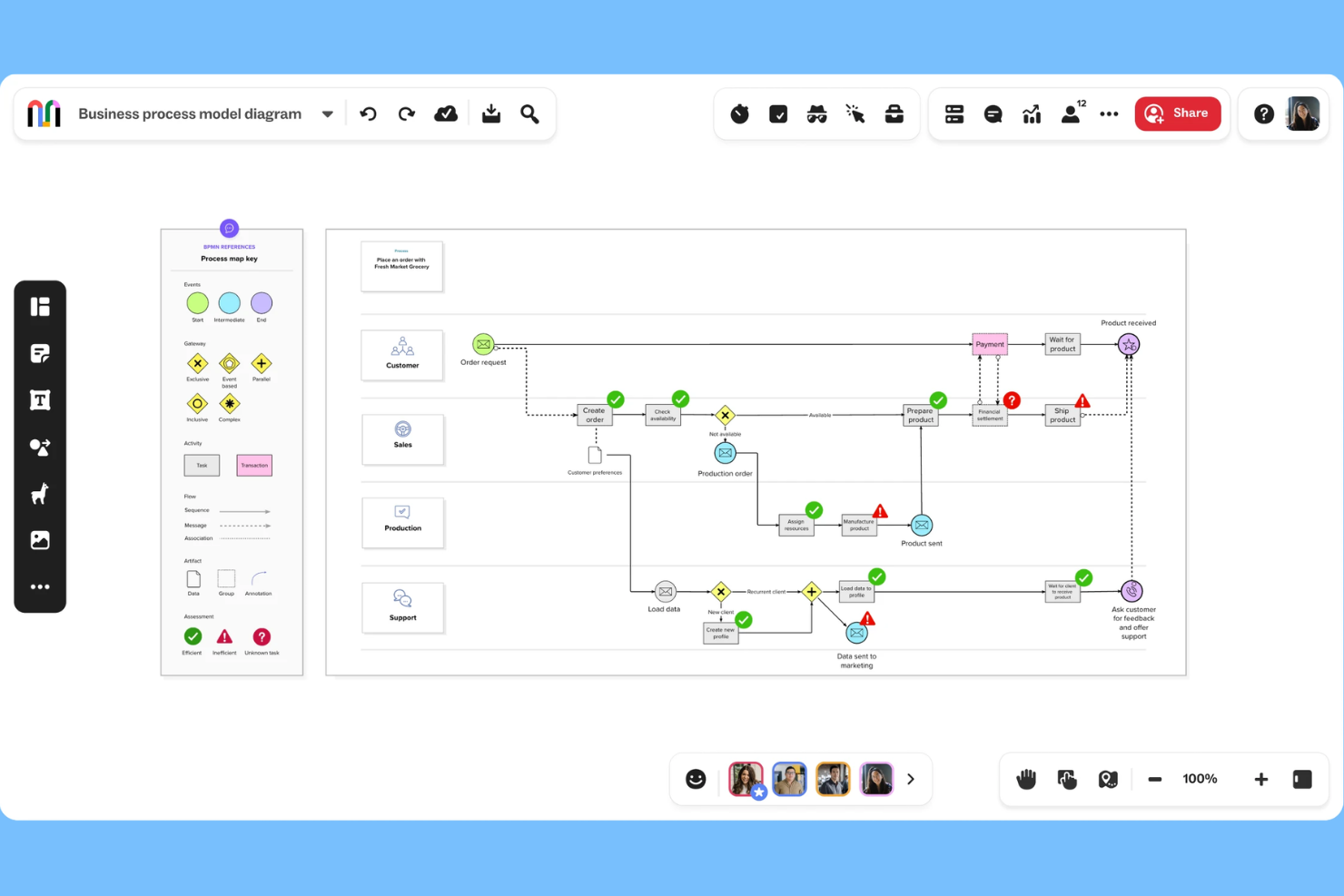
Mural is an online process mapping tool designed for teams looking to collaborate in real-time. It serves organizations aiming to improve workflows, design processes, and identify bottlenecks. Mural offers a user-friendly platform with customizable templates and drag-and-drop functionality.
Why I picked Mural: Mural excels in real-time collaboration, making it perfect for team members who need to work together to map their process steps. The intuitive design helps teams quickly adapt and integrate Mural into their workflow.
Standout Features and Integrations:
Features include an extensive library of templates that cater to various process mapping needs, helping you get started quickly. The drag-and-drop functionality makes customizing maps simple, and you can also embed or export your maps in multiple formats.
Integrations include Microsoft Teams, Google Drive, Dropbox, Slack, Asana, Trello, Confluence, GitHub, Zoom, and more.
Pros and Cons
Pros:
- Excels at real-time collaboration
- Infinite virtual whiteboard space
- Intuitive visual platform
Cons:
- Options can be overwhelming for beginners
- Limited features in free version

Creately
Best for visual diagram variety
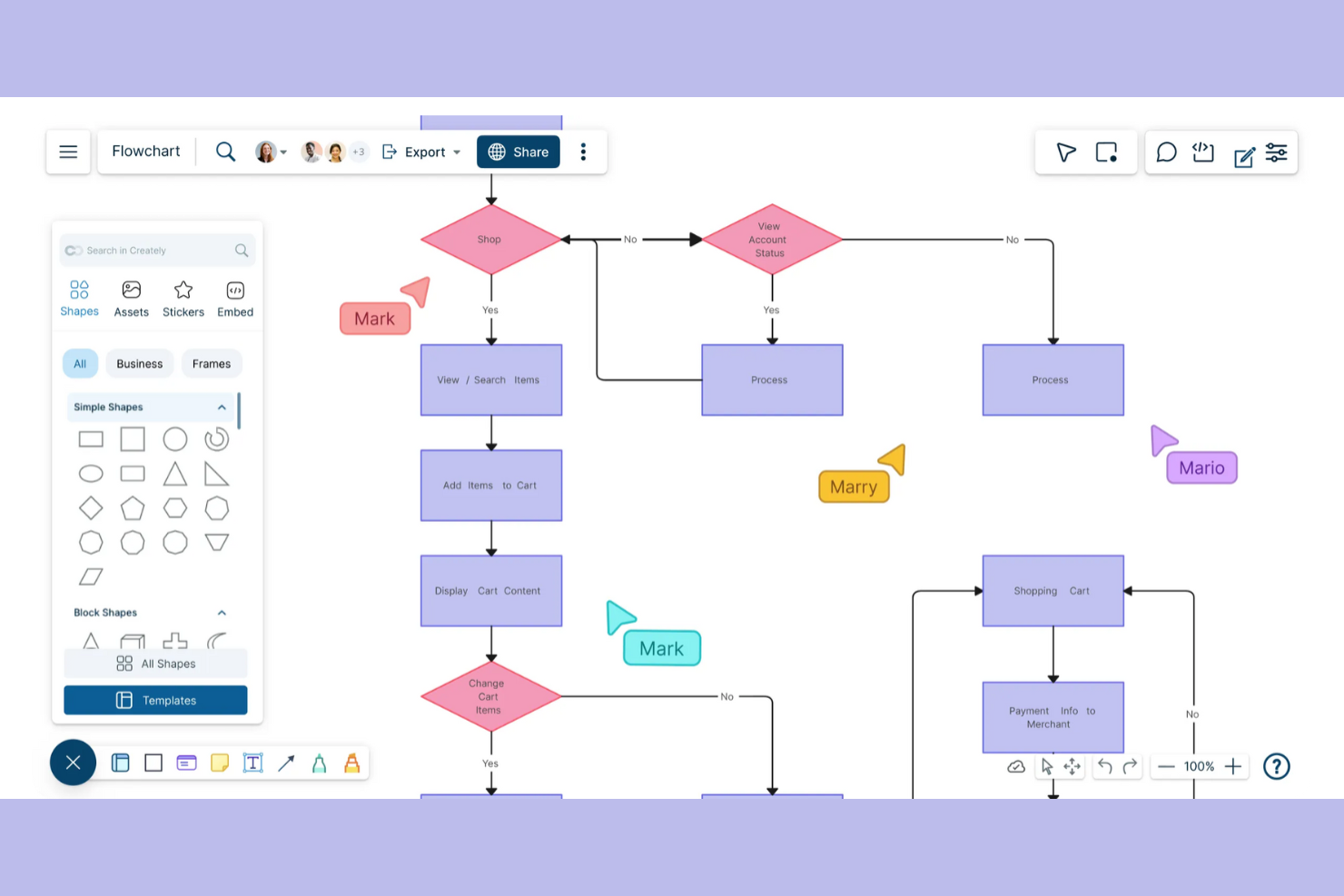
Creately helps teams build detailed process maps and flowcharts with real-time collaboration. It's designed for users who want to visually organize complex information and collaborate with others in real-time.
Why I picked Creately: Creately excels at creating visual diagrams, which is ideal for teams creating detailed visual representations. It provides an intuitive drag-and-drop interface, making diagramming straightforward and efficient.
Standout Features and Integrations:
Features include a vast library of templates that you can customize to fit your needs and real-time collaboration tools that support your team in working together to get the details right.
Integrations include Slack, Microsoft Teams, Confluence, and more.
Pros and Cons
Pros:
- Contextual in-app commenting
- One-click "Infinite Canvas" expansion
- Supports multiple diagram types
Cons:
- SVG and PDF export require a paid plan
- Occasional performance issues

Best for beginners

SmartDraw is designed to make the creation of professional diagrams quick and easy. It's aimed at users who want automatic formatting and familiar sharing options.
Why I picked SmartDraw: SmartDraw simplifies process mapping with its intuitive design, making it ideal for beginners. The software supports collaboration by allowing teams to work on shared maps, and integrations with platforms like Google Drive and Dropbox make it easy to share and store diagrams.
Standout Features and Integrations:
Features include automatic formatting, a variety of sharing and export options, and customizable templates. These features make getting started less intimidating and ensure your diagrams look professional with minimal effort. Enterprise licensing options are also available for larger organizations.
Integrations include Google Drive, Dropbox, Box, OneDrive, Confluence, Microsoft Teams, Trello, and more.
Pros and Cons
Pros:
- Ribbon UI Wide range of templates
- Familiar Microsoft-style
- Automatic diagram adjustments
Cons:
- Limited customization in templates
- Shared storage is limited on lower tiers

Best for agile teams who also map user stories
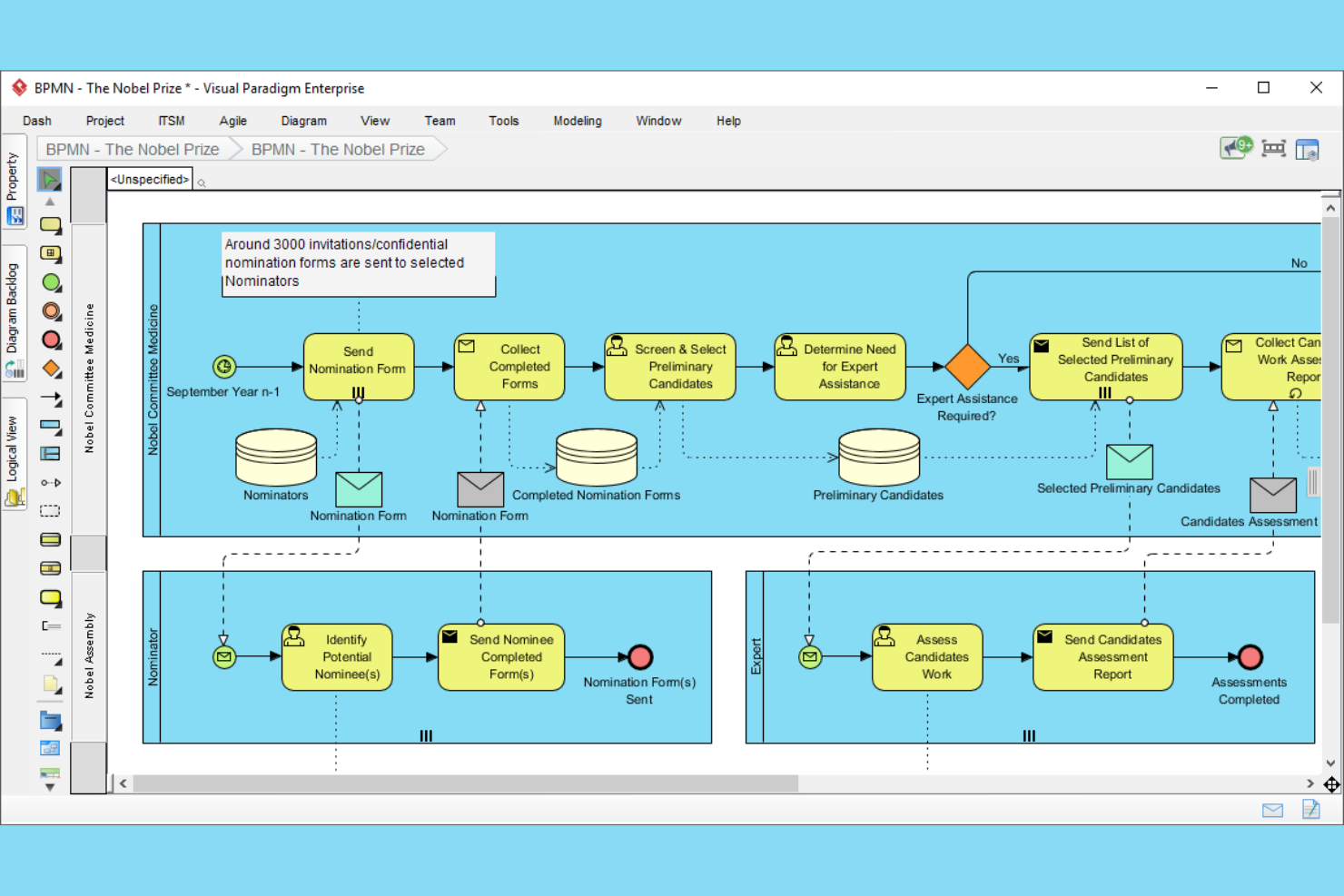
Visual Paradigm is a tool designed for agile teams that need to manage and map user stories as well as processes. It's ideal for software development teams looking to improve their agile processes. The platform offers tools for user story mapping, process modeling, and team collaboration.
Why I picked Visual Paradigm: Visual Paradigm is tailored for agile teams, providing tools that support agile methodologies. The tool's collaboration features support real-time team interaction, ensuring everyone stays on the same page. Its business process model features allow you to refine workflows to suit agile practices.
Standout Features and Integrations:
Features include a user story mapping tool as well as a process modeling tool to help you visualize and optimize every aspect of your projects. You can also use its real-time collaboration tools to keep your team aligned and focused.
Integrations include Jira, Confluence, and more.
Pros and Cons
Pros:
- Includes user story mapping tool
- Integrated Post-it toolset
- Supports agile methodologies
Cons:
- Configuration can be time-consuming
- Requires agile knowledge

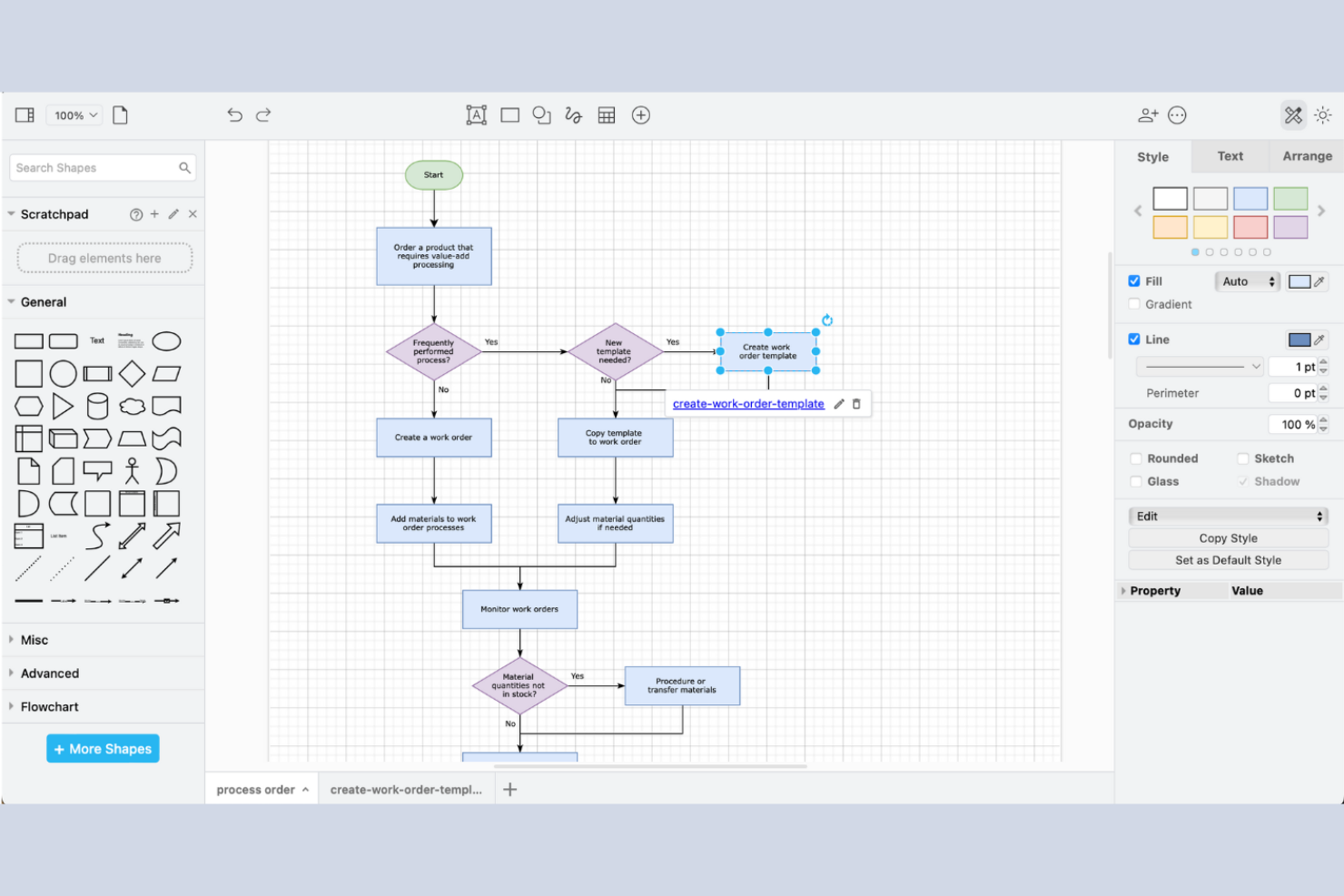
draw.io is a versatile diagramming tool that caters to individuals and teams looking for a cost-effective solution for creating process maps and diagrams. The platform offers an intuitive interface and a variety of diagramming options.
Why I picked draw.io: draw.io is ideal for those seeking a free solution for process mapping. The tool provides a user-friendly interface that simplifies the diagram creation process. You can access various shapes and templates to customize your diagrams.
Standout Features and Integrations:
Features include an extensive library of shapes and templates that you can use to create detailed diagrams. The tool offers offline functionality so you’re not dependent on an internet connection for basic tasks. You can also export diagrams in multiple formats to suit your needs.
Integrations include Google Drive, OneDrive, Dropbox, GitHub, GitLab, Confluence, and more.
Pros and Cons
Pros:
- Supports multiple file formats
- Works offline effectively
- Open source and no cost
Cons:
- Lacks dedicated customer support
- Browser-based rendering limits
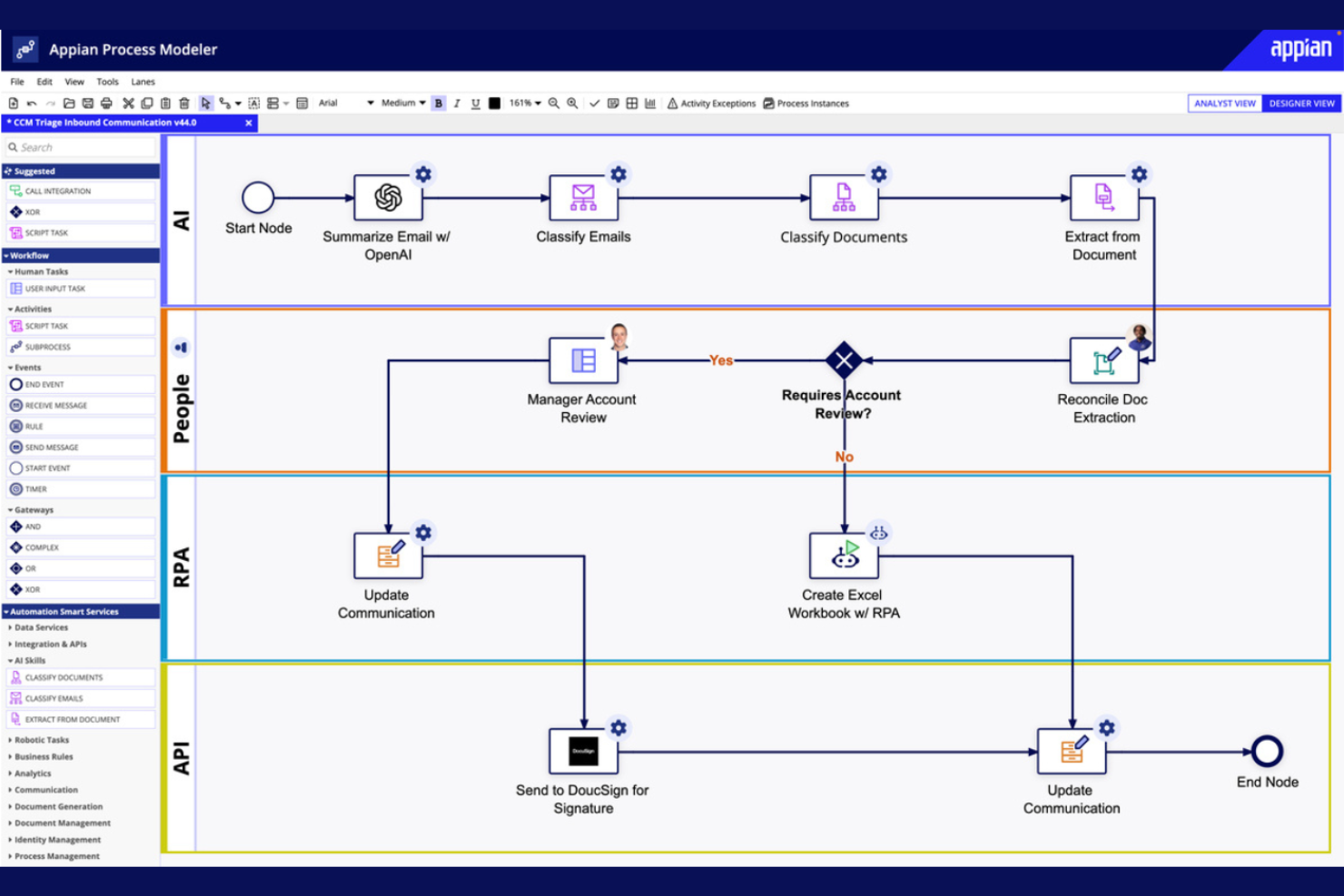
Appian is a low-code development platform designed for businesses that want to create applications quickly and efficiently. It's ideal for organizations looking to increase operational efficiency without extensive coding expertise. The platform offers tools for process automation, application development, and workflow management.
Why I picked Appian: Appian allows you to automate processes with minimal coding, reducing development time significantly. The platform's drag-and-drop interface makes it accessible to users with varying technical skills.
Standout Features and Integrations:
Features include a drag-and-drop interface that simplifies the creation of applications. The platform supports process automation to help you optimize workflows. You can also use its real-time analytics to monitor and improve process performance.
Integrations are not publicly listed.
Pros and Cons
Pros:
- Instant operational visibility
- High-speed app delivery
- Low-code development platform
Cons:
- Some processes are RAM-intensive
- Standardized low-code components

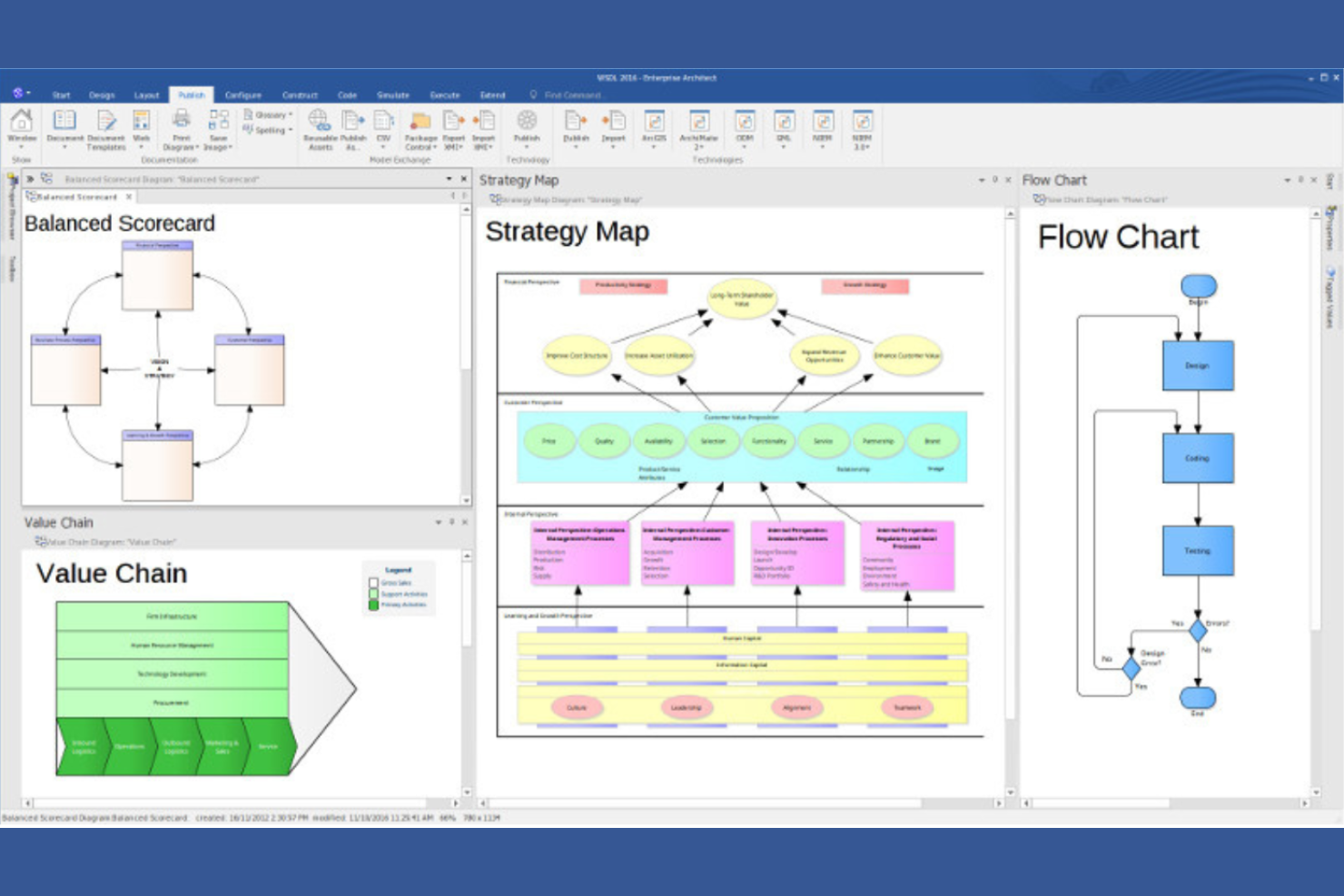
Enterprise Architect serves large organizations needing detailed modeling and visualization of complex systems. It's designed for enterprise architects and business analysts focused on aligning IT infrastructure with business goals. The platform supports a wide array of modeling languages and standards.
Why I picked Enterprise Architect: The tool provides a detailed modeling environment that supports UML, BPMN, and SysML, which are essential for complex system design. Its collaboration tools help your team work together on large-scale projects efficiently.
Standout Features and Integrations:
Features include a repository structure that supports version control and project management. The tool offers extensive reporting options to help you keep stakeholders informed. You can also use visual modeling tools to design and analyze complex systems.
Integrations include Microsoft Teams, SharePoint, Azure DevOps, Jira, Confluence, ServiceNow, and more.
Pros and Cons
Pros:
- Scalable for large enterprises
- Extensive reporting capabilities
- Supports multiple modeling languages
Cons:
- Non-standard UI layout
- Requires technical expertise

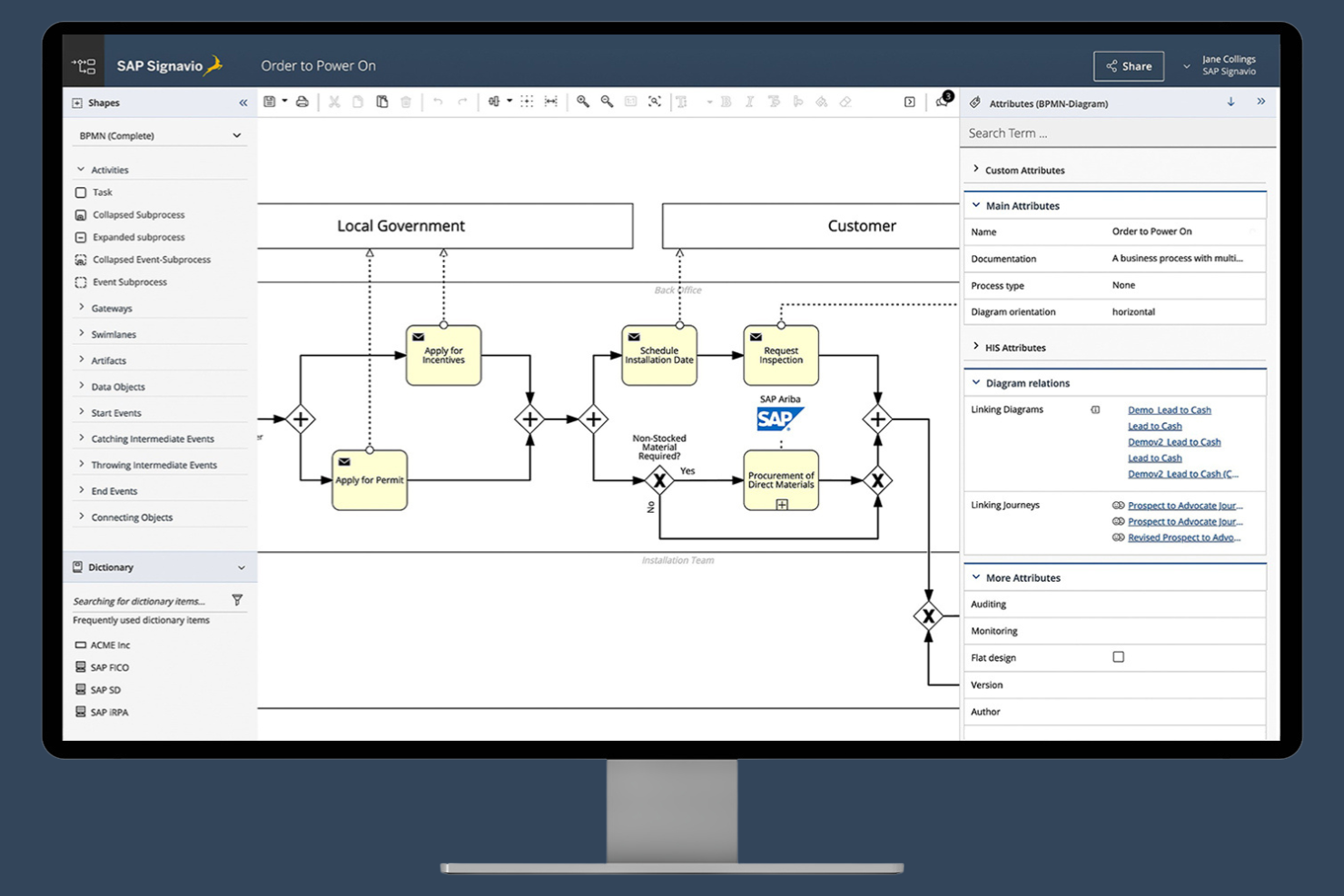
SAP Signavio Process Modeler is a process modeling tool that focuses on process optimization and compliance. It's used by organizations that require precise process documentation and analysis to ensure compliance with industry standards. The platform offers tools for modeling, analyzing, and optimizing business processes, enabling a culture of continuous improvement.
Why I picked SAP Signavio Process Modeler: SAP Signavio Process Modeler excels in compliance tracking, making it valuable for teams that need to maintain industry standards. It provides detailed process documentation to help you track and manage compliance requirements, as well as collaboration features to help your team brainstorm and improve compliance processes.
Standout Features and Integrations:
Features include a collaborative workspace that supports team engagement and real-time analytics to help you monitor and improve process efficiency. You can also access customizable reporting tools to generate detailed compliance reports.
Integrations include SAP Cloud ALM and more.
Pros and Cons
Pros:
- Engages teams in process optimization
- Built-in compliance governance
- Customizable reporting tools
Cons:
- Not ideal if you don’t use other SAP products
- Pricing details are not transparent
Diğer Süreç Haritalama Yazılımları
İşte kısa listeme girmeyen ancak yine de göz atmaya değer bazı ek süreç haritalama yazılımı seçenekleri:
- Bizagi Modeler
For process automation on the Bizagi platform
- Lucidchart
For visual collaboration
- Nintex
For process automation
- Process Street
For workflow documentation
- Kissflow
For project management


How I Evaluate Process Mapping Software
I evaluate process mapping tools in two layers: the core diagramming and notation support a tool must have to qualify, and the differentiators—like simulation or PM integrations—that set tools apart.
Core Functionality (Table Stakes For This List)
When I'm selecting tools for my list, I rank each one on a scale from 0 (does not offer the functionality) to 5 (excels in this area) for each core functionality listed below. Then, I calculate the tool's total score into a percentage. Each tool needs to achieve a minimum total score of 65% to be considered for inclusion.
- Diagramming Canvas: I look for a responsive drag-and-drop canvas with smart connectors and auto-alignment, since mapping a 40-step sprint workflow with clunky snapping is painful.
- BPMN & Notation Support: Formal notation matters when your process maps need to be read by external auditors or partner teams, so I check for BPMN 2.0 and swimlane support.
- Pre-Built Process Templates: A solid template library saves hours when you're mapping common workflows like change requests or release management instead of starting from scratch.
- Real-Time Collaboration: I evaluate whether multiple editors can co-author a single map with live cursors, comments, and @mentions—especially important for distributed project teams.
- Process Documentation & Metadata: Each step in a map should support custom fields like owners, descriptions, and linked documents so the map doubles as a living process reference.
- Export & Integration Options: I check for export to Visio, PDF, SVG, and PNG, plus native connections to PM tools like Jira, Asana, or Monday so maps stay close to execution.
Once I have a list of tools that meet this criteria, I consider what sets each platform apart.
Differentiating Factors (What Sets Vendors Apart)
Here's how I compare and contrast different vendors:
Standout Features
AI-assisted mapping is a big differentiator for teams documenting dozens of workflows at once. Tools that generate diagrams from text descriptions or imported documents cut setup time dramatically. I also evaluate process simulation capabilities, which let you model scenarios like adding a review gate before deployment to see how it impacts cycle time. Version control and governance matter when multiple teams own overlapping processes and you need branching, change tracking, and approval workflows to keep maps accurate over time.
Beyond Features
Integration depth with your existing PM stack is one of the first things I check. A process map loses value if it lives in isolation from Jira boards or Confluence pages where work actually happens. Pricing and licensing flexibility also matter here—I look at whether a vendor offers viewer-only seats so stakeholders can review maps without inflating your per-user costs. For teams in regulated environments, I evaluate SSO/SAML support, role-based access controls, and SOC 2 or ISO 27001 compliance to ensure sensitive process documentation stays protected.
Süreç Haritalama Yazılımı Nasıl Seçilir?
Uzun özellik listeleri ve karmaşık fiyatlandırma yapılarına kendinizi kaptırmanız kolaydır. Benzersiz yazılım seçimi sürecinizi yürütürken odağınızı korumanıza yardımcı olmak için aklınızda bulundurmanız gereken faktörleri aşağıda bir kontrol listesi olarak sıraladım:
| Faktör | Dikkat Edilmesi Gerekenler |
|---|---|
| Ölçeklenebilirlik | Yazılım işletmenizle birlikte büyüyebilir mi? Kullanıcı ve süreç sayısındaki artışı sorunsuz şekilde destekleyen seçenekleri arayın. Gelecekteki büyümeyi ve aracın bunu karşılayıp karşılayamayacağını değerlendirin. |
| Entegrasyonlar | Mevcut araçlarınıza bağlanabiliyor mu? İş akışındaki kesintileri önlemek için CRM, ERP veya proje yönetimi araçları gibi mevcut sistemlerinizle uyumluluğunu kontrol edin. |
| Özelleştirilebilirlik | Yazılımı ihtiyaçlarınıza uyacak şekilde uyarlayabilir misiniz? İş akışlarını, şablonları ve panoları benzersiz süreçlerinize uygun şekilde değiştirmenize izin veren araçları arayın. |
| Kullanım Kolaylığı | Ekibiniz için kullanıcı dostu mu? Öğrenme eğrisini ve ekibinizin kapsamlı bir eğitim almadan hızlı bir şekilde benimseyip benimseyemeyeceğini değerlendirin. |
| Uygulama ve İşe Alıştırma | Kurulum süreci ne kadar sorunsuz? Sistemi çalışır duruma getirmek için gereken zamanı ve kaynakları değerlendirin. Rehberli işe alıştırma ve yeterli destek sunan araçları arayın. |
| Maliyet | Bütçenize uyuyor mu? Fiyatlandırma modellerini karşılaştırın: aylık ve yıllık, kullanıcı başına ve sabit ücret. Gizli ücretlere veya ilk bakışta fark edilmeyebilecek maliyetlere karşı dikkatli olun. |
| Güvenlik Önlemleri | Verileriniz korunuyor mu? Yazılımın şifreleme ve düzenli güvenlik denetimleri gibi veri koruma alanındaki sektör standartlarını karşıladığından emin olun. |
| Destek Kullanılabilirliği | İhtiyaç duyduğunuzda yardım alabiliyor musunuz? Sağlayıcının destek kanallarını ve çalışma saatlerini değerlendirin. Ekibiniz farklı saat dilimlerinde çalışıyorsa 7/24 destek sunan seçenekleri arayın. |
Süreç Haritalama Yazılımı Nedir?
Süreç haritalama yazılımı, iş akışlarını ve süreçleri görselleştirmeye ve düzenlemeye yardımcı olur. Verimliliği ve netliği artırmak için genellikle iş analistleri, proje yöneticileri ve operasyon yöneticileri gibi profesyoneller tarafından kullanılan bir araçtır.
Sürükle ve bırak arayüzleri, gerçek zamanlı iş birliği ve özelleştirilebilir şablonlar, süreç haritalarının oluşturulmasına ve yönetilmesine yardımcı olur. Genel olarak bu araçlar, karmaşık süreçleri basitleştirir ve ekip iletişimini geliştirir.
Özellikler
Süreç haritalama yazılımı seçerken aşağıdaki temel özelliklere dikkat edin:
- Sürükle ve bırak arayüzü: Kullanıcıların teknik beceri düzeylerinden bağımsız olarak süreç haritaları oluşturmasına ve değiştirmesine olanak tanıyarak erişilebilirliği artırır.
- Gerçek zamanlı iş birliği: Birden fazla kullanıcının aynı süreç haritası üzerinde eş zamanlı çalışmasını sağlayarak ekip iletişimini ve verimliliğini artırır.
- Özelleştirilebilir şablonlar: Belirli iş ihtiyaçlarına uyacak şekilde uyarlanabilen, önceden tasarlanmış süreç haritası şablonları sunarak zamandan ve emekten tasarruf sağlar.
- Entegrasyon özellikleri: CRM ve ERP sistemleri gibi diğer iş araçlarına bağlanarak kesintisiz veri akışı sağlar ve manuel veri girişini azaltır.
- Otomasyon desteği: Tekrarlayan görevleri azaltarak kullanıcıların daha stratejik işlere odaklanmasına ve üretkenliğin artmasına olanak tanır.
- Analiz ve raporlama: Süreç performansı hakkında içgörüler sunarak kullanıcıların darboğazları belirlemesine ve iş akışlarını optimize etmesine yardımcı olur.
- Ölçeklenebilirlik: Performanstan ödün vermeden kullanıcı ve süreç sayısının artırılmasına olanak tanıyarak büyüyen işletmeleri destekler.
- Güvenlik önlemleri: Şifreleme ve sektör standartlarına uyum yoluyla veri koruması sağlayarak güven verir.
- Kullanıcı dostu gezinme: Kullanıcıların özellikleri bulmasını ve bunlara erişmesini kolaylaştırarak öğrenme eğrisini azaltır ve benimsenmeyi teşvik eder.
Avantajlar
Süreç haritalama yazılımı ekibiniz ve işletmeniz için çeşitli avantajlar sağlar. Yararlanabileceğiniz bazı avantajlar şunlardır:
- Artan verimlilik: Otomasyon araçları manuel görevleri azaltarak ekibinizin daha yüksek değer taşıyan faaliyetlere odaklanmasını sağlar.
- Daha iyi iş birliği: Gerçek zamanlı iş birliği özellikleri herkesin aynı bilgiye sahip olmasını sağlayarak ekip çalışmasını ve iletişimi geliştirir.
- Daha iyi süreç görünürlüğü: Özelleştirilebilir şablonlar ve sürükle ve bırak arayüzleri iş akışlarını görselleştirmeye yardımcı olarak süreçleri ilgili herkes için daha anlaşılır hale getirir.
- Bilgiye dayalı karar alma: Süreçlerinizin belgelenmesi, performans hakkında içgörüler sağlayabilecek analiz ve raporlamaya olanak tanır ve ekibinizin iyileştirme alanlarını belirlemesine yardımcı olur.
- Zaman tasarrufu: Kullanıcı dostu gezinme ve özelleştirilebilir şablonlar, süreç haritalarının oluşturulmasını ve değiştirilmesini hızlandırır.
Maliyetler ve Fiyatlandırma
Süreç haritalama yazılımı seçmek, mevcut çeşitli fiyatlandırma modellerinin ve planların anlaşılmasını gerektirir. Seçenekler arasında ücretsiz süreç haritalama yazılımı ile kişisel, işletme ve kurumsal planlar bulunur. Maliyetler özelliklere, ekip büyüklüğüne, eklentilere ve diğer unsurlara göre değişir.
Aşağıdaki tablo, süreç haritalama yazılımı çözümlerinde yaygın olarak sunulan planları, bunların ortalama fiyatlarını ve genellikle dahil edilen özellikleri özetlemektedir:
Süreç Haritalama Yazılımı Plan Karşılaştırma Tablosu
| Plan Türü | Ortalama Fiyat | Yaygın Özellikler |
|---|---|---|
| Ücretsiz Plan | $0 | Temel diyagram oluşturma, sınırlı şablonlar ve topluluk desteği. |
| Kişisel Plan | $5-$25/kullanıcı/ay | Gelişmiş şablonlar, temel entegrasyonlar ve sınırlı otomasyon özellikleri. |
| İşletme Planı | $25-$50/kullanıcı/ay | Tam entegrasyonlar, gerçek zamanlı iş birliği ve analiz ve raporlama araçları. |
| Kurumsal Plan | $50-$100/kullanıcı/ay | Özelleştirilebilir iş akışları, gelişmiş güvenlik, özel destek ve sınırsız kullanıcı. |
Süreç Haritalama Yazılımı SSS
Süreç haritalama yazılımı hakkında sık sorulan soruların bazı yanıtları:
Süreç haritalama yazılımı ne için kullanılır?
Süreç haritalama yazılımı, iş akışlarını ve süreçleri görselleştirmek ve belgelemek için kullanılır. Ekibinizin görevlerin nasıl birbirine bağlandığını anlamasına ve iyileştirme alanlarını belirlemesine yardımcı olur. Görsel diyagramlar oluşturarak darboğazları ve verimsizlikleri görebilir, böylece operasyonları kolaylaştırmak ve üretkenliği artırmak daha kolay hale gelir.
Süreç haritalama yazılımı diğer araçlarla entegre edilebilir mi?
Evet, çoğu süreç haritalama yazılımı CRM sistemleri, proje yönetimi uygulamaları ve bulut depolama hizmetleri gibi diğer araçlarla entegre olabilir. Bu entegrasyon, platformlar arasında bilgi akışını sağlayarak manuel veri girişini azaltır ve verimliliği artırır. Ekibinizin özel ihtiyaçlarını karşıladığından emin olmak için yazılımın entegrasyon özelliklerini kontrol edin.
Süreç haritalama yazılımı küçük işletmeler için uygun mudur?
Evet, süreç haritalama yazılımı küçük işletmeler için uygundur. Küçük ekiplerin kapsamlı kaynaklara ihtiyaç duymadan iş akışlarını düzenlemesine ve verimliliği artırmasına yardımcı olur. Birçok yazılım seçeneği, daha küçük bütçelere uygun fiyatlandırma planları sunarak yüksek yatırım yapmadan gelişmiş özelliklerden yararlanmanıza olanak tanır.
Ekibim için doğru süreç haritalama yazılımını nasıl seçerim?
Doğru süreç haritalama yazılımını seçmek için ekibinizin özel ihtiyaçlarını ve iş akışlarını değerlendirin. Kullanım kolaylığı, entegrasyon özellikleri ve ölçeklenebilirlik gibi faktörleri göz önünde bulundurun. Hangi seçeneğin süreçlerinizle en iyi şekilde uyum sağladığını görmek için farklı seçenekleri ücretsiz denemelerle test edin. İhtiyacınız olan özellikleri bütçenize uygun bir fiyata sunan araçlara öncelik verin.