2026’da Üretkenlik İçin En İyi 10 Zaman Takibi Yazılımı

10 En İyi Zaman Takibi Yazılımları Kısa Listesi


En iyi zaman takibi yazılımı, elektronik tablolara güvenmeden veya manuel zaman çizelgelerinin peşine düşmeden proje saatlerini izlemenize, müşterilere doğru şekilde fatura kesmenize ve ekibin verimliliğini yönetmenize yardımcı olur. Serbest çalışanlardan gelen tutarsız veriler, bütçeyi aşan projeler veya yetersiz takip araçları nedeniyle hatalı faturalarla uğraşıyorsanız yükseltme zamanı gelmiştir.
Sony, Land Rover ve Unilever gibi markalar için 20 yıl boyunca dijital projeler yürüttüm ve on yılı aşkın süredir zaman takibi platformlarını test ediyorum; bu nedenle güvenilir bir aracı diğerlerinden ayıran özellikleri biliyorum. Doğru çözüm, proje yönetimi araçlarınızla entegre olmalı, gerçek zamanlı girişleri desteklemeli ve hem manuel hem de otomatik takibe olanak sağlamalıdır.
Bu rehberde çok sayıda aracı test ettim ve iş akışınıza en uygun, kârlılığınızı artıracak zaman takibi yazılımını bulmanıza yardımcı olmak için en iyi 20 platformu seçtim. Her aracın özelliklerini, entegrasyonlarını ve fiyatlandırmasını analiz ederek onu farklı kılan noktaları belirledim. Böylece ekibinizin ihtiyaçlarıyla tam olarak örtüşen aracı güvenle seçebilirsiniz.
Why Trust Our Software Recommendations
Our team has been testing and reviewing software since 2012. As project managers ourselves, we know how difficult—and important—it is to choose the right software.
For this guide, we evaluated tools using hands-on testing and independent research, scoring tools using our selection criteria. We also draw on insights from industry thought leaders and practicing project management experts.
Our reviews reflect our human editorial judgment, not a sales pitch.
Expert reviewers:
Zaman Takibi Yazılımları Karşılaştırma Tablosu
Bu karşılaştırma tablosu, en iyi zaman takibi yazılımı seçimlerimin fiyatlandırma ayrıntılarını özetlemektedir.
| Tool | Best For | Trial Info | Price | ||
|---|---|---|---|---|---|
| 1 | Best GPS time tracking for mobile teams | Free plan + 14-day free trial available | Pricing upon request | Website | |
| 2 | Best for project time tracking | Free plan + 14-day trial available | From $9/user/month (billed annually) | Website | |
| 3 | Best for time-based profitability insights | 14-day free trial | From $10/user/month (billed annually) | Website | |
| 4 | Best for its workload balancing | Free plan available; 30-day free trial; Free demo available | From $9/user/month | Website | |
| 5 | Best for small teams and businesses | Free plan + Free trial + Free demo available | From $6/user/month | Website | |
| 6 | Best for full lifecycle time tracking | Not available | Pricing upon request | Website | |
| 7 | Best for offline time tracking accuracy | Free trial available | From $6.42/user/month (billed annually) | Website | |
| 8 | Best for customizable dashboards | Free plan + 30-day trial available | From $9/user/month (billed annually) | Website | |
| 9 | Best for reducing time theft | Free plan + 30-day free trial + free demo available | From $99/month (billed annually) | Website | |
| 10 | Best as AI for business | Free trial + Free demo available | From $8/user/month | Website |


En İyi Zaman Takibi Yazılımları İncelemeleri
Ekran görüntüleri, öne çıkan özellikler, kullanılabilir entegrasyonlar ve daha fazlası dahil olmak üzere en iyi zaman takibi uygulamalarına kısa bir genel bakış burada yer alıyor.

Best GPS time tracking for mobile teams
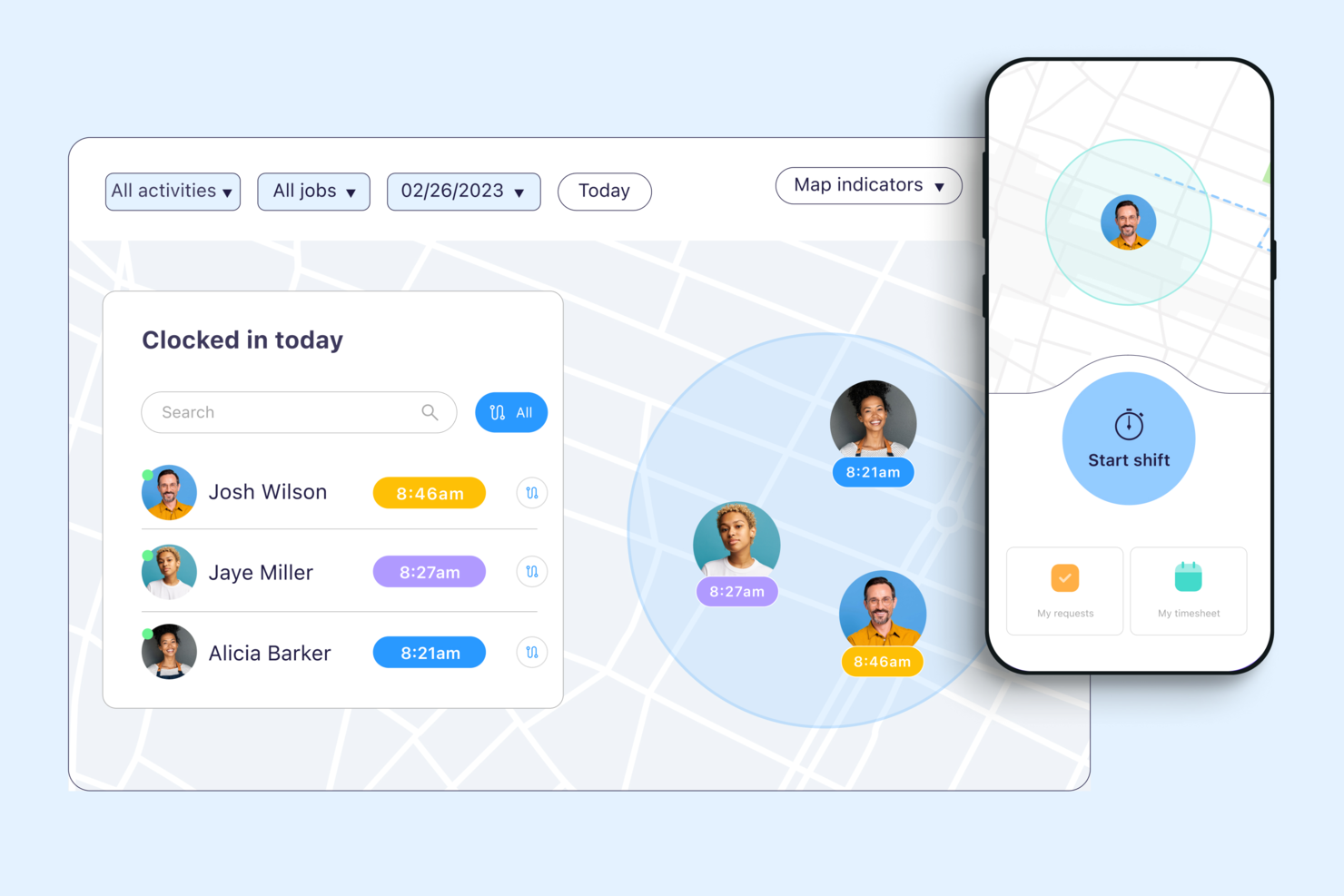
Connecteam is a workforce management platform for companies with deskless or mobile employees who need reliable time tracking, scheduling, and team communication in one place.
Who Is Connecteam Best For?
Connecteam is a great fit for small to mid-sized businesses in field-based industries like construction, retail, and hospitality that manage hourly or shift-based workers.
Why I Picked Connecteam
I picked Connecteam as one of the best because of how well its GPS time tracking features hold up in real field conditions. I particularly like the breadcrumbs feature, which logs an employee's location trail throughout their entire shift—not just at clock-in. That means if you're managing a crew spread across multiple job sites, you can see exactly where each person was and when, without relying on self-reporting. The geofencing feature takes it further by automatically clocking employees out when they leave a designated job site radius, which cuts down on time theft without requiring any manual intervention from managers.
Connecteam Key Features
- Timesheet management: Review, edit, and approve employee timesheets directly in the app before exporting to payroll.
- Job scheduling: Build and assign shifts to specific employees or teams, with visibility into availability and conflicts.
- Overtime tracking: Set custom overtime rules so the system automatically flags hours that exceed defined thresholds.
- Kiosk mode: Let employees clock in and out from a shared device using a PIN, useful for fixed job sites without individual smartphones.
Connecteam Integrations
Integrations include QuickBooks, Gusto, Xero, ADP, Wix, Lightspeed, PrismHR, Square, and BambooHR.
Pros and Cons
Pros:
- Can set specific rules for breaks, overtime, and pay rates
- Ability to track employee locations and set geofenced areas
- Variety of clock-in methods, including mobile app, kiosk, and NFC badges
Cons:
- Setting user roles and permissions can be unintuitive
- Push notifications are sometimes delayed
New Product Updates from Connecteam

Connecteam Adds Automatic Paid Break Actions and Manual Break Windows
Connecteam adds automatic paid break actions and configurable start windows for manual breaks. These updates help teams manage break schedules and maintain accurate timesheets. For more information, visit Connecteam’s official site.
 .

Best for project time tracking
monday AI Workspace is a project management platform with built-in time tracking that lets teams log hours against tasks, monitor project budgets, and view workload capacity across active projects.
Who Is monday AI Workspace Best For?
It's a strong fit for project managers and PMO leads at mid-sized companies who already run their work in monday.com and want time tracking tied directly to their project boards.
Why I Picked monday AI Workspace
I picked monday AI Workspace because the way it embeds time tracking directly into project boards is something I haven't seen done as naturally elsewhere. The Time Tracking Column lets my team start and stop timers from within the same item where they're managing tasks, so logged hours are always tied to real project context. Paired with the Time Tracking Widget on dashboards, I can see effort and burn rates across projects without ever leaving the platform.
monday AI Workspace Key Features
- Customizable boards: Teams can build project boards with columns for status, owners, priorities, and custom metrics.
- Workload view: Visualize each team member’s assigned hours across projects to spot over-allocation or unused capacity.
- Automations: Set up workflow automations for recurring actions like status changes or time tracking reminders.
- Dashboards and reporting: Roll up project and time data into dashboards with widgets for tracking budgets, workloads, and key metrics.
monday AI Workspace Integrations
monday AI Workspace offers hundreds of native integrations, including Slack, Google Workspace, Microsoft 365, Salesforce, Jira, GitHub, Zoom, Dropbox, HubSpot, and Zendesk. It also supports Zapier and provides an API for custom integrations.
Pros and Cons
Pros:
- Time data rolls up into visual dashboards
- Workload visibility across all active projects
- Time tracking tied directly to project tasks
Cons:
- Approval workflows less advanced than dedicated tools
- No automatic background time capture available
New Product Updates from monday AI Workspace
monday AI Workspace Adds Human Approval Routing
monday AI Workspace adds a human-in-the-loop approval block to AI Workflows, sending approval requests and routing workflow paths based on responses. For more information, visit monday AI Workspace's official site.

Best for time-based profitability insights
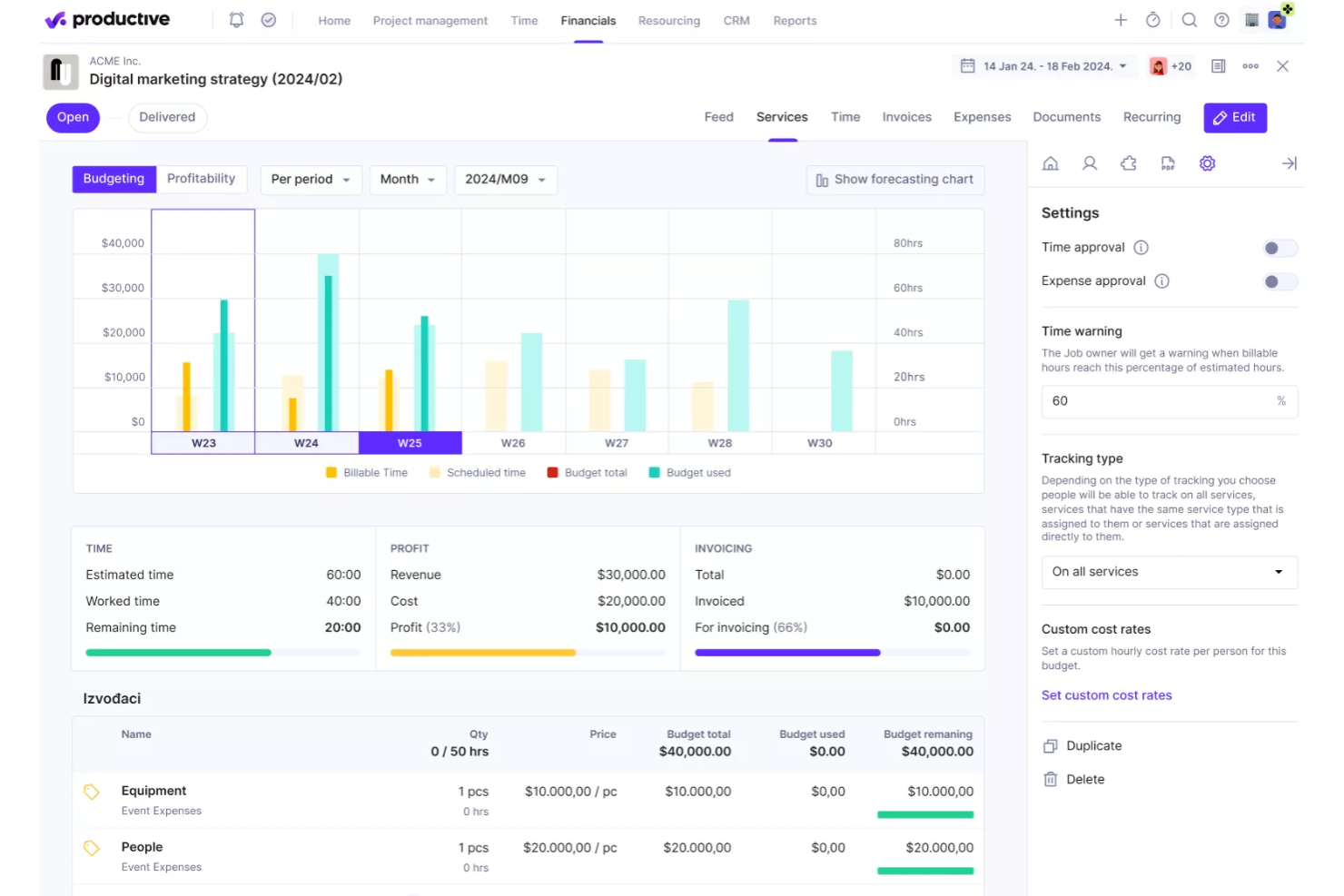
Productive is a project management and time tracking platform built for agencies and service companies that need to connect tracked hours to project budgets, resource planning, and profitability.
Who Is Productive Best For?
Productive is a strong fit for agencies and professional services firms that bill clients by the hour and need visibility into project margins.
Why I Picked Productive
I picked Productive as one of the best because of how directly it connects time tracking to profitability data. Every hour your team logs against a service—billable or non-billable—feeds straight into budget tracking and margin reporting, so you're not waiting on a finance report to know where a project stands. I particularly like the cost of work report, which compares worked time against billable time per resource, giving you a clear picture of where hours are being lost. The AI-powered reporting layer is also genuinely useful—you can ask it to surface profitability per project or utilization by team without building a single custom report from scratch.
Productive Key Features
- Time tracking with timesheets: Log hours manually or with a timer directly against tasks, projects, or services from a centralized timesheet view.
- Resource planning: Schedule team members across projects using a visual capacity planner that shows availability and workload in real time.
- Project budgeting: Set budget limits per project and track spend against them as time and expenses are logged.
- Invoicing: Generate invoices directly from tracked billable hours and send them to clients without leaving the platform.
Productive Integrations
Integrations include Jira, HubSpot, Xero, Google Calendar, Sage, Gmail, Microsoft Outlook, Slack, BugHerd, and QuickBooks.
Pros and Cons
Pros:
- Comprehensive features for financial management and reporting
- Robust resource planning features
- Customizable dashboard and reporting
Cons:
- Limited number of integrations
- Initial setup and onboarding can be time-consuming
New Product Updates from Productive
Productive Adds Email and Calendar Integrations for Agents
Productive adds Gmail, Outlook, Google Calendar, and Outlook Calendar connectors for its AI agents. These integrations let agents manage emails and create calendar events directly within Productive. For more information, visit Productive’s official site.

Toggl
Best for its workload balancing

Toggl offers a visual approach to time tracking that helps teams balance workloads and avoid burnout. It’s especially useful for project managers and agencies who need to see team capacity at a glance and reassign tasks quickly. The platform’s workload management features help prevent overbooking and support more predictable project delivery.
Who is Toggl Best For?
Project managers and team leads at small to mid-size knowledge-work organizations that balance workloads across staff and monitor time distribution across assignments.
Why I Picked Toggl
What drew me to Toggl is its focus on workload balancing, which goes beyond basic time tracking. The tool’s Team Dashboard lets you visualize each team member’s capacity and current assignments, making it easier to spot overloads or gaps. I appreciate how the Workload view allows you to reallocate tasks and adjust schedules directly from the dashboard. This makes Toggl Track a strong choice for project managers who need to keep workloads realistic and projects on track.
Toggl Key Features
Some other features that make Toggl useful for time tracking include:
- Billable Rates: Assign different hourly rates to projects or team members for accurate client billing.
- Project and Task Tracking: Organize tracked time by project, client, or specific task for detailed reporting.
- Calendar Integration: Sync tracked time with Google Calendar or Outlook to compare planned versus actual work.
- Automated Reminders: Send notifications to prompt users to start or stop tracking time.
Toggl Integrations
Integrations include Asana, Jira, Google Calendar, Outlook, QuickBooks Online, Salesforce, Slack, Toggl Plan, iCal, and the Toggl API.
Pros and Cons
Pros:
- Workload view visualizes team capacity instantly
- Bulk edit lets you adjust multiple entries
- Browser extension tracks time across web apps
Cons:
- Mobile app lacks full reporting feature
- Limited offline functionality for time entries

actiTIME
Best for small teams and businesses
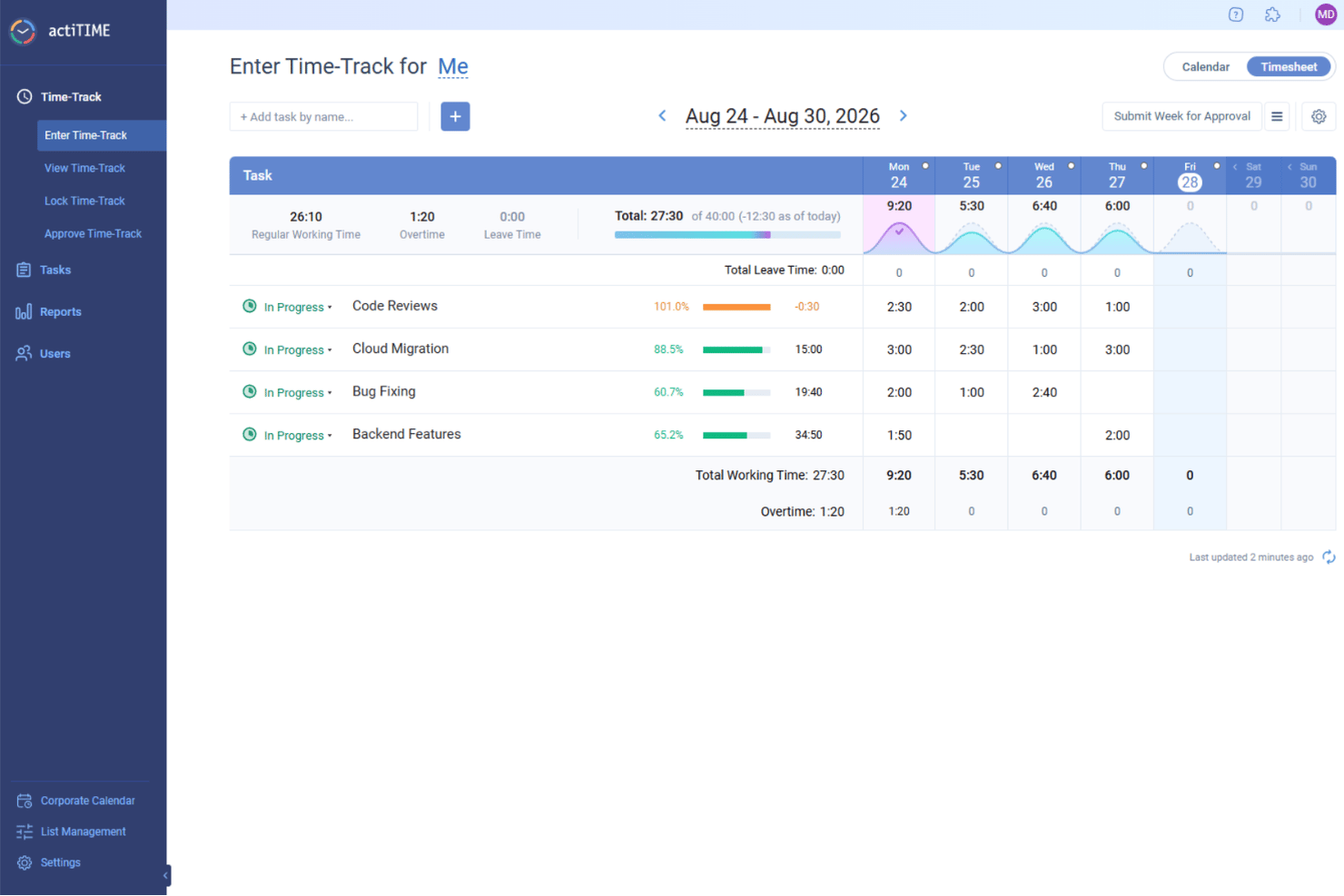
If you’re looking for a time tracking tool built with small teams and businesses in mind, actiTIME is worth a look. It’s designed for teams that need to track hours, manage tasks, and monitor project costs without extra complexity. The platform stands out for its simple setup, flexible reporting, and built-in leave management features.
Who is actiTIME Best For?
Team supervisors and administrators at small businesses that need straightforward time tracking and reporting without complex implementation or dedicated system support.
Why I Picked actiTIME
For small teams and businesses, actiTIME offers a focused set of time tracking features without unnecessary extras. I picked actiTIME because it lets you track time by client, project, or task, making it easy to see where hours are going. The tool also includes built-in leave management, so you can handle absences and vacations alongside regular time tracking. Its reporting tools help small teams monitor project costs and productivity without getting bogged down in complexity.
actiTIME Key Features
Some other features that make actiTIME useful for small teams include:
- Automated Reminders: Sends notifications to remind users to submit timesheets on schedule.
- Customizable Billing Rates: Allows you to set different hourly rates for various clients or projects.
- Mobile App: Lets users track time and manage tasks from their smartphones.
- Integration With QuickBooks: Syncs time tracking data directly with QuickBooks for streamlined accounting.
actiTIME Integrations
Integrations include actiPLANS, Chrome Plugin, QuickBooks, and Time Management Assistant. An API is also available for custom integrations.
Pros and Cons
Pros:
- Provides detailed reporting and data analysis
- Supports fixed and accrual leave policies
- Allows setting hourly budgets and tracking them
Cons:
- Lacks features like geofencing and facial recognition
- Lacks extensive native integrations
New Product Updates from actiTIME

actiTIME Visual Hour Indicator and Time-Track Report Redesign
actiTIME adds a wave-style hour indicator to the Timesheet and Calendar views and refreshes the Time-Track report for smoother navigation and clearer visuals. For more information, visit actiTIME's official site.

Kantata
Best for full lifecycle time tracking
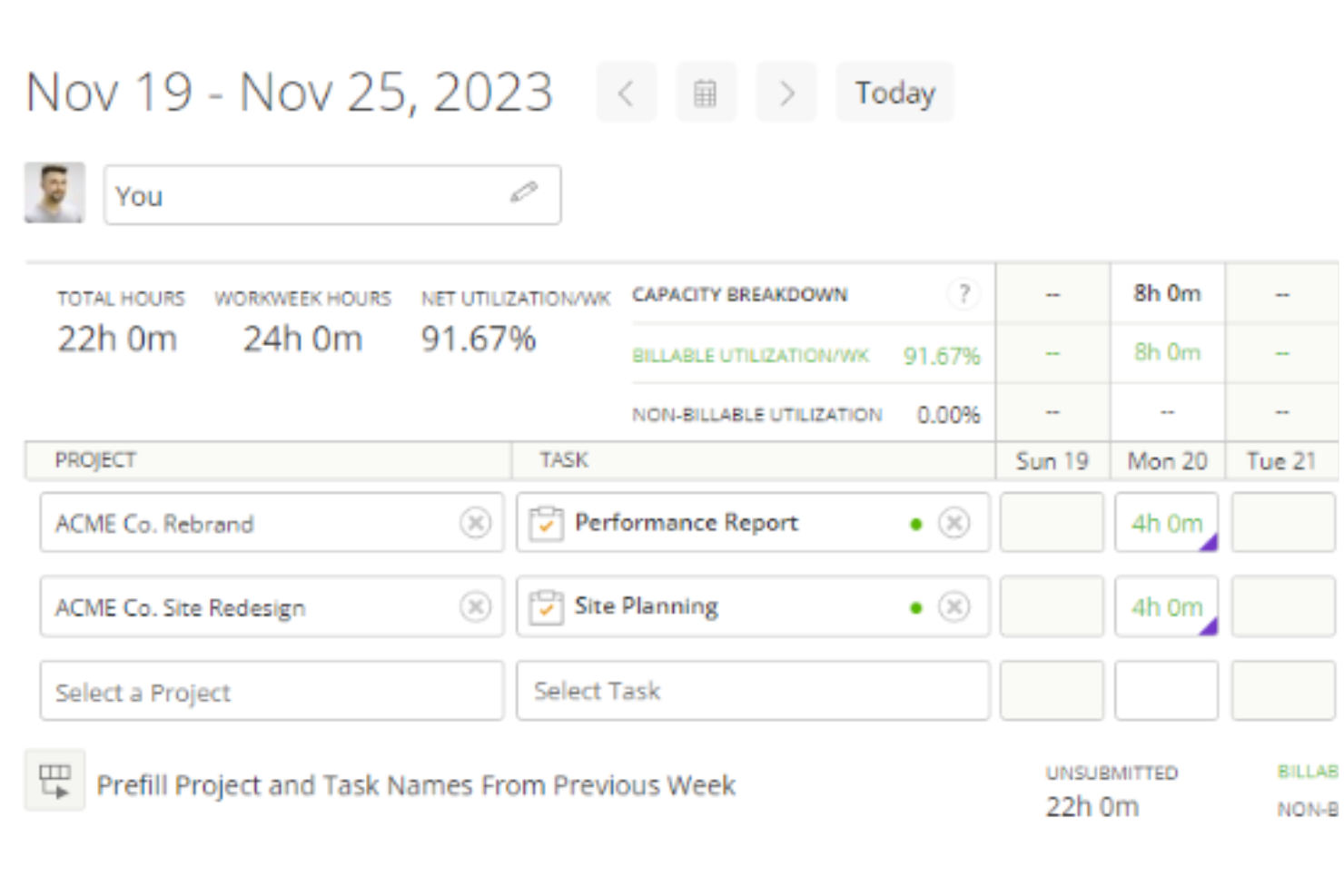
Kantata is a project and resource management platform for professional services teams who need to track time, manage projects, and optimize resources across complex client engagements.
Who Is Kantata Best For?
Kantata is a strong fit for mid-to-large professional services firms—such as consulting, marketing, and IT services companies—that need to manage time and resources across multiple client projects simultaneously.
Why I Picked Kantata
I picked Kantata as one of the best because it's one of the few time tracking tools that connects time data to every other stage of project delivery—from initial scoping through to invoicing. What I love about it is that time and expense tracking isn't a standalone module; it feeds directly into financial management, so my team can see in real time how logged hours are affecting project margins and budget burn. Kantata also has built-in timesheet workflows with automation that takes the friction out of period close—something finance teams on multi-project engagements will really appreciate. On top of that, the business intelligence layer surfaces utilization and fee data across the portfolio, so time tracking becomes an input to actual strategic decisions, not just a compliance exercise.
Kantata Key Features
- Resource management: Assign and adjust team capacity across projects using visual resource planning tools that reflect real-time availability.
- Project forecasting: Model projected costs and timelines against actuals to keep client engagements on track before issues arise.
- Role-based permissions: Control who can view, enter, or approve project data with configurable access settings across teams.
- Client and project dashboards: Monitor project health, milestones, and delivery status from a centralized view across your entire portfolio.
Kantata Integrations
Integrations include Salesforce, NetSuite, Jira, Slack, HubSpot, QuickBooks, Xero, BambooHR, Google Drive, and Microsoft Teams.
Pros and Cons
Pros:
- Admins can enforce rules like required notes or task associations
- Time entries can be reviewed and approved before invoicing
- Users can log time via timers, timesheets, or directly on tasks
Cons:
- Certain time tracking fields may not be fully customizable
- Configuring who can track and approve time may be intricate
New Product Updates from Kantata

Kantata Adds Access Group Change History
Kantata adds Access Groups History, letting account administrators track changes to group details, membership, and permissions in Recent History. The update also makes these events available through the Subscribed Events API for broader monitoring. For more information, visit Kantata’s official site.
 .

DeskTime
Best for offline time tracking accuracy
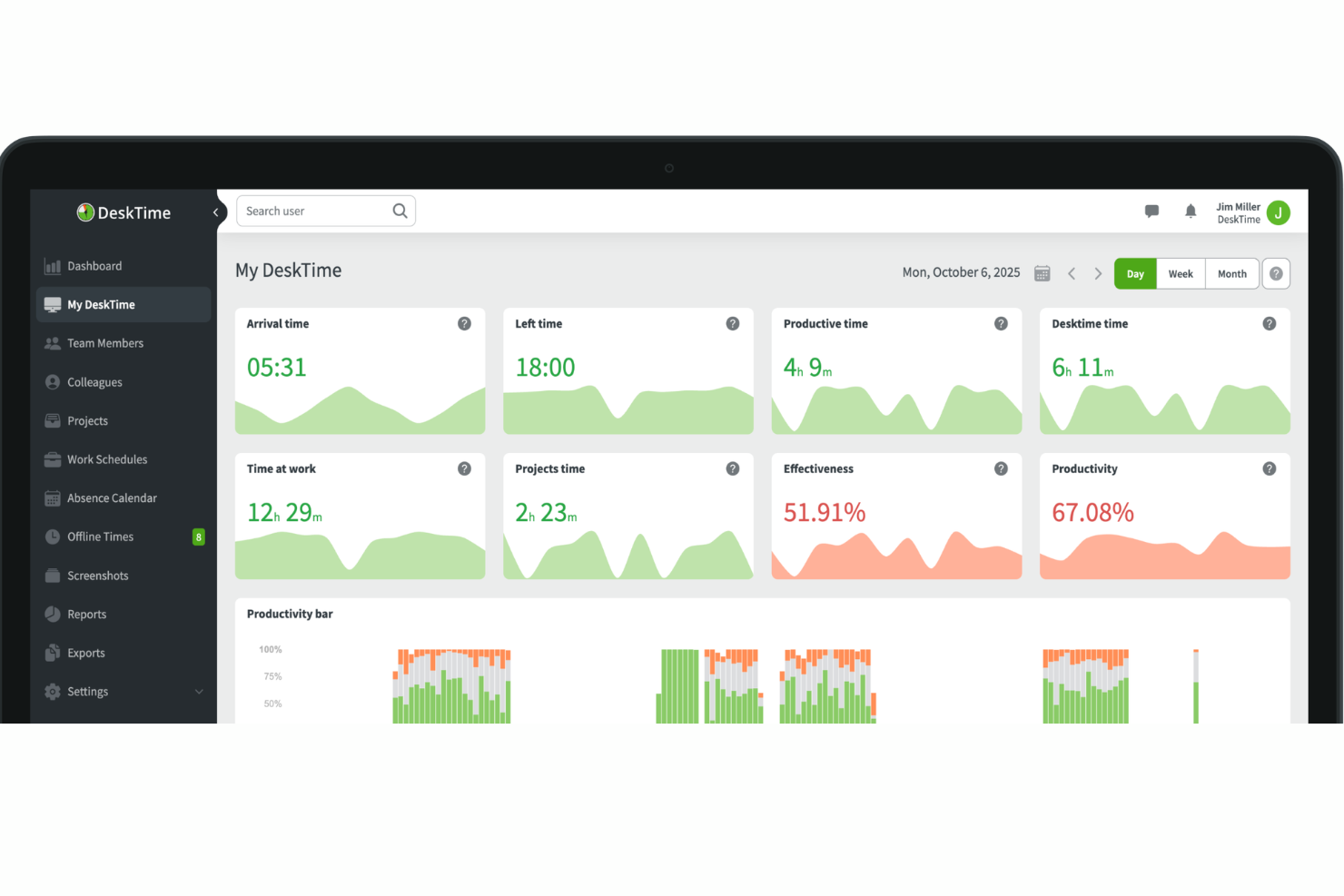
With both automatic desktop tracking and manual time entry, DeskTime is a time tracking platform that captures app, URL, and document activity alongside offline work logged through calendar integrations and manual inputs.
Who Is DeskTime Best For?
DeskTime is a good fit for small to mid-sized teams that need visibility into how working hours are spent across distributed or hybrid setups.
Why I Picked DeskTime
Offline time tracking accuracy is where a lot of tools fall short, and DeskTime handles it better than most. My team is able to log offline time manually, categorized by type (like meetings, calls, or travel), so that time doesn't just disappear from the record. DeskTime also syncs with Google Calendar and Outlook to pull in calendar events automatically, which means scheduled meetings get captured without anyone having to remember to log them after the fact.
DeskTime Key Features
- Pomodoro timer: Built-in work interval timer that alternates focus sessions with short breaks, logged automatically within your tracked time.
- Private time mode: Lets users pause automatic tracking during personal tasks, so those intervals are excluded from productivity reports.
- Shift scheduling: Managers can set expected working hours per employee and compare them against actual logged time.
- Billing rates: Assign hourly rates to team members so tracked project time converts directly into cost calculations.
DeskTime Integrations
DeskTime offers native integrations with Google Calendar, Outlook Calendar, Jira, Asana, GitLab, Trello, and Zapier. DeskTime also provides an API for building custom integrations.
Pros and Cons
Pros:
- Blurs optional screenshots for privacy
- Categorizes sites as productive or unproductive
- Tracks app and URL usage automatically
Cons:
- Software settings lack deep customization
- Limited mobile tracking capabilities
Beebole
Best for customizable dashboards
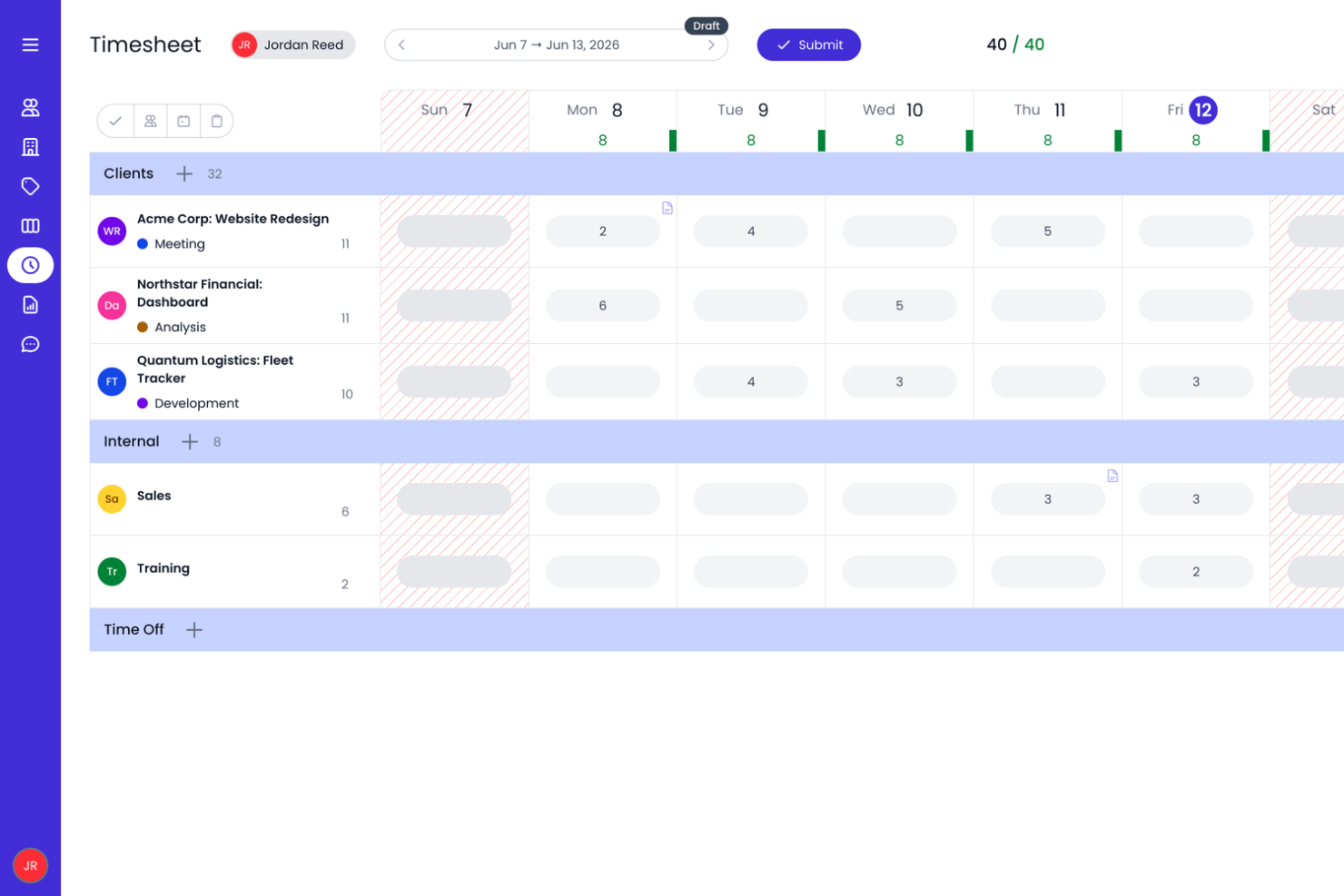
Beebole is a time tracking platform designed for companies that need to monitor project hours, manage team productivity, and generate detailed reports to support billing and resource planning.
Who Is Beebole Best For?
Beebole is a strong fit for mid-sized companies and professional services teams that need flexible time tracking with detailed reporting across projects and departments.
Why I Picked Beebole
Beebole earns its spot on my shortlist because of how much control it gives you over your reporting dashboards. I like that you can save custom reports directly to your dashboard, so when I need a real-time view of project hours, billing status, or budget variance, it's already on the dashboard. The KPI dashboard builder lets you surface exactly the metrics that matter to your team, whether that's tracking profitability across 50 client projects or monitoring overtime by department. Exporting those same reports to Excel or Google Sheets keeps the data available outside the tool. You can also configure billing and cost rates at the person, project, or task level and monitor project budgets as time is logged, giving teams additional visibility into project costs.
Beebole Key Features
- Timesheet approval workflow: Managers can review, approve, or reject submitted timesheets directly within the platform before they're locked for payroll or billing.
- Resource planning and capacity management: Assign work based on team availability and compare scheduled versus worked hours.
- Project budget and profitability tracking: Set billing, cost, or hour budgets and monitor project spending as time is logged.
- Absence and leave management: Track vacation, sick days, and other leave types alongside work hours in a single view.
Beebole Integrations
Integrations include Asana, BambooHR, Google Calendar, Outlook Calendar, Google Sheets, Excel, QuickBooks Online, and an open API for custom integrations.
Pros and Cons
Pros:
- Integrated PTO tracking feature
- You can set different billing rates for clients, projects, and team members
- Ability to track time across various projects and tasks
Cons:
- Free plan is capped at 5 users
- Lacks integrated invoicing

Homebase
Best for reducing time theft

Homebase is a time tracking and team management platform built for hourly workforces, helping retail, restaurant, and service businesses track hours, manage schedules, and simplify payroll.
Who Is Homebase Best For?
Homebase is a strong fit for small to mid-sized businesses in hourly-driven industries like food service, retail, and hospitality.
Why I Picked Homebase
Homebase earns its spot on my shortlist because of how directly it targets time theft in hourly work environments. I like that the time clock takes a photo of the employee at clock-in, so you can immediately verify that the right person is punching in—not a coworker doing it on their behalf. That buddy-punching prevention is built into the free tier, which is rare. On top of that, GPS tracking lets you confirm that remote or field-based employees are actually on-site when they clock in, not logging hours from somewhere else entirely.
Homebase Key Features
- Automated timesheets: Homebase converts clock-in and clock-out data into timesheets automatically, flagging discrepancies for manager review.
- Overtime and break alerts: Set rules for overtime thresholds and required breaks, and Homebase notifies managers when employees are approaching or violating them.
- Payroll integration: Export timesheet data directly to payroll providers to reduce manual entry and calculation errors.
- Team messaging: Built-in messaging lets managers communicate shift changes, updates, and reminders directly within the platform.
Homebase Integrations
Integrations include Square, Toast, Clover, Shopify, QuickBooks, Gusto, ADP, Paychex, Heartland, and Revel.
Pros and Cons
Pros:
- Built-in team messaging for shift coordination
- GPS tracking verifies remote or mobile attendance
- Photo clock-ins help prevent buddy punching
Cons:
- No project-based time tracking features
- Limited reporting customization options
New Product Updates from Homebase

Homebase Adds Time Card Review and AutoPayroll Alerts
Homebase adds Time Card Review, time clock monitoring, and AutoPayroll email alerts. These updates help managers correct timecard errors and address payroll issues before processing. For more information, visit Homebase’s official site.
 .

Factorial
Best as AI for business
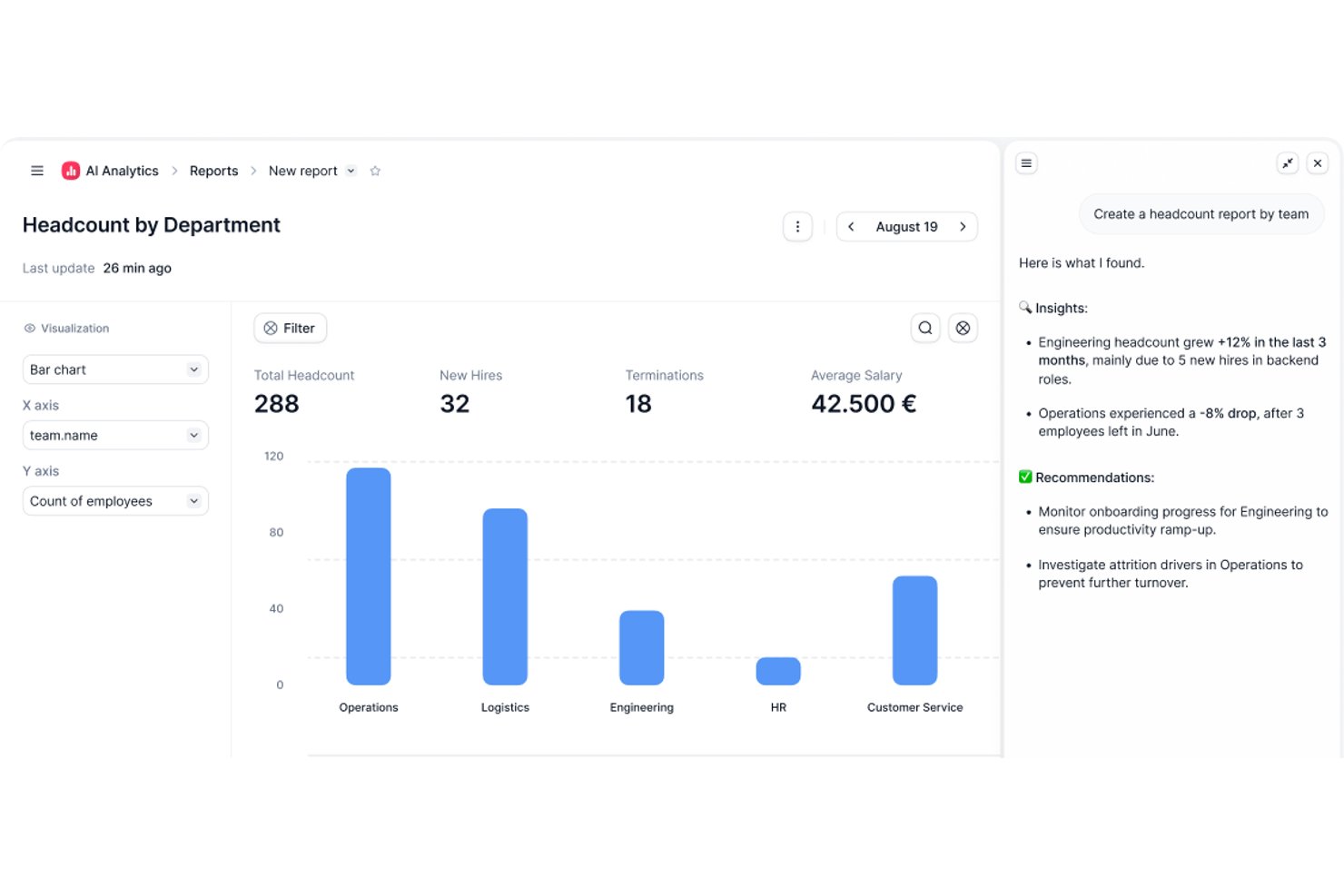
Factorial is an AI-powered HR and time tracking platform that handles time and attendance, shift scheduling, timesheet approvals, and project-based hour tracking across web and mobile.
Who Is Factorial Best For?
Factorial suits HR and payroll administrators at mid-sized companies who need a single platform to manage time tracking, shift scheduling, and payroll workflows.
Why I Picked Factorial
I've included Factorial in my top picks because it's built around AI for business, which means it doesn't just log hours—it actively assists with day-to-day operations like planning timetables, generating reports, and answering employee questions on policies. I especially like how time entries can be recorded at the task level within projects, then rolled up into time-and-materials budgets that surface costs, billable amounts, and profitability in one place. Managers can also transfer approved timesheet hours directly to compensation and sync them with payroll tools like DATEV, cutting out a lot of manual reconciliation.
Factorial Key Features
- Multiple clock-in methods: Employees can log time via QR code, facial recognition, geolocation, the mobile app, or a desktop browser.
- Shift scheduling: Managers can build and adjust team schedules using a drag-and-drop interface, including bulk scheduling and rotating shifts.
- Time-off management: Teams can set custom absence types and policies, with employees submitting requests and managers approving or rejecting them in the platform.
- Offline mobile clock-in: Employees can clock in and out without an internet connection through the Factorial app, as long as they've previously logged in.
Factorial Integrations
Factorial offers marketplace integrations with DATEV LODAS, Sage 200, Microsoft Power BI, Google Workspace, and Slack, plus a public API, webhooks, and SDKs for custom connections. It also supports Zapier.
Pros and Cons
Pros:
- Timesheet approvals support payroll workflows
- Offline mobile clock-ins preserve attendance records
- Task-level entries clarify project labor
Cons:
- Clock-in reminders still require employee discipline
- Advanced time analytics remain limited
New Product Updates from Factorial
Factorial One Adds AI Automation Across HR, Finance, and IT
Factorial One adds company-context assistance, workflow automation, and connections across HR, Finance, and IT. These capabilities help employees access information, create documents, and complete routine tasks using AI. For more information, visit Factorial’s official site.
 .
- Buddy Punch
Time clock for GPS and image tracking
- Resource Guru
For tracking time with resource scheduling
- Agendrix
For versatile clock-in methods
- Runn
With real-time capacity visibility
- Clockify
For efficient time tracking
- Traqq
For a feature-rich free version
- My Hours
For small teams and freelancers
- TimeCamp
For automatic time tracking
- TMetric
For 7-day activity tracking storage
- Bonsai Agency Software
Integrated time and resource management
- Timesheets.com
For accountants and bookkeepers
- Harvest
For actionable insights
- FunctionFox
For creative teams and agencies
- Deltek Replicon Time
For intelligent time tracking
- ProjectManager
For real-time time monitoring
- Ravetree
For tracking expenses alongside time
- eResource Scheduler
For scheduling with time tracking
- ExakTime
For teams of field employees
- Bill4time
For reporting features
- Actually
Simple time tracking for companies working with projects
- Deel HR
For keeping payroll in sync
- Insightful
For remote team monitoring
- ClickUp
For its billable time tag
- Monitask
For distributed teams
- Apploye
For hybrid teams
- Smartsheet
For mobile time tracking
- Scoro
For detailed time tracking
- ClickTime
For customizable timesheets
- Hubstaff
For distributed teams
- BigTime
For invoicing and billing


How I Evaluate Time Tracking Software
I split my evaluation into what a tool must do—log time to projects, handle approvals, and track billable rates—and what makes it the right fit for your specific team or workflow.
Core Functionality (Table Stakes For This List)
When I'm selecting tools for my list, I rank each one on a scale from 0 (does not offer the functionality) to 5 (excels in this area) for each core functionality listed below. Then, I calculate the tool's total score into a percentage. Each tool needs to achieve a minimum total score of 65% to be considered for inclusion.
- Project & Task Time Capture: I check whether you can log hours against specific projects, tasks, and subtasks—via manual entry, running timers, or background tracking—so nothing falls through the cracks during a busy sprint.
- Timesheet Management: A solid approval workflow matters here. I look for submission, review, and locking features that let a PM or team lead sign off on weekly hours before they reach payroll or invoicing.
- Billable Hours & Rate Configuration: Tools need to separate billable from non-billable time and support rate configuration at the user, role, project, or client level—the kind of flexibility an agency juggling multiple retainers relies on daily.
- Budget & Utilization Tracking: I evaluate how well a tool connects logged time back to project budgets and estimates, surfacing burn rate, overages, and per-person utilization so you can spot scope creep before it hits margins.
- Reporting & Analytics: Pre-built reports are a start, but I look for filtering by project, client, team member, and date range plus export options—because stakeholders and finance teams almost always need data in their own format.
- PM Tool Integrations: Whether your team lives in Jira, Asana, Monday, or ClickUp, I evaluate the depth of each integration—especially two-way sync that posts logged time back to tasks without manual re-entry.
Once I have a list of tools that meet the criteria, I consider what sets each platform apart.
Differentiating Factors (What Sets Vendors Apart)
Here's how I compare and contrast different vendors:
Standout Features
Resource and capacity planning is a big one—I look for tools that let you see who's available and assign work based on logged hours and forecasted demand, not guesswork. Automatic time tracking matters too. Background detection or calendar sync fills gaps that manual entry misses, especially on days packed with context-switching. For agency and consulting teams, native invoicing closes the loop between tracked hours and client billing without exporting data to a separate system.
Beyond Features
I pay close attention to team size and use-case fit. A tool built for solo freelancers won't serve a 50-person consulting firm managing retainers, fixed-fee projects, and T&M contracts side by side. Pricing structure matters just as much—I evaluate whether per-user costs stay reasonable as your team grows and whether a free tier lets smaller groups trial the platform properly. For regulated industries or government contractors, I also check for DCAA compliance, SOC 2 certification, and role-based access controls.
Zaman Takibi Yazılımı Nasıl Seçilir?
Uzun özellik listeleri ve karmaşık fiyatlandırma yapıları arasında kaybolmak kolaydır. Yazılım seçim sürecinizi yürütürken odağınızı korumanıza yardımcı olmak için göz önünde bulundurmanız gereken faktörlerin bir kontrol listesini burada bulabilirsiniz:
| Faktör | Dikkat Edilmesi Gerekenler |
| Ölçeklenebilirlik | Yazılımın ekibinizin büyümesini destekleyebildiğinden emin olun. Esnek fiyatlandırma, sınırsız kullanıcı ve rol tabanlı izinler ile kurumsal raporlama gibi büyük ekipleri destekleyen özellikleri arayın. |
| Entegrasyonlar | Bordro, faturalandırma, proje yönetimi ve İK yazılımları gibi mevcut araçlarınıza bağlanan bir çözüm seçin. Bu, manuel veri girişini azaltır ve iş akışlarının sorunsuz ilerlemesini sağlar. |
| Özelleştirilebilirlik | Ekibinizin ihtiyaçları benzersizdir. Aracı iş süreçlerinizle uyumlu hâle getirmek için özelleştirilebilir raporlar, ayarlanabilir takip kuralları ve yapılandırılabilir izinler arayın. |
| Kullanım Kolaylığı | Karmaşık bir sistem, benimsenmeyi yavaşlatır. Minimum kurulum gerektiren sezgisel bir arayüzü, basit zaman girişi seçeneklerini ve hareket hâlindeyken takip için kullanıcı dostu bir mobil uygulamayı tercih edin. |
| Bütçe | Fiyatlandırma kademelerini, gizli ücretleri ve ücretsiz deneme seçeneklerini karşılaştırın. Aracın kullanıcı başına mı, özellik başına mı ücret aldığını ya da bütçenize uygun sabit ücretli bir model sunup sunmadığını değerlendirin. |
| Güvenlik Önlemleri | Hassas zaman kayıtlarını ve bordro verilerini iki faktörlü kimlik doğrulama, rol tabanlı erişim denetimleri ve şifrelenmiş veri depolama gibi özelliklerle koruyun. |
| Mobil Erişilebilirlik | Ekibiniz uzaktan veya sahada çalışıyorsa yazılımın çevrimdışı takip, GPS özellikleri ve sorunsuz senkronizasyon sunan güçlü bir mobil uygulamaya sahip olduğundan emin olun. |
| Raporlama & Analiz | Çalışma saatleri, proje maliyetleri ve ekip verimliliği hakkında ayrıntılı bilgiler sunan çözümleri arayın. Özelleştirilebilir panolar ve otomatik raporlar, verilere dayalı kararlar almanıza yardımcı olur. |
2026 Zaman Takibi Yazılımı Trendleri
Araştırmam sırasında farklı zaman takibi yazılımı sağlayıcılarından sayısız ürün güncellemesi, basın açıklaması ve sürüm kaydı inceledim. Takip ettiğim yeni trendlerden bazıları şunlar:
- Mobil Uygulamalar ve Coğrafi Sınırlandırma: Proje yönetiminde zaman takibi için mobil uygulamalar, özellikle coğrafi sınırlandırma teknolojisiyle birlikte giderek daha popüler hâle geliyor. Bu, farklı çalışma ortamlarında zamanın daha doğru kaydedilmesi için otomatik giriş işlemlerine ve konuma dayalı takibe olanak tanır.
- Biyometrik Kimlik Tanımlama: Yüz tanıma ve biyometrik iris teknolojisi gibi teknolojiler, kullanım kolaylığını artırmak ve daha doğru zaman girişleri sağlamak amacıyla modern zaman takibi çözümlerinde benimseniyor.
- Enerji Harcaması Takibi: Ortaya çıkan bu kavram, çalışma sırasında harcanan zihinsel ve fiziksel çabayı ölçer. Böylece basit zaman takibinin ötesinde çalışan bağlılığı ve iyilik hâli hakkında bilgiler sunar.
- Giyilebilir Teknolojiyle Entegrasyon: Akıllı saatler gibi giyilebilir cihazlar artık çalışma saatlerini takip ederken çalışanların iyilik hâlini desteklemek için etkinlik ve sağlık takibi de sunabiliyor.
- Gelişmiş Yapay Zekâ ve Otomasyon: Yapay zekâ, zaman çizelgesi yazılımlarında artık yaygın ve hızla gelişen bir özellik. Genellikle zaman kaydını otomatikleştirmek, doğruluğu artırmak ve zaman kullanım modellerini analiz etmek için kullanılıyor.
Zaman Takibi Yazılımı Nedir?
Zaman takibi yazılımı, kişilerin veya ekiplerin görevler, projeler, müşteriler ya da etkinlikler için harcadığı süreyi izleyen ve kaydeden dijital bir araçtır.
Genellikle zamanlayıcılar, manuel zaman girişi, zaman çizelgeleri, raporlama ve faturalandırma gibi özellikler içerir. Bu araçlar verimliliği artırmaya, doğru faturalandırma sağlamaya ve daha iyi planlama ile kaynak kullanımına yönelik bilgiler sunmaya yardımcı olur. Birçok zaman takibi aracı, iş akışlarını kolaylaştırmak ve idari işleri azaltmak için proje yönetimi, bordro ve iş birliği araçlarıyla da entegre olur.
Zaman Takibi Yazılımının Özellikleri
Zaman takibi yazılımı seçerken aşağıdaki temel özelliklere dikkat edin:
- Otomatik zaman kaydı: Yazılımın etkinliğinizi arka planda takip etmesini sağlayın; böylece giriş ve çıkışları manuel olarak yapmanız gerekmez. Bu, unutsanız bile çalışma saatlerinizin doğru şekilde kaydedilmesini sağlar.
- Manuel giriş seçenekleri: Çevrimdışı yapılan işler için zaman girişlerini kolayca ekleyin veya düzenleyin ya da atlanan kayıtları düzeltin; böylece kayıtlarınız gerçeği her zaman yansıtır.
- Proje ve görev kategorilendirme: Saatlerinizin tam olarak nereye gittiğini görmek ve raporlamayı kolaylaştırmak için zamanınızı müşteri, proje veya göreve göre düzenleyin.
- Faturalandırılabilir ve faturalandırılamaz zaman takibi: Daha doğru faturalandırma yapmak ve zamanınızı nasıl harcadığınıza ilişkin daha iyi bir görünüm elde etmek için faturalandırılabilir ve faturalandırılamaz saatleri birbirinden ayırın.
- Raporlama ve analiz: Verimliliği analiz etmek, trendleri belirlemek ve iş akışınız hakkında bilinçli kararlar almak için ayrıntılı raporlar oluşturun.
- Diğer araçlarla entegrasyon: Süreçlerinizi kolaylaştırmak ve çift veri girişinden kaçınmak için zaman takibi yazılımınızı proje yönetimi, muhasebe veya takvim uygulamalarıyla senkronize edin.
- Hatırlatıcılar ve bildirimler: Zamanınızı takip etmenizi veya girişleri kaydetmenizi hatırlatacak uyarılar ayarlayın; böylece hiçbir şey gözden kaçmaz.
- Mobil erişim: Akıllı telefonunuzu veya tabletinizi kullanarak her yerden çalışma saatlerinizi takip edin; bu özellik uzaktan çalışan ekipler veya sürekli hareket hâlinde olan kişiler için idealdir.
Zaman Takip Yazılımındaki Yaygın Yapay Zekâ Özellikleri
Modern zaman takip yazılımları, iş akışınızı daha da sorunsuz hâle getirmek için tasarlanmış yapay zekâ destekli özellikler içerir:
- Otomatik etkinlik sınıflandırması: Yapay zekâ etkinliklerinizi analiz edebilir ve görevleri otomatik olarak kategorilere ayırarak manuel sıralama ihtiyacını azaltır ve zamandan tasarruf etmenizi sağlar.
- Akıllı zaman çizelgesi önerileri: Yapay zekâ, çalışma düzenlerinize göre zaman kayıtları önerebilir veya boşlukları doldurabilir; böylece zaman çizelgelerini daha hızlı ve doğru bir şekilde tamamlamanıza yardımcı olur.
- Verimlilik analizleri: Yapay zekâ destekli analizler eğilimleri öne çıkarır, olası dikkat dağıtıcı unsurları işaretler ve verimliliğinizi artırmak için kişiselleştirilmiş öneriler sunar.
- Anormallik tespiti: Yazılım, kaçırılan kayıtlar veya tutarsız çalışma saatleri gibi olağandışı düzenleri fark edebilir ve bunlar sorun hâline gelmeden önce incelemeniz için sizi uyarabilir.
- Doğal dil girişi: Bazı araçlar, basit metin komutlarını kullanarak zaman veya görev kaydetmenize olanak tanır; bu da süreci daha sezgisel hâle getirir.
Zaman Takip Yazılımının Faydaları
Zaman takip yazılımını uygulamak, ekibiniz ve işletmeniz için çeşitli faydalar sağlayabilir. Yararlanabileceğiniz bazı faydalar şunlardır:
- Daha yüksek doğruluk: Bordro ve faturalandırmadaki hataları azaltmak için çalışma saatlerini dakikasına kadar takip eder.
- Daha kolay proje faturalandırması: Müşteri veya proje başına faturalandırılabilir zamanı kaydeder; böylece tahminde bulunmadan doğru ücretlendirme yapabilirsiniz.
- Daha az zaman kaybı: Takip edilmeyen veya boşta geçen zamanı fark etmenize yardımcı olur; böylece faturalandırılabilir saatleri kaybetmezsiniz.
- Daha üretken ekipler: Zamanın nerede harcandığını göstererek ekiplerin dikkat dağıtıcı unsurları azaltmasına ve gerçek işe odaklanmasına yardımcı olur.
- Daha az idari iş: Zaman çizelgelerini, onayları ve raporları otomatikleştirir; böylece yöneticiler veri peşinde daha az zaman harcar.
- Daha güçlü hesap verebilirlik: Çalışma saatlerinin kaydını tutarak uzaktan ve sahada çalışan ekiplerin plana bağlı kalmasına yardımcı olur. En iyi uzaktan çalışma zaman takip yazılımı seçimlerimize göz atın.
- Daha iyi maliyet kontrolü: İş gücü maliyetlerini gerçek zamanlı olarak takip eder; böylece bütçeler kontrolden çıkmadan önce ayarlama yapabilirsiniz.
Zaman Takip Yazılımı Maliyetleri & Fiyatlandırması
Zaman takip yazılımı seçerken mevcut farklı fiyatlandırma modellerini ve planları anlamanız gerekir. Maliyetler genellikle özelliklere, ekip büyüklüğüne, eklentilere ve daha fazlasına göre değişir. Aşağıdaki tablo, zaman takip araçlarında yaygın olarak bulunan planları, ortalama fiyatları ve yaygın özellikleri özetlemektedir:
Zaman Takip Yazılımı İçin Plan Karşılaştırma Tablosu
| Plan Türü | Ortalama Fiyat | Yaygın Özellikler |
|---|---|---|
| Temel/Ücretsiz Plan | Ücretsiz | - Temel zaman takibi - Basit raporlama özellikleri - Sınırlı sayıda kullanıcı veya proje |
| Standart Plan | $5 - $10 kullanıcı/ay başına | - Geliştirilmiş zaman takip özellikleri - Temel raporlama ve analizler - Diğer yazılımlarla entegrasyon - Sınırlı destek |
| Profesyonel Plan | $10 - $20 kullanıcı/ay başına | - Gelişmiş raporlama ve analizler - Tam proje yönetimi entegrasyonu - Geliştirilmiş destek seçenekleri - Faturalandırma ve zamanlama gibi ek özellikler |
| Premium/Kurumsal Plan | $20+ kullanıcı/ay başına | - Özelleştirilebilir özellikler - Gelişmiş güvenlik seçenekleri - Öncelikli destek - İş sistemleriyle kapsamlı entegrasyonlar |
Yazılımı seçtikten sonra, daha gelişmiş bir plana geçmeden önce ihtiyaçlarınıza ne kadar uygun olduğunu görmek için ücretsiz deneme veya temel bir planla başlamak iyi bir fikirdir.
Şirketinizin fiyatlandırma planını yükseltmek isteyebileceği aşamalar şunlardır:
- Ekip Boyutunun Artması: Çalışan veya ekip üyesi sayısı arttığında ek kullanıcı lisansları ya da daha kapsamlı yönetim özellikleri gerekebilir.
- Artan Proje Hacmi: Şirket aynı anda daha fazla projeyi yönetmeye başladığında gelişmiş izleme ve raporlama özelliklerine ihtiyaç duyabilirsiniz.
- Gelişmiş Raporlama İhtiyaçları: Şirket büyüdükçe, zaman kullanımı ve kaynak tahsisi hakkında daha iyi içgörüler elde etmek için daha ayrıntılı ve özelleştirilebilir raporlar gerekebilir.
- Entegrasyon Gereksinimleri: İşletme büyüdükçe, zaman takip yazılımını bordro, faturalandırma veya proje yönetimi platformları gibi diğer sistemlerle entegre etme ihtiyacı artabilir.
- Gelişmiş Özellikler ve Otomasyon: Sonunda şirket, verimliliği ve doğruluğu artırmak için otomatik zaman takibi, gelişmiş analizler ve iş akışı otomasyonu gibi daha gelişmiş özelliklere ihtiyaç duyabilir.
Zaman Takip Yazılımı Hakkında Sıkça Sorulan Sorular
Bu konu hakkında insanların sorduğu yaygın soruların yanıtlarını bulun.
Zaman takip araçları diğer proje yönetimi yazılımlarıyla entegre olabilir mi?
Evet, neredeyse tüm modern zaman takip araçları Asana, Trello, Jira ve Slack gibi popüler platformlarla entegre olur. Entegrasyonlar görevleri senkronize etmenize, zaman girişini otomatikleştirmenize ve raporlamayı merkezileştirmenize olanak tanır. Bir araç seçmeden önce doğrudan entegrasyonu desteklediğini veya proje yönetimi iş akışınız için bir API sunduğunu doğrulayın.
Otomatik ve manuel zaman takibi arasındaki fark nedir?
Otomatik zaman takip yazılımı etkinliğinizi arka planda kaydederken manuel araçlar zamanlayıcıları başlatıp durdurmanızı veya saatleri girmenizi gerektirir. Birçok proje yöneticisi doğruluk için otomatik yöntemleri kullanır, ancak manuel takip çevrim dışı veya dijital olmayan çalışmaları kaydetmek için yararlı olabilir. Genellikle en iyi yaklaşım her ikisini birleştirmektir; böylece ekibiniz nasıl çalışırsa çalışsın zamanını sorunsuz bir şekilde takip edebilir.
Zaman takip yazılımı mobil uygulamalar sunuyor mu?
Evet, önde gelen zaman takip yazılımlarının çoğu iOS ve Android için mobil uygulamalar içerir. Bunlar ekibinizin çevrim dışı olsa bile her yerden saatlerini takip etmesini sağlar ve saha çalışmaları veya uzaktan çalışan ekipler için önemlidir. Uygulamanın hareket hâlindeki çalışanları desteklemek için bildirimler, GPS takibi ve zamanlayıcı özellikleri sunduğundan emin olun.
Bu araçlarla yüklenicilerin ve serbest çalışanların zamanını takip etmek kolay mı?
Evet, çoğu zaman takip aracı yüklenicileri ve serbest çalışanları yönetmeyi kolaylaştırır. Onları kullanıcı olarak davet edebilir, proje erişimlerini belirleyebilir ve faturalandırılabilir saatlerini tam zamanlı çalışanlardan ayrı olarak takip edebilirsiniz. Böylece ekibinizde kim olursa olsun faturalar ve proje bütçeleri için net raporlar elde edersiniz.
Zaman takip çözümleri büyüyen ekipler için ne kadar ölçeklenebilir?
Önde gelen zaman takip araçlarının çoğu ekibinizle birlikte kolayca ölçeklenebilir. Esnek kullanıcı yönetimi, uygun fiyatlı fiyatlandırma kademeleri ve toplu kullanıcı ekleme desteği arayın. Kurumsal planlar, ekibiniz temel özellikleri aştığında genellikle gelişmiş yönetici denetimleri, API erişimi ve özel destek içerir.
Zaman takibi risk yönetimine nasıl yardımcı olabilir?
Zaman takibi, proje gecikmelerini, aşırı çalışan ekip üyelerini ve beklenmeyen maliyetleri erken fark etmenize yardımcı olur. Gerçek verileri inceleyerek darboğazları giderebilir, iş yüklerini yeniden dengeleyebilir ve son teslim tarihlerini kaçırmaktan kaçınabilirsiniz. Zaman takibi, projenizi zamanında ve bütçenizi aşmadan sürdürmenizi kolaylaştırır.
Bir zaman takip aracında hangi raporlama araçlarını aramalıyım?
Proje yöneticileri genellikle proje başına toplam saatleri, bireysel zaman çizelgelerini, faturalandırılabilir ve faturalandırılamaz zamanı ve her görev veya müşteri için harcanan süreyi gösteren raporları kullanır. Bu raporlar aşımları fark etmenize, çalışmaları planlandığı şekilde sürdürmenize ve proje planlaması veya faturalandırma hakkında daha iyi kararlar almanıza yardımcı olur. Çoğu araç, bu raporları bordro ve faturalandırma için dışa aktarmanıza veya zamanlamanıza olanak tanır.
Zaman takip araçları veri gizliliğini nasıl ele alır?
Saygın zaman takip araçlarının çoğu verilerinizi güvende tutmak için şifreleme ve güvenli bulut depolama kullanır. Kullanıcı erişimini sınırlama seçeneklerini kontrol edin ve sağlayıcının gizlilik politikasını inceleyin. Hassas projeler için uyumluluk sertifikalarına ve açık veri işleme standartlarına sahip platformları seçin.