

2026’da İncelenen En İyi 10 Otomatik Zaman Takibi Yazılımı

En İyi Otomatik Zaman Takibi Yazılımları Kısa Listesi


Bir ekibi yönetmek ve her görevi takip etmek bunaltıcı olabilir. Kendinizi sürekli zamana yetişmeye çalışırken, üretkenliği ve hesap verebilirliği korumakta zorlanırken bulabilirsiniz. İşte otomatik zaman takibi yazılımı tam bu noktada devreye girer.
Deneyimlerime göre bu araçlar, sizin ve ekibinizin gerçekten önemli olan şeylere odaklanmasına yardımcı olabilir. Çalışma saatlerini otomatik olarak kaydeder, üretkenlik hakkında içgörüler sunar ve kaynakları daha etkili bir şekilde yönetmenize yardımcı olurlar.
Çeşitli yazılım çözümlerini bağımsız olarak test edip inceledim ve en iyi seçimlerimi paylaşmak için buradayım. Proje yönetimi görevlerinizi kolaylaştırabilecek özelliklere odaklanan tarafsız incelemeler bulacaksınız. İster küçük bir işletme ister büyük bir kuruluş olun, burada size uygun bir seçenek var. Şimdi zamanınızı en iyi şekilde nasıl değerlendirebileceğinize bakalım.
Why Trust Our Software Recommendations
Our team has been testing and reviewing software since 2012. As project managers ourselves, we know how difficult—and important—it is to choose the right software.
For this guide, we evaluated tools using hands-on testing and independent research, scoring tools using our selection criteria. We also draw on insights from industry thought leaders and practicing project management experts.
Our reviews reflect our human editorial judgment, not a sales pitch.
Expert reviewers:
Otomatik Zaman Takibi Yazılımları Karşılaştırma Tablosu
Bu karşılaştırma tablosu, en iyi otomatik zaman takibi yazılımı seçimlerimin fiyatlandırma ayrıntılarını özetlemektedir:
| Tool | Best For | Trial Info | Price | ||
|---|---|---|---|---|---|
| 1 | Best for employee self-service portals | Free demo available | Pricing upon request | Website | |
| 2 | Best for deskless teams | Free plan + 14-day free trial available | Pricing upon request | Website | |
| 3 | Best as AI for business | Free trial + Free demo available | From $8/user/month | Website | |
| 4 | Best for automatic time mapping | Free trial + free demo available | From $8/user/month (billed annually) | Website | |
| 5 | Best for tracking offline activity | Free trial available | From $6.42/user/month (billed annually) | Website | |
| 6 | Best for flexible reporting | Free plan available; 30-day free trial; Free demo available | From $9/user/month | Website | |
| 7 | Best for hourly workforce management | Free plan + 30-day free trial + free demo available | From $99/month (billed annually) | Website | |
| 8 | Best for a free plan for small teams | Free plan + 7-day trial + demo available | From $4.99/user/month | Website | |
| 9 | Best for payroll integration | 30-day free trial | From $20/month + $10/user/month | Website | |
| 10 | Best for AI-powered time capture | Free 14-day trial + free demo available | From $9/user/month (billed annually) | Website |


En İyi Otomatik Zaman Takibi Yazılımları İncelemesi
Aşağıda, kısa listeme giren en iyi otomatik zaman takibi yazılımlarına ilişkin ayrıntılı özetlerimi bulabilirsiniz. İncelemelerim, size en uygun olanı bulmanıza yardımcı olmak için her aracın temel özelliklerine, avantajlarına ve dezavantajlarına, entegrasyonlarına ve ideal kullanım alanlarına ayrıntılı bir bakış sunuyor.

Paycom
Best for employee self-service portals
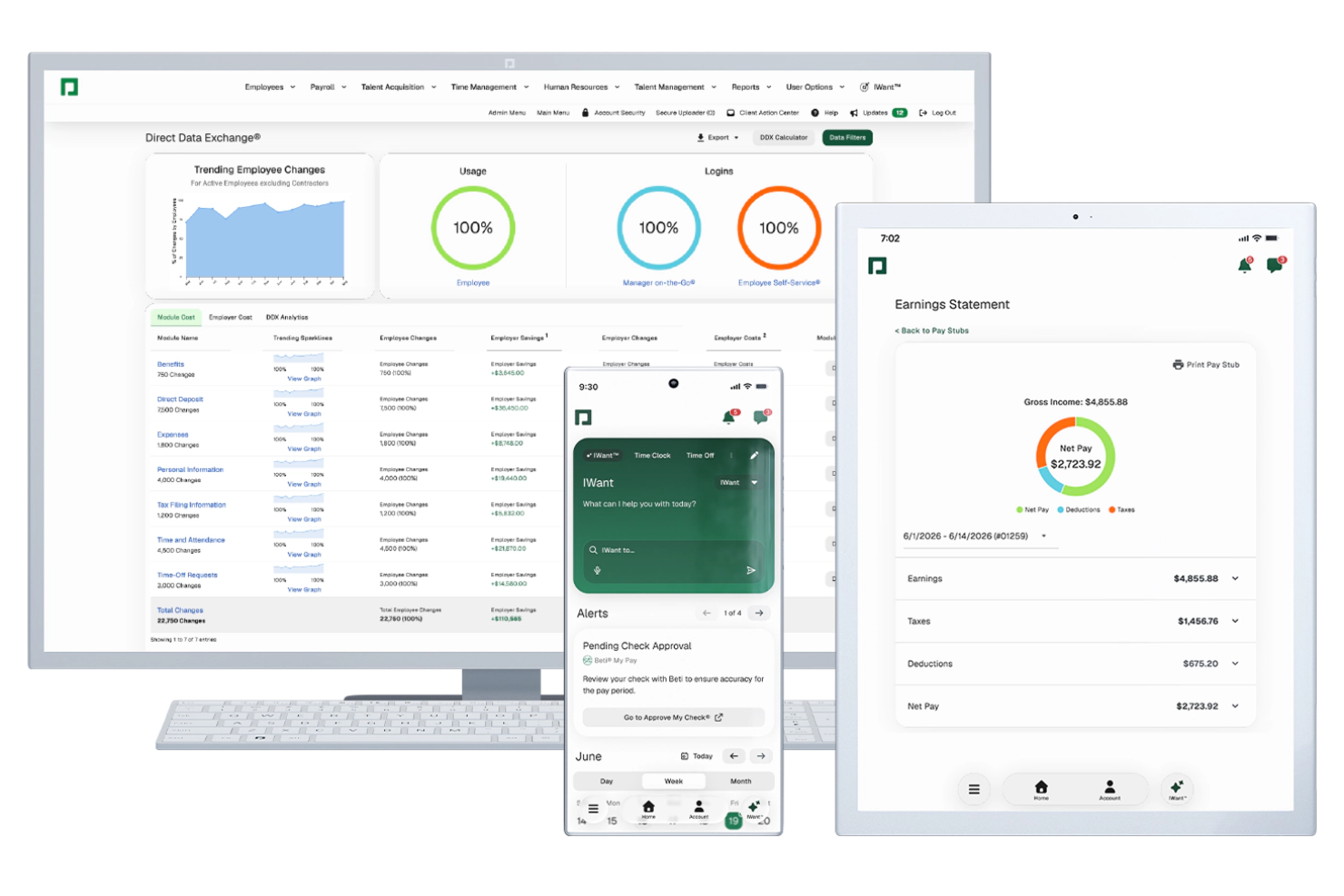
Paycom is a single-database HR and payroll platform with automated time tracking built in, including automated timecard building, clock-in and clock-out via geofencing, biometrics, or mobile, and automated time-off request decisions through its GONE module.
Who Is Paycom Best For?
Paycom is a strong fit for mid-to-large organizations that need time tracking, payroll, and HR management in one unified system.
Why I Picked Paycom
Paycom is one of my top picks because I love how its Employee Self-Service portal connects directly to time tracking in a single database. Employees clock in and out, request time off, pick up or swap shifts, and approve their own payroll before submission. GONE automates time-off decisions instantly based on rules you set, so there's no back-and-forth with managers. IWant, Paycom's AI engine, lets employees pull their own schedule and time data on command without contacting HR.
Paycom Key Features
- Geofencing and Microfence clock-in: Set broad or precise location boundaries that employees must be within to clock in or out via the Paycom mobile app.
- Automated salaried timecard building: Paycom automatically builds and approves timecards for salaried employees, removing manual entry entirely.
- Labor allocation tracking: Assign employee hours to specific cost centers, departments, or positions directly within each timecard.
- Manager on-the-Go app: Managers can review, edit, and approve timecards and schedules from a mobile device in real time.
Paycom Integrations
Integrations are primarily delivered through Paycom's native HR and payroll suite, which includes built-in tools for talent management, time tracking, benefits administration, and employee self-service within a single database.
Pros and Cons
Pros:
- Single database eliminates duplicate data entry
- Geofencing enforces clock-in location accuracy
- Beti® lets employees verify their paychecks
Cons:
- Very limited third-party integration options
- Reporting builder feels less flexible than competitors

Best for deskless teams

Connecteam is a workforce management tool designed for deskless teams across various industries. It allows businesses to improve communication, scheduling, and task management, enhancing productivity and team coordination.
Why I picked Connecteam: It's particularly beneficial for businesses with remote or field-based employees. The app provides an all-in-one platform for managing schedules, tasks, and communication. You can easily create and distribute schedules, ensuring everyone is on the same page. With its focus on deskless teams, Connecteam helps improve communication and efficiency in environments where traditional office setups aren't feasible.
Standout features & integrations:
Features include a time clock feature that allows employees to clock in and out from their mobile devices. The task management tool lets you assign and track tasks in real time. Connecteam also offers a training module to help onboard new employees effectively.
Integrations include QuickBooks, Microsoft Teams, Zoom, Slack, Dropbox, Trello, Asana, and Mailchimp.
Pros and Cons
Pros:
- Real-time task tracking
- Effective for remote employees
- All-in-one management platform
Cons:
- Advanced reporting requires paid plans
- Requires training for new users
New Product Updates from Connecteam

Connecteam Adds Automatic Paid Break Actions and Manual Break Windows
Connecteam adds automatic paid break actions and configurable start windows for manual breaks. These updates help teams manage break schedules and maintain accurate timesheets. For more information, visit Connecteam’s official site.
 .

Best as AI for business
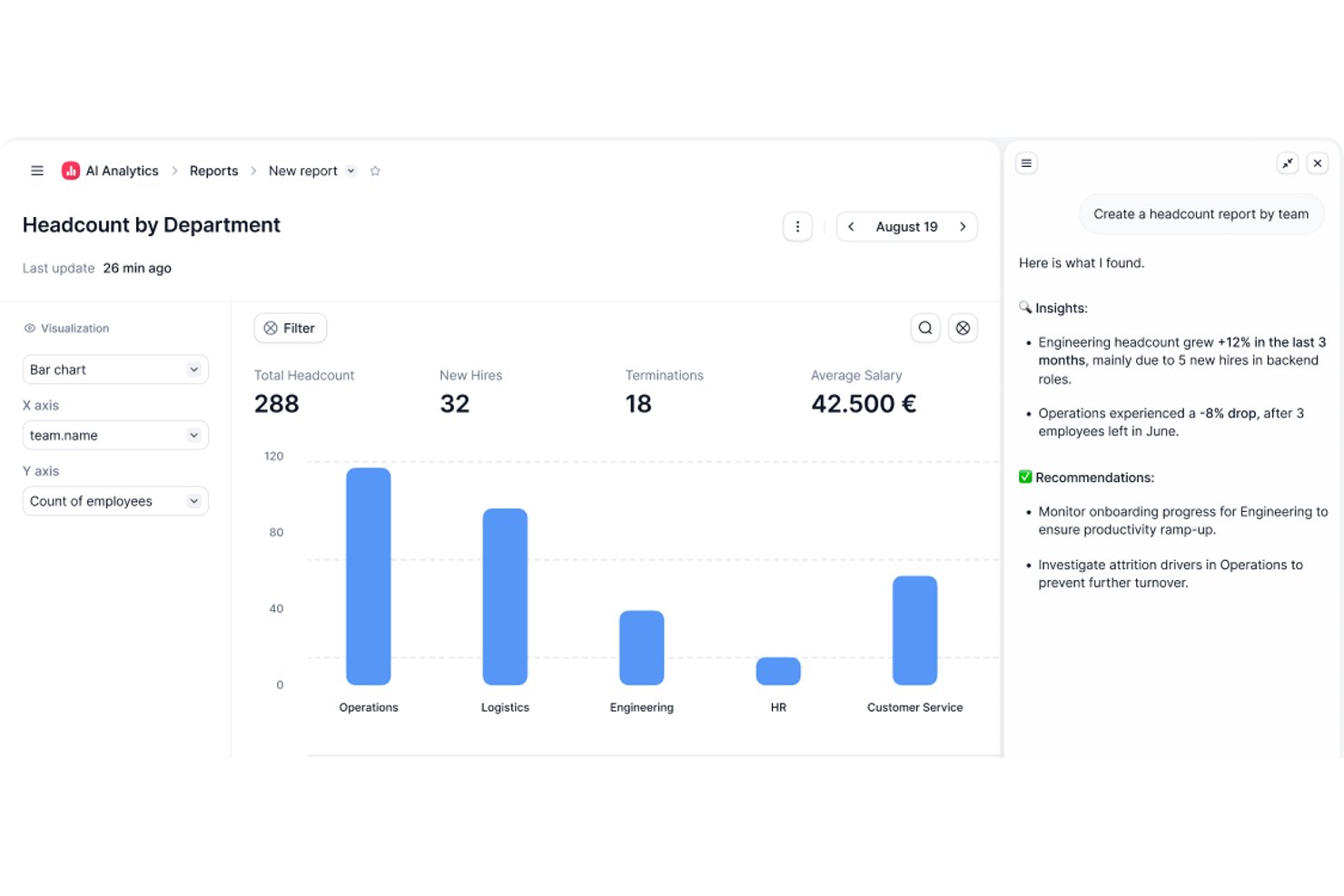
Factorial is an AI-powered HR platform that covers time tracking, shift scheduling, timesheet approvals, and attendance reporting across your team.
Who Is Factorial Best For?
Factorial suits HR and operations teams that want AI-assisted tools for scheduling, reporting, and employee policy questions alongside attendance tracking.
Why I Picked Factorial
I've included Factorial in my top picks because its AI for business positioning means it goes beyond simple clock-in tracking. The AI can answer employee questions about time-off policies, auto-generate attendance reports, and help managers build timetables without manual back-and-forth. I especially like that employees can clock in directly to assigned projects from the mobile app, giving HR teams cleaner data for timesheet approvals without chasing people down.
Factorial Key Features
- Shift scheduling with drag-and-drop: Managers can build and adjust team schedules using a drag-and-drop interface with rotating and bulk shift options.
- Geolocation-based clock-in: Employees clock in from designated locations via mobile, with geofencing controls to restrict check-ins by geography.
- Timesheet review and approval: Managers can filter timesheets by pending status, review hours by day, week, or month, and lock records once approved.
- Offline time tracking with auto-sync: Employees can log hours, breaks, and project time while offline, with data syncing automatically when reconnected.
Factorial Integrations
Factorial has marketplace integrations with Google Workspace, Slack, Microsoft Azure, Microsoft Power BI, Okta, Sage, and DATEV. It also offers a public API, webhooks, OAuth 2.0, and access to hundreds of tools through Zapier.
Pros and Cons
Pros:
- Shift and leave visibility helps plan coverage
- Timesheet submissions are quick for employees
- Attendance records give managers clear clock-in visibility
Cons:
- Overtime rules can require manual validation
- Manual clock-ins replace passive time capture
New Product Updates from Factorial
Factorial One Adds AI Automation Across HR, Finance, and IT
Factorial One adds company-context assistance, workflow automation, and connections across HR, Finance, and IT. These capabilities help employees access information, create documents, and complete routine tasks using AI. For more information, visit Factorial’s official site.
 .

Best for automatic time mapping
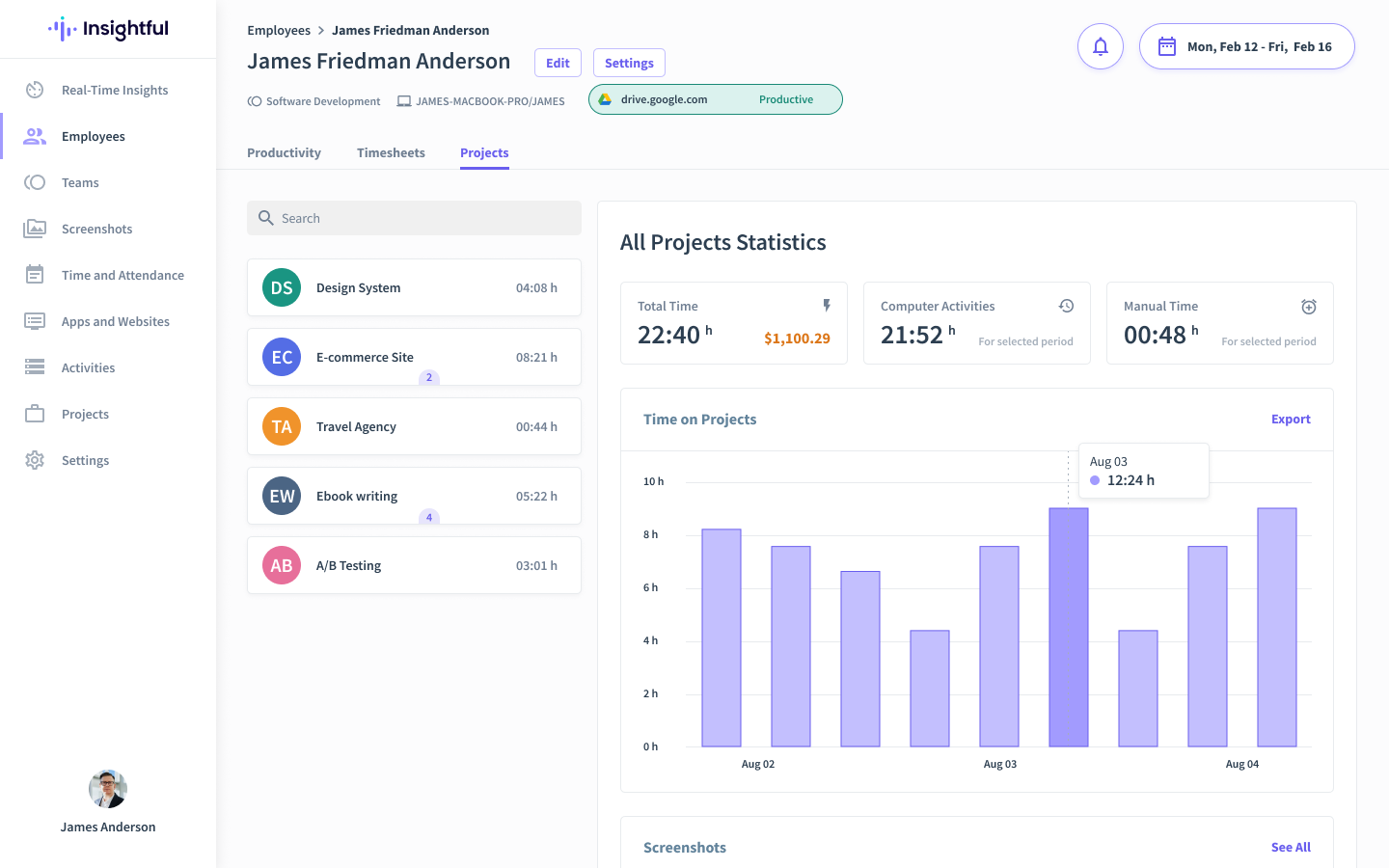
Insightful is an automated time tracking and workforce analytics platform designed for businesses seeking to optimize productivity and gain deeper insights into team dynamics. It caters specifically to industries like IT, finance, and remote-first companies by addressing workload management and process inefficiencies to drive organizational growth.
Why I Picked Insightful
I picked Insightful for its ability to provide valuable insights into productivity trends. The automatic time mapping feature reduces human error and ensures accurate time management. Additionally, the platform's real-time employee and screen monitoring tools offer you a comprehensive view of team activities, helping you optimize staffing and mitigate risks. These features directly address the needs of businesses looking to enhance productivity and operational efficiency.
Insightful Key Features
In addition to its time tracking features, I also found other valuable tools that Insightful offers:
- Attendance Management: This feature allows you to track attendance in real-time, ensuring accurate record-keeping and compliance.
- Workflow Optimization Tools: Identifies and rectifies broken processes, enabling you to improve operational efficiency.
- Insider Threat Detection: Monitors activities to protect your organization from potential security threats.
Insightful Integrations
Integrations include Asana, Jira, Trello, Slack, Microsoft Teams, Google Workspace, Zoom, Monday.com, and Basecamp.
Pros and Cons
Pros:
- Supports remote work monitoring
- Responsive customer service
- Customizable dashboards cater to diverse business needs
Cons:
- No dedicated mobile app
- May not suit smaller or less technical businesses
New Product Updates from Insightful
Insightful Expands MCP and HRIS Integrations
Insightful adds OAuth connections for ChatGPT and Microsoft Copilot Studio through its MCP Server, while HRIS integrations gain manager scope syncing in Beta. These updates expand AI access and automate permission management. For more information, visit Insightful’s official site.
 .

DeskTime
Best for tracking offline activity
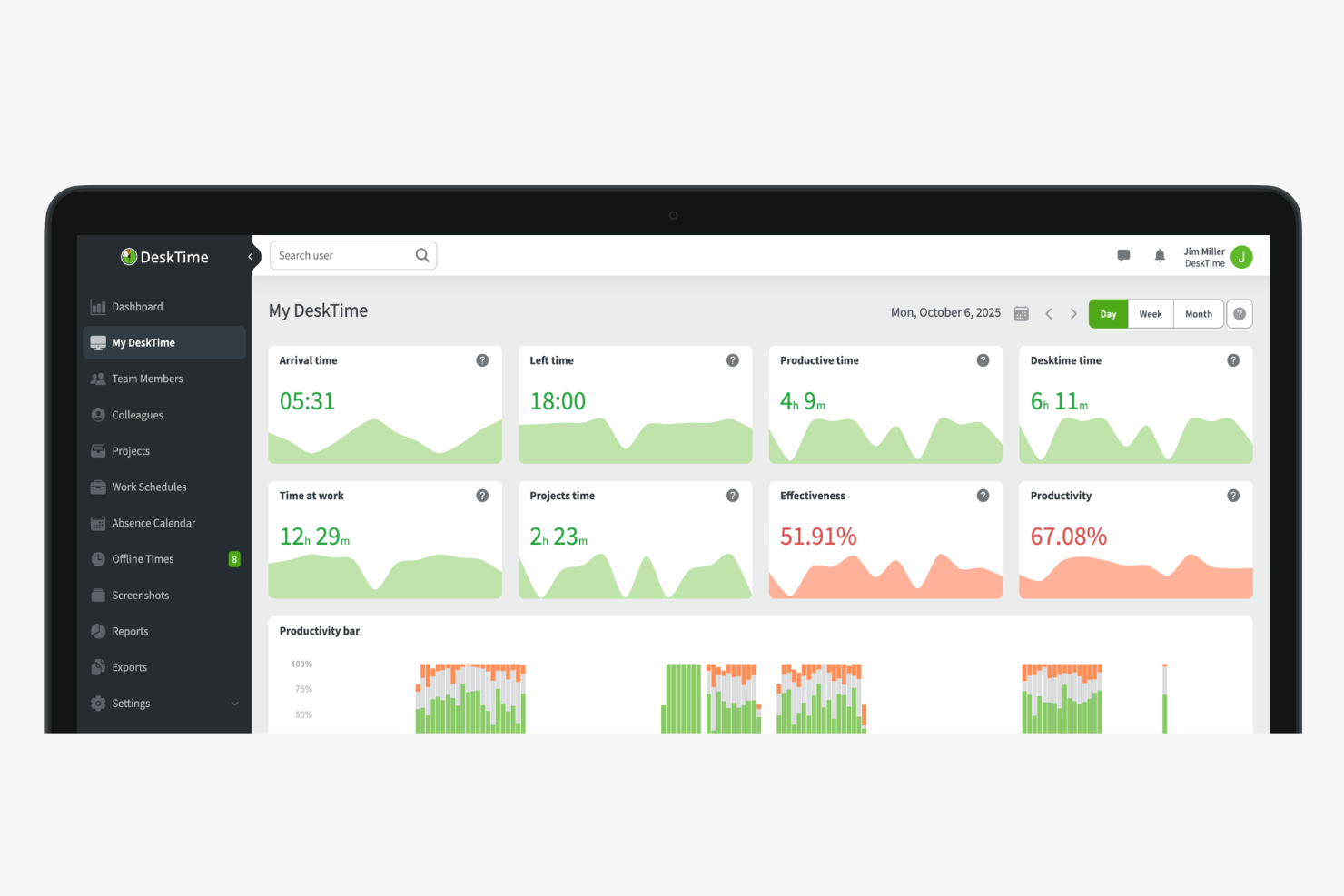
DeskTime is an automatic time tracking tool that logs app and URL usage, offline activity, and project hours in the background—without requiring your team to start or stop a single timer.
Who Is DeskTime Best For?
DeskTime is a good fit for small to mid-sized teams that need visibility into how work hours are spent across both digital and non-digital tasks.
Why I Picked DeskTime
I've included DeskTime in my top picks because of how well it handles the parts of the workday that happen away from the computer. Most automatic trackers stop cold the moment someone steps away from their desk, leaving gaps in the data. DeskTime fills those gaps with offline time logging, where team members can click an idle slot in their timeline and label it as a meeting, phone call, or on-site task. You can also sync Google Calendar or Outlook to fill idle time slots automatically. Admins can require approval before any offline entry counts toward a team member's daily total, which keeps the data honest.
DeskTime Key Features
- Automatic app and URL tracking: DeskTime runs in the background and logs every app and website a team member opens, without any manual input.
- Productivity categorization: Admins can label apps and URLs as productive, unproductive, or neutral to generate a daily productivity score for each team member.
- Screenshot capture: DeskTime takes optional periodic screenshots of each user's screen, with adjustable frequency and privacy settings.
- Absence calendar: Teams can log and track vacation, sick days, and other time-off types directly within DeskTime alongside tracked work hours.
DeskTime Integrations
Integrations include Google Calendar, Outlook Calendar, Trello, Gitlab, Asana, Jira, and Zapier.
Pros and Cons
Pros:
- Runs quietly in the background without input
- Precise tracking of apps and URLs visited
- Logs document and window titles automatically
Cons:
- No real-time screen monitoring
- Lacks predictive web category filtering

Toggl
Best for flexible reporting
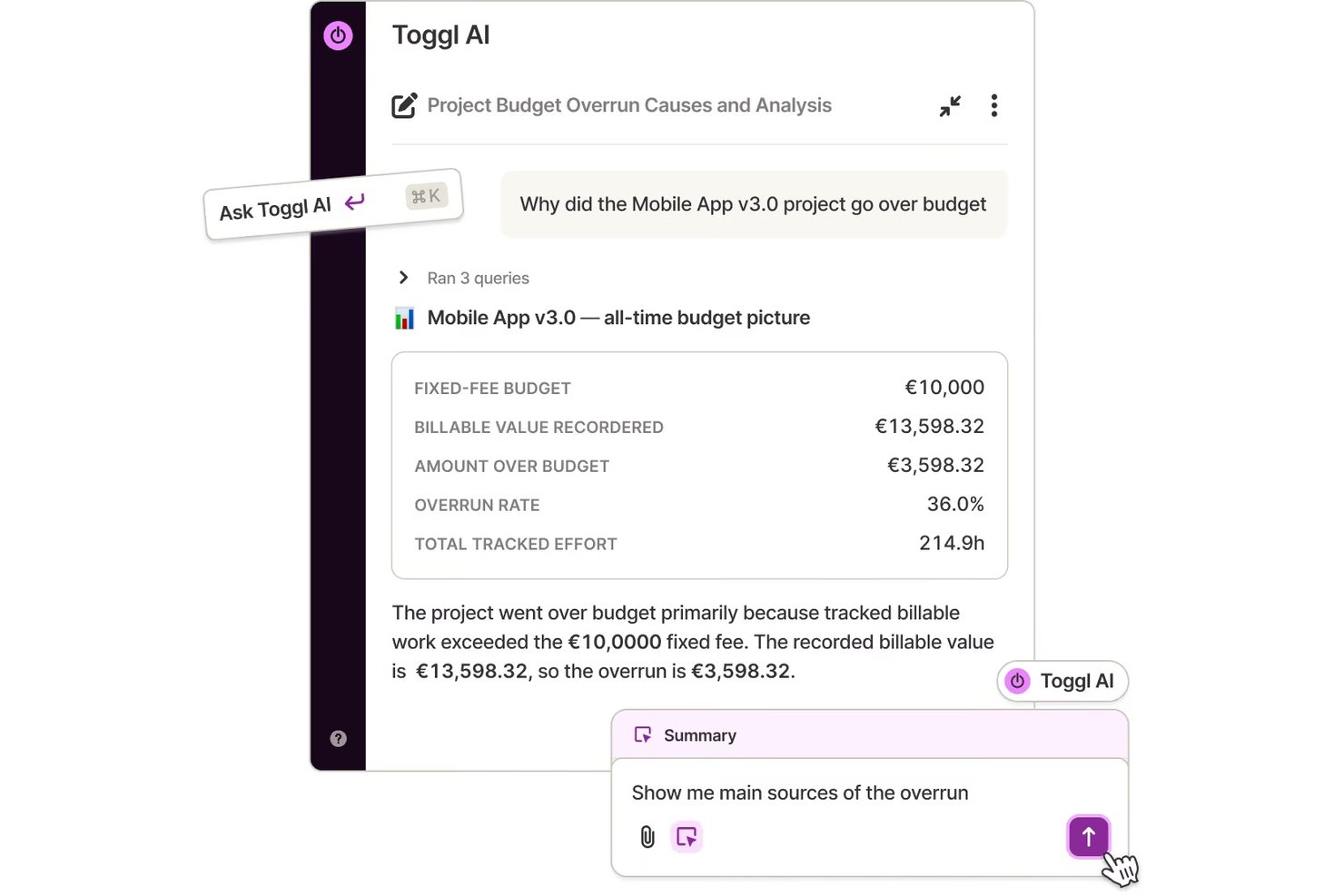
Toggl is a time tracking platform that combines automated activity recording, one-click timers, idle detection, project dashboards, and flexible reporting across web, desktop, and mobile.
Who Is Toggl Best For?
Toggl is a strong fit for operations managers, freelancers, and consultants who need detailed reporting on how time is spent across projects and clients.
Why I Picked Toggl
I've included Toggl in my top picks because its reporting layer genuinely sets it apart from other time tracking tools. I can filter and group time by project, client, member, tag, and date range, then export clean summaries as PDF, CSV, or XLSX for client billing or internal reviews. What I also find useful in practice is the automated timeline: the desktop app records every app and website you're active in throughout the day, and idle detection flags gaps so your logged hours stay accurate without manual cleanup.
Toggl Key Features
- Automated activity timeline: The desktop app records a calendar timeline of your work activities throughout the day, so you can review what you worked on and copy sessions into time entries.
- One-click timer: Start and stop tracking tasks with a single click across web, desktop, and mobile apps.
- Project dashboard: View active project progress, time actuals versus estimates, and task- and member-level breakdowns in one place.
- Idle detection: Toggl flags inactive periods during a running timer, so you can decide whether to keep or discard that time before it affects your logged hours.
Toggl Integrations
Toggl offers native integrations with Jira, Asana, Google Calendar, Slack, Outlook Email & Calendar, and QuickBooks Online. It also provides a REST API, webhooks, MCP server, and CLI for custom integrations.
Pros and Cons
Pros:
- Idle prompts help review inactive time
- Private activity timeline helps reconstruct work
- Detailed project and client time reports
Cons:
- Mobile syncing can lag or misfire
- Desktop capture requires opt-in setup

Homebase
Best for hourly workforce management

Homebase is an automated time tracking platform designed for businesses with hourly teams, offering digital time clocks, employee scheduling, payroll, and built-in team communication tools.
Who Is Homebase Best For?
Homebase is a good fit for small businesses and hourly workforce teams in industries like retail, hospitality, and food service.
Why I Picked Homebase
I picked Homebase as one of the best because it’s built for managing hourly teams across multiple locations. I use its digital time clock and scheduling tools to track hours, breaks, and overtime for every shift. The platform also lets me set custom break rules and automate compliance alerts, which is essential for hourly workforce management.
Homebase Key Features
- Mobile app: Track time, view schedules, and manage shifts from any smartphone.
- Geofencing: Limit clock-ins and clock-outs to specific locations for accurate attendance.
- Payroll integration: Sync timesheets directly with payroll providers to simplify processing.
- Labor cost reporting: Generate reports that break down labor costs by role, department, or location.
Homebase Integrations
Homebase offers 20+ native integrations, including Square, Clover, Toast, Shopify, PayAnywhere, Talech, Lightspeed, Revel, GoDaddy, Restaurant365, ADP RUN, Gusto, QuickBooks Online Plus, Paychex, Heartland, Millennium, SurePayroll, Bank of America payroll, Wells Fargo, and TipHaus. An API is available for custom integrations.
Pros and Cons
Pros:
- Mobile app allows remote clock-ins
- Auto-scheduling adapts to employee availability
- Built-in team messaging for shift coordination
Cons:
- Payroll integrations may need manual adjustments
- Overtime alerts require a paid subscription
New Product Updates from Homebase

Homebase Adds Time Card Review and AutoPayroll Alerts
Homebase adds Time Card Review, time clock monitoring, and AutoPayroll email alerts. These updates help managers correct timecard errors and address payroll issues before processing. For more information, visit Homebase’s official site.
 .

Clockify
Best for a free plan for small teams

Clockify is a time-tracking software ideal for small teams that need to manage time effectively. It offers unlimited free access for up to five users, making it a great choice for small businesses.
Why I picked Clockify: It allows up to five users on free plans, which is perfect for growing teams. The tool provides a simple time tracker that you can start and stop with one click. It also features a project tracking system that helps you monitor progress and allocate resources efficiently. With its generous user policy, Clockify is a practical choice for teams needing flexibility in user management.
Standout features & integrations:
Features include a visual time tracker that lets you log time with ease. The reporting feature generates detailed insights into how time is spent across projects. Clockify also offers a timesheet feature to help you manage and approve team hours efficiently.
Integrations include Asana, Trello, Slack, Jira, QuickBooks, monday.com, GitHub, Google Calendar, Notion, and Zapier.
Pros and Cons
Pros:
- Detailed reporting options
- Easy time logging
- Up to five user access on the free plan
Cons:
- Many features locked behind paid plans
- Basic interface design

Best for payroll integration

QuickBooks Time is a time tracking tool designed for businesses that need accurate time data integrated with payroll. It simplifies time management and payroll processing for companies of all sizes.
Why I picked QuickBooks Time: The integration with QuickBooks payroll systems is a significant advantage, ensuring accurate and efficient payroll management. You can track employee hours with precision, reducing errors in payroll processing. QuickBooks Time offers mobile time tracking, allowing your team to clock in from anywhere. This simple integration with payroll systems makes it a practical choice for businesses looking to incorporate their financial operations.
Standout features & integrations:
Features include GPS tracking that lets you monitor where employees clock in and out. The scheduling feature helps you manage shifts and assign tasks efficiently. QuickBooks Time also offers alerts and notifications to keep you informed about important time tracking events.
Integrations include QuickBooks, Xero, Gusto, BambooHR, ADP, Paychex, Sage, Expensify and Square.
Pros and Cons
Pros:
- GPS location tracking
- Mobile time tracking
- Payroll integration
Cons:
- May have occasional sync issues
- Setup can be complex

Timely
Best for AI-powered time capture

Timely is an automatic time tracking tool designed for businesses like consultancies, agencies, and SaaS companies. It helps users to automate the capture of online work hours without manual input, focusing on enhancing productivity and efficiency.
Why I picked Timely: Its standout feature is AI-powered automatic time tracking, eliminating the need for manual entries. Timely can be used to generate accurate timesheets, ensuring you have reliable data for billing and analysis. The memory tracker helps remember tasks, making time tracking precise. With its project dashboard, you can easily monitor project progress and resource allocation, aligning with its USP of automatic time tracking.
Standout features & integrations:
Features include automatic time tracking that captures work activity without manual input. AI timesheets quickly generate timesheets based on your work patterns. The memory tracker remembers tasks for accurate tracking, ensuring no detail is missed.
Integrations include Asana, Trello, ClickUp, monday.com, Google Calendar, Office 365 Calendar, QuickBooks, and Jira. Third-party software is required for Gmail, Zoom, and Microsoft Teams.
Pros and Cons
Pros:
- Memory tracking feature
- AI-generated timesheets
- Automatic time capture
Cons:
- Learning curve for new users
- Limited offline functionality
Diğer Otomatik Zaman Takibi Yazılımları
Kısa listeme girmeyen ancak yine de göz atmaya değer bazı ek otomatik zaman takibi yazılımı seçenekleri şunlardır:
- Jibble
For biometric time tracking
- TimeCamp
For budget management
- RescueTime
For productivity analysis
- Deltek Replicon Time
For enterprise scalability
- Harvest
For invoicing features
- Monitask
For online timesheets
- ClickTime
For real-time labor cost reporting
- My Hours
For approval workflows
- Memtime
For recovering billable hours
- BusyBusy
For construction industry teams


How I Evaluate Automated Time Tracking Software
I evaluate in two layers: the baseline a tool must meet—passive capture, PM integrations, timesheet approvals—and the differentiators that set the best options apart for project teams.
Core Functionality (Table Stakes For This List)
When I'm selecting tools for my list, I rank each one on a scale from 0 (does not offer the functionality) to 5 (excels in this area) for each core functionality listed below. Then, I calculate the tool's total score into a percentage. Each tool needs to achieve a minimum total score of 65% to be considered for inclusion.
- Automatic Time Capture: I check whether the tool passively tracks app, browser, and document activity without requiring anyone to start a timer or fill out a form.
- Project & Task Assignment: Tracked time should map to specific projects, tasks, clients, or activities so hours don't end up in an unassigned bucket.
- Timesheet Generation & Approvals: I look for auto-populated timesheets with approval workflows, since manual timesheet chasing is exactly what these tools should eliminate.
- PM Tool Integrations: The tool needs native connections to platforms like Jira, Asana, or Monday so tracked time syncs directly to the tasks your team works in.
- Time Reporting & Analytics: I evaluate the depth of reporting available, from utilization breakdowns and budget burn rates to project-level profitability dashboards.
- Billable Time & Rate Management: Tools should let you tag hours as billable or non-billable and configure rates by project, client, or team member for accurate invoicing.
Once I have a list of tools that meet this criteria, I consider what sets each platform apart.
Differentiating Factors (What Sets Vendors Apart)
Here's how I compare and contrast different vendors:
Standout Features
AI-powered categorization is a big one—I look for tools that automatically assign tracked hours to the right project or task without manual sorting. Calendar and meeting sync matters just as much, since client calls and sprint ceremonies often go unlogged. I also evaluate whether a tool offers resource capacity planning, which helps you spot overloaded team members before deadlines slip.
Beyond Features
Privacy controls matter a lot here—automatic tracking can feel invasive if the tool doesn't let team members review, edit, or approve their own logs before submission. I also evaluate how deeply a tool connects to the broader PM and finance stack, since a two-way sync with Jira or Asana is far more useful than a basic one-directional import. Pricing structure is worth examining too, especially whether plans scale reasonably as your team grows without locking core features behind enterprise tiers.
Otomatik Zaman Takibi Yazılımı Nasıl Seçilir?
Uzun özellik listeleri ve karmaşık fiyatlandırma yapılarına kendinizi kaptırmanız kolaydır. Size özgü yazılım seçim sürecinizde ilerlerken odağınızı korumanıza yardımcı olmak için aklınızda bulundurmanız gereken faktörleri aşağıda bir kontrol listesi halinde derledik:
| Faktör | Dikkat Edilmesi Gerekenler |
|---|---|
| Ölçeklenebilirlik | Araç işletmenizle birlikte büyüyebilir mi? Önemli bir maliyet artışı veya performans düşüşü olmadan daha fazla kullanıcıyı ya da projeyi destekleyen çözümleri arayın. |
| Entegrasyonlar | Proje yönetimi veya bordro sistemleri gibi hâlihazırda kullandığınız araçlarla çalışıyor mu? Entegrasyonların kolayca kurulup sürdürülebilmesini kontrol edin. |
| Özelleştirilebilirlik | Yazılımı iş akışlarınıza ve raporlama ihtiyaçlarınıza uyacak şekilde düzenleyebilir misiniz? Ayarları veya gösterge panellerini değiştirme olanağınızı kısıtlayan araçlardan kaçının. |
| Kullanım kolaylığı | Arayüz sezgisel ve kullanımı kolay mı? Dik bir öğrenme eğrisi, ekibinizin benimseme sürecini yavaşlatabilir. |
| Uygulama ve işe alıştırma | Ne kadar hızlı kullanmaya başlayabilirsiniz? Eğitimler, öğreticiler ve hızlı yanıt veren müşteri hizmetleri gibi ayrıntılı işe alıştırma desteği sunan çözümleri arayın. |
| Maliyet | Fiyatlandırma şeffaf mı ve bütçeniz dahilinde mi? Ek özellikler için olası eklentiler veya ücretler de dahil olmak üzere toplam maliyetleri değerlendirin. |
| Güvenlik önlemleri | Yazılım, veri koruma ihtiyaçlarınızı karşılıyor mu? Mevzuata uygun olduğundan ve şifreleme ile erişim denetimleri gibi özellikler sunduğundan emin olun. |
| Destek erişilebilirliği | Ne tür bir destek bekleyebilirsiniz? Sorunları hızlı bir şekilde çözmek için 7/24 erişilebilirlik ve birden fazla iletişim yöntemi sunan çözümleri arayın. |
Otomatik Zaman Takibi Yazılımı Nedir?
Otomatik zaman takibi yazılımı, görevlere ve projelere harcanan zamanı manuel giriş gerektirmeden otomatik olarak kaydeden bir araçtır. Verimliliği ve faturalandırma doğruluğunu artırmak için genellikle serbest çalışanlar, proje yöneticileri ve ekipler tarafından kullanılır. Otomatik zaman kaydı, raporlama ve diğer araçlarla entegrasyon gibi özellikler, verimli zaman yönetimine ve proje takibine yardımcı olur. Genel olarak bu araçlar zamandan tasarruf sağlar, ekip verimliliğini artırır ve zaman takibi ile proje yönetimindeki hataları azaltır.
Özellikler
Otomatik zaman takibi yazılımı seçerken aşağıdaki temel özelliklere dikkat edin:
- Otomatik zaman kaydı: Görevlere harcanan zamanı manuel giriş olmadan kaydederek doğruluğun sağlanmasına ve zamandan tasarruf edilmesine yardımcı olur.
- GPS konum takibi: Çalışanların nerede işe giriş ve çıkış yaptığını izleyerek konuma dayalı gerekliliklere uyulmasını sağlar.
- Yüz tanıma: Girişler sırasında kullanıcı kimliğini doğrulayarak ek bir güvenlik katmanı sağlar ve uzaktan çalışan ekipler için faydalıdır.
- Faturalandırma entegrasyonu: Faturaları doğrudan kaydedilen zamandan oluşturur ve projeler için faturalandırma sürecini basitleştirir.
- Bütçe yönetimi: Proje maliyetlerini takip eder ve bütçelerin etkili bir şekilde yönetilmesine yardımcı olarak finansal hedeflere ulaşılmasını sağlar.
- Özelleştirilebilir raporlama: Kullanıcıların raporları özel ihtiyaçlarına göre uyarlamasını sağlayarak zaman ve proje verileri hakkında içgörüler sunar.
- Mobil erişim: Kullanıcıların hareket hâlindeyken zaman takibi yapmasını sağlayarak uzaktan veya saha tabanlı çalışanlara esneklik sunar.
- Çizelge onayı: Ekip çalışma saatlerini verimli bir şekilde yönetir ve onaylar, doğru bordro işlemlerinin yapılmasını sağlar.
- Gider takibi: Projeyle ilgili giderleri izleyerek maliyetlerin yönetilmesine ve finansal denetimin iyileştirilmesine yardımcı olur.
- Entegrasyon olanakları: Proje yönetimi ve bordro sistemleri gibi mevcut araçlarla çalışarak iş akışlarını kolaylaştırır.
Faydalar
Otomatik zaman takibi yazılımının uygulanması ekibiniz ve işletmeniz için çeşitli faydalar sağlar. Yararlanabileceğiniz birkaç fayda şunlardır:
- Geliştirilmiş doğruluk: Otomatik zaman kaydı, çalışma saatlerinin takibindeki hataları azaltarak ekip üyeleri için doğru faturalandırma ve bordro işlemleri yapılmasını sağlar.
- Artırılmış verimlilik: Raporlama ve analiz gibi özellikler verimsizliklerin belirlenmesine yardımcı olarak ekiplerin iş akışlarını optimize etmesini sağlar.
- Zaman tasarrufu: Zaman takibinin otomatikleştirilmesi manuel giriş gereksinimini ortadan kaldırarak daha önemli görevlere zaman ayırılmasını sağlar.
- Daha iyi bütçe yönetimi: Proje maliyetlerini ve giderlerini takip etmek bütçe dâhilinde kalmanıza ve bilinçli finansal kararlar almanıza yardımcı olur.
- Artan hesap verebilirlik: GPS takibi ve yüz tanıma, çalışanların bulunmaları gereken yerde olmasını sağlayarak sorumluluk bilincini teşvik eder.
- Basitleştirilmiş faturalandırma: Faturalandırma sistemleriyle entegrasyon, kolay fatura oluşturulmasını sağlayarak ödeme sürecini hızlandırır.
- Uzaktan çalışma esnekliği: Mobil erişim, her yerden zaman takibi yapılmasını sağlayarak uzaktan ve saha tabanlı çalışanların çalışma süresi takibini destekler.
Maliyetler ve Fiyatlandırma
Otomatik zaman takibi yazılımı seçmek, mevcut çeşitli fiyatlandırma modellerinin ve planların anlaşılmasını gerektirir. Maliyetler özelliklere, ekip büyüklüğüne, eklentilere ve diğer unsurlara göre değişir. Aşağıdaki tabloda yaygın planlar, ortalama fiyatları ve otomatik zaman takibi yazılımı çözümlerinde genellikle sunulan özellikler özetlenmiştir:
Otomatik Zaman Takibi Yazılımı İçin Plan Karşılaştırma Tablosu
| Plan Türü | Ortalama Fiyat | Yaygın Özellikler |
|---|---|---|
| Ücretsiz Plan | $0 | Temel zaman takibi verileri, sınırlı zaman raporları ve mobil erişim. |
| Kişisel Plan | $3-$10/kullanıcı /ay | Zaman takibi, manuel sayaçlar veya temel otomatik zaman takibi, temel raporlar, tek proje/müşteri takibi ve temel mobil erişim. |
| İşletme Planı | $11-$20/kullanıcı/ay | Zaman takibi, proje/görev takibi, standart raporlama, temel entegrasyon desteği, ekip çizelgeleri ve muhtemelen faturalandırma veya gider kaydı. |
| Kurumsal Plan | $20-$40+/ kullanıcı/ay | Gelişmiş raporlama/analiz, birden çok entegrasyon, ekip/zaman ve devam takibi, gider ve bütçe takibi, bordro dışa aktarma / entegrasyonu, yönetici denetimleri / erişim yönetimi ve kurumsal düzeyde destek. |
Otomatik Zaman Takibi Yazılımı SSS
Otomatik zaman takibi yazılımı hakkında sık sorulan bazı soruların yanıtları aşağıda yer almaktadır:
Otomatik zaman takibi yazılımı nasıl çalışır?
Otomatik zaman takibi yazılımı, görevler veya projeler üzerinde harcadığınız zamanı otomatik olarak kaydeder. Bilgisayar etkinliğinizi, kullandığınız uygulamaları ve web sitelerini izlemek gibi çeşitli yöntemler kullanır. Böylece çalışma saatlerinizi manuel olarak kaydetmek zorunda kalmaz, zamandan tasarruf eder ve hataları azaltırsınız. Birçok araç, hareket hâlindeyken zamanınızı takip edebilmenizi sağlayan mobil uygulamalar da sunar.
Otomatik zaman takibi yazılımı mevcut araçlarımla entegre olabilir mi?
Evet, otomatik zaman kaydı yazılımlarının çoğu proje yönetimi, faturalandırma ve bordro sistemleri gibi mevcut araçlarla entegre olabilir. Mevcut iş akışınıza uyduğundan emin olmak için her yazılımın sunduğu belirli entegrasyonları kontrol edin. Entegrasyon, farklı sistemler arasındaki veri akışını kolaylaştırarak verimliliği artırabilir.
Otomatik zaman takibi yazılımıyla verilerim güvende mi?
Evet, saygın otomatik zaman takibi yazılımı sağlayıcıları veri güvenliğine öncelik verir. Verilerinizi korumak için şifreleme, güvenli sunucular ve düzenli güncellemeler kullanırlar. Yazılımın güvenlik özelliklerini ve veri koruma düzenlemelerine uygunluğunu her zaman inceleyin. Gizliliğinize ve veri bütünlüğünüze önem veren bir sağlayıcı seçmeniz önemlidir.
Otomatik zaman takibi yazılımını kullanmak için teknik becerilere ihtiyacım var mı?
Hayır, çoğu otomatik zaman takibi yazılımını kullanmak için ileri düzey teknik becerilere ihtiyacınız yoktur. Bu araçlar, sezgisel arayüzleriyle kullanıcı dostu olacak şekilde tasarlanmıştır. Birçok sağlayıcı, başlamanıza yardımcı olmak için eğitimler, müşteri desteği ve başlangıç desteği sunar. Sizin veya ekibinizin endişeleri varsa güçlü destek ve eğitim kaynaklarına sahip bir yazılım arayın.