

2026’da İncelenen En İyi 10 Mesai Takip Yazılımı

En İyi Zaman Takibi Yazılımları Kısa Listesi


En iyi zaman takibi yazılımı, çalışma saatlerini izlemenize ve ekibinizin zamanını daha etkili bir şekilde yönetmenize yardımcı olur. Ekibinizin belirli projeler ve görevler için ne kadar zaman harcadığını takip etmenin bir yolu olmadığında, müşterilerinize harcadığınız zaman için doğru faturalandırma yapamazsınız ve genel kârlılığınız zarar görebilir.
Bir ajans yönetme deneyimim ve 3 yılı aşkın yazılım test deneyimimi kullanarak, mevcut en iyi seçenekler hakkında bağımsız bilgiler sunmak için çeşitli zaman takibi araçlarını inceledim. Her aracın analizini ve planlama ile iş gücü takibi gibi yaygın zorlukları nasıl ele aldığını okuyun. İster zaman çizelgelerini ister ekip koordinasyonunu yakından takip etmeye çalışıyor olun, projeniz ve ekibinizin ihtiyaçları için doğru seçeneği bulmanıza yardımcı olabilirim.
Why Trust Our Software Recommendations
Our team has been testing and reviewing software since 2012. As project managers ourselves, we know how difficult—and important—it is to choose the right software.
For this guide, we evaluated tools using hands-on testing and independent research, scoring tools using our selection criteria. We also draw on insights from industry thought leaders and practicing project management experts.
Our reviews reflect our human editorial judgment, not a sales pitch.
Expert reviewers:
Zaman Takibi Yazılımları Karşılaştırma Tablosu
Aşağıdaki tablo, en iyi zaman takibi yazılımı seçimlerimin fiyatlandırma ayrıntılarını karşılaştırmaktadır.
| Tool | Best For | Trial Info | Price | ||
|---|---|---|---|---|---|
| 1 | Best as AI for business | Free trial + Free demo available | From $8/user/month | Website | |
| 2 | Best for deskless teams | Free plan + 14-day free trial available | Pricing upon request | Website | |
| 3 | Best for monitoring employee hours | Free plan + 30-day free trial + free demo available | From $99/month (billed annually) | Website | |
| 4 | Best for facial recognition sign-in | 14-day free trial + free demo available | From $4.99/user/month (billed annually) | Website | |
| 5 | Best for service delivery teams | 14-day free trial | From $49/user/month (billed annually) | Website | |
| 6 | Best for team time tracking | Free plan + 14-day free trial available | From $8.50/user/month (billed annually) | Website | |
| 7 | Best for shift scheduling | Free trial available | From $2.50/user/month | Website | |
| 8 | Best for project tracking | Free plan + 14-day free trial + free demo available | From $9.99/user/month (billed annually) | Website | |
| 9 | Best for employee scheduling | Free trial + free demo available | Pricing upon request | Website | |
| 10 | Best for project time tracking | Free plan + 30-day free trial available | From $9/seat/month (billed annually) | Website |
En İyi Zaman Takibi Yazılımı İncelemeleri
Aşağıda en iyi zaman takibi yazılımlarının ayrıntılı özetlerini bulabilirsiniz. Her araç için temel özellikleri, avantajları ve dezavantajları, entegrasyonları ve ideal kullanım alanlarını ele alarak sizin için en uygun seçeneği bulmanıza yardımcı oluyorum.

Best as AI for business
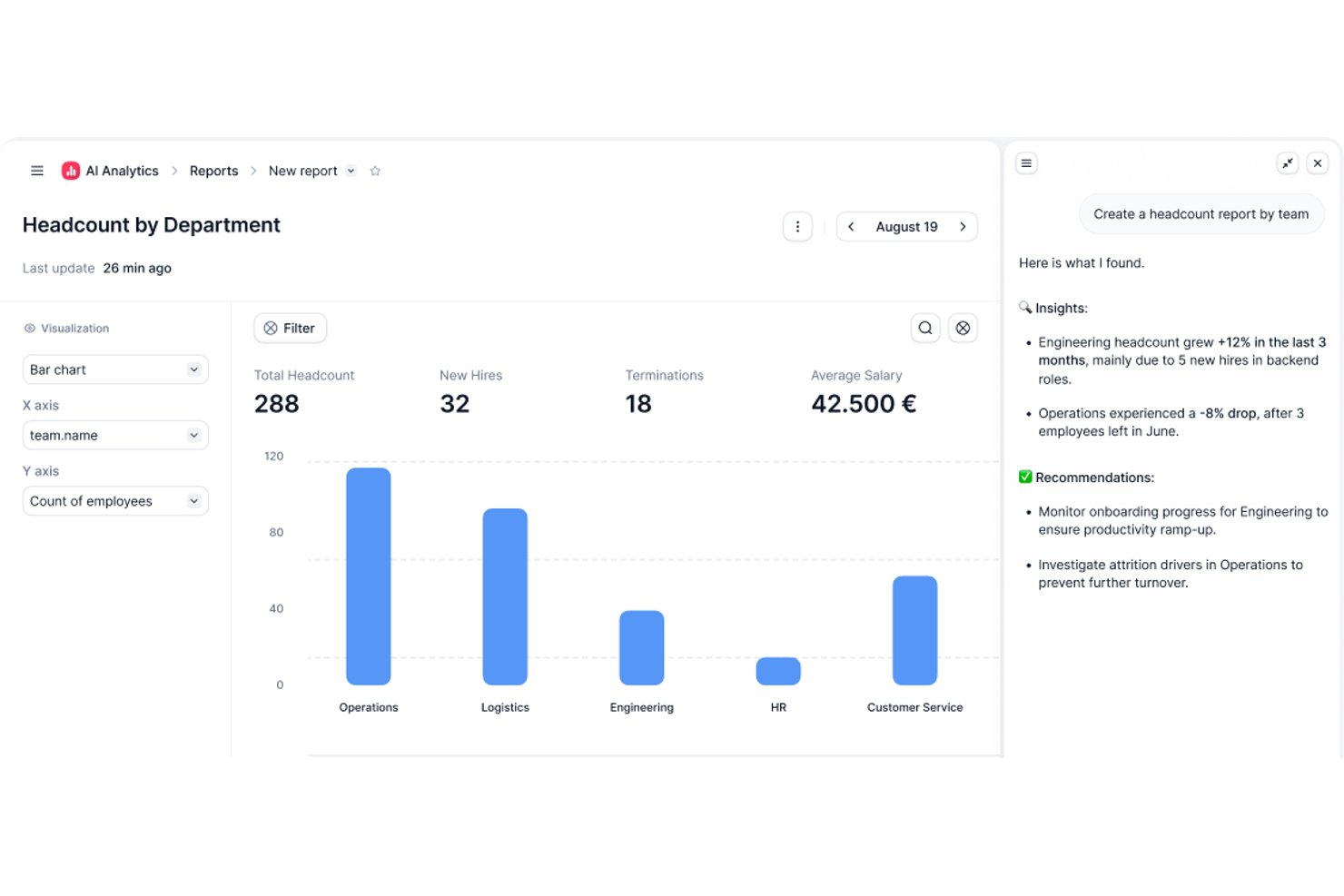
Factorial is an AI-powered HR and time management platform that covers employee time tracking, shift scheduling, time-off management, and attendance reporting across computer, mobile, QR code, and geolocation clock-in methods.
Who Is Factorial Best For?
Factorial suits HR and payroll managers at small and midsize businesses who want a single AI-powered platform to handle time tracking, scheduling, and attendance alongside broader HR operations.
Why I Picked Factorial
I've included Factorial in my top picks because its AI-powered approach means it's doing more than just logging hours—it actively assists with scheduling, reporting, and answering employee policy questions. I like how the AI handles timetable planning across multiple clock-in methods (computer, QR code, geolocation, and mobile app), so distributed teams aren't left guessing about their schedules. The AI-generated reporting also means managers spend less time pulling attendance data manually.
Factorial Key Features
- Multi-method clock-in support: Employees can clock in via computer, mobile app, QR code, facial recognition, or geolocation, depending on your team's setup.
- Timesheet approval and locking: Managers can review and approve timesheets, which locks the records to confirm they've been validated before payroll.
- Time-off request and approval workflow: Employees submit time-off requests directly in the platform, and managers can approve, reject, and view upcoming absences in a shared view.
- Payroll data export: Approved worked hours can be transferred to Factorial's Compensation module and exported in Excel or CSV format for payroll processing.
Factorial Integrations
Factorial offers marketplace integrations with DATEV LODAS, Sage 200, Google Workspace, Slack, Microsoft Power BI, and Okta, plus Zapier. Its public API supports OAuth 2.0, webhooks, API keys, and SDKs for custom integrations.
Pros and Cons
Pros:
- Employees and managers share leave visibility
- Approved timesheets lock validated clock records
- Clock-ins work across mobile, QR, and desktop
Cons:
- Geolocation cannot enforce clock-in boundaries
- Payroll hours require approved hourly timesheets
New Product Updates from Factorial
Factorial One Adds AI Automation Across HR, Finance, and IT
Factorial One adds company-context assistance, workflow automation, and connections across HR, Finance, and IT. These capabilities help employees access information, create documents, and complete routine tasks using AI. For more information, visit Factorial’s official site.
 .

Best for deskless teams

Connecteam is a time clock app and workforce management tool for deskless workers and mobile teams. It’s used in industries like retail, hospitality, and construction to manage communication, schedules, and tasks.
Why I picked Connecteam: Connecteam lets your team access schedules, tasks, and time tracking remotely so you can all stay on the same page. You can chat, send updates, and manage shifts from one place. It also lets you create training modules to help new employees get started quickly.
Standout Features & Integrations:
Features include GPS tracking to monitor employee location and automated workflows to improve efficiency. The tool also offers employee recognition programs to boost morale.
Integrations include QuickBooks, Gusto, Xero, and Zapier.
Pros and Cons
Pros:
- GPS tracking capabilities
- Easy scheduling features
- Effective for mobile teams
Cons:
- Occasional app performance issues
- Limited advanced features
New Product Updates from Connecteam

Connecteam Adds Automatic Paid Break Actions and Manual Break Windows
Connecteam adds automatic paid break actions and configurable start windows for manual breaks. These updates help teams manage break schedules and maintain accurate timesheets. For more information, visit Connecteam’s official site.
 .

Homebase
Best for monitoring employee hours

Homebase is a team management and time clock software built specifically for small businesses. It combines time tracking, scheduling, payroll, and HR management in one easy-to-use platform. Designed for hourly and shift-based teams, it helps you stay organized while keeping employees informed about schedules and shift changes.
Why I picked Homebase: I picked Homebase because it makes time tracking and payroll simple for small businesses. You can monitor employee hours through a connected digital clock, ensuring accurate payments for hourly workers. I also like that it automates scheduling and communication with shift reminders, time-off requests, and built-in messaging, helping you avoid conflicts and keep operations running smoothly.
Homebase standout features and integrations:
Features include smarter time clocks with automated alerts for shift changes, built-in team messaging for real-time communication, and HR compliance tracking to help you meet labor law requirements. You can also manage labor costs by syncing schedules with sales data from your POS system.
Integrations include Clover, Toast, Shopify, PayAnywhere, GoDaddy, Talech, Lightspeed, Revel, Square, Paychex, ADP RUN, Gusto, and QuickBooks Online Plus.
Pros and Cons
Pros:
- Includes built-in team messenger
- Provides automated shift notifications
- Integrates payroll with tracked hours
Cons:
- Geofencing restricts employees
- Free version offers limited functionality
New Product Updates from Homebase

Homebase Adds Time Card Review and AutoPayroll Alerts
Homebase adds Time Card Review, time clock monitoring, and AutoPayroll email alerts. These updates help managers correct timecard errors and address payroll issues before processing. For more information, visit Homebase’s official site.
 .

Best for facial recognition sign-in
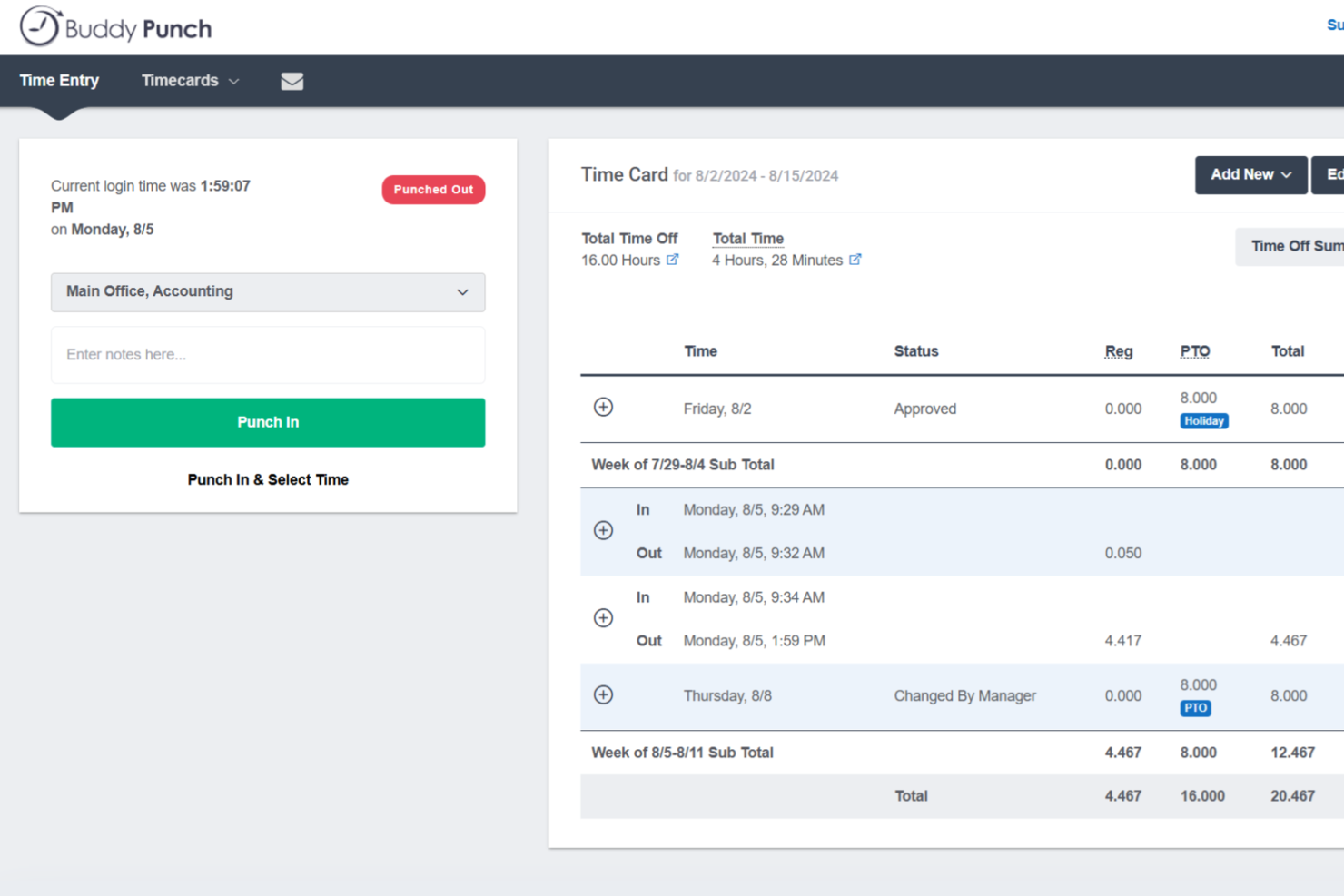
Buddy Punch is a time clock and attendance platform with flexible clock-in methods, overtime rule configuration, employee scheduling, PTO tracking, and direct payroll integrations.
Who Is Buddy Punch Best For?
Buddy Punch is a strong fit for small to mid-sized businesses with hourly or field-based workforces, particularly in industries like construction, retail, healthcare, and hospitality.
Why I Picked Buddy Punch
I've included Buddy Punch in my top picks because of how well it handles identity verification at clock-in, particularly through facial recognition. When an employee punches in via the Buddy Punch kiosk, the system captures and compares their face against a stored reference photo, which directly addresses buddy punching on shared devices. I also like that facial recognition isn't the only verification layer available: you can combine it with photos on punch, where a snapshot is automatically taken at each clock-in and stored on the timesheet for admin review. That combination gives you a clear, auditable record of who actually punched in and when.
Buddy Punch Key Features
- GPS tracking: Logs the location of each punch so you can see exactly where employees clocked in and out.
- IP address locking: Restricts clock-ins to approved networks, preventing remote punches from unauthorized locations.
- Timesheet approvals: Lets managers review, edit, and approve employee timesheets before they're sent to payroll.
- PTO tracking: Manages time-off requests, accrual balances, and approvals directly within the platform.
Buddy Punch Integrations
Buddy Punch offers native integrations focused on payroll providers, including QuickBooks Online, QuickBooks Desktop, ADP Workforce Now, Gusto, Paychex, Paycor, Paylocity, Rippling, Workday, and SurePayroll. It also connects with Zapier and provides an API for custom integrations.
Pros and Cons
Pros:
- Automatic overtime and hours calculation
- Geofence radius is adjustable per location
- Multiple punch-in methods including facial recognition
Cons:
- National holidays must be entered manually
- Requires internet connection to clock in

Best for service delivery teams

Rocketlane is a project delivery platform that helps teams manage timelines, tasks, and collaboration across client-facing projects. It’s for service delivery teams that need better visibility into project progress and time spent.
Why I picked Rocketlane: It’s made for tracking time alongside service delivery work like onboarding, implementation, and support. Team members can log time by task or project and you can compare it against planned hours. Timesheets are auto-filled based on work logs, and you can also set up billable vs non-billable hours to track margins.
Standout Features & Integrations:
Features include time approval workflows that let you review submissions before they’re final. There's also a reporting dashboard to view time spent across clients, projects, and teams.
Integrations include Salesforce, Slack, Google Calendar, HubSpot, and Zapier.
Pros and Cons
Pros:
- Automated workflows
- Visual project timelines
- Real-time status tracking
Cons:
- Initial setup complexity
- New users may require training

Everhour
Best for team time tracking

Everhour is a time tracking and project management tool that helps teams better manage their time. It's used by project managers and team leads to zero in on budget and project progress.
Why I picked Everhour: Everhour lets you track time and create reports that update in real-time. It integrates with tools like Asana and Trello, so you don’t have to keep switching tabs. The layout is simple and helps you stay on top of budgets and project work without distraction. You can also use the browser extension or iPhone app to track time when you’re away from your desk.
Standout Features & Integrations:
Features include progress tracking, detailed reporting, and employee record management. Built-in budgeting and invoicing features help you manage finances in the same tool.
Integrations include Asana, ClickUp, Jira, Trello, Basecamp, GitHub, Slack, QuickBooks, Xero, and monday.com.
Pros and Cons
Pros:
- Simple timesheet management
- Easy integration with project management tools
- Customizable reporting options
Cons:
- Occasional syncing issues
- Limited offline capabilities

Best for shift scheduling

When I Work is a scheduling and time tracking tool that helps manage employee shifts. It’s mainly used to handle schedules, track hours, and stay in touch with hourly staff.
Why I picked When I Work: When I Work helps you manage shift schedules by letting your team set availability and swap shifts easily. It’s simple to use, and your team can see updates right away. Built-in messaging keeps everyone in the loop, and the mobile access lets your team check schedules from anywhere.
Standout Features & Integrations:
Features include automated scheduling to reduce manual input and clock-in/out reminders to maintain accurate time tracking. Leave management features let you track employee time off.
Integrations include ADP, QuickBooks, Square, Gusto, and Paychex.
Pros and Cons
Pros:
- Clock-in/out reminders
- Automated scheduling features
- Effective shift scheduling
Cons:
- Limited customization options
- Limited advanced features

Best for project tracking

Teamwork.com is a project management tool that helps teams track work and meet deadlines. It’s built for project managers and teams that want an organized way to collaborate and manage tasks.
Why I picked Teamwork.com: Teamwork.com gives you the ability to track time from tasks, projects, or the timer tool so you can see where time is spent as work happens. Your team can log billable and non-billable hours and tie them to specific clients or projects. The platform also shows you time reports that highlight what’s been worked on and how it compares to estimates. Time entries work alongside budgeting and invoicing tools to help you track cost and profit.
Standout Features & Integrations:
Features include bulk time entry so you can log hours for multiple tasks at once. There's also a built-in timer that helps your team track hours in real time.
Integrations include Slack, HubSpot, QuickBooks, Zapier, Microsoft Teams, Dropbox, Google Drive, Xero, Trello, and OneDrive.
Pros and Cons
Pros:
- Detailed reporting capabilities
- Customizable workflows
- Comprehensive project tracking tools
Cons:
- May require additional customization
- Learning curve for new users

Best for employee scheduling

Humanity Schedule is a workforce management tool for employee scheduling and time tracking. Managers and HR teams can use it to manage shifts and handle staffing efficiently.
Why I picked Humanity Schedule: Humanity Schedule helps you build shift plans and offers schedules that update in real time. You can set availability to help avoid conflicts, and use the mobile app to share changes fast. Reporting features let you see labor costs and how well you're managing shifts, so you can adjust as needed.
Standout Features & Integrations:
Features include shift swapping to provide flexibility for employees and forecasting tools for anticipating staffing needs. Humanity Schedule also offers employee self-service so staff can manage their own schedules.
Integrations include ADP, Oracle, QuickBooks, Workday, BambooHR, and Paychex.
Pros and Cons
Pros:
- Comprehensive reporting capabilities
- Employee availability management
- Automated shift planning
Cons:
- May need frequent updates
- Limited customization options

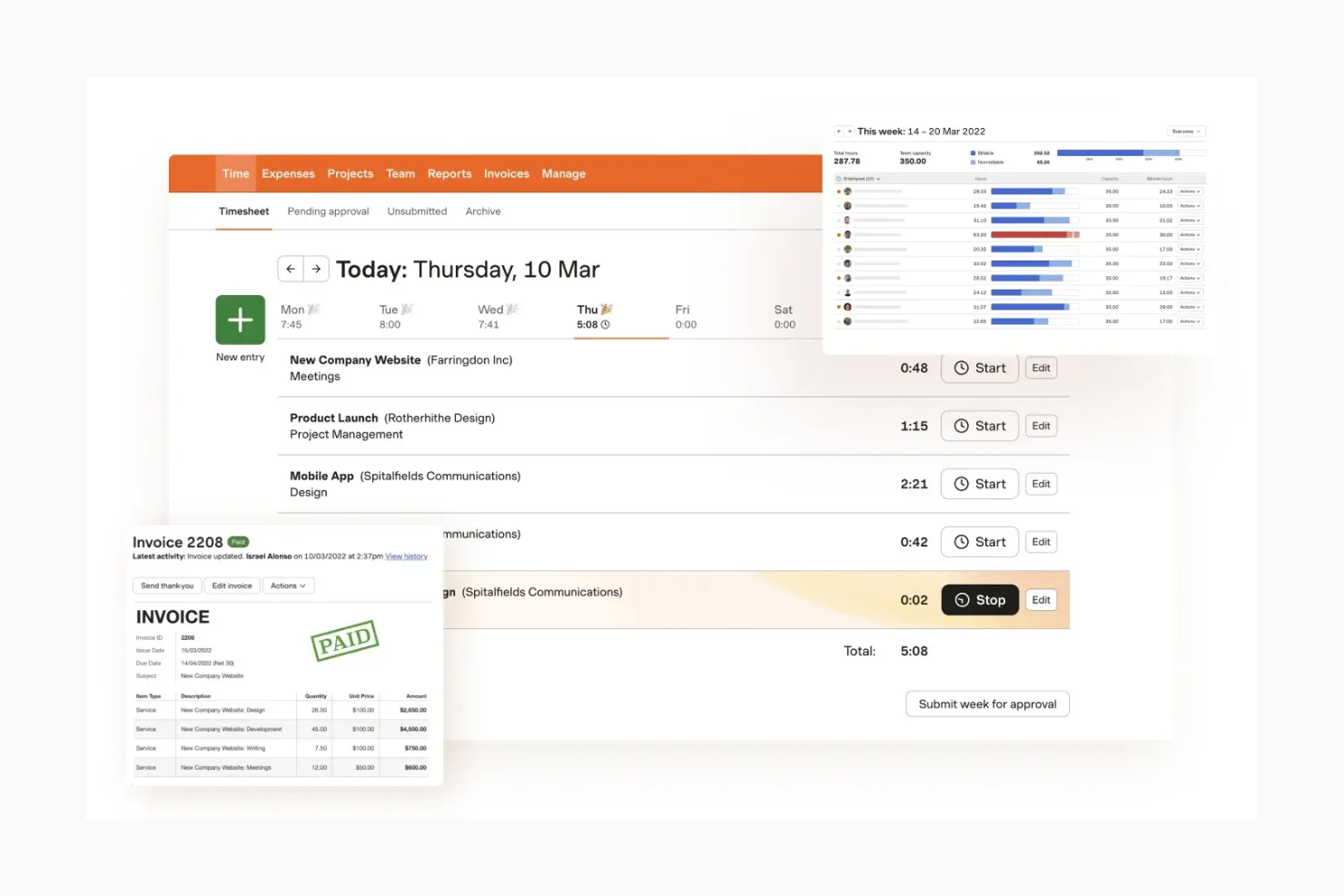
Harvest is a time tracking and invoicing tool for teams and freelancers who need to track hours and manage billing. It helps small to mid-sized teams stay on top of time and expenses.
Why I picked Harvest: Harvest makes it easy for you and your team to track time with simple timesheets and budget tools. You can turn tracked hours into invoices and send them straight to clients. The reports help you see where your team’s time goes. Its clean layout helps you get started without a lot of training.
Standout Features & Integrations:
Features include automatic reminders when timesheets haven’t been submitted and expense tracking to help manage project costs. Harvest also supports time tracking through a browser extension, which makes it easy to log hours as you work.
Integrations include Asana, Trello, Basecamp, QuickBooks, Xero, Slack, Stripe, PayPal, GitHub, and Google Calendar.
Pros and Cons
Pros:
- Supports expense tracking
- Automatic timesheet reminders
- Easy invoicing from tracked hours
Cons:
- Limited customization options
- May not fit large enterprises
Diğer Zaman Takibi Yazılımları
Kısa listeme girmeyen, ancak aradığınızı henüz bulamadıysanız incelemeye değer bazı ek zaman takibi yazılımı seçeneklerini burada bulabilirsiniz:
- Scoro
For business management
- Beesbusy
For small businesses
- Monitask
For automated time tracking
- Resource Guru
For resource scheduling
- BigTime
For professional services
- GoodDay
For integrated project-based time tracking
- Wrike
For customizable workflows
- BambooHR
For tracking PTO and holidays
- Kantata
For tracking billable hours on client work
- Workday
For enterprise HR solutions
- BrightHR
For HR document management
- ADP
For payroll and HR integration
- Paychex
For payroll processing
- monday.com
For visual project planning


How I Evaluate Time Clock Software
I evaluate time clock tools across two layers: core functionality like real-time clock-in and project time allocation, then differentiators that separate good tools from great ones.
Core Functionality (Table Stakes For This List)
When I'm selecting tools for my list, I rank each one on a scale from 0 (does not offer the functionality) to 5 (excels in this area) for each core functionality listed below. Then, I calculate the tool's total score into a percentage. Each tool needs to achieve a minimum total score of 65% to be considered for inclusion.
- Real-Time Clock In/Out: I check whether team members can punch in across web, mobile, and kiosk—especially for distributed teams splitting time between on-site and remote work.
- Project & Task Time Allocation: Logged hours should map to specific projects, tasks, or clients so PMs can see where time actually goes rather than just total hours worked.
- Timesheet Management & Approvals: I evaluate the approval workflow depth, looking for multi-level reviews, auto-reminders, and timesheet locking that prevent edits after sign-off.
- Reporting & Analytics: Reports need to go beyond raw hour totals. I look for billable vs. non-billable breakdowns, utilization rates, and budget-to-actual comparisons.
- Payroll & Billing Integrations: Whether you're pushing approved hours to QuickBooks, Xero, or a payroll provider, I evaluate the breadth and depth of native integrations available.
- Overtime & Compliance Rules: Configurable pay rules matter—especially for teams managing contractors and employees across multiple regions with different overtime and break requirements.
Once I have a list of tools that meet this criteria, I consider what sets each platform apart.
Differentiating Factors (What Sets Vendors Apart)
Here's how I compare and contrast different vendors:
Standout Features
Budget and burn alerts are a big one for me. When tracked hours start creeping toward the estimate, I want the PM notified before it becomes a surprise in the next status meeting. Capacity and workload heatmaps give resource planners a visual read on who's overloaded and who has room, which directly shapes sprint planning and staffing decisions. I also look for client portal access, since agency teams often need to share logged hours with clients for billing transparency without granting full system access.
Beyond Features
Integration depth with your existing project management stack matters. If your team runs sprints in Jira or manages deliverables in Asana, the time clock tool needs to sync tasks and hours without manual re-entry. I also evaluate pricing models closely—per-user pricing can balloon fast for a 50-person PMO compared to flat-rate plans. Finally, I consider team size and industry fit, since an agency billing hourly has very different needs than an enterprise IT department tracking internal project costs.
Zaman Takibi Yazılımı Nasıl Seçilir?
Uzun özellik listeleri ve karmaşık fiyatlandırma yapıları içinde kaybolmak kolaydır. Kendinize özgü yazılım seçimi sürecinizi yürütürken odaklanmanıza yardımcı olmak için göz önünde bulundurmanız gereken faktörleri içeren bir kontrol listesi hazırladım:
| Faktör | Dikkat Edilmesi Gerekenler |
|---|---|
| Ölçeklenebilirlik | Yazılım ekibinizle birlikte büyüyebilecek mi? İşletmeniz büyüdükçe daha fazla kullanıcıyı veya konumu destekleyip destekleyemeyeceğini değerlendirin. Gelecekteki büyümenizi sınırlayabilecek araçlardan kaçının. |
| Entegrasyonlar | Bordro veya İK sistemleri gibi mevcut araçlarınıza bağlanabiliyor mu? Veri silolarını önlemek için yazılımın hâlihazırda kullandığınız araçlarla sorunsuz bir şekilde entegre olabildiğinden emin olun. |
| Özelleştirilebilirlik | Belirli iş akışlarınıza uyacak şekilde düzenleyebilir misiniz? Raporları ve gösterge panolarını ekibinizin kendine özgü ihtiyaçlarına göre özelleştirmenize olanak tanıyan seçenekleri arayın. |
| Kullanım Kolaylığı | Ekibiniz için kullanımı sezgisel mi? Kullanıcı dostu bir arayüz, eğitim süresini azaltır ve ekibinizin yazılımı hızlı bir şekilde benimsemesine yardımcı olur. |
| Uygulama ve İlk Kullanıma Hazırlama | Başlamak ne kadar sürecek? Kurulum için gereken kaynakları ve geçişi kolaylaştırmak üzere sağlayıcının destek veya eğitim sunup sunmadığını değerlendirin. |
| Maliyet | Bütçenize uygun mu? Mali kısıtlarınıza uyduğundan emin olmak için gizli ücretler veya ek özellikler için alınan ücretler de dâhil olmak üzere toplam maliyetleri değerlendirin. |
| Güvenlik Önlemleri | Araç verilerinizi ve gizliliğinizi koruyor mu? Ekibinizin bilgilerinin güvende olduğundan emin olmak için iki faktörlü kimlik doğrulama ve veri şifreleme gibi özellikleri kontrol edin. |
Mesai Saati Yazılımı Nedir?
Mesai saati yazılımı, çalışanların çalışma saatlerini ve devam durumlarını takip etmenize yardımcı olan bir araçtır. Yöneticiler, İK ekipleri ve ekip liderleri, faturalandırma ve maaş bordrosunun doğru olduğundan ve iş yasalarına uyulduğundan emin olmak için bu yazılımı kullanır.
Zaman takibi, devam izleme ve raporlama özellikleri sayesinde ekibinizin zamanını yönetmenize, hataları azaltmanıza ve verimliliği artırmanıza yardımcı olur.
Mesai Saati Yazılımının Özellikleri
Mesai saati yazılımı seçerken aşağıdaki temel özelliklere dikkat edin:
- Zaman takibi: Doğru bir maaş bordrosu oluşturmak ve manuel hataları en aza indirmek için çalışanların saatlerini otomatik olarak kaydeder.
- Devam takibi: Yöneticilerin dakiklik ve devamsızlık sorunlarını ele almasına yardımcı olmak için çalışanların devamlılık düzenlerini takip eder.
- Vardiya planlama: Yöneticilerin çalışanların çalışma programlarını oluşturmasına ve yönetmesine olanak tanıyarak optimum personel kapsamını korur.
- Mobil erişim: Çalışanların mobil cihazlarından işe giriş ve çıkış kaydı yapmasına olanak tanır; bu da uzaktan veya sahada çalışanlar için esneklik sağlar.
- GPS takibi: Çalışma saatleri sırasında çalışanların konumlarını doğrular; bu özellik mobil veya uzaktan çalışan ekipleri olan işletmeler için kullanışlıdır.
- Raporlama özellikleri: Çalışılan saatler ve devam durumu hakkında ayrıntılı raporlar oluşturur; bu da uyumluluk ve karar alma süreçlerine yardımcı olur.
- Entegrasyon desteği: Veri girişini azaltmak ve bilgilerin tutarlılığını korumak için mevcut maaş bordrosu ve İK sistemlerine bağlanır.
- Özelleştirilebilir uyarılar: Yöneticilerin bilgi sahibi olmasına ve zamanında harekete geçmesine yardımcı olmak için eksik giriş-çıkış kayıtları veya fazla mesai hakkında bildirim gönderir.
Mesai Saati Yazılımının Faydaları
Mesai saati yazılımını uygulamak, ekibiniz ve işletmeniz için çeşitli faydalar sağlar. Yararlanabileceğiniz bazı avantajlar şunlardır:
- Doğru maaş bordrosu işlemleri: Otomatik çalışan zaman takibi, maaş bordrosundaki hataları azaltır ve zamandan ve paradan tasarruf sağlar.
- Geliştirilmiş uyumluluk: Devam izleme ve raporlama özellikleri, iş yasalarına ve düzenlemelere uymanıza yardımcı olur.
- Artan verimlilik: Vardiya planlama ve mobil erişim, iş gücünün verimli bir şekilde yönetilmesini ve esnekliği sağlar.
- Daha iyi karar alma: Ayrıntılı raporlar, iş gücü düzenleri hakkında içgörüler sunar ve stratejik planlamaya yardımcı olur.
- Maliyet tasarrufu: Manuel veri girişini ve hataları en aza indirerek idari maliyetleri azaltabilirsiniz.
- Çalışanların daha iyi sorumluluk bilinci: GPS takibi ve özelleştirilebilir uyarılar, çalışanların bulunmaları gereken yerde olduğundan emin olur ve sorumluluk duygusunu güçlendirir.
Mesai Saati Yazılımı Maliyetleri ve Fiyatlandırması
Mesai saati yazılımı maliyetleri; özelliklere, ekip büyüklüğüne, eklentilere ve daha fazlasına bağlı olarak değişir. Aşağıdaki tablo, yaygın planları, ortalama fiyatlarını ve çalışan mesai saati yazılımı çözümlerinde genellikle bulunan özellikleri özetlemektedir:
Mesai Saati Yazılımı Plan Karşılaştırma Tablosu
| Plan Türü | Ortalama Fiyat | Yaygın Özellikler |
|---|---|---|
| Ücretsiz Plan | $0 | Temel zaman takibi, sınırlı raporlama ve mobil erişim. |
| Bireysel Plan | $5 - $15/kullanıcı/ay | Zaman takibi, devam izleme ve temel raporlama. |
| İşletme Planı | $15 - $25/kullanıcı/ay | Gelişmiş planlama, GPS takibi, özelleştirilebilir uyarılar ve entegrasyon desteği. |
| Kurumsal Plan | $25 - $50/kullanıcı/ay | Kapsamlı raporlama, özel iş akışları, özel destek ve daha fazla güvenlik özelliği. |
Zaman Takibi Yazılımı SSS
Zaman takibi yazılımıyla ilgili sık sorulan soruların bazı yanıtlarını burada bulabilirsiniz.
Zaman takibi yazılımı veri güvenliğini nasıl sağlar?
Zaman takibi yazılımı verilerinizi yerel olarak veya bulutta depolar ve hassas bilgileri korumak için genellikle şifreleme kullanır. Seçtiğiniz aracın veri koruma kurallarına uyduğundan ve sektörünüz için geçerli olan gerekli sertifikalara sahip olduğundan emin olun. Verilerinizi güvende tutmak için güvenli erişim kontrolleri ve düzenli yedeklemeler de sunmalıdır.
Çalışanlar mobil cihazları kullanarak işe giriş ve çıkış yapabilir mi?
Evet, birçok çevrimiçi zaman takibi aracı iOS ve Android için mobil uygulamalarla birlikte gelir. Bu uygulamalar ekibinizin mobil cihazları üzerinden her yerden işe giriş ve çıkış yapmasına olanak tanır; bu özellik, sahada veya belirli çalışma alanlarında çalışıyorlarsa oldukça faydalıdır. Konumları doğrulamanız gerekiyorsa GPS takibi içeren uygulamaları tercih edin.
Zaman takibi yazılımıyla ne tür raporlar oluşturabilirim?
Zaman takibi yazılımı genellikle çalışılan saatler, fazla mesai, ücretli izin ve devamlılık eğilimleri hakkında ayrıntılı raporlar sunar. Faturalandırılabilir saatleri izlemek, proje bütçelerini takip etmek ve verileri müşterilerle veya bordro ekibiyle paylaşmak için raporları projeye, çalışana veya tarih aralığına göre filtreleyebilirsiniz.
Çalışan programlarını yönetme konusunda zaman takibi yazılımı ne kadar esnektir?
Çoğu zaman takibi aracı programları hızlıca güncellemenize, son dakika değişikliklerini yönetmenize ve vardiya değişikliklerini veya onaylarını otomatikleştirmenize olanak tanır. Çakışan vardiyalar veya uyumluluk sorunları konusunda sizi uyarabilen çözümleri tercih edin. Bu, projelerinizi planlandığı şekilde ilerletmenize ve manuel mikro yönetimden kaçınmanıza yardımcı olur.
Zaman takibi yazılımını bordro sistemleriyle entegre etmek mümkün mü?
Evet, çoğu zaman takibi yazılımı aracı ücret hesaplamalarını otomatikleştirmek ve manuel veri girişi hatalarını azaltmak için bordro entegrasyonları içerir. Aracın bordro, İK veya muhasebe araçlarınızla senkronize olmasını ve proje ekibinizin ücret ödeme sürecini iyileştirmesini sağlayabilecek yerel entegrasyonları veya API bağlayıcılarını kontrol edin.
Bir proje ekibine zaman takibi yazılımını uygularken kaçınılması gereken en yaygın hatalar nelerdir?
Yaygın hatalar arasında çalışan eğitimini atlamak, ayarları iş akışlarınıza göre özelleştirmemek ve geçişin ardındaki “neden”i yeterince açıklamamak yer alır. Önce aracı küçük bir grupla pilot olarak kullanıp geri bildirim toplayarak ve değişiklikleri aşamalı olarak uygulayarak bu sorunlardan kaçının ve çalışanların desteğini kazanın.
Çalışanların zaman takibi sistemini gerçekten doğru kullandığından nasıl emin olabilirim?
Uygulamalı bir işe alıştırma süreciyle başlayın ve ekibin takiple ilgili endişelerini ele alın. Ekibin bir alışkanlık oluşturmasına yardımcı olmak için hatırlatıcılar ve mobil bildirimler kullanın ve seçtiğiniz aracın kullanımı kolay bir arayüze sahip olduğundan emin olun. Açık politikalar belirleyin, doğru takibin herkese nasıl fayda sağladığını açıklayın ve ekibin yönergelerinize uyduğundan emin olmak için verileri rastgele kontrol edin.
Zaman takibi yazılımı uzaktan ve hibrit ekipleri etkili bir şekilde destekler mi?
Evet, zaman takibi yazılımı çevrimiçi erişim, mobil uygulamalar, GPS ve konum araçları ve uzaktan proje yönetimi platformlarıyla entegrasyonlar gibi özelliklerle uzaktan ve hibrit ekipleri destekler. Tüm çalışma alanlarında hesap verebilirliği sürdürebildiğinizden emin olmak için gerçek zamanlı takip ve uyarılar sunan bir çözüm seçin.