

2026’da İncelenen En İyi 10 Profesyonel Hizmetler Zaman Takibi Yazılımı

En İyi Profesyonel Hizmetler Zaman Takibi Yazılımları Kısa Listesi


Zaman değerli bir kaynaktır ve bir proje yöneticisi olarak zamanın nasıl hızla geçip gidebileceğini bilirsiniz. Ekibinizin zamanını yönetmek, projeleri zamanında ve bütçe dahilinde teslim etmenin anahtarıdır. Profesyonel hizmetler zaman takibi yazılımı tam da bu noktada fark yaratabilir.
Bu araçlar, harcanan her saati takip etmenize yardımcı olarak verimliliği artırmanız ve israfı azaltmanız için içgörüler sunar. Mevcut en iyi çözümlere tarafsız bir bakış sunmak için çeşitli seçenekleri test edip inceledim.
Bu makalede, her biri farklı ihtiyaçlara uygun benzersiz özellikler sunan en iyi seçimlerimi keşfedeceksiniz. İster sıkı teslim tarihleriyle ister karmaşık projelerle uğraşıyor olun, burada size ve ekibinize başarıya ulaşmanızda yardımcı olabilecek bir araç mutlaka vardır.
Why Trust Our Software Recommendations
Our team has been testing and reviewing software since 2012. As project managers ourselves, we know how difficult—and important—it is to choose the right software.
For this guide, we evaluated tools using hands-on testing and independent research, scoring tools using our selection criteria. We also draw on insights from industry thought leaders and practicing project management experts.
Our reviews reflect our human editorial judgment, not a sales pitch.
Expert reviewers:
Profesyonel Hizmetler Zaman Takibi Yazılımları Karşılaştırma Tablosu
Bu karşılaştırma tablosu, en iyi profesyonel hizmetler zaman takibi yazılımı seçimlerimin fiyatlandırma ayrıntılarını özetlemektedir:
| Tool | Best For | Trial Info | Price | ||
|---|---|---|---|---|---|
| 1 | Best for AI-powered reporting insights | 14-day free trial | From $10/user/month (billed annually) | Website | |
| 2 | Best for simple interface | Free plan available; 30-day free trial; Free demo available | From $9/user/month | Website | |
| 3 | Best for automatic work time calculation | Free trial available | From $6.42/user/month (billed annually) | Website | |
| 4 | Best for real time project budgeting | Free plan + Free trial + Free demo available | From $6/user/month | Website | |
| 5 | Best for end-to-end profitability tracking | 14-day free trial | From $17/user/month | Website | |
| 6 | Best for GPS-based time tracking | 30-day free trial + free demo available | From $50/user/month | Website | |
| 7 | Best for browser extensions | Free plan + 7-day trial + demo available | From $4.99/user/month | Website | |
| 8 | Best for accounting integration | 30-day free trial | From $38/month | Website | |
| 9 | Best for automatic time tracking | Free 14-day trial + free demo available | From $9/user/month (billed annually) | Website | |
| 10 | Best for small teams | Free plan + 14-day free trial + free demo available | From $5/user/month | Website |


En İyi Profesyonel Hizmetler Zaman Takibi Yazılımları İncelemesi
Aşağıda, kısa listeme giren en iyi profesyonel hizmetler zaman takibi yazılımlarının ayrıntılı özetlerini bulabilirsiniz. İncelemelerim, her aracın temel özelliklerine, avantajlarına & dezavantajlarına, entegrasyonlarına ve ideal kullanım alanlarına kapsamlı bir bakış sunarak sizin için en uygun seçeneği bulmanıza yardımcı olur.

Best for AI-powered reporting insights
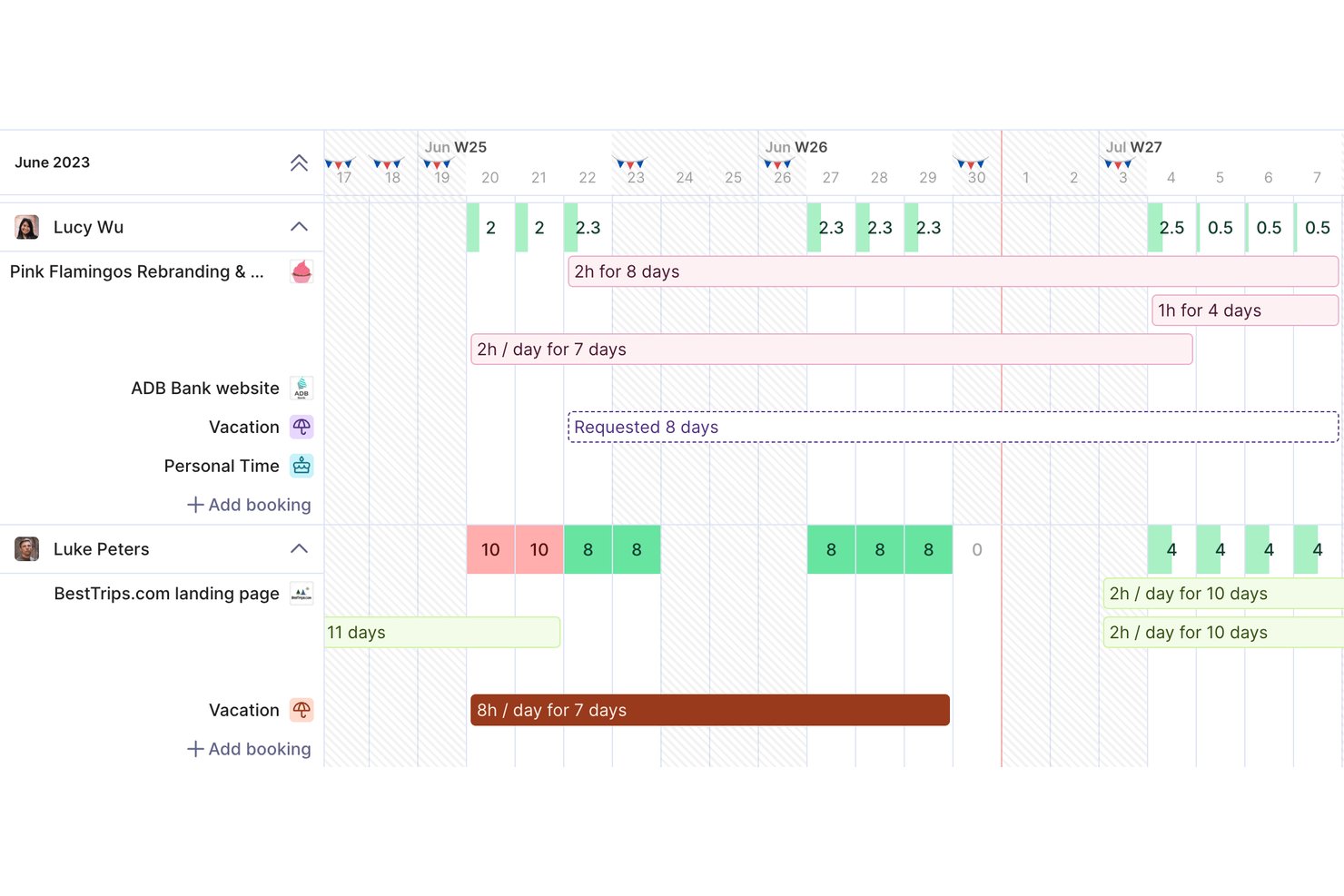
Productive is a professional services management platform that combines time tracking, project budgeting, resource planning, invoicing, and profitability reporting in a single tool built for agencies and consultancies.
Who Is Productive Best For?
Productive is a strong fit for small-to-mid-sized agencies, consultancies, and IT services firms that need to tie billable time directly to project finances.
Why I Picked Productive
Productive earns its spot on my shortlist because of how its AI reporting tools surface financial insights without requiring manual analysis. I love that Report Intelligence reads across multiple datasets and delivers plain-language summaries, so I can immediately see which projects are margin risks. AI Time Tracking also auto-fills timesheets using calendar events and past entries, which keeps utilization data accurate enough to actually trust.
Productive Key Features
- Resource planner: Plan and assign consultant capacity using tentative, repeating, and split bookings.
- Retainer and fixed-fee management: Track recurring retainers and fixed-fee project drawdowns alongside T&M work.
- Multi-currency invoicing: Generate invoices in different currencies to support global client engagements.
- Role-based permissions: Set detailed access controls for user roles, clients, and sensitive financial data.
Productive Integrations
Productive offers native integrations with Xero, HubSpot, Jira, Slack, Sage, Outlook, Google Calendar, and Microsoft 365. It connects with Zapier and provides an API for custom integrations.
Pros and Cons
Pros:
- Real-time budget and profitability views per project
- AI auto-fills timesheets from calendar data
- Tracks billable time and project margins together
Cons:
- Mobile app has limited reporting functionality
- Initial project setup takes considerable time
New Product Updates from Productive
Productive Adds Email and Calendar Integrations for Agents
Productive adds Gmail, Outlook, Google Calendar, and Outlook Calendar connectors for its AI agents. These integrations let agents manage emails and create calendar events directly within Productive. For more information, visit Productive’s official site.

Toggl
Best for simple interface
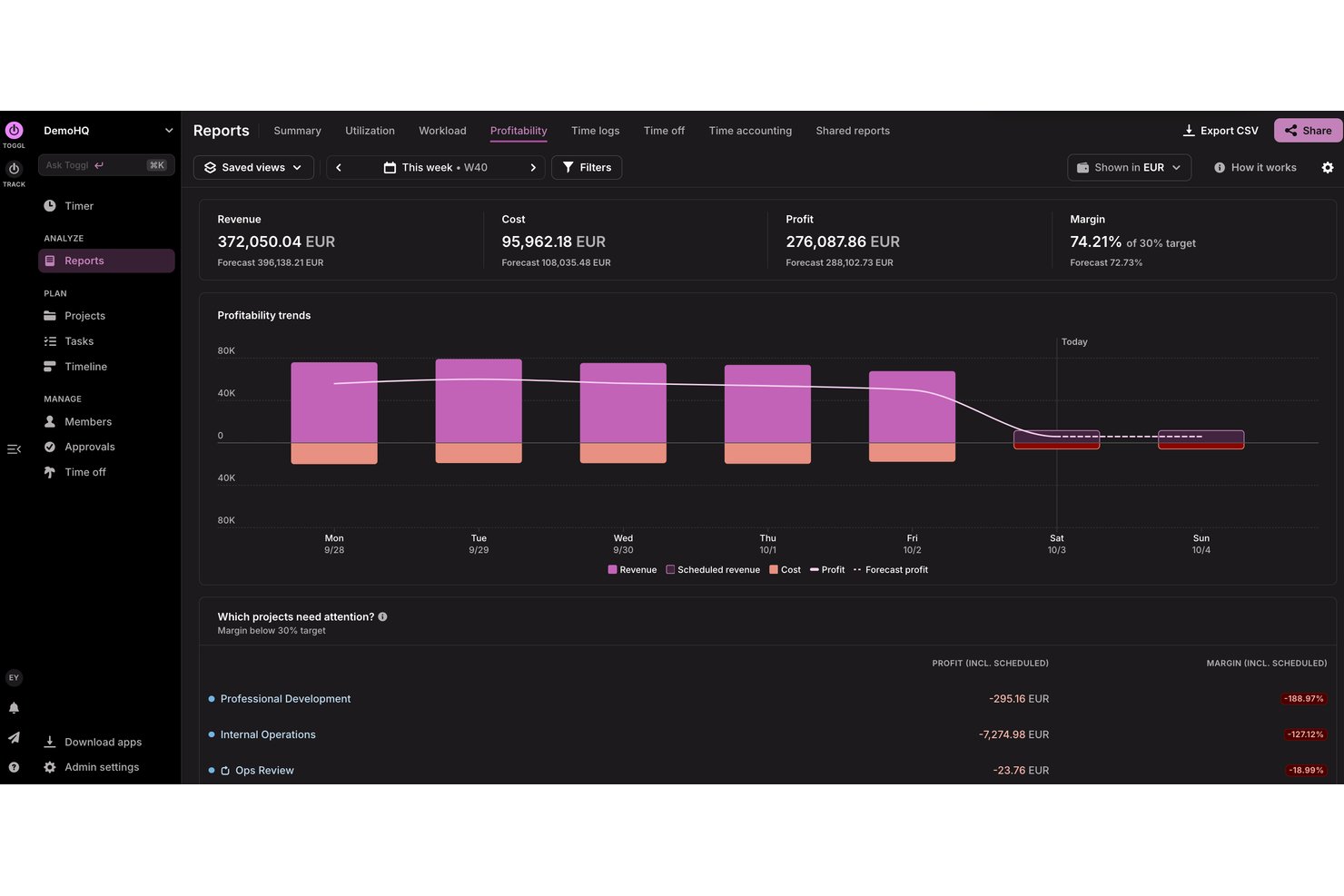
Toggl is a time tracking and capacity planning tool designed for agencies, consultancies, and other professional services teams. It helps users track billable and non-billable hours, build productivity and profitability reports, and plan team capacity so they can deliver client work on time and within budget.
Why I picked Toggl: I picked Toggl for its focus on speed and clarity. Its interface removes friction, timers are easy to start, switch, and categorize, making it ideal for individuals or small teams that want minimal setup. Idle detection and visual reporting help understand how to distribute time without overwhelming users with configuration options.
Standout Features & Integrations:
Features include project tracking, task management, capacity planning, billable rates, and idle detection. You can differentiate between billable and non-billable hours, which helps with accurate billing. The idle detection feature ensures you’re only tracking active work time, while reports help you analyze how time is spent, assess team capacity, and identify project profitability.
Integrations include Asana, Jira, Outlook, Google Calendar, GitHub, Todoist, and more. An API is available for custom integrations, along with MCP support for connecting to Claude, Cursor, and Codex.
Pros and Cons
Pros:
- Idle detection with time adjustment prompts
- Flexible tracking with multiple project views
- Simple to use for teams and freelancers
Cons:
- Lacks advanced billing features
- Periodic sync inconsistencies

DeskTime
Best for automatic work time calculation
DeskTime is an automatic time tracking tool for in-office, hybrid, and remote teams that covers project tracking, productivity monitoring, absence management, shift scheduling, and offline time logging.
Who Is DeskTime Best For?
DeskTime is a good fit for small to mid-sized teams that need a straightforward way to track work hours across in-office, remote, and hybrid setups.
Why I Picked DeskTime
DeskTime is one of my top picks because I love how it handles time calculation without any manual input from your team. The desktop app starts tracking the moment someone turns on their computer and stops when they shut it down, logging productive time, idle time, and breaks automatically. I also like the productivity calculation feature, which maps every app and URL to a productivity status, so you get a real breakdown of how billable hours are actually being spent, not just how long someone was logged in.
DeskTime Key Features
- Project and task time tracking: Assign tracked time directly to specific projects and tasks to see how hours are distributed across client work.
- Absence calendar: Log and manage team time off, including vacation, sick days, and custom leave types, with built-in approval workflows.
- Offline time tracking: Manually log time spent on work done away from the computer, such as client meetings or calls.
- Scheduled reports: Set up automatic report delivery to keep stakeholders updated on team time data without manual exports.
DeskTime Integrations
DeskTime offers a small set of native integrations, including Google Calendar, Outlook Calendar, Trello, GitLab, Asana, and Jira, and it connects with Zapier. An API is also available for custom integrations.
Pros and Cons
Pros:
- Runs silently in the background
- Categorizes time as productive or unproductive
- Tracks app and website usage automatically
Cons:
- Lack of invoicing and advanced billing
- Limited project management and collaboration tools

actiTIME
Best for real time project budgeting
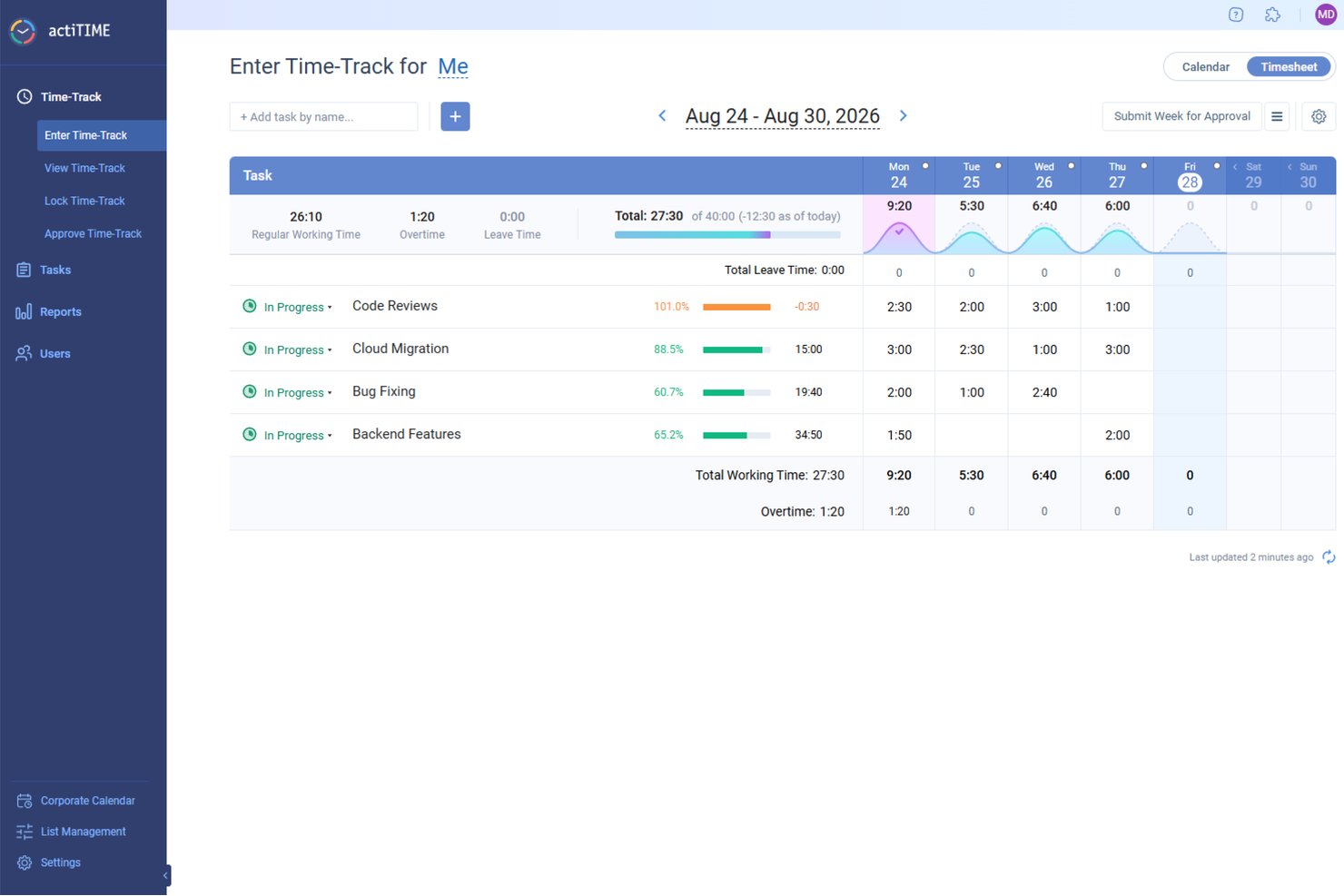
actiTIME offers a comprehensive solution for professionals in need of meticulous time management and project tracking. Ideal for industries such as architecture, consulting, and IT, actiTIME addresses the need for accurate billing and efficient resource allocation. It provides tools to manage projects, budgets, and team activities, ensuring that your business runs smoothly and profitably.
Why I Picked actiTIME
I picked actiTIME because it excels in addressing the specific needs of professional services with its detailed time tracking and project management features. You can easily track billable hours and manage project budgets, which are critical for maintaining profitability and accountability in client services. The tool also offers comprehensive reporting capabilities, allowing you to analyze project performance and make informed decisions.
actiTIME Key Features
In addition to its core functionalities, actiTIME provides several other features that enhance its utility for professional services:
- Budget Tracking: Monitor project budgets in real-time to prevent overspending.
- Leave Management: Manage team availability by tracking time off and absences.
- Billing and Invoicing: Generate invoices based on tracked time and project work.
- Custom Workflows: Tailor workflows to fit specific business processes and requirements.
actiTIME Integrations
Integrations include actiPLANS, QuickBooks, and Zapier.
Pros and Cons
Pros:
- Custom workflows support business processes
- Real-time project budget monitoring tools
- Accurate tracking of billable hours
Cons:
- Integrations limited compared to competitors
- Interface may be confusing for first-time users
New Product Updates from actiTIME

actiTIME Visual Hour Indicator and Time-Track Report Redesign
actiTIME adds a wave-style hour indicator to the Timesheet and Calendar views and refreshes the Time-Track report for smoother navigation and clearer visuals. For more information, visit actiTIME's official site.

Scoro
Best for end-to-end profitability tracking
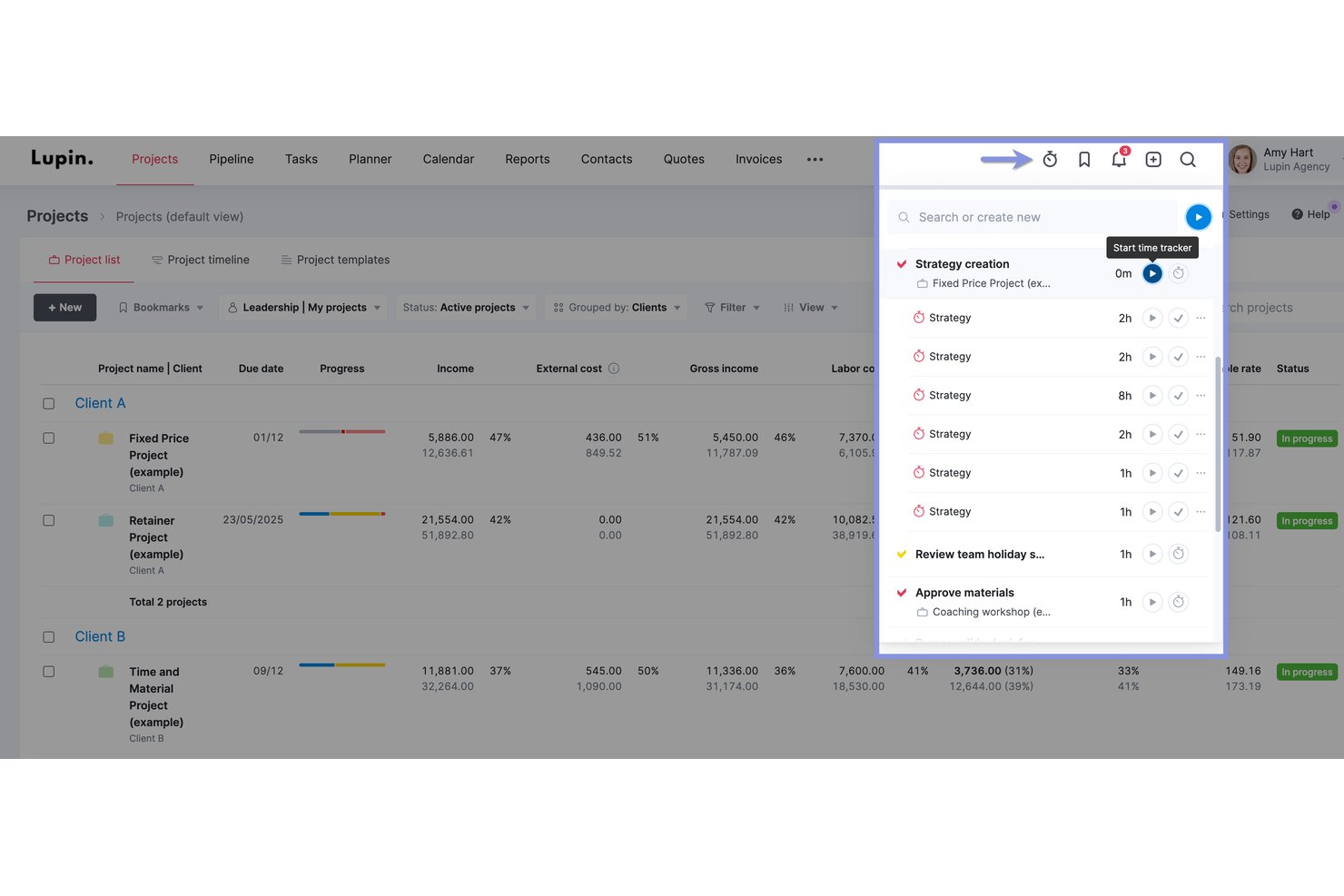
Scoro is a professional services automation (PSA) platform that combines time tracking, project management, resource planning, quoting, invoicing, and financial reporting in a single system.
Who Is Scoro Best For?
Scoro is a strong fit for professional services firms—agencies, consultancies, and IT service teams—that need to connect project delivery directly to financial performance across multiple clients.
Why I Picked Scoro
I picked Scoro as one of the best because its profitability tracking goes deeper than any other tool on my shortlist. I can see real-time budget vs. actual margins broken down by role, service, and task, and compare them against the original quote as a project runs. The portfolio-level P&L view means I'm never chasing numbers across spreadsheets to understand which clients are actually making money.
Scoro Key Features
- Retainer invoicing: Set up recurring invoices that generate automatically each billing period, with support for hour rollover between periods.
- Calendar auto-fill: Timesheets populate automatically from calendar events like meetings and appointments, reducing manual entry.
- Resource capacity heatmap: Visualizes team availability and booking status across roles, with color-coded indicators for overutilization and shortages.
- Multi-entity financial management: Run separate financials for each business entity while maintaining a consolidated group-level reporting view.
Scoro Integrations
Scoro offers 45+ marketplace integrations, including native QuickBooks Online, Xero, Stripe, Salesforce, HubSpot, Google Calendar, Microsoft 365, Slack, and Jira connections. It also provides an open REST API and Zapier.
Pros and Cons
Pros:
- Calendar events auto-fill team timesheets
- Full-featured retainer and fixed-fee billing
- Real-time profit margin tracking for all projects
Cons:
- Client portal only available on top-tier
- Requires five-user minimum on all plans
New Product Updates from Scoro

Scoro Adds Time Mobile App and ELI Improvements
Scoro adds the Scoro Time mobile app for iOS/Android to track time anywhere and expands ELI with attachments, smarter filtering, and trigger-based actions. For more information, visit Scoro's official site.

TimeTrex
Best for GPS-based time tracking
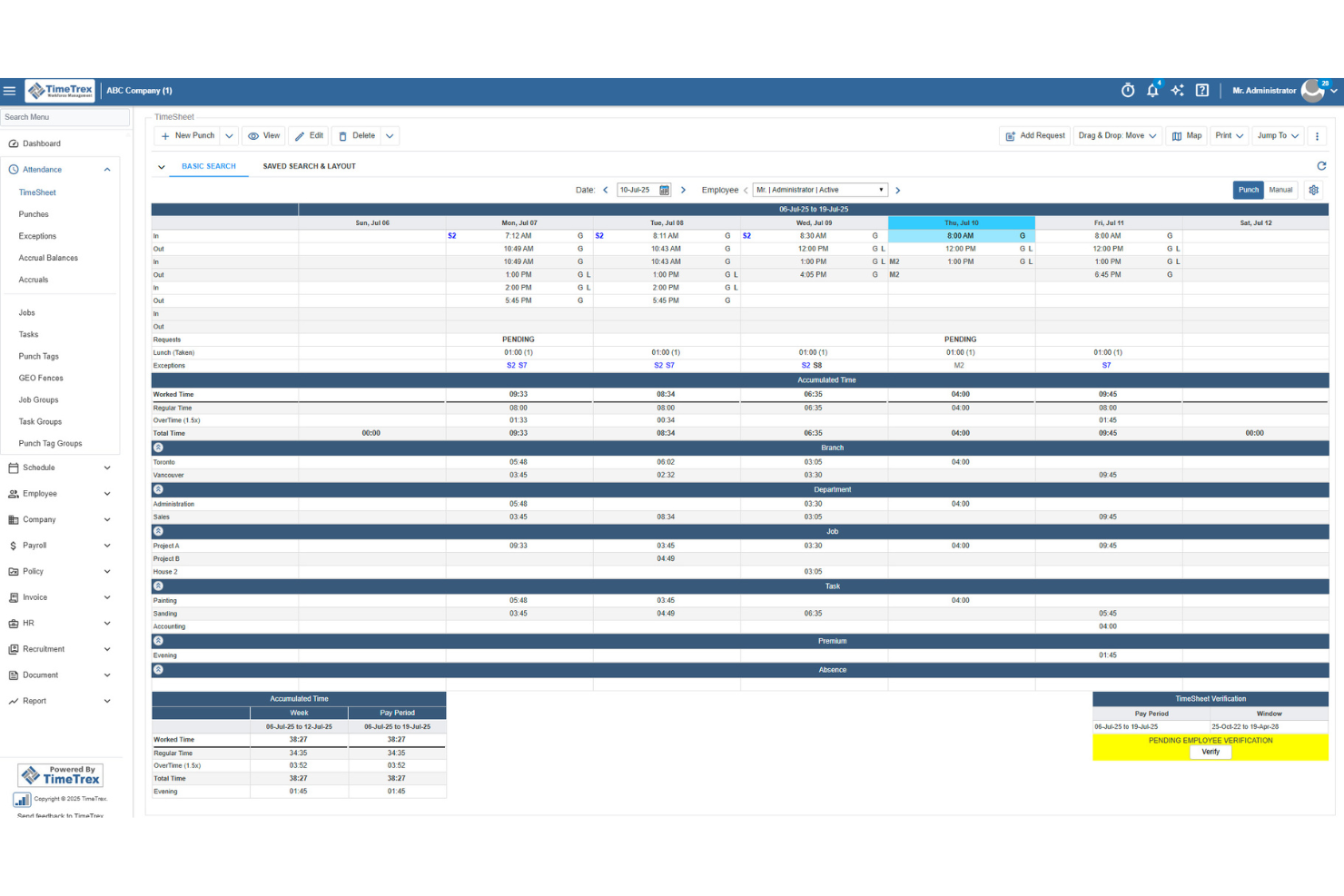
TimeTrex helps professional services teams track billable hours, manage expenses, and turn timesheet data into invoices with less manual work. Its mobile clock-in tools, GPS tracking, and job costing features make it a strong fit for firms managing consultants, field staff, or project-based teams.
Who Is TimeTrex Best For?
TimeTrex Now is a strong fit for mid-sized to large professional services firms that need to manage time tracking, payroll, and compliance in one platform.
Why I Picked TimeTrex
I picked TimeTrex because it helps professional services teams track billable hours from mobile devices while verifying where work happens through GPS tracking and geofencing. I like that employees can clock in from the field, client sites, or remote locations, and managers can review location-based punch data before approving timesheets. TimeTrex also supports job costing, expense tracking, and invoicing, so your team can connect tracked time to project costs and client billing. Its payroll and attendance rules are useful for teams with different schedules, overtime policies, or pay requirements.
TimeTrex Key Features
Some other TimeTrex features help professional services teams manage schedules, payroll, and workforce records alongside tracked time:
- Payroll management: Process payroll using approved time and attendance data, including overtime rules, deductions, paystubs, and tax reports.
- Employee scheduling: Build employee schedules, manage availability, and handle time-off requests from one system.
- Expense tracking: Record project-related expenses, upload receipts, manage approvals, and connect costs to departments or tasks.
- Employee self-service: Let employees view schedules, request leave, access paystubs, and manage personal information.
TimeTrex Integrations
Integrations include ADP, Intuit QuickBooks, Sage, Paychex, Surepay, Ceridian, Meditech, Insync, Millennium, and CompuPay.
Pros and Cons
Pros:
- Expense tools support receipts, approvals, and real-time reporting
- Job costing allocates tracked time across multiple cost centers
- Mobile GPS and geofencing verify off-site employee clock-ins
Cons:
- Interface may feel less intuitive for admin users
- Project management features appear limited beyond job costing
New Product Updates from TimeTrex
TimeTrex Redesigns Workforce Management With New Payroll, Scheduling, and AI Tools
TimeTrex redesigns its workforce management experience with new dashboards, scheduling and timesheet tools, a rebuilt payroll workflow, and expanded AI assistance. These updates give teams more flexible ways to manage schedules, payroll, reporting, and employee data. For more information, visit TimeTrex’s official site.
 .

Clockify
Best for browser extensions

Clockify is time-tracking software designed for individuals and teams to track work hours. Freelancers and small businesses use it to monitor productivity and manage billing.
Why I picked Clockify: Its browser extensions make timer-based tracking accessible. This is ideal for teams that work across multiple tabs, tools, or cloud platforms. Its simple reporting and offline mode add reliability, giving users a flexible way to capture time even when moving between devices or working with an unstable internet connection.
Standout Features & Integrations:
Features include time audits, project templates, and offline mode. These features help you ensure accuracy in time tracking and simplify project setup. The offline mode lets you continue tracking time even without an internet connection.
Integrations include Asana, Trello, Jira, QuickBooks, Slack, monday.com, Basecamp, Freshdesk, Todoist, and GitHub.
Pros and Cons
Pros:
- Offline time tracking
- Helpful time-use insights
- Easy browser extension setup
Cons:
- Basic user access controls
- No advanced invoicing tools

Best for accounting integration

QuickBooks is time-tracking and accounting software designed for small- to medium-sized businesses to manage finances and time. It's beneficial for companies that need integrated accounting and time management solutions.
Why I picked QuickBooks: It connects time tracking to accounting workflows. Billable hours, expenses, and invoices flow into the same system used for financial reporting and payroll, making it a practical choice for teams that want their time data to tie into their overall bookkeeping.
Standout Features & Integrations:
Features include automated invoicing, expense tracking, and payroll management. You can create invoices from tracked time, which helps in accurate billing. The expense-tracking feature lets you monitor and categorize expenses.
Integrations include PayPal, Shopify, Square, Amazon, Etsy, TSheets, Salesforce, HubSpot, Mailchimp, and Stripe.
Pros and Cons
Pros:
- Detailed financial reports
- Automated invoicing
- Easy accounting integration
Cons:
- Limited customization options
- Interface may feel complex at first

Timely
Best for automatic time tracking

Timely is time-tracking software designed for teams and individuals who want to automate time tracking. It's popular among creative professionals and consultants looking to manage their time without manual input.
Why I picked Timely: It offers automatic time tracking that captures activity in the background, eliminating the need for manual timers. You can focus on your work while Timely records your time spent on different tasks. The memory feature allows you to review and approve logged time, ensuring accuracy. These aspects make Timely a great choice for those who prefer a hands-off approach to time tracking.
Standout Features & Integrations:
Features include project timelines, budgeting tools, and visual reports. You can set budgets for projects and visually track progress, helping you stay on track. The visual reports provide insights into how time and resources are allocated.
Integrations include Asana, Trello, Slack, QuickBooks, Xero, Salesforce, Zapier, Google Calendar, Outlook, and Microsoft Teams.
Pros and Cons
Pros:
- Simple budgeting tools
- Accurate memory feature
- Automatic time capture
Cons:
- Basic invoicing capabilities
- Limited manual tracking options

My Hours
Best for small teams

My Hours is time-tracking software tailored for small teams to manage their projects and billing. It's designed to help businesses track time, manage tasks, and control project budgets.
Why I picked My Hours: My Hours is a strong fit for small teams because it focuses on clarity and control rather than complexity. Its customizable billing rates, approval workflow, and straightforward reporting help smaller groups maintain oversight of project budgets and client work without needing a featured project management suite. It’s great for teams that want structure without heavy configuration.
Standout Features & Integrations:
Features include customizable billing rates, detailed reporting tools, and attendance tracking. You can set different rates for various projects or clients, which helps in precise billing. The reporting tools provide insights into how time is spent across projects.
Integrations include QuickBooks, Trello, Basecamp, Asana, Google Calendar, Slack, Zapier, Xero, Microsoft Teams, and Dropbox.
Pros and Cons
Pros:
- Suitable for remote teams
- Customizable billing rates
- Simple to navigate
Cons:
- Occasional lag in reporting
- Limited offline capabilities
Diğer Profesyonel Hizmetler Zaman Takibi Yazılımları
İşte kısa listeme giremeyen ancak yine de göz atmaya değer bazı ek profesyonel hizmetler zaman takibi yazılımı seçenekleri:
- TimeCamp
For budget management
- Time Doctor
For productivity tracking
- Memtime
For freelancers
- Teamwork
For integrated timesheets
- Deltek Replicon Time
For compliance tracking
- Time Champ
For large teams
- Knack
For custom databases
- Harvest
For integration options
- Big Time
For billing features
- TimeRewards
For expense tracking
- ClickTime
For DCAA-compliant records
- Paymo
For task management
- Wrike
For project visualization
- Connecteam
For mobile workforce
- monday.com
For team collaboration
- BuddyPunch
For employee scheduling
- Click Time
For compliance monitoring


How I Evaluate Professional Services Time Tracking Software
I look at two layers: the core requirements a tool must meet—billable hour tracking, timesheet approvals, client invoicing—and the differentiators that separate the best options from the rest.
Core Functionality (Table Stakes For This List)
When I'm selecting tools for my list, I rank each one on a scale from 0 (does not offer the functionality) to 5 (excels in this area) for each core functionality listed below. Then, I calculate the tool's total score into a percentage. Each tool needs to achieve a minimum total score of 65% to be considered for inclusion.
- Billable Hours Tracking: I check whether each tool lets you log time against specific clients, projects, and tasks with a clear billable vs. non-billable split—like tagging discovery hours as non-billable while tracking implementation work at a client rate.
- Timesheet Approval Workflows: Multi-tier review and approval flows matter here, especially for firms where a project manager approves hours before a finance lead signs off on client-facing entries.
- Client Billing & Invoicing: I evaluate how each tool converts logged hours into invoices, looking for flexible rate structures—per consultant, per role, or per engagement—so you can handle T&M and blended billing models.
- Project Budgeting & Profitability: Each tool should let you set a project budget, track labor costs against it, and surface margin data so you can spot overruns before a fixed-fee engagement goes sideways.
- Resource Utilization Reporting: I look for reports that show actual vs. forecasted utilization by person and project, giving resource managers visibility into who's overbooked and where capacity exists.
- Accounting & PM Integrations: Connections to accounting platforms like QuickBooks, Xero, or Sage Intacct and PM tools like Jira or Asana are key—I evaluate whether sync is native and bidirectional or limited to one-way exports.
Once I have a list of tools that meet this criteria, I consider what sets each platform apart.
Differentiating Factors (What Sets Vendors Apart)
Here's how I compare and contrast different vendors:
Standout Features
Automated time capture is a big differentiator—tools that pull hours from calendars, emails, and apps save consultants from reconstructing their week every Friday. I also evaluate how well a platform handles retainer and fixed-fee engagements alongside T&M work, since most firms juggle all three. Client-facing portals add another layer of value, letting clients review logged hours and approve invoices directly without back-and-forth emails.
Beyond Features
Firm size and service model fit matters—a solo consultant needs a different tool than a 200-person agency with multiple practices and blended billing. I consider how quickly a platform gets teams productive, since configuring rate cards, approval chains, and project templates can stall rollout if onboarding support is thin. Pricing transparency is another factor I weigh, especially whether core capabilities like budgeting and client invoicing are included at entry-level tiers or locked behind expensive upgrades.
Profesyonel Hizmetler Zaman Takibi Yazılımı Nasıl Seçilir?
Uzun özellik listeleri ve karmaşık fiyatlandırma yapıları arasında kaybolmak kolaydır. Kendinize özgü yazılım seçim süreciniz üzerinde çalışırken odaklanmanızı korumanıza yardımcı olmak için göz önünde bulundurmanız gereken faktörleri içeren bir kontrol listesi hazırladık:
| Faktör | Nelere Dikkat Edilmeli? |
|---|---|
| Ölçeklenebilirlik | Yazılım işletmenizle birlikte büyüyebilir mi? Ek maliyetler veya karmaşıklıklar olmadan artan kullanıcı ya da proje sayısını yönetip yönetemeyeceğini değerlendirin. |
| Entegrasyonlar | Mevcut araçlarınızla entegre oluyor mu? Proje yönetimi, muhasebe ve iletişim sistemlerinizle uyumluluğunu kontrol edin. |
| Özelleştirilebilirlik | Yazılımı iş akışlarınıza göre uyarlayabilir misiniz? Panoları, raporları ve faturalandırma oranlarını ihtiyaçlarınıza göre ayarlama seçenekleri arayın. |
| Kullanım Kolaylığı | Arayüz kullanıcı dostu mu? Ekibinizin kapsamlı bir eğitim almadan kolayca kullanabilmesini sağlayın. |
| Uygulama ve Kullanıma Alma | Ne kadar hızlı kullanmaya başlayabilirsiniz? Basit kurulum süreçlerine ve eğitimler ya da web seminerleri gibi mevcut eğitim kaynaklarına sahip yazılımları tercih edin. |
| Maliyet | Fiyatlandırma bütçenize uygun mu? Hem peşin maliyetleri hem de devam eden ücretleri değerlendirin ve gizli masraflara ya da kademeli fiyatlandırma tuzaklarına dikkat edin. |
| Güvenlik Önlemleri | Yazılım verilerinizi nasıl koruyor? Şifreleme, düzenli güncellemeler ve veri koruma standartlarına uyumluluk gibi özellikleri arayın. |
| Destek Kullanılabilirliği | İhtiyaç duyduğunuzda yardım alabiliyor musunuz? Sağlayıcının destek saatlerini, yanıt süresini ve sohbet ya da telefon gibi mevcut iletişim yöntemlerini değerlendirin. |
Profesyonel Hizmetler Zaman Takibi Yazılımı Nedir?
Profesyonel hizmetler için zaman takip yazılımı, işletmelerin müşteri projelerinde harcanan zamanı izlemesine ve kaydetmesine yardımcı olan bir araçtır. Danışmanlar, muhasebeciler ve avukatlar gibi profesyoneller bu araçları faturalandırmayı yönetmek ve üretkenliği artırmak için kullanır. Zaman takibi, faturalandırma ve raporlama özellikleri doğru faturalandırmayı ve verimli proje yönetimini sağlamaya yardımcı olur. Genel olarak bu araçlar şeffaflık sağlar ve kaynak kullanımını en üst düzeye çıkarmaya yardımcı olur.
Özellikler
Profesyonel hizmetler için zaman takip yazılımı seçerken aşağıdaki zaman takip özelliklerine dikkat edin:
- Zaman takibi: Kullanıcıların belirli projelerde çalışılan saatleri izlemesine ve kaydetmesine olanak tanıyarak doğru faturalandırma ve üretkenlik hakkında içgörüler sağlar.
- Faturalandırma: Takip edilen çalışma süresi ve giderlerden faturalar oluşturur ve müşteriler için faturalandırmayı kolaylaştırır.
- Gider takibi: Projeyle ilgili giderlerin yönetilmesine ve kategorilere ayrılmasına yardımcı olarak mali denetimi ve bütçe yönetimini destekler.
- Raporlama: Zaman kullanımı ve proje ilerlemesi hakkında ayrıntılı raporlar sunarak kullanıcıların bilinçli kararlar almasına yardımcı olur.
- Proje yönetimi: Görevlerin ve zaman çizelgelerinin düzenlenmesine yardımcı olarak ekip iş birliğini ve proje teslimini geliştirir.
- Özelleştirilebilir faturalandırma oranları: Farklı müşteriler veya projeler için farklı oranlar belirlenmesini sağlayarak esnek ve doğru faturalandırma sunar.
- Entegrasyon özellikleri: Muhasebe ve proje yönetimi yazılımları gibi mevcut araçlara bağlanarak iş akışı verimliliğini artırır.
- Mobil erişim: Hareket hâlindeyken zaman takibi ve görev yönetimi yapılmasını sağlayarak uzaktan çalışma için esneklik sunar.
- Güvenlik önlemleri: Şifreleme ve veri standartlarına uygunluk yoluyla veri koruması sağlayarak hassas bilgileri güvence altına alır.
Faydalar
Profesyonel hizmetler için zaman takip yazılımının uygulanması, ekibiniz ve işletmeniz için çeşitli faydalar sunar. Yararlanabileceğiniz birkaç fayda şunlardır:
- Daha güvenilir müşteri faturalandırması: Çalışmaların net kayıtları, çalışma saatlerini yeniden oluşturmaya gerek kalmadan anlaşmazlıkların azaltılmasına ve faturalandırma döngülerinin kısaltılmasına yardımcı olur.
- Artan üretkenlik: Ayrıntılı zaman içgörüleri darboğazları ortaya çıkarır ve ekiplerin yüksek değerli işlere odaklanmasına yardımcı olur.
- Daha güçlü proje denetimi: İlerleme ve iş yüklerine ilişkin gerçek zamanlı görünürlük, yöneticilerin projeleri takviminde tutmak için ayarlamalar yapmasına yardımcı olur.
- Daha yüksek mali farkındalık: Ekipler harcama ve kaynak kullanımındaki eğilimleri belirleyerek daha iyi bütçeleme kararlarını destekleyebilir.
- Geliştirilmiş şeffaflık: Katkılar ve iş yüklerine ilişkin net görünürlük, ekipler ve paydaşlar arasında uyumu destekler.
- Dağıtık ekipler için daha iyi destek: Merkezi takip, uzaktan veya hibrit ekiplerin farklı saat dilimleri arasında koordineli kalmasına yardımcı olur.
- Hassas verilerin tutarlı biçimde korunması: Yerleşik önlemler, işletmelerin güveni korumasına ve kurum içi uyumluluk gerekliliklerini karşılamasına yardımcı olur.
Maliyetler ve Fiyatlandırma
Profesyonel hizmetler için zaman takip yazılımı seçmek, mevcut çeşitli fiyatlandırma modellerinin ve planların anlaşılmasını gerektirir. Maliyetler özelliklere, ekip büyüklüğüne, eklentilere ve diğer unsurlara göre değişir. Aşağıdaki tablo, profesyonel hizmetler için zaman takip yazılımı çözümlerinde yaygın planları, bunların ortalama fiyatlarını ve genellikle sunulan özellikleri özetlemektedir:
Profesyonel Hizmetler İçin Zaman Takip Yazılımı Plan Karşılaştırma Tablosu
| Plan Türü | Ortalama Fiyat | Yaygın Özellikler |
|---|---|---|
| KOBİ/Küçük Ekipler | Ücretsiz-$5/user/month | Temel zaman takibi, sınırlı sayıda proje, basit raporlama; genellikle manuel zamanlayıcılar veya sınırlı özellikler. |
| Orta Ölçekli/Pazar Büyümesi Sağlayan Ekipler | $5-$25/user/month | Zaman takibi + faturalandırma, temel proje & gider takibi, entegrasyonlar, standart raporlar, mobil erişim. |
| İşletme/Kurumsallaşmış Firmalar | $25-$50/user/month | Gelişmiş raporlama, özelleştirilebilir faturalandırma oranları, tam entegrasyonlar, gider takibi, mobil + masaüstü desteği. |
| Kurumsal/Büyük Kuruluşlar | $50+/user/month (veya özel kurumsal fiyatlandırma) | Tam özellik seti: güvenlik & uyumluluk, özel entegrasyonlar, gelişmiş analizler, özel destek, büyük ekip/yönetici araçları. |
Profesyonel Hizmetler Zaman Takibi Yazılımı SSS
Profesyonel hizmetler zaman takibi yazılımı hakkında sık sorulan soruların bazı yanıtları:
Profesyonel hizmetler zaman takibi yazılımı veri gizliliğini nasıl ele alır?
Evet, çoğu zaman takibi yazılımı, şifreleme ve GDPR gibi veri koruma düzenlemelerine uyum yoluyla veri gizliliğine öncelik verir. Bir araç seçerken, platform yapay zekâ destekli raporlama veya entegre zaman kayıtları gibi özellikler içeriyorsa güvenlik sertifikalarını ve gizlilik politikalarını doğrulayın. Satıcılara veri depolama uygulamalarını, ihlalleri nasıl ele aldıklarını ve masaüstü uygulamalarının güvenli erişimi destekleyip desteklemediğini sormayı düşünün. Hassas bilgileri korumak için ekibinizin veri gizliliğiyle ilgili en iyi uygulamalar konusunda eğitim aldığından her zaman emin olun.
Profesyonel hizmetler zaman takibi yazılımı bordro sistemleriyle entegre olabilir mi?
Evet, en iyi zaman takibi çözümlerinin çoğu QuickBooks ve ADP gibi popüler bordro sistemleriyle entegrasyonlar sunar. Ekibiniz verileri Excel’den dışa aktarsa veya giriş-çıkış kayıtları için bir zaman takibi uygulaması kullansa bile bu entegrasyon bordro hesaplamalarını otomatikleştirebilir ve manuel veri girişi hatalarını azaltabilir. Yazılımı değerlendirirken iş akışlarını optimize etmeye ve tüm ekip üyeleri için doğru bordro kayıtlarını korumaya yardımcı olmak üzere mevcut bordro sisteminizle uyumlu entegrasyonları kontrol edin.
Manuel zaman takibinden yazılıma geçmek zor mudur?
Hayır, doğru planlamayla manuel zaman takibinden yazılım tabanlı zaman takibine geçiş kolay olabilir. İster hepsi bir arada bir platform, ister otomatik bir zaman takibi sistemi, ister ClickUp gibi daha basit bir araç olsun, ekibinizin ihtiyaçlarına uygun, kullanımı kolay bir araç seçerek başlayın. Ekibinizin faturalandırılabilir zamana, kaynak tahsisine ve proje zaman takibine uyum sağlamasına yardımcı olmak için eğitim oturumları ve kaynaklar sunun. Ayarlamalar için zaman tanıyarak yazılımı kademeli olarak uygulayın. Bu yaklaşım kesintileri en aza indirir ve ekibinizin yeni sistemi benimsemesine yardımcı olur.
Profesyonel hizmetler zaman takibi yazılımı uzaktan çalışan ekipler için kullanılabilir mi?
Evet, zaman takibi yazılımı uzaktan çalışan ekipler için kullanışlıdır. Farklı konumlardaki çalışanların zamanını takip ederken fiziksel denetime ihtiyaç duymadan üretkenliği izlemeye ve görevleri yönetmeye yardımcı olur. Uzaktan çalışmaya uyum sağlamak için mobil erişim, GPS takibi veya Chrome uzantıları sunan yazılımları arayın. Bu araçlar ayrıca proje planlamasını, proje kârlılığının takibini ve zaman çizelgesi onaylarını destekleyebilir; böylece ekibiniz konumdan bağımsız olarak zamanı takip edebilir, devam eden işleri denetlemeyi ve en iyi zaman takibi uygulamalarını sürdürmeyi kolaylaştırır.