

2026’da Planlama İçin 10 Resource Guru Alternatifi Araç

10 Resource Guru İçin En İyi Alternatifler


Resource Guru'nun ekibiniz için doğru proje yönetimi yazılımı aracı olmadığını düşünüyorsanız, kaynaklarınızı ve projelerinizi yönetmenize ve herkesin ne üzerinde çalıştığını net bir şekilde görmenize yardımcı olacak pek çok Resource Guru alternatifi bulunmaktadır.
Resource Guru'da belirli özellikler eksik olabilir veya bütçeniz için fazla pahalı olabilir. Bu nedenle, bir yedek çözüm bulmanıza yardımcı olmak için onlarca Resource Guru alternatifini test edip inceledim. İşte en iyi Resource Guru alternatifleri için önerilerim.
Resource Guru Nedir?
Resource Guru; projeleri planlamanıza, çalışanları, ekipmanları, bütçeyi ve diğer kaynakları yönetmenize yardımcı olmak için tasarlanmış bir planlama aracıdır. Aşırı rezervasyon, dengesiz iş yükleri veya proje portföyünüzdeki uyumsuzluklar gibi zorluklardan kaçınmanıza yardımcı olabilir. Projeleri planlamanıza ve yürütmenize yardımcı olmak için kaynakların kullanılabilirliğini net bir şekilde gösterir.
Why Trust Our Software Recommendations
Our team has been testing and reviewing software since 2012. As project managers ourselves, we know how difficult—and important—it is to choose the right software.
For this guide, we evaluated tools using hands-on testing and independent research, scoring tools using our selection criteria. We also draw on insights from industry thought leaders and practicing project management experts.
Our reviews reflect our human editorial judgment, not a sales pitch.
Expert reviewers:
Resource Guru Alternatifleri Karşılaştırma Tablosu
Bu karşılaştırma tablosu, en iyi Resource Guru alternatif seçimlerim için fiyatlandırma ayrıntılarını özetlemektedir:
Score legend (out of 5)
- Excellent 4.5–5
- Good 4–4.4
- Average 3–3.9
- Below average 2–2.9
- Poor 1–1.9
| Tool | Starting Price | Website | |||||||
|---|---|---|---|---|---|---|---|---|---|
| Best for integrated time tracking | 3.3 out of 5 | 3 | 2 | 4 | 4 | 3 | 4 | $10/user/month 14-day free trial | Book Demo |
| Best for marketing and agency operations | — | 3 | — | 2 | 4 | 4 | 4 | Pricing upon request Not available | Book Demo |
| Best for robust project management | — | 3 | — | 3 | 3 | 4 | 3 | £679.99 one-time purchase Not available | Website |
| Best for client work management | 3.3 out of 5 | 4 | 2 | 2 | 4 | 4 | 4 | $9.99/user/month Free plan + 14-day free trial + free demo available | Website |
| Best for agency forecasting | 2.8 out of 5 | 3 | 2 | 3 | 3 | 3 | 3 | $9/user/month 7-day free trial | Website |
| Best for project management with CRM integration | 2.8 out of 5 | 3 | 2 | 3 | 3 | 3 | 3 | Pricing upon request 14-day free trial | Website |
| Best for visual project planning | — | 2 | — | — | 1 | 2 | 2 | $5/user/month Free plan + free trial available | Website |
| Best for agile teams | — | 2 | — | 2 | 3 | 3 | 3 | $7.91/user/month Free plan + 14-day free trial + free demo available | Website |
| Best for professional services automation | 3.5 out of 5 | 4 | 2 | 3 | 4 | 4 | 4 | Pricing upon request 14-day free trial + demo available | Website |
| Best for workload visibility | 3.0 out of 5 | 4 | 2 | 2 | 4 | 3 | 3 | $10/user/month Free plan + 14-day trial available | Book Demo |


En İyi Resource Guru Alternatifleri İncelemeleri
Her bir Resource Guru alternatifine ilişkin ayrıntılı analizim ve genel değerlendirmem burada. Avantajları ve dezavantajlarını, özelliklerini ve en çok öne çıktıkları kullanım alanlarını ele alıyorum.

Best for integrated time tracking
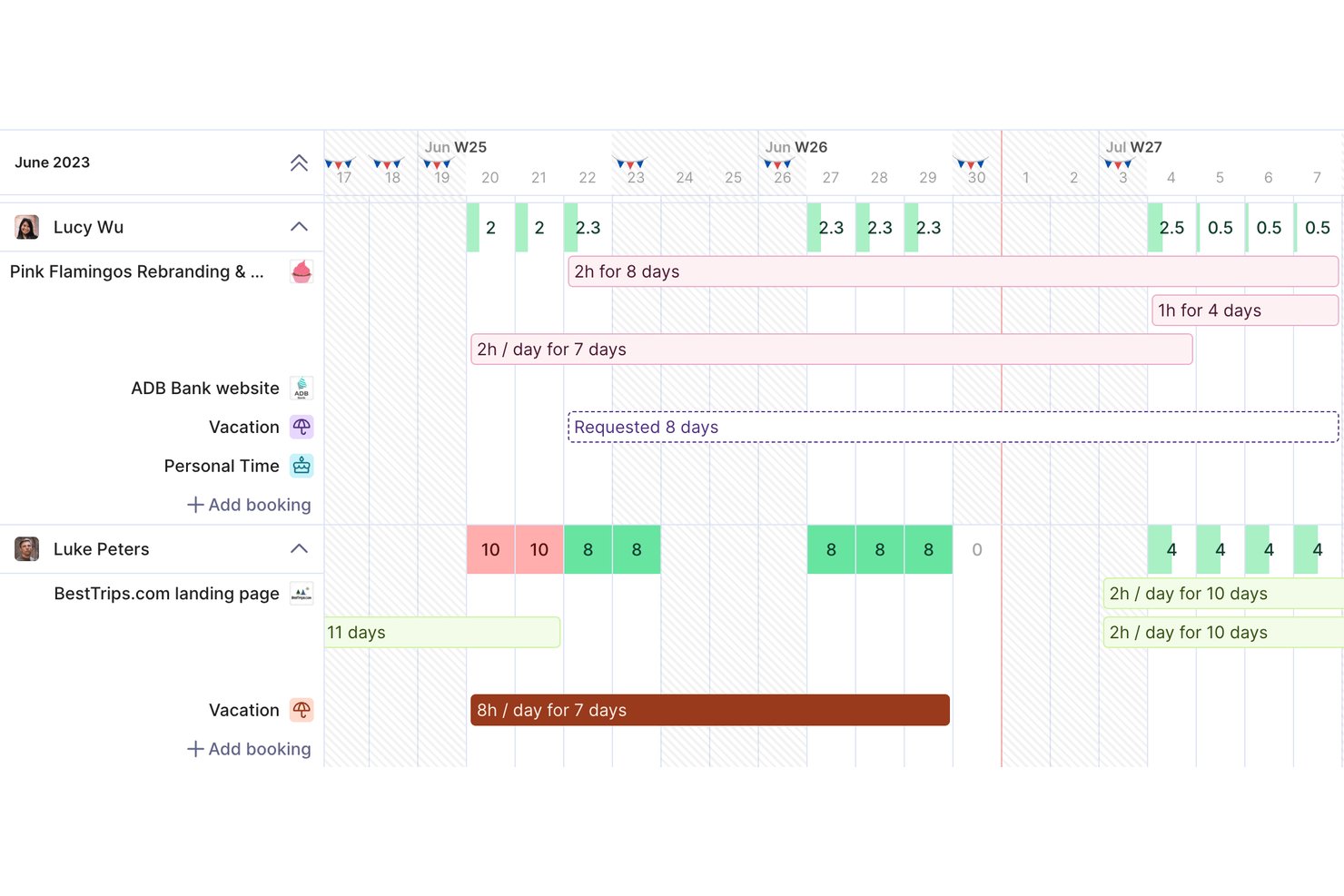
Productive is a project management platform for agencies and professional services teams that connects project plans, budgets, and workloads, helping you spot capacity gaps and keep client work on track.
Who Is Productive Best For?
Productive suits project operations leads at service firms who need teams to track time against client projects and budgets.
Why I Picked Productive
I picked Productive as a Resource Guru alternative because its integrated time tracking connects logged hours to project budgets. Weekly timesheets let teams record time against client work, while budget and profitability views help project leads see when actual effort is consuming planned spend. This helps you compare team capacity with the time client work actually requires.
Productive Key Features
- Client portal: Invite clients to view project updates, comment on tasks, and access shared files.
- Project views: Switch between Gantt, Kanban, list, and calendar views to manage tasks.
- Sales CRM: Track prospective clients and sales opportunities in one pipeline.
- Workflow automations: Set rules that trigger actions to coordinate recurring work.
Productive Integrations
Productive’s App Marketplace lists integrations with Jira, Google Calendar, Slack, HubSpot, Xero, QuickBooks, Sage, Gmail, and Microsoft Outlook. It also connects with Zapier and offers an open API for custom integrations.
Pros and Cons
Pros:
- Capacity planning sits beside project delivery
- Logged hours reveal budget burn and profitability
- Resource bookings connect to project budgets
Cons:
- Future recurring tasks omit forward capacity
- Mouse-heavy workflows slow frequent task edits
New Product Updates from Productive
Productive Adds Email and Calendar Integrations for Agents
Productive adds Gmail, Outlook, Google Calendar, and Outlook Calendar connectors for its AI agents. These integrations let agents manage emails and create calendar events directly within Productive. For more information, visit Productive’s official site.

Best for marketing and agency operations
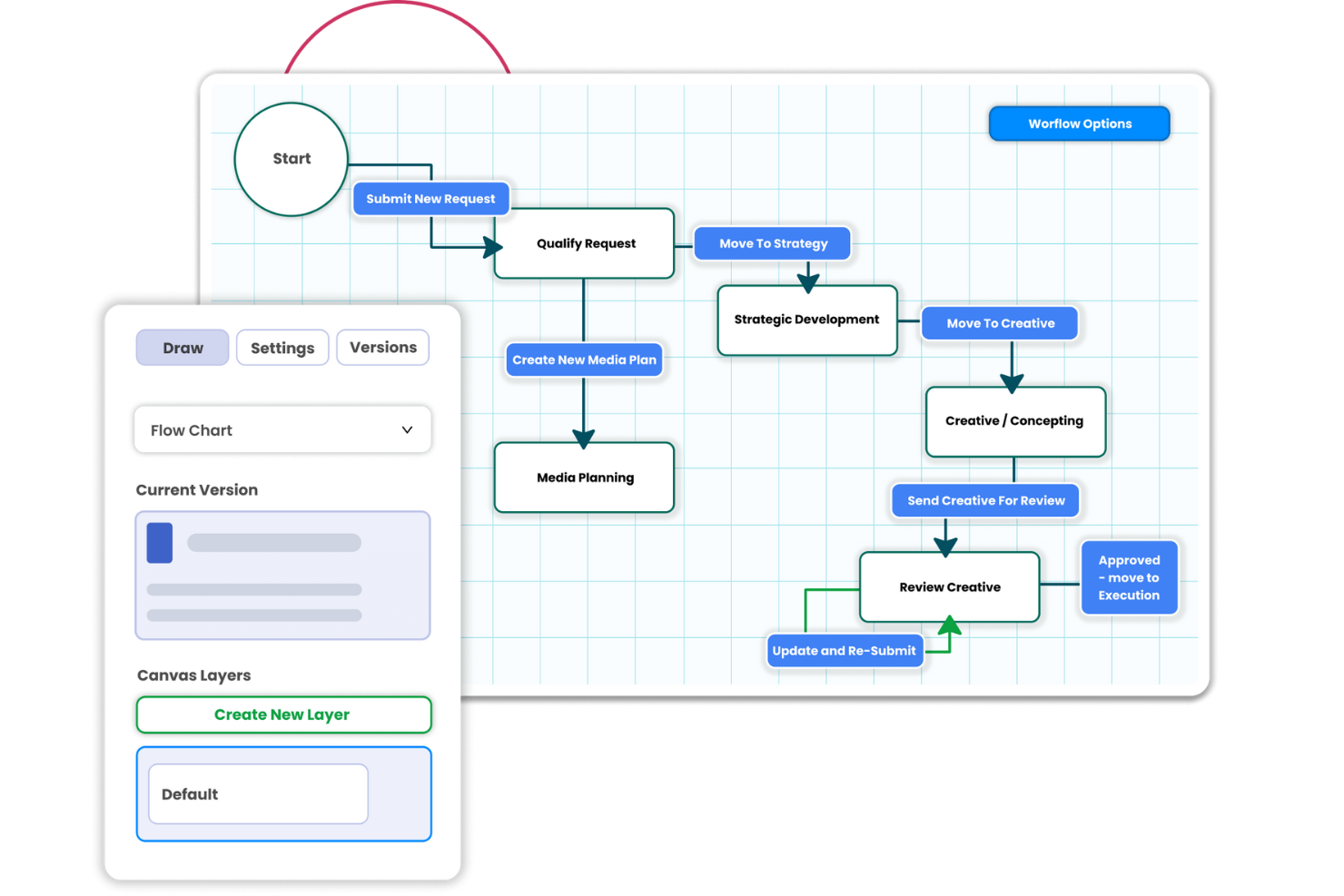
Screendragon is a work management platform for marketing teams and agencies that need to coordinate creative projects, manage approvals, and keep cross-functional workflows moving.
Who Is Screendragon Best For?
Marketing operations managers and agency project leads can use Screendragon to organize cross-team work and keep campaign production on track.
Why I Picked Screendragon
I picked Screendragon as a Resource Guru alternative because its stated fit, “Best for marketing and agency operations,” suits campaign work where staffing depends on creative handoffs. Capacity planning matches demand to skills and availability, while visual proofing and conditional approvals keep client and legal reviews attached to each asset. I value that link between team capacity and work moving through review.
Screendragon Key Features
- Dynamic briefs: Configure brief fields, language, and layout for different teams, clients, and markets.
- Real-time dashboards: Track project status and milestones with configurable dashboards.
- Role-based permissions: Set access controls down to individual fields.
- Integrations: Connect with tools including Google Drive, Adobe, Jira Software, and Microsoft 365.
Screendragon Integrations
Screendragon lists integrations with Google Drive, Adobe, Jira Software, Microsoft 365, Slack, HubSpot, Aprimo, Ziflow, Brandfolder, and Microsoft Teams. It also offers a REST API for custom integrations.
Pros and Cons
Pros:
- Flexible workflows route creative reviews and approvals
- Resource views show availability across projects
- Capacity forecasts connect staffing to incoming work
Cons:
- Large approval queues can slow projects
- Complex configuration takes time to get right
Best for robust project management
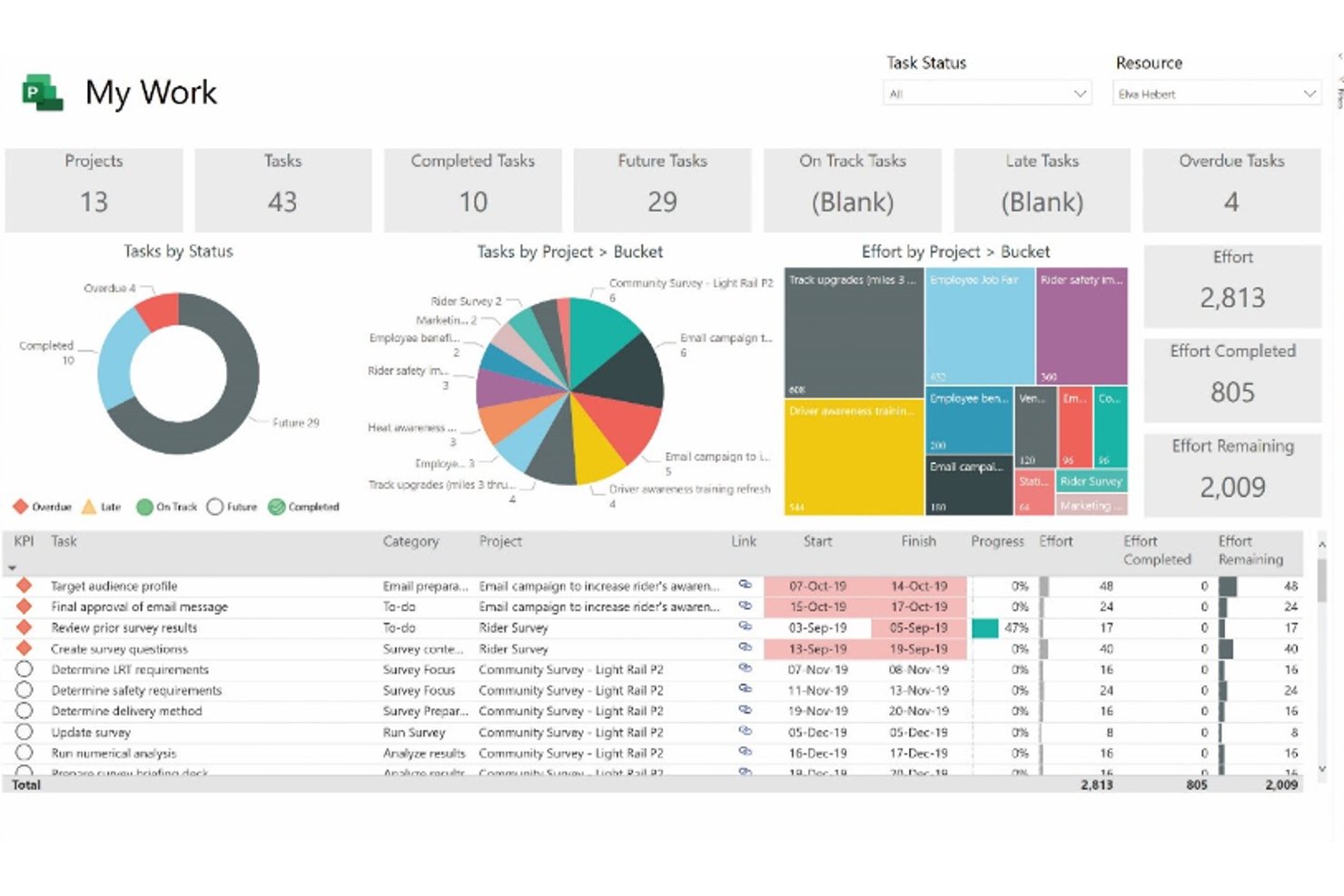
Microsoft Project combines task planning, scheduling, resource allocation, and portfolio visibility for organizations coordinating cross-functional work and dependencies across Microsoft’s productivity ecosystem.
Who Is Microsoft Project Best For?
Microsoft Project suits established organizations with dedicated project managers who need consistent planning and reporting across departments.
Why I Picked Microsoft Project
I picked Microsoft Project for its “Best for robust project management” focus: schedules, dependencies, and resource allocation help me coordinate cross-functional work and see how a delay affects related tasks. Portfolio views let me track progress across workstreams alongside capacity needs.
Microsoft Project Key Features
- Board view: Arrange tasks into buckets and move them across the board.
- Custom fields: Add fields to capture project-specific details and filter work.
- Project templates: Start a project with a preconfigured template.
- Built-in reports: Create reports on project status, costs, and progress.
Microsoft Project Integrations
Microsoft Project works with Microsoft 365, including Excel, and Project Online has a connector for Power Automate. Microsoft documents API options for custom integrations, including Project schedule APIs for Project for the web.
Pros and Cons
Pros:
- Portfolio visibility connects projects and capacity
- Resource allocation and workload views flag overbooking
- Dependency-linked schedules reveal workload impacts
Cons:
- Collaboration and updates feel less immediate
- Percentage-based allocations obscure day-to-day capacity
Best for client work management
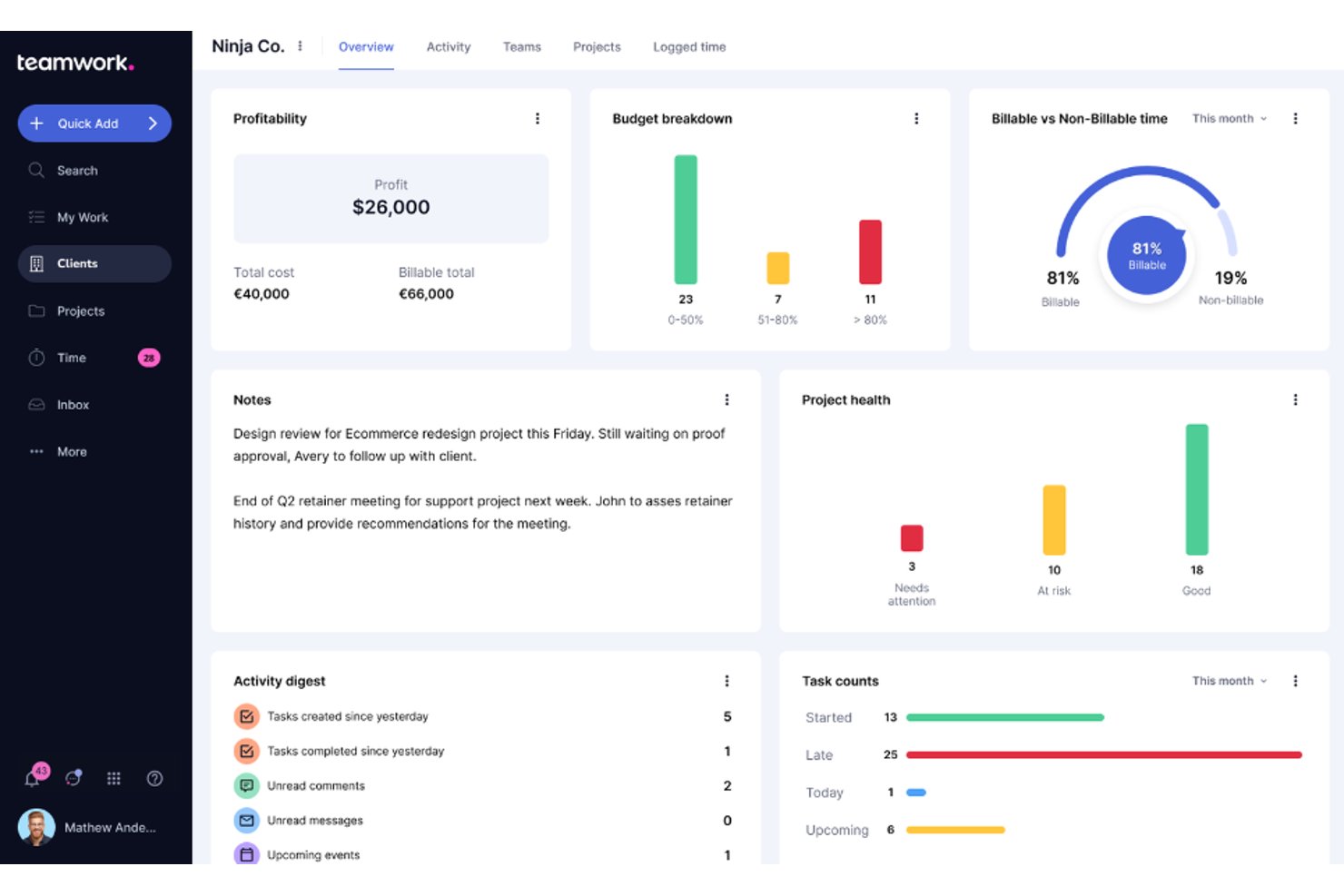
Teamwork.com is project management software for agencies and other client-facing teams, helping them coordinate tasks, deadlines, and project communication across multiple client engagements.
Who Is Teamwork.com Best For?
Project managers at service businesses can use Teamwork.com to coordinate client deliverables, deadlines, and team workloads across concurrent engagements.
Why I Picked Teamwork.com
I picked Teamwork.com as a Resource Guru alternative because it’s built for client work management. I like that client users can follow project progress while my team tracks tasks and deadlines across engagements. Built-in time tracking and project budgets help me compare billable hours with planned work.
Teamwork.com Key Features
- Workload Planner: View team capacity and scheduled work.
- AI Project Wizard: Generate a project plan with AI.
- Comment Summarization: Summarize project discussions with AI.
- Integrations: Connect Teamwork.com with more than 150 apps.
Teamwork.com Integrations
Teamwork.com’s directory lists 150+ integrations across its products; documented connections for project work include Slack, Microsoft Teams, Google Drive, Microsoft OneDrive, HubSpot, QuickBooks, and Xero. You can also connect Teamwork.com through Zapier, Unito, or Make, and use its API to build custom integrations.
Pros and Cons
Pros:
- Project budgets compare logged time with estimates
- Client access keeps deliverables and feedback together
- Workload plans connect capacity to billable utilization
Cons:
- Complex navigation can obscure project information
- Agile sprint planning lacks developer-focused depth
Best for agency forecasting
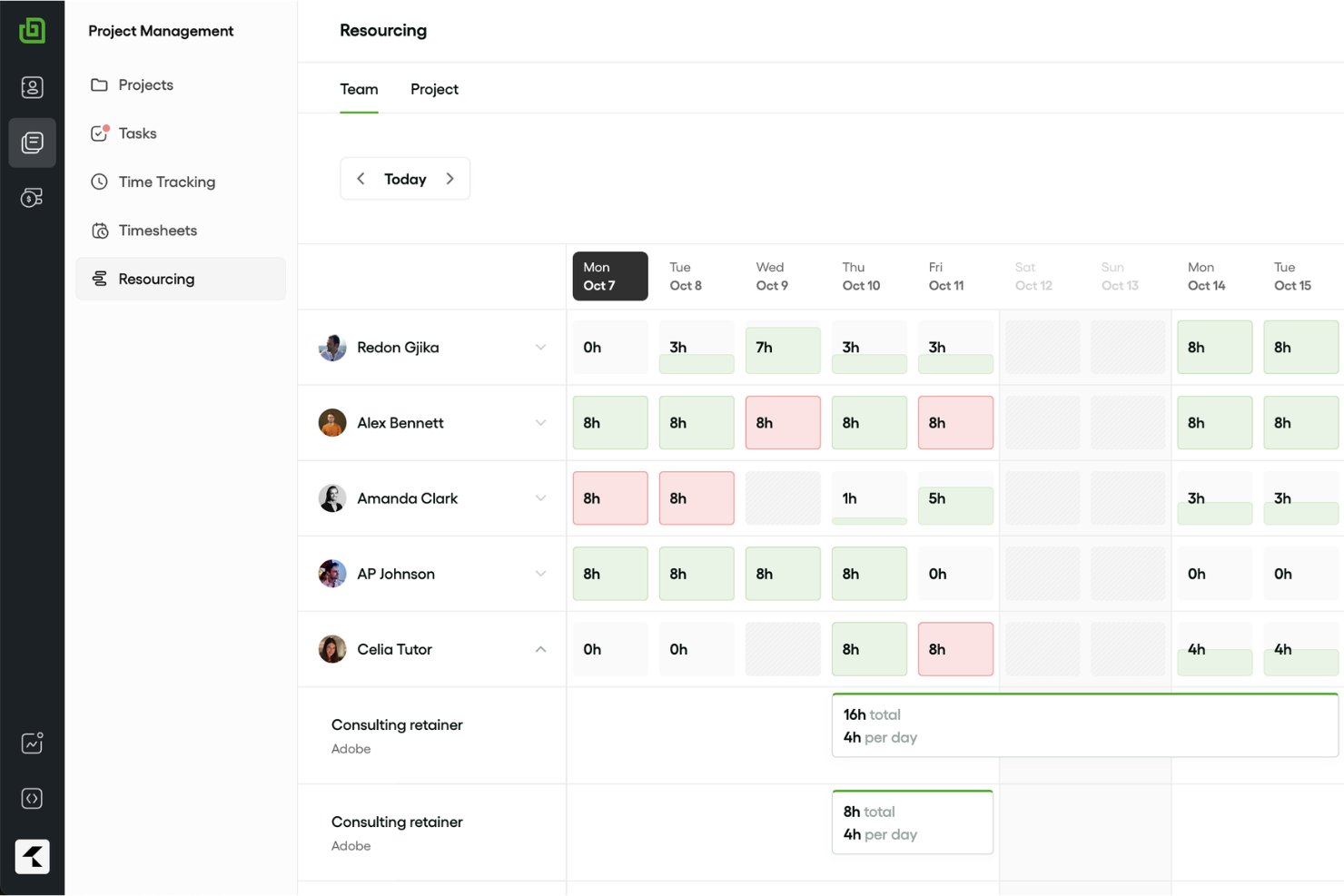
Bonsai Agency Software is a project management platform for agencies that brings client projects, tasks, and business workflows together to help teams coordinate delivery and keep work organized.
Who Is Bonsai Agency Software Best For?
Bonsai Agency Software suits agency owners and project leads who need to forecast workloads and plan delivery across client projects.
Why I Picked Bonsai Agency Software
I picked Bonsai Agency Software as a Resource Guru alternative, and “Best for agency forecasting” fits: live capacity tracking accounts for part-time schedules and holidays, helping me spot overbooking before assigning client work. I also like that project scopes convert into resource allocations, while bookings update cost, budget, and profit figures. Workload and capacity reports help me compare planned staffing with upcoming delivery needs.
Bonsai Agency Software Key Features
- Task estimates: Compare estimated task hours with logged time to track overruns.
- Kanban board: View tasks by status on a visual board.
- Gantt timeline: View project tasks and their timing across a timeline.
- Task timers: Start a timer from a task to log time to its project.
Bonsai Agency Software Integrations
Bonsai integrates with HiBob to sync approved time off into resourcing and scheduling, Zoom to sync meeting information into CRM notes, QuickBooks Online and Xero for invoice syncing, and Gmail, Outlook, and Hotmail for email and calendar activity. It also supports Calendly for scheduling automations, connects with Zapier, and offers an API for custom integrations.
Pros and Cons
Pros:
- Task estimates compare planned hours with logged time
- Scopes convert into cost-tracked resource allocations
- Capacity forecasts account for part-time schedules and holidays
Cons:
- Team permissions can expose financial details to partners
- Advanced workflow automation remains limited

Best for project management with CRM integration
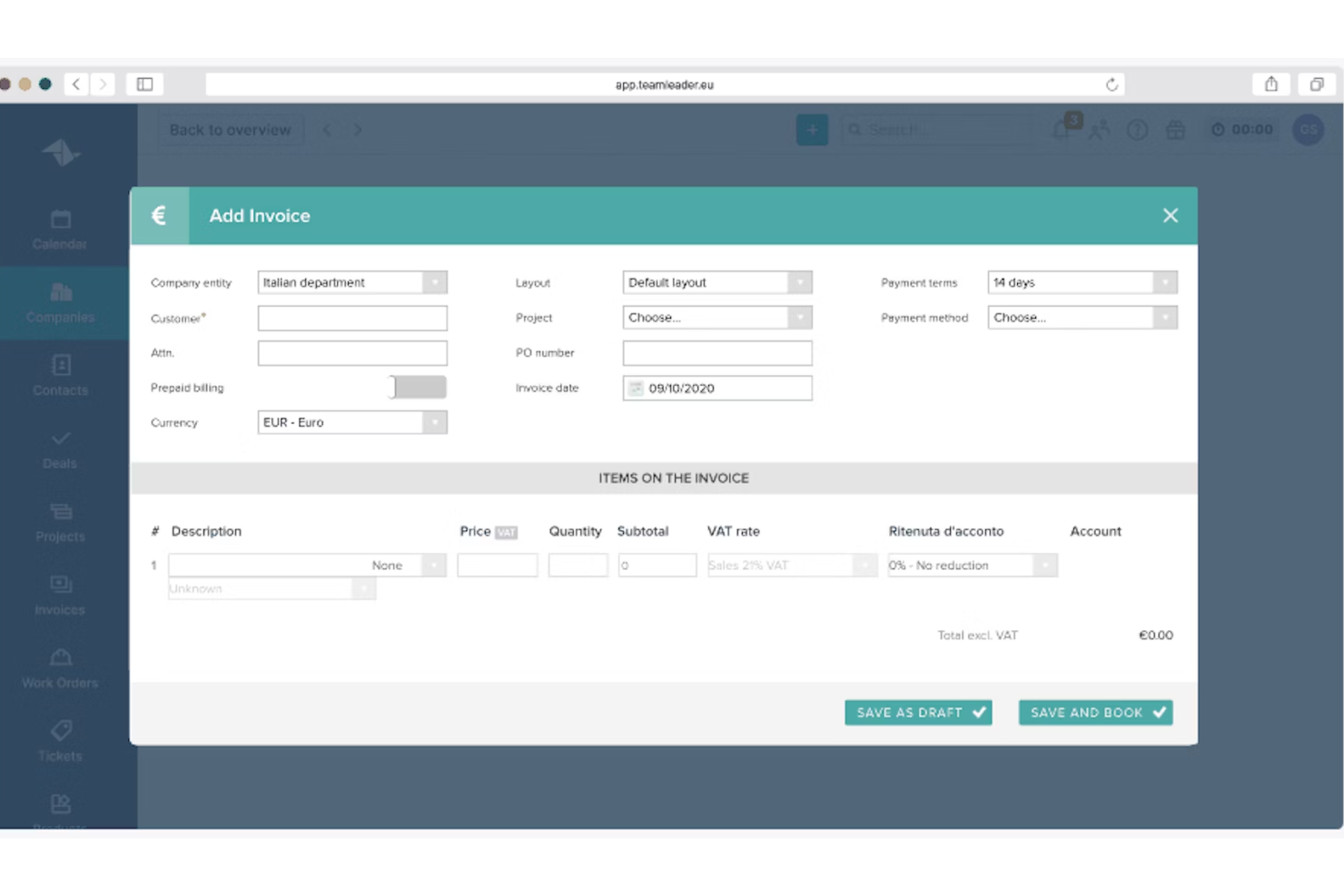
Teamleader is a project management platform for small and midsize service businesses, helping teams plan client work, coordinate tasks, and keep delivery organized as priorities shift.
Who Is Teamleader Best For?
Teamleader suits project managers at small and midsize service businesses who need client relationships and project delivery connected in one workflow.
Why I Picked Teamleader
I picked Teamleader because it pairs project management with CRM integration, carrying accepted client quotes into projects with assigned tasks. I like that I can track deadlines, budgets, and profitability against the work, then invoice directly from the project. That connects client commitments to delivery details a resource schedule alone won’t show.
Teamleader Key Features
- Kanban task view: View tasks by status on a Kanban board.
- Project timeline: See a visual summary of project phases and timing.
- Shared agendas: Schedule team activities in shared agendas.
- Calendar integrations: Connect Google Calendar, Apple iCloud Calendar, or Outlook Calendar.
Teamleader Integrations
Teamleader Focus lists 230+ marketplace integrations, including Gmail, Outlook Calendar, Google Calendar, Apple iCloud Calendar, Exact Online, Sage Business Cloud, Mailchimp, LinkedIn, and Google Sheets; it also connects with Zapier. A public API is available for custom integrations.
Pros and Cons
Pros:
- Workload planning pairs availability with client projects
- Project budgets connect tracked hours to profitability
- Quotes carry directly into delivery projects
Cons:
- Rigid workflows limit bespoke delivery processes
- Resource scheduling lacks dedicated capacity depth

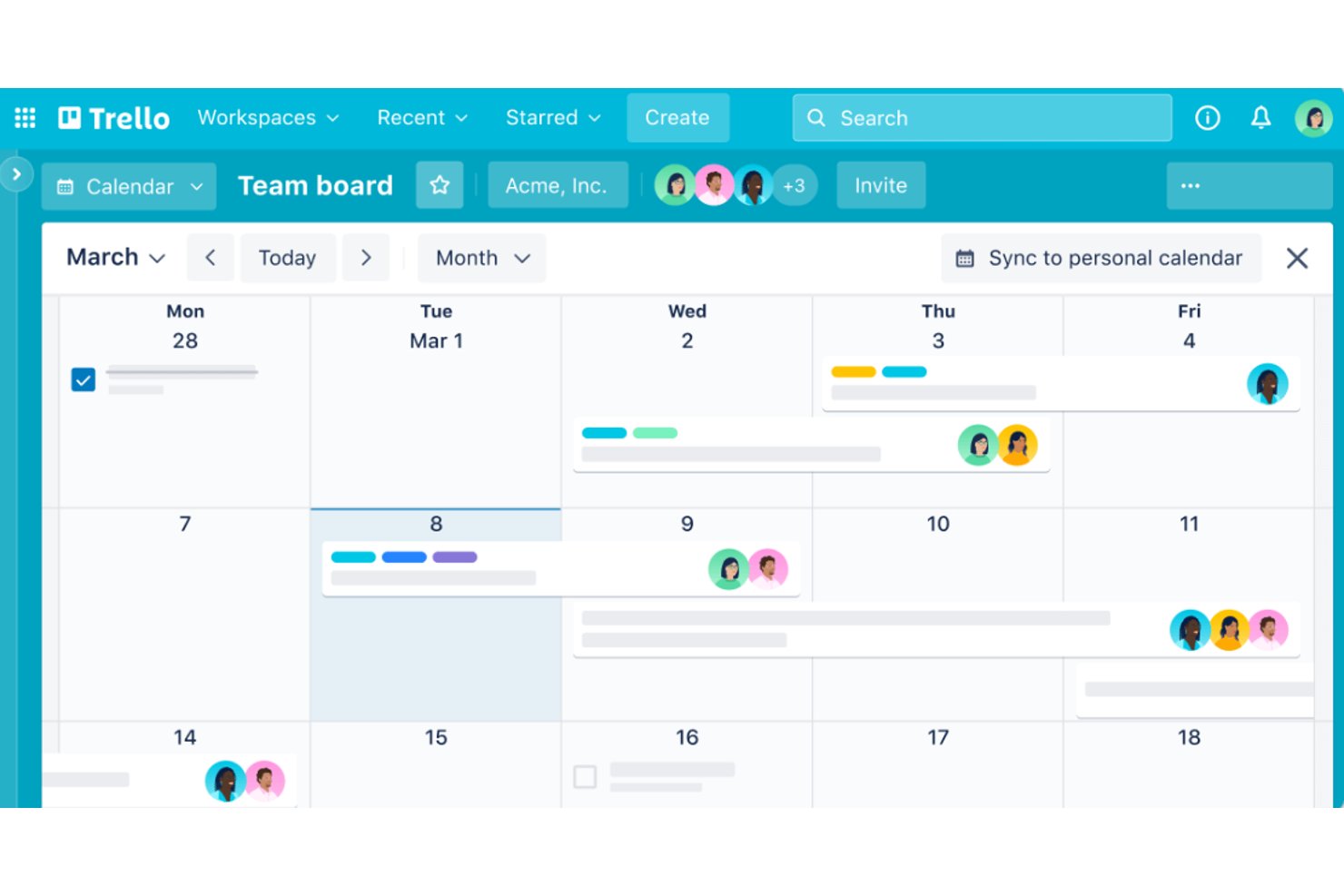
For teams that need a clear view of work without heavyweight project controls, Trello is a board-based project management app that helps product, design, and engineering groups organize tasks, ownership, and status.
Who Is Trello Best For?
Trello suits marketing and operations teams that want to coordinate campaigns, launches, or internal requests through shared task boards.
Why I Picked Trello
I picked Trello as a Resource Guru alternative because “Best for visual project planning” describes how I use its boards to map product launches. I move cards through workflow lists, assign owners and due dates, and add checklists for design reviews or engineering handoffs. That gives me a visual view of project progress, rather than Resource Guru’s focus on resource scheduling.
Trello Key Features
- Automation: Butler rules can trigger actions when cards meet conditions.
- Power-Ups: Add integrations and extra capabilities to boards.
- Custom fields: Add text, number, date, checkbox, or dropdown fields to cards.
- Calendar view: See cards with due dates arranged on a calendar.
Trello Integrations
Trello offers 200+ integrations through its Power-Ups directory, including Slack, Jira Cloud, Google Drive, Microsoft Teams, and Miro; it also connects with Zapier. Trello provides a REST API for custom integrations.
Pros and Cons
Pros:
- Butler automates repetitive board updates
- Cards combine owners, checklists, and due dates
- Visual boards clarify task status quickly
Cons:
- Dependencies and portfolio reporting need workarounds
- No native workload or capacity planning

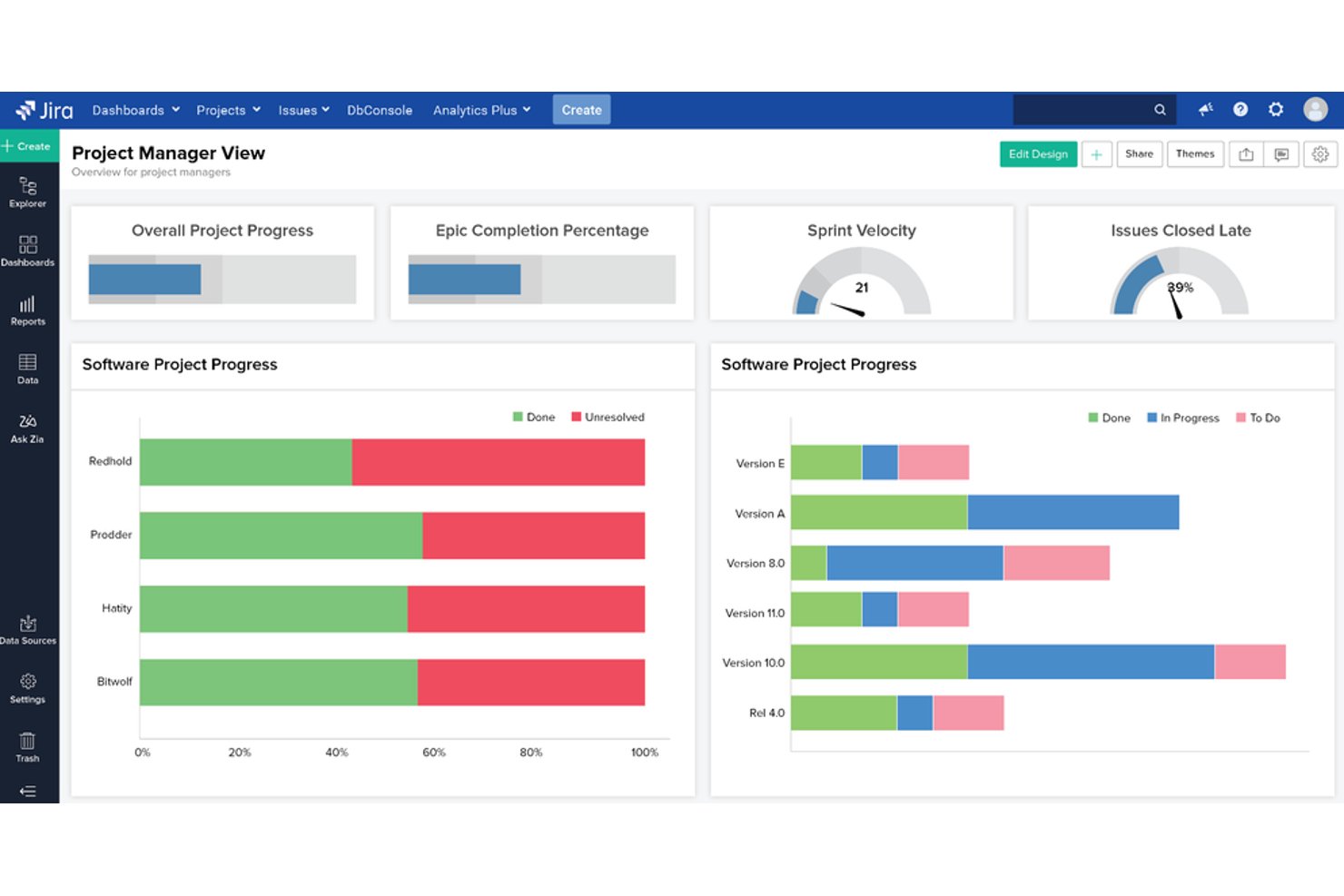
Jira is a project management platform for software and product teams that links issues, backlogs, and releases, helping you coordinate work and keep changing requirements visible.
Who Is Jira Best For?
Jira suits product and engineering teams that plan work in sprints and adjust priorities as projects evolve.
Why I Picked Jira
I picked Jira because its “Best for agile teams” focus supports delivery tracking alongside Resource Guru’s capacity planning. My team can prioritize work in a backlog, plan sprints on Scrum boards, and link issues to expose dependencies when scope shifts. We also track work through releases to check launch readiness.
Jira Key Features
- Custom workflows: Configure statuses and transitions to match your team’s process.
- Automation rules: Trigger actions when issues meet specified conditions.
- Custom fields: Capture project details with fields tailored to your team.
- Dashboards: Build views with gadgets that display project data and metrics.
Jira Integrations
Jira has 3,000+ apps in the Atlassian Marketplace, including integrations for Slack, Microsoft Teams, GitHub, Bitbucket, Confluence, and Figma. Atlassian also provides REST APIs and webhooks for custom integrations.
Pros and Cons
Pros:
- Backlogs keep changing priorities visible
- Issue links clarify cross-team dependencies
- Sprint reports flag delivery delays early
Cons:
- Individual availability needs extra setup
- Resource scheduling trails dedicated planners

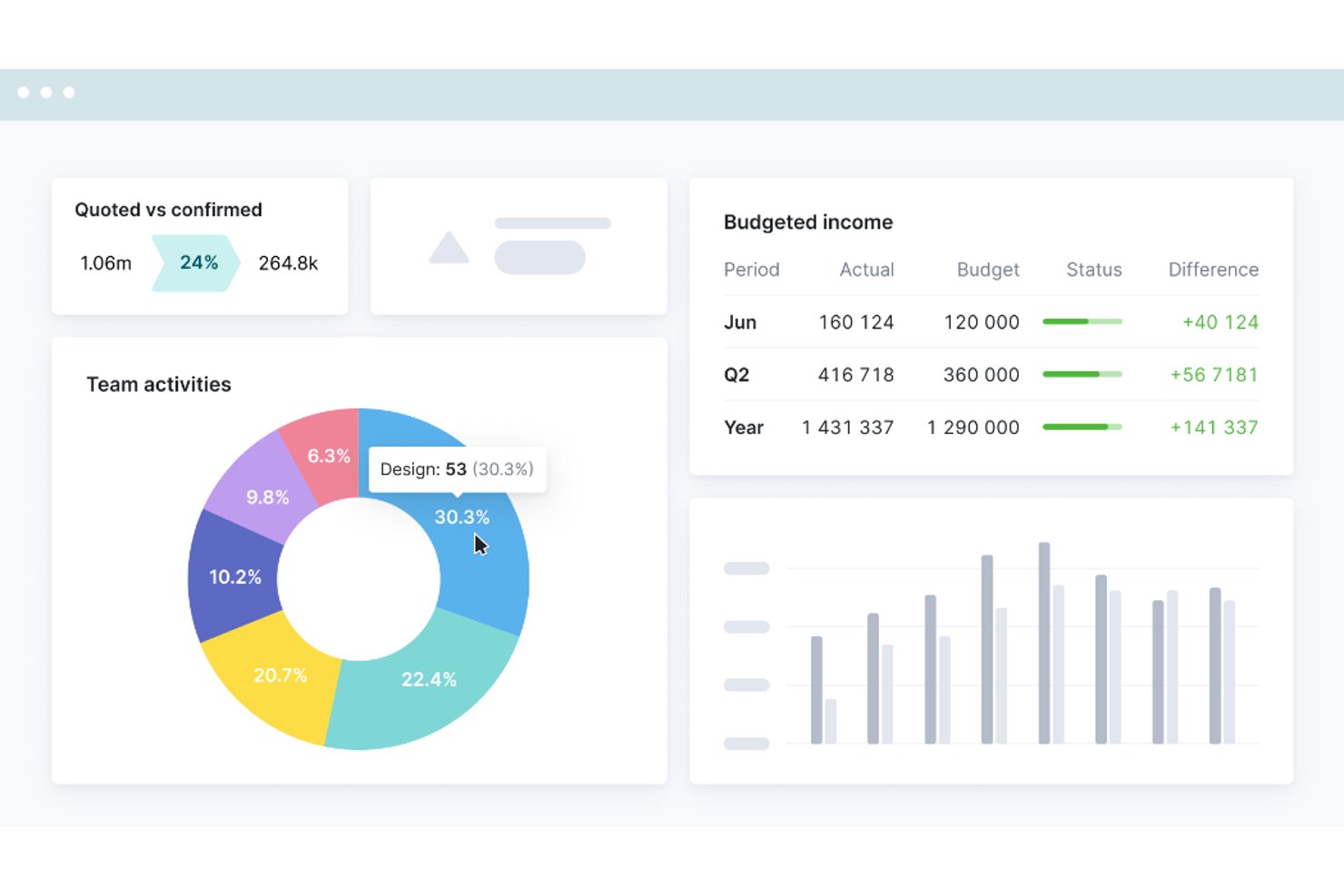
For consultancies and other client-service teams, Scoro brings project planning, resource scheduling, time tracking, and financial oversight into one work management platform to help you manage capacity and delivery visibility.
Who Is Scoro Best For?
Scoro suits operations and project leads at professional services firms who need to coordinate client delivery with business operations.
Why I Picked Scoro
I picked Scoro as a Resource Guru alternative because its professional services automation connects resource scheduling with project delivery and financial oversight. I like that teams can plan project work, schedule people, and track time against client engagements. That gives me a clearer view of capacity alongside delivery and project finances.
Scoro Key Features
- CRM and pipeline management: Track client contacts and opportunities through pipeline stages.
- Project estimates: Break deliverables into roles, hours, and costs with the estimation matrix.
- Quote approvals: Share quotes with clients through a link for review and approval.
- Expense management: Record bills and expenses against projects.
Scoro Integrations
Scoro has native integrations with Salesforce, QuickBooks, and Xero, plus calendar integrations for Google Calendar, Microsoft Exchange, and Apple Calendar. Its marketplace lists additional app connections, and Scoro supports Zapier and an API for custom integrations.
Pros and Cons
Pros:
- Quotes, delivery, and time stay connected
- Recurring bookings help prevent staff overbooking
- Capacity planning sits alongside project profitability
Cons:
- Custom reporting takes extra work
- Task setup can feel unnecessarily complex

Wrike
Best for workload visibility
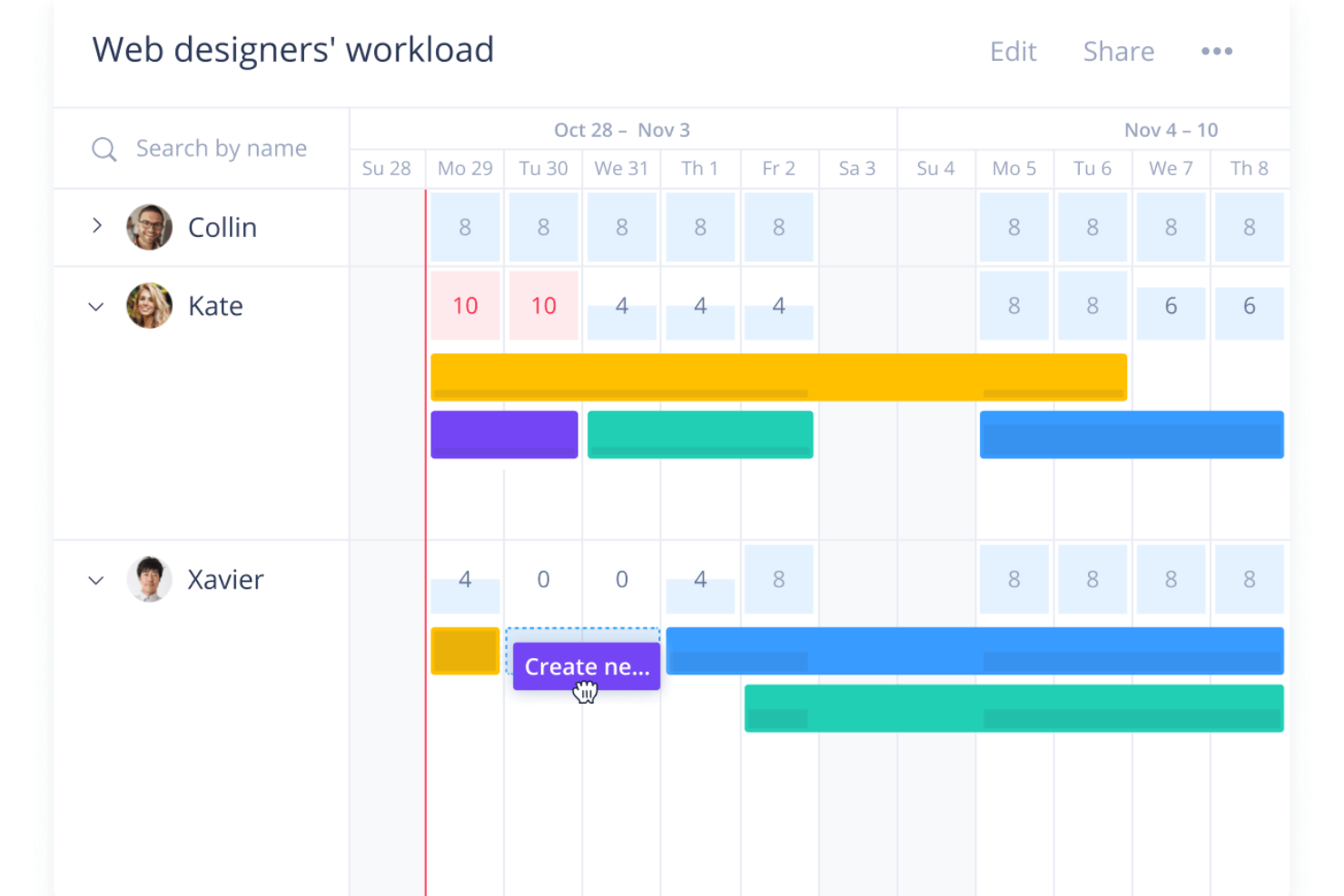
Wrike is a project management platform for tech and digital teams that brings tasks, timelines, and cross-functional work into one place, helping you coordinate delivery as priorities and dependencies change.
Who Is Wrike Best For?
Wrike is a good fit for project managers in tech and digital teams coordinating work across product, engineering, and design.
Why I Picked Wrike
I picked Wrike as a Resource Guru alternative because its workload view helps me spot when assignments exceed a person’s capacity. I can compare team members’ planned effort across projects, then adjust task ownership or timing when product, engineering, and design work collide. That gives me a clearer view of delivery pressure before it disrupts a timeline.
Wrike Key Features
- Gantt charts: Map tasks, dates, and dependencies on a timeline.
- Request forms: Collect project details and route submissions into workflows.
- Custom workflows: Set statuses and transition rules for different work types.
- Proofing and approvals: Annotate files and manage feedback on creative assets.
Wrike Integrations
Wrike offers 400+ pre-built native integrations, including Slack, Microsoft Teams, Salesforce, and Google Drive. It also provides an open REST API for custom integrations and Wrike Integrate.
Pros and Cons
Pros:
- Dashboards clarify ownership across product teams
- Gantt dependencies connect capacity to delivery dates
- Workload charts expose cross-project assignment conflicts
Cons:
- No native invoicing or billing workflows
- Setup demands more configuration than scheduling tools
New Product Updates from Wrike

Wrike Adds Advanced Filters to Chart View
Wrike introduces new default filters in Chart view, including relative dates, exclusion conditions, multiple filters per field, and status group filtering. These updates help teams refine project data and reporting. For more information, visit Wrike’s official site.
Resource Guru'nun rakibi Float ile nasıl karşılaştırıldığını burada görebilirsiniz.
Diğer Resource Guru Alternatifleri
Aşağıda kısa listeye aldığım ancak en iyi listeme giremeyen ek Resource Guru alternatiflerinin bir listesi bulunmaktadır. Yukarıda aradığınızı bulamadıysanız bunlara göz atmanız faydalı olabilir.
- Zoho Projects
For advanced task management
- Float.com
For resource scheduling
- GoodDay
For customizable workspaces
- Saviom
For enterprise resource planning
- Hub Planner by Milient
For detailed capacity planning
- Retain
For multi-location resource tracking
- Smartsheet
For spreadsheet-like project management
- Asana
For goal alignment
- Basecamp
For team communication
- Paymo
For small business management


İlgili Proje Yönetimi İncelemeleri
Hâlâ aradığınızı burada bulamadıysanız, sizin için derlediğimiz diğer proje yönetimi aracı incelemelerine göz atın:
- Gantt Şeması Oluşturucu
- Üretkenlik Araçları
- Proje Takip Yazılımı
- Proje Planlama Yazılımı
- Proje Yönetimi Yazılımı
- Kaynak Yönetimi Yazılımı
How I Evaluate Resource Guru Alternatives
I split my evaluation into two layers: core scheduling and capacity features that keep agencies out of double-booking chaos, and the differentiators that make one tool the right fit.
Core Functionality (Table Stakes For This List)
When I'm selecting tools for my list, I rank each one on a scale from 0 (does not offer the functionality) to 5 (excels in this area) for each core functionality listed below. Then, I calculate the tool's total score into a percentage. Each tool needs to achieve a minimum total score of 65% to be considered for inclusion.
- Resource Scheduling: I look for a visual, drag-and-drop timeline where you can assign people to projects—similar to how Float and Teamdeck handle booking blocks across weekly or monthly views.
- Capacity & Utilization Planning: Each tool should show me individual and team-level workload so a resource manager can spot who's overloaded before the sprint starts.
- Time-Off Management: Leave, holidays, and personal days need to appear directly on the scheduling view so bookings reflect real availability, not just theoretical hours.
- Booking Conflict Detection: Real-time overbooking alerts matter here—I check whether the tool warns you at the point of scheduling rather than forcing a manual audit afterward.
- Forecasting & Reporting: Utilization reports that break down billable vs. non-billable hours help agency ops leaders plan hiring or rebalance workloads weeks ahead of crunch periods.
- Multi-Project Resource Views: I evaluate whether the tool lets you filter and group resources across clients, departments, or project types in a single view rather than toggling between separate boards.
Once I have a list of tools that meet this criteria, I consider what sets each platform apart.
Differentiating Factors (What Sets Vendors Apart)
Here's how I compare and contrast different vendors:
Standout Features
Scenario planning is a big one—I look for tools that support tentative or soft bookings so you can model a potential project win without displacing confirmed assignments. Project financials also matter when your team bills by the hour, since pairing resource costs with booking data gives ops leaders margin visibility at the project level. I also check whether a tool offers timesheets alongside scheduling, which lets you compare planned hours against actuals and catch scope creep early.
Beyond Features
Pricing structure matters a lot here. Some tools charge per scheduled resource while others charge per user with separate viewer seats, which makes a real difference when you have 10 schedulers but 80 people on the board. I also evaluate integrations—specifically, whether the tool connects with PM platforms like Jira or Asana and calendars like Google or Outlook, since resource data that lives in isolation creates more problems than it solves. Migration support is worth checking too, especially how easily you can import existing bookings and team data during the switch.
Neden Resource Guru Alternatifi Aramalısınız?
Resource Guru iyi bir kaynak yönetimi yazılımı seçeneği olsa da bazı kullanıcıların alternatif çözümler aramasının çeşitli nedenleri vardır. Şu nedenlerle bir Resource Guru alternatifi arıyor olabilirsiniz:
- Ekibiniz ölçeklenebilirlik seçeneklerini aşmaya başladı
- Gider takip özelliklerine ihtiyacınız var
- Ekibiniz daha fazla entegrasyon seçeneğine ihtiyaç duyuyor
- Bütçe yönetimi özelliklerine ihtiyacınız var
- Ekibiniz daha fazla coğrafi kontrol talep ediyor
- Gelişmiş izin ayarlarına ihtiyacınız var
Resource Guru'nun Temel Özellikleri
Alternatif çözümlerin sunduklarını karşılaştırıp değerlendirebilmeniz için Resource Guru'nun temel özellikleri şunlardır:
- Kaynak planlama: Sezgisel bir sürükleyip bırakma arayüzüyle kaynaklar oluşturun ve atayın. Ekibinizin planlama sürecini kolaylaştırmak için aynı anda birden fazla kaynağı planlayabilmeniz gerekir.
- Çakışma yönetimi sistemi: Aşırı rezervasyonu önleyin ve kaynakların çakışma olmadan verimli bir şekilde tahsis edildiğinden emin olun. Bu, ekibinizin iş yükünü etkili bir şekilde yönetmenize yardımcı olur.
- İzin yönetimi: Ekip izinlerini ve devamsızlıklarını yönetin ve herhangi bir zamanda kimlerin müsait olduğuna dair net bir genel bakış elde edin. Bu, planlama ve programlamaya yardımcı olur.
- Ayrıntılı izinler: Aracın farklı bölümlerine erişimi denetlemek için her kullanıcıya özel izinler belirleyin. Bu, ekip üyelerinin yalnızca görmeleri ve üzerinde çalışmaları gerekenleri görmesini ve bunlarla çalışmasını sağlar.
- Özel alanlar: Beceriler veritabanı oluşturmak veya coğrafi bölgeleri etiketlemek için özel alanları kullanın; bu, ekibinizin yetkinliklerini yönetmenize ve uzaktan çalışan ekipleri verimli bir şekilde organize etmenize yardımcı olur.
- Zaman takibi: Programlara dayalı olarak önceden doldurulmuş zaman çizelgeleri, zaman kaydını hızlı ve kolay hâle getirir ve ekibinizin idari görevler yerine işlerine odaklanmasını sağlar.
- Takvim uygulamalarıyla entegrasyonlar: Tüm randevularınızı ve programlarınızı tek bir yerde tutmak için etkinlikleri Outlook ve Google Takvim gibi harici takvimlerle senkronize edin.
- Kaynak tahmini ve kapasite planlaması: Görsel uygunluk çubukları ve raporlama araçları, iş yükünü tahmin etmenize, kapasiteyi planlamanıza ve ekibinizin ne aşırı ne de yetersiz kullanılmasını sağlamanıza yardımcı olur.