

2026’da İncelenen En Kolay 10 Yapay Zekâ Proje Yönetimi Yazılımı

En İyi ve Kullanımı En Kolay Yapay Zekâ Proje Yönetimi Yazılımları Kısa Listesi


Kullanımı en kolay yapay zekâ proje yönetimi yazılımları, rutin işleri otomatikleştirerek ekiplerin görevleri, zaman çizelgelerini ve öncelikleri daha verimli şekilde yönetmesine yardımcı olur. Elektronik tablolar, e-postalar ve sürekli değişen teslim tarihleriyle bunalmışsanız yapay zekâ destekli araçlar karmaşaya düzen getirebilir; böylece sonuç sunmaya odaklanabilirsiniz.
Kullanımı en kolay yapay zekâ proje yönetimi araçları olarak değerlendirilen platformları, zorlu öğrenme süreçleri olmadan ekip verimliliğini gerçekten artıranları bulmak için bağımsız olarak test edip inceledim. Otomatik görev planlamasından akıllı içgörülere ve akıllı bildirimlere kadar bu rehberdeki her araç, günlük iş akışınızı basitleştirmek için tasarlanmış benzersiz özellikler sunuyor.
Why Trust Our Software Recommendations
Our team has been testing and reviewing software since 2012. As project managers ourselves, we know how difficult—and important—it is to choose the right software.
For this guide, we evaluated tools using hands-on testing and independent research, scoring tools using our selection criteria. We also draw on insights from industry thought leaders and practicing project management experts.
Our reviews reflect our human editorial judgment, not a sales pitch.
Expert reviewers:
Yapay Zekâ Proje Yönetimi Yazılımları Karşılaştırma Tablosu
Bu karşılaştırma tablosu, en iyi ve kullanımı en kolay yapay zekâ proje yönetimi yazılımı seçimlerimin fiyatlandırma ayrıntılarını özetlemektedir:
Score legend (out of 5)
- Excellent 4.5–5
- Good 4–4.4
- Average 3–3.9
- Below average 2–2.9
- Poor 1–1.9
| Tool | Starting Price | Website | ||||||
|---|---|---|---|---|---|---|---|---|
| Best for intuitive task automations | 3.4 out of 5 | 3 | 4 | 4 | 4 | 2 | $9/user/month Free plan + 14-day trial available | Book Demo |
| Best for scalable project structures | 3.0 out of 5 | 3 | 4 | 3 | 3 | 2 | $10/user/month Free plan + 14-day trial + demo available | Book Demo |
| Best for prompt-to-project plan generation | 4.0 out of 5 | 5 | 4 | 4 | 4 | 3 | $20/month Free plan available | Website |
| Best for natural language task management | 3.6 out of 5 | 4 | 4 | 3 | 4 | 3 | $5/user/month Free plan + free trial available | Website |
| Best for client-work AI project management | 3.6 out of 5 | 4 | 4 | 4 | 3 | 3 | $9.99/user/month Free plan + 14-day free trial + free demo available | Website |
| Best for dev team issue tracking with AI | 3.6 out of 5 | 4 | 4 | 4 | 4 | 2 | $10/user/month Free plan available | Website |
| Best for AI-driven task scheduling | 3.6 out of 5 | 4 | 3 | 3 | 3 | 5 | $19/seat/month Free trial available | Website |
| Best for all-in-one workspace project tracking | 3.8 out of 5 | 4 | 4 | 4 | 4 | 3 | $10/user/month Free plan + trial available | Website |
| Best for AI-generated project tracking plans | 3.6 out of 5 | 4 | 4 | 4 | 4 | 2 | $10.99/user/month Free plan available | Website |
| Best for AI-generated standups and changelogs | 3.6 out of 5 | 4 | 3 | 4 | 4 | 3 | $10/user/month Free plan and 30-day free trial available | Website |
Kullanımı En Kolay Yapay Zekâ Proje Yönetimi Yazılımları İncelemesi
Aşağıda, kısa listeme giren ve kullanımı en kolay yapay zekâ proje yönetimi yazılımlarına ilişkin ayrıntılı özetlerimi bulabilirsiniz. İncelemelerim, size en uygun seçeneği bulmanıza yardımcı olmak için her aracın temel özelliklerine, artılarına ve eksilerine, entegrasyonlarına ve ideal kullanım alanlarına ayrıntılı bir bakış sunuyor.

Best for intuitive task automations
Monday AI Workspace is one of the easiest AI project management software tools for teams that want a simple way to organize tasks and workflows. It’s built for businesses that value ease of use while still benefiting from smart automation and AI assistance.
Why I picked Monday AI Workspace: Its no-code automation recipes let you cut out repetitive work with just a few clicks, so your team can focus on higher-priority tasks. AI features assist with task updates, summaries, and workflow adjustments, making project management less manual. The visual dashboard keeps everything clear at a glance, and customizable boards let you tailor processes to fit your team without complexity.
Standout features & integrations:
Features include a visual dashboard that lets you track project progress at a glance. You can create custom workflows to fit your team's processes, and automation recipes allow you to set up task triggers easily. The platform also offers a variety of templates to help you get started quickly.
Integrations include Slack, Google Drive, Zoom, Microsoft Teams, Dropbox, Trello, Zapier, Jira, Salesforce, and Shopify.
Pros and Cons
Pros:
- No coding required for automations
- Variety of templates available
- Flexible workflow creation
- Visual project dashboards
- Customizable automation recipes
Cons:
- Requires internet for full functionality
- Occasional slow loading times
- Complexity in advanced features
- Limited offline functionality
- Can be overwhelming for new users
New Product Updates from monday AI Workspace
monday AI Workspace Adds Human Approval Routing
monday AI Workspace adds a human-in-the-loop approval block to AI Workflows, sending approval requests and routing workflow paths based on responses. For more information, visit monday AI Workspace's official site.
 .

Wrike
Best for scalable project structures

Wrike is one of the easiest AI project management software tools for teams that want a simple way to manage complex projects at scale. It’s designed to keep collaboration smooth and project visibility clear, even across large teams.
Why I picked Wrike: Its AI features help predict risks, suggest task priorities, and automate updates, so managing big projects feels less overwhelming. You can create custom workflows that fit your processes and set up automations to cut down on repetitive work. Real-time reporting keeps everyone aligned with accurate insights into progress and performance. Wrike’s mix of AI support and scalability makes it an easy choice for teams that need both simplicity and growth potential.
Standout features & integrations:
Features include custom workflows that let you tailor processes to fit your team's needs. You can automate recurring tasks to increase efficiency and reduce manual effort. The platform also offers real-time collaboration features, allowing team members to work together seamlessly.
Integrations include Slack, Microsoft Teams, Google Drive, Dropbox, Salesforce, Jira, Trello, Evernote, Box, and Adobe Creative Cloud.
Pros and Cons
Pros:
- Detailed reporting features
- Real-time collaboration capabilities
- Custom workflow options
- Flexible project structures
Cons:
- Initial setup can be time-consuming
- Limited offline functionality
- Learning curve for advanced features
- Requires time to fully customize
- Can be complex for new users
- Automates repetitive tasks
New Product Updates from Wrike

Wrike Redesigns Workspace Search With New Filters
Wrike introduces a redesigned Workspace Search interface with recent search shortcuts, item type and location filters, and parent-task context. These updates help users find relevant work items and navigate search results efficiently. For more information, visit Wrike’s official site.
 .

Taskade
Best for prompt-to-project plan generation
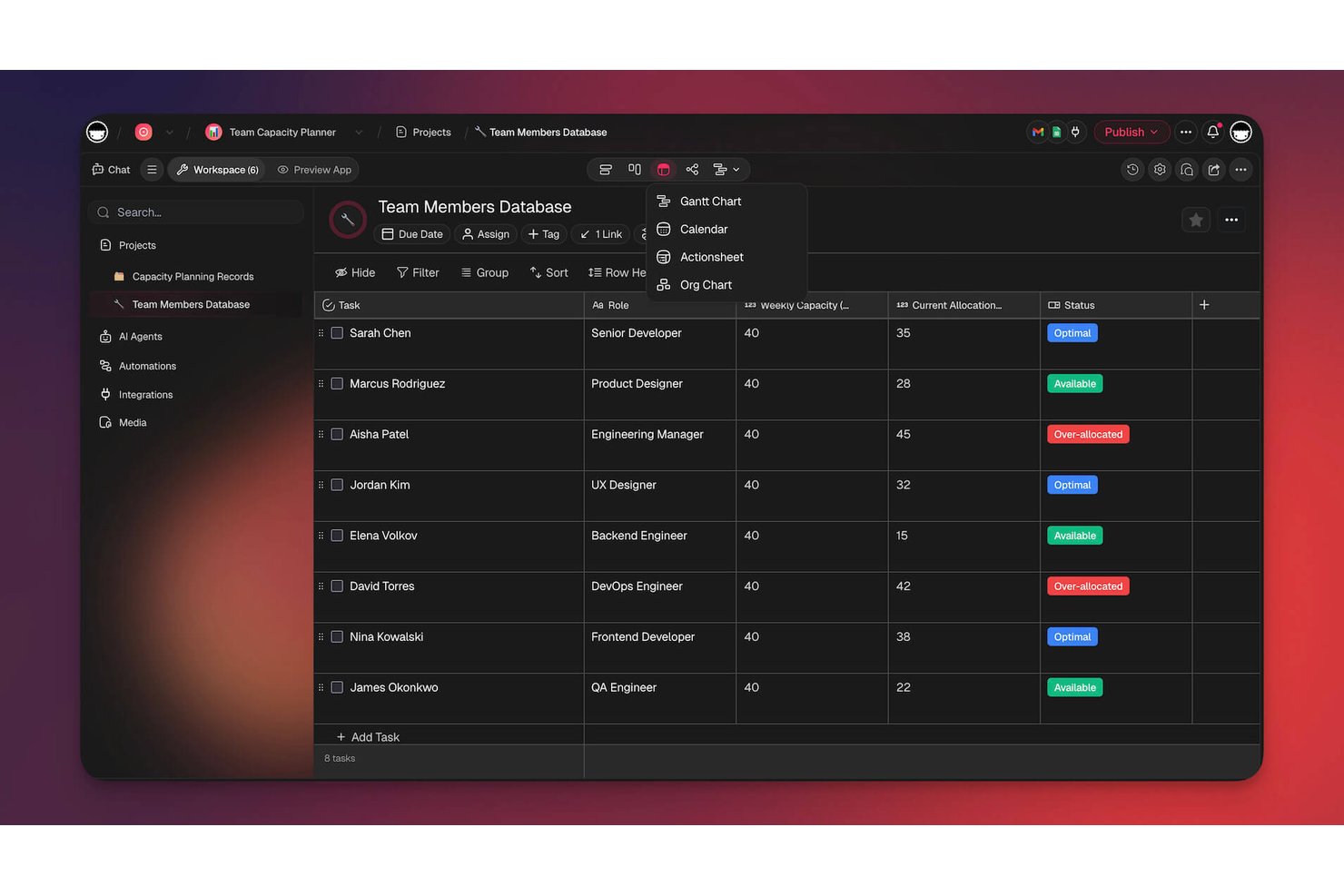
Taskade is an AI-powered project management and automation workspace that lets you generate projects, build agents, design multi-step workflows, and publish live apps—all from natural language prompts.
Who Is Taskade Best For?
Taskade is a strong fit for small teams and freelancers who want to go from a rough project idea to a structured plan in minutes, not hours.
Why I Picked Taskade
I picked Taskade as one of the best because its Project Studio genuinely turns a rough goal into a structured project, complete with sections, tasks, due dates, and assignees, without needing a template to start from. I also love how Taskade EVE lets me query project status in plain language, so instead of pulling a manual report, I can ask which milestones are overdue by assignee and get an answer instantly. The AI Workflow Generator rounds this out by converting a plain-English description into a multi-step automation I can preview and enable in minutes.
Taskade Key Features
- Multiple project views: Switch between List, Board, Calendar, Table, Mind Map, Gantt Chart, and Org Chart views, all drawing from the same project data.
- Agent generator: Describe an agent's role in plain language and Taskade builds it with relevant skills, tools, and knowledge sources.
- AI Workflow Generator: Describe an automation in plain English and Taskade produces a previewable, multi-step workflow you can customize and enable.
- Real-time collaboration: Project changes sync instantly across web, desktop, and mobile for all team members simultaneously.
Taskade Integrations
Taskade lists 166 integrations, including Slack, Google Drive, Google Calendar, Notion, GitHub, Jira, Linear, and Microsoft Teams. It supports REST and Action APIs, webhooks, MCP servers, and a TypeScript SDK, plus Zapier, Make, and n8n.
Pros and Cons
Pros:
- Natural-language requests can create and assign tasks
- Reviewers praise quick, collaborative project setup
- Builds project plans from plain-language prompts
Cons:
- Complex projects need deeper dependency and reporting controls
- Brief prompts can produce shallow project plans
Trello
Best for natural language task management
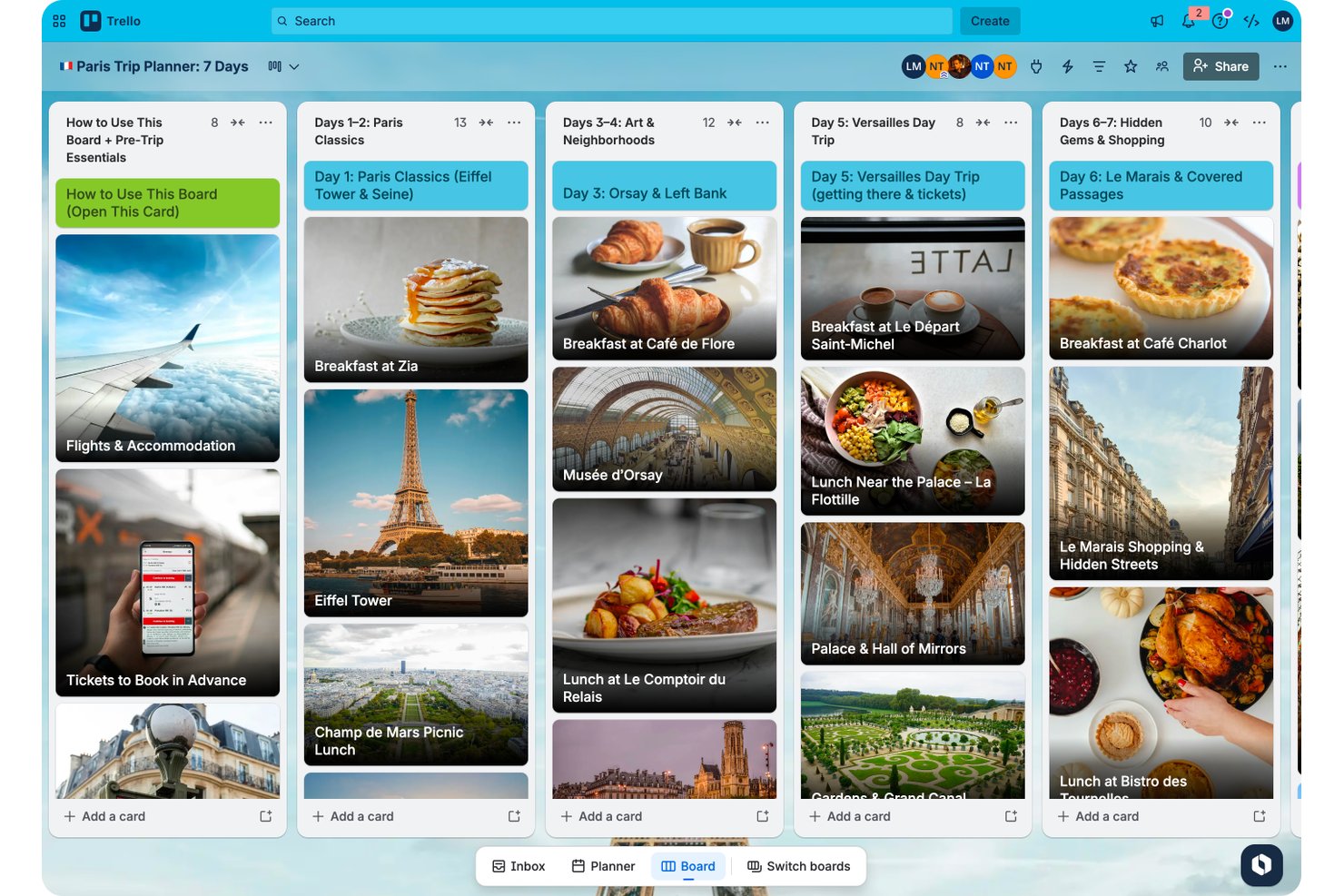
Trello is a Kanban-style project management tool built by Atlassian that combines boards, cards, AI-generated board creation, natural language task management via MCP, and built-in automation to help teams organize and track work.
Who Is Trello Best For?
Trello works well for small teams and freelancers who need a lightweight, visual way to manage tasks without a steep learning curve.
Why I Picked Trello
I picked Trello as one of the best because its MCP integration genuinely changes how you interact with your boards: you can tell Claude or ChatGPT to create a card, move tasks, assign members, or pull a summary of overdue work across your boards using plain language. I also like that the AI board builder generates a full board from a single text prompt, complete with lists, cards, checklists, and due dates, so there's no blank-slate paralysis when kicking off a new project.
Trello Key Features
- Butler automation rules: Trigger automated actions on cards and boards—like moving cards, assigning members, or posting Slack messages—based on events you define.
- Trello Inbox: Captures to-dos and messages from email, Slack, and Microsoft Teams into a personal holding area before you assign them to a board.
- Advanced checklists: Assign individual checklist items to specific team members and set due dates directly within a card.
- Multiple board views: Switch between Calendar, Timeline, Table, Dashboard, and Map views to see your work from different angles.
Trello Integrations
Trello lists 234 marketplace integrations, including Slack, Jira Cloud, Miro, Microsoft Teams, and Gmail. It also offers a REST API and Power-Ups for custom integrations.
Pros and Cons
Pros:
- Butler automates routine moves and reminders
- Teams report getting started with little training
- Visual boards make task status easy to scan
Cons:
- Missing dependencies complicate complex project planning
- Cross-board reporting offers limited project visibility

Best for client-work AI project management
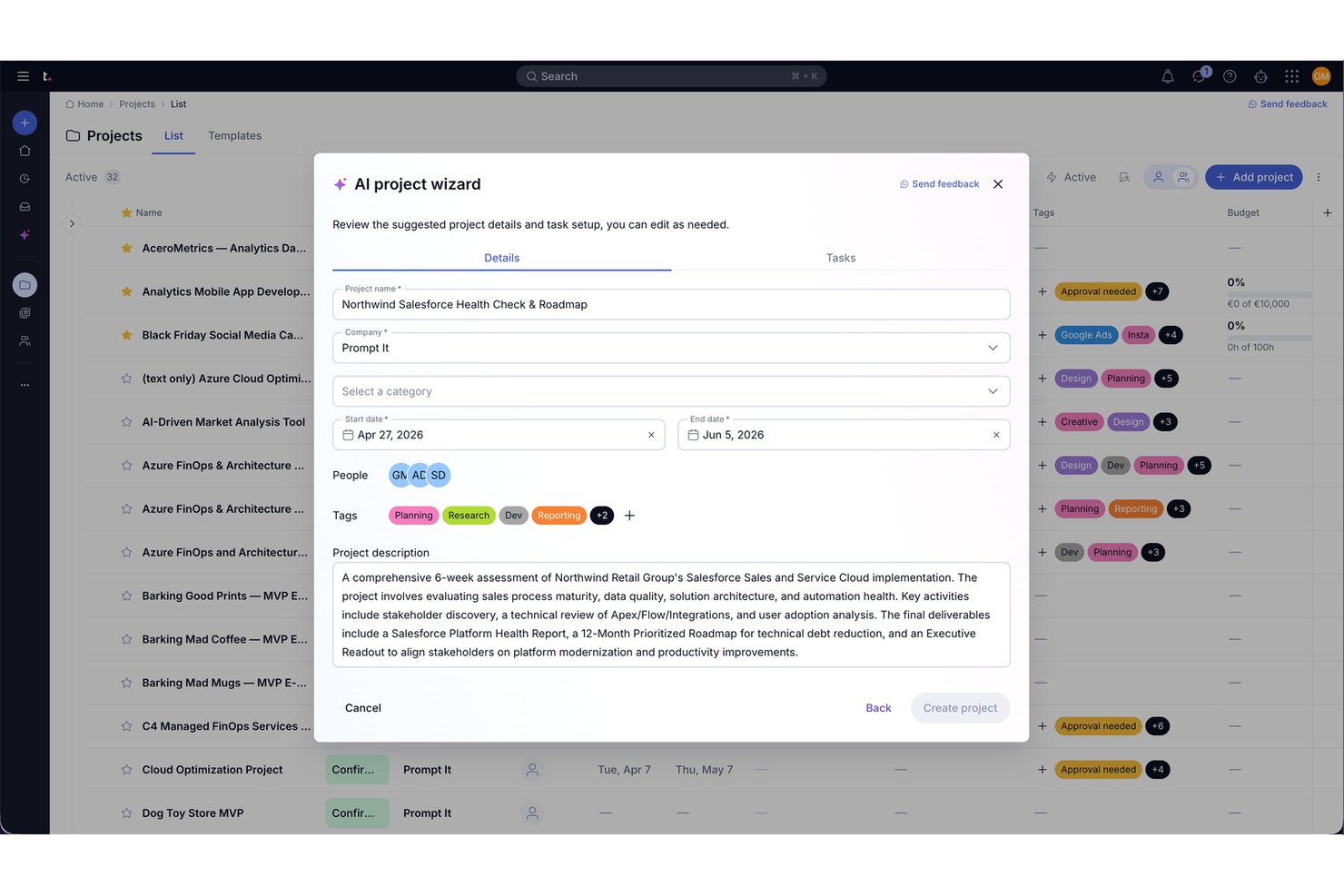
Teamwork.com is a project and resource management platform purpose-built for client work, combining AI-assisted task generation, natural language project creation, automated status summaries, time tracking, and profitability reporting.
Who Is Teamwork.com Best For?
Teamwork.com is a strong fit for agencies, consultancies, and client-services teams that need to manage projects, track billable time, and monitor profitability in one place.
Why I Picked Teamwork.com
I've included Teamwork.com in my top picks because it's the only tool on this list built specifically around client work, where AI actively supports the billing and delivery side of project management, not just task creation. The AI Project Wizard reads a project brief and generates a structured plan with tasks, timelines, and assignments, which means I can spin up a new client engagement without starting from scratch. I also rely on Ask AI to answer real-time questions about budget consumption, delivery risk, and team capacity without pulling a single report manually.
Teamwork.com Key Features
- Native time tracking: Log billable and non-billable hours directly against tasks using timers, timesheets, and reminders.
- Client invoicing: Generate customizable invoices from logged time and sync them with tools like QuickBooks and Xero.
- Automation rules: Set trigger-based automations to move tasks through workflow stages, notify teammates, or create follow-up tasks.
- Project health reporting: View snapshot summaries of project status, planned vs. actual progress, and profitability by client or project.
Teamwork.com Integrations
Teamwork.com offers 150+ integrations, including Slack, Microsoft Office, Harvest, Xero, QuickBooks, HubSpot, Google Drive, Microsoft Teams, and Dropbox. It also provides an API and webhooks for custom integrations, plus Zapier.
Pros and Cons
Pros:
- Client-facing project views clarify task ownership and progress
- Status summaries surface deadlines, risks, and capacity
- AI turns briefs into structured project tasks
Cons:
- Reviewers report slow loading and technical glitches
- Menus can bury tasks and reports

Linear
Best for dev team issue tracking with AI
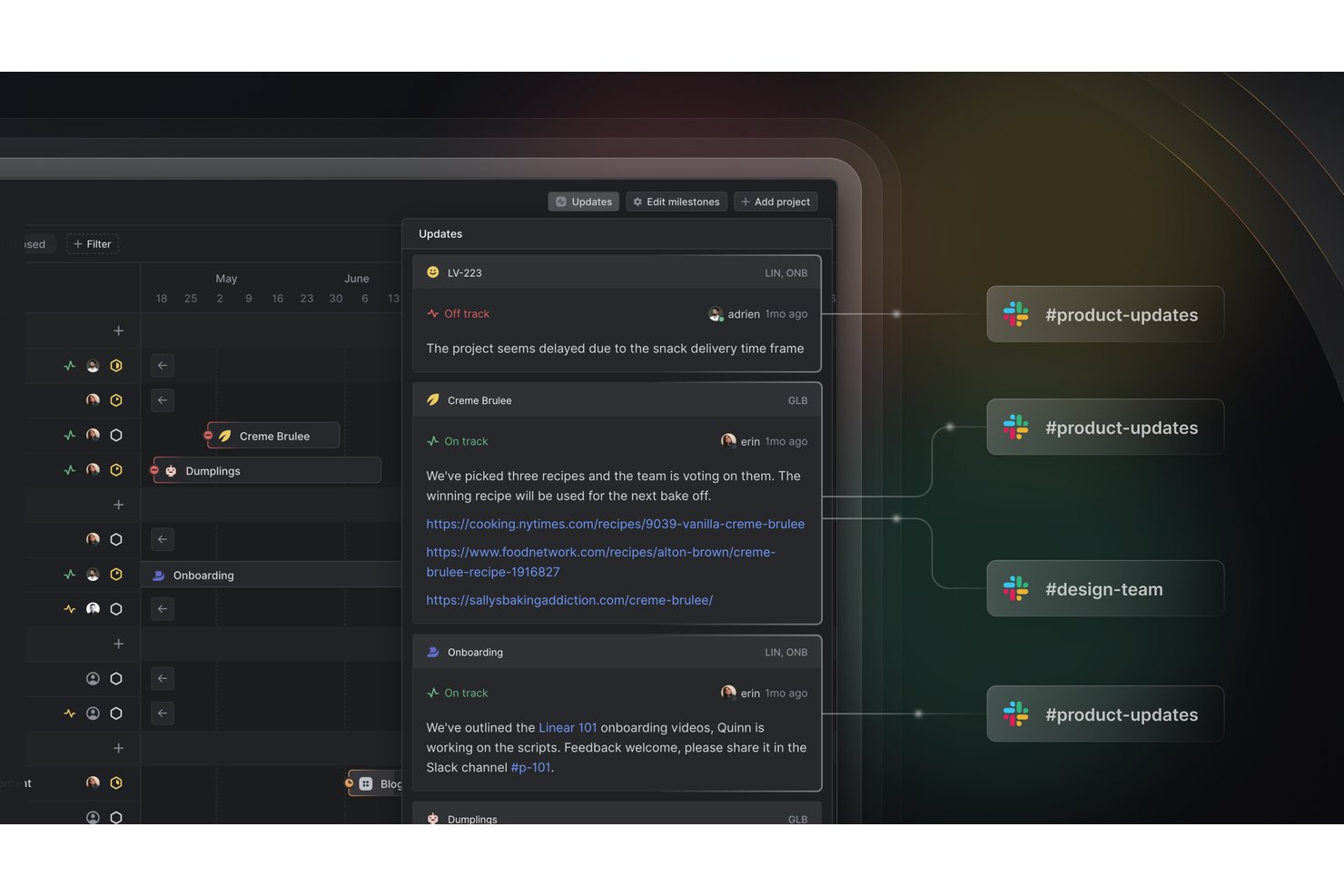
Linear is a product development and issue-tracking platform built for software teams, combining AI-assisted task creation, project planning, cycle management, and automated status summaries in one focused workspace.
Who Is Linear Best For?
Linear is a strong fit for software and product teams that need fast, focused issue tracking with AI built into the core workflow.
Why I Picked Linear
I picked Linear as one of the best because it's purpose-built for dev team issue tracking, and its AI features are deeply embedded in that workflow rather than bolted on. Linear Agent can turn a planning document into a structured project complete with issues, milestones, and dependencies, all staged for your review before anything gets created. I also love how "Write with Agent" pulls in recent Slack messages and project changes to draft status updates automatically, cutting out the manual reporting cycle that slows most engineering teams down.
Linear Key Features
- Triage Intelligence: Automatically analyzes incoming issues and suggests assignees, labels, teams, priorities, and relationships based on historical workspace data.
- Loops: Recurring agent workflows that trigger on schedules or workspace events, such as new Slack messages or GitHub pull requests, and run automatically.
- Cycles: Time-boxed work periods where teams plan, track, and review issue progress across a defined sprint-like window.
- Visual timeline: A timeline view for planning and monitoring project milestones, dependencies, and workstreams across teams.
Linear Integrations
Linear offers native integrations with GitHub, Slack, GitLab, Figma, Intercom, Zendesk, Salesforce, Gong, Notion, and Google Sheets. It also supports marketplace integrations, Zapier, and an API with webhooks for custom connections.
Pros and Cons
Pros:
- Clear cycle progress and work ownership
- AI drafts issues and project updates
- Fast issue triage and keyboard-driven workflows
Cons:
- Reporting lacks detail for portfolio oversight
- Limited resource planning for cross-team work

Motion
Best for AI-driven task scheduling
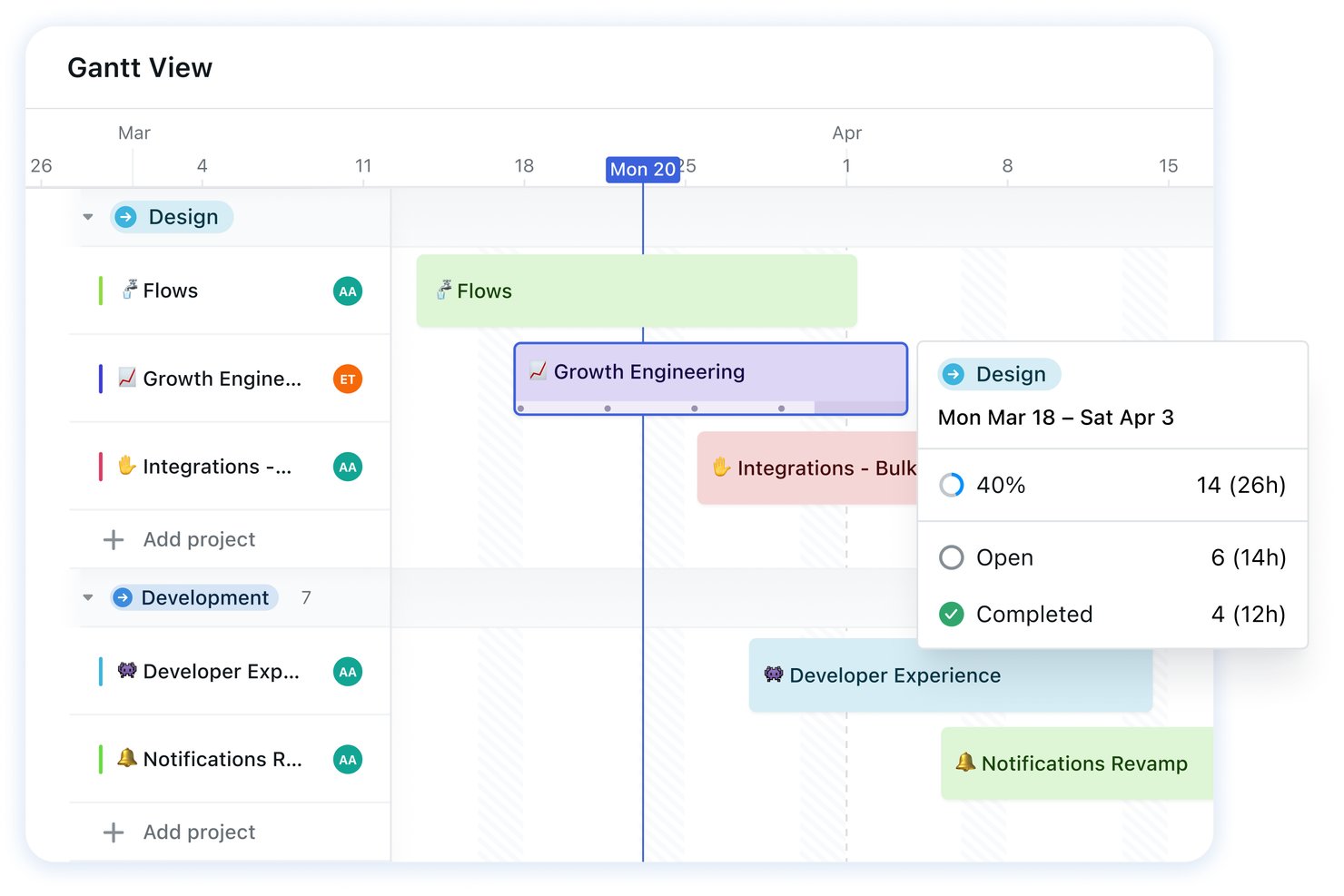
Motion is an AI-powered project management and productivity platform that combines automatic task scheduling, project planning, calendar management, meeting notes, and docs in a single workspace.
Who Is Motion Best For?
Motion works best for project managers and team leads who need AI to handle the scheduling decisions they'd otherwise spend hours doing manually.
Why I Picked Motion
Motion earns its spot on my shortlist because its AI scheduler does something most project management tools don't: it doesn't just create tasks, it actually decides when those tasks get done. Describe a project, and Motion generates a full workflow with stages, owners, deadlines, and dependencies, then places every task on your calendar automatically. When priorities shift or a meeting runs long, it reschedules the entire plan without you touching a thing.
Motion Key Features
- AI meeting notetaker: Automatically captures meeting summaries, transcripts, and action items from Zoom, Google Meet, and Microsoft Teams calls.
- Team capacity planning: Shows whether teammates are over or under capacity so you can rebalance workloads before deadlines slip.
- AI Chat: Lets you create, update, and search tasks and projects using plain-language questions directly inside the workspace.
- Workflow builder: Converts SOP documents into step-by-step project templates with tasks, stages, and assignees ready to launch.
Motion Integrations
Motion offers native integrations with Google Calendar, Outlook 365, iCloud Calendar, Zoom, Microsoft Teams, Google Meet, and Gmail. It also supports an API and Zapier.
Pros and Cons
Pros:
- Shows tasks and schedules in one workspace
- Turns project descriptions into editable task workflows
- Automatically reschedules tasks as priorities change
Cons:
- Auto-scheduling can feel rigid when plans shift
- Initial setup can take substantial time

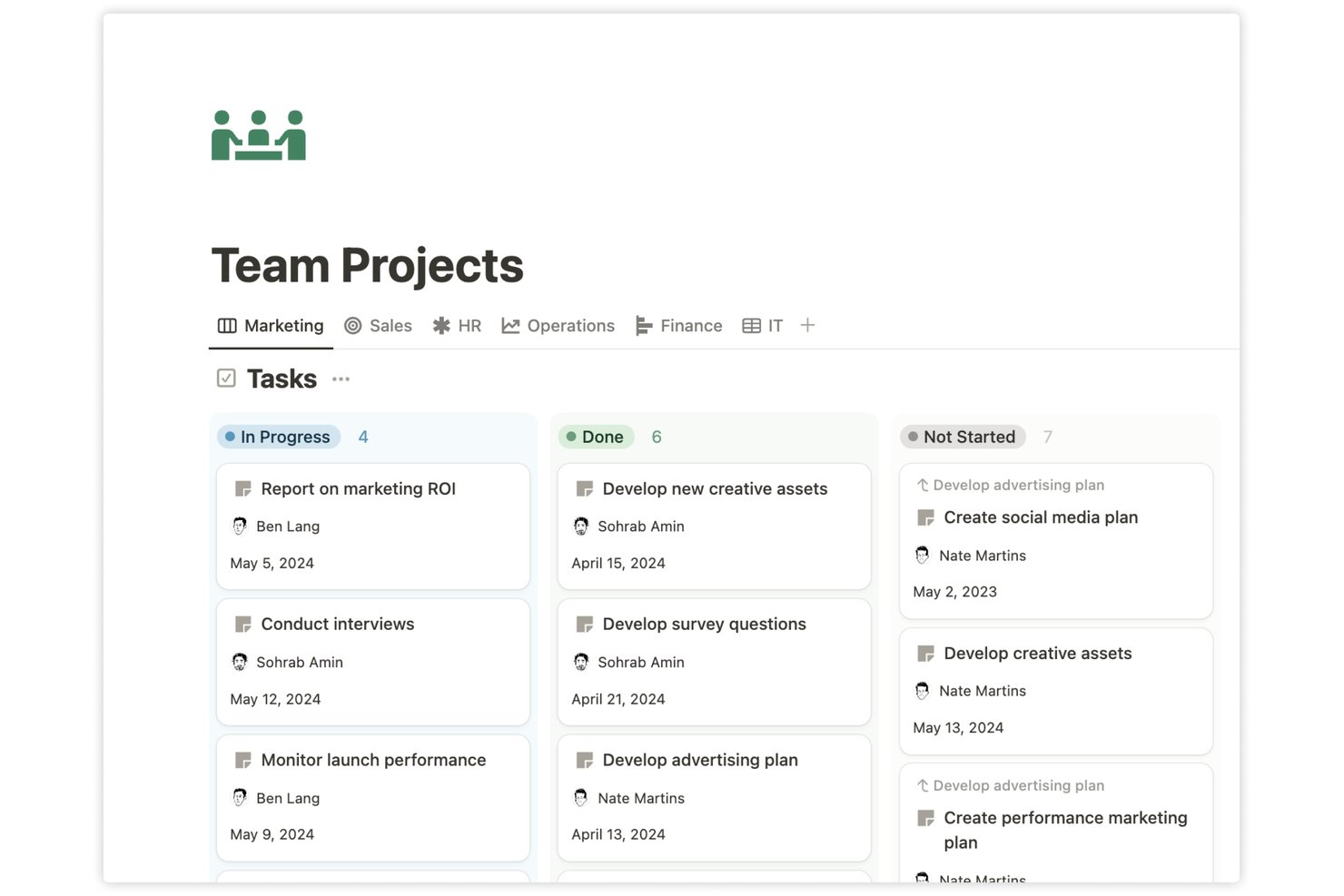
Notion is an all-in-one workspace platform that combines AI-assisted project management, configurable task databases, docs, wikis, and automation tools to help teams plan, track, and organize work in one place.
Who Is Notion Best For?
Notion works well for teams that want to manage projects, docs, and knowledge in one place rather than juggling separate tools for each.
Why I Picked Notion
I've included Notion in my top picks because it's one of the few tools that genuinely keeps projects, docs, and team knowledge in a single workspace without forcing you to patch things together. Notion Agent lets you generate a full launch plan with tasks and owners from a plain-language prompt, and the AI Summary database property automatically updates project overviews as work progresses. Custom Agents can also run scheduled status reports covering completed tasks, blockers, and next steps, cutting down the manual reporting that eats into a PM's week.
Notion Key Features
- AI Meeting Notes: Transcribes meetings, summarizes key points, and stores notes alongside related projects and documents.
- Notion Calendar integration: Connects work and personal calendars to view project deadlines and scheduled events in a single calendar view.
- Database automations: Triggers automated actions—like editing properties, sending Slack notifications, or posting webhooks—based on page events or recurring schedules.
- Enterprise Search: Searches across your Notion workspace and connected apps to surface answers from a single query.
Notion Integrations
Notion offers integrations with Slack, GitHub, Google Drive, Jira, Linear, Figma, Microsoft Teams, Google Calendar, and Outlook Calendar. It also provides a REST API, webhooks, and JavaScript SDK for custom integrations.
Pros and Cons
Pros:
- AI summaries reduce manual status updates
- Projects, docs, and notes stay together
- Flexible databases track tasks and deadlines
Cons:
- Complex projects may need deeper PM tools
- Complex databases take time to configure
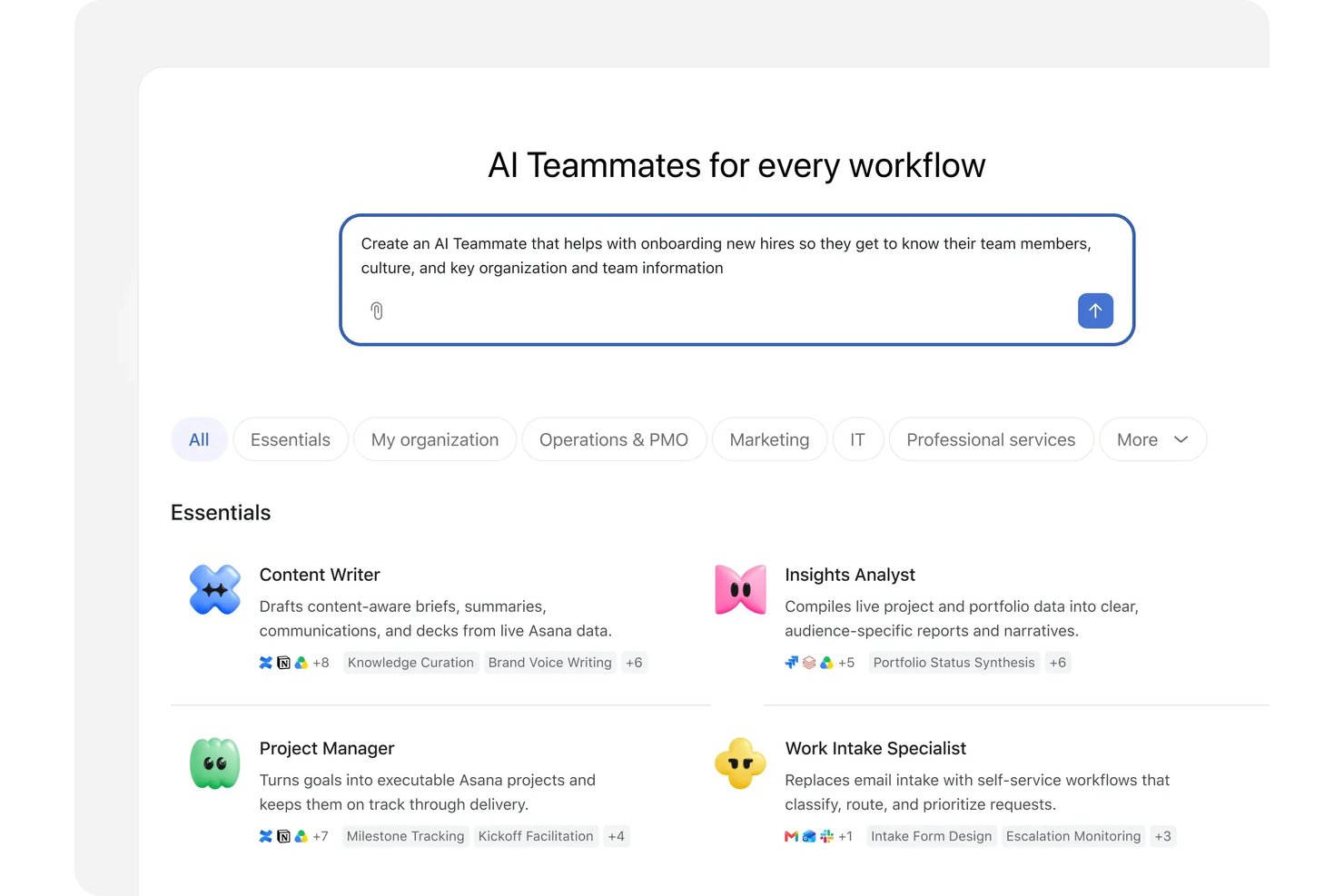
Asana is a work management platform that combines AI-generated project planning, task tracking, automated workflows, and cross-functional coordination through AI Teammates, Smart chat, and Asana Dash.
Who Is Asana Best For?
Asana works well for project managers and cross-functional team leads who need AI to draft project plans, surface blockers, and automate routine intake and routing without leaving their existing workflow.
Why I Picked Asana
Asana earns its spot on my shortlist because its AI project plan template does something I genuinely find useful: it takes a project description and generates tasks, milestones, owners, timelines, and dependencies you can review and adjust before committing. I also rely on Smart chat to ask plain-language questions like "what are my top priorities this week?" and get a direct answer grounded in actual project data. Asana Dash pulls blocked items, pending decisions, and morning priorities into one view without manual digging.
Asana Key Features
- AI Studio automation builder: A no-code builder that generates multi-step workflow automations from a plain-language description, with editable triggers, conditions, and actions.
- Portfolio summaries: Digests recent activity across projects in a portfolio and delivers recurring summaries roughly weekly when there's sufficient activity.
- Project risk reports: Identifies potential blockers, links them to relevant tasks and collaborators, and suggests mitigation steps.
- AI Teammates: Prebuilt and customizable agents that handle role-specific work—such as intake routing, content drafting, and capacity planning—alongside your team.
Asana Integrations
Asana offers 270+ app integrations, including Slack, Microsoft Teams, Google Drive, Gmail, Google Calendar, Jira Cloud, GitHub, Figma, and Google Sheets. It also provides a REST API, webhooks, OAuth, MCP server support, and Zapier.
Pros and Cons
Pros:
- Project summaries reduce manual status reporting
- Dash surfaces blockers and pending decisions
- AI drafts tasks, owners, timelines, and dependencies
Cons:
- AI Teammates may need repeated coaching
- Complex workflows take time to configure

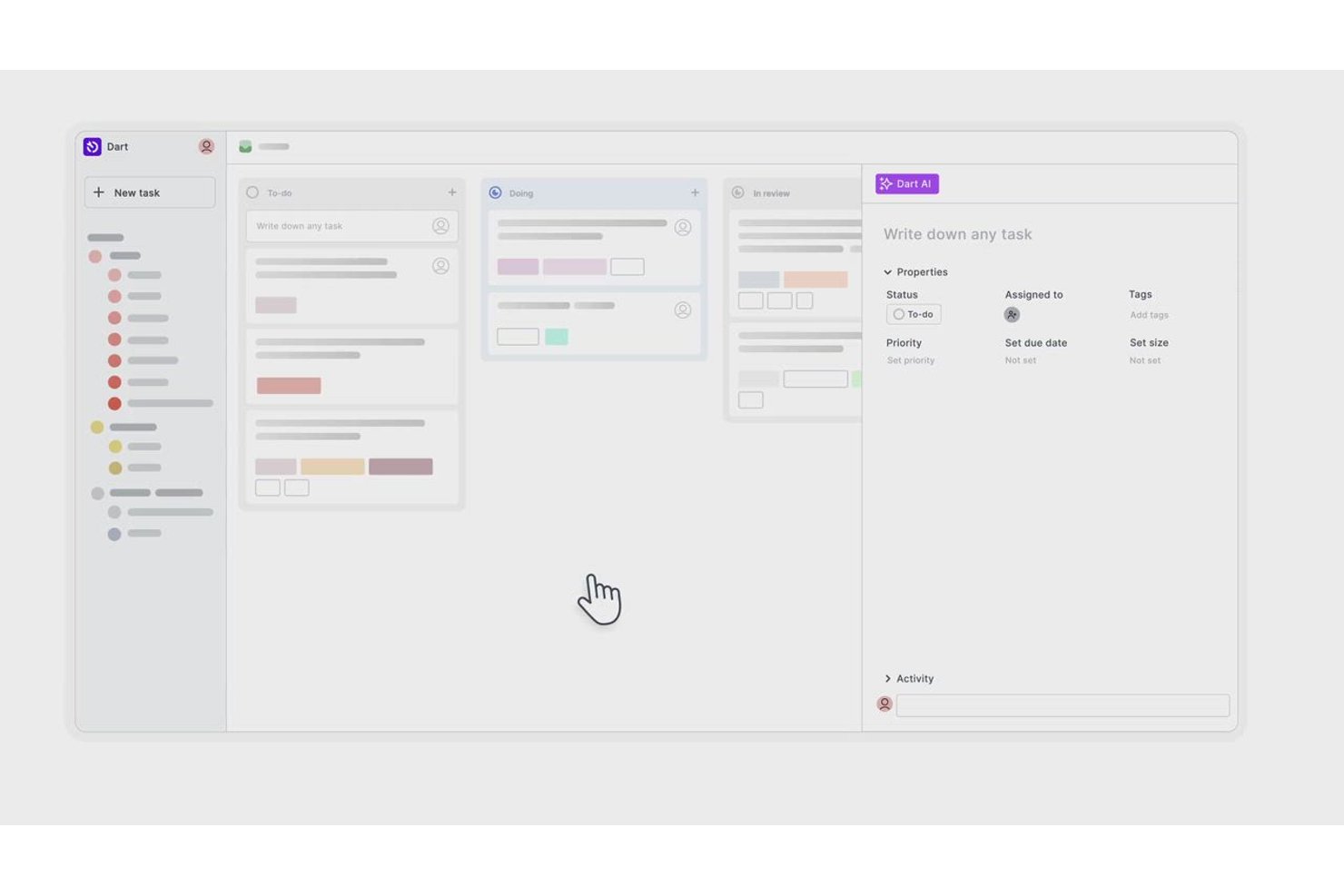
Dart is an AI-enabled project management platform that combines task generation, natural language interaction, automated standup and changelog reporting, sprint planning, and multi-agent orchestration.
Who Is Dart Best For?
Dart suits project managers on small-to-mid-sized tech teams who want AI to handle recurring reporting work like standups and changelogs automatically.
Why I Picked Dart
I picked Dart as one of the best because it automates the reporting work that eats up project managers' time every single day. Its built-in standup skill pulls completed work, blockers, and next steps from the last 24 hours and organizes everything by person, while the changelog skill tracks task changes by assignee over the same window. I especially like that you can schedule both to run automatically, say every weekday at 9:00 AM, so your team's status updates generate themselves without anyone having to write them.
Dart Key Features
- AI task property filling: AI automatically suggests tags, status, due dates, and assignees directly on any task.
- AI brainstorming: Generate and refine task ideas collaboratively in an empty dartboard or through AI chat.
- Multi-agent orchestration: A lead agent breaks down a goal and coordinates specialist agents in sequence or in parallel.
- Duplicate task detection: Dart identifies and flags duplicate tasks across your project to keep your board clean.
Dart Integrations
Dart offers native integrations with Slack, GitHub, Jira, Notion, Microsoft Project, ChatGPT, Claude, and Discord. It also supports an OpenAPI 3.1 API, webhooks, an MCP server, and Zapier.
Pros and Cons
Pros:
- Weekly planning takes less time
- Keyboard shortcuts speed up task creation
- AI turns rough lists into structured tasks
Cons:
- Sync delays can complicate cross-device updates
- AI task drafts still need regular edits
Diğer Kullanımı En Kolay Yapay Zekâ Proje Yönetimi Yazılımları
Kısa listeme giremeyen ancak yine de göz atmaya değer bazı kullanımı en kolay yapay zekâ proje yönetimi yazılımı seçenekleri şunlardır:
- Productive
For agency budget and AI reporting
- Smartsheet
For AI-generated cross-project status reports
- Jira
For AI-driven agile team tracking
- Airtable
For AI-driven database project tracking
- Lark
For visual workflow AI project management
- Hive
For turning chat into tracked actions
- ClickUp
For AI task views across custom workflows


How I Evaluate Easiest AI Project Management Software
To make this list, a tool's AI needs to handle real project work, like drafting plans from briefs or summarizing progress. From there, I evaluate three things. Core functionality carries the most weight, like tracking tasks and mapping schedules. Then I look at standout features, like cross-project AI dashboards, and factors beyond features, like how easy setup is for new users.
Core Functionality (Table Stakes For This List)
When I'm selecting tools for my list, I score each one on a scale from 0 (does not offer the functionality) to 5 (excels in this area) for each core functionality listed below. I then convert the total into a percentage to help assess each tool's overall fit, with extra weight on any functionalities I’ve deemed essential.
- Task Generation (Essential): I look for AI that turns a project brief into structured tasks and subtasks, with useful details and timelines that need little editing.
- Natural Language Actions (Essential): I assess whether plain-language prompts can create, update, or find tasks, such as locating work blocked by a dependency.
- AI Scheduling: I check whether suggestions account for deadlines, workload, and dependencies when priorities shift or a task falls behind.
- Status Summaries: I look for summaries that capture completed work, open tasks, blockers, and upcoming milestones for a project update.
- Workflow Automation: I evaluate whether rules or AI can trigger practical actions, such as assigning tasks, changing statuses, or notifying owners.
Once I have a list of tools that meet the criteria, I consider what sets each platform apart.
Differentiating Factors (What Sets Vendors Apart)
Here's how I compare and contrast different vendors:
Standout Features
I look for a cross-project AI dashboard that rolls health scores and summaries from every active project into one view. That saves me from clicking through each workspace during a Monday check-in. Template-free plan generation matters too—I evaluate whether a tool can turn a single goal statement into a usable project structure, not just serve up a generic template. I also check for adaptive workload balancing that learns each team member's pace over time and adjusts future assignments accordingly.
Beyond Features
I check whether AI features are locked behind top-tier plans, since a freelancer or small team won't get value from a tool whose AI only appears at enterprise pricing. Integration depth matters just as much—if a platform can't pull from Slack, Google Workspace, or your calendar, its AI summaries and automations run on incomplete data. I also evaluate how each vendor handles data privacy and whether you can audit or override AI decisions, especially when client-sensitive project details are involved.
Kullanımı En Kolay Yapay Zekâ Proje Yönetimi Yazılımı Nasıl Seçilir?
Uzun özellik listeleri ve karmaşık fiyatlandırma yapıları arasında kaybolmamak zor olabilir. Benzersiz yazılım seçim sürecinizi yürütürken odağınızı korumanıza yardımcı olmak için dikkate almanız gereken faktörleri aşağıda bir kontrol listesi hâlinde bulabilirsiniz:
| Faktör | Dikkate Alınması Gerekenler |
|---|---|
| Ölçeklenebilirlik | Yazılım ekibinizle birlikte büyüyebilir mi? İşletmeniz büyüdükçe daha fazla kullanıcıyı ve projeyi yönetip yönetemeyeceğini değerlendirin. Esnek fiyatlandırma kademeleri sunan araçları tercih edin. |
| Entegrasyonlar | Mevcut araçlarınızla bağlantı kurabiliyor mu? Yazılımın Slack, Google Workspace veya Microsoft Teams gibi mevcut sistemlerinizle sorunsuz şekilde entegre olup olmadığını kontrol edin. |
| Özelleştirilebilirlik | İş süreçlerinize uyacak şekilde uyarlayabilir misiniz? Yazılımın iş akışlarını ve panoları ekibinizin benzersiz ihtiyaçlarına göre özelleştirmenize izin verdiğinden emin olun. |
| Kullanım kolaylığı | Arayüz sezgisel mi? Ekibinizin kapsamlı bir eğitim almadan yazılımda kolayca gezinebilip gezinemeyeceğini değerlendirin. Kullanıcı dostu tasarımlar sunan araçları tercih edin. |
| Uygulama ve işe alıştırma | Başlamak ne kadar sürecek? Ekibinizi uygulamaya geçirmek ve eğitmek için gereken zamanı ve kaynakları değerlendirin. Rehberli işe alıştırma süreçleri sunan araçları tercih edin. |
| Maliyet | Bütçeniz dâhilinde mi? Fiyatlandırma planlarını karşılaştırın ve maliyetin bütçenizle uyumlu olup olmadığını belirleyin. Gizli ücret veya ek ödemelere dikkat edin. |
| Güvenlik önlemleri | Verilerinizi koruyor mu? Yazılımın güvenlik standartlarına uyduğunu ve veri şifreleme ile kullanıcı erişim kontrolleri gibi özellikler sunduğunu doğrulayın. |
Kullanımı En Kolay Yapay Zekâ Proje Yönetimi Yazılımı Nedir?
En kolay yapay zekâ proje yönetimi yazılımı, kullanıcıların karmaşık özellikleri öğrenmek için saatler harcamasını gerektirmeden görev yönetimini basitleştirmek ve üretkenliği artırmak için yapay zekâ kullanır. Bu araçlar, basitlik göz önünde bulundurularak tasarlanmıştır ve ekiplerin düzenli ve verimli kalmasına yardımcı olan sezgisel UX/UI tasarımını akıllı, yapay zekâ destekli otomasyonla birleştirir.
En kolay yapay zekâ proje yönetimi yazılımı genellikle manuel çalışmayı azaltmak ve projeleri planlandığı şekilde ilerletmek için otomatik zamanlama, görev önceliklendirme ve gerçek zamanlı analiz gibi özellikleri içerir. Sonuç olarak projeleri başlangıçtan bitişe kadar yönetmenin daha hızlı, daha akıllı ve daha zahmetsiz bir yolunu sunar.
En Kolay Yapay Zekâ Proje Yönetimi Yazılımının Özellikleri
En kolay yapay zekâ proje yönetimi yazılımını seçerken aşağıdaki temel özelliklere dikkat edin:
- Otomatik zamanlama: Görevleri öncelik ve son teslim tarihlerine göre otomatik olarak düzenleyerek zaman kazandırır ve manuel planlamayı azaltır.
- Görev önceliklendirme: En önemli görevleri belirlemeye ve bunlara odaklanmaya yardımcı olarak kritik işlerin önce tamamlanmasını sağlar.
- Gerçek zamanlı analiz: Proje ilerlemesi ve ekip performansı hakkında içgörüler sunarak hızlı ve bilinçli kararlar almanıza yardımcı olur.
- Özelleştirilebilir iş akışları: Süreçleri ekibinizin özel ihtiyaçlarına uyacak şekilde düzenlemenize olanak tanıyarak esnekliği ve verimliliği artırır.
- Entegrasyon özellikleri: İş akışlarını kolaylaştırmak için Slack ve Google Workspace gibi mevcut araçlara sorunsuz şekilde bağlanır.
- Yapay zekâ destekli içgörüler: Görev yönetimini ve kaynak tahsisini optimize etmek için akıllı öneriler ve tahminler sunar.
- Kullanıcı dostu arayüz: Ekip üyelerinin kapsamlı bir eğitim almadan yazılımda gezinebilmesini sağlayarak kullanım kolaylığı sunar.
- Güvenlik önlemleri: Şifreleme ve kullanıcı erişim denetimleriyle verileri koruyarak bilgilerinizin güvende kalmasını sağlar.
- İş birliği araçları: Ekip üyeleri arasındaki iletişimi ve iş birliğini kolaylaştırarak ekip çalışmasını ve üretkenliği geliştirir.
En Kolay Yapay Zekâ Proje Yönetimi Yazılımının Faydaları
En kolay yapay zekâ proje yönetimi yazılımını uygulamak, ekibiniz ve işletmeniz için çeşitli faydalar sağlar. Yararlanabileceğiniz bazı faydalar şunlardır:
- Artan verimlilik: Otomatik zamanlama ve görev önceliklendirme manuel çalışmayı azaltarak ekibinizin önemli görevlere odaklanmasını sağlar.
- Gelişmiş iş birliği: Entegrasyon özellikleri ve iş birliği araçları iletişimi geliştirerek ekip üyelerinin birlikte çalışmasını kolaylaştırır.
- Daha iyi karar alma: Gerçek zamanlı analiz, proje ilerlemesi hakkında içgörüler sunarak hızlı ve bilinçli kararlar almanıza yardımcı olur.
- Gelişmiş esneklik: Özelleştirilebilir iş akışları, süreçleri ekibinizin ihtiyaçlarına uyacak şekilde düzenlemenize ve çeşitli proje gereksinimlerine uyum sağlamanıza olanak tanır.
- Zamandan tasarruf: Yapay zekâ destekli içgörüler ve otomasyon özellikleri proje yönetimini kolaylaştırarak diğer öncelikler için zaman kazandırır.
- Veri güvenliği: Güvenlik önlemleri bilgilerinizi koruyarak verilerinizin güvende olduğuna dair içinizin rahat olmasını sağlar.
- Kullanıcı memnuniyeti: Kullanıcı dostu arayüz, ekip üyelerinin yazılımda kolayca gezinebilmesini sağlayarak öğrenme sürecini kısaltır.
En Kolay Yapay Zekâ Proje Yönetimi Yazılımının Maliyetleri ve Fiyatlandırması
En kolay yapay zekâ proje yönetimi yazılımını seçmek, mevcut çeşitli fiyatlandırma modellerini ve planları anlamayı gerektirir. Maliyetler özelliklere, ekip büyüklüğüne, eklentilere ve daha fazlasına göre değişir. Aşağıdaki tablo, yapay zekâ proje yönetimi yazılımı çözümlerinde yaygın planları, ortalama fiyatlarını ve genellikle sunulan özellikleri özetlemektedir:
En Kolay Yapay Zekâ Proje Yönetimi Yazılımı İçin Plan Karşılaştırma Tablosu
| Plan Türü | Ortalama Fiyat | Yaygın Özellikler |
|---|---|---|
| Ücretsiz Plan | $0 | Temel görev yönetimi, sınırlı entegrasyonlar ve topluluk desteği. |
| Kişisel Plan | $5-$15/kullanıcı/ay | Görev önceliklendirme, özelleştirilebilir iş akışları ve temel analiz. |
| İşletme Planı | $20-$40/kullanıcı/ay | Gelişmiş raporlama, iyileştirilmiş entegrasyonlar ve iş birliği araçları. |
| Kurumsal Plan | $50+/kullanıcı/ay | Özel güvenlik özellikleri, özel destek ve sınırsız özelleştirme seçenekleri. |
Yapay Zekâ Proje Yönetimi Yazılımı SSS'leri
İşte en kolay yapay zekâ proje yönetimi yazılımı hakkında sık sorulan soruların bazı yanıtları:
Yapay zekâ proje yönetimi araçları veri güvenliğini nasıl sağlar?
Yapay zekâ proje yönetimi araçları; şifreleme, kullanıcı erişim denetimleri ve sektör standartlarına uyumluluk gibi özellikleri uygulayarak veri güvenliğine öncelik verir. Ekibinizin verilerinin korunmasını sağlamak için yazılımın güvenlik önlemlerini değerlendirmek önemlidir. İhtiyaçlarınıza uygunsa ISO veya GDPR uyumluluğu gibi sertifikaları mutlaka kontrol edin.
Yapay zekâ proje yönetimi yazılımı mevcut sistemlerle entegre olabilir mi?
Evet, çoğu yapay zekâ proje yönetimi yazılımı Slack, Google Workspace ve Microsoft Teams gibi popüler araçlarla entegrasyon olanağı sunar. Bir çözüm seçmeden önce iş akışı verimliliğini korumak için mevcut sistemlerinize sorunsuz şekilde bağlanabildiğinden emin olun. Desteklenen uygulamalar için yazılımın entegrasyon kitaplığını kontrol edin.
Yapay zekâ özellikleri proje yönetimini nasıl geliştirir?
Proje yönetimi yazılımlarındaki yapay zekâ özellikleri; rutin görevleri otomatikleştirerek, veriye dayalı içgörüler sunarak ve karar alma süreçlerini geliştirerek yardımcı olur. Zamanlamayı optimize edebilir, proje risklerini öngörebilir ve kaynak tahsisi önerebilirler. Bu sayede ekibiniz stratejik görevlere odaklanabilir ve manuel iş yükü azalırken genel üretkenlik artar.
Yapay zekâ proje yönetimi yazılımı maliyetlerini değerlendirirken nelere dikkat etmeliyim?
Maliyetleri değerlendirirken fiyatlandırma modelini, dahil edilen özellikleri ve olası eklentileri göz önünde bulundurun. Yazılımın sunduğu değeri fiyatıyla karşılaştırın ve gizli ücret olup olmadığını kontrol edin. Yazılımın ekibinizin ihtiyaçlarını karşılarken bütçenize de uygun olması önemlidir; bu nedenle esnek fiyatlandırma planlarını tercih edin.
Yapay zekâ proje yönetimi araçları ekip iş birliğini nasıl geliştirebilir?
Yapay zekâ proje yönetimi araçları; iletişim özelliklerini entegre ederek, gerçek zamanlı güncellemeler sunarak ve paylaşılan çalışma alanları sağlayarak iş birliğini geliştirir. Bu araçlar ekip üyelerinin aynı doğrultuda ilerlemesine ve bilgilendirilmesine yardımcı olur; iletişim kopukluklarını azaltır ve proje sonuçlarını iyileştirir. İş birliği özelliklerinin ekibinizin iş akışıyla uyumlu olduğundan emin olmak için bunları değerlendirin.
Yapay zekâ proje yönetimi yazılımından daha fazla yararlanan belirli sektörler var mı?
Yapay zekâ proje yönetimi yazılımı çeşitli sektörlere fayda sağlayabilse de BT, pazarlama ve inşaat gibi karmaşık proje koordinasyonu gerektiren sektörler için özellikle kullanışlıdır. Bu araçlar karmaşık iş akışlarını yönetmeye, tekrarlayan görevleri otomatikleştirmeye ve bu alanlarda proje başarısı için kritik olan içgörüleri sunmaya yardımcı olur.