

2026’da İncelenen En İyi 10 Belge Kontrol Yazılımı

10 En İyi Belge Kontrolü Yazılımları Kısa Listesi


En iyi belge kontrolü yazılımı, doğru kişilerin doğru sürümlendirilmiş, güvenli ve denetime hazır belgelere erişmesini sağlar. Bu araçlar riski azaltmanıza, uyumluluğu korumanıza ve güncel olmayan ya da yanlış konumlandırılmış dosyaların neden olduğu hataları ortadan kaldırmanıza yardımcı olur.
Hewlett-Packard'da küresel mühendislik projelerini yönettiğim dönemde belge kontrolü kritik öneme sahipti; ister teknik özellikleri farklı zaman dilimleri arasında koordine etmek, ister altyapı geçişleri sırasında ekipleri aynı hedefte buluşturmak söz konusu olsun.
Bu rehberde, uygulamalı testlere dayanarak en iyi belge kontrolü yazılımlarını inceledim. Her biri, hızlı hareket eden ekipler ve projeler genelinde belge erişimini düzenleme, güvence altına alma ve kolaylaştırma becerisine göre seçildi.
Why Trust Our Software Recommendations
Our team has been testing and reviewing software since 2012. As project managers ourselves, we know how difficult—and important—it is to choose the right software.
For this guide, we evaluated tools using hands-on testing and independent research, scoring tools using our selection criteria. We also draw on insights from industry thought leaders and practicing project management experts.
Our reviews reflect our human editorial judgment, not a sales pitch.
Expert reviewers:
Belge Kontrolü Yazılımları Karşılaştırma Tablosu
Bu karşılaştırma tablosu, en iyi belge kontrolü yazılımı seçimlerim için fiyatlandırma ayrıntılarını özetlemektedir:
| Tool | Starting Price | Website | |
|---|---|---|---|
| Best for version control & collaborative editing | 4.7 out of 5 | Pricing upon request 14-day free trial + free demo available | Website |
| Best with FedRAMP-authorized document security | 4.4 out of 5 | $37/user/month Free demo available | Website |
| Best for multilingual document management | 4.8 out of 5 | Pricing upon request Free demo available | Website |
| Best for easy file sharing | 4.5 out of 5 | $9.99/month Free plan available | Website |
| Best for policy management | 5.0 out of 5 | Pricing upon request Free demo available | Website |
| Best for cloud document storage | 4.5 out of 5 | Pricing upon request Free demo available | Website |
| Best with AI-powered PDF editing tools | 4.5 out of 5 | $19.99/user/month 7-day free trial | Website |
| Best for AI-powered search | 4.3 out of 5 | $5.78/user/month Free plan + 7-day trial available | Website |
| Best for AI-driven document organization | 4.4 out of 5 | $65/user/month Free demo available | Website |
| Best for legal document control | 4.3 out of 5 | Pricing upon request Free demo available | Website |
En İyi Belge Kontrolü Yazılımı İncelemeleri
Aşağıda, kısa listeme giren en iyi belge kontrolü yazılımlarının ayrıntılı özetlerini bulabilirsiniz. İncelemelerim, doğru aracı bulmanıza yardımcı olmak için her aracın temel özelliklerine, artılarına \u0026 eksilerine, entegrasyonlarına ve ideal kullanım alanlarına ayrıntılı bir bakış sunuyor.

Best for version control & collaborative editing

Document360 is an AI-powered documentation platform that helps teams create, manage, and publish internal and external knowledge bases. It’s particularly useful for organizations that need structured control over versioning, user access, and content workflows in a collaborative setting.
Why I Picked Document360
I chose Document360 because of its focus on version control and collaborative editing, which are essential for document accuracy and team productivity. The software also stood out for its AI-powered search, which helps users surface the right content quickly, even in large document libraries. Its robust analytics suite supports compliance by tracking usage patterns and identifying gaps in documentation.
Document360 Key Features
Document360 also offers several other features that help with document management.
- Role-Based Access Control: You can define and manage user roles and permissions to make sure sensitive information is only accessible to authorized personnel within your organization.
- Custom Workflow Builder: You can create bespoke workflows to streamline your team's document approval processes and make sure content is reviewed and published efficiently.
- Support Ticket Deflector: This lets you reduce support load by directing users to relevant documentation through intelligent search suggestions and minimizing the need for direct intervention.
- Interactive Decision Tree: You can guide users through complex decision-making processes with visual decision trees that provide step-by-step assistance and improve user experience.
Document360 Integrations
Integrations include Zendesk, Freshdesk, Intercom, Drift, Slack, GitHub, Make, Salesforce, and Microsoft Teams.
Pros and Cons
Pros:
- Provides robust version control with audit trails
- Offers powerful reporting and analytics
- Smart file management features
Cons:
- Complex features may be overwhelming for new users
- Most integrations are only available on higher-tier plans
New Product Updates from Document360

Document360 Adds Feedback APIs, MCP Tools, and Zendesk Authentication
Document360 adds feedback APIs, expanded MCP tools, Zendesk account authentication, and the ability to reopen closed feedback. These updates help teams manage feedback, automate knowledge base tasks, and control integration access. For more information, visit Document360’s official site.
 .

InEight
Best with FedRAMP-authorized document security
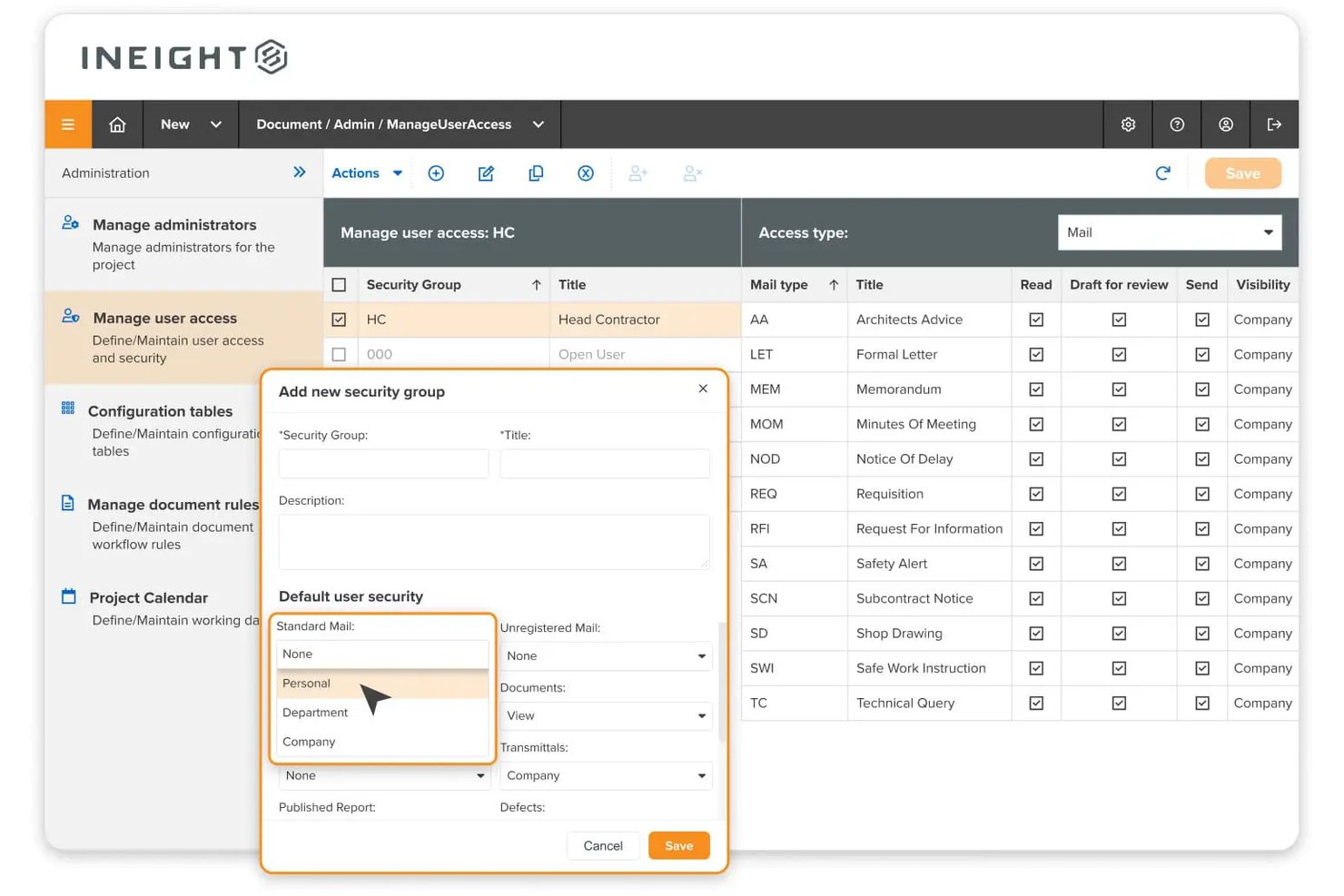
InEight Document is a capital construction-focused document control platform that centralizes project files, manages version and revision control, automates approval workflows, and handles transmittals and correspondence across large-scale engineering and infrastructure projects.
Who Is InEight Best For?
InEight Document is a strong fit for federal agencies and government contractors that need document control software meeting strict U.S. security compliance requirements.
Why I Picked InEight
InEight earns its spot on my shortlist because it's the only document control platform I've come across with FedRAMP Moderate Equivalency Authorization. Federal agencies and their contractors can adopt it without extra compliance hurdles. I like that every document action is captured in an immutable audit trail assessed against 325+ security controls, which carries real weight on federal infrastructure projects where a disputed approval can have serious legal consequences.
InEight Key Features
- Drawing markup and redlining: Annotate and compare drawings or PDFs directly within the platform to track changes.
- Mobile and offline document access: Access and update controlled documents in the field even when internet connectivity is limited.
- Automated numbering conventions: Enforce document coding and naming standards automatically across large projects.
- Native BIM and CAD file support: View and version CAD and BIM models without needing to download or convert files.
InEight Integrations
InEight offers native integrations with SAP, Oracle Primavera P6, Ping Identity, QuickBooks Desktop, Sage 300, Viewpoint Vista, AdobeSign, Autodesk Civil 3D, Navisworks, Revit, and Bluebeam. An API is available for custom integrations.
Pros and Cons
Pros:
- Advanced drawing markup and version comparison
- Automatic revision control and audit trail
- FedRAMP Moderate Equivalency for government projects
Cons:
- Initial configuration for large workflows is complex
- Interface feels dated compared to modern tools
Doxis
Best for multilingual document management
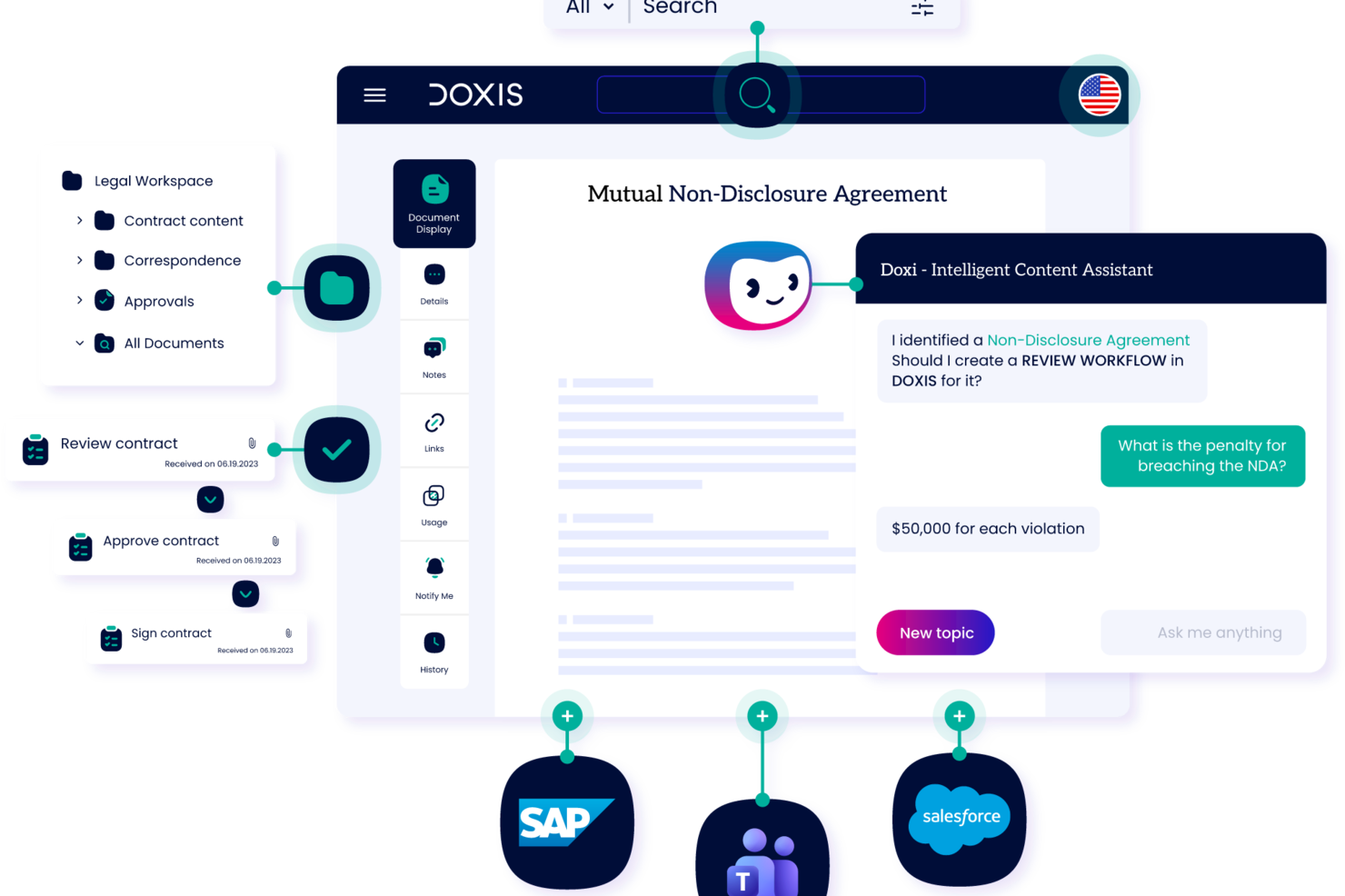
As an enterprise ECM platform, Doxis combines document version control, audit-proof archiving, records management, and AI-powered capture into a single document control system.
Who is Doxis Best For?
Doxis suits enterprise teams in regulated industries that need document control, compliance management, and content governance at scale.
Why I Picked Doxis
I've included Doxis in my top picks because it's one of the few enterprise ECM platforms built from the ground up to operate across language boundaries. The platform is Unicode-capable and supports 12 official languages covering 135 countries, including Arabic, Chinese, Persian, and Russian, which makes it genuinely viable for global teams managing document workflows across regions with very different language requirements. On top of that, Doxis's AI-powered metadata extraction and OCR works across multilingual documents, so classification and indexing don't break down just because a document is in French, Polish, or Turkish.
Doxis Key Features
- Version control: Track every document revision with a full change history, including who made changes, when, and what was modified.
- Multi-stage approval workflows: Route documents through configurable review and sign-off chains, with delegation and alternate responsible users to keep approvals moving.
- Audit-proof archiving: Store finalized documents in tamper-proof archives that meet legal and regulatory retention requirements.
- Role-based access controls: Restrict document visibility and editing rights at the folder, document type, or individual record level.
Doxis Integrations
Doxis offers native integrations with SAP, Salesforce, and the Microsoft ecosystem, including Microsoft 365, SharePoint, Outlook, Teams, and Microsoft Dynamics 365. It is also available on the Salesforce AppExchange. Doxis supports vendor-independent connectors for ERP, CRM, HR, and CAD systems, and uses the CMIS standard for interoperability with other content platforms. An API is available for custom integrations.
Pros and Cons
Pros:
- Supports deployment in over 150 countries
- AI-based classification automates document indexing
- Audit-proof archiving meets global compliance standards
Cons:
- Initial workflow configuration requires admin training
- Suited for large enterprise environments only

Dropbox
Best for easy file sharing

Dropbox is a versatile platform that allows you to store, share, and access files from virtually anywhere. It provides a secure space where you can manage and collaborate on your documents with ease.
Why I Picked Dropbox
Dropbox offers secure file sharing and tracking through DocSend. This feature lets you send documents securely, track their activity, and maintain control over what happens to them. Dropbox also offers a feature that lets you add electronic signatures to documents, which streamlines the process of getting approvals and agreements.
Another reason I picked Dropbox is a feature called Dash, which uses AI to help you organize and protect your company's content. This tool understands the context of your work and helps keep everything in order, so your team stays organized and efficient. The platform's ability to provide previews for over 175 file types means you can quickly access and manage your documents without unnecessary hassle.
Dropbox Key Features
In addition to file sharing, Dropbox also offers a range of other features that can help you improve document control.
- Version Control: This lets you automatically save previous versions of documents and revert to earlier iterations if needed.
- Document Tagging: You can categorize and tag documents for improved searchability and organization.
- Permission Settings: This lets you set specific access permissions for documents and make sure only authorized users can view or edit sensitive files.
- Automatic Backup: You can make sure all documents are continuously backed up and synced across devices for added security and peace of mind.
Dropbox Integrations
Integrations include Google Workspace, Microsoft, Adobe, HubSpot, Autodesk, Canva, and AWS.
Pros and Cons
Pros:
- Easy to use with a simple interface
- Strong version control system
- Built-in secure document sharing
Cons:
- Limited storage capacity on lower-tier plans
- Occasional file sync issues

DocTract
Best for policy management

DocTract is a cloud-based document management software (DMS) designed for organizations that need efficient policy management. It serves businesses that want to improve and speed up their policy creation, approval, and distribution processes.
Why I Picked DocTract
It excels in managing policies and provides tools to handle every stage of policy and document management, from creation to distribution. The platform offers customizable policy templates that simplify document creation for your team. Automated workflows make sure policies are reviewed and approved efficiently. It also supports electronic acknowledgments, so you know exactly when team members have read and understood the policies.
DocTract Key Features
DocTract also offers several other features that can help improve document control for your team.
- AI-Powered Search: You and your team can quickly find policies using natural language, which boosts efficiency and reduces the time spent searching for documents.
- Real-Time Collaboration: This lets multiple users work on a document simultaneously so everyone can contribute without the need for lengthy email exchanges.
- Role-Based Routing: You can automate the approval process by assigning specific roles to make sure documents are reviewed by the right people at the right time.
- Audit-Ready Compliance Binders: This lets you automatically generate comprehensive compliance binders that are ready for audit purposes to save your team time and reduce the risk of non-compliance.
DocTract Integrations
Integrations include Microsoft Office 365, Microsoft SharePoint, Docusign, Salesforce, SAP, Oracle, Google Workspace, Dropbox, Box, and OneDrive.
Pros and Cons
Pros:
- Detailed audit trail features
- Supports electronic acknowledgments
- Customizable policy document templates
Cons:
- May need customization for specific needs
- Limited to policy management functions

DocuWare
Best for cloud document storage

DocuWare is a cloud-based document management solution designed for businesses who want to improve their document storage and accessibility. It serves industries that need secure and efficient document workflows.
Why I Picked DocuWare
This tool excels in providing cloud storage and making sure your documents are secure and easily accessible from anywhere. It offers features like automatic document indexing and workflow automation capabilities, which helps make document handling smoother for your team.
DocuWare Key Features
DocuWare also offers a range of other features for document control and workflow management.
- Digital Editing: You can edit documents without altering the original to maintain document integrity while making necessary changes.
- Versioning: This lets you automatically save new document versions and keep a comprehensive history, as well as track changes and revert if needed.
- Mobile Connectivity: You can access and manage documents on-the-go from any device, which provides flexibility and continuity for your operations.
- Control Dashboard: This lets you monitor workflow progress in real-time and gives you a clear overview of tasks and deadlines to improve decision-making.
DocuWare Integrations
Integrations include Microsoft Office, Microsoft Outlook, SAP, Docusign, QuickBooks, Salesforce, Sage, Google Workspace, Dropbox, and Microsoft OneDrive.
Pros and Cons
Pros:
- Automatic indexing saves time
- Strong document security features
- Cloud access from any location
Cons:
- Limited offline functionality
- Complex setup process

Best with AI-powered PDF editing tools

Adobe Acrobat is a document control software platform that lets you create, edit, organize, and manage PDF files with advanced editing, collaboration, and security features.
Who Is Adobe Acrobat Best For?
Adobe Acrobat suits teams in regulated industries or distributed organizations that need secure document management and advanced PDF editing capabilities.
Why I Picked Adobe Acrobat
I picked Adobe Acrobat as one of the best because its AI-powered PDF editing tools let my team quickly convert scanned documents into searchable, editable files. I use features like automatic text recognition and smart form field detection to speed up document review and editing. In practice, that means we can handle large volumes of PDFs without manual rework.
Adobe Acrobat Key Features
- Version history: Track and access previous versions of documents for audit and compliance needs.
- Document e-signatures: Collect legally binding electronic signatures directly within your PDFs.
- Permission controls: Set user roles and restrict access to sensitive documents.
- Centralized document storage: Store and organize files in a secure, searchable workspace.
Adobe Acrobat Integrations
Adobe Acrobat offers native integrations with Microsoft 365, Google Workspace, Microsoft Teams, SharePoint, Box, Salesforce, and Workday. An API is available for custom integrations.
Pros and Cons
Pros:
- Native integration with Microsoft 365 and Google Workspace
- Detailed audit trails for compliance
- Real-time collaboration in shared workspaces
Cons:
- Some integrations need separate enterprise subscriptions
- Limited workflow automation compared to competitors
Best for AI-powered search

Confluence is a collaborative workspace that helps teams manage documents and projects. With AI-powered tools and a variety of templates, it offers a versatile platform for drafting, brainstorming, and planning.
Why I Picked Confluence
One of the reasons I chose Confluence as a good document control software is its AI-powered search, which makes finding documents and information a breeze. Your team can access the right information quickly, which reduces time spent searching for files. Additionally, Confluence offers real-time editing, so multiple team members can work on a document simultaneously, which helps collaboration and productivity.
Another feature is Confluence's support for diverse content types, including whiteboards and databases. This flexibility allows your team to document projects and ideas in various formats and caters to different communication needs. The platform also provides updates via page summaries and audio briefings to help you keep everyone informed about the latest changes and developments in your documents.
Confluence Key Features
Confluence also offers several other document control features.
- Version Control: You can track document changes and maintain a comprehensive revision history, as well as revert to previous versions when necessary.
- Document Lifecycle Management: This lets you manage the entire lifecycle of documents from creation to archiving, which helps maintain compliance and accessibility throughout.
- Access Control: You can manage who can view or edit documents, which improves security and control over shared content.
- Advanced Analytics: This provides insights into user engagement and content performance to help you understand how your documents are being used and who is interacting with them.
Confluence Integrations
Integrations include Slack, Balsamiq, Jira, Figma, Trello, and Zoom.
Pros and Cons
Pros:
- Wide range of templates helps maintain consistency
- Facilitates team collaboration by providing a central platform
- Strong search capabilities
Cons:
- Overkill for straightforward documentation needs
- Locating documents can be challenging

M-Files
Best for AI-driven document organization

M-Files is a document management system designed for businesses that are looking for AI solutions to improve their document organization. It helps companies manage, organize, and secure their documents.
Why I Picked M-Files
It's ideal for businesses in need of intelligent document organization. M-Files uses AI to classify and organize documents and improve searchability and accessibility. The tool's metadata-driven approach makes sure that your documents are always in the right context. Additionally, its ability to connect to existing data repositories makes it a flexible choice for diverse business environments.
M-Files Key Features
In addition to AI-driven document organization, M-Files offers several other features that make it useful as a document control software.
- Automated Workflows: This feature lets your team automate document-centric processes to reduce manual input and increase efficiency.
- Version Control: You can track document changes and maintain a history of revisions, which helps make sure you're always working with the most current information.
- Mobile Accessibility: You can access and manage your documents from anywhere with mobile access, which makes remote work more seamless and efficient.
- Role-Based Access Permissions: This makes sure only authorized users can access sensitive documents, which improves security and compliance with industry standards.
M-Files Integrations
Integrations include Microsoft Office, Salesforce, Microsoft SharePoint, Dynamics 365, Google Workspace, SAP, Oracle, QuickBooks, Dropbox, and Docusign.
Pros and Cons
Pros:
- Strong permissions management
- Connects to existing data repositories
- AI-driven document organization
Cons:
- Relies heavily on metadata
- Requires initial setup expertise

iManage
Best for legal document control

iManage is a knowledge work platform that focuses on boosting productivity, collaboration, and security for organizations. It helps you manage documents and emails and is a valuable tool for efficient document control.
Why I Picked iManage
One reason I picked iManage is its document and email management capabilities, which allow secure handling and collaborative sharing of files. This feature makes sure your team can access and manage documents from anywhere, which helps maintain control over important information. Additionally, its risk and compliance tools, like the conflicts manager, make it well-suited for law firms and legal teams and help mitigate business risks and navigate regulatory landscapes.
Another reason I picked iManage is its strong focus on security and governance. With multi-level security measures, including a security policy manager and threat manager, iManage protects sensitive information. This level of security is essential for legal organizations looking to safeguard their data and maintain compliance with industry standards.
iManage Key Features
iManage also offers a suite of other features that cater to broader document management needs.
- Knowledge Search and Management: iManage improves information retrieval with advanced search functionalities so your team can access and leverage organizational knowledge efficiently.
- Task & Workflow Management: This facilitates better project management by providing tools for task tracking and checklist management, which help your team stay organized and on track.
- Cloud Platform: Built on a secure and reliable cloud-native platform, iManage integrates with Microsoft tools to support modern work environments and better accessibility.
- AI Services: With built-in AI features, iManage lets you automate document classification and data extraction so you can focus on more strategic tasks instead.
iManage Integrations
Integrations include Power BI, Slack, Microsoft Teams, Docusign, Microsoft Excel, and Microsoft Word.
Pros and Cons
Pros:
- Extensive document storage and organization
- AI tools for advanced document and email management
- Effective document retrieval and management
Cons:
- Needs substantial server infrastructure
- Requires JavaScript for full functionality
Belge Kontrolü Yazılımı Ne Zaman Kullanılmalı?
Belge kontrolü yazılımı, ekibinize her dosya, sürüm ve onay için tek ve denetlenebilir bir merkez sağlar; böylece karmaşık veya uyumluluğun büyük önem taşıdığı projelerde hiçbir şey gözden kaçmaz. Aşağıdaki senaryolardan herhangi biri size tanıdık geliyorsa, muhtemelen bunu teknoloji yığınına eklemenin zamanı gelmiştir:
- Ekibiniz aynı belgenin farklı sürümleriyle çalışıyor: Örneğin Chicago'daki mühendisleriniz bir teknik özellik belgesinin v2 sürümüne başvururken Almanya'daki yükleniciler v4 sürümünü kullanıyor olabilir. Belge kontrolü, tek bir gerçeklik kaynağını zorunlu kılar; böylece herkes en son onaylanan sürümle çalışır.
- Onay döngüleri haftalarca sürüyor: E-posta tabanlı onaylar gözden kaçar ve takip işlemleri zamanınızı tüketir. Otomatik iş akışları belgeleri doğru inceleyen kişilere yönlendirir ve hatırlatıcılar göndererek onay süresini önemli ölçüde kısaltır.
- Düzenleyici bir denetime hazırlanıyorsunuz: ISO 9001, HIPAA veya GDPR denetimleri, her belgeyle kimin ilgilendiğine dair net bir kayıt zinciri gerektirir. Denetim günlükleri otomatik olarak oluşturulur; böylece incelemeden önceki hafta kayıtları sıfırdan yeniden oluşturmanız gerekmez.
- Birden fazla yükleniciyi veya tedarikçiyi yönetmek karmaşıklaşmaya başladı: Üç veya daha fazla dış ekibi koordine ederken hassas dosyaları kimlerin görüntüleyebileceğini, düzenleyebileceğini veya indirebileceğini kontrol etmek ciddi bir riske dönüşür. Ayrıntılı izinler doğru kişilerin erişmesini, diğer herkesin ise dışarıda kalmasını sağlar.
- Doğru dosyayı bulmak çok uzun sürüyor: Ekibiniz güncel standart işletim prosedürünü bulmak için paylaşılan sürücüler, e-posta zincirleri ve Slack arasında arama yapıyorsa her hafta saatler kaybediyorsunuz demektir. Merkezi arama ve üst veri etiketleme, doğru belgeyi saniyeler içinde karşınıza çıkarır.
Diğer Belge Kontrol Yazılımları
Kısa listeme giremeyen ancak yine de göz atmaya değer bazı ek belge kontrol yazılımı seçenekleri şunlardır:
- Microsoft SharePoint
For Microsoft integrations
- SuperOps
For IT service management
- PandaDoc
For sales document automation
- Conga
For contract life cycle management
- ETQ Reliance
For enterprise quality management
- Interfacing Enterprise Process Center
For document process automation
- SimplerQMS
For the life sciences sector
- QT9 QMS
For mid-sized businesses
- Orcanos
For those in the medical device industry
- Paradigm 3
For document quality management
- PSC Software ACE
For scalability
- ComplianceQuest
For regulatory compliance
- altaFlow
For automated document filling
- Intelex
For environmental compliance
- MasterControl
For FDA compliance
- Templafy
For brand consistency
- Bitrix24
For team collaboration tools
- DocXellent
For secure document storage


How I Evaluate Document Control Software
I split my evaluation into two layers: the baseline a tool must have—version control, approval workflows, audit trails—and the differentiators that distinguish one platform from another.
Core Functionality (Table Stakes For This List)
When I'm selecting tools for my list, I rank each one on a scale from 0 (does not offer the functionality) to 5 (excels in this area) for each core functionality listed below. Then, I calculate the tool's total score into a percentage. Each tool needs to achieve a minimum total score of 65% to be considered for inclusion.
- Version Control & Revision History: I check whether each tool auto-versions documents and lets you compare revisions side by side, like tracking markup changes across drawing submissions.
- Access Permissions & User Roles: Granular, role-based controls matter here—I look for the ability to restrict access by project, folder, or document status for contractors and internal teams.
- Document Approval Workflows: I evaluate whether you can configure multi-step review and approval routing with notifications, e-signatures, and escalation paths for submittals or specs.
- Audit Trail & Compliance Logging: Every document action should be timestamped and traceable. I look for exportable logs that support ISO, FDA, or SOX compliance reporting needs.
- Centralized Document Repository: A searchable, structured repository with metadata tagging is what I look for—teams need to find the right revision of a spec within seconds, not minutes.
- Transmittals & Controlled Distribution: I evaluate how each tool handles formal document transmittals, including recipient acknowledgment tracking and distribution list management across stakeholders.
Once I have a list of tools that meet the criteria, I consider what sets each platform apart.
Differentiating Factors (What Sets Vendors Apart)
Here's how I compare and contrast different vendors:
Standout Features
Mobile and offline access is a major differentiator. Field teams need to pull up the latest drawing set on-site without relying on connectivity. I also look for native markup and redlining tools that let reviewers annotate PDFs and drawings directly in the platform, removing round-trips through external apps. For teams working with complex deliverables, BIM and CAD file support is worth evaluating, since viewing and versioning model files without converting them saves real coordination effort.
Beyond Features
Compliance and certification standards vary widely across verticals. A pharma team needs FDA 21 CFR Part 11 validation, while an AEC firm may prioritize ISO 19650 alignment. I evaluate each vendor's compliance coverage against the industries it claims to serve. Integrations also matter—I check for native connections to tools like Procore, Primavera P6, and DocuSign, since document control rarely lives in isolation. Deployment flexibility is another factor I weigh, especially for organizations that require on-premise or hybrid hosting to meet data residency policies.
Belge Kontrol Yazılımı Nasıl Seçilir?
Uzun özellik listeleri ve karmaşık fiyatlandırma yapıları içinde kaybolmak kolaydır. Doğru yazılım aracını ararken odaklanmanıza yardımcı olmak için göz önünde bulundurmanız gereken faktörlerin bir kontrol listesini burada bulabilirsiniz:
| Faktör | Dikkat Edilmesi Gerekenler |
|---|---|
| Ölçeklenebilirlik | Yazılımın işletmenizle birlikte büyüyebildiğinden emin olun. Performanstan ödün vermeden artan belge hacimlerini ve kullanıcı sayılarını yönetebilen çözümleri arayın. |
| Entegrasyonlar | Yazılımın ekibinizin hâlihazırda kullandığı Microsoft Office veya Salesforce gibi araçlarla entegre olup olmadığını kontrol edin. Bu, kesintileri en aza indirir ve iş akışınızın verimliliğini artırır. |
| Özelleştirilebilirlik | Özellikleri işletmenizin özel ihtiyaçlarına uyacak şekilde düzenlemenize olanak tanıyan bir yazılım seçin. Özelleştirilebilir panolar ve iş akışları, yazılımı ekibiniz için daha uygun hâle getirmenizi sağlar. |
| Kullanım Kolaylığı | Asgari düzeyde eğitim gerektiren sezgisel arayüzlere sahip çözümleri tercih edin. Bu, ekibinizin hızla uyum sağlamasına yardımcı olur ve uygulama süresini kısaltır. |
| Bütçe | Bütçenizle uyumlu olduklarından emin olmak için fiyatlandırma planlarını değerlendirin. Eğitim veya destek gibi ek maliyetleri göz önünde bulundurun ve şeffaf fiyatlandırma sunan yazılımları arayın. |
| Güvenlik Önlemleri | Belge kontrolü için güvenlik kritik öneme sahiptir. Hassas bilgilerin korunmasına yardımcı olabilecek şifreleme, erişim kontrolleri ve denetim izleri gibi özellikleri arayın. |
| Uyumluluk | Sektörünüzde belirli düzenlemeler varsa yazılımın bu standartlara uyumluluğu desteklediğinden emin olun. Bu, maliyetli ihlalleri önleyebilir ve işletme olarak güvenilirliğinizi artırabilir. |
| Destek Hizmetleri | Müşteri desteğinin bulunabilirliğini ve kalitesini göz önünde bulundurun. Güvenilir destek, sorunların giderilmesine yardımcı olabilir ve sorunsuz bir kullanıcı deneyimi sağlayabilir. |
Belge Kontrol Yazılımındaki Eğilimler
Araştırmam sırasında farklı belge kontrol yazılımı sağlayıcılarından sayısız ürün güncellemesi, basın bülteni ve sürüm günlüğü inceledim. Takip ettiğim yeni ortaya çıkan eğilimlerden bazıları şunlardır:
- Yapay zekâ destekli içgörüler: Daha fazla sağlayıcı, belge kullanım kalıpları hakkında içgörüler sunabilen ve iş akışlarını optimize edebilen yapay zekâ özelliklerini bünyesine katıyor. Bu, işletmelerin veriye dayalı kararlar almasına ve verimliliği artırmasına yardımcı olur. Örneğin M-Files, belgeleri sınıflandırmaya ve düzenlemeye yardımcı olmak için yapay zekâ kullanır.
- Gelişmiş güvenlik özellikleri: Veri ihlalleri büyük bir endişe hâline geldikçe belge kontrol yazılımı araçları gelişmiş güvenlik önlemlerine odaklanıyor. Şifreleme, çok faktörlü kimlik doğrulama ve ayrıntılı denetim izleri gibi özellikler, hassas bilgilerin korunmasına yardımcı olmak için standart hâle geliyor.
- Bulut tabanlı erişilebilirlik: Bulut teknolojisi, kullanıcıların belgelere her yerden erişmesine olanak tanıyarak belge kontrolünü daha esnek hâle getiriyor. Bu eğilim uzaktan çalışmayı ve farklı konumlara dağılmış ekipler arasındaki iş birliğini destekler; ayrıca herkesin bağlantıda ve üretken kalmasına yardımcı olur.
- Kullanıcı odaklı tasarım: Bir aracın öğrenme eğrisini azaltan kullanıcı dostu arayüzlere giderek daha fazla önem veriliyor. Sağlayıcılar, teknik becerileri ne olursa olsun tüm kullanıcılar için belge yönetimini daha sezgisel ve erişilebilir hâle getirmek amacıyla kullanıcı arayüzü/kullanıcı deneyimi iyileştirmelerine yatırım yapıyor.
- Düzenleyici uyumluluk araçları: Düzenlemeler daha katı hâle geldikçe belge kontrol yazılımları yerleşik uyumluluk araçları ekliyor. Bu araçlar, işletmelerin sektöre özgü standartlara uymasına yardımcı olur ve uyumsuzluk ile ilgili cezaların riskini azaltır.
Belge Kontrol Yazılımı Nedir?
Belge kontrol yazılımı, bir projenin yaşam döngüsü boyunca belgelerin oluşturulmasını, incelenmesini, onaylanmasını, depolanmasını ve sürümlendirilmesini yöneten bir araçtır. Mühendislik, inşaat, hukuk ve dijital ekipler tarafından tutarlılığı korumak, uyumluluğu sağlamak ve güncel olmayan dosyaların neden olduğu hataları önlemek için kullanılır.
Bu araçlar erişimi merkezileştirir, izinleri uygular ve değişiklikleri takip ederek düzenlemeye tabi veya hızlı tempolu ortamlar için vazgeçilmez hâle gelir.
Belge Kontrol Yazılımının Özellikleri
Belge kontrol yazılımı seçerken aşağıdaki temel özelliklere dikkat edin:
- Sürüm kontrolü: Bu özellik, bir belgede yapılan her değişikliği takip ederek düzenlemeleri kimin ve ne zaman yaptığını görmenizi sağlar. Karışıklığı önler ve herkesin en güncel sürüm üzerinde çalışmasını sağlar. Bunun için belge sürüm kontrol yazılımını da kullanabilirsiniz.
- Erişim izinleri: Belgeleri kimlerin görüntüleyebileceğini, düzenleyebileceğini veya onaylayabileceğini tanımlayabilirsiniz. Bu, hassas bilgileri güvende tutar ve iş birliğini kolaylaştırır. Böylece yalnızca doğru kişiler değişiklik yapabilir.
- Denetim izleri: Bu özellik, belge etkinliklerinin şeffaf bir geçmişini sunar ve bir belgeyi kimin onayladığını, düzenlediğini veya görüntülediğini gösterir.
- Otomatik iş akışları: Bu özellik, belgelerin gerekli inceleme veya onay adımlarından geçirilmesine yardımcı olur ve uzun e-posta zincirlerini azaltır. Belge otomasyonu yazılımı, son teslim tarihlerini takip etmenize ve süreçte işlerin hangi aşamada olduğunu görmenize yardımcı olur.
- Belge arama: Doğru dosyayı adına veya anahtar kelimeye göre arayarak kolayca bulabilirsiniz. Bu özellik, onlarca klasörü veya e-postayı tek tek incelemek zorunda kalmanızı önler.
- Belge şablonları: Bu özellik, yaygın belgeler için önceden hazırlanmış şablonları kullanmanızı sağlar. Böylece yeni bir form, rapor veya kontrol listesine ihtiyaç duyduğunuzda her seferinde sıfırdan başlamak zorunda kalmaz, zamandan tasarruf edersiniz.
- Mobil erişim: Bu özellik, masanızdan uzaktayken belgeleri incelemenizi veya düzenlemenizi sağlar ve herkes nereden çalışıyor olursa olsun sizin ve ekibinizin bağlantıda kalmasına yardımcı olur. Bulut tabanlı belge yönetimi araçları da bu amaçla kullanışlıdır.
- Bildirimler ve uyarılar: Belgeler güncellendiğinde, atandığında veya onaylandığında anında bildirim alırsınız. Bu, herkesin gelişmelerden haberdar olmasını sağlar ve gözden kaçan güncellemelerin neden olduğu darboğazların önlenmesine yardımcı olur.
- Belge saklama politikaları: Uyumluluğunuzu ve düzeninizi korumanıza yardımcı olmak için belgelerin ne kadar süreyle saklanacağını ve ne zaman silineceğini veya arşivleneceğini otomatikleştirebilirsiniz.
Belge Kontrol Yazılımında Yapay Zekâ Özellikleri
Modern belge kontrol yazılımları, üretkenliği artırmak ve süreçleri daha da kolaylaştırmak için genellikle yapay zekâ destekli özellikler içerir:
- Otomatik belge sınıflandırma: Yapay zekâ, manuel sıralama ve dosyalama için harcadığınız zamandan tasarruf etmenizi sağlamak üzere belgeleri içeriklerine göre otomatik olarak kategorilere ayırabilir.
- Akıllı arama: Yapay zekâ destekli arama araçları, bağlamı ve amacı anlayarak anahtar kelimeleriniz belirsiz veya eksik olsa bile doğru belgeyi bulmanıza yardımcı olabilir.
- Akıllı veri çıkarma: Yapay zekâ, verileri manuel olarak girmenize gerek kalmaması için belgelerden önemli bilgileri (ör. tarihler, adlar veya fatura tutarları) çekebilir.
- Tahmine dayalı iş akışı önerileri: Yapay zekâ, ekibinizin alışkanlıklarına dayanarak iş akışı iyileştirmeleri önerebilir veya görevleri otomatik olarak doğru kişilere atayabilir.
- Anormallik tespiti: Yapay zekâ, olası güvenlik sorunlarını erken fark etmenize yardımcı olmak için yetkisiz erişim veya beklenmeyen düzenlemeler gibi olağandışı belge etkinliklerini işaretleyebilir.
- Otomatik uyumluluk kontrolleri: Yapay zekâ, belgeleri düzenlemelere veya şirket politikalarına uygunluk açısından inceleyebilir ve olası sorunlara dönüşmeden önce sizi uyarabilir.
- Doğal dil işleme (NLP): Yapay zekâ, içeriği özetlemek, önemli noktaları vurgulamak veya açıklık ve üslup açısından düzenleme önermek için belgelerinizdeki dili analiz edebilir.
Bu özelliklere öncelik veren ekipler özellikle yapay zekâ belge kontrol yazılımını inceleyebilir.
Belge Kontrol Yazılımının Faydaları
Belge kontrol yazılımını uygulamak, ekibiniz ve işletmeniz için çeşitli faydalar sağlar. Yararlanmayı bekleyebileceğiniz faydalardan bazıları şunlardır:
- Geliştirilmiş uyumluluk: Uyumluluk takibi ve denetim izleri gibi özelliklerle ekibinizin sektör düzenlemelerine uymasına yardımcı olur.
- Gelişmiş güvenlik: Erişim izinleri ve elektronik imzalarla belgeleri güvende tutar.
- Artırılmış verimlilik: Zaman kazanmak ve manuel iş yükünü azaltmak için iş akışlarını ve belge yönetimi görevlerini otomatikleştirir.
- Daha iyi iş birliği: Bulut tabanlı erişim, ekip üyelerinin her yerden birlikte çalışmasına olanak tanır ve ekip çalışmasını teşvik eder.
- Doğru kayıt tutma: Sürüm denetimi, herkesin en güncel belgeleri kullandığından emin olur ve hataları azaltır.
- Hızlı erişim: Arama işlevi belgeleri hızlı ve kolay bir şekilde bulmayı sağlar, bu da verimliliği artırır.
- Bilgiye dayalı karar alma: Raporlama araçları belge kullanımı ve uyumluluk hakkında değerli bilgiler sunarak stratejik planlamaya yardımcı olur.
Belge Kontrol Yazılımının Maliyetleri ve Fiyatlandırması
Aşağıdaki tabloda belge kontrol yazılımı için yaygın planlar, bunların ortalama fiyatları ve her plan türünde sunulan tipik özellikler özetlenmiştir:
| Plan Türü | Ortalama Fiyat | Yaygın Özellikler |
|---|---|---|
| Ücretsiz Plan | $0/kullanıcı/ay | Temel belge depolama, sınırlı sürüm denetimi ve temel arama özellikleri. |
| Kişisel Plan | $5-$25/kullanıcı/ay | Belge depolama, sürüm denetimi, temel erişim izinleri ve temel uyumluluk takibi. |
| İşletme Planı | $25-$50/kullanıcı/ay | Gelişmiş belge depolama, sürüm denetimi, kapsamlı erişim izinleri, denetim izleri ve raporlama araçları. |
| Kurumsal Plan | $50-$100/kullanıcı/ay | Ölçeklenebilir belge yönetimi, güçlü güvenlik özellikleri, kapsamlı uyumluluk takibi, özelleştirilebilir iş akışları ve entegrasyon seçenekleri. |
Belge Kontrol Yazılımı SSS
Belge kontrol yazılımı hakkında sık sorulan soruların bazı yanıtları:
Belge kontrolü için en iyi yazılım hangisidir?
En iyi yazılımı seçmek ihtiyaçlarınıza bağlıdır. Bazı popüler seçenekler arasında otomatik dosya düzenleme için M-Files ve saha çalışmasında çevrimdışı özellikler için Fluix bulunur. Kararınızı verirken otomasyon ve sürüm kontrolü gibi ekibinizin özel gereksinimlerini göz önünde bulundurun. Sürüm kontrolü önceliğinizse ve bütçeniz sınırlıysa, ücretsiz belge sürüm kontrol yazılımı değerlendirmeye değerdir.
Belge kontrolü kontrol listesinde neler bulunmalıdır?
Kontrol listeniz belge oluşturma, revizyon ve dağıtım süreçlerini kapsamalıdır. Her şeyin doğru kalmasını sağlamak için değişiklikleri yönetme ve belgeleri inceleme prosedürlerini ekleyin. Kapsamlı bir kontrol için belge saklama ve imha süreçlerini de unutmayın.
Otomasyon belge kontrolünü nasıl iyileştirir?
Otomasyon, belgelerin yönlendirilmesi ve onaylanması gibi tekrarlayan görevleri kolaylaştırır. Manuel hataları azaltır ve süreçleri hızlandırır; böylece ekibiniz daha önemli işlere odaklanabilir. DocuPhase gibi birçok sistem, iş akışını iyileştirmek için otomasyon özellikleri sunar.
Belgelerin mevzuata uygun kalmasını nasıl sağlarsınız?
Uyumluluk takibi ve denetim izleri sunan araçları kullanın. Bu özellikler, belge değişikliklerini izlemenize ve sektör düzenlemelerine uymanıza yardımcı olur. Düzenli denetimler ve belge kontrol süreçlerinizde yapacağınız güncellemeler de uyumluluk çalışmalarını destekler.
Belge kontrol yazılımı Asana veya Microsoft Teams gibi proje yönetimi araçlarıyla entegre olabilir mi?
Evet, modern belge kontrol yazılımı platformlarının çoğu Asana ve Microsoft Teams gibi araçlarla entegrasyon sunar. Bu entegrasyonlar, proje ekiplerinin belgeleri doğrudan kullandıkları çalışma platformları içinde paylaşmasına, bunlara erişmesine ve belgeleri güncellemesine olanak tanır. Böylece uygulamalar arasında geçiş yaparken kaybedilen zaman azalır ve herkesin düzenli kalması kolaylaşır.
Belge kontrol yazılımında hangi güvenlik özelliklerini aramalıyım?
Şu özellikleri arayın:
- Role dayalı erişim kontrolü
- Şifreleme (beklemede ve aktarım sırasında)
- Ayrıntılı denetim izleri
- İki faktörlü kimlik doğrulama
Yazılımınızın ilgili standartlarla (ISO 27001 gibi) uyumlu olduğundan ve hassas proje verilerini korumak için güvenli paylaşımı, veri yedeklemeyi ve belgelere filigran eklemeyi desteklediğinden emin olun.
Belge kontrol yazılımının uygulanmasında karşılaşılan yaygın zorluklar nelerdir?
Yaygın zorluklar arasında kullanıcı direnci, hatalı veri aktarımı, belirsiz belge düzeni ve diğer araçlarla entegrasyonların gözden kaçırılması bulunur.
Ekibinizi eğiterek, içe aktarmadan önce eski belgeleri düzenleyerek ve en baştan net klasör yapıları oluşturarak süreci kolaylaştırın. Ayrıca belge kontrol yazılımınızı proje yönetimi araçlarınıza tamamen bağlamak için BT ekibinizle veya tedarikçinizle birlikte çalışın.